

IoT-Gerätesegmentierung im WiFi: Isolierung von Nicht-Standard-Geräten
Dieser Leitfaden bietet praxisnahe Strategien auf Enterprise-Niveau für die sichere Segmentierung von Nicht-Standard-IoT-Geräten in WiFi-Netzwerken von Veranstaltungsorten. Erfahren Sie, wie Sie VLAN-Isolierung, MAC-basierte Authentifizierung und strenge Firewall-Richtlinien implementieren, um Ihre Kerninfrastruktur vor anfälligen Smart-Geräten zu schützen.
🎧 Diesen Leitfaden anhören
Transkript anzeigen

Executive Summary
Für IT-Manager und Netzwerkarchitekten im Gastgewerbe, im Einzelhandel und in großen öffentlichen Einrichtungen stellt die Zunahme von Internet of Things (IoT)-Geräten eine kritische Sicherheitsherausforderung dar. Smart-TVs, Zahlungsterminals, drahtlose Drucker und Gebäudemanagementsysteme (BMS) sind für den modernen Betrieb von Veranstaltungsorten unerlässlich, unterstützen jedoch selten die 802.1X-Authentifizierung auf Enterprise-Niveau.
Die Platzierung dieser „einfachen“ Geräte in einem flachen Unternehmensnetzwerk oder einem öffentlichen Guest WiFi -Netzwerk führt zu schwerwiegenden Sicherheitslücken. Ein kompromittiertes intelligentes Thermostat kann zum Ausgangspunkt für Angreifer werden, um auf sensible Unternehmensdaten oder Zahlungssysteme zuzugreifen, was gegen die PCI DSS- und GDPR-Compliance verstößt.
Dieser technische Referenzleitfaden beschreibt die definitive Strategie für die IoT-Gerätesegmentierung im WiFi. Durch die Implementierung dedizierter IoT-VLANs, die Nutzung von Identity Pre-Shared Keys (iPSK) oder MAC Authentication Bypass (MAB) und die Durchsetzung von Zero-Trust-Firewall-Richtlinien können IT-Teams an Veranstaltungsorten Nicht-Standard-Geräte sicher einbinden. Dieser Ansatz gewährleistet eine robuste Sichtbarkeit durch WiFi Analytics und mindert gleichzeitig die inhärenten Risiken einer Umgebung mit gemischten Geräten.
Technischer Deep-Dive
Das Grundprinzip der IoT-Gerätesegmentierung im WiFi ist die logische Isolierung. Geräte, die sich nicht sicher authentifizieren können, müssen in einem eingeschränkten Netzwerksegment unter Quarantäne gestellt werden.
Die Architektur der Isolierung
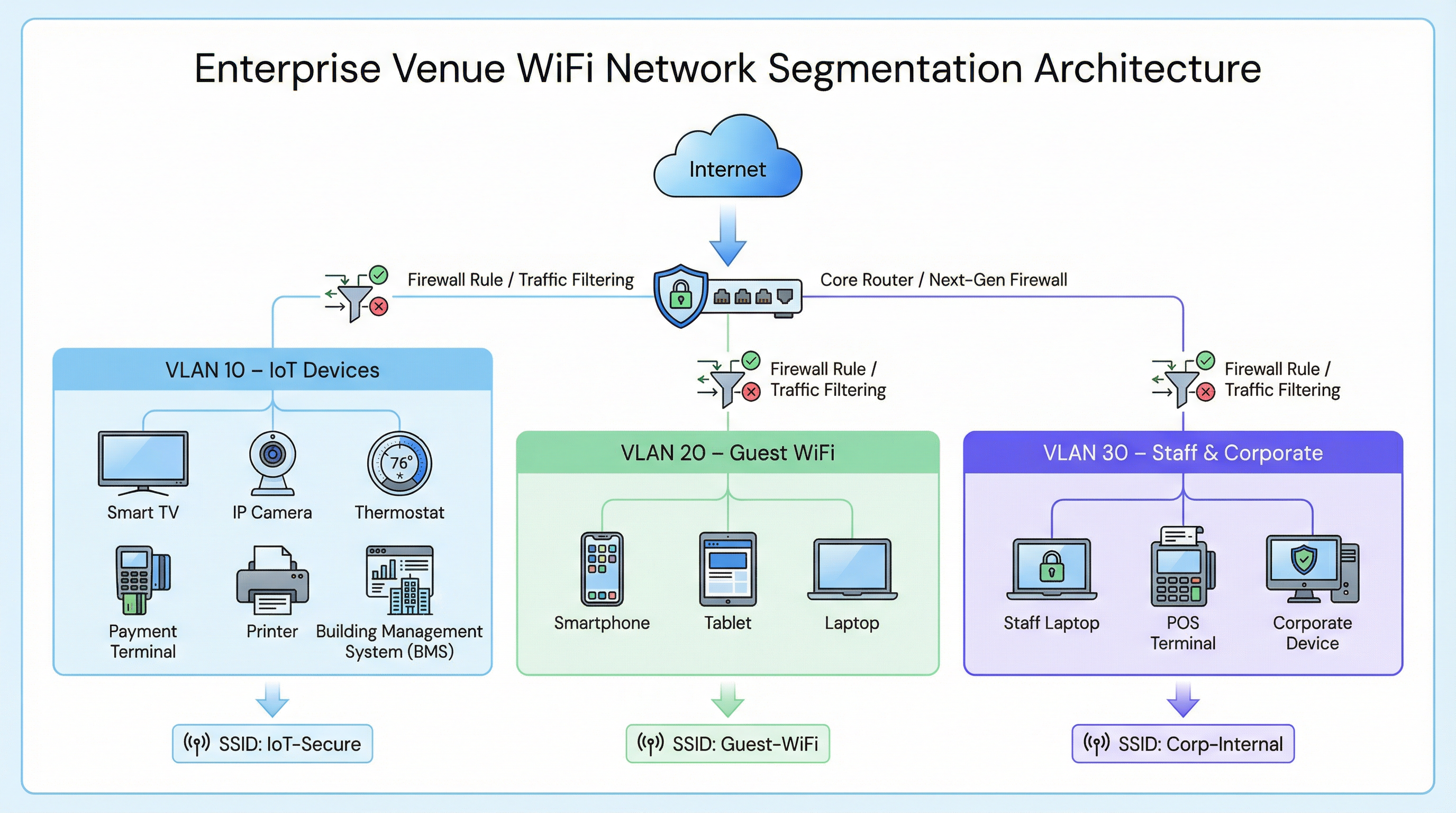
In einer typischen Enterprise-Bereitstellung, wie z. B. einer Retail -Kette oder einem Hospitality -Standort, wird der Netzwerkverkehr in verschiedene Virtual Local Area Networks (VLANs) unterteilt.
- Corporate VLAN (z. B. VLAN 30): Gesichert über 802.1X (WPA2/WPA3-Enterprise) für Laptops von Mitarbeitern und POS-Terminals.
- Guest VLAN (z. B. VLAN 20): Ein offenes Netzwerk, das ein Captive Portal für die Annahme von Nutzungsbedingungen und die Erfassung von Analysen nutzt.
- IoT VLAN (z. B. VLAN 10): Ein dediziertes Segment für Nicht-Standard-Geräte.
Authentifizierungs-Fallbacks für Nicht-Standard-Geräte
Da IoT-Geräten in der Regel die für 802.1X erforderlichen Supplicants fehlen, müssen IT-Teams auf alternative Authentifizierungsmethoden zurückgreifen, um sie dem IoT-VLAN zuzuweisen.
1. Identity Pre-Shared Keys (iPSK) / Multiple PSK
Anstatt ein einziges, globales Passwort (WPA2-Personal) für eine gesamte IoT-SSID zu verwenden, unterstützen moderne Wireless-Controller iPSK. Dies ermöglicht es Administratoren, eindeutige Pre-Shared Keys für einzelne Geräte oder Gerätegruppen (z. B. alle Smart-TVs in einem bestimmten Hotelflügel) zu generieren, während eine einzige SSID ausgestrahlt wird.
- Vorteil: Wenn ein bestimmter Schlüssel kompromittiert wird, kann er widerrufen werden, ohne das gesamte IoT-Netzwerk zu stören.
- Bereitstellung: Sehr empfehlenswert für moderne Smart-Building-Implementierungen.
2. MAC Authentication Bypass (MAB)
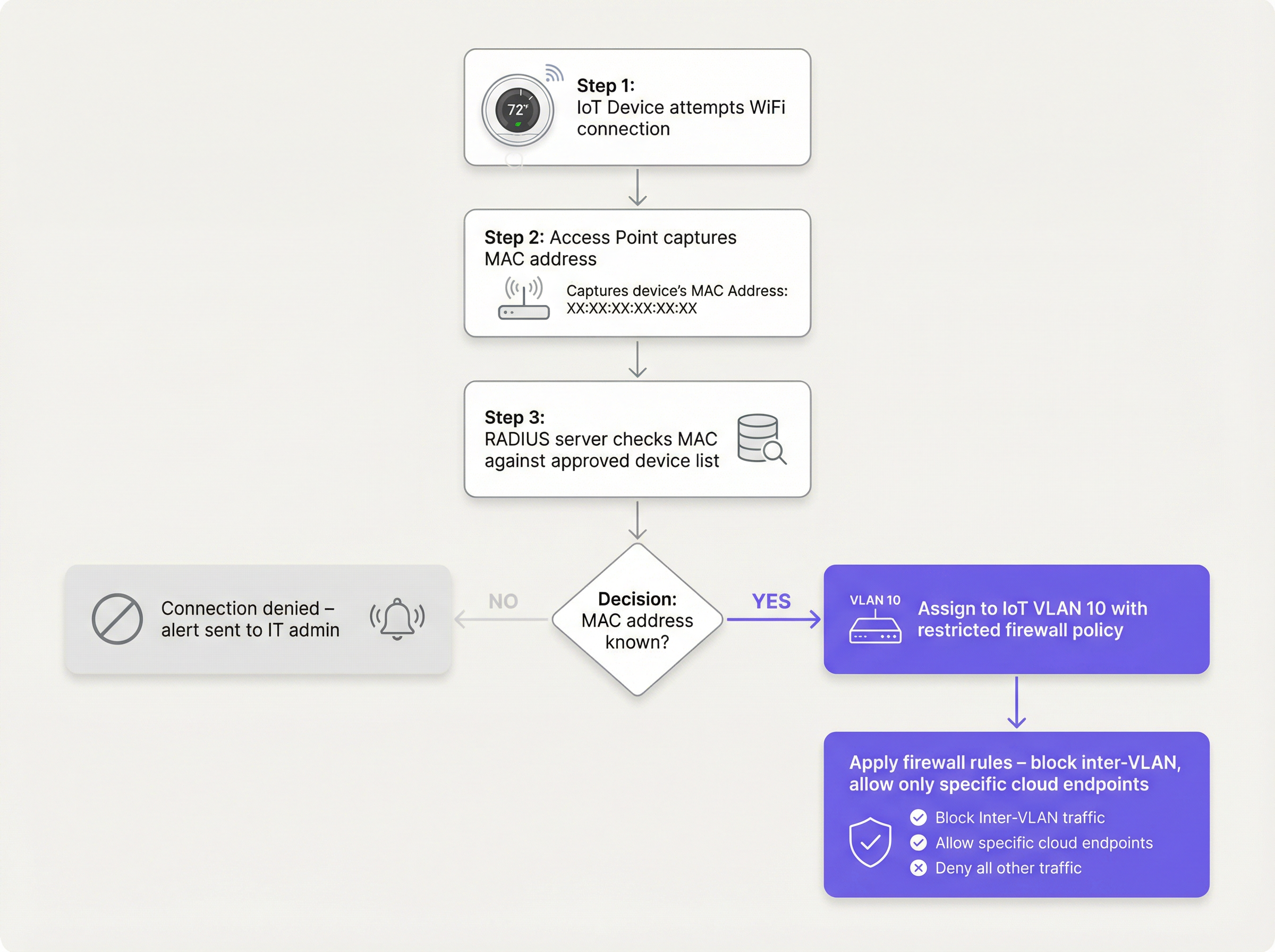
Für Legacy-Geräte, die selbst mit komplexen PSKs Probleme haben, dient MAB als Fallback. Der drahtlose Access Point erfasst die MAC-Adresse des Geräts und fragt einen RADIUS-Server ab. Wenn die MAC-Adresse in der genehmigten Datenbank registriert ist, autorisiert der RADIUS-Server die Verbindung und weist das Gerät dynamisch dem IoT-VLAN zu.
- Einschränkung: MAC-Adressen können gefälscht werden. MAB ist keine starke Sicherheitsmaßnahme; es ist ein betrieblicher Workaround, der mit aggressiven Firewall-Richtlinien kombiniert werden muss.
- Entscheidungspunkt: Bei der Bewertung der RADIUS-Infrastruktur zur Unterstützung von MAB konsultieren Sie den Cloud RADIUS vs On-Premise RADIUS: Decision Guide for IT Teams .
Implementierungsleitfaden
Die Bereitstellung eines sicheren IoT-Segments erfordert einen koordinierten Ansatz über den Wireless-Controller, den RADIUS-Server und die Kern-Firewall hinweg.
Schritt 1: Definition der IoT-VLAN- und SSID-Strategie
Erstellen Sie ein dediziertes VLAN (z. B. VLAN 10) für IoT-Geräte. Entscheiden Sie, ob Sie eine dedizierte SSID (z. B. Venue-IoT) verwenden oder eine dynamische VLAN-Zuweisung auf einer gemeinsam genutzten SSID nutzen möchten. Für maximale Kompatibilität mit günstigen IoT-Funkmodulen ist oft eine dedizierte SSID erforderlich, die ausschließlich im 2,4-GHz-Band arbeitet, da viele Legacy-Sensoren 5GHz nicht unterstützen.
Schritt 2: Konfiguration der Authentifizierung (iPSK oder MAB)
Wenn Sie iPSK verwenden, konfigurieren Sie den Wireless-Controller so, dass er bestimmte Schlüssel dem IoT-VLAN zuordnet. Wenn Sie MAB verwenden, füllen Sie Ihren RADIUS-Server mit den MAC-Adressen der zugelassenen IoT-Geräte. Stellen Sie sicher, dass ein strenger Lifecycle-Management-Prozess vorhanden ist – wenn ein Gerät außer Betrieb genommen wird, muss seine MAC-Adresse sofort aus der Datenbank gelöscht werden.
Schritt 3: Durchsetzung von Zero-Trust-Firewall-Richtlinien
Dies ist der wichtigste Schritt. Das IoT-VLAN muss als nicht vertrauenswürdig behandelt werden.
- Inter-VLAN-Routing blockieren: Das IoT-VLAN darf keine Verbindungen zum Corporate VLAN oder zum Guest VLAN initiieren können.
- Client-Isolierung implementieren (L2-Isolierung): Geräte auf derselben IoT-SSID sollten nicht miteinander kommunizieren können. Ein Smart-TV in Zimmer 101 muss den Smart-TV in Zimmer 102 nicht anpingen können.
- Ausgehenden Internetzugriff einschränken (Egress-Filterung): Wenden Sie eine Default-Deny-Richtlinie für ausgehenden Datenverkehr an. Erlauben Sie nur Datenverkehr zu bestimmten, erforderlichen IP-Adressen oder Domänen (z. B. den Cloud-Endpunkt des Herstellers über Port 443). Blockieren Sie alle generischen ausgehenden DNS-, HTTP- und NTP-Anfragen und zwingen Sie die Geräte, interne, überwachte Dienste zu nutzen.
Best Practices
- SSID nicht verstecken: Das Deaktivieren des SSID-Broadcasts bietet vernachlässigbare Sicherheitsvorteile und verursacht oft Verbindungsinstabilitäten bei schlecht programmierten IoT-Netzwerkstacks. Lassen Sie die SSID sichtbar, aber sichern Sie sie ordnungsgemäß ab.
- Geräteverhalten überwachen: Nutzen Sie WiFi Analytics , um eine Baseline für das normale Verhalten von IoT-Geräten zu erstellen. Wenn ein Temperatursensor plötzlich beginnt, Gigabytes an Daten zu übertragen, sollte das System sofort einen Alarm auslösen.
- Nach Gerätetyp segmentieren: In komplexen Umgebungen, wie z. B. Healthcare -Einrichtungen, sollten Sie die Erstellung mehrerer Mikro-Segmente in Betracht ziehen (z. B. VLAN 11 für medizinisches IoT, VLAN 12 für die Gebäude-HLK), um den Explosionsradius einer Kompromittierung weiter zu verringern.
Fehlerbehebung & Risikominderung
Häufiges Fehlerszenario: Die Kompromittierung des „flachen Netzwerks“
Die häufigste Ursache für IoT-bezogene Sicherheitsverletzungen ist die Bereitstellung von Smart-Geräten im Hauptunternehmensnetzwerk aus Bequemlichkeit. Dies umgeht alle Segmentierungskontrollen.
- Abhilfe: Setzen Sie strenge Change-Control-Richtlinien durch. Kein Gerät verbindet sich mit dem Netzwerk ohne eine genehmigte MAC-Adresse oder iPSK-Zuweisung.
Häufiges Fehlerszenario: Veraltete MAC-Adressen
Wenn ein Gerät kaputt geht und ersetzt wird, bleibt die alte MAC-Adresse oft in der RADIUS-Datenbank, was eine permanente Hintertür schafft, wenn ein Angreifer diese spezifische Adresse fälscht.
- Abhilfe: Implementieren Sie ein automatisiertes Lifecycle-Management. Fordern Sie eine regelmäßige Re-Validierung aller Geräte in der MAB-Datenbank.
ROI & geschäftliche Auswirkungen
Die Implementierung einer ordnungsgemäßen IoT-Gerätesegmentierung im WiFi erfordert einen anfänglichen Konfigurationsaufwand, aber der Return on Investment ist beträchtlich:
- Risikominderung: Reduziert drastisch die Wahrscheinlichkeit einer katastrophalen Datenschutzverletzung, die von einem anfälligen Smart-Gerät ausgeht, schützt den Ruf der Marke und vermeidet behördliche Bußgelder (GDPR, PCI DSS).
- Betriebliche Stabilität: Die Isolierung von unruhigem IoT-Datenverkehr verhindert Broadcast-Stürme, die die Leistung kritischer Unternehmensanwendungen oder das Guest WiFi -Erlebnis beeinträchtigen könnten.
- Zukunftssicherheit: Eine segmentierte Architektur ermöglicht es Veranstaltungsorten, neue Smart-Building-Technologien wie fortschrittliche Sensors und Wayfinding -Lösungen vertrauensvoll einzusetzen, ohne die Sicherheit des Kernnetzwerks zu gefährden.
Schlüsselbegriffe & Definitionen
VLAN (Virtual Local Area Network)
A logical grouping of network devices that behave as if they are on an independent network, regardless of their physical location.
Used to isolate IoT devices from corporate and guest traffic, preventing lateral movement during a security breach.
MAC Authentication Bypass (MAB)
A network access control technique that uses a device's MAC address to authorize connection to the network when standard 802.1X authentication is not supported.
The primary fallback method for onboarding 'dumb' IoT devices, requiring a RADIUS server to validate the MAC address.
Identity Pre-Shared Key (iPSK)
A feature that allows multiple unique pre-shared keys to be used on a single SSID, with each key assigning the device to a specific VLAN or policy.
A more secure alternative to a single shared password for IoT networks, allowing IT teams to revoke individual compromised devices.
Client Isolation (L2 Isolation)
A wireless network setting that prevents devices connected to the same access point or SSID from communicating directly with each other.
Essential for guest networks and IoT networks to prevent infected devices from spreading malware to adjacent devices.
802.1X
An IEEE standard for port-based network access control, providing secure, enterprise-grade authentication using a RADIUS server.
The gold standard for corporate devices, but rarely supported by the IoT devices discussed in this guide.
Zero Trust
A security framework requiring all users and devices to be authenticated, authorized, and continuously validated before being granted access to applications and data.
The guiding principle for configuring firewall rules for the IoT VLAN—assume the device is compromised and restrict access accordingly.
Egress Filtering
The practice of monitoring and potentially restricting the flow of information outbound from one network to another, typically the internet.
Crucial for IoT devices to ensure they only communicate with authorized vendor cloud services and cannot be used in DDoS attacks.
Captive Portal
A web page that the user of a public-access network is obliged to view and interact with before access is granted.
Used for Guest WiFi, but unusable by headless IoT devices, necessitating MAB or iPSK for IoT onboarding.
Fallstudien
A 300-room hotel is deploying new smart TVs in every guest room. The TVs require internet access to stream content from vendor-approved cloud services, but they do not support 802.1X. The hotel also needs to ensure guests cannot cast content to TVs in adjacent rooms.
The IT team should create a dedicated IoT VLAN (e.g., VLAN 40) and a hidden or visible dedicated SSID (e.g., Hotel-Media). They implement Identity PSK (iPSK), assigning a unique pre-shared key to each room's TV. At the access point level, Client Isolation (Layer 2 isolation) is enabled to prevent TVs from communicating with each other. At the core firewall, inter-VLAN routing is blocked, ensuring the TVs cannot access the corporate network or the guest network. Finally, egress filtering is applied to VLAN 40, allowing outbound traffic only to the specific IP ranges required by the streaming services.
A large retail chain needs to connect hundreds of wireless barcode scanners and receipt printers. These legacy devices only support basic WPA2-PSK and cannot handle complex passwords or iPSK. How should they be secured?
The network architect should deploy a dedicated SSID specifically for these legacy devices, operating on the 2.4GHz band for maximum compatibility. Because the devices cannot support iPSK, the team must use MAC Authentication Bypass (MAB). The MAC addresses of all authorized scanners and printers are loaded into the central RADIUS server. When a device connects, the RADIUS server authenticates the MAC and assigns it to a highly restricted Retail-IoT VLAN. The firewall policy for this VLAN strictly limits outbound traffic to the specific internal inventory servers and payment gateways required for operation.
Szenarioanalyse
Q1. A stadium IT director wants to deploy 50 new wireless digital signage displays. The vendor states the displays only support WPA2-Personal (a single shared password). The director wants to put them on the Guest WiFi network to avoid managing a new SSID. What is your recommendation?
💡 Hinweis:Consider the impact of client isolation and the security implications of mixing trusted and untrusted devices.
Empfohlenen Ansatz anzeigen
Do not place the displays on the Guest WiFi. The Guest network uses a captive portal, which the headless displays cannot navigate. Furthermore, Guest networks typically have client isolation enabled, which might interfere with the management system trying to update the displays. Recommendation: Create a dedicated IoT SSID. Since the devices only support WPA2-Personal, use MAC Authentication Bypass (MAB) to assign them to a dedicated Digital Signage VLAN. Apply strict firewall rules to this VLAN, allowing outbound traffic only to the specific content management cloud server.
Q2. During a network audit at a retail chain, you discover that all wireless receipt printers are connected to the Corporate VLAN using MAB. The firewall allows the Corporate VLAN full outbound internet access. What is the primary risk, and how should it be remediated?
💡 Hinweis:Think about what happens if an attacker unplugs a printer and connects their own device.
Empfohlenen Ansatz anzeigen
The primary risk is MAC spoofing. An attacker could spoof a printer's MAC address and gain full access to the Corporate VLAN, including unrestricted outbound internet access, allowing them to exfiltrate sensitive data or establish a command-and-control connection. Remediation: Move the printers to a dedicated IoT VLAN. Enforce strict egress filtering on the IoT VLAN, blocking all outbound internet access and only allowing internal communication to the specific print servers required for operation.
Q3. A hospital is deploying new smart thermostats that support Identity PSK (iPSK). The IT team plans to use a single iPSK for all thermostats across the entire campus to simplify management. Is this the optimal approach?
💡 Hinweis:Consider the blast radius if that single iPSK is compromised.
Empfohlenen Ansatz anzeigen
While better than a standard shared password, using a single iPSK for all devices defeats the primary benefit of the technology. If that single key is compromised, all thermostats are vulnerable, and changing the key requires reconfiguring every device on campus. Recommendation: Group the thermostats logically (e.g., by floor, wing, or department) and assign a unique iPSK to each group. This minimizes the blast radius of a compromised key and simplifies revocation.
Wichtigste Erkenntnisse
- ✓IoT devices rarely support 802.1X and must be logically isolated on dedicated VLANs.
- ✓Never place IoT devices on corporate or guest networks.
- ✓Use Identity PSK (iPSK) to assign unique keys to devices on a shared SSID.
- ✓Use MAC Authentication Bypass (MAB) as a fallback for legacy devices that cannot support iPSK.
- ✓MAB is not strong security; it must be paired with aggressive Zero Trust firewall policies.
- ✓Implement client isolation on IoT SSIDs to prevent lateral movement between devices.
- ✓Enforce default-deny egress filtering, allowing IoT devices to communicate only with required vendor endpoints.




