
बहुभाडेकरू कार्यालयीन इमारतींसाठी WiFi नेटवर्कचे डिझाइन करणे
हे मार्गदर्शक IT व्यवस्थापक, नेटवर्क आर्किटेक्ट आणि CTOs ना बहुभाडेकरू कार्यालयीन इमारतींमध्ये स्केलेबल, सुरक्षित आणि वेगळे केलेले WiFi नेटवर्क डिझाइन करण्यासाठी विक्रेता-तटस्थ ब्लू प्रिंट प्रदान करते. यामध्ये IEEE 802.1Q अंतर्गत VLAN विभाजन, 802.1X आणि RADIUS द्वारे डायनॅमिक VLAN असाइनमेंट, हाय-डेन्सिटी वातावरणासाठी RF नियोजन, आणि GDPR आणि PCI-DSS अंतर्गत अनुपालन बाबींचा समावेश आहे. स्थळ संचालक आणि इमारत व्यवस्थापकांना प्रत्यक्ष उपयोजनापूर्वी उपयुक्त आर्किटेक्चर मार्गदर्शन, वास्तविक-जगातील केस स्टडीज आणि टाळण्यासारख्या कॉन्फिगरेशन त्रुटी मिळतील.
हे मार्गदर्शक ऐका
पॉडकास्ट ट्रान्सक्रिप्ट पहा
आमच्या मुख्य मालिकेचा भाग: Multi-Tenant WiFi Guide →
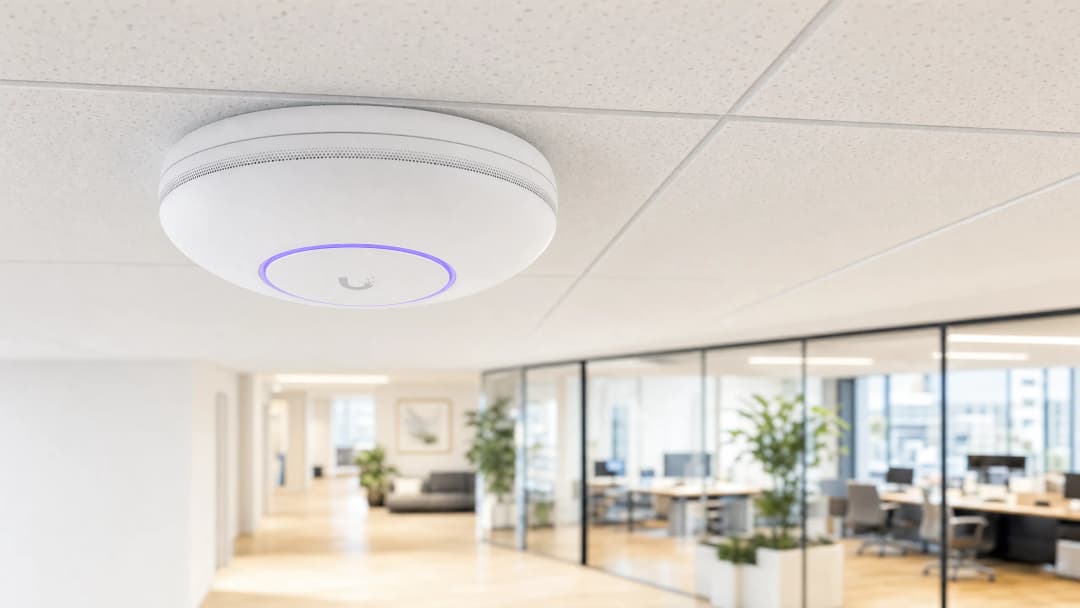
कार्यकारी सारांश (Executive Summary)
मल्टी-टेनंट ऑफिस इमारतींचे व्यवस्थापन करणाऱ्या CTOs आणि नेटवर्क आर्किटेक्ट्ससाठी, आव्हान स्पष्ट आहे: एकाच सामायिक भौतिक नेटवर्कवर अनेक स्वतंत्र संस्थांना विश्वसनीय, सुरक्षित आणि स्वतंत्र कनेक्टिव्हिटी कशी प्रदान करायची. मल्टी-टेनंट वातावरणात, फ्लॅट नेटवर्क आर्किटेक्चर ही एक गंभीर सुरक्षा त्रुटी आहे. हे GDPR आणि PCI-DSS अंतर्गत तुमची अनुपालन व्याप्ती वाढवते, भाडेकरूंना (tenants) लॅटरल सुरक्षा धोक्यांमध्ये उघडे पाडते आणि भाडेकरूंची संख्या वाढल्यास ऑपरेशनल बोजा वाढवते.
हे मार्गदर्शक मल्टी-टेनंट WiFi आर्किटेक्चर डिझाइन करण्यासाठी विक्रेता-तटस्थ (vendor-neutral) ब्लूप्रिंट प्रदान करते. IEEE 802.1Q VLAN सेगमेंटेशन, 802.1X वर आधारित डायनॅमिक VLAN असाइनमेंट आणि शिस्तबद्ध RF नियोजनाची अंमलबजावणी करून, तुम्ही SSID ची गर्दी दूर करू शकता, एअरटाइम ओव्हरहेड २०% पर्यंत कमी करू शकता आणि भाडेकरूंमध्ये कठोर लेयर २ आयसोलेशन लागू करू शकता. आम्ही तांत्रिक मानके, Cisco Meraki, HPE Aruba, Ruckus आणि Juniper Mist यांसारख्या विक्रेत्यांचे हार्डवेअर विचार आणि पायाभूत सुविधा सुरक्षित करण्यासाठी आवश्यक असलेल्या राउटिंग पॉलिसीचे तपशील दिले आहेत. योग्यरित्या अंमलात आणल्यास, हे आर्किटेक्चर सपोर्ट ओव्हरहेड्स कमी करते, अनुपालन ऑडिट सोपे करते आणि तुम्हाला कनेक्टिव्हिटीचा सेवा म्हणून वापर करून कमाई करण्याची संधी देते.
तांत्रिक सखोल विश्लेषण (Technical Deep Dive)
फ्लॅट नेटवर्कच्या विरोधातील युक्तिवाद
फ्लॅट नेटवर्क प्रत्येक डिव्हाइसला - भाडेकरू, रहदारीचा प्रकार किंवा सुरक्षा स्तर विचारात न घेता - एकाच ब्रॉडकास्ट डोमेनमध्ये ठेवते. प्रत्येक डिव्हाइसला प्रत्येक ब्रॉडकास्ट पॅकेट मिळते. एकच तडजोड केलेले पाहुणे डिव्हाइस (guest device) POS टर्मिनल्स, बिल्डिंग मॅनेजमेंट सिस्टीम आणि कॉर्पोरेट वर्कस्टेशन्स स्कॅन करून त्यांच्यापर्यंत पोहोचू शकते. यामुळे तुमचे संपूर्ण नेटवर्क PCI-DSS ऑडिटच्या कक्षेत येते. हा केवळ सैद्धांतिक धोका नाही; वायरलेस घनता हा डिझाइनचा विचार बनण्यापूर्वी केबलिंग केलेल्या अनेक मल्टी-टेनंट इमारतींची ही डीफॉल्ट स्थिती आहे.
यावर उपाय म्हणजे लॉजिकल सेगमेंटेशन. तुम्हाला प्रत्येक भाडेकरूसाठी स्वतंत्र भौतिक पायाभूत सुविधांची आवश्यकता नाही; तुम्हाला योग्यरित्या डिझाइन केलेले VLAN आर्किटेक्चर, सुव्यवस्थित फायरवॉल आणि केंद्रीकृत व्यवस्थापन प्लॅटफॉर्मची आवश्यकता आहे.
IEEE 802.1Q आणि VLAN टॅगिंग
व्हर्च्युअल LANs - IEEE 802.1Q म्हणून प्रमाणित - तुम्हाला एकाच भौतिक स्विच फॅब्रिकला अनेक वेगळ्या लॉजिकल नेटवर्क्समध्ये विभागण्याची परवानगी देतात. जेव्हा एखादा क्लायंट WiFi ऍक्सेस पॉइंट (AP) शी कनेक्ट होतो, तेव्हा AP त्या क्लायंटच्या फ्रेम्सला १२-बिट VLAN आयडेंटिफायर (VID) सह टॅग करतो. स्विचेस हा टॅग वाचतात आणि हे सुनिश्चित करतात की एका VLAN वरील ट्रॅफिक दुसऱ्या VLAN वरील पोर्टवर कधीही फॉरवर्ड केले जाणार नाही, जोपर्यंत स्पष्ट फायरवॉल राउटिंग नियम त्यास परवानगी देत नाही.
एका सामान्य मल्टी-टेनंट ऑफिस इमारतीसाठी किमान चार VLAN आवश्यक आहेत:
| VLAN | ट्रॅफिक क्लास (Traffic Class) | राउटिंग पॉलिसी (Routing Policy) | |---|---|---|| VLAN 10 | कॉर्पोरेट टेनंट A | केवळ इंटरनेट + टेनंट-विशिष्ट संसाधने | | VLAN 20 | कॉर्पोरेट टेनंट B | केवळ इंटरनेट + टेनंट-विशिष्ट संसाधने | | VLAN 30 | Guest WiFi (captive portal) | केवळ इंटरनेट, कोणत्याही टेनंट VLAN ला कोणताही प्रवेश नाही | | VLAN 40 | IoT आणि BMS | नियुक्त व्यवस्थापन प्लॅटफॉर्मवर केवळ इग्रेस |
अधिक टेनंट असलेल्या इमारतींसाठी, आपण या मॉडेलचा विस्तार करू शकता. प्रत्येक अतिरिक्त टेनंटला एक समर्पित VLAN आणि संबंधित फायरवॉल पॉलिसी दिली जाते. भौतिक पायाभूत सुविधा सामायिक राहतात.
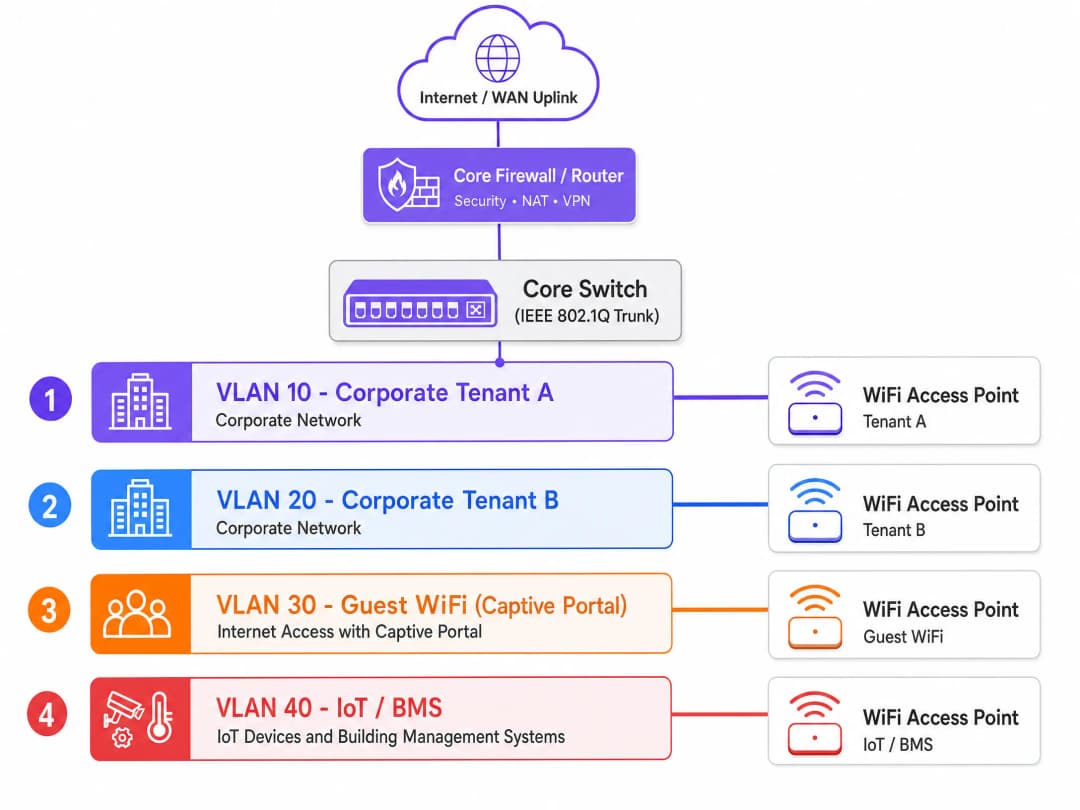
802.1X आणि RADIUS द्वारे डायनॅमिक VLAN असाइनमेंट
पूर्वी, नेटवर्क अभियंते प्रत्येक टेनंटसाठी एक स्वतंत्र SSID तयार करत असत. या दृष्टिकोनामुळे कार्यक्षमता खालावते. जुनी डिव्हाइसेस कनेक्ट होऊ शकतील याची खात्री करण्यासाठी प्रत्येक SSID सर्वात कमी मूलभूत अनिवार्य डेटा दराने व्यवस्थापन फ्रेम्स (बीकन्स) प्रसारित करतो. एकाच ॲक्सेस पॉइंटवर सहा किंवा सात SSID प्रसारित केल्याने कोणताही वापरकर्ता डेटा ट्रान्समिट होण्यापूर्वीच उपलब्ध वायरलेस एअरटाइमच्या 20% ते 30% वेळ खर्च होऊ शकतो. दाट लोकवस्तीच्या बहु-टेनंट इमारतीमध्ये, हे अस्वीकार्य आहे.
आधुनिक मानक म्हणजे डायनॅमिक VLAN असाइनमेंट. आपण IEEE 802.1X ऑथेंटिकेशन वापरून एकच सुरक्षित SSID प्रसारित करता. जेव्हा एखादा वापरकर्ता कनेक्ट होतो, तेव्हा त्यांचे डिव्हाइस (सप्लिकंट) ॲक्सेस पॉइंट (ऑथेंटिकेटर) द्वारे RADIUS सर्व्हरसह क्रेडेंशियल्सची देवाणघेवाण करते. RADIUS सर्व्हर क्रेडेंशियल्सची ओळख प्रदात्याच्या - Microsoft Entra ID, Okta, किंवा Google Workspace - विरुद्ध पडताळणी करतो आणि ॲक्सेस पॉइंटला Access-Accept संदेश पाठवतो. त्या संदेशामध्ये तीन IETF-मानक RADIUS गुणधर्म असतात:
- Tunnel-Type (गुणधर्म 64): VLAN वर सेट
- Tunnel-Medium-Type (गुणधर्म 65): 802 वर सेट
- Tunnel-Private-Group-ID (गुणधर्म 81): त्या वापरकर्त्याच्या संस्थेसाठी विशिष्ट VLAN आयडी
ॲक्सेस पॉइंट हे गुणधर्म प्राप्त करतो आणि त्या वापरकर्त्याच्या ट्रॅफिकला त्यांच्या नियुक्त VLAN मध्ये डायनॅमिकरित्या ठेवतो. टेनंट A चा कर्मचारी आणि टेनंट B चा कर्मचारी एकाच SSID ला कनेक्ट होतात. त्यांचे ट्रॅफिक लेअर 2 वर पूर्णपणे वेगळे केले जाते. स्विचेस त्यांच्याशी असा व्यवहार करतात जणू काही ते पूर्णपणे वेगळ्या भौतिक नेटवर्कमध्ये प्लग केलेले आहेत.
गेस्ट विभागासाठी, ट्रॅफिकला एका समर्पित गेस्ट VLAN द्वारे captive portal वर पाठवा. Purple चे Guest WiFi प्लॅटफॉर्म कॉर्पोरेट नेटवर्क्समध्ये कोणत्याही राउटेड प्रवेशाशिवाय, वेगळ्या सेगमेंटवर GDPR-सुसंगत संमती व्यवस्थापन, सुरक्षित ऑनबोर्डिंग आणि WiFi Analytics हाताळते. ॲक्सेस कंट्रोल आर्किटेक्चरच्या विस्तृत विहंगावलोकनसाठी, आमची नेटवर्क ॲक्सेस कंट्रोल सिस्टमची मार्गदर्शिका पहा.
WPA3-Enterprise आणि एन्क्रिप्शन मानके
बहु-भाडेकरू (multi-tenant) उपयोजनांसाठी WPA3-Enterprise हा शिफारस केलेला एन्क्रिप्शन मानक आहे. हा 192-बिट सुरक्षा मोड ऑफर करतो, WPA2 फोर-वे हँडशेक मधील असुरक्षितता दूर करतो, आणि IEEE 802.11w अंतर्गत प्रोटेक्टेड मॅनेजमेंट फ्रेम्स (PMF) अनिवार्य करतो. पेमेंट कार्ड डेटा किंवा संवेदनशील कॉर्पोरेट माहिती हाताळणाऱ्या वातावरणासाठी, EAP-TLS - प्रमाणपत्र-आधारित परस्पर प्रमाणीकरण - सह WPA3-Enterprise क्रेडेंशियल चोरीचा धोका पूर्णपणे काढून टाकतो.
ज्या अतिथी (guest) विभागांमध्ये प्रमाणपत्रे तैनात केली जाऊ शकत नाहीत, तिथे WPA3-SAE (Simultaneous Authentication of Equals) फॉरवर्ड गुप्तता प्रदान करते, ज्यामुळे तडजोड केलेली की ऐतिहासिक ट्रॅफिक उघड करणार नाही याची खात्री होते.
हाय-डेन्सिटी वातावरणात RF प्लॅनिंग
को-चॅनेल इंटरफेरन्स (CCI) हे बहु-भाडेकरू ऑफिस इमारतींमध्ये खराब WiFi कामगिरीचे मुख्य कारण आहे. जेव्हा जवळचे ऍक्सेस पॉइंट्स एकाच फ्रिक्वेन्सी चॅनेलवर ब्रॉडकास्ट करतात, तेव्हा डिव्हाइसेसना ट्रान्समिट करण्यापूर्वी मोकळ्या एअरटाइमची वाट पाहावी लागते. अनेक भाडेकरू आणि अत्यंत डिव्हाइस डेन्सिटी असलेल्या इमारतीमध्ये, अनियोजित चॅनेल वाटपामुळे एक कोंडीचे RF वातावरण तयार होते जे कितीही बँडविड्थ असली तरी दुरुस्त करता येत नाही.
उपयोजनापूर्वी प्रत्यक्ष जागेवर सक्रिय RF सर्वेक्षण करणे आवश्यक आहे. व्हेंडरचे कव्हरेज नकाशे सहसा आशावादी असतात. तुम्हाला भिंतींचे साहित्य, फ्लोअरचे बांधकाम आणि शेजारील इमारतींमधील RF वातावरणाचा विचार करून प्रत्यक्ष जागेवर घेतलेल्या वास्तविक सिग्नल मोजमापांची आवश्यकता असते.
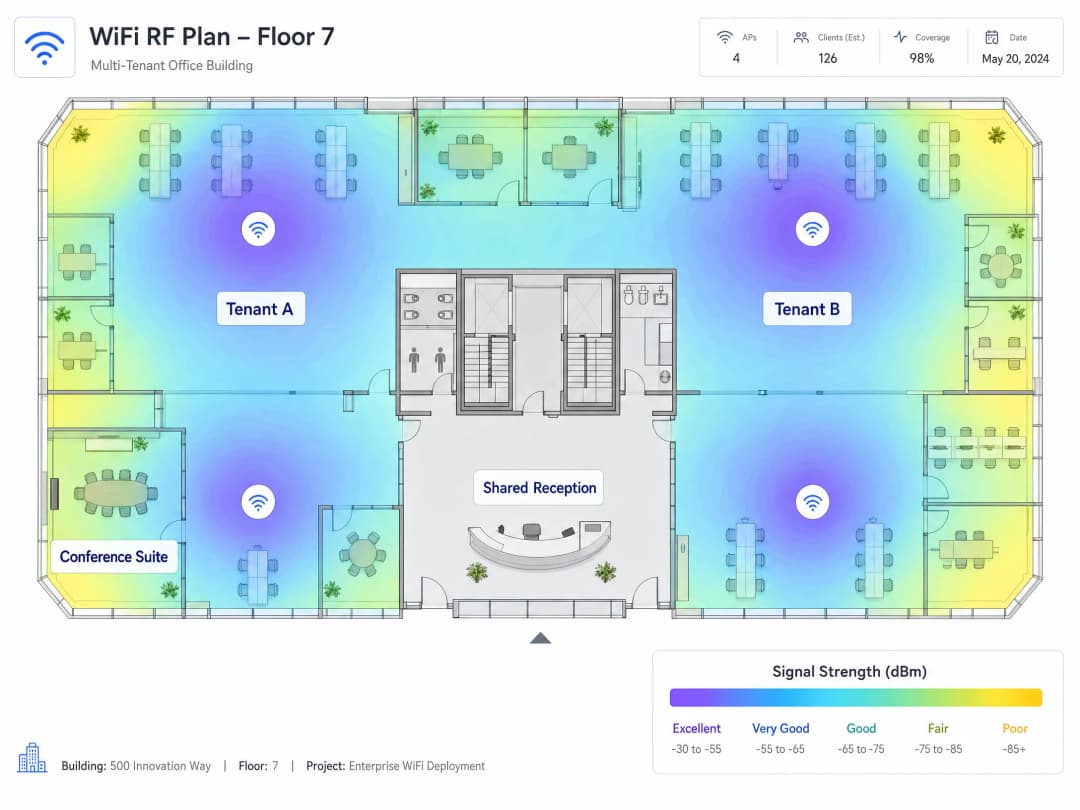
बहुतेक नियामक क्षेत्रांमध्ये, 2.4 GHz बँड तीन नॉन-ओव्हरलॅपिंग चॅनेल्स (1, 6, आणि 11) ऑफर करतो. 5 GHz बँड लक्षणीयरीत्या अधिक क्षमता प्रदान करतो. WiFi 6E हे 6 GHz बँडमध्ये विस्तारते, ज्यामुळे जुन्या डिव्हाइसेसच्या हस्तक्षेपापासून मोठ्या प्रमाणावर मुक्त असलेले स्वच्छ स्पेक्ट्रम मिळते. नवीन बहु-भाडेकरू उपयोजनांसाठी, Cisco Meraki, HPE Aruba, Ruckus, Juniper Mist, किंवा Ubiquiti UniFi मधील WiFi 6E-सक्षम ऍक्सेस पॉइंट्स निर्दिष्ट केल्याने हाय-डेन्सिटी वातावरणासाठी आवश्यक असणारी स्पेक्ट्रल क्षमता मिळते.
IoT अलगीकरण (Isolation)
आधुनिक ऑफिस इमारतींमध्ये बिल्डिंग मॅनेजमेंट सिस्टीम, HVAC कंट्रोलर्स, स्मार्ट लाइटिंग, ऍक्सेस कंट्रोल आणि CCTV असतात. हे डिव्हाइसेस पॅच करणे अत्यंत कठीण असते आणि ते सायबर हल्ल्यांसाठी मोठे लक्ष्य ठरू शकतात. त्यांना कठोर इग्रेस फिल्टरिंगसह समर्पित VLAN वर वेगळे केले पाहिजे, ज्यामुळे केवळ त्यांच्या निर्दिष्ट मॅनेजमेंट प्लॅटफॉर्मवर आउटबाउंड कम्युनिकेशनची परवानगी मिळते. कोणत्याही भाडेकरू VLAN ला झिरो राउटेड ऍक्सेस. अतिथी VLAN ला झिरो राउटेड ऍक्सेस. हे सुरक्षा आणि GDPR दोन्ही दृष्टिकोनातून बंधनकारक आहे.
तुमच्या विशिष्ट सेटअपबद्दल काही प्रश्न आहेत का?
आमची टीम ८०,००० हून अधिक वेन्यूजमधील वेन्यू ऑपरेटर्स, IT मॅनेजर्स आणि नेटवर्क इंजिनिअर्ससोबत काम करते. २० मिनिटांचा कॉल बुक करा आणि तुमच्यासारख्या इतरांनी ही समस्या कशी सोडवली हे आम्ही तुम्हाला दाखवू.
अंमलबजावणी मार्गदर्शक
पायरी 1: हार्डवेअरला स्पर्श करण्यापूर्वी तुमच्या लॉजिकल आर्किटेक्चरची रचना करा. तुमच्या भाडेकरूंची संख्या आणि ट्रॅफिक वर्ग (कॉर्पोरेट, अतिथी, IoT, पेमेंट, मॅनेजमेंट) मॅप करा आणि VLANs वाटप करा. तुमच्या IP ऍड्रेसिंग योजनेचे दस्तऐवजीकरण करा. तुमचे इंटर-VLAN राउटिंग धोरण परिभाषित करा: कोण कशाशी बोलू शकते आणि कशाला पूर्णपणे बंदी आहे.
पायरी २: ऍक्टिव्ह RF साईट सर्वे करा. व्हेंडरच्या कव्हरेज मॅप्सवर कधीही अवलंबून राहू नका. AP प्लेसमेंट आणि चॅनल वाटपाची माहिती मिळवण्यासाठी तुम्हाला प्रत्यक्ष जागेवर घेतलेल्या वास्तविक सिग्नलच्या मोजमापांची आवश्यकता आहे.
पायरी ३: तुमच्या कोर फायरवॉलला Default-Deny पॉलिसीसह कॉन्फिगर करा. डीफॉल्टनुसार सर्व इंटर-VLAN राउटिंग ब्लॉक करा. केवळ स्पष्ट, पोर्ट-विशिष्ट अपवाद जोडा. प्रत्येक इंटर-VLAN मार्गाचे समर्थन आणि दस्तऐवजीकरण असणे आवश्यक आहे.
पायरी ४: सर्व ट्रंक पोर्ट्सवर VLAN १ अक्षम करा. ट्रंक पोर्ट्सवरील मूळ (native) VLAN बदलून न वापरलेला, नॉन-राउटेबल VLAN ID करा. हे डीफॉल्ट मूळ VLAN चा गैरफायदा घेणाऱ्या VLAN हॉॉपिंग हल्ल्यांना प्रतिबंधित करते.
पायरी ५: ट्रंक पोर्ट कॉन्फिगरेशनची पडताळणी करा. ऍक्सेस पॉईंटपासून डिस्ट्रिब्युशन लेयरपर्यंतच्या मार्गातील प्रत्येक ट्रंक लिंकवर प्रत्येक आवश्यक VLAN ID ला स्पष्टपणे परवानगी द्या. गहाळ झालेल्या VLAN टॅगमुळे सायलेंट ट्रॅफिक ड्रॉप्स होतात, ज्याचे निदान करण्यासाठी तासनतास लागतात.
पायरी ६: केंद्रीकृत क्लाउड मॅनेजमेंट तैनात करा. Cisco Meraki, HPE Aruba, Juniper Mist आणि Ruckus चे प्लॅटफॉर्म्स प्रति-SSID बँडविड्थ पॉलिसी, प्रति-भाडेकरू (tenant) रिपोर्टिंग आणि तुमच्या RADIUS इन्फ्रास्ट्रक्चरसह एकत्रीकरण प्रदान करतात. कंट्रोलरशिवाय वितरित AP इस्टेट व्यवस्थापित केल्यास ऑपरेशनल ओव्हरहेड वाढतो जो मोठ्या प्रमाणावर सांभाळणे अशक्य आहे.
पायरी ७: प्रति सेगमेंट DHCP लीझ टाईम सेट करा. कॉर्पोरेट VLANs: ८ ते २४ तास. गेस्ट WiFi VLANs: १ ते २ तास. गेस्ट सेगमेंटवर लहान लीझ टाईम ठेवल्याने हाय-टर्नओव्हर वातावरणात IP ॲड्रेस संपण्यापासून बचाव होतो.
पायरी ८: मॅनेजमेंट प्लेन वेगळे करा. तुमचा मॅनेजमेंट VLAN सर्व भाडेकरू आणि गेस्ट VLANs पासून पूर्णपणे वेगळा असणे आवश्यक आहे. मॅनेजमेंट ट्रॅफिकवर कठोर ACLs लागू करा. जर एखादा भाडेकरू तुमच्या मॅनेजमेंट प्लेनपर्यंत पोहोचू शकत असेल, तर तुमच्या सुरक्षिततेमध्ये गंभीर त्रुटी आहे.
सर्वोत्तम पद्धती
खालील तक्ता अनुपालन असलेल्या मल्टि-टेनंट WiFi तैनातीसाठी मुख्य कॉन्फिगरेशन मानकांचा सारांश देतो.
| नियंत्रण | मानक | तर्कसंगतता |
|---|---|---|
| VLAN सेगमेंटेशन | IEEE 802.1Q | भाडेकरूंमधील लेयर २ आयसोलेशन |
| ऑथेंटिकेशन | WPA3-Enterprise सह IEEE 802.1X | क्रेडेंशियल चोरीचे मार्ग काढून टाकते |
| डायनॅमिक VLAN असाइनमेंट | टनेल ॲट्रिब्युट्ससह RADIUS | SSID संख्या कमी करते, एअरटाइम वाचवते |
| गेस्ट ऑनबोर्डिंग | GDPR संमतीसह Captive Portal | अनुपालन आणि डेटा कॅप्चर |
| IoT आयसोलेशन | इग्रेस ACLs सह समर्पित VLAN | अनपॅच केलेल्या उपकरणांचे अटॅक सरफेस मर्यादित करते |
| RF नियोजन | ऍक्टिव्ह साईट सर्वे | को-चॅनल इंटरफेरन्स कमी करते |
| रोमिंग | 802.11r फास्ट BSS ट्रान्झिशन | APs दरम्यान अखंड हँडऑफ |
| नेटिव्ह VLAN | नॉन-राउटेबल, न वापरलेला VLAN ID | VLAN हॉॉपिंग हल्ल्यांना प्रतिबंधित करते |
hospitality तैनातीसाठी, गेस्ट VLAN आयसोलेशन अत्यंत महत्त्वाचे आहे. retail वातावरणासाठी, समर्पित VLAN वर POS टर्मिनल्स वेगळे केल्याने थेट PCI-DSS ऑडिटची व्याप्ती कमी होते. transport हब्स आणि healthcare सुविधांसाठी, हेच सेगमेंटेशनचे नियम लागू होतात, ज्यामध्ये एकाच वेळी येणारे कनेक्शन व्हॉल्यूम आणि उपकरणांच्या विविधतेकडे अतिरिक्त लक्ष दिले जाते. सॅटेलाइट ब्रॉडबँड WAN अपलिंक्सचा विचार करणाऱ्या ठिकाणांसाठी, Purple चे मार्गदर्शक How to Set Up a Captive Portal on Starlink दुर्गम आणि सागरी वातावरणासाठीच्या विशिष्ट बाबींचा समावेश करते.
ट्रबलशूटिंग आणि जोखीम कमी करणे
सायलेंट ट्रॅफिक ड्रॉप्स. मल्टी - टेनंट उपयोजनांमध्ये हा सर्वात सामान्य बिघाड प्रकार आहे. ट्रंक पोर्टवर VLAN टॅग नसणे हे याचे कारण आहे. वापरकर्ता 802.1X द्वारे यशस्वीरित्या प्रमाणीकृत होतो, RADIUS सर्व्हर त्यांना VLAN 40 वर नियुक्त करतो, परंतु ट्रंक पोर्टवर VLAN 40 ला परवानगी नसते. ट्रॅफिक ड्रॉप केले जाते आणि वापरकर्त्याला IP पत्ता मिळू शकत नाही. ट्रंक कॉन्फिगरेशनचे काळजीपूर्वक दस्तऐवजीकरण करा आणि कमिशनिंग दरम्यान त्यांची पडताळणी करा.
SSID प्रसार. तुम्ही प्रसारित करत असलेला प्रत्येक SSID बीकन फ्रेम एअरटाइम वापरतो. दाट वातावरणात, प्रति AP 8 ते 10 SSIDs प्रत्येकासाठी नेटवर्क कार्यप्रदर्शन खराब करतात. प्रति रेडिओ 4 पेक्षा जास्त SSIDs ठेवू नका. एकाधिक टेनंटना सेवा देण्यासाठी स्वतंत्र SSIDs ऐवजी RADIUS ॲट्रिब्युट्सद्वारे डायनॅमिक VLAN असाइनमेंट वापरा.
मॅनेजमेंट प्लेन एक्सपोजर. तुमचे मॅनेजमेंट VLAN वेगळे केले नसल्यास, प्रवेश मिळवणारा टेनंट AP कॉन्फिगरेशन सुधारू शकतो, सेवेत व्यत्यय आणू शकतो किंवा मॅनेजमेंट ट्रॅफिक रोखू शकतो. शक्य तिथे आउट - ऑफ - बँड मॅनेजमेंट वापरा आणि सर्व मॅनेजमेंट इंटरफेसवर कडक ACLs लागू करा.
IoT उपकरणांचा अनियंत्रित वाढ. इमारत ऑपरेटर वारंवार नेटवर्क टीमला सूचित न करता IoT उपकरणे जोडतात. IoT VLAN वर कोणत्याही नवीन उपकरणाला IP पत्ता मिळण्यापूर्वी स्पष्ट अधिकृततेची आवश्यकता असलेले नेटवर्क ॲक्सेस कंट्रोल (NAC) धोरण लागू करा.
गेस्ट VLAN वर DHCP संपणे. जास्त आवर्तन असलेल्या वातावरणात, उपकरणे डिस्कनेक्ट झाल्यानंतरही DHCP लीज राखून ठेवतात. एक /24 सबनेट 254 पत्ते प्रदान करतो. व्यस्त कॉन्फरन्स सेंटर किंवा कोवर्किंग स्पेसमध्ये, हे पटकन संपून जातात. लीजची वेळ 1 ते 2 तास सेट करा आणि पीक कॉन्करंट डिव्हाइस काउंट सामावून घेण्यासाठी गेस्ट VLAN सबनेटचा आकार निश्चित करा.
ROI आणि व्यावसायिक प्रभाव
योग्यरित्या विभागलेले मल्टी - टेनंट WiFi आर्किटेक्चर तीन आयामांमध्ये मोजता येण्याजोगे परिणाम देते.
कमी झालेले अनुपालन खर्च. Purple च्या स्वतःच्या उपयोजन डेटावर आधारित, POS आणि पेमेंट टर्मिनल्सना कठोर फायरवॉल नियंत्रणांसह समर्पित VLAN वर वेगळे केल्याने PCI DSS ऑडिट व्याप्ती सुमारे 70% कमी होते. यामुळे वार्षिक ऑडिट खर्च आणि तुमची IT टीम अनुपालन दस्तऐवजीकरणावर घालवणारा वेळ थेट कमी होतो.
कार्यक्षम कार्यक्षमता. केंद्रीकृत क्लाउड मॅनेजमेंट वितरित AP इस्टेट व्यवस्थापित करण्याशी संबंधित OpEx कमी करते. झिरो - टच प्रोव्हिजनिंग, जागतिक धोरण अंमलबजावणी आणि प्रति - टेनंट रिपोर्टिंग ऑन - साइट कॉन्फिगरेशन बदलांची आवश्यकता काढून टाकते. टेनंट ऑनबोर्डिंग वेळ दिवसांवरून तासांवर येतो. महसूल निर्मिती. एक सुरक्षित, उच्च-कार्यक्षमता असलेले नेटवर्क इमारत चालकांना कनेक्टिव्हिटीचा वापर सेवा म्हणून करून कमाई करण्यास सक्षम करते. टियरड (Tiered) बँडविड्थ प्लॅन्स, प्रति-भाडेकरू SLAs आणि विश्लेषणावर आधारित माहिती WiFi ला खर्चाच्या केंद्राकडून महसूल स्त्रोतामध्ये रूपांतरित करते. Purple जागतिक स्तरावर 80,000 हून अधिक प्रत्यक्ष ठिकाणांवर कार्यरत आहे आणि त्यांनी 2024 मध्ये 440 दशलक्ष लॉगिन प्रक्रियेत आणले (Purple अंतर्गत डेटा, 2024), जे या मॉडेलला मोठ्या प्रमाणावर समर्थन देण्यासाठी विश्लेषणात्मक पायाभूत सुविधा प्रदान करते.
WiFi कनेक्टिव्हिटी व्यापक डिजिटल समावेशकतेच्या उद्दिष्टांना कशी मदत करते याबद्दल अधिक जाणून घेण्यासाठी, आमचा World WiFi Day 2026 वरील लेख पहा. मल्टी-साइट उपयोजनांशी संबंधित WAN आर्किटेक्चरच्या पैलूंची माहिती मिळवण्यासाठी, आमचे WAN कॉम्प्युटर नेटवर्कच्या व्याख्येवरील मार्गदर्शक पहा.
महत्वाच्या व्याख्या
IEEE 802.1Q
इथरनेट फ्रेम्ससाठी VLAN टॅगिंग परिभाषित करणारा नेटवर्किंग मानक. हे प्रत्येक फ्रेममध्ये १२-बिट VLAN आयडेंटिफायर (VID) असलेले ४-बायट टॅग जोडते, ज्यामुळे स्विचेसला सामायिक भौतिक पायाभूत सुविधांवर अनेक वेगळे ब्रॉडकास्ट डोमेन्स राखता येतात.
बहुभाडेकरू नेटवर्क वितरणासाठी पायाभूत प्रोटोकॉल. प्रत्येक एंटरप्राइझ स्विच आणि ॲक्सेस पॉइंट 802.1Q ला सपोर्ट करतो. याशिवाय, भाडेकरूंमधील लॉजिकल अलगाव अशक्य आहे.
Dynamic VLAN Assignment
एक पद्धत ज्यामध्ये RADIUS सर्व्हर यशस्वी 802.1X प्रमाणीकरणानंतर युझर किंवा डिव्हाइसला विशिष्ट VLAN नियुक्त करतो. युझरला कोणत्या VLAN मध्ये ठेवायचे हे ऍक्सेस पॉईंटला सांगण्यासाठी IETF RADIUS ॲट्रिब्युट्स (Tunnel-Type, Tunnel-Medium-Type, Tunnel-Private-Group-ID) चा वापर केला जातो.
एकाच SSID वरून एकाधिक भाडेकरूंना (tenants) सेवा देण्यासाठी मानक पद्धत. हे SSID च्या वाढत्या संख्येला थांबवते आणि भाडेकरूंमध्ये पूर्ण Layer 2 वेगळेपणा राखून वायरलेस एअरटाईमची बचत करते.
IEEE 802.1X
पोर्ट-आधारित नेटवर्क ऍक्सेस कंट्रोल (PNAC) साठीचे IEEE मानक. हे त्रिपक्षीय प्रमाणीकरण मॉडेल परिभाषित करते: सप्लिकंट (क्लायंट डिव्हाइस), ऑथेंटिकेटर (ऍक्सेस पॉईंट किंवा स्विच) आणि ऑथेंटिकेशन सर्व्हर (RADIUS). जोपर्यंत सप्लिकंटचे प्रमाणीकरण होत नाही तोपर्यंत ऑथेंटिकेटर सर्व ट्रॅफिक ब्लॉक करतो.
Dynamic VLAN Assignment लागू करण्यासाठी वापरले जाणारे प्रमाणीकरण फ्रेमवर्क. WPA3-Enterprise उपयोजनांसाठी आवश्यक. Microsoft Entra ID, Okta आणि Google Workspace यांसह ओळख प्रदात्यांशी (identity providers) जोडले जाते.
RADIUS
Remote Authentication Dial-In User Service. एक नेटवर्किंग प्रोटोकॉल जो केंद्रीकृत प्रमाणीकरण, अधिकृतता आणि लेखा (AAA) व्यवस्थापन प्रदान करतो. WiFi उपयोजनांमध्ये, RADIUS सर्व्हर युझरची क्रेडेन्शियल्स सत्यापित करतो आणि ऍक्सेस पॉईंटला VLAN असाइनमेंट ॲट्रिब्युट्स परत पाठवतो.
Dynamic VLAN Assignment लागू करणारी सर्व्हर पायाभूत सुविधा. हे ऑन-प्रिमाइसेस किंवा क्लाउड सेवा म्हणून उपयोजित केले जाऊ शकते. LDAP, SAML किंवा SCIM द्वारे ओळख प्रदात्यांशी जोडले जाते.
Co-channel interference (CCI)
जेव्हा दोन किंवा अधिक ऍक्सेस पॉईंट्स एकमेकांच्या कक्षेत एकाच फ्रिक्वेन्सी चॅनेलवर ब्रॉडकास्ट करतात तेव्हा होणारा हस्तक्षेप. डेटा ट्रान्समिट करण्यापूर्वी डिव्हाइसेसना मोकळ्या एअरटाईमची वाट पाहावी लागते, ज्यामुळे त्या चॅनेलवरील सर्व युझर्सचा प्रभावी थ्रूपुट कमी होतो.
दाट लोकवस्तीच्या बहु-भाडेकरू इमारतींमध्ये खराब WiFi कामगिरीचे मुख्य कारण. सक्रिय RF साइट सर्वेक्षण आणि 2.4 GHz, 5 GHz आणि 6 GHz बँड्सवर काळजीपूर्वक चॅनेल वाटप करून हे कमी केले जाऊ शकते.
Native VLAN
802.1Q ट्रंक पोर्टवरील VLAN जे अनटॅग केलेले ट्रॅफिक वाहून नेते. डीफॉल्टनुसार, बहुतेक स्विचेस VLAN 1 ला native VLAN म्हणून वापरतात, ज्यामुळे VLAN हॉप्पिंगसाठी एक सुप्रसिद्ध हल्ला मार्ग (attack vector) तयार होतो.
प्रत्येक बहु-भाडेकरू उपयोजनात लक्ष दिले पाहिजे असा एक सुरक्षा धोका. VLAN हॉप्पिंग हल्ले रोखण्यासाठी सर्व ट्रंक पोर्टवरील native VLAN बदलून न वापरलेला, नॉन-राउटेबल VLAN ID ठेवा.
Captive Portal
एक वेब पेज ज्याद्वारे युझरला नेटवर्क ऍक्सेस मिळण्यापूर्वी संवाद साधावा लागतो. WiFi उपयोजनांमध्ये, युझर एका खुल्या किंवा WPA2-Personal SSID शी कनेक्ट करतो, प्रमाणीकरण किंवा अटींच्या स्वीकृतीसाठी स्पॅश पेजवर रीडायरेक्ट केला जातो आणि नंतर त्याला एका वेगळ्या VLAN वर केवळ-इंटरनेट प्रवेश मंजूर केला जातो.
ग्रेस्ट WiFi विभागांसाठी ऑनबोर्डिंगची मानक पद्धत. GDPR-सुसंगत संमती संकलन, ओळख पडताळणी आणि विश्लेषण सक्षम करते. हे कॉर्पोरेट किंवा भाडेकरू नेटवर्कवर शून्य राउटिंग ऍक्सेस असलेल्या VLAN वर उपयोजित केले पाहिजे.
WPA3-Enterprise
एंटरप्राइझ नेटवर्कसाठी नवीनतम WiFi सुरक्षा प्रोटोकॉल, जो WiFi Alliance द्वारे मानकीकृत आहे. 192-बिट क्रिप्टोग्राफिक सामर्थ्य (CNSA सुट) प्रदान करतो, 802.1X प्रमाणीकरण आवश्यक करतो, IEEE 802.11w अंतर्गत प्रोटेक्टेड मॅनेजमेंट फ्रेम्स (PMF) अनिवार्य करतो आणि WPA2 च्या फोर-वे हँडशेकमधील त्रुटी दूर करतो.
बहु-भाडेकरू कॉर्पोरेट WiFi विभागांसाठी शिफारस केलेले एन्क्रिप्शन मानक. पेमेंट कार्ड डेटा किंवा संवेदनशील कॉर्पोरेट माहिती हाताळणाऱ्या वातावरणासाठी आवश्यक. सर्व प्रमुख एंटरप्राइझ AP विक्रेत्यांद्वारे समर्थित.
EAP-TLS
Extensible Authentication Protocol - Transport Layer Security. एक प्रमाणपत्र आधारित 802.1X प्रमाणीकरण पद्धत ज्यासाठी क्लायंट आणि RADIUS सर्व्हर दोघांनाही X.509 डिजिटल प्रमाणपत्रे सादर करणे आवश्यक आहे, जे परस्पर प्रमाणीकरण प्रदान करते आणि पासवर्ड आधारित क्रेडेन्शियल चोरी दूर करते.
सर्वात सुरक्षित 802.1X प्रमाणीकरण पद्धत. उच्च-सुरक्षा बहु-भाडेकरू वातावरणात वापरली जाते जिथे क्रेडेन्शियल्सची चोरी ही प्राथमिक चिंता असते. क्लायंट प्रमाणपत्रे जारी आणि व्यवस्थापित करण्यासाठी पब्लिक की इन्फ्रास्ट्रक्चर (PKI) आवश्यक आहे.
MAC Authentication Bypass (MAB)
एक फॉलबॅक प्रमाणीकरण पद्धत जी उपकरणाच्या MAC ॲड्रेसचा वापर तिची ओळख म्हणून करते जेव्हा उपकरण 802.1X चे समर्थन करत नाही. RADIUS सर्व्हर MAC ॲड्रेस शोधतो आणि पूर्वनिर्धारित VLAN ला उपकरण नियुक्त करतो.
IoT उपकरणे, प्रिंटर आणि इतर उपकरणांसाठी वापरले जाते जे 802.1X प्रमाणीकरण करू शकत नाहीत. MAC ॲड्रेस स्पूफ केले जाऊ शकत असल्याने, MAB नेहमी नियुक्त केलेल्या VLAN वरील कडक फायरवॉल नियमांसह एकत्रित केले पाहिजे.
सोडवलेली उदाहरणे
१२ मालमत्ता असलेल्या ३५० खोल्यांच्या हॉटेल समूहाला त्यांचे नेटवर्क सुरक्षित करणे आवश्यक आहे. सध्या, पाहुण्यांचे स्मार्टफोन, कर्मचाऱ्यांचे लॅपटॉप, POS टर्मिनल्स आणि इमारत व्यवस्थापन प्रणाली हे सर्व एकाच फ्लॅट नेटवर्कचा वापर करतात. संपूर्ण नेटवर्क कव्हरेजमध्ये असल्यामुळे IT टीमला दरमहा ४० तास PCI-DSS अनुपालन दस्तऐवजीकरणावर खर्च करावे लागतात. पुढील ऑडिटपूर्वी CTO ला अनुपालन ओव्हरहेड कमी करायचे आहे आणि सुरक्षितता अधिक बळकट करायची आहे.
केंद्रीकृत क्लाउड मॅनेजमेंट प्लॅटफॉर्मद्वारे सर्व १२ मालमत्तांमध्ये IEEE 802.1Q वापरून फोर-VLAN आर्किटेक्चर तैनात करा. VLAN ची नियुक्ती खालीलप्रमाणे करा: स्टाफ कॉर्पोरेटसाठी VLAN 10 (802.1X ऑथेंटिकेटेड, अंतर्गत संसाधने आणि इंटरनेटवर राउट केलेले), Guest WiFi साठी VLAN 20 (Captive Portal, फक्त इंटरनेट), POS टर्मिनल्ससाठी VLAN 30 (802.1X ऑथेंटिकेटेड, फक्त पेमेंट प्रोसेसर एंडपॉइंट्सवर राउट केलेले), आणि IoT व BMS साठी VLAN 40 (MAC ऑथेंटिकेशन बायपास, फक्त BMS व्यवस्थापन प्लॅटफॉर्मवर आउटगोइंग). सर्व VLAN च्या दरम्यान डिफॉल्ट-डिनाय फायरवॉल पॉलिसी कॉन्फिगर करा. GDPR-अनुपालन संमती व्यवस्थापन आणि विश्लेषणासाठी VLAN 20 वर Purple चे Guest WiFi प्लॅटफॉर्म समाकलित करा. कमिशनिंग दरम्यान पाथमधील प्रत्येक स्विचवर ट्रंक पोर्ट कॉन्फिगरेशन सत्यापित करा.
एक कोवर्किंग ऑपरेटर ४० स्वतंत्र सदस्य कंपन्यांसह १५ मजली कार्यालयीन इमारत व्यवस्थापित करतो. प्रत्येक कंपनीला स्वतःचे वेगळे WiFi नेटवर्क आवश्यक आहे. सध्याचे आर्किटेक्चर प्रति कंपनी स्वतंत्र SSID ब्रॉडकास्ट करते, ज्यामुळे प्रति मजला ४० SSID तयार होतात. १० Gbps फायबर अपलिंक असूनही संपूर्ण इमारतीमध्ये WiFi कामगिरी खराब आहे. नेटवर्क टीमला हार्डवेअर न बदलता कामगिरीच्या समस्या सोडवायच्या आहेत.
WPA3-Enterprise आणि IEEE 802.1X ऑथेंटिकेशन वापरून एकाच सुरक्षित SSID मध्ये एकत्रित करा. इमारतीच्या ओळख प्रदात्याशी (Microsoft Entra ID किंवा Okta) समाकलित केलेले RADIUS सर्व्हर तैनात करा. प्रत्येक ऑथेंटिकेटेड वापरकर्त्यासाठी डायनॅमिक VLAN असाइनमेंट अट्रिब्युट्स (Tunnel-Type, Tunnel-Medium-Type, Tunnel-Private-Group-ID) परत करण्यासाठी RADIUS सर्व्हर कॉन्फिगर करा, ज्यामुळे त्यांना त्यांच्या कंपनीच्या समर्पित VLAN मध्ये ठेवले जाईल. अभ्यागतांच्या प्रवेशासाठी Captive Portal सह स्वतंत्र Guest WiFi SSID ठेवा. यामुळे SSID संख्या प्रति रेडिओ ४० वरून दोनवर कमी होते. SSID एकत्रीकरणानंतर चॅनेल वाटप आणि AP प्लेसमेंट सत्यापित करण्यासाठी सक्रिय RF साइट सर्वेक्षण करा.
सराव प्रश्न
Q1. तुम्ही तळमजल्यावर 20 स्वतंत्र किरकोळ भाडेकरू आणि 1 ते 5 मजल्यांवर 10 कार्यालयीन भाडेकरू असलेल्या नवीन मिश्र - वापर इमारतीसाठी WiFi तैनात करत आहात. इमारत मालकाची इच्छा आहे की प्रत्येक भाडेकरूचे स्वतःचे सुरक्षित WiFi नेटवर्क असावे, तसेच अभ्यागतांसाठी एक सामायिक Guest WiFi नेटवर्क असावे. सर्वात कार्यक्षम आर्किटेक्चरल दृष्टीकोन कोणता आहे आणि तुम्ही प्रति ॲक्सेस पॉइंट कमाल किती SSIDs प्रसारित करावेत?
टीप: वायरलेस एअरटाइमवर 30 स्वतंत्र SSIDs प्रसारित करण्याच्या प्रभावाचा विचार करा. Dynamic VLAN Assignment एकाच SSID मधून एकाधिक भाडेकरूंना कशी सेवा देऊ शकते याबद्दल विचार करा.
नमुना उत्तर पहा
सर्व कॉर्पोरेट भाडेकरूंसाठी WPA3-Enterprise आणि IEEE 802.1X प्रमाणीकरण वापरून एकच सुरक्षित SSID तैनात करा. Dynamic VLAN Assignment करण्यासाठी इमारतीच्या ओळख प्रदात्याशी समाकलित केलेले RADIUS सर्व्हर वापरा, प्रमाणीकरण झाल्यावर प्रत्येक भाडेकरूची उपकरणे त्यांच्या स्वतःच्या स्वतंत्र VLAN मध्ये ठेवा. Guest WiFi साठी Captive Portal सह दुसरा SSID तैनात करा. याचा परिणाम प्रति रेडिओ दोन SSIDs मध्ये होतो, जे चार - SSID च्या कमाल मर्यादेत आहे. 30 पैकी प्रत्येक भाडेकरूला संबंधित Default-Deny फायरवॉल पॉलिसीसह एक समर्पित VLAN मिळते. Guest WiFi VLAN ला कोणत्याही भाडेकरूच्या VLAN वर शून्य राउटिंग प्रवेश असतो.
Q2. बहु - भाडेकरू कार्यालयीन इमारतीच्या तैनातीनंतरच्या ऑडिट दरम्यान, तुम्हाला असे आढळले की Guest WiFi VLAN (VLAN 30) मधील ट्रॅफिक IoT VLAN (VLAN 40) वरील उपकरणांना यशस्वीरित्या पिंग करू शकते. दोन्ही वेगवेगळ्या VLANs वर आहेत. सर्वात संभाव्य कारण काय आहे आणि त्वरित सुधारणा करण्याचे पाऊल कोणते आहे?
टीप: VLANs लेयर 2 वर ब्रॉडकास्ट डोमेन वेगळे करतात. लेयर 3 वर वेगवेगळ्या सबनेट्समधील ट्रॅफिक राउटिंग काय हाताळते?
नमुना उत्तर पहा
कोअर राउटर किंवा फायरवॉलमध्ये Default-Deny इंटर-VLAN राउटिंग पॉलिसी गहाळ आहे. डीफॉल्टनुसार, राउटर सर्व कनेक्ट केलेल्या सबनेट्स दरम्यान ट्रॅफिक पास करतात. त्वरित सुधारणा म्हणजे फायरवॉलवर स्पष्टपणे एक Deny नियम कॉन्फिगर करणे आहे जो VLAN 30 कडून VLAN 40 कडे जाणारा सर्व ट्रॅफिक ब्लॉक करेल. इतर कोणतेही अनपेक्षित मार्ग अस्तित्वात नाहीत याची पुष्टी करण्यासाठी एकाच वेळी इतर सर्व इंटर-VLAN राउटिंग पॉलिसींचे ऑडिट करा. दीर्घकालीन उपाय म्हणजे केवळ स्पष्ट, दस्तऐवजीकरण केलेल्या अपवादांना परवानगी देऊन सर्व VLANs वर Default-Deny पॉलिसी लागू करणे हा आहे.
Q3. एका बहु - भाडेकरू कार्यालयीन इमारतीमधील भाडेकरू अहवाल देतो की त्यांची उपकरणे WiFi नेटवर्कवर यशस्वीरित्या प्रमाणित होऊ शकतात, परंतु त्यांना कधीही IP पत्ता मिळत नाही आणि ते इंटरनेटमध्ये प्रवेश करू शकत नाहीत. त्याच ॲक्सेस पॉइंट्सवरील इतर भाडेकरू सामान्यपणे काम करत आहेत. RADIUS सर्व्हर लॉग प्रभावित भाडेकरूसाठी यशस्वी प्रमाणीकरण आणि VLAN 50 असाइनमेंट दर्शवतात. आपण प्रथम कोणते कॉन्फिगरेशन तपासले पाहिजे?
टीप: ॲक्सेस पॉइंटपासून कोअर स्विचपर्यंत VLAN-tagged ट्रॅफिक घेणाऱ्या भौतिक मार्गाचा विचार करा. VLAN 50 ट्रॅफिक जाण्यासाठी त्या मार्गावर काय कॉन्फिगर केले पाहिजे?
नमुना उत्तर पहा
ॲक्सेस पॉइंटशी जोडलेल्या स्विच पोर्टवरील 802.1Q ट्रंक पोर्ट कॉन्फिगरेशन तपासा. ट्रंकवर परवानगी असलेला VLAN म्हणून VLAN 50 स्पष्टपणे सूचीबद्ध असल्याची पडताळणी करा. ट्रंकवर VLAN 50 ला परवानगी नसल्यास, स्विच सर्व VLAN 50 टॅग केलेले फ्रेम्स ड्रॉप करतो, आणि क्लायंटला कधीही DHCP प्रतिसाद मिळत नाही. ट्रंकच्या परवानगी असलेल्या VLAN सूचीमध्ये VLAN 50 जोडा आणि क्लायंटला IP पत्ता मिळाल्याची पडताळणी करा. VLAN 50 सबनेटसाठी DHCP व्याप्ती अस्तित्वात असल्याची देखील पुष्टी करा.
Q4. एका इमारतीच्या ऑपरेटरला बहु-भाडेकरू ऑफिस इमारतीमधील ऊर्जा वापराचे परीक्षण करण्यासाठी ५० नवीन IoT सेन्सर जोडायचे आहेत. हे सेन्सर 802.1X ऑथेंटिकेशनला सपोर्ट करत नाहीत. तुम्ही हे डिव्हाइसेस सुरक्षितपणे ऑनबोर्ड कसे कराल आणि त्यांच्या VLAN ला कोणते फायरवॉल धोरण लागू केले पाहिजे?
टीप: 802.1X करू शकत नसलेल्या उपकरणांसाठी उपलब्ध प्रमाणीकरण पद्धतीचा आणि त्या पद्धतीच्या सुरक्षा परिणामांचा विचार करा.
नमुना उत्तर पहा
IoT सेन्सर्स ऑनबोर्ड करण्यासाठी MAC Authentication Bypass (MAB) वापरा. प्रत्येक सेन्सरच्या MAC ॲड्रेसची RADIUS सर्व्हरमध्ये नोंदणी करा आणि ऑथेंटिकेट झालेल्या MAC ॲड्रेसना समर्पित IoT VLAN (उदा. VLAN 40) वर नियुक्त करण्यासाठी सर्व्हर कॉन्फिगर करा. MAC ॲड्रेस स्पूफ केले जाऊ शकत असल्यामुळे, VLAN 40 वर कडक इग्रेस फायरवॉल नियम लागू करा: केवळ नियुक्त ऊर्जा व्यवस्थापन प्लॅटफॉर्म IP ॲड्रेसवर आउटबाउंड ट्रॅफिकला अनुमती द्या आणि इतर सर्व आउटबाउंड आणि इनबाउंड ट्रॅफिक ब्लॉक करा. VLAN 40 वरील कोणत्याही डिव्हाइसला कोणत्याही भाडेकरूच्या VLAN किंवा व्यवस्थापन VLAN शी कनेक्शन सुरू करण्यापासून रोखण्यासाठी कडक ACL लागू करा.
या मालिकेमध्ये पुढे वाचा
Mean time to innocence: WiFi चे दोषारोपण कसे टाळायचे
Mean time to innocence (MTTI) हा एक महत्त्वाचा मेट्रिक आहे जो नेटवर्कची समस्या ही त्यांची चूक नाही हे सिद्ध करण्यासाठी आयटी टीम्स किती वेळ घालवतात हे ठरवतो. हा मार्गदर्शक मल्टी-टेनंट वातावरणात एकमेकांवर दोषारोप करणे टाळण्यासाठी आणि सरासरी रिझोल्यूशन वेळ (MTTR) कमी करण्यासाठी सामायिक पुराव्यांच्या मदतीने पाच-पाच पायऱ्यांची एक ऑब्झर्वेबिलिटी कार्यपद्धती तपशीलवार सांगतो.
सामायिक WiFi इन्फ्रास्ट्रक्चरसाठी कायदेशीर आणि अनुपालन आवश्यकता
हे अधिकृत तांत्रिक संदर्भ मार्गदर्शक सामायिक WiFi इन्फ्रास्ट्रक्चर उपयोजित आणि व्यवस्थापित करण्यासाठी महत्त्वाच्या कायदेशीर, नियामक आणि आर्किटेक्चरल आवश्यकतांचे वर्णन करते. हे IT व्यवस्थापक, नेटवर्क आर्किटेक्ट आणि वेन्यू ऑपरेटर्सना मजबूत डेटा संरक्षण, कठोर पेमेंट सुरक्षा अनुपालन आणि एंटरप्राइझ मानके वापरून उच्च-कार्यक्षमता भाडेकरू अलगाव सुनिश्चित करण्यासाठी कृती करण्यायोग्य फ्रेमवर्क प्रदान करते.
Co-Working Spaces मधील Bandwidth Management आणि Quality of Service (QoS)
आयटी मॅनेजर्स, नेटवर्क आर्किटेक्ट्स आणि वेन्यू ऑपरेशन्स डायरेक्टर्स यांच्यासाठी सह-कार्यकारी (co-working) वातावरणात मजबूत Bandwidth Management आणि Quality of Service (QoS) फ्रेमवर्क लागू करण्यासाठीचे एक अधिकृत तांत्रिक संदर्भ मार्गदर्शक. हे मार्गदर्शक एंटरप्राइझ-ग्रेड कनेक्टिव्हिटी प्रदान करण्यासाठी नेटवर्क सेगमेंटेशन, ट्रॅफिक प्राधान्यक्रम, व्हेंडर-न्यूट्रल कॉन्फिगरेशन्स आणि रिअल-वर्ल्ड ROI मेट्रिक्सचे तपशील देते. यामध्ये IEEE 802.11e/WMM मानके, VLAN डिझाइन, प्रति-वापरकर्ता रेट लिमिटिंग आणि मोजता येण्याजोग्या व्यावसायिक परिणामांसह ट्रबलशूटिंग धोरणे समाविष्ट आहेत.
तुमच्या विशिष्ट सेटअपबद्दल काही प्रश्न आहेत का?
आमची टीम ८०,००० हून अधिक वेन्यूजमधील वेन्यू ऑपरेटर्स, IT मॅनेजर्स आणि नेटवर्क इंजिनिअर्ससोबत काम करते. २० मिनिटांचा कॉल बुक करा आणि तुमच्यासारख्या इतरांनी ही समस्या कशी सोडवली हे आम्ही तुम्हाला दाखवू.