
WeChat WiFi लॉगिन समाकलित करणे: सोशल Captive Portals द्वारे प्रतिबद्धता कॅप्चर करणे
हे मार्गदर्शक एंटरप्राइझ captive portals मध्ये WeChat WiFi प्रमाणीकरण कसे समाकलित करावे याचे तपशील देते, ज्यामध्ये OAuth 2.0 आर्किटेक्चर, RADIUS एकत्रीकरण आणि Cisco Meraki, HPE Aruba आणि Juniper Mist हार्डवेअरवरील टप्प्याटप्प्याने उपयोजन समाविष्ट आहे. हे IT व्यवस्थापक आणि नेटवर्क आर्किटेक्ट्सना WeChat च्या १.३ अब्ज वापरकर्त्यांकडून फर्स्ट-पार्टी डेटा कॅप्चर करण्यासाठी आणि Official Account फॉलो आणि लॉगिन-नंतरच्या रिडायरेक्ट्सद्वारे प्रतिबद्धता वाढवण्यासाठी एक व्यावहारिक फ्रेमवर्क प्रदान करते.
हे मार्गदर्शक ऐका
पॉडकास्ट ट्रान्सक्रिप्ट पहा
कार्यकारी सारांश
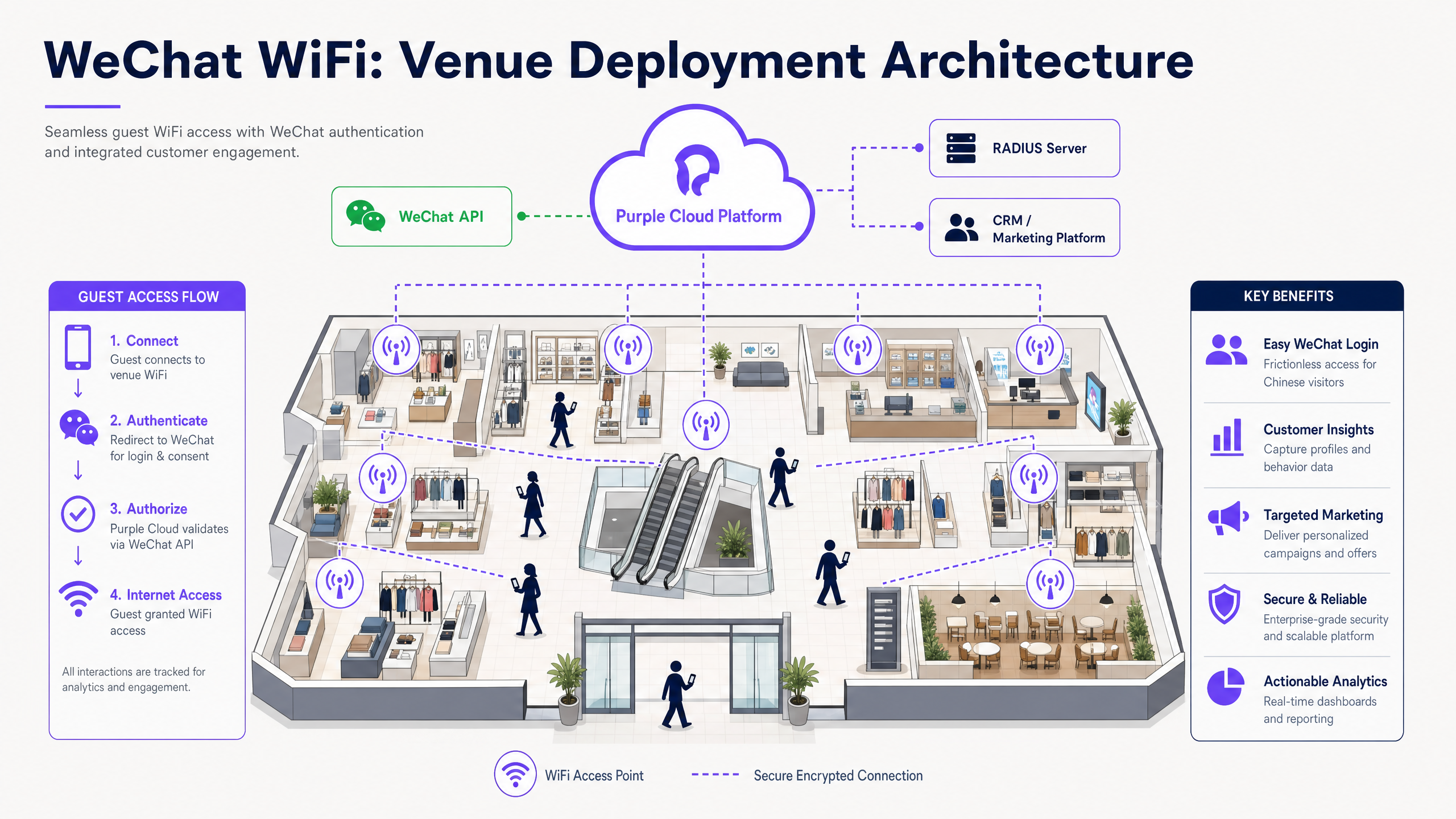
WeChat WiFi लॉगिन समाकलित केल्याने एक मानक Captive Portal हे चिनी अभ्यागत आणि व्यापक WeChat इकोसिस्टमला सेवा देणाऱ्या ठिकाणांसाठी एक धोरणात्मक फर्स्ट-पार्टी डेटा इंजिनमध्ये रूपांतरित होते. IT व्यवस्थापक आणि नेटवर्क आर्किटेक्ट्ससाठी, OAuth 2.0 आणि RADIUS द्वारे WeChat लॉगिन उपयोजित करण्यासाठी सुरक्षित, सुसंगत डेटा संकलनासह अखंड अतिथी प्रवेशाचा समतोल राखणे आवश्यक आहे. हे मार्गदर्शक Cisco Meraki, HPE Aruba, Ruckus आणि Juniper Mist यांसारख्या हार्डवेअरवरील एंटरप्राइझ नेटवर्कवर WeChat WiFi प्रमाणीकरण उपयोजित करण्यासाठी तांत्रिक आर्किटेक्चर, अंमलबजावणीच्या पायऱ्या आणि सुरक्षाविषयक बाबींचे तपशील देते. हे दर्शवते की Purple चे Guest WiFi प्लॅटफॉर्म OAuth फ्लोमध्ये कशी मध्यस्थी करते, प्रोफाइल डेटा तुमच्या CRM शी कसा मॅप करते आणि तुमच्या WeChat Official Account वर लॉगिन-नंतरच्या रिडायरेक्ट्सद्वारे प्रतिबद्धता कशी वाढवते.
WeChat चे १.३ अब्जाहून अधिक मासिक सक्रिय वापरकर्ते आहेत, चिनी पर्यटकांनी २०२३ मध्ये आंतरराष्ट्रीय स्तरावर अंदाजे $२५५ अब्ज खर्च केले आहेत (जागतिक पर्यटन संस्था डेटा). हॉटेल्स, लक्झरी रिटेल, विमानतळ आणि कॉन्फरन्स सेंटर्ससाठी, WeChat WiFi लॉगिन ऑफर करणे हा त्या लोकसंख्येसाठी थेट चॅनेल आहे. Purple ८०,०००+ लाइव्ह ठिकाणांवर कार्यरत आहे आणि २०२४ मध्ये ४४० दशलक्ष लॉगिनची नोंद केली आहे, ज्यामुळे आम्हाला प्रोडक्शन उपयोजनांमध्ये काय यशस्वी होते आणि काय अपयशी ठरते याचे थेट दर्शन घडते.
तांत्रिक सखोल विश्लेषण
WeChat WiFi प्रमाणीकरण कसे कार्य करते
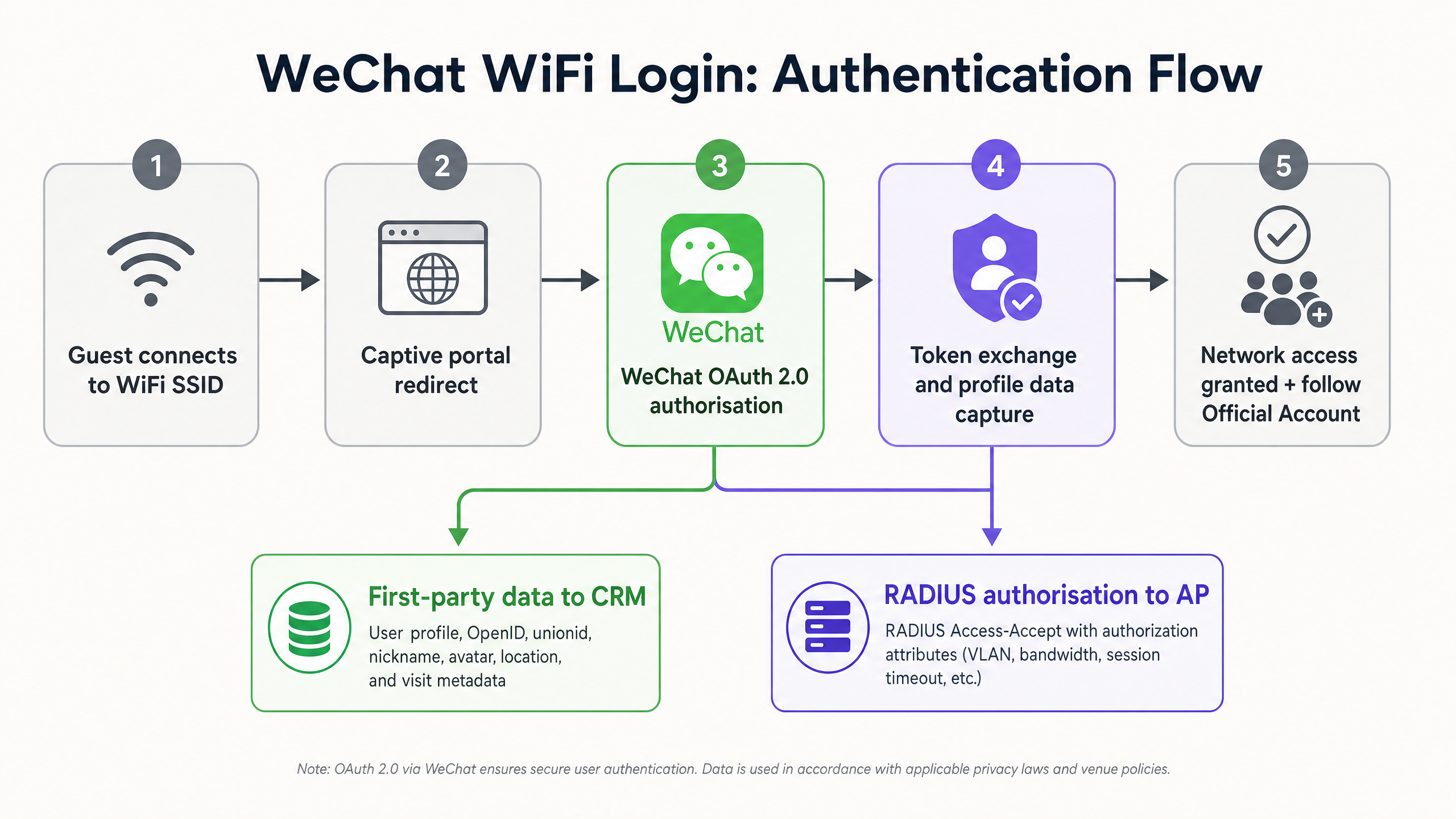
WeChat WiFi प्रमाणीकरण मॅन्युअल फॉर्म एंट्रीला थेट Captive Portal अनुभवामध्ये समाकलित केलेल्या OAuth 2.0 फ्लोसह बदलते. या क्रमामध्ये परिभाषित क्रमाने संवाद साधणारे पाच घटक समाविष्ट आहेत:
- अतिथीचे डिव्हाइस ठिकाणाच्या SSID शी कनेक्ट होते.
- ॲक्सेस पॉइंट अनधिकृत HTTP ट्रॅफिकला अडवतो आणि डिव्हाइसला Purple-होस्ट केलेल्या Captive Portal वर रिडायरेक्ट करतो.
- वापरकर्ता स्प्लॅश पेजवर WeChat लॉगिन पर्याय निवडतो.
- पोर्टल WeChat ओपन प्लॅटफॉर्म API कडे OAuth 2.0 ऑथोरायझेशन विनंती सुरू करते, ज्यामध्ये ठिकाणाचा AppID आणि रिडायरेक्ट URI पाठवला जातो.
- डिव्हाइसवर WeChat ॲप उघडते आणि वापरकर्त्याला कनेक्शन अधिकृत करण्यास सांगते.
- WeChat रिडायरेक्ट URI वर ऑथोरायझेशन कोड परत पाठवते.
- Purple प्लॅटफॉर्म ॲक्सेस टोकनसाठी कोडची देवाणघेवाण करतो आणि वापरकर्त्याचा प्रोफाइल डेटा मिळवतो: OpenID, unionid, टोपणनाव, अवतार आणि नोंदणीकृत स्थान.
- Purple ॲक्सेस पॉइंटला Access-Accept संदेश जारी करण्यासाठी RADIUS सर्व्हरला सिग्नल पाठवते.
- ॲक्सेस पॉइंट इंटरनेट प्रवेश मंजूर करतो आणि कॉन्फिगर केलेली धोरणे लागू करतो (VLAN असाइनमेंट, बँडविड्थ मर्यादा, सत्र कालबाह्यता).
- पोर्टल वापरकर्त्याला ठिकाणाच्या WeChat Official Account किंवा लक्ष्यित लँडिंग पेजवर रिडायरेक्ट करते.
खाते प्रकार आवश्यकता
WeChat WiFi उपयोजनांमध्ये हे सर्वात सामान्य अपयशाचे कारण आहे. तुम्ही सत्यापित WeChat Service Account (服务号) वापरणे आवश्यक आहे. Subscription accounts (订阅号) Captive Portal एकत्रीकरणासाठी आवश्यक असलेले OAuth 2.0 वेबपेज ऑथोरायझेशन API उघड करत नाहीत. खालील तक्ता मुख्य फरक दर्शवतो:
| वैशिष्ट्य | Service Account (服务号) | Subscription Account (订阅号) |
|---|---|---|
| OAuth 2.0 WiFi लॉगिन | होय | नाही |
| API प्रवेश पातळी | पूर्ण | मर्यादित |
| दरमहा पुश संदेश | ४ | ३० |
| संपर्क म्हणून दिसते | होय | फोल्डरमध्ये गटबद्ध |
| WeChat Pay एकत्रीकरण | होय | नाही |
| पडताळणी आवश्यक | होय | होय |
सत्यापित Service Account मिळवण्यासाठी चिनी व्यवसाय परवाना किंवा Tencent द्वारे विशेष परदेशी अर्ज प्रक्रिया आवश्यक आहे, ज्यासाठी $९९ वार्षिक पडताळणी शुल्क आणि दोन ते चार आठवड्यांचा पुनरावलोकन कालावधी लागतो.
Walled garden: सर्वात गंभीर नेटवर्क कॉन्फिगरेशन
Walled garden (ज्याला प्री-ऑथेंटिकेशन व्हाइटलिस्ट देखील म्हटले जाते) हे परिभाषित करते की एखादे डिव्हाइस Captive Portal प्रमाणीकरण पूर्ण करण्यापूर्वी कोणत्या IP पत्त्यांवर आणि डोमेनवर पोहोचू शकते. जर WeChat API डोमेन walled garden मध्ये नसतील, तर डिव्हाइस OAuth हँडशेक सुरू करू शकत नाही आणि लॉगिन कोणत्याही सूचनेशिवाय अपयशी ठरते.
किमान, खालील डोमेन व्हाइटलिस्ट केलेले असणे आवश्यक आहे:
*.weixin.qq.com*.wechat.com*.wx.qq.comres.wx.qq.commp.weixin.qq.com- WeChat CDN IP ranges (Tencent च्या प्रकाशित IP श्रेणी दस्तऐवजाचा सल्ला घ्या, कारण हे वेळोवेळी बदलतात)
Cisco Meraki वर, हे Wireless > Access Control > Walled Garden अंतर्गत कॉन्फिगर करा. HPE Aruba वर, Captive Portal Profile व्हाइटलिस्ट वापरा. Juniper Mist वर, Guest Portal अनुमत डोमेन सूची कॉन्फिगर करा.
RADIUS एकत्रीकरण आणि धोरण अंमलबजावणी
Purple या आर्किटेक्चरमध्ये RADIUS प्रॉक्सी म्हणून काम करते. यशस्वी WeChat OAuth एक्सचेंज नंतर, Purple ठिकाणाच्या वायरलेस कंट्रोलरला RADIUS Access-Accept संदेश पाठवते. Access-Accept संदेश प्रति-वापरकर्ता धोरणे लागू करण्यासाठी मानक RADIUS गुणधर्म वाहून नेऊ शकतो:
- VLAN असाइनमेंटसाठी
Tunnel-TypeआणिTunnel-Private-Group-ID(IEEE 802.1X विभागणी सर्वोत्तम पद्धतींनुसार कॉर्पोरेट नेटवर्कपासून अतिथी ट्रॅफिक वेगळे करणे) - परिभाषित कालावधीनंतर स्वयंचलित डिस्कनेक्शनसाठी
Session-Timeout - बँडविड्थ थ्रॉटलिंगसाठी
WISPr-Bandwidth-Max-UpआणिWISPr-Bandwidth-Max-Down
हे आर्किटेक्चर हार्डवेअर-अज्ञेयवादी आहे. Purple फर्मवेअर बदल किंवा अतिरिक्त ऑन-प्रिमाइसेस सर्व्हरची आवश्यकता नसताना Cisco Meraki, HPE Aruba, Ruckus, Juniper Mist, Ubiquiti UniFi, Cambium, Extreme आणि Fortinet सह समाकलित होते.
अंमलबजावणी मार्गदर्शक
पायरी १: WeChat डेव्हलपर खाते कॉन्फिगर करा
mp.weixin.qq.com वर WeChat Official Account Platform वर लॉग इन करा. Settings > Security Cent वर जा.re > Webpage Authorisation**. OAuth 2.0 वेबपेज ऑथरायझेशन सक्षम करा आणि तुमचे Captive Portal डोमेन अधिकृत कॉलबॅक डोमेन म्हणून जोडा (उदा., wifi.yourvenue.com). WeChat केवळ येथे नोंदणीकृत असलेल्या डोमेनवरच ऑथरायझेशन कोड पाठवेल - विसंगती असल्यास कोणतीही सूचना न मिळता प्रक्रिया अयशस्वी होईल.
Development > Basic Configuration पॅनेलमधून तुमचे AppID आणि AppSecret मिळवा. AppSecret सुरक्षितपणे स्टोअर करा; याला प्रायव्हेट की (private key) प्रमाणे हाताळा.
पायरी २: Purple कॉन्फिगर करा
Purple पोर्टलमध्ये, Authentication > Social Login वर जा आणि WeChat सक्षम करा. AppID आणि AppSecret प्रविष्ट करा. Purple च्या ड्रॅग-अँड-ड्रॉप एडिटरचा वापर करून Captive Portal स्प्लॅश पेज डिझाइन करा. WeChat लॉगिन बटण हे स्क्रीनवर वरच्या भागात (above the fold) मुख्य कॉल टू ॲक्शन बनवा.
ऑथेंटिकेशननंतरचे रिडायरेक्ट कॉन्फिगर करा. पर्यायांमध्ये खालील गोष्टींचा समावेश आहे:
- ठिकाणाचे WeChat ऑफिशियल अकाउंट फॉलो पेज (वापरकर्त्यांना व्यस्त ठेवण्यासाठी शिफारस केलेले)
- WeChat मिनी प्रोग्राममध्ये होस्ट केलेले प्रमोशनल लँडिंग पेज
- Purple च्या WiFi Analytics साधनांचा वापर करणारे सर्वेक्षण पेज
- लॉयल्टी प्रोग्राम नोंदणी पेज
Authentication > Return Visitor Settings अंतर्गत MAC ॲड्रेस कॅशिंग सक्षम करा. तुमच्या सामान्य भेट वारंवारतेशी जुळण्यासाठी कॅश कालावधी सेट करा (रिटेलसाठी सात दिवस, हॉस्पिटॅलिटीसाठी ३० दिवस). परत येणारे अभ्यागत पुन्हा पोर्टल न पाहता आपोआप कनेक्ट होतील, तर त्यांची भेट अद्याप ॲनालिटिक्स डॅशबोर्डमध्ये नोंदवली जाईल.
पायरी ३: नेटवर्क हार्डवेअर कॉन्फिगर करा
तुमच्या वायरलेस कंट्रोलरवर, एक्सटर्नल Captive Portal वापरण्यासाठी गेस्ट SSID कॉन्फिगर करा. स्प्लॅश पेज URL म्हणून Purple पोर्टल URL प्रविष्ट करा. WeChat डोमेन्स वॉल्ड गार्डन (walled garden) मध्ये जोडा. Purple द्वारे प्रदान केलेले RADIUS सर्व्हर IP ॲड्रेस आणि शेअर्ड सिक्रेट्स सेट करा.
लाइव्ह जाण्यापूर्वी मोबाईल डिव्हाइसवरून संपूर्ण प्रवाहाची चाचणी घ्या. विशेषतः:
- गेस्ट SSID शी कनेक्ट करा.
- Captive Portal Assistant (CPA) मिनी-ब्राउझरमध्ये Captive Portal लोड होत असल्याची खात्री करा.
- WeChat लॉगिन बटणावर टॅप करा आणि WeChat ॲप उघडत असल्याची खात्री करा.
- कनेक्शन अधिकृत करा आणि इंटरनेट ॲक्सेस मंजूर झाल्याची खात्री करा.
- लॉगिननंतरचे रिडायरेक्ट योग्यरित्या कार्य करत असल्याची खात्री करा.
सर्वोत्तम पद्धती
वॉल्ड गार्डन ऑप्टिमाइझ करा. चुकीच्या पद्धतीने कॉन्फिगर केलेले वॉल्ड गार्डन हे प्रोडक्शनमध्ये WeChat लॉगिन अयशस्वी होण्याचे मुख्य कारण आहे. लाँच करण्यापूर्वी त्याची चाचणी घ्या आणि कोणत्याही नेटवर्क फर्मवेअर अपडेटनंतर पुन्हा चाचणी घ्या, कारण काही कंट्रोलर्स अपग्रेड दरम्यान व्हाइटलिस्ट नोंदी रिसेट करतात.
लॉगिननंतरची व्यस्तता वाढवा. ऑथेंटिकेशननंतरचा क्षण हा गेस्ट WiFi प्रवासातील सर्वात जास्त लक्ष वेधून घेणारा बिंदू असतो. वापरकर्त्यांना तुमच्या ऑफिशियल अकाउंट फॉलो पेजवर रिडायरेक्ट करा. तुमच्या अकाउंटला फॉलो करणाऱ्या गेस्टशी ते ठिकाण सोडून गेल्यानंतरही पुश नोटिफिकेशनद्वारे संपर्क साधता येतो.
परत येणाऱ्या अभ्यागतांसाठी MAC कॅशिंग लागू करा. प्रत्येक भेटीवर वारंवार ऑथेंटिकेशन आवश्यक केल्याने अनुभवाचा दर्जा घसरतो. MAC कॅशिंग परत येणाऱ्या पाहुण्यांसाठीचा अडथळा दूर करते आणि त्याच वेळी ॲनालिटिक्ससाठी भेटीची नोंद देखील ठेवते. ड्वेल टाइम (dwell time) आणि रिटर्न व्हिजिट रिपोर्टिंगसाठी Purple चे WiFi Analytics पहा.
डेटा मिनिमायझेशन (किमान डेटा गोळा करणे) लागू करा. तुमचे CRM प्रत्यक्षात वापरत असलेल्या केवळ WeChat प्रोफाइल फील्ड्सची विनंती करा. अनावश्यक परवानग्यांची विनंती केल्याने ऑथरायझेशन सोडून देण्याचे प्रमाण वाढते आणि GDPR अनुपालन अधिक क्लिष्ट होते. बहुतेक ठिकाणांसाठी, वैयक्तिकरणासाठी OpenID, टोपणनाव (nickname) आणि अवतार (avatar) पुरेसे आहेत.
VLAN द्वारे गेस्ट ट्रॅफिकचे वर्गीकरण करा. WeChat-ऑथेंटिकेट केलेल्या गेस्टना तुमच्या कॉर्पोरेट किंवा POS नेटवर्कपासून वेगळ्या असलेल्या समर्पित VLAN वर नियुक्त करा. हे PCI DSS नेटवर्क वर्गीकरण आवश्यकता पूर्ण करते आणि कोणत्याही गेस्ट-साइड सुरक्षा घटनेचा प्रभाव मर्यादित करते. WiFi सुरक्षा आर्किटेक्चरच्या संपूर्ण माहितीसाठी, आमचे एंटरप्राइझ WiFi सुरक्षा मार्गदर्शक पहा.
GDPR आणि PIPL चे पालन करा. वापरकर्त्याने WeChat OAuth प्रवाह सुरू करण्यापूर्वी स्प्लॅश पेजवर स्पष्ट गोपनीयता सूचना प्रदर्शित करा. या सूचनेमध्ये डेटा कंट्रोलरची ओळख पटवणे, WeChat कडून गोळा केलेल्या डेटाच्या श्रेणींची यादी करणे, प्रचलनाचा कायदेशीर आधार सांगणे आणि संपूर्ण गोपनीयता धोरणाची लिंक देणे आवश्यक आहे. तपशीलवार मार्गदर्शनासाठी, आमचे WiFi GDPR अनुपालन मार्गदर्शक पहा.
त्रुटी निवारण आणि जोखीम कमी करणे
OAuth रिडायरेक्ट विसंगती
जर WeChat डेव्हलपर कन्सोलमध्ये नोंदणीकृत असलेला कॉलबॅक URL, Purple रिडायरेक्टसाठी वापरत असलेल्या URL शी तंतोतंत जुळत नसेल, तर WeChat एरर कोड दाखवते आणि ऑथरायझेशन ब्लॉक करते. प्रोटोकॉल विसंगती (HTTP विरुद्ध HTTPS), शेवटी असलेले स्लॅश आणि सबडोमेन फरक तपासा. नोंदणीकृत डोमेन तंतोतंत जुळणारे असणे आवश्यक आहे.
Captive Portal Assistant (CPA) हस्तक्षेप
मोबाईल ऑपरेटिंग सिस्टीम कॅप्टिव्ह नेटवर्क शोधण्यासाठी आणि हाताळण्यासाठी CPA मिनी-ब्राउझर वापरतात. या मिनी-ब्राउझरमध्ये सहसा मूळ (native) ॲप्स उघडण्याची क्षमता नसते, ज्यामुळे OAuth प्रवाहातील WeChat ॲप कॉलआउट खंडित होते. जोखीम कमी करण्याच्या पर्यायांमध्ये खालील गोष्टींचा समावेश आहे:
- JavaScript रिडायरेक्ट लागू करणे जे CPA वातावरण शोधते आणि OAuth प्रवाह सुरू करण्यापूर्वी संपूर्ण सिस्टम ब्राउझर उघडते.
- जर WeChat बटण प्रतिसाद देत नसेल, तर वापरकर्त्यांना त्यांचे पेज संपूर्ण ब्राउझरमध्ये उघडण्यास सांगणारी स्पष्ट सूचना स्प्लॅश पेजवर प्रदर्शित करणे.
टोकनची मुदत संपणे आणि जुने सेशन्स
WeChat ॲक्सेस टोकनची मुदत दोन तासांनंतर संपते. जर तुमचे प्लॅटफॉर्म टोकन रिफ्रेश करत नसेल, तर सुरुवातीच्या सेशननंतर वापरकर्त्याचे CRM रेकॉर्ड अपडेट होणे थांबेल. गेस्टच्या वास्तव्यादरम्यान सक्रिय टोकन राखण्यासाठी Purple चे टोकन रिफ्रेश सेटिंग्ज कॉन्फिगर करा.
भू-राजकीय आणि नियामक जोखीम
WeChat हे चीनी सरकारचे नियम आणि Tencent च्या प्लॅटफॉर्म धोरणांच्या अधीन आहे. API ॲक्सेस कोणत्याही पूर्वसूचनेशिवाय निलंबित किंवा सुधारित केला जाऊ शकतो. तुमचे Captive Portal एकाधिक ऑथेंटिकेशन पद्धतींना (ईमेल, SMS, इतर सोशल लॉगिन) सपोर्ट करते याची खात्री करून ही जोखीम कमी करा, जेणेकरून WeChat API आउटेजमुळे तुमचे संपूर्ण गेस्ट WiFi ऑफलाइन होणार नाही. Purple चे मल्टी-मेथड पोर्टल या फॉलबॅक आर्किटेक्चरला मूळतः सपोर्ट करते.
ROI आणि व्यावसायिक प्रभाव
WeChat WiFi ऑथेंटिकेशन तैनात केल्याने तीन घटकांमध्ये मोजण्यायोग्य परतावा मिळतो.
डेटा कॅप्चर दरात वाढ. सोशल लॉगयामुळे फॉर्म भरण्याचा त्रास कमी होतो. Purple चे सोशल लॉगिन पर्याय वापरणारी ठिकाणे केवळ-ईमेल पोर्टलच्या तुलनेत २०-३०% जास्त ऑथेंटिकेशन पूर्णत्वाचा दर नोंदवतात (Purple अंतर्गत डेटा, २०२४). दररोज ५०० अतिथी WiFi कनेक्शन्स प्रक्रिया करणाऱ्या ठिकाणी, २५% वाढीचा अर्थ दररोज १२५ अतिरिक्त सत्यापित प्रोफाइल्स मिळवणे असा होतो.
Official Account फॉलोअर्समधील वाढ. ऑथेंटिकेट केलेल्या युजर्सना Official Account फॉलो पेजवर रिडायरेक्ट केल्याने तात्पुरत्या येणाऱ्या ग्राहकांचे (footfall) रूपांतर एका संपर्क साधता येण्याजोग्या डिजिटल प्रेक्षकांमध्ये होते. दररोज २०० WeChat-ऑथेंटिकेट अतिथी असणारे हॉटेल, ४०% फॉलो दर मिळवून, दररोज ८० नवीन Official Account फॉलोअर्स जोडते - हे असे फॉलोअर्स आहेत ज्यांना पुन्हा भेट देण्याच्या ऑफर्स, लॉयल्टी प्रोग्राम अपडेट्स आणि हंगामी जाहिरातींबद्दल लक्ष्यित पुश नोटिफिकेशन्स पाठवले जाऊ शकतात.
ऑपरेशनल दृश्यमानता. Purple चे WiFi Analytics प्लॅटफॉर्म WeChat-ऑथेंटिकेट सेशन्सचा संबंध ड्वेल टाइम (dwell time), भेटींची वारंवारता आणि झोन-स्तरीय हालचालींच्या डेटाशी जोडते. यामुळे ठिकाणच्या ऑपरेशन्स डायरेक्टर्सना कर्मचारी संख्या, मांडणी (layout) आणि जाहिरातींची वेळ अनुकूल करण्यासाठी आवश्यक डेटा मिळतो. हॉस्पिटॅलिटी ठिकाणांसाठी, अतिथी प्रोफाइल्स अधिक समृद्ध करण्यासाठी हा डेटा थेट PMS सिस्टम्सशी जोडला जातो.
रिटेल वातावरणासाठी, WeChat ऑथेंटिकेशन आणि Purple च्या ॲनालिटिक्स प्लॅटफॉर्मचे संयोजन प्रत्यक्ष स्टोअरच्या संदर्भात ई-कॉमर्सच्या डेटा समृद्धतेची प्रतिकृती तयार करते - ही एक अशी क्षमता आहे जी थर्ड-पार्टी कुकीज बंद झाल्यामुळे डिजिटल रिटार्गेटिंगची प्रभावीता कमी होत असताना अधिकाधिक मौल्यवान बनते.
संबंधित मार्गदर्शनासाठी, आमचे WiFi GDPR अनुपालन मार्गदर्शक आणि आमचे एंटरप्राइझ WiFi सुरक्षा मार्गदर्शक पहा. Purple विशिष्ट क्षेत्रांमध्ये कसे कार्य करते हे जाणून घेण्यासाठी, आमची हॉस्पिटॅलिटी , रिटेल , हेल्थकेअर आणि ट्रान्सपोर्ट साठीची पृष्ठे पहा.
महत्वाच्या व्याख्या
OAuth 2.0
An industry-standard authorisation protocol that allows a user to grant a third-party application access to their account data on another service without sharing their password. In WeChat WiFi authentication, the captive portal is the third-party application and WeChat is the identity provider.
The underlying mechanism for all social WiFi login. IT teams encounter it when configuring the AppID, AppSecret, and redirect URI in the WeChat developer console and the Purple platform.
Captive portal
A web page that intercepts a device's network traffic and requires the user to authenticate or accept terms before granting internet access. It operates by redirecting all HTTP requests to the portal URL until authentication is complete.
The user-facing component of the WeChat WiFi login system. Purple hosts and manages the captive portal as a cloud overlay on top of the venue's existing hardware.
Walled garden
A pre-authentication whitelist of IP addresses and domains that a device can reach before completing captive portal login. Required to allow the device to communicate with WeChat's authentication servers during the OAuth flow.
The most commonly misconfigured element in WeChat WiFi deployments. Must be configured at the SSID level on the wireless controller.
RADIUS
Remote Authentication Dial-In User Service. A networking protocol providing centralised authentication, authorisation, and accounting for network access. After a successful WeChat OAuth exchange, Purple sends a RADIUS Access-Accept message to the access point to grant internet access.
The protocol that connects the Purple identity platform to the venue's network hardware. IT teams configure RADIUS server IP addresses and shared secrets in the wireless controller.
WeChat Service Account (服务号)
A category of WeChat Official Account designed for businesses, offering full API access including OAuth 2.0 webpage authorisation. Appears as a contact in the user's chat list. Requires Chinese business registration or overseas verification.
The mandatory account type for WeChat WiFi login. Subscription accounts cannot be used for this purpose.
OpenID
A unique identifier assigned by WeChat to a specific user for a specific Official Account. Two different Official Accounts will receive different OpenIDs for the same user.
The primary key used by the CRM to identify and track individual users across WiFi sessions.
Unionid
A unique identifier assigned by WeChat to a specific user across all Official Accounts and Mini Programs registered under the same WeChat open platform account. Allows cross-product user recognition.
Relevant for brands with multiple WeChat touchpoints (e.g., a retail chain with both a WiFi portal and a shopping Mini Program) that want to unify the user profile across all interactions.
MAC address caching
A network feature that stores a device's unique hardware identifier (MAC address) after initial authentication, allowing the network to automatically grant access on subsequent connections without presenting the captive portal again.
Used to improve the return visitor experience. Purple logs the return visit for analytics even when the portal is not displayed.
Captive Portal Assistant (CPA)
The mini-browser automatically launched by iOS and Android when they detect a network requiring captive portal authentication. CPAs have limited functionality and may not support native app callouts required for the WeChat OAuth flow.
IT teams must test the WeChat login flow specifically within the CPA environment and implement JavaScript detection to redirect to the full system browser if necessary.
VLAN
Virtual Local Area Network. A logical network segment that isolates traffic from other segments on the same physical infrastructure. Used to separate guest WiFi traffic from corporate or POS networks.
RADIUS attributes returned by Purple can assign WeChat-authenticated guests to a specific VLAN, satisfying PCI DSS network segmentation requirements.
सोडवलेली उदाहरणे
A luxury retail brand in London wants to offer seamless WiFi to Chinese tourists while increasing followers on their WeChat Official Account. They currently use Cisco Meraki access points and a standard email-capture portal. Their IT team has two weeks to deploy before a major Chinese New Year campaign.
Week one: Register and verify a WeChat Service Account if not already in place (allow two to four weeks for Tencent approval, so this step should have started earlier - if not, use a verified third-party Chinese entity as an interim measure). Configure the WeChat developer console with the callback domain matching the Purple portal URL. In the Purple platform, enable WeChat social login, input the AppID and AppSecret, and design the splash page with WeChat as the primary login option. Configure the post-authentication redirect to the brand's WeChat Official Account follow page. Week two: In the Meraki dashboard, update the guest SSID to point to the Purple portal URL. Add all WeChat API domains to the Meraki walled garden under Wireless > Access Control. Set RADIUS server details. Test the full flow end-to-end from an iOS and Android device. Enable MAC caching for 30-day return visitor recognition. Go live.
A 15,000-capacity stadium is hosting a series of international events with significant Chinese-speaking attendees. The IT director reports that 35% of guests abandon the WiFi login form before completing it. The network runs HPE Aruba access points managed via Aruba Central.
Deploy Purple's captive portal with WeChat as the primary social login option alongside email and SMS fallbacks. Configure the Aruba Central captive portal profile to redirect to Purple and add WeChat domains to the allowed list. Implement a JavaScript CPA detection script on the splash page to force the OAuth flow into the native system browser, bypassing the Aruba CPA mini-browser. Configure RADIUS attributes to assign authenticated fans to a dedicated guest VLAN, isolated from the stadium's operational network. Set session timeout to four hours to cover a typical event duration without requiring re-authentication. Post-authentication, redirect fans to a WeChat Mini Program hosting the event programme, live scores, and a food ordering service.
सराव प्रश्न
Q1. Your venue's new WeChat WiFi login is failing. Guests tap the WeChat button on the splash page, but the page times out before the WeChat app opens. The Cisco Meraki dashboard shows the SSID is online and the Purple portal URL is correctly configured. What is the most likely cause and how do you fix it?
टीप: Consider what network access the device has before it completes authentication.
नमुना उत्तर पहा
The walled garden on the Meraki SSID is misconfigured. The device cannot reach WeChat's API domains before authentication, so the OAuth handshake cannot initiate. Fix: navigate to Wireless > Access Control in the Meraki dashboard, locate the Walled Garden section, and add the required WeChat domains including *.weixin.qq.com, *.wechat.com, and *.wx.qq.com. Test by attempting the login flow again from a device that has not previously connected to the SSID.
Q2. A marketing director wants to use their existing WeChat Subscription Account (订阅号) to enable WiFi login because it allows daily article publishing to followers. They ask you to configure the integration. How do you respond?
टीप: Review the API access levels for different WeChat account types.
नमुना उत्तर पहा
Advise them that a Subscription Account cannot be used for WiFi authentication. The OAuth 2.0 webpage authorisation APIs required for captive portal integration are only available to verified Service Accounts (服务号). They will need to register a Service Account. This requires a Chinese business licence or an overseas application through Tencent's special process, which takes two to four weeks and costs $99 annually. The Subscription Account can remain active for content publishing; the two account types serve different purposes and can coexist.
Q3. After a successful WeChat WiFi deployment, the IT team notices that users who authenticated three weeks ago are no longer appearing in the CRM with updated visit data, even though they are connecting to the network. What is the likely cause?
टीप: Consider the session management settings configured in Purple and the MAC cache duration.
नमुना उत्तर पहा
The MAC cache duration is likely set to a value shorter than three weeks (e.g., 14 days), so returning users are being granted access via MAC cache without triggering a new authentication event or CRM update. Alternatively, the WeChat access token for those users has expired and the platform is not refreshing it. Fix: extend the MAC cache duration to 30 days in Purple's return visitor settings, and ensure the token refresh configuration is active. Also confirm that Purple is logging MAC-cached visits as return visit events in the analytics dashboard, even when the portal is not displayed.
Q4. Your venue operates in both the UK and mainland China. You want to deploy a unified WeChat WiFi authentication system. What compliance obligations must you address before going live?
टीप: Two distinct privacy regimes apply to the two geographies.
नमुना उत्तर पहा
You must comply with both GDPR (applicable to users in the UK and EU) and China's Personal Information Protection Law (PIPL, applicable to users in mainland China). Key requirements include: displaying a clear privacy notice on the splash page before initiating the OAuth flow, identifying the data controller and listing the categories of data collected from WeChat, stating the legal basis for processing under each regime (legitimate interests or consent under GDPR; consent under PIPL), providing a mechanism for users to withdraw consent and request deletion, and ensuring data transfer mechanisms are in place if WeChat profile data flows between jurisdictions. Consult Purple's GDPR compliance guide and your legal counsel for jurisdiction-specific requirements.
या मालिकेमध्ये पुढे वाचा
सुरक्षित एंटरप्राइझ WiFi आणि BYOD प्रोव्हिजनिंगसाठी SCEP कसे कॉन्फिगर करावे
ही तांत्रिक मार्गदर्शिका सुरक्षित 802.1X एंटरप्राइझ WiFi ऑथेंटिकेशन आणि BYOD प्रोव्हिजनिंग स्वयंचलित करण्यासाठी सिंपल सर्टिफिकेट एनरोलमेंट प्रोटोकॉल (SCEP) कसे कॉन्फिगर करावे हे स्पष्ट करते. हे नेटवर्क आर्किटेक्ट्स आणि IT व्यवस्थापकांना एक निश्चित डिप्लोयमेंट सिक्वेन्स, हॉस्पिटॅलिटी आणि रिटेलमधील वास्तविक अंमलबजावणीची उदाहरणे आणि एंटरप्राइझ नेटवर्कमधून असुरक्षित प्री-शेअर्ड कीज (PSKs) आणि MAC ऑथेंटिकेशन बायपास (MAB) काढून टाकण्यासाठी जोखीम कमी करण्याच्या रणनीती प्रदान करते.
Ruijie Networks वर Guest WiFi आणि Captive Portals कसे कॉन्फिगर करावे
हे तांत्रिक मार्गदर्शक Ruijie Networks हार्डवेअरवर guest WiFi आणि captive portals च्या कॉन्फिगरेशनचे तपशील देते, ज्यामध्ये नेटिव्ह क्लाउड पोर्टल्स आणि बाह्य RADIUS इंटिग्रेशन्स दोन्हीचा समावेश आहे. हे IT व्यवस्थापक आणि नेटवर्क आर्किटेक्ट्सना VLAN आयसोलेशन, वॉल्ड गार्डन सेटअप आणि विश्लेषण व महसूल वाढवण्यासाठी थर्ड-पार्टी प्लॅटफॉर्म इंटिग्रेशनसाठी कृतीयोग्य पायऱ्या प्रदान करते.
Captive Portals साठी WeChat OAuth ऑथेंटिकेशन कसे कॉन्फिगर करावे
हे तांत्रिक मार्गदर्शक Captive Portals साठी WeChat OAuth ऑथेंटिकेशन कसे कॉन्फिगर करावे हे स्पष्ट करते. हे चिनी अभ्यागतांकडून सुरक्षितपणे फर्स्ट-पार्टी डेटा गोळा करण्यासाठी आवश्यक असणारे प्लॅटफॉर्म रजिस्ट्रेशन, OAuth 2.0 फ्लो, स्कोप निवड आणि नेटवर्क एन्फोर्समेंट मेकॅनिझम सविस्तरपणे स्पष्ट करते.