
हाय-डेन्सिटी WiFi नेटवर्क्सवर लेटन्सी कमी करणे
हा मार्गदर्शक ट्रॅकिंग डोमेन्ससाठी अनावश्यक DNS लूकअप्स काढून टाकल्याने हाय-डेन्सिटी WiFi नेटवर्क्सवरील लेटन्सी कशी लक्षणीयरीत्या कमी होते याचा तपशील देतो. हे गर्दीच्या ठिकाणी व्यवस्थापन करणाऱ्या IT लीडर्ससाठी उपयुक्त आर्किटेक्चर, अंमलबजावणी आणि ROI मार्गदर्शन प्रदान करते.
Video overview
हे मार्गदर्शक ऐका
पॉडकास्ट ट्रान्सक्रिप्ट पहा
आमच्या मुख्य मालिकेचा भाग: Guest WiFi मार्गदर्शक →
Executive Summary

Hospitality ठिकाणे, स्टेडियम आणि Retail इस्टेट्स सारख्या हाय-डेन्सिटी वातावरणाचे व्यवस्थापन करणाऱ्या CTOs आणि नेटवर्क आर्किटेक्ट्ससाठी, लेटन्सी ही सहसा केवळ RF किंवा बॅकहॉल समस्या म्हणून चुकीची समजली जाते. तथापि, आधुनिक WiFi नेटवर्कवरील लेटन्सीचा एक मोठा टक्के हिस्सा DNS लेयरमधून उद्भवतो. जेव्हा एखादा वापरकर्ता तुमच्या Guest WiFi शी कनेक्ट होतो, तेव्हा एका पेज लोडमुळे २० ते ७० DNS क्वेरी सुरू होऊ शकतात, प्रामुख्याने थर्ड-पार्टी ट्रॅकिंग पिक्सेल, जाहिरात नेटवर्क आणि टेलिमेट्री बीकन्ससाठी. गर्दीच्या ठिकाणी, हे 'DNS क्वेरी वादळ' निर्माण करते जे स्थानिक रिझोल्व्हर्सना ब्लॉक करते आणि मौल्यवान एअरटाइम वापरते.
एजवर आक्रमक स्थानिक DNS कॅशिंग लागू करून आणि ट्रॅकिंग डोमेन्स फिल्टर करून, ठिकाणे अनावश्यक विनंत्यांसाठी त्वरित NXDOMAIN परत करू शकतात. हा दृष्टिकोन सार्वजनिक इंटरनेटच्या येण्या-जाण्याच्या फेऱ्या (round-trips) काढून टाकतो, ज्यामुळे जाणवणारी लेटन्सी ८७% पर्यंत कमी होते. हे मार्गदर्शक DNS-ऑप्टिमाइझ केलेले WiFi तैनात करण्यासाठी तांत्रिक आर्किटेक्चर आणि अंमलबजावणी फ्रेमवर्क प्रदान करते, ज्यामुळे वापरकर्त्याचा अनुभव सुधारतो, सपोर्ट तिकिटे कमी होतात आणि अखंड WiFi Analytics डेटा कॅप्चर सुनिश्चित होते.
Technical Deep-Dive
Anatomy of a DNS Query Storm
802.11ax (WiFi 6/6E) चालवणाऱ्या हाय-डेन्सिटी उपयोजनांमध्ये, OFDMA आणि BSS कलरिंग सारख्या कार्यक्षमता यंत्रणा को-चॅनल हस्तक्षेप व्यवस्थापित करण्यासाठी आणि एअरटाइम ऑप्टिमाइझ करण्यासाठी डिझाइन केल्या आहेत. तथापि, या यंत्रणा असे गृहीत धरतात की रेडिओ माध्यम वास्तविक वापरकर्ता डेटा प्रसारित करत आहे. जेव्हा एखाद्या हॉटेलमधील ३,००० अतिथी किंवा स्टेडियममधील १०,००० चाहते एकाच वेळी वेब पेजेस लोड करण्याचा प्रयत्न करतात, तेव्हा बिगर-आवश्यक डोमेन्ससाठी (उदा. ad-tracker.com, analytics.thirdparty.net) DNS क्वेरींचे प्रचंड प्रमाण प्रचंड ओव्हरहेड निर्माण करते.
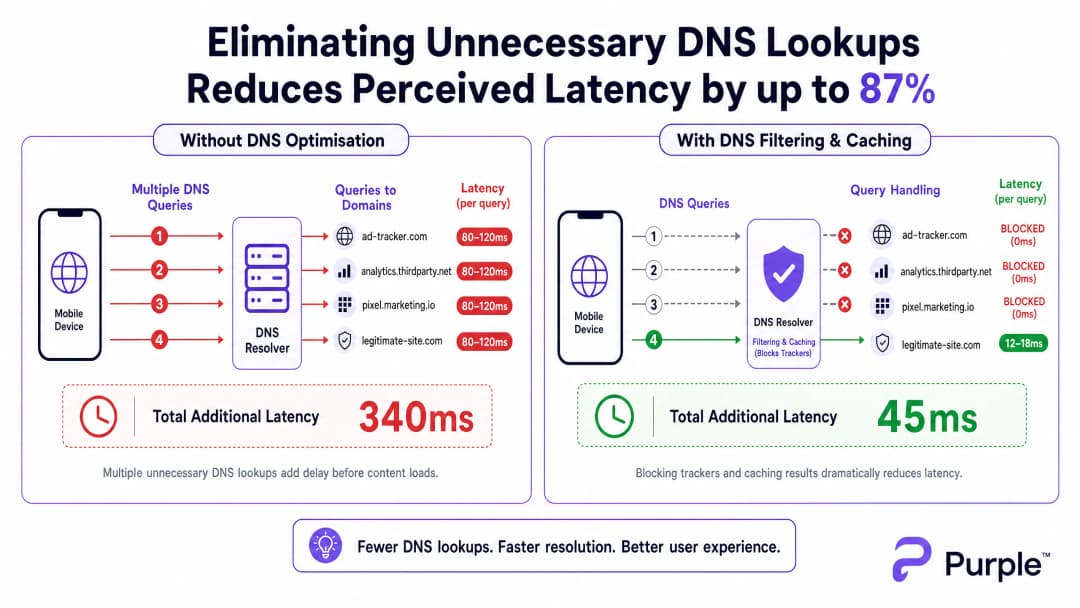
बाह्य रिझोल्व्हरकडे (जसे की ISP चे डीफॉल्ट DNS किंवा Google चे 8.8.8.8) पाठवलेल्या प्रत्येक DNS क्वेरीसाठी गर्दीच्या नेटवर्कवर ८०-१५०ms चा राउंड-ट्रिप वेळ लागतो. जर एखाद्या पेजला सामग्री रेंडर करण्यापूर्वी १५ ट्रॅकिंग डोमेन लुकअपची आवश्यकता असेल, तर वापरकर्त्याला एका सेकंदापेक्षा जास्त 'अदृश्य' विलंबाचा अनुभव येतो. ही थ्रुपुटची समस्या नाही; ही एक ट्रान्झॅक्शनल अडचण आहे.
Architecture for Edge Resolution
हे कमी करण्यासाठी, आर्किटेक्चरने रिझोल्यूशन नेटवर्क एजकडे स्थलांतरित केले पाहिजे. आक्रमक TTL कॅशेसह स्थानिक DNS रिझोल्व्हर तैनात केल्याने वैध, वारंवार विनंती केलेले डोमेन ५ms पेक्षा कमी वेळेत रिझोल्व्ह होतात याची खात्री होते.

महत्त्वाचे म्हणजे, या resolver ने ट्रॅकिंगसाठी ओळखल्या जाणाऱ्या डोमेन्सचे क्वेरीज ड्रॉप करण्यासाठी एका क्युरेटेड ब्लॉकलिस्टला (उदा. Pi-hole एंटरप्राइझ मोड, Cisco Umbrella) समाकलित केले पाहिजे. NXDOMAIN ताबडतोब परत केल्याने वायरलेस माध्यमावरील ट्रान्समिशन संधी (TXOP) मोकळी होते, ज्यामुळे मूळ पेलोड डेटा जलद गतीने प्रवाहित होतो.
तुमच्या विशिष्ट सेटअपबद्दल काही प्रश्न आहेत का?
आमची टीम ८०,००० हून अधिक वेन्यूजमधील वेन्यू ऑपरेटर्स, IT मॅनेजर्स आणि नेटवर्क इंजिनिअर्ससोबत काम करते. २० मिनिटांचा कॉल बुक करा आणि तुमच्यासारख्या इतरांनी ही समस्या कशी सोडवली हे आम्ही तुम्हाला दाखवू.
अंमलबजावणी मार्गदर्शक
पायरी १: बेसलाइन ऑडिटिंग
DNS पाथ बदलण्यापूर्वी, एक बेसलाइन स्थापित करा. पीक वापराच्या वेळेत क्वेरी लॉग कॅप्चर करण्यासाठी तुमच्या सध्याच्या resolver चे इन्स्ट्रुमेंटेशन करा किंवा पॅसिव्ह टॅप्स तैनात करा. सर्वाधिक क्वेरी केल्या जाणाऱ्या पहिल्या ५० डोमेन्सची ओळख पटवा; सामान्यतः, यातील ३०-५०% ट्रॅकिंग किंवा टेलिमेट्री सेवा असतील.
पायरी २: स्थानिक Resolver तैनात करणे
एक ऑन-प्रिमाइसेस किंवा एज-होस्टेड resolver तैनात करा. अंतर्गत संसाधनांसाठी ऑथॉरिटेटिव्ह झोन्स कॉन्फिगर करा (स्प्लिट DNS) आणि एक नियंत्रित ब्लॉकलिस्ट लागू करा. कायदेशीर ॲप्लिकेशन्समध्ये अडथळा येऊ नये म्हणून सुरुवातीला आक्रमक ब्लॉकलिस्ट्स वापरणे टाळा.
पायरी ३: DNS over HTTPS (DoH) चे व्यवस्थापन करणे
आधुनिक ऑपरेटिंग सिस्टीम्स DoH चा वापर करून स्थानिक resolvers बायपास करत आहेत. नियंत्रण राखण्यासाठी, ज्ञात DoH प्रदात्यांकडील आउटबाउंड TCP/UDP 443 ब्लॉक करून फायरवॉलवर DoH ट्रॅफिक इंटरसेप्ट करा आणि त्यांना तुमच्या व्यवस्थापित DoH resolver कडे रिडायरेक्ट करा. याच्या सखोल परिणामांसाठी, DNS Over HTTPS (DoH): Implications for Public WiFi Filtering वरील आमचे मार्गदर्शक पहा.
सर्वोत्तम पद्धती
१. पुनरावृत्ती ब्लॉकलिस्टिंग: स्वयंचलित फीड्सद्वारे दर आठवड्याला ब्लॉकलिस्ट्स अपडेट करा, परंतु फॉल्स पॉझिटिव्ह्ससाठी जलद-प्रतिसाद देणारी व्हाइटलिस्ट प्रक्रिया राखा. २. अनुपालन संरेखन: तुमच्या Captive Portal च्या सेवा शर्तींमध्ये DNS फिल्टरिंग दस्तऐवजीकरण करा. हे तृतीय-पक्ष डेटा संकलन सक्रियपणे कमी करून GDPR चे पालन करते. ३. VLAN वर्गीकरण: संपूर्ण आवारात लागू करण्यापूर्वी स्टेजिंग VLANs किंवा APs च्या विशिष्ट उपसंचांवर नवीन ब्लॉकलिस्ट्सची चाचणी घ्या.
त्रुटी निवारण आणि जोखीम निवारण
- ॲप्लिकेशन बिघाड: एखादे अवलंबित्व (dependency) ब्लॉक झाल्यामुळे कायदेशीर ॲप अयशस्वी होणे हा सर्वात सामान्य बिघाड प्रकार आहे.
NXDOMAINस्पाइक दरांचे निरीक्षण करा; अचानक झालेली वाढ सहसा फॉल्स पॉझिटिव्ह दर्शवते. - DoH बायपास अपयश: स्थानिक फिल्टरिंग असूनही विलंबाचा दर (latency) जास्त राहिल्यास, एन्क्रिप्टेड DNS तुमच्या इंटरसेप्ट नियमांना बायपास करत आहे का हे तपासण्यासाठी फायरवॉल लॉग तपासा.
- कॅशे पॉयझनिंग: तुमचा स्थानिक resolver कॅशे पॉयझनिंग हल्ल्यांपासून सुरक्षित असल्याची खात्री करा, विशेषतः सार्वजनिक क्षेत्रातील Transport किंवा Healthcare उपयोजनांमध्ये.
ROI आणि व्यावसायिक प्रभाव
DNS ऑप्टिमायझेशनद्वारे विलंबाचा दर (latency) कमी केल्याने थेट नफ्यावर परिणाम होतो. हॉटेलसाठी, जलद Captive Portal लोड आणि प्रतिसाद देणारे ब्राउझिंग थेट उच्च TripAdvisor स्कोअरशी संबंधित आहेत. किरकोळ विक्री (रिटेल) वातावरणासाठी, हे स्थान-आधारित सेवांसारख्या साधनांसह अखंड एकीकरण सुनिश्चित करते, जसे की Purple Appoints Iain Fox as VP Growth – Public Sector to Drive Digital Inclusion and Smart City Innovation उपक्रम किंवा Purple Launches Offline Maps Mode for Seamless, Secure Navigation to WiFi Hotspots.
DNS कडे दुर्लक्ष करण्याऐवजी त्याला एक महत्त्वपूर्ण पायाभूत सुविधा स्तर (infrastructure layer) मानून, ठिकाणे त्यांच्या विद्यमान RF हार्डवेअर गुंतवणुकीमधून जास्तीत जास्त कामगिरी मिळवू शकतात.
तज्ञांचे ब्रीफिंग पॉडकास्ट
उच्च-घनता असलेल्या ठिकाणांमध्ये DNS ऑप्टिमायझेशनच्या कार्यपद्धती आणि अंमलबजावणी धोरणांचे आमच्या वरिष्ठ सल्लागारांचे विश्लेषण ऐका.
महत्वाच्या व्याख्या
DNS क्वेरी स्टॉर्म
डोमेन नेम रिझोल्यूशनच्या विनंत्यांमध्ये एकाच वेळी आलेली प्रचंड वाढ, जी सहसा शेकडो डिव्हाइसेस एकाच वेळी कनेक्ट होतात आणि ट्रॅकिंग-हेवी वेब पेजेस लोड करतात तेव्हा उद्भवते.
स्टेडियम आणि हॉटेल्समध्ये गर्दीच्या वेळी हे सामान्य आहे, ज्यामुळे बँडविड्थ उपलब्ध असतानाही नेटवर्क फेल झाल्यासारखे वाटते.
NXDOMAIN
एक DNS रिस्पॉन्स कोड जो सूचित करतो की विनंती केलेले डोमेन नेम अस्तित्वात नाही.
लेटन्सी आणि एअरटाइम वाचवण्यासाठी, ज्ञात ट्रॅकिंग डोमेन्सच्या विनंत्या त्वरित समाप्त करण्यासाठी DNS फिल्टरिंगमध्ये धोरणात्मकरीत्या वापरले जाते.
DNS over HTTPS (DoH)
HTTPS प्रोटोकॉलद्वारे रिमोट डोमेन नेम सिस्टम रिझोल्यूशन करण्याची एक पद्धत, जी DoH क्लायंट आणि DoH-आधारित DNS रिझॉल्व्हरमधील डेटा एन्क्रिप्ट करते.
वापरकर्त्याच्या गोपनीयतेसाठी चांगले असले तरी, DoH कॉर्पोरेट नेटवर्क नियंत्रणे आणि फिल्टरिंगला बायपास करू शकते, ज्यासाठी विशिष्ट फायरवॉल इंटरसेप्शन धोरणांची आवश्यकता असते.
TTL कॅश (Time to Live)
एक यंत्रणा जिथे लोकल DNS रिझॉल्व्हर अलीकडेच रिझॉल्व्ह केलेल्या डोमेनचा IP ऍड्रेस निर्दिष्ट कालावधीसाठी स्टोअर करतो, ज्यामुळे ऑथॉरिटेटिव्ह सर्व्हरला क्वेरी न पाठवता पुढील विनंत्या त्वरित पूर्ण केल्या जातात.
एखाद्या ठिकाणी वैध, जास्त ट्रॅफिक असलेल्या डोमेन्ससाठी (उदा. google.com, netflix.com) लेटन्सी कमी करण्यासाठी अत्यंत महत्त्वाचे आहे.
एअरटाइम ओव्हरहेड
वास्तविक युजर पेलोड डेटा ऐवजी मॅनेजमेंट फ्रेम्स, कंट्रोल फ्रेम्स आणि ट्रान्झॅक्शनल प्रोटोकॉल्स (जसे की DNS) द्वारे वापरल्या जाणाऱ्या वायरलेस ट्रान्समिशन क्षमतेचे प्रमाण.
अनावश्यक DNS क्वेरी कमी केल्याने एअरटाइम ओव्हरहेड थेट कमी होते, ज्यामुळे संपूर्ण AP क्लस्टरची कार्यक्षमता सुधारते.
स्प्लिट DNS
एक अंमलबजावणी जिथे विनंतीच्या सोर्स IP ऍड्रेसवर अवलंबून भिन्न DNS प्रतिसाद दिले जातात, जे सहसा अंतर्गत होस्टनेम्सना बाह्य होस्टनेम्सपेक्षा वेगळे रिझॉल्व्ह करण्यासाठी वापरले जातात.
जेव्हा एखाद्या ठिकाणी स्थानिक सेवा होस्ट केल्या जातात (उदा. Captive Portal किंवा स्थानिक मीडिया सर्व्हर) ज्या पब्लिक इंटरनेटद्वारे रिझॉल्व्ह केल्या जाऊ नयेत, तेव्हा हे आवश्यक असते.
BSS कलरिंग
802.11ax (WiFi 6) मधील एक स्पेशल री-युझ तंत्रज्ञान जे प्रत्येक Basic Service Set ला एक 'रंग' (संख्या) नियुक्त करते, ज्यामुळे एकाच चॅनेलवरील APs ला स्वतःची ट्रॅफिक आणि ओव्हरलॅपिंग नेटवर्क ट्रॅफिक यांच्यात फरक करणे शक्य होते.
एक महत्त्वाचे RF ऑप्टिमायझेशन वैशिष्ट्य जे तेव्हाच सर्वोत्तम कार्य करते जेव्हा नेटवर्कवर जास्त DNS लूकअप्ससारख्या अनावश्यक ट्रान्झॅक्शनल ओव्हरहेडचा बोजा नसतो.
Passive DNS Tap
प्रत्यक्ष ट्रॅफिकच्या प्रवाहात कोणताही अडथळा न आणता स्विच पोर्ट (SPAN पोर्ट) वरून पॅकेट्स कॉपी करून DNS ट्रॅफिकचे निरीक्षण करण्याची पद्धत.
फिल्टरिंग लागू करण्यापूर्वी क्वेरीचे प्रमाण समजून घेण्यासाठी आणि टॉप ट्रॅकिंग डोमेन्स ओळखण्यासाठी प्रारंभिक ऑडिट टप्प्यादरम्यान वापरले जाते.
सोडवलेली उदाहरणे
एका ५०० खोल्यांच्या रिसॉर्ट हॉटेलला गेल्या वर्षी WiFi 6 ऍक्सेस पॉईंट्सवर अपग्रेड करूनही दुपारी ४:०० ते संध्याकाळी ६:०० या चेक-इन वेळेत गंभीर 'स्लो WiFi' च्या तक्रारींचा सामना करावा लागत आहे. बॅकहॉल वापर केवळ ४०% आहे.
१. गेस्ट VLAN वर लोकल कॅशिंग DNS रिझॉल्व्हर (उदा. Unbound) तैनात करा. २. एक सुरक्षित ट्रॅकिंग डोमेन ब्लॉकलिस्ट लागू करा. ३. सर्व गेस्ट क्लायंट्सना लोकल रिझॉल्व्हरचा IP असाइन करण्यासाठी DHCP सर्व्हर कॉन्फिगर करा. ४. सर्व DNS ट्रॅफिकला लोकल रिझॉल्व्हरद्वारे जाण्यास भाग पाडण्यासाठी आउटबाउंड पोर्ट ५३ ब्लॉक करणारे फायरवॉल नियम लागू करा.
एका मोठ्या कॉन्फरन्स सेंटरला लेटन्सी सुधारण्यासाठी DNS फिल्टरिंग लागू करायचे आहे परंतु आधुनिक स्मार्टफोन DNS over HTTPS (DoH) चा वापर करून लोकल रिझॉल्व्हरला बायपास करण्याची भीती आहे.
१. प्रमुख पब्लिक DoH प्रदात्यांचे (Cloudflare, Google, Quad9) IP रेंज ओळखा. २. या विशिष्ट IP रेंजसाठी आउटबाउंड TCP पोर्ट ४४३ ब्लॉक करणारे फायरवॉल नियम तयार करा. ३. स्थानिक DoH-सक्षम रिझॉल्व्हर तैनात करा. ४. क्लायंट्सना व्यवस्थापित DoH रिझॉल्व्हरकडे निर्देशित करण्यासाठी नेटवर्क पॉलिसी (उदा. DHCP Option ६) वापरा.
सराव प्रश्न
Q1. तुम्ही एका स्टेडियमचे WiFi नेटवर्क व्यवस्थापित करत आहात. मध्यांतरादरम्यान (halftime), युजर्स संथ लोडिंगची तक्रार करतात. डॅशबोर्डवरील मेट्रिक्स दर्शवतात की AP CPU चा वापर कमी आहे, आणि बॅकहॉल बँडविड्थ ३०% क्षमतेवर आहे. याचे सर्वात संभाव्य कारण काय आहे, आणि त्वरित उपाय काय आहे?
टीप: जेव्हा १५,००० लोक एकाच वेळी त्यांचे फोन उघडतात तेव्हा होणाऱ्या ट्रान्झॅक्शनल व्हॉल्यूमचा विचार करा.
नमुना उत्तर पहा
याचे सर्वात संभाव्य कारण म्हणजे स्थानिक रिझॉल्व्हर किंवा अपस्ट्रीम ISP रिझॉल्व्हरवर ओव्हरलोड करणारी DNS क्वेरी स्टॉर्म आहे. त्वरित उपाय म्हणजे स्थानिक रिझॉल्व्हरचा कॅश हिट रेट तपासणे आणि हाय-व्हॉल्यूम ट्रॅकिंग डोमेन्ससाठी ब्लॉकलिस्ट सक्रिय असल्याची खात्री करणे, ज्यामुळे क्वेरी लोड कमी करण्यासाठी त्वरित NXDOMAIN पाठवले जाईल.
Q2. एक रिटेल साखळी ट्रॅकिंग डोमेन्स ब्लॉक करण्यासाठी स्थानिक DNS फिल्टरिंग लागू करते. एका आठवड्यानंतर, मार्केटिंग टीम तक्रार करते की त्यांचे नवीन इन-स्टोअर ॲनालिटिक्स ॲप गेस्ट WiFi वर लोड होत नाही आहे. लेटन्सीचे फायदे कायम ठेवून तुम्ही याचे निवारण कसे कराल?
टीप: फिल्टरिंग ही एकदा कॉन्फिगर करून विसरून जाण्याची गोष्ट नाही.
नमुना उत्तर पहा
ज्या वेळी ॲप निकामी झाले त्या विशिष्ट डिव्हाइसेस किंवा वेळेच्या फ्रेमसाठी DNS क्वेरी लॉग्सचे पुनरावलोकन करा. ॲप ज्या ब्लॉक केलेल्या डोमेनवर अवलंबून आहे (फॉल्स पॉझिटिव्ह) ते ओळखा. हे विशिष्ट डोमेन रिझॉल्व्हरच्या व्हाइटलिस्टमध्ये जोडा, जेणेकरून उर्वरित ट्रॅकिंग डोमेन्स ब्लॉक असताना देखील ॲप सुरळीतपणे कार्य करेल.
Q3. तुम्ही सार्वजनिक क्षेत्रातील इमारतीमध्ये आक्रमक कॅशिंग आणि फिल्टरिंगसह स्थानिक DNS रिझॉल्व्हर तैनात करता. तथापि, पॅकेट कॅप्चर्स दर्शवतात की मोठ्या प्रमाणात DNS ट्रॅफिक अजूनही पोर्ट ४४३ वरून नेटवर्कबाहेर जात आहे. येथे नेमके काय घडत आहे, आणि तुम्ही स्थानिक पॉलिसी कशी लागू कराल?
टीप: आधुनिक ब्राउझर मानक पोर्ट ५३ DNS ला बायपास करण्यासाठी एनक्रिप्टेड प्रोटोकॉल वापरतात.
नमुना उत्तर पहा
डिव्हाइसेस स्थानिक रिझॉल्व्हरला बायपास करण्यासाठी DNS over HTTPS (DoH) चा वापर करत आहेत. पॉलिसी लागू करण्यासाठी, तुम्हाला फायरवॉल कॉन्फिगर करावी लागेल जेणेकरून ज्ञात सार्वजनिक DoH प्रदाता IP श्रेणींसाठी (उदा. Cloudflare, Google) जाणारे आउटबाउंड TCP/UDP पोर्ट ४४३ ट्रॅफिक ब्लॉक केले जाईल, ज्यामुळे डिव्हाइसेसना DHCP-प्रदान केलेल्या स्थानिक रिझॉल्व्हरवर परत येण्यास भाग पडेल.
या मालिकेमध्ये पुढे वाचा
WiFi इंटरफेरन्स कसा स्कॅन करावा आणि सर्वोत्तम चॅनेल कसे शोधावे
हे सर्वसमावेशक तांत्रिक मार्गदर्शक एंटरप्राइझ IT लीडर्सना RF इंटरफेरन्स ओळखण्यासाठी आणि ऑप्टिमल 5GHz चॅनेल निवडण्यासाठी कृतीयोग्य पद्धती प्रदान करते. नवीन हार्डवेअर गुंतवणुकीची आवश्यकता नसताना थ्रुपुट वाढवण्यासाठी आणि लेटन्सी कमी करण्यासाठी यामध्ये स्पेक्ट्रम विश्लेषण, DFS चे बारकावे आणि व्यावहारिक डिप्लॉयमेंट धोरणांचा समावेश आहे.
नवीन Access Points न खरेदी करता WiFi स्पीड कशी सुधारावी
हा मार्गदर्शक सविस्तरपणे सांगतो की कसे एंटरप्राइज ठिकाणे नवीन Access Points खरेदी न करता त्यांची ३०%+ पेक्षा जास्त WiFi बँडविड्थ परत मिळवू शकतात. DNS filtering, band steering आणि QoS पॉलिसी लागू करून, IT टीम्स हार्डवेअरचे आयुष्य वाढवू शकतात, CapEx कमी करू शकतात आणि नेटवर्क परफॉर्मन्स व सुरक्षा सुधारू शकतात.
WiFi स्पीडचा अर्थ समजून घेणे: थ्रूपुट विरुद्ध बँडविड्थ
हा अधिकृत तांत्रिक संदर्भ मार्गदर्शक एंटरप्राइझ आयटी नेत्यांसाठी WiFi स्पीडचे मेट्रिक्स स्पष्ट करतो, ज्यामध्ये लिंक स्पीड, बँडविड्थ आणि थ्रूपुट यामधील फरक स्पष्टपणे दाखवला आहे. हे रिअल-वर्ल्ड कामगिरी मोजण्यासाठी, RF गर्दी कमी करण्यासाठी आणि हाय-डेन्सिटी ठिकाणांच्या उपयोजनांमध्ये WLAN इन्फ्रास्ट्रक्चर ऑप्टिमाइझ करण्यासाठी कृती करण्यायोग्य पद्धती प्रदान करते. आयटी मॅनेजर्स, नेटवर्क आर्किटेक्ट्स आणि वेन्यू ऑपरेशन्स डायरेक्टर्सना मोजता येण्याजोग्या व्यावसायिक परिणामांसह इन्फ्रास्ट्रक्चर गुंतवणुकीचे संरेखन करण्यासाठी ठोस फ्रेमवर्क मिळेल.
तुमच्या विशिष्ट सेटअपबद्दल काही प्रश्न आहेत का?
आमची टीम ८०,००० हून अधिक वेन्यूजमधील वेन्यू ऑपरेटर्स, IT मॅनेजर्स आणि नेटवर्क इंजिनिअर्ससोबत काम करते. २० मिनिटांचा कॉल बुक करा आणि तुमच्यासारख्या इतरांनी ही समस्या कशी सोडवली हे आम्ही तुम्हाला दाखवू.