
तुमच्या व्यवसायासाठी WiFi हॉटस्पॉट कसा सेट करावा
हे अधिकृत मार्गदर्शक IT लीडर्स, नेटवर्क आर्किटेक्ट्स आणि ठिकाण ऑपरेशन्स डायरेक्टर्सना सुरक्षित, सुसंगत आणि व्यवसाय वाढवणारे अतिथी WiFi हॉटस्पॉट तैनात करण्यासाठी एक व्यावहारिक, विक्रेता-तटस्थ आराखडा प्रदान करते. यामध्ये VLAN विभागणी आणि कॅप्टिव्ह पोर्टल कॉन्फिगरेशनपासून ते GDPR अनुपालन आणि ट्रॅफिक शेपिंगपर्यंतच्या महत्त्वपूर्ण आर्किटेक्चर निर्णयांचा समावेश आहे - आणि Purple च्या अतिथी WiFi आणि विश्लेषण क्षमतांचा वापर करून नेटवर्क पायाभूत सुविधांना खर्च केंद्रातून महसूल वाढवणाऱ्या विश्लेषण प्लॅटफॉर्ममध्ये कसे रूपांतरित करावे हे दर्शवते.
हे मार्गदर्शक ऐका
पॉडकास्ट ट्रान्सक्रिप्ट पहा
आमच्या मुख्य मालिकेचा भाग: Captive Portal Guide →
कार्यकारी सारांश
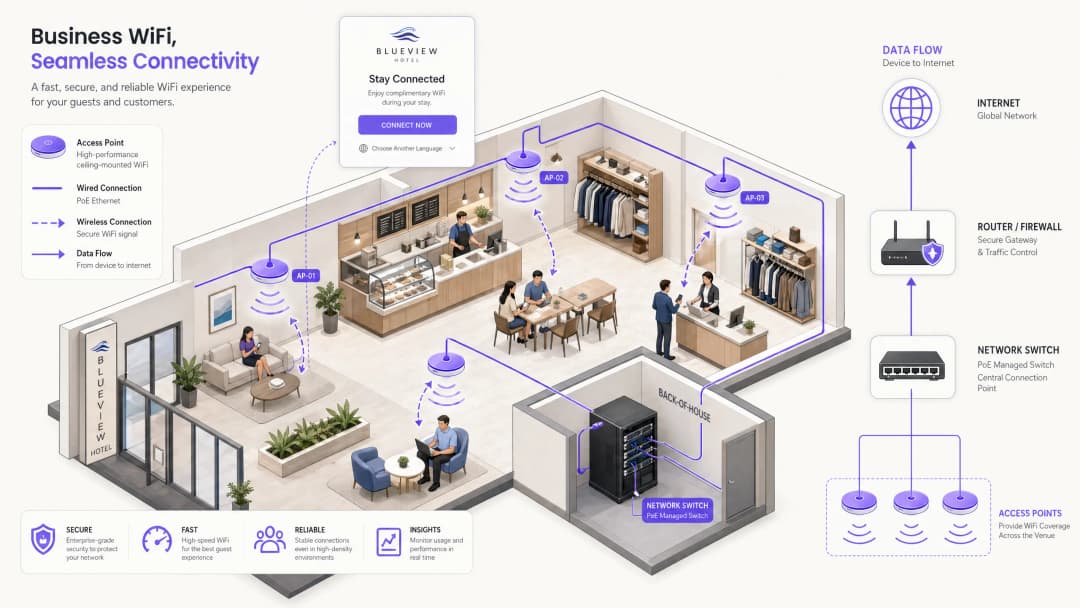
व्यावसायिक ठिकाणांसाठी — मग ते रिटेल चेन्स असोत, हॉटेल ग्रुप्स असोत, कॉन्फरन्स सेंटर्स असोत किंवा मोठ्या सार्वजनिक संस्था असोत — अतिथी WiFi ही आता केवळ एक ऐच्छिक सुविधा राहिलेली नसून एक महत्त्वपूर्ण डिजिटल टचपॉइंट बनली आहे. अतिथी आणि अभ्यागत आता विश्वासार्ह, जलद कनेक्टिव्हिटीची अपेक्षा करतात. तथापि, ग्राहक-दर्जाचे राउटर आणि योग्यरित्या तैनात केलेले व्यावसायिक हॉटस्पॉट यामधील ऑपरेशनल आणि कायदेशीर फरक खूप मोठा आहे. अयोग्यरित्या सेट केलेले नेटवर्क व्यावसायिक मालमत्तांना लॅटरल मूव्हमेंट हल्ल्यांच्या धोक्यात आणू शकते, GDPR आणि कॉम्प्युटर गैरवापर कायद्यांतर्गत दायित्वे निर्माण करू शकते आणि मौल्यवान फर्स्ट-पार्टी डेटा गोळा करण्याची संधी गमावू शकते.
हे मार्गदर्शक सार्वजनिक WiFi सेवा तैनात किंवा अपग्रेड करण्यासाठी जबाबदार असलेल्या IT मॅनेजर्स आणि नेटवर्क आर्किटेक्ट्ससाठी एक व्यावहारिक आणि तंत्रज्ञान-तटस्थ आराखडा प्रदान करते. आम्ही सुरक्षित, विभागलेले हॉटस्पॉट प्रदान करण्यासाठी आवश्यक असलेल्या तांत्रिक आर्किटेक्चरचे तपशीलवार वर्णन करतो, ज्यामध्ये VLAN डिझाइन, कॅप्टिव्ह पोर्टल ऑथेंटिकेशन फ्लो, बँडविड्थ व्यवस्थापन आणि GDPR, PCI-DSS आणि IEEE 802.1X सह अनुपालन आवश्यकतांवर विशेष लक्ष दिले आहे. आम्ही हे देखील शोधतो की अतिथी WiFi सारख्या व्यवस्थापित प्लॅटफॉर्मचे एकत्रीकरण करून मूळ कनेक्टिव्हिटीला कृतीयोग्य WiFi विश्लेषण मध्ये कसे रूपांतरित करावे, ज्यामुळे ठिकाण ऑपरेटरना ग्राहकांच्या येण्या-जाण्याच्या पॅटर्न समजून घेण्यास, थांबण्याच्या वेळेचे मोजमाप करण्यास आणि मोजण्यायोग्य विपणन ROI वाढवण्यास मदत होते.
तांत्रिक सखोल विश्लेषण: आर्किटेक्चर आणि विभागणी
कोणत्याही व्यावसायिक हॉटस्पॉट तैनातीचा मूलभूत सिद्धांत म्हणजे अलगाव (आयसोलेशन). नेटवर्क स्टॅकच्या प्रत्येक स्तरावर, अतिथी ट्रॅफिक कूटबद्ध (encrypted) आणि तार्किकदृष्ट्या (logically) कॉर्पोरेट डेटापासून वेगळे केले पाहिजे. हे अलगाव लागू न करणे ही सार्वजनिक WiFi तैनातीमधील सर्वात सामान्य आणि गंभीर चूक आहे.
VLAN द्वारे नेटवर्क विभागणी
अतिथी आणि पॉइंट ऑफ सेल (POS) प्रणाली एकाच सबनेटवर असणारे फ्लॅट नेटवर्क तैनात करणे ही एक मोठी सुरक्षा चूक आहे. व्यावसायिक तैनाती भौतिक टोपोलॉजी काहीही असो, व्यवस्थापित स्विच स्तरावर ट्रॅफिक विभागण्यासाठी व्हर्च्युअल लोकलエリア नेटवर्क (VLAN) चा वापर करतात आणि तार्किक सीमा लागू करतात.
मानक मल्टी-टेनंट तैनाती सहसा किमान दोन VLAN परिभाषित करते:
| VLAN | उद्देश | विशिष्ट ID | राउटिंग पॉलिसी |
|---|---|---|---|
| कॉर्पोरेट | कर्मचारी उपकरणे, POS टर्मिनल्स, बॅक-ऑफिस सर्व्हर्स | VLAN 10 | पूर्ण अंतर्गत प्रवेश |
| अतिथी | केवळ सार्वजनिक इंटरनेट प्रवेश | VLAN 20 | केवळ इंटरनेट; अंतर्गत राउटिंग नाही |
| IoT/इमारत | CCTV, HVAC, ॲक्सेस कंट्रोल | VLAN 30 | अलगाव; इंटरनेट नाही |
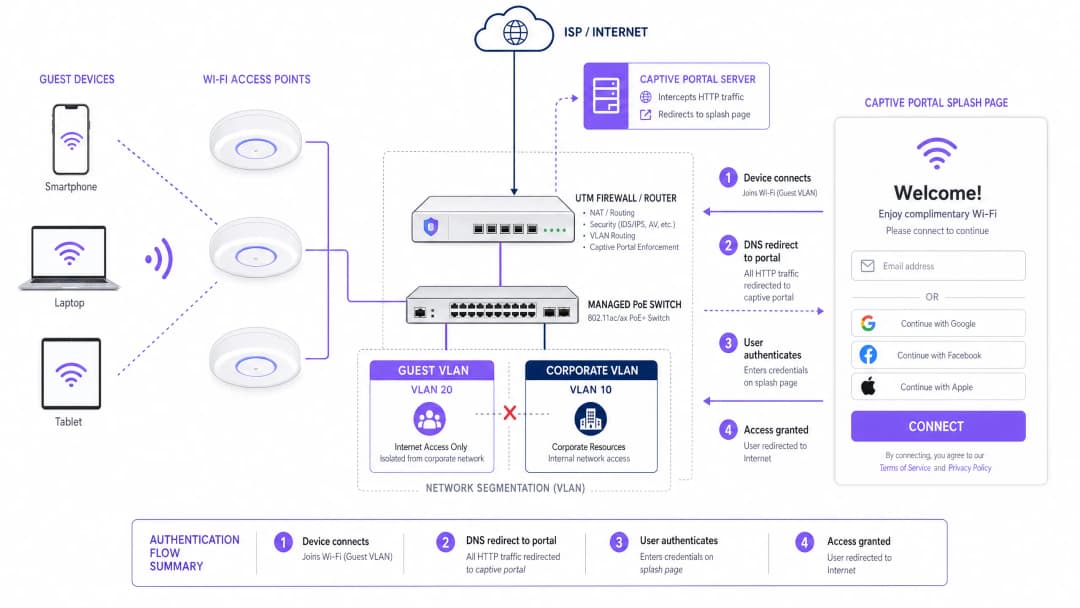
अतिथी VLAN वरील ट्रॅफिक युनिफाइड थ्रेट मॅनेजメント (UTM) फायरवॉलद्वारे थेट इंटरनेटवर राउट केले जाते आणि कठोर ॲक्सेस कंट्रोल लिस्ट (ACL) सह कॉन्फिगर केले जाते, जे अंतर्गत सबनेटसाठी जाणारे कोणतेही पॅकेट्स ड्रॉप करते. ही विभागणी PCI-DSS आवश्यकता १.३ अंतर्गत एक अनिवार्य नियंत्रण आहे, जी कार्डधारक डेटा वातावरण अविश्वासू नेटवर्कपासून वेगळे ठेवणे आवश्यक असल्याचे सांगते. एकाच भौतिक पायाभूत सुविधांवर पेमेंट टर्मिनल्स चालवणाऱ्या रिटेल आणि हॉस्पिटॅलिटी ऑपरेटरसाठी हे बंधनकारक आहे.
कॅप्टिव्ह पोर्टल ऑथेंटिकेशन फ्लो
जेव्हा अतिथीचे उपकरण ॲक्सेस पॉइंट (AP) शी जोडले जाते, तेव्हा ते DHCP द्वारे IP पत्ता मिळवते. या टप्प्यावर, फायरवॉल सर्व आउटबाउंड इंटरनेट ट्रॅफिक ब्लॉक करते. संपूर्ण ऑथेंटिकेशन प्रक्रिया खालीलप्रमाणे आहे:
- असोसिएशन: उपकरण एका खुल्या SSID शी कनेक्ट होते (किंवा 802.1X/EAP वापरून सुरक्षित OpenRoaming SSID शी).
- DHCP वाटप: अतिथी VLAN चा DHCP सर्व्हर IP पत्ता, डीफॉल्ट गेटवे आणि DNS सर्व्हर वाटप करतो.
- इंटरसेप्शन: जेव्हा उपकरण HTTP विनंतीचा प्रयत्न करते (किंवा ऑपरेटिंग सिस्टम ज्ञात URL द्वारे कॅप्टिव्ह पोर्टल शोध ट्रिगर करते),通 नेटवर्क DNS रीडायरेक्शनद्वारे ती विनंती अडवते आणि वापरकर्त्याला कॅप्टिव्ह पोर्टल सर्व्हरवर राउट करते.
- ऑथेंटिकेशन: वापरकर्त्याला ब्रँडेड स्प्लॅश पेज दाखवले जाते. ते ईमेल, सोशल लॉगिन (OAuth), SMS OTP किंवा OpenRoaming सारख्या अखंड ओळख प्रदात्याद्वारे ऑथेंटिकेट करतात.
- संमती संकलन: वापरकर्त्याला स्वीकार्य वापर धोरण (AUP) दाखवले जाते आणि विपणन हेतूंसाठी डेटा गोळा केला जात असल्यास स्पष्ट संमती चेकबॉक्स प्रदान केला जातो.
- ऑथोरायझेशन सिग्नल: पोर्टल सर्व्हर इंटरनेट प्रवेशासाठी उपकरणाचा MAC पत्ता किंवा IP ऑथोराइज करण्यासाठी RADIUS किंवा REST API द्वारे वायरलेस LAN कंट्रोलर किंवा फायरवॉलशी संवाद साधतो.
- प्रवेश मंजूर: फायरवॉल नियम डायनॅमिकपणे अपडेट केले जातात आणि वापरकर्त्याला त्यांच्या इच्छित गंतव्यस्थानावर रीडायरेक्ट केले जाते.
अतिथी पोर्टल व्यतिरिक्त कर्मचारी उपकरणांसाठी एंटरप्राइझ-ग्रेड प्रमाणपत्र-आधारित ऑथेंटिकेशन आवश्यक असलेल्या वातावरणासाठी, आमचे मार्गदर्शक iOS आणि macOS वर 802.1X सह एंटरप्राइझ WiFi कसे सेट करावे पहा (पोर्तुगीजमध्ये देखील उपलब्ध: Como Configurar WiFi Corporativo em iOS e macOS com 802.1X).
वायरलेस मानके आणि फ्रिक्वेन्सी नियोजन
व्यावसायिक तैनातीमध्ये 802.11ax (WiFi 6) किंवा 802.11be (WiFi 7) ॲक्सेस पॉइंट्सचा वापर प्रमाणित केला पाहिजे. WiFi 6 मध्ये OFDMA (ऑर्थोगोनल फ्रिक्वेन्सी डिव्हिजन मल्टिपल ॲक्सेस) सादर केले गेले आहे, जे एकाच AP ला अनुक्रमिक सेवा देण्याऐवजी सब-चॅनेलवर एकाच वेळी अनेक क्लायंट्सना सेवा देण्याची परवानगी देऊन उच्च-घनता वातावरणात कामगिरी लक्षणीयरीत्या सुधारते. हे आरोग्य सेवा संस्था, कॉन्फरन्स सेंटर्स आणि स्टेडियम तैनातीमध्ये विशेषतः महत्त्वपूर्ण आहे, जेथे पीक अवर्समध्ये एकाच AP शी शेकडो उपकरणे कनेक्ट असू शकतात.
फ्रिक्वेन्सी बँड वाटप खालील तत्त्वांचे पालन केले पाहिजे. २.४ GHz बँड अधिक लांब श्रेणी आणि भिंतींमधून चांगली प्रवेश क्षमता प्रदान करतो, ज्यामुळे तो जुन्या उपकरणांसाठी आणि मोठ्या खुल्या क्षेत्रांसाठी योग्य बनतो. तथापि, यात केवळ तीन न ओव्हरलॅप होणारे चॅनेल्स (१, ६, ११) आहेत, जे दाट तैनातीमध्ये सह-चॅनेल हस्तक्षेपास (co-channel interference) अत्यंत संवेदनशील बनवतात. ५ GHz बँड २४ पेक्षा जास्त न ओव्换लॅप होणारे चॅनेल्स आणि लक्षणीय उच्च थ्रूपुट प्रदान करतो, परंतु त्याची श्रेणी कमी असते. आधुनिक व्यावसायिक वायरलेस कंट्रोलर्स बँड स्टीयरिंगला सपोर्ट करतात, जे ड्युअल-बँड सक्षम उपकरणांना ५ GHz शी कनेक्ट होण्यासाठी सक्रियपणे प्रोत्साहित करते, ज्यामुळे जुन्या क्लायंटसाठी २.४ GHz स्पेक्ट्रम मोकळा होतो.
तुमच्या विशिष्ट सेटअपबद्दल काही प्रश्न आहेत का?
आमची टीम ८०,००० हून अधिक वेन्यूजमधील वेन्यू ऑपरेटर्स, IT मॅनेजर्स आणि नेटवर्क इंजिनिअर्ससोबत काम करते. २० मिनिटांचा कॉल बुक करा आणि तुमच्यासारख्या इतरांनी ही समस्या कशी सोडवली हे आम्ही तुम्हाला दाखवू.
अंमलबजावणी मार्गदर्शक: हार्डवेअर, कॉन्फिगरेशन आणि तैनाती
पायरी १: ISP आणि अपलिंक आकारमान निश्चित करणे
हार्डवेअर निवडण्यापूर्वी, आवश्यक अपलिंक बँडविड्थची गणना करा. सामान्य अतिथी नेटवर्कसाठी, प्रति समवर्ती (concurrent) वापरकर्त्यासाठी १-२ Mbps ची आवश्यकता गृहीत धरा. ३०० समवर्ती अतिथींची अपेक्षा असलेल्या ठिकाणासाठी, किमान ५०० Mbps सिमेट्रिक फायबर कनेक्शनची शिफारस केली जाते, तर १ Gbps कनेक्शन भविष्यातील वाढीसाठी वाव देते. वाहतूक केंद्रे किंवा मोठ्या कार्यक्रमांच्या ठिकाणांसाठी, एकाधिक बाउंड अपलिंक्स किंवा SD-WAN फेलओव्हरचा विचार केला पाहिजे.
पायरी २: ॲक्सेस पॉइंट निवड आणि मांडणी
व्यावसायिक विक्रेत्यांचे 802.11ax व्यवस्थापित ॲक्सेस पॉइंट्स वापरा. हे APs PoE+ (पॉवर ओव्हर इथरनेट प्लस, IEEE 802.3at) ला सपोर्ट करणारे असावेत, जे एकाच Cat6 केबलद्वारे व्यवस्थापित स्विचमधून AP ला डेटा आणि पॉवर दोन्ही पाठवण्याची परवानगी देतात. यामुळे प्रत्येक AP च्या ठिकाणी स्थानिक पॉवर आउटलेट स्थापित करण्याची आवश्यकता नाहीशी होते, ज्यामुळे इन्स्टॉलेशन खर्च लक्षणीयरीत्या कमी होतो.
AP ची मांडणी केवळ अंदाजावर न करता व्यावसायिक RF साइट सर्व्हेद्वारे निश्चित केली पाहिजे. या सर्व्हेमध्ये खालील गोष्टींचा विचार केला पाहिजे:
- ॲटेन्युएशन: काँक्रीटच्या भिंती, धातूचे रॅक आणि काचेच्या विभाजनांमधून जाणाऱ्या सिग्नलचे होणारे नुकसान.
- कव्हरेज ओव्हरलॅप: अखंड रोमिंग सुनिश्चित करण्यासाठी आणि कोणतेही डेड झोन नसण्यासाठी APs सुमारे १५-२०% ओव्हरलॅप झाले पाहिजेत.
- क्षमता नियोजन: उच्च-घनता क्षेत्रांमध्ये (कॉन्फरन्स रूम्स, फूड कोर्ट, लॉबी) कमी ट्रान्समिट पॉवर असलेले अधिक APs आवश्यक असतात, जेणेकरून कमी अंतरावर अनेक क्लायंट्सना सेवा दिली जाऊ शकते, ऐवजी कमी संख्येने उच्च-पॉवर APs वापरण्यापेक्षा.
पायरी ३: व्यवस्थापित स्विच आणि VLAN कॉन्फिगरेशन
सर्व APs ना पॉवर देण्यासाठी पुरेशा PoE+ बजेटसह व्यवस्थापित लेअर २/लेअर ३ स्विच तैनात करा. सर्व अपलिंक आणि AP ट्रंक पोर्ट्सवर 802.1Q VLAN टॅगिंग कॉन्फिगर करा. POS टर्मिनल्स किंवा कर्मचाऱ्यांच्या वर्कस्टेशन्सना जोडणारे ॲक्सेस पोर्ट्स कॉर्पोरेट VLAN मध्ये अनटॅग केलेले सदस्य म्हणून नियुक्त केले पाहिजेत. AP पोर्ट्स सर्व आवश्यक VLAN वाहून नेण्यासाठी ट्रंक पोर्ट्स म्हणून कॉन्फिगर केले पाहिजेत आणि वायरलेस कंट्रोलरद्वारे प्रत्येक SSID संबंधित VLAN शी मॅप केला पाहिजे.
पायरी ४: फायरवॉल आणि ट्रॅफिक शेपिंग
UTM फायरवॉल हा सर्व सुरक्षा आणि बँडविड्थ धोरणांचा अंमलबजावणी बिंदू आहे. मुख्य कॉन्फिगरेशनमध्ये समाविष्ट आहे:
- VLAN राउटिंग नियम: अतिथी VLAN ला इंटरनेटवर प्रवेश करण्याची परवानगी द्या; अतिथी VLAN चा सर्व अंतर्गत सबनेटवरील प्रवेश नाकारा.
- प्रति वापरकर्ता बँडविड्थ मर्यादा: वैयक्तिक थ्रूपुट मर्यादित करण्यासाठी ट्रॅफिक शेपिंग धोरणे लागू करा. मानक सुरुवात प्रति वापरकर्ता ५ Mbps डाउनलिंक / २ Mbps अपलिंक अशी आहे. हे एकाच वापरकर्त्याला ४K व्हिडिओ स्ट्रीम करण्यापासून रोखते, ज्यामुळे इतर सर्व अतिथींचा अनुभव खराब होत नाही.
- ॲप्लिकेशन नियंत्रण: फायरवॉल स्तरावर पीअर-टू-पीअर फाइल शेअरिंग प्रोटोकॉल (BitTorrent, eDonkey) आणि इतर उच्च-बँडविड्थ किंवा बेकायदेशीर ॲप्लिकेशन्स ब्लॉक करा.
- DNS फिल्टरिंग: मालवेअर डोमेन्स, फिशिंग साइट्स आणि अयोग्य सामग्री श्रेणींमध्ये प्रवेश रोखण्यासाठी DNS-आधारित सामग्री फिल्टरिंग लागू करा. या स्तरावरील तपशीलवार मार्गदर्शकासाठी, मजबूत DNS आणि सुरक्षेसह तुमचे नेटवर्क सुरक्षित करणे पहा.
पायरी ५: कॅप्टिव्ह पोर्टल कॉन्फिगरेशन
कॅप्टिव्ह पोर्टल हा तैनातीमधील सर्वात दृश्यमान घटक आहे आणि मुख्य डेटा संकलन यंत्रणा आहे. पोर्टल कॉन्फिगर करताना, खालील गोष्टींची खात्री करा:
- स्प्लॅश पेज HTTPS द्वारे दिले जावे आणि ब्राउझर सुरक्षा चेतावणी टाळण्यासाठी वैध, सार्वजनिकरित्या विश्वासार्ह SSL प्रमाणपत्र असावे.
- कन्व्हर्जन रेट वाढवण्यासाठी ऑथेंटिकेशन पर्यायांमध्ये किमान ईमेल/पासवर्ड आणि सोशल लॉगिन (Google, Facebook, Apple) समाविष्ट असावे.
- AUP स्पष्टपणे प्रदर्शित केले जावे आणि प्रवेश मंजूर करण्यापूर्वी ते स्वीकारणे आवश्यक असावे.
- विपणन संवादासाठी GDPR संमती स्वतंत्र, अन-टिक केलेल्या ऑप्ट-इन चेकबॉक्सद्वारे गोळा केली जावी.
- वापरकर्त्याची सोय आणि सुरक्षा यामध्ये संतुलन राखण्यासाठी सेशन टाइमआउट आणि री-ऑथेंटिकेशन अंतराल कॉन्फिगर करा.
सर्वोत्तम पद्धती आणि अनुपालन
GDPR आणि डेटा गोपनीयता
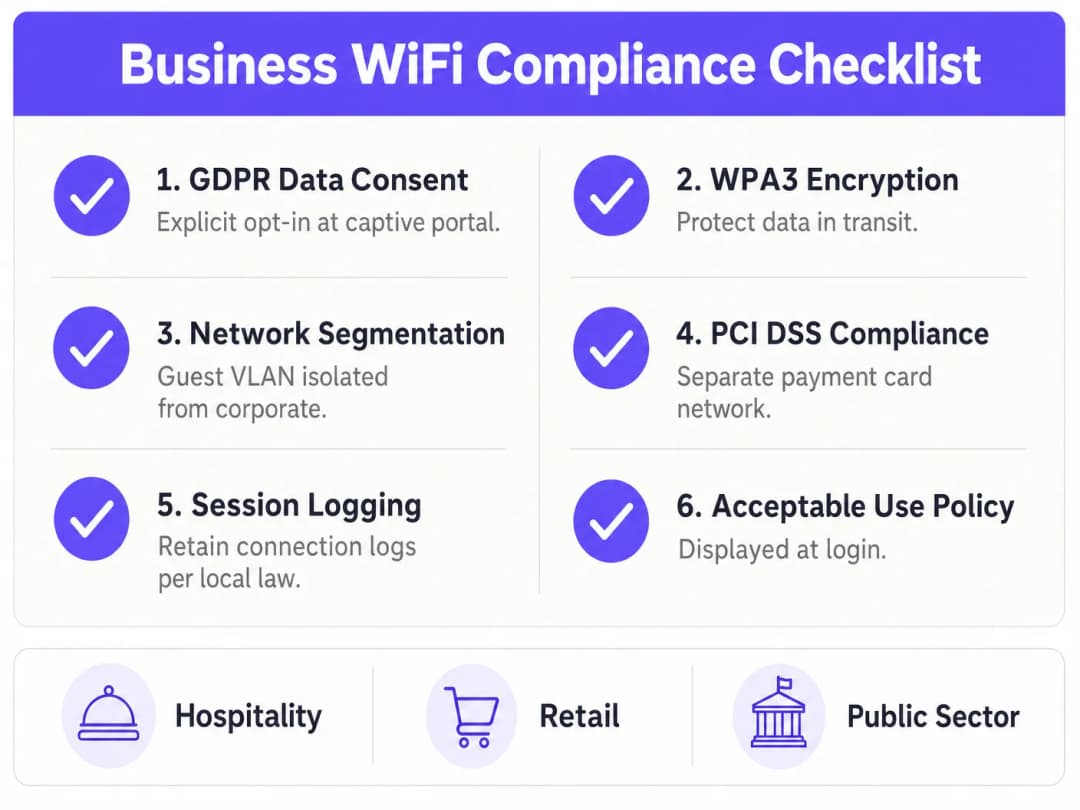
तुम्ही विपणन हेतूंसाठी वापरकर्ता डेटा गोळा करत असल्यास, UK GDPR आणि EU GDPR अंतर्गत स्पष्ट, माहितीपूर्ण संमती मिळवणे आवश्यक आहे. कायदेशीर आवश्यकता स्पष्ट आहे: आधीच टिक केलेले संमती बॉक्स प्रतिबंधित आहेत; संमती स्वेच्छेने दिलेली, विशिष्ट, माहितीपूर्ण आणि स्पष्ट असावी; वापरकर्त्यांना संमती मागे घेणे तितकेच सोपे असावे जितके ते देणे होते. तुमच्या कॅप्टिव्ह पोर्टलमध्ये कोणता डेटा गोळा केला जातो, प्रक्रियेचा कायदेशीर आधार, डेटा कसा वापरला जाईल आणि तो किती काळ ठेवला जाईल हे स्पष्टपणे नमूद केले पाहिजे.
सेशन लॉग्स आणि कायदेशीर अनुपालन
UK मध्ये, इन्व्हेस्टिगेटरी पॉवर्स ॲक्ट (RIPA) आणि संबंधित कायदे ठिकाण ऑपरेटरना कनेक्शन लॉग्स — ज्यामध्ये MAC पत्ते, टाइमस्टॅम्प आणि IP वाटप समाविष्ट आहे — ठेवणे आवश्यक करू शकतात, जेणेकरून नेटवर्कवर बेकायदेशीर क्रियाकलाप झाल्यास कायद्याची अंमलबजावणी करणाऱ्या संस्थांना मदत होईल. तुमच्या संस्थेला आणि अधिकार क्षेत्राला लागू असलेल्या विशिष्ट धारणा (retention) दायित्वांचा शोध घेण्यासाठी तुमच्या कायदेशीर सल्लागाराचा सल्ला घ्या.
WPA3 आणि एन्क्रिप्शन मानके
प्री-शेअर्ड की वापरणाऱ्या कोणत्याही SSID साठी (उदा. कर्मचारी नेटवर्क), WPA2 ऐवजी WPA3-Personal (SAE) चा वापर सक्तीचा करा. WPA3 मुळे WPA2 च्या फोर-वे हँडशेक मधील ऑफलाइन डिक्शनरी हल्ल्यांची असुरक्षितता दूर होते. 802.1X प्रमाणपत्र-आधारित ऑथेंटिकेशन वापरणाऱ्या व्यावसायिक कर्मचारी नेटवर्कसाठी, १९२-बिट मोडमधील WPA3-Enterprise सर्वोच्च पातळीची सुरक्षा प्रदान करते. वायरलेस पायाभूत सुविधांच्या भौतिक आणि तार्किक स्तरांचे रक्षण करण्याबद्दल अधिक माहितीसाठी, ॲक्सेस पॉइंट सुरक्षा: तुमचे २०२६ व्यावसायिक मार्गदर्शक पहा.
MAC पत्ता रँडमायझेशनचा सामना करणे
आधुनिक iOS (iOS 14 पासून) 和 Android (Android 10 पासून) उपकरणे डीफॉल्टनुसार MAC पत्ता रँडमायझेशन वापरतात, जे प्रत्येक WiFi नेटवर्कसाठी एक अद्वितीय यादृच्छिक (random) MAC पत्ता तयार करते. याचा अर्थ असा की परत येणाऱ्या ग्राहकांना ओळखण्यासाठी किंवा दीर्घकालीन वापरकर्ता प्रोफाइल तयार करण्यासाठी आता MAC पत्त्याचा विश्वासार्ह वापर केला जाऊ शकत नाही. योग्य आर्किटेक्चरल प्रतिसाद म्हणजे कॅप्टिव्ह पोर्टलवर ओळख-आधारित ऑथेंटिकेशन लागू करणे — वापरकर्त्यांना ईमेल किंवा सोशल खात्यांद्वारे लॉग इन करणे आवश्यक करणे — जेणेकरून हार्डवेअर आयडेंटिफायरऐवजी वापरकर्ता प्रोफाइल ही एक कायमस्वरूपी ट्रॅकिंग संस्था बनेल.
त्रुटी निवारण आणि जोखीम कमी करणे
अगदी चांगल्या प्रकारे डिझाइन केलेल्या नेटवर्कमध्येही ऑपरेशनल समस्या येऊ शकतात. खालील तक्ता सर्वात सामान्य बिघाड प्रकार आणि त्यांच्यासाठी शिफारस केलेले उपाय दर्शवतो.
| बिघाड प्रकार | मूळ कारण | उपाय |
|---|---|---|
| DHCP संपणे | सबनेट खूप लहान असणे किंवा ग्राहकांच्या संख्येच्या तुलनेत लीझ वेळ खूप जास्त असणे | /22 किंवा मोठे सबनेट वापरा; लीझ वेळ ३०-६० मिनिटांपर्यंत कमी करा |
| सह-चॅनेल हस्तक्षेप | ओव्हरलॅपिंग कव्हरेज क्षेत्रामध्ये एकाधिक APs समान चॅनेल वापरत आहेत | वायरलेस कंट्रोलरवर डायनॅमिक चॅनेल वाटप सक्षम करा |
| कॅप्टिव्ह पोर्टल SSL त्रुटी | पोर्टल सर्व्हरवरील प्रमाणपत्र अवैध किंवा सेल्फ-साइन केलेले आहे | वैध सार्वजनिक CA प्रमाणपत्र तैनात करा; Let's Encrypt वापरा |
| संथ रोमिंग | APs क्लायंट असोसिएशन डेटा शेअर करत नाहीत | वायरलेस कंट्रोलरवर 802.11r (फास्ट BSS ट्रान्झिशन) सक्षम करा |
| बँडविड्थ संपणे | प्रति वापरकर्ता ट्रॅफिक शेपिंग कॉन्फिगर केलेले नाही | फायरवॉलवर प्रति वापरकर्ता QoS धोरणे लागू करा |
| अतिथी ते कॉर्पोरेट लॅटरल मूव्हमेंट | फ्लॅट नेटवर्क किंवा चुकीचे कॉन्फिगर केलेले ACL | VLAN ACL चे ऑडिट करा; अतिथी VLAN वर पेनिट्रेशन टेस्टिंग करा |
ROI आणि व्यावसायिक प्रभाव
योग्यरित्या तैनात केलेले हॉटस्पॉट केवळ IT पायाभूत सुविधा म्हणून काम करत नाही — तर ते फर्स्ट-पार्टी डेटा इंजिन आणि थेट विपणन चॅनेल बनते. व्यवस्थापित अतिथी WiFi प्लॅटफॉर्ममध्ये गुंतवणूक करण्याचा व्यावसायिक फायदा प्रत्येक क्षेत्रात दिसून येतो.
हॉस्पिटॅलिटी क्षेत्रात, अतिथी WiFi डेटा हॉटेल्सना हे समजून घेण्यास मदत करतो की अतिथींनी कनेक्ट होण्यापूर्वी आणि नंतर कोणत्या सुविधा वापरल्या, मुक्कामादरम्यानचा संवाद वैयक्तिकृत करण्यास आणि स्वयंचलित मुक्कामानंतरच्या मोहिमांद्वारे पुन्हा बुकिंग वाढवण्यास मदत करतो. ३०० खोल्यांचे हॉटेल दररोज २०० ईमेल ऑप्ट-इन्स गोळा करते, जे दरवर्षी ७०,००० ऑप्ट-इन संपर्कांचा विपणन डेटाबेस तयार करू शकते — ही एक महत्त्वपूर्ण CRM मालमत्ता आहे.
रिटेल क्षेत्रात, WiFi विश्लेषण ग्राहकांच्या येण्या-जाण्याचे हीटमॅप्स, वेगवेगळ्या विभागांमधील थांबण्याचा वेळ आणि पुन्हा भेट देण्याचे प्रमाण प्रदान करते — हा डेटा पूर्वी केवळ महागड्या मानवी सर्वेक्षणांद्वारे उपलब्ध होता. किरकोळ विक्रेते या डेटाचा वापर स्टोअर मांडणी ऑप्टिमाइझ करण्यासाठी, प्रमोशनल डिस्प्लेच्या प्रभावाचे मोजमाप करण्यासाठी आणि ज्ञात ग्राहक स्टोअरमध्ये प्रवेश करतात तेव्हा लॉयल्टी मोहिमा ट्रिगर करण्यासाठी करू शकतात.
सार्वजनिक क्षेत्र आणि वाहतूक ऑपरेटरसाठी, याचे मूल्य ऑपरेशनल कार्यक्षमतेमध्ये आहे: गर्दीच्या वेळा समजून घेणे, कर्मचारी नियोजन ऑप्टिमाइझ करणे आणि नागरिक आणि प्रवाशांना सोयीस्कर डिजिटल सेवा प्रदान करणे.
Purple च्या अतिथी WiFi आणि WiFi विश्लेषण सारखे प्लॅटफॉर्म या व्यावसायिक परिणामांना मूळ नेटवर्कशी जोडणारा व्यवस्थापित पायाभूत सुविधा स्तर प्रदान करतात. Purple च्या धोरणात्मक विस्तारावरून सिद्ध होते — ज्यामध्ये नवीन क्षेत्रांमध्ये प्रवेश करण्याच्या अलीकडील उपक्रमांचा समावेश आहे, जसे की शिक्षण विभागाचे उपाध्यक्ष Tim Peers संघात सामील झाल्याची घोषणा करताना हायलाइट केले गेले होते — स्मार्ट कनेक्टेड स्पेसचे मूल्य सर्व आर्थिक क्षेत्रांमध्ये वेगाने विस्तारत आहे.
मूलभूत इंटरनेट कनेक्शनवरून स्मार्ट, डेटा-चालित नेटवर्कवर संक्रमण करणे हे आधुनिक व्यावसायिक WiFi तैनातीचे वैशिष्ट्य आहे. पायाभूत सुविधांचा खर्च मुख्यत्वे स्थिर असतो; जसा विपणन डेटाबेस वाढतो आणि स्वयंचलित वर्कफ्लो परिपक्व होतात, व्यवस्थापित प्लॅटफॉर्म स्तरावरील अतिरिक्त गुंतवणूक चक्रवाढ परतावा (compound returns) देते.
महत्वाच्या व्याख्या
कॅप्टिव्ह पोर्टल
एक वेब पृष्ठ जे सार्वजनिक प्रवेश नेटवर्कच्या वापरकर्त्याला इंटरनेट प्रवेश मंजूर करण्यापूर्वी पाहणे आणि संवाद साधणे बंधनकारक असते. हे DNS रीडायरेक्शनद्वारे HTTP ट्रॅफिक अडवते आणि ऑथेंटिकेशन आणि संमती गोळा करण्यासाठी स्प्लॅश पेज सादर करते.
अतिथी WiFi नेटवर्कवर स्वीकार्य वापर धोरणे लागू करणे, वापरकर्त्यांना ऑथेंटिकेट करणे आणि फर्स्ट-पार्टी विपणन डेटा गोळा करण्यासाठी प्राथमिक यंत्रणा.
VLAN (Virtual Local Area Network)
एक तार्किक सबनेटवर्क जे वेगवेगळ्या भौतिक LAN मधील उपकरणांच्या संग्रहाला गटबद्ध करते, जे 802.1Q टॅगिंगद्वारे व्यवस्थापित स्विच स्तरावर लागू केले जाते.
अतिथी WiFi ट्रॅफिकला संवेदनशील कॉर्पोरेट नेटवर्कपासून वेगळे करण्यासाठी आवश्यक. पेमेंट कार्ड डेटावर प्रक्रिया करणाऱ्या कोणत्याही ठिकाणी PCI-DSS अनुपालनासाठी अनिवार्य नियंत्रण.
Traffic Shaping (QoS)
वैयक्तिक वापरकर्त्यांना किंवा ॲप्लिकेशन प्रकारांना उपलब्ध बँडविड्थ मर्यादित करून कामगिरी ऑप्टिमाइझ किंवा हमी देण्यासाठी नेटवर्क ट्रॅफिकचे नियंत्रण.
कमी संख्येतील अति-वापरकर्त्यांना उपलब्ध अपलिंक बँ端विड्थचा बहुतांश भाग वापरण्यापासून रोखण्यासाठी वापरले जाते, ज्यामुळे सर्व समवर्ती अतिथींसाठी सुसंगत मूलभूत अनुभव सुनिश्चित होतो.
MAC Randomization
आधुनिक ऑपरेटिंग सिस्टम्स (iOS 14+, Android 10+) मधील एक गोपनीयता वैशिष्ट्य जे वेगवेगळ्या WiFi नेटवर्कशी कनेक्ट करताना एक अद्वितीय यादृच्छिक MAC पत्ता तयार करते, ज्यामुळे कायमस्वरूपी हार्डवेअर-आधारित ट्रॅकिंग रोखले जाते.
परत येणाऱ्या अभ्यागतांना ओळखण्यासाठी आणि पुन्हा जोडण्यासाठी हार्डवेअर पत्ता ट्रॅकिंगऐवजी ओळख-आधारित कॅप्टिव्ह पोर्टल लॉगिन वापरण्यास ठिकाण ऑपरेटरना भाग पाडते.
DHCP Exhaustion
एक नेटवर्क बिघाड स्थिती जेथे DHCP सर्व्हरने त्याच्या कॉन्फिगर केलेल्या पूल मधील सर्व उपलब्ध IP पत्ते नियुक्त केले आहेत, ज्यामुळे नवीन उपकरणांना IP पत्ता मिळवण्यापासून आणि नेटवर्कशी कनेक्ट होण्यापासून रोखले जाते.
लहान सबनेट किंवा जास्त लांब DHCP लीझ वेळ असलेल्या उच्च-गर्दीच्या ठिकाणी होणारा एक सामान्य आणि सहज टाळता येणारा बिघाड.
Band Steering
एक वायरलेस कंट्रोलर वैशिष्ट्य जे ड्युअल-बँड सक्षम क्लायंट उपकरणे शोधते आणि त्यांना अधिक गर्दी असलेल्या २.४ GHz बँडऐवजी ५ GHz बँडशी कनेक्ट होण्यासाठी सक्रियपणे प्रोत्साहित करते किंवा भाग पाडते.
उपलब्ध स्पेक्ट्रममध्ये क्लायंट्सचे वितरण करून आणि २.४ GHz बँडवरील सह-चॅनेल हस्तक्षेप कमी करून उच्च-घनता तैनातीमध्ये एकूण नेटवर्क कामगिरी सुधारते.
OpenRoaming
एक वायरलेस ब्रॉडबँड अलायन्स (WBA) फेडरेशन मानक जे वापरकर्त्यांना कॅप्टिव्ह पोर्टलशी संवाद साधण्याची आवश्यकता न ठेवता, 802.1X/EAP ऑथेंटिकेशन वापरून सहभागी नेटवर्कवर स्वयंचलित, सुरक्षित WiFi कनेक्शन सक्षम करते.
सहभागी ओळख प्रदात्यांच्या वापरकर्त्यांसाठी अखंड, सेल्युलर-सारखा कनेक्टिव्हिटी अनुभव प्रदान करते. Purple त्याच्या Connect परवान्यांतर्गत OpenRoaming फेडरेशनमध्ये ओळख प्रदाता म्हणून कार्य करते.
PCI-DSS (Payment Card Industry Data Security Standard)
प्रमुख कार्ड योजनांद्वारे (Visa, Mastercard, Amex) अनिवार्य केलेल्या सुरक्षा मानकांचा संच, ज्यामध्ये पेमेंट कार्ड डेटा स्वीकारणाऱ्या, प्रक्रिया करणाऱ्या, संग्रहित करणाऱ्या किंवा प्रसारित करणाऱ्या कोणत्याही संस्थेने सुरक्षित, विभागलेले नेटवर्क वातावरण राखणे आवश्यक आहे.
कोणत्याही रिटेल किंवा हॉस्पिटॅलिटी WiFi तैनातीशी थेट संबंधित जेथे पेमेंट टर्मिनल्स अतिथी ॲक्सेस पॉइंट्ससह भौतिक नेटवर्क पायाभूत सुविधा सामायिक करतात. आवश्यकता १.३ कार्डधारक डेटा वातावरण अविश्वासू नेटवर्कपासून कठोरपणे वेगळे ठेवणे अनिवार्य करते.
UTM Firewall (Unified Threat Management)
एक नेटवर्क सुरक्षा उपकरण जे एकाच व्यवस्थापित प्लॅटफॉर्ममध्ये स्टेटफुल पॅकेट इन्स्पेक्शन, इंट्रुजन प्रिव्हेंशन, ॲप्लिकेशन नियंत्रण, DNS फिल्टरिंग आणि VPN सह एकाधिक सुरक्षा कार्ये एकत्र करते.
व्यावसायिक अतिथी WiFi तैनातीमध्ये VLAN राउटिंग नियम, प्रति-वापरकर्ता बँडविड्थ धोरणे आणि सामग्री फिल्टरिंगसाठी केंद्रीय अंमलबजावणी बिंदू.
सोडवलेली उदाहरणे
एक २०० खोल्यांचे हॉटेल त्यांचे अतिथी WiFi अपग्रेड करत आहे. संध्याकाळच्या गर्दीच्या वेळी, हॉटेलमध्ये १ Gbps सिमेट्रिक फायबर अपलिंक असूनही अतिथी संथ गती आणि कनेक्शन तुटण्याच्या तक्रारी करतात. तपासणीत असे दिसून आले की सध्याच्या सेटअपमध्ये कर्मचारी आणि अतिथी दोघांसाठी एकच फ्लॅट /24 सबनेट वापरला जात आहे, ज्यामध्ये कोणतेही ट्रॅफिक शेपिंग कॉन्फिगर केलेले नाही. हॉटेलला मुक्कामानंतरच्या विपणन कार्यक्रमासाठी अतिथींचे ईमेल पत्ते गोळा करणे देखील सुरू करायचे आहे.
टप्पा १ - नेटवर्क री-डिझाइन: १. VLAN विभागणी लागू करा. सर्व कर्मचारी उपकरणे, POS टर्मिनल्स आणि प्रॉपर्टी मॅनेजमेंट सिस्टम VLAN 10 (/24 सबनेट) वर हलवा. प्रति अतिथी अनेक उपकरणांसह पीक ऑक्युपन्सी सामावून घेण्यासाठी अतिथींना /22 सबनेट (१,०२२ वापरण्यायोग्य IPs) सह VLAN 20 वर हलवा. २. कठोर ACL सह UTM फायरवॉल कॉन्फिगर करा: अतिथी VLAN 20 ला केवळ इंटरनेट प्रवेश असेल; VLAN 10 चे सर्व मार्ग स्पष्टपणे नाकारले जातील.
टप्पा २ - कामगिरी ऑप्टिमायझेशन: ३. फायरवॉलवर प्रति वापरकर्ता १० Mbps डाउन / ५ Mbps अप ची बँडविड्थ मर्यादा कॉन्फिगर करा. हे सुनिश्चित करते की १ Gbps पाईप ४००+ समवर्ती उपकरणांमध्ये योग्यरित्या वितरीत केला जाईल. ४. सक्षम उपकरणांना कमी गर्दी असलेल्या ५ GHz बँडवर ढकलण्यासाठी वायरलेस कंट्रोलरवर बँड स्टीयरिंग सक्षम करा. ५. पीक चेक-इन कालावधीत IP संपणे टाळण्यासाठी DHCP लीझ वेळ डीफॉल्ट २४ तासांवरून २ तासांवर कमी करा.
टप्पा ३ - कॅप्टिव्ह पोर्टल आणि डेटा संकलन: ६. ईमेल ऑथेंटिकेशन आवश्यक असणारे ब्रँडेड कॅप्टिव्ह पोर्टल (उदा. Purple अतिथी WiFi द्वारे) तैनात करा. ७. मुक्कामानंतरच्या विपणन कार्यक्रमासाठी स्पष्ट, अन-टिक केलेल्या GDPR ऑप्ट-इन चेकबॉक्ससह स्प्लॅश पेज कॉन्फिगर करा. ८. ऑथेंटिकेट केलेल्या अतिथी प्रोफाइल सिंक करण्यासाठी आणि मुक्कामानंतरच्या स्वयंचलित ईमेल मोहिमा ट्रिगर करण्यासाठी पोर्टलच्या API ला हॉटेलच्या CRM शी समाकलित (integrate) करा.
एक ५०-स्टोअर रिटेल चेन त्यांच्या मोफत अतिथी WiFi चा वापर करून त्यांचा विपणन डेटाबेस तयार करू इच्छित आहे. ते सध्या सर्व स्टोअर्समध्ये WPA2 प्री-शेअर्ड की (पावतीवर छापलेला पासवर्ड) वापरतात आणि कोण कनेक्ट होत आहे किंवा ते किती वेळ थांबत आहेत याबद्दल त्यांना काहीही माहिती नसते. विपणन टीमला WiFi वापरकर्त्यांना साप्ताहिक प्रमोशनल ईमेल पाठवायचे आहेत, आणि पेमेंट टर्मिनल्स एकाच भौतिक स्विचवर असल्याने IT टीमला PCI-DSS अनुपालनाबद्दल काळजी वाटत आहे.
पायरी १ - प्री-शेअर्ड की काढून टाकणे: अतिथी SSID ला खुल्या नेटवर्कमध्ये (पासवर्डशिवाय) रूपांतरित करा जे त्वरित कॅप्टिव्ह पोर्टलवर रीडायरेक्ट करेल. हे शेअर्ड सिक्रेट असुरक्षितता दूर करते आणि प्रति-वापरकर्ता ऑथेंटिकेशन सक्षम करते.
पायरी २ - PCI-DSS साठी VLAN विभागणी: सर्व व्यवस्थापित स्विचेसवर एक समर्पित अतिथी VLAN (उदा. VLAN 20) तयार करा. POS टर्मिनल्स सध्याच्या कॉर्पोरेट VLAN (VLAN 10) मध्ये नियुक्त करा. दोन्ही VLAN मधील कठोर अलगाव लागू करण्यासाठी फायरवॉलवर ACL कॉन्फिगर करा. ही विभागणी PCI-DSS नेटवर्क आकृतीचा भाग म्हणून दस्तऐवजीकरण करा.
पायरी ३ - GDPR-सुसंगत संमतीसह कॅप्टिव्ह पोर्टल: एक व्यवस्थापित कॅप्टिव्ह पोर्टल प्लॅटफॉर्म तैनात करा. ईमेल, Google किंवा Facebook द्वारे ऑथेंटिकेशन आवश्यक असण्यासाठी स्प्लॅश पेज कॉन्फिगर करा. स्पष्ट शब्दांत, अन-टिक केलेला ऑप्ट-इन चेकबॉक्स समाविष्ट करा: 'मी [ब्रँड नाव] कडून प्रमोशनल ईमेल प्राप्त करण्यास सहमत आहे. तुम्ही कधीही अनसबस्क्राईब करू शकता.'
पायरी ४ - CRM एकत्रीकरण आणि ऑटोमेशन: पोर्टलच्या API ला किरकोळ विक्रेत्याच्या CRM शी (उदा. Salesforce, Klaviyo) कनेक्ट करा. ऑथेंटिकेट केलेले वापरकर्ता प्रोफाइल, भेटीचे टाइमस्टॅम्प आणि स्टोअर स्थान डेटा सिंक करा. पहिल्या कनेक्शनवर ट्रिगर होणारा स्वयंचलित स्वागत ईमेल आणि जेव्हा एखादा ज्ञात वापरकर्ता ३० दिवस कनेक्ट झाला नसेल तेव्हा ट्रिगर होणारी री-एंगेजमेंट मोहीम कॉन्फिगर करा.
सराव प्रश्न
Q1. तुमच्या विपणन टीमला नवीन WiFi हॉटस्पॉटद्वारे अतिथींचे ईमेल पत्ते गोळा करायचे आहेत. ते DHCP लीझ वेळ २४ तास ठेवण्याची शिफारस करतात जेणेकरून अतिथींना दिवसातून वारंवार लॉग इन करावे लागणार नाही. तुमच्या ठिकाणी दररोज ३,००० अद्वितीय अभ्यागत येतात. तुमचे अतिथी सबनेट /23 (५१० वापरण्यायोग्य IPs) आहे. या विनंतीमधील आर्किटेक्चरल त्रुटी काय आहे आणि विपणन टीमची आवश्यकता पूर्ण करताना तुम्ही ती कशी सोडवाल?
टीप: दैनिक अभ्यागतांची संख्या, सबनेटचा आकार आणि लीझ कालावधी यामधील संबंधाचा विचार करा. नंतर नेटवर्क-लेअरच्या समस्येला ॲप्लिकेशन-लेअरच्या समस्येपासून कसे वेगळे करावे याचा विचार करा.
नमुना उत्तर पहा
आर्किटेक्चरल त्रुटी अशी आहे की ३,००० दैनिक अभ्यागतांसह /23 सबनेटवर २४-तासांची लीझ वेळ ठेवल्यास जलद DHCP संपण्याची समस्या उद्भवेल. एकदा ५१० उपकरणे कनेक्ट झाली की, पुढील २४ तासांपर्यंत कोणत्याही नवीन उपकरणाला IP पत्ता मिळणार नाही. याचे दोन टप्प्यांत समाधान आहे: पहिले, पीक समवर्ती उपकरणांना सामावून घेण्यासाठी सबनेट किमान /21 (२,०४६ IPs) पर्यंत वाढवा. दुसरे, अतिथी ठिकाण सोडत असताना IP पत्ते पुन्हा वापरण्यासाठी DHCP लीझ वेळ ३०-६० मिनिटांपर्यंत कमी करा. अतिथींना वारंवार री-ऑथेंटिकेट करावे लागणार नाही या विपणन टीमच्या गरजेची पूर्तता करण्यासाठी, ऑथेंटिकेट केलेले MAC पत्ते (किंवा वापरकर्ता ओळख टोकन्स) २४ तासांसाठी लक्षात ठेवण्यासाठी कॅप्टिव्ह पोर्टल कंट्रोलर कॉन्फिगर करा. हे परत येणाऱ्या उपकरणाला DHCP द्वारे नवीन IP मिळवण्याची परवानगी देते परंतु स्प्लॅश पेज बायपास करते, ज्यामुळे नेटवर्क खंडित न करता विपणन टीमला हवा असलेला अखंड अनुभव मिळतो.
Q2. एका रिटेल क्लायंटला कॅप्टिव्ह पोर्टल लागू करायचे आहे परंतु त्यांच्या सध्याच्या अनमॅनेज्ड स्विचेसला बदलण्याच्या खर्चाबद्दल ते काळजीत आहेत. ते विचारतात की ते त्यांच्या पॉइंट ऑफ सेल (POS) टर्मिनल्ससारख्याच भौतिक अनमॅनेज्ड स्विचेसवर अतिथी WiFi चालवू शकतात का, ज्यामध्ये अतिथी नेटवर्क फक्त वेगळा SSID वापरेल.
टीप: VLAN अंमलबजावणीसाठी व्यवस्थापित स्विच हार्डवेअर आवश्यक आहे. अनमॅनेज्ड स्विचवर ट्रॅफिकचे काय होते याचा विचार करा.
नमुना उत्तर पहा
सुरक्षा किंवा अनुपालनाच्या दृष्टिकोनातून हे कॉन्गिफरेशन स्वीकार्य नाही. अनमॅनेज्ड स्विचेस 802.1Q VLAN टॅगिंगला सपोर्ट करत नाहीत, याचा अर्थ स्विचवरील सर्व ट्रॅफिक - SSID काहीही असो - एकाच ब्रॉडकास्ट डोमेनवर असते. 'अतिथी' SSID वरील अतिथी उपकरण त्याच स्विचवरील POS टर्मिनल्सपर्यंत पोहोचू शकते, जे PCI-DSS आवश्यकता १.३ चे उल्लंघन आहे. क्लायंटने अनमॅनेज्ड स्विचेस बदलून 802.1Q VLAN टॅगिंगला सपोर्ट करणारे व्यवस्थापित लेअर २ स्विचेस वापरले पाहिजेत. PCI-DSS उल्लंघनाच्या दायित्वाच्या धोक्याच्या किंवा डेटा तडजोडीशी संबंधित दंडाच्या तुलनेत व्यवस्थापित स्विचेसचा भांडवली खर्च खूपच कमी आहे.
Q3. तुम्ही एका उच्च-घनतेच्या कॉन्फिगरेशन सेंटरमध्ये ॲक्सेस पॉइंट्स तैनात करत आहात जेथे एकाच वेळी १,५०० पर्यंत WiFi वापरकर्ते असतात. कार्यक्रमांदरम्यान तुम्हाला २.४ GHz स्पेक्ट्रमवर लक्षणीय लेटन्सी आणि पॅकेट लॉस जाणवतो, जरी ५ GHz स्पेक्ट्रम कमी वापरलेला दिसत असला तरीही. हे सोडवण्यासाठी तुम्ही वायरलेस कंट्रोलर कसा कॉन्फिगर करावा आणि तुम्ही कोणता अतिरिक्त हार्डवेअर विचार केला पाहिजे?
टीप: गर्दीच्या फ्रिक्वेन्सी बँडमधून सक्षम उपकरणांना कसे हलवायचे याचा विचार करा आणि AP ट्रान्समिट पॉवर आणि क्लायंट घनता यामधील संबंधाचा विचार करा.
नमुना उत्तर पहा
वायरलेस कंट्रोलरवर बँड स्टीयरिंग सक्षम करा. हे वैशिष्ट्य शोधते की क्लायंट उपकरण ५ GHz बँडशी कनेक्ट होण्यास सक्षम आहे का आणि उपकरणाला तेथे जोडण्यासाठी सक्रियपणे प्रोत्साहित करते किंवा भाग पाडते, ज्यामुळे जुन्या उपकरणांसाठी २.४ GHz बँड मोकळा होतो. याव्यतिरिक्त, सर्व APs वरील ट्रान्समिट पॉवर कमी करा. विरोधाभासाने, उच्च-घनता तैनातीमध्ये, कमी ट्रान्समिट पॉवर शेजारील APs मधील सह-चॅनेल हस्तक्षेप कमी करून आणि क्लायंट्सना उच्च सिग्नल स्ट्रेंथवर दूरच्या AP ऐवजी जवळच्या AP शी जोडण्यास प्रोत्साहित करून कामगिरी सुधारते. उच्च पॉवरवर कमी APs तैनात करण्याऐवजी कमी पॉवरवर अतिरिक्त APs तैनात करण्याचा विचार करा. वापरकर्ते ठिकाणामधून फिरत असताना अखंड रोमिंग सक्षम करण्यासाठी 802.11r (फास्ट BSS ट्रान्झिशन) देखील सक्षम करा.
या मालिकेमध्ये पुढे वाचा
Ubiquiti UniFi guest portal redirection होत नाही: कारणे आणि उपाय
ही मार्गदर्शिका guest state, redirect, pre-authorisation route आणि controller authorisation यांचा अनुक्रमे मागोवा घेऊन UniFi guest portal redirect बिघाड वेगळा करते. हे वेन्यू IT टीम्सना guest-network विरुद्ध Hotspot गोंधळ, बाह्य portal हँड-ऑफ, सद्य UniFi OS खाते आवश्यकता आणि DNS आयसोलेशन चाचणीचे निराकरण करण्यासाठी एक विश्वसनीय पद्धत प्रदान करते.
Cisco Meraki splash page काम करत नाही: एक ट्रबलशूटिंग फ्लोचार्ट
हा व्यावहारिक मार्गदर्शक Cisco Meraki splash फ्लो नेमका कुठे अयशस्वी झाला आहे ते शोधून काढतो: client authorisation, HTTP redirect initiation, walled-garden reachability किंवा RADIUS sign-on. हा व्हेन्यू IT टीम्सना एक नियंत्रित पुरावा मार्ग देतो, जेणेकरून ते थेट कार्यरत असलेल्या नेटवर्क मालमत्तेत मोठे बदल न करता Guest WiFi पूर्ववत करू शकतील.
Enterprise Guest WiFi सेटअप मार्गदर्शक: VLAN विभागणी, सुरक्षा आणि Captive Portals
हे तांत्रिक मार्गदर्शक IT टीम्सना VLAN विभागणी, फायरवॉल पॉलिसी आणि captive portal चा वापर करून Guest WiFi एक नियंत्रित इंटरनेट - ऍक्सेस सेवा म्हणून कसे सेट करावे हे दर्शवते. हे मार्गदर्शक कर्मचारी, पेमेंट आणि ऑपरेशनल सिस्टम्सच्या सुरक्षिततेची सीमा कमकुवत न करता Purple चे नोंदणी फॉर्म्स आणि ऑनबोर्डिंग नियंत्रणे पाहुण्यांना एक सुयोग्य अनुभव कसा देतात हे देखील स्पष्ट करते.
तुमच्या विशिष्ट सेटअपबद्दल काही प्रश्न आहेत का?
आमची टीम ८०,००० हून अधिक वेन्यूजमधील वेन्यू ऑपरेटर्स, IT मॅनेजर्स आणि नेटवर्क इंजिनिअर्ससोबत काम करते. २० मिनिटांचा कॉल बुक करा आणि तुमच्यासारख्या इतरांनी ही समस्या कशी सोडवली हे आम्ही तुम्हाला दाखवू.