Bus fleet passenger WiFi bandwidth & hardware calculator
Model cellular 5G backhaul data quotas, in-vehicle gateway sizing, passenger bandwidth limits, and telematics QoS.
Recommended in-vehicle hardware architecture
- Access point: Ruggedised dual-radio WiFi 6 AP (IP66, EN 50155 certified)
- Antenna array: Low-profile aerodynamic roof dome (4x4 5G + 2x2 WiFi + GNSS)
- Backhaul router: Dual-modem 5G active bonding with 2 industrial SIM card slots.
- Power & compliance: 9-36V DC ISO 7637-2 transient protection with ignition sense shutdown delay.
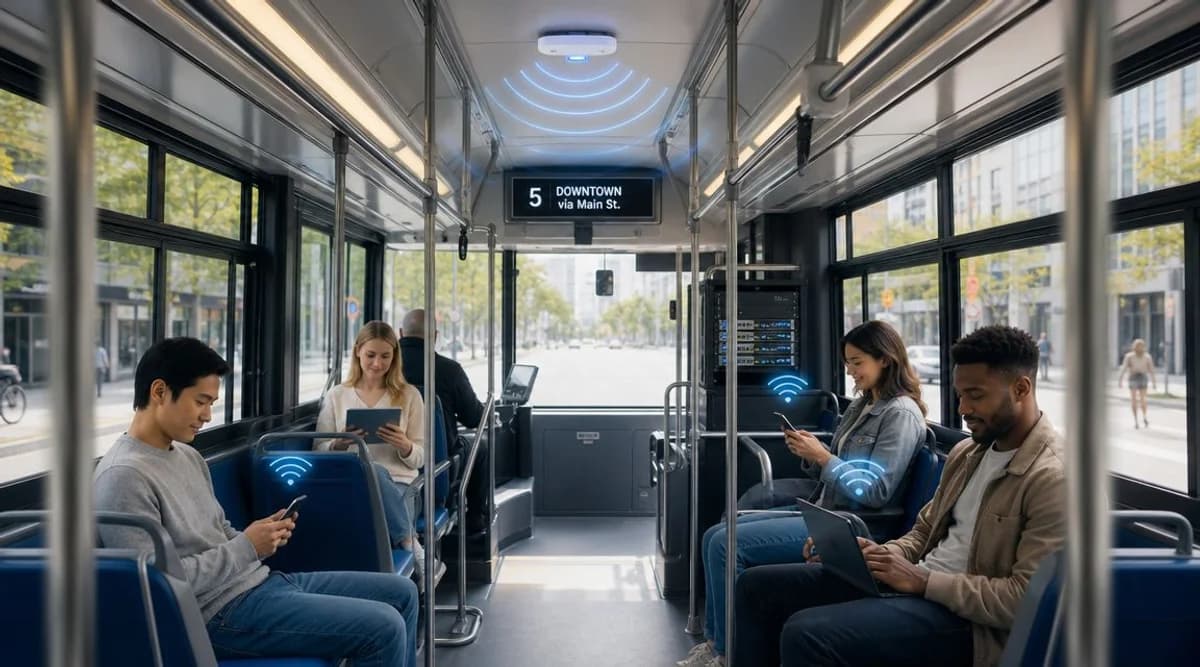
আপনি সম্ভবত সেই একই চাপের সম্মুখীন হচ্ছেন যা বেশিরভাগ অপারেটররা অনুভব করেন। যাত্রীরা একটি মৌলিক সুবিধা হিসেবে কানেক্টিভিটি আশা করেন, কমার্শিয়াল টিমগুলো আরও পরিচ্ছন্ন ডিজিটাল চ্যানেল চায়, এবং নেটওয়ার্ক টিমগুলো জানে যে “শুধু ফ্রি WiFi যুক্ত করা” মানেই সাধারণত একটি চলমান RF সমস্যা, একটি পুনরাবৃত্তিমূলক ডেটা বিল এবং একটি সাপোর্টের দীর্ঘ লাইন।
এই কারণেই বাসে ফ্রি WiFi-কে কেবল একটি সাধারণ ফিচার হিসেবে বিবেচনা করা উচিত নয়। একটি সচল গাড়িবহরে এটি যাত্রী, কর্মক্ষমতা, বাণিজ্যিক এবং সম্মতি সংক্রান্ত প্রভাব সহ একটি পরিবহন নেটওয়ার্ক পরিষেবা। যখন এটি সঠিকভাবে পরিকল্পনা করা হয়, তখন এটি যাত্রীদের সাথে যোগাযোগ বজায় রাখতে সাহায্য করে, ডিজিটাল যাত্রাকে উন্নত করে এবং দরকারী ফার্স্ট-পার্টি ইনসাইট তৈরি করে। আর যখন এটি সস্তায় জোড়াতালি দিয়ে চালানো হয়, তখন এটি একটি ধীরগতির হটস্পটে পরিণত হয় যা ব্যবহারকারীদের হতাশ করে এবং টিকিট বুকিং, CCTV ও টেলেমেটিক্সের সাথে ব্যান্ডউইথের জন্য প্রতিযোগিতা করে।
বাসে WiFi সাফল্যের জন্য কৌশলগত পরিকল্পনা
বেশিরভাগ ব্যর্থতা প্রকিউরমেন্টের আগেই ঘটে। কেউ একজন সিদ্ধান্ত নেয় যে ফ্লিটে বাসের মধ্যে ফ্রি WiFi প্রয়োজন, হার্ডওয়্যারের একটি সংক্ষিপ্ত তালিকা তৈরি হয় এবং কেবল অনেক পরে টিম জানতে চায় যে সফলতার রূপরেখা আসলে কী।
অ্যাক্সেস পয়েন্ট নয়, বরং অপারেটিং প্রশ্ন দিয়ে শুরু করুন। যদি প্রাথমিক উদ্দেশ্য যাত্রীদের সন্তুষ্টি হয়, তবে আপনার ডিজাইনের অগ্রাধিকারগুলো সহজ অনবোর্ডিং, অনুমানযোগ্য সেশন ধারাবাহিকতা এবং একটি ফেয়ার-ইউজ মডেলের দিকে ঝুঁকবে যা হালকা ব্রাউজিং এবং যাত্রার কাজগুলো সচল রাখে। উদ্দেশ্য যদি ডিজিটাল অন্তর্ভুক্তি হয়, তবে স্প্ল্যাশ-পেজ ব্র্যান্ডিংয়ের চেয়ে রুট নির্বাচন এবং পলিসি কন্ট্রোল বেশি গুরুত্বপূর্ণ। উদ্দেশ্য যদি বাণিজ্যিক হয়, তবে আপনার সম্মতি, পরিচয়, অ্যানালিটিক্স এবং মার্কেটিং কীভাবে ডেটা ব্যবহার করবে সে সম্পর্কে একটি পরিকল্পনার প্রয়োজন হবে।
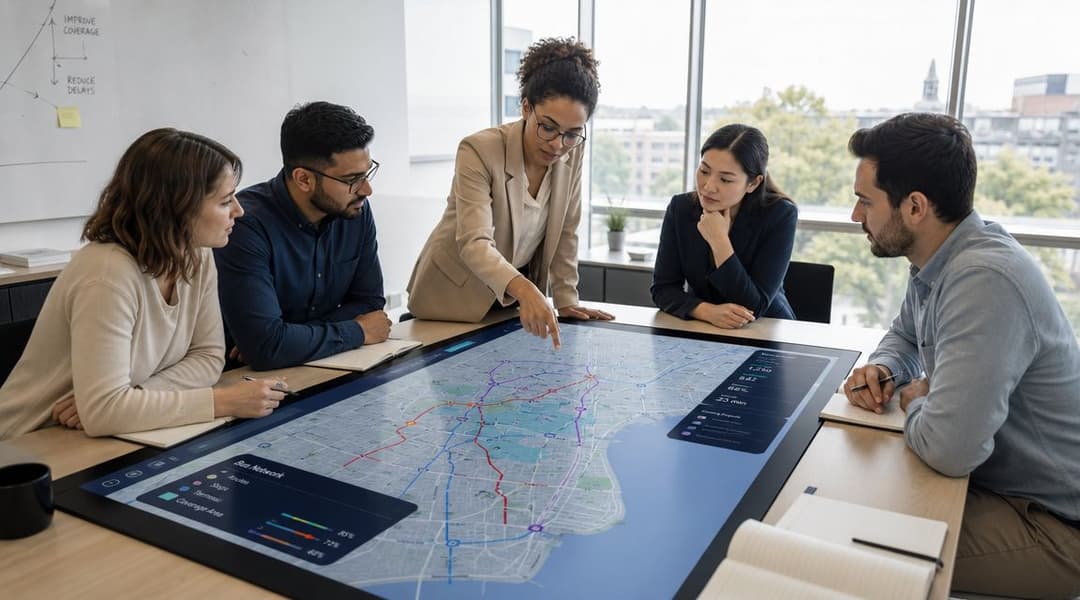
এমন লক্ষ্য নির্ধারণ করুন যা অপারেশন টিম পরিমাপ করতে পারে
আমি প্রথমে কার্যক্ষম ভাষায় লক্ষ্যগুলো সংজ্ঞায়িত করব, তারপর কাস্টমার এবং বাণিজ্যিক টিমগুলোকে তাদের নিজস্ব পরিমাপ যোগ করতে দেব। দরকারী উদাহরণগুলোর মধ্যে রয়েছে:
- যাত্রী যাত্রার গুণমান: আরোহীরা কি বারবার রিকানেক্ট না করেই টিকিটিং, মেসেজিং এবং সার্ভিস-চেক কাজগুলো সম্পন্ন করতে পারেন?
- রুটের উপযুক্ততা: কোন করিডোরগুলো একটি নির্ভরযোগ্য অনবোর্ড সার্ভিস সমর্থন করে এবং কোনগুলো সর্বদা দুর্বল থাকবে?
- ডিজিটাল এনগেজমেন্ট: অপারেটর কি সম্মতিপ্রাপ্ত যাত্রীদের ডেটা সংগ্রহ করতে এবং এটি সার্ভিস অ্যালার্ট, সমীক্ষা বা প্রচারের জন্য ব্যবহার করতে পারে?
- অন্তর্ভুক্তিমূলক ফলাফল: যে সমস্ত আরোহী প্রচুর মোবাইল ডেটা প্ল্যানের ওপর নির্ভর করতে পারেন না, WiFi কি তাদের জন্য বাধা হ্রাস করে?
এটি গুরুত্বপূর্ণ হওয়ার একটি কারণ হলো রুটের পরিবর্তনশীলতা। Ofcom-এর কানেক্টেড-ট্রান্সপোর্ট ভিউ দেখায় যে বিভিন্ন রুটে মোবাইল ডেটার অভিজ্ঞতা ব্যাপকভাবে পরিবর্তিত হয়, যেখানে গ্রামীণ এবং টানেল-বহুল করিডোরগুলিতে কভারেজ কমে যায়। বাস WiFi-এর জন্য, এর অর্থ হলো যাত্রীরা তাত্ত্বিক "সহজলভ্য" স্ট্যাটাস দেখে নয়, বরং হ্যান্ডঅফের সময় ছোট কাজগুলো সচল থাকছে কিনা তার ওপর ভিত্তি করে পরিষেবাটির মূল্যায়ন করে।
পরিচালনগত বাস্তবতা: একটি বাসের রুট যা শহরের মানচিত্রে ঠিকঠাক দেখায়, তা সত্ত্বেও যাত্রী WiFi-এর জন্য একটি দুর্বল বিকল্প হতে পারে যদি জংশন ক্যানিয়ন, আন্ডারপাস বা টানেল সেকশনে ব্যাকহল বারবার ড্রপ হয়।
কোনো কিছু কেনার আগে রুটগুলো বিশ্লেষণ করুন
একটি রুট পর্যালোচনায় আরএফ (RF) পরিস্থিতি, বাস করার ধরন, যাত্রীদের প্রোফাইল এবং পরিষেবার উদ্দেশ্য অন্তর্ভুক্ত করা উচিত। শহরের দৈনিক যাতায়াতকারীদের রুটগুলো স্কুল, বিমানবন্দর, দূরপাল্লা বা সামাজিকভাবে প্রয়োজনীয় রুটগুলোর থেকে আলাদাভাবে কাজ করে।
একটি ভালো প্ল্যানিং ওয়ার্কশপ প্রায়শই understanding fleet management সংক্রান্ত আরও ব্যাপক কাজের সাথে মিলে যায়, কারণ যানবাহনের সচল থাকার সময়, রক্ষণাবেক্ষণের সময়সূচী, চালকের কাজের ধারা এবং ডিপোর প্রক্রিয়া - সবই বাসের WiFi কীভাবে স্থাপন ও সাপোর্ট দেওয়া হবে তার ওপর প্রভাব ফেলে।
একটি সাধারণ সিদ্ধান্ত নেওয়ার স্ক্রিন ব্যবহার করুন:
| পরিকল্পনার প্রশ্ন | এটি কেন গুরুত্বপূর্ণ |
|---|---|
| কোন রুটে ধারাবাহিকতা সবচেয়ে দুর্বল? | সেগুলির জন্য মাল্টি-ক্যারিয়ার ডিজাইন বা প্রত্যাশা নির্ধারণের প্রয়োজন হতে পারে |
| যাত্রীদের কোন কাজগুলো সবচেয়ে বেশি গুরুত্বপূর্ণ? | হেডলাইন স্পিডের চেয়ে মেসেজিং এবং টিকিটিংয়ের ক্ষেত্রে ধারাবাহিকতা বেশি প্রয়োজন |
| ডেটা এবং সাপোর্ট প্রক্রিয়ার মালিক কে? | WiFi শুধুমাত্র একটি নেটওয়ার্ক ফিচার না হয়ে একটি ব্যবসায়িক সিস্টেমে পরিণত হয় |
| "ফ্রি"-এর মধ্যে আসলে কী কী অন্তর্ভুক্ত রয়েছে? | সেশন নিয়ম, ফিল্টারিং এবং ব্যান্ডউইথ সীমা অবশ্যই সুনির্দিষ্ট হতে হবে |
যেসব অপারেটররা যাত্রীদের অভিজ্ঞতার দিকটিকে আরও উন্নত করছেন, তাদের জন্য this guide to WiFi in automotive settings একটি দরকারী প্রেক্ষাপট কারণ এটি কানেক্টিভিটিকে একটি স্বতন্ত্র রেডিও সমস্যা হিসেবে না দেখে আরও বিস্তৃত যানবাহন যাত্রার একটি অংশ হিসেবে তুলে ধরে।
রাউটার, অ্যান্টেনা এবং অ্যাক্সেস পয়েন্ট নির্বাচন
কনজিউমার গ্রেড ডিভাইসগুলো বাসে দ্রুত নষ্ট হয়ে যায়। কম্পন, তাপমাত্রার ওঠানামা, অসঙ্গতিপূর্ণ বিদ্যুৎ সরবরাহ, ধাতব বডিওয়ার্ক এবং ক্রমাগত সেল হ্যান্ডঅফ সব দুর্বলতা প্রকাশ করে দেয়। অনবোর্ড কানেক্টিভিটি সম্পর্কে চিন্তা করার সঠিক উপায় হলো এটিকে একটি managed mobile network হিসেবে দেখা, সিম কার্ড সহ একটি সাধারণ হটস্পট হিসেবে নয়।
UK ফ্লিটের জন্য একটি ব্যবহারিক ডেপ্লয়মেন্ট মডেল একটি ছাদ-মাউন্ট করা, মাল্টি-SIM 4G/5G রাউটার ব্যবহার করে যার সাথে বাহ্যিক MIMO অ্যান্টেনা থাকে, তারপর একটি অনবোর্ড কন্ট্রোলার বা অ্যাক্সেস পয়েন্টে হ্যান্ডস অফ করে যা যাত্রীদের WiFi 5 বা WiFi 6 এর মাধ্যমে পরিষেবা দেয়। কারণটি সহজ। আসল রুটে, পিক থ্রুপুটের চেয়ে ধারাবাহিকতা বেশি গুরুত্বপূর্ণ, বিশেষ করে দুর্বল-সংকেত বিভাগ এবং চলমান-সেল ট্রানজিশনের মাধ্যমে। একটি স্থানীয়-কর্তৃপক্ষের মেমোতে দেখা গেছে যে যাত্রীদের WiFi ব্যবহার গড়ে প্রায় প্রতি বাসে ৩,৫০০ এমবি ছিল, যেখানে অভ্যন্তরীণ অপারেশনাল ডেটার জন্য মাত্র ৮ থেকে ১৪ এমবি ছিল, যার কারণে সেগমেন্টেশন বাধ্যতামূলক এবং ব্যাকহল সাইজিং মানুষের প্রত্যাশার চেয়ে অনেক বেশি গুরুত্বপূর্ণ, যেমনটি যাত্রী WiFi ডেপ্লয়মেন্ট মেমো-তে উল্লেখ করা হয়েছে।
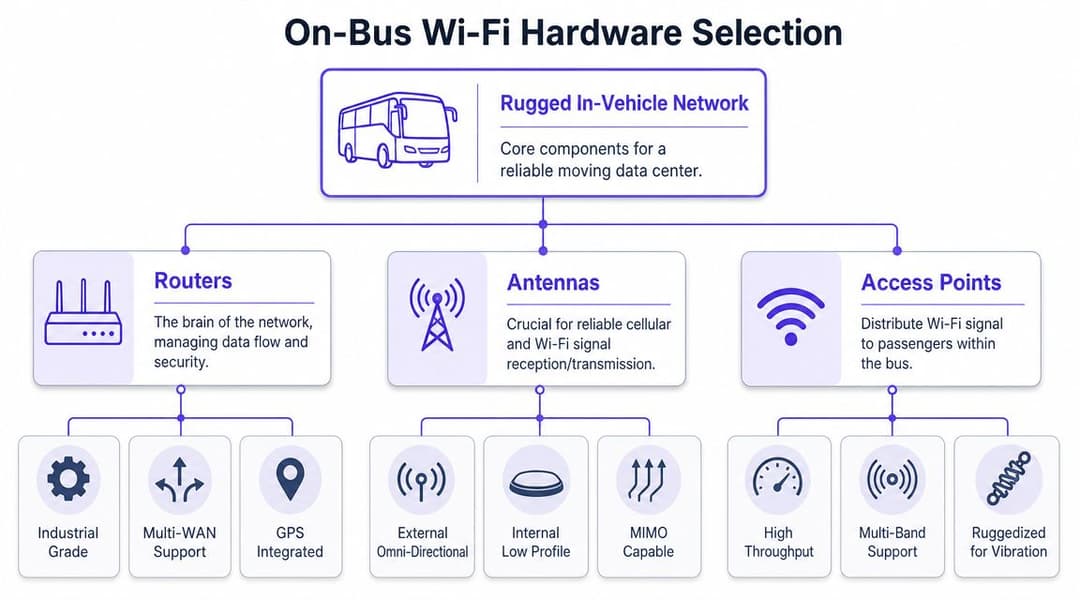
হার্ডওয়্যারের প্রতিটি স্তর আসলে কী কাজ করে
রাউটার হলো মূল মস্তিষ্ক। এটি ক্যারিয়ার লিঙ্ক, ফেইলওভার পলিসি, VPN, QoS এবং ট্রাফিক পৃথকীকরণ পরিচালনা করে। বাসের ক্ষেত্রে, আমি এমন যেকোনো ডিভাইস প্রত্যাখ্যান করব যা যানবাহনের শক্তির অবস্থা এবং কেন্দ্রীভূত ব্যবস্থাপনার জন্য ডিজাইন করা হয়নি।
অ্যান্টেনা সিস্টেম নির্ধারণ করে যে রাউটারটির কার্যকরভাবে কাজ করার কোনো সুযোগ আছে কিনা। গ্রহণযোগ্য ধারাবাহিকতা এবং ক্রমাগত রি-ট্রান্সমিশনের ঝামেলার মধ্যে পার্থক্য সাধারণত তৈরি করে এক্সটার্নাল রুফ-মাউন্টেড MIMO অ্যান্টেনা। শুধুমাত্র ইন্টার্নাল অ্যান্টেনা বিশিষ্ট ডিজাইনগুলো দেখতে হয়তো আরও পরিপাটি লাগতে পারে, কিন্তু যানবাহনের কাঠামো এবং যাত্রীদের ভিড় এগুলোর বিরুদ্ধে কাজ করে।
অ্যাক্সেস পয়েন্টটি কেবিনের অভিজ্ঞতা পরিচালনা করে। এর জন্য কোনো স্পেক-শীট প্রতিযোগিতায় জেতার প্রয়োজন নেই। এর জন্য স্থিতিশীল কভারেজ প্রদান করা, নীতি প্রয়োগকে সমর্থন করা এবং কম্পন সহ্য করা প্রয়োজন। আপনি যদি ফর্ম ফ্যাক্টরগুলি মূল্যায়ন করেন, তবে Redchip Online IT Store-এর Ubiquiti U7-এর মতো রাগড, আধুনিক AP বিভাগগুলি দেখা বিক্রেতারা কীভাবে নতুন রেডিও, আবহাওয়া প্রতিরোধ এবং মাউন্টিং নমনীয়তা প্যাকেজ করছে তার জন্য একটি দরকারী রেফারেন্স পয়েন্ট হতে পারে, যদিও একটি চলন্ত যানবাহনের জন্য উপযুক্ততা এখনও আপনার এনক্লোজার, পাওয়ার এবং ব্যবস্থাপনার প্রয়োজনীয়তার উপর নির্ভর করে।
নির্বাচনের মানদণ্ড যা বিজ্ঞাপনী গতির চেয়েও বেশি গুরুত্বপূর্ণ
"সবচেয়ে দ্রুত WiFi"-র উপর ভিত্তি করে কিনবেন না। স্থায়িত্ব এবং নিয়ন্ত্রণের ক্ষমতার উপর ভিত্তি করে কিনুন।
- যানবাহন-গ্রেড ডিজাইন: ইউনিটটি কম্পন, তাপ এবং অস্থির অটোমোটিভ পাওয়ার সহ্য করার উপযোগী হওয়া উচিত।
- ক্যারিয়ার নমনীয়তা: কোনো রুটে একটি নেটওয়ার্ক সমস্যায় পড়লে Multi-SIM সাপোর্ট অপারেশন টিমকে বিকল্প সুবিধা দেয়।
- রিমোট ম্যানেজমেন্ট: ফার্মওয়্যার আপডেট, পলিসি পরিবর্তন এবং ত্রুটি চিহ্নিতকরণের জন্য ফ্লিট টিমের সেন্ট্রাল ভিজিবিলিটি প্রয়োজন।
- সেগমেন্টেশন সাপোর্ট: গেস্ট ট্রাফিক অবশ্যই CCTV, টেলিম্যাটিক্স, টিকেটিং এবং স্টাফ সিস্টেম থেকে আলাদা রাখতে হবে।
- মাউন্টিং উপযোগিতা: পুরো ফ্লিট জুড়ে অ্যান্টেনা এবং AP-এর জন্য ইনস্টলারদের ধারাবাহিক এবং পুনরাবৃত্তিযোগ্য প্লেসমেন্টের প্রয়োজন।
একটি সাধারণ হার্ডওয়্যার সিদ্ধান্ত নেওয়ার ম্যাট্রিক্স
| উপাদান | কোন বিষয়ে জোর দিতে হবে | কী এড়িয়ে চলতে হবে |
|---|---|---|
| রাউটার | মাল্টি-SIM 4G/5G, রিমোট ম্যানেজমেন্ট, ভেহিকেল-গ্রেড পাওয়ার হ্যান্ডলিং | সিঙ্গেল-ক্যারিয়ার কনজিউমার হটস্পট ডিভাইস |
| অ্যান্টেনা | এক্সটার্নাল MIMO, প্রমাণিত মাউন্টিং পদ্ধতি, ক্যাবল কোয়ালিটি কন্ট্রোল | অজানা RF আপস সহ লুকানো ইন্টারনাল ইনস্টলেশন |
| অ্যাক্সেস পয়েন্ট | ম্যানেজড WiFi 5/6, পলিসি কন্ট্রোল, রাগড মাউন্টিং | শুধুমাত্র সর্বাধিক তাত্ত্বিক থ্রুপুটের জন্য বেছে নেওয়া AP |
অপারেশনাল বাধা সাধারণত সেলুলার ব্যাকহল হয়ে থাকে, বাসের ভেতরের WiFi রেডিও নয়।
সে কারণেই হার্ডওয়্যার নির্বাচন আলাদাভাবে না করে রুটের ডেটা মিলিয়ে করা উচিত। একটি আকর্ষণীয় AP দুর্বল ছাদের আরএফ (RF) ডিজাইন বা দুর্বল ক্যারিয়ার কৌশলের ক্ষতিপূরণ করতে পারে না।
একটি স্থিতিস্থাপক সেলুলার ব্যাকহল কৌশল ডিজাইন করা
রাউটারটি যদি মস্তিষ্ক হয়, তবে ব্যাকহল হল রক্তপ্রবাহ। বাসে ফ্রি WiFi দেওয়ার অনেক প্রকল্পই প্রায়শই এই ধাপে ব্যর্থ হয়। আপস্ট্রিম কানেকশন প্রতি কয়েক মিনিটে ভেঙে পড়ার সময়েও কেবিনের সিগন্যালটি একদম নিখুঁত দেখাতে পারে।
কৌশলগত পছন্দটি কেবল তাত্ত্বিকভাবে "4G নাকি 5G" তা নয়। বরং প্রতিটি রুটে কতটা রিডানডেন্সি এবং ক্যারিয়ার নমনীয়তা প্রয়োজন এবং আপনার টিম কতটা অপারেশনাল জটিলতা পরিচালনা করতে পারে, সেটাই আসল বিষয়।
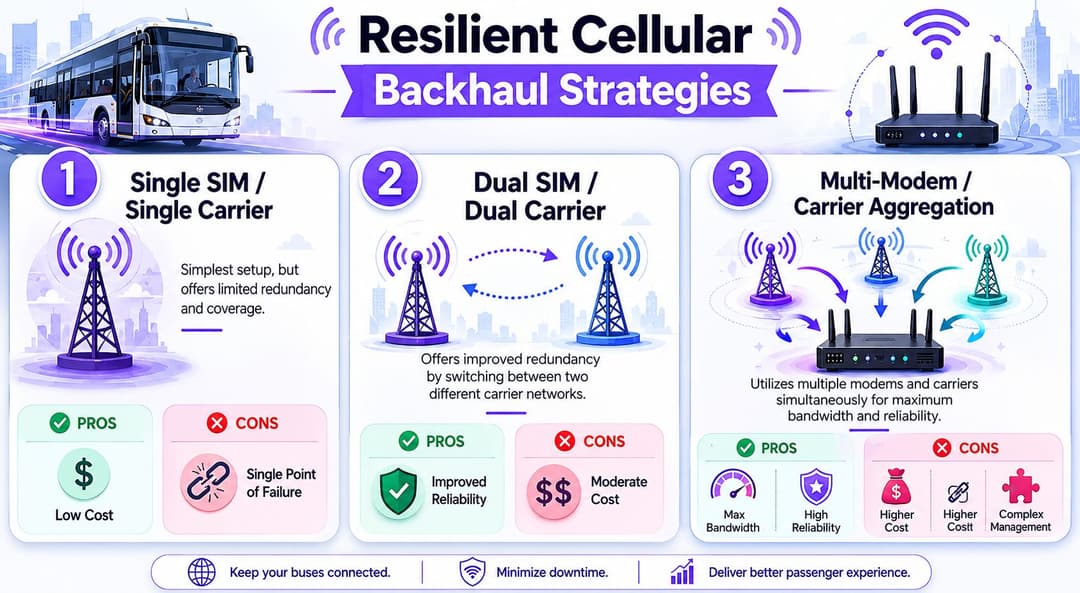
প্রধান পদ্ধতিগুলোর তুলনা
| কৌশল | সেরা ফিট | শক্তি | দুর্বলতা |
|---|---|---|---|
| একক SIM এবং একক ক্যারিয়ার | কম-ঝুঁকির শহুরে পাইলট রুট | সহজ এবং পরিচালনা করা সস্তা | একটি বিভ্রাট বা দুর্বল করিডোর পুরো পরিষেবাকে প্রভাবিত করে |
| দ্বৈত SIM এবং দ্বৈত ক্যারিয়ার | মিশ্র শহুরে এবং শহরতলি রুট | ফেইলওভারের মাধ্যমে আরও ভাল স্থিতিস্থাপকতা | আরও নীতিগত কাজ এবং ট্যারিফ ব্যবস্থাপনা |
| অ্যাগ্রিগেশন বা অ্যাডভান্সড ফেইলওভার সহ মাল্টি-মডেম | গুরুত্বপূর্ণ রুট বা প্রিমিয়াম পরিষেবা | সর্বোচ্চ ধারাবাহিকতা এবং আরও ব্যবহারযোগ্য ক্ষমতা | অধিক খরচ এবং ব্যবস্থাপনা ওভারহেড |
একটি সিঙ্গেল-ক্যারিয়ার সেটআপ শক্তভাবে নিয়ন্ত্রিত পাইলট প্রকল্পের জন্য কাজ করতে পারে। এটি সমর্থন করা সহজ এবং এটি আপনাকে একটি বেসলাইন দেয়। কিন্তু এটি আপনাকে একটি সিঙ্গেল পয়েন্ট অফ ফেইলিওর-ও দেয়। টানেল-বহুল বা প্রান্তিক করিডোরে যদি সেই ক্যারিয়ারের পারফরম্যান্স খারাপ হয়, তবে যাত্রীরা অনবোর্ড WiFi SSID দেখা যাচ্ছে কিনা তা নিয়ে মাথা ঘামাবে না। তারা কেবল বলবে যে পরিষেবাটি কাজ করছে না।
ডুয়াল-ক্যারিয়ার ডিজাইন প্রায়শই একটি বাস্তবসম্মত মধ্যপন্থা। এগুলো কভারেজ সমস্যা সম্পূর্ণ দূর করে না, তবে একটি নেটওয়ার্কের দুর্বল পয়েন্টগুলির এক্সপোজার কমিয়ে দেয়। অনেক ফ্লিটের ক্ষেত্রে, এটিই সেই পর্যায় যেখানে নির্ভরযোগ্যতা জনসমক্ষে চালু করার মতো যথেষ্ট ভালো হয়ে ওঠে।
মার্কেটিংয়ের দাবির ওপর ভিত্তি করে নয়, ধারাবাহিকতার কথা মাথায় রেখে পরিকল্পনা করুন
একটি ব্যাকহল কৌশল ব্যবহারকারীরা অন-বোর্ডে কী করেন তার উপর ভিত্তি করে ডিজাইন করা উচিত। বেশিরভাগ যাত্রী ক্রমাগত বাল্ক ট্রান্সফার করার চেষ্টা করেন না। তারা টিকিট পরীক্ষা করেন, মেসেজ পাঠান, সার্ভিস আপডেট ওপেন করেন বা হালকা ব্রাউজিং করে সময় কাটান।
এর অর্থ নেটওয়ার্ক পলিসিতে যে বিষয়গুলোকে প্রাধান্য দেওয়া উচিত:
- হ্যান্ডঅফের পরে দ্রুত পুনরুদ্ধার: স্বল্পমেয়াদী বিঘ্নগুলি গুরুত্বপূর্ণ।
- অনুমেয় ল্যাটেন্সি আচরণ: মানুষের "গতি" লক্ষ্য করার আগেই টিকিট বুকিং এবং সাইন-ইন ফ্লো ব্যর্থ হয়ে যায়।
- বাস্তবধর্মী ট্যারিফ পরিকল্পনা: পরিষেবাটি চালু হওয়ার পর গেস্ট ট্রাফিক হালকা থাকবে বলে ধরে নেবেন না।
- প্রতিটি রুটের জন্য আলাদা টিউনিং: একটি সিটি-সেন্টার শাটল এবং একটি গ্রামীণ ইন্টার-আর্বান পরিষেবার ক্ষেত্রে একই ধারণা প্রযোজ্য হওয়া উচিত নয়।
একটি বাস নেটওয়ার্ক তখন মানুষের আস্থা অর্জন করে যখন রুটটির কঠিন অংশগুলোতেও কানেকশনটি টিকে থাকে, টার্মিনাসে স্পিড টেস্টের ভালো ফলের উপর ভিত্তি করে নয়।
5G-প্রস্তুত হার্ডওয়্যার তখনই অর্থপূর্ণ হয় যখন কভারেজ এবং শুল্কের অর্থনীতি এটিকে সমর্থন করে, তবে আমি 5G ব্র্যান্ডিংয়ের উপর ভিত্তি করে ব্যবসায়িক কেস তৈরি করব না। আমি এটি তৈরি করব স্থিতিস্থাপকতা, পরিচালনযোগ্যতা এবং যাত্রীদের যেখানে প্রয়োজন সেখানে ব্যাকহল ব্যবহারযোগ্য থাকে কিনা তার উপর ভিত্তি করে।
যাত্রীদের জন্য নির্বিঘ্ন এবং নিরাপদ অথেন্টিকেশন
যাত্রীরা চিপসেটের চেয়ে যুক্ত হওয়ার অভিজ্ঞতা বেশি মনে রাখেন। যদি পোর্টালটি লুপ হতে থাকে, শর্তাবলীর পৃষ্ঠাটি কাজ না করে, অথবা প্রতিবার ভ্রমণের সময় তাদের একই লগইন পুনরাবৃত্তি করতে হয়, তবে আরএফ ডিজাইন ভালো হওয়া সত্ত্বেও তারা পুরো পরিষেবাটিকে নিম্নমানের হিসেবে বর্ণনা করবেন।
এই কারণেই লিগ্যাসি Captive Portal-গুলি একটি দায়বদ্ধতা হয়ে উঠছে। এগুলো যাত্রায় বাধা সৃষ্টি করে, অতিরিক্ত সাপোর্ট রিকোয়েস্ট তৈরি করে এবং প্রায়শই একটি জটিল ব্রাউজার ধাপের পরেই নিরাপত্তা প্রদান করে। একটি চলমান পাবলিক সার্ভিসের জন্য, এই ঘর্ষণটি অপ্রয়োজনীয়।
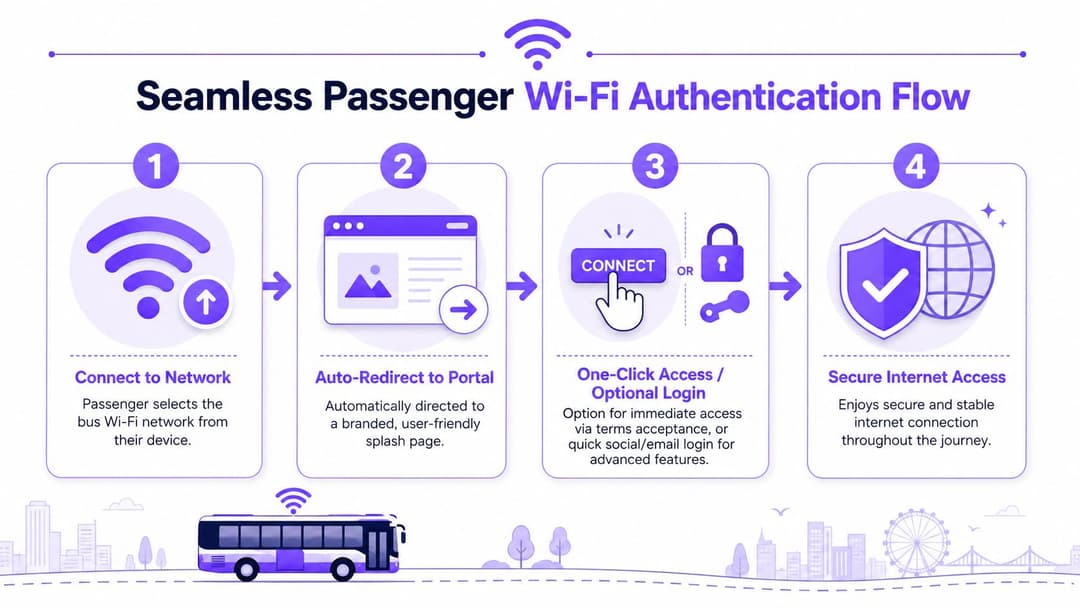
পুরোনো Captive Portal গুলো কেন আশানুরূপ পারফর্ম করে না
ঐতিহ্যবাহী পোর্টাল ওয়ার্কফ্লো কফি শপ এবং হোটেলের জন্য ডিজাইন করা হয়েছিল। বাস ভিন্ন। যাত্রীরা দ্রুত বোর্ডিং করেন, যাত্রা সংক্ষিপ্ত হয় এবং টিকিট বুকিং, মেসেজিং বা আপডেটের জন্য লোকেদের প্রায়শই অবিলম্বে সংযোগের প্রয়োজন হয়।
পুরোনো মডেলের বেশ কিছু দুর্বলতা রয়েছে:
- বারবার ম্যানুয়াল লগইন: নিয়মিত যাত্রীরা অপ্রয়োজনীয় ঝামেলার সম্মুখীন হন।
- ব্রাউজার নির্ভরতা: Captive Portal সনাক্তকরণ বিভিন্ন ডিভাইস এবং অপারেটিং সিস্টেমে ভিন্নভাবে আচরণ করে।
- দুর্বল ট্রাস্ট মডেল: শেয়ার্ড-পাসওয়ার্ড বা ওপেন-দেন-পোর্টাল ডিজাইনগুলি আধুনিক বা নিরাপদ মনে হয় না।
- দুর্বল রিকভারি: সেলুলার সংযোগ বিচ্ছিন্ন হলে, ব্যবহারকারীরা আবার যুক্ত হওয়ার প্রক্রিয়ায় ফিরে যেতে পারেন।
সেই মডেলটি কোথায় ভেঙে পড়ে সে সম্পর্কে যদি আপনার কোনো রিফ্রেসারের প্রয়োজন হয়, তবে Captive Portal-এর এই ব্যাখ্যাটি একটি দরকারী রেফারেন্স হতে পারে।
একটি উন্নত অথেন্টিকেশন মডেল দেখতে কেমন হয়
আধুনিক পরিবহন WiFi-এর যেখানে সম্ভব Passpoint, OpenRoaming এবং পাসওয়ার্ডহীন আইডেন্টিটি ফ্লো-এর দিকে অগ্রসর হওয়া উচিত। এর মূল্য কেবল সুবিধাই নয়। এটি আরও পরিষ্কার নিরাপত্তা এবং একাধিক যানবাহন ও ভেন্যু জুড়ে পুনরাবৃত্তিযোগ্য ব্যবহারকারীর অভিজ্ঞতাও নিশ্চিত করে।
ব্যবহারিক বাস্তবায়নের ক্ষেত্রে, আমি যাত্রীদের দুটি সাধারণ ক্যাটাগরিতে বিভক্ত করব:
- কম ঝামেলাপূর্ণ পাবলিক ব্যবহারের জন্য তাত্ক্ষণিক গেস্ট অ্যাক্সেস, যা সাধারণত শর্তাবলীর স্বীকৃতি এবং ন্যায্য-ব্যবহারের নীতির সাথে যুক্ত থাকে।
- ফিরে আসা ব্যবহারকারীদের জন্য স্বীকৃত অ্যাক্সেস, যেখানে ইমেল-ভিত্তিক আইডেন্টিটি, পাসওয়ার্ডহীন লগইন, বা ফেডারেটেড অনবোর্ডিং বারবার লগইন করার ঝামেলা কমায় এবং অ্যানালিটিক্সকে সমর্থন করে।
যেসব প্ল্যাটফর্ম অনবোর্ডিং, আইডেন্টিটি এবং নেটওয়ার্ক এনফোর্সমেন্টকে একত্রিত করে, সেগুলো বাস WiFi-এর অর্থনৈতিক দিকটিকে পরিবর্তন করতে শুরু করে। এটি কেবল একটি এককালীন সুবিধার পরিবর্তে একটি পরিচালিত ডিজিটাল টাচপয়েন্টে পরিণত হয়। এর একটি উদাহরণ হলো Purple, যা সাপোর্টেড ইনফ্রাস্ট্রাকচার জুড়ে ব্র্যান্ডেড অনবোর্ডিং, পাসওয়ার্ডহীন অ্যাক্সেস ফ্লো, অ্যানালিটিক্স এবং OpenRoaming-স্টাইল আইডেন্টিটি-ভিত্তিক নেটওয়ার্কিং সাপোর্ট করে।
সবচেয়ে সেরা বাসের WiFi লগইন হলো সেটি যা যাত্রীরা খুব কমই লক্ষ্য করেন।
ব্যবহারিক অথেন্টিকেশন নিয়মাবলী
- প্রথম সেশনটি সংক্ষিপ্ত রাখুন: ফর্ম ফিল্ড এবং আইনি জটিলতা ন্যূনতম রাখুন।
- ফিরে আসা ব্যবহারকারীদের চিহ্নিত করুন: নিয়মিত যাতায়াতকারীদের প্রতিবার শুরু থেকে শুরু করতে বলবেন না।
- দ্রুত এনক্রিপ্ট করুন: পাসওয়ার্ডহীন এবং সার্টিফিকেট-ভিত্তিক পদ্ধতিগুলি উন্মুক্ত গেস্ট ফ্লো-এর উপর নির্ভরতা হ্রাস করে।
- বিঘ্ন ঘটার বিষয়টি মাথায় রেখে ডিজাইন করুন: অথেন্টিকেশন মোবাইল ব্যাকহলের বাস্তবতার সাথে মানিয়ে নেওয়ার মতো হতে হবে, কোনো স্থায়ী ভেন্যু ধরে নিলে চলবে না।
আপনি যদি পরবর্তীতে রাইডারশিপ ডেটা, সমীক্ষা বা স্পন্সর-ফান্ডেড অ্যাক্সেস চান, তবে সেই ক্ষমতা একটি পরিষ্কার প্রমাণীকরণ স্তরের উপর নির্ভর করে। এটি ছাড়া, আপনি কেবল ইন্টারনেট অ্যাক্সেস সম্প্রচার করছেন এবং আশা করছেন যে কেউ এর ফলাফল পরিমাপ করতে পারবে।
সিকিউরিটি কমপ্লায়েন্স এবং ফেয়ার ইউজ পলিসি প্রয়োগ করা
পাবলিক বাসের WiFi এমন সব সিস্টেমের পাশাপাশি অবস্থান করে যা অপারেটররা কোনোভাবেই ঝুঁকিতে ফেলতে পারেন না। টিকিট বুকিং, CCTV, চালকের ব্যবহারের টুলস, ডায়াগনস্টিকস এবং টেলিমেট্রি - সবই যাত্রীদের ট্রাফিকের সাথে যানবাহনের একই স্পেস শেয়ার করে। গেস্ট নেটওয়ার্কটি যদি ফ্ল্যাট, দুর্বলভাবে ফিল্টার করা বা বাজেভাবে নিয়ন্ত্রিত হয়, তবে ডিজাইনটিতে ভুল রয়েছে।
বেসলাইন নিয়মটি সহজ। গেস্ট ট্রাফিক কখনই অপারেশনাল ট্রাফিকের সাথে মেশার সুযোগ পাবে না। সেই পার্থক্যটি পলিসি, নেটওয়ার্ক ডিজাইন এবং মনিটরিংয়ের মধ্যে থাকা উচিত।
প্রথমে কঠোর আইসোলেশন তৈরি করুন
আলাদা SSID, VLAN এবং ফায়ারওয়াল পলিসি ব্যবহার করুন যাতে যাত্রীদের ব্রাউজিং অনবোর্ড সিস্টেমের কাজে হস্তক্ষেপ করতে না পারে। কন্ট্রোল প্লেন এবং ম্যানেজমেন্ট ইন্টারফেসগুলো শুধুমাত্র অনুমোদিত কর্মীদের পাথের মধ্যে সীমাবদ্ধ রাখুন।
কাজের একটি বাস্তবসম্মত ধাপ নিম্নরূপ:
- ফাংশন অনুযায়ী সেগমেন্ট করুন: গেস্ট WiFi, অপারেশনাল সিস্টেম, CCTV, স্টাফ অ্যাক্সেস এবং রক্ষণাবেক্ষণ অ্যাক্সেস সবই আলাদা হওয়া উচিত।
- উদ্দেশ্যসহ QoS প্রয়োগ করুন: গেস্ট ব্রাউজিংয়ের চেয়ে নিরাপত্তা, ডিসপ্যাচ এবং টেলিমেট্রি ট্রাফিককে অগ্রাধিকার দেওয়া উচিত।
- ইস্ট-ওয়েস্ট মুভমেন্ট সীমাবদ্ধ করুন: যাত্রীদের ইন্টারনেট অ্যাক্সেস করা উচিত, গাড়ির সিস্টেম নয়।
- পলিসি ইভেন্ট লগ করুন: অপব্যবহার, কনজেশন বা সার্ভিস সংক্রান্ত অভিযোগ তদন্ত করার সময় সাপোর্ট টিমের প্রমাণের প্রয়োজন হয়।
কনটেন্ট ফিল্টার করুন এবং চাহিদার আকার নির্ধারণ করুন
স্কুল বাসে ব্যবহারের শিক্ষাগুলো এখানেও ভালোভাবে প্রযোজ্য। পাবলিক বাস WiFi-এ CIPA-স্টাইল কন্টেন্ট ফিল্টারিং, ডিভাইস-ভিত্তিক পলিসি লিমিট এবং একটি স্পষ্ট ফেয়ার-ইউজ পলিসি অন্তর্ভুক্ত থাকা উচিত। Kajeet-এর তথ্য অনুসারে একটি একক বাস ৬৫টি পর্যন্ত স্টুডেন্ট ডিভাইস সাপোর্ট করতে পারে, তবে এটি একটি সর্বোচ্চ সীমার পরিকল্পনা নির্দেশক মাত্র, বাস্তব অভিজ্ঞতার গ্যারান্টি নয়। কারণ ব্যাকহল কোয়ালিটি এবং সিগন্যাল কন্ডিশন এখনও পারফরম্যান্সের ওপর সবচেয়ে বেশি প্রভাব ফেলে, যা এই স্কুল বাস WiFi ইমপ্লিমেন্টেশন আর্টিকেলে আলোচনা করা হয়েছে।
যা বিচক্ষণ নিয়ন্ত্রণের দিকে পরিচালিত করে:
- ভারী অ্যাপ্লিকেশনের জন্য ব্যান্ডউইথ সীমা: স্ট্রিমিং পরিষেবা যাত্রাকালীন কাজের জন্য ডিজাইন করা পরিষেবাকে ব্যাহত করতে পারে।
- সেশন পলিসি সীমা: অল্প সংখ্যক ব্যবহারকারী যাতে অতিরিক্ত ক্ষমতা ব্যবহার করতে না পারে তা নিশ্চিত করুন।
- ওয়েব ফিল্টারিং বিভাগসমূহ: ক্ষতিকারক, অবৈধ এবং অনুপযুক্ত সাইটগুলি ব্লক করুন।
- ব্যবহারের স্বচ্ছতা: যাত্রা শুরু করার আগেই যাত্রীদের জানান যে "ফ্রি" সুবিধার মধ্যে কী কী অন্তর্ভুক্ত রয়েছে।
ন্যায্য ব্যবহার পণ্যেরই একটি অংশ
অপারেটররা কখনও কখনও উদ্বিগ্ন থাকেন যে লিমিট নির্ধারণ করলে পরিষেবাটিকে কৃপণ মনে হতে পারে। বাস্তবে, সাধারণত এর বিপরীতটাই সত্য। একটি সীমিত ব্যাকহলের ওপর সীমাহীন প্রতিশ্রুতি দেওয়ার চেয়ে একটি স্বচ্ছ পলিসি অনেক কম অভিযোগ তৈরি করে।
পরিষেবাটিকে "মেসেজিং, ব্রাউজিং এবং ট্রাভেল সংক্রান্ত কাজের জন্য সেরা" হিসাবে প্রকাশ করুন, যদি না আপনি আরও ভারী কিছুর ডিজাইন এবং ফান্ডিং করার জন্য প্রস্তুত থাকেন।
এই ধরণের শব্দচয়ন আপনার প্রদানকৃত নেটওয়ার্কের সাথে প্রত্যাশার সামঞ্জস্য বজায় রাখে। এছাড়াও কেবিন পরিপূর্ণ ও চাহিদা বৃদ্ধি পাওয়ার সময়ে এটি নিরাপত্তা-সংক্রান্ত গুরুত্বপূর্ণ ট্রাফিক রক্ষা করে।
WiFi ডেটাকে কার্যকর ইনসাইটে রূপান্তর করা
একটি লাইভ বাস WiFi পরিষেবা শুধুমাত্র সেশন কাউন্টের চেয়েও বেশি কিছু তৈরি করে। সঠিক আইডেন্টিটি, সম্মতি এবং অ্যানালিটিক্স মডেলের মাধ্যমে এটি অপারেশনাল এবং যাত্রী সংক্রান্ত ইন্টেলিজেন্সের একটি গতিশীল উৎস হয়ে ওঠে।
ব্যবহারের গ্রাফ দেখেই থেমে যাওয়াটা একটি বড় ভুল। "কতটি ডিভাইস কানেক্ট হয়েছে?" জানা দরকারি, কিন্তু এটি কমার্শিয়াল, কাস্টমার বা প্ল্যানিং টিমকে কী পরিবর্তন এসেছে তা বলে না।
সবচেয়ে দরকারি প্রশ্নগুলো কেবল নেটওয়ার্ক সংক্রান্ত প্রশ্ন নয়
একবার অথেন্টিকেশন এবং অ্যানালিটিক্স যুক্ত হয়ে গেলে, অপারেটররা আরও প্রাসঙ্গিক প্রশ্ন করা শুরু করতে পারেন:
- কোন রুটগুলো বারবার ব্যবহারকারীদের আকর্ষণ করে?
- দিনের কোন সময়ে সংযোগের চেষ্টাগুলো বেশি জমা হয়?
- ভ্রমণের সময় কোন ক্যাম্পেইন বা পরিষেবা সতর্কতাগুলো যাত্রীদের কাছে পৌঁছায়?
- পরিচিত রাইডাররা কি এককালীন ব্যবহারকারীদের চেয়ে ভিন্নভাবে আচরণ করে?
যখন এই ইনসাইটগুলো পরিষেবার প্রসঙ্গের সাথে একত্রিত করা হয় তখন সেগুলো আরও মূল্যবান হয়ে ওঠে। জোরালো বারবার ব্যবহারের হার রয়েছে এমন একটি রুট স্পন্সর-অর্থায়িত অ্যাক্সেস, লক্ষ্যযুক্ত পরিষেবা যোগাযোগ বা অনবোর্ড প্রচারের জন্য উপযুক্ত হতে পারে। প্রথমবার ব্যবহারের হার বেশি এমন একটি রুটে সহজতর অনবোর্ডিং এবং আরও স্পষ্ট যাত্রী নির্দেশনার প্রয়োজন হতে পারে।
আধুনিক অ্যানালিটিক্স যা পরিবর্তন করে
একটি পরিপক্ক প্ল্যাটফর্ম টিমগুলোকে বেনামী অ্যাক্সেস থেকে সম্মতিপ্রাপ্ত ফার্স্ট-পার্টি এনগেজমেন্টের দিকে এগিয়ে নিয়ে যেতে সাহায্য করে। এর মানে কিন্তু অনধিকারপ্রবেশকারী ট্র্যাকিং নয়। এর মানে হলো অথেন্টিকেশন এবং পলিসি কন্ট্রোলগুলো দায়িত্বশীলভাবে ব্যবহার করা যাতে অপারেটর ব্যবহারের প্যাটার্ন বুঝতে পারেন এবং পরিষেবার মান উন্নত করতে পারেন।
কার্যকরী আউটপুটের মধ্যে প্রায়শই অন্তর্ভুক্ত থাকে:
| ডেটা পয়েন্ট | ব্যবহারিক প্রয়োগ |
|---|---|
| পুনরাবৃত্ত সংযোগ | নিয়মিত যাতায়াতকারী রুট এবং অনুগত যাত্রী গোষ্ঠী চিহ্নিত করুন |
| সেশন টাইমিং | বাস্তব ভ্রমণ সময়ের সাথে অ্যালার্ট, সমীক্ষা এবং প্রমোশন মেলান |
| অনবোর্ডিংয়ে ড্রপ-অফ পয়েন্ট | পোর্টাল ডিজাইন উন্নত করুন এবং জটিলতা হ্রাস করুন |
| ডিভাইস এবং ভিজিট প্যাটার্ন | কর্মী নিয়োজন, মেসেজিং এবং স্পনসরশিপ পরিকল্পনা আরও নিখুঁত করুন |
যেসব টিম এই সক্ষমতা তৈরি করছে, তাদের জন্য গেস্ট WiFi অ্যানালিটিক্সের ব্যবহারের ক্ষেত্র এবং লোকেশন-ডেটা উদাহরণগুলো কীভাবে র কানেকশন ইভেন্টগুলো মার্কেটিং এবং অপারেশনাল সিদ্ধান্তগুলোকে সমর্থন করতে পারে তার একটি নির্ভরযোগ্য রেফারেন্স প্রদান করে।
ভালো WiFi অ্যানালিটিক্স শুধু ব্যবহারই প্রমাণ করে না। এটি অপারেটরকে সিদ্ধান্ত নিতে সাহায্য করে যে কানেক্টিভিটি ঠিক কোন জায়গায় যাত্রীর যাত্রাপথ পরিবর্তন করছে এবং কোন জায়গায় এটি কেবল খরচ বাড়াচ্ছে।
ঠিক সেখানেই কৌশলগত মূল্য ফুটে ওঠে। WiFi তখন আর কোনো ইউটিলিটি খরচ না থেকে একটি পরিমাপযোগ্য ডিজিটাল চ্যানেল হিসেবে কাজ করতে শুরু করে।
খরচ, ROI এবং ফান্ডিং মডেল বিশ্লেষণ
এটি এমন একটি পয়েন্ট যেখানে সাধারণত উদ্দীপনা এসে প্রকিউরমেন্টের বাস্তবতার মুখোমুখি হয়। চলমান অপারেটিংয়ের বোঝা যদি কেউ সঠিকভাবে মডেল না করে থাকে, তবে একটি ফ্লিট ট্রায়াল প্রযুক্তিগতভাবে সফল হওয়া সত্ত্বেও ব্যবসায়িক ক্ষেত্রে ব্যর্থ হতে পারে।
লন্ডনে ঠিক সেটাই ঘটেছিল। ট্রান্সপোর্ট ফর লন্ডন তাদের ইয়ার অফ দ্য বাস প্রচারণার সময় দুটি গাড়িতে সরঞ্জাম ফিট করে বাসে বিনামূল্যে WiFi পরীক্ষা করেছিল। প্রযুক্তিগত পারফরম্যান্স এবং গ্রাহক ব্যবহার উভয় ক্ষেত্রেই ট্রায়ালটিকে সফল বলে মনে করা হয়েছিল, কিন্তু TfL বলেছে যে উচ্চ ইনস্টলেশন খরচ এবং প্রদানকারীর কাছ থেকে উচ্চ মাসিক ডেটা চার্জের কারণে আরও ব্যাপক রোলআউট আর্থিকভাবে কার্যকর ছিল না। TfL আরও উপসংহারে পৌঁছেছে যে, ব্যাপক 3G এবং 4G উপলব্ধতার পরিপ্রেক্ষিতে, বাসে WiFi কেবল তখনই এগিয়ে যাবে যদি এটি তৃতীয় পক্ষ দ্বারা সম্পূর্ণ অর্থায়ন করা হয়, যেমনটি বাসে বিনামূল্যে WiFi সম্পর্কিত লন্ডন অ্যাসেম্বলির উত্তরে সেট করা হয়েছে।
ব্যয়ের এমন সব খাত যা অপারেটররা প্রায়শই কম মূল্যায়ন করেন
হার্ডওয়্যার আইটেমের দিকেই সবার নজর যায়। সাপোর্ট মডেলের দিকে সাধারণত নজর যায় না।
একটি বাস্তবসম্মত সামগ্রিক খরচের হিসাবের মধ্যে অন্তর্ভুক্ত রয়েছে:
- যানবাহনের হার্ডওয়্যার এবং ইনস্টলেশন: রাউটার, অ্যান্টেনা, অ্যাক্সেস পয়েন্ট, ক্যাবলিং, মাউন্টিং, লেবার, কমিশনিং।
- সেলুলার সার্ভিস: SIM ট্যারিফ, ক্যারিয়ার ম্যানেজমেন্ট, ফেইলওভার স্ট্র্যাটেজি এবং সময়ের সাথে ব্যবহারের বৃদ্ধি।
- প্ল্যাটফর্ম খরচ: অথেন্টিকেশন, অ্যানালিটিক্স, কন্টেন্ট ফিল্টারিং, কমপ্লায়েন্স টুলিং এবং রিপোর্টিং।
- অপারেশনাল সাপোর্ট: মনিটরিং, ইনসিডেন্ট হ্যান্ডলিং, ফার্মওয়্যার ম্যানেজমেন্ট, রিপ্লেসমেন্ট স্টক, ফিল্ড মেইনটেন্যান্স।
- সাইবার সিকিউরিটি এবং পলিসি কাজ: সেগমেন্টেশন, ফিল্টারিং, লগিং, রিভিউ এবং গভর্নেন্স।
"বাসে ফ্রি WiFi" বাক্যটি এই সবকিছু লুকিয়ে ফেলতে পারে। এটি যাত্রীদের জন্য ফ্রি হতে পারে, তবে অপারেটরদের জন্য নয়।
কেবল অনুভূতির ওপর নির্ভর না করে ফলাফলের ভিত্তিতে ROI কেস তৈরি করুন
যাত্রীদের সন্তুষ্টি অত্যন্ত গুরুত্বপূর্ণ, তবে এটি সাধারণত একা এই প্রকল্পের অর্থায়ন করতে পারবে না। একটি শক্তিশালী বিজনেস কেস কানেক্টিভিটিকে এক বা একাধিক পরিমাপযোগ্য ফলাফলের সাথে যুক্ত করে।
এখানে এমন কিছু মডেল দেওয়া হলো যা আমার কাছে যৌক্তিক মনে হয়:
| ভ্যালু মডেল | গুণগতভাবে কী পরিমাপ করতে হবে |
|---|---|
| যাত্রী অভিজ্ঞতা | অভিযোগ হ্রাস, মসৃণ ডিজিটাল যাত্রা, ভ্রমণে আস্থা বৃদ্ধি |
| অন্তর্ভুক্তি এবং অ্যাক্সেসিবিলিটি | যাদের ভ্রমণের কাজের জন্য কানেক্টিভিটি প্রয়োজন, সেইসব যাত্রীদের জন্য আরও ভালো সহায়তা |
| বাণিজ্যিক এনগেজমেন্ট | ইমেল ক্যাপচার, স্পন্সর-ফান্ডেড অ্যাক্সেস, ক্যাম্পেইন পার্টিসিপেশন, সার্ভে রেসপন্স |
| অপারেশনাল দক্ষতা | চাহিদার ধরণ সম্পর্কে আরও ভালো ভিজিবিলিটি এবং শক্তিশালী ডিজিটাল যোগাযোগ |
একটি স্পন্সর বা তৃতীয় পক্ষের অর্থায়ন মডেল কাজ করতে পারে, তবে কেবল তখনই যখন অপারেটর জানে যে কোন ইনভেন্টরি থেকে অর্থ উপার্জন করা হচ্ছে। এটি কি স্প্ল্যাশ-পেজ ব্র্যান্ডিং, সম্মতিপ্রাপ্ত মার্কেটিং পৌঁছানো, রুট-নির্দিষ্ট ক্যাম্পেইন, নাকি দর্শক ইনসাইট? এই সংজ্ঞা না থাকলে, "বিজ্ঞাপন রাজস্ব" অস্পষ্ট থেকে যায় এবং প্রকিউরমেন্ট টিম যুক্তিযুক্তভাবেই এটি প্রত্যাখ্যান করে।
যা সাধারণত কাজ করে এবং যা সাধারণত করে না
যেটি কার্যকর হয় তা হলো রুট-ভিত্তিক নির্বাচনের সাথে একটি পর্যায়ক্রমিক রোলআউট, একটি কঠোর সাপোর্ট মডেল এবং অপারেশন, আইটি, কাস্টমার টিম ও ফাইন্যান্স দ্বারা সম্মত সুনির্দিষ্ট সাফল্যের পরিমাপক।
কোনো প্রতিযোগী WiFi-এর বিজ্ঞাপন দিচ্ছে বলেই পুরো ফ্লিট জুড়ে এটি চালু করা, এবং তারপর অভিযোগ আসার পর গভর্নেন্স রিট্রোফিট করার চেষ্টা করা - এটি মোটেও কাজ করে না।
একটি প্রযুক্তিগত জয়ই যথেষ্ট নয়। বাসের WiFi-এর জন্য এমন একটি আর্থিক পরিকল্পনার প্রয়োজন যা মাসিক বিলিং সাইকেল, সাপোর্ট টিকিট এবং বোর্ডের যাচাইয়ের পরেও টিকে থাকে।
তৃতীয় পক্ষের অর্থায়ন সমীকরণ বদলে দিতে পারে। শক্তিশালী অ্যানালিটিক্স, সম্মতিপ্রাপ্ত মার্কেটিং এবং পরিচ্ছন্ন প্রমাণীকরণও এটি করতে পারে যা বেনামী সেশনগুলোকে পরিমাপযোগ্য এনগেজমেন্টে রূপান্তর করে। কিন্তু এই সুবিধাগুলো তখনই কার্যকর হয় যখন অপারেটর দেখাতে পারে যে কীভাবে এগুলো বাস্তবে ধরে রাখা, যোগাযোগ, অন্তর্ভুক্তি বা বাণিজ্যিক ফলাফলের সাথে যুক্ত হয়।
বাসে WiFi মূল্যায়ন করার পরিপক্ক উপায় হলো তিনটি সহজ প্রশ্ন জিজ্ঞাসা করা:
- কোন রুটগুলো একটি নির্ভরযোগ্য পরিষেবা সমর্থন করতে পারে?
- আমরা কোন পুনরাবৃত্ত খরচ বহন করতে ইচ্ছুক?
- পরিষেবাটি যে সার্থক, তা প্রমাণ করার জন্য কী প্রমাণ থাকবে?
যদি সেই উত্তরগুলো দুর্বল হয়, তবে প্রকল্পটিকে পাইলট স্তরেই রাখা উচিত। আর যদি সেগুলো স্পষ্ট হয়, বাসে ফ্রি WiFi কেবল যাত্রীদের জন্য একটি অতিরিক্ত সুযোগ না হয়ে একটি প্রকৃত কৌশলগত প্ল্যাটফর্মে পরিণত হতে পারে।
Purple অপারেটরদের অনবোর্ড WiFi-কে কেবল একটি লগইন পেজ হিসেবে নয়, বরং একটি পরিচালিত আইডেন্টিটি এবং অ্যানালিটিক্স স্তরে পরিণত করতে সাহায্য করতে পারে। পাসওয়ার্ডহীন অ্যাক্সেস, OpenRoaming, ব্র্যান্ডেড অনবোর্ডিং এবং ফার্স্ট-পার্টি WiFi ডেটা কীভাবে একটি পরিবহন স্থাপনায় খাপ খায় তা যদি আপনি মূল্যায়ন করতে চান, তবে আপনার বিদ্যমান নেটওয়ার্ক স্ট্যাক এবং যাত্রী অভিজ্ঞতার প্রয়োজনীয়তার পাশাপাশি বিবেচনা করার মতো একটি বিকল্প হতে পারে Purple।