
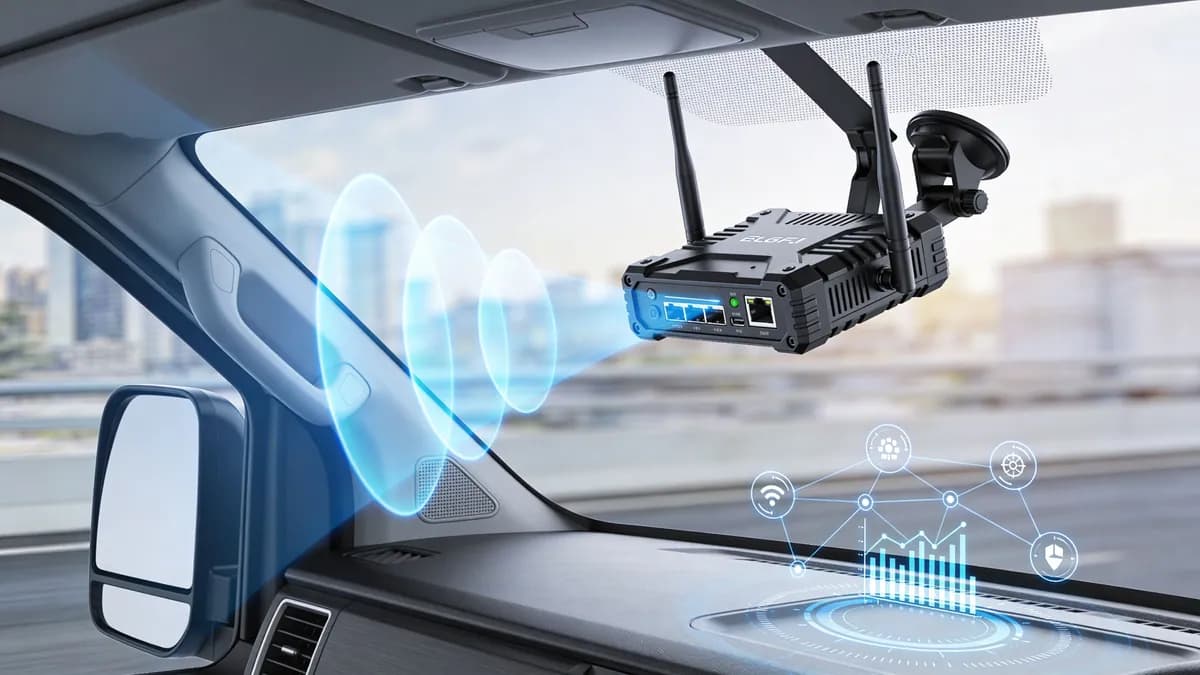
A lot of enterprise IT teams are in the same position right now. Someone in operations says passengers expect onboard WiFi. Someone in compliance asks how shared passwords fit with CCPA/CPRA and internal security policy. Someone in finance asks whether this is just a nicer hotspot, or something that can improve service and justify the spend.
That tension is what makes wi fi in auto different from office or venue networking. Users expect the ease of home broadband. Vehicles deliver the opposite conditions: movement, patchy coverage, changing users, limited space for hardware, and a mix of passenger, staff, and operational devices sharing one mobile environment. If you treat that like a consumer hotspot, you usually get poor reliability, weak identity controls, and very little useful insight.
The End of Disconnected Journeys
A fleet manager for a coach operator usually doesn’t complain that “the SSID architecture is wrong”. They complain that passengers can’t connect, drivers keep asking for help, telemetry drops out on parts of the route, and the guest network feels like a separate problem from the rest of enterprise IT.
That’s the actual starting point. Not the wireless standard. Not the hardware spec. The operational headache.
One vehicle may carry guests, staff tablets, ticketing devices, and back-office data flows at the same time. If each one connects differently, the result is a patchwork. Passengers see spinning login pages. Drivers reuse passwords they shouldn’t. IT teams lose visibility. Operations teams miss the chance to collect reliable first-party data about the journey itself.
A lot of organizations still think this is a niche problem. It isn’t. The in-car WiFi market is projected to surge by USD 1,789.26 billion from 2024-2029 at a CAGR of 96.4%, and in the US, where vehicle ownership exceeds 33 million, embedded hotspots are turning vehicles into connected data environments that can scale to over 1 TB annually for a 100,000-vehicle fleet, according to Technavio’s in-car WiFi market analysis.

Why this matters to enterprise IT
For an enterprise IT manager, that growth matters for three reasons.
- User expectation has changed: People no longer see onboard WiFi as a bonus. They expect it to work the same way their cell phone joins trusted networks elsewhere.
- Vehicles now generate business data: Connectivity supports telemetry, software updates, service workflows, and customer analytics.
- Security can’t be bolted on later: If a vehicle becomes another branch of the network, identity, segmentation, and revocation matter from day one.
Practical rule: If your vehicle network can’t identify who connected, what they accessed, and how that session was isolated, you don’t have a service. You have an unmanaged risk.
The shift from amenity to infrastructure
For hospitality transport, public transit, and field fleets, onboard connectivity has moved out of the “nice extra” category. It now sits closer to branch networking and edge access.
That’s why the old conversation about “putting WiFi in a vehicle” misses the point. The useful question is different. How do you give people the smooth experience they expect, while keeping the network controlled enough for enterprise policy, supportable enough for operations, and measurable enough for finance?
Rethinking In-Vehicle WiFi for Enterprise Use
The phrase wi fi in auto often makes people picture a phone tether or a small hotspot stuck in the glovebox. That model works for a family trip. It breaks quickly in an enterprise setting.
A personal hotspot is like a tent. It gives temporary shelter, but little structure. An enterprise in-vehicle network is more like a smart building. Different people need different access rights, devices need to stay in their own zones, and someone has to manage the whole thing centrally.
That distinction matters because a lot of fleet deployments fail at the identity layer, not the radio layer. A 2025 UK Department for Transport report found that 68% of commercial fleets report inconsistent in-car connectivity, while only 22% use secure WiFi offloading. The same source highlights a gap in enterprise authentication for the 15 million UK vehicles that could benefit, including integration with identity platforms such as Entra ID or Okta, as noted in this review of automotive WiFi 6 deployment challenges.
Why hotspot thinking causes problems
If you deploy vehicle WiFi as “just internet access”, you usually run into the same issues:
- Shared credentials spread fast: Drivers, contractors, and passengers end up using the same password.
- Support becomes manual: Every access issue turns into a helpdesk or driver-side problem.
- Policy gets muddy: Guest traffic and operational traffic may sit too close together.
- Offload is inconsistent: Vehicles may miss chances to use trusted fixed networks when available.
This is why general hotspot discussions aren’t enough. The hard part isn’t limited to broadcasting WiFi. The hard part is deciding who should connect, under what conditions, to which part of the network, with what audit trail.
A vehicle is a moving branch
In public transit and fleet operations, a vehicle behaves much more like a branch site than a gadget. It has users, policies, applications, and business risk.
That’s also why platform thinking matters. You need something that can handle authentication, roaming, policy, analytics, and device separation in one operating model. If you want a practical look at how this category is evolving, Purple’s overview of in-car WiFi deployments is useful because it frames vehicle connectivity as a managed service rather than a standalone hotspot.
Good in-vehicle access feels invisible to the user and very visible to IT.
The enterprise questions to ask first
Before anyone compares routers or antennas, ask these:
- Who are the user types? Passengers, drivers, engineers, inspectors, third-party contractors.
- Which devices need persistent trust? Staff tablets and ticketing systems differ from guest cell phones.
- What must never touch? Guest traffic should never be able to interact with vehicle operations.
- Where will identity come from? Directory, email verification, certificates, or a mix.
Those questions usually reveal that the “hotspot” is only a small piece of the design.
The Core Components Hardware and Backhaul
If the access model is the brain of in-vehicle networking, the hardware and backhaul are the skeleton and bloodstream. Without both, the service may look fine in a demo and fail on the road.
A useful way to think about it is this. The vehicle router is the local distribution system. The backhaul is the highway that carries traffic in and out of the vehicle. If the highway is congested or keeps disappearing, even the best onboard WiFi won’t feel reliable.
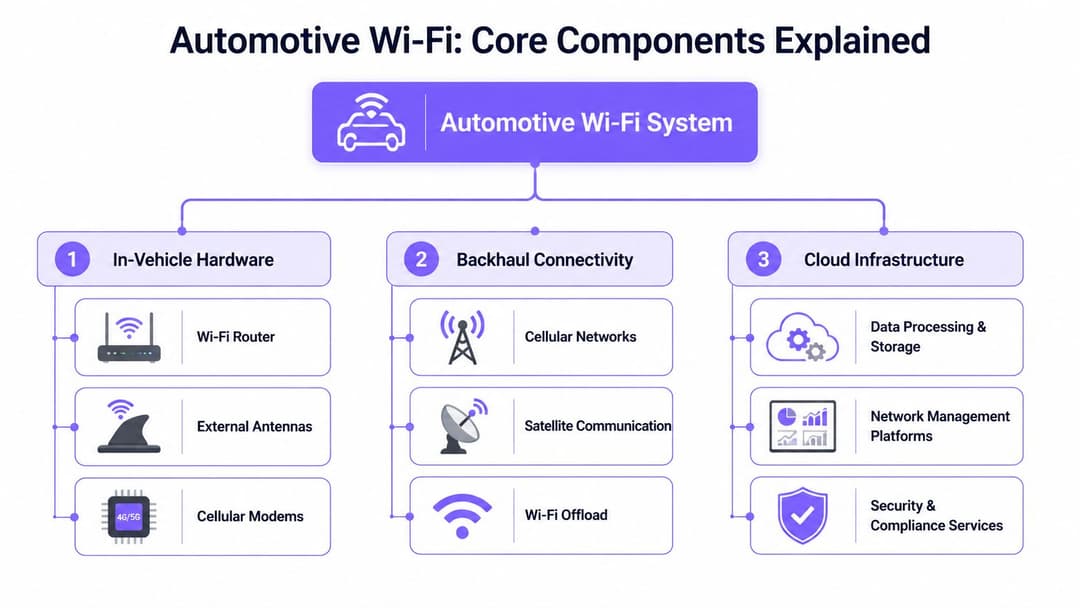
What sits inside the vehicle
Most enterprise-grade automotive deployments rely on a small set of components working together.
- Ruggedized router: This is the onboard network hub. It runs the local WiFi service, applies policy, and hands traffic to the upstream link.
- Cellular modem or telematics unit: This is what reaches the mobile network for internet and cloud services.
- External antennas: These help the vehicle hold a stronger signal than a phone sitting inside a metal body shell.
- Power and mounting design: Vehicles vibrate, heat up, cool down, and restart. Hardware needs to cope with that.
A non-specialist buyer sometimes focuses on the WiFi logo on the box. In practice, enclosure quality, thermal tolerance, modem behavior, and remote manageability often matter more.
How backhaul really works
Backhaul is the path from the vehicle to the wider network. In most deployments, that means cellular connectivity. The router takes that upstream link and redistributes it locally to passengers, staff devices, or onboard systems.
There are three common patterns:
| Backhaul option | What it does well | Where it struggles |
|---|---|---|
| Cellular primary | Good for vehicles in motion across most routes | Coverage varies by area and building density |
| WiFi offload at depots or stops | Useful for updates, sync, and bulk data transfer | Only works where trusted fixed WiFi exists |
| Hybrid approach | Balances motion and stationary workflows | Needs smarter policy and management |
What enterprise buyers often miss
A vehicle is a harsh RF environment. Metal panels, tinted glass, passenger density, route variation, and weather all influence performance. That’s why the right question isn’t “What’s the fastest router?” but “How will this behave across our actual routes, our actual use cases, and our actual support model?”
Buy for the route, not the showroom demo.
For teams evaluating mobile power and vehicle-adjacent hardware more broadly, this Motor Sportsland RV charger resource is a helpful example of how vehicle environments change equipment choices compared with a fixed building. The same lesson applies to routers and onboard networking gear. Power, vibration, space, and serviceability all matter more on wheels.
Cloud control matters more than a single box
The vehicle hardware is only half the picture. The other half sits in the cloud.
A useful deployment usually includes:
- Central configuration management: So IT can roll out policy without touching each vehicle.
- Monitoring and alerting: To spot failing modems, weak links, or misbehaving devices.
- Security and compliance tooling: To control authentication, isolate tenants, and log access events.
- Data processing: To turn connection data into operational or customer insight.
That’s the difference between buying a component and building a service. The component gets devices online. The service gives your organization control.
Solving the Access Puzzle with Modern Authentication
Most complaints about vehicle WiFi sound like coverage problems. Many are authentication problems.
A passenger sees a login page that won’t load properly on a moving coach. A driver enters a shared password that was changed last week. A staff tablet reconnects unpredictably because it was never tied to a proper identity system. The radio may be working perfectly. Access still feels broken.
The old way versus the modern way
The old model is familiar. Broadcast an SSID, protect it with a shared password or basic captive portal, and hope users can sort themselves out. That approach is easy to start and painful to run.
The modern model treats access as identity-based. Guests connect with a low-friction, trusted onboarding method. Staff use corporate identity through SSO. Legacy devices that can’t do modern auth get a controlled exception rather than becoming the default design.
Here’s the practical comparison.
| Method | User Experience | Security Level | Best For |
|---|---|---|---|
| Shared password | Easy to share, easy to leak, hard to rotate cleanly | Low | Small, temporary deployments with minimal risk |
| Captive portal with repeated sign-in | Familiar but often clunky in motion | Moderate | Guest access where branding or consent matters |
| Passpoint or OpenRoaming | Automatic and seamless after first trust is established | High | Passenger and guest journeys that need low friction |
| SSO with corporate identity | Smooth for staff, tied to joiner/mover/leaver processes | High | Drivers, staff, and managed enterprise devices |
| iPSK for legacy devices | Invisible to end users, controlled per device or class | Moderate to high when segmented properly | Older onboard devices that can’t use modern enterprise auth |
Why passengers hate captive portals in vehicles
Captive portals can work well in hotels or airports, where the user is stationary and has time to complete a flow. In motion, they often become brittle. Session interruptions, changing signal conditions, and device switching all increase friction.
That’s where Passpoint and OpenRoaming make a difference. Instead of asking people to keep entering details or reusing passwords, these methods let trusted devices join in a way that feels closer to cell phone service. The user experience matters because every extra step increases abandonment.
Staff need identity, not just access
For staff and contractors, the right design usually starts with your directory. If a driver or engineer already exists in Entra ID, Google Workspace, or Okta, the vehicle network should be able to use that identity rather than creating another local credential system.
That gives IT several benefits:
- Provisioning follows the directory: New staff can get access through existing workflows.
- Revocation is immediate: If someone leaves, their network access can be removed with the directory change.
- Policy can differ by role: Driver, supervisor, and engineer don’t need the same rights.
- Audit becomes cleaner: You can tie sessions back to known identities.
A vehicle network becomes easier to secure when it stops inventing its own user database.
Where a platform fits
A platform approach is beneficial. Rather than treating guest WiFi, staff auth, roaming, and legacy device handling as separate projects, one option is to use a platform that ties those pieces together. Purple is one example. It supports Passpoint and OpenRoaming for guest access, SSO integration for staff identity, and iPSK for legacy device isolation across multi-tenant environments.
That matters in real fleets because most environments are mixed. The same vehicle may carry a guest phone, a staff tablet, a card reader, and a telemetry unit. You don’t want four unrelated access models inside one moving network.
A simple design rule
Use the most optimal secure method each device type can support.
- Guests should get friction-light onboarding and smooth return visits.
- Staff should use existing enterprise identity.
- Legacy devices should get controlled segmentation, not broad trust.
That’s how you reduce password sprawl without making access harder.
Securing the Connected Vehicle Network
Authentication decides who gets in. Security decides what happens after they connect.
That’s an important distinction in WiFi in auto deployments. A guest joining the onboard network should never be anywhere near the systems that matter to operations. The right design doesn’t just check identity. It keeps traffic in the correct lane from the first packet onward.

Isolation matters more than a strong password
Many teams still frame onboard security as a password question. It isn’t. Shared passwords can be changed. Poor segmentation is much harder to fix after rollout.
A secure vehicle network usually separates at least these groups:
- Guest traffic
- Staff devices
- Operational systems such as ticketing or telemetry
- Legacy or specialized devices that need exceptions
If those groups share too much trust, your attack surface widens quickly.
Modern controls in a moving environment
Current automotive security design increasingly blends identity and radio-aware technologies. In the US, UWB fused with WiFi has delivered centimeter-level digital key security and cut relay attacks by 85%, while Passpoint-certified access platforms can support effortless roaming and instant SSO revocation across 80,000+ fixed venues, according to LitePoint’s analysis of wireless system testing for automotive connectivity.
For fleet operators, the lesson is broader than digital keys. If precision wireless techniques can harden vehicle access itself, then identity-based network access inside the vehicle should be designed with the same discipline.
Don’t forget older devices
The awkward devices are often the most important ones. Ticketing units, handheld scanners, printers, and specialized operational hardware may not support modern enterprise authentication cleanly.
That’s where iPSK has value. Instead of giving those devices the same broad password, you can assign identity-linked keys or tightly controlled device classes. They still connect. They just don’t get unnecessary freedom.
A good reference point for the wider security model is Purple’s guide to secure wireless networking, especially if you’re thinking about multi-tenant isolation and zero-trust policy rather than a simple guest SSID.
Security in a vehicle should work like airport security. Everyone may enter the building, but not everyone gets near the cockpit.
Compliance is part of the architecture
If your deployment collects user information, connection events, or behavioral data, compliance isn’t a separate legal note at the end. It shapes the design.
Keep these principles in view:
- Minimize data collection: Gather what the service needs, not everything the platform can technically capture.
- Separate operational and guest contexts: Don’t blur customer analytics with safety-critical systems.
- Use role-based access internally: Network admins, marketers, and fleet operations staff rarely need the same views.
- Plan revocation and retention early: It’s much easier to define this before rollout than after an audit request.
A well-designed in-vehicle network isn’t less secure because it moves. It’s secure because it treats movement as a core design condition.
Fleet and Public Transit Deployment Patterns
The most useful way to design WiFi in auto is by operating model, not by vehicle type alone. A city bus, an executive coach, and a logistics van all carry radios and users. They don’t carry the same business priorities.
The performance ceiling is now high enough to make serious service design worthwhile. In UK fleet trials, WiFi 6 with 5G backhaul delivered sustained 500 Mbps per device across 8 connected passengers and improved passenger satisfaction scores by 25%. The same trials also showed that ruggedized routers with iPSK and Entra ID integration can achieve 99.9% uptime in multi-tenant coach fleets, according to TechInsights coverage of automotive WiFi 6 and 7 adoption.
Pattern one for city buses
A city bus deployment usually benefits from a simple service hierarchy.
- Passenger access first: Keep onboarding light. Returning users should reconnect smoothly.
- Operational devices in a separate segment: Ticketing, validation, and driver systems should never rely on guest policy.
- Depot-aware behavior: When the bus returns to a trusted site, updates and bulk sync tasks can offload there instead of competing with passenger traffic.
This pattern works because the journey is short, turnover is high, and the support burden has to stay low.
Pattern two for coaches and long-distance transportation
Longer journeys change the expectations. Passengers are more likely to stream, work, and stay connected for hours. That increases pressure on the onboard network, but it also creates more value in a better experience.
For coaches, I’d usually focus on:
| Design area | Priority on long-distance coaches |
|---|---|
| Guest onboarding | Very high, because repeat friction is costly |
| Role-based staff access | High, especially for drivers and onboard staff |
| Uptime monitoring | High, because faults affect a full route |
| Analytics | Useful for service quality and repeat travel insight |
For operators benchmarking passenger experience against premium travel services, it can help to look at real transfer and shuttle expectations. For example, these Albufeira to Faro shuttle services show how transportation brands increasingly package convenience as part of the journey, not just the trip itself. Onboard connectivity is now part of that same service layer.
Pattern three for logistics and field fleets
Logistics fleets flip the priority. Passenger convenience matters less. Driver workflow, routing, scanning, compliance, and secure application access matter more.
That usually leads to a different emphasis:
- Staff devices may take precedence over guest access, or guest access may not exist at all.
- Connection policies should align closely with corporate identity.
- Vehicles often need dependable sync for route updates, proof of delivery, and telematics.
- Depot offload becomes operationally important because vehicles return to known sites.
Why central management changes everything
The common thread across these patterns is central control. Without it, every vehicle becomes a special case. With it, you can treat the fleet as a distributed edge estate.
That means IT can:
- Push configuration without hands-on work in each vehicle.
- Track health by vehicle, route, or region.
- Standardize segmentation and auth policy.
- Shorten troubleshooting because session, device, and backhaul events live in one operational view.
That’s what turns deployment from a pilot into something supportable at scale.
Turning Connectivity into Analytics and ROI
A lot of WiFi projects stall because finance sees a cost line and not much else. That happens when the network is designed only as transport for internet access.
The stronger business case appears when connectivity becomes a source of operational and customer insight. The access layer knows when users connect, where journeys start and end in service terms, how often devices return, and which experiences create repeat engagement. That doesn’t make WiFi a marketing toy. It makes it measurable infrastructure.

Where the value shows up
For public transit, the value often starts with service planning. Connection patterns can help teams understand busy routes, repeat ridership, and the digital quality of a journey.
For hospitality transit or premium shuttles, the value may sit closer to customer experience. If a returning passenger can reconnect without friction, that can support loyalty workflows, service follow-up, and more personalized journeys.
For enterprise fleets, the return is often operational. Better identity controls reduce ad hoc support, while better visibility helps teams pinpoint whether a problem came from backhaul, the router, a route segment, or a user workflow.
Analytics should answer business questions
The most useful analytics programs don’t begin with dashboards. They begin with a few practical questions.
- Service quality: Which routes or vehicle groups create the most connection complaints?
- Repeat usage: Are the same users coming back, and under what trip conditions?
- Operational health: Which failures happen at the access layer versus the upstream link?
- Commercial opportunity: Can trusted first-party data improve communications, loyalty, or partner services?
If your reporting can’t influence a route plan, support policy, or customer journey, it’s noise rather than insight.
Tie network data to existing systems
It is here that many projects become strategically useful. WiFi data shouldn’t live in a silo if the business already runs a CRM, support platform, or marketing automation stack.
Connecting those systems lets teams use identity and session data more effectively. For organizations exploring that side of the model, guest WiFi analytics and CRM-linked journey data is a good example of how access events can become business signals rather than anonymous traffic logs.
Cost center or experience layer
The difference comes down to design intent.
If you install onboard WiFi as a standalone amenity, you’ll probably measure complaints and bandwidth costs.
If you design it as a secure identity and insight layer, you can measure customer experience, operational efficiency, service quality, and repeat engagement. That’s a much stronger conversation with finance, operations, and commercial teams.
Building Your In-Vehicle Network Strategy for 2026
The main lesson is simple. WiFi in auto isn’t a box you bolt into a vehicle. It’s a platform decision about identity, segmentation, management, and data.
Teams that get this right usually start with an audit, not a purchase order. They map who needs access, what each device class should reach, and where the current journey breaks down. Passenger frustration, driver workarounds, weak offload policy, and poor visibility are often signs of the same root problem.
A practical starting checklist
Audit the current state
Review routes, coverage trouble spots, user complaints, and all device types inside the vehicle.Define user personas clearly
Separate guest, staff, driver, contractor, and operational systems. They shouldn’t inherit the same access model.Choose for control, not just connectivity
Look for support for modern authentication, segmentation, central management, and useful analytics.Plan for mixed estates
Some devices will support modern identity methods. Others won’t. Your design has to accommodate both safely.
Keep one eye on user expectation
Consumer expectation is shaping enterprise transport design more than many IT teams expected. People compare every onboard experience with the best one they’ve had elsewhere. Resources aimed at enthusiasts can be useful for understanding those expectations from the user side. This ultimate guide for car enthusiasts is a good example of how connected experiences are now part of how people think about modern vehicles more broadly.
If you treat onboard connectivity as a side feature, it will keep creating side problems. If you treat it as part of your mobile service architecture, it can support security, guest experience, and measurable business value at the same time.
If you're evaluating how to deliver secure, smooth onboard access without relying on shared passwords or fragmented captive portals, Purple is worth reviewing as part of your shortlist. It focuses on identity-based WiFi access, including Passpoint and OpenRoaming for guests, SSO for staff, and analytics that help enterprise teams manage security and prove ROI across mobile and fixed environments.