
কর্পোরেট নেটওয়ার্কের জন্য 802.1X Authentication ব্যাখ্যা
এই নির্ভরযোগ্য গাইডটি IT লিডার এবং নেটওয়ার্ক আর্কিটেক্টদের কর্পোরেট নেটওয়ার্কের জন্য 802.1X অথেনটিকেশনের একটি গভীর প্রযুক্তিগত বিশ্লেষণ প্রদান করে। এটি মাল্টি-সাইট পরিবেশে সুরক্ষিত ও কমপ্লায়েন্ট WiFi অ্যাক্সেস নিশ্চিত করতে আর্কিটেকচার, EAP পদ্ধতি, ডেপ্লয়মেন্ট কৌশল এবং ঝুঁকি প্রশমন কভার করে।
Video overview
এই গাইডটি শুনুন
পডকাস্ট ট্রান্সক্রিপ্ট দেখুন
আমাদের মূল সিরিজের অংশ: Enterprise WiFi Security Guide →
এক্সিকিউটিভ সামারি
হসপিটালিটি, রিটেইল এবং পাবলিক সেক্টর অপারেশন সহ এন্টারপ্রাইজ পরিবেশের জন্য, সিকিউরিটি পেরিমিটারের অস্তিত্ব এখন আর নেই। একটি হাইব্রিড ওয়ার্কফোর্স, BYOD পলিসি এবং সংযুক্ত ডিভাইসের বিপুল সংখ্যার অর্থ হলো Pre-Shared Keys (PSKs) এর মাধ্যমে কর্পোরেট নেটওয়ার্ক সুরক্ষিত করা আর কোনো কার্যকর কৌশল নয়। PCI-DSS v4.0 এবং GDPR সহ আধুনিক কমপ্লায়েন্স ফ্রেমওয়ার্কগুলো - সংবেদনশীল ডাটা পরিচালনা করে এমন যেকোনো নেটওয়ার্কের জন্য কঠোর, আইডেন্টিটি-ভিত্তিক অ্যাক্সেস নিয়ন্ত্রণের দাবি করে।
এই গাইডটি পোর্ট-ভিত্তিক নেটওয়ার্ক অ্যাক্সেস কন্ট্রোলের স্ট্যান্ডার্ড IEEE 802.1X এর আর্কিটেকচার এবং ইমপ্লিমেন্টেশনের বিস্তারিত বিবরণ দেয়। একটি সেন্ট্রালাইজড RADIUS অবকাঠামো দ্বারা সমর্থিত একটি ভেরিফায়েড আইডেন্টিটিতে শেয়ার্ড পাসওয়ার্ড থেকে অথেনটিকেশন স্থানান্তরিত করে, সংস্থাগুলো ডায়নামিক সেগমেন্টেশন ইমপ্লিমেন্ট করতে পারে, ক্রেডেনশিয়াল চুরি কমাতে পারে এবং শুধুমাত্র অনুমোদিত ডিভাইসগুলো যাতে কর্পোরেট রিসোর্সগুলো অ্যাক্সেস করতে পারে তা নিশ্চিত করতে পারে। নেটওয়ার্ক আর্কিটেক্ট এবং আইটি ডিরেক্টরদের জন্য ডিজাইন করা, এই ডকুমেন্টটি জটিল, মাল্টি-সাইট টপোলজিতে 802.1X ডিজাইন, ডেপ্লয় এবং ট্রাবলশুট করার জন্য প্রয়োজনীয় প্রযুক্তিগত গভীরতা প্রদান করে।
টেকনিক্যাল ডিপ ডাইভ
802.1X আর্কিটেকচার
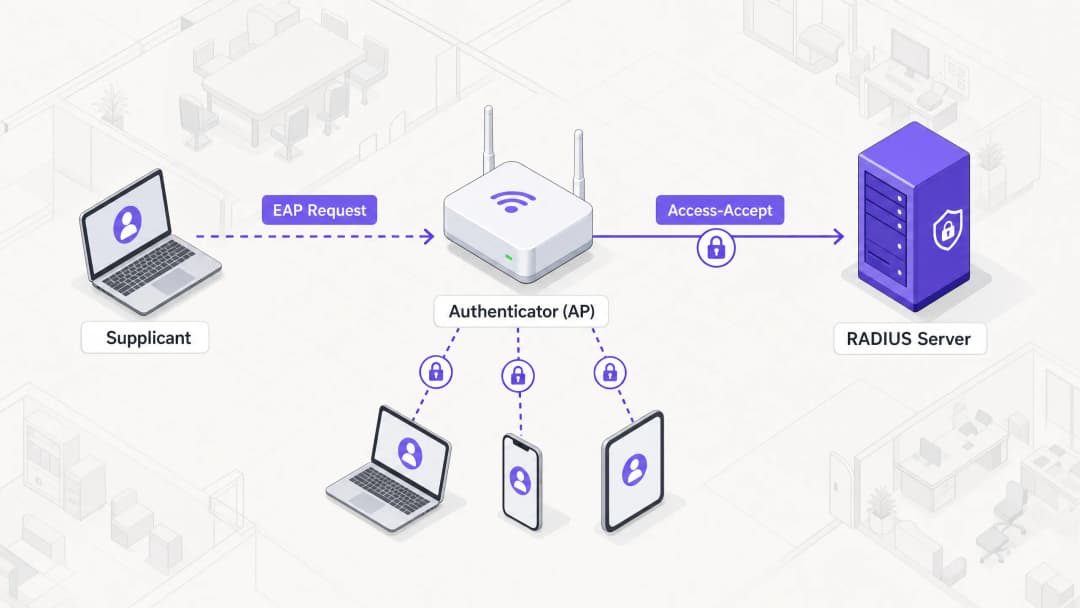
802.1X ফ্রেমওয়ার্ক নেটওয়ার্ক অ্যাক্সেস সুরক্ষিত করতে একসাথে কাজ করে এমন তিনটি ভিন্ন উপাদানের উপর নির্ভর করে:
- সাপ্লিক্যান্ট: এন্ডপয়েন্ট ডিভাইস (যেমন ল্যাপটপ, স্মার্টফোন) যা নেটওয়ার্কে অ্যাক্সেসের জন্য অনুরোধ করছে।
- অথেনটিকেটর: নেটওয়ার্ক ডিভাইস (সাধারণত একটি ওয়্যারলেস অ্যাক্সেস পয়েন্ট বা সুইচ) যা নেটওয়ার্কে ফিজিক্যাল বা লজিক্যাল অ্যাক্সেস নিয়ন্ত্রণ করে।
- অথেনটিকেশন সার্ভার: সেন্ট্রালাইজড ডাটাবেস (প্রায় একচেটিয়াভাবে একটি RADIUS সার্ভার) যা সাপ্লিক্যান্টের ক্রেডেনশিয়াল যাচাই করে এবং অ্যাক্সেস অথরাইজ করে।
যখন একটি সাপ্লিক্যান্ট একটি 802.1X-সুরক্ষিত SSID-এর সাথে সংযোগ করার চেষ্টা করে, তখন অথেনটিকেটর সংযোগটিকে একটি অননুমোদিত অবস্থায় রাখে, যা Extensible Authentication Protocol (EAP) ফ্রেম ছাড়া অন্য সমস্ত ট্রাফিক ব্লক করে দেয়। অথেনটিকেটর একটি পাস-থ্রু হিসেবে কাজ করে, সাপ্লিক্যান্টের EAP মেসেজগুলোকে RADIUS প্যাকেটে এনক্যাপসুলেট করে এবং সেগুলোকে অথেনটিকেশন সার্ভারে ফরোয়ার্ড করে।
Extensible Authentication Protocol (EAP) মেথডসমূহ
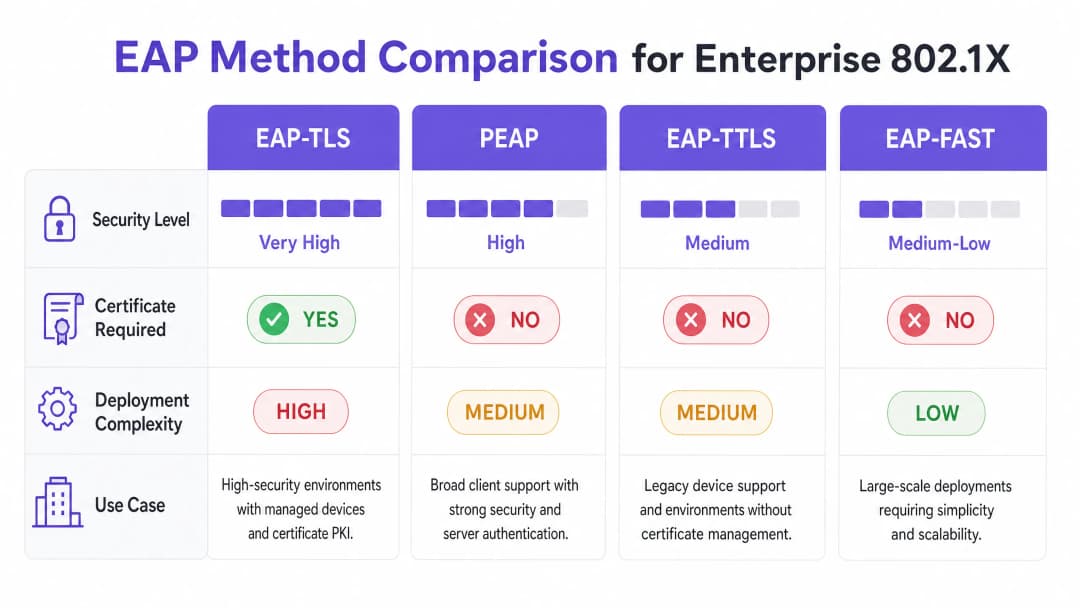
EAP হলো আসল অথেনটিকেশন ক্রেডেনশিয়ালের জন্য ট্রান্সপোর্ট মেকানিজম। উপযুক্ত EAP মেথড নির্বাচন করা একটি গুরুত্বপূর্ণ আর্কিটেকচারাল সিদ্ধান্ত, যা ডেপ্লয়মেন্টের জটিলতার সাথে সিকিউরিটি প্রয়োজনীয়তার ভারসাম্য বজায় রাখে।* EAP-TLS (Transport Layer Security): এন্টারপ্রাইজ সুরক্ষার জন্য গোল্ড স্ট্যান্ডার্ড। এর জন্য একটি সার্ভার সার্টিফিকেট এবং একটি ক্লায়েন্ট সার্টিফিকেট উভয়ই প্রয়োজন, যা পারস্পরিক প্রমাণীকরণ (mutual authentication) প্রদান করে। এটি পাসওয়ার্ডের পরিবর্তে সার্টিফিকেটের উপর নির্ভর করে বলে এটি ক্রেডেনশিয়াল ফিশিং এবং অফলাইন ডিকশনারি অ্যাটাক থেকে নিরাপদ। তবে, স্কেলে ক্লায়েন্ট সার্টিফিকেটগুলি প্রভিশন এবং পরিচালনা করার জন্য একটি শক্তিশালী পাবলিক কী ইনফ্রাস্ট্রাকচার (PKI) এবং মোবাইল ডিভাইস ম্যানেজমেন্ট (MDM) সমাধানের প্রয়োজন হয়।
- PEAP (Protected EAP): নিরাপত্তা এবং সহজস্থাপনের ভারসাম্যের কারণে এটি সবচেয়ে ব্যাপকভাবে ব্যবহৃত পদ্ধতি। PEAP-এর জন্য শুধুমাত্র RADIUS সার্ভারে একটি সার্টিফিকেটের প্রয়োজন হয়। এটি সাপ্লিক্যান্ট এবং সার্ভারের মধ্যে একটি সুরক্ষিত TLS টানেল স্থাপন করে, যার ভেতরে ব্যবহারকারীর ক্রেডেনশিয়াল (ইউজারনেম এবং পাসওয়ার্ড) নিরাপদে স্থানান্তরিত হয়। রোগ এপি (rogue AP) আক্রমণ প্রতিরোধ করতে শুধুমাত্র নির্দিষ্ট RADIUS সার্ভার সার্টিফিকেটকে বিশ্বাস করার জন্য সাপ্লিক্যান্টকে লক করা এবং সঠিক কনফিগারেশন করা অত্যন্ত গুরুত্বপূর্ণ।
- EAP-TTLS (Tunneled TLS): PEAP-এর মতো, এটি একটি সার্ভার সার্টিফিকেট ব্যবহার করে একটি সুরক্ষিত টানেল স্থাপন করে। তবে, EAP-TTLS আরও বিস্তৃত ইনার অথেন্টিকেশন প্রোটোকল সমর্থন করে, যা এটিকে লেগ্যাসি সিস্টেম বা নন-Windows এন্ডপয়েন্ট বিশিষ্ট পরিবেশের জন্য উপযুক্ত করে তোলে যা MSCHAPv2 সমর্থন করে না।
- EAP-FAST (Flexible Authentication via Secure Tunneling): সার্টিফিকেট-ভিত্তিক পদ্ধতির দ্রুত বিকল্প হিসেবে এটি Cisco দ্বারা তৈরি করা হয়েছে। এটি ক্লায়েন্ট এবং সার্ভারের মধ্যে ডাইনামিকভাবে প্রতিষ্ঠিত প্রটেক্টেড অ্যাক্সেস ক্রেডেনশিয়ালস (PACs) ব্যবহার করে। এটি দক্ষ হলেও, আধুনিক, ভেন্ডর-নিরপেক্ষ আর্কিটেকচারে এটি খুব কমই ব্যবহৃত হয়।
RADIUS ইনফ্রাস্ট্রাকচার এবং ইন্টিগ্রেশন
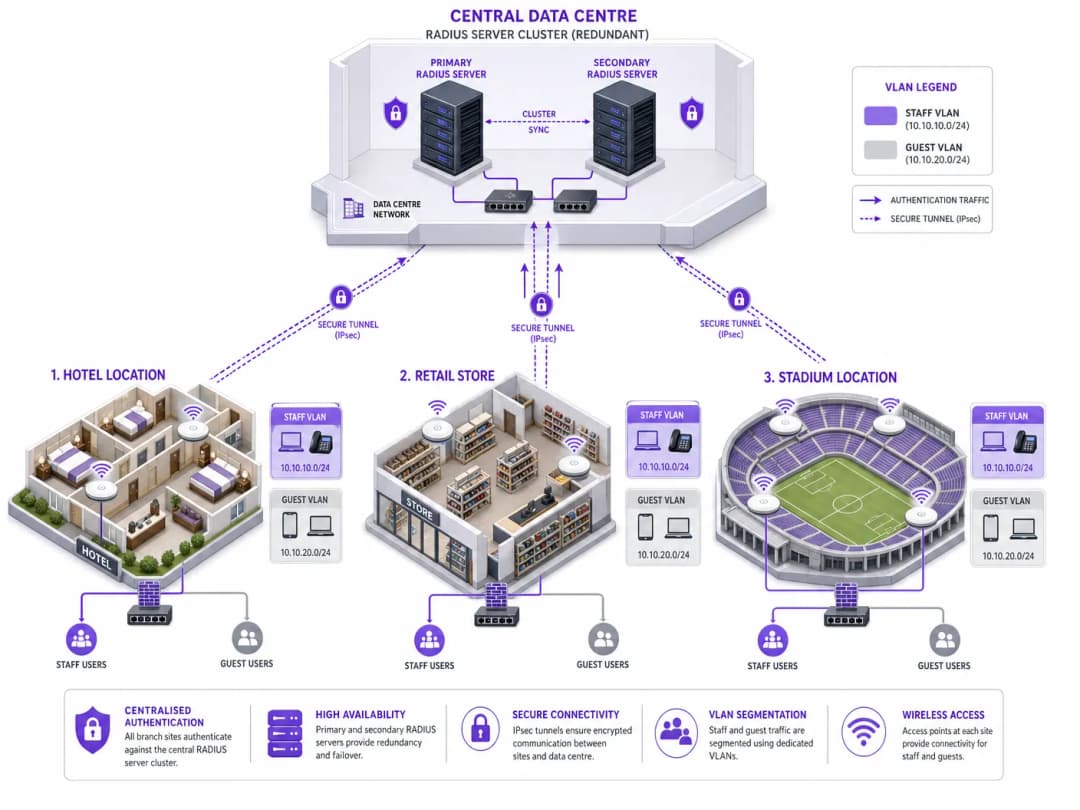
RADIUS সার্ভার হলো 802.1X-এর মূল চালিকাশক্তি। সাধারণ এন্টারপ্রাইজ সমাধানগুলির মধ্যে রয়েছে Microsoft Network Policy Server (NPS), FreeRADIUS, এবং Cisco ISE বা Aruba ClearPass-এর মতো বাণিজ্যিক সমাধান। RADIUS সার্ভার ক্রেডেনশিয়াল যাচাই করতে প্রতিষ্ঠানের আইডেন্টিটি প্রোভাইডার (IdP) - যেমন Active Directory, Entra ID, বা Okta-র সাথে ইন্টিগ্রেট করে।
গুরুত্বপূর্ণভাবে, RADIUS সার্ভার Access-Accept মেসেজে নির্দিষ্ট অ্যাট্রিবিউট ফিরিয়ে দিতে পারে, যা ডাইনামিক নেটওয়ার্ক কনফিগারেশন সক্ষম করে। এর মধ্যে সবচেয়ে শক্তিশালী হলো ডাইনামিক VLAN অ্যাসাইনমেন্ট। ব্যবহারকারীর গ্রুপ মেম্বারশিপ বা ডিভাইসের অবস্থার উপর ভিত্তি করে, RADIUS সার্ভার অথেনটিকেটরকে সংযোগটি একটি নির্দিষ্ট VLAN-এ স্থাপন করার নির্দেশ দেয়। এটি নিরবচ্ছিন্ন মাইক্রো-সেগমেন্টেশনের সুবিধা দেয়: যেমন একজন স্টাফ মেম্বারকে কর্পোরেট VLAN-এ, একজন ঠিকাদারকে একটি সীমাবদ্ধ VLAN-এ এবং কোনো ডিভাইস পোস্টার চেকে ব্যর্থ হলে সেটিকে একটি কোয়ারেন্টাইন VLAN-এ রাখা হয়।
আপনার নির্দিষ্ট সেটআপ নিয়ে কোনো প্রশ্ন আছে?
আমাদের টিম ৮০,০০০ ভেন্যুতে ভেন্যু অপারেটর, IT ম্যানেজার এবং নেটওয়ার্ক ইঞ্জিনিয়ারদের সাথে কাজ করে। একটি ২০ মিনিটের কল বুক করুন এবং আপনার মতো অন্যরা কীভাবে এর সমাধান করেছেন তা আমরা আপনাকে দেখাব।
বাস্তবায়ন নির্দেশিকা
একটি মাল্টি-সাইট এন্টারপ্রাইজে 802.1X স্থাপন করার জন্য জটিলতা এড়াতে পর্যায়ভিত্তিক, নিয়মতান্ত্রিক পদ্ধতির প্রয়োজন।
ধাপ ১: নেটওয়ার্ক ডিসকভারি এবং প্রোফাইলিং
যেকোনো কনফিগারেশন পরিবর্তন করার আগে, নেটওয়ার্কের সাথে সংযুক্ত সমস্ত ডিভাইসের একটি পুঙ্খানুপুঙ্খ অডিট পরিচালনা করুন। এটি বিশেষ করে hospitality এবং retail এর মতো পরিবেশের ক্ষেত্রে অত্যন্ত গুরুত্বপূর্ণ, যেখানে হেডলেস ডিভাইস (প্রিন্টার, POS টার্মিনাল, IoT সেন্সর) বেশি থাকে। এই ডিভাইসগুলিতে সাধারণত 802.1X সাপ্লিক্যান্ট থাকে না। আপনাকে অবশ্যই সেগুলি সনাক্ত করতে হবে এবং বিকল্প প্রমাণীকরণ পদ্ধতি, যেমন MAC Authentication Bypass (MAB) এর পরিকল্পনা করতে হবে, যাতে সেগুলি সীমাবদ্ধ VLANs এর মধ্যে আলাদা থাকে তা নিশ্চিত করা যায়।
Step 2: RADIUS Infrastructure Deployment
একটি উচ্চতর সহজলভ্য RADIUS আর্কিটেকচার স্থাপন করুন। একটি একক RADIUS সার্ভার একটি সিঙ্গেল পয়েন্ট অফ ফেইলিওর হতে পারে যা সমগ্র কর্পোরেট নেটওয়ার্ককে অচল করে দিতে পারে। একটি প্রাইমারি এবং সেকেন্ডারি সার্ভার ক্লাস্টার বাস্তবায়ন করুন, যা আদর্শভাবে বিভিন্ন ডেটা সেন্টার বা ক্লাউড অ্যাভেইলেবিলিটি জোনে বিভক্ত থাকবে। প্রাইমারি সার্ভার প্রতিক্রিয়া না জানালে অটোমেটিকভাবে ফেইলওভার করার জন্য অথেন্টিকেটর (APs এবং সুইচ) কনফিগার করুন।
Step 3: Policy Configuration and Segmentation
RADIUS সার্ভারের মধ্যে দানাদার অ্যাক্সেস নীতিগুলি সংজ্ঞায়িত করুন। Active Directory গ্রুপগুলিকে নির্দিষ্ট VLANs এবং Access Control Lists (ACLs) এ ম্যাপ করুন। নীতিগুলি যাতে ন্যূনতম সুবিধার নীতি প্রয়োগ করে তা নিশ্চিত করুন। উদাহরণস্বরূপ, একটি healthcare পরিবেশে, ক্লিনিকাল স্টাফদের রোগীর রেকর্ড সিস্টেমে অ্যাক্সেস থাকা উচিত, যখন প্রশাসনিক কর্মীদের একটি পৃথক VLAN এ বিভক্ত করা উচিত যেখানে কেবল বিলিং সিস্টেমে অ্যাক্সেস থাকবে।
Step 4: Supplicant Provisioning
PEAP স্থাপনের জন্য, পরিচালিত ডিভাইসগুলিতে প্রয়োজনীয় ওয়্যারলেস নেটওয়ার্ক সেটিংস পাঠাতে Group Policy Objects (GPOs) বা MDM প্রোফাইল ব্যবহার করুন। অত্যন্ত গুরুত্বপূর্ণভাবে, সার্ভার সার্টিফিকেট কঠোরভাবে যাচাই করার জন্য প্রোফাইলটি কনফিগার করুন এবং বিশ্বাস করার জন্য সঠিক RADIUS সার্ভারের নামগুলি নির্দিষ্ট করুন। এটি ব্যবহারকারীদের অজান্তেই অননুমোদিত অ্যাক্সেস পয়েন্টের সাথে সংযুক্ত হওয়া থেকে প্রতিরোধ করে।
অপরিচালিত ডিভাইসের জন্য, কর্পোরেট নেটওয়ার্কের সাথে আপস না করে কীভাবে নিরাপদে ব্যক্তিগত ডিভাইসগুলি যুক্ত করা যায় তার কৌশলগুলির জন্য আমাদের Secure BYOD Policies for Staff WiFi Networks নির্দেশিকাটি দেখুন।
Step 5: Phased Rollout and Testing
কখনই একবারে সম্পূর্ণ স্থাপনা করবেন না। একটি একক স্থানে একটি পাইলট গ্রুপ দিয়ে শুরু করুন। প্রমাণীকরণের ব্যর্থতার জন্য RADIUS লগগুলি নিবিড়ভাবে পর্যবেক্ষণ করুন। সার্ভার ফেইলওভার, সার্টিফিকেট মেয়াদ শেষ হওয়া এবং অ্যাক্সেস পয়েন্টগুলির মধ্যে রোমিং সহ প্রান্তিক কেসগুলি পরীক্ষা করুন। পাইলট স্থিতিশীল হওয়ার পরেই কেবল একটি বিস্তৃত রোলআউটের দিকে অগ্রসর হন।
Best Practices
- Enforce Server Certificate Validation: এটি PEAP স্থাপনের জন্য সবচেয়ে গুরুত্বপূর্ণ নিরাপত্তা নিয়ন্ত্রণ। সাপ্লিক্যান্টরা যদি সার্ভার সার্টিফিকেট যাচাই না করে, তবে নেটওয়ার্কটি Man-in-the-Middle (MitM) আক্রমণের ঝুঁকিতে পড়ে।
- Implement Dynamic VLAN Assignment: প্রতি SSID তে স্ট্যাটিক VLANs এর ওপর নির্ভর করবেন না। ব্যবহারকারীর পরিচয়ের ওপর ভিত্তি করে ডায়নামিকভাবে VLANs বরাদ্দ করতে RADIUS অ্যাট্রিবিউট ব্যবহার করুন, যা আক্রমণের পরিধি উল্লেখযোগ্যভাবে হ্রাস করে।* MAB-এর মাধ্যমে সুরক্ষিত হেডলেস ডিভাইস: কঠোরভাবে শুধুমাত্র 802.1X সমর্থন করতে পারে না এমন ডিভাইসের জন্য MAC Authentication Bypass ব্যবহার করুন। এই ডিভাইসগুলি অত্যন্ত নিয়ন্ত্রিত VLANs-এ রাখা নিশ্চিত করুন, কারণ MAC অ্যাড্রেসগুলি সহজেই স্পুফ করা যেতে পারে।
- গেস্ট এবং কর্পোরেট ট্রাফিক পৃথক করুন: 802.1X-সুরক্ষিত কর্পোরেট নেটওয়ার্ক এবং ওপেন বা পোর্টাল-ভিত্তিক গেস্ট নেটওয়ার্কগুলির মধ্যে একটি কঠোর লজিক্যাল পার্থক্য বজায় রাখুন। উন্নত গেস্ট অ্যাক্সেস ম্যানেজমেন্টের জন্য, Purple-এর Guest WiFi প্ল্যাটফর্মের মতো সমাধানগুলি বিবেচনা করুন।
ট্রাবলশুটিং এবং ঝুঁকি হ্রাস
সাধারণ ব্যর্থতার মোড
- সার্টিফিকেটের মেয়াদ শেষ হওয়া: একটি মেয়াদোত্তীর্ণ RADIUS সার্ভার সার্টিফিকেট PEAP এবং EAP-TLS ক্লায়েন্টদের জন্য ব্যাপক প্রমাণীকরণ ব্যর্থতার কারণ হবে। সার্টিফিকেটের বৈধতার মেয়াদের জন্য শক্তিশালী মনিটরিং এবং অ্যালার্ট সিস্টেম প্রয়োগ করুন।
- ক্লক স্কিউ: 802.1X সঠিক সময় রক্ষণাবেক্ষণের উপর অনেকাংশে নির্ভর করে, বিশেষ করে সার্টিফিকেট যাচাইকরণের জন্য। সমস্ত পরিকাঠামো উপাদান (RADIUS সার্ভার, IdPs, APs) একটি নির্ভরযোগ্য NTP উৎসের সাথে সিঙ্ক্রোনাইজ করা নিশ্চিত করুন।
- RADIUS সার্ভার অ্যাক্সেস অযোগ্যতা: প্রমাণীকরণকারী এবং RADIUS সার্ভারের মধ্যে নেটওয়ার্ক সংযোগ সমস্যার ফলে অ্যাক্সেস অস্বীকার করা হবে। রিডান্ড্যান্ট নেটওয়ার্ক পাথ প্রয়োগ করুন এবং একাধিক RADIUS সার্ভার আইপি সহ APs কনফিগার করুন।
- সাপ্লিক্যান্টের ভুল কনফিগারেশন: ভুলভাবে কনফিগার করা সাপ্লিক্যান্ট (যেমন ভুল EAP পদ্ধতি, অনুপস্থিত Root CA) হেল্পডেস্ক টিকিটের একটি সাধারণ কারণ। সামঞ্জস্যপূর্ণ কনফিগারেশন প্রয়োগ করতে MDM ব্যবহার করুন।
ঝুঁকি হ্রাস করার কৌশল
ডিপ্লয়মেন্ট-জনিত ডাউনটাইমের ঝুঁকি কমাতে, RADIUS পরিকাঠামোতে সমস্ত কনফিগারেশন পরিবর্তনের জন্য একটি শক্তিশালী audit trail স্থাপন করুন। এটি একটি অপ্রত্যাশিত সমস্যার ক্ষেত্রে দ্রুত রোলব্যাক ক্ষমতা নিশ্চিত করে।
ROI এবং ব্যবসায়িক প্রভাব
802.1X বাস্তবায়ন মৌলিক নিরাপত্তা সম্মতির বাইরেও উল্লেখযোগ্য ব্যবসায়িক মূল্য প্রদান করে:
- হ্রাসকৃত অপারেশনাল ওভারহেড: কর্মী চলে গেলে বা কীগুলি আপোস করা হলে প্রি-শেয়ার্ড কীগুলি ঘোরানোর প্রয়োজনীয়তা দূর করে, IT টিমগুলির উল্লেখযোগ্য প্রশাসনিক সময় বাঁচায়।
- উন্নত সম্মতি: 802.1X কঠোর নিয়ন্ত্রক কাঠামো (PCI DSS, HIPAA, GDPR) পূরণের জন্য প্রয়োজনীয় পরিচয়-ভিত্তিক অ্যাক্সেস নিয়ন্ত্রণ প্রদান করে, যা ব্যয়বহুল জরিমানা এবং সুনামের ক্ষতি এড়ায়।
- উন্নত থ্রেট কন্ট্রোল: ডায়নামিক VLAN অ্যাসাইনমেন্ট নিশ্চিত করে যে যদি একটি ডিভাইস আপোস করা হয়, তবে তার ব্লাস্ট ব্যাসার্ধ একটি নির্দিষ্ট নেটওয়ার্ক সেগমেন্টে সীমাবদ্ধ থাকে, যা এন্টারপ্রাইজ জুড়ে পার্শ্বীয় চলাচল প্রতিরোধ করে।
- ডেটা-চালিত অন্তর্দৃষ্টি: Purple-এর WiFi Analytics-এর মতো প্ল্যাটফর্মগুলির সাথে যুক্ত করা হলে, 802.1X দ্বারা প্রদত্ত পরিচয় ডেটা নেটওয়ার্কের ব্যবহার এবং ক্ষমতা পরিকল্পনার গভীর অন্তর্দৃষ্টি প্রদান করতে পারে।
মূল সংজ্ঞাসমূহ
Supplicant
ক্লায়েন্ট ডিভাইস বা সফটওয়্যার যা নেটওয়ার্কে অ্যাক্সেসের জন্য অনুরোধ করে।
অথেনটিকেশন অনুরোধ কোথা থেকে উৎপন্ন হয় এবং কীভাবে ক্রেডেনশিয়াল প্রদান করা হয় তা বোঝার জন্য এটি অপরিহার্য।
Authenticator
নেটওয়ার্ক ডিভাইস (AP বা সুইচ) যা গেটকিপার হিসাবে কাজ করে, অথেনটিকেশন সফল না হওয়া পর্যন্ত অ্যাক্সেস ব্লক করে রাখে।
Authenticator ক্রেডেনশিয়াল যাচাই করে না; এটি কেবল সেগুলিকে RADIUS সার্ভারে পাঠিয়ে দেয়।
RADIUS Server
Remote Authentication Dial-In User Service - কেন্দ্রীয় সার্ভার যা একটি আইডেন্টিটি স্টোরের বিপরীতে ক্রেডেনশিয়াল যাচাই করে।
একটি 802.1X ডেপ্লয়মেন্টের মূল সিদ্ধান্ত গ্রহণকারী ইঞ্জিন।
EAP (Extensible Authentication Protocol)
নেটওয়ার্কের মাধ্যমে নিরাপদে অথেনটিকেশন ক্রেডেনশিয়াল পরিবহনের জন্য একটি ফ্রেমওয়ার্ক।
সঠিক অথেনটিকেশন পদ্ধতি (যেমন PEAP বনাম EAP-TLS) বেছে নেওয়ার জন্য EAP বোঝা অত্যন্ত গুরুত্বপূর্ণ।
Dynamic VLAN Assignment
এমন একটি প্রক্রিয়া যেখানে RADIUS সার্ভার Authenticator-কে ব্যবহারকারীর আইডেন্টিটির উপর ভিত্তি করে একটি নির্দিষ্ট VLAN-এ রাখার নির্দেশ দেয়।
802.1X এর একটি মূল সুবিধা, যা স্বয়ংক্রিয় নেটওয়ার্ক সেগমেন্টেশন সক্ষম করে।
MAC Authentication Bypass (MAB)
একটি ফলব্যাক অথেনটিকেশন পদ্ধতি যা ডিভাইসের MAC অ্যাড্রেসকে তার ক্রেডেনশিয়াল হিসাবে ব্যবহার করে।
IoT এবং লেগাসি ডিভাইসগুলি যা 802.1X সমর্থন করতে পারে না, সেগুলিকে অনবোর্ড করার জন্য প্রয়োজনীয়।
PKI (Public Key Infrastructure)
ডিজিটাল সার্টিফিকেট ইস্যু, পরিচালনা এবং যাচাই করতে ব্যবহৃত সিস্টেম।
EAP-TLS অথেনটিকেশন ডেপ্লয় করার জন্য একটি পূর্বশর্ত।
Rogue AP Attack
একটি আক্রমণ যেখানে একটি ক্ষতিকারক অ্যাক্সেস পয়েন্ট ক্রেডেনশিয়াল চুরি করার জন্য কর্পোরেট নেটওয়ার্কের ছদ্মবেশ ধারণ করে।
PEAP ডেপ্লয়মেন্টে সার্ভার সার্টিফিকেট ভ্যালিডেশন প্রয়োগের গুরুত্ব তুলে ধরে।
সমাধানকৃত উদাহরণসমূহ
একটি ২০০ রুমের হোটেলকে তার কর্মীদের WiFi নেটওয়ার্ক সুরক্ষিত করতে হবে। বর্তমান সেট-আপে সমস্ত স্টাফ ডিভাইস (ল্যাপটপ, ট্যাবলেট) এবং IoT ডিভাইস (স্মার্ট থার্মোস্ট্যাট, IP ক্যামেরা) এর জন্য একটি একক PSK ব্যবহার করা হয়। কিভাবে তাদের 802.1X এ স্থানান্তরিত হওয়া উচিত?
১. হোটেলের Active Directory-র সাথে একীভূত করে একটি রিডান্ড্যান্ট RADIUS ইনফ্রাস্ট্রাকচার (যেমন, FreeRADIUS) ডেপ্লয় করুন। ২. সমস্ত ডিভাইস অডিট করুন। ৩. স্টাফ SSID-র জন্য 802.1X (PEAP-MSCHAPv2) ব্যবহার করতে ওয়্যারলেস কন্ট্রোলার কনফিগার করুন। ৪. সার্ভার সার্টিফিকেট ভ্যালিডেশন বাধ্যতামূলক করতে স্টাফ ল্যাপটপ এবং ট্যাবলেটে MDM প্রোফাইল পুশ করুন। ৫. IoT ডিভাইসের জন্য, RADIUS সার্ভারে MAC Authentication Bypass (MAB) কনফিগার করুন এবং সেগুলিকে একটি আইসোলেটেড IoT VLAN-এ রাখুন। ৬. সফল অথেনটিকেশনের পর স্টাফ ডিভাইসগুলিকে ডাইনামিকালি কর্পোরেট VLAN-এ অ্যাসাইন করতে RADIUS অ্যাট্রিবিউট ব্যবহার করুন।
একটি রিটেইল চেইন ৫০টি স্টোর জুড়ে 802.1X চালু করছে। স্টোর ১-এ পাইলট ফেজ চলাকালীন, ব্যবহারকারীরা মাঝে মাঝে অথেনটিকেশন ব্যর্থতার রিপোর্ট করছেন, বিশেষ করে যখন তারা স্টক রুম এবং শপ ফ্লোরের মধ্যে যাতায়াত করছেন।
সমস্যাটি সম্ভবত রোমিং এবং রি-অথেনটিকেশনের বিলম্বের সাথে সম্পর্কিত। সমাধান হল ওয়্যারলেস কন্ট্রোলার এবং অ্যাক্সেস পয়েন্টগুলিতে Fast BSS Transition (802.11r) এবং Opportunistic Key Caching (OKC) সক্ষম করা। এটি ক্লায়েন্ট ডিভাইসকে প্রাথমিক 802.1X অথেনটিকেশনের সময় প্রাপ্ত Pairwise Master Key (PMK) ক্যাশ করার অনুমতি দেয়, যার ফলে একটি সম্পূর্ণ RADIUS রাউন্ড-ট্রিপের প্রয়োজন ছাড়াই AP-গুলির মধ্যে দ্রুত রোমিং সক্ষম হয়।
অনুশীলনী প্রশ্নসমূহ
Q1. আপনার প্রতিষ্ঠান PSK থেকে 802.1X-এ মাইগ্রেট করছে। আপনার কাছে Microsoft Intune-এর মাধ্যমে পরিচালিত ৫,০০০টি কর্পোরেট-মালিকানাধীন Windows ল্যাপটপ রয়েছে। ক্রেডেনশিয়াল চুরি রোধ করতে আপনি সর্বোচ্চ স্তরের নিরাপত্তা চান। আপনার কোন EAP পদ্ধতি স্থাপন করা উচিত?
ইঙ্গিত: কোন পদ্ধতিটি পাসওয়ার্ডের ব্যবহার সম্পূর্ণরূপে দূর করে তা বিবেচনা করুন।
মডেল উত্তর দেখুন
EAP-TLS। যেহেতু ডিভাইসগুলো কর্পোরেট-মালিকানাধীন এবং Intune-এর মাধ্যমে পরিচালিত, তাই আপনি স্কেলে ক্লায়েন্ট সার্টিফিকেট স্থাপন করতে MDM ব্যবহার করতে পারেন। EAP-TLS পারস্পরিক প্রমাণীকরণ (mutual authentication) প্রদান করে এবং এটি ফিশিং বা অফলাইন ডিকশনারি অ্যাটাকের মতো পাসওয়ার্ড-ভিত্তিক আক্রমণের বিরুদ্ধে সম্পূর্ণ সুরক্ষিত।
Q2. একটি সিকিউরিটি অডিটের সময় দেখা গেল যে ব্যবহারকারীরা কোনো MDM প্রোফাইল ইনস্টল না করেই তাদের ব্যক্তিগত স্মার্টফোন ব্যবহার করে কর্পোরেট 802.1X নেটওয়ার্কে সংযোগ করতে পারছেন। এর প্রাথমিক নিরাপত্তা ঝুঁকি কী, এবং কীভাবে এটি সমাধান করা উচিত?
ইঙ্গিত: PEAP কীভাবে সার্ভার যাচাই করে তা চিন্তা করুন।
মডেল উত্তর দেখুন
প্রাথমিক ঝুঁকি হলো একটি Man-in-the-Middle (MitM) বা Rogue AP আক্রমণ। ব্যবহারকারীরা যদি ম্যানুয়ালি সংযোগটি কনফিগার করেন, তবে তারা প্রায়শই তাদের সামনে উপস্থাপিত যেকোনো সার্ভার সার্টিফিকেট গ্রহণ করে নেন। এটি সমাধান করতে, প্রতিষ্ঠানকে অবশ্যই এমন একটি নীতি প্রয়োগ করতে হবে যেখানে শুধুমাত্র পরিচালিত ডিভাইসগুলো (একটি MDM প্রোফাইল সহ যা কঠোরভাবে নির্দিষ্ট RADIUS সার্ভার সার্টিফিকেট যাচাই করে) কর্পোরেট SSID-এ অনুমোদিত হবে। ব্যক্তিগত ডিভাইসগুলোকে একটি পৃথক BYOD বা Guest নেটওয়ার্কে নির্দেশ করা উচিত।
Q3. একটি দূরবর্তী শাখা অফিস সেন্ট্রাল ডাটা সেন্টারের সাথে WAN সংযোগ হারিয়ে ফেলেছে যেখানে প্রাইমারি এবং সেকেন্ডারি RADIUS সার্ভারগুলো অবস্থিত। শাখা অফিসের ওয়্যারলেস ক্লায়েন্টদের কী হবে?
ইঙ্গিত: প্রমাণীকরণের সিদ্ধান্তটি কোথায় নেওয়া হচ্ছে তা বিবেচনা করুন।
মডেল উত্তর দেখুন
সংযোগ করার চেষ্টা করা নতুন ক্লায়েন্টদের প্রমাণীকরণ ব্যর্থ হবে কারণ প্রমাণীকরণকারী (AP) ক্রেডেনশিয়াল যাচাই করার জন্য RADIUS সার্ভারে পৌঁছাতে পারছে না। বিদ্যমান সংযুক্ত ক্লায়েন্টদের সেশন টাইম আউট না হওয়া পর্যন্ত বা তাদের পুনরায় প্রমাণীকরণের প্রয়োজন না হওয়া পর্যন্ত (যেমন, একটি নতুন AP-তে রোমিং করা) তারা সংযুক্ত থাকতে পারে, যার পরে তারাও অ্যাক্সেস হারাবে। এটি প্রশমিত করতে, টেকসই শাখা আর্কিটেকচারগুলো প্রায়শই গুরুত্বপূর্ণ শাখা সাইটগুলোতে একটি লোকাল, রিড-অনলি ডোমেন কন্ট্রোলার এবং একটি লোকাল RADIUS প্রক্সি বা সার্ভার স্থাপন করে।
এই সিরিজে পড়া চালিয়ে যান
কর্পোরেট WiFi-এ VoIP এবং ভিডিও কলের জন্য রোমিং অপ্টিমাইজেশন
এই গাইডটি IT ম্যানেজার, নেটওয়ার্ক আর্কিটেক্ট এবং CTO-দের কর্পোরেট স্টাফ নেটওয়ার্কে নির্বিঘ্ন VoIP এবং ভিডিও কল সমর্থন করার জন্য WiFi রোমিং অপ্টিমাইজ করার একটি বিস্তৃত, ভেন্ডর-নিরপেক্ষ ব্লুপ্রিন্ট প্রদান করে। এতে ৫০ms-এর কম হ্যান্ডঅফ লেটেন্সি অর্জনের জন্য প্রয়োজনীয় IEEE 802.11k/r/v প্রোটোকল স্ট্যাক, WMM QoS কনফিগারেশন, RF সেল ডিজাইন এবং এন্ড-টু-এন্ড তারযুক্ত QoS ম্যাপিং কভার করা হয়েছে। হোটেল, রিটেইল, চিকিৎসা এবং বড় ভেন্যু পরিবেশের জন্য প্রযোজ্য এই রেফারেন্সে বাস্তব-জগতের বাস্তবায়ন পরিস্থিতি, ট্রাবলশুটিং ফ্রেমওয়ার্ক এবং একটি পরিমাপযোগ্য ROI বিশ্লেষণ অন্তর্ভুক্ত রয়েছে।
কর্পোরেট ডিভাইসের জন্য সার্টিফিকেট-ভিত্তিক প্রমাণীকরণ (EAP-TLS)
এই নির্ভরযোগ্য টেকনিক্যাল রেফারেন্স গাইডে কর্পোরেট ডিভাইসের জন্য EAP-TLS সার্টিফিকেট-ভিত্তিক প্রমাণীকরণের আর্কিটেকচার, ডেপ্লয়মেন্ট এবং অপারেশনাল সেরা অনুশীলনগুলো কভার করা হয়েছে। IT আর্কিটেক্ট এবং ভেন্যু অপারেশন লিডারদের জন্য ডিজাইন করা এই গাইডটি পাসওয়ার্ড-ভিত্তিক ক্রেডেনশিয়ালের ঝুঁকি দূর করতে এবং মাল্টি-সাইট এন্টারপ্রাইজ পরিবেশে শক্তিশালী 802.1X নেটওয়ার্ক অ্যাক্সেস কন্ট্রোল অর্জন করতে একটি ব্যবহারিক রোডম্যাপ প্রদান করে।
স্টাফ নেটওয়ার্কে BYOD (Bring Your Own Device) সিকিউরিটি পরিচালনা করা
এন্টারপ্রাইজ IT ম্যানেজার এবং নেটওয়ার্ক আর্কিটেক্টদের জন্য স্টাফ নেটওয়ার্কে Bring Your Own Device (BYOD) অ্যাক্সেস সুরক্ষিত করার একটি নির্ভরযোগ্য, প্রযুক্তিগত নির্দেশিকা। এই নির্দেশিকাটি উচ্চ-পদচারণাবিশিষ্ট স্থানগুলিতে ডেটা লিকেজ হ্রাস করতে এবং নিয়ন্ত্রক কমপ্লায়েন্স বজায় রাখতে প্রয়োজনীয় সঠিক নেটওয়ার্ক আর্কিটেকচার, অথেন্টিকেশন প্রোটোকল এবং MDM ইন্টিগ্রেশন ওয়ার্কফ্লোর রূপরেখা প্রদান করে।
আপনার নির্দিষ্ট সেটআপ নিয়ে কোনো প্রশ্ন আছে?
আমাদের টিম ৮০,০০০ ভেন্যুতে ভেন্যু অপারেটর, IT ম্যানেজার এবং নেটওয়ার্ক ইঞ্জিনিয়ারদের সাথে কাজ করে। একটি ২০ মিনিটের কল বুক করুন এবং আপনার মতো অন্যরা কীভাবে এর সমাধান করেছেন তা আমরা আপনাকে দেখাব।