

Apple CNA, Android কানেক্টিভিটি চেক, Microsoft NCSI: Captive Portal ডিটেকশন আসলে কীভাবে কাজ করে
This definitive technical reference explains how Apple CNA, Android connectivitycheck, and Microsoft NCSI detect captive portals. It provides actionable guidance for IT managers and network architects on walled garden configuration, common failure modes, and best practices for seamless deployment.
🎧 এই গাইডটি শুনুন
ট্রান্সক্রিপ্ট দেখুন
এক্সিকিউটিভ সামারি
এন্টারপ্রাইজ নেটওয়ার্কিংয়ের ক্ষেত্রে Captive Portal ডিটেকশন একটি অত্যন্ত গুরুত্বপূর্ণ কিন্তু প্রায়শই ভুল বোঝা একটি উপাদান। যখন কোনো ডিভাইস একটি পাবলিক WiFi নেটওয়ার্কে যুক্ত হয়, তখন ইন্টারনেট অ্যাক্সেস পাওয়া যাচ্ছে কি না বা কোনো Captive Portal ট্রাফিক ইন্টারসেপ্ট করছে কি না, তা নির্ধারণ করতে অপারেটিং সিস্টেম ব্যাকগ্রাউন্ডে বেশ কিছু প্রোব (probe) চালায়। Apple, Android এবং Windows প্রত্যেকেই আলাদা মেকানিজম ব্যবহার করে—যাদের প্রোব URL, প্রত্যাশিত রেসপন্স এবং ফেইলিওর মোড ভিন্ন ভিন্ন।
Hospitality , Retail বা পাবলিক-সেক্টর পরিবেশে Guest WiFi সলিউশন ডিপ্লয় করা IT ম্যানেজার এবং নেটওয়ার্ক আর্কিটেক্টদের জন্য, এই ডিটেকশন মেকানিজমগুলোর ভুল কনফিগারেশন উল্লেখযোগ্য সাপোর্ট ওভারহেডের কারণ হতে পারে। গেস্টরা হয়তো সার্টিফিকেট ওয়ার্নিং দেখতে পারেন, স্প্ল্যাশ পেজ দেখতে ব্যর্থ হতে পারেন, অথবা অন্তহীন সাইন-ইন লুপের সম্মুখীন হতে পারেন। এই রেফারেন্স গাইডটি Apple CNA, Android কানেক্টিভিটি চেক এবং Microsoft NCSI-এর সুনির্দিষ্ট টেকনিক্যাল আর্কিটেকচার প্রদান করে, যা আপনাকে শক্তিশালী, ভেন্ডর-নিরপেক্ষ ওয়াল্ড গার্ডেন (walled garden) তৈরি করতে এবং একটি নিরবচ্ছিন্ন কানেকশন অভিজ্ঞতা নিশ্চিত করতে প্রয়োজনীয় কার্যকরী জ্ঞান দিয়ে সজ্জিত করবে।
টেকনিক্যাল ডিপ-ডাইভ
Apple Captive Network Assistant (CNA)
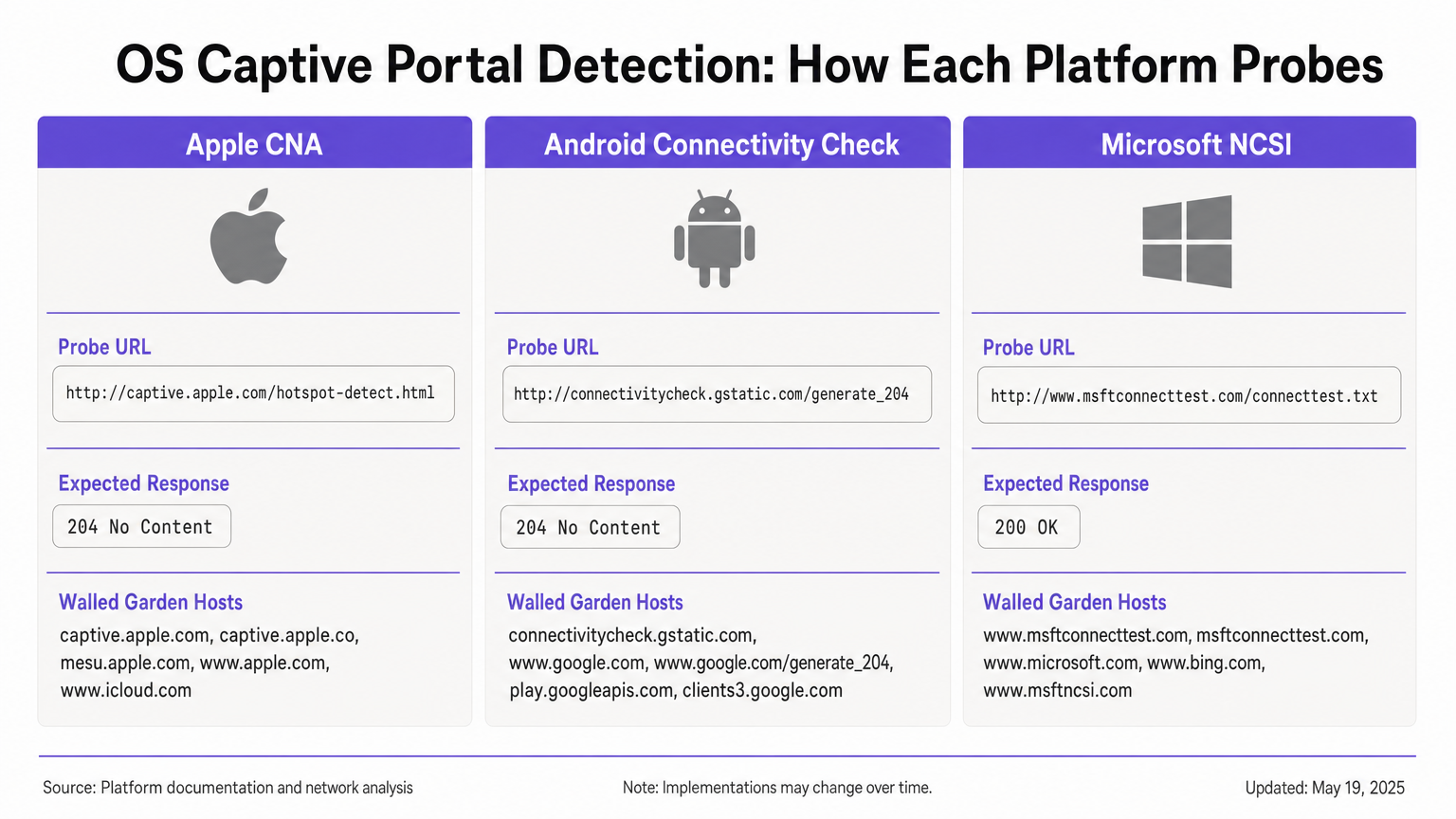
যখন কোনো Apple ডিভাইস (iOS বা macOS) কোনো নেটওয়ার্কে কানেক্ট হয়, তখন এটি তাৎক্ষণিকভাবে এর প্রাইমারি প্রোব URL-এ একটি HTTP GET রিকোয়েস্ট পাঠায়: http://captive.apple.com/hotspot-detect.html। ডিভাইসটি "Success" শব্দটি ধারণকারী একটি নির্দিষ্ট HTML বডি সহ একটি HTTP 200 OK রেসপন্স প্রত্যাশা করে [1]।
যদি রেসপন্সটি এই প্রত্যাশার সাথে মিলে যায়, তবে OS ধরে নেয় যে সম্পূর্ণ ইন্টারনেট অ্যাক্সেস রয়েছে। যদি রেসপন্সটি অন্য কিছু হয়—যেমন একটি HTTP 302 রিডাইরেক্ট বা টাইমআউট—তবে OS Captive Network Assistant (CNA) ট্রিগার করে। CNA WebSheet ওপেন করে, যা সীমিত কার্যকারিতা সম্পন্ন একটি স্যান্ডবক্সড মিনি-ব্রাউজার (কোনো Safari এক্সটেনশন নেই, কোনো পাসওয়ার্ড সেভিং নেই) [2]।
গুরুত্বপূর্ণ সীমাবদ্ধতা: প্রাথমিক প্রোবটি হলো HTTP। যদি আপনার গেটওয়ে প্রোবটিকে ইন্টারসেপ্ট করে এবং একটি HTTPS URL-এ রিডাইরেক্ট করে, তবে CNA গ্রেসফুলি ফেইল করবে, যার ফলে প্রায়শই একটি সার্টিফিকেট ওয়ার্নিং বা ব্ল্যাঙ্ক স্ক্রিন দেখা যায়। প্রাথমিক রিডাইরেক্টটি অবশ্যই HTTP পোর্ট 80-তে থাকতে হবে। এছাড়া, আপনি যদি ভুলবশত আপনার ওয়াল্ড গার্ডেনের মাধ্যমে captive.apple.com-কে অ্যালাউ করেন, তবে ডিভাইসটি আসল Apple সার্ভারে পৌঁছাবে, "Success" রেসপন্স পাবে এবং আপনার পোর্টালটিকে সম্পূর্ণভাবে বাইপাস করবে।
Android কানেক্টিভিটি চেক
Android একটি ভিন্ন নীতিতে কাজ করে। এর প্রাইমারি প্রোব টার্গেট করে http://connectivitycheck.gstatic.com/generate_204 (ফলব্যাক হিসেবে clients2.google.com এবং connectivitycheck.android.com সহ)। নির্দিষ্ট কন্টেন্ট সহ একটি HTTP 200 রেসপন্স প্রত্যাশা করার পরিবর্তে, Android একটি HTTP 204 No Content রেসপন্স প্রত্যাশা করে [3]।
যদি Android একটি HTTP 204 পায়, তবে এটি ইন্টারনেট কানেক্টিভিটি আছে বলে ধরে নেয়। যদি এটি কোনো রিডাইরেক্ট বা একটি HTTP 200 রেসপন্স পায়, তবে এটি নেটওয়ার্কটিকে captive হিসেবে ফ্ল্যাগ করে এবং একটি "Sign in to WiFi network" নোটিফিকেশন প্রদর্শন করে। এই নোটিফিকেশনে ট্যাপ করলে সম্পূর্ণ Chrome ব্রাউজার ওপেন হয়, যা Apple-এর স্যান্ডবক্সড CNA-এর তুলনায় আরও সমৃদ্ধ পোর্টাল অভিজ্ঞতার সুযোগ দেয়।
গুরুত্বপূর্ণ সীমাবদ্ধতা: যদি আপনার ওয়াল্ড গার্ডেন connectivitycheck.gstatic.com-কে ইন্টারসেপ্ট এবং রিডাইরেক্ট করার পরিবর্তে সম্পূর্ণভাবে ব্লক করে দেয়, তবে Android একটি "Connected, no internet" ওয়ার্নিং প্রদর্শন করবে এবং ব্যবহারকারীকে সাইন ইন করার জন্য প্রম্পট করবে না।
Microsoft Network Connectivity Status Indicator (NCSI)
Windows Network Connectivity Status Indicator (NCSI) সার্ভিসের মাধ্যমে একটি ডুয়েল-প্রোব মেকানিজম ব্যবহার করে। কানেকশনের পর, Windows http://www.msftconnecttest.com/connecttest.txt-এ একটি HTTP GET রিকোয়েস্ট ("Microsoft Connect Test" টেক্সট সহ একটি 200 রেসপন্স প্রত্যাশা করে) এবং dns.msftncsi.com-এর জন্য একটি DNS রেজোলিউশন সম্পাদন করে [4]।
যদি HTTP প্রোবটি ইন্টারসেপ্ট করা হয়, তবে Windows পোর্টালটি ডিটেক্ট করে এবং ডিফল্ট ব্রাউজার (Edge) ওপেন করে। তবে, Windows-এ পোস্ট-অথেনটিকেশন লুপিংয়ের সমস্যা হওয়ার প্রবণতা রয়েছে। ব্যবহারকারী অথেনটিকেট করার পর, Windows পুনরায় NCSI প্রোবগুলো চালায়। যদি গেটওয়ে এখনও MAC অ্যাড্রেস অথোরাইজেশন প্রোপাগেট না করে থাকে, তবে প্রোবটি আবার ইন্টারসেপ্ট হয় এবং Windows পুনরায় পোর্টালটি ওপেন করে, যা ব্যবহারকারীকে একটি সাইন-ইন লুপে বাধ্য করে।
ইমপ্লিমেন্টেশন গাইড
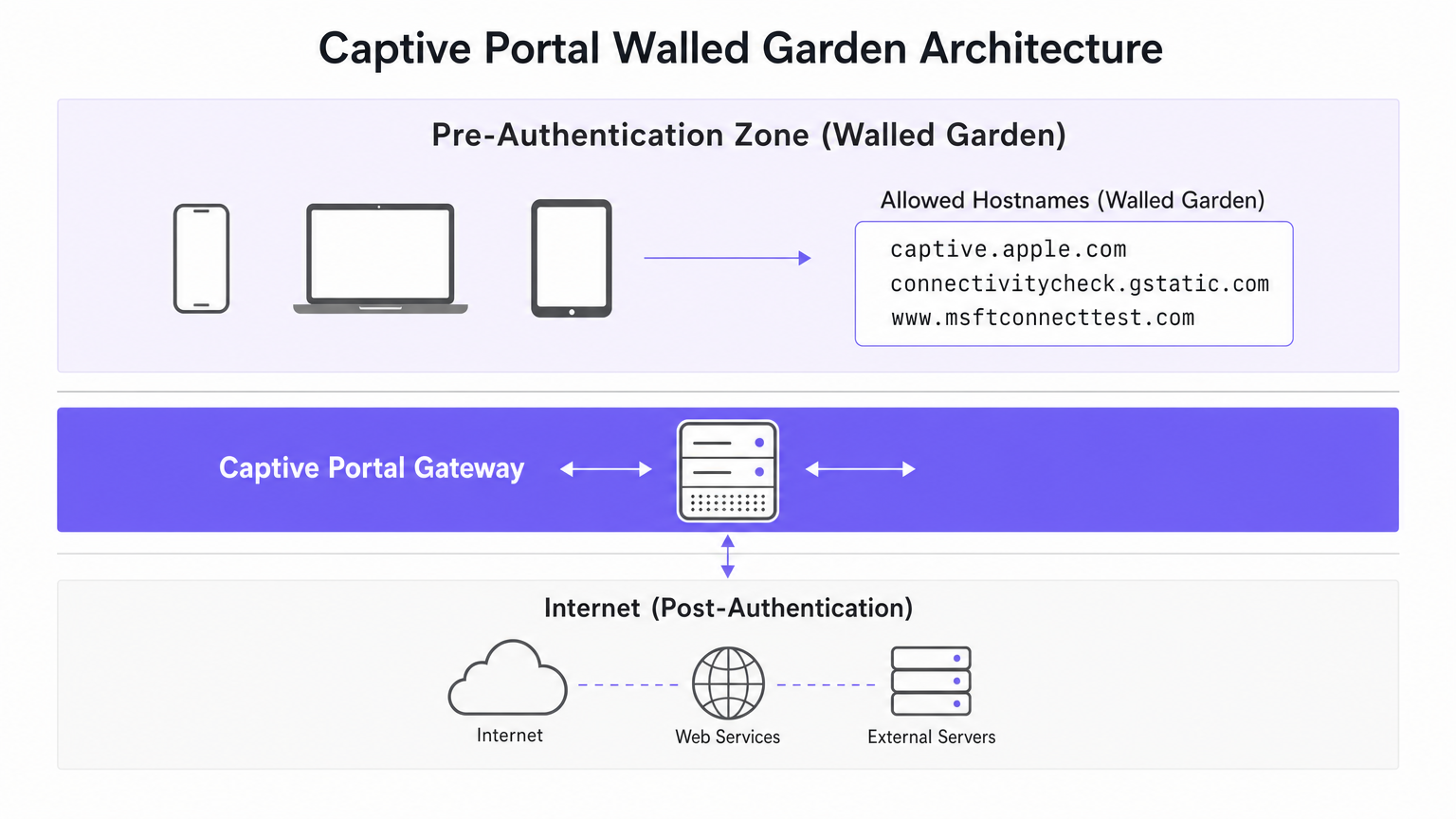
সমস্ত ডিভাইসে নির্ভরযোগ্য Captive Portal ডিটেকশন নিশ্চিত করতে, প্রতিটি OS-এর নির্দিষ্ট প্রয়োজনীয়তাগুলো পরিচালনা করার জন্য আপনাকে অবশ্যই আপনার প্রি-অথেনটিকেশন জোন (ওয়াল্ড গার্ডেন) কনফিগার করতে হবে।
ওয়াল্ড গার্ডেন কনফিগারেশন
আপনার ওয়াল্ড গার্ডেনে অবশ্যই নিচের হোস্টগুলো অন্তর্ভুক্ত থাকতে হবে। সবচেয়ে গুরুত্বপূর্ণ বিষয় হলো, এই হোস্টগুলোতে যাওয়া HTTP ট্রাফিককে ইন্টারনেটে পাস করার অনুমতি দেওয়ার পরিবর্তে আপনাকে অবশ্যই তা ইন্টারসেপ্ট এবং রিডাইরেক্ট করতে হবে।
- Apple:
captive.apple.com,www.apple.com,www.appleiphonecell.com,www.itools.info - Android:
connectivitycheck.gstatic.com,clients2.google.com,connectivitycheck.android.com - Windows:
www.msftconnecttest.com,dns.msftncsi.com,www.msftncsi.com(লেগাসি ক্লায়েন্টদের জন্য)
ডিপ্লয়মেন্টের ধাপসমূহ
- DNS রেজোলিউশন কনফিগার করুন: নিশ্চিত করুন যে প্রোব URL-গুলোর জন্য DNS রিকোয়েস্টগুলো প্রি-অথেনটিকেশন জোনের মধ্যে সফলভাবে রিজলভ হয়।
- HTTP প্রোব ইন্টারসেপ্ট করুন: প্রোব URL-গুলোতে যাওয়া HTTP GET রিকোয়েস্টগুলো ইন্টারসেপ্ট করতে এবং আপনার পোর্টালের স্প্ল্যাশ পেজে একটি HTTP 302 রিডাইরেক্ট রিটার্ন করতে আপনার গেটওয়ে কনফিগার করুন।
- প্রাথমিক রিডাইরেক্টের জন্য HTTP বজায় রাখুন: প্রাথমিক রিডাইরেক্টটি অবশ্যই HTTP (পোর্ট 80)-এর মাধ্যমে সার্ভ করতে হবে। আপনি পরবর্তীতে ব্যবহারকারীকে একটি HTTPS লগইন পেজে রিডাইরেক্ট করতে পারেন, তবে Apple CNA-কে সন্তুষ্ট করার জন্য প্রথম হপটি অবশ্যই প্লেইনটেক্সট HTTP হতে হবে।
- দ্রুত অথোরাইজেশন প্রোপাগেট করুন: সফল অথেনটিকেশনের পর আপনার গেটওয়ে যেন তাৎক্ষণিকভাবে এর ফায়ারওয়াল রুল আপডেট করে তা নিশ্চিত করুন, যাতে NCSI প্রোবগুলো পাস হতে পারে এবং Windows লুপ প্রতিরোধ করা যায়।
বেস্ট প্র্যাকটিস
- RFC 8910 (Captive Portal API) গ্রহণ করুন: আধুনিক অপারেটিং সিস্টেমগুলো (iOS 16+, Android 11+) DHCP অপশন 114 সাপোর্ট করে, যা একটি নির্ধারিত API URL-এর মাধ্যমে Captive Portal-এর উপস্থিতির একটি পজিটিভ সিগন্যাল প্রদান করে [5]। এটি প্রোব ইন্টারসেপশনের ওপর নির্ভরতা দূর করে এবং এটি একটি প্রস্তাবিত ফিউচার-প্রুফ পদ্ধতি।
- সবগুলো প্ল্যাটফর্মে টেস্ট করুন: শুধুমাত্র একটি iPhone দিয়ে টেস্ট করার ওপর ভিত্তি করে কোনো পোর্টাল কাজ করে বলে ধরে নেবেন না। এমন একটি টেস্টিং ম্যাট্রিক্স বাধ্যতামূলক করুন যার মধ্যে iOS, স্টক Android এবং Windows 10/11 ডিভাইস অন্তর্ভুক্ত রয়েছে।
- অটোমেটেড প্ল্যাটফর্ম ব্যবহার করুন: পরিবর্তনশীল প্রোব URL-গুলো ম্যানুয়ালি ম্যানেজ করা ত্রুটিপূর্ণ হতে পারে। Purple-এর মতো প্ল্যাটফর্মগুলো স্বয়ংক্রিয়ভাবে ওয়াল্ড গার্ডেন ডেফিনিশন আপডেট করে যখন Apple, Google এবং Microsoft তাদের ইনফ্রাস্ট্রাকচার পরিবর্তন করে, যা ধারাবাহিক WiFi Analytics ডেটা কালেকশন নিশ্চিত করে।
ট্রাবলশুটিং এবং ঝুঁকি প্রশমন
| লক্ষণ | মূল কারণ | সমাধান |
|---|---|---|
| Apple CNA ওপেন হতে ব্যর্থ হয়; ব্যবহারকারী SSL ওয়ার্নিং দেখেন। | গেটওয়ে প্রোব ইন্টারসেপ্ট করে এবং সরাসরি HTTPS-এ রিডাইরেক্ট করে। | নিশ্চিত করুন যে প্রাথমিক ইন্টারসেপশন এবং রিডাইরেক্ট HTTP পোর্ট 80 ব্যবহার করে। |
| Apple ডিভাইস পোর্টাল না দেখিয়েই কানেক্ট হয়। | ওয়াল্ড গার্ডেনের মাধ্যমে captive.apple.com-কে ইন্টারনেটে যাওয়ার অনুমতি দেওয়া হয়েছে। |
অ্যালাউলিস্ট থেকে captive.apple.com সরিয়ে দিন; নিশ্চিত করুন যে এটি ইন্টারসেপ্ট করা হয়েছে। |
| Android "Connected, no internet" দেখায়। | ফায়ারওয়াল দ্বারা connectivitycheck.gstatic.com ব্লক করা হয়েছে। |
ওয়াল্ড গার্ডেনে প্রোব URL-টিকে অনুমতি দিন, তবে এটিকে ইন্টারসেপ্ট এবং রিডাইরেক্ট করুন। |
| Windows ব্যবহারকারীকে একাধিকবার সাইন ইন করতে প্রম্পট করে (লুপিং)। | গেটওয়ে পোস্ট-অথেনটিকেশন MAC রুল অ্যাপ্লাই করতে ধীরগতি সম্পন্ন; NCSI এখনও ইন্টারসেপ্ট হচ্ছে। | গেটওয়ে রুল প্রোপাগেশন অপ্টিমাইজ করুন; নিশ্চিত করুন যে msftconnecttest.com পোস্ট-অথেনটিকেশন পাস করে। |
ROI এবং ব্যবসায়িক প্রভাব
একটি শক্তিশালী Captive Portal ডিটেকশন আর্কিটেকচার সরাসরি বটম লাইনে (মুনাফায়) প্রভাব ফেলে। একটি 500-রুমের হোটেল বা একটি বড় রিটেইল পরিবেশে, Captive Portal ফেইলিওরগুলো অসামঞ্জস্যপূর্ণ পরিমাণে IT সাপোর্ট টিকিট তৈরি করে। এই ঘর্ষণ বিন্দুগুলো (friction points) দূর করার মাধ্যমে, ভেন্যুগুলো সাপোর্ট ওভারহেড কমায়, গেস্ট স্যাটিসফ্যাকশন স্কোর উন্নত করে এবং ফার্স্ট-পার্টি ডেটা ক্যাপচার রেট বৃদ্ধি করে।
যখন ব্যবহারকারীরা নিরবচ্ছিন্নভাবে কানেক্ট হন, তখন তারা আপনার স্প্ল্যাশ পেজগুলোর সাথে এঙ্গেজ হন, যা আপনাকে টার্গেটেড মার্কেটিং প্রদান করতে, লয়্যালটি প্রোগ্রামের সাথে ইন্টিগ্রেট করতে এবং পরিমাপযোগ্য রেভিনিউ জেনারেট করতে সক্ষম করে—যেমনটি আমাদের Indoor Positioning System: UWB, BLE, & WiFi Guide গাইডে বিস্তারিত বলা হয়েছে। আন্তর্জাতিকভাবে পরিচালিত ভেন্যুগুলোর জন্য, একটি নির্ভরযোগ্য পোর্টাল ধারাবাহিক কমপ্লায়েন্স ডেটা কালেকশন নিশ্চিত করে, যা Brazil LGPD and Guest WiFi: A Compliance Guide -এ আলোচিত ফ্রেমওয়ার্কগুলোকে সাপোর্ট করে।
রেফারেন্স
[1] Apple Support, "Use captive Wi-Fi networks on your iPhone or iPad," 2024. [2] SecureW2, "What Is Apple Captive Network Assistant?," 2023. [3] Android Developers, "Captive portal API support," Android 11 Features, 2020. [4] Microsoft Learn, "Captive Portal Detection and User Experience in Windows," Windows Hardware Developer, 2025. [5] IETF, "RFC 8910: Captive-Portal Identification in DHCP and Router Advertisements," 2020.
মূল শব্দ ও সংজ্ঞা
Captive Network Assistant (CNA)
Apple's built-in mechanism for detecting captive portals and displaying them in a sandboxed mini-browser (WebSheet) rather than the full Safari browser.
IT teams must ensure their splash pages are responsive and do not rely on advanced browser features, as the CNA environment is highly constrained.
Network Connectivity Status Indicator (NCSI)
The Windows service responsible for determining internet connectivity by probing specific Microsoft domains via HTTP and DNS.
Understanding NCSI is critical for preventing the common 'Windows looping' issue where users are repeatedly prompted to sign in.
Walled Garden
A restricted network environment that allows unauthenticated users access to a specific list of approved hostnames or IP addresses.
Properly configuring the walled garden is the foundation of captive portal deployment, ensuring OS probes are handled correctly.
HTTP 204 No Content
An HTTP status code indicating the server successfully processed the request but is not returning any content.
This is the specific response Android devices expect from `connectivitycheck.gstatic.com` to confirm full internet access.
RFC 8910 (Captive Portal API)
An IETF standard that uses DHCP option 114 to explicitly notify a device of a captive portal's presence and provide the portal URL.
This modern standard replaces unreliable probe interception and is supported by newer versions of iOS and Android.
WebSheet
The sandboxed, limited-functionality mini-browser used by Apple's CNA to render captive portal splash pages.
Portal designers must test their pages in WebSheet, as it lacks features like password saving and full cookie support found in standard browsers.
MAC Authorisation
The process by which a gateway grants network access to a specific device based on its Media Access Control address after successful portal authentication.
Delays in applying MAC authorisation cause post-authentication probes (like Windows NCSI) to fail, leading to poor user experiences.
Probe Interception
The technique of capturing an operating system's background connectivity check and forcibly redirecting it to a captive portal login page.
This is the legacy, yet most common, method for triggering captive portals, requiring precise HTTP 302 redirects.
কেস স্টাডিজ
A 300-room hotel reports that guests using iPhones are connecting to the guest WiFi but are not being prompted with the captive portal splash page. Android and Windows users are unaffected.
- Review the walled garden (pre-authentication) allowlist on the gateway.
- Identify that
captive.apple.comhas been added as a permitted passthrough host. - Remove
captive.apple.comfrom the passthrough list. - Configure the gateway to intercept HTTP requests to
captive.apple.comand redirect them (via HTTP 302) to the portal URL.
A conference centre's IT team receives complaints that Windows 11 users are authenticating successfully but are immediately prompted to sign in again, creating an endless loop.
- Verify that the captive portal gateway is successfully authorising the client's MAC address post-authentication.
- Inspect the post-authentication firewall rules to ensure traffic to
www.msftconnecttest.comanddns.msftncsi.comis permitted. - Adjust the gateway configuration to ensure MAC authorisation is applied instantaneously, preventing subsequent NCSI probes from being intercepted.
দৃশ্যপট বিশ্লেষণ
Q1. You are deploying a captive portal for a large retail chain. The security team insists that all network traffic, including the initial portal redirect, must be encrypted using HTTPS. What is the technical implication of this policy?
💡 ইঙ্গিত:Consider how Apple's Captive Network Assistant (CNA) handles initial probe requests.
প্রস্তাবিত পদ্ধতি দেখুন
Enforcing HTTPS for the initial redirect will break Apple CNA detection. The CNA probe is an HTTP GET request. If the gateway intercepts this and redirects to an HTTPS URL, the CNA will not follow the redirect gracefully, resulting in a certificate error or a failure to open the portal. The initial interception must use HTTP port 80; the user can subsequently be redirected to an HTTPS page for authentication.
Q2. A stadium network engineer reports that Android devices are showing a 'Connected, no internet' warning without prompting the user to sign in. How should the walled garden be adjusted?
💡 ইঙ্গিত:Think about the difference between blocking a probe and intercepting it.
প্রস্তাবিত পদ্ধতি দেখুন
The engineer needs to ensure that connectivitycheck.gstatic.com is allowed to resolve via DNS within the walled garden, but the HTTP traffic must be intercepted and redirected. Currently, the firewall is likely dropping the traffic entirely, causing Android to assume the internet is down rather than detecting a captive portal.
Q3. A venue wishes to implement RFC 8910 (Captive Portal API) to improve the user experience. What infrastructure changes are required to support this?
💡 ইঙ্গিত:RFC 8910 relies on a positive signal during the IP assignment phase.
প্রস্তাবিত পদ্ধতি দেখুন
The venue must update its DHCP server or access points to advertise DHCP option 114. This option must provide the URL of the Captive Portal API endpoint. When compatible devices (iOS 16+, Android 11+) receive this option during the DHCP handshake, they will immediately fetch the API and prompt the user, bypassing the need for HTTP probe interception.




