

Apple CNA, Android Connectivity Check, Microsoft NCSI : Comment la détection de Captive Portal fonctionne réellement
Cette référence technique définitive explique comment Apple CNA, Android connectivitycheck et Microsoft NCSI détectent les Captive Portals. Elle fournit des conseils pratiques aux responsables informatiques et aux architectes réseau sur la configuration des jardins clos (walled garden), les modes de défaillance courants et les meilleures pratiques pour un déploiement fluide.
🎧 Écouter ce guide
Voir la transcription
Résumé Exécutif
La détection de Captive Portal est un composant essentiel mais souvent mal compris des réseaux d'entreprise. Lorsqu'un appareil se connecte à un réseau WiFi public, le système d'exploitation exécute une série de sondes en arrière-plan pour déterminer si l'accès à internet est disponible ou si un Captive Portal intercepte le trafic. Apple, Android et Windows utilisent chacun des mécanismes distincts, avec des URL de sonde, des réponses attendues et des modes de défaillance différents.
Pour les responsables informatiques et les architectes réseau qui déploient des solutions Guest WiFi dans les secteurs de l' Hôtellerie , du Commerce de détail ou du secteur public, une mauvaise configuration de ces mécanismes de détection entraîne des coûts de support importants. Les invités peuvent voir des avertissements de certificat, ne pas voir la page d'accueil ou rencontrer des boucles de connexion infinies. Ce guide de référence fournit l'architecture technique définitive d'Apple CNA, Android Connectivity Check et Microsoft NCSI, vous dotant des connaissances exploitables nécessaires pour construire des jardins clos (walled gardens) robustes et neutres vis-à-vis des fournisseurs, et garantir une expérience de connexion fluide.
Approfondissement Technique
Apple Captive Network Assistant (CNA)
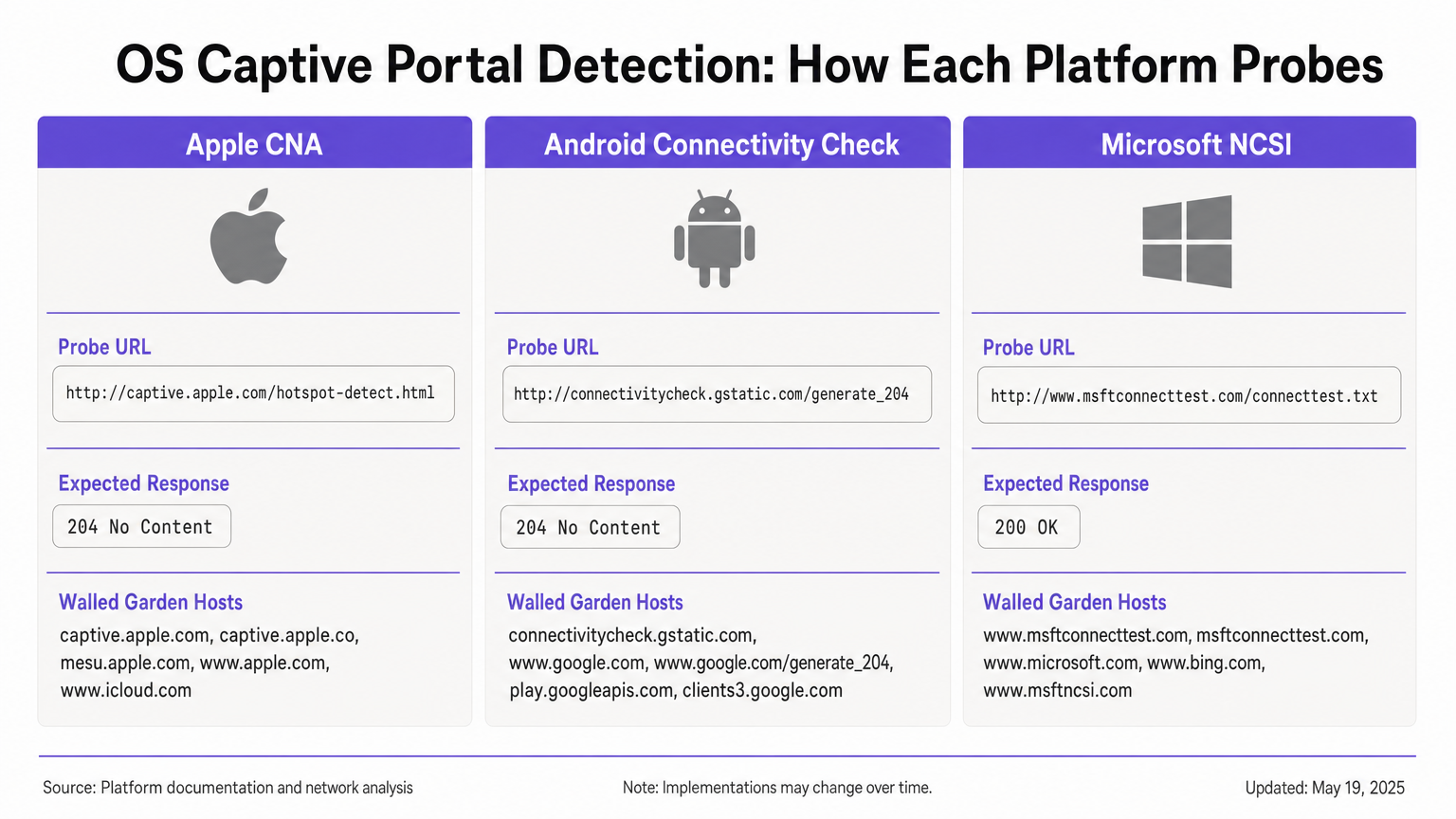
Lorsqu'un appareil Apple (iOS ou macOS) se connecte à un réseau, il envoie immédiatement une requête HTTP GET à son URL de sonde principale : http://captive.apple.com/hotspot-detect.html. L'appareil s'attend à une réponse HTTP 200 OK avec un corps HTML spécifique contenant le mot "Success" [1].
Si la réponse correspond à cette attente, l'OS suppose un accès internet complet. Si la réponse est autre chose – comme une redirection HTTP 302 ou un timeout – l'OS déclenche le Captive Network Assistant (CNA). Le CNA ouvre WebSheet, un mini-navigateur en bac à sable (sandboxed) avec des fonctionnalités limitées (pas d'extensions Safari, pas de sauvegarde de mot de passe) [2].
Contrainte critique : La sonde initiale est HTTP. Si votre passerelle intercepte la sonde et redirige vers une URL HTTPS, le CNA échouera gracieusement, entraînant souvent un avertissement de certificat ou un écran vide. La redirection initiale doit rester sur le port HTTP 80. De plus, si vous autorisez par inadvertance captive.apple.com à travers votre jardin clos (walled garden), l'appareil atteindra le véritable serveur Apple, recevra la réponse "Success" et contournera entièrement votre portail.
Android Connectivity Check
Android fonctionne sur un principe différent. Sa sonde principale cible http://connectivitycheck.gstatic.com/generate_204 (avec des solutions de repli vers clients2.google.com et connectivitycheck.android.com). Au lieu d'attendre une réponse HTTP 200 avec un contenu spécifique, Android s'attend à une réponse HTTP 204 No Content [3].
Si Android reçoit un HTTP 204, il suppose une connectivité internet. S'il reçoit une redirection ou une réponse HTTP 200, il signale le réseau comme Captive et affiche une notification "Se connecter au réseau WiFi". Taper sur cette notification ouvre le navigateur Chrome complet, permettant une expérience de portail plus riche par rapport au CNA en bac à sable d'Apple.
Contrainte critique : Si votre jardin clos (walled garden) bloque entièrement connectivitycheck.gstatic.com au lieu de l'intercepter et de le rediriger, Android affichera un avertissement "Connecté, pas d'internet" et n'invitera pas l'utilisateur à se connecter.
Microsoft Network Connectivity Status Indicator (NCSI)
Windows utilise un mécanisme de double sonde via le service Network Connectivity Status Indicator (NCSI). Lors de la connexion, Windows effectue une requête HTTP GET vers http://www.msftconnecttest.com/connecttest.txt (s'attendant à une réponse 200 avec le texte "Microsoft Connect Test") et une résolution DNS pour dns.msftncsi.com [4].
Si la sonde HTTP est interceptée, Windows détecte le portail et ouvre le navigateur par défaut (Edge). Cependant, Windows est sujet à un problème de boucle post-authentification. Après que l'utilisateur s'est authentifié, Windows réexécute les sondes NCSI. Si la passerelle n'a pas encore propagé l'autorisation de l'adresse MAC, la sonde est de nouveau interceptée, et Windows rouvre le portail, forçant l'utilisateur dans une boucle de connexion.
Guide d'Implémentation
Pour assurer une détection fiable des Captive Portals sur tous les appareils, vous devez configurer votre zone de pré-authentification (jardin clos / walled garden) pour gérer les exigences spécifiques de chaque OS.
Configuration du Jardin Clos (Walled Garden)
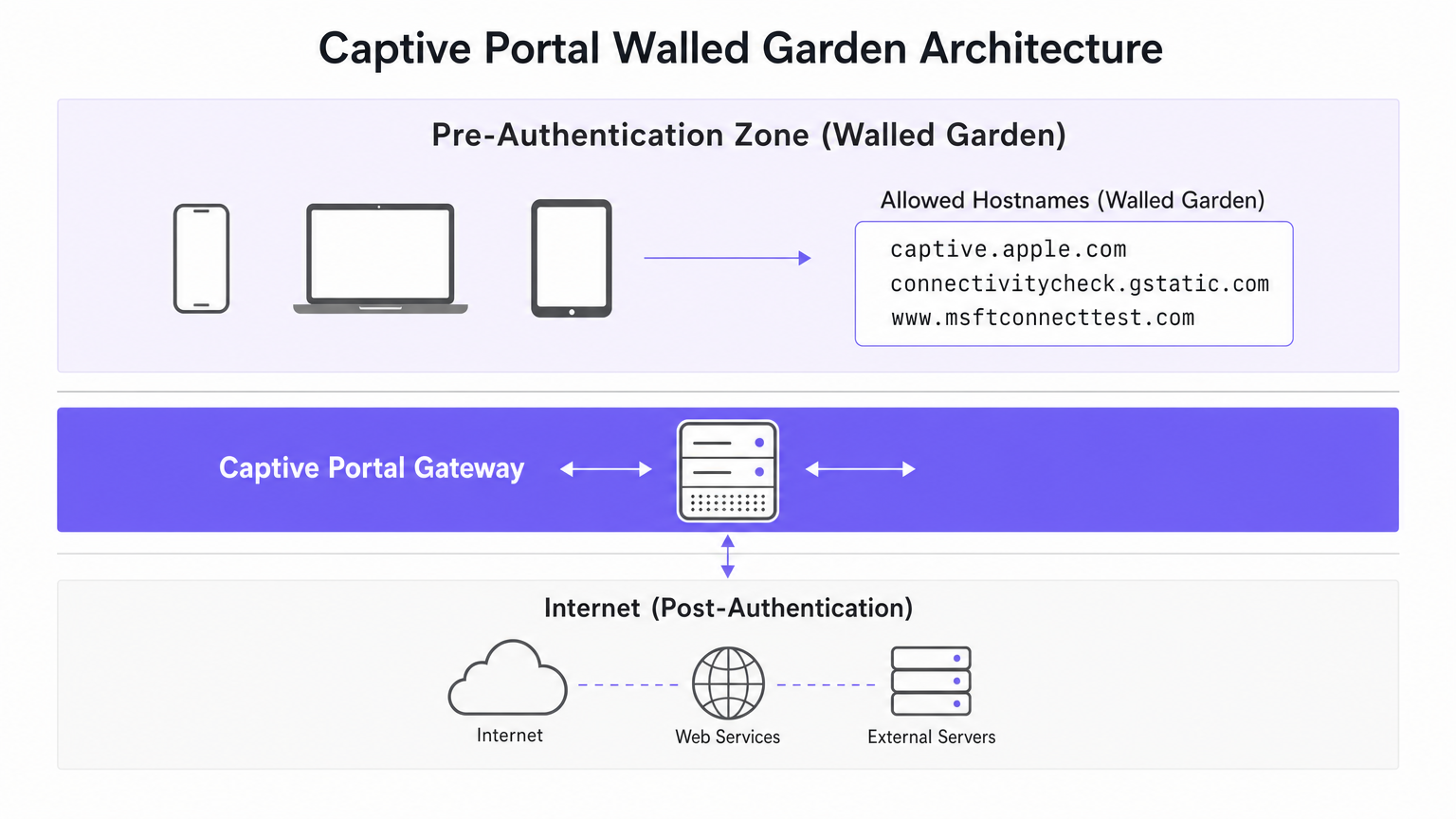
Votre jardin clos (walled garden) doit inclure les hôtes suivants. Il est crucial que vous interceptiez et redirigiez le trafic HTTP vers ces hôtes, plutôt que de simplement les laisser passer vers internet.
- Apple :
captive.apple.com,www.apple.com,www.appleiphonecell.com,www.itools.info - Android :
connectivitycheck.gstatic.com,clients2.google.com,connectivitycheck.android.com - Windows :
www.msftconnecttest.com,dns.msftncsi.com,www.msftncsi.com(pour les clients hérités)
Étapes de Déploiement
- Configurer la Résolution DNS : Assurez-vous que les requêtes DNS pour les URL de sonde se résolvent avec succès dans la zone de pré-authentification.
- Intercepter les Sondes HTTP : Configurez votre passerelle pour intercepter les requêtes HTTP GET vers les URL de sonde et renvoyer une redirection HTTP 302 vers la page d'accueil de votre portail.
- Maintenir HTTP pour la Redirection Initiale : La redirection initiale doit être servie via HTTP (port 80). Vous pouvez ensuite rediriger l'utilisateur vers une page de connexion HTTPS, mais le premier saut doit être en HTTP en texte clair pour satisfaire Apple CNA.
- Propager Rapidement l'Autorisation : Assurez-vous que votre passerelle met à jour immédiatement ses règles de pare-feu après une authentification réussie pour permettre aux sondes NCSI de passer, évitant ainsi les boucles Windows.
Bonnes Pratiques
- Adoptez le RFC 8910 (Captive Portal API) : Les systèmes d'exploitation modernes (iOS 16+, Android 11+) prennent en charge l'option DHCP 114, qui fournit un signal positif de la présence d'un Captive Portal via une URL API désignée [5]. Cela élimine la dépendance à l'interception de sondes et constitue l'approche recommandée pour l'avenir.
- Testez sur toutes les plateformes : Ne supposez jamais qu'un portail fonctionne uniquement sur la base de tests effectués avec un iPhone. Exigez une matrice de test incluant les appareils iOS, Android standard et Windows 10/11.
- Utilisez des plateformes automatisées : La gestion manuelle des URL de sondes en constante évolution est sujette aux erreurs. Des plateformes comme Purple mettent automatiquement à jour les définitions de jardins clos à mesure qu'Apple, Google et Microsoft modifient leur infrastructure, garantissant une collecte de données WiFi Analytics cohérente.
Dépannage et atténuation des risques
| Symptôme | Cause première | Résolution |
|---|---|---|
| Le CNA Apple ne s'ouvre pas ; l'utilisateur voit un avertissement SSL. | La passerelle intercepte la sonde et redirige directement vers HTTPS. | Assurez-vous que l'interception et la redirection initiales utilisent le port HTTP 80. |
| L'appareil Apple se connecte sans afficher le portail. | captive.apple.com est autorisé à traverser le jardin clos vers Internet. |
Supprimez captive.apple.com de la liste d'autorisation ; assurez-vous qu'il est intercepté. |
| Android affiche « Connecté, pas d'internet ». | connectivitycheck.gstatic.com est bloqué par le pare-feu. |
Autorisez l'URL de la sonde dans le jardin clos, mais interceptez-la et redirigez-la. |
| Windows invite l'utilisateur à se connecter plusieurs fois (boucle). | La passerelle est lente à appliquer les règles MAC post-authentification ; le NCSI est toujours intercepté. | Optimisez la propagation des règles de la passerelle ; assurez-vous que msftconnecttest.com passe après l'authentification. |
ROI et impact commercial
Une architecture robuste de détection de Captive Portal a un impact direct sur les résultats. Dans un hôtel de 500 chambres ou un grand environnement de vente au détail, les échecs de Captive Portal génèrent un volume disproportionné de tickets de support informatique. En éliminant ces points de friction, les établissements réduisent les frais de support, améliorent les scores de satisfaction des clients et augmentent le taux de capture des données de première partie.
Lorsque les utilisateurs se connectent en toute transparence, ils interagissent avec vos pages d'accueil, ce qui vous permet de diffuser un marketing ciblé, de vous intégrer aux programmes de fidélité et de générer des revenus mesurables, comme détaillé dans notre guide sur le Système de positionnement intérieur : Guide UWB, BLE et WiFi . Pour les établissements opérant à l'international, un portail fiable garantit une collecte de données de conformité cohérente, soutenant les cadres discutés dans le LGPD brésilien et le WiFi invité : Un guide de conformité .
Références
[1] Assistance Apple, « Utiliser les réseaux Wi-Fi captifs sur votre iPhone ou iPad », 2024. [2] SecureW2, « Qu'est-ce que l'assistant de réseau captif Apple ? », 2023. [3] Développeurs Android, « Prise en charge de l'API Captive Portal », Fonctionnalités d'Android 11, 2020. [4] Microsoft Learn, « Détection de Captive Portal et expérience utilisateur dans Windows », Développeur de matériel Windows, 2025. [5] IETF, « RFC 8910 : Identification de Captive Portal dans DHCP et les annonces de routeur », 2020.
Termes clés et définitions
Captive Network Assistant (CNA)
Apple's built-in mechanism for detecting captive portals and displaying them in a sandboxed mini-browser (WebSheet) rather than the full Safari browser.
IT teams must ensure their splash pages are responsive and do not rely on advanced browser features, as the CNA environment is highly constrained.
Network Connectivity Status Indicator (NCSI)
The Windows service responsible for determining internet connectivity by probing specific Microsoft domains via HTTP and DNS.
Understanding NCSI is critical for preventing the common 'Windows looping' issue where users are repeatedly prompted to sign in.
Walled Garden
A restricted network environment that allows unauthenticated users access to a specific list of approved hostnames or IP addresses.
Properly configuring the walled garden is the foundation of captive portal deployment, ensuring OS probes are handled correctly.
HTTP 204 No Content
An HTTP status code indicating the server successfully processed the request but is not returning any content.
This is the specific response Android devices expect from `connectivitycheck.gstatic.com` to confirm full internet access.
RFC 8910 (Captive Portal API)
An IETF standard that uses DHCP option 114 to explicitly notify a device of a captive portal's presence and provide the portal URL.
This modern standard replaces unreliable probe interception and is supported by newer versions of iOS and Android.
WebSheet
The sandboxed, limited-functionality mini-browser used by Apple's CNA to render captive portal splash pages.
Portal designers must test their pages in WebSheet, as it lacks features like password saving and full cookie support found in standard browsers.
MAC Authorisation
The process by which a gateway grants network access to a specific device based on its Media Access Control address after successful portal authentication.
Delays in applying MAC authorisation cause post-authentication probes (like Windows NCSI) to fail, leading to poor user experiences.
Probe Interception
The technique of capturing an operating system's background connectivity check and forcibly redirecting it to a captive portal login page.
This is the legacy, yet most common, method for triggering captive portals, requiring precise HTTP 302 redirects.
Études de cas
A 300-room hotel reports that guests using iPhones are connecting to the guest WiFi but are not being prompted with the captive portal splash page. Android and Windows users are unaffected.
- Review the walled garden (pre-authentication) allowlist on the gateway.
- Identify that
captive.apple.comhas been added as a permitted passthrough host. - Remove
captive.apple.comfrom the passthrough list. - Configure the gateway to intercept HTTP requests to
captive.apple.comand redirect them (via HTTP 302) to the portal URL.
A conference centre's IT team receives complaints that Windows 11 users are authenticating successfully but are immediately prompted to sign in again, creating an endless loop.
- Verify that the captive portal gateway is successfully authorising the client's MAC address post-authentication.
- Inspect the post-authentication firewall rules to ensure traffic to
www.msftconnecttest.comanddns.msftncsi.comis permitted. - Adjust the gateway configuration to ensure MAC authorisation is applied instantaneously, preventing subsequent NCSI probes from being intercepted.
Analyse de scénario
Q1. You are deploying a captive portal for a large retail chain. The security team insists that all network traffic, including the initial portal redirect, must be encrypted using HTTPS. What is the technical implication of this policy?
💡 Astuce :Consider how Apple's Captive Network Assistant (CNA) handles initial probe requests.
Afficher l'approche recommandée
Enforcing HTTPS for the initial redirect will break Apple CNA detection. The CNA probe is an HTTP GET request. If the gateway intercepts this and redirects to an HTTPS URL, the CNA will not follow the redirect gracefully, resulting in a certificate error or a failure to open the portal. The initial interception must use HTTP port 80; the user can subsequently be redirected to an HTTPS page for authentication.
Q2. A stadium network engineer reports that Android devices are showing a 'Connected, no internet' warning without prompting the user to sign in. How should the walled garden be adjusted?
💡 Astuce :Think about the difference between blocking a probe and intercepting it.
Afficher l'approche recommandée
The engineer needs to ensure that connectivitycheck.gstatic.com is allowed to resolve via DNS within the walled garden, but the HTTP traffic must be intercepted and redirected. Currently, the firewall is likely dropping the traffic entirely, causing Android to assume the internet is down rather than detecting a captive portal.
Q3. A venue wishes to implement RFC 8910 (Captive Portal API) to improve the user experience. What infrastructure changes are required to support this?
💡 Astuce :RFC 8910 relies on a positive signal during the IP assignment phase.
Afficher l'approche recommandée
The venue must update its DHCP server or access points to advertise DHCP option 114. This option must provide the URL of the Captive Portal API endpoint. When compatible devices (iOS 16+, Android 11+) receive this option during the DHCP handshake, they will immediately fetch the API and prompt the user, bypassing the need for HTTP probe interception.




