

Apple CNA, Android Connectivity Check, Microsoft NCSI: Come funziona realmente il rilevamento del Captive Portal
Questo riferimento tecnico definitivo spiega come Apple CNA, Android connectivitycheck e Microsoft NCSI rilevano i captive portal. Fornisce indicazioni pratiche per i responsabili IT e gli architetti di rete sulla configurazione del walled garden, sulle modalità di errore comuni e sulle migliori pratiche per una distribuzione senza interruzioni.
🎧 Ascolta questa guida
Visualizza trascrizione
Riepilogo Esecutivo
Il rilevamento del Captive Portal è una componente critica ma spesso fraintesa del networking aziendale. Quando un dispositivo si connette a una rete WiFi pubblica, il sistema operativo esegue una serie di sondaggi in background per determinare se l'accesso a Internet è disponibile o se un Captive Portal sta intercettando il traffico. Apple, Android e Windows utilizzano ciascuno meccanismi distinti, con URL di sondaggio, risposte attese e modalità di errore differenti.
Per i responsabili IT e gli architetti di rete che implementano soluzioni Guest WiFi in ambienti Hospitality , Retail o del settore pubblico, una configurazione errata di questi meccanismi di rilevamento comporta un significativo sovraccarico di supporto. Gli ospiti potrebbero visualizzare avvisi di certificato, non riuscire a vedere la splash page o sperimentare cicli di accesso infiniti. Questa guida di riferimento fornisce l'architettura tecnica definitiva di Apple CNA, Android Connectivity Check e Microsoft NCSI, fornendovi le conoscenze pratiche necessarie per costruire walled garden robusti e neutrali rispetto al fornitore e garantire un'esperienza di connessione senza interruzioni.
Approfondimento Tecnico
Apple Captive Network Assistant (CNA)
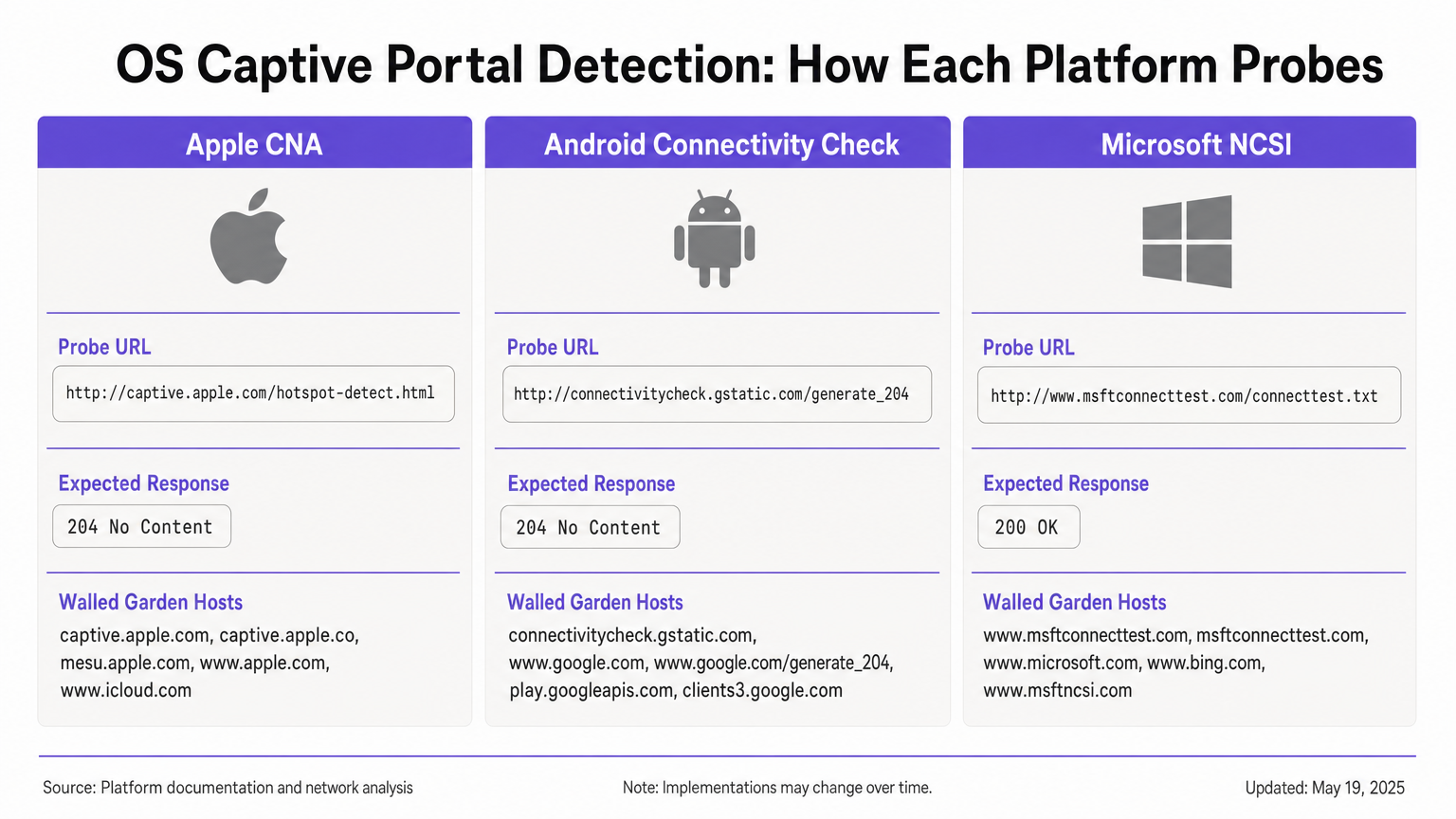
Quando un dispositivo Apple (iOS o macOS) si connette a una rete, invia immediatamente una richiesta HTTP GET al suo URL di sondaggio primario: http://captive.apple.com/hotspot-detect.html. Il dispositivo si aspetta una risposta HTTP 200 OK con un corpo HTML specifico contenente la parola "Success" [1].
Se la risposta corrisponde a questa aspettativa, il sistema operativo presume un accesso completo a Internet. Se la risposta è diversa, come un reindirizzamento HTTP 302 o un timeout, il sistema operativo attiva il Captive Network Assistant (CNA). Il CNA apre WebSheet, un mini-browser in sandbox con funzionalità limitate (nessuna estensione Safari, nessun salvataggio password) [2].
Vincolo critico: Il sondaggio iniziale è HTTP. Se il vostro gateway intercetta il sondaggio e reindirizza a un URL HTTPS, il CNA fallirà in modo controllato, spesso risultando in un avviso di certificato o una schermata vuota. Il reindirizzamento iniziale deve rimanere sulla porta HTTP 80. Inoltre, se consentite inavvertitamente captive.apple.com attraverso il vostro walled garden, il dispositivo raggiungerà il vero server Apple, riceverà la risposta "Success" e bypasserà completamente il vostro portal.
Android Connectivity Check
Android opera su un principio diverso. Il suo sondaggio primario mira a http://connectivitycheck.gstatic.com/generate_204 (con fallback a clients2.google.com e connectivitycheck.android.com). Invece di aspettarsi una risposta HTTP 200 con contenuto specifico, Android si aspetta una risposta HTTP 204 No Content [3].
Se Android riceve un HTTP 204, presume la connettività a Internet. Se riceve un reindirizzamento o una risposta HTTP 200, contrassegna la rete come captive e visualizza una notifica "Accedi alla rete WiFi". Toccando questa notifica si apre il browser Chrome completo, consentendo un'esperienza portal più ricca rispetto al CNA in sandbox di Apple.
Vincolo critico: Se il vostro walled garden blocca connectivitycheck.gstatic.com interamente invece di intercettarlo e reindirizzarlo, Android visualizzerà un avviso "Connesso, nessun internet" e non chiederà all'utente di accedere.
Microsoft Network Connectivity Status Indicator (NCSI)
Windows impiega un meccanismo a doppio sondaggio tramite il servizio Network Connectivity Status Indicator (NCSI). Al momento della connessione, Windows esegue una richiesta HTTP GET a http://www.msftconnecttest.com/connecttest.txt (aspettandosi una risposta 200 con il testo "Microsoft Connect Test") e una risoluzione DNS per dns.msftncsi.com [4].
Se il sondaggio HTTP viene intercettato, Windows rileva il portal e apre il browser predefinito (Edge). Tuttavia, Windows è soggetto a un problema di loop post-autenticazione. Dopo che l'utente si autentica, Windows riesegue i sondaggi NCSI. Se il gateway non ha ancora propagato l'autorizzazione dell'indirizzo MAC, il sondaggio viene intercettato di nuovo e Windows riapre il portal, costringendo l'utente a un ciclo di accesso.
Guida all'Implementazione
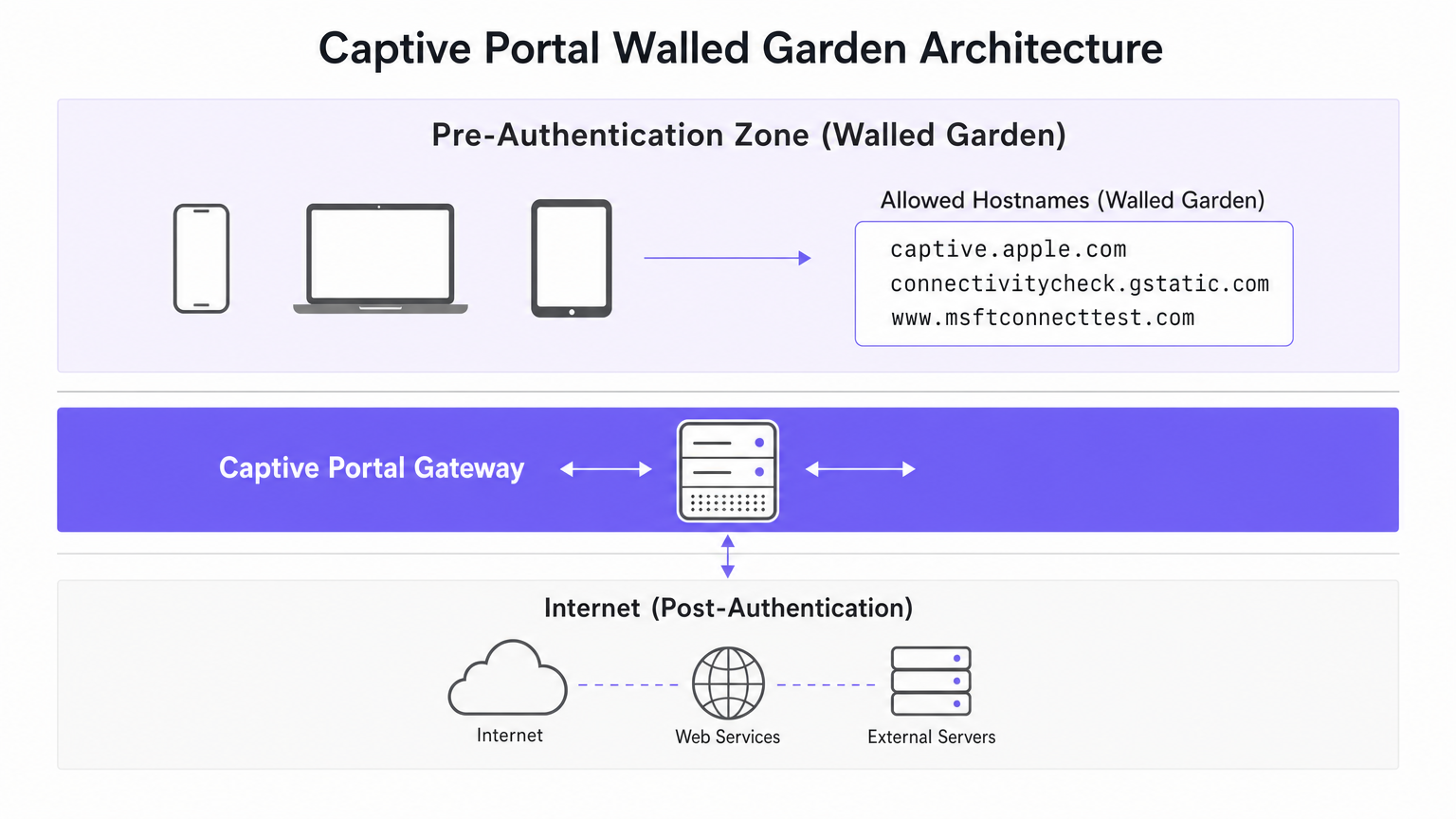
Per garantire un rilevamento affidabile del Captive Portal su tutti i dispositivi, è necessario configurare la zona di pre-autenticazione (walled garden) per gestire i requisiti specifici di ogni sistema operativo.
Walled Garden Configuration
Il vostro walled garden deve includere i seguenti host. Fondamentale, dovete intercettare e reindirizzare il traffico HTTP verso questi host, piuttosto che semplicemente consentire loro di passare a Internet.
- Apple:
captive.apple.com,www.apple.com,www.appleiphonecell.com,www.itools.info - Android:
connectivitycheck.gstatic.com,clients2.google.com,connectivitycheck.android.com - Windows:
www.msftconnecttest.com,dns.msftncsi.com,www.msftncsi.com(for legacy clients)
Fasi di Implementazione
- Configurare la Risoluzione DNS: Assicurarsi che le richieste DNS per gli URL di sondaggio si risolvano correttamente all'interno della zona di pre-autenticazione.
- Intercettare i Sondaggi HTTP: Configurare il gateway per intercettare le richieste HTTP GET agli URL di sondaggio e restituire un reindirizzamento HTTP 302 alla splash page del vostro portal.
- Mantenere HTTP per il Reindirizzamento Iniziale: Il reindirizzamento iniziale deve essere servito tramite HTTP (porta 80). È possibile reindirizzare l'utente a una pagina di login HTTPS successivamente, ma il primo hop deve essere HTTP in chiaro per soddisfare Apple CNA.
- Propagare Rapidamente l'Autorizzazione: Assicurarsi che il gateway aggiorni immediatamente le sue regole firewall dopo un'autenticazione riuscita per consentire il passaggio dei sondaggi NCSI, prevenendo i loop di Windows.
Migliori Pratiche
- Adottare RFC 8910 (Captive Portal API): I sistemi operativi moderni (iOS 16+, Android 11+) supportano l'opzione DHCP 114, che fornisce un segnale positivo della presenza di un Captive Portal tramite un URL API designato [5]. Ciò elimina la dipendenza dall'intercettazione delle sonde ed è l'approccio raccomandato a prova di futuro.
- Test su tutte le piattaforme: Non dare mai per scontato che un portale funzioni basandosi esclusivamente su test con un iPhone. Richiedi una matrice di test che includa dispositivi iOS, Android stock e Windows 10/11.
- Sfrutta le piattaforme automatizzate: La gestione manuale degli URL delle sonde in evoluzione è soggetta a errori. Piattaforme come Purple aggiornano automaticamente le definizioni dei walled garden man mano che Apple, Google e Microsoft modificano la loro infrastruttura, garantendo una raccolta dati WiFi Analytics coerente.
Risoluzione dei problemi e mitigazione dei rischi
| Sintomo | Causa principale | Risoluzione |
|---|---|---|
| Apple CNA non si apre; l'utente visualizza un avviso SSL. | Il gateway intercetta la sonda e reindirizza direttamente a HTTPS. | Assicurarsi che l'intercettazione iniziale e il reindirizzamento utilizzino la porta HTTP 80. |
| Il dispositivo Apple si connette senza mostrare il portale. | captive.apple.com è consentito attraverso il walled garden verso internet. |
Rimuovere captive.apple.com dalla lista bianca; assicurarsi che sia intercettato. |
| Android mostra "Connesso, nessuna internet". | connectivitycheck.gstatic.com è bloccato dal firewall. |
Consentire l'URL della sonda nel walled garden, ma intercettarlo e reindirizzarlo. |
| Windows chiede all'utente di accedere più volte (loop). | Il gateway è lento nell'applicare le regole MAC post-autenticazione; NCSI è ancora intercettato. | Ottimizzare la propagazione delle regole del gateway; assicurarsi che msftconnecttest.com passi post-autenticazione. |
ROI e impatto sul business
Un'architettura robusta di rilevamento del Captive Portal ha un impatto diretto sui profitti. In un hotel di 500 camere o in un grande ambiente di vendita al dettaglio, i fallimenti del Captive Portal generano un volume sproporzionato di ticket di supporto IT. Eliminando questi punti di attrito, le strutture riducono i costi di supporto, migliorano i punteggi di soddisfazione degli ospiti e aumentano il tasso di acquisizione dei dati di prima parte.
Quando gli utenti si connettono senza problemi, interagiscono con le tue splash page, consentendoti di fornire marketing mirato, integrare programmi fedeltà e generare entrate misurabili, come dettagliato nella nostra guida a Indoor Positioning System: UWB, BLE, & WiFi Guide . Per le strutture che operano a livello internazionale, un portale affidabile garantisce una raccolta dati di conformità coerente, supportando i framework discussi nella Brazil LGPD and Guest WiFi: A Compliance Guide .
Riferimenti
[1] Apple Support, "Utilizzare le reti Wi-Fi captive su iPhone o iPad," 2024. [2] SecureW2, "Cos'è Apple Captive Network Assistant?," 2023. [3] Android Developers, "Supporto API Captive Portal," Android 11 Features, 2020. [4] Microsoft Learn, "Rilevamento del Captive Portal ed esperienza utente in Windows," Windows Hardware Developer, 2025. [5] IETF, "RFC 8910: Identificazione del Captive Portal in DHCP e Router Advertisements," 2020.
Termini chiave e definizioni
Captive Network Assistant (CNA)
Apple's built-in mechanism for detecting captive portals and displaying them in a sandboxed mini-browser (WebSheet) rather than the full Safari browser.
IT teams must ensure their splash pages are responsive and do not rely on advanced browser features, as the CNA environment is highly constrained.
Network Connectivity Status Indicator (NCSI)
The Windows service responsible for determining internet connectivity by probing specific Microsoft domains via HTTP and DNS.
Understanding NCSI is critical for preventing the common 'Windows looping' issue where users are repeatedly prompted to sign in.
Walled Garden
A restricted network environment that allows unauthenticated users access to a specific list of approved hostnames or IP addresses.
Properly configuring the walled garden is the foundation of captive portal deployment, ensuring OS probes are handled correctly.
HTTP 204 No Content
An HTTP status code indicating the server successfully processed the request but is not returning any content.
This is the specific response Android devices expect from `connectivitycheck.gstatic.com` to confirm full internet access.
RFC 8910 (Captive Portal API)
An IETF standard that uses DHCP option 114 to explicitly notify a device of a captive portal's presence and provide the portal URL.
This modern standard replaces unreliable probe interception and is supported by newer versions of iOS and Android.
WebSheet
The sandboxed, limited-functionality mini-browser used by Apple's CNA to render captive portal splash pages.
Portal designers must test their pages in WebSheet, as it lacks features like password saving and full cookie support found in standard browsers.
MAC Authorisation
The process by which a gateway grants network access to a specific device based on its Media Access Control address after successful portal authentication.
Delays in applying MAC authorisation cause post-authentication probes (like Windows NCSI) to fail, leading to poor user experiences.
Probe Interception
The technique of capturing an operating system's background connectivity check and forcibly redirecting it to a captive portal login page.
This is the legacy, yet most common, method for triggering captive portals, requiring precise HTTP 302 redirects.
Casi di studio
A 300-room hotel reports that guests using iPhones are connecting to the guest WiFi but are not being prompted with the captive portal splash page. Android and Windows users are unaffected.
- Review the walled garden (pre-authentication) allowlist on the gateway.
- Identify that
captive.apple.comhas been added as a permitted passthrough host. - Remove
captive.apple.comfrom the passthrough list. - Configure the gateway to intercept HTTP requests to
captive.apple.comand redirect them (via HTTP 302) to the portal URL.
A conference centre's IT team receives complaints that Windows 11 users are authenticating successfully but are immediately prompted to sign in again, creating an endless loop.
- Verify that the captive portal gateway is successfully authorising the client's MAC address post-authentication.
- Inspect the post-authentication firewall rules to ensure traffic to
www.msftconnecttest.comanddns.msftncsi.comis permitted. - Adjust the gateway configuration to ensure MAC authorisation is applied instantaneously, preventing subsequent NCSI probes from being intercepted.
Analisi degli scenari
Q1. You are deploying a captive portal for a large retail chain. The security team insists that all network traffic, including the initial portal redirect, must be encrypted using HTTPS. What is the technical implication of this policy?
💡 Suggerimento:Consider how Apple's Captive Network Assistant (CNA) handles initial probe requests.
Mostra l'approccio consigliato
Enforcing HTTPS for the initial redirect will break Apple CNA detection. The CNA probe is an HTTP GET request. If the gateway intercepts this and redirects to an HTTPS URL, the CNA will not follow the redirect gracefully, resulting in a certificate error or a failure to open the portal. The initial interception must use HTTP port 80; the user can subsequently be redirected to an HTTPS page for authentication.
Q2. A stadium network engineer reports that Android devices are showing a 'Connected, no internet' warning without prompting the user to sign in. How should the walled garden be adjusted?
💡 Suggerimento:Think about the difference between blocking a probe and intercepting it.
Mostra l'approccio consigliato
The engineer needs to ensure that connectivitycheck.gstatic.com is allowed to resolve via DNS within the walled garden, but the HTTP traffic must be intercepted and redirected. Currently, the firewall is likely dropping the traffic entirely, causing Android to assume the internet is down rather than detecting a captive portal.
Q3. A venue wishes to implement RFC 8910 (Captive Portal API) to improve the user experience. What infrastructure changes are required to support this?
💡 Suggerimento:RFC 8910 relies on a positive signal during the IP assignment phase.
Mostra l'approccio consigliato
The venue must update its DHCP server or access points to advertise DHCP option 114. This option must provide the URL of the Captive Portal API endpoint. When compatible devices (iOS 16+, Android 11+) receive this option during the DHCP handshake, they will immediately fetch the API and prompt the user, bypassing the need for HTTP probe interception.




