

Apple CNA, Android Connectivity Check, Microsoft NCSI: Wie die Captive Portal-Erkennung tatsächlich funktioniert
Diese maßgebliche technische Referenz erklärt, wie Apple CNA, Android connectivitycheck und Microsoft NCSI Captive Portals erkennen. Sie bietet IT-Managern und Netzwerkarchitekten umsetzbare Anleitungen zur Konfiguration von Walled Gardens, zu häufigen Fehlermodi und zu Best Practices für eine nahtlose Bereitstellung.
🎧 Diesen Leitfaden anhören
Transkript anzeigen
Zusammenfassung
Die Captive Portal-Erkennung ist eine entscheidende, aber oft missverstandene Komponente von Unternehmensnetzwerken. Wenn ein Gerät einem öffentlichen WiFi-Netzwerk beitritt, führt das Betriebssystem eine Reihe von Hintergrundprüfungen durch, um festzustellen, ob Internetzugang verfügbar ist oder ob ein Captive Portal den Datenverkehr abfängt. Apple, Android und Windows verwenden jeweils unterschiedliche Mechanismen – mit verschiedenen Probe-URLs, erwarteten Antworten und Fehlermodi.
Für IT-Manager und Netzwerkarchitekten, die Guest WiFi -Lösungen in den Bereichen Hospitality , Retail oder im öffentlichen Sektor bereitstellen, führt eine Fehlkonfiguration dieser Erkennungsmechanismen zu einem erheblichen Supportaufwand. Gäste können Zertifikatswarnungen sehen, die Splash Page nicht angezeigt bekommen oder endlose Anmeldeschleifen erleben. Dieser Leitfaden bietet die maßgebliche technische Architektur von Apple CNA, Android Connectivity Check und Microsoft NCSI und stattet Sie mit dem umsetzbaren Wissen aus, das Sie benötigen, um robuste, herstellerneutrale Walled Gardens aufzubauen und ein nahtloses Verbindungserlebnis zu gewährleisten.
Technischer Überblick
Apple Captive Network Assistant (CNA)
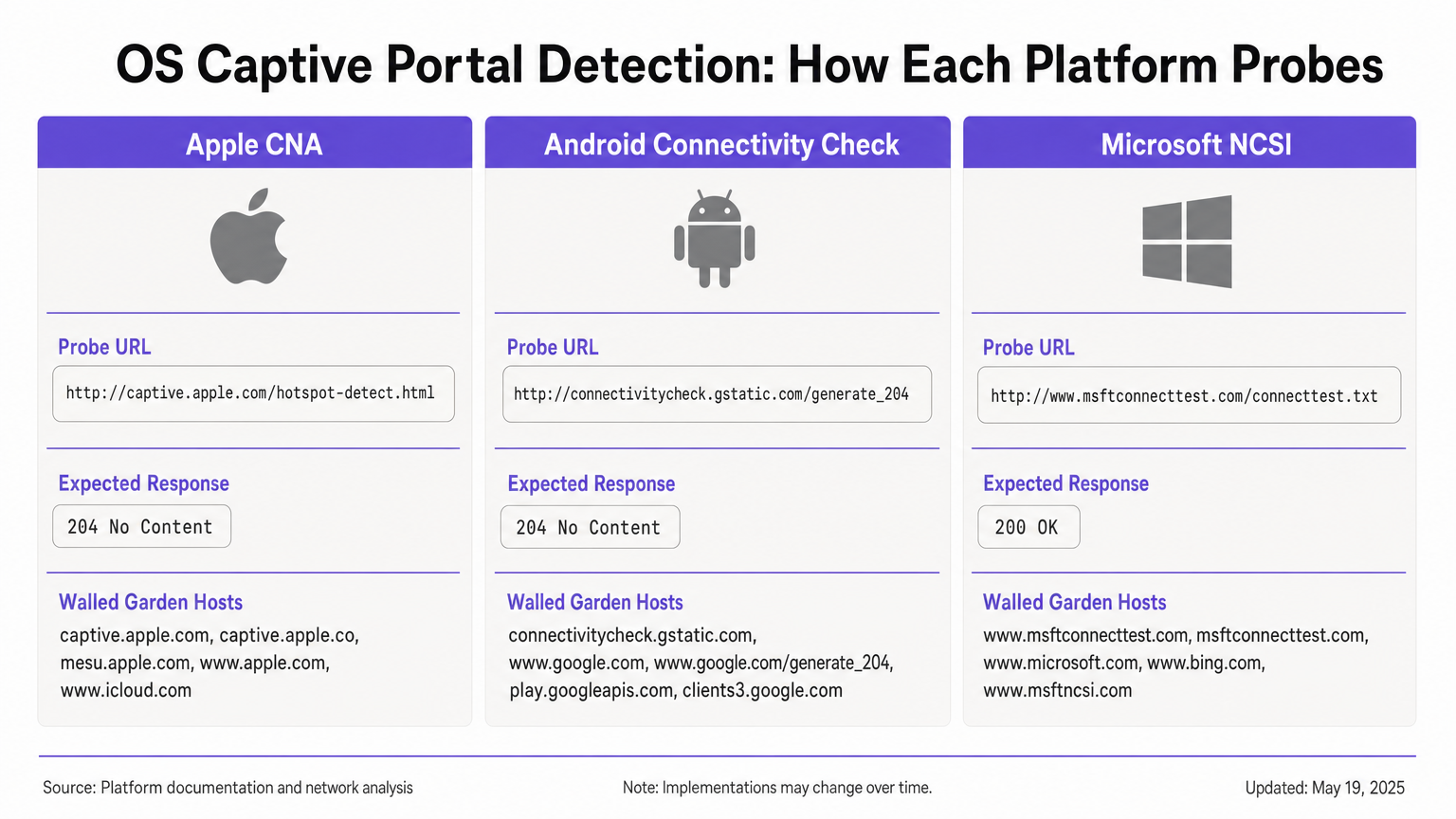
Wenn ein Apple-Gerät (iOS oder macOS) eine Verbindung zu einem Netzwerk herstellt, sendet es sofort eine HTTP GET-Anfrage an seine primäre Probe-URL: http://captive.apple.com/hotspot-detect.html. Das Gerät erwartet eine HTTP 200 OK-Antwort mit einem spezifischen HTML-Body, der das Wort „Success“ enthält [1].
Wenn die Antwort dieser Erwartung entspricht, geht das Betriebssystem von vollem Internetzugang aus. Wenn die Antwort etwas anderes ist – wie eine HTTP 302-Weiterleitung oder ein Timeout – löst das Betriebssystem den Captive Network Assistant (CNA) aus. Der CNA öffnet WebSheet, einen sandboxed Mini-Browser mit eingeschränkter Funktionalität (keine Safari-Erweiterungen, keine Passwortspeicherung) [2].
Kritische Einschränkung: Die anfängliche Probe ist HTTP. Wenn Ihr Gateway die Probe abfängt und zu einer HTTPS-URL umleitet, schlägt der CNA elegant fehl, was oft zu einer Zertifikatswarnung oder einem leeren Bildschirm führt. Die anfängliche Weiterleitung muss auf HTTP Port 80 bleiben. Wenn Sie außerdem versehentlich captive.apple.com durch Ihren Walled Garden zulassen, erreicht das Gerät den echten Apple-Server, erhält die „Success“-Antwort und umgeht Ihr Portal vollständig.
Android Connectivity Check
Android funktioniert nach einem anderen Prinzip. Seine primäre Probe zielt auf http://connectivitycheck.gstatic.com/generate_204 (mit Fallbacks auf clients2.google.com und connectivitycheck.android.com). Anstatt eine HTTP 200-Antwort mit spezifischem Inhalt zu erwarten, erwartet Android eine HTTP 204 No Content-Antwort [3].
Wenn Android eine HTTP 204-Antwort erhält, geht es von Internetkonnektivität aus. Wenn es eine Weiterleitung oder eine HTTP 200-Antwort erhält, kennzeichnet es das Netzwerk als Captive und zeigt eine Benachrichtigung „Bei WiFi-Netzwerk anmelden“ an. Durch Tippen auf diese Benachrichtigung wird der vollständige Chrome-Browser geöffnet, was ein reichhaltigeres Portal-Erlebnis im Vergleich zu Apples sandboxed CNA ermöglicht.
Kritische Einschränkung: Wenn Ihr Walled Garden connectivitycheck.gstatic.com vollständig blockiert, anstatt es abzufangen und umzuleiten, zeigt Android eine Warnung „Verbunden, kein Internet“ an und fordert den Benutzer nicht zur Anmeldung auf.
Microsoft Network Connectivity Status Indicator (NCSI)
Windows verwendet einen Dual-Probe-Mechanismus über den Network Connectivity Status Indicator (NCSI)-Dienst. Beim Verbindungsaufbau führt Windows eine HTTP GET-Anfrage an http://www.msftconnecttest.com/connecttest.txt durch (erwartet eine 200-Antwort mit dem Text „Microsoft Connect Test“) und eine DNS-Auflösung für dns.msftncsi.com [4].
Wenn die HTTP-Probe abgefangen wird, erkennt Windows das Portal und öffnet den Standardbrowser (Edge). Windows neigt jedoch zu einem Problem mit Anmeldeschleifen nach der Authentifizierung. Nachdem sich der Benutzer authentifiziert hat, führt Windows die NCSI-Probes erneut aus. Wenn das Gateway die MAC-Adressautorisierung noch nicht weitergegeben hat, wird die Probe erneut abgefangen, und Windows öffnet das Portal erneut, wodurch der Benutzer in eine Anmeldeschleife gezwungen wird.
Implementierungsleitfaden
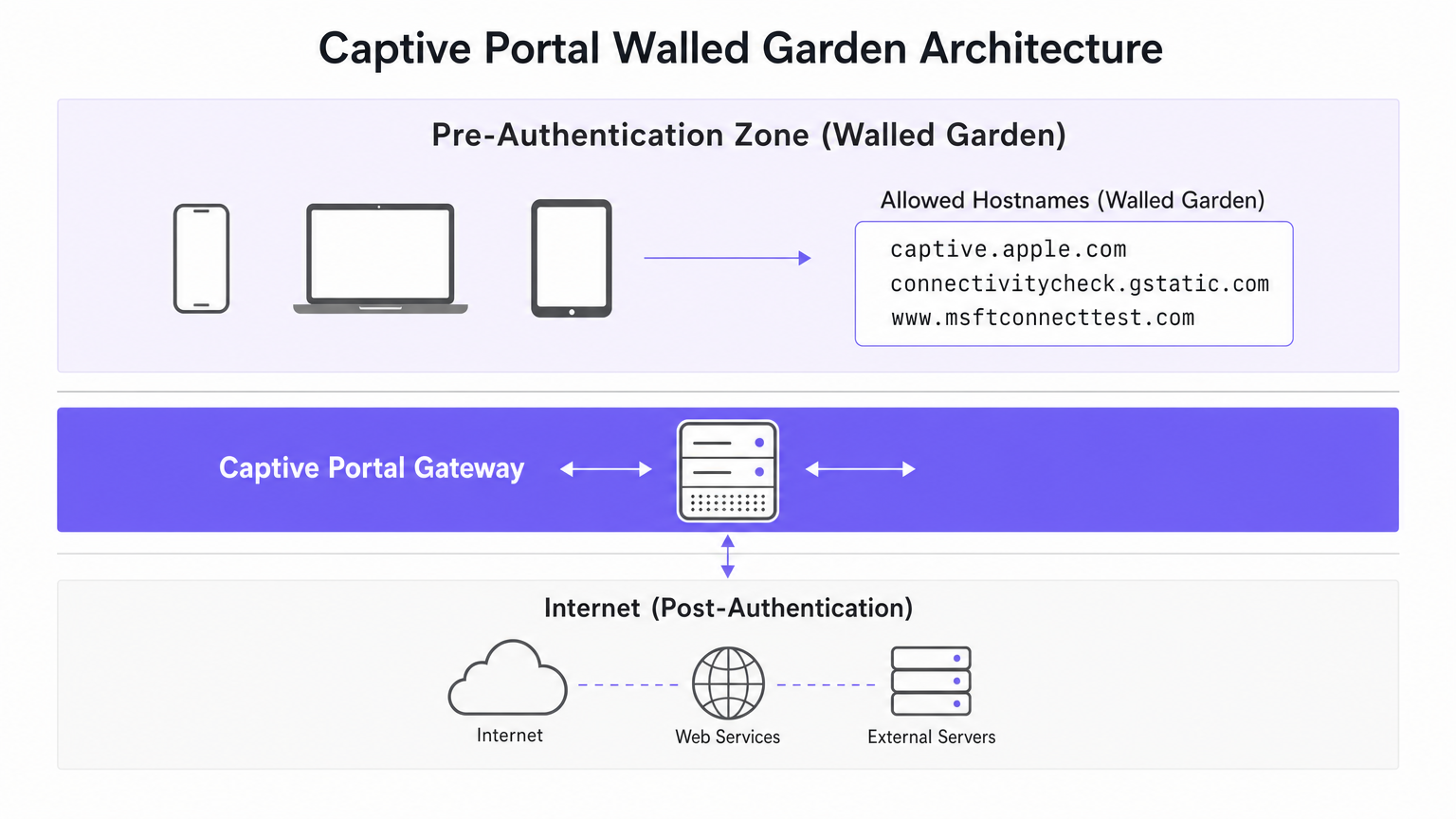
Um eine zuverlässige Captive Portal-Erkennung auf allen Geräten zu gewährleisten, müssen Sie Ihre Pre-Authentifizierungszone (Walled Garden) so konfigurieren, dass sie die spezifischen Anforderungen jedes Betriebssystems erfüllt.
Walled Garden-Konfiguration
Ihr Walled Garden muss die folgenden Hosts enthalten. Entscheidend ist, dass Sie den HTTP-Verkehr zu diesen Hosts abfangen und umleiten müssen, anstatt ihn einfach ins Internet passieren zu lassen.
- Apple:
captive.apple.com,www.apple.com,www.appleiphonecell.com,www.itools.info - Android:
connectivitycheck.gstatic.com,clients2.google.com,connectivitycheck.android.com - Windows:
www.msftconnecttest.com,dns.msftncsi.com,www.msftncsi.com(für ältere Clients)
Bereitstellungsschritte
- DNS-Auflösung konfigurieren: Stellen Sie sicher, dass DNS-Anfragen für die Probe-URLs innerhalb der Pre-Authentifizierungszone erfolgreich aufgelöst werden.
- HTTP-Probes abfangen: Konfigurieren Sie Ihr Gateway so, dass es HTTP GET-Anfragen an die Probe-URLs abfängt und eine HTTP 302-Weiterleitung zu Ihrer Portal-Splash Page zurückgibt.
- HTTP für die anfängliche Weiterleitung beibehalten: Die anfängliche Weiterleitung muss über HTTP (Port 80) erfolgen. Sie können den Benutzer anschließend auf eine HTTPS-Anmeldeseite umleiten, aber der erste Hop muss reines HTTP sein, um Apple CNA zu erfüllen.
- Autorisierung schnell weitergeben: Stellen Sie sicher, dass Ihr Gateway seine Firewall-Regeln bei erfolgreicher Authentifizierung sofort aktualisiert, um NCSI-Probes passieren zu lassen und Windows-Schleifen zu verhindern.
Best Practices
- RFC 8910 (Captive Portal API) übernehmen: Moderne Betriebssysteme (iOS 16+, Android 11+) unterstützen die DHCP-Option 114, die über eine bestimmte API-URL ein positives Signal für die Präsenz eines Captive Portals liefert [5]. Dies eliminiert die Abhängigkeit von der Sondenabfangung und ist der empfohlene zukunftssichere Ansatz.
- Auf allen Plattformen testen: Gehen Sie niemals davon aus, dass ein Portal funktioniert, nur weil es mit einem iPhone getestet wurde. Verpflichten Sie sich zu einer Testmatrix, die iOS, Standard-Android- und Windows 10/11-Geräte umfasst.
- Automatisierte Plattformen nutzen: Die manuelle Verwaltung sich ändernder Sonden-URLs ist fehleranfällig. Plattformen wie Purple aktualisieren automatisch die Walled-Garden-Definitionen, wenn Apple, Google und Microsoft ihre Infrastruktur ändern, und gewährleisten so eine konsistente WiFi Analytics -Datenerfassung.
Fehlerbehebung & Risikominderung
| Symptom | Grundursache | Lösung |
|---|---|---|
| Apple CNA öffnet nicht; Benutzer sieht SSL-Warnung. | Gateway fängt Sonde ab und leitet direkt zu HTTPS um. | Stellen Sie sicher, dass die anfängliche Abfangung und Umleitung HTTP-Port 80 verwenden. |
| Apple-Gerät verbindet sich, ohne Portal anzuzeigen. | captive.apple.com ist durch den Walled Garden ins Internet erlaubt. |
Entfernen Sie captive.apple.com von der Zulassungsliste; stellen Sie sicher, dass es abgefangen wird. |
| Android zeigt "Verbunden, kein Internet". | connectivitycheck.gstatic.com wird von der Firewall blockiert. |
Erlauben Sie die Sonden-URL im Walled Garden, fangen Sie sie aber ab und leiten Sie sie um. |
| Windows fordert den Benutzer mehrmals zur Anmeldung auf (Schleife). | Gateway wendet MAC-Regeln nach der Authentifizierung langsam an; NCSI wird immer noch abgefangen. | Optimieren Sie die Gateway-Regelverteilung; stellen Sie sicher, dass msftconnecttest.com nach der Authentifizierung durchgelassen wird. |
ROI & Geschäftsauswirkungen
Eine robuste Captive Portal-Erkennungsarchitektur wirkt sich direkt auf das Geschäftsergebnis aus. In einem Hotel mit 500 Zimmern oder einer großen Einzelhandelsumgebung führen Captive Portal-Fehler zu einer unverhältnismäßig hohen Anzahl von IT-Support-Tickets. Durch die Beseitigung dieser Reibungspunkte reduzieren Veranstaltungsorte den Supportaufwand, verbessern die Gästezufriedenheit und erhöhen die Erfassungsrate von Erstanbieterdaten.
Wenn Benutzer sich nahtlos verbinden, interagieren sie mit Ihren Splash-Seiten, wodurch Sie gezieltes Marketing betreiben, Treueprogramme integrieren und messbare Einnahmen erzielen können – wie in unserem Leitfaden zu Indoor Positioning System: UWB, BLE, & WiFi Guide beschrieben. Für international tätige Veranstaltungsorte gewährleistet ein zuverlässiges Portal eine konsistente Erfassung von Compliance-Daten und unterstützt die in Brazil LGPD and Guest WiFi: A Compliance Guide erörterten Rahmenbedingungen.
Referenzen
[1] Apple Support, "Captive Wi-Fi-Netzwerke auf Ihrem iPhone oder iPad verwenden," 2024. [2] SecureW2, "Was ist Apple Captive Network Assistant?," 2023. [3] Android Developers, "Captive Portal API-Unterstützung," Android 11 Features, 2020. [4] Microsoft Learn, "Captive Portal-Erkennung und Benutzererfahrung in Windows," Windows Hardware Developer, 2025. [5] IETF, "RFC 8910: Captive-Portal-Identifikation in DHCP und Router-Advertisements," 2020.
Schlüsselbegriffe & Definitionen
Captive Network Assistant (CNA)
Apple's built-in mechanism for detecting captive portals and displaying them in a sandboxed mini-browser (WebSheet) rather than the full Safari browser.
IT teams must ensure their splash pages are responsive and do not rely on advanced browser features, as the CNA environment is highly constrained.
Network Connectivity Status Indicator (NCSI)
The Windows service responsible for determining internet connectivity by probing specific Microsoft domains via HTTP and DNS.
Understanding NCSI is critical for preventing the common 'Windows looping' issue where users are repeatedly prompted to sign in.
Walled Garden
A restricted network environment that allows unauthenticated users access to a specific list of approved hostnames or IP addresses.
Properly configuring the walled garden is the foundation of captive portal deployment, ensuring OS probes are handled correctly.
HTTP 204 No Content
An HTTP status code indicating the server successfully processed the request but is not returning any content.
This is the specific response Android devices expect from `connectivitycheck.gstatic.com` to confirm full internet access.
RFC 8910 (Captive Portal API)
An IETF standard that uses DHCP option 114 to explicitly notify a device of a captive portal's presence and provide the portal URL.
This modern standard replaces unreliable probe interception and is supported by newer versions of iOS and Android.
WebSheet
The sandboxed, limited-functionality mini-browser used by Apple's CNA to render captive portal splash pages.
Portal designers must test their pages in WebSheet, as it lacks features like password saving and full cookie support found in standard browsers.
MAC Authorisation
The process by which a gateway grants network access to a specific device based on its Media Access Control address after successful portal authentication.
Delays in applying MAC authorisation cause post-authentication probes (like Windows NCSI) to fail, leading to poor user experiences.
Probe Interception
The technique of capturing an operating system's background connectivity check and forcibly redirecting it to a captive portal login page.
This is the legacy, yet most common, method for triggering captive portals, requiring precise HTTP 302 redirects.
Fallstudien
A 300-room hotel reports that guests using iPhones are connecting to the guest WiFi but are not being prompted with the captive portal splash page. Android and Windows users are unaffected.
- Review the walled garden (pre-authentication) allowlist on the gateway.
- Identify that
captive.apple.comhas been added as a permitted passthrough host. - Remove
captive.apple.comfrom the passthrough list. - Configure the gateway to intercept HTTP requests to
captive.apple.comand redirect them (via HTTP 302) to the portal URL.
A conference centre's IT team receives complaints that Windows 11 users are authenticating successfully but are immediately prompted to sign in again, creating an endless loop.
- Verify that the captive portal gateway is successfully authorising the client's MAC address post-authentication.
- Inspect the post-authentication firewall rules to ensure traffic to
www.msftconnecttest.comanddns.msftncsi.comis permitted. - Adjust the gateway configuration to ensure MAC authorisation is applied instantaneously, preventing subsequent NCSI probes from being intercepted.
Szenarioanalyse
Q1. You are deploying a captive portal for a large retail chain. The security team insists that all network traffic, including the initial portal redirect, must be encrypted using HTTPS. What is the technical implication of this policy?
💡 Hinweis:Consider how Apple's Captive Network Assistant (CNA) handles initial probe requests.
Empfohlenen Ansatz anzeigen
Enforcing HTTPS for the initial redirect will break Apple CNA detection. The CNA probe is an HTTP GET request. If the gateway intercepts this and redirects to an HTTPS URL, the CNA will not follow the redirect gracefully, resulting in a certificate error or a failure to open the portal. The initial interception must use HTTP port 80; the user can subsequently be redirected to an HTTPS page for authentication.
Q2. A stadium network engineer reports that Android devices are showing a 'Connected, no internet' warning without prompting the user to sign in. How should the walled garden be adjusted?
💡 Hinweis:Think about the difference between blocking a probe and intercepting it.
Empfohlenen Ansatz anzeigen
The engineer needs to ensure that connectivitycheck.gstatic.com is allowed to resolve via DNS within the walled garden, but the HTTP traffic must be intercepted and redirected. Currently, the firewall is likely dropping the traffic entirely, causing Android to assume the internet is down rather than detecting a captive portal.
Q3. A venue wishes to implement RFC 8910 (Captive Portal API) to improve the user experience. What infrastructure changes are required to support this?
💡 Hinweis:RFC 8910 relies on a positive signal during the IP assignment phase.
Empfohlenen Ansatz anzeigen
The venue must update its DHCP server or access points to advertise DHCP option 114. This option must provide the URL of the Captive Portal API endpoint. When compatible devices (iOS 16+, Android 11+) receive this option during the DHCP handshake, they will immediately fetch the API and prompt the user, bypassing the need for HTTP probe interception.




