
কীভাবে Multi-Tenant বিল্ডিংয়ে Dynamic VLAN Assignment কাজ করে
এই টেকনিক্যাল রেফারেন্স গাইডটিতে multi-tenant পরিবেশে 802.1X এবং RADIUS ব্যবহার করে Dynamic VLAN Assignment-এর আর্কিটেকচার এবং ইমপ্লিমেন্টেশন বিস্তারিতভাবে আলোচনা করা হয়েছে। এটি IT ম্যানেজার এবং নেটওয়ার্ক আর্কিটেক্টদের জন্য SSID ওভারহেড কমাতে, Layer 2 আইসোলেশন প্রয়োগ করতে এবং শেয়ার্ড বিল্ডিং জুড়ে নিরাপদ ও স্কেলেবল কানেক্টিভিটি নিশ্চিত করতে কার্যকর গাইডলাইন প্রদান করে।
Video overview
এই গাইডটি শুনুন
পডকাস্ট ট্রান্সক্রিপ্ট দেখুন
আমাদের মূল সিরিজের অংশ: Multi-Tenant WiFi গাইড →
এক্সিকিউটিভ সামারি
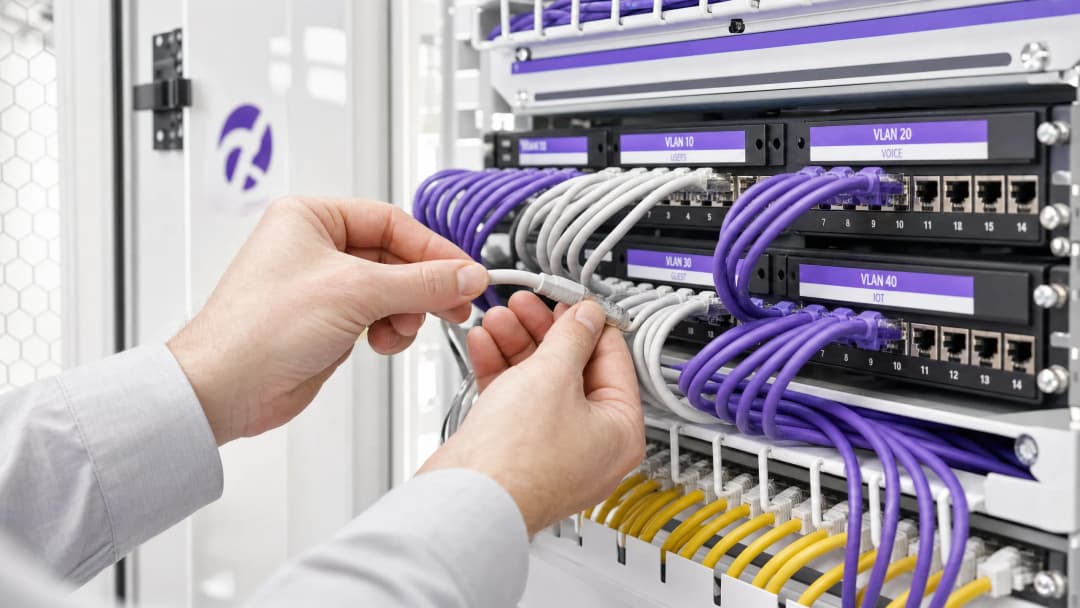
মাল্টি-টেন্যান্ট বিল্ডিং - যেমন বাণিজ্যিক অফিস, রিটেইল কমপ্লেক্স বা বিশাল হসপিটালিটি ভেন্যু তদারককারী IT ম্যানেজার এবং নেটওয়ার্ক আর্কিটেক্টদের জন্য নেটওয়ার্ক সেগমেন্টেশন পরিচালনা করা একটি অত্যন্ত গুরুত্বপূর্ণ চ্যালেঞ্জ। ঐতিহাসিকভাবে, টেন্যান্ট ট্রাফিক আলাদা করার অর্থ ছিল পৃথক ফিজিক্যাল ইনফ্রাস্ট্রাকচার স্থাপন করা বা প্রতিটি টেন্যান্টের জন্য একটি অনন্য SSID ব্রডকাস্ট করা। উভয় পদ্ধতিই মৌলিকভাবে ত্রুটিযুক্ত। ফিজিক্যাল সেপারেশন অত্যন্ত ব্যয়বহুল এবং নমনীয় নয়, অন্যদিকে একাধিক SSID ব্রডকাস্ট করার ফলে অতিরিক্ত ম্যানেজমেন্ট ফ্রেম ওভারহেডের কারণে RF পারফরম্যান্স মারাত্মকভাবে হ্রাস পায়।
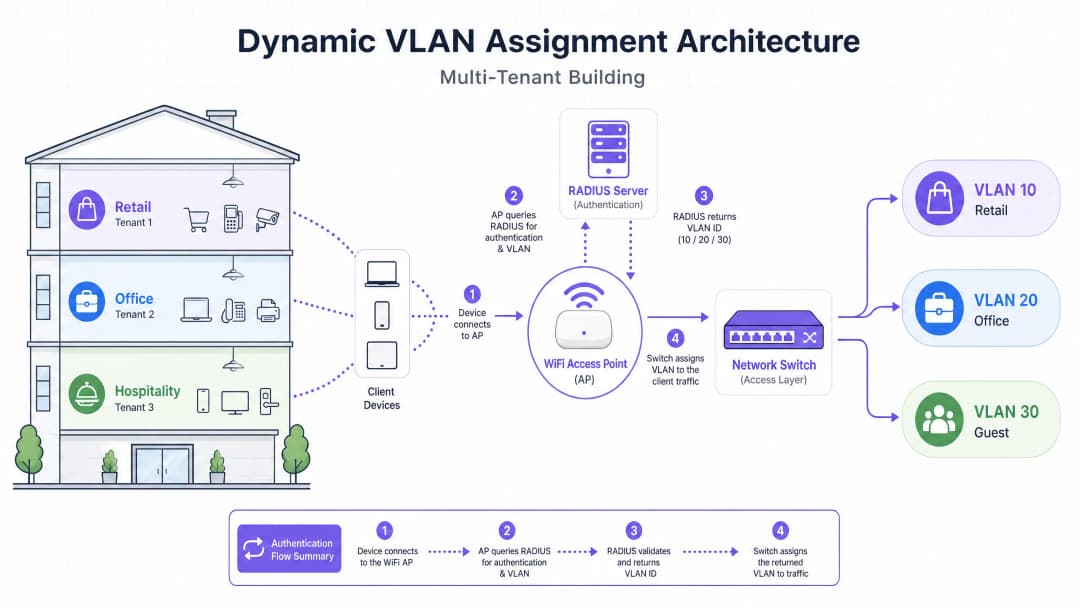
ডাইনামিক VLAN অ্যাসাইনমেন্ট ওয়্যারলেস এনভায়রনমেন্টকে একটি একক, সুরক্ষিত SSID-তে একীভূত করে এই সমস্যার সমাধান করে। IEEE 802.1X অথেন্টিকেশন এবং RADIUS-এর সুবিধা নিয়ে, নেটওয়ার্কটি ব্যবহারকারীদের তাদের আইডেন্টিটির উপর ভিত্তি করে তাদের ডেডিকেটেড ভার্চুয়াল লোকাল এরিয়া নেটওয়ার্ক (VLAN)-এ ডাইনামিকালি অ্যাসাইন করে, তারা কোন নেটওয়ার্ক বেছে নিচ্ছে তার উপর ভিত্তি করে নয়। এই গাইডটি ডাইনামিক VLAN অ্যাসাইনমেন্ট আর্কিটেকচারিং, ডেপ্লয়িং এবং ট্রাবলশুটিং করার জন্য একটি ব্যাপক প্রযুক্তিগত গভীর বিশ্লেষণ প্রদান করে, যা নিরাপদ লেয়ার ২ আইসোলেশন, PCI-DSS এবং GDPR-এর মতো স্ট্যান্ডার্ডগুলির সাথে কমপ্লায়েন্স এবং ভেন্যু অপারেটরদের জন্য একটি শক্তিশালী ROI নিশ্চিত করে।
প্রযুক্তিগত গভীর বিশ্লেষণ
একাধিক SSID-এর সমস্যা
একটি শেয়ার্ড বিল্ডিংয়ে, কয়েক ডজন SSID ব্রডকাস্ট হতে দেখা সাধারণ ব্যাপার (যেমন, "TenantA_Corp", "TenantB_Secure", "Building_Guest")। অ্যাক্সেস পয়েন্ট (AP) দ্বারা ব্রডকাস্ট করা প্রতিটি SSID-কে অবশ্যই সর্বনিম্ন বাধ্যতামূলক ডেটা রেটে (সাধারণত 1 Mbps বা 6 Mbps) বীকন ফ্রেম ট্রান্সমিট করতে হবে। SSID-এর সংখ্যা বৃদ্ধির সাথে সাথে, ম্যানেজমেন্ট ওভারহেড দ্বারা ব্যবহৃত এয়ারটাইমের অনুপাত জ্যামিতিক হারে বৃদ্ধি পায়, যা প্রকৃত ডেটা ট্রান্সমিশনের জন্য কম এয়ারটাইম অবশিষ্ট রাখে। এর ফলে উচ্চ ল্যাটেন্সি, কম থ্রুপুট এবং ইন্টারনেটের গতি যাই হোক না কেন একটি দুর্বল ইউজার এক্সপেরিয়েন্স তৈরি হয়।
802.1X এবং RADIUS আর্কিটেকচার
ডাইনামিক VLAN অ্যাসাইনমেন্ট সেগমেন্টেশন লজিকটিকে RF লেয়ার থেকে অথেন্টিকেশন লেয়ারে স্থানান্তরিত করে। এটি পোর্ট-ভিত্তিক নেটওয়ার্ক অ্যাক্সেস কন্ট্রোলের জন্য IEEE 802.1X স্ট্যান্ডার্ডের উপর নির্ভর করে, যা একটি RADIUS সার্ভারের সাথে ইন্টিগ্রেট করা থাকে।
আর্কিটেকচারটি তিনটি প্রাথমিক উপাদান নিয়ে গঠিত: ১. সাপ্লিক্যান্ট: ক্লায়েন্ট ডিভাইস (ল্যাপটপ, স্মার্টফোন) যা নেটওয়ার্ক অ্যাক্সেসের অনুরোধ করছে। ২. অথেন্টিকেটর: নেটওয়ার্ক অ্যাক্সেস ডিভাইস, সাধারণত WiFi অ্যাক্সেস পয়েন্ট বা ওয়্যারলেস কন্ট্রোলার, যা অথেন্টিকেশন সফল না হওয়া পর্যন্ত ট্রাফিক ব্লক করে। ৩. অথেন্টিকেশন সার্ভার: RADIUS সার্ভার যা একটি আইডেন্টিটি স্টোরের (যেমন, অ্যাক্টিভ ডিরেক্টরি, LDAP) বিপরীতে ক্রেডেন্সিয়াল যাচাই করে এবং নেটওয়ার্ক পলিসি নির্ধারণ করে।
অথেন্টিকেশন ফ্লো
যখন একটি সাপ্লিক্যান্ট ইউনিফাইড SSID-তে সংযোগ করার চেষ্টা করে, তখন নিম্নলিখিত ফ্লোটি ঘটে:
- EAPOL Initialization: সাপ্লিকেন্ট AP-এর সাথে সংযুক্ত হয়। AP, Extensible Authentication Protocol over LAN (EAPOL) প্যাকেট ছাড়া সমস্ত ট্রাফিক ব্লক করে দেয়।
- RADIUS Access-Request: AP, EAP ডেটা এনক্যাপসুলেট করে এবং এটি একটি
Access-Requestহিসেবে RADIUS সার্ভারে ফরোয়ার্ড করে। - শংসাপত্র যাচাইকরণ (Credential Validation): RADIUS সার্ভার ব্যবহারকারীর শংসাপত্রগুলি (EAP-TLS, PEAP ইত্যাদির মাধ্যমে) যাচাই করে।
- RADIUS Access-Accept: সফল যাচাইকরণের পর, RADIUS সার্ভার একটি
Access-Acceptবার্তা সহ প্রতিক্রিয়া জানায়। অত্যন্ত গুরুত্বপূর্ণভাবে, এই বার্তার মধ্যে নির্দিষ্ট IETF স্ট্যান্ডার্ড RADIUS অ্যাট্রিবিউট অন্তর্ভুক্ত থাকে যা AP-কে নির্দেশ দেয় ব্যবহারকারীকে কোন VLAN বরাদ্দ করতে হবে।
ডায়নামিক VLAN অ্যাসাইনমেন্টের জন্য প্রয়োজনীয় গুরুত্বপূর্ণ RADIUS অ্যাট্রিবিউটগুলি হলো:
Tunnel-Type(64):VLANহিসেবে সেট করা থাকে (মান 13)Tunnel-Medium-Type(65):802হিসেবে সেট করা থাকে (মান 6)Tunnel-Private-Group-ID(81): নির্দিষ্ট VLAN ID তে সেট করা থাকে (যেমন, ভাড়াটে A-এর জন্য "20", ভাড়াটে B-এর জন্য "30")
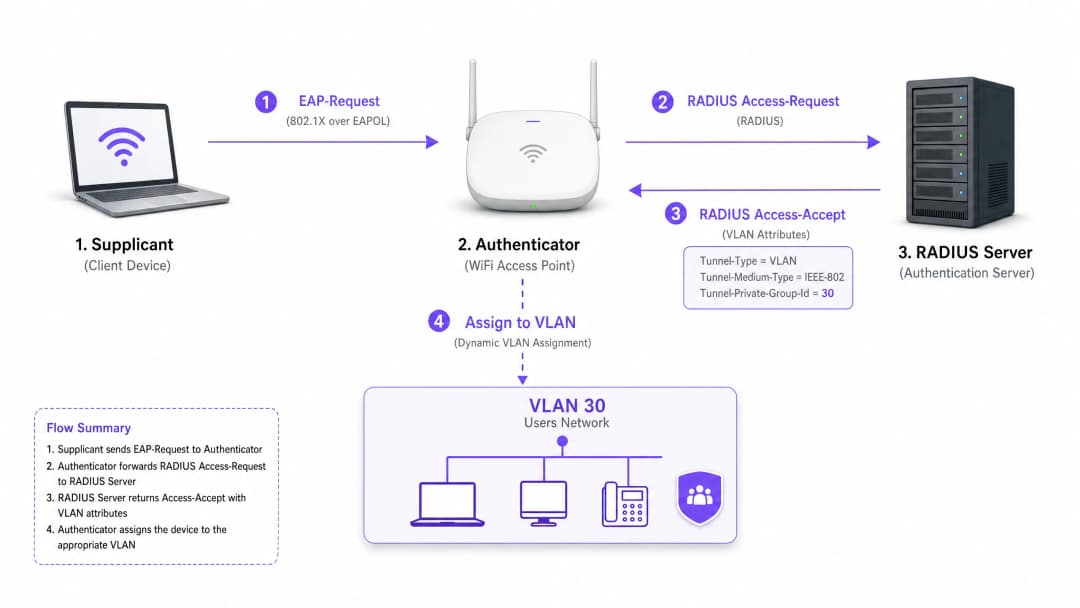
AP একবার এই অ্যাট্রিবিউটগুলি পেয়ে গেলে, এটি ব্যবহারকারীর ট্রাফিক সরাসরি নির্দিষ্ট VLAN-এ ফেলে দেয়। আপস্ট্রিম নেটওয়ার্ক সুইচগুলি তখন ট্রাফিককে এমনভাবে পরিচালনা করে যেন ব্যবহারকারী শারীরিকভাবে সেই ভাড়াটের জন্য একটি ডেডিকেটেড পোর্টে প্লাগ ইন করা আছেন, যা সম্পূর্ণ লেয়ার 2 আইসোলেশন নিশ্চিত করে।
আপনার নির্দিষ্ট সেটআপ নিয়ে কোনো প্রশ্ন আছে?
আমাদের টিম ৮০,০০০ ভেন্যুতে ভেন্যু অপারেটর, IT ম্যানেজার এবং নেটওয়ার্ক ইঞ্জিনিয়ারদের সাথে কাজ করে। একটি ২০ মিনিটের কল বুক করুন এবং আপনার মতো অন্যরা কীভাবে এর সমাধান করেছেন তা আমরা আপনাকে দেখাব।
বাস্তবায়ন নির্দেশিকা
ডায়নামিক VLAN অ্যাসাইনমেন্ট মোতায়েন করার জন্য ওয়্যারলেস পরিকাঠামো, এজ সুইচ এবং আইডেন্টিটি প্রোভাইডারের মধ্যে সতর্ক সমন্বয় প্রয়োজন। এই ভেন্ডর-নিরপেক্ষ বাস্তবায়ন সিকোয়েন্সটি অনুসরণ করুন।
ফেজ 1: নেটওয়ার্ক পরিকাঠামো প্রস্তুতি
- VLAN প্রভিশনিং: আপনার কোর রাউটিং পরিকাঠামো এবং DHCP সার্ভারগুলিতে প্রয়োজনীয় VLANগুলি সংজ্ঞায়িত এবং তৈরি করুন। প্রতিটি ভাড়াটে VLAN-এর নিজস্ব স্বতন্ত্র সাবনেট এবং উপযুক্ত রাউটিং পলিসি (যেমন, ইন্টারনেটে রাউটিং করা, কিন্তু ইন্টার-VLAN ট্রাফিক ড্রপ করা) রয়েছে তা নিশ্চিত করুন।
- সুইচ ট্রাঙ্কিং: এটি একটি অত্যন্ত গুরুত্বপূর্ণ ধাপ। আপনার অ্যাক্সেস পয়েন্টগুলির সাথে সংযোগকারী সুইচ পোর্টগুলি অবশ্যই 802.1Q ট্রাঙ্ক পোর্ট হিসাবে কনফিগার করা আবশ্যক। AP-এর যে সমস্ত সম্ভাব্য ভাড়াটে VLAN বরাদ্দ করার প্রয়োজন হতে পারে, আপনাকে অবশ্যই সেই সবগুলি ট্যাগ করতে হবে। যদি RADIUS সার্ভার VLAN 40 বরাদ্দ করে, কিন্তু সুইচ পোর্টে VLAN 40 ট্যাগ করা না থাকে, তাহলে ক্লায়েন্ট প্রমাণীকরণ করতে পারলেও IP অ্যাড্রেস পেতে ব্যর্থ হবে।
- AP কনফিগারেশন: একটি একক 802.1X-সক্ষম SSID (যেমন, WPA3-Enterprise) ব্রডকাস্ট করার জন্য AP-গুলি কনফিগার করুন। আপনার ওয়্যারলেস কন্ট্রোলার বা AP-গুলিতে নির্দিষ্ট সেটিংটি সক্ষম করুন যা তাদের RADIUS ওভাররাইড অ্যাট্রিবিউটগুলি গ্রহণ করতে দেয় (প্রায়শই "AAA Override" বা "Dynamic VLAN" নামে লেবেল করা থাকে)।
ফেজ 2: RADIUS এবং আইডেন্টিটি ইন্টিগ্রেশন
- আইডেন্টিটি স্টোর ইন্টিগ্রেশন: আপনার RADIUS সার্ভারকে সেই ডিরেক্টরি পরিষেবার সাথে সংযুক্ত করুন যাতে ব্যবহারকারীর পরিচয় এবং তাদের ভাড়াটে অ্যাসোসিয়েশন রয়েছে।
- নেটওয়ার্ক পলিসি তৈরি: RADIUS সার্ভারের মধ্যে এমন পলিসি তৈরি করুন যা ব্যবহারকারী গ্রুপকে VLAN ID-র সাথে ম্যাপ করে। উদাহরণস্বরূপ, একটি পলিসিতে বলা হয়েছে: যদি ব্যবহারকারী 'Retail_Staff' গ্রুপের অন্তর্গত হন, তবে Tunnel-Private-Group-ID = 10 রিটার্ন করুন।3. সার্টিফিকেট ম্যানেজমেন্ট: EAP-TLS ব্যবহার করলে (কর্পোরেট ডিভাইসের জন্য প্রস্তাবিত), ক্লায়েন্ট সার্টিফিকেট ডেপ্লয় করুন। PEAP-MSCHAPv2 ব্যবহার করলে (BYOD-এর জন্য সাধারণ), RADIUS সার্ভারে একটি বৈধ, বিশ্বস্ত সার্ভার সার্টিফিকেট ইনস্টল করা আছে কিনা তা নিশ্চিত করুন।
ধাপ ৩: টেস্টিং এবং পর্যায়ভিত্তিক রোলআউট
- পাইলট টেস্টিং: বিভিন্ন টেন্যান্ট জুড়ে ডিভাইসের একটি ছোট গ্রুপ দিয়ে পরীক্ষা করুন। নিশ্চিত করুন যে সংযোগ করার পরে, ডিভাইসটি সঠিক সাবনেট থেকে একটি IP অ্যাড্রেস পাচ্ছে এবং অন্যান্য টেন্যান্ট VLAN-এর ডিভাইসে পিং করতে পারছে না।
- IoT এবং হেডলেস ডিভাইস: যে সমস্ত ডিভাইস 802.1X সমর্থন করে না (প্রিন্টার, স্মার্ট টিভি), সেগুলির জন্য MAC Authentication Bypass (MAB) প্রয়োগ করুন। RADIUS সার্ভার ডিভাইসের MAC অ্যাড্রেসের উপর ভিত্তি করে ডিভাইসটিকে প্রমাণীকরণ করে এবং উপযুক্ত VLAN বরাদ্দ করে। নোট করুন: এই ডিভাইসগুলিকে কঠোরভাবে আইসোলেটেড VLAN-এ রাখুন কারণ MAC অ্যাড্রেস স্পুফ করা সম্ভব।
সর্বোত্তম অনুশীলন
- SSID একত্রিত করা: সর্বোচ্চ তিনটি SSID রাখার লক্ষ্য রাখুন: সমস্ত টেন্যান্টের জন্য একটি 802.1X SSID, লেগ্যাসি IoT ডিভাইসের জন্য একটি (PSK বা MAB ব্যবহার করে), এবং Guest WiFi-এর জন্য একটি (ক্যাপটিভ পোর্টাল ব্যবহার করে)।
- ক্লায়েন্ট আইসোলেশন প্রয়োগ করুন: গেস্ট নেটওয়ার্ক এবং অবিশ্বাস্য টেন্যান্ট নেটওয়ার্কের মধ্যে, ডিভাইসগুলির একে অপরের সাথে যোগাযোগ প্রতিরোধ করতে AP স্তরে লেয়ার ২ ক্লায়েন্ট আইসোলেশন সক্ষম করুন, যা ল্যাটারাল মুভমেন্টের ঝুঁকি হ্রাস করে।
- উন্নত অ্যানালিটিক্স ব্যবহার করুন: ভেন্যু ব্যবহার, থাকার সময় এবং টেন্যান্ট নেটওয়ার্ক পারফরম্যান্স সম্পর্কে দৃশ্যমানতা পেতে আপনার প্রমাণীকরণ ফ্লোটিকে একটি শক্তিশালী WiFi Analytics প্ল্যাটফর্মের সাথে সংযুক্ত করুন।
- WPA3 স্ট্যান্ডার্ডাইজ করুন: যেখানে ক্লায়েন্ট সমর্থন করে, সেখানে সর্বোচ্চ স্তরের এনক্রিপশন এবং ডিকশনারি অ্যাটাক থেকে সুরক্ষা নিশ্চিত করতে 802.1X SSID-এর জন্য WPA3-Enterprise বাধ্যতামূলক করুন।
- ইন্ডাস্ট্রি কনটেক্সট: সংশ্লিষ্ট খাতের সাথে সামঞ্জস্য রেখে ডেপ্লয়মেন্ট সাজান। Retail পরিবেশের ক্ষেত্রে, PCI-DSS কমপ্লায়েন্স বজায় রাখতে POS সিস্টেমগুলি কঠোরভাবে আলাদা করা VLAN-এ থাকা নিশ্চিত করুন। Hospitality ক্ষেত্রে, গেস্ট VLAN-গুলি ব্যাক-অফ-হাউস অপারেশন থেকে সম্পূর্ণরূপে বিচ্ছিন্ন থাকা নিশ্চিত করুন।
ট্রাবলশুটিং এবং ঝুঁকি প্রশমন
সাধারণ ব্যর্থতার ধরণ
"প্রমাণীকৃত কিন্তু IP নেই" পরিস্থিতি:
- লক্ষণ: ক্লায়েন্ট সংযোগ করে, প্রমাণীকরণ সফল হয়, কিন্তু ডিভাইসটি নিজেই একটি APIPA অ্যাড্রেস (169.254.x.x) বরাদ্দ করে।
- মূল কারণ: RADIUS সার্ভার একটি VLAN বরাদ্দ করেছে, কিন্তু সেই VLAN টি হয় DHCP সার্ভারে তৈরি করা হয়নি, অথবা আরও সাধারণভাবে, সুইচের সাথে AP-কে সংযোগকারী ট্রাঙ্ক পোর্টে VLAN টি ট্যাগ করা হয়নি।
- সমাধান: এজ সুইচে 802.1Q ট্রাঙ্ক কনফিগারেশন যাচাই করুন।
RADIUS টাইমআউট / অ্যাক্সেসযোগ্য নয়:
- লক্ষণ: ক্লায়েন্টরা "কানেক্টিং..." এ আটকে থাকে বা বারবার ক্রেডেনশিয়ালের জন্য অনুরোধ করা হয়।
- মূল কারণ: AP টি RADIUS সার্ভারে পৌঁছাতে পারছে না, অথবা AP এবং সার্ভারের মধ্যে RADIUS শেয়ার্ড সিক্রেট অমিল রয়েছে।
- সমাধান: AP ম্যানেজমেন্ট IP এবং RADIUS সার্ভারের মধ্যে নেটওয়ার্ক সংযোগ যাচাই করুন। শেয়ার্ড সিক্রেটটি পুনরায় পরীক্ষা করুন।
সার্টিফিকেটের মেয়াদ শেষ হওয়া:
- লক্ষণ: PEAP বা EAP-TLS ব্যবহারকারী সকল গ্রাহকের জন্য ব্যাপকভাবে হঠাৎ অথেন্টিকেশন ব্যর্থতা।
- মূল কারণ: RADIUS সার্ভার সার্টিফিকেটের মেয়াদ শেষ হয়ে গেছে, যার ফলে ক্লায়েন্টরা কানেকশন প্রত্যাখ্যান করছে।
- সমাধান: RADIUS সার্টিফিকেটের জন্য সক্রিয় মনিটরিং এবং অ্যালার্ট ব্যবস্থা চালু করুন। মেয়াদ শেষ হওয়ার অন্তত ৩০ দিন আগে সার্টিফিকেট রিনিউ করুন।
ঝুঁকি প্রশমন কৌশল
- Fail-Open বনাম Fail-Closed: RADIUS সার্ভার নাগালের বাইরে চলে গেলে কী করা হবে তার জন্য একটি স্পষ্ট পলিসি নির্ধারণ করুন। টেন্যান্ট কর্পোরেট নেটওয়ার্কের জন্য, সুরক্ষার স্বার্থে fail-closed (অ্যাক্সেস প্রত্যাখ্যান করা) আবশ্যক। গেস্ট অ্যাক্সেসের জন্য, আপনি একটি fail-open পলিসি কনফিগার করতে পারেন যা ব্যবহারকারীদের অত্যন্ত সীমাবদ্ধ, শুধুমাত্র-ইন্টারনেট বিশিষ্ট একটি "কোয়ারেন্টাইন" VLAN-এ নিয়ে যাবে।
- রিডান্ডেন্সি: সর্বদা একটি হাইলি অ্যাভেইলেবল (HA) পেয়ারে RADIUS সার্ভার ডেপ্লয় করুন, একাধিক সাইট সাপোর্ট করার ক্ষেত্রে ভৌগোলিকভাবে ভিন্ন স্থানে ডিস্ট্রিবিউট করা শ্রেয়।
ROI এবং ব্যবসায়িক প্রভাব
ডাইনামিক VLAN অ্যাসাইনমেন্ট বাস্তবায়ন করা ভেন্যু অপারেটরদের জন্য উল্লেখযোগ্য এবং পরিমাপযোগ্য ব্যবসায়িক ফলাফল নিয়ে আসে:
১. হ্রাসকৃত OpEx: একটিমাত্র SSID-এর সেন্ট্রালাইজড ম্যানেজমেন্ট প্রতিটি আলাদা টেন্যান্ট নেটওয়ার্ক সেটআপ, আপডেট এবং ট্রাবলশুটিং করার সাথে জড়িত IT ওভারহেড নাটকীয়ভাবে কমিয়ে দেয়। ২. অপ্টিমাইজড RF স্পেকট্রাম: SSID-এর জটলা দূর করার মাধ্যমে মূল্যবান এয়ারটাইম পুনরুদ্ধার করা যায়। স্পেকট্রাম ম্যানেজমেন্টের একটি গাইডের জন্য, Wi Fi Frequencies: A Guide to Wi-Fi Frequencies in 2026 বিষয়ে আমাদের আর্টিকেলটি দেখুন। এটি আরও বেশি থ্রুপুট এবং "ধীরগতির WiFi" সংক্রান্ত কম সাপোর্ট টিকিট নিশ্চিত করে। ৩. উন্নত সুরক্ষা এবং কমপ্লায়েন্স: কঠোর লেয়ার ২ আইসোলেশন নিশ্চিত করে যে একটি টেন্যান্টের নেটওয়ার্কের নিরাপত্তা বিঘ্নিত হলে তা অন্যদের মধ্যে ছড়িয়ে পড়বে না। PCI-DSS এবং GDPR-এর মতো রেগুলেটরি প্রয়োজনীয়তা পূরণের জন্য এটি অত্যন্ত গুরুত্বপূর্ণ। ৪. স্কেলাবিলিটি: একজন নতুন টেন্যান্ট যুক্ত করার জন্য ফিজিক্যাল ইনফ্রাস্ট্রাকচার বা ওয়্যারলেস কনফিগারেশনে কোনো পরিবর্তনের প্রয়োজন হয় না; এটি শুধুমাত্র RADIUS সার্ভারে একটি নতুন পলিসি তৈরি করার বিষয়।
শেয়ার্ড স্পেসের জন্য নেটওয়ার্ক ডিজাইনের আরও বিস্তারিত কৌশলের জন্য, Designing a Multi-Tenant WiFi Architecture for MDU সংক্রান্ত আমাদের গাইডটি পর্যালোচনা করুন।
মূল সংজ্ঞাসমূহ
802.1X
পোর্ট-ভিত্তিক নেটওয়ার্ক অ্যাক্সেস কন্ট্রোলের জন্য একটি IEEE স্ট্যান্ডার্ড যা LAN বা WLAN-এ যুক্ত হতে চাওয়া ডিভাইসগুলিকে একটি অথেন্টিকেশন মেকানিজম প্রদান করে।
ভিত্তিগত প্রোটোকল যা নেটওয়ার্ককে অ্যাক্সেস দেওয়ার আগে পরিচয় দাবি করার অনুমতি দেয়, যার ফলে ডাইনামিক পলিসি সক্রিয় করা সম্ভব হয়।
RADIUS (Remote Authentication Dial-In User Service)
একটি নেটওয়ার্কিং প্রোটোকল যা নেটওয়ার্ক সার্ভিস কানেক্ট এবং ব্যবহার করা ব্যবহারকারীদের জন্য সেন্ট্রালাইজড Authentication, Authorization, এবং Accounting (AAA) ম্যানেজমেন্ট প্রদান করে।
সিদ্ধান্ত গ্রহণকারী ইঞ্জিন যা ক্রেডেনশিয়াল যাচাই করে এবং নেটওয়ার্ককে নির্দেশ দেয় ব্যবহারকারীকে কোন VLAN অ্যাসাইন করতে হবে।
Supplicant
ক্লায়েন্ট ডিভাইস (যেমন ল্যাপটপ, স্মার্টফোন) বা সফটওয়্যার যা নেটওয়ার্কে অ্যাক্সেসের জন্য অনুরোধ করে এবং ক্রেডেনশিয়াল প্রদান করে।
যে এন্ডপয়েন্টটিকে 802.1X সাপোর্ট করার জন্য কনফিগার করতে হবে (যেমন WiFi সেটিংসে PEAP বা EAP-TLS সিলেক্ট করা)।
Authenticator
নেটওয়ার্ক ডিভাইস (যেমন WiFi অ্যাক্সেস পয়েন্ট বা সুইচ) যা supplicant এবং অথেন্টিকেশন সার্ভারের মধ্যে মেসেজ রিলে করে অথেন্টিকেশন প্রক্রিয়া সহজতর করে।
গেটকিপার যা RADIUS সবুজ সংকেত না দেওয়া পর্যন্ত ট্রাফিক ব্লক করে এবং তারপর অ্যাসাইন করা VLAN প্রয়োগ করে।
EAP (Extensible Authentication Protocol)
একটি অথেন্টিকেশন ফ্রেমওয়ার্ক যা প্রায়শই ওয়্যারলেস নেটওয়ার্ক এবং পয়েন্ট-টু-পয়েন্ট কানেকশনে ব্যবহৃত হয়, যা একাধিক অথেন্টিকেশন মেথড (যেমন EAP-TLS, PEAP) সাপোর্ট করে।
নিরাপদভাবে ক্রেডেনশিয়াল আদান-প্রদান করতে supplicant এবং RADIUS সার্ভারের মধ্যে ব্যবহৃত ভাষা।
MAB (MAC Authentication Bypass)
এমন একটি কৌশল যা ডিভাইসগুলোর MAC অ্যাড্রেসকে ক্রেডেন্সিয়াল হিসেবে ব্যবহার করে 802.1X সমর্থন করে না এমন ডিভাইসগুলোকে অথেন্টিকেট করতে ব্যবহৃত হয়।
একটি মাল্টি-টেন্যান্ট পরিবেশে লেগ্যাসি IoT ডিভাইস, প্রিন্টার বা স্মার্ট টিভি অনবোর্ড করার জন্য ব্যবহৃত হয়।
Tunnel-Private-Group-ID
নির্দিষ্ট RADIUS অ্যাট্রিবিউট (Attribute 81) যা RADIUS সার্ভার থেকে Authenticator-এ VLAN ID প্রেরণ করতে ব্যবহৃত হয়।
তথ্যের গুরুত্বপূর্ণ অংশ যা প্রকৃতপক্ষে নির্দেশ করে যে ব্যবহারকারীকে কোন নেটওয়ার্ক সেগমেন্টে পাঠানো হবে।
Layer 2 Isolation
একটি নিরাপত্তা ব্যবস্থা যা একই নেটওয়ার্ক সেগমেন্ট বা VLAN-এ থাকা ডিভাইসগুলোকে একে অপরের সাথে সরাসরি যোগাযোগ করতে বাধা দেয়।
ম্যালওয়ারের ল্যাটারাল মুভমেন্ট বা অননুমোদিত অ্যাক্সেস রোধ করতে গেস্ট নেটওয়ার্ক এবং অবিশ্বাস্য টেন্যান্ট নেটওয়ার্কের জন্য অপরিহার্য।
সমাধানকৃত উদাহরণসমূহ
একটি বড় কনফারেন্স সেন্টারে একই সাথে তিনটি ইভেন্ট অনুষ্ঠিত হচ্ছে। ইভেন্ট A-এর জন্য নিরাপদ কর্পোরেট অ্যাক্সেস, ইভেন্ট B-এর জন্য উপস্থিতদের জন্য ওপেন অ্যাক্সেস এবং ইভেন্ট C-এর জন্য নির্দিষ্ট ইন্টারনাল প্রেজেন্টেশন সার্ভারে অ্যাক্সেস প্রয়োজন। নেটওয়ার্ক আর্কিটেক্ট কীভাবে dynamic VLAN ব্যবহার করে এটি ডেপ্লয় করবেন?
আর্কিটেকচারটি স্টাফ এবং নিরাপদ উপস্থিতদের জন্য একটি একক 802.1X SSID এবং সাধারণ অতিথিদের জন্য একটি Captive Portal সহ পৃথক ওপেন SSID কনফিগার করে।
802.1X SSID-এর জন্য, RADIUS সার্ভারটি তিনটি পলিসি দিয়ে কনফিগার করা হয়েছে: ১. যদি User Group = 'Event_A_Staff' হয়, তবে VLAN 100 অ্যাসাইন করুন (ইন্টারনেট + কর্পোরেট VPN অ্যাক্সেস)। ২. যদি User Group = 'Event_C_Presenters' হয়, তবে VLAN 102 অ্যাসাইন করুন (ইন্টারনেট + প্রেজেন্টেশন সার্ভার অ্যাক্সেস)।
ইভেন্ট B-এর জন্য, উপস্থিতরা ওপেন গেস্ট SSID ব্যবহার করবেন, যা তাদেরকে VLAN 101-এ যুক্ত করবে (কেবলমাত্র ইন্টারনেট, ক্লায়েন্ট আইসোলেশন সক্রিয় থাকবে)।
একটি রিটেইল চেইন একটি শেয়ার্ড বিল্ডিংয়ে ব্যবসা পরিচালনা করে যেখানে একটি কফি শপ, একটি পোশাকের দোকান এবং একটি ফার্মেসি রয়েছে। ফার্মেসিটিকে অবশ্যই HIPAA মেনে চলতে হবে এবং পোশাকের দোকানটির জন্য তাদের ওয়্যারলেস POS টার্মিনালগুলিতে PCI-DSS কমপ্লায়েন্স প্রয়োজন। কীভাবে এই আইসোলেশন নিশ্চিত করা যাবে?
IT টিম একটি একক WPA3-Enterprise SSID ডেপ্লয় করে।
১. ফার্মেসি কর্মীরা 802.1X-এর মাধ্যমে অথেন্টিকেট করেন এবং RADIUS তাদের VLAN 50-এ অ্যাসাইন করে, যা কঠোর ফায়ারওয়াল নিয়মের মাধ্যমে অন্য কোনো ইন্টারনাল সাবনেটে অ্যাক্সেস করা রোধ করে। ২. পোশাকের দোকানের POS টার্মিনালগুলি EAP-TLS (সার্টিফিকেট-ভিত্তিক) ব্যবহার করে অথেন্টিকেট করে এবং VLAN 60-এ অ্যাসাইন করা হয়। VLAN 60 সরাসরি পেমেন্ট প্রসেসর গেটওয়েতে রাউট করা হয় এবং অন্য সমস্ত ট্রাফিক থেকে আইসোলেটেড থাকে। ৩. কফি শপটি গ্রাহকদের জন্য একটি পৃথক গেস্ট SSID ব্যবহার করে, যা ক্লায়েন্ট আইসোলেশন সহ VLAN 70-এ শেষ হয়।
অনুশীলনী প্রশ্নসমূহ
Q1. একজন টেন্যান্ট রিপোর্ট করেছেন যে তারা সফলভাবে 802.1X SSID-এ অথেন্টিকেট করতে পেরেছেন, কিন্তু তাদের ডিভাইসটি নিজে থেকেই একটি IP অ্যাড্রেস (169.254.x.x) অ্যাসাইন করছে এবং ইন্টারনেট অ্যাক্সেস করতে পারছে না। সবচেয়ে সম্ভাব্য কনফিগারেশন ত্রুটি কোনটি?
ইঙ্গিত: Access Point এবং কোর নেটওয়ার্ক সার্ভিসের মধ্যবর্তী পথটি সম্পর্কে চিন্তা করুন।
মডেল উত্তর দেখুন
সবচেয়ে সম্ভাব্য কারণ হলো RADIUS সার্ভার দ্বারা অ্যাসাইন করা VLAN-টি এজ সুইচকে Access Point-এর সাথে সংযোগকারী 802.1Q ট্রাঙ্ক পোর্টে ট্যাগ করা নেই। AP ট্রাফিকটিকে সঠিক VLAN-এ পাঠানোর চেষ্টা করছে, কিন্তু সুইচ ফ্রেমগুলো ড্রপ করছে কারণ এটি সেই পোর্টে সেগুলো গ্রহণ করার জন্য কনফিগার করা নেই।
Q2. আপনি একটি শেয়ার্ড অফিস স্পেসের জন্য একটি মাল্টি-টেন্যান্ট নেটওয়ার্ক ডিজাইন করছেন। ক্লায়েন্ট ১৫ জন টেন্যান্টের প্রত্যেকের জন্য একটি ইউনিক SSID ব্রডকাস্ট করতে চান যাতে "তাদের জন্য নিজেদের নেটওয়ার্ক খুঁজে পাওয়া সহজ হয়"। আপনি ক্লায়েন্টকে কী পরামর্শ দেবেন?
ইঙ্গিত: RF পারফরম্যান্সের ওপর ম্যানেজমেন্ট ফ্রেম ওভারহেডের প্রভাব বিবেচনা করুন।
মডেল উত্তর দেখুন
ক্লায়েন্টকে এই পদ্ধতির বিরুদ্ধে জোরালো পরামর্শ দিন। ১৫টি SSID ব্রডকাস্ট করলে বিকন ফ্রেমের কারণে প্রচুর পরিমাণে এয়ারটাইম নষ্ট হবে, যা নেটওয়ার্কের কার্যক্ষমতা মারাত্মকভাবে হ্রাস করবে, লেটেন্সি বাড়াবে এবং সমস্ত ব্যবহারকারীর জন্য থ্রুপুট কমিয়ে দেবে। একটি একক 802.1X SSID স্থাপন করার এবং ব্যাকএন্ডে টেন্যান্টদের নিরাপদে সেগমেন্ট করতে RADIUS-এর মাধ্যমে Dynamic VLAN Assignment ব্যবহার করার পরামর্শ দিন।
Q3. একটি মাল্টি-টেন্যান্ট বিল্ডিংয়ে বেশ কয়েকটি হেডলেস IoT ডিভাইসের (যেমন - স্মার্ট থার্মোস্ট্যাট, ডিজিটাল সাইনেজ) জন্য নেটওয়ার্ক অ্যাক্সেস প্রয়োজন যা 802.1X সাপ্লিক্যান্ট সমর্থন করে না। কীভাবে এই ডিভাইসগুলোকে নিরাপদে সঠিক টেন্যান্ট VLAN-এ অনবোর্ড করা যেতে পারে?
ইঙ্গিত: RADIUS দ্বারা সমর্থিত বিকল্প অথেন্টিকেশন পদ্ধতিগুলো বিবেচনা করুন।
মডেল উত্তর দেখুন
MAC Authentication Bypass (MAB) প্রয়োগ করুন। Access Point ডিভাইসের MAC অ্যাড্রেসটিকে ইউজারনেম এবং পাসওয়ার্ড হিসেবে RADIUS সার্ভারে পাঠাবে। RADIUS সার্ভারটিকে এই নির্দিষ্ট MAC অ্যাড্রেসগুলো সনাক্ত করতে এবং উপযুক্ত VLAN ID ফেরত পাঠাতে কনফিগার করা যেতে পারে। যেহেতু MAC অ্যাড্রেস স্পুফ করা সম্ভব, তাই এই ডিভাইসগুলোকে সীমিত নেটওয়ার্ক অ্যাক্সেস সহ কঠোরভাবে আইসোলেটেড VLAN-এ রাখা উচিত।
এই সিরিজে পড়া চালিয়ে যান
ছাত্রাবাস নেটওয়ার্কে ব্যান্ডউইথ পরিচালনা
এই গাইডটি IT ম্যানেজার, নেটওয়ার্ক আর্কিটেক্ট এবং প্রোপার্টি অপারেশন ডিরেক্টরদের উচ্চ-ঘনত্বের ছাত্রাবাস পরিবেশে WiFi ব্যান্ডউইথ পরিচালনার জন্য একটি ভেন্ডর-নিরপেক্ষ প্রযুক্তিগত রেফারেন্স প্রদান করে। এটি VLAN সেগমেন্টেশন, Quality of Service (QoS) পলিসি ডিজাইন, আইডেন্টিটি-ভিত্তিক ট্রাফিক শেপিং এবং অ্যাপ্লিকেশন-লেয়ার ভিজিবিলিটি কভার করে - যা একটি স্কেলযোগ্য, ন্যায্য-অ্যাক্সেস নেটওয়ার্কের চারটি স্তম্ভ। বাস্তব-বিশ্বের ডিপ্লয়মেন্টের দৃশ্যপট, পরিমাপযোগ্য ফলাফল এবং সিদ্ধান্ত গ্রহণের ফ্রেমওয়ার্ক সহ, এটি স্কেলে আবাসিক নেটওয়ার্ক অবকাঠামোর জন্য দায়ী যেকোনো দলের জন্য অপারেশনাল প্লেবুক।
অ্যাপার্টমেন্ট এবং কো-ওয়ার্কিং স্পেসের জন্য WPA2-Enterprise বনাম Personal
এই নির্ভরযোগ্য প্রযুক্তিগত রেফারেন্স গাইডটি অ্যাপার্টমেন্ট এবং কো-ওয়ার্কিং স্পেসের মতো মাল্টি-টেন্যান্ট পরিবেশের জন্য WPA2-Personal-এর বিপরীতে WPA2-Enterprise-এর মূল্যায়ন করে। এটি নেটওয়ার্ক স্থপতি এবং আইটি ম্যানেজারদের 802.1X প্রমাণীকরণ, ডায়নামিক VLAN অ্যাসাইনমেন্ট এবং সুরক্ষা সম্মতির বিষয়ে বাস্তবসম্মত অন্তর্দৃষ্টি প্রদান করে, যা দেখায় যে কেন শেয়ার করা পাসওয়ার্ডগুলি আধুনিক শেয়ার্ড ভেন্যুগুলিতে অগ্রহণযোগ্য ঝুঁকি তৈরি করে। ভেন্যু অপারেটররা এই প্রান্তিকে একটি মাইগ্রেশনের সিদ্ধান্তকে সমর্থন করার জন্য সুনির্দিষ্ট বাস্তবায়ন নির্দেশিকা, বাস্তব-জগতের কেস স্টাডি এবং ROI বিশ্লেষণ পাবেন।
শেয়ার্ড WiFi নেটওয়ার্কের জন্য মাইক্রো-সেগমেন্টেশন-এর সেরা অনুশীলনসমূহ
এই টেকনিক্যাল রেফারেন্স নির্দেশিকাটি শেয়ার্ড WiFi অবকাঠামোতে মাইক্রো-সেগমেন্টেশন বাস্তবায়নের জন্য কার্যকর কৌশল প্রদান করে। ঝুঁকি কমাতে, কমপ্লায়েন্স নিশ্চিত করতে এবং নেটওয়ার্কের কার্যক্ষমতা অপ্টিমাইজ করতে আইটি ম্যানেজার এবং নেটওয়ার্ক আর্কিটেক্টরা কীভাবে নিরাপদে গেস্ট, IoT এবং স্টাফ ট্রাফিক আইসোলেট করতে পারেন তা এখানে বিস্তারিতভাবে বর্ণনা করা হয়েছে।
আপনার নির্দিষ্ট সেটআপ নিয়ে কোনো প্রশ্ন আছে?
আমাদের টিম ৮০,০০০ ভেন্যুতে ভেন্যু অপারেটর, IT ম্যানেজার এবং নেটওয়ার্ক ইঞ্জিনিয়ারদের সাথে কাজ করে। একটি ২০ মিনিটের কল বুক করুন এবং আপনার মতো অন্যরা কীভাবে এর সমাধান করেছেন তা আমরা আপনাকে দেখাব।