
How Dynamic VLAN Assignment Works in Multi-Tenant Buildings
This technical reference guide details the architecture and implementation of Dynamic VLAN Assignment using 802.1X and RADIUS in multi-tenant environments. It provides actionable guidance for IT managers and network architects to reduce SSID overhead, enforce Layer 2 isolation, and ensure secure, scalable connectivity across shared buildings.
Video overview
Listen to this guide
View podcast transcript
Part of our core series: Multi-Tenant WiFi Guide →
Executive Summary
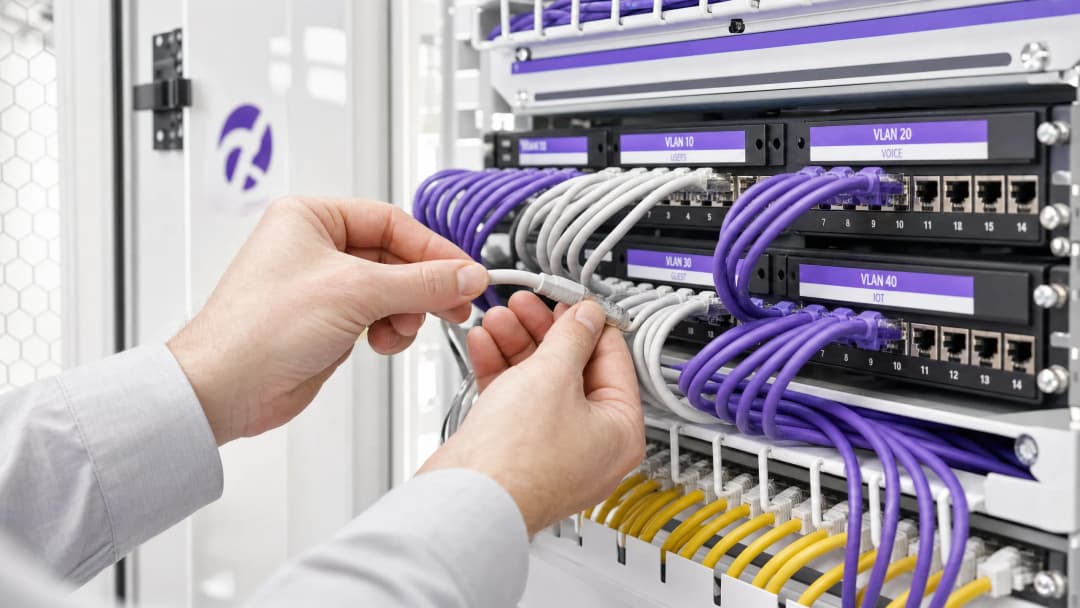
For IT managers and network architects overseeing multi-tenant buildings—such as commercial offices, retail complexes, or expansive hospitality venues—managing network segmentation is a critical challenge. Historically, isolating tenant traffic meant deploying separate physical infrastructure or broadcasting a unique SSID for every tenant. Both approaches are fundamentally flawed. Physical separation is cost-prohibitive and inflexible, while broadcasting multiple SSIDs severely degrades RF performance due to excessive management frame overhead.
Dynamic VLAN Assignment solves this by consolidating the wireless environment into a single, secure SSID. Leveraging IEEE 802.1X authentication and RADIUS, the network dynamically assigns users to their dedicated Virtual Local Area Network (VLAN) based on their identity, not the network they choose. This guide provides a comprehensive technical deep-dive into architecting, deploying, and troubleshooting dynamic VLAN assignment, ensuring secure Layer 2 isolation, compliance with standards like PCI DSS and GDPR, and a robust ROI for venue operators.
Technical Deep-Dive
The Problem with Multiple SSIDs
In a shared building, it is common to see dozens of SSIDs broadcasted (e.g., "TenantA_Corp", "TenantB_Secure", "Building_Guest"). Every SSID broadcasted by an Access Point (AP) must transmit beacon frames at the lowest mandatory data rate (typically 1 Mbps or 6 Mbps). As the number of SSIDs increases, the proportion of airtime consumed by management overhead grows exponentially, leaving less airtime for actual data transmission. This results in high latency, low throughput, and a poor user experience, regardless of the underlying internet connection speed.
The 802.1X and RADIUS Architecture
Dynamic VLAN Assignment shifts the segmentation logic from the RF layer to the authentication layer. It relies on the IEEE 802.1X standard for port-based network access control, integrated with a RADIUS (Remote Authentication Dial-In User Service) server.
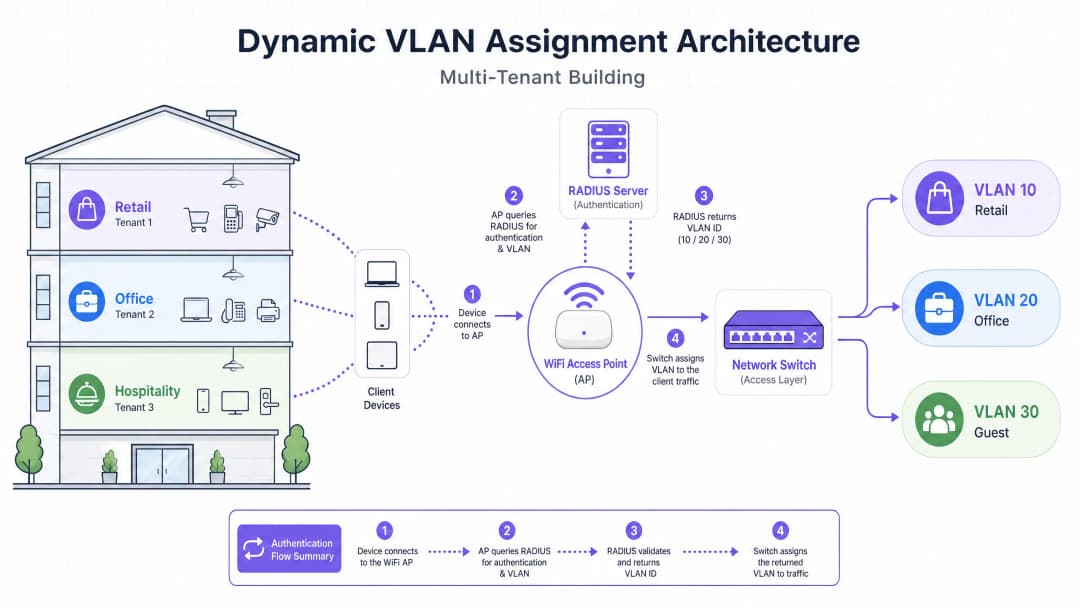
The architecture consists of three primary components:
- Supplicant: The client device (laptop, smartphone) requesting network access.
- Authenticator: The network access device, typically the WiFi Access Point or wireless controller, which blocks traffic until authentication is successful.
- Authentication Server: The RADIUS server that validates credentials against an identity store (e.g., Active Directory, LDAP) and dictates network policies.
The Authentication Flow
When a supplicant attempts to connect to the unified SSID, the following flow occurs:
- EAPOL Initialization: The supplicant connects to the AP. The AP blocks all traffic except Extensible Authentication Protocol over LAN (EAPOL) packets.
- RADIUS Access-Request: The AP encapsulates the EAP data and forwards it to the RADIUS server as an
Access-Request. - Credential Validation: The RADIUS server verifies the user's credentials (via EAP-TLS, PEAP, etc.).
- RADIUS Access-Accept: Upon successful validation, the RADIUS server responds with an
Access-Acceptmessage. Crucially, this message includes specific IETF standard RADIUS attributes that instruct the AP on which VLAN to assign the user.
The critical RADIUS attributes required for dynamic VLAN assignment are:
Tunnel-Type(64): Set toVLAN(Value 13)Tunnel-Medium-Type(65): Set to802(Value 6)Tunnel-Private-Group-ID(81): Set to the specific VLAN ID (e.g., "20" for Tenant A, "30" for Tenant B)
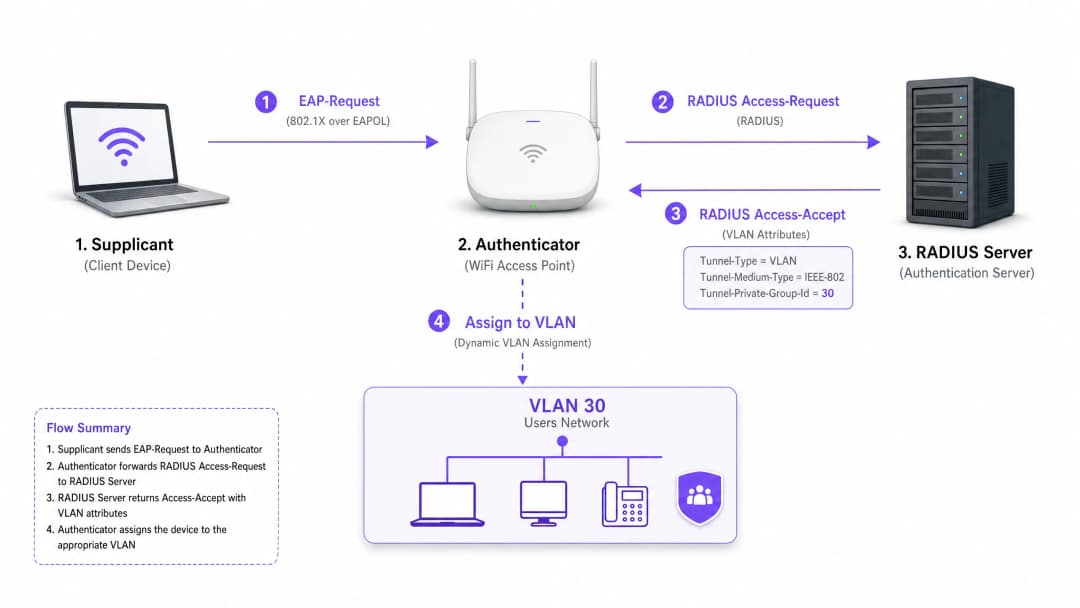
Once the AP receives these attributes, it drops the user's traffic directly into the specified VLAN. The upstream network switches then handle the traffic as if the user were physically plugged into a dedicated port for that tenant, ensuring complete Layer 2 isolation.
Got questions about your specific setup?
Our team works with venue operators, IT managers, and network engineers across 80,000 venues. Book a 20-minute call and we will show you how others like you solved it.
Implementation Guide
Deploying dynamic VLAN assignment requires careful coordination between the wireless infrastructure, edge switches, and the identity provider. Follow this vendor-neutral implementation sequence.
Phase 1: Network Infrastructure Preparation
- VLAN Provisioning: Define and create the necessary VLANs on your core routing infrastructure and DHCP servers. Ensure each tenant VLAN has its own distinct subnet and appropriate routing policies (e.g., routing to the internet, but dropping inter-VLAN traffic).
- Switch Trunking: This is a critical step. The switch ports connecting to your Access Points must be configured as 802.1Q trunk ports. You must tag all potential tenant VLANs that the AP might need to assign. If the RADIUS server assigns VLAN 40, but VLAN 40 is not tagged on the switch port, the client will authenticate but fail to receive an IP address.
- AP Configuration: Configure the APs to broadcast a single 802.1X-enabled SSID (e.g., WPA3-Enterprise). Enable the specific setting on your wireless controller or APs that allows them to accept RADIUS override attributes (often labelled "AAA Override" or "Dynamic VLAN").
Phase 2: RADIUS and Identity Integration
- Identity Store Integration: Connect your RADIUS server to the directory service containing user identities and their tenant associations.
- Network Policy Creation: Create policies within the RADIUS server that map user groups to VLAN IDs. For example, a policy stating: If User belongs to Group 'Retail_Staff', return Tunnel-Private-Group-ID = 10.
- Certificate Management: If using EAP-TLS (recommended for corporate devices), deploy client certificates. If using PEAP-MSCHAPv2 (common for BYOD), ensure a valid, trusted server certificate is installed on the RADIUS server.
Phase 3: Testing and Phased Rollout
- Pilot Testing: Test with a small group of devices across different tenants. Verify that upon connection, the device receives an IP address from the correct subnet and cannot ping devices in other tenant VLANs.
- IoT and Headless Devices: For devices that do not support 802.1X (printers, smart TVs), implement MAC Authentication Bypass (MAB). The RADIUS server authenticates the device based on its MAC address and assigns the appropriate VLAN. Note: Place these devices in strictly isolated VLANs as MAC addresses can be spoofed.
Best Practices
- Consolidate SSIDs: Aim for an absolute maximum of three SSIDs: one 802.1X SSID for all tenants, one for legacy IoT devices (using PSK or MAB), and one for Guest WiFi (using a captive portal).
- Enforce Client Isolation: Within the guest network and untrusted tenant networks, enable Layer 2 client isolation at the AP level to prevent devices from communicating with each other, mitigating lateral movement risks.
- Leverage Advanced Analytics: Integrate your authentication flow with a robust WiFi Analytics platform to gain visibility into venue utilisation, dwell times, and tenant network performance.
- Standardise on WPA3: Where client support allows, mandate WPA3-Enterprise for the 802.1X SSID to ensure the highest level of encryption and protection against dictionary attacks.
- Industry Context: Tailor the deployment to the vertical. In Retail environments, ensure POS systems are on a strictly isolated VLAN to maintain PCI DSS compliance. In Hospitality, ensure guest VLANs are completely separated from back-of-house operations.
Troubleshooting & Risk Mitigation
Common Failure Modes
The "Authenticated but No IP" Scenario:
- Symptom: The client connects, authentication succeeds, but the device self-assigns an APIPA address (169.254.x.x).
- Root Cause: The RADIUS server assigned a VLAN, but that VLAN is either not created on the DHCP server, or more commonly, the VLAN is not tagged on the trunk port connecting the switch to the AP.
- Fix: Verify 802.1Q trunk configurations on the edge switch.
RADIUS Timeout / Unreachable:
- Symptom: Clients are stuck on "Connecting..." or are repeatedly prompted for credentials.
- Root Cause: The AP cannot reach the RADIUS server, or the RADIUS shared secret is mismatched between the AP and the server.
- Fix: Verify network connectivity between the AP management IP and the RADIUS server. Double-check the shared secret.
Certificate Expiration:
- Symptom: Widespread sudden authentication failures for all users on PEAP or EAP-TLS.
- Root Cause: The RADIUS server certificate has expired, causing clients to reject the connection.
- Fix: Implement aggressive monitoring and alerting for RADIUS certificates. Renew certificates at least 30 days before expiration.
Risk Mitigation Strategies
- Fail-Open vs. Fail-Closed: Define a clear policy for when the RADIUS server is unreachable. For tenant corporate networks, fail-closed (deny access) is necessary for security. For guest access, you might configure a fail-open policy that drops users into a highly restricted, internet-only "quarantine" VLAN.
- Redundancy: Always deploy RADIUS servers in a highly available (HA) pair, preferably geographically distributed if supporting multiple sites.
ROI & Business Impact
Implementing dynamic VLAN assignment delivers significant, measurable business outcomes for venue operators:
- Reduced OpEx: Centralised management of a single SSID drastically reduces the IT overhead associated with provisioning, updating, and troubleshooting individual tenant networks.
- Optimised RF Spectrum: Eliminating SSID bloat reclaims valuable airtime. For a guide on managing spectrum, see our article on Wi Fi Frequencies: A Guide to Wi-Fi Frequencies in 2026. This leads to higher throughput and fewer support tickets regarding "slow WiFi."
- Enhanced Security and Compliance: Strict Layer 2 isolation ensures that a compromise in one tenant's network does not spread to others. This is critical for meeting regulatory requirements like PCI DSS and GDPR.
- Scalability: Onboarding a new tenant requires zero changes to the physical infrastructure or wireless configuration; it is simply a matter of creating a new policy in the RADIUS server.
For more comprehensive strategies on designing networks for shared spaces, review our guide on Designing a Multi-Tenant WiFi Architecture for MDU.
Key Definitions
802.1X
An IEEE standard for port-based network access control that provides an authentication mechanism to devices wishing to attach to a LAN or WLAN.
The foundational protocol that allows the network to demand identity before granting access, enabling dynamic policies.
RADIUS (Remote Authentication Dial-In User Service)
A networking protocol that provides centralized Authentication, Authorization, and Accounting (AAA) management for users who connect and use a network service.
The decision engine that validates credentials and tells the network which VLAN to assign to a user.
Supplicant
The client device (e.g., laptop, smartphone) or software that requests access to the network and provides credentials.
The endpoint that must be configured to support 802.1X (e.g., selecting PEAP or EAP-TLS in WiFi settings).
Authenticator
The network device (e.g., WiFi Access Point or switch) that facilitates the authentication process by relaying messages between the supplicant and the authentication server.
The gatekeeper that blocks traffic until RADIUS gives the green light, and then applies the assigned VLAN.
EAP (Extensible Authentication Protocol)
An authentication framework frequently used in wireless networks and point-to-point connections, supporting multiple authentication methods (e.g., EAP-TLS, PEAP).
The language spoken between the supplicant and the RADIUS server to securely exchange credentials.
MAB (MAC Authentication Bypass)
A technique used to authenticate devices that do not support 802.1X by using their MAC address as the credential.
Used for onboarding legacy IoT devices, printers, or smart TVs in a multi-tenant environment.
Tunnel-Private-Group-ID
The specific RADIUS attribute (Attribute 81) used to transmit the VLAN ID from the RADIUS server to the Authenticator.
The critical piece of data that actually dictates which network segment the user is dropped into.
Layer 2 Isolation
A security measure that prevents devices on the same network segment or VLAN from communicating directly with each other.
Essential for guest networks and untrusted tenant networks to prevent lateral movement of malware or unauthorized access.
Worked Examples
A large conference centre hosts three simultaneous events. Event A requires secure corporate access, Event B requires open access for attendees, and Event C requires access to specific internal presentation servers. How should the network architect deploy this using dynamic VLANs?
The architect configures a single 802.1X SSID for staff and secure attendees, and a separate open SSID with a captive portal for general guests.
For the 802.1X SSID, the RADIUS server is configured with three policies:
- If User Group = 'Event_A_Staff', assign VLAN 100 (Internet + Corporate VPN access).
- If User Group = 'Event_C_Presenters', assign VLAN 102 (Internet + Presentation Server access).
For Event B, attendees use the open Guest SSID, which drops them into VLAN 101 (Internet only, client isolation enabled).
A retail chain operates a shared building with a coffee shop, a clothing store, and a pharmacy. The pharmacy must comply with HIPAA, and the clothing store requires PCI DSS compliance for its wireless POS terminals. How is isolation guaranteed?
The IT team deploys a single WPA3-Enterprise SSID.
- Pharmacy staff authenticate via 802.1X, and RADIUS assigns them to VLAN 50, which has strict firewall rules preventing access to any other internal subnets.
- The clothing store's POS terminals authenticate using EAP-TLS (certificate-based) and are assigned to VLAN 60. VLAN 60 is routed directly to the payment processor gateway and isolated from all other traffic.
- The coffee shop uses a separate Guest SSID for patrons, terminating on VLAN 70 with client isolation.
Practice Questions
Q1. A tenant reports that they can successfully authenticate to the 802.1X SSID, but their device self-assigns an IP address (169.254.x.x) and cannot reach the internet. What is the most likely configuration error?
Hint: Think about the path between the Access Point and the core network services.
View model answer
The most likely cause is that the VLAN assigned by the RADIUS server is not tagged on the 802.1Q trunk port connecting the edge switch to the Access Point. The AP is trying to drop the traffic onto the correct VLAN, but the switch drops the frames because it is not configured to accept them on that port.
Q2. You are designing a multi-tenant network for a shared office space. The client wants to broadcast a unique SSID for each of the 15 tenants to 'make it easy for them to find their network'. How do you advise the client?
Hint: Consider the impact of management frame overhead on RF performance.
View model answer
Advise the client strongly against this approach. Broadcasting 15 SSIDs will consume a massive amount of airtime with beacon frames, severely degrading network performance, increasing latency, and reducing throughput for all users. Recommend deploying a single 802.1X SSID and using Dynamic VLAN Assignment via RADIUS to securely segment the tenants on the backend.
Q3. A multi-tenant building requires network access for several headless IoT devices (e.g., smart thermostats, digital signage) that do not support 802.1X supplicants. How can these devices be securely onboarded onto the correct tenant VLANs?
Hint: Consider alternative authentication methods supported by RADIUS.
View model answer
Implement MAC Authentication Bypass (MAB). The Access Point will send the device's MAC address to the RADIUS server as the username and password. The RADIUS server can be configured to recognize these specific MAC addresses and return the appropriate VLAN ID. Because MAC addresses can be spoofed, these devices should be placed in strictly isolated VLANs with limited network access.
Continue reading in this series
Managing Bandwidth in Student Housing Networks
This guide provides IT managers, network architects, and property operations directors with a vendor-neutral technical reference for managing WiFi bandwidth in high-density Student Housing environments. It covers VLAN segmentation, Quality of Service (QoS) policy design, identity-based traffic shaping, and application-layer visibility - the four pillars of a scalable, fair-access network. With real-world deployment scenarios, measurable outcomes, and decision frameworks, this is the operational playbook for any team responsible for residential network infrastructure at scale.
WPA2-Enterprise vs Personal for Multi-Family and Co-Working
This authoritative technical reference guide evaluates WPA2-Enterprise against WPA2-Personal for multi-tenant environments like multi-family developments and co-working spaces. It provides network architects and IT managers with actionable insights into 802.1X authentication, dynamic VLAN assignment, and security compliance, demonstrating why shared passwords introduce unacceptable risk in modern shared venues. Venue operators will find concrete implementation guidance, real-world case studies, and ROI analysis to support a migration decision this quarter.
Micro-Segmentation Best Practices for Shared WiFi Networks
This technical reference guide provides actionable strategies for implementing micro-segmentation on shared WiFi infrastructure. It details how IT managers and network architects can securely isolate guest, IoT, and staff traffic to mitigate risk, ensure compliance, and optimize network performance.
Got questions about your specific setup?
Our team works with venue operators, IT managers, and network engineers across 80,000 venues. Book a 20-minute call and we will show you how others like you solved it.