
Designing a Multi-Tenant WiFi Architecture for MDU
This authoritative guide provides an architectural blueprint for deploying scalable, secure, and isolated WiFi networks across multiple units in an MDU. It covers critical considerations including VLAN segmentation, RF planning, 802.1X authentication, and how to balance tenant isolation with centralized management for improved ROI.
Video overview
Listen to this guide
View podcast transcript
Part of our core series: Multi-Tenant WiFi Guide →

Executive Summary
CTOs and lead architects managing multi-family developments (MDUs) - whether they are vast hospitality complexes, mixed-use retail environments, or affordable housing - face the same constant challenge: delivering secure, high-performance connectivity to independent tenants over a shared physical infrastructure. Traditional single-tenant network designs collapse under the weight of MDU requirements, leading to security vulnerabilities, broadcast domain saturation, and unsustainable support overhead.
Designing a multi-tenant WiFi architecture requires a shift from physical isolation to logical segmentation. This reference guide outlines the definitive architectural blueprint for MDU deployments. We will examine the implementation of IEEE 802.1Q VLAN tagging for strict traffic isolation, the necessity of 802.1X RADIUS authentication for access control, and the critical role of centralized cloud controllers in maintaining operational visibility. By adopting these vendor-neutral principles, venue operators can mitigate compliance risks (such as PCI-DSS and CCPA/CPRA), reduce operational expenditure (OpEx), and transform connectivity from a cost center into a monetizable service layer.
Technical Deep Dive
The Cornerstone: Logical Segmentation via VLANs
The cornerstone of any multi-tenant architecture is rigorous network segmentation. In a shared physical environment, deploying separate switches and cabling for each tenant is commercially impractical. Instead, isolation is achieved at Layer 2 using IEEE 802.1Q Virtual Local Area Networks (VLANs).
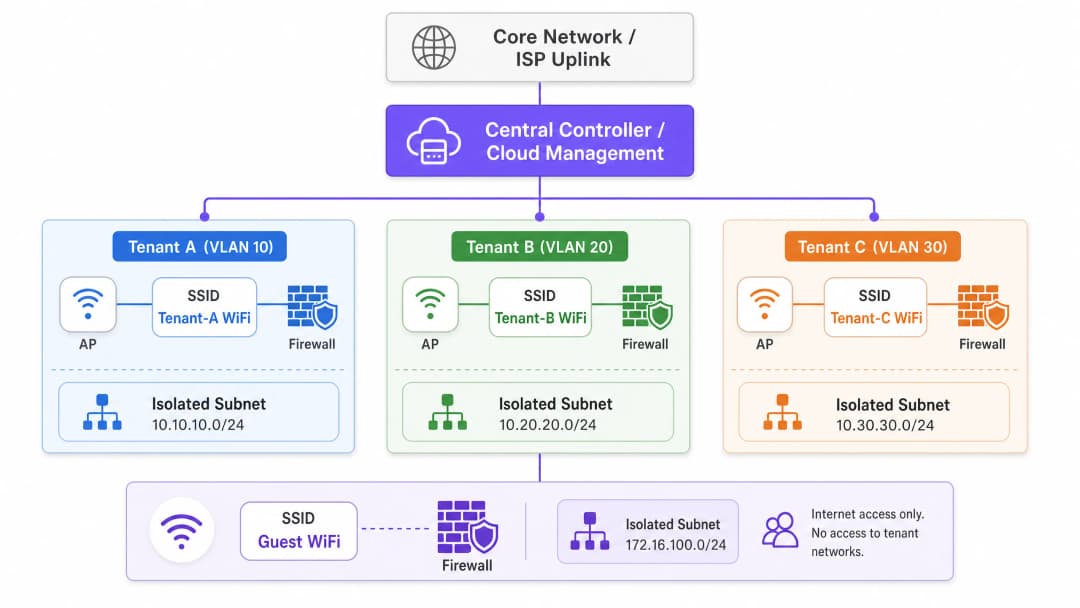
In this model, a single Access Point (AP) broadcasts multiple Service Set Identifiers (SSIDs) to serve different tenant profiles, or utilizes dynamic VLAN assignment via RADIUS. When a client connects to the network, their traffic is tagged with a specific VLAN ID at the AP edge. This tag persists as the frame traverses trunk links across the shared switch fabric, ensuring that Tenant A (e.g., VLAN 10) remains completely isolated from Tenant B (e.g., VLAN 20) at the data link layer.
However, VLANs provide isolation, not inherent security. To prevent lateral movement between tenant networks, inter-VLAN routing must be strictly controlled via firewall policies at the distribution or core layer. A Zero Trust approach dictates that traffic between tenant VLANs is completely denied unless explicitly permitted for specific, necessary services.

Authentication and Encryption Standards
For enterprise-grade multi-tenant environments, Pre-Shared Keys (PSKs) are inadequate. They are easily shared, difficult to change without impacting all users, and offer no individual accountability. The architectural standard is IEEE 802.1X with RADIUS authentication.
Under 802.1X, each user or device authenticates individually using unique credentials or digital certificates. The RADIUS server not only verifies identity but can also return Vendor-Specific Attributes (VSAs) to the authenticator (AP or switch), dynamically assigning the user to their designated VLAN regardless of which SSID they connect to. This significantly reduces SSID sprawl, which is critical for maintaining airtime efficiency.
For encryption, WPA3-Enterprise is the current mandate. It provides a robust 192-bit security suite for highly sensitive environments and mitigates offline dictionary attacks that plagued WPA2.
Guest and IoT Isolation
Beyond corporate or tenant traffic, an MDU architecture must accommodate two distinct traffic profiles: guest and Internet of Things (IoT) devices.
- Guest Network: Guests require frictionless internet access but must be completely isolated from tenant data. This is typically handled via a Captive Portal. For detailed insights on managing this layer and leveraging it for business intelligence, see our comprehensive overview of Guest WiFi and associated WiFi Analytics capabilities.
- IoT Devices: Modern MDUs are equipped with smart thermostats, IP cameras, and building management systems. These devices are often headless, difficult to patch, and present a large attack surface. They must be isolated on dedicated IoT VLANs with strict egress filtering, permitting communication only with specific management servers.
Got questions about your specific setup?
Our team works with venue operators, IT managers, and network engineers across 80,000 venues. Book a 20-minute call and we will show you how others like you solved it.
Implementation Guide
Deploying this architecture requires a systematic approach, moving from logical design to physical validation.
Step 1: Logical Network Design
Begin by defining the IP addressing scheme and VLAN mapping. A structured approach prevents overlapping subnets and simplifies routing.
- Management VLAN (e.g., VLAN 1): Strictly for network infrastructure (APs, switches). No user access.
- Tenant VLANs (e.g., VLANs 100-199): Dedicated subnets for individual tenants or business units.
- Guest VLAN (e.g., VLAN 200): Internet-only access, highly restricted.
- IoT/Facilities VLAN (e.g., VLAN 300): For building management systems.
Step 2: RF Planning and Site Survey
In high-density environments such as Hospitality or Retail, co-channel interference (CCI) is the primary driver of poor performance. A predictive survey is insufficient; an active, on-site RF survey is mandatory to account for wall attenuation and neighboring interference.
- 5 GHz / 6 GHz Prioritization: Push clients to the 5 GHz band, or the 6 GHz band when using WiFi 6E, to leverage more non-overlapping channels. For a deeper understanding of spectrum management, review our guide on Wi Fi Frequencies: A Guide to Wi-Fi Frequencies in 2026.
- Channel Widths: In dense MDUs, restrict channel widths to 20 MHz on the 2.4 GHz band and 40 MHz on the 5 GHz band to maximize channel reuse.
- If you are experiencing performance issues in an existing deployment, consult How to Analyze and Change Your WiFi Channel for Maximum Speed (or the Italian version: Come analizzare e modificare il canale WiFi per la massima velocità).
Step 3: Infrastructure Configuration
- Switch Fabric: Carefully configure trunk ports. Ensure only required VLANs are allowed on uplinks between access switches and the core.
- Access Points: Deploy APs capable of supporting multiple BSSIDs and integrating with the cloud controller. Limit the number of broadcast SSIDs to a maximum of 3 - 4 per radio to conserve airtime.
- Controller Policies: Define bandwidth limits per tenant or per user to prevent a single aggressive client from saturating the shared WAN uplink.
Best Practices
- Centralized Cloud Management: The operational overhead of managing a distributed MDU environment without a single pane of glass is unsustainable. A cloud controller enables zero-touch provisioning, firmware management, and centralized policy enforcement.
- Dynamic VLAN Assignment: Instead of broadcasting "Tenant_A_WiFi", "Tenant_B_WiFi", etc., broadcast a single "MDU_Secure" SSID and use 802.1X/RADIUS to dynamically assign authenticated users to their correct VLAN. This significantly reduces beacon overhead.
- Location-Based Services: Leverage integrated BLE (Bluetooth Low Energy) in modern APs for asset tracking or wayfinding. To learn more about this, read BLE Low Energy Explained for Enterprise.
- Optimize for the Environment: An MDU office space requires specific tuning tailored to its physical layout. See Office Wi Fi: Optimize Your Modern Office Wi-Fi Network for environment-specific adjustments.
Troubleshooting and Risk Mitigation
Common Failure Modes
- Trunk Port Misconfiguration: The most common cause of "connected, no internet" in multi-tenant setups. If a VLAN is missing from the trunk link between the AP and the gateway, DHCP requests will fail.
- Mitigation: Implement automated configuration auditing and strictly document the spanning tree topology.
- SSID Overhead: Broadcasting 10 SSIDs on a single AP means the radio spends a significant portion of its time transmitting beacon frames alone, leaving very little airtime for actual data transmission.
- Mitigation: Consolidate SSIDs and use dynamic VLAN assignment.
- Management Plane Exposure: If a tenant can ping or access the management interface of an AP or switch, the network is fundamentally compromised.
- Mitigation: Use a dedicated, out-of-band management VLAN and implement strict Access Control Lists (ACLs) blocking all RFC 1918 traffic from tenant subnets to the management subnet.
ROI and Business Impact
Transitioning to a robust multi-tenant architecture transforms the network from a necessary evil into a strategic asset.
- Reduced OpEx: Centralized management and logical segmentation reduce the need for on-site visits (truck rolls). Support desks can diagnose issues remotely, identifying whether the fault lies within the shared infrastructure or the tenant's specific configuration.
- Compliance and Risk Reduction: By isolating Payment Card Industry (PCI) data (e.g., in retail units) or sensitive patient data (e.g., in Healthcare facilities located in mixed-use buildings), the scope of compliance audits is significantly reduced, saving substantial consultancy fees.
- Monetization: With a stable, segmented architecture, venue operators can offer tier-based bandwidth packages to tenants, generating recurring revenue. Furthermore, the guest network can be leveraged for data capture and marketing, turning foot traffic into actionable intelligence.
Listen to our technical briefing podcast below for an in-depth discussion on these architectural principles:
Key Definitions
VLAN (Virtual Local Area Network)
A logical grouping of network devices that appear to be on the same local LAN, regardless of their physical location.
Used in MDUs to logically separate traffic from different tenants sharing the same physical switches and APs, reducing broadcast traffic and improving performance.
IEEE 802.1Q
The networking standard that supports VLANs on an Ethernet network by inserting a 32-bit tag into the Ethernet frame.
This is the underlying protocol that allows a single trunk cable to carry traffic for multiple isolated tenant networks.
IEEE 802.1X
An IEEE standard for port-based network access control (PNAC), providing an authentication mechanism to devices wishing to attach to a LAN or WLAN.
Essential for enterprise Multi-Family deployments, it allows individual user authentication (via RADIUS) rather than relying on a shared password, enabling dynamic VLAN assignment.
RADIUS (Remote Authentication Dial-In User Service)
A networking protocol that provides centralized Authentication, Authorization, and Accounting (AAA) management for users who connect and use a network service.
The server component in an 802.1X deployment that verifies credentials and tells the AP which VLAN to assign the tenant device to.
Trunk Port
A network switch port configured to carry traffic for multiple VLANs simultaneously, using 802.1Q tags to keep the traffic separated.
The critical link between access switches and the core network. Misconfiguring a trunk port is the most common cause of tenant connectivity failure.
Co-Channel Interference (CCI)
Interference that occurs when two or more access points are transmitting on the exact same frequency channel within hearing distance of each other.
A major issue in dense Multi-Family communities (like hotels or apartment blocks) that causes devices to wait for the channel to clear, drastically reducing network throughput.
Dynamic VLAN Assignment
The process where a RADIUS server instructs the network access device (AP or switch) to place an authenticated user into a specific VLAN based on their identity.
Allows venue operators to broadcast a single secure SSID for all tenants, assigning them to their isolated networks post-authentication, thereby saving RF airtime.
Captive Portal
A web page that the user of a public-access network is obliged to view and interact with before access is granted.
Used on the Guest VLAN in a Multi-Family property to enforce terms of service, collect marketing data, or process payments before granting internet access.
Worked Examples
A mixed-use retail and office complex (MDU) needs to provide secure WiFi for 15 independent retail tenants, a shared corporate office space, and public guest WiFi. The venue operator wants to use a single physical network infrastructure to reduce costs but must ensure PCI DSS compliance for the retailers.
- Deploy enterprise-grade APs managed by a central cloud controller.
- Create a 'Management' VLAN (VLAN 10) strictly for network devices.
- Create a 'Guest' VLAN (VLAN 20) with client isolation enabled and a Captive Portal. Route this traffic directly to the internet, bypassing internal networks.
- For the office space, create a 'Corporate' VLAN (VLAN 30) using 802.1X authentication.
- For the retail tenants, implement Dynamic VLAN Assignment. Broadcast a single 'Retail_Secure' SSID using 802.1X. When a retail device authenticates via the central RADIUS server, the server passes a Vendor-Specific Attribute (VSA) that assigns the device to its specific tenant VLAN (e.g., VLANs 101-115).
- Configure the core firewall to block all inter-VLAN routing between the retail VLANs, ensuring strict isolation required for PCI DSS.
A 400-room hotel ([Hospitality](/industries/hospitality)) is upgrading its network. They need to support guest devices, staff tablets for housekeeping, and new IoT smart thermostats in every room. They currently experience frequent dropouts during peak evening hours.
- Conduct an active RF site survey to identify interference and plan AP placement (likely moving from hallway deployments to in-room or every-other-room deployments to handle density).
- Segment traffic logically: Guest (VLAN 100), Staff (VLAN 200), IoT (VLAN 300).
- Implement per-user bandwidth limiting on the Guest SSID (e.g., 10 Mbps down / 5 Mbps up) to prevent a few heavy users from saturating the WAN link during peak hours.
- For the IoT thermostats, use a dedicated hidden SSID with WPA3-Personal (if supported) or MAC Authentication Bypass (MAB) if they lack advanced supplicants. Apply strict egress filtering on VLAN 300 so thermostats can only communicate with the specific cloud management server.
Practice Questions
Q1. You are designing the WiFi architecture for a new 50-unit premium apartment complex. The developer wants to offer 'Included Gigabit WiFi' as a selling point. They propose installing a standard consumer-grade wireless router in the closet of each apartment, all wired back to a central unmanaged switch. What are the primary architectural flaws with this proposal, and what is the enterprise alternative?
Hint: Consider RF interference, management overhead, and broadcast domain size.
View model answer
The proposed design has severe flaws. 1) RF Interference: 50 independent consumer routers will cause massive Co-Channel Interference (CCI), severely degrading performance. 2) Management: There is no central visibility; troubleshooting requires accessing 50 individual routers. 3) Security: An unmanaged switch means all apartments share a single broadcast domain, allowing tenants to potentially intercept each other's traffic.
The enterprise alternative is to deploy centrally managed, enterprise-grade APs (e.g., WiFi 6/6E) in the apartments, connected to managed PoE switches. Implement 802.1X authentication with Dynamic VLAN Assignment so each tenant is logically isolated on their own VLAN, regardless of which AP they connect to. This provides central visibility, RF coordination, and strict security isolation.
Q2. During the commissioning phase of a multi-tenant office building, Tenant A (on VLAN 10) reports they cannot access the internet. You verify that the AP is broadcasting the SSID, the client connects successfully, and 802.1X authentication passes. However, the client device is assigning itself an APIPA address (169.254.x.x). What is the most likely configuration error in the infrastructure?
Hint: Follow the path of the DHCP request from the AP to the DHCP server.
View model answer
The most likely issue is a misconfigured trunk port between the Access Point and the Access Switch, or between the Access Switch and the Core/Distribution switch. Because the client receives an APIPA address, the DHCP Discover broadcast is not reaching the DHCP server. If authentication passes, the RADIUS server is correctly assigning VLAN 10, but if VLAN 10 is not explicitly permitted on the 802.1Q trunk links along the path, the traffic is dropped at the switch port. The engineer must verify the 'switchport trunk allowed vlan' configuration on all uplinks.
Q3. A stadium ([Transport](/industries/transport) hub / event space) requires a multi-tenant network for operations staff, ticketing vendors, and public guest WiFi. To save time, the junior engineer suggests creating three SSIDs using WPA2-PSK, with a different password for each group. Why is this unacceptable for the ticketing vendors, and what must be implemented instead?
Hint: Consider compliance requirements for processing payments.
View model answer
Using WPA2-PSK is unacceptable for ticketing vendors because they process payments, making them subject to PCI DSS (Payment Card Industry Data Security Standard) compliance. PSKs offer weak security, are easily shared, and do not provide individual user accountability. Furthermore, a shared PSK network does not inherently prevent devices from communicating with each other (client isolation).
Instead, the architecture must implement 802.1X with RADIUS authentication (preferably using WPA3-Enterprise) to provide individual, auditable access. The ticketing vendors must be placed on a dedicated, strictly isolated VLAN, with core firewall rules explicitly denying any routing between the ticketing VLAN and the guest or operations VLANs.
Continue reading in this series
Managing Bandwidth in Student Housing Networks
This guide provides IT managers, network architects, and property operations directors with a vendor-neutral technical reference for managing WiFi bandwidth in high-density Student Housing environments. It covers VLAN segmentation, Quality of Service (QoS) policy design, identity-based traffic shaping, and application-layer visibility - the four pillars of a scalable, fair-access network. With real-world deployment scenarios, measurable outcomes, and decision frameworks, this is the operational playbook for any team responsible for residential network infrastructure at scale.
WPA2-Enterprise vs Personal for Multi-Family and Co-Working
This authoritative technical reference guide evaluates WPA2-Enterprise against WPA2-Personal for multi-tenant environments like multi-family developments and co-working spaces. It provides network architects and IT managers with actionable insights into 802.1X authentication, dynamic VLAN assignment, and security compliance, demonstrating why shared passwords introduce unacceptable risk in modern shared venues. Venue operators will find concrete implementation guidance, real-world case studies, and ROI analysis to support a migration decision this quarter.
Micro-Segmentation Best Practices for Shared WiFi Networks
This technical reference guide provides actionable strategies for implementing micro-segmentation on shared WiFi infrastructure. It details how IT managers and network architects can securely isolate guest, IoT, and staff traffic to mitigate risk, ensure compliance, and optimize network performance.
Got questions about your specific setup?
Our team works with venue operators, IT managers, and network engineers across 80,000 venues. Book a 20-minute call and we will show you how others like you solved it.