
मल्टी-टेनेंट इमारतों में Dynamic VLAN Assignment कैसे काम करता है
यह तकनीकी संदर्भ मार्गदर्शिका मल्टी-टेनेंट वातावरण में 802.1X और RADIUS का उपयोग करके Dynamic VLAN Assignment के आर्किटेक्चर और कार्यान्वयन का विवरण देती है। यह IT प्रबंधकों और नेटवर्क आर्किटेक्ट्स के लिए SSID ओवरहेड को कम करने, Layer 2 आइसोलेशन लागू करने और साझा इमारतों में सुरक्षित, स्केलेबल कनेक्टिविटी सुनिश्चित करने के लिए व्यावहारिक मार्गदर्शन प्रदान करती है।
इस गाइड को सुनें
पॉडकास्ट ट्रांसक्रिप्ट देखें
हमारी मुख्य श्रृंखला का हिस्सा: Multi-Tenant WiFi Guide →
कार्यकारी सारांश (Executive Summary)
मल्टी-टेनेंट इमारतों - जैसे कि व्यावसायिक कार्यालयों, रिटेल परिसरों, या बड़े आतिथ्य स्थलों की देखरेख करने वाले IT प्रबंधकों और नेटवर्क आर्किटेक्ट्स के लिए - नेटवर्क सेगमेंटेशन को प्रबंधित करना एक महत्वपूर्ण चुनौती है। ऐतिहासिक रूप से, टेनेंट ट्रैफ़िक को अलग करने का मतलब अलग भौतिक बुनियादी ढांचे को तैनात करना या हर टेनेंट के लिए एक विशिष्ट SSID प्रसारित करना था। दोनों ही दृष्टिकोणों में मौलिक खामियां हैं। भौतिक अलगाव लागत-निषेधात्मक और लचीला नहीं है, जबकि कई SSIDs प्रसारित करने से अत्यधिक प्रबंधन फ़्रेम ओवरहेड के कारण RF प्रदर्शन गंभीर रूप से कम हो जाता है।
डायनामिक VLAN असाइनमेंट वायरलेस वातावरण को एकल, सुरक्षित SSID में समेकित करके इसे हल करता है। IEEE 802.1X प्रमाणीकरण और RADIUS का लाभ उठाते हुए, नेटवर्क उपयोगकर्ताओं को उनकी पहचान के आधार पर उनके समर्पित वर्चुअल लोकल एरिया नेटवर्क (VLAN) में गतिशील रूप से असाइन करता है, न कि उनके द्वारा चुने गए नेटवर्क के आधार पर। यह गाइड डायनामिक VLAN असाइनमेंट की रूपरेखा तैयार करने, तैनात करने और समस्या निवारण (troubleshooting) के लिए एक व्यापक तकनीकी गहन-विश्लेषण प्रदान करता है, जिससे सुरक्षित Layer 2 अलगाव, PCI-DSS और GDPR जैसे मानकों का अनुपालन और स्थल ऑपरेटरों के लिए एक मजबूत ROI सुनिश्चित होता है।
तकनीकी गहन-विश्लेषण (Technical Deep-Dive)
कई SSIDs के साथ समस्या
एक साझा इमारत में, दर्जनों SSIDs प्रसारित होना आम बात है (जैसे, "TenantA_Corp", "TenantB_Secure", "Building_Guest")। एक एक्सेस प्वाइंट (AP) द्वारा प्रसारित प्रत्येक SSID को न्यूनतम अनिवार्य डेटा दर (आमतौर पर 1 Mbps या 6 Mbps) पर बीकन फ़्रेम प्रेषित करने होंगे। जैसे-जैसे SSIDs की संख्या बढ़ती है, प्रबंधन ओवरहेड द्वारा खपत होने वाले एयरटाइम का अनुपात तेजी से बढ़ता है, जिससे वास्तविक डेटा ट्रांसमिशन के लिए कम एयरटाइम बचता है। इसके परिणामस्वरूप अंतर्निहित इंटरनेट कनेक्शन की गति की परवाह किए बिना उच्च विलंबता, कम थ्रूपुट और खराब उपयोगकर्ता अनुभव होता है।
802.1X और RADIUS आर्किटेक्चर
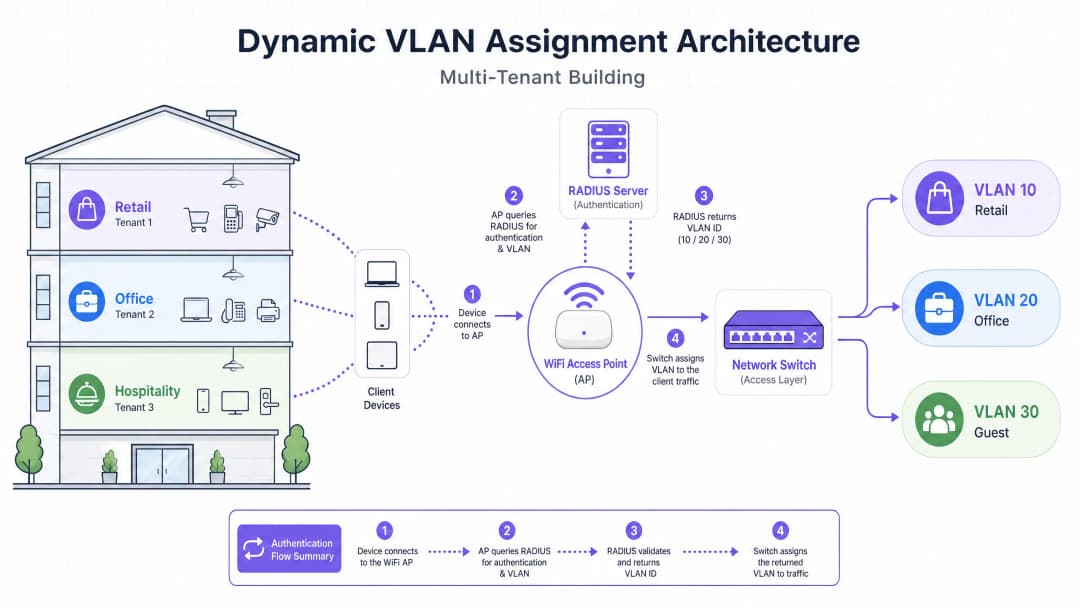
डायनामिक VLAN असाइनमेंट सेगमेंटेशन लॉजिक को RF लेयर से प्रमाणीकरण लेयर पर स्थानांतरित करता है। यह पोर्ट-आधारित नेटवर्क एक्सेस कंट्रोल के लिए IEEE 802.1X मानक पर निर्भर करता है, जो RADIUS (रिमोट ऑथेंटिकेशन डायल-इन यूजर सर्विस) सर्वर के साथ एकीकृत है।
आर्किटेक्चर में तीन प्राथमिक घटक शामिल हैं:
- सप्लीकेंट (Supplicant): क्लाइंट डिवाइस (लैपटॉप, स्मार्टफोन) जो नेटवर्क एक्सेस का अनुरोध कर रहा है।
- ऑथेंटिकेटर (Authenticator): नेटवर्क एक्सेस डिवाइस, आमतौर पर WiFi एक्सेस प्वाइंट या वायरलेस कंट्रोलर, जो प्रमाणीकरण सफल होने तक ट्रैफ़िक को ब्लॉक करता है।
- ऑथेंटिकेशन सर्वर (Authentication Server): RADIUS सर्वर जो पहचान स्टोर (जैसे, एक्टिव डायरेक्ट्री, LDAP) के विरुद्ध क्रेडेंशियल को मान्य करता है और नेटवर्क नीतियों को निर्धारित करता है।
प्रमाणीकरण प्रवाह (Authentication Flow)
जब कोई सप्लीकेंट एकीकृत SSID से कनेक्ट करने का प्रयास करता है, तो निम्नलिखित प्रवाह होता है:
- EAPOL इनिशियलाइजेशन: सप्लीकेंट AP से कनेक्ट होता है। AP LAN (EAPOL) पैकेटों पर एक्सटेंसिबल ऑथेंटिकेशन प्रोटोकॉल को छोड़कर अन्य सभी ट्रैफ़िक को ब्लॉक कर देता है।
- RADIUS एक्सेस-रिक्वेस्ट: AP EAP डेटा को एनकैप्सुलेट करता है और इसे
Access-Requestके रूप में RADIUS सर्वर पर फ़ॉरवर्ड करता है। - क्रेडेंशियल वैलिडेशन: RADIUS सर्वर उपयोगकर्ता के क्रेडेंशियल्स को सत्यापित करता है (EAP-TLS, PEAP आदि के माध्यम से)।
- RADIUS एक्सेस-एक्सेप्ट: सफल सत्यापन पर, RADIUS सर्वर एक
Access-Acceptसंदेश के साथ प्रतिक्रिया देता है। महत्वपूर्ण रूप से, इस संदेश में विशिष्ट IETF मानक RADIUS एट्रिब्यूट्स शामिल होते हैं जो AP को निर्देश देते हैं कि उपयोगकर्ता को कौन सा VLAN असाइन करना है।
डायनेमिक VLAN असाइनमेंट के लिए आवश्यक महत्वपूर्ण RADIUS एट्रिब्यूट्स हैं:
Tunnel-Type(64):VLANपर सेट करें (मान 13)Tunnel-Medium-Type(65):802पर सेट करें (मान 6)Tunnel-Private-Group-ID(81): विशिष्ट VLAN ID पर सेट करें (जैसे, टेनेंट A के लिए "20", टेनेंट B के लिए "30")
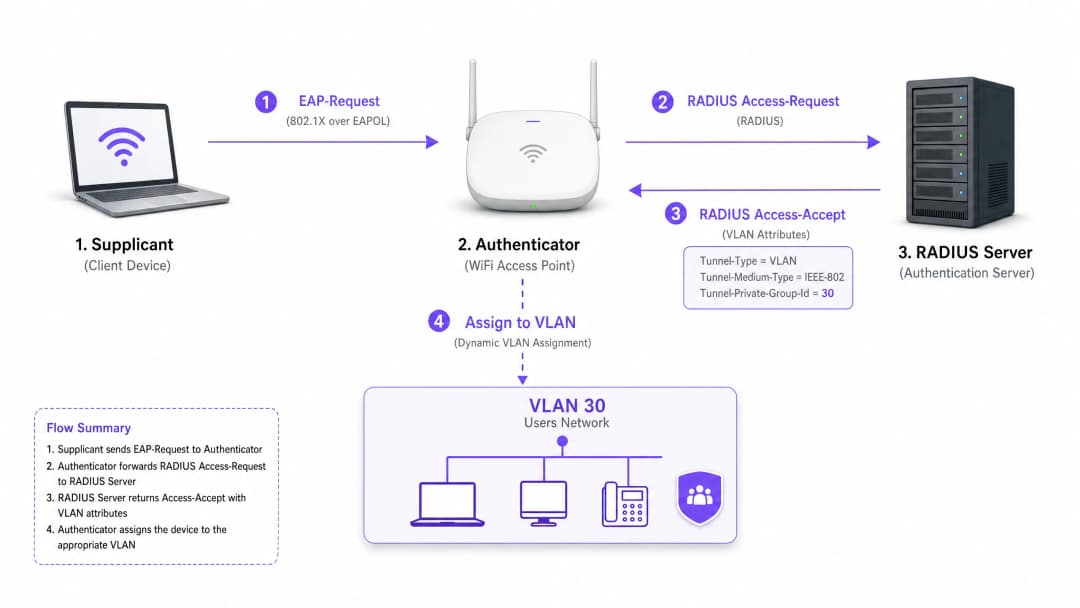
एक बार जब AP को ये एट्रिब्यूट्स मिल जाते हैं, तो यह उपयोगकर्ता के ट्रैफ़िक को सीधे निर्दिष्ट VLAN में डाल देता है। अपस्ट्रीम नेटवर्क स्विच तब ट्रैफ़िक को इस तरह से हैंडल करते हैं जैसे कि उपयोगकर्ता भौतिक रूप से उस टेनेंट के लिए एक समर्पित पोर्ट में प्लग किया गया हो, जिससे पूर्ण लेयर 2 आइसोलेशन सुनिश्चित होता है।
अपने विशिष्ट सेटअप को लेकर कोई सवाल हैं?
हमारी टीम 80,000 से अधिक वेन्यू में वेन्यू ऑपरेटरों, IT मैनेजरों और नेटवर्क इंजीनियरों के साथ काम करती है। 20 मिनट का कॉल बुक करें और हम आपको दिखाएंगे कि आपके जैसे अन्य लोगों ने इसे कैसे हल किया।
कार्यान्वयन गाइड
डायनेमिक VLAN असाइनमेंट को तैनात करने के लिए वायरलेस इन्फ्रास्ट्रक्चर, एज स्विच और आइडेंटिटी प्रोवाइडर के बीच सावधानीपूर्वक समन्वय की आवश्यकता होती है। इस वेंडर-न्यूट्रल कार्यान्वयन अनुक्रम का पालन करें।
चरण 1: नेटवर्क इन्फ्रास्ट्रक्चर की तैयारी
- VLAN प्रोविजनिंग: अपने कोर राउटिंग इन्फ्रास्ट्रक्चर और DHCP सर्वरों पर आवश्यक VLAN को परिभाषित और निर्मित करें। सुनिश्चित करें कि प्रत्येक टेनेंट VLAN का अपना अलग सबनेट और उचित राउटिंग नीतियां हों (जैसे, इंटरनेट पर राउटिंग करना, लेकिन इंटर-VLAN ट्रैफ़िक को छोड़ना)।
- स्विच ट्रंकिंग: यह एक महत्वपूर्ण कदम है। आपके Access Points से कनेक्ट होने वाले स्विच पोर्ट को 802.1Q ट्रंक पोर्ट के रूप में कॉन्फ़िगर किया जाना चाहिए। आपको उन सभी संभावित टेनेंट VLAN को टैग करना होगा जिन्हें AP को असाइन करने की आवश्यकता हो सकती है। यदि RADIUS सर्वर VLAN 40 असाइन करता है, लेकिन स्विच पोर्ट पर VLAN 40 टैग नहीं है, तो क्लाइंट ऑथेंटिकेट तो हो जाएगा लेकिन IP एड्रेस प्राप्त करने में विफल रहेगा।
- AP कॉन्फ़िगरेशन: एक सिंगल 802.1X-सक्षम SSID (जैसे, WPA3-Enterprise) प्रसारित करने के लिए APs को कॉन्फ़िगर करें। अपने वायरलेस कंट्रोलर या APs पर विशिष्ट सेटिंग को सक्षम करें जो उन्हें RADIUS ओवरराइड एट्रिब्यूट्स को स्वीकार करने की अनुमति देती है (इसे अक्सर "AAA Override" या "Dynamic VLAN" लेबल किया जाता है)।
चरण 2: RADIUS और आइडेंटिटी इंटीग्रेशन
- आइडेंटिटी स्टोर इंटीग्रेशन: अपने RADIUS सर्वर को उस डायरेक्टरी सर्विस से कनेक्ट करें जिसमें उपयोगकर्ता की पहचान और उनके टेनेंट एसोसिएशन शामिल हैं।
- नेटवर्क पॉलिसी क्रिएशन: RADIUS सर्वर के भीतर ऐसी नीतियां बनाएं जो उपयोगकर्ता समूहों को VLAN IDs से मैप करती हैं। उदाहरण के लिए, एक नीति जो कहती है: यदि उपयोगकर्ता 'Retail_Staff' ग्रुप से संबंधित है, तो Tunnel-Private-Group-ID = 10 रिटर्न करें।3. सर्टिफिकेट प्रबंधन: यदि EAP-TLS (कॉर्पोरेट उपकरणों के लिए अनुशंसित) का उपयोग कर रहे हैं, तो क्लाइंट सर्टिफिकेट तैनात करें। यदि PEAP-MSCHAPv2 (BYOD के लिए सामान्य) का उपयोग कर रहे हैं, तो सुनिश्चित करें कि RADIUS सर्वर पर एक वैध, विश्वसनीय सर्वर सर्टिफिकेट इंस्टॉल हो।
चरण 3: परीक्षण और चरणबद्ध रोलआउट
- पायलट परीक्षण: विभिन्न टेनेंट्स के बीच उपकरणों के एक छोटे समूह के साथ परीक्षण करें। सत्यापित करें कि कनेक्शन होने पर, उपकरण को सही सबनेट से एक IP एड्रेस प्राप्त होता है और वह अन्य टेनेंट VLANs के उपकरणों को पिंग नहीं कर सकता है।
- IoT और हेडलेस उपकरण: ऐसे उपकरण जो 802.1X का समर्थन नहीं करते हैं (प्रिंटर, स्मार्ट टीवी), उनके लिए MAC Authentication Bypass (MAB) लागू करें। RADIUS सर्वर उपकरण को उसके MAC एड्रेस के आधार पर प्रमाणित करता है और उपयुक्त VLAN आवंटित करता है। नोट: इन उपकरणों को पूरी तरह से अलग-थलग VLANs में रखें क्योंकि MAC एड्रेस को स्पूफ किया जा सकता है।
सर्वोत्तम प्रथाएं
- SSIDs को समेकित करें: अधिकतम तीन SSIDs का लक्ष्य रखें: सभी टेनेंट्स के लिए एक 802.1X SSID, पुराने IoT उपकरणों के लिए एक (PSK या MAB का उपयोग करके), और Guest WiFi के लिए एक (एक Captive Portal का उपयोग करके)।
- क्लाइंट आइसोलेशन लागू करें: गेस्ट नेटवर्क और अविश्वसनीय टेनेंट नेटवर्क के भीतर, उपकरणों को एक-दूसरे के साथ संचार करने से रोकने के लिए AP स्तर पर Layer 2 क्लाइंट आइसोलेशन सक्षम करें, जिससे लैटरल मूवमेंट के जोखिम कम हो सकें।
- उन्नत एनालिटिक्स का लाभ उठाएं: स्थल के उपयोग, रुकने के समय और टेनेंट नेटवर्क के प्रदर्शन की दृश्यता प्राप्त करने के लिए अपने प्रमाणीकरण प्रवाह को एक मजबूत WiFi Analytics प्लेटफॉर्म के साथ एकीकृत करें।
- WPA3 पर मानकीकृत करें: जहाँ क्लाइंट समर्थन अनुमति देता है, वहाँ एन्क्रिप्शन के उच्चतम स्तर और डिक्शनरी हमलों के खिलाफ सुरक्षा सुनिश्चित करने के लिए 802.1X SSID के लिए WPA3-Enterprise अनिवार्य करें।
- उद्योग संदर्भ: परिनियोजन को वर्टिकल के अनुसार अनुकूलित करें। Retail वातावरण में, PCI-DSS अनुपालन बनाए रखने के लिए सुनिश्चित करें कि POS सिस्टम पूरी तरह से अलग-थलग VLAN पर हों। Hospitality में, सुनिश्चित करें कि गेस्ट VLANs बैक-ऑफ-हाउस संचालन से पूरी तरह से अलग हों।
समस्या निवारण और जोखिम शमन
सामान्य विफलता मोड
- "प्रमाणित लेकिन कोई IP नहीं" परिदृश्य:
- लक्षण: क्लाइंट कनेक्ट होता है, प्रमाणीकरण सफल होता है, लेकिन उपकरण खुद को एक APIPA एड्रेस (169.254.x.x) आवंटित कर लेता है।
- मूल कारण: RADIUS सर्वर ने एक VLAN आवंटित किया, लेकिन वह VLAN या तो DHCP सर्वर पर नहीं बनाया गया है, या अधिक सामान्यतः, VLAN को स्विच को AP से जोड़ने वाले ट्रंक पोर्ट पर टैग नहीं किया गया है।
- समाधान: एज स्विच पर 802.1Q ट्रंक कॉन्फ़िगरेशन सत्यापित करें।
- RADIUS टाइमआउट / पहुंच योग्य न होना:
- लक्षण: क्लाइंट "कनेक्ट हो रहा है..." पर अटके रहते हैं या बार-बार क्रेडेंशियल के लिए संकेत दिए जाते हैं।
- मूल कारण: AP, RADIUS सर्वर तक नहीं पहुंच सकता है, या AP और सर्वर के बीच RADIUS शेयर्ड सीक्रेट बेमेल है।
- समाधान: AP प्रबंधन IP और RADIUS सर्वर के बीच नेटवर्क कनेक्टिविटी सत्यापित करें। शेयर्ड सीक्रेट की दोबारा जांच करें।
- सर्टिफिकेट की समाप्ति:
- लक्षण: PEAP या EAP-TLS पर सभी उपयोगकर्ताओं के लिए व्यापक रूप से अचानक प्रमाणीकरण (authentication) विफलताएं।
- मूल कारण: RADIUS सर्वर प्रमाणपत्र (certificate) समाप्त हो गया है, जिससे क्लाइंट कनेक्शन को अस्वीकार कर रहे हैं।
- समाधान: RADIUS प्रमाणपत्रों के लिए सक्रिय रूप से निगरानी और अलर्ट लागू करें। समाप्ति से कम से कम 30 दिन पहले प्रमाणपत्रों को रिन्यू करें।
जोखिम न्यूनीकरण रणनीतियाँ
- फेल-ओपन बनाम फेल-क्लोज्ड: RADIUS सर्वर के पहुंच से बाहर होने की स्थिति के लिए एक स्पष्ट नीति परिभाषित करें। टेनेंट कॉर्पोरेट नेटवर्क के लिए, सुरक्षा के लिए फेल-क्लोज्ड (पहुंच अस्वीकार करना) आवश्यक है। गेस्ट एक्सेस के लिए, आप एक फेल-ओपन नीति कॉन्फ़िगर कर सकते हैं जो उपयोगकर्ताओं को एक अत्यधिक प्रतिबंधित, केवल-इंटरनेट "क्वारंटाइन" VLAN में डाल देती है।
- रिडंडेंसी: हमेशा RADIUS सर्वरों को एक उच्च उपलब्धता (HA) जोड़ी में तैनात करें, अधिमानतः भौगोलिक रूप से वितरित यदि वे कई स्थानों का समर्थन कर रहे हैं।
ROI और व्यावसायिक प्रभाव
डायनेमिक VLAN असाइनमेंट लागू करना स्थल ऑपरेटरों के लिए महत्वपूर्ण, मापने योग्य व्यावसायिक परिणाम प्रदान करता है:
- कम OpEx: एकल SSID का केंद्रीकृत प्रबंधन व्यक्तिगत टेनेंट नेटवर्क के प्रावधान, अपडेट और समस्या निवारण से जुड़े IT ओवरहेड को भारी रूप से कम करता है।
- अनुकूलित RF स्पेक्ट्रम: SSID की भीड़भाड़ को समाप्त करने से मूल्यवान एयरटाइम वापस मिलता है। स्पेक्ट्रम के प्रबंधन पर एक गाइड के लिए, Wi Fi Frequencies: A Guide to Wi-Fi Frequencies in 2026 पर हमारा लेख देखें। इससे अधिक थ्रूपुट मिलता है और "धीमी WiFi" से संबंधित सपोर्ट टिकटों में कमी आती है।
- उन्नत सुरक्षा और अनुपालन: सख्त लेयर 2 आइसोलेशन यह सुनिश्चित करता है कि एक टेनेंट के नेटवर्क में सेंधमारी दूसरों तक न फैले। यह PCI-DSS और GDPR जैसे नियामक आवश्यकताओं को पूरा करने के लिए महत्वपूर्ण है।
- स्केलेबिलिटी: नए टेनेंट को जोड़ने के लिए भौतिक बुनियादी ढांचे या वायरलेस कॉन्फ़िगरेशन में शून्य बदलाव की आवश्यकता होती है; यह केवल RADIUS सर्वर में एक नई नीति बनाने का मामला है।
साझा स्थानों के लिए नेटवर्क डिजाइन करने की अधिक व्यापक रणनीतियों के लिए, Designing a Multi-Tenant WiFi Architecture for MDU पर हमारी गाइड की समीक्षा करें।
मुख्य परिभाषाएं
802.1X
पोर्ट-आधारित नेटवर्क एक्सेस कंट्रोल के लिए एक IEEE मानक जो LAN या WLAN से जुड़ने के इच्छुक उपकरणों को एक प्रमाणीकरण तंत्र प्रदान करता है।
वह बुनियादी प्रोटोकॉल जो नेटवर्क को एक्सेस देने से पहले पहचान की मांग करने की अनुमति देता है, जिससे गतिशील नीतियां सक्षम होती हैं।
RADIUS (Remote Authentication Dial-In User Service)
एक नेटवर्किंग प्रोटोकॉल जो नेटवर्क सेवा से जुड़ने और उसका उपयोग करने वाले उपयोगकर्ताओं के लिए केंद्रीकृत प्रमाणीकरण, प्राधिकरण और लेखांकन (AAA) प्रबंधन प्रदान करता है।
निर्णय इंजन जो क्रेडेंशियल्स को मान्य करता है और नेटवर्क को बताता है कि उपयोगकर्ता को कौन सा VLAN असाइन करना है।
Supplicant
क्लाइंट डिवाइस (जैसे, लैपटॉप, स्मार्टफोन) या सॉफ़्टवेयर जो नेटवर्क तक पहुंच का अनुरोध करता है और क्रेडेंशियल्स प्रदान करता है।
वह एंडपॉइंट जिसे 802.1X का समर्थन करने के लिए कॉन्फ़िगर किया जाना चाहिए (जैसे, WiFi सेटिंग्स में PEAP या EAP-TLS चुनना)।
Authenticator
नेटवर्क डिवाइस (जैसे, WiFi एक्सेस पॉइंट या स्विच) जो supplicant और प्रमाणीकरण सर्वर के बीच संदेशों को रिले करके प्रमाणीकरण प्रक्रिया को सुगम बनाता है।
द्वारपाल जो तब तक ट्रैफ़िक को ब्लॉक करता है जब तक RADIUS हरी झंडी नहीं दे देता, और फिर असाइन किए गए VLAN को लागू करता है।
EAP (Extensible Authentication Protocol)
एक प्रमाणीकरण ढांचा जो अक्सर वायरलेस नेटवर्क और पॉइंट-टू-पॉइंट कनेक्शन में उपयोग किया जाता है, जो कई प्रमाणीकरण विधियों (जैसे, EAP-TLS, PEAP) का समर्थन करता है।
क्रेडेंशियल्स को सुरक्षित रूप से आदान-प्रदान करने के लिए supplicant और RADIUS सर्वर के बीच बोली जाने वाली भाषा।
MAB (MAC Authentication Bypass)
एक तकनीक जिसका उपयोग उन उपकरणों को प्रमाणित करने के लिए किया जाता है जो 802.1X का समर्थन नहीं करते हैं, उनके MAC address को क्रेडेंशियल के रूप में उपयोग करके।
एक मल्टी-टेनेंट वातावरण में पुराने IoT उपकरणों, प्रिंटर, या स्मार्ट टीवी को ऑनबोर्ड करने के लिए उपयोग किया जाता है।
Tunnel-Private-Group-ID
विशिष्ट RADIUS विशेषता (Attribute 81) जिसका उपयोग RADIUS server से Authenticator को VLAN ID प्रसारित करने के लिए किया जाता है।
डेटा का वह महत्वपूर्ण हिस्सा जो वास्तव में यह तय करता है कि उपयोगकर्ता को किस नेटवर्क सेगमेंट में रखा गया है।
Layer 2 Isolation
एक सुरक्षा उपाय जो एक ही नेटवर्क सेगमेंट या VLAN पर मौजूद उपकरणों को एक-दूसरे के साथ सीधे संवाद करने से रोकता है।
मालवेयर के लेटरल मूवमेंट या अनधिकृत पहुंच को रोकने के लिए अतिथि नेटवर्क और अविश्वसनीय टेनेंट नेटवर्क के लिए आवश्यक।
हल किए गए उदाहरण
एक बड़ा सम्मेलन केंद्र एक साथ तीन कार्यक्रमों की मेजबानी करता है। कार्यक्रम A को सुरक्षित कॉर्पोरेट एक्सेस की आवश्यकता है, कार्यक्रम B को उपस्थित लोगों के लिए ओपन एक्सेस की आवश्यकता है, और कार्यक्रम C को विशिष्ट आंतरिक प्रेजेंटेशन सर्वर तक पहुंच की आवश्यकता है। नेटवर्क आर्किटेक्ट को dynamic VLANs का उपयोग करके इसे कैसे तैनात करना चाहिए?
आर्किटेक्ट कर्मचारियों और सुरक्षित उपस्थित लोगों के लिए एक एकल 802.1X SSID कॉन्फ़िगर करता है, और सामान्य मेहमानों के लिए Captive Portal के साथ एक अलग ओपन SSID कॉन्फ़िगर करता है।
802.1X SSID के लिए, RADIUS सर्वर को तीन पॉलिसियों के साथ कॉन्फ़िगर किया गया है:
- यदि User Group = 'Event_A_Staff', तो VLAN 100 असाइन करें (इंटरनेट + कॉर्पोरेट VPN एक्सेस)।
- यदि User Group = 'Event_C_Presenters', तो VLAN 102 असाइन करें (इंटरनेट + प्रेजेंटेशन सर्वर एक्सेस)।
कार्यक्रम B के लिए, उपस्थित लोग ओपन Guest SSID का उपयोग करते हैं, जो उन्हें VLAN 101 (केवल इंटरनेट, क्लाइंट आइसोलेशन सक्षम) में डाल देता है।
एक रिटेल चेन एक साझा इमारत का संचालन करती है जिसमें एक कॉफी शॉप, एक कपड़ों की दुकान और एक फार्मेसी है। फार्मेसी को HIPAA का अनुपालन करना होगा, और कपड़ों की दुकान को अपने वायरलेस POS टर्मिनलों के लिए PCI-DSS अनुपालन की आवश्यकता है। अलगाव की गारंटी कैसे दी जाती है?
IT टीम एक एकल WPA3-Enterprise SSID तैनात करती है।
- फार्मेसी कर्मचारी 802.1X के माध्यम से प्रमाणित होते हैं, और RADIUS उन्हें VLAN 50 असाइन करता है, जिसमें सख्त फ़ायरवॉल नियम होते हैं जो किसी अन्य आंतरिक सबनेट तक पहुंच को रोकते हैं।
- कपड़ों की दुकान के POS टर्मिनल EAP-TLS (प्रमाणपत्र-आधारित) का उपयोग करके प्रमाणित होते हैं और उन्हें VLAN 60 असाइन किया जाता है। VLAN 60 को सीधे भुगतान प्रोसेसर गेटवे पर रूट किया जाता है और अन्य सभी ट्रैफ़िक से अलग किया जाता है।
- कॉफी शॉप ग्राहकों के लिए एक अलग Guest SSID का उपयोग करती है, जो क्लाइंट आइसोलेशन के साथ VLAN 70 पर समाप्त होती है।
अभ्यास प्रश्न
Q1. एक टेनेंट रिपोर्ट करता है कि वे सफलतापूर्वक 802.1X SSID पर प्रमाणित हो सकते हैं, लेकिन उनका उपकरण खुद को एक IP address (169.254.x.x) आवंटित कर लेता है और इंटरनेट तक नहीं पहुंच पाता है। सबसे संभावित कॉन्फ़िगरेशन त्रुटि क्या है?
संकेत: Access Point और कोर नेटवर्क सेवाओं के बीच के पथ के बारे में सोचें।
मॉडल उत्तर देखें
सबसे संभावित कारण यह है कि RADIUS server द्वारा असाइन किया गया VLAN, एज स्विच को Access Point से जोड़ने वाले 802.1Q ट्रंक पोर्ट पर टैग नहीं किया गया है। AP ट्रैफ़िक को सही VLAN पर भेजने का प्रयास कर रहा है, लेकिन स्विच फ्रेम को ड्रॉप कर देता है क्योंकि इसे उस पोर्ट पर स्वीकार करने के लिए कॉन्फ़िगर नहीं किया गया है।
Q2. आप एक साझा कार्यालय स्थान के लिए एक मल्टी-टेनेंट नेटवर्क डिज़ाइन कर रहे हैं। क्लाइंट चाहता है कि सभी 15 टेनेंट के लिए एक अनूठा SSID प्रसारित किया जाए ताकि 'उनके लिए अपना नेटवर्क ढूंढना आसान हो जाए'। आप क्लाइंट को क्या सलाह देंगे?
संकेत: RF प्रदर्शन पर प्रबंधन फ्रेम ओवरहेड के प्रभाव पर विचार करें।
मॉडल उत्तर देखें
क्लाइंट को इस दृष्टिकोण के खिलाफ दृढ़ता से सलाह दें। 15 SSID प्रसारित करने से बीकन फ्रेम के साथ एयरटाइम की भारी खपत होगी, जिससे नेटवर्क का प्रदर्शन गंभीर रूप से प्रभावित होगा, लेटेंसी बढ़ेगी और सभी उपयोगकर्ताओं के लिए थ्रूपुट कम हो जाएगा। एक एकल 802.1X SSID तैनात करने और बैकएंड पर टेनेंट को सुरक्षित रूप से सेगमेंट करने के लिए RADIUS के माध्यम से Dynamic VLAN Assignment का उपयोग करने की सिफारिश करें।
Q3. एक मल्टी-टेनेंट बिल्डिंग को कई बिना डिस्प्ले वाले (headless) IoT उपकरणों (जैसे, स्मार्ट थर्मोस्टेट, डिजिटल साइनेज) के लिए नेटवर्क पहुंच की आवश्यकता होती है जो 802.1X सप्लीकेंट्स का समर्थन नहीं करते हैं। इन उपकरणों को सही टेनेंट VLANs पर सुरक्षित रूप से कैसे ऑनबोर्ड किया जा सकता है?
संकेत: RADIUS द्वारा समर्थित वैकल्पिक प्रमाणीकरण विधियों पर विचार करें।
मॉडल उत्तर देखें
MAC Authentication Bypass (MAB) लागू करें। Access Point उपकरण के MAC address को उपयोगकर्ता नाम और पासवर्ड के रूप में RADIUS server पर भेजेगा। RADIUS server को इन विशिष्ट MAC address को पहचानने और उपयुक्त VLAN ID वापस करने के लिए कॉन्फ़िगर किया जा सकता है। चूंकि MAC address को स्पूफ़ किया जा सकता है, इसलिए इन उपकरणों को सीमित नेटवर्क पहुंच वाले कड़ाई से पृथक VLANs में रखा जाना चाहिए।
इस श्रृंखला में आगे पढ़ें
छात्र आवास नेटवर्क में बैंडविड्थ का प्रबंधन
यह गाइड IT प्रबंधकों, नेटवर्क आर्किटेक्ट्स और प्रॉपर्टी ऑपरेशंस निदेशकों को उच्च-घनत्व वाले छात्र आवास वातावरण में WiFi बैंडविड्थ के प्रबंधन के लिए एक वेंडर-न्यूट्रल तकनीकी संदर्भ प्रदान करती है। इसमें VLAN सेगमेंटेशन, Quality of Service (QoS) नीति डिज़ाइन, पहचान-आधारित ट्रैफ़िक शेपिंग और एप्लिकेशन-लेयर विजिबिलिटी शामिल हैं - जो एक स्केलेबल, निष्पक्ष-पहुंच वाले नेटवर्क के चार स्तंभ हैं। वास्तविक दुनिया के परिनियोजन परिदृश्यों, मापने योग्य परिणामों और निर्णय ढांचों के साथ, यह बड़े पैमाने पर आवासीय नेटवर्क बुनियादी ढांचे के लिए जिम्मेदार किसी भी टीम के लिए परिचालन प्लेबुक है।
अपार्टमेंट्स और को-वर्किंग के लिए WPA2-Enterprise बनाम Personal
यह आधिकारिक तकनीकी संदर्भ गाइड अपार्टमेंट और को-वर्किंग स्पेस जैसे मल्टी-टेनेंट वातावरण के लिए WPA2-Personal के मुकाबले WPA2-Enterprise का मूल्यांकन करती है। यह नेटवर्क आर्किटेक्ट्स और IT प्रबंधकों को 802.1X प्रमाणीकरण, डायनामिक VLAN असाइनमेंट और सुरक्षा अनुपालन में कार्रवाई योग्य अंतर्दृष्टि प्रदान करती है, यह प्रदर्शित करते हुए कि साझा पासवर्ड आधुनिक साझा वेन्यू में अस्वीकार्य जोखिम क्यों पेश करते हैं। वेन्यू ऑपरेटरों को इस तिमाही में माइग्रेशन निर्णय का समर्थन करने के लिए ठोस कार्यान्वयन मार्गदर्शन, वास्तविक दुनिया के केस स्टडीज और ROI विश्लेषण मिलेगा।
साझा WiFi नेटवर्क के लिए माइक्रो-सेगमेंटेशन के सर्वोत्तम अभ्यास
यह तकनीकी संदर्भ मार्गदर्शिका साझा WiFi बुनियादी ढांचे पर माइक्रो-सेगमेंटेशन लागू करने के लिए व्यावहारिक रणनीतियाँ प्रदान करती है। यह विवरण देती है कि कैसे IT प्रबंधक और नेटवर्क आर्किटेक्ट जोखिम को कम करने, अनुपालन सुनिश्चित करने और नेटवर्क प्रदर्शन को अनुकूलित करने के लिए अतिथि, IoT और कर्मचारी ट्रैफ़िक को सुरक्षित रूप से अलग कर सकते हैं।
अपने विशिष्ट सेटअप को लेकर कोई सवाल हैं?
हमारी टीम 80,000 से अधिक वेन्यू में वेन्यू ऑपरेटरों, IT मैनेजरों और नेटवर्क इंजीनियरों के साथ काम करती है। 20 मिनट का कॉल बुक करें और हम आपको दिखाएंगे कि आपके जैसे अन्य लोगों ने इसे कैसे हल किया।