
छात्र आवास नेटवर्क में बैंडविड्थ का प्रबंधन
यह गाइड IT प्रबंधकों, नेटवर्क आर्किटेक्ट्स और प्रॉपर्टी ऑपरेशंस निदेशकों को उच्च-घनत्व वाले छात्र आवास वातावरण में WiFi बैंडविड्थ के प्रबंधन के लिए एक वेंडर-न्यूट्रल तकनीकी संदर्भ प्रदान करती है। इसमें VLAN सेगमेंटेशन, Quality of Service (QoS) नीति डिज़ाइन, पहचान-आधारित ट्रैफ़िक शेपिंग और एप्लिकेशन-लेयर विजिबिलिटी शामिल हैं - जो एक स्केलेबल, निष्पक्ष-पहुंच वाले नेटवर्क के चार स्तंभ हैं। वास्तविक दुनिया के परिनियोजन परिदृश्यों, मापने योग्य परिणामों और निर्णय ढांचों के साथ, यह बड़े पैमाने पर आवासीय नेटवर्क बुनियादी ढांचे के लिए जिम्मेदार किसी भी टीम के लिए परिचालन प्लेबुक है।
इस गाइड को सुनें
पॉडकास्ट ट्रांसक्रिप्ट देखें
हमारी मुख्य श्रृंखला का हिस्सा: Multi-Tenant WiFi Guide →

कार्यकारी सारांश
छात्र आवास में WiFi बैंडविड्थ का प्रबंधन करना आवासीय संपत्ति क्षेत्र में सबसे तकनीकी रूप से चुनौतीपूर्ण कार्यों में से एक है। एक अकेला 400-बेड वाला ब्लॉक पीक आवर्स के दौरान 2,800 से अधिक समवर्ती (concurrent) डिवाइस कनेक्शन उत्पन्न कर सकता है, जिसमें ट्रैफ़िक प्रोफ़ाइल लेटेंसी-सेंसिटिव वीडियो कॉन्फ्रेंसिंग, हाई-थ्रूपुट स्ट्रीमिंग, ऑनलाइन गेमिंग और बैकग्राउंड IoT टेलीमेट्री तक फैली होती है — जो सभी एक ही अपलिंक क्षमता के लिए प्रतिस्पर्धा करते हैं।
विफलता का तरीका अनुमानित है: प्रति-डिवाइस थ्रॉटलिंग वाले फ्लैट नेटवर्क आर्किटेक्चर पीक आवर्स के दौरान खराब हो जाते हैं, अत्यधिक सपोर्ट ओवरहेड उत्पन्न करते हैं, और ऑपरेटरों को अनुपालन (compliance) जोखिम में डालते हैं। इसका समाधान भी समान रूप से स्पष्ट है: VLAN सेगमेंटेशन, पहचान-आधारित QoS नीति प्रवर्तन (policy enforcement), डायनेमिक ट्रैफ़िक शेपिंग और एप्लिकेशन-लेयर एनालिटिक्स।
यह गाइड एक बैंडविड्थ प्रबंधन रणनीति को तैनात करने के लिए आवश्यक तकनीकी आर्किटेक्चर, कार्यान्वयन अनुक्रम (implementation sequence) और परिचालन निर्णय ढांचे प्रदान करती है जो बड़े पैमाने पर काम कर सके। चाहे आप किसी पुराने फ्लैट नेटवर्क को सुधार रहे हों या एक नया (greenfield) परिनियोजन डिज़ाइन कर रहे हों, यहाँ दिए गए सिद्धांत सभी वेंडर स्टैक और प्रॉपर्टी आकारों पर लागू होते हैं। उन ऑपरेटरों के लिए जो पहले से ही Guest WiFi इन्फ्रास्ट्रक्चर का उपयोग कर रहे हैं, ये नीतियां सीधे मौजूदा कैप्टिव पोर्टल और प्रमाणीकरण (authentication) वर्कफ़्लो के साथ एकीकृत होती हैं।
तकनीकी गहन विश्लेषण
कन्टेंशन (प्रतिस्पर्धा) की समस्या
छात्र आवास में बुनियादी चुनौती कच्ची (raw) बैंडविड्थ नहीं है — अधिकांश ऑपरेटरों के पास प्रतिस्पर्धी कीमतों पर गीगाबिट अपलिंक तक पहुंच होती है। चुनौती कन्टेंशन प्रबंधन (contention management) है: यह सुनिश्चित करना कि उपलब्ध क्षमता को बेतहाशा भिन्न ट्रैफ़िक प्रोफ़ाइल वाले सैकड़ों समवर्ती उपयोगकर्ताओं में निष्पक्ष और बुद्धिमानी से वितरित किया जाए।
एक फ्लैट नेटवर्क आर्किटेक्चर — एक एकल SSID, एक एकल IP सबनेट, एक वैश्विक प्रति-डिवाइस सीमा — तीन जटिल कारणों से विफल हो जाता है। पहला, प्रति-डिवाइस सीमाओं को आसानी से धोखा दिया जा सकता है: सात उपकरणों वाला एक छात्र प्रभावी रूप से सात गुना आवंटन प्राप्त करता है। दूसरा, ट्रैफ़िक वर्गीकरण के बिना, एक बड़ा टोरेंट डाउनलोड चलाने वाला एक अकेला उपयोगकर्ता अपलिंक कतार को संतृप्त (saturate) कर सकता है और सेगमेंट पर हर दूसरे उपयोगकर्ता के लिए लेटेंसी बढ़ा सकता है। तीसरा, एप्लिकेशन-लेयर विजिबिलिटी के बिना, ऑपरेटर के पास नीतिगत निर्णय लेने या लगातार उल्लंघन करने वालों की पहचान करने के लिए कोई डेटा नहीं होता है।
VLAN सेगमेंटेशन आर्किटेक्चर
पहली आर्किटेक्चरल आवश्यकता IEEE 802.1Q VLANs का उपयोग करके लॉजिकल नेटवर्क पृथक्करण है। कम से कम, एक छात्र आवास परिनियोजन में तीन अलग-अलग VLAN संचालित होने चाहिए:
| VLAN | उद्देश्य | बैंडविड्थ नीति | सुरक्षा स्थिति |
|---|---|---|---|
| VLAN 10 — छात्र | निवासी इंटरनेट एक्सेस | प्रति-उपयोगकर्ता सीमा, डायनेमिक बर्स्ट | पृथक (Isolated), केवल इंटरनेट |
| VLAN 20 — स्टाफ/एडमिन | संपत्ति प्रबंधन प्रणाली | समर्पित आवंटन | प्रतिबंधित पहुंच |
| VLAN 30 — IoT/BMS | भवन प्रबंधन, CCTV, एक्सेस कंट्रोल | सख्त दर सीमा (Strict rate limit) | छात्र VLAN से एयर-गैप्ड |
प्रदर्शन और सुरक्षा दोनों दृष्टिकोणों से यह सेगमेंटेशन गैर-परक्राम्य (non-negotiable) है। IEEE 802.1Q के तहत, प्रत्येक VLAN एक अलग ब्रॉडकास्ट डोमेन के रूप में कार्य करता है, जिससे क्रॉस-सेगमेंट ब्रॉडकास्ट स्टॉर्म समाप्त हो जाते हैं और उपयोगकर्ता श्रेणियों के बीच लेटरल मूवमेंट को रोका जा सकता है। यदि फ़ायरवॉल लेयर पर इंटर-VLAN राउटिंग नीतियों के साथ VLAN को सही ढंग से कॉन्फ़िगर किया गया है, तो एक समझौता किया गया (compromised) छात्र डिवाइस भवन प्रबंधन बुनियादी ढांचे तक नहीं पहुंच सकता है।
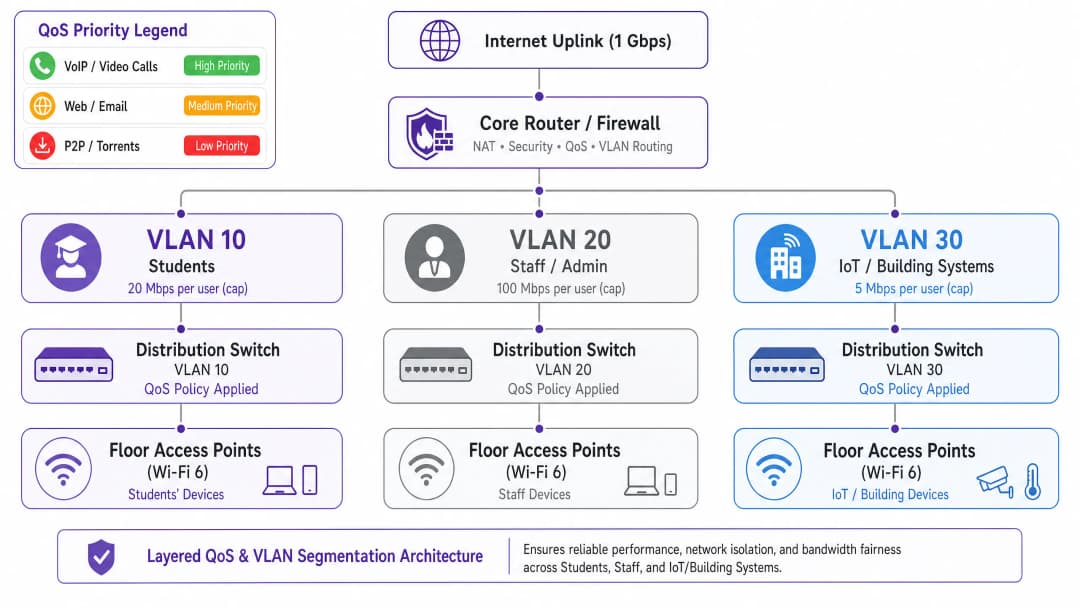
सेवा की गुणवत्ता (QoS) नीति डिज़ाइन
एक बार ट्रैफ़िक सेगमेंट हो जाने के बाद, बल्क ट्रांसफर की तुलना में लेटेंसी-सेंसिटिव एप्लिकेशन्स को प्राथमिकता देने के लिए QoS नीतियां लागू की जानी चाहिए। उद्योग मानक तंत्र डिफरेंशियल सर्विसेज कोड पॉइंट (DSCP) मार्किंग है, जिसे RFC 2474 में परिभाषित किया गया है। पैकेटों को कोर स्विचिंग फैब्रिक तक पहुँचने से पहले एक्सेस पॉइंट — इनग्रेस पॉइंट — पर वर्गीकृत और चिह्नित किया जाता है।
छात्र आवास के लिए अनुशंसित DSCP मार्किंग योजना इस प्रकार है:
| ट्रैफ़िक श्रेणी | एप्लिकेशन उदाहरण | DSCP मान | प्रति-हॉप व्यवहार (Per-Hop Behaviour) |
|---|---|---|---|
| वॉयस | VoIP, वीडियो कॉल | EF (46) | Expedited Forwarding |
| इंटरएक्टिव वीडियो | वीडियो कॉन्फ्रेंसिंग, रिमोट डेस्कटॉप | AF41 (34) | Assured Forwarding |
| स्ट्रीमिंग वीडियो | Netflix, YouTube, iPlayer | AF21 (18) | Assured Forwarding |
| वेब / ईमेल | HTTP/S, SMTP, DNS | CS0 (0) | Best Effort |
| बल्क / P2P | टोरेंट, बड़े फ़ाइल ट्रांसफर | CS1 (8) | बैकग्राउंड / स्केवेंजर |
महत्वपूर्ण रूप से, DSCP मार्किंग एक्सेस पॉइंट लेयर पर होनी चाहिए, न कि कोर राउटर पर। यदि वर्गीकरण को कोर पर टाल दिया जाता है, तो पैकेट पहले से ही बिना किसी प्राथमिकता के वायरलेस माध्यम और वितरण स्विचिंग फैब्रिक को पार कर चुके होते हैं, जिससे इसका लाभ समाप्त हो जाता है।
पहचान-आधारित नीति प्रवर्तन
छात्र आवास परिनियोजन में सबसे प्रभावशाली आर्किटेक्चरल निर्णय प्रति-डिवाइस से प्रति-उपयोगकर्ता बैंडविड्थ नीति प्रवर्तन पर जाना है। एक औसत छात्र अपने आवास में सात कनेक्टेड डिवाइस लाता है। इसलिए प्रति-डिवाइस सीमाएं अप्रभावी और अनुचित दोनों हैं: एक सिंगल लैपटॉप वाले छात्र को पूर्ण डिवाइस सूट वाले छात्र के प्रभावी आवंटन का केवल सातवां हिस्सा मिलता है।
सही दृष्टिकोण IEEE 802.1X प्रमाणीकरण है, आदर्श रूप से क्रिप्टोग्राफ़िक सुरक्षा लाभों के लिए WPA3-Enterprise के साथ। इस मॉडल के तहत:
- छात्र RADIUS सर्वर के माध्यम से अपने संस्थान या संपत्ति क्रेडेंशियल का उपयोग करके एक बार प्रमाणित होता है।
- हेडलेस उपकरणों के लिए MAC Authentication Bypass (MAB) के माध्यम से बाद के सभी डिवाइस पंजीकरण उस उपयोगकर्ता पहचान से जुड़े होते हैं।
- बैंडविड्थ नीति — मान लें, 25 Mbps कुल (aggregate) — उस उपयोगकर्ता पहचान से जुड़े सभी सत्रों के योग पर लागू होती है।
- जब कुल आवंटन से अधिक हो जाता है, तो शेपिंग नीति सभी सक्रिय सत्रों में आनुपातिक रूप से लागू होती है।
यह मॉडल प्रति-MAC थ्रॉटलिंग की तुलना में मौलिक रूप से अधिक स्केलेबल और न्यायसंगत है, और यह इन्वेस्टिगेटरी पावर्स एक्ट 2016 के तहत अनुपालन लॉगिंग के लिए आवश्यक पहचान लेयर प्रदान करता है।
एप्लिकेशन-लेयर विजिबिलिटी
गेटवे पर डीप पैकेट इंस्पेक्शन (DPI) बुद्धिमान, डेटा-संचालित नीतिगत निर्णय लेने के लिए आवश्यक एप्लिकेशन-लेयर टेलीमेट्री प्रदान करता है। DPI के बिना, बैंडविड्थ प्रबंधन अनिवार्य रूप से अंधा है: आप देख सकते हैं कि आपका अपलिंक संतृप्त है, लेकिन आप यह निर्धारित नहीं कर सकते कि कौन से एप्लिकेशन या उपयोगकर्ता इसके लिए जिम्मेदार हैं।
DPI-सक्षम एनालिटिक्स के साथ — जैसे कि WiFi Analytics द्वारा प्रदान किए गए — ऑपरेटरों को एप्लिकेशन वितरण, पीक उपयोग पैटर्न, शीर्ष उपभोक्ताओं और समय के साथ ट्रैफ़िक रुझानों की दृश्यता मिलती है। यह डेटा सीधे नीतिगत निर्णयों को सूचित करता है: यदि पीक-ऑवर ट्रैफ़िक का 55% चार स्ट्रीमिंग प्लेटफॉर्म के कारण है, तो आप वीडियो कॉन्फ्रेंसिंग या शैक्षणिक प्लेटफॉर्म को प्रभावित किए बिना परिभाषित समय के दौरान एप्लिकेशन-विशिष्ट दर सीमाएं लागू कर सकते हैं।
अपने विशिष्ट सेटअप को लेकर कोई सवाल हैं?
हमारी टीम 80,000 से अधिक वेन्यू में वेन्यू ऑपरेटरों, IT मैनेजरों और नेटवर्क इंजीनियरों के साथ काम करती है। 20 मिनट का कॉल बुक करें और हम आपको दिखाएंगे कि आपके जैसे अन्य लोगों ने इसे कैसे हल किया।
कार्यान्वयन गाइड
चरण 1: बेसलाइन मूल्यांकन (सप्ताह 1-2)
कोई भी नई नीति लागू करने से पहले, वर्तमान नेटवर्क व्यवहार का 14-दिवसीय बेसलाइन स्थापित करें। DPI क्षमताओं के साथ एक नेटवर्क प्रबंधन प्लेटफ़ॉर्म तैनात करें और कैप्चर करें: पीक समवर्ती डिवाइस संख्या, ट्रैफ़िक वॉल्यूम द्वारा एप्लिकेशन वितरण, प्रति-मंजिल और प्रति-AP उपयोग, और अपलिंक संतृप्ति आवृत्ति। यह डेटा बाद के सभी नीतिगत निर्णयों की नींव है और ROI प्रदर्शित करने के लिए आवश्यक पहले/बाद की तुलना प्रदान करता है।
चरण 2: VLAN सेगमेंटेशन परिनियोजन (सप्ताह 3-4)
ऊपर वर्णित तीन-VLAN आर्किटेक्चर को तैनात करें। इसके लिए कोर राउटर/फ़ायरवॉल (इंटर-VLAN राउटिंग और ACL नीतियां), वितरण स्विच (ट्रंक पोर्ट कॉन्फ़िगरेशन और VLAN टैगिंग), और एक्सेस पॉइंट (SSID-टू-VLAN मैपिंग) पर कॉन्फ़िगरेशन परिवर्तन की आवश्यकता होती है। मौजूदा परिनियोजन के लिए, यह आमतौर पर नए हार्डवेयर की आवश्यकता के बिना एक रखरखाव विंडो में पूरा किया जा सकता है, बशर्ते मौजूदा स्विचिंग इन्फ्रास्ट्रक्चर 802.1Q ट्रंकिंग का समर्थन करता हो।
चरण 3: QoS नीति सक्रियण (सप्ताह 5)
एक्सेस पॉइंट लेयर पर DSCP मार्किंग को सक्रिय करें और कोर राउटर पर प्रति-हॉप व्यवहार को कॉन्फ़िगर करें। सत्यापित करें कि पैकेट कैप्चर टूल का उपयोग करके एंड-टू-एंड DSCP मार्किंग का सम्मान किया जा रहा है। इस चरण में सामान्य विफलता मोड में अपस्ट्रीम ISP राउटर द्वारा DSCP मानों को रीमार्क करना या हटाना शामिल है — अपने ISP से सत्यापित करें कि क्या आपके ट्रांजिट लिंक पर DSCP का सम्मान किया जाता है।
चरण 4: पहचान-आधारित बैंडविड्थ नीतियां (सप्ताह 6-7)
प्रमाणीकरण को PSK या MAC-आधारित एक्सेस से 802.1X पर माइग्रेट करें। एक RADIUS सर्वर (FreeRADIUS या क्लाउड-होस्टेड समकक्ष) तैनात करें और मानक RADIUS विशेषताओं का उपयोग करके प्रति-उपयोगकर्ता बैंडविड्थ विशेषताओं को कॉन्फ़िगर करें: WISPr-Bandwidth-Max-Up और WISPr-Bandwidth-Max-Down। हेडलेस उपकरणों के लिए एक MAB स्व-पंजीकरण पोर्टल लागू करें। पूर्ण रोलआउट से पहले एक पायलट फ्लोर के साथ परीक्षण करें।
चरण 5: डायनेमिक शेपिंग नियम (सप्ताह 8)
कोर राउटर या बैंडविड्थ प्रबंधन उपकरण पर समय-समय पर शेपिंग नियमों को कॉन्फ़िगर करें। एक अनुशंसित नीति संरचना:
- ऑफ-पीक (00:00–08:00): बेसलाइन आवंटन से 2 गुना तक बर्स्ट, P2P अप्रतिबंधित।
- मानक (08:00–18:00): बेसलाइन आवंटन, P2P को 5 Mbps तक थ्रॉटल किया गया।
- पीक (18:00–23:00): बेसलाइन आवंटन, P2P को 1 Mbps तक थ्रॉटल किया गया, स्ट्रीमिंग को 8 Mbps पर सीमित किया गया, वीडियो कॉन्फ्रेंसिंग को प्राथमिकता दी गई।

सर्वोत्तम प्रथाएं
अपनी बैंडविड्थ नीति प्रकाशित करें। पारदर्शिता निवासियों की शिकायतों को कम करती है और उम्मीदें तय करती है। किरायेदारी समझौतों और स्वागत पैकों में बैंडविड्थ आवंटन और उचित-उपयोग नीतियों को शामिल करें। यह एक जोखिम शमन उपाय भी है: प्रलेखित नीतियां निवासी विवाद की स्थिति में जोखिम को कम करती हैं।
अपने अपलिंक को सही आकार दें। एक व्यावहारिक बेसलाइन प्रति बेड 1 Mbps है, जिसमें प्रति बेड 3 Mbps तक की बर्स्ट क्षमता है। 400-बेड वाली संपत्ति के लिए, इसका मतलब 1.2 Gbps बर्स्ट सर्किट के साथ न्यूनतम 400 Mbps अपलिंक है। अपलिंक को कम क्षमता में रखने से सभी डाउनस्ट्रीम QoS नीतियां कम प्रभावी हो जाती हैं।
P2P ट्रैफ़िक को पूरी तरह से ब्लॉक न करें। पूर्ण प्रतिबंध उपयोगकर्ताओं को व्यावसायिक VPN सेवाओं की ओर ले जाते हैं, जो आपके DPI एनालिटिक्स को अंधा कर देता है और ट्रैफ़िक प्रबंधन को काफी कठिन बना देता है। P2P को स्केवेंजर-क्लास आवंटन (1-2 Mbps) तक थ्रॉटल करें और इसे कम प्राथमिकता दें। आप दृश्यता बनाए रखते हैं, बैंडविड्थ प्रभाव को कम करते हैं, और VPN अपनाने की होड़ से बचते हैं।
** can-IoT विकास की योजना बनाएं।** भवन प्रबंधन प्रणाली, स्मार्ट मीटर, CCTV और एक्सेस कंट्रोल तेजी से IP-कनेक्टेड हो रहे हैं। सुनिश्चित करें कि ये डिवाइस सख्त फ़ायरवॉल इग्रेस नीतियों के साथ पृथक VLAN पर हैं। जैसे-जैसे उपकरणों की संख्या बढ़ती है, सालाना अपनी IoT VLAN नीति की समीक्षा करें।
एक ऑडिट ट्रेल बनाए रखें। इन्वेस्टिगेटरी पावर्स एक्ट 2016 के तहत, यूके के ऑपरेटरों को कनेक्शन रिकॉर्ड बनाए रखना आवश्यक है। सुनिश्चित करें कि आपका लॉगिंग इन्फ्रास्ट्रक्चर अनुपालन के लिए आवश्यक डेटा कलेक्ट करता है, और आपका ऑडिट ट्रेल छेड़छाड़-रोधी (tamper-evident) है। ऑडिट ट्रेल आवश्यकताओं के विस्तृत विवरण के लिए, Explain what is audit trail for IT Security in 2026 देखें।
समस्या निवारण और जोखिम शमन
सामान्य विफलता मोड 1: ISP द्वारा DSCP रीमार्किंग
कई ISP ट्रांजिट सीमा पर DSCP मानों को रीमार्क या हटा देते हैं, जिससे इंटरनेट से गुजरने वाले ट्रैफ़िक के लिए आपकी QoS नीतियां अप्रभावी हो जाती हैं। शमन: एंड-टू-एंड QoS के लिए इस पर भरोसा करने से पहले अपने ISP के साथ DSCP व्यवहार को सत्यापित करें। आंतरिक ट्रैफ़िक (जैसे, स्थानीय कैशिंग सर्वर) के लिए, DSCP का हमेशा सम्मान किया जाएगा। इंटरनेट-बाउंड ट्रैफ़िक के लिए, अपस्ट्रीम में DSCP का सम्मान होने की उम्मीद करने के बजाय अपने स्वयं के गेटवे पर कतार प्रबंधन (queue management) और शेपिंग पर भरोसा करें।
सामान्य विफलता मोड 2: DHCP पूल की समाप्ति
प्रति छात्र सात उपकरणों और सैकड़ों निवासियों के साथ, DHCP पूल की समाप्ति एक वास्तविक परिचालन जोखिम है। सुनिश्चित करें कि आपके छात्र VLAN सबनेट का आकार पर्याप्त हेडरूम के साथ हो: 200-बेड वाली संपत्ति के लिए एक /21 (2,046 उपयोग करने योग्य पते) एक उचित न्यूनतम है। निष्क्रिय उपकरणों से पते तुरंत वापस लेने के लिए कम DHCP लीज समय (4-8 घंटे) लागू करें।
सामान्य विफलता मोड 3: VPN बाईपास
व्यावसायिक VPN सेवाओं का उपयोग करने वाले छात्र अपने ट्रैफ़िक को एन्क्रिप्ट करेंगे, जिससे एप्लिकेशन-लेयर वर्गीकरण बाईपास हो जाएगा। शमन: IP स्तर पर फ्लो-आधारित शेपिंग लागू करें — पेलोड निरीक्षण के बिना भी, फ्लो वॉल्यूम और अवधि के आधार पर VPN ट्रैफ़िक को अभी भी दर-सीमित (rate-limited) किया जा सकता है। इसके अतिरिक्त, सुनिश्चित करें कि आपकी P2P थ्रॉटलिंग नीति केवल पहचान योग्य P2P प्रोटोकॉल पर ही नहीं, बल्कि एन्क्रिप्टेड फ्लो पर भी लागू होती है।
सामान्य विफलता मोड 4: सेगमेंटेशन के बाद कनेक्टिविटी समस्याएं
VLAN सेगमेंटेशन के बाद, निवासियों को कनेक्टिविटी समस्याओं का सामना करना पड़ सकता है यदि उनके डिवाइस गलत तरीके से गलत VLAN में रखे गए हैं या यदि इंटर-VLAN राउटिंग गलत तरीके से कॉन्फ़िगर की गई है। कनेक्टिविटी समस्याओं के लिए एक संरचित समस्या निवारण दृष्टिकोण के लिए, Solving the Connected but No Internet Error on Guest WiFi देखें।
ROI और व्यावसायिक प्रभाव
एक उचित रूप से आर्किटेक्टेड बैंडविड्थ प्रबंधन रणनीति के लिए व्यावसायिक मामला सीधा है। प्राथमिक लागत चालक सपोर्ट ओवरहेड और निवासी संतुष्टि हैं, दोनों ही सीधे नेटवर्क प्रदर्शन से प्रभावित होते हैं।
एक फ्लैट नेटवर्क चलाने वाले 400-बेड के परिनियोजन में, टर्म टाइम के दौरान प्रति सप्ताह 30-50 सपोर्ट टिकट वॉल्यूम होना आम बात है। सुधार के बाद के परिनियोजन लगातार 60-80% टिकटों की कमी की रिपोर्ट करते हैं, जो IT स्टाफ के समय और तीसरे पक्ष के सपोर्ट लागतों में महत्वपूर्ण कमी का प्रतिनिधित्व करता है।
निवासी संतुष्टि स्कोर — जो उद्देश्य-निर्मित छात्र आवास (PBSA) बाजार में तेजी से एक प्रतिस्पर्धी अंतरक (differentiator) बनता जा रहा है — सीधे नेटवर्क प्रदर्शन से संबंधित हैं। अच्छी तरह से प्रबंधित नेटवर्क वाली संपत्तियां उच्च नवीनीकरण दरों और मजबूत अधिभोग (occupancy) की रिपोर्ट करती हैं।
अनुपालन के दृष्टिकोण से, इन्वेस्टिगेटरी पावर्स एक्ट 2016 या GDPR डेटा हैंडलिंग आवश्यकताओं के गैर-अनुपालन की लागत अनुपालन लॉगिंग इन्फ्रास्ट्रक्चर को लागू करने की लागत से काफी अधिक है। इस गाइड में वर्णित पहचान-आधारित आर्किटेक्चर बैंडविड्थ प्रबंधन कार्यान्वयन के उप-उत्पाद (by-product) के रूप में अनुपालन के लिए आवश्यक ऑडिट ट्रेल प्रदान करता है।
मिश्रित-उपयोग वाली संपत्तियों — भूतल पर खुदरा या खाद्य और पेय पदार्थों के साथ छात्र आवास — का प्रबंधन करने वाले hospitality क्षेत्र के ऑपरेटरों के लिए, वही VLAN सेगमेंटेशन सिद्धांत लागू होते हैं, जिसमें किसी भी भुगतान-प्रसंस्करण नेटवर्क सेगमेंट के लिए PCI DSS अनुपालन आवश्यकताओं को जोड़ा जाता है।
WiFi Analytics लेयर ROI का एक और आयाम जोड़ती है: एप्लिकेशन-लेयर ट्रैफ़िक डेटा बुनियादी ढांचे के निवेश निर्णयों को सूचित कर सकता है, क्षमता अपग्रेड ट्रिगर्स की पहचान कर सकता है, और अनुमानों के बजाय वास्तविक उपयोग पैटर्न के आधार पर ISP अनुबंधों पर फिर से बातचीत करने के लिए साक्ष्य आधार प्रदान कर सकता है।
मुख्य परिभाषाएं
VLAN (Virtual Local Area Network)
IEEE 802.1Q टैगिंग का उपयोग करके एक भौतिक स्विचिंग बुनियादी ढांचे के भीतर बनाया गया एक लॉजिकल नेटवर्क सेगमेंट। प्रत्येक VLAN एक अलग ब्रॉडकास्ट डोमेन के रूप में कार्य करता है, जो अलग भौतिक हार्डवेयर की आवश्यकता के बिना उपयोगकर्ता श्रेणियों के बीच ट्रैफ़िक अलगाव प्रदान करता है।
IT टीमें एक ही भौतिक बुनियादी ढांचे पर छात्र, स्टाफ और IoT ट्रैफ़िक को अलग करने के लिए VLAN का उपयोग करती हैं। VLAN सेगमेंटेशन के बिना, एक फ्लैट नेटवर्क सभी ट्रैफ़िक श्रेणियों को एक-दूसरे के सामने उजागर करता है और प्रति-श्रेणी बैंडविड्थ नीतियों को स्पष्ट रूप से लागू करना असंभव बना देता है।
QoS (Quality of Service)
नेटवर्क तंत्र का एक सेट जो दूसरों की तुलना में कुछ ट्रैफ़िक प्रकारों को प्राथमिकता देता है ताकि यह सुनिश्चित किया सके कि लेटेंसी-सेंसिटिव एप्लिकेशन्स (VoIP, वीडियो कॉन्फ्रेंसिंग) को कंजेशन की अवधि के दौरान अधिमान्य (preferential) उपचार मिले।
छात्र आवास में, QoS पीक आवर्स के दौरान वीडियो कॉन्फ्रेंसिंग के उपयोगी होने और अनुपयोगी होने के बीच का अंतर है। QoS के बिना, एक बड़ा डाउनलोड चलाने वाला एक अकेला उपयोगकर्ता सेगमेंट पर हर दूसरे उपयोगकर्ता के लिए लेटेंसी बढ़ा सकता है।
DSCP (Differentiated Services Code Point)
IP पैकेट हेडर में एक 6-बिट फ़ील्ड, जिसे RFC 2474 में परिभाषित किया गया है, जिसका उपयोग पैकेटों को ट्रैफ़िक श्रेणियों में वर्गीकृत करने के लिए किया जाता है। प्रत्येक श्रेणी को प्रत्येक नेटवर्क डिवाइस पर एक परिभाषित प्रति-हॉप व्यवहार (PHB) प्राप्त होता है - वॉयस के लिए Expedited Forwarding, वीडियो के लिए Assured Forwarding, मानक वेब ट्रैफ़िक के लिए Best Effort।
एंटरप्राइज़ नेटवर्क में QoS को लागू करने के लिए DSCP मानक तंत्र है। IT टीमें इनग्रेस पर पैकेटों को उपयुक्त DSCP मान के साथ चिह्नित करने के लिए एक्सेस पॉइंट्स को कॉन्फ़िगर करती हैं, जिससे यह सुनिश्चित होता है कि पूरे नेटवर्क में प्राथमिकता उपचार लगातार लागू हो।
IEEE 802.1X
पोर्ट-आधारित नेटवर्क एक्सेस कंट्रोल के लिए एक IEEE मानक जो LAN या WLAN से कनेक्ट होने वाले उपकरणों के लिए एक प्रमाणीकरण ढांचा प्रदान करता है। यह Extensible Authentication Protocol (EAP) का उपयोग करता है और क्रेडेंशियल सत्यापन के लिए एक RADIUS सर्वर की आवश्यकता होती है।
802.1X पहचान-आधारित बैंडविड्थ नीति प्रवर्तन की नींव है। जब कोई छात्र 802.1X के माध्यम से प्रमाणित होता है, तो उसकी पहचान नेटवर्क को ज्ञात होती है, जिससे प्रति-डिवाइस नीतियों के बजाय प्रति-उपयोगकर्ता बैंडविड्थ नीतियां सक्षम होती हैं।
Traffic Shaping
एक बैंडविड्थ प्रबंधन तकनीक जो एक परिभाषित नीति के अनुरूप होने के लिए ट्रैफ़िक प्रवाह की दर और समय को नियंत्रित करती है। पोलिसिंग (जो अतिरिक्त ट्रैफ़िक को छोड़ देती है) के विपरीत, शेपिंग अतिरिक्त ट्रैफ़िक को कतारबद्ध (queue) करती है और क्षमता उपलब्ध होने पर इसे प्रसारित करती है।
TCP-आधारित ट्रैफ़िक (वेब, स्ट्रीमिंग) के लिए पोलिसिंग की तुलना में ट्रैफ़िक शेपिंग बेहतर है क्योंकि यह TCP रीट्रांसमिशन को ट्रिगर करने से बचाता है, जो बैंडविड्थ को बर्बाद करता है। पोलिसिंग UDP-आधारित ट्रैफ़िक (P2P, कुछ गेमिंग) के लिए उपयुक्त है जहाँ रीट्रांसमिशन कोई कारक नहीं है।
DPI (Deep Packet Inspection)
एक नेटवर्क विश्लेषण तकनीक जो ट्रैफ़िक उत्पन्न करने वाले एप्लिकेशन या प्रोटोकॉल की पहचान करने के लिए पैकेट की पूरी सामग्री (हेडर से परे) की जांच करती है। DPI एप्लिकेशन-अवेयर QoS नीतियों को सक्षम बनाता है और विस्तृत ट्रैफ़िक एनालिटिक्स प्रदान करता है।
DPI वह तकनीक है जो एक ऑपरेटर को Netflix ट्रैफ़िक और वीडियो कॉल के बीच अंतर करने में सक्षम बनाती है, भले ही दोनों पोर्ट 443 पर HTTPS का उपयोग करते हों। DPI के बिना, एप्लिकेशन-अवेयर बैंडविड्थ नीतियां संभव नहीं हैं।
MAB (MAC Authentication Bypass)
उन उपकरणों के लिए एक फ़ॉलबैक प्रमाणीकरण तंत्र जो IEEE 802.1X का समर्थन नहीं करते हैं। डिवाइस के MAC पते का उपयोग प्रमाणीकरण क्रेडेंशियल के रूप में किया जाता है, जिसे RADIUS सर्वर या स्थानीय डेटाबेस के खिलाफ सत्यापित किया जाता है।
MAB का उपयोग छात्र आवास में हेडलेस उपकरणों - गेमिंग कंसोल, स्मार्ट टीवी, IoT सेंसर - के लिए किया जाता है जो 802.1X प्रमाणीकरण नहीं कर सकते हैं। एक स्व-पंजीकरण पोर्टल के साथ संयुक्त, MAB इन उपकरणों को एक उपयोगकर्ता पहचान से जोड़ने और उसी प्रति-उपयोगकर्ता बैंडविड्थ नीतियों के अधीन करने में सक्षम बनाता है।
Bandwidth Contention
वह स्थिति जो तब उत्पन्न होती है जब कई उपयोगकर्ता या उपकरण एक ही सीमित बैंडविड्थ संसाधन के लिए प्रतिस्पर्धा करते हैं, जिसके परिणामस्वरूप सभी पक्षों के लिए थ्रूपुट कम हो जाता है और लेटेंसी बढ़ जाती है। उच्च-घनत्व वाले वातावरण में अधिकांश कथित नेटवर्क प्रदर्शन समस्याओं का मूल कारण कन्टेंशन है।
बैंडविड्थ समस्याओं के निदान के लिए कन्टेंशन को समझना आवश्यक है। 1 Gbps अपलिंक और 400 समवर्ती उपयोगकर्ताओं वाला एक नेटवर्क, जिनमें से प्रत्येक 3 Mbps की खपत करता है, कन्टेंशन में है (1.2 Gbps मांग बनाम 1 Gbps आपूर्ति)। QoS और ट्रैफ़िक शेपिंग कन्टेंशन का प्रबंधन करते हैं; वे इसे समाप्त नहीं करते हैं।
WPA3-Enterprise
एंटरप्राइज़ नेटवर्क के लिए WiFi Protected Access सुरक्षा प्रोटोकॉल की नवीनतम पीढ़ी, जिसे WiFi Alliance द्वारा परिभाषित किया गया है। WPA3-Enterprise 192-बिट न्यूनतम-शक्ति क्रिप्टोग्राफी को अनिवार्य करता है और WPA2 की तुलना में ऑफ़लाइन डिक्शनरी हमलों के खिलाफ मजबूत सुरक्षा प्रदान करता है।
WPA3-Enterprise 802.1X का उपयोग करने वाले छात्र आवास परिनियोजनों के लिए अनुशंसित प्रमाणीकरण मोड है। यह GDPR अनुपालन के लिए आवश्यक क्रिप्टोग्राफ़िक सुरक्षा प्रदान करता है और वायरलेस माध्यम पर क्रेडेंशियल इंटरसेप्शन से बचाता है।
हल किए गए उदाहरण
मैनचेस्टर में एक 400-बेड वाला उद्देश्य-निर्मित छात्र आवास (PBSA) ब्लॉक एक एकल SSID और वैश्विक 10 Mbps प्रति-डिवाइस सीमा के साथ एक फ्लैट नेटवर्क चला रहा है। पीक आवर्स (19:00–23:00) के दौरान, नेटवर्क वीडियो कॉन्फ्रेंसिंग के लिए प्रभावी रूप से अनुपयोगी है। सपोर्ट टिकट प्रति सप्ताह 40 पर चल रहे हैं। ऑपरेटर के पास 1 Gbps अपलिंक है और केवल सॉफ्टवेयर कॉन्फ़िगरेशन परिवर्तनों के लिए बजट है - कोई नया हार्डवेयर नहीं। आप इसका समाधान कैसे करेंगे?
चरण 1 - बेसलाइन ऑडिट (दिन 1-7): एप्लिकेशन वितरण, पीक समवर्ती डिवाइस संख्या और प्रति-AP उपयोग को कैप्चर करने के लिए मौजूदा गेटवे पर DPI-सक्षम मॉनिटरिंग तैनात करें। यह साक्ष्य आधार स्थापित करता है और प्राथमिक बैंडविड्थ उपभोक्ताओं की पहचान करता है।
चरण 2 - VLAN सेगमेंटेशन (दिन 8-14): मौजूदा स्विचिंग बुनियादी ढांचे पर तीन VLAN कॉन्फ़िगर करें (यह मानते हुए कि स्विच 802.1Q-सक्षम हैं, जो 2015 के बाद के किसी भी परिनियोजन में मानक है)। छात्र SSID को VLAN 10 से मैप करें, VLAN 20 से मैप किया गया एक स्टाफ SSID बनाएं, और IoT उपकरणों को VLAN 30 पर माइग्रेट करें। उपयुक्त ACL के साथ फ़ायरवॉल पर इंटर-VLAN राउटिंग कॉन्फ़िगर करें।
चरण 3 - QoS सक्रियण (दिन 15): एक्सेस पॉइंट लेयर पर DSCP मार्किंग सक्षम करें। वीडियो कॉन्फ्रेंसिंग ट्रैफ़िक (Zoom, Teams, Google Meet) को AF41 के रूप में वर्गीकृत करें। स्ट्रीमिंग को AF21 के रूप में वर्गीकृत करें। P2P को CS1 के रूप में वर्गीकृत करें। पैकेट कैप्चर के साथ सत्यापित करें।
चरण 4 - प्रति-उपयोगकर्ता बैंडविड्थ नीति (दिन 16-21): मौजूदा RADIUS बुनियादी ढांचे का उपयोग करके प्रमाणीकरण को 802.1X पर माइग्रेट करें (या VM पर FreeRADIUS तैनात करें)। प्रति-उपयोगकर्ता बैंडविड्थ विशेषताएँ सेट करें: पीक के दौरान 25 Mbps कुल, ऑफ-पीक के दौरान 50 Mbps। हेडलेस उपकरणों के लिए MAB पोर्टल लागू करें।
चरण 5 - समय-समय पर शेपिंग (दिन 22): पीक-ऑवर नियम कॉन्फ़िगर करें: P2P को 1 Mbps तक थ्रॉटल किया गया, स्ट्रीमिंग को प्रति उपयोगकर्ता 8 Mbps पर सीमित किया गया, वीडियो कॉन्फ्रेंसिंग को प्रति सक्रिय सत्र न्यूनतम 5 Mbps की गारंटी के साथ प्राथमिकता दी गई।
परिणाम: 30 दिनों के भीतर, सपोर्ट टिकट 78% गिर गए (प्रति सप्ताह 40 से 9 तक)। भौतिक अपलिंक में कोई बदलाव न होने के बावजूद प्रति उपयोगकर्ता औसत पीक-ऑवर थ्रूपुट में 140% की वृद्धि हुई। पीक आवर्स के दौरान वीडियो कॉन्फ्रेंसिंग विश्वसनीय रूप से उपयोगी हो गई।
एडिनबर्ग में एक 1,200-बेड वाले विश्वविद्यालय के छात्र निवास में मिश्रित बुनियादी ढांचा है: मंजिलों 1-4 पर पुराने 802.11ac एक्सेस पॉइंट और मंजिलों 5-8 पर नए WiFi 6 हार्डवेयर। कोई एप्लिकेशन-लेयर विजिबिलिटी नहीं है, और नेटवर्क प्रबंधन टीम के पास कोई बेसलाइन डेटा नहीं है। विश्वविद्यालय के IT निदेशक पूर्ण हार्डवेयर रिफ्रेश के बिना 90 दिनों के भीतर पीक-ऑवर कंजेशन को 30% तक कम करना चाहते हैं। आप इस पर कैसे काम करेंगे?
चरण 1 - टेलीमेट्री परिनियोजन (दिन 1-30): पुराने 802.11ac हार्डवेयर सहित सभी एक्सेस पॉइंट्स पर DPI क्षमताओं के साथ एक एकीकृत नेटवर्क प्रबंधन प्लेटफ़ॉर्म तैनात करें। अधिकांश एंटरप्राइज़ NMS प्लेटफ़ॉर्म SNMP और syslog के माध्यम से मिश्रित-पीढ़ी के हार्डवेयर का समर्थन करते हैं। 30 दिनों का बेसलाइन डेटा कैप्चर करें: एप्लिकेशन वितरण, प्रति-मंजिल उपयोग, पीक समवर्ती डिवाइस संख्या, और उपयोगकर्ता पहचान द्वारा शीर्ष बैंडविड्थ उपभोक्ता।
चरण 2 - डेटा विश्लेषण और नीति डिज़ाइन (दिन 31-35): बेसलाइन डेटा का विश्लेषण करें। इस परिदृश्य में, डेटा से पता चला कि पीक-ऑवर ट्रैफ़िक का 55% चार स्ट्रीमिंग प्लेटफॉर्म के कारण था। एप्लिकेशन-अवेयर QoS नीतियां डिज़ाइन करें: 18:00-23:00 के दौरान स्ट्रीमिंग प्लेटफॉर्म को प्रति उपयोगकर्ता 8 Mbps तक थ्रॉटल किया गया, वीडियो कॉन्फ्रेंसिंग और शैक्षणिक प्लेटफॉर्म (VLE, लाइब्रेरी डेटाबेस) को थ्रॉटलिंग से बाहर रखा गया और AF41 प्राथमिकता दी गई।
चरण 3 - नीति परिनियोजन (दिन 36-50): एक नियंत्रित पायलट के रूप में WiFi 6 मंजिलों (5-8) से शुरू करते हुए QoS नीतियां तैनात करें। 14 दिनों तक निगरानी रखें। पुराने मंजिलों पर रोल आउट करने से पहले सत्यापित करें कि पीक-ऑवर कंजेशन मेट्रिक्स में सुधार हुआ है।
चरण 4 - पहचान माइग्रेशन (दिन 51-75): प्रति-उपयोगकर्ता बैंडविड्थ प्रवर्तन के साथ प्रमाणीकरण को 802.1X पर माइग्रेट करें। यह परिचालन रूप से सबसे जटिल चरण है: छात्र पहचान प्रदाता के साथ RADIUS एकीकरण के लिए विश्वविद्यालय की IT टीम के साथ समन्वय करें। गेमिंग कंसोल और स्मार्ट टीवी के लिए MAB स्व-पंजीकरण लागू करें।
चरण 5 - सत्यापन और रिपोर्टिंग (दिन 76-90): 30-दिवसीय बेसलाइन के खिलाफ कार्यान्वयन के बाद के मेट्रिक्स की तुलना करें। पीक-ऑवर कंजेशन में कमी, सपोर्ट टिकट वॉल्यूम और एप्लिकेशन वितरण परिवर्तनों पर रिपोर्ट करें।
परिणाम: पीक-ऑवर कंजेशन में 35% की कमी (30% के लक्ष्य से अधिक), निवासी संतुष्टि सर्वेक्षण स्कोर में मापने योग्य सुधार, और हार्डवेयर रिफ्रेश बिजनेस केस के लिए एक प्रलेखित साक्ष्य आधार।
अभ्यास प्रश्न
Q1. आप एक 600-बेड वाले PBSA ऑपरेटर के IT निदेशक हैं। आपका वर्तमान नेटवर्क एक साझा पासवर्ड के साथ WPA2-PSK का उपयोग करता है जिसे मासिक रूप से बदला जाता है। छात्र शाम के समय खराब प्रदर्शन की शिकायत कर रहे हैं। आपका अपलिंक 500 Mbps है। कोई भी बजट खर्च करने से पहले, आपको सबसे पहले क्या तैनात करना चाहिए, और आप कौन सा विशिष्ट डेटा कैप्चर करने का प्रयास कर रहे हैं?
संकेत: आप बेसलाइन डेटा के बिना उचित नीतिगत निर्णय नहीं ले सकते। कौन सा टूल आपको नए हार्डवेयर की आवश्यकता के बिना एप्लिकेशन-लेयर विजिबिलिटी देता है?
मॉडल उत्तर देखें
मौजूदा गेटवे पर एक DPI-सक्षम नेटवर्क मॉनिटरिंग टूल तैनात करें - अधिकांश एंटरप्राइज़ गेटवे उपकरण सॉफ़्टवेयर सक्रियण या प्रबंधन प्लेटफ़ॉर्म एकीकरण के माध्यम से इसका समर्थन करते हैं। इसे 14-30 दिनों के लिए चलाएं ताकि कैप्चर किया जा सके: (1) पीक आवर्स के दौरान ट्रैफ़िक वॉल्यूम द्वारा एप्लिकेशन वितरण, (2) पीक समवर्ती डिवाइस संख्या, (3) हॉटस्पॉट की पहचान करने के लिए प्रति-AP उपयोग, और (4) MAC पते द्वारा शीर्ष बैंडविड्थ उपभोक्ता। यह डेटा आपको बताएगा कि समस्या अपलिंक संतृप्ति (क्षमता अपग्रेड या ट्रैफ़िक शेपिंग की आवश्यकता), विशिष्ट AP पर कन्टेंशन (AP प्लेसमेंट परिवर्तन या लोड बैलेंसिंग की आवश्यकता), या असमान रूप से अधिक बैंडविड्थ की खपत करने वाले भारी उपयोगकर्ताओं की एक छोटी संख्या (प्रति-उपयोगकर्ता नीति प्रवर्तन की आवश्यकता) है। इस डेटा के बिना, कोई भी सुधार केवल अनुमान है। बेसलाइन संपत्ति के मालिक को ROI प्रदर्शित करने के लिए आवश्यक पहले/बाद की तुलना भी प्रदान करता है।
Q2. एक 300-बेड वाले हॉल में एक छात्र रिपोर्ट करता है कि आपके द्वारा प्रमाणीकरण को 802.1X पर माइग्रेट करने के बाद उनका गेमिंग कंसोल नेटवर्क से कनेक्ट नहीं हो पा रहा है। वे PlayStation 5 का उपयोग कर रहे हैं, जो मूल रूप से 802.1X का समर्थन नहीं करता है। आप अपनी पहचान-आधारित बैंडविड्थ नीतियों को बायपास करने वाले सुरक्षा अपवाद को बनाए बिना इसे कैसे हल करेंगे?
संकेत: बैंडविड्थ नीति प्रवर्तन उद्देश्यों के लिए समाधान को डिवाइस और छात्र की पहचान के बीच संबंध बनाए रखना चाहिए।
मॉडल उत्तर देखें
एक स्व-सेवा डिवाइस पंजीकरण पोर्टल के साथ MAC Authentication Bypass (MAB) लागू करें। वर्कफ़्लो: (1) छात्र एक प्रमाणित डिवाइस (अपने लैपटॉप या फोन) से कैप्टिव पोर्टल URL (जैसे, register.accommodation.ac.uk) पर जाता है। (2) वे अपने गेमिंग कंसोल का MAC पता दर्ज करते हैं और स्वामित्व की पुष्टि करते हैं। (3) पोर्टल RADIUS डेटाबेस में MAC पता जोड़ता है, जो छात्र की उपयोगकर्ता पहचान से जुड़ा होता है। (4) जब PlayStation कनेक्ट होता है, तो नेटवर्क MAB निष्पादित करता है - यह डिवाइस का MAC पता RADIUS सर्वर पर भेजता, जो संबद्ध उपयोगकर्ता पहचान और बैंडविड्थ नीति विशेषताओं को लौटाता है। (5) कंसोल को छात्र के अन्य उपकरणों के समान VLAN में रखा जाता है और उसी कुल प्रति-उपयोगकर्ता बैंडविड्थ नीति के अधीन किया जाता है। यह दृष्टिकोण बैंडविड्थ प्रवर्तन के लिए पहचान संबंध बनाए रखता है, अनुपालन के लिए एक ऑडिट ट्रेल प्रदान करता है, और छात्र को IT सहायता से संपर्क करने की आवश्यकता नहीं होती है। सुनिश्चित करें कि पंजीकरण पोर्टल यह सत्यापित करता है कि पता स्पूफिंग को रोकने के लिए MAC पता पहले से ही किसी अन्य उपयोगकर्ता के लिए पंजीकृत नहीं है।
Q3. आपके DPI एनालिटिक्स से पता चलता है कि आपके छात्र आवास नेटवर्क पर पीक-ऑवर बैंडविड्थ का 62% वीडियो स्ट्रीमिंग (Netflix, Disney+, YouTube) द्वारा खपत किया जाता है। पीक आवर्स के दौरान आपका अपलिंक 85% उपयोग पर है। आपके पास दो विकल्प हैं: (A) अपलिंक को 2× क्षमता में अपग्रेड करें, या (B) पीक आवर्स के दौरान स्ट्रीमिंग को प्रति उपयोगकर्ता 8 Mbps पर सीमित करने के लिए एप्लिकेशन-अवेयर ट्रैफ़िक शेपिंग लागू करें। आप किसकी अनुशंसा करते हैं, और क्यों?
संकेत: प्रत्येक दृष्टिकोण की अल्पकालिक लागत और दीर्घकालिक स्केलेबिलिटी दोनों पर विचार करें। यदि आप केवल क्षमता बढ़ाते हैं तो मांग का क्या होता है?
मॉडल उत्तर देखें
प्राथमिक हस्तक्षेप के रूप में विकल्प B (एप्लिकेशन-अवेयर ट्रैफ़िक शेपिंग) की सिफारिश करें, यदि आवश्यक हो तो मध्यम अवधि के अनुवर्ती के रूप में विकल्प A के साथ। कारण: (1) ट्रैफ़िक शेपिंग के बिना अपलिंक क्षमता बढ़ाना अंतर्निहित समस्या को हल नहीं करता है - यह इसे टाल देता है। उपलब्ध क्षमता को भरने के लिए स्ट्रीमिंग खपत का विस्तार होगा (बैंडविड्थ पर लागू जेवन्स विरोधाभास), और आप 12-18 महीनों के भीतर फिर से 85% उपयोग पर आ जाएंगे। (2) पीक आवर्स के दौरान स्ट्रीमिंग को प्रति उपयोगकर्ता 8 Mbps पर सीमित करने का उपयोगकर्ता अनुभव पर नगण्य प्रभाव पड़ता है - Netflix HD स्ट्रीमिंग के लिए 5 Mbps और 4K के लिए 25 Mbps की सिफारिश करता है। एक 8 Mbps की सीमा एक अच्छा HD अनुभव प्रदान करती है। (3) 62% स्ट्रीमिंग हिस्सेदारी का मतलब है कि स्ट्रीमिंग पर प्रति-उपयोगकर्ता 8 Mbps की सीमा, जो 200 सक्रिय उपयोगकर्ताओं की एक विशिष्ट पीक समवर्तीता पर लागू होती है, स्ट्रीमिंग मांग को लगभग 425 Mbps से घटाकर लगभग 160 Mbps कर देती है - स्ट्रीमिंग ट्रैफ़िक में 62% की कमी, जिससे कुल उपयोग लगभग 55% हो जाता है। (4) यदि गेटवे हार्डवेयर इसका समर्थन करता है तो ट्रैफ़िक शेपिंग कॉन्फ़िगरेशन की लागत लगभग शून्य है; 2× अपलिंक अपग्रेड की लागत एक आवर्ती OpEx वृद्धि है। पहले ट्रैफ़िक शेपिंग लागू करें, 30 दिनों में प्रभाव को मापें, और फिर इस पर साक्ष्य-आधारित निर्णय लें कि क्या अपलिंक अपग्रेड की अभी भी आवश्यकता है।
इस श्रृंखला में आगे पढ़ें
अपार्टमेंट्स और को-वर्किंग के लिए WPA2-Enterprise बनाम Personal
यह आधिकारिक तकनीकी संदर्भ गाइड अपार्टमेंट और को-वर्किंग स्पेस जैसे मल्टी-टेनेंट वातावरण के लिए WPA2-Personal के मुकाबले WPA2-Enterprise का मूल्यांकन करती है। यह नेटवर्क आर्किटेक्ट्स और IT प्रबंधकों को 802.1X प्रमाणीकरण, डायनामिक VLAN असाइनमेंट और सुरक्षा अनुपालन में कार्रवाई योग्य अंतर्दृष्टि प्रदान करती है, यह प्रदर्शित करते हुए कि साझा पासवर्ड आधुनिक साझा वेन्यू में अस्वीकार्य जोखिम क्यों पेश करते हैं। वेन्यू ऑपरेटरों को इस तिमाही में माइग्रेशन निर्णय का समर्थन करने के लिए ठोस कार्यान्वयन मार्गदर्शन, वास्तविक दुनिया के केस स्टडीज और ROI विश्लेषण मिलेगा।
साझा WiFi नेटवर्क के लिए माइक्रो-सेगमेंटेशन के सर्वोत्तम अभ्यास
यह तकनीकी संदर्भ मार्गदर्शिका साझा WiFi बुनियादी ढांचे पर माइक्रो-सेगमेंटेशन लागू करने के लिए व्यावहारिक रणनीतियाँ प्रदान करती है। यह विवरण देती है कि कैसे IT प्रबंधक और नेटवर्क आर्किटेक्ट जोखिम को कम करने, अनुपालन सुनिश्चित करने और नेटवर्क प्रदर्शन को अनुकूलित करने के लिए अतिथि, IoT और कर्मचारी ट्रैफ़िक को सुरक्षित रूप से अलग कर सकते हैं।
मल्टी-टेनेंट इमारतों में Dynamic VLAN Assignment कैसे काम करता है
यह तकनीकी संदर्भ मार्गदर्शिका मल्टी-टेनेंट वातावरण में 802.1X और RADIUS का उपयोग करके Dynamic VLAN Assignment के आर्किटेक्चर और कार्यान्वयन का विवरण देती है। यह IT प्रबंधकों और नेटवर्क आर्किटेक्ट्स के लिए SSID ओवरहेड को कम करने, Layer 2 आइसोलेशन लागू करने और साझा इमारतों में सुरक्षित, स्केलेबल कनेक्टिविटी सुनिश्चित करने के लिए व्यावहारिक मार्गदर्शन प्रदान करती है।
अपने विशिष्ट सेटअप को लेकर कोई सवाल हैं?
हमारी टीम 80,000 से अधिक वेन्यू में वेन्यू ऑपरेटरों, IT मैनेजरों और नेटवर्क इंजीनियरों के साथ काम करती है। 20 मिनट का कॉल बुक करें और हम आपको दिखाएंगे कि आपके जैसे अन्य लोगों ने इसे कैसे हल किया।