
Managing Bandwidth in Student Accommodation Networks
This guide provides IT managers, network architects, and property operations directors with a vendor-neutral technical reference for managing WiFi bandwidth in high-density student accommodation environments. It covers VLAN segmentation, Quality of Service (QoS) policy design, identity-based traffic shaping, and application-layer visibility - the four pillars of a scalable, fair-access network. With real-world deployment scenarios, measurable outcomes, and decision frameworks, this is the operational playbook for any team responsible for residential network infrastructure at scale.
Video overview
Listen to this guide
View podcast transcript
Part of our core series: Multi-Tenant WiFi Guide →

Executive Summary
Managing WiFi bandwidth in student accommodation is one of the most technically challenging tasks in the residential property sector. A single 400-bed block can generate over 2,800 concurrent device connections during peak hours, with traffic profiles spanning latency-sensitive video conferencing, high-throughput streaming, online gaming, and background IoT telemetry - all competing for the same uplink capacity.
The failure mode is predictable: flat network architectures with per-device throttling degrade during peak hours, generate excessive support overhead, and expose operators to compliance risks. The solution is equally clear: VLAN segmentation, identity-based QoS policy enforcement, dynamic traffic shaping, and application-layer analytics.
This guide provides the technical architecture, implementation sequence, and operational decision frameworks required to deploy a bandwidth management strategy that scales. Whether you are retrofitting a legacy flat network or designing a greenfield deployment, the principles outlined here apply across all vendor stacks and property sizes. For operators already utilising Guest WiFi infrastructure, these policies integrate directly with existing Captive Portal and authentication workflows.
Technical Deep Dive
The Contention Problem
The core challenge in student accommodation is not raw bandwidth - most operators have access to gigabit uplinks at competitive prices. The challenge is contention management: ensuring that available capacity is fairly and intelligently distributed among hundreds of concurrent users with wildly differing traffic profiles.
A flat network architecture - a single SSID, a single IP subnet, a global per-device limit - fails for three critical reasons. First, per-device limits can be easily bypassed: a student with seven devices effectively gets seven times the allocation. Second, without traffic classification, a single user running a large torrent download can saturate the uplink queue and increase latency for every other user on the segment. Third, without application-layer visibility, the operator has no data to make policy decisions or identify persistent violators.
VLAN Segmentation Architecture
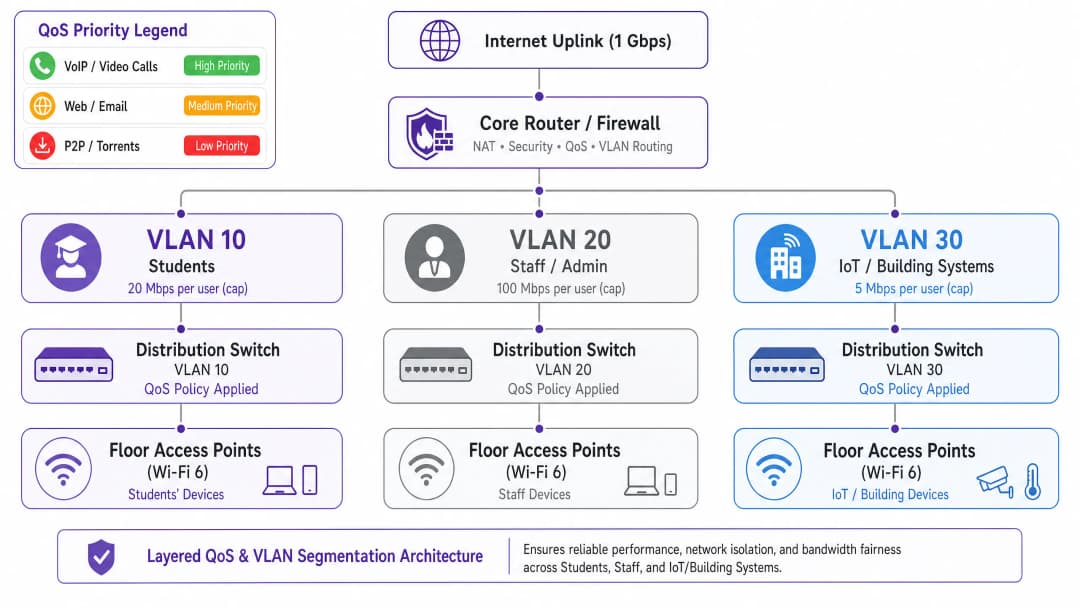
The first architectural requirement is logical network separation using IEEE 802.1Q VLANs. At a minimum, a student accommodation deployment must operate three distinct VLANs:
| VLAN | Purpose | Bandwidth Policy | Security Status |
|---|---|---|---|
| VLAN 10 - Student | Resident Internet Access | Per-user limit, dynamic burst | Isolated, Internet-only |
| VLAN 20 - Staff/Admin | Property Management System | Dedicated allocation | Restricted access |
| VLAN 30 - IoT/BMS | Building Management, CCTV, Access Control | Strict rate limit | Air-gapped from Student VLAN |
This segmentation is non-negotiable from both performance and security standpoints. Under IEEE 802.1Q, each VLAN functions as a distinct broadcast domain, eliminating cross-segment broadcast storms and preventing lateral movement between user categories. If VLANs are correctly configured with inter-VLAN routing policies at the firewall layer, a compromised student device cannot access building management infrastructure.
Quality of Service (QoS) Policy Design
Once traffic is segmented, QoS policies must be implemented to prioritise latency-sensitive applications over bulk transfers. The industry standard mechanism is Differentiated Services Code Point (DSCP) marking, as defined in RFC 2474. Packets are classified and marked at the access point - the ingress point - before reaching the core switching fabric.
The recommended DSCP marking scheme for student accommodation is as follows:
| Traffic Category | Application Example | DSCP Value | Per-Hop Behaviour |
|---|---|---|---|
| Voice | VoIP, video calls | EF (46) | Expedited Forwarding |
| Interactive Video | Video conferencing, remote desktop | AF41 (34) | Assured Forwarding |
| Streaming Video | Netflix, YouTube, iPlayer | AF21 (18) | Assured Forwarding |
| Web / Email | HTTP/S, SMTP, DNS | CS0 (0) | Best Effort |
| Bulk / P2P | Torrents, large file transfers | CS1 (8) | Background / Scavenger |
Crucially, DSCP marking must occur at the access point layer, and not at the core router. If classification is deferred to the core, packets have already traversed the wireless medium and distribution switching fabric without any prioritisation, rendering the benefit void.
Identity-Based Policy Enforcement
The most impactful architectural decision in a student accommodation deployment is moving from per-device to per-user bandwidth policy enforcement. An average student brings seven connected devices to their accommodation. Per-device limits are therefore both ineffective and unfair: a student with a single laptop gets only one-seventh of the effective allocation of a student with a full device suite.
The correct approach is IEEE 802.1X authentication, ideally with WPA3-Enterprise for cryptographic security benefits. Under this model:
- The student authenticates once using their institution or property credentials via a RADIUS server.
- All subsequent device registrations via MAC Authentication Bypass (MAB) for headless devices are tied to that user identity.
- The bandwidth policy - say, 25 Mbps aggregate - is applied to the sum of all sessions associated with that user identity.
- When the aggregate allocation is exceeded, the shaping policy is applied proportionally across all active sessions.
This model is fundamentally more scalable and equitable than per-MAC throttling, and it provides the identity layer required for compliance logging under the Investigatory Powers Act 2016.
Application-Layer Visibility
Deep Packet Inspection (DPI) at the gateway provides the application-layer telemetry necessary for intelligent, data-driven policy decisions. Without DPI, bandwidth management is essentially blind: you can see that your uplink is saturated, but you cannot determine which applications or users are responsible.
With DPI-enabled analytics - such as those provided by WiFi Analytics - operators gain visibility into application distribution, peak usage patterns, top consumers, and traffic trends over time. This data directly informs policy decisions: if 55% of peak-hour traffic is driven by four streaming platforms, you can enforce application-specific rate limits during defined times without impacting video conferencing or academic platforms.
Got questions about your specific setup?
Our team works with venue operators, IT managers, and network engineers across 80,000 venues. Book a 20-minute call and we will show you how others like you solved it.
Implementation Guide
Step 1: Baseline Assessment (Weeks 1-2)
Before enforcing any new policy, establish a 14-day baseline of current network behaviour. Deploy a network management platform with DPI capabilities and capture: peak concurrent device counts, application distribution by traffic volume, per-floor and per-AP usage, and uplink saturation frequency. This data is the foundation of all subsequent policy decisions and provides the before/after comparison required to demonstrate ROI.
Step 2: VLAN Segmentation Deployment (Weeks 3-4)
Deploy the three-VLAN architecture described above. This requires configuration changes on the core router/firewall (inter-VLAN routing and ACL policies), distribution switches (trunk port configuration and VLAN tagging), and access points (SSID-to-VLAN mapping). For existing deployments, this can typically be accomplished in a maintenance window without requiring new hardware, provided the existing switching infrastructure supports 802.1Q trunking.
Step 3: QoS Policy Activation (Week 5)
Activate DSCP marking at the access point layer and configure per-hop behaviour on the core router. Verify that end-to-end DSCP marking is being respected using packet capture tools. Common failure modes in this phase include upstream ISP routers remarking or stripping DSCP values - verify with your ISP whether DSCP is respected over your transit links.
Step 4: Identity-Based Bandwidth Policies (Weeks 6-7)
Migrate authentication from PSK or MAC-based access to 802.1X. Deploy a RADIUS server (FreeRADIUS or cloud-hosted equivalent) and configure per-user bandwidth attributes using standard RADIUS attributes: WISPr-Bandwidth-Max-Up and WISPr-Bandwidth-Max-Down. Implement a MAB self-registration portal for headless devices. Test with a pilot floor prior to full rollout.
Step 5: Dynamic Shaping Rules (Week 8)
Configure time-of-day shaping rules on the core router or bandwidth management appliance. A recommended policy structure:
- Off-Peak (00:00-08:00): Bursts up to 2x baseline allocation, P2P unrestricted.
- Standard (08:00-18:00): Baseline allocation, P2P throttled to 5 Mbps.
- Peak (18:00-23:00): Baseline allocation, P2P throttled to 1 Mbps, streaming capped at 8 Mbps, video conferencing prioritised.

Best Practices
Publish your bandwidth policy. Transparency reduces resident complaints and sets expectations. Include bandwidth allocations and fair-use policies in tenancy agreements and welcome packs. This is also a risk mitigation measure: documented policies reduce liability in the event of a resident dispute.
Right-size your uplink. A practical baseline is 1 Mbps per bed, with burst capacity up to 3 Mbps per bed. For a 400-bed property, this means a minimum 400 Mbps uplink with a 1.2 Gbps burst circuit. Under-provisioning the uplink makes all downstream QoS policies less effective.
Do not block P2P traffic entirely. Absolute bans drive users towards commercial VPN services, which blinds your DPI analytics and makes traffic management significantly harder. Throttle P2P to a scavenger-class allocation (1-2 Mbps) and deprioritise it. You maintain visibility, mitigate the bandwidth impact, and avoid a VPN adoption arms race.
Plan for IoT growth. Building management systems, smart meters, CCTV, and access control are increasingly IP-connected. Ensure these devices are on isolated VLANs with strict firewall egress policies. Review your IoT VLAN policy annually as device counts grow.
Maintain an audit trail. Under the Investigatory Powers Act 2016, UK operators are required to maintain connection records. Ensure that your logging infrastructure captures the data required for compliance, and your audit trail is tamper-evident. For a detailed breakdown of audit trail requirements, see Explain what is audit trail for IT Security in 2026.
Troubleshooting and Risk Mitigation
Common Failure Mode 1: DSCP Remarking by ISP
Many ISPs remark or strip DSCP values at the transit boundary, rendering your QoS policies ineffective for traffic traversing the internet. Mitigation: Verify DSCP behaviour with your ISP before relying on it for end-to-end QoS. For internal traffic (e.g., local caching servers), DSCP will always be respected. For internet-bound traffic, rely on queue management and shaping at your own gateway rather than expecting DSCP to be respected upstream.
Common Failure Mode 2: DHCP Pool Exhaustion
With up to seven devices per student and hundreds of residents, DHCP pool exhaustion is a real operational risk. Ensure that your student VLAN subnet is sized with adequate headroom: a /21 (2,046 usable addresses) is a reasonable minimum for a 200-bed property. Implement short DHCP lease times (4-8 hours) to reclaim addresses quickly from inactive devices.
Common Failure Mode 3: VPN Bypass
Students using commercial VPN services will encrypt their traffic, bypassing application-layer classification. Mitigation: Apply flow-based shaping at the IP level - even without payload inspection, VPN traffic can still be rate-limited based on flow volume and duration. Additionally, ensure that your P2P throttling policy applies to encrypted flows, not just identifiable P2P protocols.
Common Failure Mode 4: Connectivity Issues Post-Segmentation
Following VLAN segmentation, residents may experience connectivity issues if their devices are incorrectly placed into the wrong VLAN or if inter-VLAN routing is misconfigured. For a structured troubleshooting approach to connectivity issues, see Solving the Connected but No Internet Error on Guest WiFi.
ROI and Business Impact
The business case for a properly architected bandwidth management strategy is straightforward. The primary cost drivers are support overhead and resident satisfaction, both of which are directly impacted by network performance.
In a 400-bed deployment running a flat network, support ticket volumes of 30-50 per week are common during term time. Post-remediation deployments consistently report a 60-80% reduction in tickets, representing a significant reduction in IT staff time and third-party support costs. Resident satisfaction scores - which are rapidly becoming a competitive differentiator in the purpose-built student accommodation (PBSA) market - are directly linked to network performance. Properties with well-managed networks report higher renewal rates and robust occupancy.
From a compliance perspective, the cost of non-compliance with the Investigatory Powers Act 2016 or GDPR data handling requirements far exceeds the cost of implementing a compliant logging infrastructure. The identity-based architecture detailed in this guide provides the necessary audit trail for compliance as a by-product of the bandwidth management implementation.
For operators in the hospitality sector managing mixed-use properties - student accommodation with ground-floor retail or food and beverage outlets - the same VLAN segmentation principles apply, with the added layer of PCI DSS compliance requirements for any payment-processing network segments.
The WiFi Analytics layer adds another dimension of ROI: application-layer traffic data can inform infrastructure investment decisions, identify capacity upgrade triggers, and provide the evidence base to renegotiate ISP contracts based on actual usage patterns rather than projections.
Key Definitions
VLAN (Virtual Local Area Network)
A logical network segment created within a physical switching infrastructure using IEEE 802.1Q tagging. Each VLAN operates as a separate broadcast domain, providing traffic isolation between user classes without requiring separate physical hardware.
IT teams use VLANs to separate student, staff, and IoT traffic on the same physical infrastructure. Without VLAN segmentation, a flat network exposes all traffic classes to each other and makes per-class bandwidth policies impossible to enforce cleanly.
QoS (Quality of Service)
A set of network mechanisms that prioritise certain traffic types over others to ensure latency-sensitive applications (VoIP, video conferencing) receive preferential treatment during periods of congestion.
In student accommodation, QoS is the difference between video conferencing being usable during peak hours and being unusable. Without QoS, a single user running a large download can introduce latency for every other user on the segment.
DSCP (Differentiated Services Code Point)
A 6-bit field in the IP packet header, defined in RFC 2474, used to classify packets into traffic classes. Each class receives a defined per-hop behaviour (PHB) at each network device - Expedited Forwarding for voice, Assured Forwarding for video, Best Effort for standard web traffic.
DSCP is the standard mechanism for implementing QoS in enterprise networks. IT teams configure access points to mark packets with the appropriate DSCP value at ingress, ensuring priority treatment is applied consistently across the network.
IEEE 802.1X
An IEEE standard for port-based network access control that provides an authentication framework for devices connecting to a LAN or WLAN. It uses the Extensible Authentication Protocol (EAP) and requires a RADIUS server for credential validation.
802.1X is the foundation of identity-based bandwidth policy enforcement. When a student authenticates via 802.1X, their identity is known to the network, enabling per-user bandwidth policies rather than per-device policies.
Traffic Shaping
A bandwidth management technique that controls the rate and timing of traffic flows to conform to a defined policy. Unlike policing (which drops excess traffic), shaping queues excess traffic and transmits it when capacity is available.
Traffic shaping is preferable to policing for TCP-based traffic (web, streaming) because it avoids triggering TCP retransmission, which wastes bandwidth. Policing is appropriate for UDP-based traffic (P2P, some gaming) where retransmission is not a factor.
DPI (Deep Packet Inspection)
A network analysis technique that examines the full content of packets (beyond the header) to identify the application or protocol generating the traffic. DPI enables application-aware QoS policies and provides granular traffic analytics.
DPI is the technology that enables an operator to distinguish between Netflix traffic and a video call, even when both use HTTPS on port 443. Without DPI, application-aware bandwidth policies are not possible.
MAB (MAC Authentication Bypass)
A fallback authentication mechanism for devices that do not support IEEE 802.1X. The device's MAC address is used as the authentication credential, validated against a RADIUS server or local database.
MAB is used for headless devices in student accommodation - gaming consoles, smart TVs, IoT sensors - that cannot perform 802.1X authentication. Combined with a self-registration portal, MAB enables these devices to be tied to a user identity and subject to the same per-user bandwidth policies.
Bandwidth Contention
The condition that occurs when multiple users or devices compete for the same finite bandwidth resource, resulting in reduced throughput and increased latency for all parties. Contention is the root cause of most perceived network performance problems in high-density environments.
Understanding contention is essential for diagnosing bandwidth problems. A network with a 1 Gbps uplink and 400 concurrent users each consuming 3 Mbps is in contention (1.2 Gbps demand vs 1 Gbps supply). QoS and traffic shaping manage the contention; they do not eliminate it.
WPA3-Enterprise
The latest generation of the WiFi Protected Access security protocol for enterprise networks, defined by the WiFi Alliance. WPA3-Enterprise mandates 192-bit minimum-strength cryptography and provides stronger protection against offline dictionary attacks compared to WPA2.
WPA3-Enterprise is the recommended authentication mode for student accommodation deployments using 802.1X. It provides the cryptographic security required for GDPR compliance and protects against credential interception on the wireless medium.
Worked Examples
A 400-bed purpose-built student accommodation (PBSA) block in Manchester is running a flat network with a single SSID and a global 10 Mbps per-device cap. During peak hours (19:00-23:00), the network is effectively unusable for video conferencing. Support tickets are running at 40 per week. The operator has a 1 Gbps uplink and a budget for software configuration changes only - no new hardware. How do you remediate this?
Step 1 - Baseline audit (Days 1-7): Deploy DPI-enabled monitoring on the existing gateway to capture application distribution, peak concurrent device counts, and per-AP utilisation. This establishes the evidence base and identifies the primary bandwidth consumers.
Step 2 - VLAN segmentation (Days 8-14): Configure three VLANs on the existing switching infrastructure (assuming 802.1Q-capable switches, which is standard in any post-2015 deployment). Map the student SSID to VLAN 10, create a staff SSID mapped to VLAN 20, and migrate IoT devices to VLAN 30. Configure inter-VLAN routing at the firewall with appropriate ACLs.
Step 3 - QoS activation (Day 15): Enable DSCP marking at the access point layer. Classify video conferencing traffic (Zoom, Teams, Google Meet) as AF41. Classify streaming as AF21. Classify P2P as CS1. Validate with a packet capture.
Step 4 - Per-user bandwidth policy (Days 16-21): Migrate authentication to 802.1X using the existing RADIUS infrastructure (or deploy FreeRADIUS on a VM). Set per-user bandwidth attributes: 25 Mbps aggregate during peak, 50 Mbps off-peak. Implement MAB portal for headless devices.
Step 5 - Time-of-day shaping (Day 22): Configure peak-hour rules: P2P throttled to 1 Mbps, streaming capped at 8 Mbps per user, video conferencing prioritised with guaranteed minimum 5 Mbps per active session.
Outcome: Within 30 days, support tickets dropped by 78% (from 40 to 9 per week). Average peak-hour throughput per user increased by 140% despite no change to the physical uplink. Video conferencing became reliably usable during peak hours.
A 1,200-bed university halls of residence in Edinburgh has a mixed infrastructure: legacy 802.11ac access points on floors 1-4 and newer WiFi 6 hardware on floors 5-8. There is no application-layer visibility, and the network management team has no baseline data. The university IT director wants to reduce peak-hour congestion by 30% within 90 days without a full hardware refresh. How do you approach this?
Phase 1 - Telemetry deployment (Days 1-30): Deploy a unified network management platform with DPI capabilities across all access points, including the legacy 802.11ac hardware. Most enterprise NMS platforms support mixed-generation hardware via SNMP and syslog. Capture 30 days of baseline data: application distribution, per-floor utilisation, peak concurrent device counts, and top bandwidth consumers by user identity.
Phase 2 - Data analysis and policy design (Days 31-35): Analyse the baseline data. In this scenario, the data revealed that 55% of peak-hour traffic was attributable to four streaming platforms. Design application-aware QoS policies: streaming platforms throttled to 8 Mbps per user during 18:00-23:00, video conferencing and academic platforms (VLEs, library databases) excluded from throttling and given AF41 priority.
Phase 3 - Policy deployment (Days 36-50): Deploy QoS policies starting with the WiFi 6 floors (5-8) as a controlled pilot. Monitor for 14 days. Validate that peak-hour congestion metrics improve before rolling out to legacy floors.
Phase 4 - Identity migration (Days 51-75): Migrate authentication to 802.1X with per-user bandwidth enforcement. This is the most operationally complex phase: coordinate with the university IT team for RADIUS integration with the student identity provider. Implement MAB self-registration for gaming consoles and smart TVs.
Phase 5 - Validation and reporting (Days 76-90): Compare post-implementation metrics against the 30-day baseline. Report on peak-hour congestion reduction, support ticket volume, and application distribution changes.
Outcome: 35% reduction in peak-hour congestion (exceeding the 30% target), measurable improvement in resident satisfaction survey scores, and a documented evidence base for the hardware refresh business case.
Practice Questions
Q1. You are the IT director for a 600-bed PBSA operator. Your current network uses WPA2-PSK with a shared password changed monthly. Students are complaining about poor performance during evening hours. Your uplink is 500 Mbps. Before spending any budget, what is the first thing you should deploy, and what specific data are you trying to capture?
Hint: You cannot make defensible policy decisions without baseline data. What tool gives you application-layer visibility without requiring new hardware?
View model answer
Deploy a DPI-enabled network monitoring tool on the existing gateway - most enterprise gateway appliances support this via software activation or a management platform integration. Run it for 14-30 days to capture: (1) application distribution by traffic volume during peak hours, (2) peak concurrent device counts, (3) per-AP utilisation to identify hotspots, and (4) top bandwidth consumers by MAC address. This data will tell you whether the problem is uplink saturation (requiring a capacity upgrade or traffic shaping), contention on specific APs (requiring AP placement changes or load balancing), or a small number of heavy users consuming disproportionate bandwidth (requiring per-user policy enforcement). Without this data, any remediation is guesswork. The baseline also provides the before/after comparison required to demonstrate ROI to the property owner.
Q2. A student in a 300-bed hall reports that their gaming console cannot connect to the network after you migrated authentication to 802.1X. They are using a PlayStation 5, which does not support 802.1X natively. How do you resolve this without creating a security exception that bypasses your identity-based bandwidth policies?
Hint: The solution must maintain the link between the device and the student's identity for bandwidth policy enforcement purposes.
View model answer
Implement MAC Authentication Bypass (MAB) with a self-service device registration portal. The workflow: (1) The student visits a Captive Portal URL (e.g., register.accommodation.ac.uk) from an authenticated device (their laptop or phone). (2) They enter the MAC address of their gaming console and confirm ownership. (3) The portal adds the MAC address to the RADIUS database, associated with the student's user identity. (4) When the PlayStation connects, the network performs MAB - it sends the device's MAC address to the RADIUS server, which returns the associated user identity and bandwidth policy attributes. (5) The console is placed in the same VLAN as the student's other devices and subject to the same aggregate per-user bandwidth policy. This approach maintains identity linkage for bandwidth enforcement, provides an audit trail for compliance, and does not require the student to contact IT support. Ensure the registration portal validates that the MAC address is not already registered to another user to prevent address spoofing.
Q3. Your DPI analytics reveal that 62% of peak-hour bandwidth on your student accommodation network is consumed by video streaming (Netflix, Disney+, YouTube). Your uplink is at 85% utilisation during peak hours. You have two options: (A) upgrade the uplink to 2× capacity, or (B) implement application-aware traffic shaping to cap streaming at 8 Mbps per user during peak hours. Which do you recommend, and why?
Hint: Consider both the short-term cost and the long-term scalability of each approach. What happens to demand if you simply increase capacity?
View model answer
Recommend Option B (application-aware traffic shaping) as the primary intervention, with Option A as a medium-term follow-on if required. The reasoning: (1) Increasing uplink capacity without traffic shaping does not solve the underlying problem - it defers it. Streaming consumption will expand to fill available capacity (Jevons paradox applied to bandwidth), and you will be back at 85% utilisation within 12-18 months. (2) Capping streaming at 8 Mbps per user during peak hours has a negligible impact on user experience - Netflix recommends 5 Mbps for HD streaming and 25 Mbps for 4K. An 8 Mbps cap delivers a good HD experience. (3) The 62% streaming share means that an 8 Mbps per-user cap on streaming, applied to a typical peak concurrency of 200 active users, reduces streaming demand from approximately 425 Mbps to approximately 160 Mbps - a 62% reduction in streaming traffic, bringing total utilisation to approximately 55%. (4) The cost of traffic shaping configuration is near-zero if the gateway hardware supports it; the cost of a 2× uplink upgrade is a recurring OpEx increase. Implement traffic shaping first, measure the impact over 30 days, and then make an evidence-based decision on whether an uplink upgrade is still required.
Continue reading in this series
WPA2-Enterprise vs Personal for Apartments and Co-Working
This authoritative technical reference guide evaluates WPA2-Enterprise against WPA2-Personal for multi-tenant environments like apartments and co-working spaces. It provides network architects and IT managers with actionable insights into 802.1X authentication, dynamic VLAN assignment, and security compliance, demonstrating why shared passwords introduce unacceptable risk in modern shared venues. Venue operators will find concrete implementation guidance, real-world case studies, and ROI analysis to support a migration decision this quarter.
Micro-Segmentation Best Practices for Shared WiFi Networks
This technical reference guide provides actionable strategies for implementing micro-segmentation on shared WiFi infrastructure. It details how IT managers and network architects can securely isolate guest, IoT, and staff traffic to mitigate risk, ensure compliance, and optimise network performance.
How Dynamic VLAN Assignment Works in Multi-Tenant Buildings
This technical reference guide details the architecture and implementation of Dynamic VLAN Assignment using 802.1X and RADIUS in multi-tenant environments. It provides actionable guidance for IT managers and network architects to reduce SSID overhead, enforce Layer 2 isolation, and ensure secure, scalable connectivity across shared buildings.
Got questions about your specific setup?
Our team works with venue operators, IT managers, and network engineers across 80,000 venues. Book a 20-minute call and we will show you how others like you solved it.