
Solving the Connected but No Internet Error on Guest WiFi
This authoritative technical reference guide explains how DNS timeouts caused by congested networks trigger the 'Connected, No Internet' error on guest WiFi. It provides network architects and IT managers with actionable implementation steps for deploying enterprise DNS filters to resolve these bottlenecks and improve guest onboarding.
Video overview
Listen to this guide
View podcast transcript
Part of our core series: Guest WiFi Guide →
Guest WiFi “Connected, No Internet” Root-Cause Diagnostic Tool
Select your venue deployment profile, active connection failure symptom, and wireless infrastructure vendor to calculate probe timeout risks, diagnose DNS/DHCP bottlenecks, and generate multi-vendor remediation steps.
Root-Cause Diagnostic Analysis: Captive portal login popup never appears on mobile devices
Severity: CriticalOS captive portal detection probe DNS queries exceed the 2-5 second timeout window due to upstream resolver latency or dropped UDP packets.
Devices display "Connected, No Internet" and automatically drop the connection or fail back to mobile cellular data.
Deploy a local enterprise DNS caching filter, whitelist probe domains, and ensure UDP port 53 is allowed pre-authentication.
Vendor Implementation Guide: Cisco Meraki (Meraki Dashboard)
- DNS Configuration & Resolver Tuning:Under Wireless > Configure > Access control > Addressing and traffic, set Client IP assignment to "External DHCP server" or "Bridge mode" with reliable public Anycast DNS (1.1.1.1, 8.8.8.8).
- DHCP Scope & Lease Duration:In Security & SD-WAN > Configure > Addressing & VLANs, decrease DHCP lease time on the Guest VLAN to 30 minutes to prevent scope starvation.
- Walled Garden Pre-Authentication Rules:Under Wireless > Access control > Walled garden, enable Walled garden and add: *.purple.ai, captive.apple.com, connectivitycheck.gstatic.com, msftconnecttest.com.
# Meraki Dashboard Configuration:
# 1. Wireless > Configure > Access Control > Splash Page: "Sign-on splash page"
# 2. Walled Garden ranges: *.purple.ai, fonts.googleapis.com, captive.apple.com
# 3. Client IP assignment: Bridge Mode (NAT mode restricts Layer 2 client isolation)
Experiencing Guest WiFi Onboarding Failures Across Your Venue?
Purple operates seamlessly across Cisco Meraki, HPE Aruba, Ruckus, Ubiquiti UniFi, and Fortinet to eliminate captive portal drops, manage DNS pre-auth walled gardens, and onboard guests in under 3 seconds.
Executive Summary
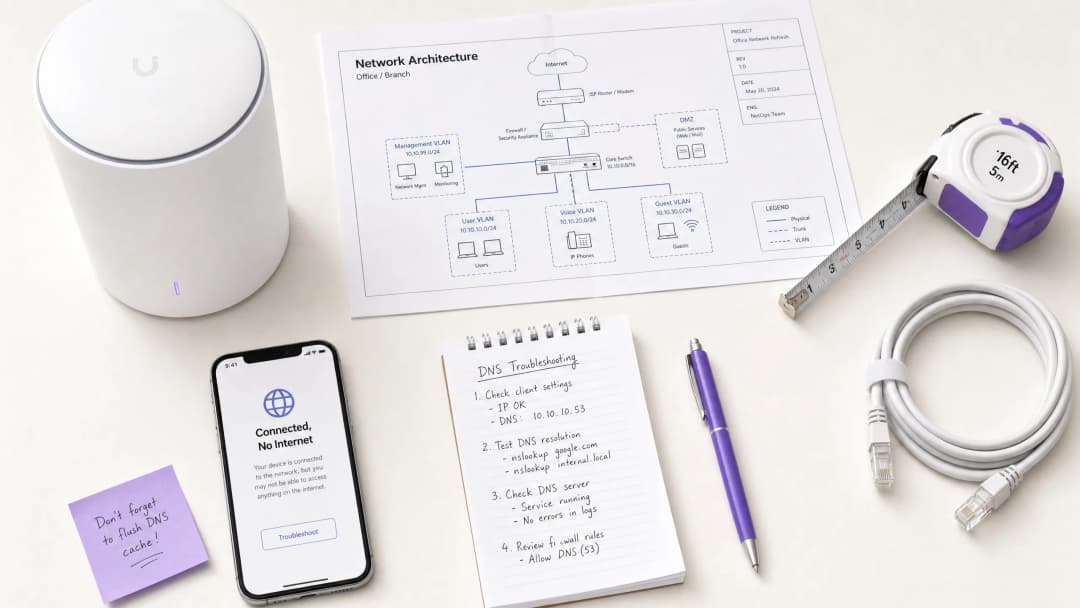
For CTOs and network architects overseeing high-density venues - such as those in Retail, Hospitality, Healthcare, and Transport - the "Connected, No Internet" error on Guest WiFi networks is a persistent operational headache. While often misdiagnosed as an AP hardware fault or insufficient upstream bandwidth, the root cause in enterprise environments is typically DNS timeout caused by network congestion.
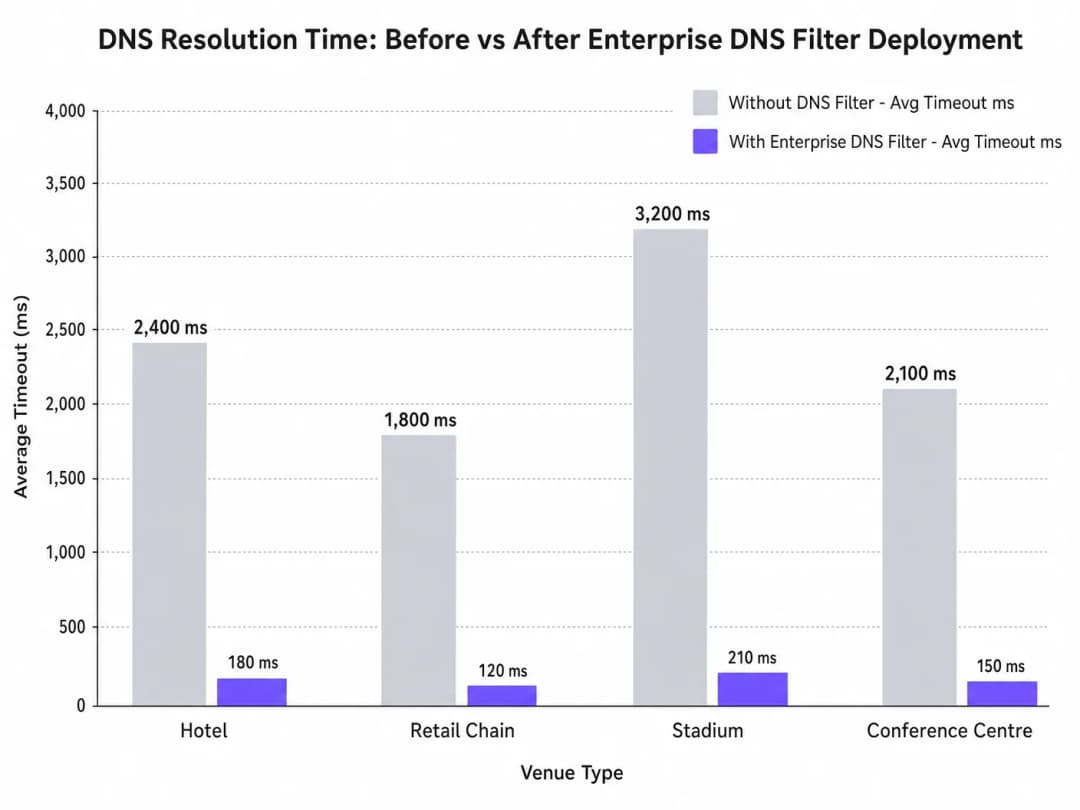
When hundreds of devices concurrently probe for captive portal detection (e.g., captive.apple.com), the default UDP port 53 queries can overwhelm standard upstream resolvers. If the DNS response exceeds the OS-level timeout window (typically 1-5 seconds), the device assumes no internet connectivity exists, failing to trigger the captive portal. This guide details the technical architecture of this failure mode and demonstrates how deploying an enterprise DNS filter resolves the bottleneck, reducing query latency from thousands of milliseconds to sub-200ms, ensuring compliance with standards like IEEE 802.1X and GDPR, and dramatically improving the guest onboarding experience.
Technical Deep-Dive
The Captive Portal Detection Mechanism
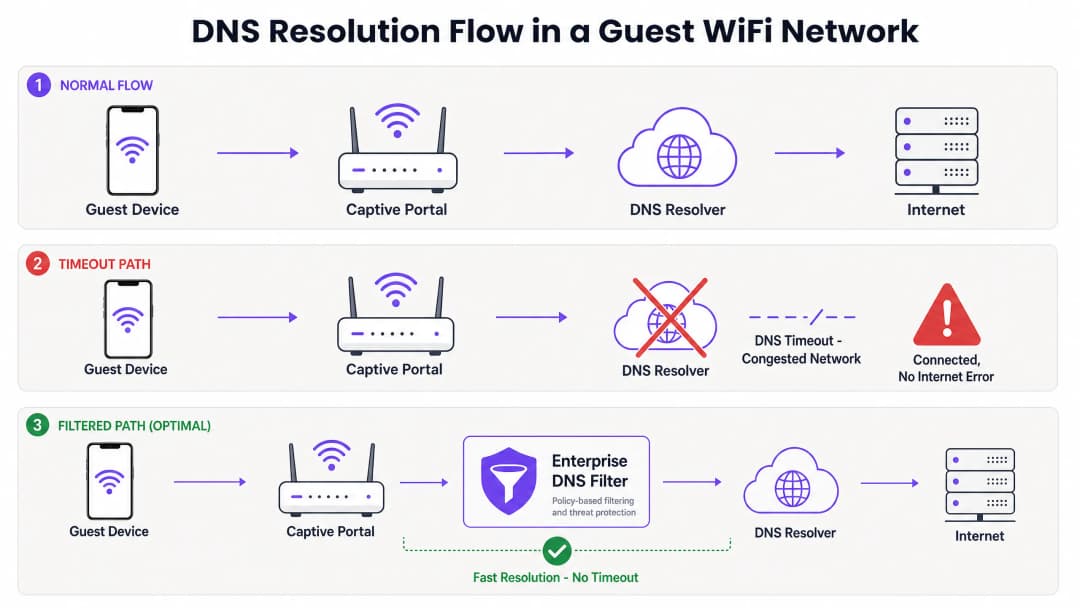
When a client device associates with an access point and receives a DHCP lease, it must verify internet reachability before fully transitioning to a connected state. This is achieved via captive portal detection probes:
- iOS/macOS: HTTP GET to
captive.apple.com - Android: HTTP GET to
connectivitycheck.gstatic.com - Windows: HTTP GET to
msftconnecttest.com
Before the HTTP GET can be issued, the device must resolve the hostname via DNS. This initial DNS query is the critical failure point in high-density environments.
Why Congestion Triggers DNS Timeouts
DNS queries typically use UDP, a connectionless protocol without transport-layer retransmission. In a congested network - such as a stadium during half-time or a hotel during morning peak hours - UDP packets are easily dropped or delayed.
If the venue relies on a standard ISP resolver or a public DNS service (like 8.8.8.8), the round-trip time (RTT) plus the processing time at the resolver can exceed the OS's hardcoded timeout limit. When the timeout expires, the device flags the connection as "Connected, No Internet" and halts the captive portal redirection process.
Furthermore, short Time-To-Live (TTL) values on these probe domains exacerbate the issue. As devices constantly associate and disassociate, cached entries expire rapidly, triggering a flood of simultaneous DNS queries precisely when the network is under maximum load.
The Role of the Enterprise DNS Filter
An enterprise DNS filter, such as the one integrated into Purple's WiFi Analytics platform, acts as a high-performance, local or edge-proximate resolver. By intercepting DNS queries before they traverse the congested WAN link, the filter:
- Caches High-Frequency Domains: Serves probe domains locally, reducing RTT to sub-millisecond levels.
- Policy Enforcement: Drops queries for malicious or blocked domains immediately, conserving WAN bandwidth.
- Audit Logging: Provides an audit trail for IT Security, aiding in GDPR compliance and incident response.
Got questions about your specific setup?
Our team works with venue operators, IT managers, and network engineers across 80,000 venues. Book a 20-minute call and we will show you how others like you solved it.
Implementation Guide
Deploying an enterprise DNS filter requires careful architectural planning to avoid introducing new points of failure.
1. Resolver Placement and Latency Optimization
Deploy the DNS filter as close to the network edge as possible. For distributed retail chains, a cloud-delivered edge node is appropriate; for large single-site venues like stadiums, a localized appliance or virtual machine on the core switch is preferred. The goal is to minimize the number of routing hops between the guest VLAN and the resolver.
2. Captive Portal Whitelisting (Passthrough)
The most critical configuration step is ensuring your captive portal domain is explicitly whitelisted. If the DNS filter delays or blocks the resolution of the authentication portal itself, you will induce the exact error you are attempting to solve.
3. TTL Tuning and Cache Management
Configure the local resolver to aggressively cache captive portal probe domains. While respecting upstream TTLs is standard practice, overriding TTLs for captive.apple.com and similar domains to a minimum of 60 seconds locally can drastically reduce upstream query volume during peak association events.
4. Integration with Existing Infrastructure
Ensure the DNS filter deployment aligns with your existing network segmentation. Guest DNS traffic must remain isolated from corporate DNS infrastructure to maintain PCI DSS compliance. This isolation is crucial whether you are optimising hotel WiFi for business travelers or securing a public sector deployment.
Listen to our technical briefing podcast for more context on these implementation steps:
Best Practices
- Avoid Public Resolvers for Guest Networks: Relying on 8.8.8.8 or 1.1.1.1 as the primary DHCP-assigned DNS for high-density guest networks introduces unacceptable latency variability.
- Implement DNS over HTTPS (DoH) Carefully: While DoH improves privacy, it bypasses traditional port 53 filtering. Ensure your enterprise DNS solution can inspect or manage DoH traffic if required by venue policy.
- Monitor UDP Port 53 Drops: Configure your firewall or core switch to alert on excessive UDP port 53 packet drops, which is a leading indicator of impending DNS timeouts.
- Regularly Review Blocklists: Over-aggressive filtering can break legitimate applications. Review DNS query logs weekly to identify false positives.
For public sector deployments, ensuring robust connectivity is part of broader digital inclusion initiatives, as recently highlighted when Purple Appoints Iain Fox as VP Growth - Public Sector.
Troubleshooting & Risk Mitigation
When the "Connected, No Internet" error occurs, IT teams should follow a structured diagnostic path rather than immediately assuming bandwidth exhaustion.
- Packet Capture (PCAP): Run a packet capture on the guest VLAN filtering for
udp port 53. Look for queries without corresponding responses within a 2-second window. - Simulate the Probe: Use
curlorwgetfrom a test device on the guest VLAN to manually hithttp://captive.apple.com/hotspot-detect.html. Measure the DNS resolution time versus the HTTP response time. - Check Firewall Rules: Verify that no rate-limiting or QoS policies are inadvertently throttling UDP port 53 traffic from the guest subnet.
- Verify Offline Capabilities: In environments with intermittent WAN connectivity, consider features like Purple's Offline Maps Mode to maintain some level of user engagement even when upstream internet is degraded.
ROI & Business Impact
Resolving DNS timeouts directly impacts the bottom line for venue operators.
- Reduced Support Overhead: The "Connected, No Internet" error is a primary driver of Level 1 support tickets in hospitality and retail. Eliminating it reduces IT operational expenditure.
- Increased Data Capture: A failed captive portal load means a lost opportunity for data capture and user authentication. By ensuring rapid portal rendering, venues maximize the ROI of their WiFi Analytics platforms.
- Enhanced Guest Satisfaction: Seamless connectivity is a baseline expectation. Minimizing onboarding friction directly correlates with improved Net Promoter Scores (NPS) and positive venue reviews.
By shifting the perspective from "we need more bandwidth" to "we need optimized DNS resolution," network architects can deliver enterprise-grade guest WiFi that scales gracefully under pressure.
Key Definitions
Captive Portal Detection Probe
An automated HTTP request sent by a mobile OS (e.g., to captive.apple.com) immediately upon network association to determine if a login page is required.
If this probe fails due to DNS timeout, the OS assumes there is no internet access and shows the error.
DNS Timeout
The event where a client device abandons a DNS query because the resolver took too long to respond (typically >2-5 seconds).
The primary technical cause of 'Connected, No Internet' errors in high-density environments.
Enterprise DNS Filter
A dedicated DNS resolver that caches queries locally and applies policy-based blocking to prevent access to malicious or unwanted domains.
Used to offload query volume from congested upstream resolvers and reduce latency.
UDP Port 53
The standard connectionless transport protocol and port used for DNS queries.
Because UDP has no guaranteed delivery, DNS packets are easily dropped during network congestion.
Time-To-Live (TTL)
A value in a DNS record that dictates how long a resolver or client should cache the IP address before querying again.
Short TTLs on probe domains cause frequent re-querying, exacerbating congestion.
IEEE 802.1X
A standard for port-based Network Access Control (PNAC) providing an authentication mechanism to devices wishing to attach to a LAN or WLAN.
While secure, 802.1X environments still rely on robust DNS infrastructure for post-authentication routing.
Local Internet Breakout
Routing internet-bound traffic directly from a branch location to the internet, rather than backhauling it to a central data centre.
Crucial for reducing DNS latency in distributed retail or hospitality networks.
WPA3
The latest WiFi security standard that provides enhanced encryption for open and password-protected networks.
WPA3 improves security but does not alter the fundamental DNS resolution path or mitigate timeout issues.
Worked Examples
A 400-room hotel experiences a surge of 'Connected, No Internet' complaints every morning between 7:30 AM and 8:30 AM when guests wake up and connect to the WiFi. The 1Gbps WAN link shows only 40% utilisation during this time.
- Run a packet capture on the guest VLAN filtering for UDP port 53 during the morning peak.
- Identify that DNS queries to captive portal probe domains (e.g., captive.apple.com) are taking >3000ms to resolve via the ISP's default DNS.
- Deploy a local enterprise DNS filter on the guest subnet.
- Configure the DHCP server to assign the local DNS filter IP to guest devices.
- Whitelist the hotel's captive portal domain in the filter.
- Monitor resolution times, which should drop to <50ms.
A large retail chain rolls out a new guest WiFi network across 50 stores, but users in high-footfall flagship stores cannot load the captive portal, while users in smaller stores have no issues.
- Analyse the architecture: all 50 stores are tunnelling guest traffic back to a central data centre firewall, which then forwards DNS queries to a public resolver.
- In high-footfall stores, the sheer volume of concurrent association events exhausts the NAT/PAT state tables on the central firewall, causing UDP port 53 packets to be dropped.
- Implement a cloud-delivered enterprise DNS filter.
- Reconfigure the local branch routers to forward guest DNS queries directly to the cloud filter via local internet breakout, rather than backhauling them to the data centre.
Practice Questions
Q1. A stadium IT director notices that during half-time, thousands of users connect to the WiFi but fail to reach the captive portal. The core switch shows heavy UDP packet drops. Should they increase the WAN bandwidth from 2Gbps to 5Gbps?
Hint: Consider what protocol is being dropped and whether it's related to payload bandwidth or connection state limits.
View model answer
No. Increasing WAN bandwidth will not solve the issue. The UDP packet drops indicate that the firewall or resolver cannot handle the sheer volume of concurrent DNS queries (state table exhaustion or CPU limits). The correct approach is to deploy a high-performance local DNS filter at the edge to cache and respond to these queries locally, bypassing the WAN bottleneck entirely.
Q2. You have just deployed an enterprise DNS filter on a hotel guest network. Guests can now resolve public websites quickly, but when they first connect, they are not redirected to the hotel's login page. What is the most likely configuration error?
Hint: Think about the domain name of the login page itself.
View model answer
The most likely error is that the captive portal's own domain has not been explicitly whitelisted (passthrough) in the DNS filter. The filter is either blocking or delaying the resolution of the portal URL, preventing the redirection from completing.
Q3. A public sector organisation requires all guest WiFi traffic to be logged for 90 days to comply with security policies. How does deploying an enterprise DNS filter assist with this requirement?
Hint: Consider what data a DNS filter processes versus a standard firewall.
View model answer
An enterprise DNS filter natively logs all DNS queries made by client devices. This provides a clear, searchable audit trail of which domains were requested and when, satisfying the 90-day logging requirement without needing to perform deep packet inspection on all encrypted HTTPS payload traffic.
Frequently asked questions
Why does guest WiFi say connected but no internet?
The 'Connected, No Internet' status occurs when a client device associates with an access point and receives an IP address, but its operating system detection probe fails to reach the internet. On guest WiFi networks, this is most commonly caused by DNS query timeouts on captive portal detection domains (such as captive.apple.com or connectivitycheck.gstatic.com), DHCP lease scope exhaustion, or firewalls blocking pre-authentication DNS traffic.
How do captive portal detection probes work on guest WiFi across iOS, Android, and Windows?
When connecting to an open or guest WiFi SSID, modern operating systems immediately transmit plaintext HTTP probe requests to vendor test URLs (iOS uses captive.apple.com/hotspot-detect.html, Android queries connectivitycheck.gstatic.com/generate_204, and Windows tests msftconnecttest.com/connecttest.txt). If the network returns an HTTP 200/204, the OS marks the connection as having internet. If it receives an HTTP 302 redirect, it launches the captive portal browser. If the initial DNS query for the probe domain times out, the OS reports 'Connected, No Internet' and drops the link.
How do DNS timeouts trigger guest WiFi connection drops?
In high-density environments, hundreds of devices query upstream DNS resolvers simultaneously over UDP port 53. If the local guest WiFi network forwards raw queries directly to rate-limited ISP resolvers without caching, response latency spikes above 2,000ms. Mobile devices enforce strict 2- to 5-second probe timeouts. Once that threshold is exceeded, the device assumes the network is broken and abandons the connection before the splash page can load.
What walled garden domains must be allowed before guest WiFi captive portal login?
Pre-authentication access control lists (walled gardens) on guest WiFi networks must permit outbound UDP and TCP port 53 to your designated DNS resolvers, DHCP transactions (UDP 67/68), and OS detection probes (captive.apple.com, connectivitycheck.gstatic.com, msftconnecttest.com). If using external captive portal hosting, CDN styling, or social login, you must also allow your portal domain (*.purple.ai), Google Fonts (fonts.googleapis.com), and OAuth endpoints.
How does DHCP pool exhaustion cause connected without internet errors on guest WiFi?
When venues configure long DHCP lease durations (such as 24 hours) on guest WiFi in environments with rapid visitor turnover, the pool of available IP addresses quickly runs out. New arrivals may associate with the access point via 802.11 beacons, but fail to receive a valid DHCPOFFER or default gateway, receiving a self-assigned 169.254.x.x APIPA address instead. Shortening lease times to 30 to 60 minutes and configuring dynamic VLAN pooling prevents scope starvation.
How does Purple prevent captive portal and DNS timeout failures on guest WiFi?
Purple acts as a resilient, hardware-agnostic guest WiFi management platform across Cisco Meraki, HPE Aruba, Ruckus, Ubiquiti UniFi, and Fortinet architectures. By optimizing captive portal redirection flows, automating walled garden rules, and integrating with high-speed Anycast DNS, Purple ensures detection probes succeed instantly, onboarding visitors in under 3 seconds without connection drops.
Continue reading in this series
A Step-by-Step Guide to Diagnosing WiFi Roaming Issues
This comprehensive guide provides enterprise IT leaders and network architects with an authoritative, step-by-step methodology for diagnosing and resolving WiFi roaming issues. By combining technical deep-dives into IEEE 802.11k/v/r standards with real-world case studies and packet-level analysis, this reference equips teams to eliminate the 'sticky client' problem and deliver seamless mobile connectivity. It covers the full diagnostic workflow from RF site surveys and controller configuration audits through to over-the-air packet capture analysis and post-remediation validation.
Why Your Stadium WiFi Grinds to a Halt (And How to Fix It)
This authoritative technical guide examines the root cause of stadium WiFi congestion - the simultaneous background chatter of 50,000 devices loading programmatic advertisements and telemetry - and provides a detailed architectural blueprint for deploying edge DNS filtering as the primary mitigation strategy. Designed for IT Directors, CTOs, and Network Architects, it delivers actionable implementation guidance, real-world case studies, and measurable ROI frameworks to help venue operators reclaim bandwidth and deliver high-performance connectivity at scale.
Why is Our Guest WiFi So Slow? Diagnosing Network Congestion
This guide diagnoses the hidden drivers of guest WiFi congestion - background telemetry, programmatic ad networks, and automated OS updates - which collectively consume up to 40% of public WiFi bandwidth before a guest even opens a browser. It provides a phased, vendor-neutral implementation framework for DNS filtering and QoS policies that reclaim that bandwidth, improve guest experience, and deliver measurable ROI. Targeted at IT Directors and Operations Managers in hospitality, retail, events, and public-sector environments.
Got questions about your specific setup?
Our team works with venue operators, IT managers, and network engineers across 80,000 venues. Book a 20-minute call and we will show you how others like you solved it.