
गैस्ट WiFi पर कनेक्टेड लेकिन नो इंटरनेट एरर को हल करना
यह आधिकारिक तकनीकी संदर्भ गाइड बताती है कि कैसे भीड़भाड़ वाले नेटवर्क के कारण होने वाले DNS टाइमआउट गैस्ट WiFi पर 'Connected, No Internet' एरर को ट्रिगर करते हैं। यह नेटवर्क आर्किटेक्ट्स और IT प्रबंधकों को इन बाधाओं को हल करने और गैस्ट ऑनबोर्डिंग को बेहतर बनाने के लिए एंटरप्राइज DNS फिल्टर को तैनात करने के लिए व्यावहारिक कार्यान्वयन चरण प्रदान करता है।
इस गाइड को सुनें
पॉडकास्ट ट्रांसक्रिप्ट देखें
हमारी मुख्य श्रृंखला का हिस्सा: Guest WiFi Guide →
Guest WiFi “Connected, No Internet” Root-Cause Diagnostic Tool
Select your venue deployment profile, active connection failure symptom, and wireless infrastructure vendor to calculate probe timeout risks, diagnose DNS/DHCP bottlenecks, and generate multi-vendor remediation steps.
Root-Cause Diagnostic Analysis: Captive portal login popup never appears on mobile devices
Severity: CriticalOS captive portal detection probe DNS queries exceed the 2-5 second timeout window due to upstream resolver latency or dropped UDP packets.
Devices display "Connected, No Internet" and automatically drop the connection or fail back to mobile cellular data.
Deploy a local enterprise DNS caching filter, whitelist probe domains, and ensure UDP port 53 is allowed pre-authentication.
Vendor Implementation Guide: Cisco Meraki (Meraki Dashboard)
- DNS Configuration & Resolver Tuning:Under Wireless > Configure > Access control > Addressing and traffic, set Client IP assignment to "External DHCP server" or "Bridge mode" with reliable public Anycast DNS (1.1.1.1, 8.8.8.8).
- DHCP Scope & Lease Duration:In Security & SD-WAN > Configure > Addressing & VLANs, decrease DHCP lease time on the Guest VLAN to 30 minutes to prevent scope starvation.
- Walled Garden Pre-Authentication Rules:Under Wireless > Access control > Walled garden, enable Walled garden and add: *.purple.ai, captive.apple.com, connectivitycheck.gstatic.com, msftconnecttest.com.
# Meraki Dashboard Configuration:
# 1. Wireless > Configure > Access Control > Splash Page: "Sign-on splash page"
# 2. Walled Garden ranges: *.purple.ai, fonts.googleapis.com, captive.apple.com
# 3. Client IP assignment: Bridge Mode (NAT mode restricts Layer 2 client isolation)
Experiencing Guest WiFi Onboarding Failures Across Your Venue?
Purple operates seamlessly across Cisco Meraki, HPE Aruba, Ruckus, Ubiquiti UniFi, and Fortinet to eliminate captive portal drops, manage DNS pre-auth walled gardens, and onboard guests in under 3 seconds.
कार्यकारी सारांश (Executive Summary)
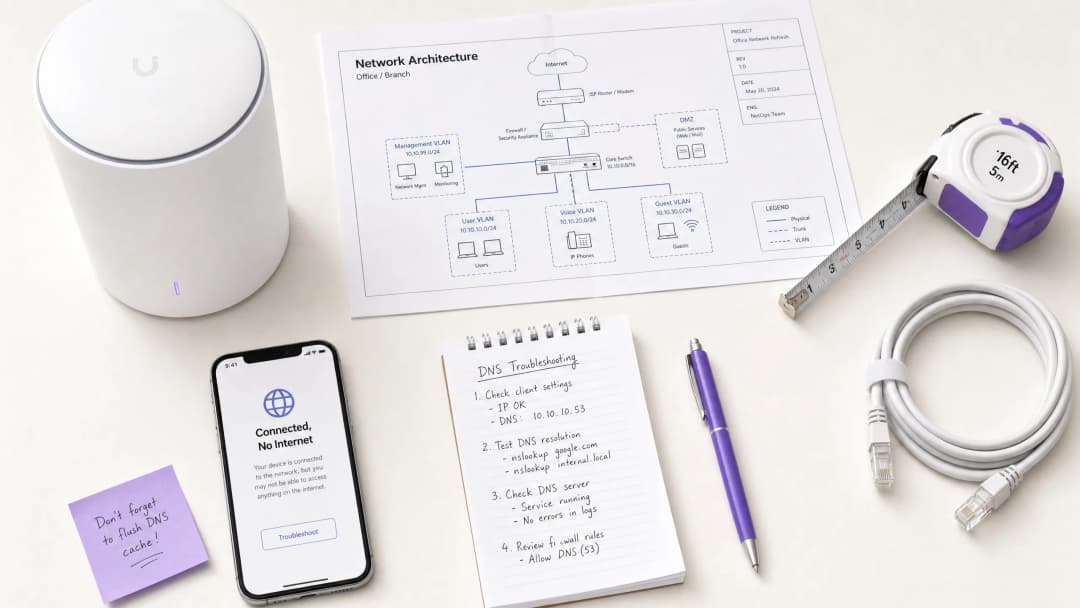
Retail, Hospitality, Healthcare, और Transport जैसे उच्च-घनत्व वाले स्थानों की देखरेख करने वाले CTOs और नेटवर्क आर्किटेक्ट्स के लिए, Guest WiFi नेटवर्क पर "Connected, No Internet" त्रुटि एक लगातार बनी रहने वाली परिचालन समस्या है। हालांकि इसे अक्सर AP हार्डवेयर खराबी या अपर्याप्त अपस्ट्रीम बैंडविड्थ के रूप में गलत समझा जाता है, लेकिन एंटरप्राइज़ वातावरण में इसका मुख्य कारण आम तौर पर नेटवर्क कंजेशन के कारण होने वाला DNS टाइमआउट है।
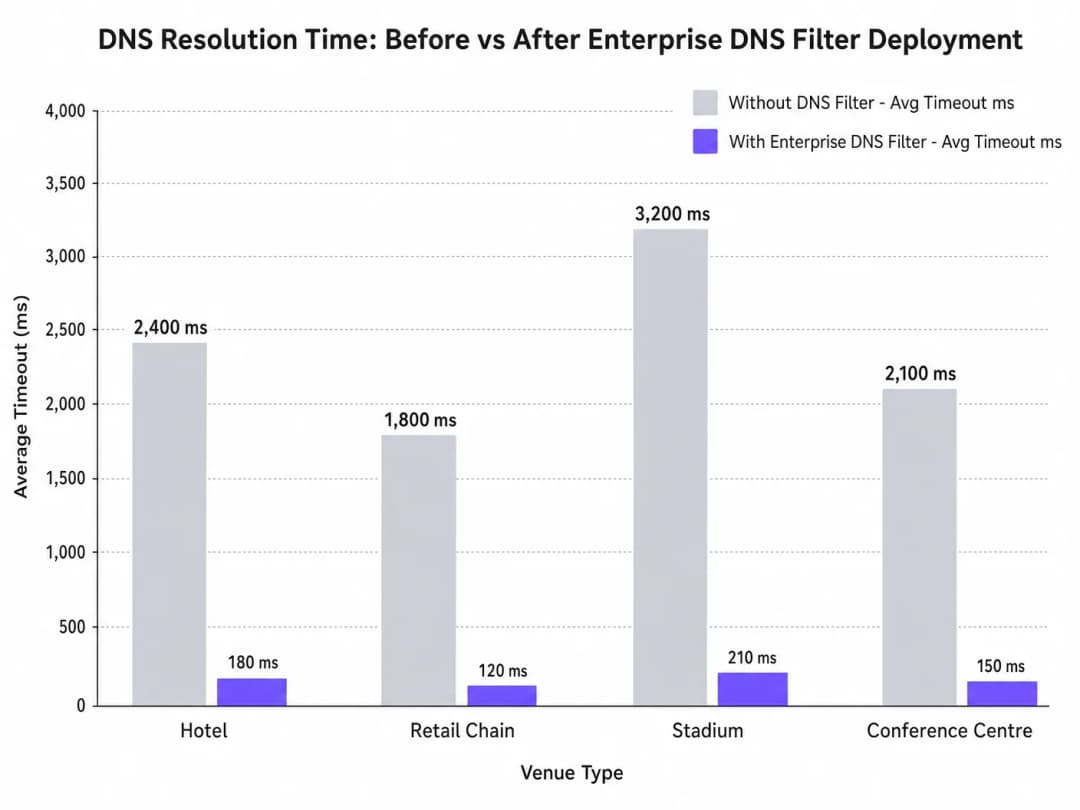
जब सैकड़ों डिवाइस एक साथ कैप्टिव पोर्टल डिटेक्शन (जैसे, captive.apple.com) के लिए जांच करते हैं, तो डिफ़ॉल्ट UDP पोर्ट 53 क्वेरीज़ मानक अपस्ट्रीम रिज़ॉल्वर्स को ओवरलोड कर सकती हैं। यदि DNS प्रतिक्रिया OS-स्तर की टाइमआउट विंडो (आमतौर पर 1 - 5 सेकंड) से अधिक हो जाती है, तो डिवाइस मान लेता है कि कोई इंटरनेट कनेक्टिविटी मौजूद नहीं है, जिससे Captive Portal ट्रिगर होने में विफल हो जाता है। यह गाइड इस विफलता मोड की तकनीकी आर्किटेक्चर का विवरण देती है और यह प्रदर्शित करती है कि कैसे एक एंटरप्राइज़ DNS फ़िल्टर को तैनात करने से यह बाधा दूर होती है, जिससे क्वेरी लेटेंसी हजारों मिलीसेकंड से घटकर 200ms से कम हो जाती है, IEEE 802.1X और GDPR जैसे मानकों का अनुपालन सुनिश्चित होता है, और गेस्ट ऑनबोर्डिंग अनुभव में नाटकीय रूप से सुधार होता है।
तकनीकी गहन विश्लेषण (Technical Deep-Dive)
Captive Portal डिटेक्शन तंत्र (The Captive Portal Detection Mechanism)
जब कोई क्लाइंट डिवाइस किसी एक्सेस पॉइंट से जुड़ता है और DHCP लीज प्राप्त करता है, तो कनेक्टेड स्थिति में पूरी तरह से जाने से पहले उसे इंटरनेट एक्सेस की पुष्टि करनी होगी। यह Captive Portal डिटेक्शन जांच के माध्यम से प्राप्त किया जाता है:
- iOS/macOS:
captive.apple.comपर HTTP GET - Android:
connectivitycheck.gstatic.comपर HTTP GET - Windows:
msftconnecttest.comपर HTTP GET
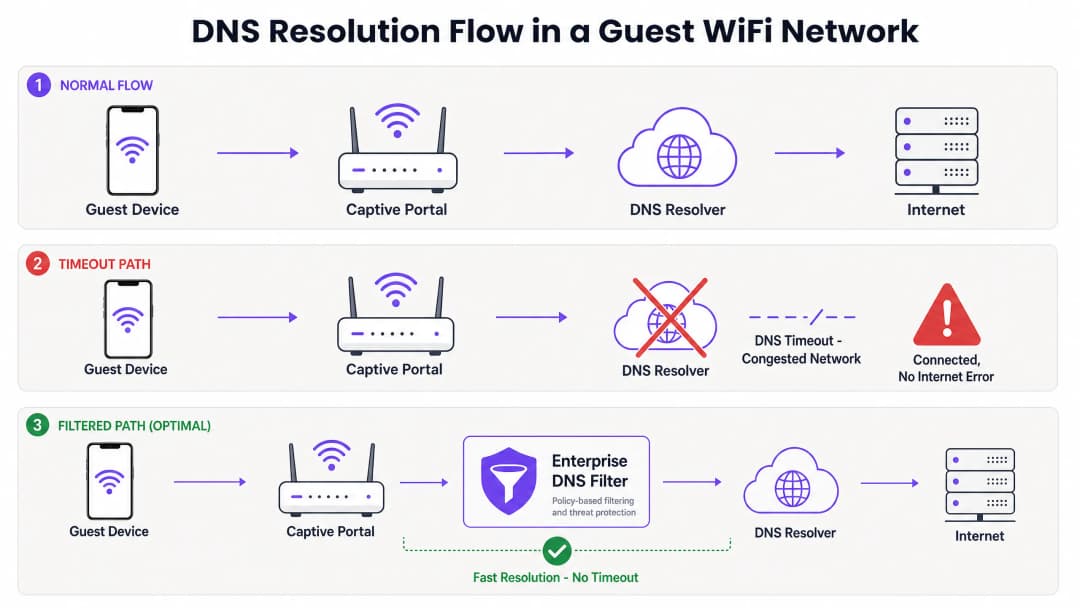
HTTP GET जारी होने से पहले, डिवाइस को DNS के माध्यम से होस्टनाम को रिज़ॉल्व करना होगा। यह प्रारंभिक DNS क्वेरी उच्च-घनत्व वाले वातावरण में महत्वपूर्ण विफलता बिंदु है।
कंजेशन से DNS टाइमआउट क्यों ट्रिगर होता है
DNS क्वेरीज़ आमतौर पर UDP का उपयोग करती हैं, जो बिना ट्रांसपोर्ट-लेयर रीट्रांसमिशन वाला कनेक्शन रहित प्रोटोकॉल है। एक कंजेशन वाले नेटवर्क में - जैसे हाफ-टाइम के दौरान स्टेडियम या सुबह के पीक आवर्स के दौरान कोई होटल - UDP पैकेट आसानी से ड्रॉप या विलंबित हो जाते हैं।
यदि स्थान एक मानक ISP रिज़ॉल्वर या सार्वजनिक DNS सेवा (जैसे 8.8.8.8) पर निर्भर करता है, तो राउंड-ट्रिप समय (RTT) और रिज़ॉल्वर पर प्रोसेसिंग का समय OS की हार्डकोडेड टाइमआउट सीमा से अधिक हो सकता है। जब टाइमआउट समाप्त हो जाता है, तो डिवाइस कनेक्शन को "Connected, No Internet" के रूप में चिह्नित करता है और Captive Portal रीडायरेक्शन प्रक्रिया को रोक देता है।इसके अलावा, इन प्रोब डोमेन पर शॉर्ट Time-To-Live (TTL) वैल्यू इस समस्या को और बढ़ा देती हैं। जैसे-जैसे डिवाइस लगातार जुड़ते और अलग होते हैं, कैश्ड एंट्रियां तेजी से समाप्त हो जाती हैं, जिससे ठीक उसी समय एक साथ कई DNS क्वेरी की बाढ़ आ जाती है जब नेटवर्क अधिकतम लोड पर होता है।
Enterprise DNS फ़िल्टर की भूमिका
एक enterprise DNS फ़िल्टर, जैसे कि वह जो Purple के WiFi Analytics प्लेटफ़ॉर्म में एकीकृत है, एक उच्च-प्रदर्शन, स्थानीय या एज-प्रॉक्सिमेट रिज़ॉल्वर के रूप में कार्य करता है। कंजस्टेड WAN लिंक को पार करने से पहले ही DNS क्वेरीज़ को रोककर, यह फ़िल्टर:
- हाई-फ़्रीक्वेंसी डोमेन को कैश करता है: प्रोब डोमेन को स्थानीय रूप से सर्व करता है, जिससे RTT घटकर सब-मिलीसेकंड स्तर पर आ जाता है।
- पॉलिसी को लागू करना: मैलवेयर वाले या ब्लॉक किए गए डोमेन की क्वेरीज़ को तुरंत छोड़ देता है, जिससे WAN बैंडविड्थ की बचत होती है।
- ऑडिट लॉगिंग: IT Security के लिए एक ऑडिट ट्रेल प्रदान करता है, जो GDPR अनुपालन और घटना के प्रति प्रतिक्रिया में सहायता करता है।
अपने विशिष्ट सेटअप को लेकर कोई सवाल हैं?
हमारी टीम 80,000 से अधिक वेन्यू में वेन्यू ऑपरेटरों, IT मैनेजरों और नेटवर्क इंजीनियरों के साथ काम करती है। 20 मिनट का कॉल बुक करें और हम आपको दिखाएंगे कि आपके जैसे अन्य लोगों ने इसे कैसे हल किया।
कार्यान्वयन गाइड (Implementation Guide)
एक enterprise DNS फ़िल्टर को स्थापित करने के लिए सावधानीपूर्वक आर्किटेक्चरल प्लानिंग की आवश्यकता होती है ताकि विफलता के नए बिंदु पैदा न हों।
1. रिज़ॉल्वर प्लेसमेंट और लेटेंसी ऑप्टिमाइज़ेशन
DNS फ़िल्टर को नेटवर्क एज के जितना संभव हो सके उतना करीब तैनात करें। वितरित रिटेल चेनों के लिए, क्लाउड-डिलीवर्ड एज नोड उपयुक्त है; स्टेडियमों जैसे बड़े सिंगल-साइट स्थानों के लिए, कोर स्विच पर एक स्थानीयकृत उपकरण या वर्चुअल मशीन को प्राथमिकता दी जाती है। इसका लक्ष्य गेस्ट VLAN और रिज़ॉल्वर के बीच राउटिंग हॉप्स की संख्या को कम करना है।
2. Captive Portal व्हाइटलिस्टिंग (पासथ्रू)
सबसे महत्वपूर्ण कॉन्फ़िगरेशन चरण यह सुनिश्चित करना है कि आपका Captive Portal डोमेन स्पष्ट रूप से व्हाइटलिस्टेड हो। यदि DNS फ़िल्टर ऑथेंटिकेशन पोर्टल के रिज़ॉल्यूशन में देरी करता है या उसे ब्लॉक करता है, तो आप ठीक वही त्रुटि पैदा करेंगे जिसे आप हल करने का प्रयास कर रहे हैं।
3. TTL ट्यूनिंग और कैश मैनेजमेंट
Captive Portal प्रोब डोमेन को आक्रामक रूप से कैश करने के लिए स्थानीय रिज़ॉल्वर को कॉन्फ़िगर करें। हालांकि अपस्ट्रीम TTL का सम्मान करना एक मानक प्रक्रिया है, लेकिन स्थानीय स्तर पर captive.apple.com और इसी तरह के डोमेन के लिए TTL को न्यूनतम 60 सेकंड के लिए ओवरराइड करने से पीक एसोसिएशन इवेंट के दौरान अपस्ट्रीम क्वेरी वॉल्यूम को काफी कम किया जा सकता है।
4. मौजूदा इंफ्रास्ट्रक्चर के साथ इंटीग्रेशन
यह सुनिश्चित करें कि DNS फ़िल्टर परिनियोजन आपके मौजूदा नेटवर्क सेगमेंटेशन के साथ मेल खाता हो। PCI DSS अनुपालन बनाए रखने के लिए गेस्ट DNS ट्रैफ़िक कॉर्पोरेट DNS इंफ्रास्ट्रक्चर से अलग रहना चाहिए। यह अलगाव अत्यंत महत्वपूर्ण है चाहे आप बिजनेस यात्रियों के लिए होटल WiFi को ऑप्टिमाइज़ कर रहे हों या किसी सार्वजनिक क्षेत्र की तैनाती को सुरक्षित कर रहे हों।
इन कार्यान्वयन चरणों पर अधिक संदर्भ के लिए हमारे तकनीकी ब्रीफिंग पॉडकास्ट को सुनें:
सर्वोत्तम प्रथाएं
- अतिथि नेटवर्क के लिए सार्वजनिक समाधानकर्ताओं से बचें: अत्यधिक सघन अतिथि नेटवर्क के लिए प्राथमिक DHCP-assigned DNS के रूप में 8.8.8.8 या 1.1.1.1 पर निर्भर रहने से अस्वीकार्य विलंबता परिवर्तनशीलता आ जाती है।
- DNS over HTTPS (DoH) को सावधानीपूर्वक लागू करें: हालांकि DoH गोपनीयता में सुधार करता है, यह पारंपरिक पोर्ट 53 फ़िल्टरिंग को बायपास कर देता है। सुनिश्चित करें कि यदि स्थल नीति द्वारा आवश्यक हो तो आपका उद्यम DNS समाधान DoH ट्रैफ़िक का निरीक्षण या प्रबंधन कर सकता है।
- UDP पोर्ट 53 ड्रॉप्स की निगरानी करें: अत्यधिक UDP पोर्ट 53 पैकेट ड्रॉप्स पर अलर्ट करने के लिए अपने फ़ायरवॉल या कोर स्विच को कॉन्फ़िगर करें, जो कि आसन्न DNS टाइमआउट का एक प्रमुख संकेतक है।
- ब्लॉकलिस्ट की नियमित रूप से समीक्षा करें: अत्यधिक आक्रामक फ़िल्टरिंग वैध अनुप्रयोगों को बाधित कर सकती है। गलत सकारात्मकताओं की पहचान करने के लिए साप्ताहिक रूप से DNS क्वेरी लॉग की समीक्षा करें।
सार्वजनिक क्षेत्र के परिनियोजन के लिए, मजबूत कनेक्टिविटी सुनिश्चित करना व्यापक डिजिटल समावेशन पहलों का हिस्सा है, जैसा कि हाल ही में उजागर किया गया था जब Purple Appoints Iain Fox as VP Growth – Public Sector हुआ।
समस्या निवारण और जोखिम न्यूनीकरण
जब "कनेक्टेड, कोई इंटरनेट नहीं" त्रुटि होती है, तो IT टीमों को तुरंत बैंडविड्थ समाप्त होने का अनुमान लगाने के बजाय एक संरचित नैदानिक मार्ग का पालन करना चाहिए।
- पैकेट कैप्चर (PCAP):
udp port 53के लिए फ़िल्टरिंग करने वाले अतिथि VLAN पर पैकेट कैप्चर चलाएं। 2-सेकंड की अवधि के भीतर बिना संगत प्रतिक्रियाओं वाली क्वेरीज़ की तलाश करें। - जांच का अनुकरण करें:
http://captive.apple.com/hotspot-detect.htmlको मैन्युअल रूप से हिट करने के लिए अतिथि VLAN पर एक परीक्षण डिवाइस सेcurlयाwgetका उपयोग करें। HTTP प्रतिक्रिया समय बनाम DNS रिज़ॉल्यूशन समय को मापें। - फ़ायरवॉल नियमों की जाँच करें: सत्यापित करें कि कोई भी दर-सीमित करने वाली (rate-limiting) या QoS नीतियां अनजाने में अतिथि सबनेट से UDP पोर्ट 53 ट्रैफ़िक को अवरुद्ध नहीं कर रही हैं।
- ऑफ़लाइन क्षमताओं को सत्यापित करें: रुक-रुक कर होने वाली WAN कनेक्टिविटी वाले वातावरण में, अपस्ट्रीम इंटरनेट के धीमे होने पर भी उपयोगकर्ता जुड़ाव के स्तर को बनाए रखने के लिए Purple's Offline Maps Mode जैसी सुविधाओं पर विचार करें।
ROI और व्यावसायिक प्रभाव
DNS टाइमआउट को हल करने से स्थल ऑपरेटरों के मुनाफ़े पर सीधा प्रभाव पड़ता है।
- कम सपोर्ट ओवरहेड: "कनेक्टेड, कोई इंटरनेट नहीं" त्रुटि हॉस्पिटैलिटी और रिटेल में लेवल 1 सपोर्ट टिकटों का एक प्राथमिक कारण है। इसे समाप्त करने से IT परिचालन व्यय कम हो जाता है।
- डेटा कैप्चर में वृद्धि: कैप्टिव पोर्टल लोड होने में विफलता का अर्थ है डेटा कैप्चर और उपयोगकर्ता प्रमाणीकरण के अवसर का खो जाना। तेजी से पोर्टल रेंडरिंग सुनिश्चित करके, स्थल अपने WiFi Analytics प्लेटफ़ॉर्म के ROI को अधिकतम करते हैं।
- बेहतर अतिथि संतुष्टि: सहज कनेक्टिविटी एक बुनियादी अपेक्षा है। ऑनबोर्डिंग घर्षण को कम करना सीधे तौर पर बेहतर नेट प्रमोटर स्कोर (NPS) और सकारात्मक स्थल समीक्षाओं से संबंधित है।
अपना दृष्टिकोण "हमें अधिक बैंडविड्थ की आवश्यकता है" से बदलकर "हमें अनुकूलित DNS रिज़ॉल्यूशन की आवश्यकता है" पर लाकर, नेटवर्क आर्किटेक्ट्स उद्यम-स्तर का गेस्ट WiFi प्रदान कर सकते हैं जो दबाव में भी सुचारू रूप से कार्य करता है।
मुख्य परिभाषाएं
Captive Portal डिटेक्शन प्रोब
नेटवर्क एसोसिएशन के तुरंत बाद एक मोबाइल OS द्वारा भेजा गया एक स्वचालित HTTP अनुरोध (जैसे, captive.apple.com पर) यह निर्धारित करने के लिए कि क्या लॉगिन पेज आवश्यक है।
यदि यह प्रोब DNS टाइमआउट के कारण विफल हो जाता है, तो OS मान लेता है कि कोई इंटरनेट एक्सेस नहीं है और एरर दिखाता है।
DNS टाइमआउट
वह स्थिति जहां एक क्लाइंट डिवाइस DNS क्वेरी को छोड़ देता है क्योंकि रिज़ॉल्वर ने प्रतिक्रिया देने में बहुत लंबा समय लिया (आमतौर पर >2 - 5 सेकंड)।
उच्च-घनत्व वाले वातावरण में 'Connected, No Internet' त्रुटियों का प्राथमिक तकनीकी कारण।
एंटरप्राइज DNS फिल्टर
एक समर्पित DNS रिज़ॉल्वर जो स्थानीय रूप से क्वेरीज़ को कैश करता है और दुर्भावनापूर्ण या अवांछित डोमेन तक पहुंच को रोकने के लिए नीति-आधारित ब्लॉकिंग लागू करता है।
भीड़भाड़ वाले अपस्ट्रीम रिज़ॉल्वर से क्वेरी वॉल्यूम को कम करने और लेटेंसी को कम करने के लिए उपयोग किया जाता है।
UDP पोर्ट 53
DNS क्वेरीज़ के लिए उपयोग किया जाने वाला मानक कनेक्शन रहित ट्रांसपोर्ट प्रोटोकॉल और पोर्ट।
क्योंकि UDP में कोई गारंटीकृत डिलीवरी नहीं होती है, नेटवर्क की भीड़ के दौरान DNS पैकेट आसानी से ड्रॉप हो जाते हैं।
टाइम-टू-लाइव (TTL)
DNS रिकॉर्ड में एक मान जो यह तय करता है कि किसी रिज़ॉल्वर या क्लाइंट को दोबारा क्वेरी करने से पहले IP एड्रेस को कब तक कैश करना चाहिए।
प्रोब डोमेन पर छोटे TTL बार-बार री-क्वेरी करने का कारण बनते हैं, जिससे भीड़ बढ़ जाती है।
IEEE 802.1X
पोर्ट-आधारित नेटवर्क एक्सेस कंट्रोल (PNAC) के लिए एक मानक जो LAN या WLAN से जुड़ने के इच्छुक उपकरणों को एक ऑथेंटिकेशन तंत्र प्रदान करता है।
सुरक्षित होने के बावजूद, 802.1X वातावरण अभी भी पोस्ट-ऑथेंटिकेशन राउटिंग के लिए मजबूत DNS इन्फ्रास्ट्रक्चर पर निर्भर करते हैं।
स्थानीय इंटरनेट ब्रेकआउट
इंटरनेट-बाउंड ट्रैफ़िक को किसी केंद्रीय डेटा सेंटर में वापस भेजने के बजाय, सीधे शाखा स्थान से इंटरनेट पर रूट करना।
वितरित रिटेल या हॉस्पिटैलिटी नेटवर्क में DNS लेटेंसी को कम करने के लिए महत्वपूर्ण है महत्वपूर्ण है महत्वपूर्ण।
WPA3
नवीनतम WiFi सुरक्षा मानक जो खुले और पासवर्ड-सुरक्षित नेटवर्क के लिए उन्नत एन्क्रिप्शन प्रदान करता है।
WPA3 सुरक्षा में सुधार करता है लेकिन मौलिक DNS रिज़ॉल्यूशन पथ को नहीं बदलता है या टाइमआउट समस्याओं को कम नहीं करता है।
हल किए गए उदाहरण
एक 400 कमरों वाले होटल में हर सुबह 7:30 AM से 8:30 AM के बीच 'Connected, No Internet' की शिकायतों में तेजी आती है, जब मेहमान जागते हैं और WiFi से कनेक्ट होते हैं। इस दौरान 1Gbps WAN लिंक केवल 40% उपयोग दिखाता है।
- सुबह के पीक आवर्स के दौरान UDP पोर्ट 53 को फिल्टर करते हुए गैस्ट VLAN पर पैकेट कैप्चर चलाएं।
- पहचानें कि Captive Portal प्रोब डोमेन (जैसे, captive.apple.com) के लिए DNS क्वेरी ISP के डिफॉल्ट DNS के माध्यम से रिज़ॉल्यूशन होने में >3000ms का समय ले रही हैं।
- गैस्ट सबनेट पर एक स्थानीय एंटरप्राइज DNS फिल्टर तैनात करें।
- गैस्ट डिवाइसों को स्थानीय DNS फिल्टर IP असाइन करने के लिए DHCP सर्वर को कॉन्फ़िगर करें।
- फिल्टर में होटल के Captive Portal डोमेन को व्हाइटलिस्ट करें।
- रिज़ॉल्यूशन समय की निगरानी करें, जो घटकर <50ms हो जाना चाहिए।
एक बड़ी रिटेल चेन 50 स्टोर्स में एक नया गैस्ट WiFi नेटवर्क शुरू करती है, लेकिन अधिक भीड़भाड़ वाले फ्लैगशिप स्टोर्स में उपयोगकर्ता Captive Portal लोड नहीं कर पाते हैं, जबकि छोटे स्टोर्स में उपयोगकर्ताओं को कोई समस्या नहीं होती है।
- आर्किटेक्चर का विश्लेषण करें: सभी 50 स्टोर्स गैस्ट ट्रैफ़िक को वापस एक केंद्रीय डेटा सेंटर फ़ायरवॉल पर टनल कर रहे हैं, जो फिर DNS क्वेरी को एक पब्लिक रिज़ॉल्वर पर फ़ॉरवर्ड करता है।
- अधिक भीड़भाड़ वाले स्टोर्स में, समवर्ती एसोसिएशन इवेंट्स की भारी संख्या केंद्रीय फ़ायरवॉल पर NAT/PAT स्टेट टेबल को समाप्त कर देती है, जिससे UDP पोर्ट 53 पैकेट ड्रॉप हो जाते हैं।
- क्लाउड-डिलीवर एंटरप्राइज DNS फिल्टर लागू करें।
- स्थानीय ब्रांच राउटर्स को डेटा सेंटर में बैकहॉल करने के बजाय स्थानीय इंटरनेट ब्रेकआउट के माध्यम से गैस्ट DNS क्वेरी को सीधे क्लाउड फिल्टर पर फ़ॉरवर्ड करने के लिए रीकॉन्फ़िगर करें।
अभ्यास प्रश्न
Q1. एक स्टेडियम के IT निदेशक ने ध्यान दिया कि हाफ-टाइम के दौरान, हजारों उपयोगकर्ता WiFi से जुड़ते हैं लेकिन Captive Portal तक नहीं पहुंच पाते हैं। कोर स्विच भारी UDP पैकेट ड्रॉप दिखाता है। क्या उन्हें WAN बैंडविड्थ को 2Gbps से बढ़ाकर 5Gbps करना चाहिए?
संकेत: विचार करें कि कौन सा प्रोटोकॉल ड्रॉप किया जा रहा है और क्या यह पेलोड बैंडविड्थ या कनेक्शन स्टेट सीमाओं से संबंधित है।
मॉडल उत्तर देखें
नहीं। WAN बैंडविड्थ बढ़ाने से समस्या का समाधान नहीं होगा। UDP पैकेट ड्रॉप्स यह दर्शाते हैं कि फ़ायरवॉल या रिज़ॉल्वर समवर्ती DNS प्रश्नों की भारी मात्रा (स्टेट टेबल थकावट या CPU सीमाएं) को संभाल नहीं सकता है। सही दृष्टिकोण इन प्रश्नों को स्थानीय रूप से कैश करने और उनका जवाब देने के लिए एज पर एक उच्च-प्रदर्शन स्थानीय DNS फ़िल्टर तैनात करना है, जिससे WAN की बाधा पूरी तरह से समाप्त हो जाए।
Q2. आपने अभी-अभी एक होटल गेस्ट नेटवर्क पर एंटरप्राइज DNS फ़िल्टर तैनात किया है। मेहमान अब सार्वजनिक वेबसाइटों को तेज़ी से एक्सेस कर सकते हैं, लेकिन जब वे पहली बार कनेक्ट होते हैं, तो उन्हें होटल के लॉगिन पेज पर रीडायरेक्ट नहीं किया जाता है। सबसे संभावित कॉन्फ़िगरेशन त्रुटि क्या है?
संकेत: स्वयं लॉगिन पेज के डोमेन नाम के बारे में सोचें।
मॉडल उत्तर देखें
सबसे संभावित त्रुटि यह है कि Captive Portal के अपने डोमेन को DNS फ़िल्टर में स्पष्ट रूप से श्वेतसूची (पासथ्रू) नहीं किया गया है। फ़िल्टर या तो पोर्टल URL के रिज़ॉल्यूशन को ब्लॉक कर रहा है या उसमें देरी कर रहा है, जिससे रीडायरेक्शन पूरा होने से रुक रहा है।
Q3. एक सार्वजनिक क्षेत्र के संगठन को सुरक्षा नीतियों का अनुपालन करने के लिए सभी गेस्ट WiFi ट्रैफ़िक को 90 दिनों तक लॉग करने की आवश्यकता होती है। एक एंटरप्राइज DNS फ़िल्टर को तैनात करना इस आवश्यकता में कैसे सहायता करता है?
संकेत: विचार करें कि एक DNS फ़िल्टर मानक फ़ायरवॉल की तुलना में किस डेटा को प्रोसेस करता है।
मॉडल उत्तर देखें
एक एंटरप्राइज DNS फ़िल्टर क्लाइंट उपकरणों द्वारा किए गए सभी DNS प्रश्नों को मूल रूप से लॉग करता है। यह स्पष्ट, खोजने योग्य ऑडिट ट्रेल प्रदान करता है कि किस डोमेन के लिए और कब अनुरोध किया गया था, जिससे सभी एन्क्रिप्टेड HTTPS पेलोड ट्रैफ़िक पर डीप पैकेट इंस्पेक्शन किए बिना 90 दिनों के लॉगिंग की आवश्यकता पूरी हो जाती है।
अक्सर पूछे जाने वाले प्रश्न
Why does guest WiFi say connected but no internet?
The 'Connected, No Internet' status occurs when a client device associates with an access point and receives an IP address, but its operating system detection probe fails to reach the internet. On guest WiFi networks, this is most commonly caused by DNS query timeouts on captive portal detection domains (such as captive.apple.com or connectivitycheck.gstatic.com), DHCP lease scope exhaustion, or firewalls blocking pre-authentication DNS traffic.
How do captive portal detection probes work on guest WiFi across iOS, Android, and Windows?
When connecting to an open or guest WiFi SSID, modern operating systems immediately transmit plaintext HTTP probe requests to vendor test URLs (iOS uses captive.apple.com/hotspot-detect.html, Android queries connectivitycheck.gstatic.com/generate_204, and Windows tests msftconnecttest.com/connecttest.txt). If the network returns an HTTP 200/204, the OS marks the connection as having internet. If it receives an HTTP 302 redirect, it launches the captive portal browser. If the initial DNS query for the probe domain times out, the OS reports 'Connected, No Internet' and drops the link.
How do DNS timeouts trigger guest WiFi connection drops?
In high-density environments, hundreds of devices query upstream DNS resolvers simultaneously over UDP port 53. If the local guest WiFi network forwards raw queries directly to rate-limited ISP resolvers without caching, response latency spikes above 2,000ms. Mobile devices enforce strict 2- to 5-second probe timeouts. Once that threshold is exceeded, the device assumes the network is broken and abandons the connection before the splash page can load.
What walled garden domains must be allowed before guest WiFi captive portal login?
Pre-authentication access control lists (walled gardens) on guest WiFi networks must permit outbound UDP and TCP port 53 to your designated DNS resolvers, DHCP transactions (UDP 67/68), and OS detection probes (captive.apple.com, connectivitycheck.gstatic.com, msftconnecttest.com). If using external captive portal hosting, CDN styling, or social login, you must also allow your portal domain (*.purple.ai), Google Fonts (fonts.googleapis.com), and OAuth endpoints.
How does DHCP pool exhaustion cause connected without internet errors on guest WiFi?
When venues configure long DHCP lease durations (such as 24 hours) on guest WiFi in environments with rapid visitor turnover, the pool of available IP addresses quickly runs out. New arrivals may associate with the access point via 802.11 beacons, but fail to receive a valid DHCPOFFER or default gateway, receiving a self-assigned 169.254.x.x APIPA address instead. Shortening lease times to 30 to 60 minutes and configuring dynamic VLAN pooling prevents scope starvation.
How does Purple prevent captive portal and DNS timeout failures on guest WiFi?
Purple acts as a resilient, hardware-agnostic guest WiFi management platform across Cisco Meraki, HPE Aruba, Ruckus, Ubiquiti UniFi, and Fortinet architectures. By optimizing captive portal redirection flows, automating walled garden rules, and integrating with high-speed Anycast DNS, Purple ensures detection probes succeed instantly, onboarding visitors in under 3 seconds without connection drops.
इस श्रृंखला में आगे पढ़ें
WiFi Roaming समस्याओं के निदान के लिए एक चरण-दर-चरण मार्गदर्शिका
यह व्यापक मार्गदर्शिका उद्यम IT लीडरों और नेटवर्क आर्किटेक्ट्स को WiFi roaming समस्याओं के निदान और समाधान के लिए एक आधिकारिक, चरण-दर-चरण कार्यप्रणाली प्रदान करती है। IEEE 802.11k/v/r मानकों के तकनीकी गहन अध्ययन को वास्तविक दुनिया के केस स्टडीज और पैकेट-स्तरीय विश्लेषण के साथ जोड़कर, यह संदर्भ टीमों को 'sticky client' समस्या को समाप्त करने और निर्बाध मोबाइल कनेक्टिविटी प्रदान करने के लिए सक्षम बनाता है। इसमें RF साइट सर्वेक्षण और नियंत्रक कॉन्फ़िगरेशन ऑडिट से लेकर ओवर-द-एयर पैकेट कैप्चर विश्लेषण और समाधान के बाद के सत्यापन तक का पूरा नैदानिक वर्कफ़्लो शामिल है।
आपके स्टेडियम का WiFi ठप क्यों हो जाता है (और इसे कैसे ठीक करें)
यह आधिकारिक तकनीकी गाइड स्टेडियम WiFi कंजेशन के मूल कारण — प्रोग्रैमेटिक विज्ञापनों और टेलीमेट्री को लोड करने वाले 50,000 डिवाइसों की एक साथ बैकग्राउंड चैटर — की जांच करती है, और प्राथमिक शमन रणनीति के रूप में Edge DNS फ़िल्टरिंग को तैनात करने के लिए एक विस्तृत आर्किटेक्चरल ब्लूप्रिंट प्रदान करती है। IT निदेशकों, CTO और नेटवर्क आर्किटेक्ट्स के लिए डिज़ाइन किया गया, यह वेन्यू ऑपरेटरों को बैंडविड्थ पुनः प्राप्त करने और बड़े पैमाने पर उच्च-प्रदर्शन कनेक्टिविटी प्रदान करने में मदद करने के लिए कार्रवाई योग्य कार्यान्वयन मार्गदर्शन, वास्तविक दुनिया के केस स्टडीज़ और मापने योग्य ROI फ्रेमवर्क प्रदान करता है।
हमारा गेस्ट WiFi इतना धीमा क्यों है? नेटवर्क कंजेशन का निदान
यह मार्गदर्शिका गेस्ट WiFi कंजेशन के छिपे हुए चालकों का निदान करती है - बैकग्राउंड टेलीमेट्री, प्रोग्रामेटिक विज्ञापन नेटवर्क और स्वचालित OS अपडेट - जो सामूहिक रूप से किसी गेस्ट द्वारा ब्राउज़र खोलने से पहले ही सार्वजनिक WiFi बैंडविड्थ का 40% तक उपभोग करते हैं। यह DNS फ़िल्टरिंग और QoS नीतियों के लिए एक चरणबद्ध, विक्रेता-तटस्थ कार्यान्वयन ढांचा प्रदान करता है जो उस बैंडविड्थ को पुनः प्राप्त करता है, गेस्ट अनुभव में सुधार करता है और मापने योग्य ROI प्रदान करता है। यह आतिथ्य (hospitality), खुदरा (retail), कार्यक्रमों और सार्वजनिक क्षेत्र के वातावरण में IT निदेशकों और संचालन प्रबंधकों के लिए लक्षित है।
अपने विशिष्ट सेटअप को लेकर कोई सवाल हैं?
हमारी टीम 80,000 से अधिक वेन्यू में वेन्यू ऑपरेटरों, IT मैनेजरों और नेटवर्क इंजीनियरों के साथ काम करती है। 20 मिनट का कॉल बुक करें और हम आपको दिखाएंगे कि आपके जैसे अन्य लोगों ने इसे कैसे हल किया।