
व्यावसायिक यात्रियों के लिए Hotel WiFi को अनुकूलित करना
यह गाइड हॉस्पिटैलिटी IT लीडर्स को DNS-स्तरीय विज्ञापन अवरोधन (ad blocking) को एंड-टू-एंड Quality of Service (QoS) नीतियों के साथ जोड़कर व्यावसायिक यात्रियों के लिए hotel WiFi को अनुकूलित करने के लिए कार्रवाई योग्य, वेंडर-तटस्थ रणनीतियाँ प्रदान करती है। इसमें तकनीकी आर्किटेक्चर, VLAN सेगमेंटेशन, सुरक्षा अनुपालन और वास्तविक दुनिया के केस स्टडीज शामिल हैं जो दिखाते हैं कि बैकग्राउंड शोर को समाप्त करके कैसे 35% तक बर्बाद बैंडविड्थ को वापस पाया जा सकता है। वेन्यू संचालन निदेशकों और नेटवर्क आर्किटेक्ट्स को इस तिमाही में तैनाती को सही ठहराने और निष्पादित करने के लिए ठोस कार्यान्वयन चरण, निर्णय फ्रेमवर्क और मापने योग्य ROI बेंचमार्क मिलेंगे।
इस गाइड को सुनें
पॉडकास्ट ट्रांसक्रिप्ट देखें
हमारी मुख्य श्रृंखला का हिस्सा: Guest WiFi Guide →

कार्यकारी सारांश
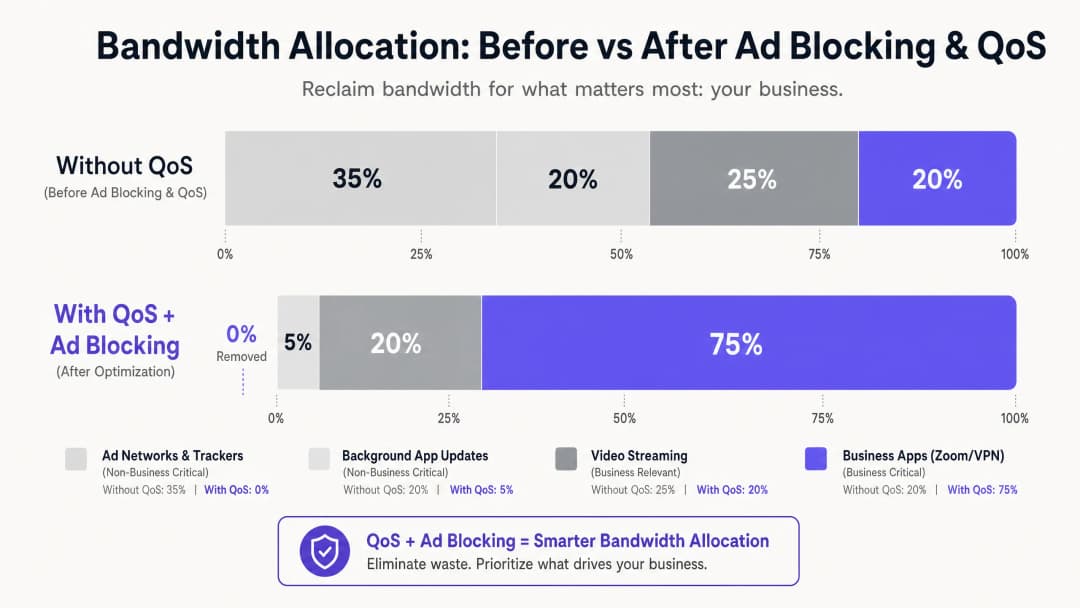
hospitality क्षेत्र में IT प्रबंधकों और स्थल संचालन निदेशकों के लिए, विश्वसनीय WiFi प्रदान करना अब कोई अलग विशेषता नहीं रह गई है - यह एक बुनियादी परिचालन आवश्यकता है। व्यावसायिक यात्री कॉर्पोरेट VPNs, वीडियो कॉन्फ्रेंसिंग और क्लाउड-होस्टेड ऐप्स के लिए उच्च-प्रदर्शन कनेक्टिविटी की मांग करते हैं। फिर भी अधिकांश होटल नेटवर्क अदृश्य बैकग्राउंड ट्रैफ़िक के कारण चुपचाप बैंडविड्थ खो रहे हैं: विज्ञापन ट्रैकर्स, टेलीमेट्री बीकन और स्वचालित ऐप अपडेट जो किसी एकल व्यावसायिक एप्लिकेशन के प्रारंभ होने से पहले कुल उपलब्ध बैंडविड्थ का 35% तक उपभोग कर सकते हैं।
यह मार्गदर्शिका उस बर्बाद बैंडविड्थ को पुनः प्राप्त करने के लिए एक सिद्ध, विक्रेता-तटस्थ आर्किटेक्चर का विवरण देती है। नेटवर्क गेटवे पर DNS-स्तरीय विज्ञापन अवरोधन को तैनात करके और Deep Packet Inspection (DPI) के माध्यम से मैप की गई एंड-टू-एंड Quality of Service (QoS) नीतियों को लागू करके, नेटवर्क आर्किटेक्ट यह सुनिश्चित कर सकते हैं कि लेटेंसी-संवेदनशील एप्लिकेशन - Zoom, Microsoft Teams, IPsec VPNs, और SSL टनल - को गारंटीकृत प्राथमिकता थ्रूपुट प्राप्त हो। अधिकांश मामलों में, इस दृष्टिकोण को मौजूदा बुनियादी ढांचे पर लागू किया जा सकता है, जो आस्थगित ISP लिंक अपग्रेड और बेहतर कॉर्पोरेट अतिथि संतुष्टि स्कोर के माध्यम से मापने योग्य ROI प्रदान करता है।
तकनीकी गहन विश्लेषण
आधुनिक होटल WiFi परिवेश के सामने मुख्य चुनौती अवांछित बैकग्राउंड ट्रैफ़िक का प्रसार है। जब कोई भी आधुनिक डिवाइस - एक व्यावसायिक लैपटॉप, स्मार्टफोन, या टैबलेट - किसी नेटवर्क से जुड़ता है, तो यह तुरंत दर्जनों बैकग्राउंड कनेक्शन शुरू कर देता है। इनमें इंस्टॉल किए गए ऐप्स से विज्ञापन SDK पोलिंग, ऑपरेटिंग सिस्टम टेलीमेट्री, क्लाउड सिंक सेवाएं और स्वचालित अपडेट जांच शामिल हैं। 200 समवर्ती रूप से जुड़े मेहमानों वाले एक अप्रबंधित, फ्लैट नेटवर्क पर, यह बैकग्राउंड बातचीत केवल एक असुविधा नहीं है - यह एक संरचनात्मक बैंडविड्थ समस्या है।
कॉर्पोरेट अतिथि नेटवर्क के ट्रैफ़िक प्रोफाइल पर शोध लगातार दिखाता है कि विज्ञापन नेटवर्क और तृतीय-पक्ष ट्रैकर्स अप्रबंधित होटल नेटवर्क पर DNS क्वेरी वॉल्यूम का 25% से 40% हिस्सा हैं। प्रत्येक सफलतापूर्वक हल की गई क्वेरी एक डेटा ट्रांसफर शुरू कर सकती है, और हालांकि प्रत्येक व्यक्तिगत पेलोड छोटा होता है, सैकड़ों समवर्ती कनेक्शनों पर संचयी प्रभाव पर्याप्त होता है। यह वह बैंडविड्थ है जो CFO की Zoom बोर्ड बैठक, या सलाहकार के उनके कॉर्पोरेट डेटा सेंटर में वापस जाने वाले VPN सत्र की सेवा करनी चाहिए।
लेयर 1: DNS-आधारित विज्ञापन और ट्रैकर ब्लॉकिंग
हस्तक्षेप का सबसे प्रभावी बिंदु DNS रिज़ॉल्यूशन है। सभी गेस्ट DNS क्वेरीज़ को एक फ़िल्टरिंग रिज़ॉल्वर के माध्यम से निर्देशित करके - चाहे वह ऑन-प्रिमाइसेस एप्लायंस हो या क्लाउड DNS सुरक्षा सेवा हो - नेटवर्क WAN लिंक को पार करने से पहले ही ज्ञात विज्ञापन सर्वरों, ट्रैकर डोमेन और टेलीमेट्री एंडपॉइंट्स के अनुरोधों को चुपचाप ब्लॉक कर सकता है। यहाँ दक्षता का लाभ संरचनात्मक है: एक ब्लॉक की गई DNS क्वेरी उस पूर्ण HTTP/S कनेक्शन की तुलना में नगण्य संसाधनों की खपत करती है जिसे उसने अन्यथा शुरू किया होता।
व्यावहारिक होटल डिप्लॉयमेंट के लिए, प्रबंधित DNS फ़िल्टरिंग सेवाएँ एंटरप्राइज़-ग्रेड SLAs द्वारा समर्थित नियमित रूप से अपडेट की जाने वाली ब्लॉकलिस्ट प्रदान करती हैं, जो उन्हें उन वातावरणों में स्व-प्रबंधित ओपन-सोर्स समाधानों की तुलना में बेहतर बनाती हैं जहाँ उपलब्धता महत्वपूर्ण है। मुख्य कॉन्फ़िगरेशन आवश्यकता यह सुनिश्चित करना है कि Walled Garden - Captive Portal ऑथेंटिकेशन से पहले सुलभ डोमेन का सेट - स्पष्ट रूप से व्हाइटलिस्ट किया गया हो और सामान्य फ़िल्टरिंग नीति से मुक्त हो। ऐसा न करना डिप्लॉयमेंट के बाद गेस्ट की शिकायतों का सबसे आम कारण है।
लेयर 2: डीप पैकेट इंस्पेक्शन और QoS मार्किंग
एक बार DNS लेयर पर बैकग्राउंड शोर कम हो जाने के बाद, शेष ट्रैफ़िक को प्राथमिकता के आधार पर सक्रिय रूप से प्रबंधित किया जाना चाहिए। एज फ़ायरवॉल या यूनिफाइड थ्रेट मैनेजमेंट (UTM) एप्लायंस पर डीप पैकेट इंस्पेक्शन (DPI) विशिष्ट एप्लिकेशन प्रोटोकॉल की पहचान करता है। आधुनिक DPI इंजन पैकेट सिग्नेचर और पोर्ट पैटर्न के आधार पर Zoom, Microsoft Teams, Cisco Webex, RTP/SIP वॉयस ट्रैफ़िक और IPsec और SSL VPN सेशन को विश्वसनीय रूप से वर्गीकृत कर सकते हैं, भले ही गैर-मानक पोर्ट उपयोग में हों।
बिजनेस-क्रिटिकल के रूप में पहचाने जाने वाले ट्रैफ़िक को IP हेडर में डिफ्रेंशिएटेड सर्विसेज कोड पॉइंट (DSCP) वैल्यू के साथ मार्क किया जाता है। DSCP फ़ील्ड 64 संभावित प्रति-हॉप व्यवहार प्रदान करता है, लेकिन व्यवहार में अधिकांश होटल डिप्लॉयमेंट एक सरलीकृत तीन-स्तरीय मॉडल का उपयोग करते हैं: वॉयस और वीडियो कॉन्फ्रेंसिंग के लिए एक्सपेडाइटेड फॉरवर्डिंग (EF, DSCP 46); VPN और कॉर्पोरेट एप्लिकेशन डेटा के लिए एश्योर्ड फॉरवर्डिंग क्लास 4 (AF41, DSCP 34); और सामान्य वेब ब्राउज़िंग और मीडिया स्ट्रीमिंग के लिए बेस्ट एफर्ट (BE, DSCP 0)।
लेयर 3: WMM के माध्यम से वायरलेस QoS
वायर्ड QoS कॉन्फ़िगरेशन केवल तभी प्रभावी होता है जब वायरलेस एक्सेस पॉइंट DSCP मार्किंग को उपयुक्त Wi-Fi मल्टीमीडिया (WMM) एक्सेस श्रेणियों में सही ढंग से मैप करते हैं। WMM चार एक्सेस श्रेणियों को परिभाषित करता है: वॉयस (AC_VO), वीडियो (AC_VI), बेस्ट एफर्ट (AC_BE), और बैकग्राउंड (AC_BK)। DSCP-टू-WMM मैपिंग को APs पर स्पष्ट रूप से कॉन्फ़िगर किया जाना चाहिए, क्योंकि डिफ़ॉल्ट व्यवहार वेंडर के अनुसार भिन्न होता है। अपने AP मैनेजमेंट कंसोल में इस सेटिंग को सत्यापित करें; यह एक आम कमी है जिसके कारण अन्यथा अच्छी तरह से डिज़ाइन की गई QoS नीतियां अंतिम छोर पर विफल हो जाती हैं।
VLAN Segmentation और सुरक्षा आर्किटेक्चर
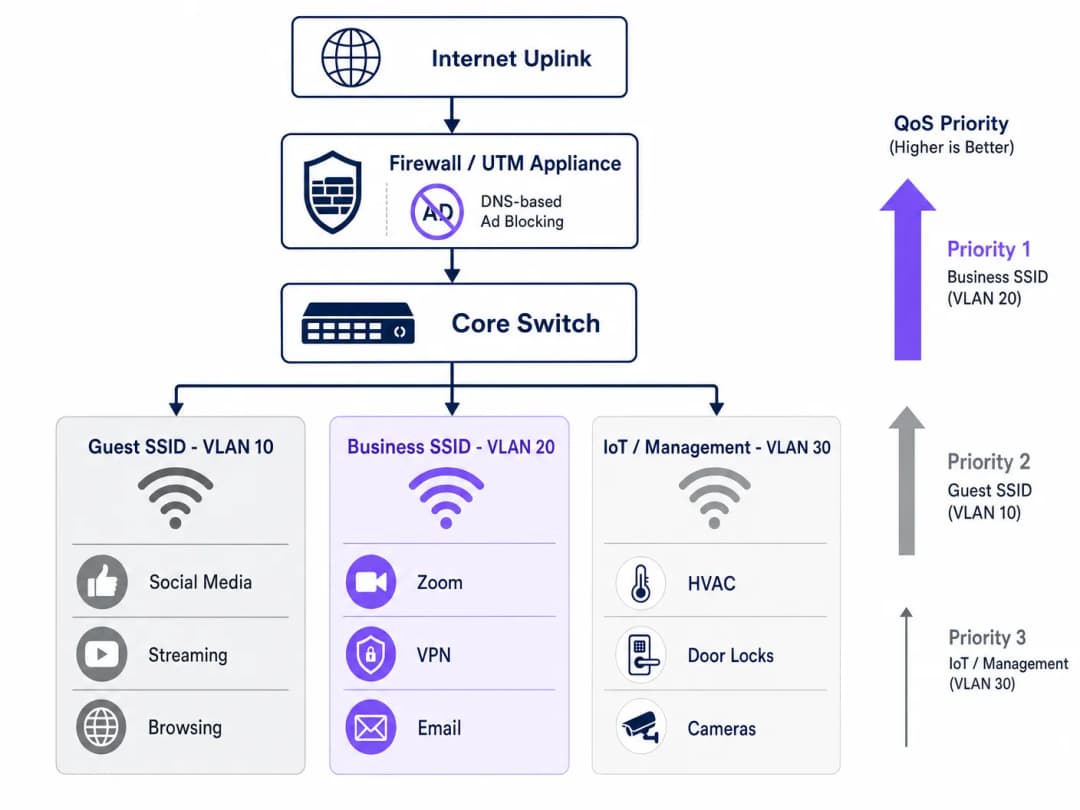
एक उचित रूप से ऑप्टिमाइज़ किए गए होटल नेटवर्क को कम से कम तीन लॉजिकल सेगमेंट में काम करना चाहिए। Guest SSID (VLAN 10) सामान्य इंटरनेट एक्सेस के साथ अवकाश यात्रियों और सम्मेलन सहभागियों को सेवा प्रदान करता है, जो DNS फ़िल्टरिंग और रेट लिमिटिंग के अधीन है। Business SSID (VLAN 20) उच्चतम QoS प्राथमिकता रखता है और प्रत्येक उपयोगकर्ता को क्रेडेंशियल प्रदान करने के लिए RADIUS सर्वर के साथ एकीकृत होकर, IEEE 802.1X के साथ WPA3-Enterprise के माध्यम से प्रमाणित करता है। IoT and Management VLAN (VLAN 30) स्मार्ट रूम डिवाइस, HVAC सेंसर, इलेक्ट्रॉनिक डोर लॉक और IP कैमरों को सभी गेस्ट ट्रैफ़िक से अलग रखता है।
यह सेगमेंटेशन केवल एक परफॉर्मेंस ऑप्टिमाइज़ेशन नहीं है - यह एक अनुपालन (compliance) आवश्यकता है। PCI DSS के तहत, भुगतान कार्ड डेटा को छूने वाले किसी भी नेटवर्क सेगमेंट को दस्तावेज़ी फ़ायरवॉल नियमों और एक्सेस कंट्रोल के माध्यम से सामान्य नेटवर्क से अलग किया जाना चाहिए। GDPR के तहत, Guest WiFi ऑथेंटिकेशन के माध्यम से एकत्र किए गए व्यक्तिगत डेटा को उचित तकनीकी सुरक्षा उपायों के साथ संभाला जाना चाहिए, और नेटवर्क सेगमेंटेशन उचित परिश्रम प्रदर्शित करने के लिए एक बुनियादी नियंत्रण है। मूल्यांकन के दौरान अनुपालन साबित करने के लिए सभी VLAN में 2026 IT security audit trail के लिए संपूर्ण रिकॉर्ड बनाए रखना आवश्यक है।
अपने विशिष्ट सेटअप को लेकर कोई सवाल हैं?
हमारी टीम 80,000 से अधिक वेन्यू में वेन्यू ऑपरेटरों, IT मैनेजरों और नेटवर्क इंजीनियरों के साथ काम करती है। 20 मिनट का कॉल बुक करें और हम आपको दिखाएंगे कि आपके जैसे अन्य लोगों ने इसे कैसे हल किया।
कार्यान्वयन गाइड (Implementation Guide)
इस आर्किटेक्चर को लागू करने के लिए लाइव गेस्ट सेवाओं को बाधित करने से बचने के लिए एक व्यवस्थित दृष्टिकोण की आवश्यकता होती है। नीचे दिए गए चरणों का पालन करते हुए एक चरणबद्ध रोलआउट की सिफारिश की जाती है।
चरण 1 - ट्रैफ़िक प्रोफ़ाइलिंग (सप्ताह 1): कोई भी बदलाव करने से पहले, बेसलाइन डेटा के 72 घंटे कैप्चर करने के लिए कोर स्विच के SPAN पोर्ट पर एक ट्रैफ़िक विश्लेषण टूल तैनात करें। शीर्ष 20 बैंडविड्थ खपत करने वाले डोमेन और एप्लिकेशन श्रेणियों की पहचान करें। यह डेटा निवेश को सही ठहराता है और बेसलाइन प्रदान करता है जिसके खिलाफ तैनाती के बाद के सुधारों को मापा जाता है। कई ऑपरेटर अपने स्थानों पर डिवाइस प्रकारों, ठहरने के पैटर्न और एप्लिकेशन उपयोग को समझने के लिए WiFi Analytics क्षमताओं का उपयोग करते हैं।
चरण 2 - पायलट DNS फ़िल्टरिंग (सप्ताह 2): एक रूढ़िवादी ब्लॉकलिस्ट का उपयोग करके एक सिंगल अलग किए गए VLAN पर - आदर्श रूप से एक स्टाफ या बैक-ऑफिस सेगमेंट पर - DNS फ़िल्टरिंग लागू करें। गेस्ट सेगमेंट तक विस्तार करने से पहले यह पुष्टि करने के लिए 48 घंटों तक निगरानी रखें कि कोई गलत पॉजिटिव तो नहीं हैं। वॉल्ड गार्डन (Walled Garden) व्हाइटलिस्ट में जोड़े गए प्रत्येक डोमेन का दस्तावेजीकरण करें।
चरण 3 - QoS पॉलिसी परिनियोजन (सप्ताह 3): एज फ़ायरवॉल पर DPI नियम और DSCP मार्किंग कॉन्फ़िगर करें। वितरण परत पर पैकेट कैप्चर करके सत्यापित करें कि DSCP मार्किंग प्रत्येक स्विच हॉप पर बनी रहे। सभी एक्सेस पॉइंट पर WMM सक्षम करें और पुष्टि करें कि DSCP-से-WMM मैपिंग सही ढंग से लागू की गई है। इस चरण में फ़्रीक्वेंसी प्लानिंग और चैनल प्रबंधन पर मार्गदर्शन के लिए, WiFi Frequencies: A Guide to Wi-Fi Frequencies in 2026 देखें।चरण 4 — VLAN पुनर्गठन (सप्ताह 4)। IoT उपकरणों को समर्पित प्रबंधन VLAN पर माइग्रेट करें। WPA3-Enterprise प्रमाणीकरण के साथ Business SSID लागू करें। कॉर्पोरेट ग्राहकों और सम्मेलन आयोजकों को नए SSID के बारे में सूचित करें।
चरण 5 — निगरानी और अनुकूलन (निरंतर)। KPIs स्थापित करें: औसत Zoom कॉल गुणवत्ता स्कोर, VPN कनेक्शन सफलता दर, पीक-ऑवर थ्रूपुट उपयोग, और अतिथि WiFi संतुष्टि स्कोर। मासिक रूप से DNS ब्लॉकलिस्ट की समीक्षा और अपडेट करें।
-
सर्वोत्तम प्रथाएं
निम्नलिखित वेंडर-तटस्थ सिफारिशें वर्तमान उद्योग मानकों को दर्शाती हैं और Cisco Meraki, Ubiquiti UniFi, Aruba Networks, और Ruckus सहित प्रमुख हार्डवेयर प्लेटफार्मों पर लागू होती हैं।
| प्रथा | मानक / संदर्भ | प्राथमिकता |
|---|---|---|
| Business SSID पर WPA3-Enterprise सक्षम करें | IEEE 802.11i / WPA3 | महत्वपूर्ण |
| 802.1X RADIUS प्रमाणीकरण | IEEE 802.1X | महत्वपूर्ण |
| एंड-टू-एंड DSCP संरक्षण | RFC 2474 | उच्च |
| सभी APs पर WMM सक्षम करें | Wi-Fi Alliance WMM | उच्च |
| एयरटाइम फेयरनेस सक्षम करें | वेंडर-विशिष्ट | मध्यम |
| प्रबंधित ब्लॉकलिस्ट के साथ DNS फ़िल्टरिंग | NIST SP 800-81 | उच्च |
| VLAN विभाजन (अतिथि/Business/IoT) | IEEE 802.1Q | महत्वपूर्ण |
| PCI DSS नेटवर्क अलगाव | PCI DSS v4.0 Req. 1 | महत्वपूर्ण (जहां लागू हो) |
अपने आतिथ्य क्षेत्र के साथ-साथ रिटेल वातावरण का संचालन करने वाले स्थानों के लिए - जैसे कि होटल लॉबी की दुकानें या मिश्रित सम्मेलन-रिटेल क्षेत्र - समान VLAN और QoS सिद्धांत लागू होते हैं, जिसमें POS ट्रैफ़िक के लिए एक अतिरिक्त समर्पित उच्च-प्राथमिकता कतार होती है। Office Wi-Fi: Optimising Your Modern Office Wi-Fi Network में चर्चा किए गए सिद्धांत सीधे होटल व्यावसायिक केंद्रों और बैठक कक्षों की तैनाती पर लागू होते हैं।
-
समस्या निवारण और जोखिम शमन
होटल WiFi अनुकूलन तैनातियों में सबसे आम विफलता के तरीके तीन श्रेणियों में आते हैं।
Captive Portal की विफलता। लक्षण: DNS फ़िल्टरिंग सक्षम होने के बाद मेहमान लॉगिन पेज तक नहीं पहुंच पाते हैं। मूल कारण: फ़िल्टरिंग नीति Captive Portal रीडायरेक्ट या Walled Garden के लिए आवश्यक डोमेन को ब्लॉक कर रही है। शमन: प्रमाणीकरण प्रवाह के लिए आवश्यक प्रत्येक डोमेन का ऑडिट करें और सामान्य फ़िल्टर सक्षम करने से पहले उन्हें पूर्व-प्रमाणीकरण श्वेतसूची में जोड़ें। यदि आप व्यापक नेटवर्क संकुलन समस्याओं का निदान कर रहे हैं, तो गाइड Why Is Our Guest WiFi So Slow? Diagnosing Network Congestion एक संरचित नैदानिक ढांचा प्रदान करता है। स्पेनिश भाषी ऑपरेटरों के लिए, एक समान संसाधन ¿Por qué nuestro WiFi para invitados es tan lento? Diagnóstico de la congestión de la red पर उपलब्ध है।
DSCP marking stripped. लक्षण: फ़ायरवॉल और APs पर QoS कॉन्फ़िगर किया गया है, लेकिन लोड के तहत कॉर्पोरेट एप्लीकेशन परफॉर्मेंस में सुधार नहीं होता है। मूल कारण: एक इंटरमीडिएट स्विच DSCP टैग को हटा रहा है या री-मार्क कर रहा है। समाधान: Wireshark या किसी समकक्ष टूल का उपयोग करके नेटवर्क पाथ पर कई बिंदुओं पर पैकेट कैप्चर करें। सत्यापित करें कि प्रत्येक स्विच की QoS ट्रस्ट पॉलिसी अपस्ट्रीम डिवाइस से DSCP पर भरोसा करने के लिए सेट है।
Airtime fairness सक्षम करने के बाद IoT डिवाइस अस्थिरता। लक्षण: airtime fairness सक्षम होने के बाद स्मार्ट रूम डिवाइस (थर्मोस्टेट, डोर लॉक) रुक-रुक कर ऑफलाइन हो जाते हैं। मूल कारण: लेगेसी 802.11b/g IoT डिवाइस धीरे-धीरे ट्रांसमिट करते हैं और airtime fairness पॉलिसियों के तहत एयरटाइम की कमी से जूझते हैं। समाधान: IoT डिवाइस को airtime fairness अक्षम करके VLAN 30 पर एक समर्पित 2.4GHz SSID पर माइग्रेट करें। airtime fairness केवल 5GHz गेस्ट और बिजनेस SSIDs पर लागू करें।
ROI और व्यावसायिक प्रभाव
इस निवेश का वित्तीय मामला बिल्कुल सीधा है। केवल DNS फ़िल्टरिंग के माध्यम से बर्बाद होने वाले 20-35% बैंडविड्थ को पुनः प्राप्त करके, अधिकांश होटल ऑपरेटर 12 से 18 महीनों तक ISP सर्किट अपग्रेड को टाल सकते हैं। 1Gbps समर्पित फाइबर सर्किट के लिए सामान्य व्यावसायिक ब्रॉडबैंड मूल्य निर्धारण पर, यह बाजार और अनुबंध की शर्तों के आधार पर £15,000 से £40,000 के आस्थगित पूंजीगत व्यय का प्रतिनिधित्व करता है।
इन्फ्रास्ट्रक्चर बचत से परे, कॉर्पोरेट गेस्ट संतुष्टि पर प्रभाव मापने योग्य है। जो होटल विश्वसनीय, बिजनेस-ग्रेड WiFi का विश्वसनीय रूप से विपणन कर सकते हैं, वे कॉर्पोरेट ट्रैवल मार्केट में प्रीमियम मूल्य प्राप्त करते हैं। WiFi संतुष्टि स्कोर में निरंतर सुधार - जो आमतौर पर रुकने के बाद के सर्वेक्षणों के माध्यम से मापा जाता है - सीधे कॉर्पोरेट ग्राहकों के बीच रिपीट बुकिंग दरों से संबंधित होता है, जो अधिकांश फुल-सर्विस होटलों के लिए सबसे अधिक मार्जिन वाला सेगमेंट है।
विज़िटर या पेशेंट WiFi संचालित करने वाले healthcare और transport वेन्यू के लिए, अनुपालन लाभ भी उतने ही महत्वपूर्ण हैं। नेटवर्क सुरक्षा और डेटा हैंडलिंग के लिए एक दस्तावेजी, ऑडिट योग्य दृष्टिकोण प्रदर्शित करना नियामक जोखिम को कम करता है और अनुपालन आकलन को सरल बनाता है।
मुख्य परिभाषाएं
DNS फ़िल्टरिंग
DNS रिज़ॉल्यूशन चरण में निर्दिष्ट डोमेन तक पहुंच को ब्लॉक करने की प्रक्रिया, जो डिवाइसों को उन गंतव्यों से कनेक्शन स्थापित करने से रोकती है।
गेटवे पर तैनात किया जाता है ताकि गेस्ट डिवाइसों को विज्ञापन नेटवर्क और ट्रैकर डोमेन तक पहुंचने से रोका जा सके, जिससे कोई भी पेलोड डेटा ट्रांसमिट होने से पहले बैंडविड्थ को बचाया जा सके।
Quality of Service (QoS)
नेटवर्क तंत्रों का एक सेट जो लेटेंसी-संवेदनशील अनुप्रयोगों के लिए प्रदर्शन की गारंटी देने के लिए अन्य ट्रैफ़िक की तुलना में कुछ प्रकार के ट्रैफ़िक को प्राथमिकता देता है।
सैकड़ों उपयोगकर्ताओं द्वारा साझा किए गए व्यस्त होटल नेटवर्क पर Zoom, VoIP और VPN ट्रैफ़िक को गारंटीकृत थ्रूपुट और कम लेटेंसी मिलना सुनिश्चित करने के लिए आवश्यक है।
Deep Packet Inspection (DPI)
पैकेट फ़िल्टरिंग का एक उन्नत रूप जो विशिष्ट एप्लिकेशन या प्रोटोकॉल की पहचान करने के लिए पैकेट के हेडर से परे उसके डेटा कंटेंट की जांच करता है।
एज फ़ायरवॉल द्वारा एप्लिकेशन ट्रैफ़िक को सटीक रूप से वर्गीकृत करने के लिए उपयोग किया जाता है (जैसे, सामान्य HTTPS ट्रैफ़िक से Zoom कॉल को अलग करना) ताकि इसे QoS प्राथमिकता के लिए टैग किया जा सके।
DSCP (Differentiated Services Code Point)
IP पैकेट हेडर में एक 6-बिट फ़ील्ड जिसका उपयोग नेटवर्क डिवाइसों में प्रति-हॉप QoS उपचार के लिए पैकेटों को वर्गीकृत और चिह्नित करने के लिए किया जाता है।
पैकेटों को टैग करने के लिए उद्योग-मानक तंत्र ताकि स्विच, राउटर और एक्सेस पॉइंट जान सकें कि कौन सा ट्रैफ़िक व्यावसायिक रूप से महत्वपूर्ण है और इसे पहले प्रोसेस किया जाना चाहिए।
WMM (WiFi Multimedia)
एक WiFi Alliance सर्टिफिकेशन जो चार एक्सेस श्रेणियों: वॉइस, वीडियो, बेस्ट एफर्ट और बैकग्राउंड को परिभाषित करके वायरलेस नेटवर्क पर QoS को लागू करता है।
वायर्ड QoS के वायरलेस समकक्ष। इसे सभी एक्सेस पॉइंट पर सक्षम किया जाना चाहिए और DSCP मानों पर सही ढंग से मैप किया जाना चाहिए ताकि यह सुनिश्चित हो सके कि अंतिम हॉप पर वायर्ड QoS नीतियों का पालन किया जाए।
एयरटाइम फेयरनेस
एक वायरलेस शेड्यूलिंग सुविधा जो समान पैकेट काउंट के बजाय सभी जुड़े हुए क्लाइंट्स को समान ट्रांसमिशन समय आवंटित करती है, जिससे धीमे लेगेसी डिवाइसों को चैनल क्षमता पर एकाधिकार करने से रोका जा सके।
होटल के वातावरण में महत्वपूर्ण जहां आधुनिक व्यावसायिक लैपटॉप और पुराने डिवाइसों का मिश्रण एक ही AP को साझा करता है। यह एक एकल धीमे डिवाइस को अन्य सभी के अनुभव को खराब करने से रोकता है।
VLAN (Virtual Local Area Network)
IEEE 802.1Q टैगिंग का उपयोग करके डिवाइसों के समूहों के बीच ट्रैफ़िक को अलग करने के लिए एक भौतिक स्विच इंफ्रास्ट्रक्चर पर बनाया गया एक लॉजिकल नेटवर्क सेगमेंट।
एक ही भौतिक बुनियादी ढांचे पर गेस्ट, बिजनेस और IoT ट्रैफ़िक को अलग करने के लिए उपयोग किया जाता है। PCI DSS अनुपालन के लिए एक अनिवार्य नियंत्रण और नेटवर्क सुरक्षा तथा प्रदर्शन प्रबंधन के लिए एक सर्वोत्तम अभ्यास।
Captive Portal
एक वेब-आधारित ऑथेंटिकेशन गेटवे जो एक नए डिवाइस के HTTP ट्रैफ़िक को रोकता है और पूर्ण नेटवर्क एक्सेस प्रदान करने से पहले इसे लॉगिन या रजिस्ट्रेशन पेज पर रीडायरेक्ट करता करता है।
गेस्ट WiFi ऑथेंटिकेशन और फर्स्ट-पार्टी डेटा संग्रह के लिए प्राथमिक टचपॉइंट। यह सुनिश्चित करने के लिए सावधानीपूर्वक प्रबंधित किया जाना चाहिए कि DNS फ़िल्टरिंग नीतियां ऑथेंटिकेशन फ़्लो को ब्लॉक न करें।
Walled Garden
डोमेन और IP पतों का एक सेट जिसे एक डिवाइस Captive Portal ऑथेंटिकेशन पूरा करने से पहले एक्सेस कर सकता है, जिसमें आमतौर पर पोर्टल स्वयं और कोई भी आवश्यक तृतीय-पक्ष ऑथेंटिकेशन सेवाएं शामिल होती हैं।
DNS फ़िल्टरिंग को लागू करते समय इसे विशेष रूप से कॉन्फ़िगर किया जाना चाहिए ताकि यह सुनिश्चित हो सके कि सामान्य ब्लॉकिंग नीति द्वारा ऑथेंटिकेशन फ़्लो बाधित न हो।
IEEE 802.1X
पोर्ट-आधारित नेटवर्क एक्सेस कंट्रोल के लिए एक IEEE मानक जो नेटवर्क से कनेक्ट होने के इच्छुक डिवाइसों के लिए एक ऑथेंटिकेशन तंत्र प्रदान करता है।
WPA3-Enterprise डिप्लॉयमेंट का समर्थन करने वाला ऑथेंटिकेशन फ्रेमवर्क। प्रति-उपयोगकर्ता क्रेडेंशियल प्रदान करने के लिए एक RADIUS सर्वर के साथ एकीकृत होता है और बिजनेस-ग्रेड होटल SSIDs के लिए अनुशंसित मानक है।
हल किए गए उदाहरण
एक 400 कमरों वाला सिटी-सेंटर होटल 600 पंजीकृत प्रतिनिधियों के साथ एक बड़े तकनीकी सम्मेलन की मेजबानी कर रहा है। वेन्यू में 1Gbps सममित फाइबर अपलिंक है। सम्मेलन की पहली सुबह के दौरान, नेटवर्क संचालन टीम को शिकायतों की बाढ़ मिलती है: Zoom कॉल कट रही हैं, VPN कनेक्शन टाइम आउट हो रहे हैं, और सम्मेलन ऐप लोड होने में विफल हो रहा है। ट्रैफ़िक कैप्चर से पता चलता है कि 1Gbps लिंक 94% उपयोग पर है। IT टीम को तुरंत और संरचनात्मक रूप से कैसी प्रतिक्रिया देनी चाहिए?
तत्काल प्रतिक्रिया (30 मिनट के भीतर): ट्रैफ़िक कैप्चर में पहचाने गए शीर्ष 50 विज्ञापन नेटवर्क और टेलीमेट्री डोमेन के लिए एक आपातकालीन DNS सिंकहोल तैनात करें। अकेले इससे वर्तमान लोड का 25 - 35% कम होना चाहिए। साथ ही, एज फायरवॉल पर आपातकालीन QoS नियम कॉन्फ़िगर करें ताकि UDP पोर्ट 8801-8802 (Zoom) और Zoom की IP श्रेणियों के साथ TCP 443 पर ट्रैफ़िक को प्राथमिकता दी जा सके, और ज्ञात स्ट्रीमिंग CDN IP श्रेणियों के ट्रैफ़िक को कुल 10Mbps तक सीमित किया जा सके।
संरचनात्मक प्रतिक्रिया (घटना के बाद): नेटवर्क को समर्पित सम्मेलन प्रतिनिधि और स्पीकर VLANs में विभाजित करें। एक बनाए रखी गई ब्लॉकलिस्ट के साथ एक प्रबंधित DNS फ़िल्टरिंग सेवा तैनात करें। भविष्य के सभी कार्यक्रमों के लिए DSCP टैगिंग के साथ DPI-आधारित QoS लागू करें। उच्च-घनत्व वाले कार्यक्रम अवधियों के लिए ISP के साथ बर्स्ट क्षमता समझौते पर बातचीत करें। 300 से अधिक प्रतिनिधियों वाले सम्मेलनों के लिए एक समर्पित 10Gbps इवेंट अपलिंक पर विचार करें।
तीन शहरों में संपत्तियों वाला एक 120 कमरों का बुटीक होटल समूह अपने WiFi बुनियादी ढांचे को मानकीकृत करना चाहता है। प्रत्येक संपत्ति में अवकाश और व्यावसायिक मेहमानों का मिश्रण है। IT निदेशक यह सुनिश्चित करना चाहते हैं कि व्यावसायिक मेहमानों को प्रत्येक साइट पर नए हार्डवेयर में निवेश किए बिना एक प्रीमियम अनुभव मिले। मौजूदा बुनियादी ढांचा Ubiquiti UniFi APs और Cisco Meraki फायरवॉल का मिश्रण है। किस आर्किटेक्चर की सिफारिश की जानी चाहिए?
DNS फ़िल्टरिंग (Meraki के अंतर्निहित सामग्री फ़िल्टरिंग और Umbrella एकीकरण के माध्यम से) और DPI-आधारित QoS के लिए मौजूदा Meraki फायरवॉल का लाभ उठाने वाले एक केंद्रीकृत क्लाउड-प्रबंधित आर्किटेक्चर की सिफारिश करें। प्रति संपत्ति दो SSIDs कॉन्फ़िगर करें: एक मानक Guest SSID (Captive Portal के साथ WPA3-Personal) और एक Business SSID (802.1X के साथ WPA3-Enterprise)। Business SSID को उच्चतम QoS प्राथमिकता स्तर वाले एक समर्पित VLAN पर मैप करें। UniFi APs पर, WMM सक्षम करें और Meraki फायरवॉल की टैगिंग नीति से मेल खाने के लिए DSCP-से-WMM मैपिंग को कॉन्फ़िगर करें। तीनों संपत्तियों में 802.1X प्रमाणीकरण के लिए एक केंद्रीकृत RADIUS सर्वर तैनात करें (या क्लाउड RADIUS सेवा का उपयोग करें)। चेक-इन के समय कॉर्पोरेट खाता मेहमानों को Business SSID क्रेडेंशियल प्रदान करें।
अभ्यास प्रश्न
Q1. आपने अभी-अभी अपने होटल के गेस्ट VLAN पर DNS फ़िल्टरिंग सक्षम की है। 10 मिनट के भीतर, फ्रंट डेस्क को मेहमानों के कॉल आने लगते हैं कि वे WiFi से कनेक्ट नहीं हो पा रहे हैं - उन्हें लॉगिन पेज दिखाई नहीं दे रहा है और 'No Internet Connection' की त्रुटि मिल रही है। इसका सबसे संभावित कारण क्या है और आप इसे कैसे हल करेंगे?
संकेत: एक नए डिवाइस के ओपन नेटवर्क से जुड़ने और captive portal तक पहुँचने के प्रयास के समय होने वाले घटनाक्रम के अनुक्रम पर विचार करें।
मॉडल उत्तर देखें
DNS फ़िल्टरिंग नीति captive portal रीडायरेक्ट या walled garden के लिए आवश्यक एक या अधिक डोमेन को ब्लॉक कर रही है। जब कोई डिवाइस नेटवर्क से जुड़ता है, तो वह captive portal का पता लगाने के लिए एक HTTP प्रोब अनुरोध भेजता है। यदि DNS रिज़ॉल्वर रीडायरेक्ट डोमेन को रिज़ॉल्व नहीं कर पाता है (क्योंकि यह ब्लॉकलिस्ट में है या फ़िल्टर बहुत आक्रामक है), तो डिवाइस को कभी भी लॉगिन पेज दिखाई नहीं देता है। समाधान: तुरंत captive portal के रीडायरेक्ट डोमेन, प्रमाणीकरण सर्वर डोमेन और किसी भी सोशल लॉगिन प्रदाता डोमेन (जैसे, Google लॉगिन के लिए accounts.google.com) की पहचान करें, और उन्हें walled garden श्वेतसूची में जोड़ें। walled garden को अप्रमाणित डिवाइसों के लिए DNS फ़िल्टर को पूरी तरह से बायपास करना चाहिए।
Q2. एक नेटवर्क आर्किटेक्ट ने Zoom ट्रैफ़िक को DSCP EF (46) के साथ टैग करने के लिए एज फ़ायरवॉल पर DPI कॉन्फ़िगर किया है और सत्यापित किया है कि कॉन्फ़िगरेशन सही है। हालाँकि, कॉन्फ्रेंस के व्यस्त समय के दौरान, व्यावसायिक मेहमान अभी भी जिटर और कॉल ड्रॉप होने की रिपोर्ट करते हैं। AP पर एक पैकेट कैप्चर दिखाता है कि Zoom ट्रैफ़िक DSCP 0 (Best Effort) के साथ आ रहा है। इसका सबसे संभावित कारण क्या है?
संकेत: याद रखें कि QoS एक एंड-टू-एंड आवश्यकता है और पथ में प्रत्येक डिवाइस को प्राथमिकता चिह्नों पर भरोसा करने और उन्हें आगे भेजने के लिए कॉन्फ़िगर किया जाना चाहिए।
मॉडल उत्तर देखें
फ़ायरवॉल और एक्सेस पॉइंट के बीच का एक स्विच DSCP टैग को हटा रहा है या उन्हें 0 (Best Effort) पर रीमार्क कर रहा है। यह एक आम समस्या है जब स्विचों को एक डिफ़ॉल्ट 'untrusted' QoS नीति के साथ कॉन्फ़िगर किया जाता है जो सभी इनकमिंग DSCP मानों को रीसेट कर देती है। समाधान: फ़ायरवॉल और APs के बीच के पथ में स्विच (स्विचों) की पहचान करें, और अपलिंक पोर्ट्स पर उनकी QoS ट्रस्ट नीति को 'trust DSCP' पर कॉन्फ़िगर करें। इसके अतिरिक्त, सत्यापित करें कि एक्सेस पॉइंट DSCP EF को WMM AC_VO (Voice) पर मैप करने के लिए कॉन्फ़िगर किए गए हैं न कि डिफ़ॉल्ट रूप से AC_BE पर।
Q3. आप एक 250 कमरों वाले होटल को सलाह दे रहे हैं जो व्यावसायिक मेहमानों के लिए WiFi प्रदर्शन को बेहतर बनाने के लिए Airtime Fairness लागू करना चाहता है। होटल में 80 स्मार्ट रूम डिवाइस (थर्मोस्टेट, मोटर चालित ब्लाइंड्स) भी हैं जो 802.11b/g का उपयोग करते हैं और वर्तमान में मेहमानों के समान ही SSID पर हैं। इस कॉन्फ़िगरेशन में Airtime Fairness को सक्षम करने का क्या जोखिम है, और अनुशंसित दृष्टिकोण क्या है?
संकेत: विचार करें कि Airtime Fairness संसाधनों को कैसे आवंटित करता है और लीगेसी 802.11b डिवाइसों की ट्रांसमिशन दर आधुनिक 802.11ac/WiFi 6 डिवाइसों की तुलना में कैसी है।
मॉडल उत्तर देखें
Airtime Fairness सभी क्लाइंट्स को उनकी डेटा दर की परवाह किए बिना समान ट्रांसमिशन समय आवंटित करता है। 1 - 11 Mbps पर ट्रांसमिट करने वाले एक लीगेसी 802.11b डिवाइस को 600+ Mbps पर ट्रांसमिट करने वाले एक आधुनिक WiFi 6 डिवाइस के समान ही टाइम स्लाइस मिलता है। व्यवहार में, लीगेसी डिवाइस अपने टाइम स्लाइस में बहुत कम डेटा ट्रांसमिट करता है, जो डिवाइस के लिए तो ठीक है, लेकिन समस्या यह है कि एक्सेस पॉइंट को अगले क्लाइंट को सेवा देने से पहले धीमे डिवाइस के ट्रांसमिशन को समाप्त करने की प्रतीक्षा करनी होगी। इससे स्मार्ट रूम डिवाइस अपने पोलिंग विंडो को मिस कर सकते हैं, जिससे रुक-रुक कर कनेक्शन टूटने की समस्या हो सकती है। अनुशंसित दृष्टिकोण सभी IoT डिवाइसों को Airtime Fairness अक्षम के साथ VLAN 30 (IoT/मैनेजमेंट) पर एक समर्पित 2.4GHz SSID पर स्थानांतरित करना है, और केवल 5GHz गेस्ट और बिजनेस SSIDs पर Airtime Fairness सक्षम करना है जहाँ सभी क्लाइंट आधुनिक डिवाइस हैं।
Q4. एक होटल समूह के CTO आपसे वर्तमान अप्रबंधित नेटवर्क को जारी रखने की तुलना में एक प्रबंधित DNS फ़िल्टरिंग सेवा (£8,000/वर्ष) को तैनात करने की लागत को सही ठहराने के लिए कहते हैं। होटल के पास £24,000/वर्ष की लागत वाला 1Gbps फाइबर अपलिंक है। आप ROI तर्क को कैसे तैयार करेंगे?
संकेत: प्रत्यक्ष बुनियादी ढांचा बचत और अप्रत्यक्ष राजस्व प्रभाव दोनों पर विचार करें।
मॉडल उत्तर देखें
ROI तर्क को दो भागों में व्यवस्थित करें। प्रत्यक्ष बचत: यदि DNS फ़िल्टरिंग 30% बर्बाद बैंडविड्थ को पुनः प्राप्त करती है, तो मौजूदा 1Gbps लिंक का प्रभावी थ्रूपुट लगभग 1.3Gbps के बराबर बढ़ जाता है। यह कम से कम 18 - 24 महीनों के लिए 10Gbps अपग्रेड (आमतौर पर £45,000 - £80,000 की पूंजीगत लागत और बढ़े हुए वार्षिक लाइन रेंटल) की आवश्यकता को टाल देता है। £8,000/वर्ष की फ़िल्टरिंग सेवा लागत केवल आस्थगित पूंजीगत व्यय के माध्यम से पहले वर्ष के भीतर ही वसूल हो जाती है। अप्रत्यक्ष राजस्व प्रभाव: कॉर्पोरेट सेगमेंट में बेहतर WiFi संतुष्टि स्कोर - तुलनीय परिनियोजन के आधार पर आम तौर पर 15 - 25% का सुधार - कॉर्पोरेट खातों से रिपीट बुकिंग दरों को सीधे प्रभावित करता है। £180/रात की औसत दर पर 40% कॉर्पोरेट ऑक्यूपेंसी वाले 250 कमरों के होटल के लिए, कॉर्पोरेट रिपीट बुकिंग में 2% का सुधार भी लगभग £65,000 के अतिरिक्त वार्षिक राजस्व का प्रतिनिधित्व करता है। संयुक्त ROI मामला आकर्षक है और एक ही वित्तीय वर्ष के भीतर मात्रात्मक है।
इस श्रृंखला में आगे पढ़ें
सर्वोत्तम चैनल प्लानिंग के लिए RSSI और सिग्नल की ताकत को समझना
यह गाइड सर्वोत्तम चैनल प्लानिंग के लिए RSSI, सिग्नल-टू-नॉइज रेशियो (SNR), और RF प्रोपेगेशन सिद्धांतों की व्यापक तकनीकी जानकारी प्रदान करती है। यह IT प्रबंधकों, नेटवर्क आर्किटेक्ट्स और वेन्यू ऑपरेशंस डायरेक्टरों को को-चैनल और एडजसेंट चैनल इंटरफेरेंस को कम करने, AP प्लेसमेंट को अनुकूलित करने, और हॉस्पिटैलिटी, रिटेल एवं सार्वजनिक क्षेत्र के वातावरण में मापने योग्य व्यावसायिक प्रभाव के लिए एनालिटिक्स का लाभ उठाने की व्यावहारिक रणनीतियों से लैस करती है।
WiFi 6 बनाम WiFi 5: क्या यह चैनल इंटरफेरेंस को हल करता है?
यह गाइड एक तकनीकी डीप-डाइव प्रदान करती है कि कैसे WiFi 6 (802.11ax) OFDMA और BSS कलरिंग के माध्यम से हाई-डेंसिटी एंटरप्राइज़ वातावरण में चैनल इंटरफेरेंस को संबोधित करता है। यह IT प्रबंधकों, नेटवर्क आर्किटेक्ट्स और CTOs को कार्रवाई योग्य डिप्लॉयमेंट रणनीतियों, हॉस्पिटैलिटी और हेल्थकेयर से वास्तविक दुनिया के केस स्टडीज़, और उन स्थानों में इंफ्रास्ट्रक्चर अपग्रेड के ROI का मूल्यांकन करने के लिए एक रूपरेखा से लैस करता है जहां वायरलेस परफॉरमेंस व्यवसाय के लिए महत्वपूर्ण है।
उच्च घनत्व वाले स्थानों के लिए सर्वश्रेष्ठ WiFi चैनल
स्टेडियम, एरेनास और बड़े सार्वजनिक स्थलों जैसे उच्च-घनत्व वाले वातावरण में WiFi चैनलों के चयन और अनुकूलन के लिए एक निश्चित तकनीकी संदर्भ। इसमें RF भौतिकी, 5 GHz और 6 GHz बैंड में चैनल पुन: उपयोग रणनीतियों और IT लीडर्स के लिए व्यावहारिक परिनियोजन मार्गदर्शन शामिल है।
अपने विशिष्ट सेटअप को लेकर कोई सवाल हैं?
हमारी टीम 80,000 से अधिक वेन्यू में वेन्यू ऑपरेटरों, IT मैनेजरों और नेटवर्क इंजीनियरों के साथ काम करती है। 20 मिनट का कॉल बुक करें और हम आपको दिखाएंगे कि आपके जैसे अन्य लोगों ने इसे कैसे हल किया।