
ব্যবসায়িক ভ্রমণকারীদের জন্য Hotel WiFi অপ্টিমাইজ করা
এই নির্দেশিকাটি হসপিটালিটি আইটি লিডারদের জন্য DNS-লেভেল বিজ্ঞাপন ব্লকিং এবং এন্ড-টু-এন্ড কোয়ালিটি অফ সার্ভিস (QoS) নীতিগুলির সমন্বয় করে ব্যবসায়িক ভ্রমণকারীদের জন্য hotel WiFi অপ্টিমাইজ করার জন্য কার্যকরী, বিক্রেতা-নিরপেক্ষ কৌশল প্রদান করে। এটি প্রযুক্তিগত আর্কিটেকচার, VLAN সেগমেন্টেশন, সিকিউরিটি কমপ্লায়েন্স এবং রিয়েল-ওয়ার্ল্ড কেস স্টাডি কভার করে যা দেখায় যে কীভাবে ব্যাকগ্রাউন্ড নয়েজ দূর করে অপব্যয় হওয়া ব্যান্ডউইথের ৩৫% পর্যন্ত পুনরুদ্ধার করা যায়। ভেন্যু অপারেশন ডিরেক্টর এবং নেটওয়ার্ক আর্কিটেক্টরা এই ত্রৈমাসিকে ডেপ্লয়মেন্টকে সমর্থন এবং কার্যকর করার জন্য সুনির্দিষ্ট বাস্তবায়ন পদক্ষেপ, সিদ্ধান্ত গ্রহণের কাঠামো এবং পরিমাপযোগ্য ROI বেঞ্চমার্ক পাবেন।
এই গাইডটি শুনুন
পডকাস্ট ট্রান্সক্রিপ্ট দেখুন
আমাদের মূল সিরিজের অংশ: Guest WiFi Guide →

এক্সিকিউটিভ সামারি
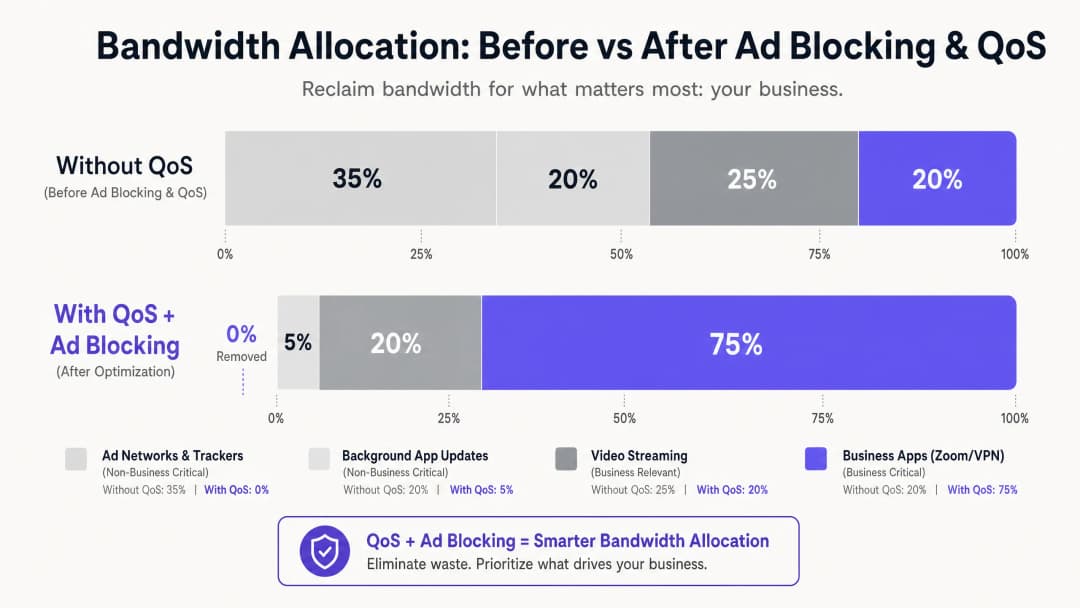
hospitality সেক্টরের IT ম্যানেজার এবং ভেন্যু অপারেশনস ডিরেক্টরদের জন্য, নির্ভরযোগ্য WiFi প্রদান করা এখন আর কোনো বাড়তি সুবিধা নয় - এটি একটি মৌলিক অপারেশনাল প্রয়োজনীয়তা। ব্যবসায়িক ভ্রমণকারীরা কর্পোরেট VPN, ভিডিও কনফারেন্সিং এবং ক্লাউড-হোস্টেড অ্যাপ্লিকেশনের জন্য উচ্চ-ক্ষমতাসম্পন্ন কানেক্টিভিটি দাবি করেন। তবুও বেশিরভাগ হোটেল নেটওয়ার্ক অলক্ষ্যে তাদের ব্যান্ডউইথ হারিয়ে ফেলছে অদৃশ্য ব্যাকগ্রাউন্ড ট্রাফিকের কারণে: বিজ্ঞাপন ট্র্যাকার, টেলিমেট্রি বিকন এবং অটোমেটিক অ্যাপ আপডেট যা একটি একক ব্যবসায়িক অ্যাপ্লিকেশন শুরু হওয়ার আগেই মোট উপলব্ধ ব্যান্ডউইথের ৩৫% পর্যন্ত গ্রাস করতে পারে।
এই গাইডটি সেই অপব্যয় হওয়া ব্যান্ডউইথ পুনরুদ্ধার করার জন্য একটি প্রমাণিত, ভেন্ডর-নিরপেক্ষ আর্কিটেকচারের বিশদ বিবরণ দেয়। নেটওয়ার্ক গেটওয়েতে DNS-স্তরের বিজ্ঞাপন ব্লকিং মোতায়েন করে এবং Deep Packet Inspection (DPI)-এর মাধ্যমে ম্যাপ করা এন্ড-টু-এন্ড Quality of Service (QoS) পলিসি ইমপ্লিমেন্ট করে, নেটওয়ার্ক আর্কিটেক্টরা নিশ্চিত করতে পারেন যে ল্যাটেন্সি-সংবেদনশীল অ্যাপ্লিকেশনগুলো - Zoom, Microsoft Teams, IPsec VPN এবং SSL টানেল - গ্যারান্টিযুক্ত অগ্রাধিকার থ্রুপুট পাবে। বেশিরভাগ ক্ষেত্রে, এই পদ্ধতিটি বিদ্যমান অবকাঠামোতেই ইমপ্লিমেন্ট করা যেতে পারে, যা বিলম্বিত ISP লিঙ্ক আপগ্রেড এবং উন্নত কর্পোরেট গেস্ট স্যাটিসফ্যাকশন স্কোরের মাধ্যমে পরিমাপযোগ্য ROI প্রদান করে।
টেকনিক্যাল ডিপ ডাইভ
আধুনিক হোটেল WiFi পরিবেশের প্রধান চ্যালেঞ্জ হলো অযাচিত ব্যাকগ্রাউন্ড ট্রাফিকের ব্যাপক বৃদ্ধি। যখন কোনো আধুনিক ডিভাইস - একটি কর্পোরেট ল্যাপটপ, স্মার্টফোন বা ট্যাবলেট - একটি নেটওয়ার্কে কানেক্ট হয়, তখন এটি অবিলম্বে ডজন ডজন ব্যাকগ্রাউন্ড কানেকশন শুরু করে। এর মধ্যে রয়েছে ইনস্টল করা অ্যাপ্লিকেশন থেকে বিজ্ঞাপন SDK পোলিং, অপারেটিং সিস্টেম টেলিমেট্রি, ক্লাউড সিঙ্ক সার্ভিস এবং অটোমেটিক আপডেট চেক। ২০০ জন সমসাময়িকভাবে কানেক্টেড গেস্টসহ একটি আনম্যানেজড, ফ্ল্যাট নেটওয়ার্কে এই ব্যাকগ্রাউন্ড চ্যাটার কেবল একটি ঝামেলাই নয় - এটি একটি কাঠামোগত ব্যান্ডউইথ সমস্যা।
কর্পোরেট গেস্ট নেটওয়ার্কের ট্রাফিক প্রোফাইল নিয়ে গবেষণা ক্রমাগত দেখায় যে বিজ্ঞাপন নেটওয়ার্ক এবং থার্ড-পার্টি ট্র্যাকারগুলো আনম্যানেজড হোটেল নেটওয়ার্কে DNS কোয়েরি ভলিউমের ২৫% থেকে ৪০% পর্যন্ত দখল করে। প্রতিটি সফলভাবে সমাধান করা কোয়েরি একটি ডেটা ট্রান্সফার শুরু করতে পারে, এবং যদিও প্রতিটি পৃথক পে-লোড ছোট, শত শত সমসাময়িক কানেকশনের মধ্যে এর সামগ্রিক প্রভাব বিশাল। এটি এমন ব্যান্ডউইথ যা CFO-এর Zoom বোর্ড মিটিং বা পরামর্শকের তাঁর কর্পোরেট ডেটা সেন্টারে ফিরে যাওয়ার VPN সেশনে ব্যবহার হওয়া উচিত ছিল।
লেয়ার ১: DNS-ভিত্তিক বিজ্ঞাপন এবং ট্র্যাকার ব্লকিং
হস্তক্ষেপের সবচেয়ে কার্যকর মাধ্যম হলো DNS রেজোলিউশন। একটি ফিল্টারিং রিজলভারের মাধ্যমে - তা অন-প্রিমিস ডিভাইস বা ক্লাউড DNS সিকিউরিটি সার্ভিস যাই হোক না কেন - সমস্ত গেস্ট DNS কোয়েরি পরিচালনা করে, নেটওয়ার্কটি WAN লিঙ্কে কোনো পেলোড ডেটা স্থানান্তরিত হওয়ার আগেই পরিচিত অ্যাড সার্ভার, ট্র্যাকার ডোমেন এবং টেলিমেট্রি এন্ডপয়েন্টগুলোর রিকোয়েস্ট নিঃশব্দে ড্রপ করে দিতে পারে। এখানকার দক্ষতার সুবিধাটি কাঠামোগত: একটি ব্লক করা DNS কোয়েরি অত্যন্ত নগণ্য রিসোর্স ব্যবহার করে, যা অন্যথায় শুরু হওয়া সম্পূর্ণ HTTP/S সংযোগের তুলনায় অনেক কম।
ব্যবহারিক হোটেল ডেপ্লয়মেন্টের জন্য, ম্যানেজড DNS ফিল্টারিং সার্ভিসগুলো এন্টারপ্রাইজ-গ্রেড SLA দ্বারা সমর্থিত নিয়মিত আপডেট হওয়া ব্লকলিস্ট অফার করে, যা নির্ভরযোগ্যতা অত্যন্ত গুরুত্বপূর্ণ এমন পরিবেশে সেলফ-ম্যানেজড ওপেন-সোর্স সলিউশনের চেয়ে এগুলোকে বেশি পছন্দনীয় করে তোলে। মূল কনফিগারেশন প্রয়োজনীয়তা হলো এটি নিশ্চিত করা যে, Walled Garden - অর্থাৎ Captive Portal অথেন্টিকেশনের আগে অ্যাক্সেসযোগ্য ডোমেনগুলোর সেট - যেন স্পষ্টভাবে হোয়াইটলিস্ট করা থাকে এবং সাধারণ ফিল্টারিং পলিসি থেকে মুক্ত থাকে। এটি করতে ব্যর্থ হওয়া হলো ডেপ্লয়মেন্টের পরে গেস্টদের অভিযোগের সবচেয়ে সাধারণ কারণ।
লেয়ার ২: ডিপ প্যাকেট ইন্সপেকশন এবং QoS মার্কিং
DNS লেয়ারে ব্যাকগ্রাউন্ড নয়েজ কমানো হয়ে গেলে, অবশিষ্ট ট্রাফিক অবশ্যই অগ্রাধিকারের ভিত্তিতে সক্রিয়ভাবে পরিচালনা করতে হবে। এজ ফায়ারওয়াল বা ইউনিফাইড থ্রেট ম্যানেজমেন্ট (UTM) অ্যাপ্লায়েন্সে ডিপ প্যাকেট ইন্সপেকশন (DPI) নির্দিষ্ট অ্যাপ্লিকেশন প্রোটোকল সনাক্ত করে। আধুনিক DPI ইঞ্জিনগুলো প্যাকেট সিগনেচার এবং পোর্ট প্যাটার্নের ওপর ভিত্তি করে Zoom, Microsoft Teams, Cisco Webex, RTP/SIP ভয়েস ট্রাফিক এবং IPsec ও SSL VPN সেশনগুলোকে নির্ভরযোগ্যভাবে শ্রেণীবদ্ধ করতে পারে, এমনকি নন-স্ট্যান্ডার্ড পোর্ট ব্যবহারে থাকলেও।
বিজনেস-ক্রিটিক্যাল হিসেবে চিহ্নিত ট্রাফিককে IP হেডারে একটি ডিফারেনশিয়েটেড সার্ভিসেস কোড পয়েন্ট (DSCP) মান দিয়ে চিহ্নিত করা হয়। DSCP ফিল্ড ৬৪টি সম্ভাব্য প্রতি-হপ আচরণ অফার করে, কিন্তু বাস্তবে বেশিরভাগ হোটেল ডেপ্লয়মেন্ট একটি সরলীকৃত তিন-স্তর বিশিষ্ট মডেল ব্যবহার করে: ভয়েস এবং ভিডিও কনফারেন্সিংয়ের জন্য এক্সপেডাইটেড ফরোয়ার্ডিং (EF, DSCP 46); VPN এবং কর্পোরেট অ্যাপ্লিকেশন ডেটার জন্য অ্যাসিউরড ফরোয়ার্ডিং ক্লাস ৪ (AF41, DSCP 34); এবং সাধারণ ওয়েব ব্রাউজিং ও মিডিয়া স্ট্রিমিংয়ের জন্য বেস্ট এফোর্ট (BE, DSCP 0)।
লেয়ার ৩: WMM এর মাধ্যমে ওয়্যারলেস QoS
ওয়্যার্ড QoS কনফিগারেশন কেবল তখনই কার্যকর হয় যখন ওয়্যারলেস অ্যাক্সেস পয়েন্টগুলো সঠিকভাবে DSCP মার্কিংগুলোকে উপযুক্ত Wi-Fi মাল্টিমিডিয়া (WMM) অ্যাক্সেস ক্যাটাগরিতে ম্যাপ করে। WMM চারটি অ্যাক্সেস ক্যাটাগরি সংজ্ঞায়িত করে: ভয়েস (AC_VO), ভিডিও (AC_VI), বেস্ট এফোর্ট (AC_BE), এবং ব্যাকগ্রাউন্ড (AC_BK)। DSCP-টু-WMM ম্যাপিং অবশ্যই AP-গুলোতে স্পষ্টভাবে কনফিগার করা থাকতে হবে, কারণ ভেন্ডর ভেদে ডিফল্ট আচরণ ভিন্ন হতে পারে। আপনার AP ম্যানেজমেন্ট কনসোলে এই সেটিংটি যাচাই করুন; এটি একটি সাধারণ ত্রুটি যা অন্যথায় সুপরিকল্পিত QoS পলিসিগুলোকে শেষ মুহূর্তে ব্যর্থ করে দেয়।
VLAN Segmentation এবং নিরাপত্তা আর্কিটেকচার
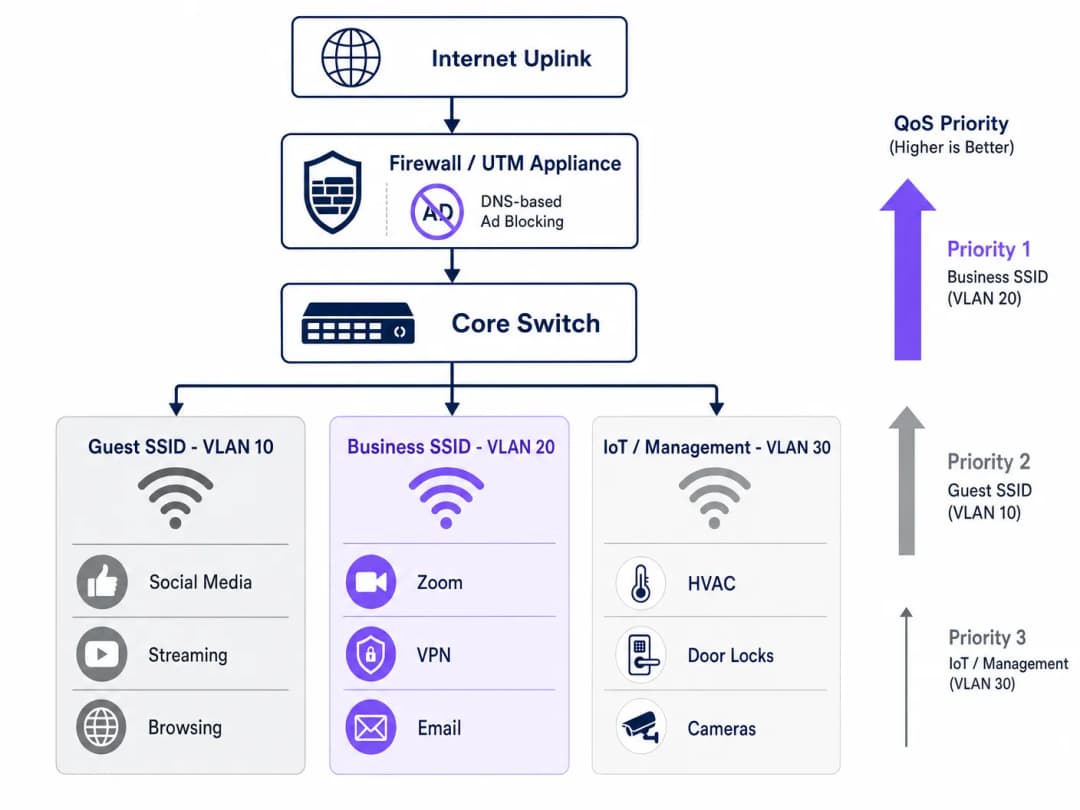
একটি সঠিকভাবে অপ্টিমাইজড হোটেল নেটওয়ার্ক কমপক্ষে তিনটি লজিক্যাল সেগমেন্ট জুড়ে কাজ করা উচিত। Guest SSID (VLAN 10) সাধারণ ইন্টারনেট অ্যাক্সেস সহ অবকাশযাপনকারী ভ্রমণকারী এবং কনফারেন্সে অংশগ্রহণকারীদের পরিষেবা প্রদান করে, যা DNS ফিল্টারিং এবং রেট লিমিটিং সাপেক্ষে। Business SSID (VLAN 20) সর্বোচ্চ QoS অগ্রাধিকার বহন করে এবং একটি RADIUS সার্ভারের সাথে একীভূত হয়ে প্রতি ব্যবহারকারী ভিত্তিক শংসাপত্র প্রদান করতে IEEE 802.1X সহ WPA3-Enterprise-এর মাধ্যমে প্রমাণীকরণ করে। IoT and Management VLAN (VLAN 30) স্মার্ট রুম ডিভাইস, HVAC সেন্সর, ইলেকট্রনিক দরজার লক এবং IP ক্যামেরাগুলোকে সমস্ত গেস্ট ট্রাফিক থেকে আলাদা রাখে।
এই সেগমেন্টেশন কেবল একটি পারফরম্যান্স অপ্টিমাইজেশন নয় - এটি একটি কমপ্লায়েন্সের বাধ্যবাধকতা। PCI-DSS এর অধীনে, পেমেন্ট কার্ডের ডেটা স্পর্শ করে এমন যেকোনো নেটওয়ার্ক সেগমেন্টকে অবশ্যই নথিভুক্ত ফায়ারওয়াল নিয়ম এবং অ্যাক্সেস নিয়ন্ত্রণের মাধ্যমে সাধারণ নেটওয়ার্ক থেকে আলাদা করতে হবে। GDPR-এর অধীনে, Guest WiFi প্রমাণীকরণের মাধ্যমে সংগৃহীত ব্যক্তিগত ডেটা যথাযথ প্রযুক্তিগত সুরক্ষার সাথে পরিচালনা করা আবশ্যক, এবং নেটওয়ার্ক সেগমেন্টেশন হলো যথাযথ অধ্যবসায় প্রদর্শনের জন্য একটি মৌলিক নিয়ন্ত্রণ। মূল্যায়ন চলাকালীন কমপ্লায়েন্স প্রমাণ করার জন্য সমস্ত VLAN জুড়ে ২০২৬ সালের IT security audit trail এর সম্পূর্ণ রেকর্ড বজায় রাখা অপরিহার্য।
আপনার নির্দিষ্ট সেটআপ নিয়ে কোনো প্রশ্ন আছে?
আমাদের টিম ৮০,০০০ ভেন্যুতে ভেন্যু অপারেটর, IT ম্যানেজার এবং নেটওয়ার্ক ইঞ্জিনিয়ারদের সাথে কাজ করে। একটি ২০ মিনিটের কল বুক করুন এবং আপনার মতো অন্যরা কীভাবে এর সমাধান করেছেন তা আমরা আপনাকে দেখাব।
বাস্তবায়ন নির্দেশিকা
লাইভ গেস্ট পরিষেবাগুলোতে বিঘ্ন না ঘটিয়ে এই আর্কিটেকচারটি স্থাপন করার জন্য একটি নিয়মতান্ত্রিক পদ্ধতির প্রয়োজন। নিচের ধাপগুলো অনুসরণ করে পর্যায়ক্রমে রোলআউট করার পরামর্শ দেওয়া হচ্ছে।
ধাপ ১ - ট্রাফিক প্রোফাইলিং (সপ্তাহ ১)। কোনো পরিবর্তন করার আগে, ৭২ ঘণ্টার বেসলাইন ডেটা ক্যাপচার করতে কোর সুইচের একটি SPAN পোর্টে একটি ট্রাফিক বিশ্লেষণ টুল স্থাপন করুন। ব্যান্ডউইথের শীর্ষ ২০টি ব্যবহারকারী ডোমেন এবং অ্যাপ্লিকেশনের বিভাগগুলো চিহ্নিত করুন। এই ডেটা বিনিয়োগকে যুক্তিযুক্ত করে এবং বেসলাইন প্রদান করে যার বিপরীতে স্থাপনার পরবর্তী উন্নতিগুলো পরিমাপ করা হয়। অনেক অপারেটর তাদের ভেন্যু জুড়ে ডিভাইসের ধরন, থাকার ধরণ এবং অ্যাপ্লিকেশনের ব্যবহার বুঝতে WiFi Analytics সক্ষমতা ব্যবহার করেন।
ধাপ ২ - পাইলট DNS ফিল্টারিং (সপ্তাহ ২)। একটি রক্ষণশীল ব্লক তালিকা ব্যবহার করে একটি একক বিচ্ছিন্ন VLAN - আদর্শভাবে স্টাফ বা ব্যাক-অফিস সেগমেন্টে - DNS ফিল্টারিং বাস্তবায়ন করুন। গেস্ট সেগমেন্টে প্রসারিত করার আগে কোনো ভুল পজিটিভ নেই তা নিশ্চিত করতে ৪৮ ঘণ্টা পর্যবেক্ষণ করুন। Walled Garden হোয়াইটলিস্টে যোগ করা প্রতিটি ডোমেন নথিভুক্ত করুন।
ধাপ ৩ - QoS পলিসি স্থাপন (সপ্তাহ ৩)। এজ ফায়ারওয়ালে DPI নিয়ম এবং DSCP মার্কিং কনফিগার করুন। ডিস্ট্রিবিউশন লেয়ারে প্যাকেট ক্যাপচার করে নিশ্চিত করুন যে DSCP মার্কিংগুলো প্রতিটি সুইচের হপ পেরিয়েও বজায় থাকছে। সমস্ত অ্যাক্সেস পয়েন্টে WMM সক্ষম করুন এবং নিশ্চিত করুন যে DSCP-টু-WMM ম্যাপিংটি সঠিকভাবে প্রয়োগ করা হয়েছে। এই পর্যায়ে ফ্রিকোয়েন্সি পরিকল্পনা এবং চ্যানেল পরিচালনার নির্দেশনার জন্য, WiFi Frequencies: A Guide to Wi-Fi Frequencies in 2026 দেখুন।ধাপ ৪ - VLAN পুনর্গঠন (সপ্তাহ ৪)। IoT ডিভাইসগুলিকে ডেডিকেটেড ম্যানেজমেন্ট VLAN-এ মাইগ্রেট করুন। WPA3-Enterprise অথেন্টিকেশন সহ Business SSID চালু করুন। করপোরেট ক্লায়েন্ট এবং কনফারেন্স সংগঠকদের নতুন SSID সম্পর্কে অবহিত করুন।
ধাপ ৫ - মনিটরিং এবং অপ্টিমাইজেশন (চলমান)। KPI নির্ধারণ করুন: গড় Zoom কল কোয়ালিটি স্কোর, VPN কানেকশন সফলতার হার, পিক-আওয়ার থ্রুপুট ব্যবহার, এবং গেস্ট WiFi সন্তুষ্টির স্কোর। প্রতি মাসে DNS ব্লক-লিস্ট পর্যালোচনা এবং আপডেট করুন।
সর্বোত্তম অনুশীলনসমূহ
নিম্নোক্ত ভেন্ডর-নিরপেক্ষ সুপারিশগুলি বর্তমান ইন্ডাস্ট্রির মানদণ্ড প্রদর্শন করে এবং Cisco Meraki, Ubiquiti UniFi, Aruba Networks এবং Ruckus সহ প্রধান হার্ডওয়্যার প্ল্যাটফর্ম জুড়ে প্রযোজ্য।
| অনুশীলন | স্ট্যান্ডার্ড / রেফারেন্স | অগ্রাধিকার |
|---|---|---|
| Business SSID-এ WPA3-Enterprise সক্রিয় করুন | IEEE 802.11i / WPA3 | অত্যন্ত গুরুত্বপূর্ণ |
| 802.1X RADIUS অথেন্টিকেশন | IEEE 802.1X | অত্যন্ত গুরুত্বপূর্ণ |
| এন্ড-টু-এন্ড DSCP সংরক্ষণ | RFC 2474 | উচ্চ |
| সব AP-তে WMM সক্রিয় করুন | Wi-Fi Alliance WMM | উচ্চ |
| এয়ারটাইম ফেয়ারনেস সক্রিয় করুন | ভেন্ডর-নির্দিষ্ট | মাঝারি |
| ম্যানেজড ব্লক-লিস্ট সহ DNS ফিল্টারিং | NIST SP 800-81 | উচ্চ |
| VLAN সেগমেন্টেশন (গেস্ট/Business/IoT) | IEEE 802.1Q | অত্যন্ত গুরুত্বপূর্ণ |
| PCI DSS নেটওয়ার্ক আইসোলেশন | PCI DSS v4.0 Req. 1 | অত্যন্ত গুরুত্বপূর্ণ (যেখানে প্রযোজ্য) |
হসপিটালিটি স্পেসের পাশাপাশি যেসব ভেন্যুতে রিটেইল পরিবেশ পরিচালিত হয় - যেমন হোটেলের লবি শপ বা মিশ্র কনফারেন্স-রিটেইল এরিয়া - সেগুলির ক্ষেত্রেও একই VLAN এবং QoS নীতিগুলি প্রযোজ্য, সাথে POS ট্রাফিকের জন্য একটি অতিরিক্ত ডেডিকেটেড উচ্চ-অগ্রাধিকার কিউ (queue) থাকবে। অফিস Wi-Fi: আপনার মডার্ন অফিস Wi-Fi নেটওয়ার্ক অপ্টিমাইজ করা-এ আলোচিত নীতিগুলি সরাসরি হোটেলের বিজনেস সেন্টার এবং মিটিং রুমের ডেপ্লয়মেন্টের ক্ষেত্রে স্থানান্তরিত হয়।
ট্রাবলশুটিং এবং ঝুঁকি হ্রাসকরণ
হোটেল WiFi অপ্টিমাইজেশন ডেপ্লয়মেন্টের ক্ষেত্রে সবচেয়ে সাধারণ ব্যর্থতার ধরনগুলি তিনটি ক্যাটাগরিতে পড়ে।
Captive Portal বিভ্রাট। লক্ষণ: DNS ফিল্টারিং সক্রিয় করার পর অতিথিরা লগইন পেজে পৌঁছাতে পারছেন না। মূল কারণ: ফিল্টারিং পলিসিটি Captive Portal রিডাইরেক্ট বা Walled Garden-এর জন্য প্রয়োজনীয় ডোমেনগুলিকে ব্লক করছে। সমাধান: অথেন্টিকেশন ফ্লোর জন্য প্রয়োজনীয় প্রতিটি ডোমেন অডিট করুন এবং সাধারণ ফিল্টারগুলি সক্রিয় করার আগে সেগুলিকে প্রি-অথেন্টিকেশন হোয়াইট-লিস্টে যুক্ত করুন। আপনি যদি আরও ব্যাপক কনজেশন সমস্যাগুলি নির্ণয় করতে চান, তবে আমাদের গেস্ট WiFi কেন এত ধীরগতির? নেটওয়ার্ক কনজেশন নির্ণয় করা গাইডটি একটি সুগঠিত ডায়াগনস্টিক ফ্রেমওয়ার্ক প্রদান করে। স্প্যানিশভাষী অপারেটরদের জন্য, একটি সমতুল্য রিসোর্স এখানে উপলব্ধ রয়েছে: ¿Por qué nuestro WiFi para invitados es tan lento? Diagnóstico de la congestión de la red। DSCP marking stripped. লক্ষণ: ফায়ারওয়াল এবং AP-গুলিতে QoS কনফিগার করা হয়েছে, কিন্তু লোডের অধীনে কর্পোরেট অ্যাপ্লিকেশনের পারফরম্যান্সের উন্নতি হচ্ছে না। মূল কারণ: একটি ইন্টারমিডিয়েট সুইচ DSCP ট্যাগগুলি স্ট্রিপ বা রি-মার্ক করছে। সমাধান: Wireshark বা এর সমমানের টুল ব্যবহার করে নেটওয়ার্ক পাথের একাধিক পয়েন্টে প্যাকেট ক্যাপচার করুন। যাচাই করুন যে প্রতিটি সুইচের QoS ট্রাস্ট পলিসি আপস্ট্রিম ডিভাইস থেকে DSCP ট্রাস্ট করার জন্য সেট করা আছে।
এয়ারটাইম ফেয়ারনেস সক্রিয় করার পরে IoT ডিভাইসের অস্থিরতা। লক্ষণ: এয়ারটাইম ফেয়ারনেস সক্রিয় করার পরে স্মার্ট রুমের ডিভাইসগুলি (থার্মোস্ট্যাট, ডোর লক) মাঝে মাঝে অফলাইন হয়ে যাচ্ছে। মূল কারণ: লিগ্যাসি 802.11b/g IoT ডিভাইসগুলি ধীর গতিতে ট্রান্সমিট করে এবং ফেয়ারনেস পলিসির অধীনে পর্যাপ্ত এয়ারটাইম পায় না। সমাধান: IoT ডিভাইসগুলিকে এয়ারটাইম ফেয়ারনেস নিষ্ক্রিয় করে VLAN 30-এর একটি ডেডিকেটেড ২.৪GHz SSID-এ মাইগ্রেট করুন। এয়ারটাইম ফেয়ারনেস শুধুমাত্র ৫GHz গেস্ট এবং বিজনেস SSID-এ প্রয়োগ করুন।
ROI এবং ব্যবসায়িক প্রভাব
এই ইনভেস্টমেন্টের আর্থিক যুক্তিটি অত্যন্ত স্পষ্ট। শুধুমাত্র DNS ফিল্টারিংয়ের মাধ্যমে ২০ থেকে ৩৫% অপচয় হওয়া ব্যান্ডউইথ পুনরুদ্ধার করে, বেশিরভাগ হোটেল অপারেটর একটি ISP সার্কিট আপগ্রেড ১২ থেকে ১৮ মাস পর্যন্ত পিছিয়ে দিতে পারেন। ১Gbps ডেডিকেটেড ফাইবার সার্কিটের জন্য সাধারণ ব্যবসায়িক ব্রডব্যান্ড মূল্যে, এটি বাজার এবং চুক্তির শর্তাবলীর উপর ভিত্তি করে ১৫,০০০ থেকে ৪০,০০০ পাউন্ডের বিলম্বিত মূলধনী ব্যয় উপস্থাপন করে।
ইনফ্রাস্ট্রাকচার সাশ্রয়ের পাশাপাশি, কর্পোরেট গেস্টদের সন্তুষ্টির উপর এর প্রভাব পরিমাপযোগ্য। যেসব হোটেল নির্ভরযোগ্য, বিজনেস-গ্রেড WiFi অফার করতে পারে, তারা কর্পোরেট ট্রাভেল মার্কেটে প্রিমিয়াম চার্জ করতে পারে। WiFi সন্তুষ্টির স্কোরে ধারাবাহিক উন্নতি - যা সাধারণত থাকার পরের সমীক্ষার মাধ্যমে পরিমাপ করা হয় - কর্পোরেট ক্লায়েন্টদের মধ্যে পুনরাবৃত্তি বুকিংয়ের হারের সাথে সরাসরি সম্পর্কিত, যা বেশিরভাগ ফুল-সার্ভিস হোটেলের জন্য সর্বোচ্চ মার্জিনের সেগমেন্ট।
ভিজিটর বা পেশেন্ট WiFi পরিচালনা করা healthcare এবং transport ভেন্যুগুলির জন্য, কমপ্লায়েন্সের সুবিধাগুলিও একইভাবে উল্লেখযোগ্য। নেটওয়ার্ক সিকিউরিটি এবং ডেটা হ্যান্ডলিংয়ের ক্ষেত্রে একটি ডকুমেন্টেড, অডিটযোগ্য পদ্ধতি প্রদর্শন করা নিয়ন্ত্রক ঝুঁকি হ্রাস করে এবং কমপ্লায়েন্স অ্যাসেসমেন্টকে সহজ করে।
মূল সংজ্ঞাসমূহ
DNS Filtering
DNS রেজোলিউশন ধাপে নির্দিষ্ট ডোমেনে অ্যাক্সেস ব্লক করার প্রক্রিয়া, যা ডিভাইসগুলিকে সেই গন্তব্যগুলিতে সংযোগ স্থাপন করা থেকে বিরত রাখে।
গেটওয়েতে মোতায়েন করা হয় যাতে গেস্ট ডিভাইসগুলি বিজ্ঞাপন নেটওয়ার্ক এবং ট্র্যাকার ডোমেনে পৌঁছাতে না পারে, যার ফলে কোনো পেলোড ডেটা স্থানান্তরিত হওয়ার আগেই ব্যান্ডউইথ সাশ্রয় হয়।
Quality of Service (QoS)
নেটওয়ার্ক মেকানিজমের একটি সেট যা লেটেন্সি-সংবেদনশীল অ্যাপ্লিকেশনগুলির পারফরম্যান্সের গ্যারান্টি দিতে অন্যদের তুলনায় নির্দিষ্ট ধরণের ট্রাফিককে অগ্রাধিকার দেয়।
শত শত ব্যবহারকারীর দ্বারা শেয়ার করা একটি ব্যস্ত হোটেল নেটওয়ার্কে Zoom, VoIP, এবং VPN ট্রাফিকের গ্যারান্টিযুক্ত থ্রুপুট এবং কম লেটেন্সি নিশ্চিত করার জন্য এটি অত্যন্ত প্রয়োজনীয়।
Deep Packet Inspection (DPI)
প্যাকেট ফিল্টারিংয়ের একটি উন্নত রূপ যা নির্দিষ্ট অ্যাপ্লিকেশন বা প্রোটোকল সনাক্ত করতে তার হেডার ছাড়িয়ে প্যাকেটের ডেটা কন্টেন্ট পরীক্ষা করে।
এজ ফায়ারওয়াল দ্বারা অ্যাপ্লিকেশন ট্রাফিক সঠিকভাবে শ্রেণীবদ্ধ করতে ব্যবহৃত হয় (যেমন, একটি সাধারণ HTTPS ট্রাফিক থেকে একটি Zoom কলকে আলাদা করা) যাতে এটি QoS অগ্রাধিকারের জন্য ট্যাগ করা যায়।
DSCP (Differentiated Services Code Point)
IP প্যাকেট হেডারে একটি 6-বিট ফিল্ড যা নেটওয়ার্ক ডিভাইস জুড়ে পার-হপ QoS ট্রিটমেন্টের জন্য প্যাকেটগুলিকে শ্রেণীবদ্ধ এবং চিহ্নিত করতে ব্যবহৃত হয়।
প্যাকেট ট্যাগ করার জন্য ইন্ডাস্ট্রি-স্ট্যান্ডার্ড মেকানিজম যাতে সুইচ, রাউটার এবং অ্যাক্সেস পয়েন্টগুলি জানতে পারে কোন ট্রাফিকটি ব্যবসার জন্য অত্যন্ত গুরুত্বপূর্ণ এবং প্রথমে প্রসেস করা উচিত।
WMM (WiFi Multimedia)
একটি WiFi অ্যালায়েন্স সার্টিফিকেশন যা চারটি অ্যাক্সেস ক্যাটাগরি: Voice, Video, Best Effort এবং Background সংজ্ঞায়িত করে ওয়্যারলেস নেটওয়ার্কে QoS বাস্তবায়ন করে।
ওয়্যার্ড QoS এর ওয়্যারলেস সমতুল্য। শেষ হপে ওয়্যার্ড QoS নীতিগুলি যাতে মেনে চলা হয় তা নিশ্চিত করতে সমস্ত অ্যাক্সেস পয়েন্টে এটি সক্রিয় এবং DSCP মানগুলিতে সঠিকভাবে ম্যাপ করা আবশ্যক।
Airtime Fairness
একটি ওয়্যারলেস শিডিউলিং বৈশিষ্ট্য যা সমান সংখ্যক প্যাকেটের পরিবর্তে সমস্ত সংযুক্ত ক্লায়েন্টকে সমান ট্রান্সমিশন সময় বরাদ্দ করে, যা ধীরগতির পুরানো ডিভাইসগুলিকে চ্যানেলের ক্ষমতা একচেটিয়া করা থেকে বিরত রাখে।
হোটেল পরিবেশের জন্য অত্যন্ত গুরুত্বপূর্ণ যেখানে আধুনিক বিজনেস ল্যাপটপ এবং পুরানো ডিভাইসের সংমিশ্রণ একই AP শেয়ার করে। এটি একটিমাত্র ধীরগতির ডিভাইসকে অন্য সকলের অভিজ্ঞতা নষ্ট করা থেকে বিরত রাখে।
VLAN (Virtual Local Area Network)
IEEE 802.1Q ট্যাগিং ব্যবহার করে ডিভাইসের গ্রুপগুলির মধ্যে ট্রাফিককে বিচ্ছিন্ন করার জন্য একটি ফিজিক্যাল সুইচ অবকাঠামোতে তৈরি একটি লজিক্যাল নেটওয়ার্ক সেগমেন্ট।
একই ফিজিক্যাল অবকাঠামোতে গেস্ট, বিজনেস এবং IoT ট্রাফিক আলাদা করতে ব্যবহৃত হয়। PCI-DSS কমপ্লায়েন্সের জন্য একটি বাধ্যতামূলক নিয়ন্ত্রণ এবং নেটওয়ার্ক নিরাপত্তা ও পারফরম্যান্স ম্যানেজমেন্টের জন্য একটি সর্বোত্তম অনুশীলন।
Captive Portal
একটি ওয়েব-ভিত্তিক প্রমাণীকরণ গেটওয়ে যা একটি নতুন ডিভাইসের HTTP ট্রাফিককে বাধা দেয় এবং সম্পূর্ণ নেটওয়ার্ক অ্যাক্সেস দেওয়ার আগে এটিকে একটি লগইন বা রেজিস্ট্রেশন পৃষ্ঠায় রিডাইরেক্ট করে।
গেস্ট WiFi প্রমাণীকরণ এবং ফার্স্ট-পার্টি ডেটা সংগ্রহের প্রাথমিক টাচপয়েন্ট। DNS filtering নীতিগুলি যাতে প্রমাণীকরণ প্রবাহকে ব্লক না করে তা নিশ্চিত করতে এটি সতর্কতার সাথে পরিচালনা করা আবশ্যক।
Walled Garden
ডোমেন এবং IP ঠিকানার একটি সেট যা একটি ডিভাইস Captive Portal প্রমাণীকরণ সম্পন্ন করার আগে অ্যাক্সেস করতে পারে, যার মধ্যে সাধারণত পোর্টাল নিজেই এবং প্রয়োজনীয় যেকোনো থার্ড-পার্টি প্রমাণীকরণ পরিষেবা অন্তর্ভুক্ত থাকে।
DNS filtering মোতায়েন করার সময় অবশ্যই স্পষ্টভাবে কনফিগার করা উচিত যাতে সাধারণ ব্লকিং নীতির কারণে প্রমাণীকরণ প্রবাহ ব্যাহত না হয়।
IEEE 802.1X
পোর্ট-ভিত্তিক নেটওয়ার্ক অ্যাক্সেস কন্ট্রোলের জন্য একটি IEEE স্ট্যান্ডার্ড যা একটি নেটওয়ার্কের সাথে সংযোগ করতে চাওয়া ডিভাইসগুলির জন্য একটি প্রমাণীকরণ মেকানিজম প্রদান করে।
WPA3-এন্টারপ্রাইজ স্থাপনার ভিত্তিপ্রস্তর প্রমাণীকরণ ফ্রেমওয়ার্ক। প্রতি ব্যবহারকারীর পরিচয়পত্র প্রদানের জন্য একটি RADIUS সার্ভারের সাথে একত্রিত হয় এবং বিজনেস-গ্রেড হোটেল SSID-এর জন্য এটি প্রস্তাবিত স্ট্যান্ডার্ড।
সমাধানকৃত উদাহরণসমূহ
একটি ৪০০-রুমের সিটি-সেন্টার হোটেলে একটি বড় প্রযুক্তি সম্মেলন অনুষ্ঠিত হচ্ছে যেখানে ৬০০ জন নিবন্ধিত প্রতিনিধি রয়েছেন। ভেন্যুতে একটি 1Gbps সিমেট্রিক ফাইবার আপলিঙ্ক রয়েছে। সম্মেলনের প্রথম সকালে, নেটওয়ার্ক অপারেশন টিম অভিযোগের বন্যা পায়: Zoom কল ড্রপ হচ্ছে, VPN সংযোগের সময় শেষ হয়ে যাচ্ছে এবং কনফারেন্স অ্যাপ লোড হতে ব্যর্থ হচ্ছে। একটি ট্রাফিক ক্যাপচার দেখায় যে 1Gbps লিঙ্কের ব্যবহার ৯৪% এ রয়েছে। আইটি টিমের কীভাবে সাড়া দেওয়া উচিত, অবিলম্বে এবং কাঠামোগতভাবে?
অবিলম্বে প্রতিক্রিয়া (৩০ মিনিটের মধ্যে): ট্রাফিক ক্যাপচারে চিহ্নিত শীর্ষ ৫০টি বিজ্ঞাপন নেটওয়ার্ক এবং টেলিমেট্রি ডোমেনের জন্য একটি জরুরি DNS সিঙ্কহোল ডেপ্লয় করুন। এটি একাই বর্তমান লোডের ২৫ - ৩৫% কমাতে সাহায্য করবে। একই সাথে, UDP পোর্ট 8801-8802 (Zoom) এবং Zoom-এর আইপি রেঞ্জ সহ TCP 443-এর ট্রাফিকের জন্য কঠোর অগ্রাধিকার দিতে এজ ফায়ারওয়ালে জরুরি QoS নিয়ম কনফিগার করুন এবং পরিচিত স্ট্রিমিং CDN আইপি রেঞ্জগুলিতে ট্রাফিককে ১০Mbps এগ্রিগেটে রেট-লিমিট করুন।
কাঠামোগত প্রতিক্রিয়া (ইভেন্ট-পরবর্তী): নেটওয়ার্কটিকে ডেডিকেটেড কনফারেন্স ডেলিগেট এবং স্পিকার VLAN-এ বিভক্ত করুন। একটি রক্ষণাবেক্ষণ করা ব্লক লিস্ট সহ একটি পরিচালিত DNS ফিল্টারিং পরিষেবা ডেপ্লয় করুন। ভবিষ্যতের সমস্ত ইভেন্টের জন্য DSCP ট্যাগের সাথে DPI-ভিত্তিক QoS বাস্তবায়ন করুন। উচ্চ-ঘনত্বের ইভেন্ট পিরিয়ডগুলির জন্য ISP-এর সাথে একটি বার্স্ট ক্যাপাসিটি চুক্তি নিয়ে আলোচনা করুন। ৩০০ জনের বেশি প্রতিনিধির কনফারেন্সের জন্য একটি ডেডিকেটেড 10Gbps ইভেন্ট আপলিঙ্কের কথা বিবেচনা করুন।
তিনটি শহরে প্রপার্টি সহ একটি ১২০-রুমের বুটিক হোটেল গ্রুপ তাদের WiFi পরিকাঠামো মানসম্মত করতে চায়। প্রতিটি প্রপার্টিতে অবসর এবং ব্যবসায়িক অতিথিদের মিশ্রণ রয়েছে। আইটি ডিরেক্টর নিশ্চিত করতে চান যে ব্যবসায়িক অতিথিরা প্রতিটি সাইটে নতুন হার্ডওয়্যারে বিনিয়োগ না করেই একটি প্রিমিয়াম অভিজ্ঞতা পান। বিদ্যমান পরিকাঠামোটি Ubiquiti UniFi APs এবং Cisco Meraki ফায়ারওয়ালের একটি মিশ্রণ। কোন আর্কিটেকচার সুপারিশ করা উচিত?
DNS ফিল্টারিং (Meraki-এর বিল্ট-ইন কন্টেন্ট ফিল্টারিং এবং Umbrella ইন্টিগ্রেশনের মাধ্যমে) এবং DPI-ভিত্তিক QoS-এর জন্য বিদ্যমান Meraki ফায়ারওয়ালগুলিকে কাজে লাগিয়ে একটি সেন্ট্রালাইজড ক্লাউড-ম্যানেজড আর্কিটেকচারের সুপারিশ করুন। প্রতি প্রপার্টিতে দুটি SSID কনফিগার করুন: একটি স্ট্যান্ডার্ড গেস্ট SSID (Captive Portal সহ WPA3-Personal) এবং একটি বিজনেস SSID (802.1X সহ WPA3-Enterprise)। সর্বোচ্চ QoS অগ্রাধিকার স্তরের সাথে বিজনেস SSID-টিকে একটি ডেডিকেটেড VLAN-এ ম্যাপ করুন। UniFi APs-এ, WMM সক্ষম করুন এবং Meraki ফায়ারওয়ালের ট্যাগিং নীতির সাথে মিল রাখতে DSCP-টু-WMM ম্যাপিং কনফিগার করুন। তিনটি প্রপার্টি জুড়েই 802.1X প্রমাণীকরণের জন্য একটি সেন্ট্রালাইজড RADIUS সার্ভার ডেপ্লয় করুন (অথবা একটি ক্লাউড RADIUS পরিষেবা ব্যবহার করুন)। চেক-ইনের সময় কর্পোরেট অ্যাকাউন্ট অতিথিদের বিজনেস SSID শংসাপত্র সরবরাহ করুন।
অনুশীলনী প্রশ্নসমূহ
Q1. আপনি এইমাত্র আপনার হোটেলের গেস্ট VLAN-এ DNS ফিল্টারিং সক্ষম করেছেন। ১০ মিনিটের মধ্যে, ফ্রন্ট ডেস্ক গেস্টদের কাছ থেকে কল পাচ্ছে যে তারা WiFi-এর সাথে সংযুক্ত হতে পারছে না - তারা লগইন পৃষ্ঠা দেখতে পাচ্ছে না এবং 'No Internet Connection' ত্রুটি পাচ্ছে। এর সম্ভাব্য কারণ কী এবং আপনি এটি কীভাবে সমাধান করবেন?
ইঙ্গিত: একটি নতুন ডিভাইস যখন একটি উন্মুক্ত নেটওয়ার্কে যুক্ত হয় এবং captive portal-এ পৌঁছানোর চেষ্টা করে, তখন ইভেন্টগুলির ক্রম বিবেচনা করুন।
মডেল উত্তর দেখুন
DNS ফিল্টারিং পলিসিটি captive portal রিডাইরেক্ট বা walled garden-এর জন্য প্রয়োজনীয় এক বা একাধিক ডোমেন ব্লক করছে। যখন একটি ডিভাইস নেটওয়ার্কে যুক্ত হয়, তখন এটি captive portal সনাক্ত করতে একটি HTTP প্রোব অনুরোধ পাঠায়। যদি DNS রিজলভার রিডাইরেক্ট ডোমেনটি সমাধান করতে না পারে (কারণ এটি ব্লক তালিকায় রয়েছে বা ফিল্টারটি খুব বেশি আক্রমণাত্মক), তবে ডিভাইসটি কখনই লগইন পৃষ্ঠাটি দেখতে পায় না। সমাধান: অবিলম্বে captive portal-এর রিডাইরেক্ট ডোমেন, অথেনটিকেশন সার্ভার ডোমেন এবং যেকোনো সোশ্যাল লগইন প্রোভাইডার ডোমেন (যেমন, Google লগইনের জন্য accounts.google.com) চিহ্নিত করুন এবং সেগুলিকে walled garden হোয়াইটলিস্টে যুক্ত করুন। walled garden-কে অবশ্যই অননুমোদিত ডিভাইসগুলির জন্য DNS ফিল্টার সম্পূর্ণরূপে বাইপাস করতে হবে।
Q2. একজন নেটওয়ার্ক আর্কিটেক্ট এজ ফায়ারওয়ালে DPI কনফিগার করেছেন Zoom ট্রাফিককে DSCP EF (46) দিয়ে ট্যাগ করার জন্য এবং কনফিগারেশনটি সঠিক কিনা তা যাচাই করেছেন। তবে, পিক কনফারেন্সের সময়, ব্যবসায়িক গেস্টরা এখনও জিটার এবং ড্রপড কলের রিপোর্ট করছেন। AP-তে একটি প্যাকেট ক্যাপচার দেখাচ্ছে যে Zoom ট্রাফিক DSCP 0 (Best Effort) সহ পৌঁছাচ্ছে। এর সম্ভাব্য কারণ কী?
ইঙ্গিত: মনে রাখবেন যে QoS একটি এন্ড-টু-এন্ড প্রয়োজনীয়তা এবং পাথের প্রতিটি ডিভাইসকে অগ্রাধিকার মার্কিং ট্রাস্ট এবং ফরোয়ার্ড করার জন্য কনফিগার করতে হবে।
মডেল উত্তর দেখুন
ফায়ারওয়াল এবং অ্যাক্সেস পয়েন্টের মধ্যবর্তী একটি সুইচ DSCP ট্যাগগুলিকে সরিয়ে দিচ্ছে বা পুনরায় DSCP 0 (Best Effort)-এ পরিবর্তন করছে। এটি একটি সাধারণ সমস্যা যখন সুইচগুলি একটি ডিফল্ট 'untrusted' QoS পলিসি সহ কনফিগার করা থাকে যা সমস্ত ইনকামিং DSCP মান রিসেট করে। সমাধান: ফায়ারওয়াল এবং AP-গুলির মধ্যকার পাথে থাকা সুইচ(গুলি) চিহ্নিত করুন এবং আপলিঙ্ক পোর্টগুলিতে তাদের QoS ট্রাস্ট পলিসি 'trust DSCP'-তে কনফিগার করুন। অতিরিক্তভাবে, অ্যাক্সেস পয়েন্টগুলি DSCP EF-কে WMM AC_VO (Voice)-এ ম্যাপ করার জন্য কনফিগার করা হয়েছে কিনা এবং ডিফল্টভাবে AC_BE-তে চলে যাচ্ছে না তা যাচাই করুন।
Q3. আপনি একটি ২৫০ রুমের হোটেলকে পরামর্শ দিচ্ছেন যা ব্যবসায়িক গেস্টদের জন্য WiFi পারফরম্যান্স উন্নত করতে Airtime Fairness প্রয়োগ করতে চায়। হোটেলের ৮০টি স্মার্ট রুম ডিভাইসও (থার্মোস্ট্যাট, মোটরাইজড ব্লাইন্ড) রয়েছে যা 802.11b/g ব্যবহার করে এবং বর্তমানে গেস্টদের মতো একই SSID-এ রয়েছে। এই কনফিগারেশনে Airtime Fairness সক্ষম করার ঝুঁকি কী এবং প্রস্তাবিত পদ্ধতি কী?
ইঙ্গিত: Airtime Fairness কীভাবে রিসোর্স বরাদ্দ করে এবং লিগ্যাসি 802.11b ডিভাইসের ট্রান্সমিশন রেট কীভাবে আধুনিক 802.11ac/WiFi 6 ডিভাইসের সাথে তুলনা করে তা বিবেচনা করুন।
মডেল উত্তর দেখুন
Airtime Fairness সমস্ত ক্লায়েন্টকে তাদের ডেটা রেট নির্বিশেষে সমান ট্রান্সমিশন সময় বরাদ্দ করে। ১-১১ Mbps গতিতে ট্রান্সমিট করা একটি লিগ্যাসি 802.11b ডিভাইস, ৬০০+ Mbps গতিতে ট্রান্সমিট করা একটি আধুনিক WiFi 6 ডিভাইসের মতো একই টাইম স্লাইস পায়। বাস্তবে, লিগ্যাসি ডিভাইসটি তার টাইম স্লাইসে অনেক কম ডেটা ট্রান্সমিট করে, যা ডিভাইসের নিজের জন্য ঠিক আছে, কিন্তু সমস্যা হলো পরবর্তী ক্লায়েন্টকে সেবা দেওয়ার আগে অ্যাক্সেস পয়েন্টকে ধীর গতির ডিভাইসটির ট্রান্সমিশন শেষ করার জন্য অপেক্ষা করতে হবে। এর ফলে স্মার্ট রুম ডিভাইসগুলি তাদের পোলিং উইন্ডো মিস করতে পারে, যার ফলে মাঝে মাঝে সংযোগ বিচ্ছিন্ন হয়ে যেতে পারে। প্রস্তাবিত পদ্ধতি হলো সমস্ত IoT ডিভাইসকে VLAN 30 (IoT/Management)-এ একটি ডেডিকেটেড ২.৪GHz SSID-এ স্থানান্তরিত করা যেখানে Airtime Fairness নিষ্ক্রিয় থাকবে, এবং শুধুমাত্র ৫GHz গেস্ট ও বিজনেস SSID-এ Airtime Fairness সক্ষম করা যেখানে সমস্ত ক্লায়েন্ট আধুনিক ডিভাইস।
Q4. একটি হোটেল গ্রুপের CTO আপনাকে একটি পরিচালিত DNS ফিল্টারিং পরিষেবা মোতায়েন করার খরচ (£৮,০০০/বছর) বনাম বর্তমান অবিন্যস্ত নেটওয়ার্ক চালু রাখার খরচকে যুক্তিযুক্ত করতে বলেছেন। হোটেলের একটি ১Gbps ফাইবার আপলিঙ্ক রয়েছে যার খরচ £২৪,০০০/বছর। আপনি কীভাবে ROI যুক্তিটি সাজাবেন?
ইঙ্গিত: সরাসরি পরিকাঠামো সাশ্রয় এবং পরোক্ষ রাজস্ব প্রভাব উভয়ই বিবেচনা করুন।
মডেল উত্তর দেখুন
ROI যুক্তিটি দুই ভাগে সাজান। প্রত্যক্ষ সাশ্রয়: যদি DNS ফিল্টারিং ৩০% অপচয় হওয়া ব্যান্ডউইথ পুনরুদ্ধার করে, তবে বিদ্যমান 1Gbps লিঙ্কের কার্যকর থ্রুপুট প্রায় 1.3Gbps এর সমতুল্য বৃদ্ধি পায়। এটি অন্তত ১৮ - ২৪ মাসের জন্য একটি 10Gbps আপগ্রেডের প্রয়োজনীয়তাকে বিলম্বিত করে (যা সাধারণত £৪৫,০০০ - £৮০,০০০ মূলধনী খরচ এবং বর্ধিত বার্ষিক লাইন ভাড়া)। বার্ষিক £৮,০০০ ফিল্টারিং পরিষেবা খরচ শুধুমাত্র বিলম্বিত মূলধনী ব্যয়ের মাধ্যমেই প্রথম বছরের মধ্যে উঠে আসে। পরোক্ষ রাজস্ব প্রভাব: কর্পোরেট সেগমেন্টে উন্নত WiFi সন্তুষ্টির স্কোর - যা সমতুল্য ডেপ্লয়মেন্টের ভিত্তিতে সাধারণত ১৫ - ২৫% উন্নতি নির্দেশ করে - সরাসরি কর্পোরেট অ্যাকাউন্টগুলি থেকে পুনরায় বুকিংয়ের হারকে প্রভাবিত করে। একটি ২৫০ রুমের হোটেলের জন্য যেখানে প্রতি রাতে গড় ১৮০ পাউন্ড হারে ৪০% কর্পোরেট অকুপেন্সি থাকে, সেখানে কর্পোরেট রিপিট বুকিংয়ে মাত্র ২% উন্নতি হলেও তা বার্ষিক প্রায় £৬৫,০০০ অতিরিক্ত রাজস্বের প্রতিনিধিত্ব করে। সম্মিলিত ROI কেসটি অত্যন্ত জোরালো এবং একটি একক আর্থিক বছরের মধ্যেই পরিমাপযোগ্য।
এই সিরিজে পড়া চালিয়ে যান
অপ্টিমাল চ্যানেল প্ল্যানিংয়ের জন্য RSSI এবং সিগন্যালের ক্ষমতা বোঝা
এই নির্দেশিকাটি অপ্টিমাল চ্যানেল প্ল্যানিংয়ের জন্য RSSI, সিগন্যাল-টু-নয়েজ রেশিও (SNR), এবং RF প্রোপাগেশন নীতিগুলির একটি বিস্তৃত প্রযুক্তিগত বিশ্লেষণ প্রদান করে। এটি IT ম্যানেজার, নেটওয়ার্ক আর্কিটেক্ট এবং ভেন্যু অপারেশন ডিরেক্টরদের কো-চ্যানেল এবং অ্যাডজাসেন্ট চ্যানেল ইন্টারফারেন্স হ্রাস করার, AP প্লেসমেন্ট অপ্টিমাইজ করার এবং হসপিটালিটি, রিটেইল এবং পাবলিক-সেক্টর পরিবেশে পরিমাপযোগ্য ব্যবসায়িক প্রভাবের জন্য অ্যানালিটিক্স ব্যবহার করার কার্যকর কৌশল প্রদান করে।
WiFi 6 বনাম WiFi 5: এটি কি চ্যানেল ইন্টারফেয়ারেন্সের সমাধান করে?
এই গাইডটি OFDMA এবং BSS Coloring-এর মাধ্যমে কীভাবে WiFi 6 (802.11ax) উচ্চ-ঘনত্বের এন্টারপ্রাইজ পরিবেশে চ্যানেল ইন্টারফেয়ারেন্সের সমাধান করে সে সম্পর্কে একটি প্রযুক্তিগত বিশ্লেষণ প্রদান করে। এটি IT ম্যানেজার, নেটওয়ার্ক আর্কিটেক্ট এবং CTO-দের কার্যকর ডেপ্লয়মেন্ট কৌশল, হসপিটালিটি ও হেলথকেয়ারের বাস্তব কেস স্টাডি এবং ওয়্যারলেস পারফরম্যান্স ব্যবসায়িকভাবে অত্যন্ত গুরুত্বপূর্ণ এমন ভেন্যুগুলোতে ইনফ্রাস্ট্রাকচার আপগ্রেডের ROI মূল্যায়নের জন্য একটি ফ্রেমওয়ার্ক প্রদান করে।
উচ্চ-ঘনত্বের ভেন্যুর জন্য সেরা WiFi চ্যানেলসমূহ
স্টেডিয়াম, অ্যারেনা এবং বৃহৎ পাবলিক ভেন্যুর মতো উচ্চ-ঘনত্বের পরিবেশে WiFi চ্যানেল নির্বাচন এবং অপ্টিমাইজ করার জন্য একটি চূড়ান্ত প্রযুক্তিগত নির্দেশিকা। এটি RF ফিজিক্স, 5 GHz এবং 6 GHz ব্যান্ড জুড়ে চ্যানেল পুনরায় ব্যবহারের কৌশল এবং IT লিডারদের জন্য কার্যকরী স্থাপনা নির্দেশিকা কভার করে।
আপনার নির্দিষ্ট সেটআপ নিয়ে কোনো প্রশ্ন আছে?
আমাদের টিম ৮০,০০০ ভেন্যুতে ভেন্যু অপারেটর, IT ম্যানেজার এবং নেটওয়ার্ক ইঞ্জিনিয়ারদের সাথে কাজ করে। একটি ২০ মিনিটের কল বুক করুন এবং আপনার মতো অন্যরা কীভাবে এর সমাধান করেছেন তা আমরা আপনাকে দেখাব।