
व्यावसायिक प्रवाशांसाठी Hotel WiFi अनुकूल करणे
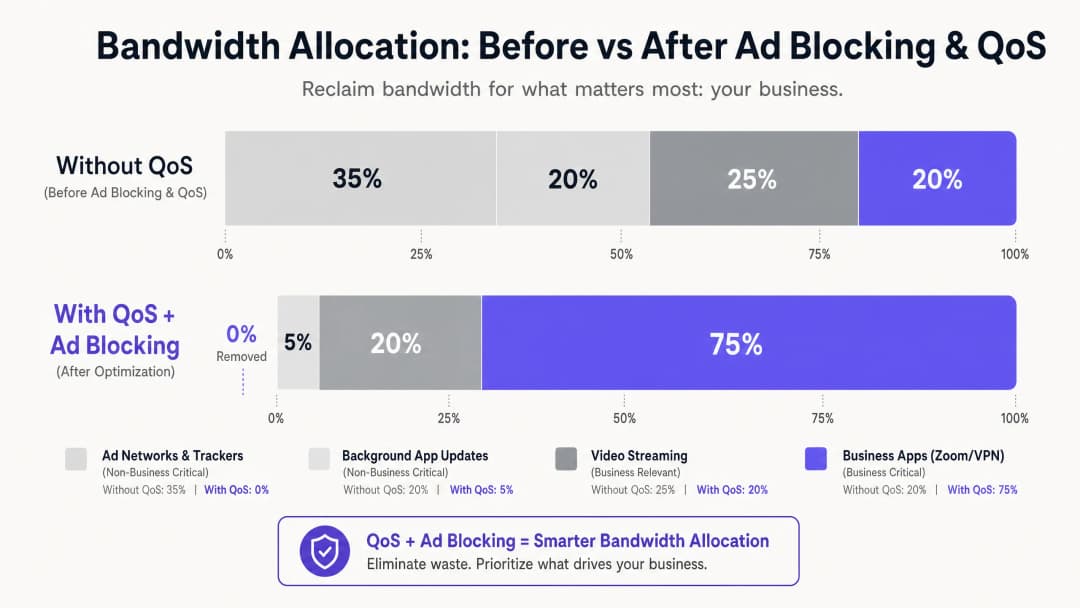
हे मार्गदर्शक हॉस्पिटॅलिटी IT नेत्यांसाठी DNS-level जाहिरात ब्लॉकिंगसह एंड-टू-एंड Quality of Service (QoS) धोरणे एकत्रित करून व्यावसायिक प्रवाशांसाठी hotel WiFi ऑप्टिमाइझ करण्यासाठी व्यावहारिक, व्हेंडर-तटस्थ धोरणे प्रदान करते. यामध्ये तांत्रिक आर्किटेक्चर, VLAN विभागणी, सुरक्षा अनुपालन आणि वास्तविक जगातील केस स्टडीज समाविष्ट आहेत जे दर्शवतात की बॅकग्राउंडमधील अनावश्यक ट्रॅफिक काढून टाकल्याने 35% पर्यंत वाया जाणारी बँडविड्थ कशी परत मिळवता येऊ शकते. वेन्यू ऑपरेशन्स डायरेक्टर्स आणि नेटवर्क आर्किटेक्ट्सना या तिमाहीत हे उपयोजन न्याय्य ठरवण्यासाठी आणि अंमलात आणण्यासाठी ठोस अंमलबजावणीच्या पायऱ्या, निर्णय फ्रेमवर्क आणि मोजता येण्याजोगे ROI बेंचमार्क मिळतील.
हे मार्गदर्शक ऐका
पॉडकास्ट ट्रान्सक्रिप्ट पहा
आमच्या मुख्य मालिकेचा भाग: Guest WiFi Guide →

मुख्य सारांश (Executive Summary)
hospitality क्षेत्रातील IT मॅनेजर्स आणि व्हेन्यू ऑपरेशन्स डायरेक्टर्ससाठी, विश्वासार्ह WiFi प्रदान करणे आता काही वेगळे वैशिष्ट्य राहिलेले नाही - ती एक पायाभूत ऑपरेशनल गरज बनली आहे. व्यावसायिक प्रवाशांना कॉर्पोरेट VPN, व्हिडिओ कॉन्फरन्सिंग आणि क्लाउड-होस्टेड ॲप्लिकेशन्ससाठी हाय-परफॉर्मन्स कनेक्टिव्हिटी हवी असते. तरीही बहुतेक हॉटेल नेटवर्क्स हे अदृश्य बॅकग्राउंड ट्रॅफिकमुळे नकळतपणे बँडविड्थ गमावत असतात: जाहिरात ट्रॅकर्स, टेलिमेट्री बीकन्स आणि ऑटोमॅटिक ॲप अपडेट्स जे एखादे व्यावसायिक ॲप्लिकेशन सुरू होण्यापूर्वीच एकूण उपलब्ध बँडविड्थचा 35% पर्यंत वापर करू शकतात.
हे मार्गदर्शक ती वाया गेलेली बँडविड्थ पुन्हा मिळवण्यासाठी एक सिद्ध, वेंडर-न्यूट्रल आर्किटेक्चर सविस्तरपणे सांगते. नेटवर्क गेटवेवर DNS-पातळीवर ॲड ब्लॉकिंग तैनात करून आणि Deep Packet Inspection (DPI) द्वारे मॅप केलेल्या एंड-टू-एंड Quality of Service (QoS) पॉलिसी लागू करून, नेटवर्क आर्किटेक्ट्स हे सुनिश्चित करू शकतात की लेटन्सी-सेन्सिटिव्ह ॲप्लिकेशन्स - Zoom, Microsoft Teams, IPsec VPNs आणि SSL टनेल्स - यांना हमी दिलेली प्रायोरिटी थ्रुपुट मिळेल. बहुतांश घटनांमध्ये, ही पद्धत सध्याच्या पायाभूत सुविधांवर लागू केली जाऊ शकते, ज्यामुळे विलंबित ISP लिंक अपग्रेड्स आणि सुधारित कॉर्पोरेट गेस्ट सॅटिस्फॅक्शन स्कोअरद्वारे मोजता येण्याजोगा ROI मिळतो.
तांत्रिक सखोल विश्लेषण (Technical Deep Dive)
आधुनिक हॉटेल WiFi वातावरणासमोरील मुख्य आव्हान म्हणजे न मागितलेल्या बॅकग्राउंड ट्रॅफिकचा होणारा प्रसार. जेव्हा कोणतेही आधुनिक डिव्हाइस - जसे की बिझनेस लॅपटॉप, स्मार्टफोन किंवा टॅबलेट - नेटवर्कशी कनेक्ट होते, तेव्हा ते ताबडतोब डझनभर बॅकग्राउंड कनेक्शन्स सुरू करते. यामध्ये इन्स्टॉल केलेल्या ॲप्लिकेशन्सकडून ॲड SDK पोलिंग, ऑपरेटिंग सिस्टम टेलिमेट्री, क्लाउड सिंक सर्व्हिसेस आणि ऑटोमॅटिक अपडेट चेक्स यांचा समावेश होतो. एकाच वेळी 200 अतिथी कनेक्ट असलेल्या अनमॅनेज्ड, फ्लॅट नेटवर्कवर, हा बॅकग्राउंड गोंधळ केवळ एक गैरसोय नसून - ती एक स्ट्रक्चरल बँडविड्थ समस्या आहे.
कॉर्पोरेट गेस्ट नेटवर्क्सच्या ट्रॅफिक प्रोफाइल्सवरील संशोधनातून सतत असे दिसून येते की अनमॅनेज्ड हॉटेल नेटवर्क्सवरील DNS क्वेरी व्हॉल्यूममध्ये जाहिरात नेटवर्क्स आणि थर्ड-पार्टी ट्रॅकर्सचा वाटा 25% ते 40% असतो. प्रत्येक यशस्वीरित्या रिझॉल्व्ह झालेली क्वेरी डेटा ट्रान्सफर सुरू करू शकते, आणि जरी प्रत्येक वैयक्तिक पेलोड लहान असला, तरी शेकडो एकाच वेळी असणाऱ्या कनेक्शन्सवरील एकत्रित प्रभाव लक्षणीय असतो. ती बँडविड्थ आहे जी CFO च्या Zoom बोर्ड मीटिंगसाठी किंवा कन्सल्टंटच्या त्यांच्या कॉर्पोरेट डेटा सेंटरमधील VPN सेशनसाठी वापरली गेली पाहिजे.
लेअर 1: DNS-आधारित ॲड आणि ट्रॅकर ब्लॉकिंग
हस्तक्षेपाचा सर्वात प्रभावी बिंदू DNS रिझोल्यूशन आहे. सर्व गेस्ट DNS क्वेरी एका फिल्टरिंग रिझॉल्व्हरद्वारे पाठवून - मग ते ऑन-प्रिमायसेस अप्लायन्स असो किंवा क्लाउड DNS सुरक्षा सेवा असो - नेटवर्क WAN लिंकवर कोणताही पेलोड डेटा जाण्यापूर्वीच ज्ञात जाहिरात सर्व्हर्स, ट्रॅकर डोमेन्स आणि टेलिमेट्री एंडपॉइंट्सच्या विनंत्या शांतपणे काढून टाकू शकते. याद्वारे मिळणारा कार्यक्षमतेचा फायदा स्ट्रक्चरल आहे: ब्लॉक केलेली DNS क्वेरी ही पूर्ण HTTP/S कनेक्शनच्या तुलनेत नगण्य रिसोर्सेस वापरते जी तिने अन्यथा सुरू केली असती.
व्यावहारिक हॉटेल उपयोजनांसाठी, व्यवस्थापित DNS फिल्टरिंग सेवा एंटरप्राइझ-दर्जाच्या SLA द्वारे समर्थित नियमितपणे अपडेट केलेल्या ब्लॉकलिस्ट देतात, ज्यामुळे उपलब्धता गंभीर असलेल्या वातावरणात स्व-व्यवस्थापित ओपन-सोर्स सोल्यूशन्सपेक्षा त्यांना प्राधान्य दिले जाते. मुख्य कॉन्फिगरेशन आवश्यकता ही आहे की Walled Garden - म्हणजेच Captive Portal प्रमाणीकरणापूर्वी प्रवेश करता येणारे डोमेन्सचा संच - स्पष्टपणे व्हाईटलिस्ट केलेला असणे आणि सामान्य फिल्टरिंग पॉलिसीमधून सूट मिळणे आवश्यक आहे. असे न करणे हे उपयोजनानंतरच्या पाहुण्यांच्या तक्रारींचे सर्वात सामान्य कारण आहे.
लेअर २: डीप पॅकेट इन्स्पेक्शन आणि QoS मार्किंग
DNS लेअरवर बॅकग्राउंडचा आवाज कमी झाल्यानंतर, उर्वरित ट्रॅफिकचे प्राधान्यक्रमानुसार सक्रियपणे व्यवस्थापन केले पाहिजे. एज फायरवॉल किंवा युनिफाइड थ्रेट मॅनेजमेंट (UTM) अप्लायन्सवरील डीप पॅकेट इन्स्पेक्शन (DPI) विशिष्ट ॲप्लिकेशन प्रोटोकॉल ओळखते. आधुनिक DPI इंजिन पॅकेट सिग्नेचर्स आणि पोर्ट पॅटर्नच्या आधारे झूम, मायक्रोसॉफ्ट टीम्स, Cisco Webex, RTP/SIP व्हॉइस ट्रॅफिक आणि IPsec आणि SSL VPN सेशन्सचे अचूक वर्गीकरण करू शकतात, जरी नॉन-स्टँडर्ड पोर्ट्स वापरात असले तरीही.
व्यवसायासाठी अत्यंत आवश्यक म्हणून ओळखल्या जाणाऱ्या ट्रॅफिकला IP हेडरमध्ये डिफरन्शिएटेड सर्व्हिसेस कोड पॉइंट (DSCP) व्हॅल्यूसह चिन्हांकित केले जाते. DSCP फील्ड ६४ संभाव्य पर-हॉप बिहेवियर्स ऑफर करते, परंतु व्यावहारिकदृष्ट्या बहुतेक हॉटेल उपयोजनांमध्ये साधे तीन-स्तरीय मॉडेल वापरले जाते: व्हॉइस आणि व्हिडिओ कॉन्फरन्सिंगसाठी एक्स्पेडायटेड फॉरवर्डिंग (EF, DSCP 46); VPN आणि कॉर्पोरेट ॲप्लिकेशन डेटासाठी अश्युअर्ड फॉरवर्डिंग क्लास ४ (AF41, DSCP 34); आणि सामान्य वेब ब्राउझिंग आणि मीडिया स्ट्रीमिंगसाठी बेस्ट एफर्ट (BE, DSCP 0).
लेअर ३: WMM द्वारे वायरलेस QoS
वायर्ड QoS कॉन्फिगरेशन केवळ तेव्हाच प्रभावी ठरते जेव्हा वायरलेस ॲक्सेस पॉइंट्स DSCP मार्किंग्ज योग्य Wi-Fi मल्टीमीडिया (WMM) ॲक्सेस कॅटेगरीशी मॅप करतात. WMM चार ॲक्सेस कॅटेगरी परिभाषित करते: व्हॉइस (AC_VO), व्हिडिओ (AC_VI), बेस्ट एफर्ट (AC_BE), आणि बॅकग्राउंड (AC_BK). DSCP-टू-WMM मॅपिंग APs वर स्पष्टपणे कॉन्फिगर केलेले असणे आवश्यक आहे, कारण डिफॉल्ट वर्तन व्हेंडरनुसार बदलते. तुमच्या AP मॅनेजमेंट कन्सोलमध्ये या सेटिंगची पडताळणी करा; हा एक सामान्य अभाव आहे ज्यामुळे अन्यथा उत्तम प्रकारे डिझाइन केलेल्या QoS पॉलिसी शेवटच्या मैलावर अयशस्वी ठरतात.
VLAN Segmentation आणि सुरक्षा आर्किटेक्चर
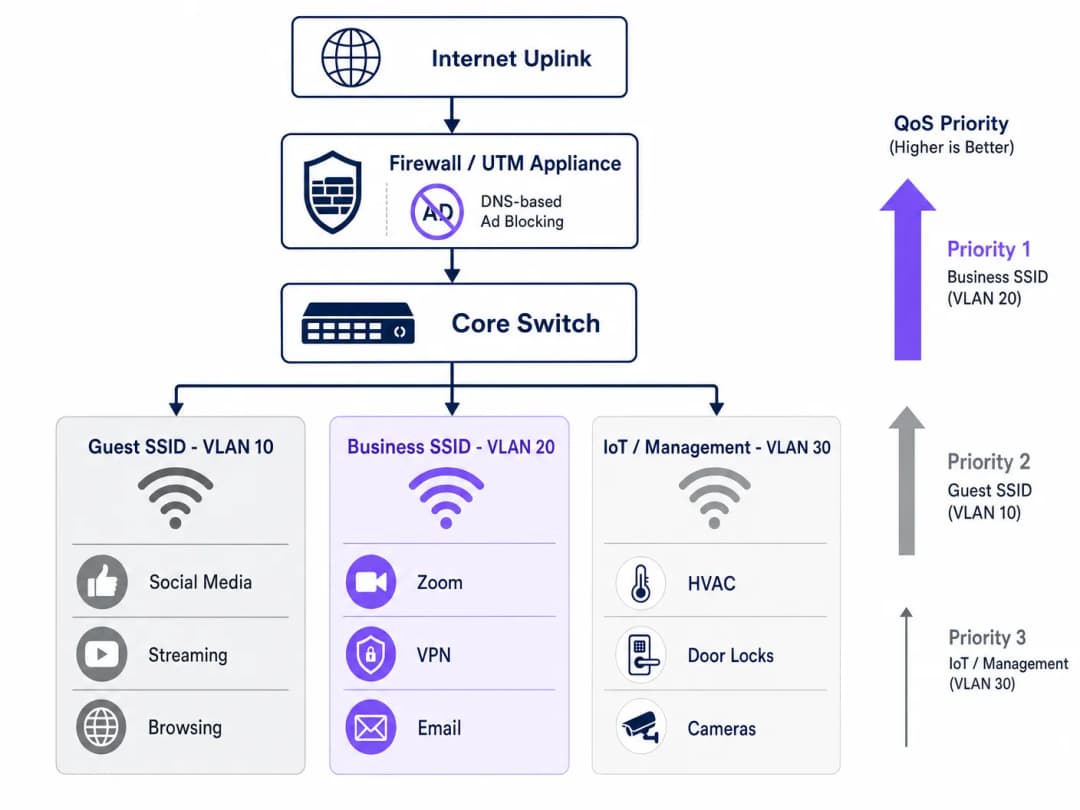
एक योग्यरित्या ऑप्टिमाइझ केलेले हॉटेल नेटवर्क किमान तीन लॉजिकल सेगमेंट्सवर चालले पाहिजे. Guest SSID (VLAN 10) हे लेझर ट्रॅव्हलर्स आणि कॉन्फरन्स उपस्थितांना मानक इंटरनेट ऍक्सेस प्रदान करते, जे DNS फिल्टरिंग आणि रेट लिमिटिंगच्या अधीन असते. Business SSID (VLAN 20) हे सर्वोच्च QoS प्रायोरिटी धारण करते आणि RADIUS सर्व्हरशी समाकलित करून प्रति-वापरकर्ता क्रेडेंशियल प्रदान करण्यासाठी IEEE 802.1X सह WPA3-Enterprise द्वारे ऑथेंटिकेट करते. IoT आणि Management VLAN (VLAN 30) हे स्मार्ट रूम डिव्हाइसेस, HVAC सेन्सर्स, इलेक्ट्रॉनिक डोअर लॉक्स आणि IP कॅमेरे यांना सर्व गेस्ट ट्रॅफिकपासून वेगळे करते.
हे सेगमेंटेशन केवळ परफॉर्मन्स ऑप्टिमायझेशन नाही - ही एक कम्प्लायन्स आवश्यकता आहे. PCI-DSS अंतर्गत, पेमेंट कार्ड डेटाला स्पर्श करणारे कोणतेही नेटवर्क सेगमेंट दस्तऐवजीकरण केलेल्या फायरवॉल नियमांद्वारे आणि ऍक्सेस कंट्रोल्सद्वारे सामान्य नेटवर्कपासून वेगळे केले जाणे आवश्यक आहे. GDPR अंतर्गत, Guest WiFi ऑथेंटिकेशनद्वारे गोळा केलेला वैयक्तिक डेटा योग्य तांत्रिक सुरक्षेसह हाताळला गेला पाहिजे आणि योग्य काळजी (due diligence) प्रदर्शित करण्यासाठी नेटवर्क सेगमेंटेशन हे एक मूलभूत नियंत्रण आहे. मूल्यमापना दरम्यान कम्प्लायन्स सिद्ध करण्यासाठी सर्व VLANs मधील २०२६ IT security audit trail चे संपूर्ण रेकॉर्ड राखणे आवश्यक आहे.
तुमच्या विशिष्ट सेटअपबद्दल काही प्रश्न आहेत का?
आमची टीम ८०,००० हून अधिक वेन्यूजमधील वेन्यू ऑपरेटर्स, IT मॅनेजर्स आणि नेटवर्क इंजिनिअर्ससोबत काम करते. २० मिनिटांचा कॉल बुक करा आणि तुमच्यासारख्या इतरांनी ही समस्या कशी सोडवली हे आम्ही तुम्हाला दाखवू.
अंमलबजावणी मार्गदर्शक
सक्रिय गेस्ट सेवांमध्ये व्यत्यय आणू नये म्हणून हे आर्किटेक्चर तैनात करण्यासाठी पद्धतशीर दृष्टिकोन आवश्यक आहे. खालील चरणांचे अनुसरण करून टप्प्याटप्प्याने रोलआउट करण्याची शिफारस केली जाते.
टप्पा १ - ट्रॅफिक प्रोफाइलिंग (आठवडा १). कोणताही बदल करण्यापूर्वी, ७२ तासांचा बेसलाईन डेटा कॅप्चर करण्यासाठी कोर स्विचच्या SPAN पोर्टवर ट्रॅफिक विश्लेषण टूल तैनात करा. सर्वाधिक बँडविड्थ वापरणारे टॉप २० डोमेन्स आणि ऍप्लिकेशन कॅटेगरी ओळखा. हा डेटा गुंतवणुकीचे समर्थन करतो आणि पोस्ट-डिप्लॉयमेंट सुधारणा मोजण्यासाठी बेसलाईन प्रदान करतो. अनेक ऑपरेटर्स त्यांच्या ठिकाणी डिव्हाइसचे प्रकार, ड्वेल पॅटर्न आणि ऍप्लिकेशनचा वापर समजून घेण्यासाठी WiFi Analytics क्षमतेचा वापर करतात.
टप्पा २ - पायलट DNS फिल्टरिंग (आठवडा २). एका वेगळ्या VLAN वर - आदर्शपणे कर्मचारी किंवा बॅक-ऑफिस सेगमेंटवर - कंझर्व्हेटिव्ह ब्लॉकलिस्ट वापरून DNS फिल्टरिंग लागू करा. गेस्ट सेगमेंट्सवर विस्तारित करण्यापूर्वी कोणतेही फॉल्स पॉझिटिव्ह नाहीत याची खात्री करण्यासाठी ४८ तास निरीक्षण करा. वल्ड गार्डन व्हाइटलिस्टमध्ये जोडलेल्या प्रत्येक डोमेनचे दस्तऐवजीकरण करा.
टप्पा ३ - QoS पॉलिसी डिप्लॉयमेंट (आठवडा ३). एज फायरवॉलवर DPI नियम आणि DSCP मार्किंग कॉन्फिगर करा. डिस्ट्रिब्युशन लेयरवर पॅकेट्स कॅप्चर करून DSCP मार्किंग प्रत्येक स्विच हॉपनंतर टिकून राहतात याची पडताळणी करा. सर्व ऍक्सेस पॉईंट्सवर WMM सक्षम करा आणि DSCP-to-WMM मॅपिंग योग्यरित्या लागू झाल्याची खात्री करा. या टप्प्यावर फ्रिक्वेन्सी प्लॅनिंग आणि चॅनेल मॅनेजमेंटच्या मार्गदर्शनासाठी, WiFi Frequencies: A Guide to Wi-Fi Frequencies in 2026 पहा.टप्पा 4 — VLAN पुनर्रचना (आठवडा 4). IoT डिव्हाइसेसना समर्पित मॅनेजमेंट VLAN वर स्थलांतरित करा. WPA3-Enterprise ऑथेंटिकेशनसह बिझनेस SSID रोल आउट करा. कॉर्पोरेट क्लायंट आणि कॉन्फरन्स आयोजकांना नवीन SSID बद्दल सूचित करा.
टप्पा 5 — मॉनिटरिंग आणि ऑप्टिमायझेशन (सुरू असलेले). KPIs स्थापित करा: सरासरी Zoom कॉल गुणवत्ता स्कोअर, VPN कनेक्शन यश दर, पीक-अवर थ्रुपुट वापर, आणि गेस्ट WiFi समाधान स्कोअर. दरमहा DNS ब्लॉकलिस्टचे पुनरावलोकन आणि अपडेट करा.
सर्वोत्तम पद्धती
खालील वेंडर-न्यूट्रल शिफारसी सध्याच्या उद्योग मानकांचे प्रतिनिधित्व करतात आणि Cisco Meraki, Ubiquiti UniFi, Aruba Networks, आणि Ruckus यासह प्रमुख हार्डवेअर प्लॅटफॉर्मवर लागू होतात.
| पद्धत | मानक / संदर्भ | प्राधान्य |
|---|---|---|
| बिझनेस SSID वर WPA3-Enterprise सक्षम करा | IEEE 802.11i / WPA3 | अत्यंत महत्त्वाचे |
| 802.1X RADIUS ऑथेंटिकेशन | IEEE 802.1X | अत्यंत महत्त्वाचे |
| एंड-टू-एंड DSCP संरक्षण | RFC 2474 | उच्च |
| सर्व APs वर WMM सक्षम करा | Wi-Fi Alliance WMM | उच्च |
| एअरटाइम फेअरनेस सक्षम करा | वेंडर-विशिष्ट | मध्यम |
| व्यवस्थापित ब्लॉकलिस्टसह DNS फिल्टरिंग | NIST SP 800-81 | उच्च |
| VLAN सेगमेंटेशन (गेस्ट/बिझनेस/IoT) | IEEE 802.1Q | अत्यंत महत्त्वाचे |
| PCI-DSS नेटवर्क आयसोलेशन | PCI-DSS v4.0 Req. 1 | अत्यंत महत्त्वाचे (लागू असेल तिथे) |
हॉस्पिटॅलिटी स्पेसच्या सोबतीने रिटेल वातावरण चालवणाऱ्या ठिकाणांसाठी - जसे की हॉटेल लॉबी शॉप्स किंवा मिश्रित कॉन्फरन्स-रिटेल क्षेत्रे - हेच VLAN आणि QoS नियम लागू होतात, ज्यामध्ये POS ट्रॅफिकसाठी अतिरिक्त समर्पित उच्च-प्राधान्य रांग (queue) असते. ऑफिस Wi-Fi: तुमच्या आधुनिक ऑफिसचे Wi-Fi नेटवर्क ऑप्टिमाइझ करणे मध्ये चर्चा केलेली तत्त्वे थेट हॉटेल बिझनेस सेंटर आणि मीटिंग रूमच्या डिप्लॉयमेंटवर लागू होतात.
ट्रबलशूटिंग आणि जोखीम कमी करणे
हॉटेल WiFi ऑप्टिमायझेशन डिप्लॉयमेंटमधील सर्वात सामान्य बिघाड तीन श्रेणींमध्ये येतात.
Captive Portal बिघाड. लक्षण: DNS फिल्टरिंग सक्षम केल्यानंतर अतिथी लॉगिन पेजवर पोहोचू शकत नाहीत. मूळ कारण: फिल्टरिंग पॉलिसी Captive Portal रिडायरेक्ट किंवा वॉल्ड गार्डनसाठी आवश्यक असलेल्या डोमेन्सना ब्लॉक करत आहे. उपाय: ऑथेंटिकेशन प्रवाहासाठी आवश्यक असलेल्या प्रत्येक डोमेनचे ऑडिट करा आणि सामान्य फिल्टर्स सक्षम करण्यापूर्वी त्यांना प्री-ऑथेंटिकेशन व्हाइटलिस्टमध्ये जोडा. जर तुम्ही मोठ्या प्रमाणावरील गर्दीच्या (congestion) समस्यांचे निदान करत असाल, तर आमचे गेस्ट WiFi इतके संथ का आहे? नेटवर्क गर्दीचे निदान करणे हे मार्गदर्शक एक संरचित निदान फ्रेमवर्क प्रदान करते. स्पॅनिश भाषिक ऑपरेटरसाठी, एक समतुल्य संसाधन ¿Por qué nuestro WiFi para invitados es tan lento? Diagnóstico de la congestión de la red येथे उपलब्ध आहे.
DSCP marking stripped. लक्षण: फायरवॉल आणि APs वर QoS कॉन्फिगर केले आहे, परंतु लोड अंतर्गत कॉर्पोरेट ॲप्लिकेशन परफॉर्मन्स सुधारत नाही. मूळ कारण: एक इंटरमीडिएट स्विच DSCP टॅग काढून टाकत आहे किंवा पुन्हा मार्क करत आहे. निवारण: Wireshark किंवा तत्सम टूलचा वापर करून नेटवर्क पाथवर अनेक ठिकाणी पाकीट कॅप्चर करा. प्रत्येक स्विचची QoS ट्रस्ट पॉलिसी अपस्ट्रीम डिव्हाइसेसकडून DSCP वर विश्वास ठेवण्यासाठी सेट केली असल्याची पडताळणी करा.
एअरटाइम फेअरनेस सक्षम केल्यानंतर IoT डिव्हाइस अस्थिरता. लक्षण: एअरटाइम फेअरनेस सक्षम केल्यानंतर स्मार्ट रूम डिव्हाइसेस (थर्मोस्टॅट्स, डोअर लॉक्स) मधूनमधून ऑफलाइन होतात. मूळ कारण: जुने 802.11b/g IoT डिव्हाइसेस हळू ट्रान्समिट करतात आणि फेअरनेस पॉलिसी अंतर्गत त्यांना एअरटाइम मिळत नाही. निवारण: एअरटाइम फेअरनेस बंद असलेल्या VLAN 30 वरील समर्पित 2.4GHz SSID वर IoT डिव्हाइसेस मायग्रेट करा. फक्त 5GHz guest आणि बिझनेस SSIDs वर एअरटाइम फेअरनेस लागू करा.
ROI आणि व्यावसायिक प्रभाव
या गुंतवणुकीची आर्थिक बाजू अगदी स्पष्ट आहे. केवळ DNS फिल्टरिंगद्वारे वाया जाणाऱ्या बँडविड्थपैकी 20 - 35% बँडविड्थ पुन्हा मिळवून, बहुतेक हॉटेल ऑपरेटर्स ISP सर्किट अपग्रेड 12 ते 18 महिन्यांसाठी पुढे ढकलू शकतात. 1Gbps समर्पित फायबर सर्किटसाठी सामान्य व्यावसायिक ब्रॉडबँडच्या किमतीवर, हे बाजार आणि कराराच्या अटींनुसार £15,000 ते £40,000 च्या पुढे ढकललेल्या भांडवली खर्चाचे प्रतिनिधित्व करते.
पायाभूत सुविधांच्या बचतीपलीकडे, कॉर्पोरेट अतिथींच्या समाधानावर होणारा परिणाम मोजण्याजोगा आहे. जे हॉटेल्स खात्रीशीर, बिझनेस-ग्रेड WiFi चे विश्वसनीयपणे विपणन करू शकतात ते कॉर्पोरेट ट्रॅव्हल मार्केटमध्ये प्रीमियम मिळवतात. WiFi समाधान गुणांमधील शाश्वत सुधारणा - सामान्यतः मुक्कामानंतरच्या सर्वेक्षणांद्वारे मोजल्या जातात - कॉर्पोरेट क्लायंटमधील रिपीट बुकिंग दरांशी थेट संबंधित असतात, जे बहुतेक फुल-सर्व्हिस हॉटेल्ससाठी सर्वोच्च-मार्जिन देणारे क्षेत्र आहे.
व्हिजिटर किंवा पेशंट WiFi चालवणाऱ्या healthcare आणि transport ठिकाणांसाठी, कम्प्लायन्सचे फायदे तितकेच महत्त्वपूर्ण आहेत. नेटवर्क सिक्युरिटी आणि डेटा हाताळणीसाठी दस्तऐवजीकरण, ऑडिटेबल दृष्टिकोन प्रदर्शित केल्याने नियामक जोखीम कमी होते आणि कम्प्लायन्स मूल्यमापन सुलभ होते.
महत्वाच्या व्याख्या
DNS Filtering
DNS रिझोल्यूशन टप्प्यात निर्दिष्ट डोमेनवर प्रवेश अवरोधित करण्याची प्रक्रिया, जी उपकरणांना त्या गंतव्यस्थानांशी कनेक्शन स्थापित करण्यापासून रोखते.
कोणताही पेलोड डेटा ट्रान्समिट होण्यापूर्वी बँडविड्थ पुन्हा मिळवण्यासाठी, अतिथी उपकरणांना जाहिरात नेटवर्क्स आणि ट्रॅकर डोमेनपर्यंत पोहोचण्यापासून रोखण्यासाठी गेटवेवर तैनात केले जाते.
Quality of Service (QoS)
नेटवर्क मेकॅनिझमचा एक संच जो लेटन्सी-संवेदनशील ॲप्लिकेशन्सच्या कामगिरीची हमी देण्यासाठी इतर ट्रॅफिकच्या तुलनेत काही विशिष्ट प्रकारच्या ट्रॅफिकला प्राधान्य देतो.
शकडो वापरकर्त्यांद्वारे सामायिक केलेल्या गर्दीच्या हॉटेल नेटवर्कवर Zoom, VoIP आणि VPN ट्रॅफिकला हमी दिलेला थ्रूपुट आणि कमी लेटन्सी मिळेल याची खात्री करण्यासाठी आवश्यक आहे.
Deep Packet Inspection (DPI)
पॅकेट फिल्टरिंगचे एक प्रगत रूप जे विशिष्ट ॲप्लिकेशन किंवा प्रोटोकॉल ओळखण्यासाठी पॅकेटच्या हेडरच्या पलीकडे जाऊन त्याच्या डेटा सामग्रीचे परीक्षण करते.
ॲप्लिकेशन ट्रॅफिकचे अचूक वर्गीकरण करण्यासाठी (उदा. सामान्य HTTPS ट्रॅफिकपेक्षा Zoom कॉल वेगळा ओळखणे) एज फायरवॉल्सद्वारे वापरले जाते जेणेकरून त्यास QoS प्राधान्यकरणासाठी टॅग केले जाऊ शकते.
DSCP (Differentiated Services Code Point)
नेटवर्क डिव्हाइसेसवर प्रति-हॉप QoS उपचारासाठी पॅकेट्सचे वर्गीकरण आणि चिन्हांकन करण्यासाठी IP पॅकेट हेडरमधील ६-बिट फील्ड वापरले जाते.
पॅकेट्स टॅग करण्यासाठीची उद्योग-मानक यंत्रणा जेणेकरून स्विचेस, राउटर आणि ॲक्सेस पॉइंट्सना हे समजेल की कोणते ट्रॅफिक व्यवसायासाठी महत्त्वपूर्ण आहे आणि त्यावर आधी प्रक्रिया केली पाहिजे.
WMM (WiFi Multimedia)
एक WiFi Alliance प्रमाणपत्र जे चार ॲक्सेस श्रेणी: Voice, Video, Best Effort आणि Background परिभाषित करून वायरलेस नेटवर्क्सवर QoS लागू करते.
वायर्ड QoS चे वायरलेस समतुल्य. शेवटच्या हॉपवर वायर्ड QoS पॉलिसींचा आदर केला जाईल याची खात्री करण्यासाठी सर्व ॲक्सेस पॉइंट्सवर सक्षम केले पाहिजे आणि DSCP मूल्यांवर योग्यरित्या मॅप केले पाहिजे.
Airtime Fairness
एक वायरलेस शेड्यूलिंग वैशिष्ट्य जे सर्व कनेक्ट केलेल्या क्लायंट्सना समान पॅकेट संख्येऐवजी समान ट्रान्समिशन वेळ वाटप करते, ज्यामुळे जुनी संथ उपकरणे चॅनेल क्षमतेवर मक्तेदारी मिळवण्यापासून रोखली जातात.
हॉटेलच्या वातावरणात अत्यंत महत्त्वपूर्ण आहे जिथे आधुनिक व्यावसायिक लॅपटॉप आणि जुनी उपकरणे एकाच AP चा वापर करतात. एका मंद गतीच्या उपकरणामुळे इतरांचा अनुभव खराब होण्यापासून हे रोखते.
VLAN (Virtual Local Area Network)
उपकरणांच्या गटांमधील ट्रॅफिक वेगळे करण्यासाठी IEEE 802.1Q टॅगिंगचा वापर करून भौतिक स्विच इन्फ्रास्ट्रक्चरवर तयार केलेला एक लॉजिकल नेटवर्क विभाग.
एकाच भौतिक पायाभूत सुविधांवर अतिथी, व्यवसाय आणि IoT ट्रॅफिक विभक्त करण्यासाठी वापरले जाते. PCI-DSS अनुपालनासाठी एक अनिवार्य नियंत्रण आणि नेटवर्क सुरक्षा आणि कार्यप्रदर्शन व्यवस्थापनासाठी एक सर्वोत्तम सराव.
Captive Portal
एक वेब-आधारित प्रमाणीकरण गेटवे जो नवीन उपकरणाच्या HTTP ट्रॅफिकला थांबवतो आणि संपूर्ण नेटवर्क प्रवेश मंजूर करण्यापूर्वी त्याला लॉगिन किंवा नोंदणी पृष्ठावर रिडायरेक्ट करतो.
अतिथी WiFi प्रमाणीकरण आणि फर्स्ट-पार्टी डेटा संकलनासाठी प्राथमिक टचपॉइंट. DNS Filtering पॉलिसी प्रमाणीकरण प्रवाहात अडथळा आणणार नाहीत याची खात्री करण्यासाठी याचे काळजीपूर्वक व्यवस्थापन केले पाहिजे.
Walled Garden
डोमेन आणि IP पत्त्यांचा एक संच ज्यामध्ये एखादे उपकरण Captive Portal प्रमाणीकरण पूर्ण करण्यापूर्वी प्रवेश करू शकते, ज्यामध्ये सहसा पोर्टल स्वतः आणि कोणतीही आवश्यक तृतीय-पक्ष प्रमाणीकरण सेवा समाविष्ट असते.
सामान्य ब्लॉकिंग पॉलिसीद्वारे प्रमाणीकरण प्रवाह विस्कळीत होणार नाही याची खात्री करण्यासाठी DNS Filtering तैनात करताना हे स्पष्टपणे कॉन्फिगर केले पाहिजे.
IEEE 802.1X
पोर्ट-आधारित नेटवर्क ॲक्सेस कंट्रोलसाठीचे एक IEEE मानक जे नेटवर्कशी कनेक्ट होऊ इच्छिणाऱ्या उपकरणांसाठी प्रमाणीकरण यंत्रणा प्रदान करते.
WPA3-Enterprise तैनातीला आधार देणारे प्रमाणीकरण फ्रेमवर्क. प्रति-वापरकर्ता क्रेडेन्शियल्स प्रदान करण्यासाठी RADIUS सर्व्हरसह समाकलित होते आणि व्यवसाय-दर्जाच्या हॉटेल SSIDs साठी शिफारस केलेले मानक आहे.
सोडवलेली उदाहरणे
एक 400 खोल्यांचे शहर-मध्यवर्ती हॉटेल 600 नोंदणीकृत प्रतिनिधींसह एका मोठ्या तंत्रज्ञान परिषदेचे आयोजन करत आहे. वेन्यूमध्ये 1Gbps सिमेट्रिक फायबर अपलिंक आहे. परिषदेच्या पहिल्या सकाळी, नेटवर्क ऑपरेशन्स टीमला तक्रारींचा महापूर येतो: Zoom कॉल्स ड्रॉप होत आहेत, VPN कनेक्शन्स टाईम आउट होत आहेत आणि कॉन्फरन्स ॲप लोड होण्यात अपयशी ठरत आहे. ट्रॅफिक कॅप्चर दर्शवते की 1Gbps लिंक 94% वापरावर आहे. IT टीमने तात्काळ आणि संरचनात्मकरित्या कसा प्रतिसाद दिला पाहिजे?
तात्काळ प्रतिसाद (30 मिनिटांच्या आत): ट्रॅफिक कॅप्चरमध्ये ओळखल्या गेलेल्या शीर्ष 50 जाहिरात नेटवर्क आणि टेलिमेट्री डोमेन्ससाठी आपत्कालीन DNS सिंकहोल तैनात करा. यामुळे एकट्यानेच सध्याच्या लोडचा 25 - 35% भाग कमी झाला पाहिजे. त्याच वेळी, एज फायरवॉलवर आपत्कालीन QoS नियम कॉन्फिगर करा जेणेकरून UDP पोर्ट्स 8801-8802 (Zoom) आणि Zoom च्या IP श्रेणींसह TCP 443 वरील ट्रॅफिकला कठोर प्राधान्य दिले जाईल आणि ज्ञात स्ट्रीमिंग CDN IP श्रेणींमधील ट्रॅफिक एकूण 10Mbps पर्यंत मर्यादित केले जाईल.
संरचनात्मक प्रतिसाद (घटनेनंतर): नेटवर्कला समर्पित कॉन्फरन्स प्रतिनिधी आणि स्पीकर VLANs मध्ये विभाजित करा. देखरेख केलेल्या ब्लॉकलिस्टसह व्यवस्थापित DNS फिल्टरिंग सेवा तैनात करा. भविष्यातील सर्व इव्हेंट्ससाठी DSCP टॅगिंगसह DPI-आधारित QoS लागू करा. जास्त गर्दीच्या इव्हेंट कालावधीसाठी ISP सह बर्स्ट कॅपॅसिटी कराराची बोलणी करा. 300 पेक्षा जास्त प्रतिनिधी असलेल्या परिषदांसाठी समर्पित 10Gbps इव्हेंट अपलिंकचा विचार करा.
तीन शहरांमध्ये मालमत्ता असलेला 120 खोल्यांचा बुटीक हॉटेल समूह त्यांच्या WiFi पायाभूत सुविधांचे प्रमाणीकरण करू इच्छितो. प्रत्येक मालमत्तेमध्ये विश्रांती आणि व्यावसायिक पाहुण्यांचे मिश्रण आहे. IT डायरेक्टरला हे सुनिश्चित करायचे आहे की व्यावसायिक पाहुण्यांना प्रत्येक साइटवर नवीन हार्डवेअरमध्ये गुंतवणूक न करता प्रीमियम अनुभव मिळावा. विद्यमान पायाभूत सुविधा ही Ubiquiti UniFi APs आणि Cisco Meraki फायरवॉल्सचे मिश्रण आहे. कोणत्या आर्किटेक्चरची शिफारस केली पाहिजे?
DNS फिल्टरिंग (Meraki च्या अंगभूत सामग्री फिल्टरिंग आणि Umbrella एकत्रीकरणाद्वारे) आणि DPI-आधारित QoS साठी विद्यमान Meraki फायरवॉल्सचा लाभ घेणाऱ्या केंद्रित क्लाउड-व्यवस्थापित आर्किटेक्चरची शिफारस करा. प्रति मालमत्ता दोन SSIDs कॉन्फिगर करा: एक मानक Guest SSID (WPA3-Personal सह Captive Portal) आणि एक Business SSID (WPA3-Enterprise सह 802.1X). Business SSID ला सर्वोच्च QoS प्राधान्य स्तरासह समर्पित VLAN वर मॅप करा. UniFi APs वर, WMM सक्षम करा आणि Meraki फायरवॉलच्या टॅगिंग धोरणाशी जुळण्यासाठी DSCP-ते-WMM मॅपिंग कॉन्फिगर करा. तिन्ही मालमत्तांमध्ये 802.1X प्रमाणीकरणासाठी केंद्रित RADIUS सर्व्हर तैनात करा (किंवा क्लाउड RADIUS सेवा वापरा). कॉर्पोरेट खाते असलेल्या पाहुण्यांना चेक-इनच्या वेळी Business SSID क्रेडेंशियल्स प्रदान करा.
सराव प्रश्न
Q1. तुम्ही तुमच्या हॉटेलच्या गेस्ट VLAN वर नुकतेच DNS filtering सक्षम केले आहे. १० मिनिटांच्या आत, फ्रंट डेस्कला पाहुण्यांचे कॉल येऊ लागतात की ते WiFi शी कनेक्ट करू शकत नाहीत - त्यांना लॉगिन पेज दिसत नाही आहे आणि 'No Internet Connection' एरर येत आहे. याचे सर्वात संभाव्य कारण काय आहे आणि तुम्ही त्याचे निवारण कसे कराल?
टीप: जेव्हा एखादे नवीन डिव्हाइस ओपन नेटवर्कमध्ये जोडले जाते आणि captive portal पर्यंत पोहोचण्याचा प्रयत्न करते, तेव्हा घडणाऱ्या घटनांच्या क्रमाचा विचार करा.
नमुना उत्तर पहा
DNS filtering पॉलिसी captive portal रिडायरेक्ट किंवा walled garden साठी आवश्यक असलेल्या एका किंवा अधिक डोमेन्सना ब्लॉक करत आहे. जेव्हा एखादे डिव्हाइस नेटवर्कमध्ये जोडले जाते, तेव्हा ते captive portal शोधण्यासाठी HTTP प्रोब रिक्वेस्ट पाठवते. जर DNS रिझोल्व्हर रिडायरेक्ट डोमेन रिझोल्व्ह करू शकला नाही (कारण ते ब्लॉकलिस्टवर आहे किंवा फिल्टर खूप आक्रमक आहे), तर डिव्हाइसला लॉगिन पेज कधीच दिसत नाही. निवारण: captive portal चे रिडायरेक्ट डोमेन, ऑथेंटिकेशन सर्व्हर डोमेन आणि कोणतेही सोशल लॉगिन प्रदाता डोमेन्स (उदा. Google लॉगिनसाठी accounts.google.com) त्वरित ओळखा आणि त्यांना walled garden व्हाईटलिस्टमध्ये जोडा. walled garden ने अन-ऑथेंटिकेटेड डिव्हाइसेससाठी DNS filter पूर्णपणे बायपास केला पाहिजे.
Q2. एका नेटवर्क आर्किटेक्टने Zoom ट्रॅफिकला DSCP EF (46) सह टॅग करण्यासाठी एज फायरवॉलवर DPI कॉन्फिगर केले आहे आणि कॉन्फिगरेशन योग्य असल्याची खात्री केली आहे. तथापि, कॉन्फरन्सच्या पीक अवर्स दरम्यान, व्यावसायिक पाहुणे अजूनही जिटर आणि ड्रॉप झालेल्या कॉल्सची तक्रार करतात. AP वरील पॅकेट कॅप्चर दर्शवते की Zoom ट्रॅफिक DSCP 0 (Best Effort) सह येत आहे. याचे सर्वात संभाव्य कारण काय आहे?
टीप: लक्षात ठेवा की QoS ही एक एंड-टू-एंड आवश्यकता आहे आणि मार्गातील प्रत्येक डिव्हाइस प्रायोरिटी मार्किंग्सवर विश्वास ठेवण्यासाठी आणि ते फॉरवर्ड करण्यासाठी कॉन्फिगर केलेले असणे आवश्यक आहे.
नमुना उत्तर पहा
फायरवॉल आणि ॲक्सेस पॉइंट दरम्यानचा स्विच DSCP टॅग्ज काढून टाकत आहे किंवा ते 0 (Best Effort) वर रिमार्क करत आहे. ही एक सामान्य समस्या आहे जेव्हा स्विचेस डीफॉल्ट 'untrusted' QoS पॉलिसीसह कॉन्फिगर केलेले असतात जे सर्व येणाऱ्या DSCP व्हॅल्यूज रिसेट करतात. निवारण: फायरवॉल आणि AP मधील मार्गातील स्विच ओळखा आणि अपलिंक पोर्ट्सवर त्यांची QoS ट्रस्ट पॉलिसी 'trust DSCP' वर कॉन्फिगर करा. याव्यतिरिक्त, ॲक्सेस पॉइंट्स DSCP EF ला WMM AC_VO (Voice) वर मॅप करण्यासाठी कॉन्फिगर केले आहेत आणि ते AC_BE वर डीफॉल्ट होत नाहीत याची खात्री करा.
Q3. तुम्ही एका २५० खोल्यांच्या हॉटेलला सल्ला देत आहात जे व्यावसायिक पाहुण्यांसाठी WiFi परफॉर्मन्स सुधारण्यासाठी Airtime Fairness लागू करू इच्छितात. हॉटेलमध्ये ८० स्मार्ट रूम डिव्हाइसेस (थर्मोस्टॅट्स, मोटराइज्ड ब्लाइंड्स) देखील आहेत जे 802.11b/g वापरतात आणि सध्या पाहुण्यांच्या समान SSID वर आहेत. या कॉन्फिगरेशनमध्ये Airtime Fairness सक्षम करण्याचा धोका काय आहे आणि शिफारस केलेला दृष्टिकोन कोणता आहे?
टीप: Airtime Fairness संसाधनांचे वाटप कसे करते आणि जुन्या 802.11b डिव्हाइसेसच्या ट्रान्समिशन रेटची तुलना आधुनिक 802.11ac/WiFi 6 डिव्हाइसेसशी कशी होते याचा विचार करा.
नमुना उत्तर पहा
Airtime Fairness सर्व क्लायंट्सना त्यांच्या डेटा रेटचा विचार न करता समान ट्रान्समिशन वेळ वाटप करते. 1 - 11 Mbps वर ट्रान्समिट करणारे जुने 802.11b डिव्हाइस आणि 600+ Mbps वर ट्रान्समिट करणारे आधुनिक WiFi 6 डिव्हाइस यांना समान वेळ मिळतो. प्रत्यक्षात, जुने डिव्हाइस त्याच्या वेळेत खूप कमी डेटा ट्रान्समिट करते, जे स्वतः त्या डिव्हाइससाठी ठीक आहे, परंतु समस्या अशी आहे की ॲक्सेस पॉइंटला पुढील क्लायंटला सेवा देण्यापूर्वी धीमे डिव्हाइसचे ट्रान्समिशन पूर्ण होण्याची वाट पहावी लागते. यामुळे स्मार्ट रूम डिव्हाइसेस त्यांच्या पोलिंग विंडोज चुकवू शकतात, ज्यामुळे मधूनमधून कनेक्शन खंडित होऊ शकते. शिफारस केलेला दृष्टिकोन म्हणजे सर्व IoT डिव्हाइसेसना Airtime Fairness डिसेबल असलेल्या VLAN 30 (IoT/मॅनेजमेंट) वरील डेडिकेटेड 2.4GHz SSID वर स्थलांतरित करणे, आणि Airtime Fairness फक्त 5GHz गेस्ट आणि बिझनेस SSID वर सक्षम करणे जेथे सर्व क्लायंट आधुनिक डिव्हाइसेस आहेत.
Q4. एका हॉटेल ग्रुपचे CTO तुम्हाला सध्याच्या अनमॅनेज्ड नेटवर्कसह सुरू ठेवण्याऐवजी मॅनेज्ड DNS filtering सेवा (£८,०००/वर्ष) तैनात करण्याच्या खर्चाचे समर्थन करण्यास सांगतात. हॉटेलकडे १Gbps फायबर अपलिंक आहे ज्याची किंमत £२४,०००/वर्ष आहे. तुम्ही ROI युक्तिवादाची रचना कशी कराल?
टीप: थेट इन्फ्रास्ट्रक्चर बचत आणि अप्रत्यक्ष महसूल प्रभाव या दोन्हीचा विचार करा.
नमुना उत्तर पहा
ROI च्या युक्तिवादाची दोन भागांत रचना करा. थेट बचत: जर DNS filtering मुळे ३०% वाया जाणारी बँडविड्थ परत मिळवता आली, तर सध्याच्या 1Gbps लिंकची प्रभावी थ्रूपुट क्षमता अंदाजे 1.3Gbps च्या समतुल्य वाढते. यामुळे 10Gbps अपग्रेडची गरज (ज्याचा भांडवली खर्च साधारणपणे £४५,००० - £८०,००० आणि सोबत वार्षिक लाईन रेंट असतो) किमान १८ - २४ महिन्यांनी पुढे ढकलली जाते. वार्षिक £८,००० चा filtering सेवा खर्च केवळ पुढे ढकललेल्या भांडवली खर्चामधूनच पहिल्या वर्षात वसूल होतो. अप्रत्यक्ष महसुली परिणाम: कॉर्पोरेट क्षेत्रामध्ये सुधारित WiFi समाधान गुणसंख्या - जी तुलनात्मक उपयोजनांवर आधारित साधारणपणे १५ - २५% सुधारणा दर्शवते - कॉर्पोरेट खात्यांमधील पुन्हा बुकिंग करण्याच्या दरावर थेट प्रभाव पाडते. प्रति रात्र सरासरी £१८० दराने ४०% कॉर्पोरेट ऑक्युपेंसी असलेल्या २५० खोल्यांच्या हॉटेलसाठी, कॉर्पोरेट रिपीट बुकिंगमध्ये झालेली केवळ २% सुधारणा देखील अंदाजे £६५,००० च्या अतिरिक्त वार्षिक महसुलाचे प्रतिनिधित्व करते. एकत्रित ROI चे प्रकरण अत्यंत खात्रीशीर आणि एकाच आर्थिक वर्षात मोजता येण्याजोगे आहे.
या मालिकेमध्ये पुढे वाचा
उत्कृष्ट चॅनेल प्लॅनिंगसाठी RSSI आणि सिग्नल स्ट्रेंथ समजून घेणे
हे मार्गदर्शक उत्कृष्ट चॅनेल प्लॅनिंगसाठी RSSI, सिग्नल - टू - नॉईज रेशो (SNR) आणि RF प्रोपॅगेशन सिद्धांतांचा सखोल तांत्रिक अभ्यास प्रदान करते. हे IT मॅनेजर्स, नेटवर्क आर्किटेक्ट्स आणि व्हेन्यू ऑपरेशन्स डायरेक्टर्सना को - चॅनेल आणि ॲडजेसेंट चॅनेल इंटरफेरन्स कमी करण्यासाठी, AP प्लेसमेंट सुधारण्यासाठी आणि हॉस्पिटॅलिटी, रिटेल आणि सार्वजनिक क्षेत्रातील वातावरणात मोजता येण्याजोग्या व्यावसायिक प्रभावासाठी ॲनालिटिक्सचा लाभ घेण्यासाठी कृतीयोग्य धोरणे प्रदान करते.
WiFi 6 विरुद्ध WiFi 5: हे चॅनेल इंटरफेरन्स सोडवते का?
हे मार्गदर्शक WiFi 6 (802.11ax) हे OFDMA आणि BSS Coloring द्वारे हाय-डेन्सिटी एंटरप्राइझ वातावरणात चॅनेल इंटरफेरन्सचे निवारण कसे करते याचे तांत्रिक सखोल विश्लेषण प्रदान करते. हे IT व्यवस्थापक, network architects, आणि CTOs ना व्यावहारिक अंमलबजावणी धोरणे, हॉस्पिटॅलिटी आणि हेल्थकेअरमधील वास्तविक केस स्टडीज आणि ज्या ठिकाणी वायरलेस कामगिरी व्यवसायासाठी अत्यंत महत्त्वाची आहे अशा ठिकाणी इन्फ्रास्ट्रक्चर अपग्रेडच्या ROI चे मूल्यमापन करण्यासाठी एक फ्रेमवर्क प्रदान करते.
उच्च-घनता असलेल्या ठिकाणांसाठी सर्वोत्तम WiFi चॅनेल्स
स्टेडियम, क्रीडांगणे आणि मोठ्या सार्वजनिक ठिकाणांसारख्या उच्च-घनता असलेल्या वातावरणात WiFi चॅनेल्स निवडण्यासाठी आणि ऑप्टिमाइझ करण्यासाठी एक निश्चित तांत्रिक संदर्भ. यामध्ये RF फिजिक्स, 5 GHz आणि 6 GHz बँड्समधील चॅनेलचा पुनर्वापर करण्याच्या रणनीती आणि IT लीडर्ससाठी प्रत्यक्ष अंमलबजावणीचे मार्गदर्शन समाविष्ट आहे.
तुमच्या विशिष्ट सेटअपबद्दल काही प्रश्न आहेत का?
आमची टीम ८०,००० हून अधिक वेन्यूजमधील वेन्यू ऑपरेटर्स, IT मॅनेजर्स आणि नेटवर्क इंजिनिअर्ससोबत काम करते. २० मिनिटांचा कॉल बुक करा आणि तुमच्यासारख्या इतरांनी ही समस्या कशी सोडवली हे आम्ही तुम्हाला दाखवू.