
आपला Guest WiFi इतका संथ का आहे? नेटवर्क कंजेशनचे निदान
हे मार्गदर्शक guest WiFi कंजेशनच्या अदृश्य कारणांचे निदान करते - बॅकग्राउंड टेलिमेट्री, प्रोग्रामॅटिक जाहिरात नेटवर्क आणि ऑटोमेटेड OS अपडेट्स - जे सामूहिकपणे अतिथीने ब्राउझर उघडण्यापूर्वीच सार्वजनिक WiFi बँडविड्थच्या 40% पर्यंत वापरतात. हे DNS फिल्टरिंग आणि QoS पॉलिसींसाठी एक टप्प्याटप्प्याने, वेंडर-तटस्थ अंमलबजावणी फ्रेमवर्क प्रदान करते जे ती बँडविड्थ पुन्हा मिळवून देते, अतिथींचा अनुभव सुधारते आणि मोजता येण्याजोगा ROI देते. हॉस्पिटॅलिटी, रिटेल, इव्हेंट्स आणि सार्वजनिक-क्षेत्रातील वातावरणातील IT संचालक आणि ऑपरेशन्स मॅनेजर्ससाठी हे उद्दिष्टित आहे.
हे मार्गदर्शक ऐका
पॉडकास्ट ट्रान्सक्रिप्ट पहा
आमच्या मुख्य मालिकेचा भाग: Guest WiFi Guide →
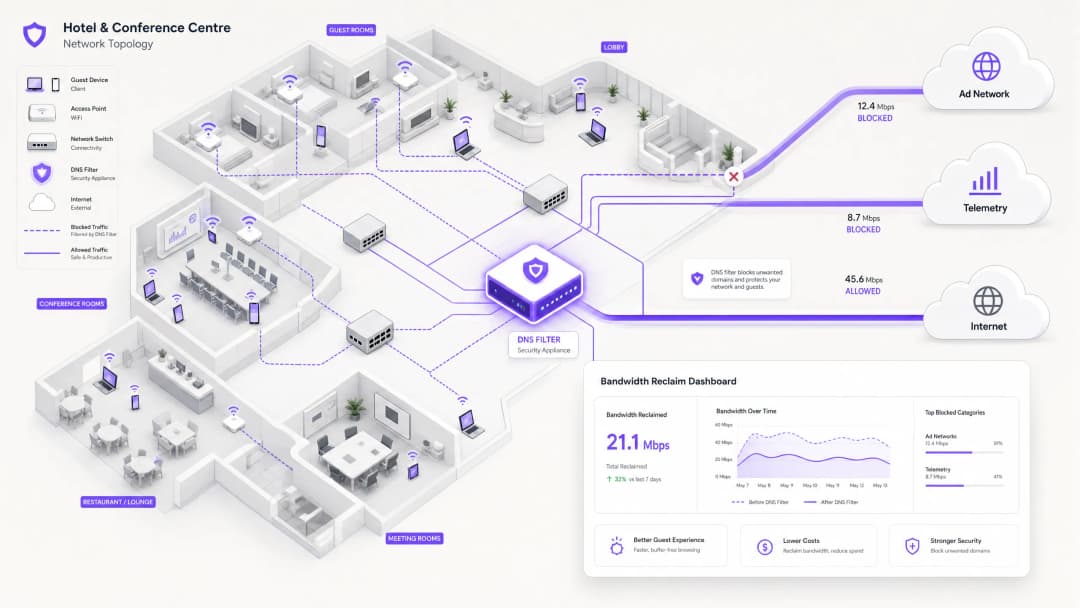
कार्यकारी सारांश (Executive Summary)
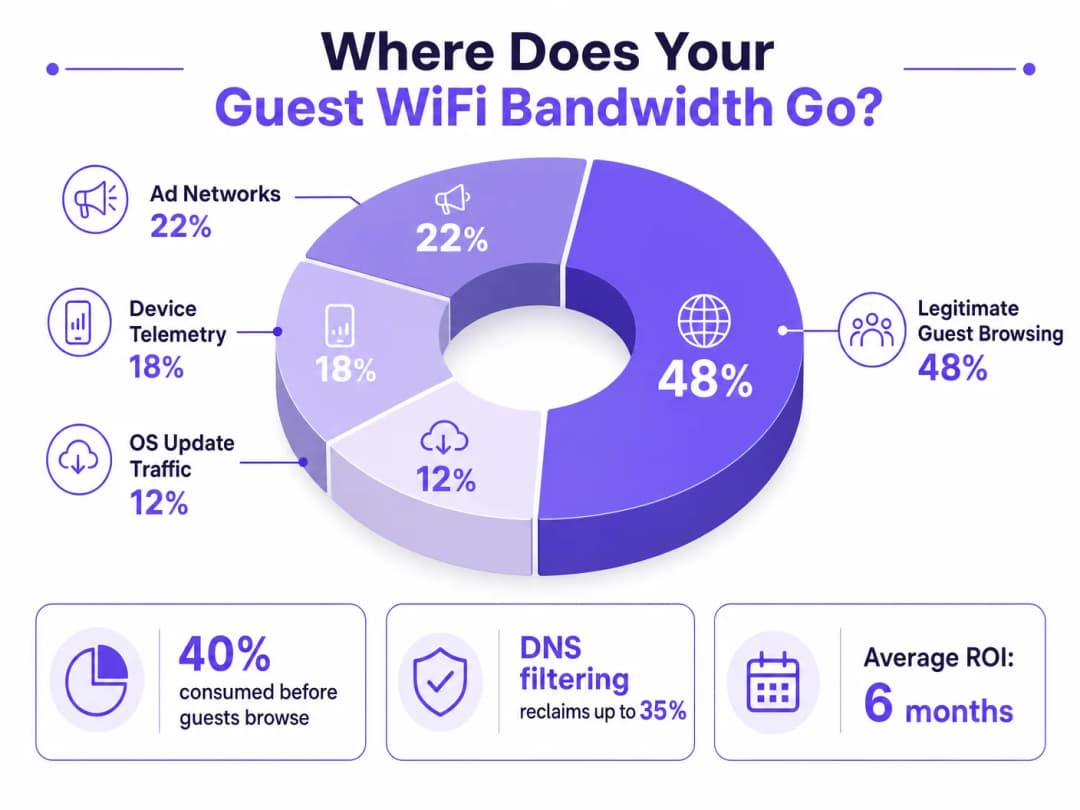
उच्च-घनता असलेल्या ठिकाणांचे व्यवस्थापन करणाऱ्या IT Directors आणि ऑपरेशन्स मॅनेजर्ससाठी, एक विश्वासार्ह Guest WiFi अनुभव सुनिश्चित करणे म्हणजे नेटवर्क गर्दीविरुद्धचा सततचा लढा आहे. जुने दृष्टिकोन एकूण बँडविड्थ वाढवण्यावर किंवा अतिरिक्त ऍक्सेस पॉईंट्स तैनात करण्यावर लक्ष केंद्रित करतात, परंतु धीम्या थ्रूपुटचे मूळ कारण बऱ्याचदा कायदेशीर वापरकर्त्याच्या ट्रॅफिकमध्ये नसून पार्श्वभूमीतील डेटाच्या (background data) लपलेल्या थरामध्ये असते. आधुनिक वातावरणात - विस्तारलेल्या Hospitality संकुलांपासून ते लोकांची जास्त वर्दळ असलेल्या Retail जागांपर्यंत - एखाद्या पाहुण्याने ब्राउझर उघडण्यापूर्वीच डिव्हाइस टेलिमेट्री, प्रोग्रामॅटिक ॲड नेटवर्क आणि स्वयंचलित OS अपडेट्सद्वारे सार्वजनिक WiFi बँडविड्थचा 40% पर्यंत भाग वापरला जातो.
हे तांत्रिक संदर्भ मार्गदर्शक या गर्दीचे निदान करण्यासाठी आणि धोरणात्मक शमन लागू करण्यासाठी एक निश्चित कार्यपद्धती प्रदान करते. नेटवर्क-स्तरीय DNS फिल्टरिंग आणि रिस्पॉन्स पॉलिसी झोन (RPZ) तैनात करून, एंटरप्राइझ नेटवर्क आर्किटेक्ट पायाभूत सुविधांच्या अपग्रेडचा भांडवली खर्च न करता लक्षणीय बँडविड्थ परत मिळवू शकतात, लेटन्सी कमी करू शकतात आणि अंतिम वापरकर्त्याच्या अनुभवात नाट्यमय सुधारणा करू शकतात. आम्ही या सोल्यूशन्सचे तांत्रिक आर्किटेक्चर, वास्तविक-जगातील अंमलबजावणीच्या केस स्टडीज आणि तुमचे नेटवर्क परत मिळवण्याचा मोजण्यायोग्य ROI शोधणार आहोत.
तांत्रिक सखोल विश्लेषण (Technical Deep-Dive)
बॅकग्राउंड गर्दीचे विश्लेषण (The Anatomy of Background Congestion)
जेव्हा एखादे अतिथी डिव्हाइस सार्वजनिक नेटवर्कवर ऑथेंटिकेट होते, तेव्हा ते लगेचच बॅकग्राउंड कनेक्शन्सचा मारा सुरू करते. हे कनेक्शन्स प्रामुख्याने ट्रॅफिकच्या तीन श्रेणींद्वारे चालवले जातात जे एकत्रितपणे नेटवर्क अभियंते ज्याला फँटम लोड (phantom load) म्हणतात ते तयार करतात - म्हणजेच कोणतीही जाणूनबुजून अतिथी क्रिया सुरू होण्यापूर्वी नेटवर्कद्वारे वापरली जाणारी बँडविड्थ.
१. डिव्हाइस टेलिमेट्री आणि ॲनालिटिक्स (Device Telemetry and Analytics)
आधुनिक ऑपरेटिंग सिस्टम (iOS, Android, Windows) आणि इन्स्टॉल केलेले ॲप्लिकेशन्स सतत वापर डेटा, लोकेशन मेट्रिक्स, क्रॅश रिपोर्ट्स आणि वर्तणूक विश्लेषणे रिमोट सर्व्हरवर पाठवत असतात. Transport हब किंवा कॉन्फरन्स सेंटरसारख्या दाट लोकवस्तीच्या वातावरणात, लहान परंतु वारंवार टेलिमेट्री पेलोड एकाच वेळी प्रसारित करणारी हजारो डिव्हाइसेस उपलब्ध वायरलेस एअरटाइम संपवू शकतात आणि NAT टेबल्सवर ताण आणू शकतात. एकच iOS डिव्हाइस मोजल्या न जाणाऱ्या नेटवर्कशी कनेक्ट झाल्यानंतर पहिल्या ६० सेकंदांच्या आत २०० पेक्षा जास्त स्वतंत्र बॅकग्राउंड DNS क्वेरी तयार करू शकते.
२. प्रोग्रामॅटिक ॲड नेटवर्क्स (Programmatic Ad Networks)
अनेक विनामूल्य ॲप्लिकेशन्स प्रोग्रामॅटिक जाहिरात इकोसिस्टमवर अवलंबून असतात. जेव्हा एखादे डिव्हाइस अनमीटर केलेले WiFi कनेक्शन शोधते, तेव्हा हे ॲप्स जाहिरात एक्सचेंज प्लॅटफॉर्मवरून व्हिडिओ जाहिराती, उच्च-रिझोल्यूशन डिस्प्ले बॅनर्स आणि ट्रॅकिंग स्क्रिप्ट्स आधीच मिळवणे (pre-fetching) सुरू करतात. हा ट्रॅफिक हाय-बँडविड्थ आणि लेटन्सी-संवेदनशील दोन्ही असतो आणि तो वैध गेस्ट ब्राउझिंगसह एअरटाइमसाठी तीव्र स्पर्धा करेल. सार्वजनिक ठिकाणांच्या नेटवर्कचे विश्लेषण सातत्याने दर्शवते की पीक अवर्स दरम्यान एकूण WAN वापरामध्ये प्रोग्रामॅटिक जाहिरात ट्रॅफिकचा वाटा १५ ते २२% असतो.
३. स्वयंचलित OS आणि ॲप्लिकेशन अपडेट्स
योग्य ट्रॅफिक शेपिंगशिवाय, डिव्हाइसेस अनमीटर केलेले WiFi कनेक्शन शोधताच मोठे OS पॅचेस आणि ॲप्लिकेशन अपडेट्स डाउनलोड करण्याचा प्रयत्न करतील. एकच मोठा iOS अपडेट ३ ते ५ GB चा असू शकतो. ५००-डिव्हाइसेस असलेल्या वातावरणात, एकाच वेळी अपडेट ट्रिगर झाल्यास - जे नवीन OS व्हर्जन रिलीज झाल्यावर सामान्य आहे - काही मिनिटांत १ Gbps चा WAN लिंक देखील पूर्णपणे भरून जाऊ शकतो.
पारंपारिक दृष्टिकोन का अपुरे पडतात
गेस्ट WiFi मधील गर्दीवर पारंपारिक उपाय म्हणजे WAN बँडविड्थ वाढवणे किंवा अतिरिक्त ॲक्सेस पॉइंट्स तैनात करणे. या दोन्ही उपायांचे स्वतःचे महत्त्व असले तरी, यातील कोणताही उपाय फँटम लोडची (अदृश्य लोड) समस्या सोडवत नाही. अधिक बँडविड्थ जोडल्याने बॅकग्राउंड ट्रॅफिकला वापरण्यासाठी केवळ अधिक क्षमता मिळते. Deep Packet Inspection (DPI) हे दुसरे पारंपारिक साधन देखील दिवसेंदिवस कुचकामी ठरत आहे: TLS 1.3 आणि एंड-टू-एंड एन्क्रिप्शनच्या व्यापक वापराचा अर्थ असा आहे की बहुतेक ट्रॅफिक पेलोड्स तपासणी इंजिनसाठी अस्पष्ट असतात. ज्याचे तुम्ही वर्गीकरण करू शकत नाही, त्यावर तुम्ही मर्यादा आणू शकत नाही.
वायरलेस फ्रिक्वेन्सी उच्च-घनतेच्या तैनातींशी कशा प्रकारे संवाद साधतात याच्या सविस्तर चर्चेसाठी, आमचे Wi-Fi Frequencies: A Guide to Wi-Fi Frequencies in 2026 वरील मार्गदर्शक पहा.
DNS फिल्टरिंग: कार्यक्षम उपाय
नेटवर्कच्या टोकावर (edge) असणारे DNS फिल्टरिंग हा आधुनिक आणि स्केलेबल उपाय आहे. ट्रॅफिक पेलोड्सची तपासणी करण्याऐवजी, DNS फिल्टरिंग रिझोल्यूशन लेयरवर कार्य करते - ज्यामुळे मुळात कनेक्शन स्थापित होण्यापासूनच रोखले जाते.
जेव्हा एखादे डिव्हाइस ज्ञात जाहिरात नेटवर्क किंवा टेलिमेट्री डोमेनमध्ये प्रवेशाची विनंती करते, तेव्हा DNS रिझोल्व्हर Response Policy Zone (RPZ) च्या आधारे विनंती तपासतो. डोमेन ब्लॉकलिस्टमध्ये असल्यास, रिझोल्व्हर NXDOMAIN (अस्तित्वात नसलेले डोमेन) प्रतिसाद परत करतो, किंवा ट्रॅफिक स्थानिक नल IP पत्त्यावर वळवतो. TCP हँडशेक होण्यापूर्वीच कनेक्शन समाप्त केले जाते, ज्यामुळे वायरलेस एअरटाइम आणि WAN बँडविड्थ दोन्ही वाचतात. हा दृष्टिकोन संगणकीयदृष्ट्या किफायतशीर आहे, रिझोल्व्हर क्षमतेसह रेषीयपणे मोजला जातो आणि पेलोड एन्क्रिप्शनचा त्यावर कोणताही परिणाम होत नाही.

सुरक्षेचा पैलू
DNS filtering एक अत्यंत महत्त्वाचा दुय्यम फायदा देतो: सुरक्षा. DNS स्तरावर ज्ञात मालवेअर Command and Control (C2) डोमेन्स, फिशिंग इन्फ्रास्ट्रक्चर आणि एक्स्प्लॉइट किट डिलिव्हरी नेटवर्क्स ब्लॉक करून, गेस्ट नेटवर्क लक्षणीयरीत्या अधिक सुरक्षित बनते. हे थेट PCI DSS (ज्यासाठी कार्डधारक डेटा वातावरणासाठी नेटवर्क वर्गीकरण आणि मॉनिटरिंग आवश्यक आहे) आणि GDPR (जे वैयक्तिक डेटाचे रक्षण करण्यासाठी योग्य तांत्रिक उपाययोजना अनिवार्य करते) यांसारख्या फ्रेमवर्क्स अंतर्गत अनुपालन दायितवांशी सुसंगत आहे. या संदर्भातील ऑडिट ट्रेल आवश्यकतांच्या तपशीलवार माहितीसाठी, Explain what is audit trail for IT Security in 2026 पहा.
शैक्षणिक वातावरणाचे व्यवस्थापन करणाऱ्या संस्थांसाठी जिथे जाहिरात ब्लॉकिंग हे संरक्षणाचे काम देखील करते, तिथे Minimising Student Distractions with Network-Level Ad Blocking मध्ये समाविष्ट केलेली तत्त्वे थेट लागू होतात.
तुमच्या विशिष्ट सेटअपबद्दल काही प्रश्न आहेत का?
आमची टीम ८०,००० हून अधिक वेन्यूजमधील वेन्यू ऑपरेटर्स, IT मॅनेजर्स आणि नेटवर्क इंजिनिअर्ससोबत काम करते. २० मिनिटांचा कॉल बुक करा आणि तुमच्यासारख्या इतरांनी ही समस्या कशी सोडवली हे आम्ही तुम्हाला दाखवू.
अंमलबजावणी मार्गदर्शक (Implementation Guide)
एक मजबूत DNS filtering आर्किटेक्चर तैनात करण्यासाठी वैध गेस्ट सेवांमध्ये व्यत्यय येऊ नये म्हणून काळजीपूर्वक नियोजनाची आवश्यकता असते. ही अंमलबजावणी टप्प्याटप्प्याने केली पाहिजे.
टप्पा 1: बेसलाइन मूल्यांकन आणि दृश्यमानता (Baseline Assessment and Visibility)
कोणतेही ब्लॉक्स लागू करण्यापूर्वी, सध्याच्या ट्रॅफिक पॅटर्नची बेसलाइन स्थापित करा. एक प्रतिनिधी ७ - १४ दिवसांच्या कालावधीत सर्वाधिक बँडविड्थ वापरणारे डोमेन्स आणि श्रेणी ओळखण्यासाठी WiFi Analytics चा वापर करा. तुमच्या वेन्यूचे विशिष्ट ट्रॅफिक प्रोफाइल समजून घेण्यासाठी आणि गुंतवणुकीसाठी बिझनेस केस तयार करण्यासाठी हा ऑडिट टप्पा अत्यंत महत्त्वाचा आहे. कॅप्चर करायचे मुख्य मेट्रिक्स खालीलप्रमाणे आहेत:
| मेट्रिक | लक्ष्य बेसलाइन | नोट्स |
|---|---|---|
| क्वेरी व्हॉल्यूमनुसार शीर्ष २० DNS डोमेन्स | संपूर्ण सूची | टेलिमेट्री आणि जाहिरात डोमेन्स ओळखा |
| श्रेणीनुसार WAN वापर | % विभागणी | फँटम लोडचे प्रमाण निश्चित करा |
| पीक कॉनकरंट डिव्हाइस काउंट | संख्या | रिझॉल्व्हर इन्फ्रास्ट्रक्चरचा आकार निश्चित करा |
| DNS क्वेरी अयशस्वी होण्याचा दर | < ०.१% | तैनात करण्यापूर्वीचा बेंचमार्क स्थापित करा |
टप्पा 2: टप्प्याटप्प्याने RPZ तैनात करणे
RPZ केवळ लॉग-ओनली मोड (log-only mode) मध्ये तैनात करून सुरुवात करा. यामुळे युझर अनुभवावर परिणाम न करता तुम्हाला तुमच्या ब्लॉकलिस्टच्या अचूकतेची पडताळणी करता येते. प्रथम उच्च-विश्वास श्रेणींवर लक्ष केंद्रित करा:
- ज्ञात मालवेअर आणि C2 डोमेन्स: फॉल्स पॉझिटिव्हचा जवळजवळ शून्य धोका असलेला त्वरित सुरक्षा फायदा. प्रतिष्ठित प्रदात्यांकडून थ्रेट इंटेलिजन्स फीड्स वापरा.
- हाय-बँडविड्थ प्रोग्रामॅटिक जाहिरात नेटवर्क्स: प्रमुख व्हिडिओ जाहिरात एक्सचेंज प्लॅटफॉर्म्स लक्ष्य करा. हे चांगल्या प्रकारे दस्तऐवजीकरण केलेले आहेत आणि त्यांच्यावर वैध कन्टेंट होस्ट असण्याची शक्यता नसते.
- आक्रमक टेलिमेट्री एंडपॉइंट्स: गैर-अत्यावश्यक ट्रॅकिंग डोमेन्स ब्लॉक करा. Captive Portal ऑथेंटिकेशन फ्लोसाठी आवश्यक असलेल्या डोमेन्ससाठी काळजीपूर्वक अलाऊ-लिस्ट राखा.
एकदा लॉग-ओनली मोड स्वीकार्य फॉल्स पॉझिटिव्ह दरांची (लक्ष्य क्वेरीच्या < ०.५%) पुष्टी करतो की, एन्फोर्समेंट मोडकडे वळा.
टप्पा 3: ट्रॅफिक शेपिंग आणि QoS इंटिग्रेशन
ज्या ट्रॅफिकला पूर्णपणे ब्लॉक केले जाऊ शकत नाही (उदा. Apple, Microsoft, आणि Google कडील OS अपडेट्स), त्यांच्यासाठी Quality of Service (QoS) पॉलिसी लागू करा. अपडेट सर्व्हरची गती एका निश्चित मर्यादेपर्यंत - सामान्यतः एकूण WAN क्षमतेच्या १०-१५% पर्यंत - मर्यादित करा, ज्यामुळे परस्परसंवादी गेस्ट ट्रॅफिकला (वेब ब्राउझिंग, VoIP, व्हिडिओ कॉन्फरन्सिंग) प्राधान्याने क्युईंग मिळेल याची खात्री होते. हे विशेषतः Healthcare वातावरणासाठी महत्त्वाचे आहे जेथे क्लिनिकल कर्मचारी गेस्टसोबत नेटवर्क विभाग शेअर करू शकतात.
ऑफिस आणि मिश्रित वापराच्या तैनातींसह, विस्तृत नेटवर्क वातावरण ऑप्टिमाइझ करण्याच्या मार्गदर्शनासाठी, Office Wi-Fi: Optimize Your Modern Office Wi-Fi Network पहा.
सर्वोत्तम पद्धती (Best Practices)
महत्त्वाच्या सेवांसाठी स्पष्ट परवानगी-याद्या (Allow-lists) ठेवा. कॅप्टिव्ह पोर्टल ऑथेंटिकेशन, पेमेंट गेटवे (PCI-DSS अनुपालन), आणि मुख्य महसूल ऑपरेशन्ससाठी आवश्यक असलेले डोमेन स्पष्टपणे परवानगी दिलेले आहेत याची खात्री करा. चुकीच्या पद्धतीने कॉन्फिगर केलेली ब्लॉकलिस्ट जी लॉगिन प्रवाहात अडथळा आणते, ती त्वरित आणि मोठ्या प्रमाणावर सपोर्ट लोड निर्माण करेल.
पॉलिसी पारदर्शकपणे कळवा. तुमच्या सेवा अटींमध्ये (Terms of Service) हे स्पष्ट केले पाहिजे की सर्व वापरकर्त्यांना उच्च दर्जाचा अनुभव मिळावा यासाठी नेटवर्क ट्रॅफिक व्यवस्थापित केले जाते. हे GDPR अंतर्गत कायदेशीर सर्वोत्तम सराव आणि अतिथींसाठी वाजवी अपेक्षा निश्चित करणारी उपाययोजना दोन्ही आहे.
ब्लॉकलिस्ट अपडेट्स स्वयंचलित करा. जाहिरात नेटवर्क आणि टेलिमेट्री डोमेनचे स्वरूप सातत्याने बदलत असते. थ्रेट इंटेलिजन्स फीड्स आणि RPZ याद्या डायनॅमिकली अपडेट केल्या पाहिजेत - आदर्शरित्या २४ तासांपेक्षा कमी सायकलमध्ये - जेणेकरून त्या प्रभावी राहतील.
DNS इव्हेशनचा (DNS Evasion) सक्रियपणे सामना करा. सर्व आउटबाउंड पोर्ट ५३ (UDP आणि TCP) ट्रॅफिकला स्थानिक रिझॉल्व्हरकडे इंटरसेप्ट आणि रिडायरेक्ट करण्यासाठी फायरवॉल नियम लागू करा. हे क्लायंटला बाह्य DNS सर्व्हर हार्डकोड करून फिल्टरिंग बायपास करण्यापासून रोखते.
DNS over HTTPS (DoH) साठी नियोजन करा. DoH चा वापर जसजसा वाढत जाईल, तसतसे क्लायंट स्थानिक रिझॉल्व्हर पूर्णपणे बायपास करण्यासाठी HTTPS वरून DNS क्वेरी रूट करू शकतात. प्रस्थापित DoH प्रदात्यांना (उदा., dns.google, cloudflare-dns.com) ब्लॉक करायचे की स्थानिक पॉलिसी लागू करणारा पारदर्शक DoH प्रॉक्सी तैनात करायचा याचे मूल्यांकन करा.
IEEE 802.1X आणि WPA3 शी सुसंगत करा. तुमचे DNS फिल्टरिंग आर्किटेक्चर तुमच्या ऑथेंटिकेशन फ्रेमवर्कशी सुसंगत असल्याची खात्री करा. RADIUS-आधारित ऑथेंटिकेशनसह IEEE 802.1X वापरणाऱ्या वातावरणात, प्रति VLAN किंवा प्रति वापरकर्ता गट DNS फिल्टरिंग पॉलिसी लागू केल्या जाऊ शकतात, ज्यामुळे सूक्ष्म नियंत्रण शक्य होते.
त्रुटी निवारण आणि जोखीम कमी करणे (Troubleshooting & Risk Mitigation)
सामान्य त्रुटींचे प्रकार (Common Failure Modes)
| त्रुटीचा प्रकार | लक्षण | उपाय |
|---|---|---|
| प्रमाणाबाहेर ब्लॉक करणे (CDN टक्कर) | तुटलेली वेबपेजेस, गहाळ प्रतिमा | तपशीलवार ब्लॉकलिस्ट; जलद परवानगी-यादी प्रक्रिया |
| DNS इव्हेशन (हार्डकोडेड रिझॉल्व्हर्स) | विशिष्ट ॲप्सद्वारे फिल्टरिंग बायपास करणे | पोर्ट ५३ साठी फायरवॉल रिडायरेक्ट नियम |
| DoH बायपास | आधुनिक ब्राउझरद्वारे फिल्टरिंग बायपास करणे | प्रस्थापित DoH प्रदात्यांना ब्लॉक करा किंवा DoH प्रॉक्सी तैनात करा |
| रिझॉल्व्हर कार्यप्रदर्शन अडथळा | सर्व क्लायंटवर वाढलेली DNS विलंबता | रिझॉल्व्हर इन्फ्रास्ट्रक्चर स्केल करा; anycast लागू करा |
| Captive portal त्रुटी | अतिथी प्रमाणीकरण करू शकत नाहीत | पोर्टल डोमेन्स आणि OS शोध एंडपॉइंट्ससाठी स्पष्ट परवानगी-सूची (allow-list) |
| शिळे ब्लॉकलिस्ट | नवीन जाहिरात डोमेन्स ब्लॉक न होणे | फीड अपडेट्स स्वयंचलित करा; नवीन हाय-व्हॉल्यूम डोमेन्ससाठी क्वेरी लॉग मॉनिटर करा |
सुरक्षा घटना प्रतिसाद
एखादे अतिथी डिव्हाइस ज्ञात मालवेअर C2 डोमेनशी संवाद साधत असल्याचे आढळल्यास (DNS क्वेरी लॉगमध्ये दृश्यमान), तर RPZ स्वयंचलितपणे पुढील संवाद ब्लॉक करेल. आपल्या घटना प्रतिसाद प्रक्रियेमध्ये या इव्हेंटचे पुनरावलोकन करण्यासाठी वर्कफ्लो समाविष्ट असल्याची खात्री करा, कारण ते तडजोड केलेले डिव्हाइस दर्शवू शकतात ज्याला अतिथी VLAN पासून वेगळे करणे आवश्यक आहे.
ROI आणि व्यावसायिक प्रभाव
नेटवर्क-स्तरीय DNS फिल्टरिंग लागू केल्याने अनेक आयामांमध्ये मोजण्यायोग्य, परिमाणात्मक व्यावसायिक परिणाम मिळतात.
बँडविड्थ रिक्लमेशन आणि CapEx विलंब. वेन्यू सहसा त्यांच्या एकूण WAN बँडविड्थच्या 20 - 40% परत मिळवतात. हे महागड्या सर्किट अपग्रेडची आवश्यकता पुढे ढकलून थेट खर्च बचतीमध्ये रूपांतरित होते. सध्या 500 Mbps लीज्ड लाईनसाठी पैसे देणाऱ्या वेन्यूसाठी, 30% क्षमता परत मिळवणे म्हणजे कोणत्याही अतिरिक्त खर्चाशिवाय 150 Mbps प्रभावी थ्रूपुट मिळवण्यासारखे आहे.
सुधारित अतिथी समाधान आणि NPS. पार्श्वभूमीतील गर्दी (congestion) दूर करून, अतिथी WiFi चा कल्पित वेग आणि विश्वासार्हता नाट्यमयरित्या सुधारते. कमी झालेली लेटन्सी आणि सातत्यपूर्ण थ्रूपुटमुळे नेट प्रमोटर स्कोअर (NPS) वाढतात आणि ऑपरेशनल सपोर्ट वाढवण्याच्या घटना कमी होतात.
वर्धित सुरक्षा आणि अनुपालन स्थिती. DNS लेयरवर मालवेअर आणि फिशिंग डोमेन्स ब्लॉक केल्याने अतिथी नेटवर्कवरून उद्भवणाऱ्या सुरक्षा उल्लंघनाचा धोका लक्षणीयरीत्या कमी होतो. हे थेट PCI-DSS नेटवर्क सेगमेंटेशन आवश्यकता आणि योग्य तांत्रिक सुरक्षा उपाय लागू करण्याच्या GDPR च्या बंधनाचे समर्थन करते.
ऑपरेशनल कार्यक्षमता. स्वयंचलित DNS फिल्टरिंग नेटवर्क ऑपरेशन्स टीमवरील मॅन्युअल वर्कलोड कमी करते. गर्दीच्या इव्हेंट्सना रिॲक्टिव्ह प्रतिसाद देण्याऐवजी, नेटवर्क सक्रियपणे स्वतःचे ट्रॅफिक प्रोफाइल व्यवस्थापित करते.
| परिणाम | सामान्य श्रेणी | मोजमाप पद्धत |
|---|---|---|
| परत मिळवलेली बँडविड्थ | WAN क्षमतेच्या 20 - 40% | WAN वापर मॉनिटरिंगच्या आधी/नंतर |
| DNS क्वेरी ब्लॉक दर | सर्व क्वेरींच्या 15 - 35% | रिझॉल्व्हर क्वेरी लॉग |
| अतिथी समाधान सुधारणा | +8 - 15 NPS पॉइंट्स | मुक्कामानंतरचे/भेटीनंतरचे सर्वेक्षण |
| CapEx विलंब | सर्किट अपग्रेडवर 1 - 3 वर्षे | खर्च मॉडेलिंग |
| सुरक्षा घटनांमध्ये घट | 40 - 60% कमी C2 शोध | SIEM परस्परसंबंध |
नेटवर्ककडे केवळ एक पाईप म्हणून न पाहता, एक बुद्धिमान, फिल्टर केलेले गेटवे म्हणून पाहून, IT लीडर्स एक उत्कृष्ट, सुरक्षित आणि किफायतशीर कनेक्टिव्हिटी अनुभव देऊ शकतात - जो प्रमाणबद्ध पायाभूत सुविधांच्या गुंतवणुकीशिवाय वेन्यूच्या वाढीसह सुसंगतपणे स्केल होतो.
महत्वाच्या व्याख्या
Response Policy Zone (RPZ)
DNS सर्व्हरमधील एक यंत्रणा जी परिभाषित पॉलिसीच्या आधारे DNS प्रतिसादांमध्ये बदल करण्याची परवानगी देते. जेव्हा क्वेरी केलेले डोमेन RPZ मधील नोंदीशी जुळते, तेव्हा रिझॉल्व्हर वास्तविक उत्तराऐवजी सिंथेटिक प्रतिसाद (उदा. NXDOMAIN किंवा सिंकहोल IP) परत करू शकतो.
नेटवर्क - व्यापी DNS फिल्टरिंग लागू करण्यासाठी मुख्य तांत्रिक यंत्रणा. IT टीम क्लायंट - साइड सॉफ्टवेअरची आवश्यकता न घेता जाहिरात नेटवर्क, मालवेअर डोमेन आणि टेलिमेट्री एंडपॉइंट्स ब्लॉक करण्यासाठी त्यांच्या अंतर्गत रिझॉल्व्हर्सवर RPZ कॉन्फिगर करतात.
Deep Packet Inspection (DPI)
नेटवर्क पॅकेट फिल्टरिंगचा एक प्रकार जो पॅकेट तपासणी बिंदूमधून जात असताना त्याच्या डेटा पेलोडची तपासणी करतो, प्रोटोकॉलचे उल्लंघन, विशिष्ट सामग्री किंवा परिभाषित निकष शोधतो.
पारंपारिकपणे ट्रॅफिक वर्गीकरण आणि शेपिंगसाठी वापरले जाते. TLS 1.3 एंड - टू - एंड एन्क्रिप्शनच्या व्यापक अवलंबामुळे वाढत्या प्रमाणात मर्यादित झाले आहे, ज्यामुळे पेलोड्स अपारदर्शक बनतात. एन्क्रिप्टेड ट्रॅफिक वातावरणासाठी DNS फिल्टरिंग हा प्राधान्य दिलेला पर्याय आहे.
NXDOMAIN
एक DNS प्रतिसाद कोड (RCODE 3) जो दर्शवतो की क्वेरी केलेले डोमेन नाव DNS नेमस्पेसमध्ये अस्तित्वात नाही.
नको असलेल्या डोमेनचे कनेक्शन जाणूनबुजून ब्लॉक करण्यासाठी फिल्टरिंग DNS रिझॉल्व्हरद्वारे परत केले जाते. क्लायंट ॲप्लिकेशन हा प्रतिसाद प्राप्त करतो आणि कनेक्शनचा प्रयत्न सोडून देतो, ज्यामुळे कोणतीही बँडविड्थ वापरली जाण्यापासून वाचते.
DNS over HTTPS (DoH)
HTTPS प्रोटोकॉल (RFC 8484) द्वारे DNS रिझोल्यूशन करण्याची एक पद्धत, जी क्लायंट आणि DoH - सक्षम रिझॉल्व्हरमधील DNS क्वेरी आणि प्रतिसाद एन्क्रिप्ट करते.
जर क्लायंट्स बाह्य DoH प्रदाते वापरण्यासाठी कॉन्फिगर केलेले असतील तर स्थानिक नेटवर्क DNS फिल्टरिंगला बायपास करू शकतात. स्थानिक RPZ पॉलिसी लागू करण्यासाठी नेटवर्क प्रशासकांनी फायरवॉल नियम लागू करणे किंवा DoH ट्रॅफिक प्रॉक्सी करणे आवश्यक आहे.
Quality of Service (QoS)
नेटवर्क यंत्रणांचा एक संच जो गंभीर ॲप्लिकेशन्सची कार्यक्षमता सुनिश्चित करण्यासाठी ट्रॅफिक प्राधान्यीकरण, रेट - लिमिटिंग आणि क्युइंग नियंत्रित करतो.
वैध परंतु हाय - बँडविड्थ ट्रॅफिक (उदा. OS अपडेट्स) व्यवस्थापित करण्यासाठी DNS फिल्टरिंगच्या सोबत वापरले जाते जे ब्लॉक केले जाऊ शकत नाही. QoS हे सुनिश्चित करते की बॅकग्राउंड बल्क ट्रान्सफरपेक्षा संवादात्मक गेस्ट ट्रॅफिकला प्राधान्य मिळेल.
Telemetry
मॉनिटरिंग, ॲनालिटिक्स आणि डायग्नोस्टिक्ससाठी डिव्हाइसेसमधून रिमोट सर्व्हर्सवर ऑपरेशनल डेटाचे स्वयंचलित संकलन आणि प्रसारण.
गेस्ट WiFi च्या संदर्भात, मोबाईल ऑपरेटिंग सिस्टम आणि ॲप्लिकेशन्स कडील डिव्हाइस Telemetry उपलब्ध बँडविड्थचा १५ - २०% भाग नकळत वापरू शकते. सार्वजनिक नेटवर्क डिप्लॉयमेंटमध्ये हे DNS फिल्टरिंगचे मुख्य लक्ष्य असते.
DNS Sinkholing
एक तंत्र ज्यामध्ये विशिष्ट डोमेनसाठी चुकीचा IP पत्ता (सहसा स्थानिक रिक्त पत्ता) परत करण्यासाठी DNS सर्व्हर कॉन्फिगर केला जातो, ज्यामुळे ट्रॅफिकला त्याच्या मूळ उद्दिष्टापासून दूर वळवले जाते.
मालवेअर C2 ट्रॅफिक निष्प्रभ करण्यासाठी आणि हाय - बँडविड्थ जाहिरात नेटवर्क्सना आक्रमकपणे ब्लॉक करण्यासाठी वापरले जाते. NXDOMAIN प्रतिसादांपेक्षा हे अधिक निर्णायक आहे, कारण ते सुरक्षा विश्लेषणासाठी सिंकहोल सर्व्हरला कनेक्शनचे प्रयत्न लॉग करण्याची परवानगी देते.
Airtime Fairness
एक वायरलेस नेटवर्क वैशिष्ट्य जे सर्व कनेक्ट केलेल्या क्लायंट्सना त्यांच्या वैयक्तिक डेटा दरांचा विचार न करता वायरलेस माध्यमात समान प्रवेश प्रदान करते.
उच्च - घनता असलेल्या वातावरणात अत्यंत महत्त्वपूर्ण. Airtime Fairness शिवाय, एकच संथ डिव्हाइस (उदा. जुने 802.11g क्लायंट) असमान प्रमाणात एअरटाइम वापरू शकते, ज्यामुळे इतर सर्व क्लायंटसाठी थ्रूपुट कमी होते. बर्याच डिव्हाइसेसकडील बॅकग्राउंड Telemetry ट्रॅफिक या समस्येला अधिक गंभीर बनवते.
Phantom Load
वापरकर्त्याने कोणतीही कृती करण्यापूर्वी कनेक्ट केलेल्या डिव्हाइसेसवरील स्वयंचलित बॅकग्राउंड प्रक्रियेद्वारे वापरली जाणारी Bandwidth.
Telemetry, जाहिरात नेटवर्क प्री - फेचिंग आणि OS अपडेट ट्रॅफिकचा एकत्रित शब्द. Phantom Load समजून घेणे आणि त्याचे प्रमाण निश्चित करणे ही कोणत्याही गेस्ट WiFi गर्दीच्या निदानातील पहिली पायरी आहे.
सोडवलेली उदाहरणे
एक 400 खोल्यांचे रिसॉर्ट हॉटेल दररोज संध्याकाळी 7:00 PM ते 10:00 PM दरम्यान गंभीर नेटवर्क कंजेशनचा अनुभव घेत आहे. 1 Gbps WAN लिंक संपृक्त झाली आहे, आणि अतिथी संथ स्ट्रीमिंग आणि ड्रॉप झालेल्या VoIP कॉल्सबद्दल तक्रार करत आहेत. IT संचालकांना सर्किट अपग्रेड न करता मूळ कारण शोधून काढणे आणि उपाय लागू करणे आवश्यक आहे.
टप्पा 1 - ट्रॅफिक विश्लेषण: मुख्य राउटरवर नेटवर्क फ्लो विश्लेषक (NetFlow/IPFIX) तैनात करा आणि ते पीक आणि ऑफ-पीक कालावधीत 5 दिवस चालवा. सध्याच्या रिझॉल्व्हरच्या DNS क्वेरी लॉगसह सहसंबंध स्थापित करा. विश्लेषणातून असे दिसून आले आहे की संध्याकाळच्या 35% ट्रॅफिक हे ज्ञात प्रोग्रामॅटिक व्हिडिओ जाहिरात नेटवर्क (DoubleClick, AppNexus) आणि ऑटोमेटेड ॲप अपडेट सर्व्हर्स (Apple Software Update, Google Play) कडे निर्देशित आहे. वैध अतिथी ब्राउझिंगचा वाटा एकूण ट्रॅफिकच्या केवळ 52% आहे.
टप्पा 2 - DNS फिल्टरिंग तैनात करणे: सर्व guest VLAN DNS क्वेरी (UDP/TCP पोर्ट 53) स्थानिक पातळीवर होस्ट केलेल्या RPZ-सक्षम रिझॉल्व्हरकडे रीडायरेक्ट करण्यासाठी मुख्य फायरवॉल कॉन्फिगर करा. ओळखले गेलेले जाहिरात नेटवर्क आणि टेलिमेट्री डोमेन कव्हर करणारी एक क्युरेट केलेली ब्लॉकलिस्ट आयात करा. फॉल्स पॉझिटिव्ह दरांची पडताळणी करण्यासाठी 48 तास केवळ-लॉग (log-only) मोडमध्ये चालवा.
टप्पा 3 - पॉलिसी अंमलबजावणी: फॉल्स पॉझिटिव्ह दर 0.3% च्या खाली असल्याचे सत्यापित केल्यानंतर, अंमलबजावणी मोडवर स्विच करा. त्याच वेळी, एक QoS पॉलिसी लागू करा जी संध्याकाळी 6 PM ते रात्री 11 PM दरम्यान Apple आणि Google अपडेट सर्व्हर्सची दर-मर्यादा एकूण 80 Mbps पर्यंत मर्यादित करते.
टप्पा 4 - पडताळणी: पुढील 7 दिवसांमध्ये WAN वापरावर लक्ष ठेवा. पीक वापर 98% वरून 61% वर घसरतो, ज्यामुळे अतिथींच्या तक्रारींचे निवारण होते. हॉटेलने नियोजित सर्किट अपग्रेड अंदाजे 18 महिन्यांसाठी पुढे ढकलले आहे.
एक मोठे कॉन्फरन्स सेंटर 5,000 उपस्थितांसह तंत्रज्ञान परिषदेचे आयोजन करत आहे. मुख्य भाषणादरम्यान (keynote), WiFi नेटवर्क पूर्णपणे निरुपयोगी होते. घटनेनंतरच्या विश्लेषणावरून असे दिसून आले आहे की हजारो डिव्हाइसेसनी त्याच दिवशी सकाळी रिलीज झालेले मोठे iOS अपडेट एकाच वेळी डाउनलोड करण्याचा प्रयत्न केला.
त्वरित शमन (इव्हेंटचा दिवस): नेटवर्क ऑपरेशन्स टीम रिअल-टाइम DNS क्वेरी मॉनिटरिंगद्वारे वाढ ओळखते. ते त्वरित विशिष्ट Apple सॉफ्टवेअर अपडेट डोमेन (mesu.apple.com, appldnld.apple.com, updates.cdn-apple.com) DNS लेयरवर सिंकहोल (sinkhole) करतात. 4 मिनिटांत, WAN वापर 99% वरून 68% वर घसरतो आणि नेटवर्क स्थिर होते आणि नेटवर्क स्थिर होते.
अल्पकालीन उपाय (तोच इव्हेंट): इव्हेंटच्या कालावधीसाठी उर्वरित सर्व अपडेट ट्रॅफिकला 50 Mbps पर्यंत मर्यादित करण्यासाठी एक QoS पॉलिसी लागू केली जाते.
दीर्घकालीन धोरण (इव्हेंट नंतर): नेटवर्क टीम एक डायनॅमिक QoS पॉलिसी लागू करते जी एकूण WAN वापर 75% पेक्षा जास्त झाल्यावर आपोआप सक्रिय होते, आणि ज्ञात अपडेट सर्व्हर्सना एकूण क्षमतेच्या 10% पर्यंत मर्यादित करते. एक इव्हेंट-पूर्व चेकलिस्ट तयार केली जाते ज्यामध्ये हाय-प्रोफाइल सेशन्सच्या आधी आणि नंतरच्या 2 तासांदरम्यान मुख्य अपडेट डोमेन्सचे तात्पुरते सिंकहोल्स समाविष्ट असतात. भविष्यातील वाढीच्या घटनांचा अंदाज घेण्यासाठी टीम Apple आणि Microsoft च्या अपडेट रिलीज नोटिफिकेशन फीड्सचे सदस्यत्व देखील घेते.
सराव प्रश्न
Q1. तुम्ही एका राष्ट्रीय रिटेल चेनचे IT मॅनेजर आहात. ५० स्टोअर्समध्ये DNS फिल्टरिंग सोल्यूशन तैनात केल्यानंतर, अनेक स्टोअर मॅनेजर्सनी नोंदवले की पाहुण्यांसाठी Captive Portal लॉगिन पृष्ठ लोड होत नाहीये. सपोर्ट टीमला मोठ्या प्रमाणात कॉल्स येत आहेत. याचे बहुधा काय कारण असू शकते आणि त्वरित उपाययोजना काय आहे?
टीप: OS-पातळीवरील Captive Portal शोधण्याच्या यंत्रणेसह, आधुनिक Captive Portal प्रमाणीकरण प्रवाहाच्या संपूर्ण अवलंबित्व साखळीचा विचार करा.
नमुना उत्तर पहा
याचे सर्वात संभाव्य कारण म्हणजे ओव्हर-ब्लॉकिंग. DNS फिल्टर Captive Portal ला कार्य करण्यासाठी आवश्यक असलेला डोमेन ब्लॉक करत आहे. आधुनिक मोबाईल ऑपरेटिंग सिस्टीम Captive Portal शोधण्यासाठी विशिष्ट डोमेन वापरतात (उदा. iOS साठी captive.apple.com, Android साठी connectivitycheck.gstatic.com). हे ब्लॉक केले असल्यास, OS Captive Portal ब्राउझर सुरू करणार नाही आणि पाहुण्यांना लॉगिन प्रॉमप्ट दिसणार नाही. याव्यतिरिक्त, पोर्टल स्वतः CDN किंवा थर्ड-पार्टी ऑथेंटिकेशन प्रोव्हायडरवर (उदा. Facebook किंवा Google द्वारे सोशल लॉगिन) अवलंबून असू शकते ज्यांचे डोमेन अनपेक्षितपणे ब्लॉक झाले आहेत.
त्वरित उपाययोजना: प्रमाणीकरण टप्प्यादरम्यान गेस्ट सबनेटवरून उद्भवणाऱ्या NXDOMAIN प्रतिसादांसाठी DNS क्वेरी लॉगचे पुनरावलोकन करा. यशस्वी लॉगिनपूर्वी क्वेरी केलेल्या सर्व ब्लॉक केलेल्या डोमेनची ओळख पटवा. हे डोमेन जागतिक स्तरावरील अलाउ-लिस्टमध्ये जोडा. Captive Portal उपयोजनांसाठी एक प्रमाणित अलाउ-लिस्ट टेम्पलेट लागू करा ज्यामध्ये सर्व प्रमुख OS शोध एंडपॉइंट्स आणि सामान्य प्रमाणीकरण प्रदाता डोमेन समाविष्ट असतील.
Q2. एका स्टेडियमच्या नेटवर्क आर्किटेक्टच्या लक्षात येते की आक्रमक DNS फिल्टरिंग लागू करूनही, सामन्यांदरम्यान WAN वापर अत्यंत जास्त राहतो. पुढील तपासणीत UDP पोर्ट ४४३ ट्रॅफिकचे सतत उच्च प्रमाण दिसून येते जे DNS लॉग मधील कोणत्याही ब्लॉक केलेल्या डोमेनशी संबंधित नाही. येथे नक्की काय घडत आहे आणि याचे निराकरण कसे केले पाहिजे?
टीप: आधुनिक ट्रान्सपोर्ट प्रोटोकॉल आणि ते DNS-स्तर नियंत्रणांशी कशा प्रकारे संवाद साधतात याचा विचार करा.
नमुना उत्तर पहा
UDP ४४३ ट्रॅफिकचे उच्च प्रमाण QUIC (HTTP/3) चा वापर दर्शवते. QUIC हा प्रमुख प्लॅटफॉर्म्स (Google, Meta, YouTube) द्वारे वापरला जाणारा UDP-आधारित ट्रान्सपोर्ट प्रोटोकॉल आहे जो पारंपारिक TCP-आधारित प्रॉक्सी आणि DPI इंजिनना मागे टाकतो. अधिक गंभीर बाब म्हणजे, QUIC वापरणारे क्लायंट डोमेन रिझॉल्व्ह करण्यासाठी DNS over HTTPS (DoH) चा वापर करत असू शकतात, ज्यामुळे स्थानिक RPZ रिझॉल्व्हर पूर्णपणे बायपास होतो आणि त्या क्लायंटसाठी DNS फिल्टरिंग कुचकामी ठरते.
याचे निराकरण करण्यासाठी: पहिले, गंतव्य IP द्वारे TCP/UDP पोर्ट ४४३ वर ज्ञात सार्वजनिक DoH प्रदात्यांना (Google, Cloudflare, NextDNS) जाणारे बाह्यगामी DoH ट्रॅफिक ब्लॉक करण्यासाठी फायरवॉल नियम लागू करा, ज्यामुळे क्लायंटला स्थानिक रिझॉल्व्हरवर परत येणे भाग पडेल. दुसरे, QUIC क्लायंटना TCP-आधारित HTTP/2 वर परत येण्यास भाग पाडण्यासाठी संपूर्ण बाह्यगामी UDP ४४३ ब्लॉक करण्याचे (किंवा त्यावर आक्रमकपणे दर-मर्यादा घालण्याचे) मूल्यांकन करा, जे विद्यमान ट्रॅफिक व्यवस्थापन धोरणांच्या अधीन आहे. तिसरे, स्थानिक RPZ धोरणे लागू करत असताना DoH क्वेरी रोखण्यासाठी आणि तपासण्यासाठी पारदर्शक DoH प्रॉक्सी तैनात केली जाऊ शकते का याचे पुनरावलोकन करा.
Q3. तुम्ही एका मोठ्या सरकारी हॉस्पिटलच्या गेस्ट WiFi नेटवर्कसाठी QoS पॉलिसी डिझाइन करत आहात. हे नेटवर्क रुग्णांचे मनोरंजन करणारे डिव्हाइसेस, अभ्यागतांचे वैयक्तिक डिव्हाइसेस आणि त्यांच्या वैयक्तिक मोबाईलवर VoIP सॉफ्टफोन वापरणारे क्लिनिकल स्टाफचे काही सदस्य यांच्यात सामायिक केले आहे. खालील ट्रॅफिक प्रकारांना प्राधान्य द्या: VoIP (SIP/RTP), Guest Web Browsing (HTTP/HTTPS), Windows/iOS Updates, आणि Streaming Video (Netflix/YouTube).
टीप: प्रत्येक प्रकारच्या ट्रॅफिकच्या लेटन्सी संवेदनशीलता आणि व्यवसाय/वैद्यकीय प्रभावाचा विचार करा. आरोग्य सेवा वातावरणातील नियामक संदर्भाचा देखील विचार करा.
नमुना उत्तर पहा
प्राधान्य 1 - VoIP (SIP/RTP): Strict Priority Queuing (Expedited Forwarding, DSCP EF). VoIP हे लेटन्सी (लक्ष्य < 150ms वन-वे) आणि जिटर (लक्ष्य < 30ms) या दोन्हीसाठी अत्यंत संवेदनशील आहे. 1% पेक्षा जास्त पॅकेट लॉस झाल्यास आवाजाची गुणवत्ता खालावते. क्लिनिकल संदर्भात, कॉल ड्रॉप होणे रुग्णाच्या सुरक्षिततेसाठी घातक ठरू शकते.
प्राधान्य 2 - Guest Web Browsing (HTTP/HTTPS): Assured Forwarding (AF31). रुग्ण आणि अभ्यागत दोघांसाठीही हा मुख्य वापर असणार आहे. यासाठी वाजवी रिस्पॉन्सिव्हनेस आवश्यक आहे परंतु मध्यम लेटन्सी चालू शकते.
प्राधान्य 3 - व्हिडिओ स्ट्रीमिंग (Netflix/YouTube): Assured Forwarding (AF21) सह प्रति क्लायंट रेट-लिमिटेड (उदा. 3 - 5 Mbps मर्यादा). दीर्घकाळ मुक्काम असलेल्या रुग्णांच्या अनुभवासाठी हे महत्त्वाचे असले, तरी अमर्यादित स्ट्रीमिंगमुळे लिंक सॅच्युरेट होईल. प्रति-क्लायंट मर्यादेमुळे सर्वांना समान प्रवेश मिळतो. गर्दी नसलेल्या वेळेत मर्यादा शिथिल करणाऱ्या टाईम-ऑफ-डे पॉलिसीजचा विचार करा.
प्राधान्य 4 - OS/App अपडेट्स (Scavenger Class, DSCP CS1): सर्वात कमी प्राधान्य, बेस्ट-एफर्ट क्यूइंग, एकूण रेट मर्यादेसह (उदा. सर्व अपडेट ट्रॅफिकसाठी एकूण 50 Mbps). ही बॅकग्राउंड टास्क असून यासाठी लेटन्सी संवेदनशील नसते. त्यांनी केवळ अतिरिक्त उपलब्ध क्षमतेचा वापर केला पाहिजे. हेल्थकेअर वातावरणात, गेस्ट नेटवर्क क्लिनिकल सिस्टमपासून पूर्णपणे वेगळे आहे की नाही याचाही विचार करा - जर नसेल, तर अपडेट ट्रॅफिक मॅनेजमेंट हा बँडविड्थसोबतच सुरक्षेचाही विषय बनतो.
या मालिकेमध्ये पुढे वाचा
WiFi Roaming च्या समस्यांचे निदान करण्यासाठी स्टेप - बाय - स्टेप मार्गदर्शक
हे सर्वसमावेशक मार्गदर्शक एंटरप्राइझ IT लीडर्स आणि नेटवर्क आर्किटेक्ट्सना WiFi roaming च्या समस्यांचे निदान आणि निवारण करण्यासाठी एक अधिकृत, स्टेप - बाय - स्टेप पद्धती प्रदान करते. IEEE 802.11k/v/r मानकांचे तांत्रिक विश्लेषण आणि प्रत्यक्ष केस स्टडीज तसेच पॅकेट-पातळीवरील विश्लेषणाचा मेळ घालून, हे संदर्भ पुस्तक टीम्सना 'sticky client' ची समस्या दूर करण्यास आणि अखंड मोबाईल कनेक्टिव्हिटी प्रदान करण्यास सक्षम करते. यामध्ये RF साईट सर्व्हे आणि कंट्रोलर कॉन्फिगरेशन ऑडिटपासून ते ओव्हर-द-एयर पॅकेट कॅप्चर विश्लेषण आणि निवारणानंतरच्या व्हॅलिडेशनपर्यंतच्या संपूर्ण डायग्नोस्टिक वर्कफ्लोचा समावेश आहे.
तुमचे Stadium WiFi का ठप्प होते (आणि ते कसे दुरुस्त करावे)
हे अधिकृत तांत्रिक मार्गदर्शक stadium WiFi मधील गर्दीच्या मूळ कारणाचे - ५०,००० डिव्हाइसेसद्वारे प्रोग्रामॅटिक जाहिराती आणि टेलिमेट्री लोड करताना होणाऱ्या एकाच वेळच्या बॅकग्राउंड चॅटरचे - विश्लेषण करते आणि मुख्य निवारण धोरण म्हणून एज DNS फिल्टरिंग तैनात करण्यासाठी एक तपशीलवार आर्किटेक्चरल ब्लूप्रिंट प्रदान करते. IT Directors, CTOs, आणि Network Architects यांच्यासाठी डिझाइन केलेले, हे वेन्यू ऑपरेटर्सना बँडविड्थ परत मिळवून देण्यासाठी आणि मोठ्या प्रमाणावर उच्च-कार्यक्षमता कनेक्टिव्हिटी प्रदान करण्यासाठी कृतीयोग्य अंमलबजावणी मार्गदर्शन, वास्तविक-जगातील केस स्टडीज आणि मोजण्यायोग्य ROI फ्रेमवर्क प्रदान करते.
Guest WiFi वरील Connected but No Internet एरर सोडवणे
हे अधिकृत तांत्रिक संदर्भ मार्गदर्शक स्पष्ट करते की कशा प्रकारे गर्दी असलेल्या नेटवर्कमुळे होणारे DNS टाईमआउट्स हे guest WiFi वर 'Connected, No Internet' एरर ट्रिगर करतात. हे नेटवर्क आर्किटेक्ट्स आणि IT मॅनेजर्सना या अडचणी सोडवण्यासाठी आणि गेस्ट ऑनबोर्डिंग सुधारण्यासाठी एंटरप्राइझ DNS फिल्टर्स तैनात करण्यासाठी कृती करण्यायोग्य अंमलबजावणीच्या पायऱ्या प्रदान करते.
तुमच्या विशिष्ट सेटअपबद्दल काही प्रश्न आहेत का?
आमची टीम ८०,००० हून अधिक वेन्यूजमधील वेन्यू ऑपरेटर्स, IT मॅनेजर्स आणि नेटवर्क इंजिनिअर्ससोबत काम करते. २० मिनिटांचा कॉल बुक करा आणि तुमच्यासारख्या इतरांनी ही समस्या कशी सोडवली हे आम्ही तुम्हाला दाखवू.