
¿Por qué nuestro WiFi de invitados es tan lento? Diagnóstico de la congestión de red
Esta guía analiza los factores ocultos de la congestión del WiFi de invitados (telemetría en segundo plano, redes de publicidad programática y actualizaciones automáticas del sistema operativo) que, en conjunto, consumen hasta el 40 % del ancho de banda del WiFi público antes de que un invitado abra siquiera el navegador. Proporciona un marco de implementación progresivo y neutral respecto al proveedor para políticas de filtrado DNS y QoS que recuperan ese ancho de banda, mejoran la experiencia del usuario y ofrecen un ROI medible. Dirigido a directores de TI y responsables de operaciones en sectores como hostelería, retail, eventos y entornos del sector público.
Escuchar esta guía
Ver transcripción del podcast
📚 Parte de nuestra serie principal: Guest WiFi Guide →
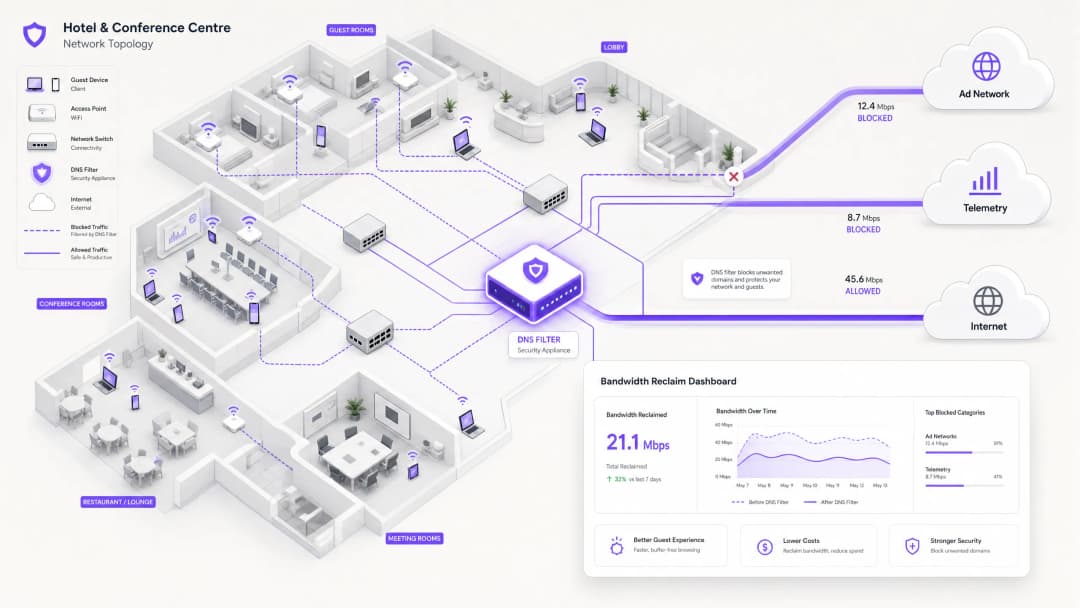
Executive Summary
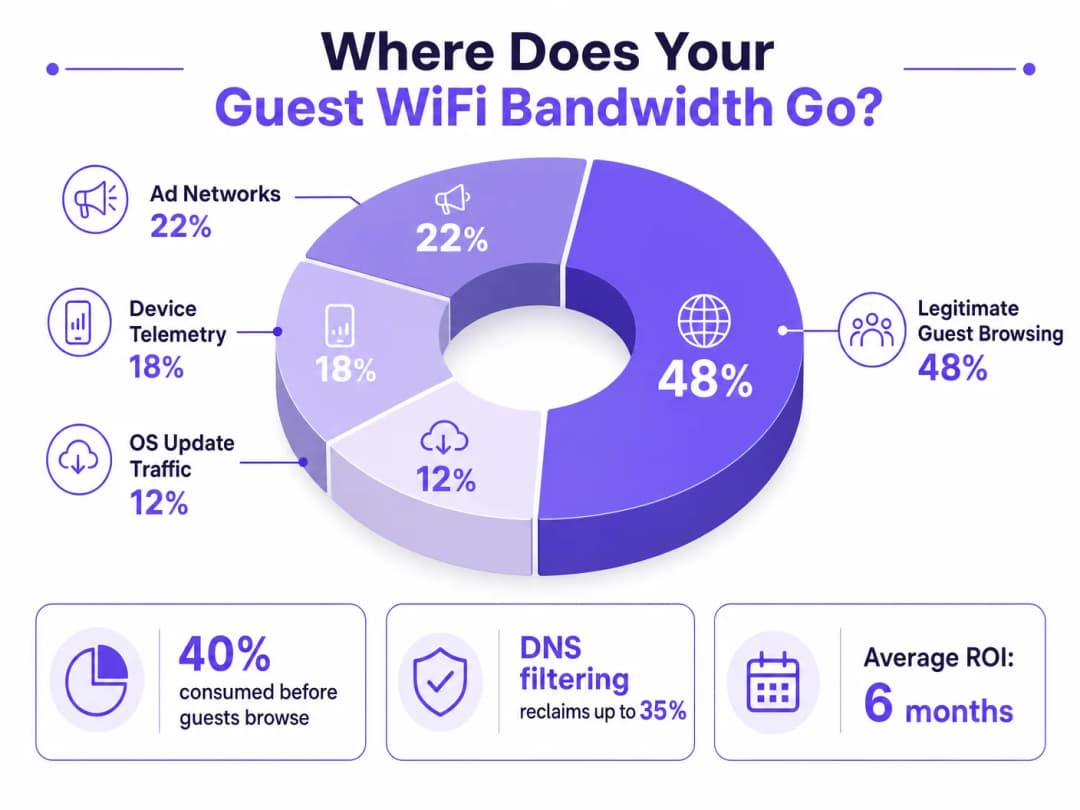
For IT Directors and Operations Managers overseeing high-density venues, ensuring a reliable Guest WiFi experience is a constant battle against network congestion. While legacy approaches focus on increasing overall bandwidth or deploying additional access points, the root cause of slow throughput often lies not in legitimate user traffic, but in the hidden layer of background data. In modern environments — from sprawling Hospitality complexes to high-footfall Retail spaces — up to 40% of public WiFi bandwidth is consumed by device telemetry, programmatic ad networks, and automated OS updates before a guest even opens a browser.
This technical reference guide provides a definitive methodology for diagnosing this congestion and implementing strategic mitigation. By deploying network-level DNS filtering and Response Policy Zones (RPZ), enterprise network architects can reclaim significant bandwidth, reduce latency, and dramatically improve the end-user experience without incurring the capital expenditure of infrastructure upgrades. We will explore the technical architecture of these solutions, real-world implementation case studies, and the measurable ROI of reclaiming your network.
Technical Deep-Dive
The Anatomy of Background Congestion
When a guest device authenticates to a public network, it immediately initiates a barrage of background connections. These connections are primarily driven by three categories of traffic that, in aggregate, constitute what network engineers call the phantom load — bandwidth consumed by the network before any deliberate guest activity occurs.
1. Device Telemetry and Analytics
Modern operating systems (iOS, Android, Windows) and installed applications constantly transmit usage data, location metrics, crash reports, and behavioural analytics to remote servers. In a dense environment such as a Transport hub or conference centre, thousands of devices simultaneously transmitting small but frequent telemetry payloads can exhaust available wireless airtime and overwhelm NAT tables. A single iOS device can generate upwards of 200 distinct background DNS queries within the first 60 seconds of connecting to an unmetered network.
2. Programmatic Ad Networks
Many free applications rely on programmatic advertising ecosystems. The moment a device detects an unmetered WiFi connection, these apps begin pre-fetching video ads, high-resolution display banners, and tracking scripts from ad exchange platforms. This traffic is both high-bandwidth and latency-sensitive, and it will aggressively compete for airtime with legitimate guest browsing. Analysis of public venue networks consistently shows that programmatic ad traffic accounts for 15–22% of total WAN utilisation during peak hours.
3. Automated OS and Application Updates
Without proper traffic shaping, devices will attempt to download large OS patches and application updates as soon as they detect an unmetered WiFi connection. A single iOS major update can be 3–5 GB. In a 500-device environment, a simultaneous update trigger — common when a new OS version is released — can saturate even a 1 Gbps WAN link within minutes.
Why Traditional Approaches Fall Short
The conventional response to guest WiFi congestion is to increase WAN bandwidth or deploy additional access points. While both measures have their place, neither addresses the phantom load. Adding more bandwidth simply provides more capacity for background traffic to consume. Deep Packet Inspection (DPI), the other traditional tool, is increasingly ineffective: the widespread adoption of TLS 1.3 and end-to-end encryption means that the majority of traffic payloads are opaque to inspection engines. You cannot throttle what you cannot classify.
For a broader discussion of how wireless frequencies interact with high-density deployments, see our guide on Wi-Fi Frequencies: A Guide to Wi-Fi Frequencies in 2026 .
DNS Filtering: The Efficient Countermeasure
The modern, scalable solution is DNS filtering at the network edge. Rather than inspecting traffic payloads, DNS filtering operates at the resolution layer — preventing connections from being established in the first place.
When a device requests access to a known ad network or telemetry domain, the DNS resolver checks the request against a Response Policy Zone (RPZ). If the domain appears in the blocklist, the resolver returns an NXDOMAIN (Non-Existent Domain) response, or sinkholes the traffic to a local null IP address. The connection is terminated before the TCP handshake occurs, preserving both wireless airtime and WAN bandwidth. This approach is computationally inexpensive, scales linearly with resolver capacity, and is unaffected by payload encryption.

The Security Dimension
DNS filtering delivers a significant secondary benefit: security. By blocking known malware Command and Control (C2) domains, phishing infrastructure, and exploit kit delivery networks at the DNS layer, the guest network becomes substantially more defensible. This is directly relevant to compliance obligations under frameworks such as PCI DSS (which requires network segmentation and monitoring for cardholder data environments) and GDPR (which mandates appropriate technical measures to protect personal data). For a detailed treatment of audit trail requirements in this context, see Explain what is audit trail for IT Security in 2026 .
For organisations managing educational environments where ad blocking also serves a safeguarding function, the principles covered in Minimising Student Distractions with Network-Level Ad Blocking are directly applicable.
¿Tiene preguntas sobre su configuración específica?
Nuestro equipo trabaja con operadores de recintos, responsables de TI e ingenieros de redes en 80 000 espacios. Reserve una llamada de 20 minutos y le mostraremos cómo lo han solucionado otros profesionales como usted.
Implementation Guide
Deploying a robust DNS filtering architecture requires careful planning to avoid disrupting legitimate guest services. The implementation should follow a phased approach.
Phase 1: Baseline Assessment and Visibility
Before implementing any blocks, establish a baseline of current traffic patterns. Utilise WiFi Analytics to identify the top bandwidth-consuming domains and categories over a representative 7–14 day period. This audit phase is critical for understanding the specific traffic profile of your venue and for building the business case for the investment. Key metrics to capture include:
| Metric | Target Baseline | Notes |
|---|---|---|
| Top 20 DNS domains by query volume | Full list | Identify telemetry and ad domains |
| WAN utilisation by category | % split | Quantify the phantom load |
| Peak concurrent device count | Number | Size resolver infrastructure |
| DNS query failure rate | < 0.1% | Establish pre-deployment benchmark |
Phase 2: Staged RPZ Deployment
Begin by deploying the RPZ in log-only mode. This allows you to verify the accuracy of your blocklists without impacting the user experience. Focus on high-confidence categories first:
- Known Malware and C2 Domains: Immediate security benefit with near-zero risk of false positives. Use threat intelligence feeds from reputable providers.
- High-Bandwidth Programmatic Ad Networks: Target the major video ad exchange platforms. These are well-documented and unlikely to host legitimate content.
- Aggressive Telemetry Endpoints: Block non-essential tracking domains. Maintain a careful allow-list for domains required for captive portal authentication flows.
Once log-only mode confirms acceptable false positive rates (target < 0.5% of queries), move to enforcement mode.
Phase 3: Traffic Shaping and QoS Integration
For traffic that cannot be outright blocked (e.g., OS updates from Apple, Microsoft, and Google), implement Quality of Service (QoS) policies. Rate-limit update servers to a defined ceiling — typically 10–15% of total WAN capacity — ensuring that interactive guest traffic (web browsing, VoIP, video conferencing) receives priority queuing. This is particularly important for Healthcare environments where clinical staff may share a network segment with guests.
For guidance on optimising broader network environments, including office and mixed-use deployments, see Office Wi-Fi: Optimize Your Modern Office Wi-Fi Network .
Best Practices
Maintain Explicit Allow-lists for Critical Services. Ensure that domains essential for captive portal authentication, payment gateways (PCI DSS compliance), and core venue operations are explicitly permitted. A misconfigured blocklist that breaks the login flow will generate immediate and significant support load.
Communicate the Policy Transparently. Your Terms of Service should state that network traffic is managed to ensure a high-quality experience for all users. This is both a legal best practice under GDPR and a reasonable expectation-setting measure for guests.
Automate Blocklist Updates. The landscape of ad networks and telemetry domains shifts constantly. Threat intelligence feeds and RPZ lists must be updated dynamically — ideally on a sub-24-hour cycle — to remain effective.
Address DNS Evasion Proactively. Implement firewall rules to intercept and redirect all outbound port 53 (UDP and TCP) traffic to the local resolver. This prevents clients from bypassing filtering by hardcoding external DNS servers.
Plan for DNS over HTTPS (DoH). As DoH adoption increases, clients may route DNS queries over HTTPS to bypass local resolvers entirely. Evaluate whether to block known DoH providers (e.g., dns.google, cloudflare-dns.com) or to deploy a transparent DoH proxy that enforces local policy.
Align with IEEE 802.1X and WPA3. Ensure that your DNS filtering architecture is compatible with your authentication framework. In environments using IEEE 802.1X with RADIUS-based authentication, DNS filtering policies can be applied per VLAN or per user group, enabling granular control.
Troubleshooting & Risk Mitigation
Common Failure Modes
| Failure Mode | Symptom | Mitigation |
|---|---|---|
| Over-blocking (CDN collision) | Broken webpages, missing images | Granular blocklists; rapid allow-listing process |
| DNS evasion (hardcoded resolvers) | Filtering bypassed by specific apps | Firewall redirect rules for port 53 |
| DoH bypass | Filtering bypassed by modern browsers | Block known DoH providers or deploy DoH proxy |
| Resolver performance bottleneck | Increased DNS latency across all clients | Scale resolver infrastructure; implement anycast |
| Captive portal breakage | Guests cannot authenticate | Explicit allow-list for portal domains and OS detection endpoints |
| Stale blocklists | New ad domains not blocked | Automate feed updates; monitor query logs for new high-volume domains |
Security Incident Response
If a guest device is identified as communicating with a known malware C2 domain (visible in DNS query logs), the RPZ will automatically block further communication. Ensure your incident response process includes a workflow for reviewing these events, as they may indicate a compromised device that requires isolation from the guest VLAN.
ROI & Business Impact
Implementing network-level DNS filtering delivers measurable, quantifiable business outcomes across multiple dimensions.
Bandwidth Reclamation and CapEx Deferral. Venues typically reclaim 20–40% of their total WAN bandwidth. This directly translates to cost savings by deferring the need for expensive circuit upgrades. For a venue currently paying for a 500 Mbps leased line, reclaiming 30% of capacity is equivalent to gaining 150 Mbps of effective throughput at zero additional cost.
Improved Guest Satisfaction and NPS. By eliminating background congestion, the perceived speed and reliability of the Guest WiFi improves dramatically. Reduced latency and consistent throughput lead to higher Net Promoter Scores and fewer operational support escalations.
Enhanced Security and Compliance Posture. Blocking malware and phishing domains at the DNS layer significantly reduces the risk of a security breach originating from the guest network. This directly supports compliance with PCI DSS network segmentation requirements and GDPR's obligation to implement appropriate technical security measures.
Operational Efficiency. Automated DNS filtering reduces the manual workload on network operations teams. Rather than reactively responding to congestion events, the network proactively manages its own traffic profile.
| Outcome | Typical Range | Measurement Method |
|---|---|---|
| Bandwidth reclaimed | 20–40% of WAN capacity | Before/after WAN utilisation monitoring |
| DNS query block rate | 15–35% of all queries | Resolver query logs |
| Guest satisfaction improvement | +8–15 NPS points | Post-stay/post-visit surveys |
| CapEx deferral | 1–3 years on circuit upgrade | Cost modelling |
| Security incident reduction | 40–60% fewer C2 detections | SIEM correlation |
By treating the network not just as a pipe, but as an intelligent, filtered gateway, IT leaders can deliver a superior, secure, and cost-effective connectivity experience — one that scales with venue growth without proportional infrastructure investment.
Definiciones clave
Response Policy Zone (RPZ)
Mecanismo en los servidores DNS que permite la modificación de las respuestas DNS en función de una política definida. Cuando un dominio consultado coincide con una entrada en la RPZ, el resolutor puede devolver una respuesta sintética (por ejemplo, NXDOMAIN o una IP de sinkhole) en lugar de la respuesta real.
El mecanismo técnico principal para implementar el filtrado de DNS en toda la red. Los equipos de TI configuran las RPZ en sus resolutores internos para bloquear redes de anuncios, dominios de malware y endpoints de telemetría sin necesidad de software en el lado del cliente.
Deep Packet Inspection (DPI)
Una forma de filtrado de paquetes de red que examina la carga útil de datos de un paquete a medida que pasa por un punto de inspección, buscando el incumplimiento de protocolos, contenido específico o criterios definidos.
Utilizado tradicionalmente para la clasificación y el modelado del tráfico. Cada vez más limitado por la adopción generalizada del cifrado de extremo a extremo TLS 1.3, que hace que las cargas útiles sean opacas. El filtrado de DNS es la alternativa preferida para entornos de tráfico cifrado.
NXDOMAIN
Un código de respuesta DNS (RCODE 3) que indica que el nombre de dominio consultado no existe en el espacio de nombres DNS.
Devuelto por un resolutor DNS de filtrado para bloquear intencionadamente una conexión a un dominio no deseado. La aplicación cliente recibe esta respuesta y abandona el intento de conexión, evitando que se consuma ancho de banda.
DNS over HTTPS (DoH)
Un protocolo para realizar la resolución DNS a través del protocolo HTTPS (RFC 8484), cifrando las consultas y respuestas DNS entre el cliente y un resolutor compatible con DoH.
Puede eludir el filtrado de DNS de la red local si los clientes están configurados para usar proveedores de DoH externos. Los administradores de red deben implementar reglas de firewall o proxy para el tráfico DoH con el fin de aplicar las políticas de RPZ locales.
Quality of Service (QoS)
Un conjunto de mecanismos de red que controlan la priorización del tráfico, la limitación de velocidad y la cola para garantizar el rendimiento de las aplicaciones críticas.
Se utiliza junto con el filtrado de DNS para gestionar el tráfico legítimo pero de gran ancho de banda (por ejemplo, actualizaciones del sistema operativo) que no se puede bloquear. La QoS garantiza que el tráfico de invitados interactivo reciba prioridad sobre las transferencias masivas en segundo plano.
Telemetry
La recopilación y transmisión automatizada de datos operativos de los dispositivos a servidores remotos para su monitorización, análisis y diagnóstico.
En el contexto del WiFi para invitados, la telemetría de dispositivos de sistemas operativos móviles y aplicaciones puede consumir de forma silenciosa entre el 15 y el 20 % del ancho de banda disponible. Es un objetivo principal para el filtrado de DNS en despliegues de redes públicas.
DNS Sinkholing
Técnica en la que un servidor DNS se configura para devolver una dirección IP falsa (normalmente una dirección nula local) para dominios específicos, redirigiendo el tráfico fuera de su destino previsto.
Se utiliza para neutralizar el tráfico de malware C2 y bloquear agresivamente las redes de anuncios de gran ancho de banda. Más definitivo que las respuestas NXDOMAIN, ya que permite al servidor sinkhole registrar los intentos de conexión para el análisis de seguridad.
Airtime Fairness
Función de red inalámbrica que asigna un acceso equitativo al medio inalámbrico entre todos los clientes conectados, independientemente de sus velocidades de datos individuales.
Crítico en entornos de alta densidad. Sin airtime fairness, un único dispositivo lento (por ejemplo, un cliente 802.11g más antiguo) puede consumir de forma desproporcionada el tiempo de transmisión, degradando el rendimiento para todos los demás clientes. El tráfico de telemetría en segundo plano de muchos dispositivos agrava este efecto.
Phantom Load
Ancho de banda consumido por procesos automáticos en segundo plano en los dispositivos conectados antes de que se produzca cualquier actividad deliberada del usuario.
El término colectivo para la telemetría, la precarga de redes de anuncios y el tráfico de actualización del sistema operativo. Comprender y cuantificar la carga fantasma es el primer paso en cualquier diagnóstico de congestión de WiFi para invitados.
Ejemplos prácticos
Un hotel resort de 400 habitaciones experimenta una congestión de red grave todas las noches entre las 19:00 y las 22:00. El enlace WAN de 1 Gbps se satura y los huéspedes se quejan de la lentitud en el streaming y de la interrupción de las llamadas VoIP. El Director de TI necesita identificar la causa raíz e implementar una solución sin tener que ampliar el circuito.
Paso 1 — Análisis de tráfico: Desplegar un analizador de flujo de red (NetFlow/IPFIX) en el router principal y ejecutarlo durante 5 días en periodos de hora punta y hora valle. Correlacionar con los registros de consultas DNS del resolvedor existente. El análisis revela que el 35% del tráfico nocturno se dirige a redes de anuncios de vídeo programáticos conocidas (DoubleClick, AppNexus) y a servidores de actualización automática de aplicaciones (Apple Software Update, Google Play). El tráfico legítimo de navegación de los huéspedes representa solo el 52% del tráfico total.
Paso 2 — Despliegue de filtrado DNS: Configurar el firewall central para redirigir todas las consultas DNS de la VLAN de invitados (puerto UDP/TCP 53) a un resolvedor local compatible con RPZ. Importar una lista de bloqueo depurada que cubra las redes de anuncios y los dominios de telemetría identificados. Ejecutar en modo de solo registro durante 48 horas para validar las tasas de falsos positivos.
Paso 3 — Aplicación de políticas: Tras validar una tasa de falsos positivos inferior al 0,3%, cambiar al modo de aplicación de políticas. Simultáneamente, implementar una política de QoS que limite la velocidad de los servidores de actualización de Apple y Google a un límite combinado de 80 Mbps en la franja horaria de 18:00 a 23:00.
Paso 4 — Validación: Supervisar la utilización de la WAN durante los 7 días siguientes. El pico de utilización desciende del 98% al 61%, resolviendo las quejas de los huéspedes. El hotel aplaza la mejora planificada del circuito un tiempo estimado de 18 meses.
Un gran centro de conferencias acoge una cumbre tecnológica con 5.000 asistentes. Durante la sesión de apertura, la red WiFi queda completamente inutilizable. El análisis posterior al incidente revela que miles de dispositivos intentaron descargar simultáneamente una actualización importante de iOS lanzada esa misma mañana.
Mitigación inmediata (el día del evento): El equipo de operaciones de red identifica la saturación mediante la monitorización de consultas DNS en tiempo real. Aplican inmediatamente un redireccionamiento («sinkhole») a nivel de DNS a los dominios específicos de actualización de software de Apple (mesu.apple.com, appldnld.apple.com, updates.cdn-apple.com). En 4 minutos, la utilización de la WAN baja del 99% al 68% y la red se estabiliza.
Solución a corto plazo (mismo evento): Se aplica una política de QoS para limitar la velocidad de todo el tráfico de actualización restante a 50 Mbps durante el evento.
Estrategia a largo plazo (post-evento): El equipo de red implementa una política dinámica de QoS que se activa automáticamente cuando la utilización total de la WAN supera el 75%, limitando los servidores de actualización conocidos al 10% de la capacidad total. Se crea una lista de comprobación previa al evento que incluye el bloqueo temporal («sinkhole») de los principales dominios de actualización durante las 2 horas anteriores y posteriores a las sesiones de alto perfil. El equipo también se suscribe a los canales de notificación de lanzamientos de actualizaciones de Apple y Microsoft para anticiparse a futuros picos.
Preguntas de práctica
Q1. You are the IT Manager for a national retail chain. After deploying a DNS filtering solution across 50 stores, several store managers report that the captive portal login page is failing to load for guests. The support team is receiving high call volumes. What is the most likely cause, and what is the immediate remediation step?
Sugerencia: Consider the full dependency chain of a modern captive portal authentication flow, including OS-level captive portal detection mechanisms.
Ver respuesta modelo
The most likely cause is over-blocking. The DNS filter is blocking a domain required for the captive portal to function. Modern mobile operating systems use specific domains to detect captive portals (e.g., captive.apple.com for iOS, connectivitycheck.gstatic.com for Android). If these are blocked, the OS will not trigger the captive portal browser, and the guest will see no login prompt. Additionally, the portal itself may depend on a CDN or third-party authentication provider (e.g., social login via Facebook or Google) whose domains are inadvertently blocked.
Immediate remediation: Review the DNS query logs for NXDOMAIN responses originating from the guest subnet during the authentication phase. Identify all blocked domains that are queried before a successful login. Add these domains to the global allow-list. Implement a standard allow-list template for captive portal deployments that includes all major OS detection endpoints and common authentication provider domains.
Q2. A stadium network architect notices that despite implementing aggressive DNS filtering, WAN utilisation remains critically high during matches. Further investigation reveals a sustained high volume of UDP port 443 traffic that does not correlate with any blocked domains in the DNS logs. What is happening, and how should it be addressed?
Sugerencia: Consider modern transport protocols and how they interact with DNS-layer controls.
Ver respuesta modelo
The high volume of UDP 443 traffic indicates the use of QUIC (HTTP/3). QUIC is a UDP-based transport protocol used by major platforms (Google, Meta, YouTube) that bypasses traditional TCP-based proxies and DPI engines. More critically, clients using QUIC may also be using DNS over HTTPS (DoH) to resolve domains, completely bypassing the local RPZ resolver and rendering DNS filtering ineffective for those clients.
To address this: First, implement firewall rules to block outbound DoH traffic to known public DoH providers (Google, Cloudflare, NextDNS) on TCP/UDP port 443 by destination IP, forcing clients to fall back to the local resolver. Second, evaluate blocking outbound UDP 443 entirely (or rate-limiting it aggressively) to force QUIC clients to fall back to TCP-based HTTP/2, which is subject to existing traffic management policies. Third, review whether a transparent DoH proxy can be deployed to intercept and inspect DoH queries while enforcing local RPZ policies.
Q3. You are designing a QoS policy for a large public hospital's guest WiFi network. The network is shared between patient entertainment devices, visitor personal devices, and a small number of clinical staff using VoIP softphones on their personal mobiles. Prioritise the following traffic types: VoIP (SIP/RTP), Guest Web Browsing (HTTP/HTTPS), Windows/iOS Updates, and Streaming Video (Netflix/YouTube).
Sugerencia: Consider both latency sensitivity and the business/clinical impact of each traffic type. Also consider the regulatory context of a healthcare environment.
Ver respuesta modelo
Priority 1 — VoIP (SIP/RTP): Strict Priority Queuing (Expedited Forwarding, DSCP EF). VoIP is highly sensitive to latency (target < 150ms one-way) and jitter (target < 30ms). Packet loss above 1% causes audible degradation. In a clinical context, a dropped call could have patient safety implications.
Priority 2 — Guest Web Browsing (HTTP/HTTPS): Assured Forwarding (AF31). This is the primary expected use case for both patients and visitors. It requires reasonable responsiveness but is tolerant of moderate latency.
Priority 3 — Streaming Video (Netflix/YouTube): Rate-limited per client (e.g., 3–5 Mbps cap) with Assured Forwarding (AF21). While important for patient experience during long stays, uncapped streaming will saturate the link. A per-client cap ensures equitable access. Consider time-of-day policies that relax limits during off-peak hours.
Priority 4 — OS/App Updates (Scavenger Class, DSCP CS1): Lowest priority, best-effort queuing, with an aggregate rate limit (e.g., 50 Mbps total across all update traffic). These are background tasks with no latency sensitivity. They should only consume spare capacity. In a healthcare environment, also consider whether the guest network is fully isolated from clinical systems — if not, update traffic management becomes a security concern as well as a bandwidth one.
Continúe leyendo esta serie
Cisco Catalyst WLC y guest WiFi: configuración de Captive Portal con Purple
Cómo funciona un controlador LAN inalámbrico Cisco Catalyst 9800 (IOS-XE) con Purple guest WiFi: autenticación web externa, RADIUS y un walled garden, con un enlace a la guía de configuración paso a paso de Purple para la configuración exacta.
Gestión de WiFi para huéspedes de hoteles: Integración de PMS, portales y estándares de marca
Esta guía técnica detalla cómo estructurar redes WiFi de hotel de nivel empresarial, centrándose en la segmentación de VLAN, la integración de PMS para la gestión automatizada de sesiones y la optimización del Captive Portal para la captura de datos conforme a GDPR.
Cómo implementar restricciones de tiempo y de ancho de banda en redes WiFi de invitados
Una guía de referencia técnica autorizada sobre cómo implementar restricciones de tiempo y de ancho de banda en redes WiFi de invitados empresariales. Esta guía proporciona planes arquitectónicos prácticos, configuraciones independientes del proveedor y casos de estudio reales para ayudar a los responsables de TI a equilibrar el rendimiento de la red, el cumplimiento de la seguridad y la experiencia del visitante.
¿Tiene preguntas sobre su configuración específica?
Nuestro equipo trabaja con operadores de recintos, responsables de TI e ingenieros de redes en 80 000 espacios. Reserve una llamada de 20 minutos y le mostraremos cómo lo han solucionado otros profesionales como usted.