
Warum ist unser Gäste-WiFi so langsam? Diagnose von Netzwerkengpässen
Dieser Leitfaden analysiert die verborgenen Treiber für die Überlastung von Gäste-WiFi – Hintergrundtelemetrie, programmatische Werbenetzwerke und automatische OS-Updates –, die zusammen bis zu 40 % der Bandbreite des öffentlichen WiFi verbrauchen, noch bevor ein Gast überhaupt einen Browser öffnet. Er bietet einen phasenweisen, herstellerneutralen Implementierungsrahmen für DNS-Filterung und QoS-Richtlinien, um diese Bandbreite zurückzugewinnen, das Gästeerlebnis zu verbessern und einen messbaren ROI zu erzielen. Zielgruppe sind IT-Leiter und Operations Manager in den Bereichen Gastgewerbe, Einzelhandel, Events und im öffentlichen Sektor.
Diesen Leitfaden anhören
Podcast-Transkript ansehen
📚 Teil unserer Kernserie: Guest WiFi Guide →
Executive Summary
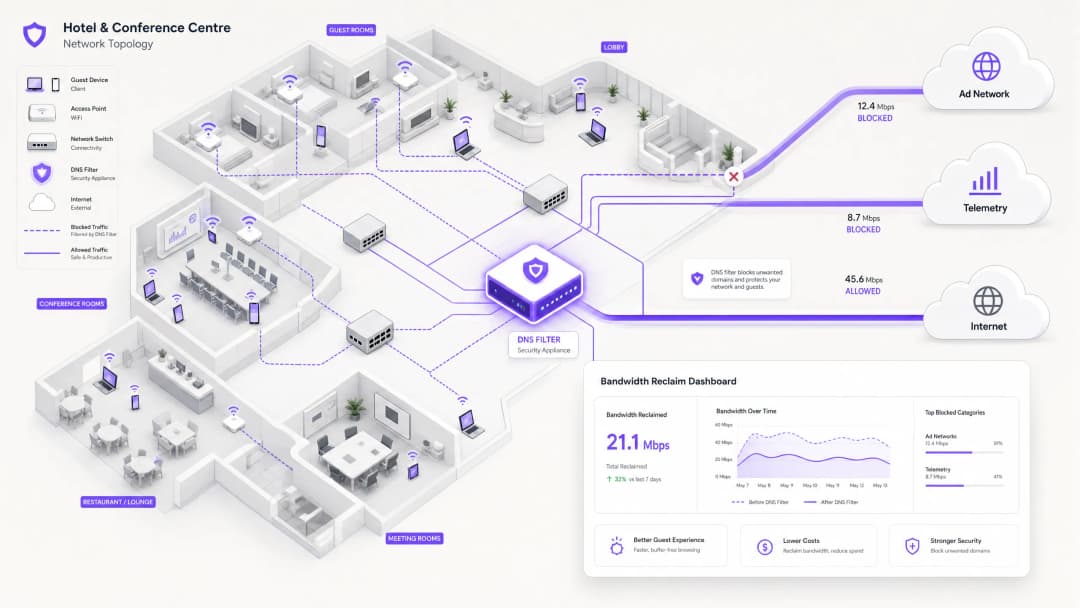
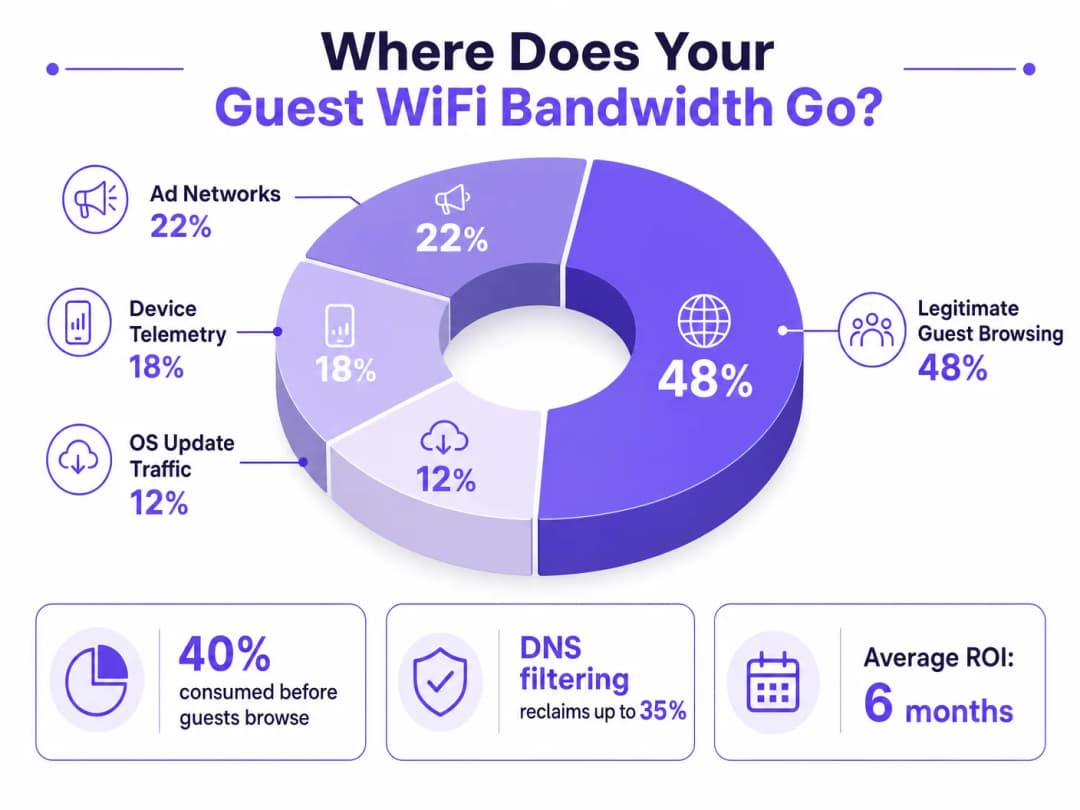
For IT Directors and Operations Managers overseeing high-density venues, ensuring a reliable Guest WiFi experience is a constant battle against network congestion. While legacy approaches focus on increasing overall bandwidth or deploying additional access points, the root cause of slow throughput often lies not in legitimate user traffic, but in the hidden layer of background data. In modern environments — from sprawling Hospitality complexes to high-footfall Retail spaces — up to 40% of public WiFi bandwidth is consumed by device telemetry, programmatic ad networks, and automated OS updates before a guest even opens a browser.
This technical reference guide provides a definitive methodology for diagnosing this congestion and implementing strategic mitigation. By deploying network-level DNS filtering and Response Policy Zones (RPZ), enterprise network architects can reclaim significant bandwidth, reduce latency, and dramatically improve the end-user experience without incurring the capital expenditure of infrastructure upgrades. We will explore the technical architecture of these solutions, real-world implementation case studies, and the measurable ROI of reclaiming your network.
Technical Deep-Dive
The Anatomy of Background Congestion
When a guest device authenticates to a public network, it immediately initiates a barrage of background connections. These connections are primarily driven by three categories of traffic that, in aggregate, constitute what network engineers call the phantom load — bandwidth consumed by the network before any deliberate guest activity occurs.
1. Device Telemetry and Analytics
Modern operating systems (iOS, Android, Windows) and installed applications constantly transmit usage data, location metrics, crash reports, and behavioural analytics to remote servers. In a dense environment such as a Transport hub or conference centre, thousands of devices simultaneously transmitting small but frequent telemetry payloads can exhaust available wireless airtime and overwhelm NAT tables. A single iOS device can generate upwards of 200 distinct background DNS queries within the first 60 seconds of connecting to an unmetered network.
2. Programmatic Ad Networks
Many free applications rely on programmatic advertising ecosystems. The moment a device detects an unmetered WiFi connection, these apps begin pre-fetching video ads, high-resolution display banners, and tracking scripts from ad exchange platforms. This traffic is both high-bandwidth and latency-sensitive, and it will aggressively compete for airtime with legitimate guest browsing. Analysis of public venue networks consistently shows that programmatic ad traffic accounts for 15–22% of total WAN utilisation during peak hours.
3. Automated OS and Application Updates
Without proper traffic shaping, devices will attempt to download large OS patches and application updates as soon as they detect an unmetered WiFi connection. A single iOS major update can be 3–5 GB. In a 500-device environment, a simultaneous update trigger — common when a new OS version is released — can saturate even a 1 Gbps WAN link within minutes.
Why Traditional Approaches Fall Short
The conventional response to guest WiFi congestion is to increase WAN bandwidth or deploy additional access points. While both measures have their place, neither addresses the phantom load. Adding more bandwidth simply provides more capacity for background traffic to consume. Deep Packet Inspection (DPI), the other traditional tool, is increasingly ineffective: the widespread adoption of TLS 1.3 and end-to-end encryption means that the majority of traffic payloads are opaque to inspection engines. You cannot throttle what you cannot classify.
For a broader discussion of how wireless frequencies interact with high-density deployments, see our guide on Wi-Fi Frequencies: A Guide to Wi-Fi Frequencies in 2026 .
DNS Filtering: The Efficient Countermeasure
The modern, scalable solution is DNS filtering at the network edge. Rather than inspecting traffic payloads, DNS filtering operates at the resolution layer — preventing connections from being established in the first place.
When a device requests access to a known ad network or telemetry domain, the DNS resolver checks the request against a Response Policy Zone (RPZ). If the domain appears in the blocklist, the resolver returns an NXDOMAIN (Non-Existent Domain) response, or sinkholes the traffic to a local null IP address. The connection is terminated before the TCP handshake occurs, preserving both wireless airtime and WAN bandwidth. This approach is computationally inexpensive, scales linearly with resolver capacity, and is unaffected by payload encryption.

The Security Dimension
DNS filtering delivers a significant secondary benefit: security. By blocking known malware Command and Control (C2) domains, phishing infrastructure, and exploit kit delivery networks at the DNS layer, the guest network becomes substantially more defensible. This is directly relevant to compliance obligations under frameworks such as PCI DSS (which requires network segmentation and monitoring for cardholder data environments) and GDPR (which mandates appropriate technical measures to protect personal data). For a detailed treatment of audit trail requirements in this context, see Explain what is audit trail for IT Security in 2026 .
For organisations managing educational environments where ad blocking also serves a safeguarding function, the principles covered in Minimising Student Distractions with Network-Level Ad Blocking are directly applicable.
Haben Sie Fragen zu Ihrem spezifischen Setup?
Unser Team arbeitet mit Standortbetreibern, IT-Managern und Netzwerktechnikern an über 80.000 Standorten zusammen. Buchen Sie ein 20-minütiges Gespräch und wir zeigen Ihnen, wie andere diese Herausforderungen gelöst haben.
Implementation Guide
Deploying a robust DNS filtering architecture requires careful planning to avoid disrupting legitimate guest services. The implementation should follow a phased approach.
Phase 1: Baseline Assessment and Visibility
Before implementing any blocks, establish a baseline of current traffic patterns. Utilise WiFi Analytics to identify the top bandwidth-consuming domains and categories over a representative 7–14 day period. This audit phase is critical for understanding the specific traffic profile of your venue and for building the business case for the investment. Key metrics to capture include:
| Metric | Target Baseline | Notes |
|---|---|---|
| Top 20 DNS domains by query volume | Full list | Identify telemetry and ad domains |
| WAN utilisation by category | % split | Quantify the phantom load |
| Peak concurrent device count | Number | Size resolver infrastructure |
| DNS query failure rate | < 0.1% | Establish pre-deployment benchmark |
Phase 2: Staged RPZ Deployment
Begin by deploying the RPZ in log-only mode. This allows you to verify the accuracy of your blocklists without impacting the user experience. Focus on high-confidence categories first:
- Known Malware and C2 Domains: Immediate security benefit with near-zero risk of false positives. Use threat intelligence feeds from reputable providers.
- High-Bandwidth Programmatic Ad Networks: Target the major video ad exchange platforms. These are well-documented and unlikely to host legitimate content.
- Aggressive Telemetry Endpoints: Block non-essential tracking domains. Maintain a careful allow-list for domains required for captive portal authentication flows.
Once log-only mode confirms acceptable false positive rates (target < 0.5% of queries), move to enforcement mode.
Phase 3: Traffic Shaping and QoS Integration
For traffic that cannot be outright blocked (e.g., OS updates from Apple, Microsoft, and Google), implement Quality of Service (QoS) policies. Rate-limit update servers to a defined ceiling — typically 10–15% of total WAN capacity — ensuring that interactive guest traffic (web browsing, VoIP, video conferencing) receives priority queuing. This is particularly important for Healthcare environments where clinical staff may share a network segment with guests.
For guidance on optimising broader network environments, including office and mixed-use deployments, see Office Wi-Fi: Optimize Your Modern Office Wi-Fi Network .
Best Practices
Maintain Explicit Allow-lists for Critical Services. Ensure that domains essential for captive portal authentication, payment gateways (PCI DSS compliance), and core venue operations are explicitly permitted. A misconfigured blocklist that breaks the login flow will generate immediate and significant support load.
Communicate the Policy Transparently. Your Terms of Service should state that network traffic is managed to ensure a high-quality experience for all users. This is both a legal best practice under GDPR and a reasonable expectation-setting measure for guests.
Automate Blocklist Updates. The landscape of ad networks and telemetry domains shifts constantly. Threat intelligence feeds and RPZ lists must be updated dynamically — ideally on a sub-24-hour cycle — to remain effective.
Address DNS Evasion Proactively. Implement firewall rules to intercept and redirect all outbound port 53 (UDP and TCP) traffic to the local resolver. This prevents clients from bypassing filtering by hardcoding external DNS servers.
Plan for DNS over HTTPS (DoH). As DoH adoption increases, clients may route DNS queries over HTTPS to bypass local resolvers entirely. Evaluate whether to block known DoH providers (e.g., dns.google, cloudflare-dns.com) or to deploy a transparent DoH proxy that enforces local policy.
Align with IEEE 802.1X and WPA3. Ensure that your DNS filtering architecture is compatible with your authentication framework. In environments using IEEE 802.1X with RADIUS-based authentication, DNS filtering policies can be applied per VLAN or per user group, enabling granular control.
Troubleshooting & Risk Mitigation
Common Failure Modes
| Failure Mode | Symptom | Mitigation |
|---|---|---|
| Over-blocking (CDN collision) | Broken webpages, missing images | Granular blocklists; rapid allow-listing process |
| DNS evasion (hardcoded resolvers) | Filtering bypassed by specific apps | Firewall redirect rules for port 53 |
| DoH bypass | Filtering bypassed by modern browsers | Block known DoH providers or deploy DoH proxy |
| Resolver performance bottleneck | Increased DNS latency across all clients | Scale resolver infrastructure; implement anycast |
| Captive portal breakage | Guests cannot authenticate | Explicit allow-list for portal domains and OS detection endpoints |
| Stale blocklists | New ad domains not blocked | Automate feed updates; monitor query logs for new high-volume domains |
Security Incident Response
If a guest device is identified as communicating with a known malware C2 domain (visible in DNS query logs), the RPZ will automatically block further communication. Ensure your incident response process includes a workflow for reviewing these events, as they may indicate a compromised device that requires isolation from the guest VLAN.
ROI & Business Impact
Implementing network-level DNS filtering delivers measurable, quantifiable business outcomes across multiple dimensions.
Bandwidth Reclamation and CapEx Deferral. Venues typically reclaim 20–40% of their total WAN bandwidth. This directly translates to cost savings by deferring the need for expensive circuit upgrades. For a venue currently paying for a 500 Mbps leased line, reclaiming 30% of capacity is equivalent to gaining 150 Mbps of effective throughput at zero additional cost.
Improved Guest Satisfaction and NPS. By eliminating background congestion, the perceived speed and reliability of the Guest WiFi improves dramatically. Reduced latency and consistent throughput lead to higher Net Promoter Scores and fewer operational support escalations.
Enhanced Security and Compliance Posture. Blocking malware and phishing domains at the DNS layer significantly reduces the risk of a security breach originating from the guest network. This directly supports compliance with PCI DSS network segmentation requirements and GDPR's obligation to implement appropriate technical security measures.
Operational Efficiency. Automated DNS filtering reduces the manual workload on network operations teams. Rather than reactively responding to congestion events, the network proactively manages its own traffic profile.
| Outcome | Typical Range | Measurement Method |
|---|---|---|
| Bandwidth reclaimed | 20–40% of WAN capacity | Before/after WAN utilisation monitoring |
| DNS query block rate | 15–35% of all queries | Resolver query logs |
| Guest satisfaction improvement | +8–15 NPS points | Post-stay/post-visit surveys |
| CapEx deferral | 1–3 years on circuit upgrade | Cost modelling |
| Security incident reduction | 40–60% fewer C2 detections | SIEM correlation |
By treating the network not just as a pipe, but as an intelligent, filtered gateway, IT leaders can deliver a superior, secure, and cost-effective connectivity experience — one that scales with venue growth without proportional infrastructure investment.
Schlüsseldefinitionen
Response Policy Zone (RPZ)
Ein Mechanismus in DNS-Servern, der die Änderung von DNS-Antworten basierend auf einer definierten Richtlinie ermöglicht. Wenn eine abgefragte Domain mit einem Eintrag in der RPZ übereinstimmt, kann der Resolver eine synthetische Antwort (z. B. NXDOMAIN oder eine Sinkhole-IP) anstelle der echten Antwort zurückgeben.
Der primäre technische Mechanismus zur Implementierung netzwerkweiter DNS-Filterung. IT-Teams konfigurieren RPZs auf ihren internen Resolvern, um Werbenetzwerke, Malware-Domains und Telemetrie-Endpunkte ohne clientseitige Software zu blockieren.
Deep Packet Inspection (DPI)
Eine Form der Netzwerkpaketfilterung, bei der die Nutzdaten (Payload) eines Pakets beim Passieren eines Inspektionspunkts untersucht werden, um nach Protokollverletzungen, bestimmten Inhalten oder definierten Kriterien zu suchen.
Traditionell für die Datenverkehrsklassifizierung und -steuerung eingesetzt. Zunehmend eingeschränkt durch die weite Verbreitung der TLS 1.3 End-to-End-Verschlüsselung, die Payloads unlesbar macht. DNS-Filterung ist die bevorzugte Alternative für verschlüsselte Traffic-Umgebungen.
NXDOMAIN
Ein DNS-Antwortcode (RCODE 3), der angibt, dass der abgefragte Domainname im DNS-Namensraum nicht existiert.
Wird von einem filternden DNS-Resolver zurückgegeben, um eine Verbindung zu einer unerwünschten Domain absichtlich zu blockieren. Die Client-Anwendung erhält diese Antwort und bricht den Verbindungsversuch ab, wodurch keine Bandbreite verbraucht wird.
DNS over HTTPS (DoH)
Ein Protokoll zur Durchführung der DNS-Auflösung über das HTTPS-Protokoll (RFC 8484), das DNS-Abfragen und -Antworten zwischen dem Client und einem DoH-fähigen Resolver verschlüsselt.
Kann die lokale DNS-Filterung im Netzwerk umgehen, wenn Clients so konfiguriert sind, dass sie externe DoH-Anbieter nutzen. Netzwerkadministratoren müssen Firewall-Regeln implementieren oder DoH-Traffic über Proxys leiten, um lokale RPZ-Richtlinien durchzusetzen.
Quality of Service (QoS)
Eine Reihe von Netzwerkmechanismen zur Steuerung von Traffic-Priorisierung, Ratenbegrenzung und Warteschlangen, um die Leistung kritischer Anwendungen zu sichern.
Wird zusammen mit DNS-Filterung eingesetzt, um legitimen, aber bandbreitenintensiven Datenverkehr (z. B. OS-Updates) zu verwalten, der nicht blockiert werden kann. QoS stellt sicher, dass interaktiver Gast-Traffic Vorrang vor Massenübertragungen im Hintergrund erhält.
Telemetry
Die automatisierte Erfassung und Übertragung von Betriebsdaten von Geräten an Remote-Server zur Überwachung, Analyse und Diagnose.
Im Kontext von Gast-WiFi kann die Geräte-Telemetrie von mobilen Betriebssystemen und Anwendungen lautlos 15–20 % der verfügbaren Bandbreite verbrauchen. Sie ist ein Hauptziel für DNS-Filterung in öffentlichen Netzwerken.
DNS Sinkholing
Eine Technik, bei der ein DNS-Server so konfiguriert ist, dass er für bestimmte Domains eine falsche IP-Adresse (normalerweise eine lokale Null-Adresse) zurückgibt und so den Datenverkehr von seinem eigentlichen Ziel umleitet.
Wird verwendet, um Malware-C2-Traffic zu neutralisieren und bandbreitenintensive Werbenetzwerke aggressiv zu blockieren. Effektiver als NXDOMAIN-Antworten, da der Sinkhole-Server Verbindungsversuche für Sicherheitsanalysen protokollieren kann.
Airtime Fairness
Eine drahtlose Netzwerkfunktion, die allen verbundenen Clients unabhängig von ihren individuellen Datenübertragungsraten den gleichen Zugriff auf das drahtlose Medium ermöglicht.
Kritisch in Umgebungen mit hoher Dichte. Ohne Airtime Fairness kann ein einzelnes langsames Gerät (z. B. ein älterer 802.11g-Client) unverhältnismäßig viel Sendezeit verbrauchen, was den Durchsatz für alle anderen Clients verschlechtert. Hintergrund-Telemetriedaten von vielen Geräten verstärken diesen Effekt.
Phantom Load
Bandbreite, die von automatisierten Hintergrundprozessen auf verbundenen Geräten verbraucht wird, bevor eine bewusste Benutzeraktivität stattfindet.
Der Sammelbegriff für Telemetrie, Vorabrufe von Werbenetzwerken und OS-Update-Traffic. Das Verständnis und die Quantifizierung des Phantom Load ist der erste Schritt bei jeder Diagnose von Engpässen im Gast-WiFi.
Ausgearbeitete Beispiele
Ein Resort-Hotel mit 400 Zimmern verzeichnet jeden Abend zwischen 19:00 und 22:00 Uhr starke Netzwerküberlastungen. Die 1-Gbps-WAN-Verbindung ist ausgelastet, und Gäste beschweren sich über langsames Streaming und abgebrochene VoIP-Anrufe. Der IT-Leiter muss die Ursache identifizieren und eine Lösung implementieren, ohne die Leitung aufzurüsten.
Schritt 1 — Traffic-Analyse: Bereitstellung eines Netzwerk-Flow-Analysators (NetFlow/IPFIX) auf dem Core-Router und Betrieb über 5 Tage hinweg während der Spitzen- und Nebenzeiten. Korrelation mit den DNS-Abfrageprotokollen des vorhandenen Resolvers. Die Analyse zeigt, dass 35 % des abendlichen Datenverkehrs für bekannte programmatische Video-Anzeigennetzwerke (DoubleClick, AppNexus) und automatische App-Update-Server (Apple Software Update, Google Play) bestimmt sind. Der legitime Datenverkehr der Gäste macht nur 52 % des Gesamtverkehrs aus.
Schritt 2 — Bereitstellung der DNS-Filterung: Konfigurieren Sie die Core-Firewall so, dass alle DNS-Abfragen des Gäste-VLANs (UDP/TCP-Port 53) an einen lokal gehosteten, RPZ-fähigen Resolver umgeleitet werden. Importieren Sie eine kuratierte Blockliste, die die identifizierten Werbenetzwerke und Telemetriedomänen abdeckt. Führen Sie das System 48 Stunden lang im reinen Protokollierungsmodus aus, um die Rate falscher Positivmeldungen zu validieren.
Schritt 3 — Durchsetzung der Richtlinie: Nach Validierung einer Falsch-Positiv-Rate von unter 0,3 % wechseln Sie in den Durchsetzungsmodus. Implementieren Sie gleichzeitig eine QoS-Richtlinie, die die Update-Server von Apple und Google im Zeitfenster von 18:00 bis 23:00 Uhr auf ein gemeinsames Maximum von 80 Mbps drosselt.
Schritt 4 — Validierung: Überwachen Sie die WAN-Auslastung in den folgenden 7 Tagen. Die Spitzenauslastung sinkt von 98 % auf 61 %, was die Beschwerden der Gäste behebt. Das Hotel verschiebt eine geplante Leitungserweiterung um schätzungsweise 18 Monate.
Ein großes Konferenzzentrum veranstaltet einen Technologiegipfel mit 5.000 Teilnehmern. Während der Keynote wird das WiFi-Netzwerk völlig unbrauchbar. Die Analyse nach dem Vorfall zeigt, dass Tausende von Geräten gleichzeitig versuchten, ein großes iOS-Update herunterzuladen, das an diesem Morgen veröffentlicht wurde.
Sofortige Schadensminderung (Veranstaltungstag): Das Network Operations Team identifiziert den Anstieg durch Echtzeit-DNS-Abfrageüberwachung. Sie leiten die spezifischen Apple-Software-Update-Domains (mesu.apple.com, appldnld.apple.com, updates.cdn-apple.com) auf DNS-Ebene sofort ins Leere (Sinkhole). Innerhalb von 4 Minuten sinkt die WAN-Auslastung von 99 % auf 68 %, und das Netzwerk stabilisiert sich.
Kurzfristige Lösung (Gleiche Veranstaltung): Eine QoS-Richtlinie wird angewendet, um den verbleibenden Update-Verkehr für die Dauer der Veranstaltung auf 50 Mbps zu begrenzen.
Langfristige Strategie (Nach der Veranstaltung): Das Netzwerkteam implementiert eine dynamische QoS-Richtlinie, die sich automatisch aktiviert, wenn die WAN-Gesamtauslastung 75 % überschreitet, und bekannte Update-Server auf 10 % der Gesamtkapazität drosselt. Es wird eine Checkliste für die Zeit vor der Veranstaltung erstellt, die ein vorübergehendes Sinkholing wichtiger Update-Domains in den 2 Stunden vor und nach hochkarätigen Sessions vorsieht. Das Team abonniert außerdem die Benachrichtigungen von Apple und Microsoft zu Update-Releases, um zukünftige Lastspitzen vorherzusehen.
Übungsfragen
Q1. You are the IT Manager for a national retail chain. After deploying a DNS filtering solution across 50 stores, several store managers report that the captive portal login page is failing to load for guests. The support team is receiving high call volumes. What is the most likely cause, and what is the immediate remediation step?
Hinweis: Consider the full dependency chain of a modern captive portal authentication flow, including OS-level captive portal detection mechanisms.
Musterlösung anzeigen
The most likely cause is over-blocking. The DNS filter is blocking a domain required for the captive portal to function. Modern mobile operating systems use specific domains to detect captive portals (e.g., captive.apple.com for iOS, connectivitycheck.gstatic.com for Android). If these are blocked, the OS will not trigger the captive portal browser, and the guest will see no login prompt. Additionally, the portal itself may depend on a CDN or third-party authentication provider (e.g., social login via Facebook or Google) whose domains are inadvertently blocked.
Immediate remediation: Review the DNS query logs for NXDOMAIN responses originating from the guest subnet during the authentication phase. Identify all blocked domains that are queried before a successful login. Add these domains to the global allow-list. Implement a standard allow-list template for captive portal deployments that includes all major OS detection endpoints and common authentication provider domains.
Q2. A stadium network architect notices that despite implementing aggressive DNS filtering, WAN utilisation remains critically high during matches. Further investigation reveals a sustained high volume of UDP port 443 traffic that does not correlate with any blocked domains in the DNS logs. What is happening, and how should it be addressed?
Hinweis: Consider modern transport protocols and how they interact with DNS-layer controls.
Musterlösung anzeigen
The high volume of UDP 443 traffic indicates the use of QUIC (HTTP/3). QUIC is a UDP-based transport protocol used by major platforms (Google, Meta, YouTube) that bypasses traditional TCP-based proxies and DPI engines. More critically, clients using QUIC may also be using DNS over HTTPS (DoH) to resolve domains, completely bypassing the local RPZ resolver and rendering DNS filtering ineffective for those clients.
To address this: First, implement firewall rules to block outbound DoH traffic to known public DoH providers (Google, Cloudflare, NextDNS) on TCP/UDP port 443 by destination IP, forcing clients to fall back to the local resolver. Second, evaluate blocking outbound UDP 443 entirely (or rate-limiting it aggressively) to force QUIC clients to fall back to TCP-based HTTP/2, which is subject to existing traffic management policies. Third, review whether a transparent DoH proxy can be deployed to intercept and inspect DoH queries while enforcing local RPZ policies.
Q3. You are designing a QoS policy for a large public hospital's guest WiFi network. The network is shared between patient entertainment devices, visitor personal devices, and a small number of clinical staff using VoIP softphones on their personal mobiles. Prioritise the following traffic types: VoIP (SIP/RTP), Guest Web Browsing (HTTP/HTTPS), Windows/iOS Updates, and Streaming Video (Netflix/YouTube).
Hinweis: Consider both latency sensitivity and the business/clinical impact of each traffic type. Also consider the regulatory context of a healthcare environment.
Musterlösung anzeigen
Priority 1 — VoIP (SIP/RTP): Strict Priority Queuing (Expedited Forwarding, DSCP EF). VoIP is highly sensitive to latency (target < 150ms one-way) and jitter (target < 30ms). Packet loss above 1% causes audible degradation. In a clinical context, a dropped call could have patient safety implications.
Priority 2 — Guest Web Browsing (HTTP/HTTPS): Assured Forwarding (AF31). This is the primary expected use case for both patients and visitors. It requires reasonable responsiveness but is tolerant of moderate latency.
Priority 3 — Streaming Video (Netflix/YouTube): Rate-limited per client (e.g., 3–5 Mbps cap) with Assured Forwarding (AF21). While important for patient experience during long stays, uncapped streaming will saturate the link. A per-client cap ensures equitable access. Consider time-of-day policies that relax limits during off-peak hours.
Priority 4 — OS/App Updates (Scavenger Class, DSCP CS1): Lowest priority, best-effort queuing, with an aggregate rate limit (e.g., 50 Mbps total across all update traffic). These are background tasks with no latency sensitivity. They should only consume spare capacity. In a healthcare environment, also consider whether the guest network is fully isolated from clinical systems — if not, update traffic management becomes a security concern as well as a bandwidth one.
Weiterlesen in dieser Reihe
Cisco Catalyst WLC und Gäste-WiFi: Captive Portal-Einrichtung mit Purple
Wie ein Cisco Catalyst 9800 (IOS-XE) Wireless LAN Controller mit Purple Gäste-WiFi funktioniert: externe Web-Authentifizierung, RADIUS und ein Walled Garden, mit einem Link zur Schritt-für-Schritt-Installationsanleitung von Purple für die genaue Konfiguration.
Der Leitfaden für Unternehmen zur Einrichtung von Gäste-WiFi: Sicherheit, Segmentierung und Geschwindigkeit
Dieser technische Leitfaden für Unternehmen bietet IT-Managern und Netzwerkarchitekten praktische Anleitungen zur Bereitstellung von sicherem, segmentiertem Gäste-WiFi. Er behandelt VLAN-Architektur, WPA3-Verschlüsselung, 802.1X-Authentifizierung, PCI-DSS- und GDPR-Konformität sowie die Integration der hardwareunabhängigen Captive Portal-Ebene von Purple.
Mitarbeiter-WiFi vs. Gäste-WiFi: Best Practices für die Segmentierung von Unternehmensnetzwerken
Ein umfassender technischer Leitfaden für IT-Führungskräfte zur Segmentierung von Mitarbeiter- und Gäste-WiFi-Netzwerken. Er behandelt VLAN-Architektur, 802.1X-Authentifizierung, Firewall-Richtlinien und die geschäftlichen Auswirkungen eines sicheren Netzwerkdesigns.
Haben Sie Fragen zu Ihrem spezifischen Setup?
Unser Team arbeitet mit Standortbetreibern, IT-Managern und Netzwerktechnikern an über 80.000 Standorten zusammen. Buchen Sie ein 20-minütiges Gespräch und wir zeigen Ihnen, wie andere diese Herausforderungen gelöst haben.