
Why is Our Guest WiFi So Slow? Diagnosing Network Congestion
Questa guida analizza i fattori nascosti della congestione del WiFi per gli ospiti — telemetria in background, reti pubblicitarie programmatiche e aggiornamenti automatici del sistema operativo — che insieme consumano fino al 40% della larghezza di banda del WiFi pubblico prima ancora che un ospite apra un browser. Fornisce un framework di implementazione graduale e indipendente dal fornitore per il filtraggio DNS e le policy QoS che consentono di recuperare tale larghezza di banda, migliorare l'esperienza degli ospiti e offrire un ROI misurabile. Rivolto a Direttori IT e Responsabili delle Operations nei settori dell'ospitalità, del retail, degli eventi e degli ambienti pubblici.
Ascolta questa guida
Visualizza trascrizione del podcast
📚 Parte della nostra serie principale: Guest WiFi Guide →
Executive Summary
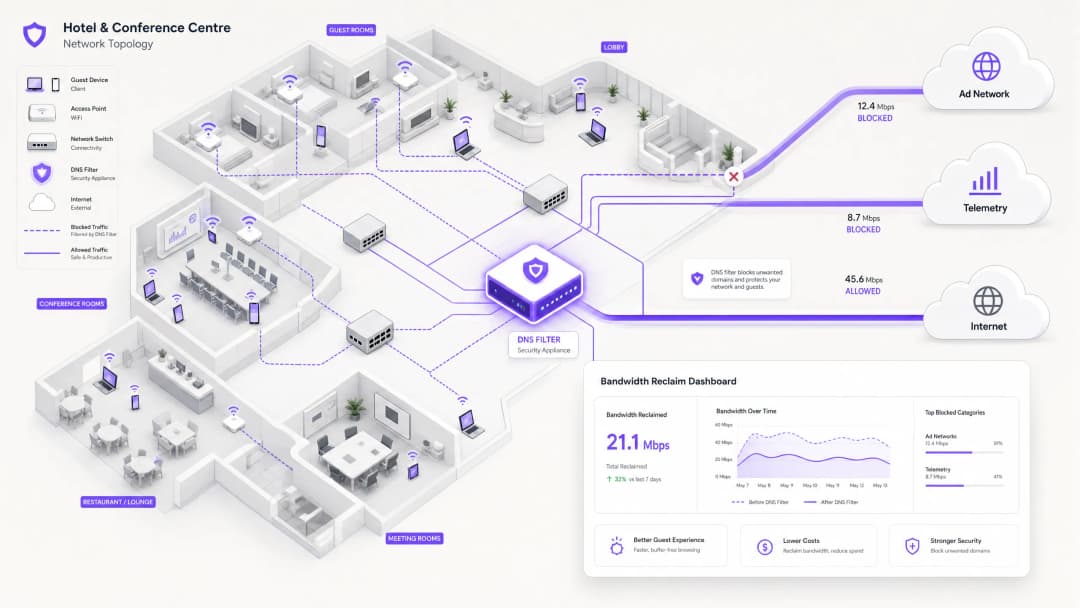
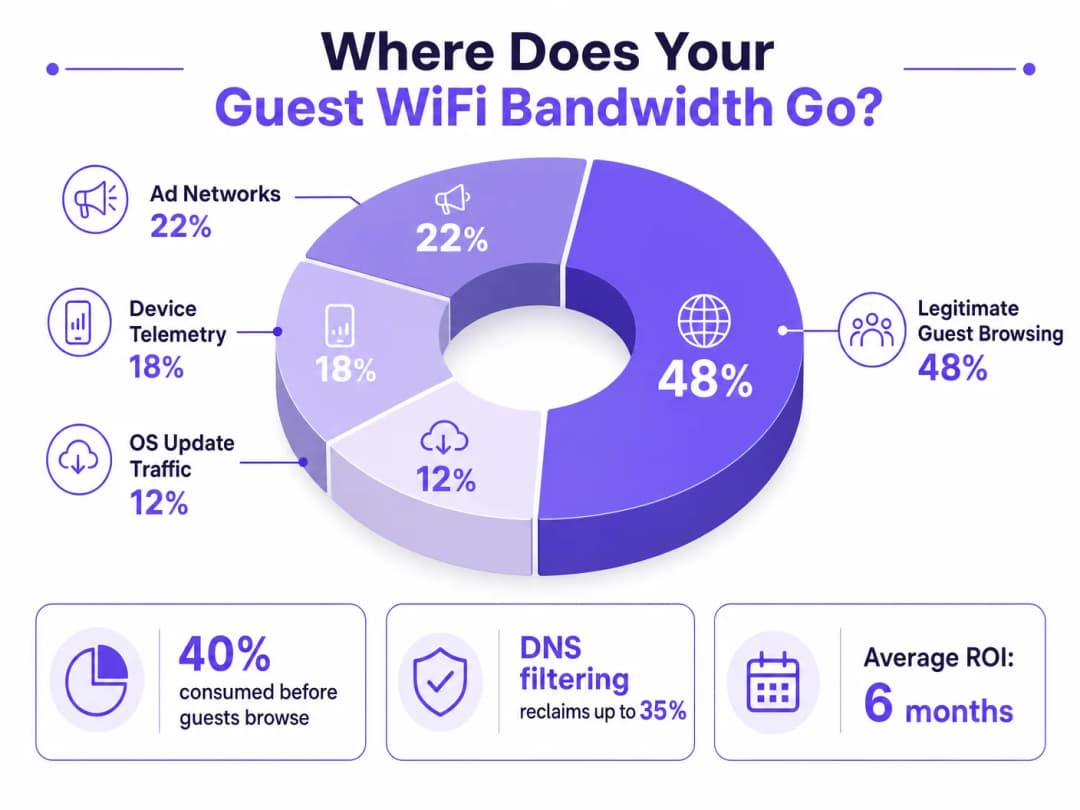
For IT Directors and Operations Managers overseeing high-density venues, ensuring a reliable Guest WiFi experience is a constant battle against network congestion. While legacy approaches focus on increasing overall bandwidth or deploying additional access points, the root cause of slow throughput often lies not in legitimate user traffic, but in the hidden layer of background data. In modern environments — from sprawling Hospitality complexes to high-footfall Retail spaces — up to 40% of public WiFi bandwidth is consumed by device telemetry, programmatic ad networks, and automated OS updates before a guest even opens a browser.
This technical reference guide provides a definitive methodology for diagnosing this congestion and implementing strategic mitigation. By deploying network-level DNS filtering and Response Policy Zones (RPZ), enterprise network architects can reclaim significant bandwidth, reduce latency, and dramatically improve the end-user experience without incurring the capital expenditure of infrastructure upgrades. We will explore the technical architecture of these solutions, real-world implementation case studies, and the measurable ROI of reclaiming your network.
Technical Deep-Dive
The Anatomy of Background Congestion
When a guest device authenticates to a public network, it immediately initiates a barrage of background connections. These connections are primarily driven by three categories of traffic that, in aggregate, constitute what network engineers call the phantom load — bandwidth consumed by the network before any deliberate guest activity occurs.
1. Device Telemetry and Analytics
Modern operating systems (iOS, Android, Windows) and installed applications constantly transmit usage data, location metrics, crash reports, and behavioural analytics to remote servers. In a dense environment such as a Transport hub or conference centre, thousands of devices simultaneously transmitting small but frequent telemetry payloads can exhaust available wireless airtime and overwhelm NAT tables. A single iOS device can generate upwards of 200 distinct background DNS queries within the first 60 seconds of connecting to an unmetered network.
2. Programmatic Ad Networks
Many free applications rely on programmatic advertising ecosystems. The moment a device detects an unmetered WiFi connection, these apps begin pre-fetching video ads, high-resolution display banners, and tracking scripts from ad exchange platforms. This traffic is both high-bandwidth and latency-sensitive, and it will aggressively compete for airtime with legitimate guest browsing. Analysis of public venue networks consistently shows that programmatic ad traffic accounts for 15–22% of total WAN utilisation during peak hours.
3. Automated OS and Application Updates
Without proper traffic shaping, devices will attempt to download large OS patches and application updates as soon as they detect an unmetered WiFi connection. A single iOS major update can be 3–5 GB. In a 500-device environment, a simultaneous update trigger — common when a new OS version is released — can saturate even a 1 Gbps WAN link within minutes.
Why Traditional Approaches Fall Short
The conventional response to guest WiFi congestion is to increase WAN bandwidth or deploy additional access points. While both measures have their place, neither addresses the phantom load. Adding more bandwidth simply provides more capacity for background traffic to consume. Deep Packet Inspection (DPI), the other traditional tool, is increasingly ineffective: the widespread adoption of TLS 1.3 and end-to-end encryption means that the majority of traffic payloads are opaque to inspection engines. You cannot throttle what you cannot classify.
For a broader discussion of how wireless frequencies interact with high-density deployments, see our guide on Wi-Fi Frequencies: A Guide to Wi-Fi Frequencies in 2026 .
DNS Filtering: The Efficient Countermeasure
The modern, scalable solution is DNS filtering at the network edge. Rather than inspecting traffic payloads, DNS filtering operates at the resolution layer — preventing connections from being established in the first place.
When a device requests access to a known ad network or telemetry domain, the DNS resolver checks the request against a Response Policy Zone (RPZ). If the domain appears in the blocklist, the resolver returns an NXDOMAIN (Non-Existent Domain) response, or sinkholes the traffic to a local null IP address. The connection is terminated before the TCP handshake occurs, preserving both wireless airtime and WAN bandwidth. This approach is computationally inexpensive, scales linearly with resolver capacity, and is unaffected by payload encryption.

The Security Dimension
DNS filtering delivers a significant secondary benefit: security. By blocking known malware Command and Control (C2) domains, phishing infrastructure, and exploit kit delivery networks at the DNS layer, the guest network becomes substantially more defensible. This is directly relevant to compliance obligations under frameworks such as PCI DSS (which requires network segmentation and monitoring for cardholder data environments) and GDPR (which mandates appropriate technical measures to protect personal data). For a detailed treatment of audit trail requirements in this context, see Explain what is audit trail for IT Security in 2026 .
For organisations managing educational environments where ad blocking also serves a safeguarding function, the principles covered in Minimising Student Distractions with Network-Level Ad Blocking are directly applicable.
Hai domande sulla tua configurazione specifica?
Il nostro team collabora con gestori di sedi, responsabili IT e ingegneri di rete in 80.000 sedi. Prenota una chiamata di 20 minuti e ti mostreremo come altri professionisti come te hanno risolto il problema.
Implementation Guide
Deploying a robust DNS filtering architecture requires careful planning to avoid disrupting legitimate guest services. The implementation should follow a phased approach.
Phase 1: Baseline Assessment and Visibility
Before implementing any blocks, establish a baseline of current traffic patterns. Utilise WiFi Analytics to identify the top bandwidth-consuming domains and categories over a representative 7–14 day period. This audit phase is critical for understanding the specific traffic profile of your venue and for building the business case for the investment. Key metrics to capture include:
| Metric | Target Baseline | Notes |
|---|---|---|
| Top 20 DNS domains by query volume | Full list | Identify telemetry and ad domains |
| WAN utilisation by category | % split | Quantify the phantom load |
| Peak concurrent device count | Number | Size resolver infrastructure |
| DNS query failure rate | < 0.1% | Establish pre-deployment benchmark |
Phase 2: Staged RPZ Deployment
Begin by deploying the RPZ in log-only mode. This allows you to verify the accuracy of your blocklists without impacting the user experience. Focus on high-confidence categories first:
- Known Malware and C2 Domains: Immediate security benefit with near-zero risk of false positives. Use threat intelligence feeds from reputable providers.
- High-Bandwidth Programmatic Ad Networks: Target the major video ad exchange platforms. These are well-documented and unlikely to host legitimate content.
- Aggressive Telemetry Endpoints: Block non-essential tracking domains. Maintain a careful allow-list for domains required for captive portal authentication flows.
Once log-only mode confirms acceptable false positive rates (target < 0.5% of queries), move to enforcement mode.
Phase 3: Traffic Shaping and QoS Integration
For traffic that cannot be outright blocked (e.g., OS updates from Apple, Microsoft, and Google), implement Quality of Service (QoS) policies. Rate-limit update servers to a defined ceiling — typically 10–15% of total WAN capacity — ensuring that interactive guest traffic (web browsing, VoIP, video conferencing) receives priority queuing. This is particularly important for Healthcare environments where clinical staff may share a network segment with guests.
For guidance on optimising broader network environments, including office and mixed-use deployments, see Office Wi-Fi: Optimize Your Modern Office Wi-Fi Network .
Best Practices
Maintain Explicit Allow-lists for Critical Services. Ensure that domains essential for captive portal authentication, payment gateways (PCI DSS compliance), and core venue operations are explicitly permitted. A misconfigured blocklist that breaks the login flow will generate immediate and significant support load.
Communicate the Policy Transparently. Your Terms of Service should state that network traffic is managed to ensure a high-quality experience for all users. This is both a legal best practice under GDPR and a reasonable expectation-setting measure for guests.
Automate Blocklist Updates. The landscape of ad networks and telemetry domains shifts constantly. Threat intelligence feeds and RPZ lists must be updated dynamically — ideally on a sub-24-hour cycle — to remain effective.
Address DNS Evasion Proactively. Implement firewall rules to intercept and redirect all outbound port 53 (UDP and TCP) traffic to the local resolver. This prevents clients from bypassing filtering by hardcoding external DNS servers.
Plan for DNS over HTTPS (DoH). As DoH adoption increases, clients may route DNS queries over HTTPS to bypass local resolvers entirely. Evaluate whether to block known DoH providers (e.g., dns.google, cloudflare-dns.com) or to deploy a transparent DoH proxy that enforces local policy.
Align with IEEE 802.1X and WPA3. Ensure that your DNS filtering architecture is compatible with your authentication framework. In environments using IEEE 802.1X with RADIUS-based authentication, DNS filtering policies can be applied per VLAN or per user group, enabling granular control.
Troubleshooting & Risk Mitigation
Common Failure Modes
| Failure Mode | Symptom | Mitigation |
|---|---|---|
| Over-blocking (CDN collision) | Broken webpages, missing images | Granular blocklists; rapid allow-listing process |
| DNS evasion (hardcoded resolvers) | Filtering bypassed by specific apps | Firewall redirect rules for port 53 |
| DoH bypass | Filtering bypassed by modern browsers | Block known DoH providers or deploy DoH proxy |
| Resolver performance bottleneck | Increased DNS latency across all clients | Scale resolver infrastructure; implement anycast |
| Captive portal breakage | Guests cannot authenticate | Explicit allow-list for portal domains and OS detection endpoints |
| Stale blocklists | New ad domains not blocked | Automate feed updates; monitor query logs for new high-volume domains |
Security Incident Response
If a guest device is identified as communicating with a known malware C2 domain (visible in DNS query logs), the RPZ will automatically block further communication. Ensure your incident response process includes a workflow for reviewing these events, as they may indicate a compromised device that requires isolation from the guest VLAN.
ROI & Business Impact
Implementing network-level DNS filtering delivers measurable, quantifiable business outcomes across multiple dimensions.
Bandwidth Reclamation and CapEx Deferral. Venues typically reclaim 20–40% of their total WAN bandwidth. This directly translates to cost savings by deferring the need for expensive circuit upgrades. For a venue currently paying for a 500 Mbps leased line, reclaiming 30% of capacity is equivalent to gaining 150 Mbps of effective throughput at zero additional cost.
Improved Guest Satisfaction and NPS. By eliminating background congestion, the perceived speed and reliability of the Guest WiFi improves dramatically. Reduced latency and consistent throughput lead to higher Net Promoter Scores and fewer operational support escalations.
Enhanced Security and Compliance Posture. Blocking malware and phishing domains at the DNS layer significantly reduces the risk of a security breach originating from the guest network. This directly supports compliance with PCI DSS network segmentation requirements and GDPR's obligation to implement appropriate technical security measures.
Operational Efficiency. Automated DNS filtering reduces the manual workload on network operations teams. Rather than reactively responding to congestion events, the network proactively manages its own traffic profile.
| Outcome | Typical Range | Measurement Method |
|---|---|---|
| Bandwidth reclaimed | 20–40% of WAN capacity | Before/after WAN utilisation monitoring |
| DNS query block rate | 15–35% of all queries | Resolver query logs |
| Guest satisfaction improvement | +8–15 NPS points | Post-stay/post-visit surveys |
| CapEx deferral | 1–3 years on circuit upgrade | Cost modelling |
| Security incident reduction | 40–60% fewer C2 detections | SIEM correlation |
By treating the network not just as a pipe, but as an intelligent, filtered gateway, IT leaders can deliver a superior, secure, and cost-effective connectivity experience — one that scales with venue growth without proportional infrastructure investment.
Definizioni chiave
Response Policy Zone (RPZ)
Un meccanismo nei server DNS che consente la modifica delle risposte DNS in base a una politica definita. Quando un dominio interrogato corrisponde a una voce nella RPZ, il resolver può restituire una risposta sintetica (ad es. NXDOMAIN o un IP sinkhole) anziché la risposta reale.
Il principale meccanismo tecnico per l'implementazione del filtraggio DNS a livello di rete. I team IT configurano le RPZ sui loro resolver interni per bloccare le reti pubblicitarie, i domini malware e gli endpoint di telemetria senza richiedere software lato client.
Deep Packet Inspection (DPI)
Una forma di filtraggio dei pacchetti di rete che esamina il payload dei dati di un pacchetto mentre passa attraverso un punto di ispezione, cercando la non conformità del protocollo, contenuti specifici o criteri definiti.
Tradizionalmente utilizzato per la classificazione e lo shaping del traffico. Sempre più limitato dall'adozione diffusa della crittografia end-to-end TLS 1.3, che rende i payload opachi. Il filtraggio DNS è l'alternativa preferita per gli ambienti con traffico crittografato.
NXDOMAIN
Un codice di risposta DNS (RCODE 3) che indica che il nome di dominio richiesto non esiste nello spazio dei nomi DNS.
Restituito da un resolver DNS di filtraggio per bloccare intenzionalmente una connessione a un dominio indesiderato. L'applicazione client riceve questa risposta e abbandona il tentativo di connessione, impedendo il consumo di banda.
DNS over HTTPS (DoH)
Un protocollo per eseguire la risoluzione DNS tramite il protocollo HTTPS (RFC 8484), crittografando le query e le risposte DNS tra il client e un resolver compatibile con DoH.
Può aggirare il filtraggio DNS della rete locale se i client sono configurati per utilizzare provider DoH esterni. Gli amministratori di rete devono implementare regole firewall o proxy per il traffico DoH per far rispettare le politiche RPZ locali.
Quality of Service (QoS)
Un insieme di meccanismi di rete che controllano la prioritizzazione del traffico, la limitazione della velocità e l'accodamento per garantire le prestazioni delle applicazioni critiche.
Utilizzato insieme al filtraggio DNS per gestire il traffico legittimo ma ad alta intensità di banda (ad es. aggiornamenti del sistema operativo) che non può essere bloccato. La QoS garantisce che il traffico interattivo degli ospiti riceva la priorità rispetto ai trasferimenti in background di grandi dimensioni.
Telemetry
La raccolta e la trasmissione automatizzata di dati operativi dai dispositivi ai server remoti per il monitoraggio, l'analisi e la diagnostica.
Nel contesto del WiFi per gli ospiti, la telemetria dei dispositivi provenienti da sistemi operativi mobili e applicazioni può consumare silenziosamente il 15-20% della larghezza di banda disponibile. È un obiettivo primario per il filtraggio DNS nelle implementazioni di reti pubbliche.
DNS Sinkholing
Una tecnica in cui un server DNS è configurato per restituire un indirizzo IP falso (in genere un indirizzo nullo locale) per domini specifici, reindirizzando il traffico lontano dalla destinazione prevista.
Utilizzato per neutralizzare il traffico malware C2 e bloccare in modo aggressivo le reti pubblicitarie ad alta larghezza di banda. Più definitivo delle risposte NXDOMAIN, poiché consente al server sinkhole di registrare i tentativi di connessione per l'analisi della sicurezza.
Airtime Fairness
Una funzionalità di rete wireless che alloca parità di accesso al mezzo wireless tra tutti i client connessi, indipendentemente dalle loro singole velocità di trasmissione dati.
Critico in ambienti ad alta densità. Senza airtime fairness, un singolo dispositivo lento (ad es. un client 802.11g più vecchio) può consumare in modo sproporzionato il tempo di trasmissione radio, degradando il throughput per tutti gli altri client. Il traffico di telemetria in background proveniente da molti dispositivi esacerba questo effetto.
Phantom Load
Larghezza di banda consumata da processi in background automatizzati sui dispositivi connessi prima che si verifichi qualsiasi attività intenzionale da parte dell'utente.
Il termine collettivo per la telemetria, il pre-fetching delle reti pubblicitarie e il traffico di aggiornamento del sistema operativo. Comprendere e quantificare il phantom load è il primo passo in qualsiasi diagnosi di congestione del WiFi per gli ospiti.
Esempi pratici
Un resort da 400 camere riscontra una grave congestione della rete ogni sera tra le 19:00 e le 22:00. Il collegamento WAN da 1 Gbps è saturo e gli ospiti si lamentano della lentezza dello streaming e delle chiamate VoIP interrotte. Il Direttore IT deve identificare la causa principale e implementare una soluzione senza aggiornare il circuito.
Fase 1 — Analisi del Traffico: Implementare un analizzatore di flussi di rete (NetFlow/IPFIX) sul router principale ed eseguirlo per 5 giorni durante i periodi di picco e non di picco. Correlare con i log delle query DNS del resolver esistente. L'analisi rivela che il 35% del traffico serale è destinato a note reti pubblicitarie video programmatiche (DoubleClick, AppNexus) e server di aggiornamento automatico delle app (Apple Software Update, Google Play). La navigazione legittima degli ospiti rappresenta solo il 52% del traffico totale.
Fase 2 — Implementazione del Filtraggio DNS: Configurare il firewall centrale per reindirizzare tutte le query DNS della VLAN degli ospiti (porta UDP/TCP 53) a un resolver abilitato RPZ ospitato localmente. Importare una blocklist curata che copra le reti pubblicitarie e i domini di telemetria identificati. Eseguire in modalità solo log per 48 ore per convalidare i tassi di falsi positivi.
Fase 3 — Applicazione delle Policy: Dopo aver convalidato un tasso di falsi positivi inferiore allo 0,3%, passare alla modalità di applicazione. Contemporaneamente, implementare una policy QoS che limiti la velocità dei server di aggiornamento Apple e Google a un tetto combinato di 80 Mbps durante la fascia oraria 18:00–23:00.
Fase 4 — Convalida: Monitorare l'utilizzo della WAN nei 7 giorni successivi. L'utilizzo di picco scende dal 98% al 61%, risolvendo i reclami degli ospiti. L'hotel posticipa l'aggiornamento pianificato del circuito di circa 18 mesi.
Un grande centro congressi ospita un vertice tecnologico con 5.000 partecipanti. Durante il keynote, la rete WiFi diventa completamente inutilizzabile. L'analisi post-incidente mostra che migliaia di dispositivi hanno tentato contemporaneamente di scaricare un importante aggiornamento iOS rilasciato quella mattina.
Mitigazione Immediata (Giorno dell'Evento): Il team delle operazioni di rete identifica il picco tramite il monitoraggio in tempo reale delle query DNS. Applicano immediatamente il sinkholing ai domini specifici di aggiornamento software Apple (mesu.apple.com, appldnld.apple.com, updates.cdn-apple.com) a livello DNS. Entro 4 minuti, l'utilizzo della WAN scende dal 99% al 68% e la rete si stabilizza.
Risoluzione a Breve Termine (Stesso Evento): Viene applicata una policy QoS per limitare tutto il traffico di aggiornamento rimanente a 50 Mbps per la durata dell'evento.
Strategia a Lungo Termine (Post-Evento): Il team di rete implementa una policy QoS dinamica che si attiva automaticamente quando l'utilizzo totale della WAN supera il 75%, limitando i server di aggiornamento noti al 10% della capacità totale. Viene creata una checklist pre-evento che include il sinkholing temporaneo dei principali domini di aggiornamento nelle 2 ore precedenti e successive alle sessioni di alto profilo. Il team si iscrive inoltre ai feed di notifica del rilascio degli aggiornamenti di Apple e Microsoft per anticipare futuri eventi di picco.
Domande di esercitazione
Q1. Sei l'IT Manager di una catena di vendita al dettaglio nazionale. Dopo aver distribuito una soluzione di filtraggio DNS in 50 negozi, diversi direttori di negozio segnalano che la pagina di login del Captive Portal non si carica per gli ospiti. Il team di supporto sta ricevendo un volume elevato di chiamate. Qual è la causa più probabile e quale l'intervento di ripristino immediato?
Suggerimento: Considera l'intera catena di dipendenze di un moderno flusso di autenticazione del Captive Portal, inclusi i meccanismi di rilevamento del Captive Portal a livello di sistema operativo.
Visualizza risposta modello
La causa più probabile è un blocco eccessivo. Il filtro DNS sta bloccando un dominio necessario per il funzionamento del Captive Portal. I moderni sistemi operativi mobili utilizzentano domini specifici per rilevare i Captive Portal (ad es. captive.apple.com per iOS, connectivitycheck.gstatic.com per Android). Se questi sono bloccati, il sistema operativo non avvierà il browser del Captive Portal e l'ospite non vedrà alcuna richiesta di login. Inoltre, il portale stesso potrebbe dipendere da un CDN o da un provider di autenticazione di terze parti (ad es. social login tramite Facebook o Google) i cui domini sono stati inavvertitamente bloccati.
Ripristino immediato: esamina i log delle query DNS per individuare le risposte NXDOMAIN provenienti dalla sottorete ospiti durante la fase di autenticazione. Identifica tutti i domini bloccati che vengono interrogati prima di un login andato a buon fine. Aggiungi questi domini alla allow-list globale. Implementa un modello di allow-list standard per le distribuzioni di Captive Portal che includa tutti i principali endpoint di rilevamento del sistema operativo e i domini dei provider di autenticazione più comuni.
Q2. Un network architect di uno stadio nota che, nonostante l'implementazione di un filtraggio DNS aggressivo, l'utilizzo della WAN rimane criticamente elevato durante le partite. Ulteriori indagini rivelano un volume costantemente elevato di traffico sulla porta UDP 443 che non corrisponde ad alcun dominio bloccato nei log DNS. Cosa sta succedendo e come dovrebbe essere gestito?
Suggerimento: Considera i moderni protocolli di trasporto e il modo in care interagiscono con i controlli a livello DNS.
Visualizza risposta modello
L'elevato volume di traffico sulla porta UDP 443 indica l'uso di QUIC (HTTP/3). QUIC è un protocollo di trasporto basato su UDP utilizzato dalle principali piattaforme (Google, Meta, YouTube) che bypassa i tradizionali proxy basati su TCP e i motori DPI. Aspetto ancora più critico, i client che utilizzano QUIC potrebbero anche utilizzare il DNS over HTTPS (DoH) per risolvere i domini, bypassando completamente il risolutore RPZ locale e rendendo il filtraggio DNS inefficace per tali client.
Per risolvere questo problema: in primo luogo, implementa regole firewall per bloccare il traffico DoH in uscita verso i noti provider DoH pubblici (Google, Cloudflare, NextDNS) sulla porta TCP/UDP 443 in base all'IP di destinazione, forzando i client a ripiegare sul risolutore locale. In secondo luogo, valuta la possibilità di bloccare completamente la porta UDP 443 in uscita (o di limitarne drasticamente la velocità) per forzare i client QUIC a ripiegare su HTTP/2 basato su TCP, che è soggetto alle policy di gestione del traffico esistenti. In terzo luogo, verifica se sia possibile distribuire un proxy DoH trasparente per intercettare e ispezionare le query DoH applicando al contempo le policy RPZ locali.
Q3. Stai progettando una policy QoS per la rete WiFi ospiti di un grande ospedale pubblico. La rete è condivisa tra dispositivi di intrattenimento dei pazienti, dispositivi personali dei visitatori e un piccolo numero di membri del personale clinico che utilizzano softphone VoIP sui propri cellulari personali. Dai la priorità ai seguenti tipi di traffico: VoIP (SIP/RTP), navigazione web degli ospiti (HTTP/HTTPS), aggiornamenti Windows/iOS e streaming video (Netflix/YouTube).
Suggerimento: Considera sia la sensibilità alla latenza sia l'impatto aziendale/clinico di ciascun tipo di traffico. Considera anche il contesto normativo di un ambiente sanitario.
Visualizza risposta modello
Priorità 1 — VoIP (SIP/RTP): Strict Priority Queuing (Expedited Forwarding, DSCP EF). Il VoIP è altamente sensibile alla latenza (target < 150ms unidirezionale) e al jitter (target < 30ms). Una perdita di pacchetti superiore all'1% causa un degrado udibile. In un contesto clinico, una chiamata interrotta potrebbe avere implicazioni per la sicurezza dei pazienti.
Priorità 2 — Navigazione Web Ospiti (HTTP/HTTPS): Assured Forwarding (AF31). Questo è il caso d'uso principale previsto sia per i pazienti che per i visitatori. Richiede una reattività ragionevole ma tollera una latenza moderata.
Priorità 3 — Streaming Video (Netflix/YouTube): Limitazione della velocità per client (es. limite di 3–5 Mbps) con Assured Forwarding (AF21). Sebbene sia importante per l'esperienza dei pazienti durante le lunghe degenze, lo streaming senza limiti saturerà il collegamento. Un limite per client garantisce un accesso equo. Considera policy basate sulla fascia oraria per allentare i limiti durante le ore non di punta.
Priorità 4 — Aggiornamenti OS/App (Classe Scavenger, DSCP CS1): Priorità più bassa, queuing best-effort, con un limite di velocità aggregato (es. 50 Mbps totali per tutto il traffico di aggiornamento). Si tratta di attività in background senza sensibilità alla latenza. Dovrebbero consumare solo la capacità residua. In un ambiente sanitario, valuta anche se la rete ospiti è completamente isolata dai sistemi clinici — in caso contrario, la gestione del traffico di aggiornamento diventa sia un problema di sicurezza che di larghezza di banda.
Continua a leggere questa serie
Cisco Catalyst WLC e guest WiFi: configurazione del captive portal con Purple
Come funziona un controller wireless LAN Cisco Catalyst 9800 (IOS-XE) con il guest WiFi di Purple: autenticazione web esterna, RADIUS e walled garden, con un link alla guida di configurazione passo-passo di Purple per l'esatta configurazione.
Gestione del WiFi per gli ospiti degli hotel: integrazione di PMS, portali e standard di marca
Questa guida tecnica illustra in dettaglio come progettare reti WiFi per hotel di livello enterprise, concentrandosi sulla segmentazione VLAN, sull'integrazione del PMS per la gestione automatizzata delle sessioni e sull'ottimizzazione del Captive Portal per l'acquisizione dei dati conforme al GDPR.
Come implementare limitazioni di tempo e larghezza di banda sul WiFi per gli ospiti
Una guida tecnica di riferimento autorevole sull'implementazione di limitazioni di tempo e larghezza di banda sulle reti WiFi per ospiti aziendali. Questa guida fornisce progetti architetturali pratici, configurazioni indipendenti dai fornitori e casi di studio reali per aiutare i responsabili IT a bilanciare prestazioni di rete, conformità di sicurezza ed esperienza dei visitatori.
Hai domande sulla tua configurazione specifica?
Il nostro team collabora con gestori di sedi, responsabili IT e ingegneri di rete in 80.000 sedi. Prenota una chiamata di 20 minuti e ti mostreremo come altri professionisti come te hanno risolto il problema.