
আমাদের গেস্ট WiFi এত ধীরগতির কেন? নেটওয়ার্ক কনজেশন নির্ণয় করা
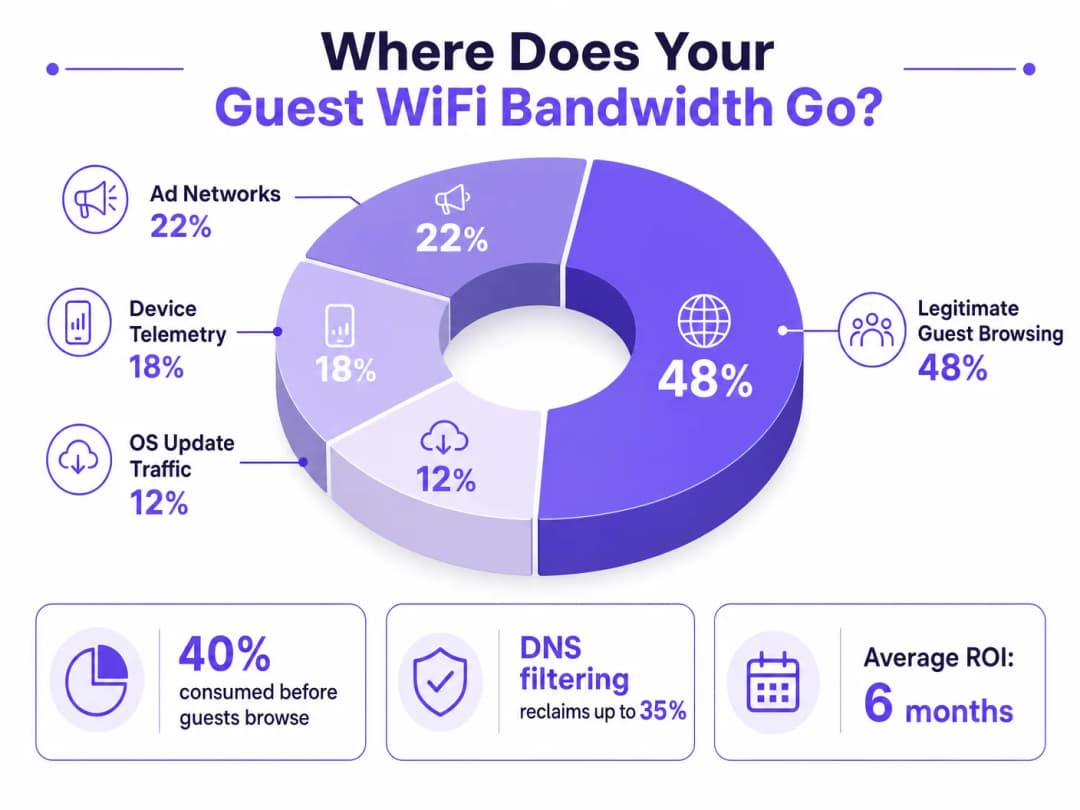
এই গাইডটি গেস্ট WiFi কনজেশনের লুকানো চালকগুলো নির্ণয় করে - ব্যাকগ্রাউন্ড টেলিমেট্রি, প্রোগ্রাম্যাটিক অ্যাড নেটওয়ার্ক এবং স্বয়ংক্রিয় OS আপডেট - যা সম্মিলিতভাবে একজন গেস্ট ব্রাউজার খোলার আগেই পাবলিক WiFi ব্যান্ডউইথের ৪০% পর্যন্ত গ্রাস করে। এটি DNS ফিল্টারিং এবং QoS পলিসিগুলোর জন্য একটি পর্যায়ভিত্তিক, ভেন্ডর-নিরপেক্ষ বাস্তবায়ন ফ্রেমওয়ার্ক প্রদান করে যা সেই ব্যান্ডউইথ পুনরুদ্ধার করে, গেস্ট অভিজ্ঞতা উন্নত করে এবং পরিমাপযোগ্য ROI প্রদান করে। এটি হসপিটালিটি, রিটেইল, ইভেন্ট এবং পাবলিক-সেক্টর পরিবেশের IT ডিরেক্টর এবং অপারেশন ম্যানেজারদের লক্ষ্য করে তৈরি।
এই গাইডটি শুনুন
পডকাস্ট ট্রান্সক্রিপ্ট দেখুন
আমাদের মূল সিরিজের অংশ: Guest WiFi Guide →
এক্সিকিউটিভ সামারি
উচ্চ-ঘনত্বের ভেন্যুগুলো তদারকি করা IT ডিরেক্টর এবং অপারেশন ম্যানেজারদের জন্য, একটি নির্ভরযোগ্য গেস্ট WiFi অভিজ্ঞতা নিশ্চিত করা নেটওয়ার্ক কনজেশনের বিরুদ্ধে একটি অবিরাম লড়াই। যদিও ঐতিহ্যবাহী পদ্ধতিগুলো সামগ্রিক ব্যান্ডউইথ বাড়ানো বা অতিরিক্ত অ্যাক্সেস পয়েন্ট স্থাপনের উপর ফোকাস করে, ধীরগতির থ্রুপুটের মূল কারণটি প্রায়শই বৈধ ব্যবহারকারীর ট্রাফিকের মধ্যে থাকে না, বরং ব্যাকগ্রাউন্ড ডেটার লুকানো স্তরের মধ্যে থাকে। আধুনিক পরিবেশে — বিস্তৃত হসপিটালিটি কমপ্লেক্স থেকে শুরু করে উচ্চ-ফুটফল বিশিষ্ট রিটেইল স্পেস পর্যন্ত — একজন গেস্ট ব্রাউজার খোলার আগেই পাবলিক WiFi ব্যান্ডউইথের ৪০% পর্যন্ত ডিভাইস টেলিমেট্রি, প্রোগ্রাম্যাটিক অ্যাড নেটওয়ার্ক এবং স্বয়ংক্রিয় OS আপডেট দ্বারা গ্রাস করা হয়।
এই টেকনিক্যাল রেফারেন্স গাইডটি এই কনজেশন নির্ণয় এবং কৌশলগত প্রশমন বাস্তবায়নের জন্য একটি সুনির্দিষ্ট পদ্ধতি প্রদান করে। নেটওয়ার্ক-স্তরের DNS ফিল্টারিং এবং Response Policy Zones (RPZ) স্থাপন করে, এন্টারপ্রাইজ নেটওয়ার্ক আর্কিটেক্টরা অবকাঠামো আপগ্রেডের মূলধনী ব্যয় (CapEx) ছাড়াই উল্লেখযোগ্য ব্যান্ডউইথ পুনরুদ্ধার করতে পারেন, লেটেন্সি কমাতে পারেন এবং নাটকীয়ভাবে শেষ-ব্যবহারকারীর অভিজ্ঞতা উন্নত করতে পারেন। আমরা এই সমাধানগুলোর টেকনিক্যাল আর্কিটেকচার, বাস্তব-বিশ্বের বাস্তবায়ন কেস স্টাডি এবং আপনার নেটওয়ার্ক পুনরুদ্ধারের পরিমাপযোগ্য ROI অন্বেষণ করব।
টেকনিক্যাল ডিপ-ডাইভ
ব্যাকগ্রাউন্ড কনজেশনের শারীরস্থান
যখন একটি গেস্ট ডিভাইস একটি পাবলিক নেটওয়ার্কে প্রমাণীকরণ (authenticate) করে, তখন এটি অবিলম্বে ব্যাকগ্রাউন্ড সংযোগের একটি ব্যারেজ শুরু করে। এই সংযোগগুলো মূলত তিন শ্রেণীর ট্রাফিক দ্বারা চালিত হয় যা সামগ্রিকভাবে নেটওয়ার্ক ইঞ্জিনিয়ারদের ভাষায় ফ্যান্টম লোড (phantom load) গঠন করে — কোনো ইচ্ছাকৃত গেস্ট অ্যাক্টিভিটি ঘটার আগেই নেটওয়ার্ক দ্বারা গ্রাস করা ব্যান্ডউইথ।
১. ডিভাইস টেলিমেট্রি এবং অ্যানালিটিক্স
আধুনিক অপারেটিং সিস্টেম (iOS, Android, Windows) এবং ইনস্টল করা অ্যাপ্লিকেশনগুলো ক্রমাগত রিমোট সার্ভারে ব্যবহারের ডেটা, লোকেশন মেট্রিক্স, ক্র্যাশ রিপোর্ট এবং আচরণগত অ্যানালিটিক্স প্রেরণ করে। একটি ঘন পরিবেশ যেমন একটি পরিবহন হাব বা কনফারেন্স সেন্টারে, হাজার হাজার ডিভাইস একসাথে ছোট কিন্তু ঘন ঘন টেলিমেট্রি পে-লোড প্রেরণ করার ফলে উপলব্ধ ওয়্যারলেস এয়ারটাইম শেষ হয়ে যেতে পারে এবং NAT টেবিলগুলোকে ওভারহোয়েল্ম করতে পারে। একটি একক iOS ডিভাইস একটি আনমিটারড নেটওয়ার্কে সংযুক্ত হওয়ার প্রথম ৬০ সেকেন্ডের মধ্যে ২০০টিরও বেশি স্বতন্ত্র ব্যাকগ্রাউন্ড DNS কোয়েরি তৈরি করতে পারে।
২. প্রোগ্রাম্যাটিক অ্যাড নেটওয়ার্ক
অনেক ফ্রি অ্যাপ্লিকেশন প্রোগ্রাম্যাটিক বিজ্ঞাপন ইকোসিস্টেমের উপর নির্ভর করে। একটি ডিভাইস যখনই একটি আনমিটারড WiFi সংযোগ সনাক্ত করে, এই অ্যাপগুলো অ্যাড এক্সচেঞ্জ প্ল্যাটফর্ম থেকে ভিডিও বিজ্ঞাপন, উচ্চ-রেজোলিউশনের ডিসপ্লে ব্যানার এবং ট্র্যাকিং স্ক্রিপ্টগুলো প্রি-ফেচ করা শুরু করে। এই ট্রাফিক উচ্চ-ব্যান্ডউইথ এবং লেটেন্সি-সংবেদনশীল উভয়ই, এবং এটি বৈধ গেস্ট ব্রাউজিংয়ের সাথে এয়ারটাইমের জন্য আক্রমণাত্মকভাবে প্রতিযোগিতা করবে। পাবলিক ভেন্যু নেটওয়ার্কগুলোর বিশ্লেষণে ক্রমাগত দেখা গেছে যে পিক আওয়ারের সময় মোট WAN ব্যবহারের ১৫-২২% প্রোগ্রাম্যাটিক অ্যাড ট্রাফিকের কারণে ঘটে।
৩. স্বয়ংক্রিয় OS এবং অ্যাপ্লিকেশন আপডেট
সঠিক ট্রাফিক শেপিং ছাড়া, ডিভাইসগুলো একটি আনমিটারড WiFi সংযোগ সনাক্ত করার সাথে সাথেই বড় OS প্যাচ এবং অ্যাপ্লিকেশন আপডেটগুলো ডাউনলোড করার চেষ্টা করবে। একটি একক iOS মেজর আপডেট ৩-৫ GB হতে পারে। ৫০০-ডিভাইসের পরিবেশে, একটি যুগপৎ আপডেট ট্রিগার — যা একটি নতুন OS সংস্করণ রিলিজ হওয়ার সময় সাধারণ — মিনিটের মধ্যে এমনকি ১ Gbps WAN লিঙ্ককেও সম্পৃক্ত (saturate) করতে পারে।
কেন ঐতিহ্যবাহী পদ্ধতিগুলো ব্যর্থ হয়
গেস্ট WiFi কনজেশনের প্রচলিত প্রতিক্রিয়া হলো WAN ব্যান্ডউইথ বাড়ানো বা অতিরিক্ত অ্যাক্সেস পয়েন্ট স্থাপন করা। যদিও উভয় পদক্ষেপেরই নিজস্ব গুরুত্ব রয়েছে, তবে কোনোটিই ফ্যান্টম লোডের সমাধান করে না। আরও ব্যান্ডউইথ যোগ করা কেবল ব্যাকগ্রাউন্ড ট্রাফিকের গ্রাস করার জন্য আরও বেশি ক্ষমতা প্রদান করে। Deep Packet Inspection (DPI), অন্য ঐতিহ্যবাহী টুলটি ক্রমশ অকার্যকর হয়ে পড়ছে: TLS 1.3 এবং এন্ড-টু-এন্ড এনক্রিপশনের ব্যাপক গ্রহণের অর্থ হলো বেশিরভাগ ট্রাফিক পে-লোড ইন্সপেকশন ইঞ্জিনের কাছে অস্বচ্ছ। আপনি যা শ্রেণীবদ্ধ করতে পারেন না তা থ্রোটল করতে পারবেন না।
ওয়্যারলেস ফ্রিকোয়েন্সিগুলো কীভাবে উচ্চ-ঘনত্বের স্থাপনার সাথে ইন্টারঅ্যাক্ট করে সে সম্পর্কে আরও বিস্তারিত আলোচনার জন্য, আমাদের গাইড WiFi Frequencies: A Guide to WiFi Frequencies in 2026 দেখুন।
DNS ফিল্টারিং: কার্যকর প্রতিরোধমূলক ব্যবস্থা
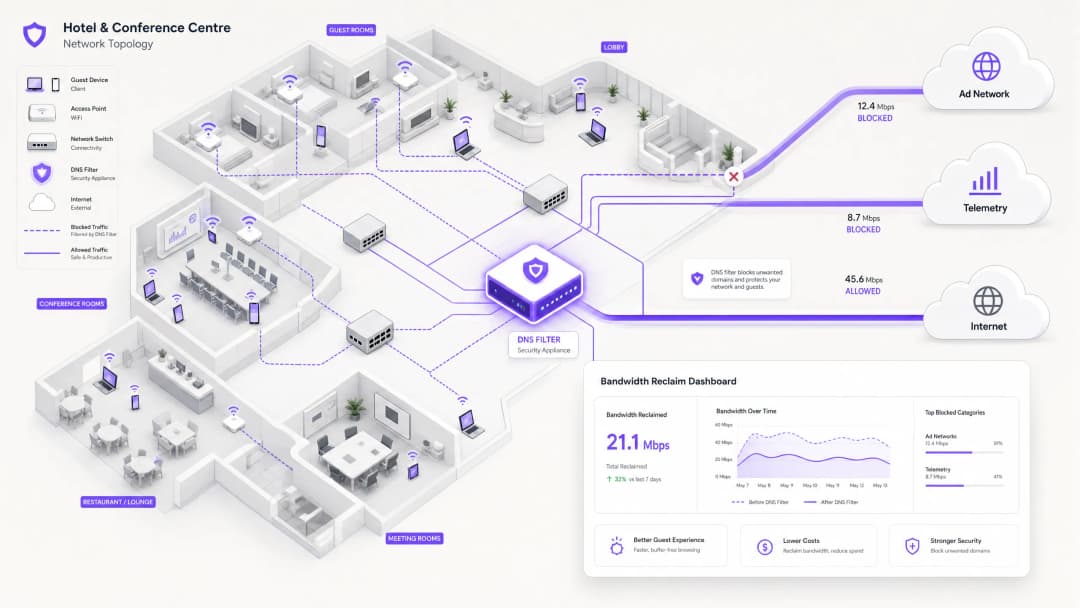
আধুনিক, স্কেলযোগ্য সমাধান হলো নেটওয়ার্কের প্রান্তে DNS ফিল্টারিং। ট্রাফিক পে-লোডগুলো পরীক্ষা করার পরিবর্তে, DNS ফিল্টারিং রেজোলিউশন স্তরে কাজ করে — প্রথম স্থানেই সংযোগ স্থাপন প্রতিরোধ করে।
যখন একটি ডিভাইস কোনো পরিচিত অ্যাড নেটওয়ার্ক বা টেলিমেট্রি ডোমেনে অ্যাক্সেসের অনুরোধ করে, তখন DNS রিজলভার অনুরোধটি একটি Response Policy Zone (RPZ)-এর বিপরীতে পরীক্ষা করে। যদি ডোমেনটি ব্লক তালিকায় উপস্থিত থাকে, তবে রিজলভার একটি NXDOMAIN (অ-বিদ্যমান ডোমেন) প্রতিক্রিয়া প্রদান করে, অথবা ট্রাফিকটিকে একটি স্থানীয় নাল IP ঠিকানায় সিঙ্কহোল (sinkhole) করে। TCP হ্যান্ডশেক হওয়ার আগেই সংযোগটি বন্ধ হয়ে যায়, যা ওয়্যারলেস এয়ারটাইম এবং WAN ব্যান্ডউইথ উভয়ই রক্ষা করে। এই পদ্ধতিটি কম্পিউটেশনালভাবে সাশ্রয়ী, রিজলভার ক্ষমতার সাথে রৈখিকভাবে স্কেল করে এবং পে-লোড এনক্রিপশন দ্বারা প্রভাবিত হয় না।

নিরাপত্তার মাত্রা
DNS ফিল্টারিং একটি গুরুত্বপূর্ণ সেকেন্ডারি সুবিধা প্রদান করে: নিরাপত্তা। DNS স্তরে পরিচিত ম্যালওয়্যার Command and Control (C2) ডোমেন, ফিশিং অবকাঠামো এবং এক্সপ্লয়েট কিট ডেলিভারি নেটওয়ার্কগুলো ব্লক করার মাধ্যমে, গেস্ট নেটওয়ার্কটি যথেষ্ট সুরক্ষিত হয়ে ওঠে। এটি সরাসরি PCI-DSS (যা কার্ডহোল্ডার ডেটা এনভায়রনমেন্টের জন্য নেটওয়ার্ক সেগমেন্টেশন এবং মনিটরিং প্রয়োজন করে) এবং GDPR (যা ব্যক্তিগত ডেটা সুরক্ষার জন্য উপযুক্ত টেকনিক্যাল ব্যবস্থা গ্রহণের নির্দেশ দেয়) এর মতো ফ্রেমওয়ার্কগুলোর অধীনে কমপ্লায়েন্স বাধ্যবাধকতার সাথে প্রাসঙ্গিক। এই প্রসঙ্গে অডিট ট্রেইল প্রয়োজনীয়তার বিস্তারিত ব্যবহারের জন্য, ২০২৬ সালে IT সিকিউরিটির জন্য অডিট ট্রেইল কী তা ব্যাখ্যা করুন দেখুন।
শিক্ষামূলক পরিবেশ পরিচালনাকারী সংস্থাগুলোর জন্য যেখানে অ্যাড ব্লকিং একটি সুরক্ষামূলক কাজও করে, সেখানে নেটওয়ার্ক-স্তরের অ্যাড ব্লকিংয়ের মাধ্যমে শিক্ষার্থীদের বিভ্রান্তি কমানো এ কভার করা নীতিগুলো সরাসরি প্রযোজ্য।
আপনার নির্দিষ্ট সেটআপ নিয়ে কোনো প্রশ্ন আছে?
আমাদের টিম ৮০,০০০ ভেন্যুতে ভেন্যু অপারেটর, IT ম্যানেজার এবং নেটওয়ার্ক ইঞ্জিনিয়ারদের সাথে কাজ করে। একটি ২০ মিনিটের কল বুক করুন এবং আপনার মতো অন্যরা কীভাবে এর সমাধান করেছেন তা আমরা আপনাকে দেখাব।
বাস্তবায়ন নির্দেশিকা
একটি শক্তিশালী DNS ফিল্টারিং আর্কিটেকচার স্থাপনের জন্য সতর্ক পরিকল্পনার প্রয়োজন যাতে বৈধ গেস্ট পরিষেবাগুলো ব্যাহত না হয়। বাস্তবায়নটি একটি পর্যায়ভিত্তিক পদ্ধতি অনুসরণ করা উচিত।
ধাপ ১: বেসলাইন মূল্যায়ন এবং দৃশ্যমানতা
কোনো ব্লক বাস্তবায়ন করার আগে, বর্তমান ট্রাফিক প্যাটার্নের একটি বেসলাইন স্থাপন করুন। একটি প্রতিনিধিত্বমূলক ৭-১৪ দিনের মেয়াদে শীর্ষ ব্যান্ডউইথ-গ্রাসকারী ডোমেন এবং বিভাগগুলো সনাক্ত করতে WiFi Analytics ব্যবহার করুন। এই অডিট পর্বটি আপনার ভেন্যুর নির্দিষ্ট ট্রাফিক প্রোফাইল বোঝার জন্য এবং বিনিয়োগের জন্য বিজনেস কেস তৈরি করার জন্য অত্যন্ত গুরুত্বপূর্ণ। ক্যাপচার করার জন্য মূল মেট্রিক্সগুলোর মধ্যে রয়েছে:
| মেট্রিক | টার্গেট বেসলাইন | নোট |
|---|---|---|
| কোয়েরি ভলিউম অনুসারে শীর্ষ ২০টি DNS ডোমেন | সম্পূর্ণ তালিকা | টেলিমেট্রি এবং অ্যাড ডোমেন সনাক্ত করুন |
| বিভাগ অনুসারে WAN ব্যবহার | % বিভাজন | ফ্যান্টম লোড পরিমাপ করুন |
| পিক কনকারেন্ট ডিভাইস সংখ্যা | সংখ্যা | রিজলভার অবকাঠামোর আকার নির্ধারণ করুন |
| DNS কোয়েরি ব্যর্থতার হার | < ০.১% | স্থাপনের পূর্ববর্তী বেঞ্চমার্ক স্থাপন করুন |
ধাপ ২: পর্যায়ভিত্তিক RPZ স্থাপন
লগ-অনলি মোডে RPZ স্থাপন করে শুরু করুন। এটি আপনাকে ব্যবহারকারীর অভিজ্ঞতাকে প্রভাবিত না করেই আপনার ব্লক তালিকার সঠিকতা যাচাই করতে দেয়। প্রথমে উচ্চ-আত্মবিশ্বাসের বিভাগগুলোর উপর ফোকাস করুন:
- পরিচিত ম্যালওয়্যার এবং C2 ডোমেন: প্রায় শূন্য ফলস পজিটিভের ঝুঁকি সহ তাত্ক্ষণিক নিরাপত্তা সুবিধা। নামী সরবরাহকারীদের থেকে থ্রেট ইন্টেলিজেন্স ফিড ব্যবহার করুন।
- উচ্চ-ব্যান্ডউইথ প্রোগ্রাম্যাটিক অ্যাড নেটওয়ার্ক: প্রধান ভিডিও অ্যাড এক্সচেঞ্জ প্ল্যাটফর্মগুলোকে লক্ষ্য করুন। এগুলো সু-নথিভুক্ত এবং এতে বৈধ সামগ্রী থাকার সম্ভাবনা কম।
- আক্রমণাত্মক টেলিমেট্রি এন্ডপয়েন্ট: অপ্রয়োজনীয় ট্র্যাকিং ডোমেনগুলো ব্লক করুন। ক্যাপটিভ পোর্টাল প্রমাণীকরণ প্রবাহের জন্য প্রয়োজনীয় ডোমেনগুলোর জন্য একটি সতর্ক অনুমোদন তালিকা (allow-list) বজায় রাখুন।
একবার লগ-অনলি মোড গ্রহণযোগ্য ফলস পজিটিভ হার (টার্গেট < ০.৫% কোয়েরি) নিশ্চিত করলে, এনফোর্সমেন্ট মোডে যান।
ধাপ ৩: ট্রাফিক শেপিং এবং QoS ইন্টিগ্রেশন
যে ট্রাফিকগুলো সরাসরি ব্লক করা যায় না (যেমন, Apple, Microsoft এবং Google থেকে OS আপডেট), সেগুলোর জন্য Quality of Service (QoS) পলিসি বাস্তবায়ন করুন। আপডেট সার্ভারগুলোকে একটি নির্দিষ্ট সীমায় রেট-লিমিট করুন — সাধারণত মোট WAN ক্ষমতার ১০-১৫% — যাতে ইন্টারেক্টিভ গেস্ট ট্রাফিক (ওয়েব ব্রাউজিং, VoIP, ভিডিও কনফারেন্সিং) অগ্রাধিকার কিউয়িং পায়। এটি বিশেষ করে Healthcare পরিবেশের জন্য গুরুত্বপূর্ণ যেখানে ক্লিনিকাল কর্মীরা গেস্টদের সাথে একটি নেটওয়ার্ক সেগমেন্ট শেয়ার করতে পারেন।
অফিস এবং মিশ্র-ব্যবহারের স্থাপনা সহ আরও বিস্তৃত নেটওয়ার্ক পরিবেশ অপ্টিমাইজ করার নির্দেশনার জন্য, Office WiFi: Optimize Your Modern Office WiFi Network দেখুন।
সেরা অনুশীলনসমূহ
গুরুত্বপূর্ণ পরিষেবাগুলোর জন্য স্পষ্ট অনুমোদন তালিকা (Allow-lists) বজায় রাখুন। নিশ্চিত করুন যে ক্যাপটিভ পোর্টাল প্রমাণীকরণ, পেমেন্ট গেটওয়ে (PCI-DSS কমপ্লায়েন্স) এবং মূল ভেন্যু অপারেশনের জন্য প্রয়োজনীয় ডোমেনগুলো স্পষ্টভাবে অনুমোদিত। একটি ভুল কনফিগার করা ব্লক তালিকা যা লগইন প্রবাহকে ব্যাহত করে, তা তাত্ক্ষণিক এবং উল্লেখযোগ্য সাপোর্ট লোড তৈরি করবে।
নীতিটি স্বচ্ছভাবে যোগাযোগ করুন। আপনার ব্যবহারের শর্তাবলীতে (Terms of Service) উল্লেখ করা উচিত যে সমস্ত ব্যবহারকারীর জন্য একটি উচ্চ-মানের অভিজ্ঞতা নিশ্চিত করতে নেটওয়ার্ক ট্রাফিক পরিচালনা করা হয়। এটি GDPR-এর অধীনে একটি আইনি সেরা অনুশীলন এবং গেস্টদের জন্য একটি যুক্তিসঙ্গত প্রত্যাশা নির্ধারণের ব্যবস্থা উভয়ই।
ব্লক তালিকা আপডেট স্বয়ংক্রিয় করুন। অ্যাড নেটওয়ার্ক এবং টেলিমেট্রি ডোমেনের ল্যান্ডস্কেপ ক্রমাগত পরিবর্তিত হয়। কার্যকর থাকার জন্য থ্রেট ইন্টেলিজেন্স ফিড এবং RPZ তালিকাগুলো গতিশীলভাবে আপডেট করতে হবে — আদর্শভাবে ২৪ ঘণ্টার কম চক্রে।
প্রোঅ্যাক্টিভভাবে DNS এভেশন (এড়িয়ে যাওয়া) মোকাবেলা করুন। সমস্ত আউটবাউন্ড পোর্ট ৫৩ (UDP এবং TCP) ট্রাফিককে ইন্টারসেপ্ট করতে এবং স্থানীয় রিজলভারে রিডাইরেক্ট করতে ফায়ারওয়াল নিয়ম বাস্তবায়ন করুন। এটি ক্লায়েন্টদের এক্সটার্নাল DNS সার্ভার হার্ডকোড করে ফিল্টারিং বাইপাস করা প্রতিরোধ করে।
DNS over HTTPS (DoH) এর জন্য পরিকল্পনা করুন। DoH-এর ব্যবহার বৃদ্ধির সাথে সাথে, ক্লায়েন্টরা স্থানীয় রিজলভারগুলোকে সম্পূর্ণরূপে বাইপাস করতে HTTPS-এর মাধ্যমে DNS কোয়েরিগুলো রুট করতে পারে। পরিচিত DoH প্রদানকারীদের (যেমন, dns.google, cloudflare-dns.com) ব্লক করবেন নাকি স্থানীয় নীতি প্রয়োগকারী একটি স্বচ্ছ DoH প্রক্সি স্থাপন করবেন তা মূল্যায়ন করুন।
IEEE 802.1X এবং WPA3 এর সাথে সারিবদ্ধ করুন। নিশ্চিত করুন যে আপনার DNS ফিল্টারিং আর্কিটেকচার আপনার প্রমাণীকরণ ফ্রেমওয়ার্কের সাথে সামঞ্জস্যপূর্ণ। RADIUS-ভিত্তিক প্রমাণীকরণ সহ IEEE 802.1X ব্যবহার করা পরিবেশে, DNS ফিল্টারিং নীতিগুলো প্রতি VLAN বা প্রতি ব্যবহারকারী গ্রুপে প্রয়োগ করা যেতে পারে, যা দানাদার (granular) নিয়ন্ত্রণ সক্ষম করে।
ট্রাবলশুটিং এবং ঝুঁকি প্রশমন
সাধারণ ব্যর্থতার মোডসমূহ
| ব্যর্থতার মোড | লক্ষণ | প্রশমন |
|---|---|---|
| ওভার-ব্লকিং (CDN কলিশন) | ভাঙা ওয়েবপেজ, অনুপস্থিত ছবি | দানাদার ব্লক তালিকা; দ্রুত অনুমোদন তালিকাভুক্তকরণ প্রক্রিয়া |
| DNS এভেশন (হার্ডকোডেড রিজলভার) | নির্দিষ্ট অ্যাপ দ্বারা ফিল্টারিং বাইপাস | পোর্ট ৫৩ এর জন্য ফায়ারওয়াল রিডাইরেক্ট নিয়ম |
| DoH বাইপাস | আধুনিক ব্রাউজার দ্বারা ফিল্টারিং বাইপাস | পরিচিত DoH প্রদানকারীদের ব্লক করুন বা DoH প্রক্সি স্থাপন করুন |
| রিজলভার পারফরম্যান্সের বাধা | সমস্ত ক্লায়েন্ট জুড়ে DNS লেটেন্সি বৃদ্ধি | রিজলভার অবকাঠামো স্কেল করুন; anycast বাস্তবায়ন করুন |
| ক্যাপটিভ পোর্টাল ভাঙ্গন | গেস্টরা প্রমাণীকরণ করতে পারে না | পোর্টাল ডোমেন এবং OS সনাক্তকরণ এন্ডপয়েন্টের জন্য স্পষ্ট অনুমোদন তালিকা |
| বাসি (stale) ব্লক তালিকা | নতুন অ্যাড ডোমেন ব্লক করা হয়নি | ফিড আপডেট স্বয়ংক্রিয় করুন; নতুন উচ্চ-ভলিউম ডোমেনগুলোর জন্য কোয়েরি লগ মনিটর করুন |
নিরাপত্তা ইনসিডেন্ট রেসপন্স
যদি একটি গেস্ট ডিভাইস একটি পরিচিত ম্যালওয়্যার C2 ডোমেনের সাথে যোগাযোগ করছে বলে সনাক্ত করা হয় (DNS কোয়েরি লগে দৃশ্যমান), তবে RPZ স্বয়ংক্রিয়ভাবে পরবর্তী যোগাযোগ ব্লক করবে। নিশ্চিত করুন যে আপনার ইনসিডেন্ট রেসপন্স প্রক্রিয়ার মধ্যে এই ইভেন্টগুলো পর্যালোচনা করার জন্য একটি ওয়ার্কফ্লো অন্তর্ভুক্ত রয়েছে, কারণ এগুলো একটি আপোসকৃত (compromised) ডিভাইস নির্দেশ করতে পারে যা গেস্ট VLAN থেকে বিচ্ছিন্ন করা প্রয়োজন।
ROI এবং ব্যবসায়িক প্রভাব
নেটওয়ার্ক-স্তরের DNS ফিল্টারিং বাস্তবায়ন একাধিক মাত্রা জুড়ে পরিমাপযোগ্য, পরিমাণগত ব্যবসায়িক ফলাফল প্রদান করে।
ব্যান্ডউইথ পুনরুদ্ধার এবং CapEx বিলম্বিতকরণ। ভেন্যুগুলো সাধারণত তাদের মোট WAN ব্যান্ডউইথের ২০-৪০% পুনরুদ্ধার করে। এটি ব্যয়বহুল সার্কিট আপগ্রেডের প্রয়োজনীয়তা বিলম্বিত করে সরাসরি খরচ সাশ্রয় করে। বর্তমানে ৫০০ Mbps লিজড লাইনের জন্য অর্থ প্রদান করা একটি ভেন্যুর জন্য, ৩০% ক্ষমতা পুনরুদ্ধার করা কোনো অতিরিক্ত খরচ ছাড়াই ১৫০ Mbps কার্যকর থ্রুপুট পাওয়ার সমতুল্য।
উন্নত গেস্ট সন্তুষ্টি এবং NPS। ব্যাকগ্রাউন্ড কনজেশন দূর করার মাধ্যমে, গেস্ট WiFi-এর অনুভূত গতি এবং নির্ভরযোগ্যতা নাটকীয়ভাবে উন্নত হয়। কম লেটেন্সি এবং সামঞ্জস্যপূর্ণ থ্রুপুট উচ্চতর Net Promoter Scores এবং কম অপারেশনাল সাপোর্ট এসকেলেশনের দিকে পরিচালিত করে।
উন্নত নিরাপত্তা এবং কমপ্লায়েন্স অবস্থান। DNS স্তরে ম্যালওয়্যার এবং ফিশিং ডোমেনগুলো ব্লক করা গেস্ট নেটওয়ার্ক থেকে উদ্ভূত নিরাপত্তা লঙ্ঘনের ঝুঁকি উল্লেখযোগ্যভাবে হ্রাস করে। এটি সরাসরি PCI-DSS নেটওয়ার্ক সেগমেন্টেশন প্রয়োজনীয়তা এবং উপযুক্ত টেকনিক্যাল নিরাপত্তা ব্যবস্থা বাস্তবায়নের GDPR-এর বাধ্যবাধকতার সাথে কমপ্লায়েন্সকে সমর্থন করে।
অপারেশনাল দক্ষতা। স্বয়ংক্রিয় DNS ফিল্টারিং নেটওয়ার্ক অপারেশন টিমের ম্যানুয়াল কাজের চাপ কমায়। কনজেশন ইভেন্টগুলোতে প্রতিক্রিয়াশীলভাবে সাড়া দেওয়ার পরিবর্তে, নেটওয়ার্কটি সক্রিয়ভাবে তার নিজস্ব ট্রাফিক প্রোফাইল পরিচালনা করে।
| ফলাফল | সাধারণ পরিসর | পরিমাপ পদ্ধতি |
|---|---|---|
| পুনরুদ্ধার করা ব্যান্ডউইথ | WAN ক্ষমতার ২০-৪০% | WAN ব্যবহারের আগের/পরের মনিটরিং |
| DNS কোয়েরি ব্লক রেট | সমস্ত কোয়েরির ১৫-৩৫% | রিজলভার কোয়েরি লগ |
| গেস্ট সন্তুষ্টির উন্নতি | +৮-১৫ NPS পয়েন্ট | অবস্থান-পরবর্তী/ভ্রমণ-পরবর্তী জরিপ |
| CapEx বিলম্বিতকরণ | সার্কিট আপগ্রেডে ১-৩ বছর | খরচ মডেলিং |
| নিরাপত্তা ইনসিডেন্ট হ্রাস | ৪০-৬০% কম C2 সনাক্তকরণ | SIEM পারস্পরিক সম্পর্ক (correlation) |
By treating the network not just as a pipe, but as an intelligent, filtered gateway, IT leaders can deliver a superior, secure, and cost-effective connectivity experience — one that scales with venue growth without proportional infrastructure investment.
মূল সংজ্ঞাসমূহ
Response Policy Zone (RPZ)
DNS সার্ভারগুলোর একটি প্রক্রিয়া যা একটি সংজ্ঞায়িত নীতির উপর ভিত্তি করে DNS প্রতিক্রিয়াগুলোর পরিবর্তনের অনুমতি দেয়। যখন একটি কোয়েরি করা ডোমেন RPZ-এর একটি এন্ট্রির সাথে মিলে যায়, তখন রিজলভার আসল উত্তরের পরিবর্তে একটি সিন্থেটিক প্রতিক্রিয়া (যেমন, NXDOMAIN বা একটি সিঙ্কহোল IP) প্রদান করতে পারে।
নেটওয়ার্ক-ব্যাপী DNS ফিল্টারিং বাস্তবায়নের প্রাথমিক টেকনিক্যাল প্রক্রিয়া। IT টিমগুলো ক্লায়েন্ট-সাইড সফটওয়্যারের প্রয়োজন ছাড়াই অ্যাড নেটওয়ার্ক, ম্যালওয়্যার ডোমেন এবং টেলিমেট্রি এন্ডপয়েন্টগুলো ব্লক করতে তাদের অভ্যন্তরীণ রিজলভারগুলোতে RPZ কনফিগার করে।
Deep Packet Inspection (DPI)
নেটওয়ার্ক প্যাকেট ফিল্টারিংয়ের একটি রূপ যা একটি প্যাকেট একটি পরিদর্শন বিন্দু অতিক্রম করার সময় তার ডেটা পে-লোড পরীক্ষা করে, প্রোটোকল অ-কমপ্লায়েন্স, নির্দিষ্ট সামগ্রী বা সংজ্ঞায়িত মানদণ্ড অনুসন্ধান করে।
ঐতিহ্যগতভাবে ট্রাফিক শ্রেণীবিভাগ এবং শেপিংয়ের জন্য ব্যবহৃত হয়। TLS 1.3 এন্ড-টু-এন্ড এনক্রিপশনের ব্যাপক গ্রহণের কারণে ক্রমশ সীমিত হয়ে পড়ছে, যা পে-লোডগুলোকে অস্বচ্ছ করে তোলে। এনক্রিপ্ট করা ট্রাফিক পরিবেশের জন্য DNS ফিল্টারিং হলো পছন্দের বিকল্প।
NXDOMAIN
একটি DNS প্রতিক্রিয়া কোড (RCODE 3) যা নির্দেশ করে যে কোয়েরি করা ডোমেন নামটি DNS নেমস্পেসে বিদ্যমান নেই।
একটি অবাঞ্ছিত ডোমেনের সংযোগ ইচ্ছাকৃতভাবে ব্লক করতে একটি ফিল্টারিং DNS রিজলভার দ্বারা ফেরত পাঠানো হয়। ক্লায়েন্ট অ্যাপ্লিকেশনটি এই প্রতিক্রিয়াটি গ্রহণ করে এবং সংযোগের চেষ্টা পরিত্যাগ করে, যা কোনো ব্যান্ডউইথ গ্রাস করা প্রতিরোধ করে।
DNS over HTTPS (DoH)
HTTPS প্রোটোকল (RFC 8484) এর মাধ্যমে DNS রেজোলিউশন সম্পাদন করার একটি প্রোটোকল, যা ক্লায়েন্ট এবং একটি DoH-সক্ষম রিজলভারের মধ্যে DNS কোয়েরি এবং প্রতিক্রিয়াগুলোকে এনক্রিপ্ট করে।
ক্লায়েন্টরা যদি এক্সটার্নাল DoH প্রদানকারী ব্যবহার করার জন্য কনফিগার করা থাকে তবে স্থানীয় নেটওয়ার্ক DNS ফিল্টারিং বাইপাস করতে পারে। স্থানীয় RPZ নীতিগুলো প্রয়োগ করতে নেটওয়ার্ক অ্যাডমিনিস্ট্রেটরদের অবশ্যই ফায়ারওয়াল নিয়ম বাস্তবায়ন করতে হবে বা DoH ট্রাফিক প্রক্সি করতে হবে।
Quality of Service (QoS)
নেটওয়ার্ক মেকানিজমের একটি সেট যা গুরুত্বপূর্ণ অ্যাপ্লিকেশনগুলোর পারফরম্যান্স নিশ্চিত করতে ট্রাফিক অগ্রাধিকার, রেট-লিমিটিং এবং কিউয়িং নিয়ন্ত্রণ করে।
ব্লক করা যায় না এমন বৈধ কিন্তু উচ্চ-ব্যান্ডউইথ ট্রাফিক (যেমন, OS আপডেট) পরিচালনা করতে DNS ফিল্টারিংয়ের পাশাপাশি ব্যবহৃত হয়। QoS নিশ্চিত করে যে ইন্টারেক্টিভ গেস্ট ট্রাফিক ব্যাকগ্রাউন্ড বাল্ক ট্রান্সফারের চেয়ে অগ্রাধিকার পায়।
Telemetry
মনিটরিং, অ্যানালিটিক্স এবং ডায়াগনস্টিকসের জন্য ডিভাইস থেকে রিমোট সার্ভারে অপারেশনাল ডেটার স্বয়ংক্রিয় সংগ্রহ এবং প্রেরণ।
গেস্ট WiFi-এর প্রসঙ্গে, মোবাইল অপারেটিং সিস্টেম এবং অ্যাপ্লিকেশন থেকে ডিভাইস টেলিমেট্রি নীরবে উপলব্ধ ব্যান্ডউইথের ১৫-২০% গ্রাস করতে পারে। পাবলিক নেটওয়ার্ক স্থাপনায় এটি DNS ফিল্টারিংয়ের একটি প্রাথমিক লক্ষ্য।
DNS Sinkholing
একটি কৌশল যাতে একটি DNS সার্ভারকে নির্দিষ্ট ডোমেনগুলোর জন্য একটি মিথ্যা IP ঠিকানা (সাধারণত একটি স্থানীয় নাল ঠিকানা) ফেরত দেওয়ার জন্য কনফিগার করা হয়, যা ট্রাফিককে তার উদ্দিষ্ট গন্তব্য থেকে দূরে রিডাইরেক্ট করে।
ম্যালওয়্যার C2 ট্রাফিক নিষ্ক্রিয় করতে এবং আক্রমণাত্মকভাবে উচ্চ-ব্যান্ডউইথ অ্যাড নেটওয়ার্কগুলো ব্লক করতে ব্যবহৃত হয়। NXDOMAIN প্রতিক্রিয়ার চেয়ে আরও সুনির্দিষ্ট, কারণ এটি সিঙ্কহোল সার্ভারকে নিরাপত্তা বিশ্লেষণের জন্য সংযোগের চেষ্টাগুলো লগ করার অনুমতি দেয়।
Airtime Fairness
একটি ওয়্যারলেস নেটওয়ার্ক বৈশিষ্ট্য যা সমস্ত সংযুক্ত ক্লায়েন্টদের ব্যক্তিগত ডেটা রেট নির্বিশেষে ওয়্যারলেস মিডিয়ামে সমান অ্যাক্সেস বরাদ্দ করে।
উচ্চ-ঘনত্বের পরিবেশে অত্যন্ত গুরুত্বপূর্ণ। এয়ারটাইম ফেয়ারনেস ছাড়া, একটি একক ধীরগতির ডিভাইস (যেমন, একটি পুরানো 802.11g ক্লায়েন্ট) অসমভাবে এয়ারটাইম গ্রাস করতে পারে, যা অন্য সমস্ত ক্লায়েন্টের থ্রুপুট হ্রাস করে। অনেক ডিভাইস থেকে ব্যাকগ্রাউন্ড টেলিমেট্রি ট্রাফিক এই প্রভাবকে আরও বাড়িয়ে তোলে।
Phantom Load
কোনো ইচ্ছাকৃত ব্যবহারকারীর কার্যকলাপ ঘটার আগে সংযুক্ত ডিভাইসগুলোতে স্বয়ংক্রিয় ব্যাকগ্রাউন্ড প্রক্রিয়া দ্বারা গ্রাস করা ব্যান্ডউইথ।
টেলিমেট্রি, অ্যাড নেটওয়ার্ক প্রি-ফেচিং এবং OS আপডেট ট্রাফিকের সম্মিলিত নাম। ফ্যান্টম লোড বোঝা এবং পরিমাপ করা যেকোনো গেস্ট WiFi কনজেশন নির্ণয়ের প্রথম ধাপ।
সমাধানকৃত উদাহরণসমূহ
একটি ৪০০ রুমের রিসোর্ট হোটেল প্রতি সন্ধ্যায় ৭:০০ টা থেকে ১০:০০ টার মধ্যে মারাত্মক নেটওয়ার্ক কনজেশনের সম্মুখীন হচ্ছে। ১ Gbps WAN লিঙ্কটি স্যাচুরেটেড হয়ে গেছে এবং গেস্টরা ধীরগতির স্ট্রিমিং এবং ড্রপ হওয়া VoIP কল সম্পর্কে অভিযোগ করছেন। IT ডিরেক্টরকে সার্কিট আপগ্রেড না করেই মূল কারণ চিহ্নিত করতে হবে এবং একটি সমাধান বাস্তবায়ন করতে হবে।
ধাপ ১ - ট্রাফিক বিশ্লেষণ: কোর রাউটারে একটি নেটওয়ার্ক ফ্লো অ্যানালাইজার (NetFlow/IPFIX) স্থাপন করুন এবং পিক এবং অফ-পিক পিরিয়ড জুড়ে ৫ দিন এটি চালান। বিদ্যমান রিজলভার থেকে DNS কোয়েরি লগের সাথে পারস্পরিক সম্পর্ক স্থাপন করুন। বিশ্লেষণে দেখা গেছে যে সন্ধ্যার ট্রাফিকের ৩৫% পরিচিত প্রোগ্রাম্যাটিক ভিডিও অ্যাড নেটওয়ার্ক (DoubleClick, AppNexus) এবং স্বয়ংক্রিয় অ্যাপ আপডেট সার্ভার (Apple Software Update, Google Play)-এর উদ্দেশ্যে যাচ্ছে। বৈধ গেস্ট ব্রাউজিং মোট ট্রাফিকের মাত্র ৫২%।
ধাপ ২ - DNS ফিল্টারিং স্থাপন: সমস্ত গেস্ট VLAN DNS কোয়েরি (UDP/TCP পোর্ট ৫৩) একটি স্থানীয়ভাবে হোস্ট করা RPZ-সক্ষম রিজলভারে রিডাইরেক্ট করতে কোর ফায়ারওয়াল কনফিগার করুন। চিহ্নিত অ্যাড নেটওয়ার্ক এবং টেলিমেট্রি ডোমেনগুলো কভার করে একটি কিউরেটেড ব্লক তালিকা ইম্পোর্ট করুন। ফলস পজিটিভ হার যাচাই করতে ৪৮ ঘণ্টার জন্য লগ-অনলি মোডে চালান।
ধাপ ৩ - নীতি প্রয়োগ: ০.৩%-এর নিচে ফলস পজিটিভ হার যাচাই করার পরে, এনফোর্সমেন্ট মোডে স্যুইচ করুন। একই সাথে, একটি QoS পলিসি বাস্তবায়ন করুন যা সন্ধ্যা ৬টা থেকে রাত ১১টার উইন্ডোতে Apple এবং Google আপডেট সার্ভারগুলোকে সম্মিলিত ৮০ Mbps সীমার মধ্যে রেট-লিমিট করে।
ধাপ ৪ - যাচাইকরণ: পরবর্তী ৭ দিন ধরে WAN ব্যবহার পর্যবেক্ষণ করুন। পিক ব্যবহার ৯৮% থেকে কমে ৬১% এ নেমে আসে, যা গেস্টদের অভিযোগের সমাধান করে। হোটেলটি আনুমানিক ১৮ মাসের জন্য একটি পরিকল্পিত সার্কিট আপগ্রেড বিলম্বিত করে।
একটি বড় কনফারেন্স সেন্টার ৫,০০০ জন প্রতিনিধির অংশগ্রহণে একটি প্রযুক্তি শীর্ষ সম্মেলনের (technology summit) আয়োজন করছে। কিনোটের সময়, WiFi নেটওয়ার্কটি সম্পূর্ণ অব্যবহারযোগ্য হয়ে পড়ে। ইনসিডেন্ট-পরবর্তী বিশ্লেষণে দেখা গেছে যে হাজার হাজার ডিভাইস একই সাথে একটি বড় iOS আপডেট ডাউনলোড করার চেষ্টা করেছিল যা সেদিন সকালে রিলিজ হয়েছিল।
তাত্ক্ষণিক প্রশমন (ইভেন্টের দিন): নেটওয়ার্ক অপারেশন টিম রিয়েল-টাইম DNS কোয়েরি মনিটরিংয়ের মাধ্যমে এই বৃদ্ধি সনাক্ত করে। তারা অবিলম্বে DNS স্তরে নির্দিষ্ট Apple সফটওয়্যার আপডেট ডোমেনগুলো (mesu.apple.com, appldnld.apple.com, updates.cdn-apple.com) সিঙ্কহোল করে। ৪ মিনিটের মধ্যে, WAN ব্যবহার ৯৯% থেকে ৬৮% এ নেমে আসে এবং নেটওয়ার্ক স্থিতিশীল হয়।
স্বল্পমেয়াদী সমাধান (একই ইভেন্ট): ইভেন্টের সময়কালের জন্য অবশিষ্ট সমস্ত আপডেট ট্রাফিককে ৫০ Mbps-এ রেট-লিমিট করতে একটি QoS পলিসি প্রয়োগ করা হয়।
দীর্ঘমেয়াদী কৌশল (ইভেন্ট-পরবর্তী): নেটওয়ার্ক টিম একটি ডায়নামিক QoS পলিসি বাস্তবায়ন করে যা মোট WAN ব্যবহার ৭৫% অতিক্রম করলে স্বয়ংক্রিয়ভাবে সক্রিয় হয়, পরিচিত আপডেট সার্ভারগুলোকে মোট ক্ষমতার ১০%-এ থ্রোটল করে। একটি ইভেন্ট-পূর্ববর্তী চেকলিস্ট তৈরি করা হয় যার মধ্যে হাই-প্রোফাইল সেশনগুলোর আগের এবং পরের ২ ঘণ্টার জন্য প্রধান আপডেট ডোমেনগুলোর সাময়িক সিঙ্কহোল অন্তর্ভুক্ত থাকে। টিমটি ভবিষ্যতের তীব্র বৃদ্ধির ইভেন্টগুলোর পূর্বাভাস পেতে Apple এবং Microsoft-এর আপডেট রিলিজ নোটিফিকেশন ফিডগুলোতেও সাবক্রাইব করে।
অনুশীলনী প্রশ্নসমূহ
Q1. আপনি একটি জাতীয় রিটেইল চেইনের IT ম্যানেজার। ৫০টি স্টোর জুড়ে একটি DNS ফিল্টারিং সমাধান স্থাপন করার পরে, বেশ কয়েকজন স্টোর ম্যানেজার রিপোর্ট করেছেন যে গেস্টদের জন্য ক্যাপটিভ পোর্টাল লগইন পৃষ্ঠা লোড হতে ব্যর্থ হচ্ছে। সাপোর্ট টিম প্রচুর কল পাচ্ছে। সবচেয়ে সম্ভাব্য কারণ কী, এবং তাত্ক্ষণিক প্রতিকারের পদক্ষেপ কী?
ইঙ্গিত: OS-স্তরের ক্যাপটিভ পোর্টাল সনাক্তকরণ প্রক্রিয়া সহ একটি আধুনিক ক্যাপটিভ পোর্টাল প্রমাণীকরণ প্রবাহের সম্পূর্ণ নির্ভরতা চেইন বিবেচনা করুন।
মডেল উত্তর দেখুন
সবচেয়ে সম্ভাব্য কারণ হলো ওভার-ব্লকিং। DNS ফিল্টারটি ক্যাপটিভ পোর্টাল কাজ করার জন্য প্রয়োজনীয় একটি ডোমেন ব্লক করছে। আধুনিক মোবাইল অপারেটিং সিস্টেমগুলো ক্যাপটিভ পোর্টাল সনাক্ত করতে নির্দিষ্ট ডোমেন ব্যবহার করে (যেমন, iOS-এর জন্য captive.apple.com, Android-এর জন্য connectivitycheck.gstatic.com)। এগুলো ব্লক করা থাকলে, OS ক্যাপটিভ পোর্টাল ব্রাউজারটিকে ট্রিগার করবে না এবং গেস্ট কোনো লগইন প্রম্পট দেখতে পাবেন না। উপরন্তু, পোর্টালটি নিজেই একটি CDN বা থার্ড-পার্টি প্রমাণীকরণ প্রদানকারীর (যেমন, Facebook বা Google-এর মাধ্যমে সোশ্যাল লগইন) উপর নির্ভর করতে পারে যার ডোমেনগুলো অসাবধানতাবশত ব্লক করা হয়েছে।
তাত্ক্ষণিক প্রতিকার: প্রমাণীকরণ পর্বের সময় গেস্ট সাবনেট থেকে উদ্ভূত NXDOMAIN প্রতিক্রিয়াগুলোর জন্য DNS কোয়েরি লগগুলো পর্যালোচনা করুন। সফল লগইনের আগে কোয়েরি করা সমস্ত ব্লক করা ডোমেন সনাক্ত করুন। এই ডোমেনগুলোকে গ্লোবাল অনুমোদন তালিকায় (allow-list) যুক্ত করুন। ক্যাপটিভ পোর্টাল স্থাপনের জন্য একটি স্ট্যান্ডার্ড অনুমোদন তালিকা টেমপ্লেট বাস্তবায়ন করুন যার মধ্যে সমস্ত প্রধান OS সনাক্তকরণ এন্ডপয়েন্ট এবং সাধারণ প্রমাণীকরণ প্রদানকারী ডোমেন অন্তর্ভুক্ত থাকে।
Q2. একটি স্টেডিয়ামের নেটওয়ার্ক আর্কিটেক্ট লক্ষ্য করেছেন যে আক্রমণাত্মক DNS ফিল্টারিং বাস্তবায়ন করা সত্ত্বেও, ম্যাচের সময় WAN ব্যবহার অত্যন্ত বেশি থাকে। আরও তদন্তে UDP পোর্ট ৪৪৩ ট্রাফিকের একটি টেকসই উচ্চ ভলিউম প্রকাশ পায় যা DNS লগের কোনো ব্লক করা ডোমেনের সাথে সম্পর্কিত নয়। কী ঘটছে, এবং কীভাবে এটি সমাধান করা উচিত?
ইঙ্গিত: আধুনিক ট্রান্সপোর্ট প্রোটোকল এবং তারা কীভাবে DNS-স্তর নিয়ন্ত্রণের সাথে ইন্টারঅ্যাক্ট করে তা বিবেচনা করুন।
মডেল উত্তর দেখুন
UDP ৪৪৩ ট্রাফিকের উচ্চ ভলিউম QUIC (HTTP/3) এর ব্যবহার নির্দেশ করে। QUIC হলো একটি UDP-ভিত্তিক ট্রান্সপোর্ট প্রোটোকল যা প্রধান প্ল্যাটফর্মগুলো (Google, Meta, YouTube) দ্বারা ব্যবহৃত হয় যা ঐতিহ্যবাহী TCP-ভিত্তিক প্রক্সি এবং DPI ইঞ্জিনগুলোকে বাইপাস করে। আরও গুরুতর বিষয় হলো, QUIC ব্যবহারকারী ক্লায়েন্টরা ডোমেন রেজোলিউশনের জন্য DNS over HTTPS (DoH) ব্যবহার করতে পারে, যা স্থানীয় RPZ রিজলভারকে সম্পূর্ণরূপে বাইপাস করে এবং সেই ক্লায়েন্টদের জন্য DNS ফিল্টারিং অকার্যকর করে তোলে।
এটি সমাধান করতে: প্রথমত, গন্তব্য IP দ্বারা TCP/UDP পোর্ট ৪৪৩-এ পরিচিত পাবলিক DoH প্রদানকারীদের (Google, Cloudflare, NextDNS) আউটবাউন্ড DoH ট্রাফিক ব্লক করতে ফায়ারওয়াল নিয়ম বাস্তবায়ন করুন, যা ক্লায়েন্টদের স্থানীয় রিজলভারে ফিরে যেতে বাধ্য করবে। দ্বিতীয়ত, QUIC ক্লায়েন্টদের TCP-ভিত্তিক HTTP/2-এ ফিরে যেতে বাধ্য করতে আউটবাউন্ড UDP ৪৪৩ সম্পূর্ণরূপে ব্লক করা (অথবা এটিকে আক্রমণাত্মকভাবে রেট-লিমিট করা) মূল্যায়ন করুন, যা বিদ্যমান ট্রাফিক ব্যবস্থাপনা নীতির অধীন। তৃতীয়ত, স্থানীয় RPZ নীতিগুলো প্রয়োগ করার সময় DoH কোয়েরিগুলো ইন্টারসেপ্ট এবং পরীক্ষা করার জন্য একটি স্বচ্ছ DoH প্রক্সি স্থাপন করা যেতে পারে কিনা তা পর্যালোচনা করুন।
Q3. আপনি একটি বড় পাবলিক হাসপাতালের গেস্ট WiFi নেটওয়ার্কের জন্য একটি QoS পলিসি ডিজাইন করছেন। নেটওয়ার্কটি রোগীদের বিনোদন ডিভাইস, দর্শকদের ব্যক্তিগত ডিভাইস এবং তাদের ব্যক্তিগত মোবাইলে VoIP সফটফোন ব্যবহারকারী অল্প সংখ্যক ক্লিনিকাল কর্মীদের মধ্যে শেয়ার করা হয়। নিম্নলিখিত ট্রাফিকের প্রকারগুলোকে অগ্রাধিকার দিন: VoIP (SIP/RTP), গেস্ট ওয়েব ব্রাউজিং (HTTP/HTTPS), Windows/iOS আপডেট এবং স্ট্রিমিং ভিডিও (Netflix/YouTube)।
ইঙ্গিত: প্রতিটি ট্রাফিক প্রকারের লেটেন্সি সংবেদনশীলতা এবং ব্যবসায়িক/ক্লিনিকাল প্রভাব উভয়ই বিবেচনা করুন। এছাড়াও একটি হেলথকেয়ার পরিবেশের নিয়ন্ত্রক প্রসঙ্গ বিবেচনা করুন।
মডেল উত্তর দেখুন
অগ্রাধিকার ১ - VoIP (SIP/RTP): কঠোর অগ্রাধিকার কিউয়িং (Strict Priority Queuing - Expedited Forwarding, DSCP EF)। VoIP লেটেন্সি (টার্গেট < ১৫০ms একমুখী) এবং জিটার (টার্গেট < ৩০ms) এর প্রতি অত্যন্ত সংবেদনশীল। ১%-এর বেশি প্যাকেট লস শ্রবণযোগ্য অবনতি ঘটায়। ক্লিনিকাল প্রসঙ্গে, একটি ড্রপ হওয়া কল রোগীর নিরাপত্তার উপর প্রভাব ফেলতে পারে।
অগ্রাধিকার ২ - গেস্ট ওয়েব ব্রাউজিং (HTTP/HTTPS): অ্যাসুরড ফরওয়ার্ডিং (Assured Forwarding - AF31)। এটি রোগী এবং দর্শক উভয়ের জন্যই প্রাথমিক প্রত্যাশিত ব্যবহারের ক্ষেত্র। এটির জন্য যুক্তিসঙ্গত প্রতিক্রিয়াশীলতা প্রয়োজন তবে মাঝারি লেটেন্সি সহনশীল।
অগ্রাধিকার ৩ - স্ট্রিমিং ভিডিও (Netflix/YouTube): অ্যাসুরড ফরওয়ার্ডিং (AF21) সহ প্রতি ক্লায়েন্ট রেট-লিমিটেড (যেমন, ৩-৫ Mbps ক্যাপ)। দীর্ঘ অবস্থানের সময় রোগীর অভিজ্ঞতার জন্য গুরুত্বপূর্ণ হলেও, আনক্যাপড স্ট্রিমিং লিঙ্কটিকে স্যাচুরেট করবে। প্রতি ক্লায়েন্ট ক্যাপ ন্যায়সঙ্গত অ্যাক্সেস নিশ্চিত করে। অফ-পিক আওয়ারের সময় সীমা শিথিল করে এমন সময়-ভিত্তিক নীতিগুলো বিবেচনা করুন।
অগ্রাধিকার ৪ - OS/অ্যাপ আপডেট (Scavenger Class, DSCP CS1): সর্বনিম্ন অগ্রাধিকার, বেস্ট-এফোর্ট কিউয়িং, একটি সামগ্রিক রেট সীমা সহ (যেমন, সমস্ত আপডেট ট্রাফিক জুড়ে মোট ৫০ Mbps)। এগুলো কোনো লেটেন্সি সংবেদনশীলতা ছাড়া ব্যাকগ্রাউন্ড কাজ। এগুলো কেবল অতিরিক্ত ক্ষমতা ব্যবহার করা উচিত। একটি হেলথকেয়ার পরিবেশে, গেস্ট নেটওয়ার্কটি ক্লিনিকাল সিস্টেম থেকে সম্পূর্ণরূপে বিচ্ছিন্ন কিনা তাও বিবেচনা করুন - যদি না হয়, তবে আপডেট ট্রাফিক ব্যবস্থাপনা ব্যান্ডউইথের পাশাপাশি একটি নিরাপত্তা উদ্বেগের কারণ হয়ে দাঁড়ায়।
এই সিরিজে পড়া চালিয়ে যান
WiFi Roaming-এর সমস্যাগুলো চিহ্নিত করার জন্য একটি ধাপে ধাপে নির্দেশিকা
এই বিস্তারিত নির্দেশিকাটি এন্টারপ্রাইজ IT লিডার এবং নেটওয়ার্ক আর্কিটেক্টদের WiFi roaming-এর সমস্যাগুলো চিহ্নিত এবং সমাধান করার জন্য একটি নির্ভরযোগ্য, ধাপে ধাপে পদ্ধতি প্রদান করে। IEEE 802.11k/v/r স্ট্যান্ডার্ডের প্রযুক্তিগত বিশ্লেষণকে বাস্তব জীবনের কেস স্টাডি এবং প্যাকেট-লেভেল বিশ্লেষণের সাথে যুক্ত করে, এই রেফারেন্সটি টিমগুলোকে 'sticky client' সমস্যা দূর করতে এবং নিরবচ্ছিন্ন মোবাইল কানেক্টিভিটি প্রদান করতে সক্ষম করে। এটি RF সাইট সার্ভে এবং কন্ট্রোলার কনফিগারেশন অডিট থেকে শুরু করে ওভার-দ্য-এয়ার প্যাকেট ক্যাপচার অ্যানালাইসিস এবং সমাধান-পরবর্তী যাচাইকরণ পর্যন্ত সম্পূর্ণ ডায়াগনস্টিক ওয়ার্কফ্লো কভার করে।
কেন আপনার স্টেডিয়ামের WiFi স্থবির হয়ে পড়ে (এবং কীভাবে এটি সমাধান করবেন)
এই নির্ভরযোগ্য প্রযুক্তিগত নির্দেশিকাটি স্টেডিয়াম WiFi কনজেশনের মূল কারণ পরীক্ষা করে — ৫০,০০০ ডিভাইসের একসাথে প্রোগ্রাম্যাটিক বিজ্ঞাপন এবং টেলিমেট্রি লোড করার ব্যাকগ্রাউন্ড চ্যাটার — এবং প্রাথমিক প্রশমন কৌশল হিসেবে edge DNS ফিল্টারিং স্থাপনের জন্য একটি বিস্তারিত আর্কিটেকচারাল ব্লুপ্রিন্ট প্রদান করে। IT পরিচালক, CTO এবং নেটওয়ার্ক আর্কিটেক্টদের জন্য ডিজাইন করা এই নির্দেশিকাটি বাস্তবায়নযোগ্য নির্দেশিকা, বাস্তব-জগতের কেস স্টাডি এবং পরিমাপযোগ্য ROI ফ্রেমওয়ার্ক সরবরাহ করে যাতে ভেন্যু অপারেটররা ব্যান্ডউইথ পুনরুদ্ধার করতে পারেন এবং স্কেলে উচ্চ-ক্ষমতাসম্পন্ন সংযোগ প্রদান করতে পারেন।
Guest WiFi -এ Connected but No Internet ত্রুটি সমাধান করা
এই নির্ভরযোগ্য টেকনিক্যাল রেফারেন্স নির্দেশিকাটি ব্যাখ্যা করে যে কীভাবে কনজেস্টেড নেটওয়ার্কের কারণে ঘটা DNS টাইমআউট গেস্ট WiFi -এ "Connected, No Internet" ত্রুটি তৈরি করে। এটি নেটওয়ার্ক আর্কিটেক্ট এবং IT ম্যানেজারদের এই ধরনের বাধাগুলি দূর করতে এবং গেস্ট অনবোর্ডিং উন্নত করতে এন্টারপ্রাইজ DNS ফিল্টার স্থাপন করার জন্য কার্যকরী পদক্ষেপ প্রদান করে।
আপনার নির্দিষ্ট সেটআপ নিয়ে কোনো প্রশ্ন আছে?
আমাদের টিম ৮০,০০০ ভেন্যুতে ভেন্যু অপারেটর, IT ম্যানেজার এবং নেটওয়ার্ক ইঞ্জিনিয়ারদের সাথে কাজ করে। একটি ২০ মিনিটের কল বুক করুন এবং আপনার মতো অন্যরা কীভাবে এর সমাধান করেছেন তা আমরা আপনাকে দেখাব।