
Resolver o Erro Ligado mas Sem Internet no WiFi de Convidados
Este guia de referência técnica de autoridade explica como os limites de tempo de DNS (DNS timeouts) causados por redes congestionadas acionam o erro "Ligado mas Sem Internet" no WiFi de convidados. Oferece aos arquitetos de rede e gestores de TI passos de implementação práticos para implementar filtros de DNS empresariais para resolver estes estrangulamentos e melhorar a integração de convidados.
Video overview
Ouça este guia
Ver transcrição do podcast
Parte da nossa série principal: Guia de WiFi de Convidados →
Resumo Executivo
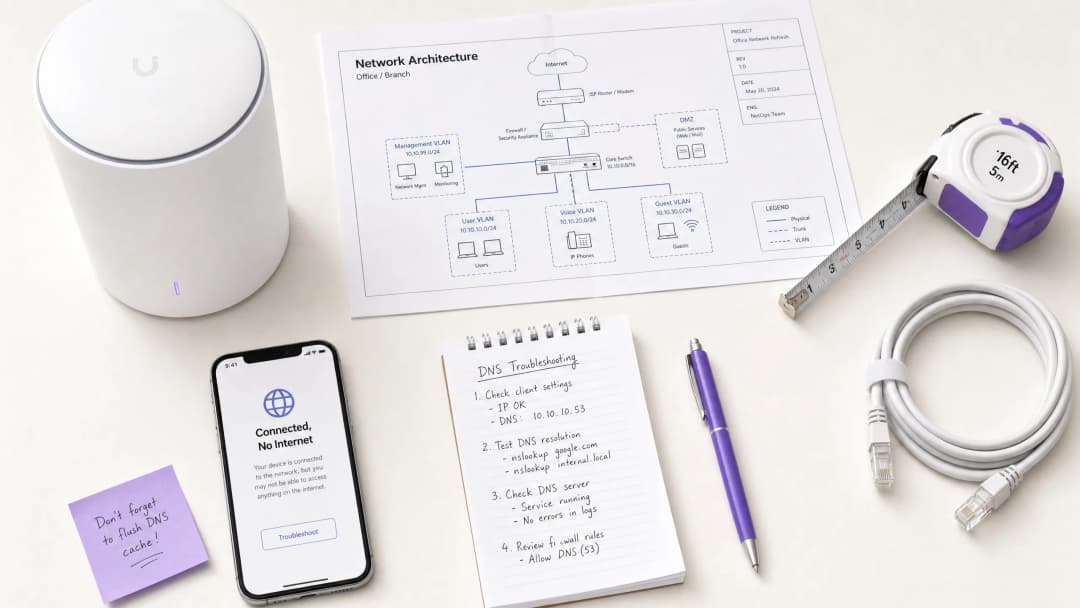
Para os CTOs e arquitetos de rede que supervisionam locais de alta densidade - tais como no Retalho , Hotelaria , Saúde e Transportes - o erro "Ligado, Sem Internet" em redes de Guest WiFi é uma dor de cabeça operacional persistente. Embora seja frequentemente diagnosticado incorretamente como uma falha de hardware do AP ou largura de banda upstream insuficiente, a causa raiz em ambientes empresariais é tipicamente o timeout de DNS provocado por congestionamento de rede.
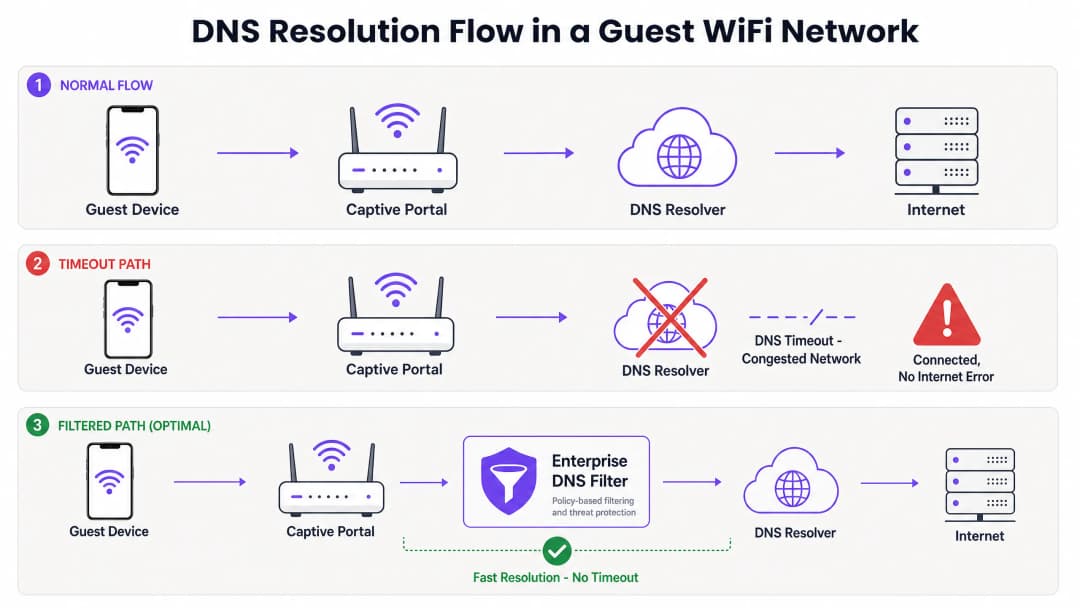
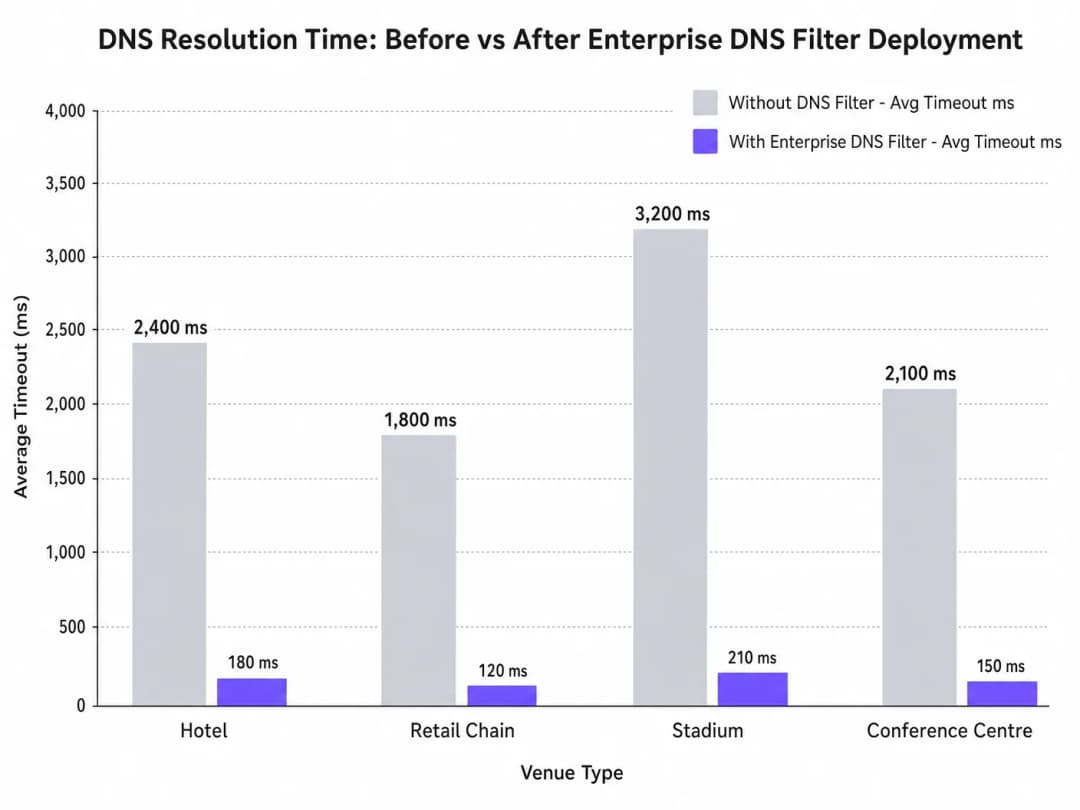
Quando centenas de dispositivos sondam simultaneamente para deteção de Captive Portal (por exemplo, captive.apple.com), as consultas predefinidas na porta UDP 53 podem sobrecarregar os resolvers upstream padrão. Se a resposta de DNS exceder a janela de timeout ao nível do SO (normalmente 1 a 5 segundos), o dispositivo assume que não existe conectividade à internet, falhando o acionamento do Captive Portal. Este guia detalha a arquitetura técnica deste modo de falha e demonstra como a implementação de um filtro de DNS empresarial resolve o estrangulamento, reduzindo a latência das consultas de milhares de milissegundos para menos de 200ms, garantindo a conformidade com normas como IEEE 802.1X e GDPR, e melhorando drasticamente a experiência de onboarding dos convidados.
Análise Técnica Detalhada
O Mecanismo de Deteção de Captive Portal
Quando um dispositivo cliente se associa a um ponto de acesso e recebe uma concessão DHCP, deve verificar a acessibilidade à internet antes de transitar totalmente para um estado ligado. Isto é alcançado através de sondas de deteção de Captive Portal:
- iOS/macOS: HTTP GET para
captive.apple.com - Android: HTTP GET para
connectivitycheck.gstatic.com - Windows: HTTP GET para
msftconnecttest.com
Antes que o HTTP GET possa ser emitido, o dispositivo deve resolver o hostname via DNS. Esta consulta de DNS inicial é o ponto crítico de falha em ambientes de alta densidade.
Por que o Congestionamento Desencadeia Timeouts de DNS
As consultas de DNS utilizam tipicamente UDP, um protocolo sem ligação e sem retransmissão na camada de transporte. Numa rede congestionada - como um estádio durante o intervalo ou um hotel durante as horas de ponta da manhã - os pacotes UDP são facilmente perdidos ou atrasados.
Se o local depender de um resolver padrão do ISP ou de um serviço de DNS público (como o 8.8.8.8), o tempo de ida e volta (RTT) somado ao tempo de processamento no resolver pode exceder o limite de timeout codificado no SO. Quando o timeout expira, o dispositivo sinaliza a ligação como "Ligado, Sem Internet" e interrompe o processo de redirecionamento do Captive Portal. Além disso, os valores baixos de Time-To-Live (TTL) nestes domínios de sondagem agravam o problema. À medida que os dispositivos se associam e desassociam constantemente, as entradas em cache expiram rapidamente, desencadeando uma vaga de consultas DNS simultâneas precisamente quando a rede está sob carga máxima.
O Papel do Filtro DNS Empresarial
Um filtro DNS empresarial, como o que está integrado na plataforma de WiFi Analytics da Purple, atua como um resolvedor de alto desempenho, local ou próximo da periferia. Ao intercetar as consultas DNS antes de estas atravessarem a ligação WAN congestionada, o filtro:
- Armazena em Cache Domínios de Alta Frequência: Serve os domínios de sondagem localmente, reduzindo o RTT para níveis inferiores a um milissegundo.
- Aplicação de Políticas: Rejeita imediatamente as consultas para domínios maliciosos ou bloqueados, poupando largura de banda WAN.
- Registo de Auditoria: Fornece um registo de auditoria para Segurança de TI , auxiliando na conformidade com o GDPR e na resposta a incidentes.
Tem dúvidas sobre a sua configuração específica?
A nossa equipa trabalha com operadores de espaços, gestores de TI e engenheiros de rede em 80.000 espaços. Agende uma chamada de 20 minutos e mostraremos como outros profissionais na sua área o resolveram.
Guia de Implementação
A implementação de um filtro DNS empresarial exige um planeamento arquitetónico cuidadoso para evitar a introdução de novos pontos de falha.
1. Colocação do Resolvedor e Otimização da Latência
Implemente o filtro DNS o mais próximo possível da periferia da rede. Para cadeias de retalho distribuídas, um nó periférico fornecido na nuvem é adequado; para grandes recintos de local único, como estádios, prefere-se um dispositivo localizado ou uma máquina virtual no comutador principal. O objetivo é minimizar o número de saltos de encaminhamento entre a VLAN de convidados e o resolvedor.
2. Lista de Permissões do Captive Portal (Passthrough)
O passo de configuração mais crítico é garantir que o domínio do seu Captive Portal está explicitamente na lista de permissões. Se o filtro DNS atrasar ou bloquear a resolução do próprio portal de autenticação, causará exatamente o erro que está a tentar resolver.
3. Ajuste de TTL e Gestão de Cache
Configure o resolvedor local para armazenar em cache de forma agressiva os domínios de sondagem do Captive Portal. Embora respeitar os TTLs de origem seja uma prática padrão, substituir os TTLs de captive.apple.com e domínios semelhantes para um mínimo de 60 segundos localmente pode reduzir drasticamente o volume de consultas upstream durante eventos de pico de associação.
4. Integração com a Infraestrutura Existente
Garante que a implementação do filtro DNS está alinhada com a segmentação de rede existente. O tráfego de DNS de convidados deve permanecer isolado da infraestrutura de DNS corporativa para manter a conformidade PCI-DSS. Este isolamento é crucial, quer esteja a otimizar o WiFi de hotéis para viajantes de negócios ou a proteger uma implementação no setor público.
Oiça o nosso podcast de briefing técnico para obter mais contexto sobre estes passos de implementação:
Melhores Práticas
- Evite Resolvers Públicos para Redes de Convidados: Confiar no 8.8.8.8 ou 1.1.1.1 como o DNS primário atribuído por DHCP para redes de convidados de alta densidade introduz uma variabilidade de latência inaceitável.
- Implemente DNS over HTTPS (DoH) com Cuidado: Embora o DoH melhore a privacidade, este contorna a filtragem tradicional da porta 53. Certifique-se de que a sua solução de DNS empresarial consegue inspecionar ou gerir o tráfego DoH se exigido pela política do local.
- Monitorize Descarte de Pacotes UDP na Porta 53: Configure o seu firewall ou switch principal para alertar sobre descartes excessivos de pacotes UDP na porta 53, o que é um indicador principal de timeouts de DNS iminentes.
- Reveja Regularmente as Listas de Bloqueio: A filtragem demasiado agressiva pode corromper aplicações legítimas. Reveja os registos de consultas DNS semanalmente para identificar falsos positivos.
Para implementações no setor público, garantir uma conectividade robusta faz parte de iniciativas mais amplas de inclusão digital, como destacado recentemente quando a Purple nomeia Iain Fox como VP de Crescimento – Setor Público .
Resolução de Problemas e Mitigação de Riscos
Quando ocorre o erro "Ligado, Sem Internet", as equipas de TI devem seguir um caminho de diagnóstico estruturado em vez de assumir imediatamente o esgotamento da largura de banda.
- Captura de Pacotes (PCAP): Execute uma captura de pacotes na VLAN de convidados filtrando por
udp port 53. Procure consultas sem respostas correspondentes num intervalo de 2 segundos. - Simule o Teste: Use
curlouwgeta partir de um dispositivo de teste na VLAN de convidados para aceder manualmente ahttp://captive.apple.com/hotspot-detect.html. Meça o tempo de resolução de DNS face ao tempo de resposta HTTP. - Verifique as Regras de Firewall: Verifique se nenhum limite de taxa ou política de QoS está inadvertidamente a estrangular o tráfego UDP da porta 53 a partir da sub-rede de convidados.
- Verifique as Capacidades Offline: Em ambientes com conectividade WAN intermitente, considere funcionalidades como o Modo de Mapas Offline da Purple para manter algum nível de interação com o utilizador, mesmo quando a internet a montante está degradada.
ROI e Impacto no Negócio
A resolução de timeouts de DNS tem um impacto direto nos resultados financeiros dos operadores de locais públicos.
- Redução de Custos com Suporte: O erro "Ligado, Sem Internet" é um dos principais impulsionadores de pedidos de suporte de Nível 1 na hotelaria e no retalho. A sua eliminação reduz as despesas operacionais de TI.
- Aumento da Captura de Dados: O carregamento com falha de um Captive Portal significa uma oportunidade perdida para a captura de dados e autenticação de utilizadores. Ao garantir a renderização rápida do portal, os locais maximizam o ROI das suas plataformas de WiFi Analytics .
- Maior Satisfação dos Convidados: A conectividade contínua é uma expectativa básica. Minimizar a fricção no acesso correlaciona-se diretamente com melhores pontuações de Net Promoter Scores (NPS) e avaliações positivas do local.
Ao mudar a perspetiva de "precisamos de mais largura de banda" para "precisamos de uma resolução de DNS otimizada", os arquitetos de rede podem fornecer WiFi para convidados de nível empresarial que se dimensiona perfeitamente sob pressão.
Definições Principais
Teste de Deteção de Captive Portal
Um pedido HTTP automático enviado por um sistema operativo móvel (ex. para captive.apple.com) imediatamente após a associação à rede para determinar se é necessária uma página de início de sessão.
Se este teste falhar devido a um DNS timeout, o sistema operativo assume que não há acesso à internet e apresenta o erro.
DNS Timeout
O evento em que um dispositivo cliente abandona uma consulta DNS porque o resolvedor demorou demasiado tempo a responder (normalmente mais de 2 a 5 segundos).
A principal causa técnica dos erros "Ligado mas Sem Internet" em ambientes de alta densidade.
Filtro de DNS Empresarial
Um resolvedor de DNS dedicado que armazena consultas localmente em cache e aplica bloqueios baseados em políticas para impedir o acesso a domínios maliciosos ou indesejados.
Utilizado para aliviar o volume de consultas dos resolvedores upstream congestionados e reduzir a latência.
Porta UDP 53
O protocolo de transporte padrão sem ligação e a porta utilizada para consultas de DNS.
Como o UDP não garante a entrega, os pacotes de DNS são facilmente perdidos durante o congestionamento da rede.
Time-To-Live (TTL)
Um valor num registo DNS que dita quanto tempo um resolvedor ou cliente deve armazenar o endereço IP em cache antes de realizar uma nova consulta.
Os TTLs curtos nos domínios de teste provocam consultas frequentes, agravando o congestionamento.
IEEE 802.1X
Um padrão para Controlo de Acesso à Rede baseado em porta (PNAC) que fornece um mecanismo de autenticação para dispositivos que se desejam ligar a uma LAN ou WLAN.
Embora seguros, os ambientes 802.1X ainda dependem de uma infraestrutura de DNS robusta para o encaminhamento pós-autenticação.
Local Internet Breakout
Encaminhamento de tráfego destinado à internet diretamente a partir de uma filial para a internet, em vez de o enviar de volta para um centro de dados central.
Crucial para reduzir a latência de DNS em redes distribuídas de retalho ou hotelaria.
WPA3
O mais recente padrão de segurança WiFi que fornece encriptação melhorada para redes abertas e protegidas por palavra-passe.
O WPA3 melhora a segurança, mas não altera o caminho fundamental de resolução de DNS nem mitiga problemas de tempo limite.
Exemplos Práticos
Um hotel de 400 quartos regista um pico de reclamações de "Ligado mas Sem Internet" todas as manhãs, entre as 07:30 e as 08:30, quando os hóspedes acordam e se ligam ao WiFi. A ligação WAN de 1Gbps mostra apenas 40% de utilização durante este período.
- Execute uma captura de pacotes na VLAN de convidados filtrando pela porta UDP 53 durante o pico matinal.
- Identifique se os pedidos de DNS para domínios de teste de Captive Portal (ex. captive.apple.com) demoram mais de 3000ms a responder através do DNS padrão do ISP.
- Implemente um filtro de DNS empresarial local na sub-rede de convidados.
- Configure o servidor DHCP para atribuir o IP do filtro de DNS local aos dispositivos dos convidados.
- Adicione o domínio do Captive Portal do hotel à lista de permissões no filtro.
- Monitorize os tempos de resposta, que deverão cair para menos de 50ms.
Uma grande cadeia de retalho lança uma nova rede WiFi de convidados em 50 lojas, mas os utilizadores nas lojas principais de grande afluência não conseguem carregar o Captive Portal, enquanto os utilizadores em lojas mais pequenas não têm quaisquer problemas.
- Analise a arquitetura: as 50 lojas estão a encaminhar o tráfego de convidados através de um túnel para uma firewall central de um centro de dados, que depois reencaminha os pedidos de DNS para um resolvedor público.
- Nas lojas de grande afluência, o enorme volume de eventos de associação simultâneos esgota as tabelas de estado NAT/PAT na firewall central, fazendo com que os pacotes da porta UDP 53 sejam rejeitados.
- Implemente um filtro de DNS empresarial fornecido na nuvem.
- Reconfigure os routers das filiais locais para reencaminharem os pedidos de DNS de convidados diretamente para o filtro na nuvem através de local internet breakout, em vez de os enviar de volta para o centro de dados.
Perguntas de Prática
Q1. O diretor de TI de um estádio nota que, durante o intervalo, milhares de utilizadores ligam-se ao WiFi mas não conseguem aceder ao captive portal. O switch principal mostra uma grande perda de pacotes UDP. Devem aumentar a largura de banda WAN de 2Gbps para 5Gbps?
Dica: Considere qual o protocolo que está a ser descartado e se está relacionado com a largura de banda de payload ou com limites de estado de ligação.
Ver resposta modelo
Não. O aumento da largura de banda WAN não resolverá o problema. A perda de pacotes UDP indica que a firewall ou o resolver não conseguem lidar com o volume massivo de consultas DNS concorrentes (exaustão da tabela de estados ou limites de CPU). A abordagem correta é implementar um filtro de DNS local de alto desempenho na periferia para armazenar em cache e responder a estas consultas localmente, contornando completamente o estrangulamento da WAN.
Q2. Acabou de implementar um filtro DNS empresarial numa rede de convidados de um hotel. Os convidados conseguem agora resolver websites públicos rapidamente, mas quando se ligam pela primeira vez, não são redirecionados para a página de login do hotel. Qual é o erro de configuração mais provável?
Dica: Pense no nome de domínio da própria página de login.
Ver resposta modelo
O erro mais provável é que o próprio domínio do captive portal não tenha sido explicitamente adicionado à lista de permissões (passthrough) no filtro DNS. O filtro está a bloquear ou a atrasar a resolução do URL do portal, impedindo a conclusão do redirecionamento.
Q3. Uma organização do setor público exige que todo o tráfego de WiFi de convidados seja registado por 90 dias para cumprir as políticas de segurança. De que forma a implementação de um filtro DNS empresarial ajuda a cumprir este requisito?
Dica: Considere que dados são processados por um filtro DNS em comparação com uma firewall padrão.
Ver resposta modelo
Um filtro DNS empresarial regista de forma nativa todas as consultas DNS efetuadas pelos dispositivos clientes. Isto fornece um registo de auditoria claro e pesquisável sobre quais os domínios solicitados e quando, cumprindo o requisito de registo de 90 dias sem a necessidade de realizar inspeção profunda de pacotes (deep packet inspection) em todo o tráfego de payload HTTPS encriptado.
Continue a ler esta série
Cisco Catalyst WLC e guest WiFi: configuração de captive portal com a Purple
Como um controlador LAN sem fios Cisco Catalyst 9800 (IOS-XE) funciona com o guest WiFi da Purple: autenticação web externa, RADIUS e uma walled garden, com um link para o guia de configuração passo a passo da Purple para a configuração exata.
Gestão de WiFi de Hóspedes de Hotel: Integrar PMS, Portais e Padrões de Marca
Este guia técnico detalha como estruturar redes WiFi de hotel de classe empresarial, focando-se na segmentação de VLAN, integração de PMS para gestão automatizada de sessões e otimização de Captive Portal para recolha de dados em conformidade com o GDPR.
Como Implementar Restrições de Tempo e de Largura de Banda no WiFi de Convidados
Um guia de referência técnica de autoridade sobre a implementação de restrições de tempo e de largura de banda em redes WiFi de convidados empresariais. Este guia fornece esquemas de arquitetura práticos, configurações neutras em termos de fornecedor e casos de estudo reais para ajudar os líderes de TI a equilibrar o desempenho da rede, a conformidade de segurança e a experiência do visitante.
Tem dúvidas sobre a sua configuração específica?
A nossa equipa trabalha com operadores de espaços, gestores de TI e engenheiros de rede em 80.000 espaços. Agende uma chamada de 20 minutos e mostraremos como outros profissionais na sua área o resolveram.