
अपार्टमेंट्स और को-वर्किंग के लिए WPA2-Enterprise बनाम Personal
यह आधिकारिक तकनीकी संदर्भ गाइड अपार्टमेंट और को-वर्किंग स्पेस जैसे मल्टी-टेनेंट वातावरण के लिए WPA2-Personal के मुकाबले WPA2-Enterprise का मूल्यांकन करती है। यह नेटवर्क आर्किटेक्ट्स और IT प्रबंधकों को 802.1X प्रमाणीकरण, डायनामिक VLAN असाइनमेंट और सुरक्षा अनुपालन में कार्रवाई योग्य अंतर्दृष्टि प्रदान करती है, यह प्रदर्शित करते हुए कि साझा पासवर्ड आधुनिक साझा वेन्यू में अस्वीकार्य जोखिम क्यों पेश करते हैं। वेन्यू ऑपरेटरों को इस तिमाही में माइग्रेशन निर्णय का समर्थन करने के लिए ठोस कार्यान्वयन मार्गदर्शन, वास्तविक दुनिया के केस स्टडीज और ROI विश्लेषण मिलेगा।
इस गाइड को सुनें
पॉडकास्ट ट्रांसक्रिप्ट देखें
हमारी मुख्य श्रृंखला का हिस्सा: Multi-Tenant WiFi Guide →
कार्यकारी सारांश
मल्टी-टेनेंट वातावरण — जैसे को-वर्किंग स्पेस और हाई-डेंसिटी अपार्टमेंट कॉम्प्लेक्स — का प्रबंधन करने वाले CTOs, नेटवर्क आर्किटेक्ट्स और वेन्यू ऑपरेशंस डायरेक्टर्स के लिए, WPA2-Personal (Pre-Shared Key या PSK) पर निर्भर रहना एक परिचालन और सुरक्षा जोखिम है। हालांकि WPA2-Personal सिंगल-फैमिली घर के लिए पर्याप्त है, लेकिन इसे ऐसे वातावरण में डिप्लॉय करना जहां कई असंबद्ध उपयोगकर्ता एक ही भौतिक एयरस्पेस साझा करते हैं, गंभीर कमजोरियां पैदा करता है। साझा पासवर्ड का मतलब है साझा जोखिम: एक समझौता की गई (compromised) कुंजी पूरे नेटवर्क सेगमेंट को खतरे में डाल देती है, जो PCI DSS और GDPR जैसे बेसलाइन अनुपालन मानकों को पूरा करने में विफल रहती है。
यह गाइड WPA2-Personal और WPA2-Enterprise (802.1X) के बीच एक व्यापक तकनीकी तुलना प्रदान करती है। यह व्यक्तिगत प्रमाणीकरण (individualised authentication) की वास्तुशिल्प आवश्यकता, टेनेंट आइसोलेशन के लिए डायनामिक VLAN असाइनमेंट के तंत्र, और एंटरप्राइज़-ग्रेड सुरक्षा स्थिति में माइग्रेट करने के ठोस व्यावसायिक प्रभाव का विवरण देती है। नेटवर्क एक्सेस के साथ पहचान प्रबंधन (identity management) को एकीकृत करके, IT टीमें ग्रैन्युलर नियंत्रण, तत्काल क्रेडेंशियल निरस्तीकरण (revocation), और पूर्ण ऑडिटेबिलिटी प्राप्त कर सकती हैं — जो अंततः वेन्यू की प्रतिष्ठा और टेनेंट्स के डेटा दोनों की रक्षा करता है।
तकनीकी डीप-डाइव: WPA2-Personal बनाम WPA2-Enterprise
Pre-Shared Key (PSK) की भेद्यता (Vulnerability)
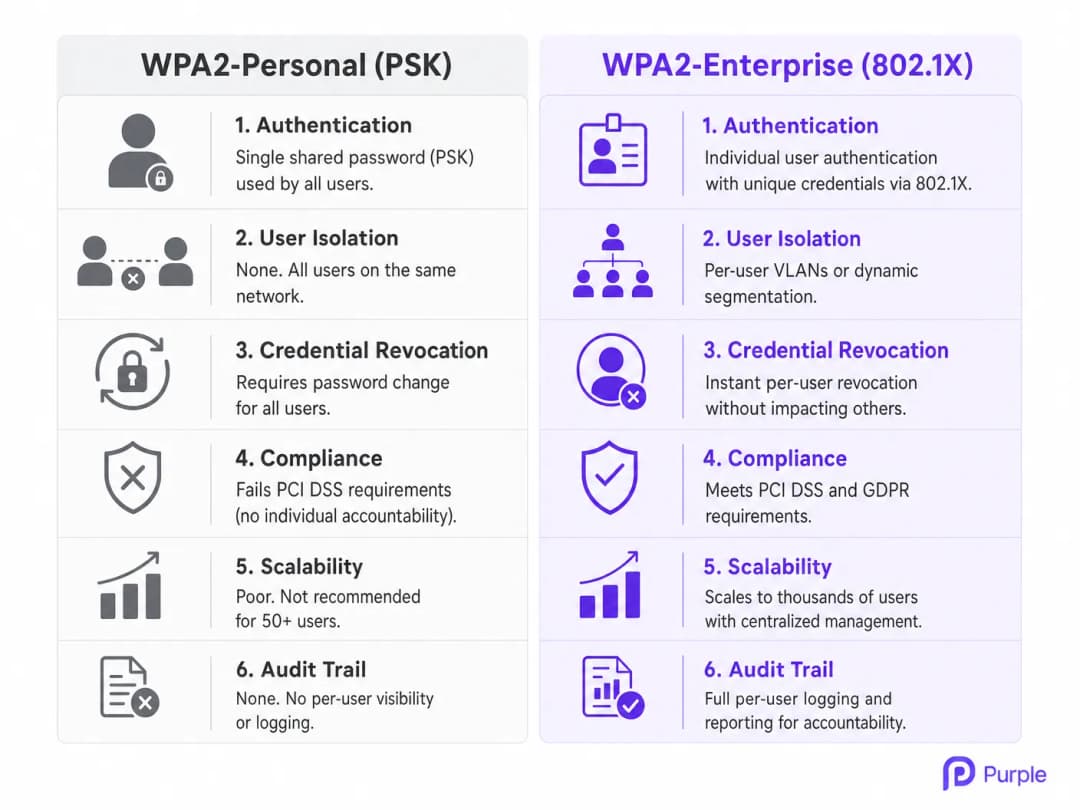
WPA2-Personal किसी विशिष्ट SSID से कनेक्ट होने वाले सभी उपयोगकर्ताओं को प्रमाणित करने के लिए एक ही Pre-Shared Key (PSK) पर निर्भर करता है। मल्टी-टेनेंट वातावरण में, यह आर्किटेक्चर मौलिक रूप से त्रुटिपूर्ण है। जब कोई को-वर्किंग सदस्य या अपार्टमेंट निवासी कनेक्ट होता है, तो वे उस नेटवर्क के हर दूसरे उपयोगकर्ता के समान क्रिप्टोग्राफ़िक आधार साझा करते हैं। आइसोलेशन की इस कमी का मतलब है कि PSK वाला कोई भी उपयोगकर्ता संभावित रूप से दूसरों के ट्रैफ़िक को डिक्रिप्ट कर सकता है, संवेदनशील डेटा को इंटरसेप्ट कर सकता है, या उसी सबनेट पर मौजूद डिवाइसों के खिलाफ लेटरल हमले शुरू कर सकता है।
इसके अलावा, बड़े पैमाने पर PSK प्रबंधन का परिचालन ओवरहेड अस्थिर है। जब कोई टेनेंट जाता है, तो उनके एक्सेस को रद्द करने का एकमात्र तरीका पूरे नेटवर्क के लिए PSK को बदलना है, जिससे सभी शेष टेनेंट्स को फिर से प्रमाणित करने के लिए मजबूर होना पड़ता है। यह घर्षण एक सामान्य, खतरनाक प्रथा की ओर ले जाता है: पासवर्ड कभी नहीं बदला जाता है, जिससे पूर्व टेनेंट्स और अनधिकृत आगंतुकों को स्थायी एक्सेस मिल जाता है। दर्जनों टेनेंट्स का प्रबंधन करने वाले Retail लैंडलॉर्ड्स और Hospitality ऑपरेटरों के लिए, यह कोई सैद्धांतिक जोखिम नहीं है — यह एक नियमित परिचालन विफलता मोड है।
802.1X आर्किटेक्चर: व्यक्तिगत सुरक्षा
IEEE 802.1X मानक पर निर्मित WPA2-Enterprise, सुरक्षा मॉडल को नेटवर्क-स्तरीय प्रमाणीकरण से उपयोगकर्ता-स्तरीय प्रमाणीकरण में मौलिक रूप से बदल देता है। साझा पासवर्ड के बजाय, प्रत्येक उपयोगकर्ता (या डिवाइस) अद्वितीय क्रेडेंशियल्स का उपयोग करके प्रमाणित होता है — आमतौर पर एक उपयोगकर्ता नाम और पासवर्ड, या एक डिजिटल प्रमाणपत्र — जिसे Active Directory, LDAP, या क्लाउड-आधारित RADIUS सेवा जैसे केंद्रीय पहचान स्टोर (identity store) के विरुद्ध मान्य किया जाता है।
इस आर्किटेक्चर में तीन प्राथमिक घटक शामिल हैं:
सप्लिकेंट (Supplicant): कनेक्ट करने का प्रयास करने वाला क्लाइंट डिवाइस (लैपटॉप, स्मार्टफोन)।
ऑथेंटिकेटर (Authenticator): वायरलेस एक्सेस पॉइंट (AP) या नेटवर्क स्विच जो नेटवर्क तक भौतिक पहुंच को नियंत्रित करता है。
ऑथेंटिकेशन सर्वर (Authentication Server): RADIUS सर्वर जो क्रेडेंशियल्स को मान्य करता है और एक्सेस को अधिकृत करता है।
जब कोई सप्लिकेंट AP के साथ जुड़ता है, तो AP एक्सटेंसिबल ऑथेंटिकेशन प्रोटोकॉल (EAP) संदेशों को छोड़कर सभी ट्रैफ़िक को ब्लॉक कर देता है। AP उपयोगकर्ता के क्रेडेंशियल्स को RADIUS सर्वर पर अग्रेषित करता है। केवल सफल सत्यापन पर ही RADIUS सर्वर AP को पोर्ट खोलने और नेटवर्क ट्रैफ़िक की अनुमति देने का निर्देश देता है। यह सुनिश्चित करता है कि प्रत्येक सत्र एक अद्वितीय, गतिशील रूप से उत्पन्न कुंजी के साथ एन्क्रिप्ट किया गया है, जो उपयोगकर्ताओं को एक-दूसरे की जासूसी करने से रोकता है।
डायनामिक VLAN असाइनमेंट और माइक्रो-सेगमेंटेशन
मल्टी-टेनेंट सेटिंग में WPA2-Enterprise की सबसे शक्तिशाली क्षमताओं में से एक डायनामिक VLAN असाइनमेंट है। जब RADIUS सर्वर किसी उपयोगकर्ता को प्रमाणित करता है, तो यह AP को विशिष्ट विशेषताएँ (attributes) लौटा सकता है, जिसमें एक VLAN ID शामिल है। यह नेटवर्क इन्फ्रास्ट्रक्चर को उपयोगकर्ता की पहचान, भूमिका या टेनेंट संबद्धता के आधार पर गतिशील रूप से एक विशिष्ट वर्चुअल लोकल एरिया नेटवर्क (VLAN) में रखने की अनुमति देता है, भले ही वे किसी भी भौतिक AP से कनेक्ट हों।
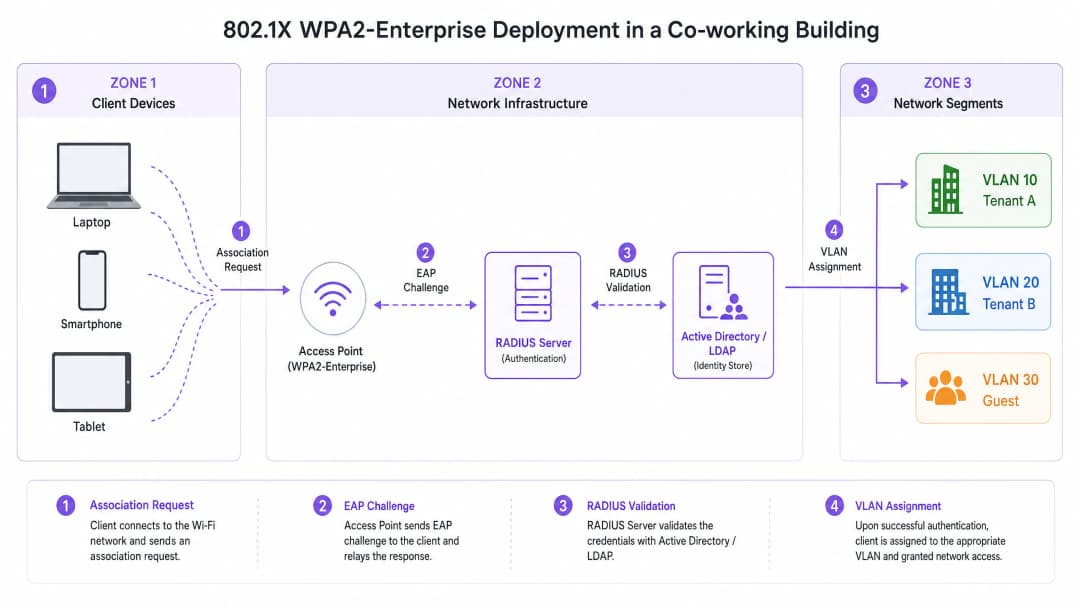
उदाहरण के लिए, एक को-वर्किंग स्पेस में, टेनेंट A और टेनेंट B एक ही भौतिक SSID (जैसे, "CoWorking_Secure") से कनेक्ट हो सकते हैं। हालांकि, प्रमाणीकरण पर, RADIUS सर्वर टेनेंट A के डिवाइसों को VLAN 10 और टेनेंट B के डिवाइसों को VLAN 20 असाइन करता है। यह मजबूत लेयर 2 आइसोलेशन प्रदान करता है, यह सुनिश्चित करते हुए कि टेनेंट A, टेनेंट B के सर्वर, प्रिंटर या क्लाइंट डिवाइस तक नहीं पहुंच सकता है। यह माइक्रो-सेगमेंटेशन अनुपालन आवश्यकताओं को पूरा करने और टेनेंट की बौद्धिक संपदा की रक्षा करने के लिए महत्वपूर्ण है। Healthcare टेनेंट्स या वित्तीय सेवा फर्मों का प्रबंधन करने वाले वेन्यू के लिए, आइसोलेशन का यह स्तर गैर-परक्राम्य (non-negotiable) है।
अपने विशिष्ट सेटअप को लेकर कोई सवाल हैं?
हमारी टीम 80,000 से अधिक वेन्यू में वेन्यू ऑपरेटरों, IT मैनेजरों और नेटवर्क इंजीनियरों के साथ काम करती है। 20 मिनट का कॉल बुक करें और हम आपको दिखाएंगे कि आपके जैसे अन्य लोगों ने इसे कैसे हल किया।
कार्यान्वयन गाइड
WPA2-Enterprise को डिप्लॉय करने के लिए वायरलेस इन्फ्रास्ट्रक्चर और पहचान प्रबंधन प्रणाली के बीच सावधानीपूर्वक योजना और एकीकरण की आवश्यकता होती है। निम्नलिखित चरण एक वेंडर-न्यूट्रल डिप्लॉयमेंट रणनीति की रूपरेखा तैयार करते हैं।
चरण 1: आइडेंटिटी प्रोवाइडर (IdP) स्थापित करें
WPA2-Enterprise की नींव एक मजबूत आइडेंटिटी स्टोर है। आधुनिक डिप्लॉयमेंट के लिए, ऑन-प्रिमाइसेस Active Directory की तुलना में क्लाउड-आधारित डायरेक्टरी (जैसे, Microsoft Entra ID, Google Workspace) को उनकी स्केलेबिलिटी और एकीकरण में आसानी के कारण प्राथमिकता दी जाती है। सुनिश्चित करें कि चुना गया IdP RADIUS इन्फ्रास्ट्रक्चर के साथ संचार करने के लिए आवश्यक प्रोटोकॉल (जैसे, SAML, LDAP) का समर्थन करता है।
Purple, Connect लाइसेंस के तहत OpenRoaming जैसी सेवाओं के लिए एक मुफ्त आइडेंटिटी प्रोवाइडर के रूप में कार्य कर सकता है, जो जटिल ऑन-प्रिमाइसेस डायरेक्टरी का प्रबंधन किए बिना एक्सेस को सुव्यवस्थित करने वाले वेन्यू के लिए डिप्लॉयमेंट को सरल बनाता है।
चरण 2: RADIUS इन्फ्रास्ट्रक्चर को डिप्लॉय और कॉन्फ़िगर करें
RADIUS सर्वर APs और IdP के बीच एक पुल के रूप में कार्य करता है। क्लाउड RADIUS समाधान ऑन-प्रिमाइसेस हार्डवेयर की आवश्यकता को समाप्त करते हैं और उच्च उपलब्धता प्रदान करते हैं। IdP के साथ सुरक्षित रूप से संचार करने और प्रमाणीकरण नीतियों को परिभाषित करने के लिए RADIUS सर्वर को कॉन्फ़िगर करें।
सुरक्षा आवश्यकताओं और क्लाइंट डिवाइस क्षमताओं के आधार पर उपयुक्त EAP विधि का चयन करें। PEAP-MSCHAPv2 उपयोगकर्ता नाम/पासवर्ड प्रमाणीकरण का उपयोग करने वाले वातावरण के लिए आम है, जो क्रेडेंशियल्स संचारित करने से पहले एक सुरक्षित TLS टनल स्थापित करता है। EAP-TLS सबसे सुरक्षित विधि है, जिसके लिए सर्वर और क्लाइंट डिवाइस दोनों पर डिजिटल प्रमाणपत्र की आवश्यकता होती है, जो पासवर्ड को पूरी तरह से समाप्त कर देता है और निर्बाध प्रमाणीकरण प्रदान करता है — हालांकि इसके लिए प्रमाणपत्र वितरण के लिए पब्लिक की इन्फ्रास्ट्रक्चर (PKI) या मोबाइल डिवाइस मैनेजमेंट (MDM) समाधान की आवश्यकता होती है।
चरण 3: वायरलेस इन्फ्रास्ट्रक्चर को कॉन्फ़िगर करें
प्रमाणीकरण के लिए RADIUS सर्वर को पॉइंट करने के लिए WLAN कंट्रोलर या क्लाउड-प्रबंधित APs को कॉन्फ़िगर करें। WPA2-Enterprise SSID को परिभाषित करें और डायनामिक VLAN असाइनमेंट के लिए आवश्यक RADIUS विशेषताओं को कॉन्फ़िगर करें। APs या कंट्रोलर पर RADIUS सर्वर IP पते, पोर्ट (आमतौर पर प्रमाणीकरण के लिए 1812, अकाउंटिंग के लिए 1813), और साझा रहस्य (shared secrets) परिभाषित करें। SSID कॉन्फ़िगरेशन पर डायनामिक VLAN असाइनमेंट (अक्सर "AAA Override" या समान वेंडर-विशिष्ट शब्दावली के रूप में जाना जाता है) सक्षम करें।
चरण 4: क्लाइंट प्रोविजनिंग और ऑनबोर्डिंग
WPA2-Enterprise डिप्लॉयमेंट में सबसे महत्वपूर्ण चुनौती क्लाइंट ऑनबोर्डिंग है। 802.1X नेटवर्क से कनेक्ट होने के लिए उपयोगकर्ताओं को अपने डिवाइस को सही ढंग से कॉन्फ़िगर करना होगा। मैन्युअल कॉन्फ़िगरेशन में त्रुटियों की संभावना होती है और यह हेल्पडेस्क टिकट उत्पन्न करता है। एक स्वचालित ऑनबोर्डिंग समाधान लागू करें — आमतौर पर एक खुले ऑनबोर्डिंग SSID के माध्यम से एक्सेस किया जाने वाला एक सुरक्षित ऑनबोर्डिंग पोर्टल — जो उपयोगकर्ता को उनके डिवाइस पर प्रोफ़ाइल या प्रमाणपत्र स्थापित करने में मार्गदर्शन करता है। एक बार प्रोविज़न होने के बाद, डिवाइस स्वचालित रूप से सुरक्षित WPA2-Enterprise SSID से कनेक्ट हो जाता है। ऑफिस-ग्रेड वायरलेस डिप्लॉयमेंट को अनुकूलित करने के बारे में अधिक मार्गदर्शन के लिए, Office Wi-Fi: Optimize Your Modern Office Wi-Fi Network पर हमारी गाइड देखें।
सर्वोत्तम प्रथाएँ
WPA2-Enterprise डिप्लॉयमेंट में प्रमाणपत्र सत्यापन (certificate validation) को अनिवार्य करना सबसे महत्वपूर्ण कॉन्फ़िगरेशन निर्णय है। सुनिश्चित करें कि क्लाइंट डिवाइस RADIUS सर्वर के प्रमाणपत्र को मान्य करने के लिए कॉन्फ़िगर किए गए हैं। ऐसा करने में विफलता उपयोगकर्ताओं को "Evil Twin" हमलों के प्रति संवेदनशील बनाती है, जहां एक दुष्ट (rogue) AP क्रेडेंशियल्स चुराने के लिए वैध नेटवर्क की नकल करता है।
हेडलेस डिवाइसों — प्रिंटर, IoT सेंसर, बिल्डिंग मैनेजमेंट सिस्टम — जो 802.1X का समर्थन नहीं कर सकते, की पहचान करने के लिए डिवाइस प्रोफाइलिंग के साथ 802.1X प्रमाणीकरण को मिलाएं। इन डिवाइसों के लिए MAC Authentication Bypass (MAB) का उपयोग करें, लेकिन सख्त फ़ायरवॉल नीतियों के साथ पृथक VLANs तक उनकी पहुंच को प्रतिबंधित करें। उपयोगकर्ता सत्रों का विस्तृत ऑडिट ट्रेल प्रदान करने के लिए सर्वर पर RADIUS अकाउंटिंग संदेश भेजने के लिए APs को कॉन्फ़िगर करें, जिसमें कनेक्शन समय, डेटा उपयोग और समाप्ति के कारण शामिल हैं, जो समस्या निवारण और अनुपालन के लिए महत्वपूर्ण है।
आगंतुकों के लिए एक अलग, पृथक Guest WiFi नेटवर्क बनाए रखें। इस नेटवर्क को सेवा की शर्तों की स्वीकृति और डेटा कैप्चर के लिए एक Captive Portal का उपयोग करना चाहिए, जो वेन्यू इनसाइट्स प्राप्त करने के लिए WiFi Analytics के साथ एकीकृत हो, जबकि अतिथि ट्रैफ़िक को एंटरप्राइज़ नेटवर्क से पूरी तरह अलग रखा जाए। Transport हब और सम्मेलन केंद्रों के लिए, यह अलगाव GDPR के तहत एक विनियामक आवश्यकता है।
समस्या निवारण और जोखिम न्यूनीकरण
सामान्य विफलता मोड
WPA2-Enterprise वातावरण में अचानक, व्यापक प्रमाणीकरण विफलताओं का सबसे आम कारण प्रमाणपत्र की समाप्ति (Certificate expiry) है। यदि RADIUS सर्वर प्रमाणपत्र समाप्त हो जाता है या किसी अविश्वसनीय प्रमाणपत्र प्राधिकरण (CA) द्वारा जारी किया जाता है, तो क्लाइंट डिवाइस कनेक्ट करने से इंकार कर देंगे। न्यूनतम 60-दिन की अग्रिम चेतावनी के साथ प्रमाणपत्र समाप्ति के लिए सक्रिय निगरानी और अलर्ट लागू करें。
RADIUS सर्वर की अनुपलब्धता दूसरा सबसे महत्वपूर्ण विफलता मोड है। यदि APs RADIUS सर्वर तक नहीं पहुंच सकते हैं, तो कोई भी उपयोगकर्ता प्रमाणित नहीं हो सकता है। उच्च उपलब्धता सुनिश्चित करने के लिए विभिन्न भौगोलिक क्षेत्रों या उपलब्धता क्षेत्रों (availability zones) में रिडंडेंट RADIUS सर्वर डिप्लॉय करें। क्लाइंट मिसकॉन्फ़िगरेशन हेल्पडेस्क टिकटों का सबसे लगातार स्रोत है: अपने डिवाइस को मैन्युअल रूप से कॉन्फ़िगर करने वाले उपयोगकर्ता अक्सर गलत EAP विधि का चयन करते हैं या सर्वर प्रमाणपत्र पर भरोसा करने में विफल रहते हैं। सुसंगत क्लाइंट कॉन्फ़िगरेशन लागू करने के लिए स्वचालित ऑनबोर्डिंग टूल या MDM समाधानों पर भरोसा करें।
जोखिम न्यूनीकरण: रोमिंग चुनौती
बड़े वेन्यू में, उपयोगकर्ता अक्सर APs के बीच रोम (roam) करते हैं। WPA2-Enterprise के साथ, एक पूर्ण 802.1X प्रमाणीकरण चक्र में कई सौ मिलीसेकंड लग सकते हैं, जिससे VoIP या वीडियो कॉन्फ्रेंसिंग जैसे रीयल-टाइम एप्लिकेशन में ध्यान देने योग्य रुकावटें आ सकती हैं। इसे कम करने के लिए, 802.11r (Fast BSS Transition) और Opportunistic Key Caching (OKC) जैसे फास्ट रोमिंग प्रोटोकॉल लागू करें। ये मानक क्लाइंट और नेटवर्क को प्रमाणीकरण कुंजियों को कैश करने की अनुमति देते हैं, जिससे APs के बीच रोम करने के लिए आवश्यक समय काफी कम हो जाता है। एंटरप्राइज़ WLANs में रोमिंग प्रदर्शन को अनुकूलित करने के विस्तृत तकनीकी वॉकथ्रू के लिए, Resolving Roaming Issues in Corporate WLANs पर हमारी गाइड देखें। अंतर्निहित RF व्यवहार को समझना भी आवश्यक है; Wi-Fi Frequencies: A Guide to Wi-Fi Frequencies in 2026 पर हमारी गाइड मूलभूत संदर्भ प्रदान करती है।
ROI और व्यावसायिक प्रभाव
WPA2-Personal से WPA2-Enterprise में माइग्रेट करने के लिए RADIUS इन्फ्रास्ट्रक्चर और ऑनबोर्डिंग समाधानों में प्रारंभिक निवेश की आवश्यकता होती है, लेकिन दीर्घकालिक निवेश पर रिटर्न (ROI) पर्याप्त है, विशेष रूप से Retail, Hospitality, और वाणिज्यिक रियल एस्टेट क्षेत्रों में।
| ROI ड्राइवर | WPA2-Personal | WPA2-Enterprise |
|---|---|---|
| क्रेडेंशियल निरस्तीकरण (Revocation) | पूर्ण नेटवर्क व्यवधान | तत्काल, प्रति-उपयोगकर्ता |
| हेल्पडेस्क ओवरहेड | उच्च (पासवर्ड रीसेट) | निम्न (स्वचालित ऑनबोर्डिंग) |
| अनुपालन स्थिति | PCI DSS / GDPR में विफल | PCI DSS / GDPR को पूरा करता है |
| टेनेंट आइसोलेशन | कोई नहीं | पूर्ण VLAN माइक्रो-सेगमेंटेशन |
| ऑडिट ट्रेल | कोई नहीं | पूर्ण प्रति-उपयोगकर्ता सत्र लॉगिंग |
| स्केलेबिलिटी | खराब (50+ उपयोगकर्ता) | हजारों तक स्केल करता है |
टेनेंट्स के जाने पर PSKs को मैन्युअल रूप से अपडेट करने की आवश्यकता को समाप्त करने से हेल्पडेस्क टिकट और प्रशासनिक बोझ काफी कम हो जाता है। स्वचालित ऑनबोर्डिंग प्रोविजनिंग प्रक्रिया को सुव्यवस्थित करती है, जिससे IT कर्मचारी रणनीतिक पहलों पर ध्यान केंद्रित करने के लिए मुक्त हो जाते हैं। व्यक्तिगत जवाबदेही और नेटवर्क सेगमेंटेशन प्रदान करके, WPA2-Enterprise वेन्यू को PCI DSS और GDPR जैसे कड़े अनुपालन जनादेशों को पूरा करने में सक्षम बनाता है, जिससे महंगे डेटा उल्लंघनों और विनियामक जुर्माने के जोखिम को कम किया जा सकता है।
एंटरप्राइज़-ग्रेड सुरक्षा की पेशकश को-वर्किंग स्पेस और प्रीमियम अपार्टमेंट के लिए एक प्रतिस्पर्धी विभेदक (differentiator) है। टेनेंट्स अपनी बौद्धिक संपदा की रक्षा के लिए सुरक्षित, विश्वसनीय कनेक्टिविटी की मांग करते हैं। एक मजबूत WPA2-Enterprise डिप्लॉयमेंट वेन्यू के मूल्य प्रस्ताव (value proposition) को बढ़ाता है, जो उच्च टेनेंट प्रतिधारण (retention) और प्रीमियम मूल्य निर्धारण मॉडल का समर्थन करता है। जैसे-जैसे सुरक्षित, लचीले कार्यक्षेत्रों की मांग बढ़ती जा रही है, लीगेसी सुरक्षा मॉडल पर निर्भर रहना अब व्यवहार्य नहीं है। WPA2-Enterprise आधुनिक मल्टी-टेनेंट वातावरण का समर्थन करने के लिए आवश्यक स्केलेबल, सुरक्षित आधार प्रदान करता है।
मुख्य परिभाषाएं
802.1X
पोर्ट-आधारित नेटवर्क एक्सेस कंट्रोल के लिए एक IEEE मानक जो LAN या WLAN से जुड़ने के इच्छुक डिवाइसों को प्रमाणीकरण तंत्र प्रदान करता है। यह IEEE 802 नेटवर्क पर EAP के एनकैप्सुलेशन को परिभाषित करता है।
मूलभूत प्रोटोकॉल जो WPA2-Enterprise को सक्षम बनाता है, सुरक्षा को साझा पासवर्ड से तीन-पक्षीय मॉडल के माध्यम से व्यक्तिगत उपयोगकर्ता प्रमाणीकरण में स्थानांतरित करता है: सप्लिकेंट, ऑथेंटिकेटर, और ऑथेंटिकेशन सर्वर।
RADIUS (Remote Authentication Dial-In User Service)
एक नेटवर्किंग प्रोटोकॉल जो नेटवर्क सेवा से जुड़ने और उसका उपयोग करने वाले उपयोगकर्ताओं के लिए केंद्रीकृत प्रमाणीकरण, प्राधिकरण और अकाउंटिंग (AAA) प्रबंधन प्रदान करता है। RFC 2865 में परिभाषित।
केंद्रीय सर्वर जो एक आइडेंटिटी स्टोर के विरुद्ध उपयोगकर्ता क्रेडेंशियल्स को मान्य करता है और AP को निर्देश देता है कि एक्सेस देना है या नहीं और कौन सा VLAN असाइन करना है।
डायनामिक VLAN असाइनमेंट (Dynamic VLAN Assignment)
802.1X प्रमाणीकरण प्रक्रिया के दौरान RADIUS विशेषता (Tunnel-Private-Group-ID) के रूप में लौटाए गए उनकी पहचान या भूमिका के आधार पर किसी उपयोगकर्ता को एक विशिष्ट वर्चुअल लोकल एरिया नेटवर्क (VLAN) असाइन करने की प्रक्रिया।
मल्टी-टेनेंट वातावरण के लिए यह सुनिश्चित करने के लिए महत्वपूर्ण है कि अलग-अलग SSIDs की आवश्यकता के बिना विभिन्न कंपनियों या निवासियों को अलग-अलग नेटवर्क सेगमेंट पर अलग रखा जाए।
EAP (Extensible Authentication Protocol)
एक प्रमाणीकरण फ्रेमवर्क जिसका उपयोग अक्सर वायरलेस नेटवर्क और पॉइंट-टू-पॉइंट कनेक्शन में किया जाता है, जो EAP-TLS, PEAP और EAP-TTLS सहित कई प्रमाणीकरण विधियों का समर्थन करता है।
क्लाइंट डिवाइस (सप्लिकेंट) और RADIUS सर्वर के बीच प्रमाणीकरण संदेशों को ट्रांसपोर्ट करने के लिए उपयोग किया जाने वाला प्रोटोकॉल, जो 802.1X फ्रेमवर्क के भीतर एनकैप्सुलेटेड है।
सप्लिकेंट (Supplicant)
डिवाइस (लैपटॉप, स्मार्टफोन) पर एक सॉफ़्टवेयर क्लाइंट जो 802.1X के माध्यम से नेटवर्क एक्सेस प्राप्त करने के लिए ऑथेंटिकेटर के साथ संचार करता है। Windows, macOS, iOS और Android सहित सभी आधुनिक ऑपरेटिंग सिस्टम में अंतर्निहित है।
एंटरप्राइज़ WiFi नेटवर्क से कनेक्ट करने का प्रयास करने वाला एंड-यूज़र डिवाइस। इसका सही कॉन्फ़िगरेशन — विशेष रूप से RADIUS सर्वर प्रमाणपत्र सत्यापन — सुरक्षा के लिए महत्वपूर्ण है।
MAB (MAC Authentication Bypass)
डिवाइस के MAC पते के आधार पर नेटवर्क एक्सेस प्रदान करने की एक विधि, जिसका उपयोग उन डिवाइसों के लिए फ़ॉलबैक के रूप में किया जाता है जो 802.1X प्रमाणीकरण का समर्थन नहीं करते हैं। MAC पता RADIUS सर्वर को उपयोगकर्ता नाम और पासवर्ड दोनों के रूप में भेजा जाता है।
एंटरप्राइज़ वातावरण में प्रिंटर, IoT सेंसर और पॉइंट-ऑफ़-सेल टर्मिनल जैसे हेडलेस डिवाइसों को सुरक्षित करने के लिए उपयोग किया जाता है। इन डिवाइसों को हमेशा एक प्रतिबंधित, पृथक VLAN में रखा जाना चाहिए।
ईविल ट्विन अटैक (Evil Twin Attack)
एक दुष्ट वायरलेस एक्सेस पॉइंट जो समान SSID प्रसारित करके एक वैध Wi-Fi एक्सेस पॉइंट के रूप में प्रच्छन्न (masquerades) होता है, जिसका उपयोग वायरलेस संचार की जासूसी करने या उपयोगकर्ता क्रेडेंशियल्स चुराने के लिए किया जाता है।
WPA2-Enterprise डिप्लॉयमेंट में एक प्राथमिक खतरा। क्लाइंट डिवाइसों को RADIUS सर्वर के डिजिटल प्रमाणपत्र को मान्य करने की आवश्यकता के द्वारा कम किया गया, जिसे एक दुष्ट (rogue) AP दोहरा नहीं सकता है।
EAP-TLS (EAP-Transport Layer Security)
सबसे सुरक्षित EAP विधि, जिसके लिए RADIUS सर्वर और क्लाइंट डिवाइस दोनों पर डिजिटल प्रमाणपत्रों के माध्यम से पारस्परिक प्रमाणीकरण की आवश्यकता होती है। पासवर्ड-आधारित प्रमाणीकरण को पूरी तरह से समाप्त कर देता है।
उच्च-सुरक्षा वाले वातावरण के लिए अनुशंसित प्रमाणीकरण विधि। क्लाइंट डिवाइसों में प्रमाणपत्र वितरण के लिए PKI या MDM समाधान की आवश्यकता होती है, लेकिन निर्बाध, पासवर्ड रहित प्रमाणीकरण प्रदान करता है।
PEAP-MSCHAPv2 (Protected EAP with Microsoft Challenge Handshake Authentication Protocol v2)
व्यापक रूप से डिप्लॉय की गई EAP विधि जो केवल सर्वर-साइड प्रमाणपत्र का उपयोग करके एक TLS टनल स्थापित करती है, फिर उस टनल के भीतर उपयोगकर्ता नाम और पासवर्ड के माध्यम से उपयोगकर्ता को प्रमाणित करती है।
उन वातावरणों के लिए एक व्यावहारिक विकल्प जहां क्लाइंट-साइड प्रमाणपत्र डिप्लॉय करना संभव नहीं है। क्लाइंट डिवाइसों पर अनिवार्य सर्वर प्रमाणपत्र सत्यापन के साथ संयुक्त होने पर सुरक्षित।
हल किए गए उदाहरण
एक 200-कमरों वाला प्रीमियम अपार्टमेंट कॉम्प्लेक्स वर्तमान में सभी निवासियों के लिए एक ही WPA2-Personal नेटवर्क का उपयोग करता है। प्रॉपर्टी मैनेजर की रिपोर्ट है कि पूर्व टेनेंट्स अभी भी सड़क से नेटवर्क एक्सेस कर रहे हैं, और निवासी अनधिकृत डिवाइसों के कारण धीमी गति की शिकायत कर रहे हैं। उन्हें IT कर्मचारियों द्वारा प्रत्येक निवासी के लैपटॉप और स्मार्टफोन को मैन्युअल रूप से कॉन्फ़िगर किए बिना नेटवर्क को सुरक्षित करने की आवश्यकता है।
प्रॉपर्टी मैनेजमेंट सिस्टम (PMS) या समर्पित टेनेंट डायरेक्टरी के साथ एकीकृत क्लाउड-आधारित RADIUS सर्वर डिप्लॉय करें। PEAP-MSCHAPv2 के साथ WPA2-Enterprise (802.1X) का उपयोग करने के लिए वायरलेस कंट्रोलर कॉन्फ़िगर करें। एक अस्थायी खुले ऑनबोर्डिंग SSID के माध्यम से सुलभ एक स्वयं-सेवा (self-service) ऑनबोर्डिंग पोर्टल लागू करें। जब कोई नया निवासी आता है, तो उन्हें ऑनबोर्डिंग पोर्टल के लिंक के साथ एक ईमेल प्राप्त होता है। पोर्टल उन्हें एक सुरक्षित नेटवर्क प्रोफ़ाइल डाउनलोड करने के लिए मार्गदर्शन करता है जो उनके अद्वितीय क्रेडेंशियल्स का उपयोग करके 802.1X नेटवर्क के लिए उनके डिवाइस को कॉन्फ़िगर करता है। जब उनका पट्टा (lease) समाप्त हो जाता है, तो डायरेक्टरी में उनका खाता अक्षम कर दिया जाता है, जिससे अन्य निवासियों को प्रभावित किए बिना उनका WiFi एक्सेस तुरंत रद्द हो जाता है। स्मार्ट टीवी और IoT सेंसर जैसे हेडलेस डिवाइसों को MAC Authentication Bypass के माध्यम से नियंत्रित किया जाता है, जिन्हें प्रति-यूनिट IoT VLAN में रखा जाता है।
एक बड़े को-वर्किंग स्पेस में 15 अलग-अलग स्टार्टअप कंपनियां हैं, जिनमें से प्रत्येक में 5-20 कर्मचारी हैं। उन्हें यह सुनिश्चित करने की आवश्यकता है कि स्टार्टअप A के डिवाइस स्टार्टअप B के डिवाइसों के साथ संचार नहीं कर सकते, भले ही वे सभी एक ही भौतिक एक्सेस पॉइंट से कनेक्ट हो रहे हों। उन्हें उस कंपनी के लिए एक्सेस को तुरंत रद्द करने में भी सक्षम होना चाहिए जो अपनी मासिक सदस्यता शुल्क का भुगतान करने में विफल रहती है।
डायनामिक VLAN असाइनमेंट के साथ WPA2-Enterprise लागू करें। एक केंद्रीय पहचान डायरेक्टरी (जैसे, Google Workspace या Microsoft Entra ID) बनाएं और उपयोगकर्ताओं को उनकी स्टार्टअप संबद्धता के आधार पर समूहों में व्यवस्थित करें। 802.1X प्रमाणीकरण प्रक्रिया के दौरान उपयोगकर्ता की समूह सदस्यता के आधार पर एक विशिष्ट VLAN ID विशेषता वापस करने के लिए RADIUS सर्वर को कॉन्फ़िगर करें। इन VLAN IDs को इंटर-VLAN रूटिंग को रोकने वाले सख्त फ़ायरवॉल नियमों के साथ पृथक सबनेट में मैप करने के लिए नेटवर्क स्विच और APs को कॉन्फ़िगर करें। जब किसी कंपनी की सदस्यता समाप्त हो जाती है, तो डायरेक्टरी में उनके समूह को अक्षम कर दें। सभी सक्रिय सत्र समाप्त कर दिए जाते हैं और कोई नया सत्र स्थापित नहीं किया जा सकता है। शेष 14 कंपनियां पूरी तरह से अप्रभावित रहती हैं।
अभ्यास प्रश्न
Q1. एक रिटेल कॉम्प्लेक्स अपने व्यक्तिगत स्टोर टेनेंट्स को WiFi प्रदान करता है। वे WPA2-Enterprise लागू करना चाहते हैं लेकिन चिंतित हैं कि पॉइंट-ऑफ़-सेल (POS) टर्मिनल और बारकोड स्कैनर 802.1X प्रमाणीकरण का समर्थन नहीं करते हैं। सुरक्षा बनाए रखते हुए इन डिवाइसों को समायोजित करने के लिए नेटवर्क आर्किटेक्ट को एक्सेस नीति कैसे डिज़ाइन करनी चाहिए?
संकेत: विचार करें कि सुरक्षा और आइसोलेशन बनाए रखते हुए उन डिवाइसों को कैसे संभालना है जिनमें सप्लिकेंट का अभाव है।
मॉडल उत्तर देखें
आर्किटेक्ट को 802.1X के साथ MAC Authentication Bypass (MAB) लागू करना चाहिए। RADIUS सर्वर को पहले 802.1X प्रमाणीकरण का प्रयास करने के लिए कॉन्फ़िगर किया जाना चाहिए। यदि डिवाइस टाइम आउट हो जाता है (क्योंकि इसमें सप्लिकेंट का अभाव है), तो AP डिवाइस के MAC पते को RADIUS सर्वर पर भेजने के लिए फ़ॉलबैक करता है। RADIUS सर्वर ज्ञात POS टर्मिनलों और स्कैनरों के पूर्व-अनुमोदित डेटाबेस के विरुद्ध MAC पते की जांच करता है। यदि कोई मिलान पाया जाता है, तो डिवाइस को अधिकृत किया जाता है और POS उपकरणों के लिए निर्दिष्ट एक अत्यधिक प्रतिबंधित, पृथक VLAN में रखा जाता है, जिसमें फ़ायरवॉल नियम केवल भुगतान गेटवे ट्रैफ़िक की अनुमति देते हैं। यह सुनिश्चित करता है कि POS डिवाइस टेनेंट उपयोगकर्ता डेटा के साथ मिश्रित हुए बिना नेटवर्क पर हैं, जो PCI DSS सेगमेंटेशन आवश्यकताओं को पूरा करते हैं।
Q2. को-वर्किंग स्पेस में WPA2-Enterprise डिप्लॉयमेंट के दौरान, उपयोगकर्ता रिपोर्ट करते हैं कि पहली बार नेटवर्क से कनेक्ट करते समय उन्हें अक्सर 'Accept Certificate' के लिए प्रेरित किया जाता है। IT प्रबंधक चिंतित है कि इससे उपयोगकर्ता ईविल ट्विन हमले में दुष्ट (rogue) प्रमाणपत्र स्वीकार कर लेंगे। इसे हल करने का सबसे प्रभावी तरीका क्या है?
संकेत: प्रमाणपत्रों को मैन्युअल रूप से मान्य करने के लिए उपयोगकर्ताओं पर निर्भर रहना एक सुरक्षा जोखिम है। सही ट्रस्ट एंकर (trust anchor) को लागू करने के लिए इस प्रक्रिया को स्वचालित कैसे किया जा सकता है?
मॉडल उत्तर देखें
IT प्रबंधक को एक स्वचालित ऑनबोर्डिंग समाधान (जैसे एक सुरक्षित ऑनबोर्डिंग पोर्टल या MDM-वितरित नेटवर्क प्रोफ़ाइल) लागू करना चाहिए। यह समाधान स्वचालित रूप से क्लाइंट डिवाइस की सप्लिकेंट सेटिंग्स को कॉन्फ़िगर करता है, जिसमें स्पष्ट रूप से यह परिभाषित करना शामिल है कि किस RADIUS सर्वर प्रमाणपत्र पर भरोसा करना है और किस प्रमाणपत्र प्राधिकरण (CA) ने इसे जारी किया है। ट्रस्ट एंकर को पूर्व-कॉन्फ़िगर करके, डिवाइस चुपचाप और सुरक्षित रूप से वैध नेटवर्क को प्रमाणित करेगा और उपयोगकर्ता को प्रेरित किए बिना, एक अलग प्रमाणपत्र प्रस्तुत करने वाले किसी भी दुष्ट APs को स्वचालित रूप से अस्वीकार कर देगा। ऑनबोर्डिंग पोर्टल को एक अस्थायी खुले SSID पर HTTPS पर वितरित किया जाना चाहिए, और प्रोफ़ाइल को उपयोगकर्ताओं को इसे ओवरराइड करने से रोकने के लिए सप्लिकेंट कॉन्फ़िगरेशन को लॉक करना चाहिए।
Q3. एक स्टेडियम कार्यकारी सुइट को आयोजनों के दौरान हाई-प्रोफाइल कॉर्पोरेट ग्राहकों के लिए सुरक्षित, पृथक WiFi की आवश्यकता होती है। वर्तमान डिज़ाइन 50 सुइट्स में से प्रत्येक के लिए एक अलग WPA2-Personal SSID और पासवर्ड का उपयोग करता है, जिसके परिणामस्वरूप 50 SSIDs एक साथ प्रसारित होते हैं। WiFi का प्रदर्शन खराब है। तकनीकी मूल कारण क्या है, और WPA2-Enterprise इसे कैसे हल करता है?
संकेत: RF स्पेक्ट्रम की भौतिक सीमाओं और प्रबंधन फ़्रेमों द्वारा उत्पन्न ओवरहेड पर विचार करें।
मॉडल उत्तर देखें
50 अलग-अलग SSIDs प्रसारित करने से गंभीर प्रबंधन फ्रेम ओवरहेड बनता है। प्रत्येक SSID के लिए APs को नियमित अंतराल (आमतौर पर हर 102.4ms) पर बीकन फ्रेम प्रसारित करने की आवश्यकता होती है। 50 SSIDs के साथ, APs कोई भी वास्तविक डेटा ट्रैफ़िक भेजे जाने से पहले बीकन संचारित करने में उपलब्ध RF एयरटाइम के एक महत्वपूर्ण हिस्से का उपभोग कर रहे हैं। यह सीधे थ्रूपुट को कम करता है और सभी उपयोगकर्ताओं के लिए विलंबता (latency) बढ़ाता है। WPA2-Enterprise सभी सुइट्स को एक ही, सुरक्षित SSID पर समेकित करके इसे हल करता है। डायनामिक VLAN असाइनमेंट का उपयोग करते हुए, RADIUS सर्वर कॉर्पोरेट क्लाइंट के क्रेडेंशियल्स को प्रमाणित करता है और गतिशील रूप से उन्हें उनके सुइट के लिए विशिष्ट एक पृथक VLAN में रखता है। यह SSID ब्लोट को समाप्त करके RF प्रदर्शन को अनुकूलित करते हुए आवश्यक सुरक्षा और आइसोलेशन प्रदान करता है। उच्च-घनत्व वाले वातावरण में प्रति AP अनुशंसित अधिकतम 3-4 SSIDs है।
इस श्रृंखला में आगे पढ़ें
छात्र आवास नेटवर्क में बैंडविड्थ का प्रबंधन
यह गाइड IT प्रबंधकों, नेटवर्क आर्किटेक्ट्स और प्रॉपर्टी ऑपरेशंस निदेशकों को उच्च-घनत्व वाले छात्र आवास वातावरण में WiFi बैंडविड्थ के प्रबंधन के लिए एक वेंडर-न्यूट्रल तकनीकी संदर्भ प्रदान करती है। इसमें VLAN सेगमेंटेशन, Quality of Service (QoS) नीति डिज़ाइन, पहचान-आधारित ट्रैफ़िक शेपिंग और एप्लिकेशन-लेयर विजिबिलिटी शामिल हैं - जो एक स्केलेबल, निष्पक्ष-पहुंच वाले नेटवर्क के चार स्तंभ हैं। वास्तविक दुनिया के परिनियोजन परिदृश्यों, मापने योग्य परिणामों और निर्णय ढांचों के साथ, यह बड़े पैमाने पर आवासीय नेटवर्क बुनियादी ढांचे के लिए जिम्मेदार किसी भी टीम के लिए परिचालन प्लेबुक है।
साझा WiFi नेटवर्क के लिए माइक्रो-सेगमेंटेशन के सर्वोत्तम अभ्यास
यह तकनीकी संदर्भ मार्गदर्शिका साझा WiFi बुनियादी ढांचे पर माइक्रो-सेगमेंटेशन लागू करने के लिए व्यावहारिक रणनीतियाँ प्रदान करती है। यह विवरण देती है कि कैसे IT प्रबंधक और नेटवर्क आर्किटेक्ट जोखिम को कम करने, अनुपालन सुनिश्चित करने और नेटवर्क प्रदर्शन को अनुकूलित करने के लिए अतिथि, IoT और कर्मचारी ट्रैफ़िक को सुरक्षित रूप से अलग कर सकते हैं।
मल्टी-टेनेंट इमारतों में Dynamic VLAN Assignment कैसे काम करता है
यह तकनीकी संदर्भ मार्गदर्शिका मल्टी-टेनेंट वातावरण में 802.1X और RADIUS का उपयोग करके Dynamic VLAN Assignment के आर्किटेक्चर और कार्यान्वयन का विवरण देती है। यह IT प्रबंधकों और नेटवर्क आर्किटेक्ट्स के लिए SSID ओवरहेड को कम करने, Layer 2 आइसोलेशन लागू करने और साझा इमारतों में सुरक्षित, स्केलेबल कनेक्टिविटी सुनिश्चित करने के लिए व्यावहारिक मार्गदर्शन प्रदान करती है।
अपने विशिष्ट सेटअप को लेकर कोई सवाल हैं?
हमारी टीम 80,000 से अधिक वेन्यू में वेन्यू ऑपरेटरों, IT मैनेजरों और नेटवर्क इंजीनियरों के साथ काम करती है। 20 मिनट का कॉल बुक करें और हम आपको दिखाएंगे कि आपके जैसे अन्य लोगों ने इसे कैसे हल किया।