
অ্যাপার্টমেন্ট এবং কো-ওয়ার্কিং স্পেসের জন্য WPA2-Enterprise বনাম Personal
এই নির্ভরযোগ্য প্রযুক্তিগত রেফারেন্স গাইডটি অ্যাপার্টমেন্ট এবং কো-ওয়ার্কিং স্পেসের মতো মাল্টি-টেন্যান্ট পরিবেশের জন্য WPA2-Personal-এর বিপরীতে WPA2-Enterprise-এর মূল্যায়ন করে। এটি নেটওয়ার্ক স্থপতি এবং আইটি ম্যানেজারদের 802.1X প্রমাণীকরণ, ডায়নামিক VLAN অ্যাসাইনমেন্ট এবং সুরক্ষা সম্মতির বিষয়ে বাস্তবসম্মত অন্তর্দৃষ্টি প্রদান করে, যা দেখায় যে কেন শেয়ার করা পাসওয়ার্ডগুলি আধুনিক শেয়ার্ড ভেন্যুগুলিতে অগ্রহণযোগ্য ঝুঁকি তৈরি করে। ভেন্যু অপারেটররা এই প্রান্তিকে একটি মাইগ্রেশনের সিদ্ধান্তকে সমর্থন করার জন্য সুনির্দিষ্ট বাস্তবায়ন নির্দেশিকা, বাস্তব-জগতের কেস স্টাডি এবং ROI বিশ্লেষণ পাবেন।
Video overview
এই গাইডটি শুনুন
পডকাস্ট ট্রান্সক্রিপ্ট দেখুন
আমাদের মূল সিরিজের অংশ: মাল্টি-টেন্যান্ট WiFi গাইড →
এক্সিকিউটিভ সামারি
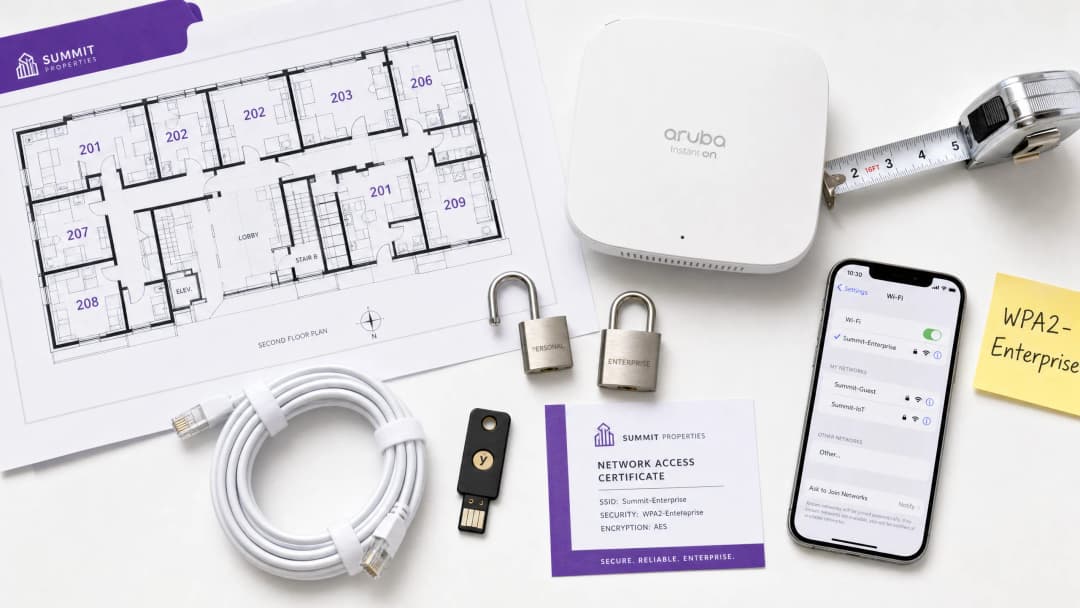
যেসব CTO, নেটওয়ার্ক আর্কিটেক্ট এবং ভেন্যু অপারেশন ডিরেক্টররা মাল্টি-টেন্যান্ট পরিবেশ পরিচালনা করছেন - যেমন কো-ওয়ার্কিং স্পেস এবং উচ্চ ঘনত্বের অ্যাপার্টমেন্ট কমপ্লেক্স - তাদের জন্য WPA2-Personal (প্রি-শেয়ার্ড কি বা PSK)-এর উপর নির্ভর করা একটি অপারেশনাল এবং নিরাপত্তা ঝুঁকি। যদিও WPA2-Personal একটি একক পরিবারের বাড়ির জন্য যথেষ্ট, তবে একাধিক সম্পর্কহীন ব্যবহারকারী একই ফিজিক্যাল এয়ারস্পেস শেয়ার করেন এমন পরিবেশে এটি স্থাপন করা গুরুতর দুর্বলতা তৈরি করে। একটি শেয়ার্ড পাসওয়ার্ড মানে শেয়ার্ড ঝুঁকি: একটি আপোসকৃত কি পুরো নেটওয়ার্ক সেগমেন্টকে ঝুঁকিতে ফেলে দেয়, যা PCI-DSS এবং GDPR-এর মতো বেসলাইন কমপ্লায়েন্স স্ট্যান্ডার্ড পূরণ করতে ব্যর্থ হয়।
এই নির্দেশিকাটি WPA2-Personal এবং WPA2-Enterprise (802.1X)-এর মধ্যে একটি বিস্তৃত প্রযুক্তিগত তুলনা প্রদান করে। এটি ব্যক্তিগতকৃত প্রমাণীকরণের আর্কিটেকচারাল প্রয়োজনীয়তা, টেন্যান্ট আইসোলেশনের জন্য ডায়নামিক VLAN অ্যাসাইনমেন্টের প্রক্রিয়া এবং একটি এন্টারপ্রাইজ-গ্রেড নিরাপত্তা ব্যবস্থায় স্থানান্তরিত হওয়ার সুনির্দিষ্ট ব্যবসায়িক প্রভাবের বিশদ বিবরণ দেয়। নেটওয়ার্ক অ্যাক্সেসের সাথে আইডেন্টিটি ম্যানেজমেন্ট একীভূত করে, আইটি টিমগুলি দানাদার নিয়ন্ত্রণ, অবিলম্বে শংসাপত্র প্রত্যাহার এবং সম্পূর্ণ অডিটেবিলিটি অর্জন করতে পারে - যা শেষ পর্যন্ত ভেন্যুটির সুনাম এবং টেন্যান্টদের ডেটা উভয়কেই রক্ষা করে।
Technical Deep-Dive: WPA2-Personal বনাম WPA2-Enterprise
Pre-Shared Key (PSK) Vulnerability
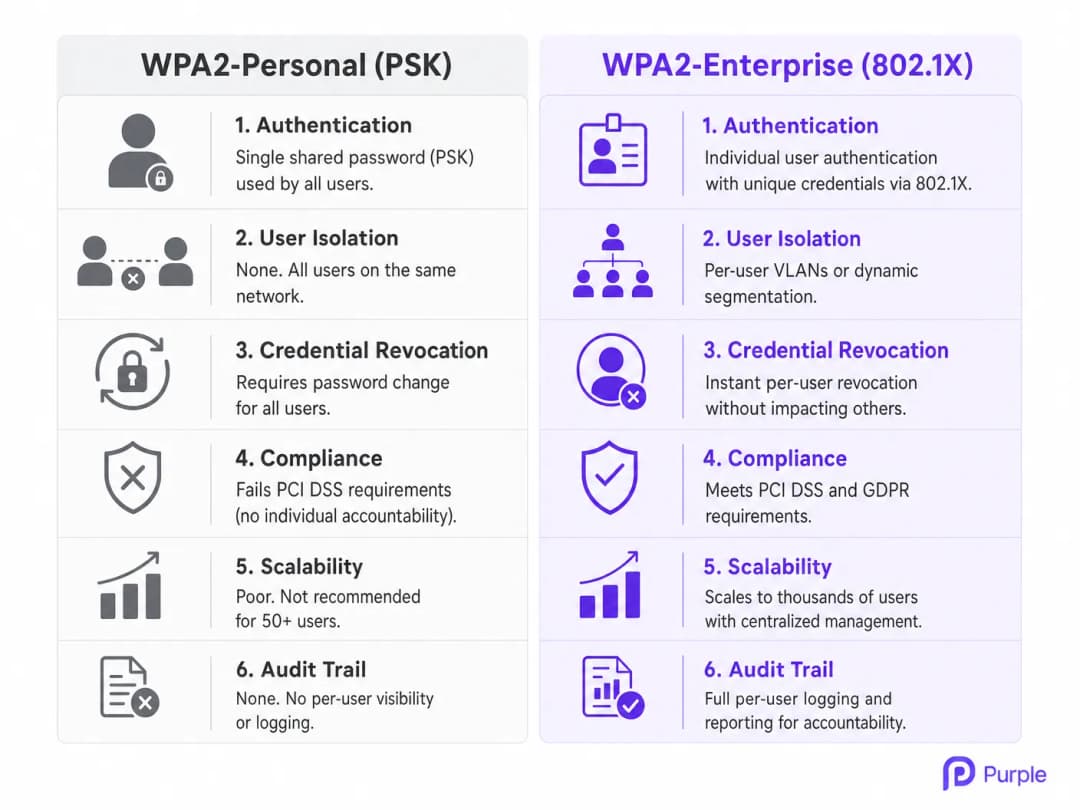
WPA2-Personal একটি নির্দিষ্ট SSID -এর সাথে সংযুক্ত সমস্ত ব্যবহারকারীকে প্রমাণীকরণ করতে একটি একক Pre-Shared Key (PSK) এর উপর নির্ভর করে। একটি মাল্টি-টেন্যান্ট পরিবেশে, এই আর্কিটেকচারটি মৌলিকভাবে ত্রুটিযুক্ত। যখন কোনো কো-ওয়ার্কিং মেম্বার বা অ্যাপার্টমেন্টের বাসিন্দা সংযুক্ত হন, তখন তারা সেই নেটওয়ার্কের অন্য প্রতিটি ব্যবহারকারীর মতো একই ক্রিপ্টোগ্রাফিক ভিত্তি শেয়ার করেন। এই আইসোলেশনের অভাবের অর্থ হল PSK আছে এমন যেকোনো ব্যবহারকারী সম্ভাব্যভাবে অন্যদের ট্রাফিকের ডিক্রিপ্ট করতে পারেন, সংবেদনশীল তথ্য আটকে রাখতে পারেন, বা একই সাবনেটের ডিভাইসগুলোর বিরুদ্ধে ল্যাটারাল অ্যাটাক চালাতে পারেন।
তাছাড়া, স্কেলে PSK ম্যানেজমেন্টের অপারেশনাল ওভারহেড টেকসই নয়। যখন কোনো টেন্যান্ট চলে যান, তখন তার অ্যাক্সেস প্রত্যাহার করার একমাত্র উপায় হল সম্পূর্ণ নেটওয়ার্কের জন্য PSK পরিবর্তন করা, যা বাকি সমস্ত টেন্যান্টকে পুনরায় প্রমাণীকরণ করতে বাধ্য করে। এই ঝামেলার কারণে একটি সাধারণ, বিপজ্জনক অনুশীলন তৈরি হয়: পাসওয়ার্ড কখনই পরিবর্তন করা হয় না, যা প্রাক্তন টেন্যান্ট এবং অননুমোদিত দর্শকদের স্থায়ী অ্যাক্সেস দেয়। Retail ল্যান্ডলর্ড এবং Hospitality অপারেটর যারা ডজন ডজন টেন্যান্ট পরিচালনা করছেন, তাদের জন্য এটি কোনো তাত্ত্বিক ঝুঁকি নয় - এটি একটি নিয়মিত অপারেশনাল ফেইলিওর মোড।
802.1X Architecture: Individualised Security
IEEE 802.1X স্ট্যান্ডার্ডের উপর ভিত্তি করে তৈরি, WPA2-Enterprise মৌলিকভাবে সিকিউরিটি মডেলটিকে নেটওয়ার্ক-লেভেল প্রমাণীকরণ থেকে ইউজার-লেভেল প্রমাণীকরণে স্থানান্তরিত করে। একটি শেয়ার্ড পাসওয়ার্ডের পরিবর্তে, প্রতিটি ব্যবহারকারী (বা ডিভাইস) অনন্য ক্রেডেনশিয়াল ব্যবহার করে প্রমাণীকরণ করে - সাধারণত একটি ইউজারনেম এবং পাসওয়ার্ড, বা একটি ডিজিটাল সার্টিফিকেট - যা Active Directory, LDAP, বা ক্লাউড-ভিত্তিক RADIUS পরিষেবার মতো একটি কেন্দ্রীয় আইডেন্টিটি স্টোরের বিপরীতে যাচাই করা হয়।
এই আর্কিটেকচারটি তিনটি প্রাথমিক উপাদান নিয়ে গঠিত:
Supplicant: ক্লায়েন্ট ডিভাইস যা সংযোগ করার চেষ্টা করছে (ল্যাপটপ, স্মার্টফোন)।
Authenticator: ওয়্যারলেস অ্যাক্সেস পয়েন্ট (AP) বা নেটওয়ার্ক সুইচ যা নেটওয়ার্কে ফিজিক্যাল অ্যাক্সেস নিয়ন্ত্রণ করে।
Authentication Server: RADIUS সার্ভার যা ক্রেডেনশিয়াল যাচাই করে এবং অ্যাক্সেস অনুমোদন করে।
যখন একটি supplicant AP-র সাথে যুক্ত হয়, তখন AP Extensible Authentication Protocol (EAP) মেসেজ ছাড়া অন্য সব ট্রাফিক ব্লক করে দেয়। AP ব্যবহারকারীর ক্রেডেনশিয়াল RADIUS সার্ভারে ফরোয়ার্ড করে। শুধুমাত্র সফল যাচাইকরণের পরেই RADIUS সার্ভার AP-কে পোর্ট খুলতে এবং নেটওয়ার্ক ট্রাফিকের অনুমতি দেওয়ার নির্দেশ দেয়। এটি নিশ্চিত করে যে প্রতিটি সেশন একটি অনন্য, গতিশীলভাবে তৈরি কী দিয়ে এনক্রিপ্ট করা হয়েছে, যা ব্যবহারকারীদের একে অপরের উপর নজরদারি করা থেকে বিরত রাখে।
Dynamic VLAN Assignment এবং Micro-Segmentation
মাল্টি-টেন্যান্ট সেটআপে WPA2-Enterprise-এর অন্যতম শক্তিশালী ক্ষমতা হলো ডায়নামিক VLAN অ্যাসাইনমেন্ট। যখন RADIUS সার্ভার কোনো ব্যবহারকারীকে অথেন্টিকেট করে, তখন এটি AP-তে একটি VLAN ID সহ নির্দিষ্ট অ্যাট্রিবিউট ফেরত পাঠাতে পারে। এটি নেটওয়ার্ক ইনফ্রাস্ট্রাকচারকে ব্যবহারকারীর পরিচয়, ভূমিকা বা টেন্যান্টের সম্পর্কের উপর ভিত্তি করে একটি নির্দিষ্ট ভার্চুয়াল লোকাল এরিয়া নেটওয়ার্ক (VLAN)-এ ডায়নামিকালি স্থাপন করতে দেয়, তারা যে ফিজিক্যাল AP-এর সাথেই সংযুক্ত হোক না কেন।
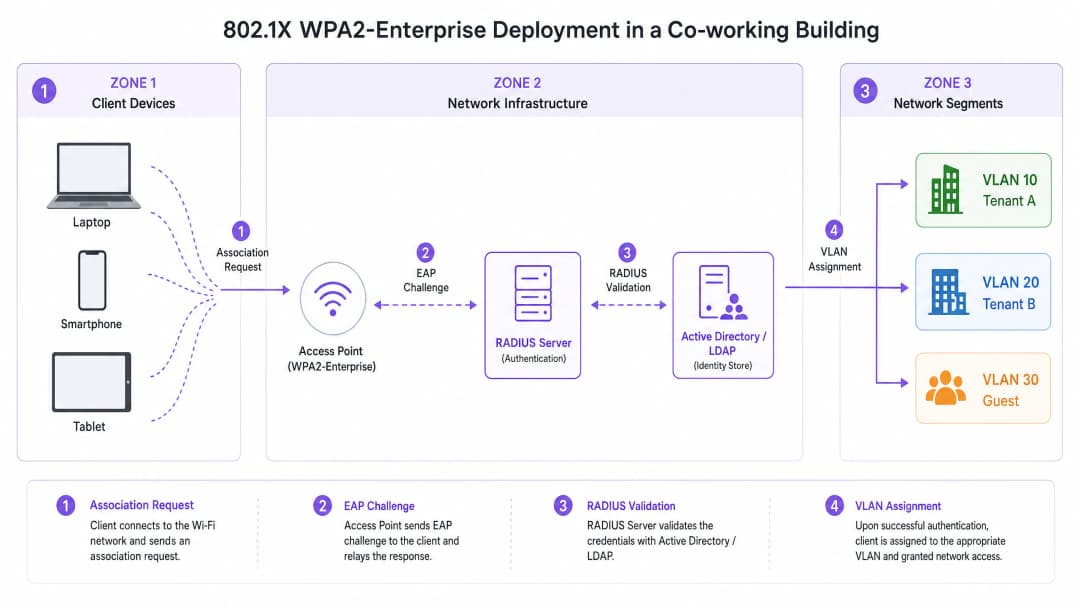
উদাহরণস্বরূপ, একটি কো-ওয়ার্কিং স্পেসে, Tenant A এবং Tenant B একই ফিজিক্যাল SSID (যেমন, "CoWorking_Secure")-এর সাথে সংযুক্ত হতে পারে। তবে, অথেন্টিকেশনের পর, RADIUS সার্ভার Tenant A-এর ডিভাইসগুলোকে VLAN 10 এবং Tenant B-এর ডিভাইসগুলোকে VLAN 20-এ অ্যাসাইন করে। এটি একটি শক্তিশালী লেয়ার ২ আইসোলেশন প্রদান করে, যা নিশ্চিত করে যে Tenant A যেন Tenant B-এর সার্ভার, প্রিন্টার বা ক্লায়েন্ট ডিভাইস অ্যাক্সেস করতে না পারে। কমপ্লায়েন্সের প্রয়োজনীয়তা পূরণ করতে এবং টেন্যান্টদের মেধা সম্পত্তি রক্ষা করতে এই মাইক্রো-সেগমেন্টেশন অত্যন্ত গুরুত্বপূর্ণ। Healthcare টেন্যান্ট বা ফাইন্যান্সিয়াল সার্ভিসেস ফার্ম ম্যানেজ করছে এমন ভেন্যুগুলোর জন্য এই স্তরের আইসোলেশন অনস্বীকার্য।
আপনার নির্দিষ্ট সেটআপ নিয়ে কোনো প্রশ্ন আছে?
আমাদের টিম ৮০,০০০ ভেন্যুতে ভেন্যু অপারেটর, IT ম্যানেজার এবং নেটওয়ার্ক ইঞ্জিনিয়ারদের সাথে কাজ করে। একটি ২০ মিনিটের কল বুক করুন এবং আপনার মতো অন্যরা কীভাবে এর সমাধান করেছেন তা আমরা আপনাকে দেখাব।
ইমপ্লিমেন্টেশন গাইড
WPA2-Enterprise ডেপ্লয় করার জন্য ওয়্যারলেস ইনফ্রাস্ট্রাকচার এবং আইডেন্টিটি ম্যানেজমেন্ট সিস্টেমের মধ্যে সতর্ক পরিকল্পনা এবং ইন্টিগ্রেশনের প্রয়োজন। নিচের ধাপগুলো একটি ভেন্ডর-নিরপেক্ষ ডেপ্লয়মেন্ট স্ট্র্যাটেজিকে তুলে ধরে।
ধাপ ১: আইডেন্টিটি প্রোভাইডার (IdP) প্রতিষ্ঠা করা
WPA2-Enterprise-এর ভিত্তি হলো একটি শক্তিশালী আইডেন্টিটি স্টোর। আধুনিক ডেপ্লয়মেন্টের জন্য, অন-প্রিমিস অ্যাক্টিভ ডিরেক্টরির চেয়ে ক্লাউড-ভিত্তিক ডিরেক্টরি (যেমন, Microsoft Entra ID, Google Workspace) তাদের স্কেলেবিলিটি এবং সহজে ইন্টিগ্রেশন করার সুবিধার জন্য বেশি পছন্দের। নিশ্চিত করুন যে নির্বাচিত IdP-টি RADIUS ইনফ্রাস্ট্রাকচারের সাথে যোগাযোগ করার জন্য প্রয়োজনীয় প্রোটোকলগুলো (যেমন, SAML, LDAP) সমর্থন করে।
Purple, Connect লাইসেন্সের অধীনে, OpenRoaming-এর মতো পরিষেবাগুলোর জন্য একটি ফ্রি আইডেন্টিটি প্রোভাইডার হিসেবে কাজ করতে পারে, যা জটিল অন-প্রিমিস ডিরেক্টরি ম্যানেজ না করেই অ্যাক্সেসকে সহজ করতে চাওয়া ভেন্যুগুলোর জন্য ডেপ্লয়মেন্টকে সহজ করে তোলে।
ধাপ ২: RADIUS ইনফ্রাস্ট্রাকচার ডেপ্লয় এবং কনফিগার করা
RADIUS সার্ভার AP এবং IdP-এর মধ্যে একটি সেতু হিসেবে কাজ করে। ক্লাউড RADIUS সমাধানগুলো অন-প্রিমিস হার্ডওয়্যারের প্রয়োজনীয়তা দূর করে এবং উচ্চ প্রাপ্যতা প্রদান করে। IdP-এর সাথে নিরাপদে যোগাযোগ করার জন্য RADIUS সার্ভারটি কনফিগার করুন এবং অথেন্টিকেশন পলিসিগুলো নির্ধারণ করুন।
নির্ধারণ করুন।নিরাপত্তার প্রয়োজনীয়তা এবং ক্লায়েন্ট ডিভাইসের ক্ষমতার উপর ভিত্তি করে উপযুক্ত EAP পদ্ধতি নির্বাচন করুন। PEAP-MSCHAPv2 ব্যবহারকারীর নাম/পাসওয়ার্ড প্রমাণীকরণ ব্যবহার করা পরিবেশের জন্য সাধারণ, যা শংসাপত্র প্রেরণের আগে একটি নিরাপদ TLS টানেল স্থাপন করে। EAP-TLS হল সবচেয়ে নিরাপদ পদ্ধতি, যার জন্য সার্ভার এবং ক্লায়েন্ট উভয় ডিভাইসেই ডিজিটাল সার্টিফিকেটের প্রয়োজন হয়, যা পাসওয়ার্ডের প্রয়োজনীয়তা সম্পূর্ণরূপে দূর করে এবং নির্বিঘ্ন প্রমাণীকরণ প্রদান করে - যদিও সার্টিফিকেট বিতরণের জন্য একটি Public Key Infrastructure (PKI) বা Mobile Device Management (MDM) সমাধানের প্রয়োজন হয়।
ধাপ ৩: ওয়্যারলেস অবকাঠামো কনফিগার করুন
প্রমাণীকরণের জন্য RADIUS সার্ভারকে নির্দেশ করতে WLAN কন্ট্রোলার বা ক্লাউড-ম্যানেজড AP-গুলি কনফিগার করুন। WPA2-Enterprise SSID সংজ্ঞায়িত করুন এবং ডায়নামিক VLAN অ্যাসাইনমেন্টের জন্য প্রয়োজনীয় RADIUS অ্যাট্রিবিউট কনফিগার করুন। AP-গুলি বা কন্ট্রোলারে RADIUS সার্ভারের IP ঠিকানা, পোর্ট (সাধারণত প্রমাণীকরণের জন্য ১৮১২, অ্যাকাউন্টিংয়ের জন্য ১৮১৩) এবং শেয়ার্ড সিক্রেট সংজ্ঞায়িত করুন। SSID কনফিগারেশনে ডায়নামিক VLAN অ্যাসাইনমেন্ট (প্রায়শই "AAA Override" বা অনুরূপ ভেন্ডর-নির্দিষ্ট পরিভাষা হিসাবে পরিচিত) সক্ষম করুন।
ধাপ ৪: ক্লায়েন্ট প্রভিশনিং এবং অনবোর্ডিং
WPA2-Enterprise স্থাপনে ক্লায়েন্ট অনবোর্ডিং সবচেয়ে গুরুত্বপূর্ণ চ্যালেঞ্জ। ব্যবহারকারীদের অবশ্যই 802.1X নেটওয়ার্কের সাথে সংযোগ করার জন্য তাদের ডিভাইসগুলি সঠিকভাবে কনফিগার করতে হবে। ম্যানুয়াল কনফিগারেশন ভুলের প্রবণতা বাড়ায় এবং হেল্পডেস্ক টিকিট তৈরি করে। একটি স্বয়ংক্রিয় অনবোর্ডিং সমাধান প্রয়োগ করুন - সাধারণত একটি ওপেন অনবোর্ডিং SSID এর মাধ্যমে অ্যাক্সেস করা একটি নিরাপদ অনবোর্ডিং পোর্টাল - যা ব্যবহারকারীকে তাদের ডিভাইসে একটি প্রোফাইল বা সার্টিফিকেট ইনস্টল করার নির্দেশিকা প্রদান করে। একবার প্রভিশন করা হয়ে গেলে, ডিভাইসটি স্বয়ংক্রিয়ভাবে নিরাপদ WPA2-Enterprise SSID এর সাথে সংযুক্ত হয়। অফিস-মানের ওয়্যারলেস স্থাপন অপ্টিমাইজ করার বিষয়ে আরও নির্দেশনার জন্য, আমাদের Office WiFi: Optimize Your Modern Office WiFi Network নির্দেশিকাটি দেখুন।
সর্বোত্তম অনুশীলনসমূহ
একটি WPA2-Enterprise স্থাপনে সার্টিফিকেট যাচাইকরণ বাধ্যতামূলক করা সবচেয়ে গুরুত্বপূর্ণ কনফিগারেশন সিদ্ধান্ত। ক্লায়েন্ট ডিভাইসগুলি যাতে RADIUS সার্ভারের সার্টিফিকেট যাচাই করার জন্য কনফিগার করা থাকে তা নিশ্চিত করুন। এটি করতে ব্যর্থ হলে ব্যবহারকারীরা "Evil Twin" আক্রমণের ঝুঁকিতে পড়েন, যেখানে একটি ক্ষতিকারক AP শংসাপত্র চুরি করার জন্য বৈধ নেটওয়ার্কের অনুকরণ করে।
হেডলেস ডিভাইসগুলি - প্রিন্টার, IoT সেন্সর, বিল্ডিং ম্যানেজমেন্ট সিস্টেম - যা 802.1X সমর্থন করতে পারে না তা সনাক্ত করতে ডিভাইস প্রোফাইলিংয়ের সাথে 802.1X প্রমাণীকরণ একত্রিত করুন। এই ডিভাইসগুলির জন্য MAC Authentication Bypass (MAB) ব্যবহার করুন, তবে কঠোর ফায়ারওয়াল পলিসি সহ বিচ্ছিন্ন VLAN-এ তাদের অ্যাক্সেস সীমাবদ্ধ করুন। ব্যবহারকারীর সেশনের একটি বিস্তারিত অডিট ট্রেইল প্রদান করতে AP-গুলিকে সার্ভারে RADIUS অ্যাকাউন্টিং বার্তা পাঠাতে কনফিগার করুন, যার মধ্যে সংযোগের সময়, ডেটা ব্যবহার এবং সংযোগ বিচ্ছিন্ন হওয়ার কারণ অন্তর্ভুক্ত থাকে, যা সমস্যা সমাধান এবং সম্মতির জন্য অত্যন্ত গুরুত্বপূর্ণ।ভিজিটরদের জন্য একটি পৃথক, বিচ্ছিন্ন Guest WiFi নেটওয়ার্ক বজায় রাখুন। এই নেটওয়ার্কে পরিষেবার শর্তাবলী গ্রহণ এবং ডেটা সংগ্রহের জন্য একটি Captive Portal ব্যবহার করা উচিত, যা ভেন্যুর অন্তর্দৃষ্টি পেতে WiFi Analytics-এর সাথে একীভূত হয়, এবং একই সাথে গেস্ট ট্রাফিককে এন্টারপ্রাইজ নেটওয়ার্ক থেকে সম্পূর্ণ আলাদা রাখে। Transport হাব এবং কনফারেন্স সেন্টারের জন্য, GDPR-এর অধীনে এই পৃথকীকরণ একটি নিয়ন্ত্রক প্রয়োজনীয়তা।
সমস্যা সমাধান এবং ঝুঁকি হ্রাসকরণ
সাধারণ ব্যর্থতার মোড
WPA2-Enterprise পরিবেশে হঠাৎ, ব্যাপক প্রমাণীকরণ (authentication) ব্যর্থতার সবচেয়ে সাধারণ কারণ হলো সার্টিফিকেটের মেয়াদ শেষ হয়ে যাওয়া। যদি RADIUS সার্ভার সার্টিফিকেটের মেয়াদ শেষ হয়ে যায় বা এটি কোনো অবিশ্বস্ত সার্টিফিকেট অথরিটি (CA) দ্বারা ইস্যু করা হয়, তবে ক্লায়েন্ট ডিভাইসগুলো সংযোগ করতে অস্বীকার করবে। সার্টিফিকেটের মেয়াদ শেষ হওয়ার জন্য অন্তত ৬০ দিন আগে সতর্কতা সহ সক্রিয় পর্যবেক্ষণ এবং অ্যালার্টের ব্যবস্থা করুন।
RADIUS সার্ভারের অনুপলব্ধতা হলো দ্বিতীয় সবচেয়ে ঝুঁকিপূর্ণ ব্যর্থতার মোড। যদি AP-গুলো RADIUS সার্ভারে পৌঁছাতে না পারে, তবে কোনো ব্যবহারকারী প্রমাণীকরণ করতে পারবেন না। উচ্চ প্রাপ্যতা নিশ্চিত করতে বিভিন্ন ভৌগোলিক অঞ্চল বা অ্যাভেইলেবিলিটি জোনে রিডান্ড্যান্ট RADIUS সার্ভার স্থাপন করুন। ক্লায়েন্ট কনফিগারেশনের ভুল হলো হেল্পডেস্ক টিকিটের সবচেয়ে ঘন ঘন উৎস: ব্যবহারকারীরা ম্যানুয়ালি তাদের ডিভাইস কনফিগার করার সময় প্রায়শই ভুল EAP পদ্ধতি বেছে নেন বা সার্ভার সার্টিফিকেটকে বিশ্বাস করতে ব্যর্থ হন। সামঞ্জস্যপূর্ণ ক্লায়েন্ট কনফিগারেশন প্রয়োগ করতে স্বয়ংক্রিয় অনবোর্ডিং টুল বা MDM সলিউশনের ওপর নির্ভর করুন।
ঝুঁকি হ্রাসকরণ: রোমিং চ্যালেঞ্জ
বড় ভেন্যুগুলোতে, ব্যবহারকারীরা প্রায়শই AP-গুলোর মধ্যে রোম করেন। WPA2-Enterprise-এর ক্ষেত্রে, একটি সম্পূর্ণ 802.1X প্রমাণীকরণ চক্রে কয়েকশ মিলিসেকেন্ড সময় লাগতে পারে, যা VoIP বা ভিডিও কনফারেন্সিংয়ের মতো রিয়েল-টাইম অ্যাপ্লিকেশনগুলোতে লক্ষণীয় ব্যাঘাত ঘটায়। এটি কমাতে, 802.11r (Fast BSS Transition) এবং Opportunistic Key Caching (OKC)-এর মতো ফাস্ট রোমিং প্রোটোকলগুলো প্রয়োগ করুন। এই স্ট্যান্ডার্ডগুলো ক্লায়েন্ট এবং নেটওয়ার্ককে প্রমাণীকরণ কীগুলো ক্যাশ করার অনুমতি দেয়, যা AP-গুলোর মধ্যে রোম করার জন্য প্রয়োজনীয় সময়কে উল্লেখযোগ্যভাবে কমিয়ে দেয়। এন্টারপ্রাইজ WLAN-এ রোমিং পারফরম্যান্স অপ্টিমাইজ করার বিস্তারিত প্রযুক্তিগত দিকনির্দেশনার জন্য, Resolving Roaming Issues in Corporate WLANs সংক্রান্ত আমাদের গাইডটি দেখুন। এর পেছনের RF আচরণ বোঝা অত্যন্ত গুরুত্বপূর্ণ; আমাদের WiFi Frequencies: A Guide to WiFi Frequencies in 2026 গাইডটি একটি মৌলিক রেফারেন্স প্রদান করে।
ROI এবং ব্যবসায়িক প্রভাব
WPA2-Personal থেকে WPA2-Enterprise-এ স্থানান্তরিত হওয়ার জন্য RADIUS অবকাঠামো এবং অনবোর্ডিং সলিউশনে প্রাথমিক বিনিয়োগের প্রয়োজন হয়, তবে দীর্ঘমেয়াদী রিটার্ন অন ইনভেস্টমেন্ট (ROI) যথেষ্ট, বিশেষ করে Retail, Hospitality, এবং বাণিজ্যিক রিয়েল এস্টেট সেক্টরগুলোতে।
| ROI চালিকাশক্তি | WPA2-Personal | WPA2-Enterprise |
|---|---|---|
| শংসাপত্র প্রত্যাহার | সম্পূর্ণ নেটওয়ার্ক ব্যাঘাত | তাত্ক্ষণিক, ব্যবহারকারী-ভিত্তিক |
| হেল্পডেস্ক ওভারহেড | উচ্চ (পাসওয়ার্ড রিসেট) | কম (স্বয়ংক্রিয় অনবোর্ডিং) |
| টেন্যান্ট আইসোলেশন | কোনোটিই নয় | সম্পূর্ণ VLAN মাইক্রো-সেগমেন্টেশন |
| অডিট ট্রেইল | কোনোটিই নয় | ব্যবহারকারী প্রতি সম্পূর্ণ সেশন লগিং |
| স্কেলেবিলিটি | দুর্বল (৫০+ ব্যবহারকারী) | হাজার হাজারে স্কেল করে |
টেন্যান্টরা চলে যাওয়ার সময় ম্যানুয়ালি PSK আপডেট করার প্রয়োজনীয়তা দূর করা হেল্পডেস্ক টিকিট এবং প্রশাসনিক ঝামেলা উল্লেখযোগ্যভাবে হ্রাস করে। স্বয়ংক্রিয় অনবোর্ডিং প্রভিশনিং প্রক্রিয়াটিকে স্ট্রীমলাইন করে, যা আইটি কর্মীদের কৌশলগত উদ্যোগগুলিতে ফোকাস করতে সহায়তা করে। ব্যক্তিগত জবাবদিহিতা এবং নেটওয়ার্ক সেগমেন্টেশন প্রদান করে, WPA2-Enterprise ভেন্যুগুলিকে PCI-DSS এবং GDPR-এর মতো কঠোর কমপ্লায়েন্স ম্যান্ডেটগুলি পূরণ করতে সক্ষম করে, যা ব্যয়বহুল ডেটা লঙ্ঘন এবং নিয়ন্ত্রক জরিমানার ঝুঁকি হ্রাস করে।
এন্টারপ্রাইজ-গ্রেড নিরাপত্তা অফার করা কো-ওয়ার্কিং স্পেস এবং প্রিমিয়াম অ্যাপার্টমেন্টগুলির জন্য একটি প্রতিযোগিতামূলক সুবিধা। টেন্যান্টরা তাদের মেধা সম্পত্তি রক্ষা করার জন্য নিরাপদ, নির্ভরযোগ্য সংযোগ দাবি করে। একটি শক্তিশালী WPA2-Enterprise স্থাপনা ভেন্যুটির ভ্যালু প্রপোজিশন বাড়ায়, যা উচ্চ টেন্যান্ট রিটেনশন এবং প্রিমিয়াম প্রাইসিং মডেলগুলিকে সমর্থন করে। যেহেতু নিরাপদ, নমনীয় ওয়ার্কস্পেসের চাহিদা ক্রমাগত বৃদ্ধি পাচ্ছে, তাই লিগ্যাসি সিকিউরিটি মডেলের উপর নির্ভর করা আর বাস্তবসম্মত নয়। আধুনিক মাল্টি-টেন্যান্ট পরিবেশকে সমর্থন করার জন্য প্রয়োজনীয় স্কেলযোগ্য, নিরাপদ ভিত্তি প্রদান করে WPA2-Enterprise।
মূল সংজ্ঞাসমূহ
802.1X
পোর্ট-ভিত্তিক নেটওয়ার্ক অ্যাক্সেস নিয়ন্ত্রণের জন্য একটি IEEE স্ট্যান্ডার্ড যা LAN বা WLAN-এর সাথে সংযুক্ত হতে ইচ্ছুক ডিভাইসগুলির জন্য একটি অথেন্টিকেশন মেকানিজম প্রদান করে। এটি IEEE 802 নেটওয়ার্কে EAP-এর এনক্যাপসুলেশনকে সংজ্ঞায়িত করে।
একটি মৌলিক প্রোটোকল যা WPA2-Enterprise-কে সক্ষম করে, এবং একটি থ্রি-পার্টি মডেল: Supplicant, Authenticator এবং Authentication Server-এর মাধ্যমে নিরাপত্তা শেয়ার্ড পাসওয়ার্ড থেকে স্বতন্ত্র ব্যবহারকারী অথেন্টিকেশনে স্থানান্তরিত করে।
RADIUS (Remote Authentication Dial-In User Service)
একটি নেটওয়ার্কিং প্রোটোকল যা একটি নেটওয়ার্ক পরিষেবা সংযোগকারী এবং ব্যবহারকারী গ্রাহকদের জন্য কেন্দ্রীভূত Authentication, Authorisation, and Accounting (AAA) ম্যানেজমেন্ট প্রদান করে। RFC 2865-এ সংজ্ঞায়িত।
একটি কেন্দ্রীয় সার্ভার যা একটি আইডেন্টিটি স্টোরের বিপরীতে ব্যবহারকারীর ক্রেডেনশিয়াল যাচাই করে এবং AP-কে নির্দেশ দেয় যে অ্যাক্সেস মঞ্জুর করা হবে কি না এবং কোন VLAN অ্যাসাইন করা হবে।
Dynamic VLAN Assignment
802.1X অথেন্টিকেশন প্রক্রিয়া চলাকালীন একটি RADIUS অ্যাট্রিবিউট (Tunnel-Private-Group-ID) হিসাবে রিটার্ন হওয়া ব্যবহারকারীর পরিচয় বা ভূমিকার উপর ভিত্তি করে একটি নির্দিষ্ট Virtual Local Area Network (VLAN)-এ তাকে অ্যাসাইন করার প্রক্রিয়া।
মাল্টি-টেন্যান্ট পরিবেশের জন্য অত্যন্ত গুরুত্বপূর্ণ যাতে নিশ্চিত করা যায় যে বিভিন্ন কোম্পানি বা বাসিন্দারা পৃথক SSID-এর প্রয়োজন ছাড়াই পৃথক নেটওয়ার্ক সেগমেন্টে আইসোলেটেড থাকে।
EAP (Extensible Authentication Protocol)
ওয়্যারলেস নেটওয়ার্ক এবং পয়েন্ট-টু-পয়েন্ট সংযোগে প্রায়শই ব্যবহৃত একটি অথেন্টিকেশন ফ্রেমওয়ার্ক, যা EAP-TLS, PEAP এবং EAP-TTLS সহ একাধিক অথেন্টিকেশন পদ্ধতি সমর্থন করে।
802.1X ফ্রেমওয়ার্কের মধ্যে এনক্যাপসুলেটেড ক্লায়েন্ট ডিভাইস (Supplicant) এবং RADIUS সার্ভারের মধ্যে অথেন্টিকেশন মেসেজ আদান-প্রদান করতে ব্যবহৃত প্রোটোকল।
Supplicant
একটি ডিভাইসের (ল্যাপটপ, স্মার্টফোন) উপর থাকা একটি সফটওয়্যার ক্লায়েন্ট যা 802.1X-এর মাধ্যমে নেটওয়ার্ক অ্যাক্সেস পেতে Authenticator-এর সাথে যোগাযোগ করে। এটি Windows, macOS, iOS এবং Android সহ সমস্ত আধুনিক অপারেটিং সিস্টেমে বিল্ট-ইন থাকে।
এন্টারপ্রাইজ WiFi নেটওয়ার্কের সাথে সংযোগ করার চেষ্টা করা এন্ড-ইউজার ডিভাইস। এটির সঠিক কনফিগারেশন - বিশেষ করে RADIUS সার্ভার সার্টিফিকেট ভ্যালিডেশন - নিরাপত্তার জন্য অত্যন্ত গুরুত্বপূর্ণ।
MAB (MAC Authentication Bypass)
ডিভাইসের MAC ঠিকানার উপর ভিত্তি করে নেটওয়ার্ক অ্যাক্সেস মঞ্জুর করার একটি পদ্ধতি, যা 802.1X অথেন্টিকেশন সমর্থন করে না এমন ডিভাইসগুলির জন্য একটি বিকল্প হিসেবে ব্যবহৃত হয়। MAC ঠিকানাটি RADIUS সার্ভারে ইউজারনেম এবং পাসওয়ার্ড উভয় হিসেবে পাঠানো হয়।
একটি এন্টারপ্রাইজ পরিবেশে প্রিন্টার, IoT সেন্সর এবং পয়েন্ট-অফ-সেল টার্মিনালের মতো হেডলেস ডিভাইসগুলিকে সুরক্ষিত করতে ব্যবহৃত হয়। এই ডিভাইসগুলিকে সর্বদা একটি সীমাবদ্ধ, আইসোলেটেড VLAN-এ রাখা উচিত।
Evil Twin Attack
একটি অননুমোদিত ওয়্যারলেস অ্যাক্সেস পয়েন্ট যা একই SSID ব্রডকাস্ট করে একটি বৈধ WiFi অ্যাক্সেস পয়েন্টের ছদ্মবেশ ধারণ করে, যা ওয়্যারলেস যোগাযোগে আড়ি পাততে বা ব্যবহারকারীর ক্রেডেনশিয়াল হাতিয়ে নিতে ব্যবহৃত হয়।
WPA2-Enterprise ডেপ্লয়মেন্টের ক্ষেত্রে একটি প্রাথমিক হুমকি। ক্লায়েন্ট ডিভাইসগুলির জন্য RADIUS সার্ভারের ডিজিটাল সার্টিফিকেট যাচাই করা বাধ্যতামূলক করার মাধ্যমে এটি প্রশমিত করা হয়, যা একটি রোগ AP নকল করতে পারে না।
EAP-TLS (EAP-Transport Layer Security)
সবচেয়ে নিরাপদ EAP পদ্ধতি, যার জন্য RADIUS সার্ভার এবং ক্লায়েন্ট ডিভাইস উভয় ক্ষেত্রেই ডিজিটাল সার্টিফিকেটের মাধ্যমে পারস্পরিক অথেন্টিকেশন প্রয়োজন হয়। এটি পাসওয়ার্ড-ভিত্তিক অথেন্টিকেশন সম্পূর্ণভাবে দূর করে।
উচ্চ-নিরাপত্তা সম্পন্ন পরিবেশের জন্য প্রস্তাবিত অথেন্টিকেশন পদ্ধতি। ক্লায়েন্ট ডিভাইসে সার্টিফিকেট বিতরণের জন্য একটি PKI বা MDM সলিউশনের প্রয়োজন হয়, তবে এটি নির্বিঘ্ন, পাসওয়ার্ডহীন অথেন্টিকেশন প্রদান করে।
PEAP-MSCHAPv2 (Protected EAP with Microsoft Challenge Handshake Authentication Protocol v2)
একটি ব্যাপকভাবে ব্যবহৃত EAP পদ্ধতি যা কেবল একটি সার্ভার-সাইড সার্টিফিকেট ব্যবহার করে একটি TLS টানেল স্থাপন করে, তারপর সেই টানেলের মধ্যে ইউজারনেম এবং পাসওয়ার্ডের মাধ্যমে ব্যবহারকারীকে অথেনটিকেট করে।
এমন পরিবেশের জন্য একটি বাস্তবসম্মত পছন্দ যেখানে ক্লায়েন্ট-সাইড সার্টিফিকেট ডেপ্লয় করা সম্ভব নয়। ক্লায়েন্ট ডিভাইসে বাধ্যতামূলক সার্ভার সার্টিফিকেট ভ্যালিডেশনের সাথে যুক্ত করা হলে এটি সুরক্ষিত হয়।
সমাধানকৃত উদাহরণসমূহ
একটি ২০০-রুমের প্রিমিয়াম অ্যাপার্টমেন্ট কমপ্লেক্স বর্তমানে সমস্ত বাসিন্দাদের জন্য একটি একক WPA2-Personal নেটওয়ার্ক ব্যবহার করে। প্রপার্টি ম্যানেজার রিপোর্ট করেছেন যে প্রাক্তন ভাড়াটিয়ারা এখনও রাস্তা থেকে নেটওয়ার্ক অ্যাক্সেস করছেন এবং বাসিন্দারা অননুমোদিত ডিভাইসের কারণে ধীর গতির অভিযোগ করছেন। প্রতিটি বাসিন্দার ল্যাপটপ এবং স্মার্টফোন ম্যানুয়ালি কনফিগার করার জন্য আইটি কর্মীদের প্রয়োজন ছাড়াই তাদের নেটওয়ার্ক সুরক্ষিত করতে হবে।
একটি প্রপার্টি ম্যানেজমেন্ট সিস্টেম (PMS) বা একটি ডেডিকেটেড টেন্যান্ট ডিরেক্টরির সাথে একীভূত একটি ক্লাউড-ভিত্তিক RADIUS সার্ভার স্থাপন করুন। PEAP-MSCHAPv2 সহ WPA2-Enterprise (802.1X) ব্যবহার করতে ওয়্যারলেস কন্ট্রোলারগুলি কনফিগার করুন। একটি অস্থায়ী ওপেন অনবোর্ডিং SSID-এর মাধ্যমে অ্যাক্সেসযোগ্য একটি স্ব-পরিষেবা অনবোর্ডিং পোর্টাল বাস্তবায়ন করুন। যখন একজন নতুন বাসিন্দা আসেন, তারা অনবোর্ডিং পোর্টালের একটি লিঙ্ক সহ একটি ইমেল পান। পোর্টালটি তাদের একটি নিরাপদ নেটওয়ার্ক প্রোফাইল ডাউনলোড করতে গাইড করে যা তাদের অনন্য শংসাপত্র ব্যবহার করে 802.1X নেটওয়ার্কের জন্য তাদের ডিভাইসগুলি কনফিগার করে। যখন তাদের লিজের মেয়াদ শেষ হয়ে যায়, তখন ডিরেক্টরিতে তাদের অ্যাকাউন্ট নিষ্ক্রিয় করা হয়, যা অন্য বাসিন্দাদের প্রভাবিত না করেই অবিলম্বে তাদের WiFi অ্যাক্সেস বাতিল করে। স্মার্ট টিভি এবং IoT সেন্সরের মতো হেডলেস ডিভাইসগুলি MAC Authentication Bypass-এর মাধ্যমে পরিচালনা করা হয় এবং প্রতি-ইউনিট IoT VLAN-এ স্থাপন করা হয়।
একটি বড় কো-ওয়ার্কিং স্পেসে ১৫টি ভিন্ন স্টার্ট-আপ কোম্পানি রয়েছে, যার প্রতিটিতে ৫-২০ জন কর্মচারী রয়েছেন। তাদের নিশ্চিত করতে হবে যে Startup A-এর অন্তর্গত ডিভাইসগুলি Startup B-এর অন্তর্গত ডিভাইসের সাথে যোগাযোগ করতে না পারে, যদিও তারা সকলেই একই ফিজিক্যাল অ্যাক্সেস পয়েন্টগুলির সাথে সংযুক্ত রয়েছে। যে কোম্পানি তার মাসিক মেম্বারশিপ ফি দিতে ব্যর্থ হবে তার অ্যাক্সেস অবিলম্বে বাতিল করার সক্ষমতাও তাদের প্রয়োজন।
ডায়নামিক VLAN অ্যাসাইনমেন্ট সহ WPA2-Enterprise বাস্তবায়ন করুন। একটি কেন্দ্রীয় আইডেন্টিটি ডিরেক্টরি (যেমন, Google Workspace বা Microsoft Entra ID) তৈরি করুন এবং ব্যবহারকারীদের তাদের স্টার্ট-আপের সম্পর্কের উপর ভিত্তি করে গ্রুপে সংগঠিত করুন। 802.1X প্রমাণীকরণ প্রক্রিয়া চলাকালীন ব্যবহারকারীর গ্রুপ মেম্বারশিপের উপর ভিত্তি করে একটি নির্দিষ্ট VLAN ID অ্যাট্রিবিউট ফেরত দেওয়ার জন্য RADIUS সার্ভারটি কনফিগার করুন। নেটওয়ার্ক সুইচ এবং AP-গুলিকে এই VLAN ID-গুলিকে বিচ্ছিন্ন সাবনেটে ম্যাপ করার জন্য কনফিগার করুন যেখানে কঠোর ফায়ারওয়াল নিয়মগুলি ইন্টার-VLAN রাউটিং প্রতিরোধ করে। যখন কোনো কোম্পানির মেম্বারশিপ শেষ হয়ে যায়, ডিরেক্টরিতে তাদের গ্রুপটি নিষ্ক্রিয় করুন। সমস্ত সক্রিয় সেশন বন্ধ হয়ে যায় এবং নতুন কোনো সেশন স্থাপন করা যায় না। অবশিষ্ট ১৪টি কোম্পানি সম্পূর্ণ অপ্রভাবিত থাকে।
অনুশীলনী প্রশ্নসমূহ
Q1. একটি রিটেল কমপ্লেক্স তাদের স্বতন্ত্র স্টোর ভাড়াটেদের WiFi পরিষেবা প্রদান করে। তারা WPA2-Enterprise প্রয়োগ করতে চায় কিন্তু চিন্তিত যে পয়েন্ট-অফ-সেল (POS) টার্মিনাল এবং বারকোড স্ক্যানারগুলো 802.1X অথেন্টিকেশন সমর্থন করে না। নিরাপত্তা বজায় রেখে এই ডিভাইসগুলোর ব্যবস্থা করার জন্য নেটওয়ার্ক আর্কিটেক্টের কীভাবে অ্যাক্সেস পলিসি ডিজাইন করা উচিত?
ইঙ্গিত: নিরাপত্তা এবং আইসোলেশন বজায় রেখে কীভাবে এমন ডিভাইসগুলি পরিচালনা করা যায় যেগুলিতে supplicant নেই তা বিবেচনা করুন।
মডেল উত্তর দেখুন
আর্কিটেক্টের উচিত 802.1X এর পাশাপাশি MAC Authentication Bypass (MAB) প্রয়োগ করা। RADIUS সার্ভারটিকে প্রথমে 802.1X অথেন্টিকেশনের চেষ্টা করার জন্য কনফিগার করতে হবে। যদি ডিভাইসটির টাইমআউট হয় (কারণ এতে কোনো সাপ্লিক্যান্ট নেই), তাহলে AP ডিভাইসটির MAC অ্যাড্রেস RADIUS সার্ভারে পাঠানোর জন্য ফলব্যাক করে। RADIUS সার্ভারটি পূর্ব-অনুমোদিত পরিচিত POS টার্মিনাল এবং স্ক্যানারের ডেটাবেসের সাথে MAC অ্যাড্রেসটি মিলিয়ে দেখে। যদি মিল পাওয়া যায়, তবে ডিভাইসটিকে অথরাইজ করা হয় এবং POS সরঞ্জামের জন্য নির্ধারিত একটি অত্যন্ত সীমাবদ্ধ, আইসোলেটেড VLAN-এ রাখা হয়, যেখানে ফায়ারওয়াল নিয়মগুলো কেবল পেমেন্ট গেটওয়ে ট্রাফিকের অনুমতি দেয়। এটি নিশ্চিত করে যে POS ডিভাইসগুলো ভাড়াটেদের ব্যবহারকারী ডেটার সাথে মিশ্রিত না হয়ে নেটওয়ার্কে রয়েছে, যা PCI-DSS সেগমেন্টেশনের প্রয়োজনীয়তা পূরণ করে।
Q2. একটি কো-ওয়ার্কিং স্পেসে WPA2-Enterprise স্থাপনের সময়, ব্যবহারকারীরা রিপোর্ট করছেন যে প্রথমবার নেটওয়ার্কে কানেক্ট করার সময় তাদের প্রায়শই "Accept Certificate" এর জন্য অনুরোধ করা হচ্ছে। আইটি ম্যানেজার চিন্তিত যে এটি ব্যবহারকারীদের একটি Evil Twin অ্যাটাক-এ ভুয়া সার্টিফিকেট গ্রহণ করতে প্ররোচিত করবে। এটি সমাধান করার সবচেয়ে কার্যকর উপায় কী?
ইঙ্গিত: ম্যানুয়ালি সার্টিফিকেট যাচাই করার জন্য ব্যবহারকারীদের উপর নির্ভর করা একটি নিরাপত্তা ঝুঁকি। সঠিক ট্রাস্ট অ্যাঙ্কর প্রয়োগ করতে এই প্রক্রিয়াটিকে কীভাবে স্বয়ংক্রিয় করা যেতে পারে?
মডেল উত্তর দেখুন
আইটি ম্যানেজারের একটি স্বয়ংক্রিয় অনবোর্ডিং সমাধান (যেমন একটি সুরক্ষিত অনবোর্ডিং পোর্টাল বা একটি MDM-দ্বারা বিতরণ করা নেটওয়ার্ক প্রোফাইল) প্রয়োগ করা উচিত। এই সমাধানটি স্বয়ংক্রিয়ভাবে ক্লায়েন্ট ডিভাইসের সাপ্লিক্যান্ট সেটিংস কনফিগার করে, যার মধ্যে স্পষ্টভাবে সংজ্ঞায়িত করা থাকে যে কোন RADIUS সার্ভার সার্টিফিকেট বিশ্বাস করতে হবে এবং কোন Certificate Authority (CA) এটি ইস্যু করেছে। ট্রাস্ট অ্যাঙ্করটি আগে থেকে কনফিগার করে রাখার মাধ্যমে, ডিভাইসটি নীরবে এবং নিরাপদে আসল নেটওয়ার্কের সাথে অথেন্টিকেট হবে এবং ব্যবহারকারীকে কোনো অনুরোধ না জানিয়েই ভিন্ন সার্টিফিকেট প্রদর্শনকারী যেকোনো ভুয়া AP স্বয়ংক্রিয়ভাবে প্রত্যাখ্যান করবে। অনবোর্ডিং পোর্টালটি একটি সাময়িক ওপেন SSID-এ HTTPS-এর মাধ্যমে সরবরাহ করা উচিত এবং ব্যবহারকারীরা যাতে এটিকে ওভাররাইড করতে না পারেন সেজন্য প্রোফাইলটির সাপ্লিক্যান্ট কনফিগারেশন লক ডাউন করা উচিত।
Q3. একটি স্টেডিয়ামের এক্সিকিউটিভ স্যুটে ইভেন্ট চলাকালীন হাই-প্রোফাইল কর্পোরেট ক্লায়েন্টদের জন্য নিরাপদ, আইসোলেটেড WiFi প্রয়োজন। বর্তমান ডিজাইনে ৫০টি স্যুটের প্রতিটির জন্য একটি আলাদা WPA2-Personal SSID এবং পাসওয়ার্ড ব্যবহার করা হয়, যার ফলে ৫০টি SSID একযোগে ব্রডকাস্ট হচ্ছে। WiFi পারফরম্যান্স অত্যন্ত দুর্বল। এর প্রযুক্তিগত মূল কারণ কী এবং WPA2-Enterprise এটি কীভাবে সমাধান করে?
ইঙ্গিত: RF স্পেকট্রামের শারীরিক সীমাবদ্ধতা এবং ম্যানেজমেন্ট ফ্রেম দ্বারা তৈরি ওভারহেড বিবেচনা করুন।
মডেল উত্তর দেখুন
৫০টি পৃথক SSID ব্রডকাস্ট করা গুরুতর ম্যানেজমেন্ট ফ্রেম ওভারহেড তৈরি করে। প্রতিটি SSID-এর জন্য AP-গুলোকে নিয়মিত বিরতিতে (সাধারণত প্রতি ১০২.৪ মিলি সেকেন্ডে) বিকন ফ্রেম ব্রডকাস্ট করতে হয়। ৫০টি SSID থাকায়, কোনো প্রকৃত ডেটা ট্রাফিক পাঠানোর আগেই AP-গুলো উপলব্ধ RF এয়ারটাইমের একটি বড় অংশ বিকন প্রেরণে ব্যয় করে। এটি সরাসরি থ্রুপুট হ্রাস করে এবং সমস্ত ব্যবহারকারীর জন্য ল্যাটেন্সি বাড়িয়ে দেয়। WPA2-Enterprise সমস্ত স্যুটকে একটি একক, সুরক্ষিত SSID-এ একত্রিত করে এটি সমাধান করে। ডায়নামিক VLAN অ্যাসাইনমেন্ট ব্যবহার করে, RADIUS সার্ভার কর্পোরেট ক্লায়েন্টের ক্রেডেনশিয়াল যাচাই করে এবং তাদের স্যুটের জন্য নির্দিষ্ট একটি আইসোলেটেড VLAN-এ ডায়নামিকালি স্থাপন করে। এটি প্রয়োজনীয় নিরাপত্তা ও আইসোলেশন প্রদান করে এবং একই সাথে SSID-এর সংখ্যা কমিয়ে RF পারফরম্যান্স অপ্টিমাইজ করে। উচ্চ-ঘনত্বের পরিবেশে প্রতি AP-তে সর্বোচ্চ ৩ - ৪টি SSID রাখার পরামর্শ দেওয়া হয়।
এই সিরিজে পড়া চালিয়ে যান
ছাত্রাবাস নেটওয়ার্কে ব্যান্ডউইথ পরিচালনা
এই গাইডটি IT ম্যানেজার, নেটওয়ার্ক আর্কিটেক্ট এবং প্রোপার্টি অপারেশন ডিরেক্টরদের উচ্চ-ঘনত্বের ছাত্রাবাস পরিবেশে WiFi ব্যান্ডউইথ পরিচালনার জন্য একটি ভেন্ডর-নিরপেক্ষ প্রযুক্তিগত রেফারেন্স প্রদান করে। এটি VLAN সেগমেন্টেশন, Quality of Service (QoS) পলিসি ডিজাইন, আইডেন্টিটি-ভিত্তিক ট্রাফিক শেপিং এবং অ্যাপ্লিকেশন-লেয়ার ভিজিবিলিটি কভার করে - যা একটি স্কেলযোগ্য, ন্যায্য-অ্যাক্সেস নেটওয়ার্কের চারটি স্তম্ভ। বাস্তব-বিশ্বের ডিপ্লয়মেন্টের দৃশ্যপট, পরিমাপযোগ্য ফলাফল এবং সিদ্ধান্ত গ্রহণের ফ্রেমওয়ার্ক সহ, এটি স্কেলে আবাসিক নেটওয়ার্ক অবকাঠামোর জন্য দায়ী যেকোনো দলের জন্য অপারেশনাল প্লেবুক।
শেয়ার্ড WiFi নেটওয়ার্কের জন্য মাইক্রো-সেগমেন্টেশন-এর সেরা অনুশীলনসমূহ
এই টেকনিক্যাল রেফারেন্স নির্দেশিকাটি শেয়ার্ড WiFi অবকাঠামোতে মাইক্রো-সেগমেন্টেশন বাস্তবায়নের জন্য কার্যকর কৌশল প্রদান করে। ঝুঁকি কমাতে, কমপ্লায়েন্স নিশ্চিত করতে এবং নেটওয়ার্কের কার্যক্ষমতা অপ্টিমাইজ করতে আইটি ম্যানেজার এবং নেটওয়ার্ক আর্কিটেক্টরা কীভাবে নিরাপদে গেস্ট, IoT এবং স্টাফ ট্রাফিক আইসোলেট করতে পারেন তা এখানে বিস্তারিতভাবে বর্ণনা করা হয়েছে।
কীভাবে Multi-Tenant বিল্ডিংয়ে Dynamic VLAN Assignment কাজ করে
এই টেকনিক্যাল রেফারেন্স গাইডটিতে multi-tenant পরিবেশে 802.1X এবং RADIUS ব্যবহার করে Dynamic VLAN Assignment-এর আর্কিটেকচার এবং ইমপ্লিমেন্টেশন বিস্তারিতভাবে আলোচনা করা হয়েছে। এটি IT ম্যানেজার এবং নেটওয়ার্ক আর্কিটেক্টদের জন্য SSID ওভারহেড কমাতে, Layer 2 আইসোলেশন প্রয়োগ করতে এবং শেয়ার্ড বিল্ডিং জুড়ে নিরাপদ ও স্কেলেবল কানেক্টিভিটি নিশ্চিত করতে কার্যকর গাইডলাইন প্রদান করে।
আপনার নির্দিষ্ট সেটআপ নিয়ে কোনো প্রশ্ন আছে?
আমাদের টিম ৮০,০০০ ভেন্যুতে ভেন্যু অপারেটর, IT ম্যানেজার এবং নেটওয়ার্ক ইঞ্জিনিয়ারদের সাথে কাজ করে। একটি ২০ মিনিটের কল বুক করুন এবং আপনার মতো অন্যরা কীভাবে এর সমাধান করেছেন তা আমরা আপনাকে দেখাব।