
WPA2-Enterprise vs Personal for Multi-Family and Co-Working
This authoritative technical reference guide evaluates WPA2-Enterprise against WPA2-Personal for multi-tenant environments like multi-family developments and co-working spaces. It provides network architects and IT managers with actionable insights into 802.1X authentication, dynamic VLAN assignment, and security compliance, demonstrating why shared passwords introduce unacceptable risk in modern shared venues. Venue operators will find concrete implementation guidance, real-world case studies, and ROI analysis to support a migration decision this quarter.
Video overview
Listen to this guide
View podcast transcript
Part of our core series: Multi-Tenant WiFi Guide →
Executive Summary
For CTOs, network architects, and venue operations directors managing multi-tenant environments - such as co-working spaces and high-density apartment complexes - relying on WPA2-Personal (Pre-Shared Key or PSK) is an operational and security risk. While WPA2-Personal is sufficient for a single-family home, deploying it in environments where multiple unrelated users share the same physical airspace creates severe vulnerabilities. A shared password means shared risk: a compromised key puts the entire network segment at risk, failing to meet baseline compliance standards such as PCI-DSS and CCPA/CPRA.
This guide provides a comprehensive technical comparison between WPA2-Personal and WPA2-Enterprise (802.1X). It details the architectural necessity of individualized authentication, the mechanisms of dynamic VLAN assignment for tenant isolation, and the concrete business impact of migrating to an enterprise-grade security posture. By integrating identity management with network access, IT teams can achieve granular control, immediate credential revocation, and full auditability - ultimately protecting both the venue's reputation and tenants' data.
Technical Deep-Dive: WPA2-Personal vs WPA2-Enterprise
Pre-Shared Key (PSK) Vulnerability
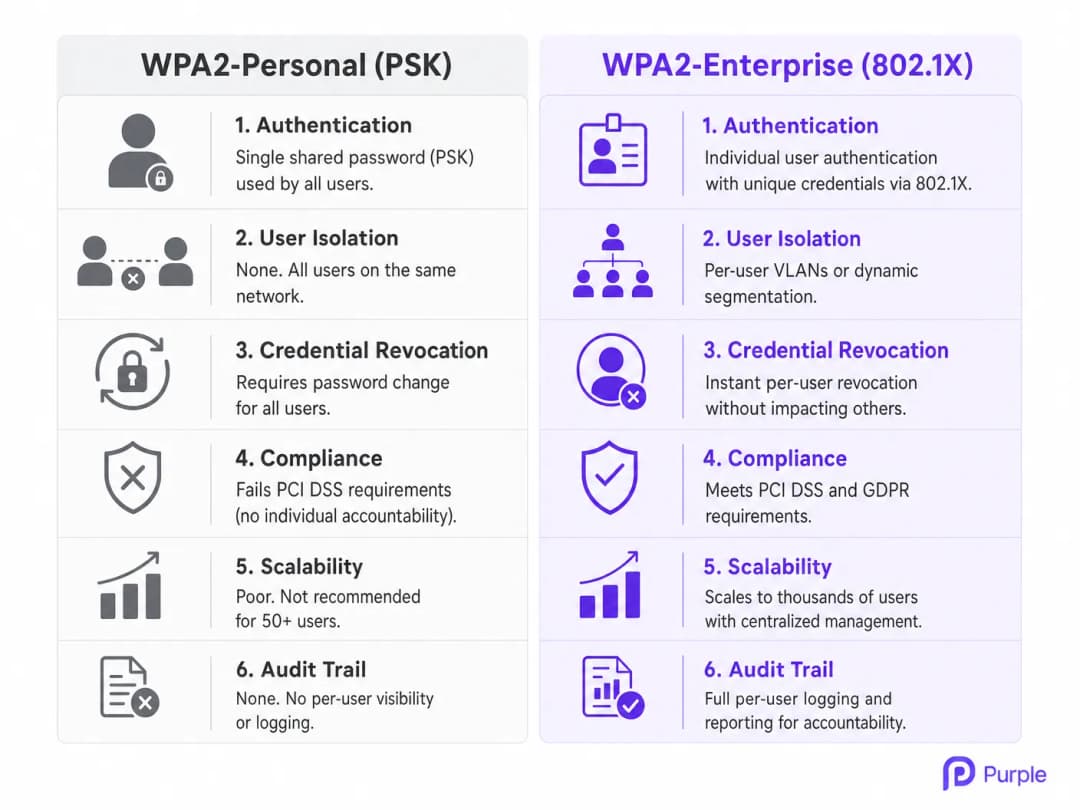
WPA2-Personal relies on a single Pre-Shared Key (PSK) to authenticate all users connecting to a specific SSID. In a multi-tenant environment, this architecture is fundamentally flawed. When a co-working member or apartment resident connects, they share the same cryptographic foundation as every other user on that network. This lack of isolation means that any user with the PSK can potentially decrypt others' traffic, intercept sensitive data, or launch lateral attacks against devices on the same subnet.
Furthermore, the operational overhead of PSK management at scale is unsustainable. When a tenant leaves, the only way to revoke their access is to change the PSK for the entire network, forcing all remaining tenants to re-authenticate. This friction leads to a common, dangerous practice: the password is never changed, granting former tenants and unauthorized visitors permanent access. For Retail landlords and Hospitality operators managing dozens of tenants, this is not a theoretical risk - it is a routine operational failure mode.
802.1X Architecture: Individualized Security
Built on the IEEE 802.1X standard, WPA2-Enterprise fundamentally shifts the security model from network-level authentication to user-level authentication. Instead of a shared password, each user (or device) authenticates using unique credentials - typically a username and password, or a digital certificate - validated against a central identity store such as Active Directory, LDAP, or a cloud-based RADIUS service.
This architecture comprises three primary components:
Supplicant: The client device attempting to connect (laptop, cell phone).
Authenticator: The wireless access point (AP) or network switch that controls physical access to the network.
Authentication Server: The RADIUS server that validates credentials and authorizes access.
When a supplicant associates with the AP, the AP blocks all traffic except for Extensible Authentication Protocol (EAP) messages. The AP forwards the user's credentials to the RADIUS server. Only upon successful validation does the RADIUS server instruct the AP to open the port and allow network traffic. This ensures that each session is encrypted with a unique, dynamically generated key, preventing users from snooping on one another.
Dynamic VLAN Assignment and Micro-Segmentation
One of the most powerful capabilities of WPA2-Enterprise in multi-tenant settings is dynamic VLAN assignment. When the RADIUS server authenticates a user, it can return specific attributes to the AP, including a VLAN ID. This allows the network infrastructure to dynamically place the user into a specific Virtual Local Area Network (VLAN) based on their identity, role, or tenant affiliation, regardless of which physical AP they connect to.
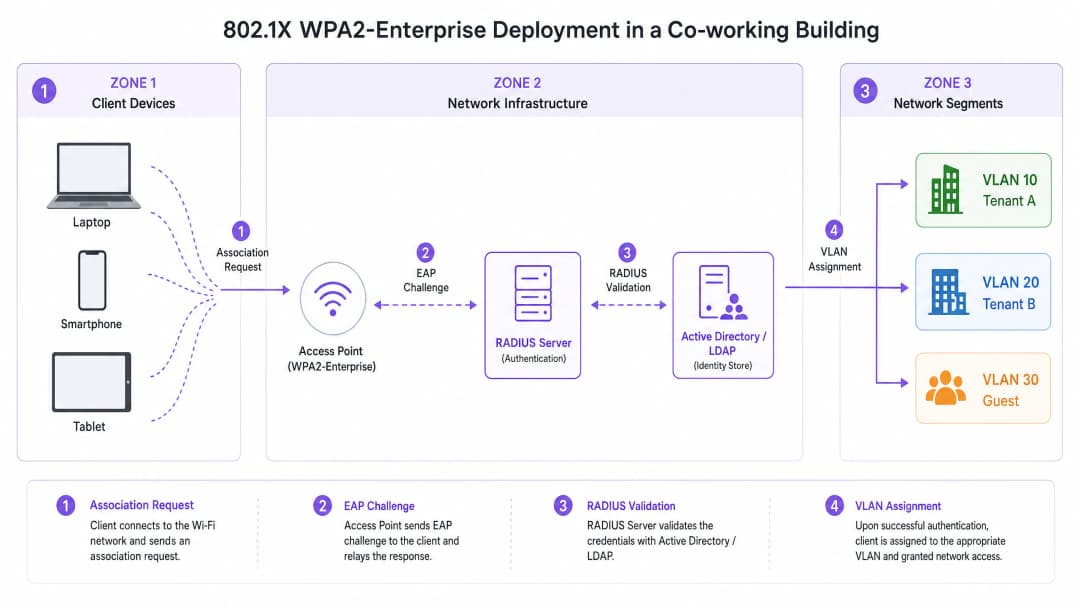
For example, in a coworking space, Tenant A and Tenant B can connect to the same physical SSID (e.g., "CoWorking_Secure"). However, upon authentication, the RADIUS server assigns Tenant A's devices to VLAN 10 and Tenant B's devices to VLAN 20. This provides robust Layer 2 isolation, ensuring that Tenant A cannot access Tenant B's servers, printers, or client devices. This micro-segmentation is critical for meeting compliance requirements and protecting tenants' intellectual property. For venues managing Healthcare tenants or financial services firms, this level of isolation is non-negotiable.
Got questions about your specific setup?
Our team works with venue operators, IT managers, and network engineers across 80,000 venues. Book a 20-minute call and we will show you how others like you solved it.
Implementation Guide
Deploying WPA2-Enterprise requires careful planning and integration between the wireless infrastructure and the identity management system. The following steps outline a vendor-neutral deployment strategy.
Step 1: Establish the Identity Provider (IdP)
The foundation of WPA2-Enterprise is a robust identity store. For modern deployments, cloud-based directories (e.g., Microsoft Entra ID, Google Workspace) are preferred over on-premises Active Directory due to their scalability and ease of integration. Ensure that the chosen IdP supports the necessary protocols (e.g., SAML, LDAP) to communicate with the RADIUS infrastructure.
Purple, under the Connect license, can act as a free identity provider for services like OpenRoaming, simplifying deployment for venues looking to streamline access without managing complex on-premises directories.
Step 2: Deploy and Configure the RADIUS Infrastructure
The RADIUS server acts as a bridge between the APs and the IdP. Cloud RADIUS solutions eliminate the need for on-premises hardware and provide high availability. Configure the RADIUS server to communicate securely with the IdP and define authentication policies.
Select the appropriate EAP method based on security requirements and client device capabilities. PEAP-MSCHAPv2 is common for environments using username/password authentication, establishing a secure TLS tunnel before transmitting credentials. EAP-TLS is the most secure method, requiring digital certificates on both the server and client devices, which completely eliminates passwords and provides seamless authentication - though it requires a Public Key Infrastructure (PKI) or Mobile Device Management (MDM) solution for certificate distribution.
Step 3: Configure the Wireless Infrastructure
Configure the WLAN controller or cloud-managed APs to point to the RADIUS server for authentication. Define the WPA2-Enterprise SSID and configure the necessary RADIUS attributes for dynamic VLAN assignment. Define the RADIUS server IP addresses, ports (typically 1812 for authentication, 1813 for accounting), and shared secrets on the APs or controller. Enable dynamic VLAN assignment (often referred to as "AAA Override" or similar vendor-specific terminology) on the SSID configuration.
Step 4: Client Provisioning and Onboarding
Client onboarding is the most critical challenge in WPA2-Enterprise deployments. Users must correctly configure their devices to connect to the 802.1X network. Manual configuration is prone to errors and generates helpdesk tickets. Implement an automated onboarding solution - typically a secure onboarding portal accessed via an open onboarding SSID - that guides the user through installing a profile or certificate on their device. Once provisioned, the device automatically connects to the secure WPA2-Enterprise SSID. For more guidance on optimizing office-grade wireless deployments, see our guide on Office WiFi: Optimize Your Modern Office WiFi Network.
Best Practices
Mandating certificate validation is the most critical configuration decision in a WPA2-Enterprise deployment. Ensure that client devices are configured to validate the RADIUS server's certificate. Failure to do so leaves users vulnerable to "Evil Twin" attacks, where a rogue AP mimics the legitimate network to steal credentials.
Combine 802.1X authentication with device profiling to identify headless devices - printers, IoT sensors, building management systems - that cannot support 802.1X. Use MAC Authentication Bypass (MAB) for these devices, but restrict their access to isolated VLANs with strict firewall policies. Configure APs to send RADIUS accounting messages to the server to provide a detailed audit trail of user sessions, including connection times, data usage, and termination reasons, which is critical for troubleshooting and compliance.
Maintain a separate, isolated Guest WiFi network for visitors. This network should use a Captive Portal for terms of service acceptance and data capture, integrating with WiFi Analytics to gain venue insights, while keeping guest traffic completely segregated from the enterprise network. For Transport hubs and convention centers, this segregation is a regulatory requirement under CCPA/CPRA.
Troubleshooting and Risk Mitigation
Common Failure Modes
The most common cause of sudden, widespread authentication failures in WPA2-Enterprise environments is certificate expiration. If the RADIUS server certificate expires or is issued by an untrusted Certificate Authority (CA), client devices will refuse to connect. Implement proactive monitoring and alerting for certificate expiration with a minimum 60-day advance warning.
RADIUS server unavailability is the second most critical failure mode. If APs cannot reach the RADIUS server, no users can authenticate. Deploy redundant RADIUS servers across different geographical regions or availability zones to ensure high availability. Client misconfiguration is the most frequent source of helpdesk tickets: users manually configuring their devices often select the wrong EAP method or fail to trust the server certificate. Rely on automated onboarding tools or MDM solutions to enforce consistent client configurations.
Risk Mitigation: The Roaming Challenge
In large venues, users frequently roam between APs. With WPA2-Enterprise, a full 802.1X authentication cycle can take several hundred milliseconds, causing noticeable disruptions in real-time applications like VoIP or video conferencing. To mitigate this, implement fast roaming protocols such as 802.11r (Fast BSS Transition) and Opportunistic Key Caching (OKC). These standards allow the client and network to cache authentication keys, significantly reducing the time required to roam between APs. For a detailed technical walkthrough of optimizing roaming performance in enterprise WLANs, see our guide on Resolving Roaming Issues in Corporate WLANs. Understanding the underlying RF behavior is also essential; our guide on WiFi Frequencies: A Guide to WiFi Frequencies in 2026 provides a foundational reference.
ROI and Business Impact
Migrating from WPA2-Personal to WPA2-Enterprise requires an initial investment in RADIUS infrastructure and onboarding solutions, but the long-term return on investment (ROI) is substantial, particularly in the Retail, Hospitality, and commercial real estate sectors.
| ROI Driver | WPA2-Personal | WPA2-Enterprise |
|---|---|---|
| Credential Revocation | Full network disruption | Immediate, per-user |
| Helpdesk Overhead | High (password resets) | Low (automated onboarding) |
| Compliance Posture | Fails PCI-DSS / CCPA/CPRA | Meets PCI-DSS / CCPA/CPRA |
| Tenant Isolation | None | Full VLAN micro-segmentation |
| Audit Trail | None | Full per-user session logging |
| Scalability | Poor (50+ users) | Scales to thousands |
Eliminating the need to manually update PSKs when tenants depart significantly reduces helpdesk tickets and administrative burden. Automated onboarding streamlines the provisioning process, freeing IT staff to focus on strategic initiatives. By providing individual accountability and network segmentation, WPA2-Enterprise enables venues to meet stringent compliance mandates such as PCI-DSS and CCPA/CPRA, reducing the risk of costly data breaches and regulatory fines.
Offering enterprise-grade security is a competitive differentiator for co-working spaces and premium apartments. Tenants demand secure, reliable connectivity to protect their intellectual property. A robust WPA2-Enterprise deployment enhances the venue's value proposition, supporting higher tenant retention and premium pricing models. As the demand for secure, flexible workspaces continues to grow, relying on legacy security models is no longer viable. WPA2-Enterprise provides the scalable, secure foundation required to support modern multi-tenant environments.
Key Definitions
802.1X
An IEEE standard for port-based network access control that provides an authentication mechanism to devices wishing to attach to a LAN or WLAN. It defines the encapsulation of EAP over IEEE 802 networks.
The foundational protocol that enables WPA2-Enterprise, shifting security from a shared password to individual user authentication via a three-party model: Supplicant, Authenticator, and Authentication Server.
RADIUS (Remote Authentication Dial-In User Service)
A networking protocol that provides centralized Authentication, Authorization, and Accounting (AAA) management for users who connect and use a network service. Defined in RFC 2865.
The central server that validates user credentials against an identity store and instructs the AP whether to grant access and which VLAN to assign.
Dynamic VLAN Assignment
The process of assigning a user to a specific Virtual Local Area Network (VLAN) based on their identity or role, returned as a RADIUS attribute (Tunnel-Private-Group-ID) during the 802.1X authentication process.
Crucial for multi-tenant environments to ensure that different companies or residents are isolated on separate network segments without requiring separate SSIDs.
EAP (Extensible Authentication Protocol)
An authentication framework frequently used in wireless networks and point-to-point connections, supporting multiple authentication methods including EAP-TLS, PEAP, and EAP-TTLS.
The protocol used to transport authentication messages between the client device (Supplicant) and the RADIUS server, encapsulated within the 802.1X framework.
Supplicant
A software client on a device (laptop, smartphone) that communicates with the Authenticator to gain network access via 802.1X. Built into all modern operating systems including Windows, macOS, iOS, and Android.
The end-user device attempting to connect to the enterprise WiFi network. Its correct configuration - particularly RADIUS server certificate validation - is critical to security.
MAB (MAC Authentication Bypass)
A method of granting network access based on the device's MAC address, used as a fallback for devices that do not support 802.1X authentication. The MAC address is sent to the RADIUS server as both the username and password.
Used to secure headless devices like printers, IoT sensors, and point-of-sale terminals in an enterprise environment. These devices should always be placed in a restricted, isolated VLAN.
Evil Twin Attack
A rogue wireless access point that masquerades as a legitimate WiFi access point by broadcasting the same SSID, used to eavesdrop on wireless communications or harvest user credentials.
A primary threat in WPA2-Enterprise deployments. Mitigated by requiring client devices to validate the RADIUS server's digital certificate, which a rogue AP cannot replicate.
EAP-TLS (EAP-Transport Layer Security)
The most secure EAP method, requiring mutual authentication via digital certificates on both the RADIUS server and the client device. Eliminates password-based authentication entirely.
The recommended authentication method for high-security environments. Requires a PKI or MDM solution for certificate distribution to client devices, but provides seamless, passwordless authentication.
PEAP-MSCHAPv2 (Protected EAP with Microsoft Challenge Handshake Authentication Protocol v2)
A widely deployed EAP method that establishes a TLS tunnel using only a server-side certificate, then authenticates the user via username and password within that tunnel.
A pragmatic choice for environments where deploying client-side certificates is not feasible. Secure when combined with mandatory server certificate validation on client devices.
Worked Examples
A 200-room premium multi-family complex currently uses a single WPA2-Personal network for all residents. The property manager reports that former tenants are still accessing the network from the street, and residents are complaining about slow speeds due to unauthorized devices. They need to secure the network without requiring IT staff to manually configure every resident's laptop and cell phone.
Deploy a cloud-based RADIUS server integrated with a property management system (PMS) or a dedicated tenant directory. Configure the wireless controllers to use WPA2-Enterprise (802.1X) with PEAP-MSCHAPv2. Implement a self-service onboarding portal accessible via a temporary open onboarding SSID. When a new resident moves in, they receive an email with a link to the onboarding portal. The portal guides them to download a secure network profile that configures their devices for the 802.1X network using their unique credentials. When their lease expires, their account in the directory is disabled, instantly revoking their WiFi access without affecting other residents. Headless devices such as smart TVs and IoT sensors are handled via MAC Authentication Bypass, placed into a per-unit IoT VLAN.
A large co-working space hosts 15 different start-up companies, each with 5 - 20 employees. They need to ensure that devices belonging to Startup A cannot communicate with devices belonging to Startup B, even though they are all connecting to the same physical Access Points.
Implement WPA2-Enterprise with dynamic VLAN assignment. Create a central identity directory (e.g., Google Workspace or Microsoft Entra ID) and organize users into groups based on their start-up affiliation. Configure the RADIUS server to return a specific VLAN ID attribute based on the user's group membership during the 802.1X authentication process. Configure the network switches and APs to map these VLAN IDs to isolated subnets with strict firewall rules preventing inter-VLAN routing. When a company's membership lapses, disable their group in the directory. All active sessions are terminated and no new sessions can be established. The remaining 14 companies are completely unaffected.
Practice Questions
Q1. A retail complex provides WiFi to its individual store tenants. They want to implement WPA2-Enterprise but are concerned that point-of-sale (POS) terminals and barcode scanners do not support 802.1X authentication. How should the network architect design the access policy to accommodate these devices while maintaining security?
Hint: Consider how to handle devices that lack a supplicant while maintaining security and isolation.
View model answer
The architect should implement MAC Authentication Bypass (MAB) alongside 802.1X. The RADIUS server should be configured to first attempt 802.1X authentication. If the device times out (because it lacks a supplicant), the AP falls back to sending the device's MAC address to the RADIUS server. The RADIUS server checks the MAC address against a pre-approved database of known POS terminals and scanners. If a match is found, the device is authorized and placed into a highly restricted, isolated VLAN designated for POS equipment, with firewall rules permitting only payment gateway traffic. This ensures POS devices are on the network without being commingled with tenant user data, meeting PCI-DSS segmentation requirements.
Q2. During a WPA2-Enterprise deployment at a coworking space, users report that they are frequently prompted to "Accept Certificate" when connecting to the network for the first time. The IT manager is concerned this will lead to users accepting rogue certificates in an Evil Twin attack. What is the most effective way to resolve this?
Hint: Relying on users to manually validate certificates is a security risk. How can this process be automated to enforce the correct trust anchor?
View model answer
The IT manager should implement an automated onboarding solution (such as a secure onboarding portal or an MDM-distributed network profile). This solution automatically configures the client device's supplicant settings, including explicitly defining which RADIUS server certificate to trust and which Certificate Authority (CA) issued it. By pre-configuring the trust anchor, the device will silently and securely authenticate to the legitimate network and automatically reject any rogue APs presenting a different certificate, without prompting the user. The onboarding portal should be delivered over HTTPS on a temporary open SSID, and the profile should lock down the supplicant configuration to prevent users from overriding it.
Q3. A stadium executive suite requires secure, isolated WiFi for high-profile corporate clients during events. The current design uses a separate WPA2-Personal SSID and password for each of the 50 suites, resulting in 50 SSIDs broadcasting simultaneously. The WiFi performance is poor. What is the technical root cause, and how does WPA2-Enterprise resolve it?
Hint: Consider the physical limitations of the RF spectrum and the overhead generated by management frames.
View model answer
Broadcasting 50 separate SSIDs creates severe management frame overhead. Each SSID requires the APs to broadcast beacon frames at regular intervals (typically every 102.4ms). With 50 SSIDs, the APs are consuming a significant portion of available RF airtime transmitting beacons before any actual data traffic is sent. This directly degrades throughput and increases latency for all users. WPA2-Enterprise resolves this by consolidating all suites onto a single, secure SSID. Using dynamic VLAN assignment, the RADIUS server authenticates the corporate client's credentials and dynamically places them into an isolated VLAN specific to their suite. This provides the required security and isolation while optimizing RF performance by eliminating SSID bloat. The recommended maximum is 3 - 4 SSIDs per AP in high-density environments.
Continue reading in this series
Managing Bandwidth in Student Housing Networks
This guide provides IT managers, network architects, and property operations directors with a vendor-neutral technical reference for managing WiFi bandwidth in high-density Student Housing environments. It covers VLAN segmentation, Quality of Service (QoS) policy design, identity-based traffic shaping, and application-layer visibility - the four pillars of a scalable, fair-access network. With real-world deployment scenarios, measurable outcomes, and decision frameworks, this is the operational playbook for any team responsible for residential network infrastructure at scale.
Micro-Segmentation Best Practices for Shared WiFi Networks
This technical reference guide provides actionable strategies for implementing micro-segmentation on shared WiFi infrastructure. It details how IT managers and network architects can securely isolate guest, IoT, and staff traffic to mitigate risk, ensure compliance, and optimize network performance.
How Dynamic VLAN Assignment Works in Multi-Tenant Buildings
This technical reference guide details the architecture and implementation of Dynamic VLAN Assignment using 802.1X and RADIUS in multi-tenant environments. It provides actionable guidance for IT managers and network architects to reduce SSID overhead, enforce Layer 2 isolation, and ensure secure, scalable connectivity across shared buildings.
Got questions about your specific setup?
Our team works with venue operators, IT managers, and network engineers across 80,000 venues. Book a 20-minute call and we will show you how others like you solved it.