
फ्लॅट्स आणि को-वर्किंग स्पेसेससाठी WPA2-Enterprise विरुद्ध Personal
हे अधिकृत तांत्रिक संदर्भ मार्गदर्शक फ्लॅट्स आणि को-वर्किंग स्पेसेससारख्या मल्टी-टेनंट वातावरणासाठी WPA2-Personal विरुद्ध WPA2-Enterprise चे मूल्यांकन करते. हे नेटवर्क आर्किटेक्ट्स आणि IT मॅनेजर्सना 802.1X ऑथेंटिकेशन, डायनॅमिक VLAN असाइनमेंट आणि सुरक्षा अनुपालनाबद्दल उपयुक्त माहिती प्रदान करते, आणि सामायिक केलेले पासवर्ड्स आधुनिक सामायिक ठिकाणी कसे अस्वीकार्य जोखीम निर्माण करतात हे दर्शवते. ठिकाण चालवणाऱ्या ऑपरेटर्सना या तिमाहीत मायग्रेशनचा निर्णय घेण्यासाठी ठोस अंमलबजावणी मार्गदर्शन, वास्तविक केस स्टडीज आणि ROI विश्लेषण मिळेल.
Video overview
हे मार्गदर्शक ऐका
पॉडकास्ट ट्रान्सक्रिप्ट पहा
आमच्या मुख्य मालिकेचा भाग: मल्टी-टेनंट WiFi मार्गदर्शक →
कार्यकारी सारांश (Executive Summary)
मल्टी-टेनंट वातावरणाचे - जसे की सह-कार्यक्षेत्रे (co-working spaces) आणि उच्च-घनतेचे अपार्टमेंट संकुल - व्यवस्थापन करणाऱ्या CTOs, नेटवर्क आर्किटेक्ट्स आणि वेन्यू ऑपरेशन्स डायरेक्टर्ससाठी, WPA2-Personal (प्री-शेअर्ड की किंवा PSK) वर अवलंबून राहणे हा एक ऑपरेशनल आणि सुरक्षा धोका आहे. जरी एका कुटुंबाच्या घरासाठी WPA2-Personal पुरेसे असले, तरी अशा वातावरणात जेथे अनेक असंबंधित युजर्स समान भौतिक एअरस्पेस सामायिक करतात, तेथे हे उपयोजित केल्यास गंभीर असुरक्षितता निर्माण होते. सामायिक पासवर्ड म्हणजे सामायिक धोका: एखादी की तडजोड झाल्यास संपूर्ण नेटवर्क सेगमेंट धोक्यात येतो, ज्यामुळे PCI-DSS आणि GDPR सारख्या बेसलाइन अनुपालन मानकांची पूर्तता करण्यात अपयश येते.
हे मार्गदर्शक WPA2-Personal आणि WPA2-Enterprise (802.1X) मधील सर्वसमावेशक तांत्रिक तुलना प्रदान करते. हे वैयक्तिकृत प्रमाणीकरणाची आर्किटेक्चरल आवश्यकता, टेनंट आयसोलेशनसाठी डायनॅमिक VLAN असाइनमेंटची यंत्रणा आणि एंटरप्राइझ-ग्रेड सुरक्षा स्थितीवर स्थलांतरित होण्याचा ठोस व्यावसायिक प्रभाव तपशीलवार स्पष्ट करते. नेटवर्क ऍक्सेससह आयडेंटिटी मॅनेजमेंटचे एकत्रीकरण करून, IT टीम्स ग्रॅन्युलर कंट्रोल, तत्काळ क्रेडेंशियल रिव्होकेशन आणि संपूर्ण ऑडिटेबिलिटी साध्य करू शकतात - ज्यामुळे शेवटी वेन्यूची प्रतिष्ठा आणि टेनंट्सचा डेटा दोन्ही सुरक्षित राहतात.
तांत्रिक सखोल विश्लेषण: WPA2-Personal विरुद्ध WPA2-Enterprise
प्री-शेअर्ड की (PSK) असुरक्षितता
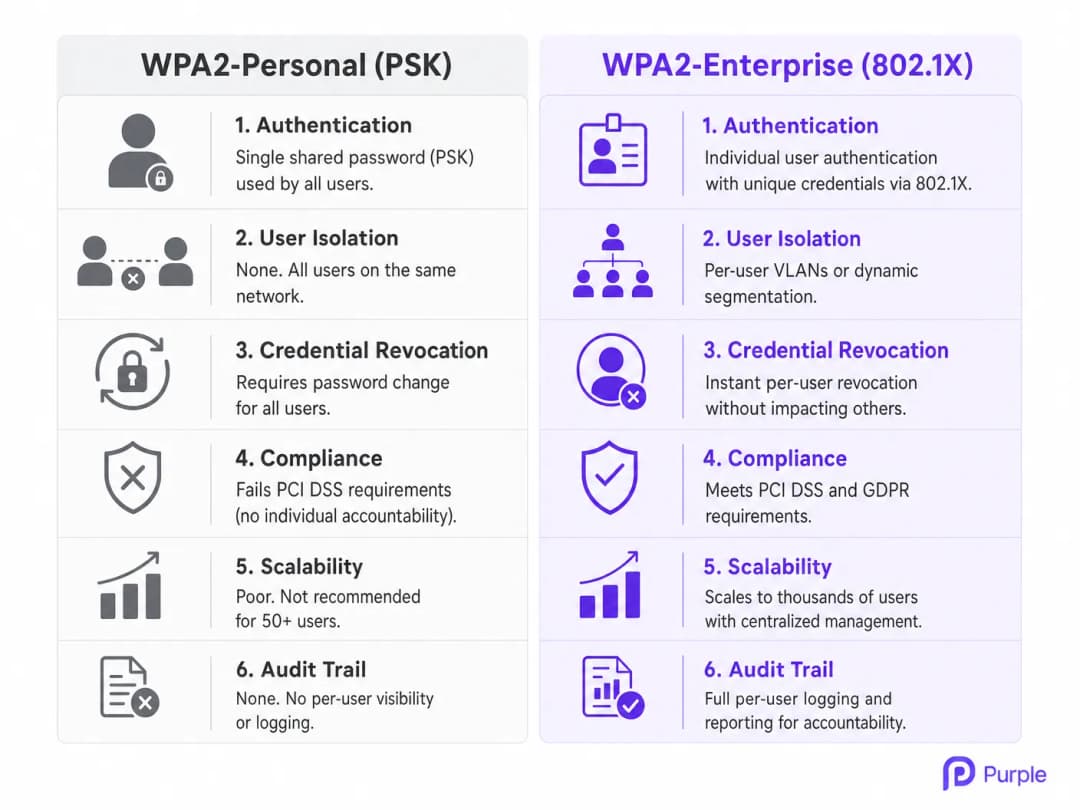
WPA2-Personal विशिष्ट SSID शी कनेक्ट होणाऱ्या सर्व वापरकर्त्यांना प्रमाणित करण्यासाठी एकाच प्री-शेअर्ड की (PSK) वर अवलंबून असते. बहु-भाडेकरू (multi-tenant) वातावरणात, ही आर्किटेक्चर मूलभूतपणे त्रुटीयुक्त आहे. जेव्हा एखादा को-वर्किंग सदस्य किंवा अपार्टमेंट रहिवासी कनेक्ट होतो, तेव्हा ते त्या नेटवर्कवरील इतर प्रत्येक वापरकर्त्यासारखाच समान क्रिप्टोग्राफिक पाया सामायिक करतात. या अलगावच्या (isolation) अभावाचा अर्थ असा आहे की PSK असलेल्या कोणताही वापरकर्ता संभाव्यतः इतरांचा ट्रॅफिक डीक्रिप्ट करू शकतो, संवेदनशील डेटा चोरू शकतो किंवा त्याच सबनेटवरील उपकरणांवर अंतर्गत हल्ले करू शकतो.
शिवाय, मोठ्या प्रमाणावर PSK व्यवस्थापनाचा ऑपरेशनल खर्च आणि वेळ परवडणारा नसतो. जेव्हा एखादा भाडेकरू जागा सोडतो, तेव्हा त्यांचा प्रवेश रद्द करण्याचा एकमेव मार्ग म्हणजे संपूर्ण नेटवर्कसाठी PSK बदलणे, ज्यामुळे उर्वरित सर्व भाडेकरूंना पुन्हा प्रमाणित करण्यास भाग पाडले जाते. या त्रासामुळे एक सामान्य, धोकादायक सवय निर्माण होते: पासवर्ड कधीच बदलला जात नाही, ज्यामुळे माजी भाडेकरू आणि अनधिकृत अभ्यागतांना कायमचा प्रवेश मिळतो. डझनभर भाडेकरूंचे व्यवस्थापन करणाऱ्या Retail जमीनदारांसाठी आणि Hospitality ऑपरेटर्ससाठी, हा केवळ सैद्धांतिक धोका नाही - हा एक नियमित ऑपरेशनल बिघाड आहे.
802.1X आर्किटेक्चर: वैयक्तिकृत सुरक्षा
IEEE 802.1X मानकांवर तयार केलेले, WPA2-Enterprise सुरक्षेचे मॉडेल नेटवर्क-स्तरीय प्रमाणीकरणाकडून थेट वापरकर्ता-स्तरीय प्रमाणीकरणाकडे बदलते. सामायिक पासवर्डऐवजी, प्रत्येक वापरकर्ता (किंवा डिव्हाइस) अद्वितीय क्रेडेंशियल्स वापरून प्रमाणित करतो - सामान्यतः वापरकर्तानाव आणि पासवर्ड, किंवा डिजिटल प्रमाणपत्र - जे ॲक्टिव्ह डिरेक्टरी, LDAP किंवा क्लाउड-आधारित RADIUS सेवेसारख्या केंद्रीय ओळख संग्रहाविरुद्ध प्रमाणित केले जाते.
या आर्किटेक्चरमध्ये तीन प्राथमिक घटक असतात:
सप्लिकंट (Supplicant): कनेक्ट करण्याचा प्रयत्न करणारे क्लायंट डिव्हाइस (लॅपटॉप, स्मार्टफोन).
ऑथेंटिकेटर (Authenticator): वायरलेस ॲक्सेस पॉइंट (AP) किंवा नेटवर्क स्विच जो नेटवर्कच्या भौतिक प्रवेशावर नियंत्रण ठेवतो.
प्रमाणीकरण सर्व्हर (Authentication Server): क्रेडेंशियल्स प्रमाणित करणारा आणि प्रवेश अधिकृत करणारा RADIUS सर्व्हर.
जेव्हा एखादा सप्लिकंट AP शी जोडला जातो, तेव्हा AP Extensible Authentication Protocol (EAP) संदेशांशिवाय इतर सर्व ट्रॅफिक ब्लॉक करतो. AP वापरकर्त्याचे क्रेडेंशियल्स RADIUS सर्व्हरकडे फॉरवर्ड करतो. केवळ यशस्वी प्रमाणीकरणानंतरच RADIUS सर्व्हर AP ला पोर्ट उघडण्याची आणि नेटवर्क ट्रॅफिकला परवानगी देण्याची सूचना देतो. हे सुनिश्चित करते की प्रत्येक सेशन एका अद्वितीय, गतिमानपणे तयार केलेल्या की सह एनक्रिप्ट केले आहे, ज्यामुळे वापरकर्त्यांना एकमेकांवर पाळत ठेवण्यापासून रोखले जाते.
डायनॅमिक VLAN असाइनमेंट आणि मायक्रो-सेगमेंटेशन
मल्टी-टेनंट सेटिंग्जमध्ये WPA2-Enterprise च्या सर्वात शक्तिशाली क्षमतांपैकी एक म्हणजे डायनॅमिक VLAN असाइनमेंट आहे. जेव्हा RADIUS सर्व्हर वापरकर्त्याचे प्रमाणीकरण करतो, तेव्हा तो AP ला VLAN ID सह विशिष्ट गुणधर्म परत पाठवू शकतो. हे नेटवर्क इन्फ्रास्ट्रक्चरला वापरकर्त्याच्या ओळख, भूमिका किंवा टेनंट संबंधांच्या आधारे त्यांना विशिष्ट व्हर्च्युअल लोकल एरिया नेटवर्क (VLAN) मध्ये डायनॅमिकली ठेवण्याची परवानगी देते, मग ते कोणत्याही फिजिकल AP शी जोडले गेले असले तरीही.
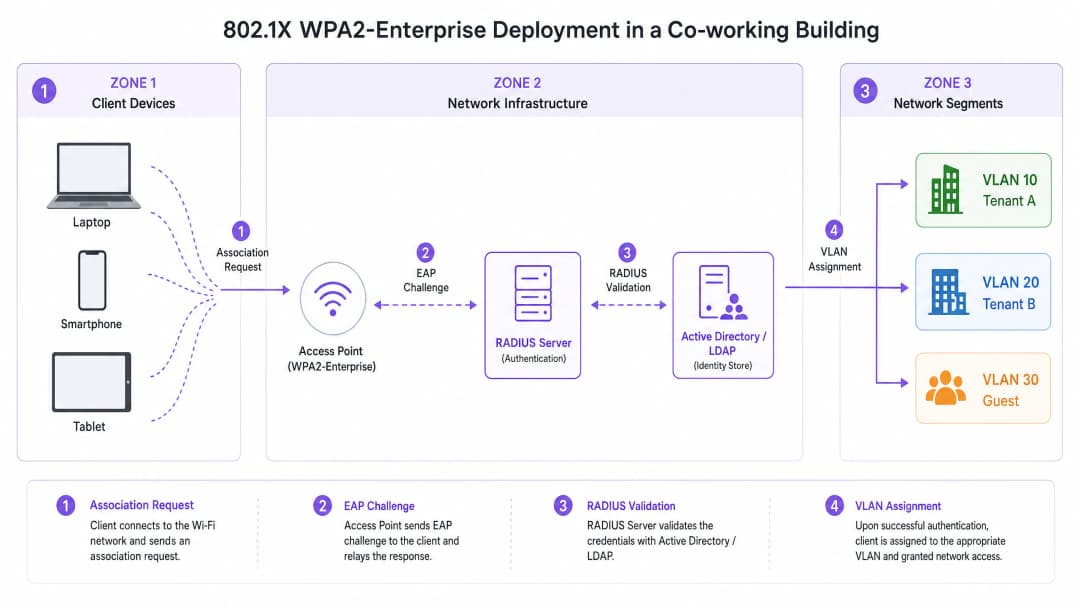
उदाहरणार्थ, एका को-वर्किंग स्पेसमध्ये, टेनंट A आणि टेनंट B एकाच फिजिकल SSID (उदा., "CoWorking_Secure") शी कनेक्ट होऊ शकतात. तथापि, प्रमाणीकरण झाल्यावर, RADIUS सर्व्हर टेनंट A च्या डिव्हाइसेसना VLAN 10 आणि टेनंट B च्या डिव्हाइसेसना VLAN 20 नियुक्त करतो. हे मजबूत लेअर 2 आयसोलेशन प्रदान करते, ज्यामुळे टेनंट A हा टेनंट B च्या सर्व्हर, प्रिंटर किंवा क्लायंट डिव्हाइसेसवर प्रवेश करू शकणार नाही याची खात्री होते. अनुपालन आवश्यकता पूर्ण करण्यासाठी आणि भाडेकरूंच्या बौद्धिक संपत्तीचे रक्षण करण्यासाठी हे मायक्रो-सेगमेंटेशन अत्यंत महत्त्वपूर्ण आहे. Healthcare टेनंट्स किंवा आर्थिक सेवा संस्थांचे व्यवस्थापन करणाऱ्या ठिकाणांसाठी, या पातळीचे आयसोलेशन अत्यंत आवश्यक आहे.
तुमच्या विशिष्ट सेटअपबद्दल काही प्रश्न आहेत का?
आमची टीम ८०,००० हून अधिक वेन्यूजमधील वेन्यू ऑपरेटर्स, IT मॅनेजर्स आणि नेटवर्क इंजिनिअर्ससोबत काम करते. २० मिनिटांचा कॉल बुक करा आणि तुमच्यासारख्या इतरांनी ही समस्या कशी सोडवली हे आम्ही तुम्हाला दाखवू.
अंमलबजावणी मार्गदर्शक (Implementation Guide)
WPA2-Enterprise तैनात करण्यासाठी वायरलेस इन्फ्रास्ट्रक्चर आणि आयडेंटिटी मॅनेजमेंट सिस्टम दरम्यान काळजीपूर्वक नियोजन आणि एकत्रीकरण आवश्यक आहे. खालील पायऱ्या विक्रेता-तटस्थ (vendor-neutral) तैनाती धोरणाची रूपरेषा स्पष्ट करतात.
पायरी १: आयडेंटिटी प्रोव्हाइडर (IdP) स्थापित करा
WPA2-Enterprise चा पाया एक मजबूत आयडेंटिटी स्टोअर आहे. आधुनिक तैनातीसाठी, त्यांच्या स्केलेबिलिटी आणि एकत्रीकरणाच्या सुलभतेमुळे ऑन-प्रिमाइसेस ॲक्टिव्ह डिरेक्टरीपेक्षा क्लाउड-आधारित डिरेक्टरीज (उदा., Microsoft Entra ID, Google Workspace) ला प्राधान्य दिले जाते. निवडलेले IdP हे RADIUS इन्फ्रास्ट्रक्चरशी संवाद साधण्यासाठी आवश्यक प्रोटोकॉल (उदा., SAML, LDAP) चे समर्थन करत असल्याची खात्री करा.
Purple, Connect परवान्याअंतर्गत, OpenRoaming सारख्या सेवांसाठी विनामूल्य आयडेंटिटी प्रोव्हाइडर म्हणून कार्य करू शकते, ज्यामुळे जटिल ऑन-प्रिमाइसेस डिरेक्टरीज व्यवस्थापित न करता प्रवेश सुलभ करू इच्छिणाऱ्या ठिकाणांसाठी तैनाती सोपी होते.
पायरी २: RADIUS इन्फ्रास्ट्रक्चर तैनात आणि कॉन्फिगर करा
RADIUS सर्व्हर APs आणि IdP मधील पूल म्हणून काम करतो. क्लाउड RADIUS सोल्यूशन्स ऑन-प्रिमाइसेस हार्डवेअरची आवश्यकता काढून टाकतात आणि उच्च उपलब्धता प्रदान करतात. IdP सह सुरक्षितपणे संवाद साधण्यासाठी RADIUS सर्व्हर कॉन्फिगर करा आणि प्रमाणीकरण धोरणे परिभाषित करा. सुरक्षा आवश्यकता आणि क्लायंट डिव्हाइसच्या क्षमतेनुसार योग्य EAP पद्धत निवडा. क्रेडेंशियल ट्रान्समिट करण्यापूर्वी सुरक्षित TLS टनेल स्थापित करण्यासाठी युझरनेम/पासवर्ड ऑथेंटिकेशन वापरणाऱ्या वातावरणात PEAP-MSCHAPv2 सामान्य आहे. EAP-TLS ही सर्वात सुरक्षित पद्धत आहे, ज्यासाठी सर्व्हर आणि क्लायंट डिव्हाइस दोन्हीवर डिजिटल प्रमाणपत्रे आवश्यक असतात, जी पासवर्ड पूर्णपणे काढून टाकतात आणि अखंड ऑथेंटिकेशन प्रदान करतात - जरी यासाठी प्रमाणपत्र वितरणासाठी पब्लिक की इन्फ्रास्ट्रक्चर (PKI) किंवा मोबाईल डिव्हाइस मॅनेजमेंट (MDM) सोल्यूशन आवश्यक आहे.
पायरी ३: वायरलेस इन्फ्रास्ट्रक्चर कॉन्फिगर करा
ऑथेंटिकेशनसाठी RADIUS सर्व्हरकडे निर्देश करण्यासाठी WLAN कंट्रोलर किंवा क्लाउड-मॅनेज्ड APs कॉन्फिगर करा. WPA2-Enterprise SSID परिभाषित करा आणि डायनॅमिक VLAN असाइनमेंटसाठी आवश्यक RADIUS ॲट्रिब्युट्स कॉन्फिगर करा. APs किंवा कंट्रोलरवर RADIUS सर्व्हरचे IP ॲड्रेस, पोर्ट्स (ऑथेंटिकेशनसाठी सामान्यतः १८१२, अकाउंटिंगसाठी १८१३) आणि शेअर्ड सिक्रेट्स परिभाषित करा. SSID कॉन्फिगरेशनवर डायनॅमिक VLAN असाइनमेंट (ज्याला सहसा "AAA Override" किंवा तत्सम वेंडर-विशिष्ट संज्ञा म्हणून संबोधले जाते) सक्षम करा.
पायरी ४: क्लायंट प्रोव्हिजनिंग आणि ऑनबोर्डिंग
WPA2-Enterprise उपयोजनांमध्ये क्लायंट ऑनबोर्डिंग हे सर्वात मोठे आव्हान आहे. वापरकर्त्यांनी त्यांचे डिव्हाइसेस 802.1X नेटवर्कशी जोडण्यासाठी योग्यरित्या कॉन्फिगर केले पाहिजेत. मॅन्युअल कॉन्फिगरेशनमध्ये चुका होण्याची शक्यता असते आणि यामुळे हेल्पडेस्क तिकीट निर्माण होतात. ऑटोमेटेड ऑनबोर्डिंग सोल्यूशन लागू करा - सामान्यतः एका खुल्या ऑनबोर्डिंग SSID द्वारे ॲक्सेस केलेले सुरक्षित ऑनबोर्डिंग पोर्टल - जे वापरकर्त्याला त्यांच्या डिव्हाइसवर प्रोफाइल किंवा प्रमाणपत्र स्थापित करण्यासाठी मार्गदर्शन करते. एकदा प्रोव्हिजन झाल्यावर, डिव्हाइस स्वयंचलितपणे सुरक्षित WPA2-Enterprise SSID शी कनेक्ट होते. ऑफिस-ग्रेड वायरलेस उपयोजन ऑप्टिमाइझ करण्याबाबत अधिक मार्गदर्शनासाठी, आमचे Office WiFi: Optimize Your Modern Office WiFi Network वरील मार्गदर्शक पहा.
सर्वोत्तम पद्धती
WPA2-Enterprise उपयोजनामध्ये प्रमाणपत्र प्रमाणीकरण (certificate validation) अनिवार्य करणे हा सर्वात महत्त्वाचा कॉन्फिगरेशन निर्णय आहे. क्लायंट डिव्हाइसेस RADIUS सर्व्हरचे प्रमाणपत्र प्रमाणित करण्यासाठी कॉन्फिगर केले असल्याची खात्री करा. असे न केल्यास वापरकर्ते "Evil Twin" हल्ल्यांना बळी पडू शकतात, जिथे एक फसवणारा AP क्रेडेंशियल चोरण्यासाठी वैध नेटवर्कची नक्कल करतो.
प्रिंटर, IoT सेन्सर, बिल्डिंग मॅनेजमेंट सिस्टीम यासारखे 802.1X ला सपोर्ट न करणारे हेडलेस डिव्हाइसेस ओळखण्यासाठी 802.1X ऑथेंटिकेशनसह डिव्हाइस प्रोफाइलिंगची जोड द्या. या डिव्हाइसेससाठी MAC Authentication Bypass (MAB) वापरा, परंतु कडक फायरवॉल पॉलिसीसह त्यांचा प्रवेश केवळ वेगळ्या VLANs पुरता मर्यादित ठेवा. वापरकर्ता सत्रांचा तपशीलवार ऑडिट ट्रेल प्रदान करण्यासाठी सर्व्हरला RADIUS अकाउंटिंग मेसेजेस पाठवण्यासाठी APs कॉन्फिगर करा, ज्यामध्ये कनेक्शनची वेळ, डेटा वापर आणि सत्र समाप्त होण्याची कारणे समाविष्ट असतात, जी ट्रबलशूटिंग आणि अनुपालनासाठी अत्यंत आवश्यक आहेत.
पाहुण्यांसाठी एक स्वतंत्र, विलग Guest WiFi नेटवर्क ठेवा. हे नेटवर्क सेवा अटींच्या मंजुरीसाठी आणि डेटा कॅप्चर करण्यासाठी Captive Portal वापरणारे असावे, जे ठिकाणाचे विश्लेषण मिळवण्यासाठी WiFi Analytics सोबत जोडलेले असेल, तसेच पाहुण्यांचा ट्रॅफिक एंटरप्राइझ नेटवर्कपासून पूर्णपणे वेगळा ठेवेल. Transport हब्स आणि परिषद केंद्रांसाठी, हे विलगीकरण GDPR अंतर्गत एक नियामक आवश्यकता आहे.
त्रुटी निवारण आणि जोखीम निवारण
सामान्य बिघाड प्रकार
WPA2-Enterprise वातावरणामध्ये अचानक, व्यापक प्रमाणीकरण अपयशाचे सर्वात सामान्य कारण म्हणजे सर्टिफिकेट कालबाह्य होणे होय. जर RADIUS सर्व्हर सर्टिफिकेट कालबाह्य झाले किंवा अविश्वासू सर्टिफिकेट ऑथोरिटी (CA) द्वारे जारी केले गेले, तर क्लायंट डिव्हाइसेस कनेक्ट होण्यास नकार देतील. किमान ६० दिवस आधी इशारा देणारी, सर्टिफिकेट कालबाह्यतेसाठीची सक्रिय देखरेख आणि अलर्ट यंत्रणा लागू करा.
RADIUS सर्व्हरची अनुपलब्धता हा दुसरा सर्वात गंभीर बिघाड प्रकार आहे. जर APs हे RADIUS सर्व्हरपर्यंत पोहोचू शकत नसतील, तर कोणताही वापरकर्ता प्रमाणित होऊ शकत नाही. उच्च उपलब्धता सुनिश्चित करण्यासाठी विविध भौगोलिक क्षेत्रांमध्ये किंवा उपलब्धता झोनमध्ये अतिरिक्त (redundant) RADIUS सर्व्हर तैनात करा. हेल्पडेस्क तिकिटांचे सर्वात वारंवार येणारे कारण म्हणजे क्लायंटचे चुकीचे कॉन्फिगरेशन असते: वापरकर्ते त्यांच्या डिव्हाइसेसचे मॅन्युअली कॉन्फिगरेशन करताना अनेकदा चुकीची EAP पद्धत निवडतात किंवा सर्व्हर सर्टिफिकेटवर विश्वास ठेवण्यास अपयशी ठरतात. सुसंगत क्लायंट कॉन्फिगरेशन्स लागू करण्यासाठी स्वयंचलित ऑनबोर्डिंग टूल्स किंवा MDM सोल्यूशन्सवर अवलंबून रहा.
जोखीम निवारण: रोमिंगचे आव्हान
मोठ्या ठिकाणी, वापरकर्ते वारंवार APs दरम्यान रोमींग करतात. WPA2-Enterprise सह, संपूर्ण 802.1X प्रमाणीकरण चक्राला काहीशे मिलिसेकंद लागू शकतात, ज्यामुळे VoIP किंवा व्हिडिओ कॉन्फरन्सिंगसारख्या रिअल-टाइम ॲप्लिकेशन्समध्ये लक्षणीय व्यत्यय येतो. हे कमी करण्यासाठी, 802.11r (Fast BSS Transition) आणि Opportunistic Key Caching (OKC) सारखे जलद रोमिंग प्रोटोकॉल लागू करा. हे मानक क्लायंट आणि नेटवर्कला प्रमाणीकरण की (keys) कॅशे करण्याची परवानगी देतात, ज्यामुळे APs दरम्यान रोमींग करण्यासाठी लागणारा वेळ लक्षणीयरीत्या कमी होतो. एंटरप्राइझ WLANs मधील रोमींग कार्यप्रदर्शन ऑप्टिमाइझ करण्याच्या तपशीलवार तांत्रिक माहितीसाठी, आमचे Resolving Roaming Issues in Corporate WLANs वरील मार्गदर्शक पहा. मूलभूत RF वर्तन समजून घेणे देखील आवश्यक आहे; आमचे WiFi Frequencies: A Guide to WiFi Frequencies in 2026 वरील मार्गदर्शक एक पायाभूत संदर्भ प्रदान करते.
ROI आणि व्यावसायिक प्रभाव
WPA2-Personal कडून WPA2-Enterprise कडे स्थलांतरित होण्यासाठी RADIUS पायाभूत सुविधा आणि ऑनबोर्डिंग सोल्यूशन्समध्ये सुरुवातीच्या गुंतवणुकीची आवश्यकता असते, परंतु गुंतवणुकीवरील दीर्घकालीन परतावा (ROI) लक्षणीय असतो, विशेषतः Retail, Hospitality आणि व्यावसायिक रिअल इस्टेट क्षेत्रांमध्ये.
| ROI चालक | WPA2-Personal | WPA2-Enterprise |
|---|---|---|
| क्रेडेन्शियल रद्द करणे | संपूर्ण नेटवर्क व्यत्यय | त्वरित, प्रति-वापरकर्ता |
| हेल्पडेस्क ओव्हरहेड | जास्त (पासवर्ड रीसेट) | कमी (स्वयंचलित ऑनबोर्डिंग) |
| अनुपालन स्थिती | PCI-DSS / GDPR मध्ये अपयशी ठरते | PCI-DSS / GDPR ची पूर्तता करते |
| टेनंट आयसोलेशन | काहीही नाही | पूर्ण VLAN मायक्रो-सेगमेंटेशन |
| ऑडिट ट्रेल | काहीही नाही | पूर्ण प्रति-युजर सेशन लॉगिंग |
| स्केलेबिलिटी | निकृष्ट (५०+ युजर्स) | हजारांपर्यंत स्केल होते |
टेनंट्स सोडून गेल्यावर PSKs मॅन्युअली अपडेट करण्याची आवश्यकता काढून टाकल्याने हेल्पडेस्क तिकिटे आणि प्रशासकीय भार लक्षणीयरीत्या कमी होतो. स्वयंचलित ऑनबोर्डिंग प्रोव्हिजनिंग प्रक्रिया सुलभ करते, ज्यामुळे IT कर्मचाऱ्यांना धोरणात्मक उपक्रमांवर लक्ष केंद्रित करण्यास मोकळीक मिळते. वैयक्तिक जबाबदारी आणि नेटवर्क सेगमेंटेशन प्रदान करून, WPA2-Enterprise वेन्यूजला PCI-DSS आणि GDPR सारख्या कठोर अनुपालन आदेशांची पूर्तता करण्यास सक्षम करते, ज्यामुळे खर्चिक डेटा उल्लंघन आणि नियामक दंडाचा धोका कमी होतो.
एंटरप्राइझ-ग्रेड सुरक्षा ऑफर करणे हा सह-कार्यक्षेत्रे आणि प्रीमियम अपार्टमेंट्ससाठी एक स्पर्धात्मक फरक आहे. टेनंट्स त्यांच्या बौद्धिक संपदेचे रक्षण करण्यासाठी सुरक्षित, विश्वासार्ह कनेक्टिव्हिटीची मागणी करतात. एक मजबूत WPA2-Enterprise उपयोजन वेन्यूच्या मूल्याचा प्रस्ताव वाढवते, ज्यामुळे उच्च टेनंट रिटेंशन आणि प्रीमियम प्राइसिंग मॉडेल्सना समर्थन मिळते. सुरक्षित, लवचिक वर्कस्पेसेसची मागणी सातत्याने वाढत असताना, जुन्या सुरक्षा मॉडेल्सवर अवलंबून राहणे आता व्यवहार्य राहिलेले नाही. WPA2-Enterprise आधुनिक मल्टी-टेनंट वातावरणास समर्थन देण्यासाठी आवश्यक असलेले स्केलेबल, सुरक्षित फाउंडेशन प्रदान करते.
महत्वाच्या व्याख्या
802.1X
पोर्ट-आधारित नेटवर्क प्रवेश नियंत्रणासाठीचा एक IEEE मानक जो LAN किंवा WLAN ला जोडू इच्छिणाऱ्या उपकरणांना प्रमाणीकरण यंत्रणा प्रदान करतो. हे IEEE 802 नेटवर्क्सवर EAP च्या encapsulation ची व्याख्या करते.
WPA2-Enterprise सक्षम करणारा पायाभूत प्रोटोकॉल, जो सुरक्षिततेला सामायिक पासवर्डवरून तीन-पक्षी मॉडेलद्वारे वैयक्तिक वापरकर्ता प्रमाणीकरणावर हलवतो: Supplicant, Authenticator आणि Authentication Server.
RADIUS (Remote Authentication Dial-In User Service)
एक नेटवर्किंग प्रोटोकॉल जो नेटवर्क सेवा कनेक्ट करणाऱ्या आणि वापरणाऱ्या वापरकर्त्यांसाठी केंद्रीकृत प्रमाणीकरण, अधिकृतता आणि लेखा (AAA) व्यवस्थापन प्रदान करतो. RFC 2865 मध्ये परिभाषित.
मध्यवर्ती सर्व्हर जो ओळख भांडाराच्या विरूद्ध वापरकर्त्याच्या क्रेडेंशियलची पडताळणी करतो आणि प्रवेश द्यायचा की नाही आणि कोणता VLAN नियुक्त करायचा हे AP ला निर्देशित करतो.
Dynamic VLAN Assignment
वापरकर्त्याच्या ओळखीवर किंवा भूमिकेवर आधारित विशिष्ट Virtual Local Area Network (VLAN) वर नियुक्त करण्याची प्रक्रिया, जी 802.1X प्रमाणीकरण प्रक्रियेदरम्यान RADIUS गुणधर्म (Tunnel-Private-Group-ID) म्हणून परत केली जाते.
वेगळे SSID न वापरता वेगवेगळ्या कंपन्या किंवा रहिवासी स्वतंत्र नेटवर्क घटकांवर विलग राहतील याची खात्री करण्यासाठी बहु-भाडेकरू (multi-tenant) वातावरणासाठी अत्यंत महत्त्वाचे आहे.
EAP (Extensible Authentication Protocol)
वायरलेस नेटवर्क्स आणि पॉइंट-टू-पॉइंट कनेक्शन्समध्ये वारंवार वापरले जाणारे एक प्रमाणीकरण फ्रेमवर्क, जे EAP-TLS, PEAP आणि EAP-TTLS सह अनेक प्रमाणीकरण पद्धतींना समर्थन देते.
802.1X फ्रेमवर्कमध्ये अंतर्भूत असलेल्या क्लायंट डिव्हाइस (Supplicant) आणि RADIUS सर्व्हर दरम्यान प्रमाणीकरण संदेश वाहून नेण्यासाठी वापरला जाणारा प्रोटोकॉल.
Supplicant
डिव्हाइस (लॅपटॉप, स्मार्टफोन) वरील एक सॉफ्टवेअर क्लायंट जो 802.1X द्वारे नेटवर्क प्रवेश मिळवण्यासाठी Authenticator शी संप्रेषण करतो. Windows, macOS, iOS आणि Android सह सर्व आधुनिक ऑपरेटिंग सिस्टम्समध्ये अंगभूत आहे.
एंटरप्राइझ WiFi नेटवर्कशी कनेक्ट करण्याचा प्रयत्न करणारे अंतिम-वापरकर्ता डिव्हाइस. त्याचे अचूक कॉन्फिगरेशन - विशेषतः RADIUS सर्व्हर प्रमाणपत्र पडताळणी - सुरक्षिततेसाठी अत्यंत महत्त्वाचे आहे.
MAB (MAC Authentication Bypass)
डिव्हाइसच्या MAC पत्त्यावर आधारित नेटवर्क प्रवेश मंजूर करण्याची एक पद्धत, जी उपकरणे 802.1X प्रमाणीकरणाला समर्थन देत नाहीत त्यांच्यासाठी पर्यायी पर्याय म्हणून वापरली जाते. MAC पत्ता RADIUS सर्व्हरला युझरनेम आणि पासवर्ड दोन्ही म्हणून पाठवला जातो.
एंटरप्राइझ वातावरणात प्रिंटर, IoT सेन्सर्स आणि पॉइंट-ऑफ-सेल टर्मिनल्स यांसारखी हेडलेस उपकरणे सुरक्षित करण्यासाठी वापरले जाते. ही उपकरणे नेहमी प्रतिबंधित, विलग VLAN मध्ये ठेवली पाहिजेत.
Evil Twin Attack
एक अनधिकृत वायरलेस ऍक्सेस पॉइंट जो तोच SSID प्रसारित करून वैध WiFi ऍक्सेस पॉइंट असल्याचे भासवतो, ज्याचा वापर वायरलेस संप्रेषणावर पाळत ठेवण्यासाठी किंवा वापरकर्त्याची क्रेडेंशियल चोरण्यासाठी केला जातो.
WPA2-Enterprise उपयोजनांमधील एक मुख्य धोका. क्लायंट उपकरणांना RADIUS सर्व्हरचे डिजिटल प्रमाणपत्र पडताळणे अनिवार्य करून हा धोका कमी केला जातो, ज्याची प्रतिकृती एखादा अनधिकृत AP तयार करू शकत नाही.
EAP-TLS (EAP-Transport Layer Security)
सर्वात सुरक्षित EAP पद्धत, ज्यासाठी RADIUS सर्व्हर आणि क्लायंट डिव्हाइस दोन्हीवर डिजिटल प्रमाणपत्रांद्वारे परस्पर प्रमाणीकरण आवश्यक आहे. पासवर्ड-आधारित प्रमाणीकरण पूर्णपणे काढून टाकते.
उच्च-सुरक्षा वातावरणासाठी शिफारस केलेली प्रमाणीकरण पद्धत. क्लायंट उपकरणांवर प्रमाणपत्र वितरणासाठी PKI किंवा MDM सोल्यूशन आवश्यक आहे, परंतु हे अखंड, पासवर्डविरहित प्रमाणीकरण प्रदान करते.
PEAP-MSCHAPv2 (Protected EAP with Microsoft Challenge Handshake Authentication Protocol v2)
मोठ्या प्रमाणावर वापरली जाणारी EAP पद्धत जी केवळ सर्व्हर-साइड प्रमाणपत्र वापरून TLS टनेल स्थापित करते, त्यानंतर त्या टनेलमध्ये युझरनेम आणि पासवर्डद्वारे वापरकर्त्याचे प्रमाणीकरण करते.
अशा वातावरणासाठी एक व्यावहारिक पर्याय जिथे क्लायंट-साइड प्रमाणपत्रे तैनात करणे शक्य नाही. क्लायंट उपकरणांवर अनिवार्य सर्व्हर प्रमाणपत्र पडताळणीसह एकत्रित केल्यावर सुरक्षित.
सोडवलेली उदाहरणे
२०० खोल्यांचे एक प्रिमियम अपार्टमेंट कॉम्प्लेक्स सध्या सर्व रहिवाशांसाठी एकच WPA2-Personal नेटवर्क वापरत आहे. प्रॉपर्टी मॅनेजरच्या मते, जुने भाडेकरू अद्याप बाहेरून नेटवर्कवर प्रवेश करत आहेत आणि अनधिकृत उपकरणांमुळे मंद गती मिळण्याबाबत रहिवासी तक्रार करत आहेत. त्यांना प्रत्येक रहिवाशाच्या लॅपटॉप आणि स्मार्टफोनला मॅन्युअली कॉन्फिगर करण्यासाठी IT कर्मचाऱ्यांची आवश्यकता न पडता नेटवर्क सुरक्षित करायचे आहे.
प्रॉपर्टी मॅनेजमेंट सिस्टम (PMS) किंवा समर्पित भाडेकरू डिरेक्टरीशी जोडलेले क्लाउड-आधारित RADIUS सर्व्हर तैनात करा. PEAP-MSCHAPv2 सह WPA2-Enterprise (802.1X) वापरण्यासाठी वायरलेस कंट्रोलर्स कॉन्फिगर करा. तात्पुरत्या खुल्या ऑनबोर्डिंग SSID द्वारे प्रवेश करण्यायोग्य सेल्फ-सर्व्हिस ऑनबोर्डिंग पोर्टल लागू करा. जेव्हा नवीन रहिवासी प्रवेश करतो, तेव्हा त्यांना ऑनबोर्डिंग पोर्टलच्या लिंकसह ईमेल प्राप्त होतो. हे पोर्टल त्यांना एक सुरक्षित नेटवर्क प्रोफाइल डाउनलोड करण्यासाठी मार्गदर्शन करते जे त्यांच्या अनन्य क्रेडेंशियल्सचा वापर करून त्यांच्या उपकरणांना 802.1X नेटवर्कसाठी कॉन्फिगर करते. जेव्हा त्यांची लीज संपुष्टात येते, तेव्हा डिरेक्टरीमधील त्यांचे खाते निष्क्रिय केले जाते, ज्यामुळे इतर रहिवाशांना त्रास न देता त्यांचा WiFi प्रवेश त्वरित रद्द होतो. स्मार्ट टीव्ही आणि IoT सेन्सर्स सारखी हेडलेस उपकरणे MAC Authentication Bypass द्वारे हाताळली जातात आणि प्रति-युनिट IoT VLAN मध्ये ठेवली जातात.
एक मोठे को-वर्किंग स्पेस १५ वेगवेगळ्या स्टार्ट-अप कंपन्यांचे आयोजन करते, ज्यामध्ये प्रत्येकी ५-२० कर्मचारी आहेत. त्यांना हे सुनिश्चित करणे आवश्यक आहे की स्टार्टअप A चे डिव्हाइसेस स्टार्टअप B च्या डिव्हाइसेसशी संवाद साधू शकणार नाहीत, जरी ते सर्व एकाच फिजिकल ॲक्सेस पॉइंट्सशी कनेक्ट केलेले असले तरीही. मासिक सदस्यत्व शुल्क भरण्यात अपयशी ठरलेल्या कंपनीचा प्रवेश त्वरित रद्द करण्याची क्षमता देखील त्यांच्याकडे असणे आवश्यक आहे.
डायनॅमिक VLAN असाइनमेंटसह WPA2-Enterprise लागू करा. एक केंद्रीय ओळख डिरेक्टरी तयार करा (उदा. Google Workspace किंवा Microsoft Entra ID) आणि वापरकर्त्यांना त्यांच्या स्टार्ट-अप संलग्नतेच्या आधारे गटांमध्ये व्यवस्थापित करा. 802.1X ऑथेंटिकेशन प्रक्रियेदरम्यान वापरकर्त्याच्या गट सदस्यत्वावर आधारित विशिष्ट VLAN ID ॲट्रिब्यूट परत करण्यासाठी RADIUS सर्व्हर कॉन्फिगर करा. नेटवर्क स्विचेस आणि APs ला हे VLAN IDs अशा वेगळ्या सबनेट्सवर मॅप करण्यासाठी कॉन्फिगर करा जे इंटर-VLAN राउटिंगला प्रतिबंधित करणारे कडक फायरवॉल नियम पाळतात. जेव्हा एखाद्या कंपनीची सदस्यता संपते, तेव्हा डिरेक्टरीमधील त्यांचा गट निष्क्रिय करा. सर्व सक्रिय सेशन्स संपुष्टात आणले जातात आणि कोणतेही नवीन सेशन्स स्थापित केले जाऊ शकत नाहीत. उर्वरित १४ कंपन्या पूर्णपणे अप्रभावित राहतात.
सराव प्रश्न
Q1. एक रिटेल कॉम्प्लेक्स त्यांच्या वैयक्तिक स्टोअर भाडेकरूंना WiFi प्रदान करतो. त्यांना WPA2-Enterprise लागू करायचे आहे परंतु पॉईंट-ऑफ-सेल (POS) टर्मिनल्स आणि बारकोड स्कॅनर्स 802.1X ऑथेंटिकेशनला सपोर्ट करत नाहीत याबद्दल ते चिंतेत आहेत. सुरक्षा राखून या डिव्हाइसेसना सामावून घेण्यासाठी नेटवर्क आर्किटेक्टने ॲक्सेस पॉलिसीची रचना कशी करावी?
टीप: सुरक्षितता आणि विलगीकरण राखताना ज्या उपकरणांमध्ये supplicant नाही अशा उपकरणांना कसे हाताळायचे याचा विचार करा.
नमुना उत्तर पहा
आर्किटेक्टने 802.1X सोबत MAC Authentication Bypass (MAB) लागू करावे. RADIUS सर्व्हरने प्रथम 802.1X ऑथेंटिकेशनचा प्रयत्न करण्यासाठी कॉन्फिगर केले पाहिजे. जर डिव्हाइस टाईमआउट झाले (कारण त्यात सप्लिकंटचा अभाव आहे), तर AP डिव्हाइसचा MAC ॲड्रेस RADIUS सर्व्हरकडे पाठवण्यासाठी परत येतो. RADIUS सर्व्हर ज्ञात POS टर्मिनल्स आणि स्कॅनर्सच्या पूर्व-मंजूर डेटाबेससह MAC ॲड्रेस तपासतो. जुळणी आढळल्यास, डिव्हाइस अधिकृत केले जाते आणि POS उपकरणांसाठी नियुक्त केलेल्या अत्यंत प्रतिबंधित, वेगळ्या VLAN मध्ये ठेवले जाते, ज्यामध्ये फायरवॉल नियम केवळ पेमेंट गेटवे ट्रॅफिकला अनुमती देतात. हे POS डिव्हाइसेस भाडेकरू युझर डेटासह एकत्र न येता नेटवर्कवर राहतील याची खात्री करते, ज्यामुळे PCI DSS विभागणीच्या आवश्यकता पूर्ण होतात.
Q2. सह-कार्यरत जागेत (co-working space) WPA2-Enterprise डिप्लॉयमेंट दरम्यान, युझर्सनी तक्रार केली की पहिल्यांदा नेटवर्कशी कनेक्ट करताना त्यांना वारंवार 'Accept Certificate' असे विचारले जाते. आयटी मॅनेजरला काळजी आहे की यामुळे Evil Twin हल्ल्यामध्ये युझर्स बनावट प्रमाणपत्रे स्वीकारतील. याचे निराकरण करण्याचा सर्वात प्रभावी मार्ग कोणता आहे?
टीप: प्रमाणपत्रे मॅन्युअली प्रमाणित करण्यासाठी युझर्सवर अवलंबून राहणे हा सुरक्षेचा धोका आहे. योग्य ट्रस्ट अँकर लागू करण्यासाठी ही प्रक्रिया स्वयंचलित कशी केली जाऊ शकते?
नमुना उत्तर पहा
आयटी मॅनेजरने एक ऑटोमेटेड ऑनबोर्डिंग सोल्यूशन (जसे की सुरक्षित ऑनबोर्डिंग पोर्टल किंवा MDM-वितरित नेटवर्क प्रोफाइल) लागू केले पाहिजे. हे सोल्यूशन क्लायंट डिव्हाइसच्या सप्लिकंट सेटिंग्ज आपोआप कॉन्फिगर करते, ज्यामध्ये कोणत्या RADIUS सर्व्हर प्रमाणपत्रावर विश्वास ठेवायचा आणि ते कोणत्या सर्टिफिकेट ऑथॉरिटीने (CA) जारी केले आहे हे स्पष्टपणे परिभाषित करणे समाविष्ट आहे. ट्रस्ट अँकरची पूर्व-कॉन्फिगरेशन करून, डिव्हाइस शांतपणे आणि सुरक्षितपणे कायदेशीर नेटवर्कवर ऑथेंटिकेट होईल आणि युझरला न विचारता भिन्न प्रमाणपत्र सादर करणारे कोणतेही बनावट AP स्वयंचलितपणे नाकारेल. ऑनबोर्डिंग पोर्टल तात्पुरत्या खुल्या SSID वर HTTPS द्वारे वितरित केले जावे आणि युझर्सना ते ओव्हरराइड करण्यापासून रोखण्यासाठी प्रोफाइलने सप्लिकंट कॉन्फिगरेशन लॉक केले पाहिजे.
Q3. एका स्टेडियम एक्झिक्युटिव्ह सूटला इव्हेंट्स दरम्यान हाय-प्रोफाइल कॉर्पोरेट क्लायंटसाठी सुरक्षित, वेगळे WiFi आवश्यक आहे. सध्याचे डिझाईन 50 सुट्सपैकी प्रत्येकासाठी स्वतंत्र WPA2-Personal SSID आणि पासवर्ड वापरते, ज्यामुळे 50 SSID एकाच वेळी ब्रॉडकास्ट होतात. WiFi ची कामगिरी खराब आहे. याचे तांत्रिक मूळ कारण काय आहे आणि WPA2-Enterprise याचे निराकरण कसे करते?
टीप: RF स्पेक्ट्रमच्या भौतिक मर्यादा आणि मॅनेजमेंट फ्रेम्सद्वारे निर्माण होणारा ओव्हरहेड विचारात घ्या.
नमुना उत्तर पहा
50 स्वतंत्र SSID ब्रॉडकास्ट केल्याने गंभीर मॅनेजमेंट फ्रेम ओव्हरहेड तयार होतो. प्रत्येक SSID साठी APs ने नियमित अंतराने (साधारणपणे दर 102.4ms ला) बीकन फ्रेम्स ब्रॉडकास्ट करणे आवश्यक असते. 50 SSID सह, कोणताही प्रत्यक्ष डेटा ट्रॅफिक पाठवण्यापूर्वी बीकन्स ट्रान्समिट करण्यासाठी APs उपलब्ध RF एअरटाइमचा महत्त्वपूर्ण भाग वापरत असतात. यामुळे थेट थ्रूपूट खराब होतो आणि सर्व युझर्ससाठी लेटन्सी वाढते. WPA2-Enterprise सर्व सुट्सना एकाच, सुरक्षित SSID वर एकत्रित करून याचे निराकरण करते. डायनॅमिक VLAN असाइनमेंटचा वापर करून, RADIUS सर्व्हर कॉर्पोरेट क्लायंटच्या क्रेडेंशियलचे ऑथेंटिकेशन करतो आणि त्यांना त्यांच्या सुटसाठी विशिष्ट अशा वेगळ्या VLAN मध्ये डायनॅमिकरित्या ठेवतो. हे SSID ब्लोट काढून टाकून RF कामगिरी ऑप्टिमाइझ करत असताना आवश्यक सुरक्षा आणि आयसोलेशन प्रदान करते. उच्च-घनता (high-density) वातावरणात प्रति AP कमाल 3 - 4 SSID ची शिफारस केली जाते.
या मालिकेमध्ये पुढे वाचा
विद्यार्थी निवास नेटवर्क्समध्ये बँडविड्थ व्यवस्थापित करणे
हे मार्गदर्शक IT व्यवस्थापक, नेटवर्क आर्किटेक्ट्स आणि प्रॉपर्टी ऑपरेशन्स डायरेक्टर्सना हाय-डेन्सिटी विद्यार्थी निवास वातावरणात WiFi बँडविड्थ व्यवस्थापित करण्यासाठी एक वेंडर-न्यूट्रल तांत्रिक संदर्भ प्रदान करते. यामध्ये VLAN सेगमेंटेशन, क्वालिटी ऑफ सर्व्हिस (QoS) पॉलिसी डिझाइन, आयडेंटिटी-बेस्ड ट्रॅफिक शेपिंग आणि ॲप्लिकेशन-लेयर व्हिजिबिलिटी यांचा समावेश आहे - जे स्केलेबल, फेअर-ॲक्सेस नेटवर्कचे चार मुख्य आधारस्तंभ आहेत. वास्तविक-जगातील डिप्लॉयमेंट परिस्थिती, मोजता येण्याजोगे परिणाम आणि निर्णय फ्रेमवर्कसह, मोठ्या प्रमाणावर निवासी नेटवर्क इन्फ्रास्ट्रक्चरसाठी जबाबदार असलेल्या कोणत्याही टीमसाठी हे एक ऑपरेशनल प्लेबुक आहे.
सामायिक WiFi नेटवर्कसाठी मायक्रो-सेगमेंटेशनच्या सर्वोत्तम पद्धती
हे तांत्रिक संदर्भ मार्गदर्शक सामायिक WiFi पायाभूत सुविधांवर मायक्रो-सेगमेंटेशन लागू करण्यासाठी व्यावहारिक धोरणे प्रदान करते. IT व्यवस्थापक आणि नेटवर्क आर्किटेक्ट्स जोखीम कमी करण्यासाठी, अनुपालन सुनिश्चित करण्यासाठी आणि नेटवर्क कार्यक्षमता ऑप्टिमाइझ करण्यासाठी अतिथी, IoT आणि कर्मचारी ट्रॅफिक सुरक्षितपणे कसे आयसोलेट करू शकतात याचे तपशील यात दिले आहेत.
मल्टी-भाडेकरू (Multi-Tenant) इमारतींमध्ये Dynamic VLAN Assignment कसे काम करते
हा तांत्रिक संदर्भ मार्गदर्शक मल्टी-भाडेकरू वातावरणात 802.1X आणि RADIUS वापरून Dynamic VLAN Assignment च्या आर्किटेक्चर आणि अंमलबजावणीचा तपशील देतो. हे IT व्यवस्थापक आणि नेटवर्क आर्किटेक्ट्सना SSID ओव्हरहेड कमी करण्यासाठी, Layer 2 आयसोलेशन लागू करण्यासाठी आणि सामायिक इमारतींमध्ये सुरक्षित, स्केलेबल कनेक्टिव्हिटी सुनिश्चित करण्यासाठी कृतीयोग्य मार्गदर्शन प्रदान करते.
तुमच्या विशिष्ट सेटअपबद्दल काही प्रश्न आहेत का?
आमची टीम ८०,००० हून अधिक वेन्यूजमधील वेन्यू ऑपरेटर्स, IT मॅनेजर्स आणि नेटवर्क इंजिनिअर्ससोबत काम करते. २० मिनिटांचा कॉल बुक करा आणि तुमच्यासारख्या इतरांनी ही समस्या कशी सोडवली हे आम्ही तुम्हाला दाखवू.