
Cisco Meraki-তে VLAN Steering-এর জন্য NAC পলিসি কীভাবে কনফিগার করবেন
এই নির্ভরযোগ্য গাইডটি আইটি লিডার, নেটওয়ার্ক আর্কিটেক্ট এবং ভেন্যু অপারেশন ডিরেক্টরদের Cisco Meraki পরিবেশে NAC পলিসি এবং VLAN steering কনফিগার করার একটি ব্যবহারিক, ধাপে ধাপে ফ্রেমওয়ার্ক প্রদান করে। এটি হসপিটালিটি, রিটেইল এবং পাবলিক-সেক্টর ডেপ্লয়মেন্ট জুড়ে নিরাপদ, কমপ্লায়েন্ট এবং উচ্চ-পারফরম্যান্স নেটওয়ার্ক সেগমেন্টেশন নিশ্চিত করতে 802.1X ইমপ্লিমেন্টেশন, MAC Authentication Bypass-এর মাধ্যমে IoT ডিভাইস আইসোলেশন এবং Purple-এর গেস্ট WiFi অ্যানালিটিক্স প্ল্যাটফর্মের সাথে নির্বিঘ্ন ইন্টিগ্রেশন কভার করে।
এই গাইডটি শুনুন
পডকাস্ট ট্রান্সক্রিপ্ট দেখুন
আমাদের মূল সিরিজের অংশ: Enterprise WiFi Security Guide →
এক্সিকিউটিভ সামারি
এন্টারপ্রাইজ ভেন্যুগুলো — উচ্চ-ঘনত্বের স্টেডিয়াম থেকে শুরু করে বিশাল হসপিটালিটি কমপ্লেক্স — একটি ফ্ল্যাট নেটওয়ার্কে চলতে পারে না। ট্রাফিক বিভক্ত করার জন্য একাধিক SSID ব্রডকাস্ট করা RF পারফরম্যান্সকে হ্রাস করে, মূল্যবান এয়ারটাইম নষ্ট করে এবং একটি প্রশাসনিক বোঝা তৈরি করে যা মাল্টি-সাইট ডেপ্লয়মেন্টের ক্ষেত্রে স্কেল করা কঠিন। আধুনিক স্ট্যান্ডার্ড হলো ডাইনামিক সেগমেন্টেশন: একটি একক, সুরক্ষিত SSID ব্রডকাস্ট করা এবং ডিভাইসগুলোকে স্বয়ংক্রিয়ভাবে প্রোফাইল, অথেন্টিকেট এবং সঠিক VLAN-এ স্টিয়ার করতে Network Access Control (NAC)-এর ওপর নির্ভর করা।
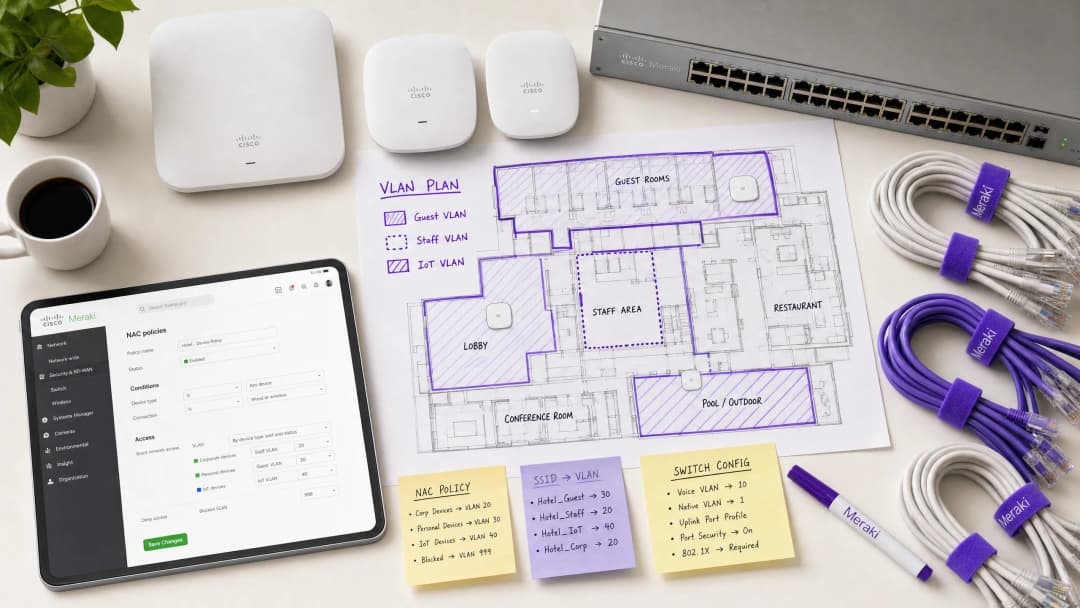
এই গাইডটি সিনিয়র আইটি আর্কিটেক্ট এবং অপারেশন ডিরেক্টরদের Cisco Meraki-তে VLAN steering-এর জন্য NAC পলিসি কনফিগার করার একটি ব্যবহারিক ব্লুপ্রিন্ট প্রদান করে। আমরা তাত্ত্বিক আলোচনার বাইরে গিয়ে ডেপ্লয়মেন্টের বাস্তবতার ওপর ফোকাস করি: কর্পোরেট ডিভাইসের জন্য 802.1X প্রয়োগ করা, হেডলেস IoT সিস্টেমের জন্য MAC Authentication Bypass (MAB) ব্যবহার করা এবং Retail, Hospitality এবং অন্যান্য এন্টারপ্রাইজ পরিবেশে নিরাপদ, কমপ্লায়েন্ট অ্যাক্সেস নিশ্চিত করতে Purple-এর মতো Guest WiFi প্ল্যাটফর্মের সাথে নির্বিঘ্নে ইন্টিগ্রেট করা। এই কনফিগারেশনগুলো আয়ত্ত করার মাধ্যমে, প্রতিষ্ঠানগুলো নিরাপত্তা ঝুঁকি কমাতে পারে, PCI-DSS কমপ্লায়েন্স নিশ্চিত করতে পারে এবং নেটওয়ার্ক থ্রুপুট অপ্টিমাইজ করতে পারে — সবই একটি একক, সেন্ট্রালি ম্যানেজড SSID থেকে।
টেকনিক্যাল ডিপ-ডাইভ
ডাইনামিক VLAN Steering-এর আর্কিটেকচার
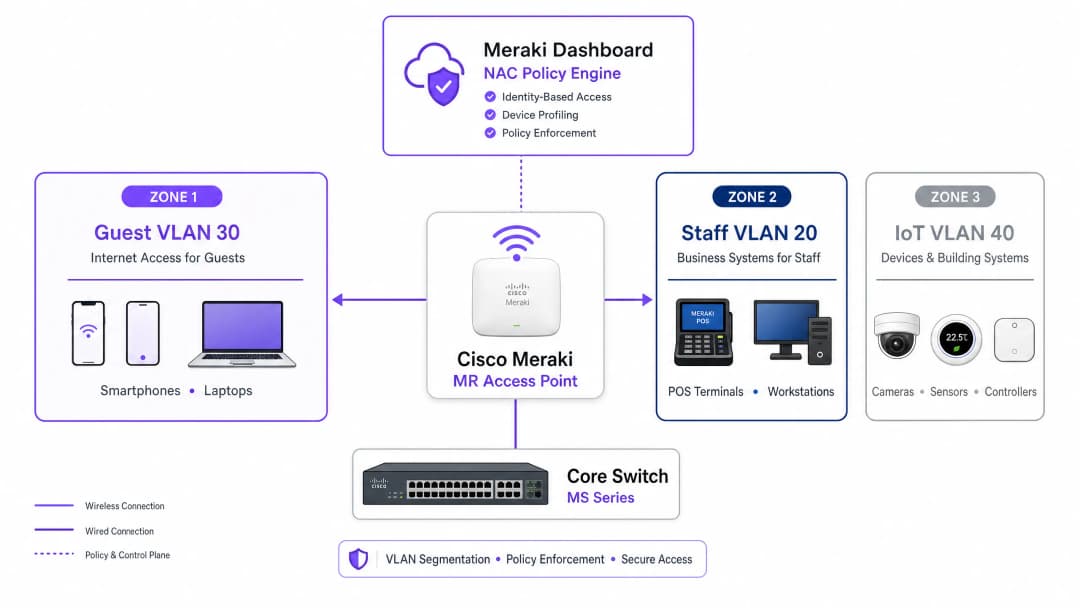
একটি Meraki পরিবেশে VLAN steering তিনটি মূল উপাদানের মধ্যকার মিথস্ক্রিয়ার ওপর নির্ভর করে: Meraki অ্যাক্সেস পয়েন্ট (অথেন্টিকেটর হিসেবে কাজ করে), ক্লায়েন্ট ডিভাইস (সাপ্লিক্যান্ট) এবং NAC/RADIUS সার্ভার (অথেন্টিকেশন সার্ভার)। এই ত্রিপক্ষীয় মডেলটি 802.1X স্ট্যান্ডার্ড দ্বারা সংজ্ঞায়িত এবং যেকোনো এন্টারপ্রাইজ-গ্রেড অ্যাক্সেস কন্ট্রোল ডেপ্লয়মেন্টের মেরুদণ্ড গঠন করে।
যখন একটি ডিভাইস নেটওয়ার্কের সাথে যুক্ত হয়, তখন AP ট্রাফিক ইন্টারসেপ্ট করে এবং RADIUS সার্ভারে একটি Access-Request ফরোয়ার্ড করে। সফল অথেন্টিকেশনের পর, RADIUS সার্ভার একটি Access-Accept মেসেজ দিয়ে সাড়া দেয়। গুরুত্বপূর্ণ বিষয় হলো, VLAN steering ঘটার জন্য এই মেসেজে অবশ্যই নির্দিষ্ট IETF স্ট্যান্ডার্ড RADIUS অ্যাট্রিবিউট থাকতে হবে যা AP-কে নির্দেশ দেয় কোন VLAN প্রয়োগ করতে হবে:
| RADIUS অ্যাট্রিবিউট | আইডি | মান | উদ্দেশ্য |
|---|---|---|---|
| Tunnel-Type | 64 | ১৩ (VLAN) | টানেলিং প্রোটোকল নির্দিষ্ট করে |
| Tunnel-Medium-Type | 65 | ৬ (802) | ট্রান্সপোর্ট মিডিয়াম নির্দিষ্ট করে |
| Tunnel-Private-Group-ID | 81 | যেমন, 20 |
টার্গেট VLAN আইডি নির্দিষ্ট করে |
যখন Meraki AP এই অ্যাট্রিবিউটগুলো পায়, তখন এটি সুইচপোর্টের মাধ্যমে ফরোয়ার্ড করার আগে ক্লায়েন্টের ট্রাফিককে নির্দিষ্ট VLAN আইডি দিয়ে ডাইনামিকভাবে ট্যাগ করে। এই প্রক্রিয়াটি এন্ড-ইউজারের কাছে সম্পূর্ণ অদৃশ্য থাকে এবং অ্যাসোসিয়েশনের কয়েক মিলিসেকেন্ডের মধ্যে সম্পন্ন হয়।
অথেন্টিকেশন মেকানিজম
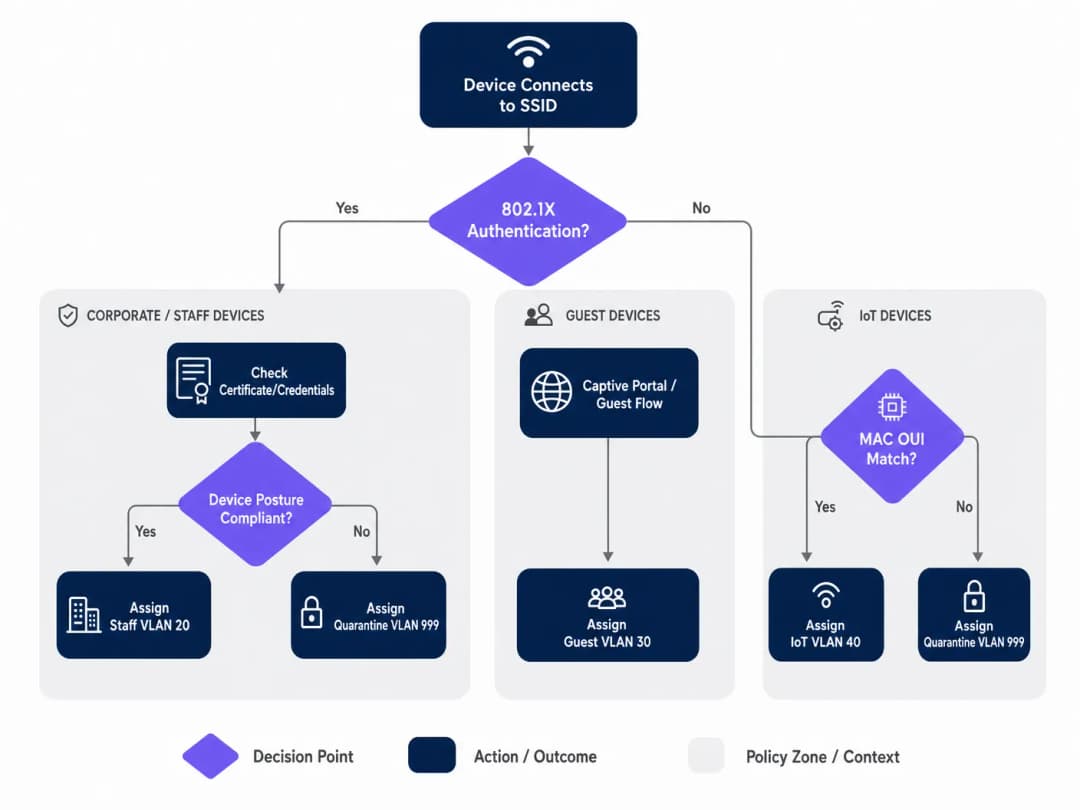
এন্টারপ্রাইজ নেটওয়ার্কগুলোতে সাধারণত অথেন্টিকেশনের জন্য একটি মাল্টি-টিয়ার পদ্ধতির প্রয়োজন হয়, কারণ যেকোনো স্থানে ডিভাইসের সংখ্যা এবং ধরন ভিন্ন হতে পারে। এখানে তিনটি প্রাথমিক মেকানিজম রয়েছে:
802.1X (EAP-TLS বা PEAP) হলো কর্পোরেট এবং স্টাফ ডিভাইসের জন্য গোল্ড স্ট্যান্ডার্ড। অথেন্টিকেশন ডিজিটাল সার্টিফিকেট (EAP-TLS) বা সুরক্ষিত ক্রেডেনশিয়াল (PEAP-MSCHAPv2)-এর ওপর ভিত্তি করে কাজ করে, যা শক্তিশালী এনক্রিপশন এবং আইডেন্টিটি ভেরিফিকেশন প্রদান করে। প্রতিষ্ঠানের MDM প্ল্যাটফর্ম দ্বারা পরিচালিত যেকোনো ডিভাইসের জন্য এটি একটি সুপারিশকৃত পদ্ধতি।
MAC Authentication Bypass (MAB) হেডলেস ডিভাইসগুলোর জন্য প্রয়োজন — যেমন আইপি ক্যামেরা, POS টার্মিনাল, বিল্ডিং ম্যানেজমেন্ট সেন্সর এবং স্মার্ট টিভি — যা একটি 802.1X সাপ্লিক্যান্ট চালাতে পারে না। এখানে MAC অ্যাড্রেসটি আইডেন্টিফায়ার হিসেবে ব্যবহৃত হয়। যদিও এটি সার্টিফিকেট-ভিত্তিক অথেন্টিকেশনের চেয়ে কম নিরাপদ (কারণ MAC অ্যাড্রেস স্পুফ করা সম্ভব), তবুও কঠোর VLAN ACL-এর সাথে MAB-এর সংমিশ্রণ আইসোলেটেড IoT সেগমেন্টের জন্য একটি গ্রহণযোগ্য নিরাপত্তা ব্যবস্থা প্রদান করে। এই বিষয়ে বিস্তারিত জানতে, আমাদের Managing IoT Device Security with NAC and MPSK গাইডটি দেখুন।
ক্যাপটিভ পোর্টাল অথেন্টিকেশন গেস্ট অ্যাক্সেসের জন্য ব্যবহৃত হয়। ব্যবহারকারী যতক্ষণ না Purple-এর মতো প্ল্যাটফর্ম দ্বারা হোস্ট করা লগইন ফ্লো — সাধারণত সোশ্যাল লগইন, ইমেল রেজিস্ট্রেশন বা একটি সাধারণ ক্লিক-থ্রু — সম্পন্ন করছেন, ততক্ষণ ডিভাইসটিকে একটি সীমিত প্রি-অথেন্টিকেশন স্টেটে রাখা হয়। এটি ডিভাইসটিকে একটি আইসোলেটেড গেস্ট VLAN-এ স্টিয়ার করার পাশাপাশি ফার্স্ট-পার্টি ডেটা সংগ্রহ করে।
আপনার নির্দিষ্ট সেটআপ নিয়ে কোনো প্রশ্ন আছে?
আমাদের টিম ৮০,০০০ ভেন্যুতে ভেন্যু অপারেটর, IT ম্যানেজার এবং নেটওয়ার্ক ইঞ্জিনিয়ারদের সাথে কাজ করে। একটি ২০ মিনিটের কল বুক করুন এবং আপনার মতো অন্যরা কীভাবে এর সমাধান করেছেন তা আমরা আপনাকে দেখাব।
ইমপ্লিমেন্টেশন গাইড
ধাপ ১: আপনার VLAN আর্কিটেকচার প্ল্যান করুন
Meraki ড্যাশবোর্ডে কাজ শুরু করার আগে, আপনার VLAN সেগমেন্টেশন স্ট্র্যাটেজি নির্ধারণ করুন। একটি সাধারণ এন্টারপ্রাইজ ভেন্যু ডেপ্লয়মেন্টে নিচের স্ট্রাকচারটি ব্যবহৃত হয়:
| VLAN আইডি | নাম | উদ্দেশ্য | অথেন্টিকেশন পদ্ধতি |
|---|---|---|---|
| 10 | Management | নেটওয়ার্ক ইনফ্রাস্ট্রাকচার | স্ট্যাটিক |
| 20 | Staff | কর্পোরেট ডিভাইস, ইন্টারনাল সিস্টেম | 802.1X (EAP-TLS) |
| 30 | Guest | ভিজিটর ইন্টারনেট অ্যাক্সেস | ক্যাপটিভ পোর্টাল (Purple) |
| 40 | IoT | ক্যামেরা, সেন্সর, স্মার্ট ডিভাইস | MAB |
| 50 | POS | পেমেন্ট টার্মিনাল (PCI স্কোপ) | 802.1X (সার্টিফিকেট) |
| 999 | Quarantine | ব্যর্থ অথেন্টিকেশন, অজানা ডিভাইস | কোনোটিই নয় |
ধাপ ২: সুইচ ইনফ্রাস্ট্রাকচার কনফিগার করুন
ওয়্যারলেস সেটিংস কনফিগার করার আগে, ওয়্যার্ড ইনফ্রাস্ট্রাকচার প্রস্তুত করতে হবে। Meraki AP-এর সাথে সংযুক্ত সুইচ পোর্টগুলোকে ট্রাঙ্ক পোর্ট হিসেবে কনফিগার করা উচিত, যা AP ডাইনামিকভাবে অ্যাসাইন করতে পারে এমন সমস্ত VLAN-কে অনুমতি দেয়। ব্যর্থ ডেপ্লয়মেন্টগুলোর ক্ষেত্রে এটি সবচেয়ে সাধারণ ভুল।
Meraki ড্যাশবোর্ডে, Switch > Monitor > Switch ports-এ যান, আপনার AP-এর সাথে সংযুক্ত পোর্টগুলো সিলেক্ট করুন, Type সেট করুন Trunk, Native VLAN কনফিগার করুন (সাধারণত আপনার ম্যানেজমেন্ট VLAN), এবং Allowed VLANs ফিল্ডে সমস্ত সম্ভাব্য ক্লায়েন্ট VLAN (যেমন, 20,30,40,50,999) স্পষ্টভাবে উল্লেখ করুন।
ধাপ ৩: 802.1X-এর জন্য Meraki SSID কনফিগার করুন
Wireless > Configure > Access control-এ যান এবং টার্গেট SSID সিলেক্ট করুন। Network access-এর অধীনে, Enterprise with 802.1X বেছে নিন। স্ক্রোল করে নিচে RADIUS servers সেকশনে যান এবং আপনার NAC সার্ভারের বিবরণ যোগ করুন: আইপি অ্যাড্রেস, পোর্ট (অথেন্টিকেশনের জন্য ডিফল্ট ১৮১২, অ্যাকাউন্টিংয়ের জন্য ১৮১৩) এবং শেয়ার্ড সিক্রেট। রিডান্ডেন্সির জন্য একটি সেকেন্ডারি RADIUS সার্ভার যোগ করুন।
ধাপ ৪: VLAN Tagging-এর জন্য RADIUS Override সক্রিয় করুন
এটি একটি গুরুত্বপূর্ণ ধাপ যা Meraki AP-কে NAC সার্ভার থেকে VLAN অ্যাসাইনমেন্ট গ্রহণ করতে সক্ষম করে। একই Access control পেজে, স্ক্রোল করে Addressing and traffic সেকশনে যান। Client IP assignment সেট করুন Bridge mode — এটি নিশ্চিত করে যে ক্লায়েন্টরা AP-এর NAT থেকে নয়, बल्कि তাদের অ্যাসাইন করা VLAN-এর লোকাল DHCP সার্ভার থেকে আইপি অ্যাড্রেস পাবে। VLAN tagging-এর অধীনে, Use VLAN tag from RADIUS সিলেক্ট করুন।
ধাপ ৫: Purple-এর সাথে গেস্ট অ্যাক্সেস কনফিগার করুন
গেস্ট নেটওয়ার্কের জন্য, ওপেন অ্যাসোসিয়েশন এবং ক্যাপটিভ পোর্টাল ইন্টিগ্রেশন সহ একটি আলাদা SSID তৈরি করুন। Network access সেট করুন Open (no encryption) এবং আপনার Purple পোর্টাল URL-কে নির্দেশ করতে Splash page কনফিগার করুন। সমস্ত প্রি-অথেন্টিকেটেড ট্রাফিককে একটি ডেডিকেটেড, আইসোলেটেড গেস্ট VLAN-এ (যেমন, VLAN 30) অ্যাসাইন করতে VLAN tagging সেট করুন এবং গেস্ট ডিভাইসগুলোর মধ্যে ল্যাটারাল মুভমেন্ট রোধ করতে Client isolation সক্রিয় করুন। Purple-এর WiFi Analytics প্ল্যাটফর্ম অথেন্টিকেশন ফ্লো এবং ডেটা ক্যাপচার পরিচালনা করবে।
বেস্ট প্র্যাকটিস
ক্রিটিক্যাল অথেন্টিকেশন VLAN-এর সাথে একটি ফেইল-ক্লোজড পোস্চার প্রয়োগ করুন। যদি RADIUS সার্ভারটি আনরিচেবল হয়ে যায়, তবে ফেইল ওপেন করে সম্পূর্ণ নেটওয়ার্ক অ্যাক্সেস দেবেন না। একটি ক্রিটিক্যাল অথেন্টিকেশন VLAN কনফিগার করুন যা বেসিক ইন্টারনেট কানেক্টিভিটি প্রদান করে কিন্তু NAC সার্ভার পুনরুদ্ধার না হওয়া পর্যন্ত সমস্ত ইন্টারনাল রিসোর্সে অ্যাক্সেস ব্লক করে। এটি বিশেষ করে রিটেইল পরিবেশের জন্য অত্যন্ত গুরুত্বপূর্ণ যেখানে RADIUS আউটেজের সময়ও POS টার্মিনালগুলোকে পেমেন্ট প্রসেসিং চালিয়ে যেতে হয়।
নিরবচ্ছিন্ন রোমিংয়ের জন্য Fast BSS Transition (802.11r) সক্রিয় করুন। ডাইনামিক VLAN অ্যাসাইনমেন্ট রোমিংয়ের সময় ল্যাটেন্সি তৈরি করতে পারে কারণ ডিভাইসটিকে প্রতিটি AP-তে পুনরায় অথেন্টিকেট করতে হয়। 802.11r সক্রিয় করা পুরো লোকেশন জুড়ে ভয়েস এবং ভিডিও অ্যাপ্লিকেশনের জন্য নিরবচ্ছিন্ন হ্যান্ডঅফ নিশ্চিত করে। হসপিটালিটি পরিবেশের জন্য এটি অত্যন্ত গুরুত্বপূর্ণ যেখানে গেস্টরা অনবরত প্রোপার্টির চারপাশে চলাফেরা করেন। ঘন ডেপ্লয়মেন্টের জন্য চ্যানেল প্ল্যানিং অপ্টিমাইজ করতে WiFi Frequencies: ২০২৬ সালে WiFi ফ্রিকোয়েন্সির একটি গাইড গাইডটি দেখাও সহায়ক হতে পারে।
IoT ট্রাফিককে কঠোরভাবে সেগমেন্ট করুন। কখনই কর্পোরেট বা গেস্ট ট্রাফিকের সাথে IoT ডিভাইস মিশ্রিত করবেন না। এই ডিভাইসগুলোকে শনাক্ত করতে MAB ব্যবহার করুন এবং কঠোর লেয়ার ৩ ফায়ারওয়াল রুল সহ ডেডিকেটেড VLAN-এ স্টিয়ার করুন যা কেবল ডিভাইস পরিচালনার জন্য প্রয়োজনীয় নির্দিষ্ট পোর্ট এবং ডেস্টিনেশনের অনুমতি দেয়। একটি হ্যাক হওয়া আইপি ক্যামেরা কখনই আপনার POS নেটওয়ার্ক বা কর্পোরেট ফাইল সার্ভার অ্যাক্সেস করতে সক্ষম হওয়া উচিত নয়।
কর্পোরেট SSID-এ WPA3 প্রয়োগ করুন। যেখানে ডিভাইসের সামঞ্জস্যতা অনুমতি দেয়, সেখানে WPA3-Enterprise ব্যবহার করার জন্য কর্পোরেট SSID কনফিগার করুন। এটি আরও শক্তিশালী এনক্রিপশন প্রদান করে এবং WPA2 PMKID অ্যাটাকের সাথে সম্পর্কিত দুর্বলতাগুলো দূর করে।
ট্রাবলশুটিং এবং ঝুঁকি হ্রাস
সাধারণ ব্যর্থতার ধরন
ক্লায়েন্টরা আইপি অ্যাড্রেস পেতে ব্যর্থ হচ্ছে। এটি প্রায় সবসময়ই একটি সুইচপোর্ট কনফিগারেশন সমস্যা। যাচাই করুন যে AP-এর সাথে সংযুক্ত সুইচপোর্টটি ট্রাঙ্ক হিসেবে কনফিগার করা হয়েছে এবং ডাইনামিকভাবে অ্যাসাইন করা VLAN-টি সেই ট্রাঙ্কে অনুমোদিত। এছাড়াও, যাচাই করুন যে DHCP সার্ভারে সেই VLAN-এর জন্য একটি সক্রিয় স্কোপ রয়েছে এবং DHCP রিলে এজেন্ট (যদি প্রযোজ্য হয়) সঠিকভাবে কনফিগার করা হয়েছে।
অথেন্টিকেশন টাইমআউট। যদি 802.1X হ্যান্ডশেকের সময় ডিভাইসগুলোর টাইমআউট হয়, তবে Meraki AP এবং RADIUS সার্ভারের মধ্যে নেটওয়ার্ক ল্যাটেন্সি পরীক্ষা করুন। উচ্চ ল্যাটেন্সির কারণে EAP টাইমারগুলোর মেয়াদ শেষ হয়ে যেতে পারে। এটি ঘটলে Meraki ড্যাশবোর্ডের Event Log-এ একটি 8021x_auth_timeout ইভেন্ট দেখাবে।
ভুল VLAN অ্যাসাইনমেন্ট। RADIUS Access-Accept মেসেজটি দেখতে Meraki ড্যাশবোর্ডের Event Log ব্যবহার করুন। যাচাই করুন যে NAC সার্ভার সঠিক Tunnel-Private-Group-ID অ্যাট্রিবিউট পাঠাচ্ছে কিনা। যদি এটি অনুপস্থিত বা ভুল হয়, তবে সমস্যাটি NAC পলিসি কনফিগারেশনে রয়েছে, Meraki AP-তে নয়। বেশিরভাগ NAC প্ল্যাটফর্ম (Cisco ISE, ClearPass) বিস্তারিত RADIUS অথেন্টিকেশন লগ প্রদান করে যা দেখাবে ঠিক কোন অ্যাট্রিবিউটগুলো রিটার্ন করা হয়েছে।
MAC র্যান্ডমাইজেশনের কারণে MAB ব্যাহত হওয়া। আধুনিক iOS এবং Android ডিভাইসগুলো ডিফল্টরূপে তাদের MAC অ্যাড্রেস র্যান্ডমাইজ করে। Purple দ্বারা পরিচালিত গেস্ট নেটওয়ার্কগুলোর জন্য, এটি ক্যাপটিভ পোর্টাল ফ্লো-এর মাধ্যমে চমৎকারভাবে পরিচালনা করা হয় — আইডেন্টিটি ব্যবহারকারীর লগইনের মাধ্যমে প্রতিষ্ঠিত হয়, MAC অ্যাড্রেসের মাধ্যমে নয়। MAB ব্যবহার করা IoT ডিভাইসগুলোর জন্য, নিশ্চিত করুন যে আসল হার্ডওয়্যার MAC অ্যাড্রেসটি এন্ডপয়েন্ট ডেটাবেসে নিবন্ধিত আছে, কারণ এই ডিভাইসগুলো র্যান্ডমাইজ করে না।
ROI এবং ব্যবসায়িক প্রভাব
NAC-চালিত VLAN steering প্রয়োগ করা বিভিন্ন দিক থেকে এন্টারপ্রাইজ ভেন্যুগুলোর জন্য পরিমাপযোগ্য ব্যবসায়িক মূল্য প্রদান করে:
| ব্যবসায়িক ফলাফল | মেকানিজম | পরিমাপযোগ্য প্রভাব |
|---|---|---|
| অপারেশনাল ওভারহেড হ্রাস | পরিচালনা করার জন্য কম SSID | SSID-এর সংখ্যা ৬০-৭০% হ্রাস |
| উন্নত নিরাপত্তা ব্যবস্থা | স্বয়ংক্রিয় মাইক্রো-সেগমেন্টেশন | ব্রিচের ক্ষেত্রে সীমিত ব্লাস্ট রেডিয়াস |
| কমপ্লায়েন্স সক্ষমতা | আইডেন্টিটি-ভিত্তিক অ্যাক্সেস কন্ট্রোল | PCI-DSS, GDPR, ISO 27001 অ্যালাইনমেন্ট |
| গেস্ট ডেটা ক্যাপচার | Purple ক্যাপটিভ পোর্টাল ইন্টিগ্রেশন | বড় স্কেলে ফার্স্ট-পার্টি ডেটা |
| নেটওয়ার্ক পারফরম্যান্স | ম্যানেজমেন্ট ফ্রেম ওভারহেড হ্রাস | উচ্চ-ঘনত্বের এলাকায় আরও ভালো থ্রুপুট |
Healthcare এবং Transport অপারেটরদের জন্য, কেবল কমপ্লায়েন্সের যুক্তিই এই বিনিয়োগকে সমর্থন করে। রোগীর রেকর্ডগুলো একটি কঠোরভাবে আইসোলেটেড VLAN-এ রয়েছে বা টিকিট সিস্টেমগুলো পাবলিক WiFi থেকে আলাদা করা হয়েছে তা প্রদর্শন করার ক্ষমতা একটি গুরুত্বপূর্ণ ঝুঁকি হ্রাসকারী পদক্ষেপ, যা অভ্যন্তরীণ অডিট এবং বাহ্যিক নিয়ন্ত্রক প্রয়োজনীয়তা উভয়কেই সন্তুষ্ট করে।
হসপিটালিটি এবং রিটেইল অপারেটরদের জন্য, Purple-এর গেস্ট WiFi প্ল্যাটফর্মের সাথে ইন্টিগ্রেশন গেস্ট নেটওয়ার্ককে একটি কস্ট সেন্টার থেকে রেভিনিউ-জেনারেটিং অ্যাসেটে রূপান্তরিত করে। প্রতিটি অথেন্টিকেটেড গেস্ট সেশন একটি ডেটা পয়েন্টে পরিণত হয়, যা মার্কেটিং অটোমেশন, লয়্যালটি প্রোগ্রাম এবং ভেন্যু অ্যানালিটিক্সে অবদান রাখে — আর এই সবকিছুর পেছনে থাকা NAC পলিসি নিশ্চিত করে যে গেস্ট ট্রাফিক কখনই ইন্টারনাল সিস্টেমকে স্পর্শ করবে না।
ব্রিফিংটি শুনুন
ডেপ্লয়মেন্ট স্ট্র্যাটেজি এবং সাধারণ ভুলত্রুটিগুলো সম্পর্কে আরও বিস্তারিত জানতে, আমাদের ১০ মিনিটের টেকনিক্যাল ব্রিফিং পডকাস্টটি শুনুন:
মূল সংজ্ঞাসমূহ
Network Access Control (NAC)
একটি সিকিউরিটি আর্কিটেকচার যা নেটওয়ার্ক রিসোর্স অ্যাক্সেস করতে চাওয়া ডিভাইসগুলোর ওপর পলিসি প্রয়োগ করে, সাধারণত অ্যাক্সেস দেওয়ার এবং একটি নেটওয়ার্ক সেগমেন্ট অ্যাসাইন করার আগে আইডেন্টিটি, ডিভাইসের অবস্থা এবং কমপ্লায়েন্স স্ট্যাটাস মূল্যায়ন করে।
আইটি টিমগুলো সেন্ট্রাল পলিসি ইঞ্জিন হিসেবে কাজ করার জন্য NAC প্ল্যাটফর্ম (যেমন Cisco ISE বা Aruba ClearPass) ডেপ্লয় করে, যা কোনো ডিভাইস কে বা কী এবং এটি কী অবস্থায় আছে তার ওপর ভিত্তি করে এটি কোন VLAN-এর অন্তর্ভুক্ত হবে তা নির্ধারণ করে।
VLAN Steering (Dynamic VLAN Assignment)
সফল অথেন্টিকেশনের পর একটি ক্লায়েন্ট ডিভাইসকে স্বয়ংক্রিয়ভাবে একটি নির্দিষ্ট Virtual Local Area Network (VLAN)-এ অ্যাসাইন করার প্রক্রিয়া, তারা কোন ফিজিক্যাল পোর্ট বা SSID-এর সাথে সংযুক্ত হচ্ছে তা বিবেচনা না করেই।
গেস্ট, স্টাফ এবং IoT ডিভাইসগুলোর মধ্যে কঠোর নিরাপত্তা সেগমেন্টেশন বজায় রাখার পাশাপাশি ব্রডকাস্ট করা SSID-এর সংখ্যা কমাতে উচ্চ-ঘনত্বের ভেন্যুগুলোর জন্য অপরিহার্য।
IEEE 802.1X
পোর্ট-ভিত্তিক নেটওয়ার্ক অ্যাক্সেস কন্ট্রোলের জন্য একটি IEEE স্ট্যান্ডার্ড যা Extensible Authentication Protocol (EAP) ফ্রেমওয়ার্ক ব্যবহার করে LAN বা WLAN-এর সাথে যুক্ত হতে চাওয়া ডিভাইসগুলোকে একটি অথেন্টিকেশন মেকানিজম প্রদান করে।
কর্পোরেট ল্যাপটপ এবং স্টাফদের স্মার্টফোন অথেন্টিকেট করার জন্য গোল্ড স্ট্যান্ডার্ড, যা নিশ্চিত করে যে কেবল বৈধ ক্রেডেনশিয়াল বা সার্টিফিকেট সহ যাচাইকৃত ব্যবহারকারীরাই ইন্টারনাল রিসোর্স অ্যাক্সেস করতে পারবেন।
MAC Authentication Bypass (MAB)
একটি ফলব্যাক অথেন্টিকেশন পদ্ধতি যেখানে কোনো ডিভাইস 802.1X সমর্থন করতে না পারলে তার MAC অ্যাড্রেসটিকে আইডেন্টিটি ক্রেডেনশিয়াল হিসেবে ব্যবহার করা হয়। MAC অ্যাড্রেসটি ইউজারনেম এবং পাসওয়ার্ড উভয় হিসেবেই RADIUS সার্ভারে পাঠানো হয়।
ব্যবহারকারীর হস্তক্ষেপ ছাড়াই হেডলেস IoT ডিভাইসগুলোকে - প্রিন্টার, ক্যামেরা, সেন্সর এবং POS টার্মিনাল - একটি নিরাপদ, সেগমেন্টেড নেটওয়ার্কে যুক্ত করার জন্য অত্যন্ত গুরুত্বপূর্ণ।
RADIUS (Remote Authentication Dial-In User Service)
একটি নেটওয়ার্কিং প্রোটোকল যা একটি নেটওয়ার্ক সার্ভিসের সাথে সংযুক্ত ব্যবহারকারী এবং ডিভাইসগুলোর জন্য সেন্ট্রালাইজড Authentication, Authorisation, and Accounting (AAA) ম্যানেজমেন্ট প্রদান করে।
NAC সার্ভারের সাথে যোগাযোগ করতে Meraki AP দ্বারা ব্যবহৃত প্রোটোকল। AP Access-Request মেসেজ পাঠায়; NAC সার্ভার Access-Accept (VLAN অ্যাট্রিবিউট সহ) বা Access-Reject দিয়ে সাড়া দেয়।
Captive Portal
একটি ওয়েব পেজ যা কোনো পাবলিক-অ্যাক্সেস নেটওয়ার্কের ব্যবহারকারীকে সম্পূর্ণ নেটওয়ার্ক অ্যাক্সেস পাওয়ার আগে দেখতে এবং ইন্টারঅ্যাক্ট করতে হয়। সাধারণত শর্তাবলী গ্রহণ, লগইন বা ডেটা ক্যাপচারের জন্য ব্যবহৃত হয়।
হসপিটালিটি, রিটেইল এবং পাবলিক-সেক্টর পরিবেশে গেস্ট ব্যবহারকারীদের যুক্ত করার প্রাথমিক পদ্ধতি। Purple-এর মতো প্ল্যাটফর্মগুলো ক্যাপটিভ পোর্টাল হোস্ট করে, অ্যানালিটিক্স ডেটা সংগ্রহ করে এবং টার্মস অফ সার্ভিস প্রয়োগ করে।
Client Isolation
একটি ওয়্যারলেস সিকিউরিটি ফিচার যা একই SSID বা VLAN-এর সাথে সংযুক্ত ডিভাইসগুলোকে একে অপরের সাথে সরাসরি যোগাযোগ করতে বাধা দেয়, এবং সমস্ত ট্রাফিককে গেটওয়ের মাধ্যমে যেতে বাধ্য করে।
ক্ষতিকারক অ্যাক্টরদের অন্যান্য গেস্টদের ডিভাইস স্ক্যান বা আক্রমণ করা থেকে বিরত রাখতে গেস্ট VLAN-এর জন্য একটি বাধ্যতামূলক সেটিং। যেখানে অনিরাপদ ডিভাইস আশা করা হয় এমন যেকোনো SSID-এ এটি সক্রিয় করা উচিত।
Fast BSS Transition (802.11r)
একটি IEEE 802.11 অ্যামেন্ডমেন্ট যা অথেন্টিকেশন কি-গুলো প্রি-ক্যাশ করার মাধ্যমে এক অ্যাক্সেস পয়েন্ট থেকে অন্য অ্যাক্সেস পয়েন্টে দ্রুত এবং নিরাপদ হ্যান্ডওভার সক্ষম করে, যা রোমিং ল্যাটেন্সিকে শত শত মিলিসেকেন্ড থেকে কমিয়ে ৫০ মিলিসেকেন্ডের নিচে নিয়ে আসে।
যেসব ভেন্যুতে ব্যবহারকারীরা মোবাইল বা গতিশীল, সেখানে ব্যবহারকারীরা অ্যাক্সেস পয়েন্টগুলোর মধ্যে চলাফেরা করার সময় ভয়েস কল বা ভিডিও স্ট্রিম ড্রপ হওয়া রোধ করতে 802.1X এবং ডাইনামিক VLAN অ্যাসাইনমেন্ট ব্যবহার করার সময় এটি অবশ্যই সক্রিয় করতে হবে।
EAP-TLS (Extensible Authentication Protocol - Transport Layer Security)
802.1X ফ্রেমওয়ার্কের মধ্যে একটি মিউচুয়াল অথেন্টিকেশন পদ্ধতি যা ক্লায়েন্ট এবং অথেন্টিকেশন সার্ভার উভয় ক্ষেত্রেই ডিজিটাল সার্টিফিকেট ব্যবহার করে, যা ওয়্যারলেস অথেন্টিকেশনের জন্য সর্বোচ্চ স্তরের নিরাপত্তা প্রদান করে।
PCI-DSS-স্কোপড ডিভাইস এবং ক্রেডেনশিয়াল চুরির উল্লেখযোগ্য ঝুঁকি রয়েছে এমন যেকোনো পরিবেশের জন্য সুপারিশকৃত অথেন্টিকেশন পদ্ধতি। ক্লায়েন্ট সার্টিফিকেট ইস্যু এবং পরিচালনা করার জন্য একটি PKI ইনফ্রাস্ট্রাকচারের প্রয়োজন হয়।
সমাধানকৃত উদাহরণসমূহ
একটি ৪০০ রুমের হোটেলের একটি নিরাপদ ওয়্যারলেস নেটওয়ার্ক ডেপ্লয় করা প্রয়োজন। তাদের স্টাফদের নিরাপদে ইন্টারনাল বুকিং সিস্টেম অ্যাক্সেস করতে হবে, গেস্টদের একটি ব্র্যান্ডেড ক্যাপটিভ পোর্টালের মাধ্যমে ইন্টারনেট অ্যাক্সেস করতে হবে এবং রুমের স্মার্ট টিভিগুলোকে একটি লোকাল মিডিয়া সার্ভারের সাথে সংযুক্ত করতে হবে। তারা উচ্চ-ঘনত্বের এলাকায় সর্বোত্তম পারফরম্যান্স নিশ্চিত করতে SSID ব্রডকাস্ট ওভারহেড কমাতে চায়।
আইটি টিমের দুটি SSID ডেপ্লয় করা উচিত। SSID ১: 'Hotel_Secure' যা 802.1X-এর জন্য কনফিগার করা হয়েছে। স্টাফরা হোটেলের PKI দ্বারা ইস্যু করা কর্পোরেট সার্টিফিকেট সহ EAP-TLS ব্যবহার করে অথেন্টিকেট করবেন। NAC সার্ভার (Cisco ISE) স্টাফদের আইডেন্টিটি শনাক্ত করে এবং RADIUS অ্যাট্রিবিউট রিটার্ন করে তাদের VLAN 20 (Staff)-এ অ্যাসাইন করে, যার PMS এবং বুকিং সিস্টেমে সম্পূর্ণ অ্যাক্সেস রয়েছে। স্মার্ট টিভিগুলোতে 802.1X সক্ষমতা না থাকায়, সেগুলোকে MAC Authentication Bypass (MAB) ব্যবহার করে প্রোফাইল করা হয়। NAC সার্ভার টিভির MAC OUI প্রিফিক্সগুলো শনাক্ত করে এবং সেগুলোকে VLAN 40 (IoT)-এ অ্যাসাইন করে, যার ACL কেবল পোর্ট ৮০৮০-এ মিডিয়া সার্ভার এবং ইন্টারনেট অ্যাক্সেসের অনুমতি দেয়। SSID ২: 'Hotel_Guest' যা Purple ক্যাপটিভ পোর্টাল সহ Open হিসেবে কনফিগার করা হয়েছে। গেস্টরা কানেক্ট করেন, Purple স্প্ল্যাশ পেজে রিডাইরেক্ট হন এবং সফল সোশ্যাল লগইন বা ইমেল রেজিস্ট্রেশনের পর, ক্লায়েন্ট আইসোলেশন সক্রিয় থাকা অবস্থায় VLAN 30 (Guest)-এ অ্যাসাইন হন। Purple প্ল্যাটফর্ম হোটেলের CRM এবং মার্কেটিং অটোমেশনের জন্য ফার্স্ট-পার্টি ডেটা সংগ্রহ করে।
একটি রিটেইল চেইন ৫০টি লোকেশন জুড়ে নতুন ওয়্যারলেস Point-of-Sale (POS) টার্মিনাল চালু করছে। PCI-DSS প্রয়োজনীয়তা মেনে চলার জন্য এই ডিভাইসগুলোকে কঠোরভাবে সেগমেন্ট করতে হবে। তবে, আইটি টিম চিন্তিত যে পিক ট্রেডিং আওয়ারের সময় সেন্ট্রাল RADIUS সার্ভার অফলাইনে চলে গেলে কী হবে।
POS টার্মিনালগুলোকে একটি 802.1X-সক্ষম SSID-এর সাথে সংযুক্ত করা উচিত, যেখানে শক্তিশালী আইডেন্টিটি ভ্যালিডেশন নিশ্চিত করতে সার্টিফিকেট-ভিত্তিক অথেন্টিকেশন (EAP-TLS) ব্যবহার করা হবে। NAC পলিসি এই ডিভাইসগুলোকে একটি ডেডিকেটেড, অত্যন্ত সীমিত POS VLAN (VLAN 50)-এ স্টিয়ার করবে, যার লেয়ার ৩ ফায়ারওয়াল রুল কেবল প্রয়োজনীয় পোর্টে পেমেন্ট গেটওয়ে আইপিগুলোতে ট্রাফিকের অনুমতি দেয়। RADIUS সার্ভার ব্যর্থতার ঝুঁকি কমাতে, আইটি টিমকে Meraki অ্যাক্সেস পয়েন্টগুলোতে একটি Critical Authentication VLAN কনফিগার করতে হবে। যদি AP কনফিগার করা টাইমআউটের মধ্যে RADIUS সার্ভারে পৌঁছাতে না পারে, তবে এটি স্বয়ংক্রিয়ভাবে POS টার্মিনালগুলোকে এই ক্রিটিক্যাল VLAN-এ ড্রপ করবে। এই VLAN-টি কঠোর ACL সহ কনফিগার করা উচিত যা কেবল প্রয়োজনীয় পেমেন্ট প্রসেসিং গেটওয়েগুলোতে ট্রাফিকের অনুমতি দেয়, যা অন্যান্য সমস্ত নেটওয়ার্ক অ্যাক্সেস ব্লক করার পাশাপাশি লেনদেন চালিয়ে যাওয়া নিশ্চিত করে। প্রতিটি লোকেশনে একটি সেকেন্ডারি RADIUS সার্ভার রিডান্ডেন্সির একটি অতিরিক্ত লেয়ার প্রদান করে।
অনুশীলনী প্রশ্নসমূহ
Q1. একটি হাসপাতালের আইটি ডিরেক্টর রিপোর্ট করেছেন যে নতুন ইনস্টল করা ওয়্যারলেস আইপি ক্যামেরাগুলো 'Med_Secure' SSID-এর সাথে কানেক্ট হতে ব্যর্থ হচ্ছে, যা 802.1X-এর জন্য কনফিগার করা হয়েছে। ক্যামেরাগুলো সার্টিফিকেট-ভিত্তিক অথেন্টিকেশন সমর্থন করে না এবং এগুলোর কোনো ইউজার ইন্টারফেস নেই। এই ডিভাইসগুলোকে নিরাপদে যুক্ত করতে নেটওয়ার্ক আর্কিটেকচার কীভাবে সামঞ্জস্য করা উচিত?
ইঙ্গিত: 802.1X সাপ্লিক্যান্ট চালাতে না পারলে হেডলেস ডিভাইসগুলোকে কীভাবে প্রোফাইল এবং অথেন্টিকেট করা হয় তা বিবেচনা করুন।
মডেল উত্তর দেখুন
আইটি টিমকে অবশ্যই NAC সার্ভারে MAC Authentication Bypass (MAB) ব্যবহার করতে হবে। ক্যামেরাগুলোর MAC অ্যাড্রেস এন্ডপয়েন্ট ডেটাবেসে যোগ করতে হবে এবং 'IoT_Camera' হিসেবে প্রোফাইল করতে হবে। যখন একটি ক্যামেরা কানেক্ট করার চেষ্টা করবে, তখন NAC সার্ভার MAC অ্যাড্রেসটিকে অথেন্টিকেশন ক্রেডেনশিয়াল হিসেবে ব্যবহার করবে এবং ক্যামেরাটিকে একটি আইসোলেটেড IoT VLAN-এ স্টিয়ার করতে RADIUS অ্যাট্রিবিউট রিটার্ন করবে। এই VLAN-এ কঠোর লেয়ার ৩ ACL প্রয়োগ করা উচিত, যা কেবল ক্যামেরা ম্যানেজমেন্ট সার্ভারে ট্রাফিকের অনুমতি দেয় এবং অন্যান্য সমস্ত ইন্টারনাল নেটওয়ার্ক অ্যাক্সেস ব্লক করে। হাসপাতালের উচিত নিবন্ধিত MAC অ্যাড্রেসের জন্য ডিভাইসের ধরনটি প্রত্যাশিত প্রোফাইলের সাথে মেলে কিনা তা যাচাই করতে একটি সেকেন্ডারি প্রোফাইলিং পদ্ধতি হিসেবে DHCP ফিঙ্গারপ্রিন্টিং ব্যবহার করার কথা বিবেচনা করা।
Q2. একটি রিটেইল চেইনে নেটওয়ার্ক অডিটের সময় দেখা গেছে যে ডাইনামিক VLAN-এ থাকা স্টাফদের ল্যাপটপগুলো 802.1X-এর মাধ্যমে সফলভাবে অথেন্টিকেট হচ্ছে (ইভেন্ট লগ সঠিক VLAN আইডি সহ Access-Accept মেসেজ দেখাচ্ছে) কিন্তু আইপি অ্যাড্রেস পাচ্ছে না। একটি আলাদা SSID-এ থাকা গেস্ট ডিভাইসগুলো স্বাভাবিকভাবে কাজ করছে। সবচেয়ে সম্ভাব্য কনফিগারেশন ত্রুটি কোনটি এবং আপনি কীভাবে এটি সমাধান করবেন?
ইঙ্গিত: অথেন্টিকেশন সফল হচ্ছে - সমস্যাটি VLAN ট্যাগ প্রয়োগ করার পরের ডেটা পাথে রয়েছে।
মডেল উত্তর দেখুন
সবচেয়ে সম্ভাব্য সমস্যাটি হলো Meraki AP-কে কোর সুইচের সাথে সংযুক্তকারী ফিজিক্যাল সুইচপোর্টটি সঠিকভাবে কনফিগার করা হয়নি। যদিও AP সফলভাবে ক্লায়েন্টকে অথেন্টিকেট করছে এবং স্টাফ VLAN আইডি দিয়ে ট্রাফিক ট্যাগ করছে, সুইচপোর্টটি সম্ভবত একটি অ্যাক্সেস পোর্ট হিসেবে কনফিগার করা হয়েছে (অথবা একটি ট্রাঙ্ক পোর্ট যার অনুমোদিত তালিকায় স্টাফ VLAN-টি অনুপস্থিত)। সুইচপোর্টটিকে অবশ্যই ট্রাঙ্ক হিসেবে কনফিগার করতে হবে এবং ডাইনামিকভাবে অ্যাসাইন করা স্টাফ VLAN-টি স্পষ্টভাবে অনুমোদিত VLAN-এর তালিকায় থাকতে হবে। আইটি টিমের উচিত Meraki ড্যাশবোর্ডে Switch > Monitor > Switch ports-এ যাওয়া, AP-এর সাথে সংযুক্ত পোর্টটি সিলেক্ট করা, এটি Trunk টাইপে সেট করা আছে কিনা তা যাচাই করা এবং Allowed VLANs ফিল্ডে স্টাফ VLAN আইডি অন্তর্ভুক্ত রয়েছে কিনা তা নিশ্চিত করা।
Q3. একটি স্টেডিয়াম ইভেন্ট চলাকালীন ৫০,০০০ ভক্তকে নিরবচ্ছিন্ন WiFi দিতে চায় এবং একই সাথে পয়েন্ট-অফ-সেল টার্মিনাল ও ডিজিটাল সাইনেজ নিরাপদে সংযুক্ত করতে চায়। বর্তমান নেটওয়ার্ক টিম ট্রাফিক আলাদা করার জন্য পাঁচটি ভিন্ন SSID ব্রডকাস্ট করার প্রস্তাব করেছে। উচ্চ-ঘনত্বের পরিবেশের জন্য এটি কেন একটি দুর্বল ডিজাইন, এবং সুপারিশকৃত আর্কিটেকচার কী?
ইঙ্গিত: উচ্চ-ঘনত্বের পরিবেশে ওয়্যারলেস এয়ারটাইমের ওপর ম্যানেজমেন্ট ফ্রেমের প্রভাব বিবেচনা করুন।
মডেল উত্তর দেখুন
পাঁচটি SSID ব্রডকাস্ট করা অতিরিক্ত ম্যানেজমেন্ট ফ্রেম ওভারহেড তৈরি করে - প্রতিটি SSID-এর জন্য প্রতিটি অ্যাক্সেসয়েন্ট থেকে নিয়মিত বিরতিতে নিজস্ব বিকন ফ্রেম ব্রডকাস্ট করা প্রয়োজন। শত শত AP সহ স্টেডিয়ামের মতো একটি উচ্চ-ঘনত্বের পরিবেশে, এই ম্যানেজমেন্ট ফ্রেম ওভারহেড উপলব্ধ এয়ারটাইমের একটি উল্লেখযোগ্য অংশ গ্রাস করে, যা সরাসরি ব্যবহারকারীর ডেটার জন্য উপলব্ধ থ্রুপুট কমিয়ে দেয়। সুপারিশকৃত পদ্ধতি হলো সর্বোচ্চ দুটি SSID ব্রডকাস্ট করা: ৫০,০০০ ভক্তের জন্য একটি Purple ক্যাপটিভ পোর্টাল সহ Open SSID, যা তাদের ক্লায়েন্ট আইসোলেশন সহ একটি গেস্ট VLAN-এ স্টিয়ার করবে; এবং সমস্ত কর্পোরেট ডিভাইসের জন্য একটি 802.1X-সক্ষম সুরক্ষিত SSID। এরপর NAC পলিসি অতিরিক্ত SSID-এর প্রয়োজন ছাড়াই তাদের আইডেন্টিটির ওপর ভিত্তি করে POS টার্মিনালগুলোকে একটি PCI-কমপ্লায়েন্ট VLAN-এ এবং ডিজিটাল সাইনেজকে একটি IoT VLAN-এ ডাইনামিকভাবে স্টিয়ার করবে।
এই সিরিজে পড়া চালিয়ে যান
কোনো কর্মী চাকরি ছেড়ে চলে গেলে কীভাবে তার WiFi অ্যাক্সেস বাতিল করবেন
এই নির্দেশিকাটি IT এবং ভেন্যু অপারেশনস টিমকে দেখায় যে কীভাবে অন্যান্য কর্মীদের কোনো ব্যাঘাত না ঘটিয়ে একজন কর্মী চলে যাওয়ার পর তার Staff WiFi অ্যাক্সেস বন্ধ করতে হয়। এটি সার্টিফিকেট-ভিত্তিক 802.1X, আইডি-নির্দিষ্ট iPSK এবং SCIM-চালিত ডিপ্রোভিশনিংয়ের তুলনা করে, তারপর একই দিনের একটি রানবুক, পরীক্ষার পদ্ধতি এবং অডিট প্রমাণ মডেল প্রদান করে।
একটি ক্লিনিক্যাল পরিবেশে WiFi 7 ডেপ্লয়মেন্টের পরিকল্পনা: IoMT ডিভাইস, ইন্টারফেয়ারেন্স এবং HIPAA
এই ব্যাপক নির্দেশিকাটি একটি ক্লিনিক্যাল পরিবেশে WiFi 7 ডেপ্লয়মেন্টের পরিকল্পনা অন্বেষণ করে, যেখানে 6 GHz ব্যান্ড স্ট্র্যাটেজি, লেগ্যাসি IoMT ডিভাইসের সামঞ্জস্যতা, IEC 60601-1-2 RF ইন্টারফেয়ারেন্স বাধ্যবাধকতা এবং HIPAA -সংযুক্ত নেটওয়ার্ক সেগমেন্টেশনের ওপর আলোকপাত করা হয়েছে। এটি Purple-এর ক্লাউড RADIUS প্ল্যাটফর্ম ব্যবহার করে মিশ্র ডিভাইস ফ্লিট সুরক্ষিত করার জন্য হেলথকেয়ার আইটি লিডারদের জন্য কার্যকরী আর্কিটেকচার পরামর্শ প্রদান করে।
কীভাবে কর্মী এবং গেস্ট WiFi নেটওয়ার্ক সুরক্ষিতভাবে সেগমেন্ট করবেন: এন্টারপ্রাইজ LAN-এর জন্য সেরা অনুশীলনসমূহ
কর্মী এবং গেস্ট WiFi ট্রাফিক সঠিকভাবে সেগমেন্ট করে এন্টারপ্রাইজ LAN সুরক্ষিত করার জন্য এই নির্দেশিকাটি IT ম্যানেজার এবং নেটওয়ার্ক স্থপতিদের একটি ভেন্ডর-নিরপেক্ষ, প্রযুক্তিগত ব্লুপ্রিন্ট প্রদান করে। এতে শেয়ার্ড পাসফ্রেজ দূর করতে এবং কর্পোরেট সম্পদ রক্ষা করতে প্রয়োজনীয় 802.1X প্রমাণীকরণ, ক্লাউড RADIUS, VLAN আইসোলেশন এবং ক্রেডেনশিয়াল লাইফসাইকেল ম্যানেজমেন্ট কভার করা হয়েছে।
আপনার নির্দিষ্ট সেটআপ নিয়ে কোনো প্রশ্ন আছে?
আমাদের টিম ৮০,০০০ ভেন্যুতে ভেন্যু অপারেটর, IT ম্যানেজার এবং নেটওয়ার্ক ইঞ্জিনিয়ারদের সাথে কাজ করে। একটি ২০ মিনিটের কল বুক করুন এবং আপনার মতো অন্যরা কীভাবে এর সমাধান করেছেন তা আমরা আপনাকে দেখাব।