
Cisco Meraki में VLAN स्टीयरिंग के लिए NAC पॉलिसी कैसे कॉन्फ़िगर करें
यह आधिकारिक गाइड IT लीडर्स, नेटवर्क आर्किटेक्ट्स और वेन्यू ऑपरेशंस डायरेक्टर्स को Cisco Meraki वातावरण में NAC पॉलिसी और VLAN स्टीयरिंग को कॉन्फ़िगर करने के लिए एक व्यावहारिक, चरण-दर-चरण ढांचा प्रदान करती है। यह हॉस्पिटैलिटी, रिटेल और सार्वजनिक-क्षेत्र के डिप्लॉयमेंट में सुरक्षित, कंप्लायंट और उच्च-प्रदर्शन नेटवर्क सेगमेंटेशन सुनिश्चित करने के लिए 802.1X इम्प्लीमेंटेशन, MAC ऑथेंटिकेशन बायपास के माध्यम से IoT डिवाइस आइसोलेशन, और Purple के गेस्ट WiFi एनालिटिक्स प्लेटफ़ॉर्म के साथ सहज इंटीग्रेशन को कवर करती है।
इस गाइड को सुनें
पॉडकास्ट ट्रांसक्रिप्ट देखें
हमारी मुख्य श्रृंखला का हिस्सा: Enterprise WiFi Security Guide →
कार्यकारी सारांश
एंटरप्राइज़ स्थानों के लिए — हाई-डेंसिटी स्टेडियम से लेकर फैले हुए हॉस्पिटैलिटी कॉम्प्लेक्स तक — एक फ्लैट नेटवर्क एक समझौता किया गया नेटवर्क है। ट्रैफ़िक को सेगमेंट करने के लिए कई SSID ब्रॉडकास्ट करने से RF परफॉरमेंस कम होती है, कीमती एयरटाइम बर्बाद होता है, और एक ऐसा प्रशासनिक बोझ पैदा होता है जो मल्टी-साइट डिप्लॉयमेंट में खराब तरीके से स्केल होता है। आधुनिक मानक डायनामिक सेगमेंटेशन है: एक सुरक्षित SSID ब्रॉडकास्ट करना और डिवाइस को स्वचालित रूप से प्रोफ़ाइल करने, प्रमाणित करने और सही VLAN में स्टीयर करने के लिए नेटवर्क एक्सेस कंट्रोल (NAC) पर निर्भर रहना。
यह गाइड सीनियर IT आर्किटेक्ट्स और ऑपरेशंस डायरेक्टर्स को Cisco Meraki में VLAN स्टीयरिंग के लिए NAC पॉलिसी कॉन्फ़िगर करने का एक व्यावहारिक ब्लूप्रिंट प्रदान करती है। हम डिप्लॉयमेंट की वास्तविकताओं पर ध्यान केंद्रित करने के लिए अकादमिक थ्योरी को दरकिनार करते हैं: कॉर्पोरेट डिवाइस के लिए IEEE 802.1X लागू करना, हेडलेस IoT सिस्टम के लिए MAC ऑथेंटिकेशन बायपास (MAB) का उपयोग करना, और Retail, Hospitality, और अन्य एंटरप्राइज़ वातावरणों में सुरक्षित, कंप्लायंट एक्सेस सुनिश्चित करने के लिए Purple जैसे Guest WiFi प्लेटफ़ॉर्म के साथ सहजता से इंटीग्रेट करना। इन कॉन्फ़िगरेशन में महारत हासिल करके, संगठन सुरक्षा जोखिमों को कम कर सकते हैं, PCI DSS कंप्लायंस सुनिश्चित कर सकते हैं, और नेटवर्क थ्रूपुट को ऑप्टिमाइज़ कर सकते हैं — यह सब एक ही, केंद्रीय रूप से प्रबंधित SSID से।
तकनीकी डीप-डाइव
डायनामिक VLAN स्टीयरिंग का आर्किटेक्चर
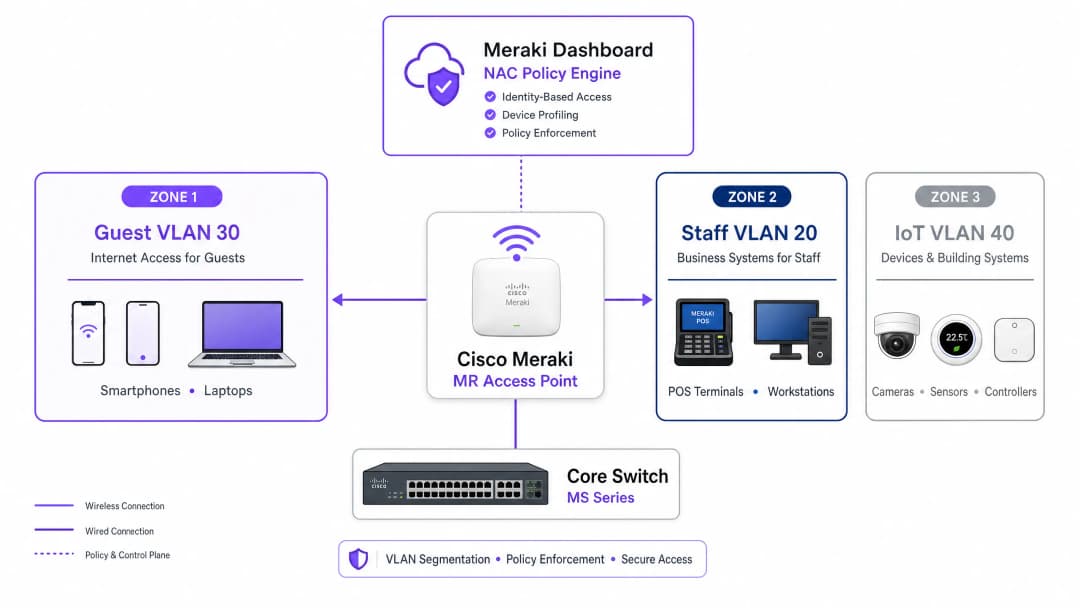
Meraki वातावरण में VLAN स्टीयरिंग तीन मुख्य घटकों के बीच इंटरैक्शन पर निर्भर करता है: Meraki एक्सेस पॉइंट (ऑथेंटिकेटर के रूप में कार्य करता है), क्लाइंट डिवाइस (सप्लिकेंट), और NAC/RADIUS सर्वर (ऑथेंटिकेशन सर्वर)। यह थ्री-पार्टी मॉडल IEEE 802.1X मानक द्वारा परिभाषित किया गया है और किसी भी एंटरप्राइज़-ग्रेड एक्सेस कंट्रोल डिप्लॉयमेंट की रीढ़ बनता है।
जब कोई डिवाइस नेटवर्क से जुड़ता है, तो AP ट्रैफ़िक को इंटरसेप्ट करता है और RADIUS सर्वर को एक Access-Request फॉरवर्ड करता है। सफल ऑथेंटिकेशन पर, RADIUS सर्वर Access-Accept संदेश के साथ प्रतिक्रिया देता है। महत्वपूर्ण रूप से, VLAN स्टीयरिंग होने के लिए, इस संदेश में विशिष्ट IETF मानक RADIUS एट्रिब्यूट्स शामिल होने चाहिए जो AP को निर्देश देते हैं कि कौन सा VLAN लागू करना है:
| RADIUS एट्रिब्यूट | ID | वैल्यू | उद्देश्य |
|---|---|---|---|
| Tunnel-Type | 64 | 13 (VLAN) | टनलिंग प्रोटोकॉल निर्दिष्ट करता है |
| Tunnel-Medium-Type | 65 | 6 (802) | ट्रांसपोर्ट मीडियम निर्दिष्ट करता है |
| Tunnel-Private-Group-ID | 81 | उदा., 20 |
लक्ष्य VLAN ID निर्दिष्ट करता है |
जब Meraki AP को ये एट्रिब्यूट्स प्राप्त होते हैं, तो यह स्विचपोर्ट पर फॉरवर्ड करने से पहले क्लाइंट के ट्रैफ़िक को निर्दिष्ट VLAN ID के साथ डायनामिक रूप से टैग करता है। यह प्रक्रिया एंड यूज़र के लिए पारदर्शी होती है और एसोसिएशन के कुछ मिलीसेकंड के भीतर पूरी हो जाती है।
ऑथेंटिकेशन मैकेनिज्म
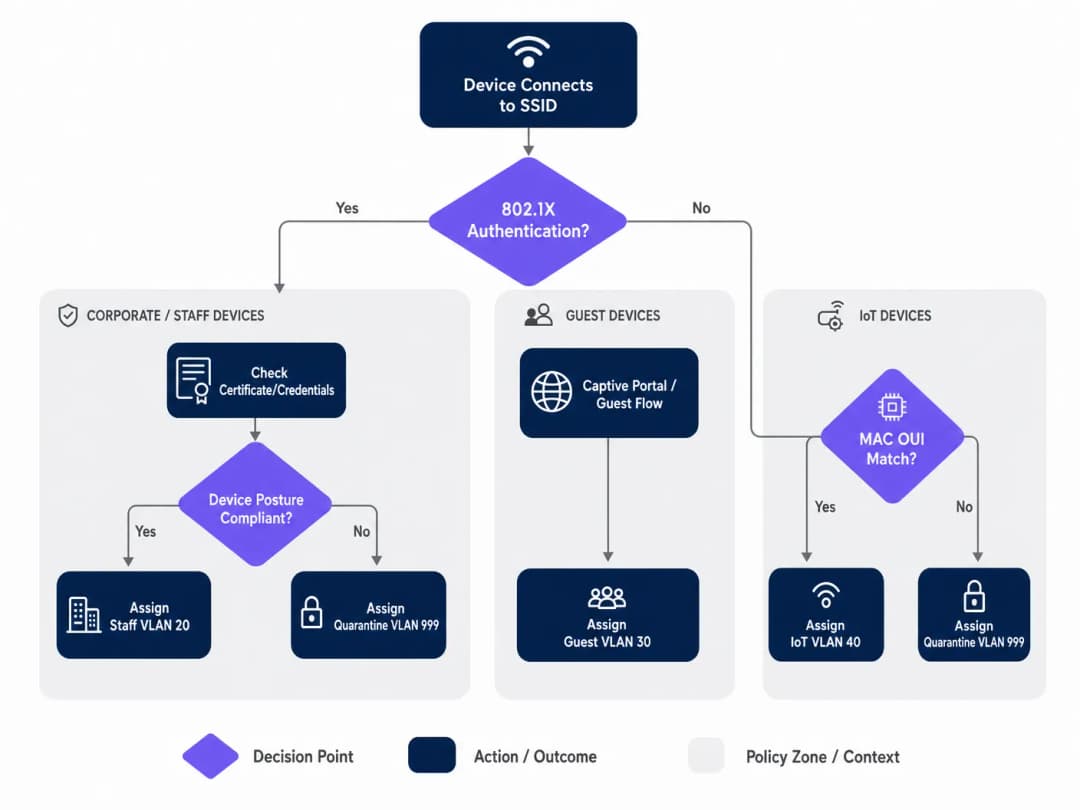
एंटरप्राइज़ नेटवर्क को आमतौर पर ऑथेंटिकेशन के लिए मल्टी-टियर दृष्टिकोण की आवश्यकता होती है, क्योंकि किसी भी दिए गए स्थान में डिवाइस की आबादी विषम (हेटेरोजेनियस) होती है। तीन प्राथमिक मैकेनिज्म हैं:
IEEE 802.1X (EAP-TLS या PEAP) कॉर्पोरेट और स्टाफ डिवाइस के लिए गोल्ड स्टैंडर्ड है। ऑथेंटिकेशन डिजिटल सर्टिफिकेट (EAP-TLS) या सुरक्षित क्रेडेंशियल्स (PEAP-MSCHAPv2) पर आधारित है, जो मजबूत एन्क्रिप्शन और पहचान सत्यापन प्रदान करता है। संगठन के MDM प्लेटफ़ॉर्म द्वारा प्रबंधित किसी भी डिवाइस के लिए यह अनुशंसित दृष्टिकोण है।
MAC ऑथेंटिकेशन बायपास (MAB) हेडलेस डिवाइस — IP कैमरे, POS टर्मिनल, बिल्डिंग मैनेजमेंट सेंसर और स्मार्ट टीवी — के लिए आवश्यक है जो 802.1X सप्लिकेंट नहीं चला सकते हैं। MAC एड्रेस का उपयोग आइडेंटिफायर के रूप में किया जाता है। हालांकि यह सर्टिफिकेट-आधारित ऑथेंटिकेशन (MAC एड्रेस को स्पूफ किया जा सकता है) की तुलना में कम सुरक्षित है, सख्त VLAN ACLs के साथ संयुक्त MAB आइसोलेटेड IoT सेगमेंट के लिए एक स्वीकार्य सुरक्षा स्थिति प्रदान करता है। इस विषय के व्यापक विवरण के लिए, Managing IoT Device Security with NAC and MPSK पर हमारी गाइड देखें।
Captive Portal ऑथेंटिकेशन का उपयोग गेस्ट एक्सेस के लिए किया जाता है। डिवाइस को तब तक प्रतिबंधित प्री-ऑथेंटिकेशन स्थिति में रखा जाता है जब तक कि उपयोगकर्ता लॉगिन फ्लो — आमतौर पर सोशल लॉगिन, ईमेल पंजीकरण, या एक साधारण क्लिक-थ्रू — पूरा नहीं कर लेता, जिसे Purple जैसे प्लेटफ़ॉर्म द्वारा होस्ट किया जाता है। यह डिवाइस को एक आइसोलेटेड गेस्ट VLAN में स्टीयर करते हुए फर्स्ट-पार्टी डेटा कैप्चर करता है।
अपने विशिष्ट सेटअप को लेकर कोई सवाल हैं?
हमारी टीम 80,000 से अधिक वेन्यू में वेन्यू ऑपरेटरों, IT मैनेजरों और नेटवर्क इंजीनियरों के साथ काम करती है। 20 मिनट का कॉल बुक करें और हम आपको दिखाएंगे कि आपके जैसे अन्य लोगों ने इसे कैसे हल किया।
इम्प्लीमेंटेशन गाइड
चरण 1: अपने VLAN आर्किटेक्चर की योजना बनाएं
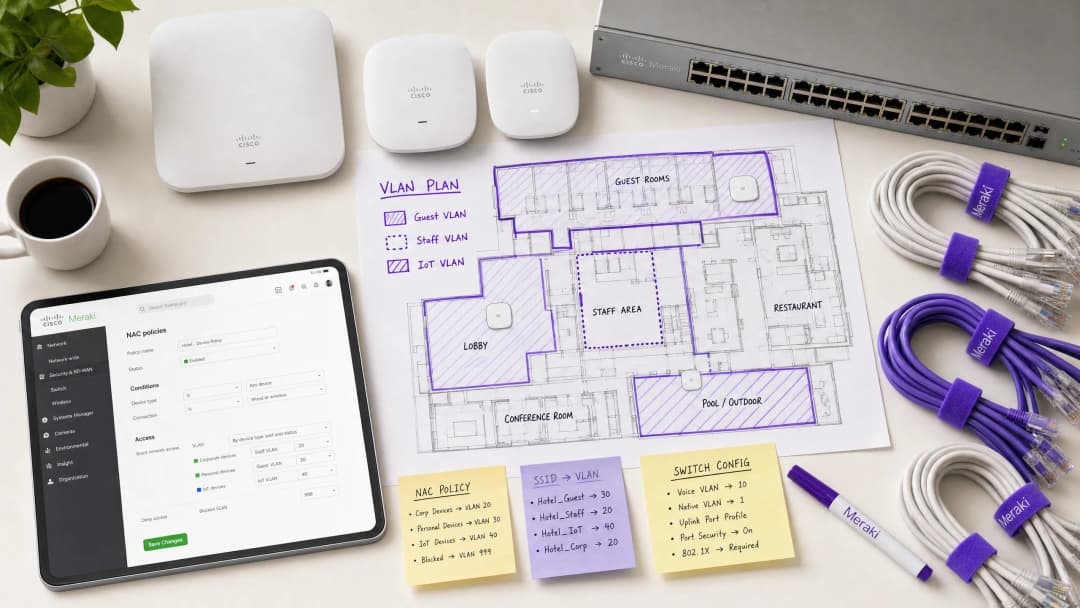
Meraki डैशबोर्ड को छूने से पहले, अपनी VLAN सेगमेंटेशन रणनीति को परिभाषित करें। एक विशिष्ट एंटरप्राइज़ वेन्यू डिप्लॉयमेंट निम्नलिखित संरचना का उपयोग करता है:
| VLAN ID | नाम | उद्देश्य | ऑथेंटिकेशन विधि |
|---|---|---|---|
| 10 | मैनेजमेंट | नेटवर्क इंफ्रास्ट्रक्चर | स्टैटिक |
| 20 | स्टाफ | कॉर्पोरेट डिवाइस, आंतरिक सिस्टम | 802.1X (EAP-TLS) |
| 30 | गेस्ट | विज़िटर इंटरनेट एक्सेस | Captive Portal (Purple) |
| 40 | IoT | कैमरे, सेंसर, स्मार्ट डिवाइस | MAB |
| 50 | POS | पेमेंट टर्मिनल (PCI स्कोप) | 802.1X (सर्टिफिकेट) |
| 999 | क्वारंटाइन | विफल ऑथेंटिकेशन, अज्ञात डिवाइस | कोई नहीं |
चरण 2: स्विच इंफ्रास्ट्रक्चर को कॉन्फ़िगर करें
वायरलेस सेटिंग्स को कॉन्फ़िगर करने से पहले, वायर्ड इंफ्रास्ट्रक्चर तैयार किया जाना चाहिए। Meraki APs से जुड़ने वाले स्विचपोर्ट्स को ट्रंक पोर्ट्स के रूप में कॉन्फ़िगर किया जाना चाहिए, जिससे उन सभी VLANs को अनुमति मिल सके जिन्हें AP डायनामिक रूप से असाइन कर सकता है। विफल डिप्लॉयमेंट में यह सबसे आम चूक है।
Meraki डैशबोर्ड में, Switch > Monitor > Switch ports पर नेविगेट करें, अपने APs से जुड़े पोर्ट्स का चयन करें, Type को Trunk पर सेट करें, Native VLAN (आमतौर पर आपका मैनेजमेंट VLAN) कॉन्फ़िगर करें, और Allowed VLANs फ़ील्ड में, सभी संभावित क्लाइंट VLANs को स्पष्ट रूप से निर्दिष्ट करें (उदा., 20,30,40,50,999)।
चरण 3: 802.1X के लिए Meraki SSID कॉन्फ़िगर करें
Wireless > Configure > Access control पर नेविगेट करें और लक्ष्य SSID का चयन करें। Network access के तहत, Enterprise with 802.1X चुनें। RADIUS servers सेक्शन तक नीचे स्क्रॉल करें और अपने NAC सर्वर का विवरण जोड़ें: IP एड्रेस, पोर्ट (ऑथेंटिकेशन के लिए डिफ़ॉल्ट 1812, अकाउंटिंग के लिए 1813), और शेयर्ड सीक्रेट। रिडंडेंसी के लिए, एक सेकेंडरी RADIUS सर्वर जोड़ें।
चरण 4: VLAN टैगिंग के लिए RADIUS ओवरराइड सक्षम करें
यह वह महत्वपूर्ण चरण है जो Meraki AP को NAC सर्वर से VLAN असाइनमेंट स्वीकार करने में सक्षम बनाता है। उसी Access control पेज पर, Addressing and traffic सेक्शन तक स्क्रॉल करें। Client IP assignment को Bridge mode पर सेट करें — यह सुनिश्चित करता है कि क्लाइंट्स को उनके असाइन किए गए VLAN पर स्थानीय DHCP सर्वर से IP एड्रेस प्राप्त हों, न कि AP के NAT से। VLAN tagging के तहत, Use VLAN tag from RADIUS चुनें।
चरण 5: Purple के साथ गेस्ट एक्सेस कॉन्फ़िगर करें
गेस्ट नेटवर्क के लिए, ओपन एसोसिएशन और Captive Portal इंटीग्रेशन के साथ कॉन्फ़िगर किया गया एक अलग SSID बनाएं। Network access को Open (no encryption) पर सेट करें और अपने Purple पोर्टल URL को पॉइंट करने के लिए Splash page कॉन्फ़िगर करें। सभी प्री-ऑथेंटिकेटेड ट्रैफ़िक को एक समर्पित, आइसोलेटेड गेस्ट VLAN (उदा., VLAN 30) में असाइन करने के लिए VLAN tagging सेट करें और गेस्ट डिवाइस के बीच लेटरल मूवमेंट को रोकने के लिए Client isolation सक्षम करें। Purple का WiFi Analytics प्लेटफ़ॉर्म ऑथेंटिकेशन फ्लो और डेटा कैप्चर को संभालेगा।
सर्वोत्तम प्रथाएं (Best Practices)
क्रिटिकल ऑथेंटिकेशन VLANs के साथ फेल-क्लोज़्ड पोस्चर लागू करें। यदि RADIUS सर्वर अनरीचेबल हो जाता है, तो फेल ओपन न करें और पूर्ण नेटवर्क एक्सेस न दें। एक क्रिटिकल ऑथेंटिकेशन VLAN कॉन्फ़िगर करें जो बुनियादी इंटरनेट कनेक्टिविटी प्रदान करता है लेकिन NAC सर्वर के रीस्टोर होने तक सभी आंतरिक संसाधनों तक पहुंच को ब्लॉक करता है। यह विशेष रूप से रिटेल वातावरण के लिए महत्वपूर्ण है जहां POS टर्मिनलों को RADIUS आउटेज के दौरान भी भुगतान प्रोसेस करना जारी रखना चाहिए।
निर्बाध रोमिंग के लिए Fast BSS Transition (802.11r) सक्षम करें। डायनामिक VLAN असाइनमेंट रोमिंग के दौरान लेटेंसी ला सकता है क्योंकि डिवाइस को प्रत्येक AP पर फिर से ऑथेंटिकेट करना होता है। 802.11r को सक्षम करने से पूरे स्थान पर वॉयस और वीडियो एप्लिकेशन के लिए निर्बाध हैंडऑफ़ सुनिश्चित होता है। यह हॉस्पिटैलिटी वातावरण के लिए गैर-परक्राम्य (non-negotiable) है जहां मेहमान संपत्ति में लगातार घूमते रहते हैं। Wi Fi Frequencies: A Guide to Wi-Fi Frequencies in 2026 को समझने से डेंस डिप्लॉयमेंट के लिए चैनल प्लानिंग को ऑप्टिमाइज़ करने में भी मदद मिल सकती है।
IoT ट्रैफ़िक को आक्रामक रूप से सेगमेंट करें। कभी भी IoT डिवाइस को कॉर्पोरेट या गेस्ट ट्रैफ़िक के साथ न मिलाएं। इन डिवाइस की पहचान करने के लिए MAB का उपयोग करें और उन्हें सख्त लेयर 3 फ़ायरवॉल नियमों के साथ समर्पित VLANs में स्टीयर करें जो केवल डिवाइस संचालन के लिए आवश्यक विशिष्ट पोर्ट्स और डेस्टिनेशन की अनुमति देते हैं। एक समझौता किया गया IP कैमरा कभी भी आपके POS नेटवर्क या कॉर्पोरेट फ़ाइल सर्वर तक पहुंचने में सक्षम नहीं होना चाहिए।
कॉर्पोरेट SSIDs पर WPA3 लागू करें। जहां डिवाइस कम्पैटिबिलिटी अनुमति देती है, WPA3-Enterprise का उपयोग करने के लिए कॉर्पोरेट SSIDs कॉन्फ़िगर करें। यह मजबूत एन्क्रिप्शन प्रदान करता है और WPA2 PMKID हमलों से जुड़ी कमजोरियों को समाप्त करता है。
समस्या निवारण और जोखिम न्यूनीकरण (Troubleshooting & Risk Mitigation)
सामान्य विफलता मोड (Common Failure Modes)
क्लाइंट्स IP एड्रेस प्राप्त करने में विफल रहते हैं। यह लगभग हमेशा एक स्विचपोर्ट कॉन्फ़िगरेशन समस्या है। सत्यापित करें कि AP से जुड़ा स्विचपोर्ट ट्रंक के रूप में कॉन्फ़िगर किया गया है और डायनामिक रूप से असाइन किए गए VLAN को उस ट्रंक पर अनुमति है। इसके अलावा, सत्यापित करें कि DHCP सर्वर में उस VLAN के लिए एक सक्रिय स्कोप है और DHCP रिले एजेंट (यदि लागू हो) सही ढंग से कॉन्फ़िगर किया गया है।
ऑथेंटिकेशन टाइमआउट। यदि 802.1X हैंडशेक के दौरान डिवाइस टाइम आउट हो रहे हैं, तो Meraki APs और RADIUS सर्वर के बीच नेटवर्क लेटेंसी की जांच करें। उच्च लेटेंसी के कारण EAP टाइमर समाप्त हो सकते हैं। यदि ऐसा हो रहा है तो Meraki डैशबोर्ड का Event Log 8021x_auth_timeout ईवेंट दिखाएगा।
गलत VLAN असाइनमेंट। RADIUS Access-Accept संदेश देखने के लिए Meraki डैशबोर्ड के Event Log का उपयोग करें। सत्यापित करें कि NAC सर्वर सही Tunnel-Private-Group-ID एट्रिब्यूट भेज रहा है। यदि यह गायब है या गलत है, तो समस्या NAC पॉलिसी कॉन्फ़िगरेशन में है, न कि Meraki AP में। अधिकांश NAC प्लेटफ़ॉर्म (Cisco ISE, ClearPass) विस्तृत RADIUS ऑथेंटिकेशन लॉग प्रदान करते हैं जो दिखाएंगे कि वास्तव में कौन से एट्रिब्यूट्स वापस किए गए थे।
MAC रैंडमाइज़ेशन MAB को तोड़ रहा है। आधुनिक iOS और Android डिवाइस डिफ़ॉल्ट रूप से अपने MAC एड्रेस को रैंडमाइज़ करते हैं। Purple द्वारा प्रबंधित गेस्ट नेटवर्क के लिए, इसे Captive Portal फ्लो के माध्यम से शालीनता से संभाला जाता है — पहचान उपयोगकर्ता के लॉगिन द्वारा स्थापित की जाती है, न कि MAC एड्रेस द्वारा। MAB का उपयोग करने वाले IoT डिवाइस के लिए, सुनिश्चित करें कि वास्तविक हार्डवेयर MAC एड्रेस एंडपॉइंट डेटाबेस में पंजीकृत है, क्योंकि ये डिवाइस रैंडमाइज़ नहीं करते हैं।
ROI और व्यावसायिक प्रभाव
NAC-संचालित VLAN स्टीयरिंग को लागू करने से कई आयामों में एंटरप्राइज़ स्थानों के लिए मापने योग्य व्यावसायिक मूल्य मिलता है:
| व्यावसायिक परिणाम | मैकेनिज्म | मापने योग्य प्रभाव |
|---|---|---|
| कम परिचालन ओवरहेड | प्रबंधित करने के लिए कम SSIDs | SSID गिनती में 60-70% की कमी |
| उन्नत सुरक्षा स्थिति | स्वचालित माइक्रो-सेगमेंटेशन | उल्लंघनों के लिए सीमित ब्लास्ट रेडियस |
| कंप्लायंस सक्षमता | पहचान-आधारित एक्सेस कंट्रोल | PCI DSS, GDPR, ISO 27001 अलाइनमेंट |
| गेस्ट डेटा कैप्चर | Purple Captive Portal इंटीग्रेशन | बड़े पैमाने पर फर्स्ट-पार्टी डेटा |
| नेटवर्क परफॉरमेंस | कम मैनेजमेंट फ्रेम ओवरहेड | हाई-डेंसिटी वाले क्षेत्रों में बेहतर थ्रूपुट |
Healthcare और Transport ऑपरेटरों के लिए, केवल कंप्लायंस का तर्क ही निवेश को सही ठहराता है। यह प्रदर्शित करने की क्षमता कि रोगी के रिकॉर्ड कड़ाई से आइसोलेटेड VLAN पर हैं, या कि टिकटिंग सिस्टम सार्वजनिक WiFi से अलग हैं, एक महत्वपूर्ण जोखिम न्यूनीकरण है जो आंतरिक ऑडिट और बाहरी नियामक आवश्यकताओं दोनों को संतुष्ट करता है।
हॉस्पिटैलिटी और रिटेल ऑपरेटरों के लिए, Purple के गेस्ट WiFi प्लेटफ़ॉर्म के साथ इंटीग्रेशन गेस्ट नेटवर्क को एक लागत केंद्र से राजस्व-उत्पन्न करने वाली संपत्ति में बदल देता है। प्रत्येक ऑथेंटिकेटेड गेस्ट सेशन एक डेटा पॉइंट बन जाता है, जो मार्केटिंग ऑटोमेशन, लॉयल्टी प्रोग्राम और वेन्यू एनालिटिक्स में फीड होता है — यह सब तब होता है जब अंतर्निहित NAC पॉलिसी यह सुनिश्चित करती है कि गेस्ट ट्रैफ़िक कभी भी आंतरिक सिस्टम को न छुए।
ब्रीफिंग सुनें
डिप्लॉयमेंट रणनीतियों और सामान्य नुकसानों में गहराई से जाने के लिए, हमारा 10 मिनट का तकनीकी ब्रीफिंग पॉडकास्ट सुनें:
मुख्य परिभाषाएं
नेटवर्क एक्सेस कंट्रोल (NAC)
एक सुरक्षा आर्किटेक्चर जो नेटवर्क संसाधनों तक पहुंचने की मांग करने वाले उपकरणों पर पॉलिसी लागू करता है, आमतौर पर एक्सेस देने और नेटवर्क सेगमेंट असाइन करने से पहले पहचान, डिवाइस पोस्चर और कंप्लायंस स्थिति का मूल्यांकन करता है।
IT टीमें केंद्रीय पॉलिसी इंजन के रूप में कार्य करने के लिए NAC प्लेटफ़ॉर्म (जैसे Cisco ISE या Aruba ClearPass) डिप्लॉय करती हैं, जो यह तय करता है कि कोई डिवाइस कौन या क्या है, और वह किस स्थिति में है, इसके आधार पर वह किस VLAN से संबंधित है।
VLAN स्टीयरिंग (डायनामिक VLAN असाइनमेंट)
सफल ऑथेंटिकेशन पर क्लाइंट डिवाइस को स्वचालित रूप से एक विशिष्ट वर्चुअल लोकल एरिया नेटवर्क (VLAN) असाइन करने की प्रक्रिया, चाहे वे किसी भी भौतिक पोर्ट या SSID से कनेक्ट हों।
गेस्ट, स्टाफ और IoT डिवाइस आबादी के बीच सख्त सुरक्षा सेगमेंटेशन बनाए रखते हुए ब्रॉडकास्ट किए गए SSIDs की संख्या को कम करने के लिए हाई-डेंसिटी वाले स्थानों के लिए आवश्यक है।
IEEE 802.1X
पोर्ट-आधारित नेटवर्क एक्सेस कंट्रोल के लिए एक IEEE मानक जो एक्सटेंसिबल ऑथेंटिकेशन प्रोटोकॉल (EAP) फ्रेमवर्क का उपयोग करके LAN या WLAN से जुड़ने के इच्छुक उपकरणों को एक ऑथेंटिकेशन मैकेनिज्म प्रदान करता है।
कॉर्पोरेट लैपटॉप और स्टाफ स्मार्टफोन को ऑथेंटिकेट करने के लिए गोल्ड स्टैंडर्ड, यह सुनिश्चित करता है कि केवल वैध क्रेडेंशियल्स या सर्टिफिकेट वाले सत्यापित उपयोगकर्ता ही आंतरिक संसाधनों तक पहुंच सकें।
MAC ऑथेंटिकेशन बायपास (MAB)
एक फ़ॉलबैक ऑथेंटिकेशन विधि जहां डिवाइस के MAC एड्रेस का उपयोग उसके पहचान क्रेडेंशियल के रूप में किया जाता है जब वह 802.1X का समर्थन नहीं कर सकता है। MAC एड्रेस को RADIUS सर्वर पर यूज़रनेम और पासवर्ड दोनों के रूप में भेजा जाता है।
उपयोगकर्ता के हस्तक्षेप की आवश्यकता के बिना एक सुरक्षित, सेगमेंटेड नेटवर्क पर हेडलेस IoT डिवाइस - प्रिंटर, कैमरे, सेंसर और POS टर्मिनल - को ऑनबोर्ड करने के लिए महत्वपूर्ण है।
RADIUS (रिमोट ऑथेंटिकेशन डायल-इन यूज़र सर्विस)
एक नेटवर्किंग प्रोटोकॉल जो नेटवर्क सेवा से जुड़ने वाले उपयोगकर्ताओं और उपकरणों के लिए केंद्रीकृत ऑथेंटिकेशन, ऑथराइज़ेशन और अकाउंटिंग (AAA) प्रबंधन प्रदान करता है।
NAC सर्वर के साथ संचार करने के लिए Meraki AP द्वारा उपयोग किया जाने वाला प्रोटोकॉल। AP Access-Request संदेश भेजता है; NAC सर्वर Access-Accept (VLAN एट्रिब्यूट्स सहित) या Access-Reject के साथ प्रतिक्रिया देता है।
Captive Portal
एक वेब पेज जिसे सार्वजनिक-एक्सेस नेटवर्क के उपयोगकर्ता को पूर्ण नेटवर्क एक्सेस दिए जाने से पहले देखने और इंटरैक्ट करने के लिए बाध्य किया जाता है। आमतौर पर शर्तों की स्वीकृति, लॉगिन या डेटा कैप्चर के लिए उपयोग किया जाता है।
हॉस्पिटैलिटी, रिटेल और सार्वजनिक-क्षेत्र के वातावरण में गेस्ट उपयोगकर्ताओं को ऑनबोर्ड करने की प्राथमिक विधि। Purple जैसे प्लेटफ़ॉर्म Captive Portal को होस्ट करते हैं, एनालिटिक्स डेटा कैप्चर करते हैं और सेवा की शर्तें लागू करते हैं।
क्लाइंट आइसोलेशन
एक वायरलेस सुरक्षा सुविधा जो एक ही SSID या VLAN से जुड़े उपकरणों को एक-दूसरे के साथ सीधे संचार करने से रोकती है, सभी ट्रैफ़िक को गेटवे के माध्यम से मजबूर करती है।
दुर्भावनापूर्ण तत्वों को अन्य मेहमानों के उपकरणों को स्कैन करने या उन पर हमला करने से रोकने के लिए गेस्ट VLANs के लिए एक अनिवार्य सेटिंग। किसी भी SSID पर सक्षम किया जाना चाहिए जहां अविश्वसनीय उपकरणों की उम्मीद है।
Fast BSS Transition (802.11r)
एक IEEE 802.11 संशोधन जो ऑथेंटिकेशन कुंजियों को प्री-कैश करके एक एक्सेस पॉइंट से दूसरे एक्सेस पॉइंट पर तेज़ और सुरक्षित हैंडऑफ़ सक्षम करता है, रोमिंग लेटेंसी को सैकड़ों मिलीसेकंड से घटाकर 50ms से कम कर देता है।
उन स्थानों पर 802.1X और डायनामिक VLAN असाइनमेंट का उपयोग करते समय सक्षम होना चाहिए जहां उपयोगकर्ता मोबाइल हैं, ताकि उपयोगकर्ताओं के एक्सेस पॉइंट्स के बीच जाने पर वॉयस कॉल या वीडियो स्ट्रीम को ड्रॉप होने से रोका जा सके।
EAP-TLS (एक्सटेंसिबल ऑथेंटिकेशन प्रोटोकॉल - ट्रांसपोर्ट लेयर सिक्योरिटी)
802.1X फ्रेमवर्क के भीतर एक पारस्परिक ऑथेंटिकेशन विधि जो क्लाइंट और ऑथेंटिकेशन सर्वर दोनों पर डिजिटल सर्टिफिकेट का उपयोग करती है, वायरलेस ऑथेंटिकेशन के लिए उच्चतम स्तर की सुरक्षा प्रदान करती है।
PCI DSS-स्कोप वाले उपकरणों और किसी भी वातावरण के लिए अनुशंसित ऑथेंटिकेशन विधि जहां क्रेडेंशियल चोरी एक महत्वपूर्ण जोखिम है। क्लाइंट सर्टिफिकेट जारी करने और प्रबंधित करने के लिए PKI इंफ्रास्ट्रक्चर की आवश्यकता होती है।
हल किए गए उदाहरण
एक 400 कमरों वाले होटल को एक सुरक्षित वायरलेस नेटवर्क डिप्लॉय करने की आवश्यकता है। उन्हें कर्मचारियों को आंतरिक बुकिंग सिस्टम तक सुरक्षित रूप से पहुंचने, मेहमानों को ब्रांडेड Captive Portal के माध्यम से इंटरनेट तक पहुंचने, और कमरों में स्मार्ट टीवी को स्थानीय मीडिया सर्वर से कनेक्ट करने की आवश्यकता है। वे हाई-डेंसिटी वाले क्षेत्रों में इष्टतम प्रदर्शन सुनिश्चित करने के लिए SSID ब्रॉडकास्ट ओवरहेड को कम करना चाहते हैं।
IT टीम को दो SSIDs डिप्लॉय करने चाहिए। SSID 1: 'Hotel_Secure' 802.1X के लिए कॉन्फ़िगर किया गया है। कर्मचारी होटल के PKI द्वारा जारी कॉर्पोरेट सर्टिफिकेट के साथ EAP-TLS का उपयोग करके ऑथेंटिकेट करते हैं। NAC सर्वर (Cisco ISE) कर्मचारियों की पहचान को पहचानता है और उन्हें VLAN 20 (स्टाफ) असाइन करने वाले RADIUS एट्रिब्यूट्स लौटाता है, जिसकी PMS और बुकिंग सिस्टम तक पूर्ण पहुंच है। स्मार्ट टीवी, जिनमें 802.1X क्षमताएं नहीं हैं, MAC ऑथेंटिकेशन बायपास (MAB) का उपयोग करके प्रोफ़ाइल किए जाते हैं। NAC सर्वर टीवी MAC OUI प्रीफिक्स को पहचानता है और उन्हें VLAN 40 (IoT) असाइन करता है, जिसमें ACLs केवल पोर्ट 8080 पर मीडिया सर्वर और इंटरनेट तक पहुंच की अनुमति देते हैं। SSID 2: 'Hotel_Guest' Purple Captive Portal के साथ ओपन के रूप में कॉन्फ़िगर किया गया है। मेहमान कनेक्ट होते हैं, Purple स्प्लैश पेज पर रीडायरेक्ट किए जाते हैं, और सफल सोशल लॉगिन या ईमेल पंजीकरण पर, क्लाइंट आइसोलेशन सक्षम के साथ VLAN 30 (गेस्ट) को असाइन किए जाते हैं। Purple प्लेटफ़ॉर्म होटल के CRM और मार्केटिंग ऑटोमेशन के लिए फर्स्ट-पार्टी डेटा कैप्चर करता है।
एक रिटेल चेन 50 स्थानों पर नए वायरलेस पॉइंट-ऑफ़-सेल (POS) टर्मिनल रोल आउट कर रही है। PCI DSS आवश्यकताओं का पालन करने के लिए इन उपकरणों को कड़ाई से सेगमेंट किया जाना चाहिए। हालांकि, IT टीम इस बात को लेकर चिंतित है कि यदि पीक ट्रेडिंग घंटों के दौरान केंद्रीय RADIUS सर्वर ऑफ़लाइन हो जाता है तो क्या होगा।
मजबूत पहचान सत्यापन सुनिश्चित करने के लिए POS टर्मिनलों को सर्टिफिकेट-आधारित ऑथेंटिकेशन (EAP-TLS) का उपयोग करते हुए 802.1X-सक्षम SSID से कनेक्ट होना चाहिए। NAC पॉलिसी इन उपकरणों को एक समर्पित, अत्यधिक प्रतिबंधित POS VLAN (VLAN 50) में लेयर 3 फ़ायरवॉल नियमों के साथ स्टीयर करेगी जो केवल आवश्यक पोर्ट्स पर पेमेंट गेटवे IPs को ट्रैफ़िक की अनुमति देते हैं। RADIUS सर्वर विफलता के जोखिम को कम करने के लिए, IT टीम को Meraki एक्सेस पॉइंट्स पर एक क्रिटिकल ऑथेंटिकेशन VLAN कॉन्फ़िगर करना चाहिए। यदि AP कॉन्फ़िगर किए गए टाइमआउट के भीतर RADIUS सर्वर तक नहीं पहुंच सकता है, तो यह स्वचालित रूप से POS टर्मिनलों को इस क्रिटिकल VLAN में डाल देगा। इस VLAN को सख्त ACLs के साथ कॉन्फ़िगर किया जाना चाहिए जो केवल आवश्यक पेमेंट प्रोसेसिंग गेटवे को ट्रैफ़िक की अनुमति देते हैं, यह सुनिश्चित करते हुए कि अन्य सभी नेटवर्क एक्सेस को ब्लॉक करते हुए लेनदेन जारी रह सके। प्रत्येक स्थान पर एक सेकेंडरी RADIUS सर्वर रिडंडेंसी की एक अतिरिक्त परत प्रदान करता है।
अभ्यास प्रश्न
Q1. एक अस्पताल के IT निदेशक रिपोर्ट करते हैं कि नए स्थापित वायरलेस IP कैमरे 'Med_Secure' SSID से कनेक्ट होने में विफल हो रहे हैं, जो 802.1X के लिए कॉन्फ़िगर किया गया है। कैमरे सर्टिफिकेट-आधारित ऑथेंटिकेशन का समर्थन नहीं करते हैं और उनमें कोई यूज़र इंटरफ़ेस नहीं है। इन उपकरणों को सुरक्षित रूप से ऑनबोर्ड करने के लिए नेटवर्क आर्किटेक्चर को कैसे समायोजित किया जाना चाहिए?
संकेत: विचार करें कि हेडलेस उपकरणों को कैसे प्रोफ़ाइल और ऑथेंटिकेट किया जाता है जब वे 802.1X सप्लिकेंट नहीं चला सकते हैं।
मॉडल उत्तर देखें
IT टीम को NAC सर्वर पर MAC ऑथेंटिकेशन बायपास (MAB) का उपयोग करना चाहिए। कैमरों के MAC एड्रेस को एंडपॉइंट डेटाबेस में जोड़ा जाना चाहिए और 'IoT_Camera' के रूप में प्रोफ़ाइल किया जाना चाहिए। जब कोई कैमरा कनेक्ट करने का प्रयास करता है, तो NAC सर्वर ऑथेंटिकेशन क्रेडेंशियल के रूप में MAC एड्रेस का उपयोग करेगा और कैमरे को एक आइसोलेटेड IoT VLAN में स्टीयर करने के लिए RADIUS एट्रिब्यूट्स लौटाएगा। इस VLAN पर सख्त लेयर 3 ACLs लागू किए जाने चाहिए, जो केवल कैमरा मैनेजमेंट सर्वर को ट्रैफ़िक की अनुमति देते हैं और अन्य सभी आंतरिक नेटवर्क एक्सेस को ब्लॉक करते हैं। अस्पताल को पंजीकृत MAC एड्रेस के लिए अपेक्षित प्रोफ़ाइल से डिवाइस प्रकार के मेल खाने को सत्यापित करने के लिए द्वितीयक प्रोफ़ाइलिंग विधि के रूप में DHCP फ़िंगरप्रिंटिंग का उपयोग करने पर भी विचार करना चाहिए।
Q2. एक रिटेल चेन में नेटवर्क ऑडिट के दौरान, यह पता चला है कि डायनामिक VLAN पर स्टाफ लैपटॉप 802.1X के माध्यम से सफलतापूर्वक ऑथेंटिकेट कर रहे हैं (Event Log सही VLAN ID के साथ Access-Accept संदेश दिखाता है) लेकिन IP एड्रेस प्राप्त नहीं कर रहे हैं। एक अलग SSID पर गेस्ट डिवाइस सामान्य रूप से काम कर रहे हैं। सबसे संभावित कॉन्फ़िगरेशन त्रुटि क्या है और आप इसे कैसे हल करेंगे?
संकेत: ऑथेंटिकेशन सफल हो रहा है - समस्या VLAN टैग लागू होने के बाद डेटा पथ में है।
मॉडल उत्तर देखें
सबसे संभावित समस्या यह है कि Meraki AP को कोर स्विच से जोड़ने वाला भौतिक स्विचपोर्ट सही ढंग से कॉन्फ़िगर नहीं किया गया है। जबकि AP क्लाइंट को सफलतापूर्वक ऑथेंटिकेट कर रहा है और ट्रैफ़िक को स्टाफ VLAN ID के साथ टैग कर रहा है, स्विचपोर्ट को एक्सेस पोर्ट (या एक ट्रंक पोर्ट जिसमें इसकी अनुमत सूची में स्टाफ VLAN गायब है) के रूप में कॉन्फ़िगर किए जाने की संभावना है। स्विचपोर्ट को ट्रंक के रूप में कॉन्फ़िगर किया जाना चाहिए, और डायनामिक रूप से असाइन किए गए स्टाफ VLAN को अनुमत VLANs में स्पष्ट रूप से सूचीबद्ध किया जाना चाहिए। IT टीम को Meraki डैशबोर्ड में Switch > Monitor > Switch ports पर नेविगेट करना चाहिए, AP से जुड़े पोर्ट का चयन करना चाहिए, यह सत्यापित करना चाहिए कि यह Trunk प्रकार पर सेट है, और पुष्टि करनी चाहिए कि स्टाफ VLAN ID Allowed VLANs फ़ील्ड में शामिल है।
Q3. एक स्टेडियम इवेंट्स के दौरान 50,000 प्रशंसकों को निर्बाध WiFi प्रदान करना चाहता है, जबकि पॉइंट-ऑफ़-सेल टर्मिनल और डिजिटल साइनेज को सुरक्षित रूप से कनेक्ट करना चाहता है। वर्तमान नेटवर्क टीम ट्रैफ़िक को अलग करने के लिए पांच अलग-अलग SSIDs ब्रॉडकास्ट करने का प्रस्ताव करती है। हाई-डेंसिटी वाले वातावरण के लिए यह एक खराब डिज़ाइन क्यों है, और अनुशंसित आर्किटेक्चर क्या है?
संकेत: हाई-डेंसिटी वाले वातावरण में वायरलेस एयरटाइम पर मैनेजमेंट फ्रेम के प्रभाव पर विचार करें।
मॉडल उत्तर देखें
पांच SSIDs ब्रॉडकास्ट करने से अत्यधिक मैनेजमेंट फ्रेम ओवरहेड बनता है - प्रत्येक SSID को हर एक्सेस पॉइंट द्वारा नियमित अंतराल पर अपने स्वयं के बीकन फ्रेम ब्रॉडकास्ट करने की आवश्यकता होती है। सैकड़ों APs वाले स्टेडियम जैसे हाई-डेंसिटी वाले वातावरण में, यह मैनेजमेंट फ्रेम ओवरहेड उपलब्ध एयरटाइम के एक महत्वपूर्ण हिस्से की खपत करता है, जो सीधे उपयोगकर्ता डेटा के लिए उपलब्ध थ्रूपुट को कम करता है। अनुशंसित दृष्टिकोण अधिकतम दो SSIDs ब्रॉडकास्ट करना है: 50,000 प्रशंसकों के लिए Purple Captive Portal के साथ एक ओपन SSID, उन्हें क्लाइंट आइसोलेशन के साथ गेस्ट VLAN में स्टीयर करना; और सभी कॉर्पोरेट उपकरणों के लिए एक 802.1X-सक्षम सुरक्षित SSID। NAC पॉलिसी तब अतिरिक्त SSIDs की आवश्यकता के बिना, उनकी पहचान के आधार पर POS टर्मिनलों को PCI-कंप्लायंट VLAN में और डिजिटल साइनेज को IoT VLAN में डायनामिक रूप से स्टीयर करेगी।
इस श्रृंखला में आगे पढ़ें
कर्मचारी के जाने पर WiFi एक्सेस को कैसे रिवोक करें
यह गाइड IT और वेन्यू ऑपरेशन्स टीमों को दिखाती है कि बाकी कर्मचारियों को बाधित किए बिना किसी कर्मचारी के जाने पर उसकी Staff WiFi एक्सेस को कैसे हटाया जाए। यह सर्टिफिकेट-आधारित 802.1X, आइडेंटिटी-विशिष्ट iPSK और SCIM-चालित डीप्रोविजनिंग की तुलना करता है, और फिर उसी दिन का रनबुक, परीक्षण विधि और ऑडिट साक्ष्य मॉडल प्रदान करता है।
क्लिनिकल वातावरण में WiFi 7 परिनियोजन की योजना बनाना: IoMT डिवाइस, हस्तक्षेप, और HIPAA
यह व्यापक गाइड क्लिनिकल वातावरण में WiFi 7 परिनियोजन की योजना बनाने की पड़ताल करती है, जिसमें 6 GHz बैंड रणनीति, लीगेसी IoMT डिवाइस अनुकूलता, IEC 60601-1-2 RF हस्तक्षेप दायित्वों और HIPAA-अनुरूप नेटवर्क सेगमेंटेशन पर ध्यान केंद्रित किया गया है। यह हेल्थकेयर IT लीडर्स को Purple के क्लाउड RADIUS प्लेटफॉर्म का उपयोग करके मिश्रित डिवाइस बेड़े को सुरक्षित करने के लिए व्यावहारिक आर्किटेक्चर सलाह प्रदान करता है।
स्टाफ और गेस्ट WiFi नेटवर्क को सुरक्षित रूप से कैसे खंडित करें: एंटरप्राइज LANs के लिए सर्वोत्तम अभ्यास
यह गाइड IT प्रबंधकों और नेटवर्क आर्किटेक्ट्स को स्टाफ और गेस्ट WiFi ट्रैफ़िक को ठीक से खंडित करके एंटरप्राइज LANs को सुरक्षित करने के लिए एक विक्रेता-तटस्थ, तकनीकी खाका प्रदान करती है। इसमें 802.1X प्रमाणीकरण, क्लाउड RADIUS, VLAN आइसोलेशन और साझा पासफ़्रेज़ को समाप्त करने और कॉर्पोरेट संपत्तियों की सुरक्षा के लिए आवश्यक क्रेडेंशियल लाइफसाइकल मैनेजमेंट शामिल है।
अपने विशिष्ट सेटअप को लेकर कोई सवाल हैं?
हमारी टीम 80,000 से अधिक वेन्यू में वेन्यू ऑपरेटरों, IT मैनेजरों और नेटवर्क इंजीनियरों के साथ काम करती है। 20 मिनट का कॉल बुक करें और हम आपको दिखाएंगे कि आपके जैसे अन्य लोगों ने इसे कैसे हल किया।