
How to Configure NAC Policies for VLAN Steering in Cisco Meraki
This authoritative guide provides IT leaders, network architects, and venue operations directors with a practical, step-by-step framework for configuring NAC policies and VLAN steering in Cisco Meraki environments. It covers 802.1X implementation, IoT device isolation via MAC Authentication Bypass, and seamless integration with Purple's guest WiFi analytics platform to ensure secure, compliant, and high-performance network segmentation across hospitality, retail, and public-sector deployments.
Video overview
Listen to this guide
View podcast transcript
Part of our core series: Enterprise WiFi Security Guide →
Executive Summary
Enterprise venues - from high-density stadiums to sprawling hospitality complexes - cannot afford to run on a flat network. Broadcasting multiple SSIDs to segment traffic degrades RF performance, wastes valuable airtime, and creates an administrative burden that scales poorly across multi-site deployments. The modern standard is dynamic segmentation: broadcasting a single, secure SSID and relying on Network Access Control (NAC) to automatically profile, authenticate, and steer devices into the correct VLAN.
This guide provides senior IT architects and operations directors with a practical blueprint for configuring NAC policies for VLAN steering in Cisco Meraki. We bypass academic theory to focus on deployment realities: enforcing IEEE 802.1X for corporate devices, utilizing MAC Authentication Bypass (MAB) for headless IoT systems, and seamlessly integrating with Guest WiFi platforms like Purple to ensure secure, compliant access in Retail, Hospitality, and other enterprise environments. By mastering these configurations, organizations can mitigate security risks, ensure PCI-DSS compliance, and optimize network throughput - all from a single, centrally managed SSID.
Technical Deep-Dive
The Architecture of Dynamic VLAN Steering
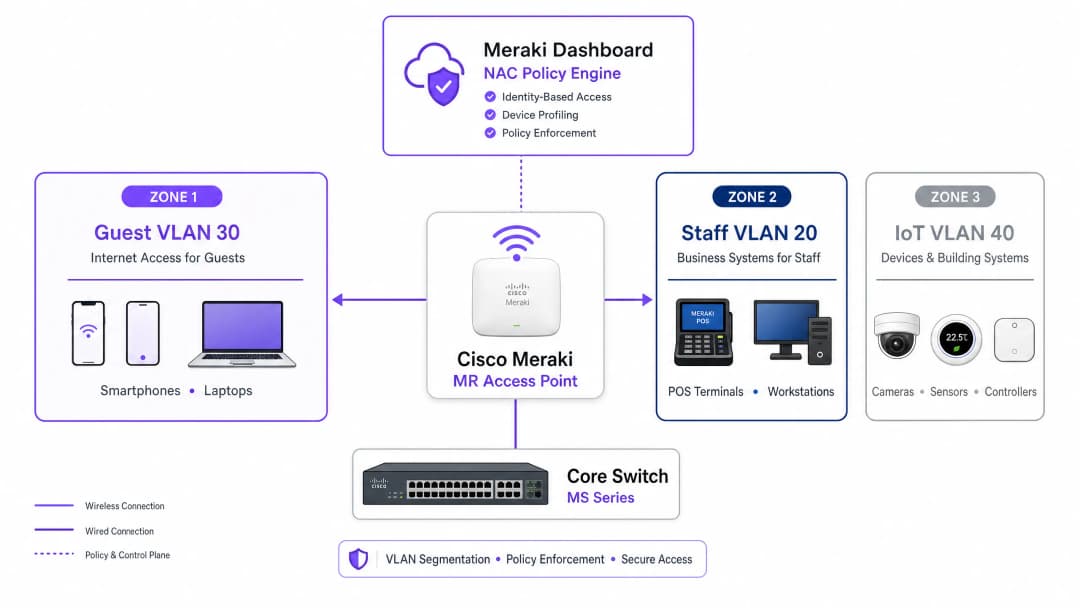
VLAN steering in a Meraki environment relies on the interaction between three core components: the Meraki Access Point (acting as the authenticator), the client device (the supplicant), and the NAC/RADIUS server (the authentication server). This three-party model is defined by the IEEE 802.1X standard and forms the backbone of any enterprise-grade access control deployment.
When a device associates with the network, the AP intercepts the traffic and forwards an Access-Request to the RADIUS server. Upon successful authentication, the RADIUS server responds with an Access-Accept message. Crucially, for VLAN steering to occur, this message must contain specific IETF standard RADIUS attributes that instruct the AP which VLAN to apply:
| RADIUS Attribute | ID | Value | Purpose |
|---|---|---|---|
| Tunnel-Type | 64 | 13 (VLAN) | Specifies the tunneling protocol |
| Tunnel-Medium-Type | 65 | 6 (802) | Specifies the transport medium |
| Tunnel-Private-Group-ID | 81 | e.g., 20 |
Specifies the target VLAN ID |
When the Meraki AP receives these attributes, it dynamically tags the client's traffic with the designated VLAN ID before forwarding it over the switchport. This process is transparent to the end user and completes within milliseconds of association.
Authentication Mechanisms
Enterprise networks typically require a multi-tier approach to authentication, as the device population in any given location is heterogeneous. There are three primary mechanisms:
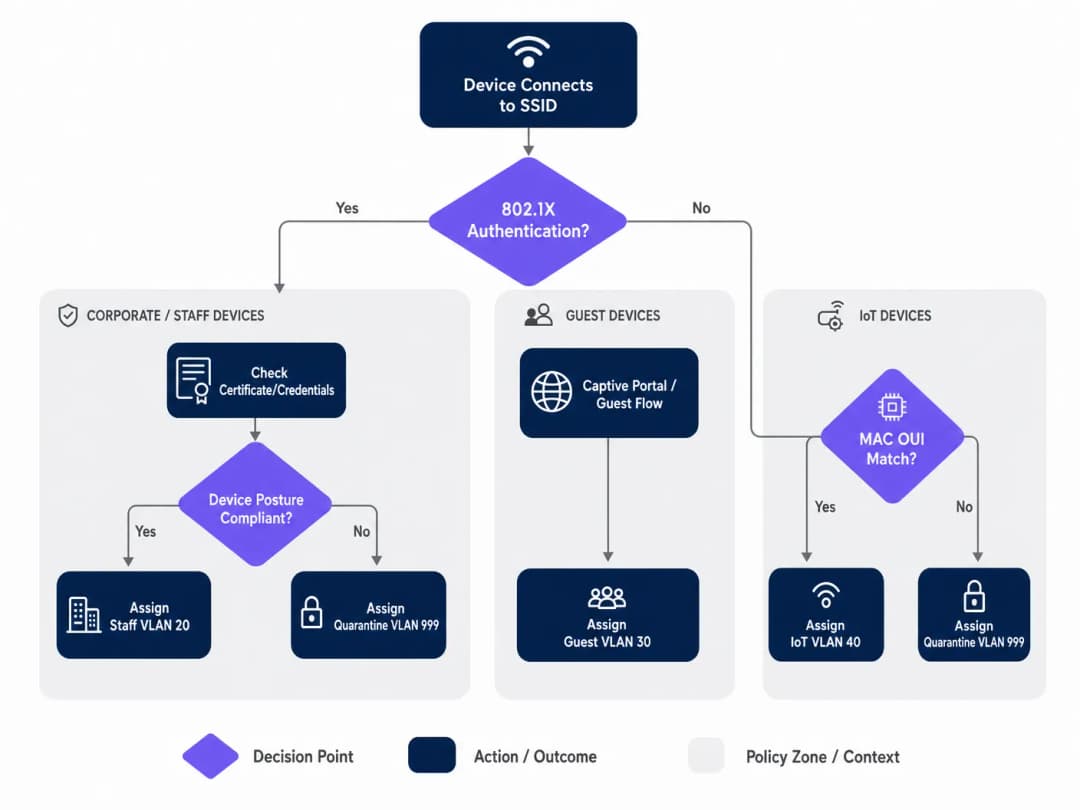
IEEE 802.1X (EAP-TLS or PEAP) is the gold standard for corporate and staff devices. Authentication is based on digital certificates (EAP-TLS) or secure credentials (PEAP-MSCHAPv2), providing strong encryption and identity verification. This is the recommended approach for any device managed by the organization's MDM platform.
MAC Authentication Bypass (MAB) is required for headless devices - IP cameras, POS terminals, building management sensors, and smart TVs - that cannot run an 802.1X supplicant. The MAC address is used as the identifier. While this is less secure than certificate-based authentication (as MAC addresses can be spoofed), MAB combined with strict VLAN ACLs provides an acceptable security posture for isolated IoT segments. For a comprehensive overview of this topic, see our guide on Managing IoT Device Security with NAC and MPSK.
Captive Portal Authentication is used for guest access. The device is held in a restricted pre-authentication state until the user completes the login flow - typically social login, email registration, or a simple click-through - hosted by a platform like Purple. This captures first-party data while steering the device into an isolated Guest VLAN.
Implementation Guide
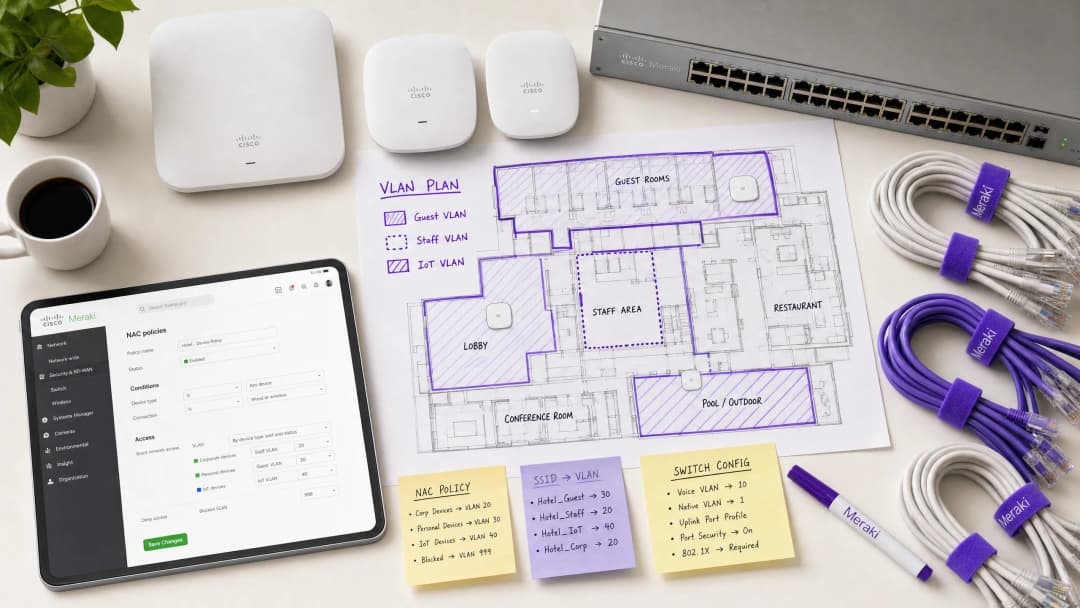
Step 1: Plan Your VLAN Architecture
Before touching the Meraki dashboard, define your VLAN segmentation strategy. A typical enterprise venue deployment uses the following structure:
| VLAN ID | Name | Purpose | Authentication Method |
|---|---|---|---|
| 10 | Management | Network Infrastructure | Static |
| 20 | Staff | Corporate Devices, Internal Systems | 802.1X (EAP-TLS) |
| 30 | Guest | Visitor Internet Access | Captive Portal (Purple) |
| 40 | IoT | Cameras, Sensors, Smart Devices | MAB |
| 50 | POS | Payment Terminals (PCI Scope) | 802.1X (Certificate) |
| 999 | Quarantine | Failed Authentication, Unknown Devices | None |
Step 2: Configure the Switch Infrastructure
Before configuring wireless settings, the wired infrastructure must be prepared. Switch ports connecting to Meraki APs should be configured as trunk ports, allowing all VLANs that the AP may dynamically assign. This is the most common omission in failed deployments.
In the Meraki dashboard, navigate to Switch > Monitor > Switch ports, select the ports connected to your APs, set Type to Trunk, configure the Native VLAN (typically your management VLAN), and in the Allowed VLANs field, explicitly specify all potential client VLANs (e.g., 20,30,40,50,999).
Step 3: Configure Meraki SSID for 802.1X
Navigate to Wireless > Configure > Access control and select the target SSID. Under Network access, choose Enterprise with 802.1X. Scroll down to the RADIUS servers section and add your NAC server details: IP address, port (default 1812 for authentication, 1813 for accounting), and shared secret. For redundancy, add a secondary RADIUS server.
Step 4: Enable RADIUS Override for VLAN Tagging
This is the critical step that enables the Meraki AP to accept VLAN assignments from the NAC server. On the same Access control page, scroll to the Addressing and traffic section. Set Client IP assignment to Bridge mode - this ensures clients receive IP addresses from the local DHCP server on their assigned VLAN, not from the AP's NAT. Under VLAN tagging, select Use VLAN tag from RADIUS.
Step 5: Configure Guest Access with Purple
For the guest network, create a separate SSID configured with open association and Captive Portal integration. Set Network access to Open (no encryption) and configure the Splash page to point to your Purple portal URL. Set VLAN tagging to assign all pre-authenticated traffic to a dedicated, isolated guest VLAN (e.g., VLAN 30) and enable Client isolation to prevent lateral movement between guest devices. Purple's WiFi Analytics platform will handle the authentication flow and data capture.
Got questions about your specific setup?
Our team works with venue operators, IT managers, and network engineers across 80,000 venues. Book a 20-minute call and we will show you how others like you solved it.
Best Practices
Implement a fail-closed posture with critical authentication VLANs. If the RADIUS server becomes unreachable, do not fail open and grant full network access. Configure a critical authentication VLAN that provides basic internet connectivity but blocks access to all internal resources until the NAC server is restored. This is particularly vital for retail environments where POS terminals must continue processing payments even during a RADIUS outage.
Enable Fast BSS Transition (802.11r) for seamless roaming. Dynamic VLAN assignment can introduce latency during roaming because the device has to re-authenticate at each AP. Enabling 802.11r ensures seamless handoffs for voice and video applications across the entire location. This is non-negotiable for hospitality environments where guests are constantly moving around the property. Understanding WiFi Frequencies: A Guide to WiFi Frequencies in 2026 can also help optimize channel planning for dense deployments.
Segment IoT traffic aggressively. Never mix IoT devices with corporate or guest traffic. Use MAB to identify these devices and steer them into dedicated VLANs with strict Layer 3 firewall rules that only allow specific ports and destinations required for device operation. A compromised IP camera should never be able to access your POS network or corporate file servers.
Enforce WPA3 on corporate SSIDs. Where device compatibility permits, configure corporate SSIDs to use WPA3-Enterprise. This provides stronger encryption and eliminates vulnerabilities associated with WPA2 PMKID attacks.
Troubleshooting & Risk Mitigation
Common Failure Modes
Clients fail to obtain an IP address. This is almost always a switchport configuration issue. Verify that the switchport connected to the AP is configured as a trunk and that the dynamically assigned VLAN is allowed on that trunk. Also, verify that the DHCP server has an active scope for that VLAN and that the DHCP relay agent (if applicable) is correctly configured.
Authentication timeouts. If devices are timing out during the 802.1X handshake, check the network latency between the Meraki APs and the RADIUS server. High latency can cause EAP timers to expire. The Meraki dashboard's Event Log will show an 8021x_auth_timeout event if this is occurring.
Incorrect VLAN assignment. Use the Meraki dashboard's Event Log to view the RADIUS Access-Accept message. Verify that the NAC server is sending the correct Tunnel-Private-Group-ID attribute. If this is missing or incorrect, the issue lies in the NAC policy configuration, not the Meraki AP. Most NAC platforms (Cisco ISE, ClearPass) provide detailed RADIUS authentication logs that will show exactly which attributes were returned.
MAC randomization breaking MAB. Modern iOS and Android devices randomize their MAC addresses by default. For guest networks managed by Purple, this is handled gracefully through the Captive Portal flow - identity is established by the user's login, not the MAC address. For IoT devices using MAB, ensure the real hardware MAC address is registered in the endpoint database, as these devices do not randomize.
ROI and Business Impact
Implementing NAC-driven VLAN steering delivers measurable business value for enterprise venues across multiple dimensions:
| Business Outcome | Mechanism | Measurable Impact |
|---|---|---|
| Reduced Operational Overhead | Fewer SSIDs to manage | 60-70% reduction in SSID count |
| Enhanced Security Posture | Automated micro-segmentation | Limited blast radius for breaches |
| Compliance Enablement | Identity-based access control | PCI DSS, CCPA/CPRA, ISO 27001 alignment |
| Guest Data Capture | Purple Captive Portal integration | First-party data at scale |
| Network Performance | Reduced management frame overhead | Better throughput in high-density areas |
For hospitality and retail operators, integration with Purple's guest WiFi platform transforms the guest network from a cost center into a revenue-generating asset. Every authenticated guest session becomes a data point, feeding into marketing automation, loyalty programs, and venue analytics - all while the underlying NAC policy ensures that guest traffic never touches internal systems.
Listen to the Briefing
To dive deeper into deployment strategies and common pitfalls, listen to our 10-minute technical briefing podcast:
```of This page displays an overlay, wait! If you cannot view this overlay correctly, please click here to resolve it manually. Close [X]
Why are some of the items in my order missing?
Sometimes items in an order are shipped from different locations, and may arrive separately. Usually, the other items will arrive very soon. However, if you would like to contact us regarding a missing item, we’ll be happy to look into this for you. Select 'Contact Us' below. If you've ordered more than one item, it is possible they have been shipped separately. Please check your delivery note as it will list which items have been sent in each parcel. If this is the case, you'll also receive separate tracking links so you can track the status of each parcel. How do I contact Customer Services? The quickest way to contact us is via Live Chat, which is available 24 hours a day, 7 days a week. You can start a Live Chat by clicking the button on the bottom right-hand side of your screen. Alternatively, you can use one of our other contact options by clicking here. Please have your order number, email address and delivery postcode to hand. Related Articles Can I change or cancel my order? What do I do if my order is damaged? How do I return an item? Can I change my delivery address? What if I'm not in when my order is delivered? How do I track my order? How long will my delivery take? How much does delivery cost? Do you deliver to my area? Do you deliver internationally? Back to top ^ Close [X] 148,00€ 118,40€ (vat excl.) 143,26€ (vat incl.)-20% off
1 2 3 4 5 6 7 8 9 10
Adding to basket...
- High output active pickup (alnico V)
- Solderless connectors for quick replacement
- Fits most models
- Designed for acoustic guitar
Key Definitions
Network Access Control (NAC)
A security architecture that enforces policy on devices seeking to access network resources, typically evaluating identity, device posture, and compliance status before granting access and assigning a network segment.
IT teams deploy NAC platforms (such as Cisco ISE or Aruba ClearPass) to act as the central policy engine, deciding which VLAN a device belongs in based on who or what it is, and what state it is in.
VLAN Steering (Dynamic VLAN Assignment)
The process of automatically assigning a client device to a specific Virtual Local Area Network (VLAN) upon successful authentication, regardless of which physical port or SSID they connect to.
Essential for high-density venues to reduce the number of broadcasted SSIDs while maintaining strict security segmentation between guest, staff, and IoT device populations.
IEEE 802.1X
An IEEE standard for port-based network access control that provides an authentication mechanism to devices wishing to attach to a LAN or WLAN, using the Extensible Authentication Protocol (EAP) framework.
The gold standard for authenticating corporate laptops and staff smartphones, ensuring only verified users with valid credentials or certificates can access internal resources.
MAC Authentication Bypass (MAB)
A fallback authentication method where a device's MAC address is used as its identity credential when it cannot support 802.1X. The MAC address is sent to the RADIUS server as both the username and password.
Crucial for onboarding headless IoT devices - printers, cameras, sensors, and POS terminals - onto a secure, segmented network without requiring user intervention.
RADIUS (Remote Authentication Dial-In User Service)
A networking protocol that provides centralized Authentication, Authorization, and Accounting (AAA) management for users and devices connecting to a network service.
The protocol used by the Meraki AP to communicate with the NAC server. The AP sends Access-Request messages; the NAC server responds with Access-Accept (including VLAN attributes) or Access-Reject.
Captive Portal
A web page that a user of a public-access network is obliged to view and interact with before full network access is granted. Typically used for terms acceptance, login, or data capture.
The primary method for onboarding guest users in hospitality, retail, and public-sector environments. Platforms like Purple host the Captive Portal, capturing analytics data and enforcing terms of service.
Client Isolation
A wireless security feature that prevents devices connected to the same SSID or VLAN from communicating directly with each other, forcing all traffic through the gateway.
A mandatory setting for Guest VLANs to prevent malicious actors from scanning or attacking other guests' devices. Should be enabled on any SSID where untrusted devices are expected.
Fast BSS Transition (802.11r)
An IEEE 802.11 amendment that enables fast and secure handovers from one access point to another by pre-caching authentication keys, reducing roaming latency from hundreds of milliseconds to under 50ms.
Must be enabled when using 802.1X and dynamic VLAN assignment in venues where users are mobile, to prevent voice calls or video streams from dropping as users move between access points.
EAP-TLS (Extensible Authentication Protocol - Transport Layer Security)
A mutual authentication method within the 802.1X framework that uses digital certificates on both the client and the authentication server, providing the highest level of security for wireless authentication.
The recommended authentication method for PCI DSS-scoped devices and any environment where credential theft is a significant risk. Requires a PKI infrastructure to issue and manage client certificates.
Worked Examples
A 400-room hotel needs to deploy a secure wireless network. They require staff to access internal booking systems securely, guests to access the internet via a branded captive portal, and smart TVs in the rooms to connect to a local media server. They want to minimize SSID broadcast overhead to ensure optimal performance in high-density areas.
The IT team should deploy two SSIDs. SSID 1: 'Hotel_Secure' configured for 802.1X. Staff authenticate using EAP-TLS with corporate certificates issued by the hotel's PKI. The NAC server (Cisco ISE) recognizes the staff identity and returns RADIUS attributes assigning them to VLAN 20 (Staff), which has full access to the PMS and booking systems. The Smart TVs, lacking 802.1X capabilities, are profiled using MAC Authentication Bypass (MAB). The NAC server recognizes the TV MAC OUI prefixes and assigns them to VLAN 40 (IoT), which has ACLs permitting access only to the media server on port 8080 and the internet. SSID 2: 'Hotel_Guest' configured as Open with a Purple captive portal. Guests connect, are redirected to the Purple splash page, and upon successful social login or email registration, are assigned to VLAN 30 (Guest) with client isolation enabled. The Purple platform captures first-party data for the hotel's CRM and marketing automation.
A retail chain is rolling out new wireless Point-of-Sale (POS) terminals across 50 locations. These devices must be strictly segmented to comply with PCI DSS requirements. However, the IT team is concerned about what happens if the central RADIUS server goes offline during peak business hours.
The POS terminals should connect to an 802.1X-enabled SSID, utilizing certificate-based authentication (EAP-TLS) to ensure strong identity validation. The NAC policy will steer these devices into a dedicated, highly restricted POS VLAN (VLAN 50) with Layer 3 firewall rules permitting traffic only to the payment gateway IPs on the required ports. To mitigate the risk of RADIUS server failure, the IT team must configure a Critical Authentication VLAN on the Meraki access points. If the AP cannot reach the RADIUS server within the configured timeout, it will automatically drop the POS terminals into this critical VLAN. This VLAN should be configured with strict ACLs that allow traffic only to the essential payment processing gateways, ensuring transactions can continue while blocking all other network access. A secondary RADIUS server at each location provides an additional layer of redundancy.
Practice Questions
Q1. A hospital IT director reports that newly installed wireless IP cameras are failing to connect to the 'Med_Secure' SSID, which is configured for 802.1X. The cameras do not support certificate-based authentication and have no user interface. How should the network architecture be adjusted to securely onboard these devices?
Hint: Consider how headless devices are profiled and authenticated when they cannot run an 802.1X supplicant.
View model answer
The IT team must utilize MAC Authentication Bypass (MAB) on the NAC server. The cameras' MAC addresses should be added to the endpoint database and profiled as 'IoT_Camera'. When a camera attempts to connect, the NAC server will use the MAC address as the authentication credential and return the RADIUS attributes to steer the camera into an isolated IoT VLAN. Strict Layer 3 ACLs should be applied to this VLAN, permitting traffic only to the camera management server and blocking all other internal network access. The hospital should also consider using DHCP fingerprinting as a secondary profiling method to verify the device type matches the expected profile for the registered MAC address.
Q2. During a network audit at a retail chain, it is discovered that staff laptops on the dynamic VLAN are successfully authenticating via 802.1X (the Event Log shows Access-Accept messages with the correct VLAN ID) but are not receiving IP addresses. Guest devices on a separate SSID are functioning normally. What is the most likely configuration error and how would you resolve it?
Hint: The authentication is succeeding - the issue is in the data path after the VLAN tag is applied.
View model answer
The most likely issue is that the physical switchport connecting the Meraki AP to the core switch is not configured correctly. While the AP is successfully authenticating the client and tagging the traffic with the Staff VLAN ID, the switchport is likely configured as an access port (or a trunk port that is missing the Staff VLAN in its allowed list). The switchport must be configured as a trunk, and the dynamically assigned Staff VLAN must be explicitly listed in the allowed VLANs. The IT team should navigate to Switch > Monitor > Switch ports in the Meraki Dashboard, select the port connected to the AP, verify it is set to Trunk type, and confirm the Staff VLAN ID is included in the Allowed VLANs field.
Q3. A stadium wants to offer seamless WiFi to 50,000 fans during events while securely connecting point-of-sale terminals and digital signage. The current network team proposes broadcasting five different SSIDs to separate the traffic. Why is this a poor design for a high-density environment, and what is the recommended architecture?
Hint: Consider the impact of management frames on wireless airtime in a high-density environment.
View model answer
Broadcasting five SSIDs creates excessive management frame overhead - each SSID requires its own beacon frames broadcast at regular intervals by every access point. In a high-density environment like a stadium with hundreds of APs, this management frame overhead consumes a significant proportion of available airtime, directly reducing the throughput available for user data. The recommended approach is to broadcast a maximum of two SSIDs: one Open SSID with a Purple captive portal for the 50,000 fans, steering them to a Guest VLAN with client isolation; and one 802.1X-enabled secure SSID for all corporate devices. The NAC policy will then dynamically steer POS terminals into a PCI-compliant VLAN and digital signage into an IoT VLAN based on their identity, without requiring additional SSIDs.
Continue reading in this series
How to revoke WiFi access when an employee leaves
This guide shows IT and venue operations teams how to remove Staff WiFi access when an employee leaves without disrupting the rest of the workforce. It compares certificate-based 802.1X, identity-specific iPSK and SCIM-driven deprovisioning, then provides a same-day runbook, test method and audit evidence model.
Planning a WiFi 7 deployment in a clinical environment: IoMT devices, interference, and HIPAA
This comprehensive guide explores planning a WiFi 7 deployment in a clinical environment, focusing on 6 GHz band strategy, legacy IoMT device compatibility, IEC 60601 - 1 - 2 RF interference obligations, and HIPAA-aligned network segmentation. It provides actionable architecture advice for healthcare IT leaders to secure mixed device fleets using Purple's cloud RADIUS platform.
How to Securely Segment Staff and Guest WiFi Networks: Best Practices for Enterprise LANs
This guide provides IT managers and network architects with a vendor-neutral, technical blueprint for securing enterprise LANs by properly segmenting staff and guest WiFi traffic. It covers 802.1X authentication, cloud RADIUS, VLAN isolation, and the credential lifecycle management required to eliminate shared passphrases and protect corporate assets.
Got questions about your specific setup?
Our team works with venue operators, IT managers, and network engineers across 80,000 venues. Book a 20-minute call and we will show you how others like you solved it.