
RadSec: TLS-এর মাধ্যমে RADIUS অথেন্টিকেশন ট্রাফিক সুরক্ষিত করা
এই বিস্তৃত গাইডটি RadSec (TLS-এর ওপর RADIUS) এক্সপ্লোর করে, আধুনিক ক্লাউড এবং মাল্টি-সাইট ডিপ্লয়মেন্টের জন্য এটি কীভাবে নেটওয়ার্ক অথেন্টিকেশন ট্রাফিক সুরক্ষিত করে তার বিস্তারিত বিবরণ দেয়। এটি নেটওয়ার্ক আর্কিটেক্টদের লিগ্যাসি UDP RADIUS প্রতিস্থাপন করার জন্য প্র্যাক্টিক্যাল ইমপ্লিমেন্টেশন ধাপ, সার্টিফিকেট ম্যানেজমেন্ট স্ট্র্যাটেজি এবং ট্রাবলশুটিং টেকনিক প্রদান করে।
এই গাইডটি শুনুন
পডকাস্ট ট্রান্সক্রিপ্ট দেখুন

এক্সিকিউটিভ সামারি
কয়েক দশক ধরে, UDP-এর ওপর RADIUS নেটওয়ার্ক অথেন্টিকেশনের ভিত্তি হিসেবে কাজ করছে, যা নিরাপত্তার জন্য প্রাইভেট নেটওয়ার্ক এবং শেয়ার্ড সিক্রেটের ওপর নির্ভরশীল। এন্টারপ্রাইজ আর্কিটেকচারগুলো ক্লাউড-নেটিভ ইনফ্রাস্ট্রাকচার, ডিস্ট্রিবিউটেড Retail এবং Hospitality ভেন্যু এবং SD-WAN ওভারলেগুলোর দিকে স্থানান্তরিত হওয়ার সাথে সাথে থ্রেট মডেলটি মৌলিকভাবে পরিবর্তিত হয়েছে। RADIUS ট্রাফিক এখন প্রায়শই পাবলিক বা শেয়ার্ড নেটওয়ার্কের মধ্য দিয়ে যায়, যা অথেন্টিকেশন ডেটাকে ইন্টারসেপশনের ঝুঁকিতে ফেলে।
RFC 6614-এ সংজ্ঞায়িত RadSec (TLS-এর ওপর RADIUS), একটি মিউচুয়ালি অথেন্টিকেটেড TLS টানেলের মধ্যে RADIUS প্যাকেটগুলোকে এনক্যাপসুলেট করে এর সমাধান করে। এই গাইডটি নেটওয়ার্ক আর্কিটেক্ট এবং সিকিউরিটি ইঞ্জিনিয়ারদের জন্য RadSec ডিপ্লয় করার বিষয়ে একটি বিস্তৃত টেকনিক্যাল রেফারেন্স প্রদান করে। আমরা প্রথাগত RADIUS থেকে আর্কিটেকচারাল পার্থক্য, সার্টিফিকেট ম্যানেজমেন্টের প্রয়োজনীয়তা, ফায়ারওয়াল কনফিগারেশন এবং Purple-এর Guest WiFi ও WiFi Analytics ইনফ্রাস্ট্রাকচারের মতো ক্লাউড RADIUS প্ল্যাটফর্মগুলোর সাথে ইন্টিগ্রেট করার জন্য প্র্যাক্টিক্যাল ডিপ্লয়মেন্টের বিবেচ্য বিষয়গুলো কভার করি। RadSec গ্রহণ করার মাধ্যমে, প্রতিষ্ঠানগুলো শক্তিশালী নিরাপত্তা নিশ্চিত করতে পারে, PCI DSS এবং GDPR-এর মতো কঠোর কমপ্লায়েন্সের প্রয়োজনীয়তাগুলো পূরণ করতে পারে এবং মাল্টি-সাইট অথেন্টিকেশন আর্কিটেকচারগুলোকে সহজ করতে পারে।
টেকনিক্যাল ডিপ-ডাইভ
RADIUS ট্রান্সপোর্টের বিবর্তন
রিমোট অথেন্টিকেশন ডায়াল-ইন ইউজার সার্ভিস (RADIUS) প্রোটোকল, যা মূলত RFC 2865-এ সংজ্ঞায়িত, নেটওয়ার্কিংয়ের একটি ভিন্ন যুগের জন্য ডিজাইন করা হয়েছিল। এটি এর ট্রান্সপোর্ট লেয়ার হিসেবে UDP ব্যবহার করে (অথেন্টিকেশনের জন্য পোর্ট 1812, অ্যাকাউন্টিংয়ের জন্য 1813)। প্রথাগত RADIUS-এ, পেলোড ট্রানজিটের সময় মূলত আনএনক্রিপ্টেড থাকে। একমাত্র সুরক্ষা মেকানিজম হলো নেটওয়ার্ক অ্যাক্সেস সার্ভার (NAS) এবং RADIUS সার্ভারের মধ্যে একটি শেয়ার্ড সিক্রেট ব্যবহার করে User-Password অ্যাট্রিবিউটকে অবফাস্কেট করা।
যদিও NAS ডিভাইস এবং RADIUS সার্ভারগুলো একই ফিজিক্যাল LAN বা ডেডিকেটেড MPLS সার্কিটে থাকার সময় এটি যথেষ্ট ছিল, আধুনিক আর্কিটেকচারগুলো এই মডেলটিকে ছাড়িয়ে গেছে। যেমনটি আমরা The Core SD WAN Benefits for Modern Businesses -এর আলোচনায় দেখেছি, ডিস্ট্রিবিউটেড এন্টারপ্রাইজগুলো এখন ইন্টার-সাইট কানেক্টিভিটির জন্য ইন্টারনেট ট্রান্সপোর্টের ওপর নির্ভর করে। পাবলিক ইন্টারনেটের মাধ্যমে আনএনক্রিপ্টেড RADIUS ট্রাফিক পাঠানো ইউজার ক্রেডেনশিয়াল, সেশন আইডেন্টিফায়ার এবং নেটওয়ার্ক অ্যাক্সেস পলিসিগুলোকে ইন্টারসেপশন এবং টেম্পারিংয়ের ঝুঁকিতে ফেলে।
RadSec: TLS-এর ওপর RADIUS (RFC 6614)
RadSec ট্রান্সপোর্ট লেয়ার পরিবর্তন করে এই দুর্বলতাগুলো দূর করে। UDP-এর পরিবর্তে, RadSec TCP পোর্ট 2083 ব্যবহার করে। কোনো RADIUS প্যাকেট আদান-প্রদানের আগে, NAS এবং RADIUS সার্ভার একটি TLS (ট্রান্সপোর্ট লেয়ার সিকিউরিটি) কানেকশন স্থাপন করে।
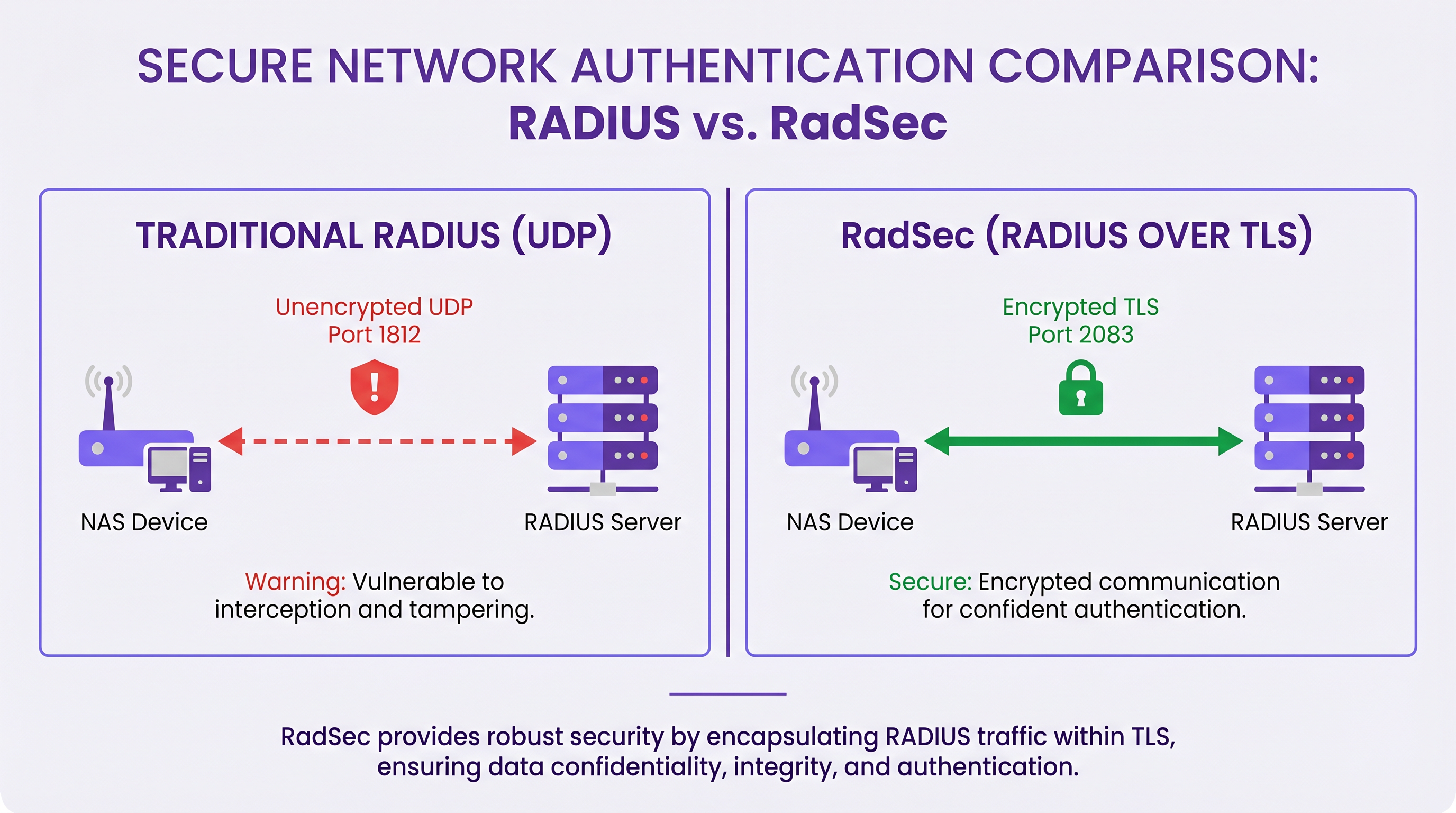
RadSec-এর মূল টেকনিক্যাল বৈশিষ্ট্যগুলোর মধ্যে রয়েছে:
১. TCP ট্রান্সপোর্ট: RadSec নির্ভরযোগ্য, সুশৃঙ্খল ডেলিভারি প্রদান করে। এটি UDP RADIUS-এর অন্তর্নিহিত অ্যাপ্লিকেশন-লেয়ার রিট্রান্সমিশনের প্রয়োজনীয়তা দূর করে, যা হাই-ল্যাটেন্সি এনভায়রনমেন্টে সমস্যার সৃষ্টি করতে পারে। ২. ফুল পেলোড এনক্রিপশন: সম্পূর্ণ RADIUS প্যাকেট—হেডার এবং সমস্ত অ্যাট্রিবিউট সহ—TLS টানেলের মধ্যে এনক্রিপ্ট করা থাকে। ৩. মিউচুয়াল অথেন্টিকেশন (mTLS): RADIUS সার্ভার এবং NAS ডিভাইস উভয়ই X.509 সার্টিফিকেট ব্যবহার করে একে অপরকে অথেন্টিকেট করে। এটি দুর্বল শেয়ার্ড সিক্রেট মডেলকে শক্তিশালী পাবলিক কি ইনফ্রাস্ট্রাকচার (PKI) দিয়ে প্রতিস্থাপন করে। ৪. পারসিস্টেন্ট কানেকশন: UDP RADIUS-এর বিপরীতে যা কানেকশনলেস, RadSec একটি পারসিস্টেন্ট TCP কানেকশন বজায় রাখে। এটি প্রতিটি অথেন্টিকেশন রিকোয়েস্টের জন্য একটি নতুন কানেকশন স্থাপনের ওভারহেড কমায়, যা ব্যস্ত ভেন্যুগুলোর জন্য অত্যন্ত কার্যকরী।
নোট: RFC 7360 DTLS (ডেটাগ্রাম TLS)-এর ওপর RADIUS সংজ্ঞায়িত করে, যা UDP ব্যবহার করে। যদিও নির্দিষ্ট হাই-থ্রুপুট পরিস্থিতিতে এটি কার্যকর, এন্টারপ্রাইজ ক্লাউড RADIUS ডিপ্লয়মেন্টের জন্য TCP-এর ওপর TLS-ই স্ট্যান্ডার্ড হিসেবে রয়ে গেছে।
ডিস্ট্রিবিউটেড এনভায়রনমেন্টে আর্কিটেকচার
একটি সাধারণ মাল্টি-সাইট ডিপ্লয়মেন্টে—যেমন একটি জাতীয় Healthcare প্রোভাইডার বা Transport হাবের চেইন—RadSec আর্কিটেকচারকে উল্লেখযোগ্যভাবে সহজ করে তোলে।
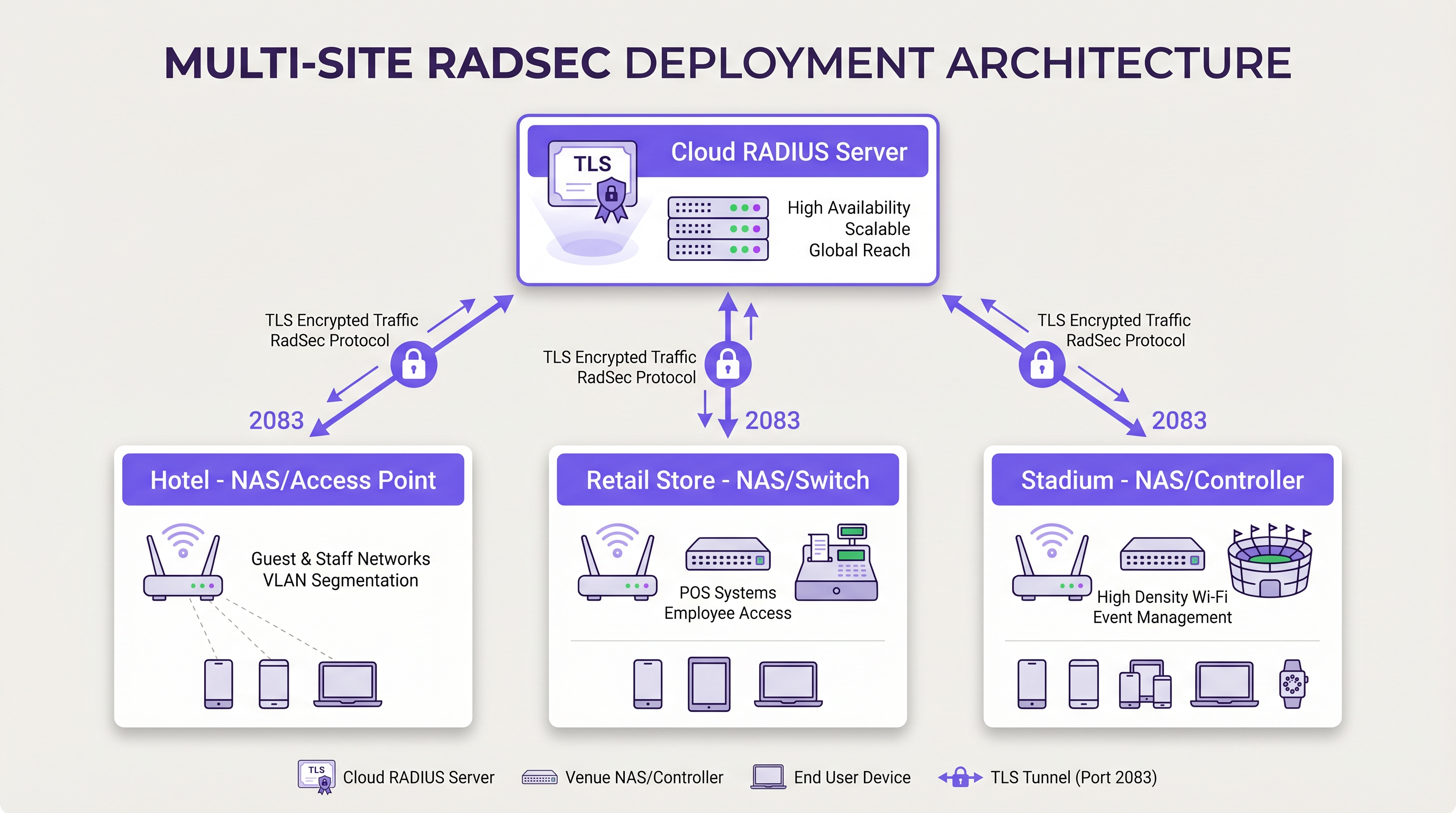
RADIUS ট্রাফিক সুরক্ষিত করার জন্য প্রতিটি ব্রাঞ্চ লোকেশন থেকে একটি সেন্ট্রাল ডেটা সেন্টারে জটিল IPsec VPN মেশ তৈরি করার পরিবর্তে, প্রতিটি NAS ডিভাইস ক্লাউড RADIUS প্রোভাইডারের সাথে ইন্টারনেটের মাধ্যমে একটি সরাসরি RadSec TLS কানেকশন স্থাপন করে। এটি একটি অ্যাপ্লিকেশন-লেয়ার সিকিউরিটি মডেল যা নেটওয়ার্ক-লেয়ার VPN-এর তুলনায় ডিপ্লয় করা পরিষ্কার এবং ট্রাবলশুট করা সহজ।
ইমপ্লিমেন্টেশন গাইড
RadSec ডিপ্লয় করার জন্য নেটওয়ার্ক ইনফ্রাস্ট্রাকচার, সার্টিফিকেট অথরিটি এবং ফায়ারওয়াল পলিসিগুলোর মধ্যে সমন্বয় প্রয়োজন। একটি সফল ডিপ্লয়মেন্টের জন্য এই ভেন্ডর-নিউট্রাল ধাপগুলো অনুসরণ করুন।
১. সার্টিফিকেট ইনফ্রাস্ট্রাকচার প্রস্তুতি
RadSec mTLS-এর ওপর নির্ভর করে। আপনার সার্ভার এবং ক্লায়েন্ট (NAS ডিভাইস) উভয়ের জন্যই সার্টিফিকেটের প্রয়োজন।
- সার্ভার সার্টিফিকেট: আপনার ক্লাউড RADIUS প্রোভাইডার (যেমন, Purple) একটি পাবলিক সার্টিফিকেট অথরিটি (CA) বা একটি ইন্টারনাল CA দ্বারা স্বাক্ষরিত একটি সার্ভার সার্টিফিকেট উপস্থাপন করবে। সার্ভারটিকে ভ্যালিডেট করার জন্য আপনার NAS ডিভাইসগুলোর ট্রাস্ট স্টোরে রুট CA সার্টিফিকেট ইনস্টল করা থাকতে হবে。
- ক্লায়েন্ট সার্টিফিকেট: RADIUS সার্ভারের কাছে নিজেকে আইডেন্টিফাই করার জন্য প্রতিটি NAS ডিভাইসের একটি ক্লায়েন্ট সার্টিফিকেট প্রয়োজন। আপনার ইন্টারনাল PKI বা নেটওয়ার্ক ম্যানেজমেন্ট সিস্টেমের মাধ্যমে এগুলো জেনারেট করুন। নিশ্চিত করুন যে তারা কমপক্ষে RSA 2048-বিট বা ECDSA P-256 কি ব্যবহার করে।
২. ফায়ারওয়াল কনফিগারেশন
আপনার NAS ম্যানেজমেন্ট ইন্টারফেসগুলো থেকে RadSec-এর নির্দিষ্ট ইগ্রেস রুল প্রয়োজন:
- প্রোটোকল: TCP
- ডেস্টিনেশন পোর্ট: 2083
- ডেস্টিনেশন IP/FQDN: আপনার প্রাইমারি এবং সেকেন্ডারি ক্লাউড RADIUS সার্ভারের ঠিকানা।
- স্টেটফুল ইন্সপেকশন: নিশ্চিত করুন যে ফায়ারওয়ালটি প্রতিষ্ঠিত TCP কানেকশনগুলোর জন্য রিটার্ন ট্রাফিক অ্যালাউ করে।
- কিপঅ্যালাইভস: সাইলেন্ট কানেকশন ড্রপ রোধ করতে ফায়ারওয়াল TCP টাইমআউট ভ্যালুগুলোকে RadSec কিপঅ্যালাইভ ইন্টারভ্যালের (সাধারণত ৬০ সেকেন্ড) চেয়ে দীর্ঘ হিসেবে কনফিগার করুন।
৩. NAS ডিভাইস কনফিগারেশন (জেনেরিক ওয়ার্কফ্লো)
যদিও নির্দিষ্ট সিনট্যাক্স ভেন্ডর (Cisco, Aruba, Juniper ইত্যাদি) অনুযায়ী পরিবর্তিত হয়, লজিক্যাল কনফিগারেশন ধাপগুলো সামঞ্জস্যপূর্ণ:
১. CA সার্টিফিকেট ইমপোর্ট করুন: RADIUS সার্ভারের সার্টিফিকেটে স্বাক্ষরকারী CA সার্টিফিকেটটি NAS ট্রাস্ট স্টোরে লোড করুন। ২. ক্লায়েন্ট সার্টিফিকেট ইমপোর্ট করুন: NAS ডিভাইসের ক্লায়েন্ট সার্টিফিকেট এবং প্রাইভেট কি লোড করুন。 ৩. RADIUS সার্ভার ডিফাইন করুন: RADIUS সার্ভার IP/FQDN কনফিগার করুন। ৪. RadSec এনাবল করুন: ট্রান্সপোর্ট প্রোটোকল হিসেবে TLS নির্দিষ্ট করুন এবং পোর্ট 2083 সেট করুন। ৫. সার্টিফিকেট বাইন্ড করুন: ইমপোর্ট করা সার্টিফিকেটগুলোকে RadSec সার্ভার কনফিগারেশনের সাথে যুক্ত করুন। ৬. AAA প্রোফাইলে অ্যাপ্লাই করুন: প্রাসঙ্গিক AAA অথেন্টিকেশন এবং অ্যাকাউন্টিং গ্রুপগুলোতে RadSec সার্ভার যোগ করুন।
৪. লিগ্যাসি ডিভাইস হ্যান্ডলিং (RadSec প্রক্সি)
সব NAS ডিভাইস নেটিভভাবে RadSec সাপোর্ট করে না। পুরোনো সুইচ বা কনজ্যুমার-গ্রেড অ্যাক্সেস পয়েন্টগুলোর জন্য, একটি RadSec প্রক্সি (যেমন radsecproxy) ডিপ্লয় করুন। প্রক্সিটি লোকাল LAN-এ বসে, লিগ্যাসি ডিভাইসগুলো থেকে প্রথাগত UDP RADIUS গ্রহণ করে এবং এটিকে একটি সুরক্ষিত RadSec TLS টানেলের মাধ্যমে ক্লাউড RADIUS সার্ভারে ফরোয়ার্ড করে।
বেস্ট প্র্যাক্টিস
- সার্টিফিকেট লাইফসাইকেল ম্যানেজমেন্ট: NAS ডিভাইসগুলোর জন্য অটোমেটেড সার্টিফিকেট রিনিউয়াল ইমপ্লিমেন্ট করুন। ক্লায়েন্ট সার্টিফিকেটগুলোর একটি ম্যাস এক্সপায়ারি ব্যাপক নেটওয়ার্ক আউটেজের কারণ হবে। সার্টিফিকেটের ভ্যালিডিটি মনিটর করুন এবং মেয়াদ শেষ হওয়ার ৯০, ৬০ এবং ৩০ দিন আগে অ্যালার্ট দিন।
- হাই অ্যাভেইলেবিলিটি: সর্বদা প্রাইমারি এবং সেকেন্ডারি RadSec সার্ভার কনফিগার করুন। যেহেতু TCP কানেকশন স্থাপনে UDP প্যাকেট ট্রান্সমিশনের চেয়ে বেশি সময় লাগে, তাই প্রাইমারি কানেকশন ড্রপ হলে দ্রুত সেকেন্ডারি সার্ভারে স্যুইচ করার জন্য NAS-এ অ্যাগ্রেসিভ ফেইলওভার টাইমার কনফিগার করুন।
- TCP কিপঅ্যালাইভস: ডেড কানেকশন শনাক্ত করতে এবং ফায়ারওয়ালগুলোকে আইডল সেশন ড্রপ করা থেকে বিরত রাখতে NAS ডিভাইসে TCP কিপঅ্যালাইভ এনাবল করুন। একটি ৬০-সেকেন্ডের ইন্টারভ্যাল হলো স্ট্যান্ডার্ড।
- স্ট্রিক্ট সার্টিফিকেট ভ্যালিডেশন: কনফিগার করা সার্ভার হোস্টনেমের বিপরীতে সাবজেক্ট অল্টারনেটিভ নেম (SAN) চেক করা সহ, সার্ভার সার্টিফিকেট কঠোরভাবে ভ্যালিডেট করার জন্য NAS ডিভাইসগুলো কনফিগার করা হয়েছে তা নিশ্চিত করুন। প্রোডাকশনে সার্টিফিকেট ভ্যালিডেশন ডিজেবল করবেন না।
- ফিউচার-প্রুফিং: ওয়্যারলেস স্ট্যান্ডার্ডগুলো বিকশিত হওয়ার সাথে সাথে, যেমনটি আমাদের WiFi 6E vs WiFi 7: What Venues Need to Know গাইডে আলোচনা করা হয়েছে, অথেন্টিকেশন ট্রাফিকের ভলিউম বৃদ্ধি পাবে। RadSec-এর পারসিস্টেন্ট TCP কানেকশনগুলো UDP-এর চেয়ে এই ডেনসিটি পরিচালনা করার জন্য বেশি উপযুক্ত।
ট্রাবলশুটিং এবং রিস্ক মিটিগেশন
যখন RadSec ডিপ্লয়মেন্ট ব্যর্থ হয়, তখন সমস্যাটি খুব কমই RADIUS প্রোটোকল নিজেই হয়; এটি প্রায় সবসময়ই TLS বা TCP সম্পর্কিত।
সাধারণ ফেইলিওর মোড
১. TLS হ্যান্ডশেক ফেইলিওর (অজানা CA): NAS ডিভাইস RADIUS সার্ভারের সার্টিফিকেট রিজেক্ট করে কারণ সাইনিং CA-টি NAS ট্রাস্ট স্টোরে নেই। * মিটিগেশন: সার্ভার দ্বারা ব্যবহৃত সঠিক CA চেইন ভেরিফাই করুন এবং নিশ্চিত করুন যে রুট (এবং যেকোনো ইন্টারমিডিয়েট) CA-গুলো NAS-এ ইনস্টল করা আছে। ২. সাইলেন্ট কানেকশন ড্রপ: RadSec কানেকশন সফলভাবে স্থাপিত হয়, কিন্তু একটি নির্দিষ্ট সময় নিষ্ক্রিয় থাকার পর অথেন্টিকেশন রিকোয়েস্টগুলো টাইমআউট হয়ে যায়। এটি সাধারণত একটি স্টেটফুল ফায়ারওয়াল যা আইডল TCP কানেকশন ড্রপ করে দেয়। * মিটিগেশন: NAS-এ TCP কিপঅ্যালাইভ এনাবল করুন এবং পোর্ট 2083-এর জন্য ফায়ারওয়াল সেশন টাইমআউট সেটিংস ভেরিফাই করুন। ৩. ক্লক স্কিউ: TLS সার্টিফিকেট ভ্যালিডেশন সঠিক সিস্টেম টাইমের ওপর নির্ভর করে। যদি NAS ডিভাইসের ঘড়ি উল্লেখযোগ্যভাবে সিঙ্কের বাইরে থাকে, তবে এটি ভ্যালিড সার্টিফিকেটগুলোকে মেয়াদোত্তীর্ণ বা এখনও ভ্যালিড নয় হিসেবে মূল্যায়ন করবে। * মিটিগেশন: RadSec কানেকশন শুরু করার আগে নিশ্চিত করুন যে সমস্ত NAS ডিভাইস নির্ভরযোগ্য NTP সার্ভারের সাথে সিঙ্ক্রোনাইজ করা আছে।
ROI এবং বিজনেস ইমপ্যাক্ট
RadSec-এ ট্রানজিশন করা টেকনিক্যাল সিকিউরিটি ইমপ্রুভমেন্টের বাইরেও পরিমাপযোগ্য বিজনেস ভ্যালু প্রদান করে:
- কমপ্লায়েন্স এবং রিস্ক রিডাকশন: RadSec ট্রানজিটে থাকা অথেন্টিকেশন ডেটা এনক্রিপ্ট করে, যা সরাসরি PCI DSS v4.0 এবং GDPR-এর প্রয়োজনীয়তা পূরণ করে। এটি ক্রেডেনশিয়াল ইন্টারসেপশনের সাথে যুক্ত আর্থিক এবং রেপুটেশনাল ঝুঁকিগুলো হ্রাস করে।
- অপারেশনাল এফিশিয়েন্সি: জটিল, সাইট-টু-সাইট IPsec VPN-গুলোকে অ্যাপ্লিকেশন-লেয়ার RadSec দিয়ে প্রতিস্থাপন করা নেটওয়ার্ক ইঞ্জিনিয়ারিং ওভারহেড কমায়। শত শত ব্রাঞ্চ জুড়ে VPN রাউটিং এবং IKE ফেজ নেগোসিয়েশন ডিবাগ করার চেয়ে ক্লাউড প্রোভাইডারের সাথে একটি TLS কানেকশন ট্রাবলশুট করা উল্লেখযোগ্যভাবে দ্রুত।
- ক্লাউড রেডিনেস: RadSec হলো ক্লাউড-নেটিভ অথেন্টিকেশনের জন্য একটি এনাবলিং টেকনোলজি। এটি গ্রহণ করার মাধ্যমে, প্রতিষ্ঠানগুলো নির্বিঘ্নে আধুনিক আইডেন্টিটি প্রোভাইডার এবং Purple-এর মতো প্ল্যাটফর্মগুলোর সাথে ইন্টিগ্রেট করতে পারে, যা অন-প্রিমিস সার্ভার ফুটপ্রিন্ট এবং লাইসেন্সিং খরচ কমায়।
মূল সংজ্ঞাসমূহ
RadSec
একটি প্রোটোকল যা একটি ট্রান্সপোর্ট লেয়ার সিকিউরিটি (TLS) টানেলের মধ্যে RADIUS অথেন্টিকেশন এবং অ্যাকাউন্টিং ডেটা এনক্যাপসুলেট করে।
লিগ্যাসি UDP RADIUS প্রতিস্থাপন করে, আনট্রাস্টেড নেটওয়ার্কগুলোতে অথেন্টিকেশন ট্রাফিক সুরক্ষিত করতে ব্যবহৃত হয়।
mTLS (Mutual TLS)
একটি অথেন্টিকেশন প্রক্রিয়া যেখানে ক্লায়েন্ট (NAS) এবং সার্ভার (RADIUS) উভয়ই TLS হ্যান্ডশেকের সময় একে অপরের X.509 সার্টিফিকেট ভেরিফাই করে।
উভয় এন্ডপয়েন্ট ক্রিপ্টোগ্রাফিকভাবে ভেরিফাইড তা নিশ্চিত করার মাধ্যমে প্রথাগত RADIUS শেয়ার্ড সিক্রেট মডেলের চেয়ে শক্তিশালী নিরাপত্তা প্রদান করে।
NAS (Network Access Server)
যে ডিভাইসটি ইউজারদের নেটওয়ার্ক অ্যাক্সেস প্রদান করে এবং একটি RADIUS ক্লায়েন্ট হিসেবে কাজ করে। আধুনিক নেটওয়ার্কগুলোতে, এটি সাধারণত একটি ওয়্যারলেস অ্যাক্সেস পয়েন্ট, সুইচ বা ওয়্যারলেস LAN কন্ট্রোলার।
NAS ক্লাউড RADIUS সার্ভারে RadSec কানেকশন শুরু করার জন্য দায়ী।
PKI (Public Key Infrastructure)
ডিজিটাল সার্টিফিকেট তৈরি, পরিচালনা, বিতরণ, ব্যবহার, সংরক্ষণ এবং বাতিল করার জন্য প্রয়োজনীয় ভূমিকা, পলিসি, হার্ডওয়্যার, সফটওয়্যার এবং পদ্ধতিগুলোর ফ্রেমওয়ার্ক।
বড় এস্টেট জুড়ে RadSec ডিপ্লয়মেন্টের জন্য প্রয়োজনীয় সার্টিফিকেটগুলো পরিচালনা করার জন্য অপরিহার্য।
TCP Keepalive
একটি মেকানিজম যা কানেকশনটি এখনও সক্রিয় আছে কিনা তা ভেরিফাই করতে এবং স্টেটফুল ফায়ারওয়ালগুলোকে সেশন ড্রপ করা থেকে বিরত রাখতে একটি আইডল কানেকশনের ওপর খালি TCP প্যাকেট পাঠায়।
কম অথেন্টিকেশন অ্যাক্টিভিটির সময় পারসিস্টেন্ট RadSec কানেকশন বজায় রাখার জন্য অত্যন্ত গুরুত্বপূর্ণ।
RadSec Proxy
একটি সফটওয়্যার সার্ভিস যা মধ্যস্থতাকারী হিসেবে কাজ করে, লিগ্যাসি ডিভাইসগুলো থেকে প্রথাগত UDP RADIUS ট্রাফিক গ্রহণ করে এবং এটিকে একটি সুরক্ষিত RadSec TLS কানেকশনের মাধ্যমে ফরোয়ার্ড করে।
যেসব এনভায়রনমেন্টে পুরোনো নেটওয়ার্ক হার্ডওয়্যার নেটিভভাবে RadSec সাপোর্ট করে না, সেখানে গ্যাপ পূরণ করতে ব্যবহৃত হয়।
X.509 Certificate
একটি ডিজিটাল সার্টিফিকেট যা ব্যাপকভাবে গৃহীত আন্তর্জাতিক X.509 PKI স্ট্যান্ডার্ড ব্যবহার করে ভেরিফাই করে যে একটি পাবলিক কি সার্টিফিকেটের মধ্যে থাকা ইউজার, কম্পিউটার বা সার্ভিস আইডেন্টিটির অন্তর্গত।
আইডেন্টিটি স্থাপন করতে এবং TLS টানেল এনক্রিপ্ট করতে RadSec দ্বারা ব্যবহৃত ক্রিপ্টোগ্রাফিক ভিত্তি।
EAP (Extensible Authentication Protocol)
একটি অথেন্টিকেশন ফ্রেমওয়ার্ক যা প্রায়শই ওয়্যারলেস নেটওয়ার্ক এবং পয়েন্ট-টু-পয়েন্ট কানেকশনে ব্যবহৃত হয়।
EAP ট্রাফিক (যেমন EAP-TLS বা PEAP) RADIUS প্যাকেটের মধ্যে এনক্যাপসুলেট করা থাকে, যার অর্থ RadSec নিরাপদে EAP এক্সচেঞ্জ ট্রান্সপোর্ট করে।
সমাধানকৃত উদাহরণসমূহ
৫০০টি লোকেশন বিশিষ্ট একটি জাতীয় রিটেইল চেইন অন-প্রিমিস RADIUS সার্ভার থেকে Purple-এর ক্লাউড RADIUS-এ মাইগ্রেট করছে। বিদ্যমান আর্কিটেকচারটি MPLS এবং SD-WAN লিঙ্কের মিশ্রণ জুড়ে UDP-এর ওপর আনএনক্রিপ্টেড RADIUS ব্যবহার করে। ৪৫০টি লোকেশনে আধুনিক Aruba অ্যাক্সেস পয়েন্ট রয়েছে, যেখানে ৫০টি লোকেশন লিগ্যাসি হার্ডওয়্যার ব্যবহার করে যা RadSec সাপোর্ট করে না। নেটওয়ার্ক আর্কিটেক্টের কীভাবে নতুন অথেন্টিকেশন ট্রান্সপোর্ট ডিজাইন করা উচিত?
আর্কিটেক্টের একটি হাইব্রিড RadSec ডিপ্লয়মেন্ট ইমপ্লিমেন্ট করা উচিত। আধুনিক Aruba AP থাকা ৪৫০টি লোকেশনের জন্য, সরাসরি AP বা লোকাল কন্ট্রোলারগুলোতে নেটিভ RadSec কনফিগার করুন। Aruba ডিভাইসগুলোতে Purple-এর ক্লাউড RADIUS-এর রুট CA সার্টিফিকেট ইনস্টল করুন এবং নেটওয়ার্ক ম্যানেজমেন্ট প্ল্যাটফর্মের মাধ্যমে ক্লায়েন্ট সার্টিফিকেট প্রোভিশন করুন। TCP 2083-এর জন্য ইগ্রেস ফায়ারওয়াল রুল কনফিগার করুন। ৫০টি লিগ্যাসি লোকেশনের জন্য, প্রতিটি সাইটে একটি লাইটওয়েট RadSec প্রক্সি (যেমন, radsecproxy রান করা একটি ছোট Linux VM বা কন্টেইনার) ডিপ্লয় করুন। লিগ্যাসি AP-গুলো লোকাল প্রক্সিতে স্ট্যান্ডার্ড UDP RADIUS পাঠাবে, যা পরে Purple ক্লাউডে একটি TLS টানেলের মধ্যে ট্রাফিকটিকে এনক্যাপসুলেট করবে।
একটি বড় কনফারেন্স সেন্টারে RadSec ডিপ্লয়মেন্টের সময়, নেটওয়ার্ক টিম লক্ষ্য করে যে NAS ডিভাইসগুলো ব্যস্ত সময়ে ইউজারদের সফলভাবে অথেন্টিকেট করে, কিন্তু খুব সকালে প্রথম কয়েকজন ইউজারকে অথেন্টিকেট করতে ব্যর্থ হয়। প্যাকেট ক্যাপচার দেখায় যে NAS RADIUS ট্রাফিক পাঠানোর চেষ্টা করছে, কিন্তু ফায়ারওয়াল থেকে TCP RST প্যাকেট গ্রহণ করছে।
সমস্যাটি ফায়ারওয়ালের অ্যাগ্রেসিভ TCP সেশন টাইমআউটের কারণে ঘটে যা রাতারাতি আইডল RadSec কানেকশন ড্রপ করে দেয়। নেটওয়ার্ক টিমকে অবশ্যই RadSec কানেকশনের জন্য NAS ডিভাইসগুলোতে TCP কিপঅ্যালাইভ কনফিগার করতে হবে, ইন্টারভ্যাল ৬০ সেকেন্ডে সেট করতে হবে। উপরন্তু, তাদের TCP পোর্ট 2083-এর জন্য ফায়ারওয়ালের স্টেটফুল ইন্সপেকশন রুলগুলো রিভিউ করা উচিত এবং নিশ্চিত করা উচিত যে সেশন টাইমআউট কিপঅ্যালাইভ ইন্টারভ্যালের চেয়ে বেশি।
অনুশীলনী প্রশ্নসমূহ
Q1. আপনি Purple-এর ক্লাউড RADIUS প্ল্যাটফর্মের সাথে ৫০টি ব্রাঞ্চ অফিসকে সংযুক্ত করে একটি নতুন RadSec ডিপ্লয়মেন্টের জন্য ফায়ারওয়াল পলিসি ডিজাইন করছেন। ব্রাঞ্চ ফায়ারওয়ালগুলোতে কোন নির্দিষ্ট ইগ্রেস রুলগুলো কনফিগার করতে হবে?
ইঙ্গিত: প্রোটোকল এবং কানেকশনের স্টেটফুল প্রকৃতি উভয়ই বিবেচনা করুন।
মডেল উত্তর দেখুন
ব্রাঞ্চ ফায়ারওয়ালগুলোকে অবশ্যই NAS ম্যানেজমেন্ট IP অ্যাড্রেসগুলো থেকে উদ্ভূত পোর্ট 2083-এ আউটবাউন্ড TCP ট্রাফিক অ্যালাউ করতে হবে, যা Purple ক্লাউড RADIUS সার্ভারগুলোর IP অ্যাড্রেস বা FQDN-এর উদ্দেশ্যে। যেহেতু TCP স্টেটফুল, ফায়ারওয়াল স্বয়ংক্রিয়ভাবে প্রতিষ্ঠিত সেশনগুলোর জন্য রিটার্ন ট্রাফিক অ্যালাউ করবে। RadSec-এর জন্য UDP পোর্ট 1812 এবং 1813-এর প্রয়োজন নেই।
Q2. একজন জুনিয়র ইঞ্জিনিয়ার রিপোর্ট করেছেন যে একটি নতুন কনফিগার করা সুইচ ক্লাউড RADIUS সার্ভারের সাথে RadSec কানেকশন স্থাপন করতে ব্যর্থ হচ্ছে। সুইচের লগগুলো দেখায়: `TLS handshake failed: unknown CA`। আপনি কীভাবে এর সমাধান করবেন?
ইঙ্গিত: সুইচটি সার্ভার দ্বারা উপস্থাপিত সার্টিফিকেটকে সহজাতভাবে বিশ্বাস করে না।
মডেল উত্তর দেখুন
আপনাকে ক্লাউড RADIUS সার্ভারের সার্টিফিকেট ইস্যুকারী সার্টিফিকেট অথরিটি (CA) আইডেন্টিফাই করতে হবে। একবার আইডেন্টিফাই হয়ে গেলে, পাবলিক রুট CA সার্টিফিকেট (এবং যেকোনো ইন্টারমিডিয়েট CA সার্টিফিকেট) সংগ্রহ করুন এবং সেগুলোকে সুইচের ট্রাস্ট স্টোরে ইমপোর্ট করুন। এটি সুইচটিকে TLS হ্যান্ডশেকের সময় সার্ভারের আইডেন্টিটি ক্রিপ্টোগ্রাফিকভাবে ভেরিফাই করার অনুমতি দেয়।
Q3. আপনার প্রতিষ্ঠান ম্যান্ডেট দেয় যে সমস্ত নেটওয়ার্ক ইনফ্রাস্ট্রাকচারকে অবশ্যই একটি WAN আউটেজ সারভাইভ করতে হবে। যদি ক্লাউড RADIUS সার্ভারের ইন্টারনেট কানেকশন ব্যর্থ হয়, তবে RadSec কানেকশনের কী হবে এবং NAS কীভাবে পরবর্তী অথেন্টিকেশন রিকোয়েস্টগুলো পরিচালনা করবে?
ইঙ্গিত: TCP কানেকশন স্টেট এবং স্ট্যান্ডার্ড RADIUS ফেইলওভার মেকানিজমগুলো বিবেচনা করুন।
মডেল উত্তর দেখুন
যখন WAN ব্যর্থ হয়, পারসিস্টেন্ট TCP কানেকশনটি শেষ পর্যন্ত টাইম আউট হয়ে যাবে (বা লোকাল ইন্টারফেস ডাউন হয়ে গেলে এক্সপ্লিসিটলি রিসেট হবে)। NAS প্রাইমারি RadSec সার্ভারটিকে আনরিচেবল হিসেবে মার্ক করবে। যদি একটি সেকেন্ডারি RadSec সার্ভার কনফিগার করা থাকে (যেমন, একটি ভিন্ন ভৌগোলিক অঞ্চলে), NAS এটির সাথে একটি নতুন TLS কানেকশন স্থাপন করার চেষ্টা করবে। যদি সমস্ত RADIUS সার্ভার আনরিচেবল হয়, তবে নতুন অথেন্টিকেশনগুলো ব্যর্থ হবে। তবে, যে ইউজাররা ইতিমধ্যে অথেন্টিকেটেড এবং কানেক্টেড আছেন তারা সাধারণত তাদের সেশনের মেয়াদ শেষ না হওয়া পর্যন্ত বা তারা রোম না করা পর্যন্ত কানেক্টেড থাকবেন, কারণ RADIUS শুধুমাত্র প্রাথমিক অথেন্টিকেশন এবং পর্যায়ক্রমিক রি-অথেন্টিকেশন ফেজগুলোর সময় জড়িত থাকে।
এই সিরিজে পড়া চালিয়ে যান
স্টাফ WiFi শর্তাবলী: আইনি এবং কমপ্লায়েন্সের প্রয়োজনীয় বিষয়সমূহ
এই নির্দেশিকাটি এন্টারপ্রাইজ ভেন্যুগুলোর জন্য স্টাফ WiFi শর্তাবলী খসড়া এবং প্রয়োগ করার আইনি ও প্রযুক্তিগত প্রয়োজনীয় বিষয়গুলো কভার করে। এতে একটি গ্রহণযোগ্য ব্যবহার নীতি (AUP)-তে কী অন্তর্ভুক্ত করতে হবে, কীভাবে GDPR এবং PCI DSS-এর প্রয়োজনীয়তাগুলো পূরণ করতে হবে এবং কর্পোরেট সম্পদ সুরক্ষায় কীভাবে আইডেন্টিটি-ভিত্তিক প্রমাণীকরণ এবং নেটওয়ার্ক সেগমেন্টেশন স্থাপন করতে হবে তা বিস্তারিতভাবে আলোচনা করা হয়েছে। হোটেল, রিটেইল চেইন, স্টেডিয়াম এবং পাবলিক সেক্টর প্রতিষ্ঠানের IT ম্যানেজার, HR টিম এবং অপারেশন ডিরেক্টররা এই ত্রৈমাসিকে বাস্তবায়নযোগ্য কার্যকরী নির্দেশনা পাবেন।
Wi-Fi সিকিউরিটির ভবিষ্যৎ: এআই-চালিত NAC এবং থ্রেট ডিটেকশন
এই প্রামাণিক গাইডটি লিগ্যাসি WPA2 থেকে এআই-চালিত Network Access Control (NAC) এবং থ্রেট ডিটেকশন পর্যন্ত এন্টারপ্রাইজ Wi-Fi সিকিউরিটির বিবর্তন নিয়ে আলোচনা করে। আইটি লিডারদের জন্য ডিজাইন করা এই গাইডটি Purple-এর আইডেন্টিটি-ভিত্তিক নেটওয়ার্কগুলো ব্যবহার করে রিটেইল, হসপিটালিটি এবং স্টেডিয়ামের মতো হাই-ডেনসিটি এনভায়রনমেন্ট সুরক্ষিত করার জন্য কার্যকর ডিপ্লয়মেন্ট কৌশল প্রদান করে।
NAC এবং MPSK-এর মাধ্যমে IoT ডিভাইসের নিরাপত্তা পরিচালনা
এই টেকনিক্যাল গাইডে বিস্তারিত আলোচনা করা হয়েছে কীভাবে এন্টারপ্রাইজ ভেন্যুগুলো মাল্টিপল প্রি-শেয়ারড কি (MPSK) আর্কিটেকচার এবং নেটওয়ার্ক অ্যাক্সেস কন্ট্রোল (NAC) ব্যবহার করে হেডলেস IoT ডিভাইসগুলোকে সুরক্ষিত করতে পারে। এটি স্কেলেবিলিটির সাথে আপস না করে মাইক্রো-সেগমেন্টেশন অর্জন, সিকিউরিটি ব্লাস্ট রেডিয়াস নিয়ন্ত্রণ এবং কমপ্লায়েন্স বজায় রাখার জন্য কার্যকর ইমপ্লিমেন্টেশন পদক্ষেপ প্রদান করে।