
NAC-এর উপর MAC Randomisation-এর প্রভাব এবং কীভাবে এটি কাটিয়ে ওঠা যায়
এই নির্দেশিকাটি Network Access Control (NAC) সিস্টেম এবং গেস্ট WiFi আর্কিটেকচারের উপর MAC অ্যাড্রেস র্যান্ডমাইজেশনের প্রভাব সম্পর্কে একটি গভীর ও প্রযুক্তিগত রেফারেন্স প্রদান করে। এটি iOS, Android, এবং Windows জুড়ে প্রতি-নেটওয়ার্ক এবং পর্যায়ক্রমিক MAC পরিবর্তনের মেকানিজম ব্যাখ্যা করে এবং এর ফলে সৃষ্ট ক্রমাগত ব্যর্থতার বিবরণ দেয় - যা Captive Portal ক্লান্তি এবং DHCP নিঃশেষকরণ থেকে শুরু করে পলিসি প্রয়োগের ভাঙন এবং ভুল অ্যানালিটিক্স পর্যন্ত বিস্তৃত। IT লিডার এবং নেটওয়ার্ক স্থপতিরা IEEE 802.1X, Passpoint (Hotspot 2.0), এবং OpenRoaming ব্যবহার করে ডিভাইস-কেন্দ্রিক থেকে পরিচয়-কেন্দ্রিক অথেন্টিকেশনে স্থানান্তরিত হওয়ার জন্য কার্যকরী ও ভেন্ডর-নিরপেক্ষ কৌশল খুঁজে পাবেন, যেখানে আতিথেয়তা, খুচরা বিক্রয়, স্বাস্থ্যসেবা এবং পাবলিক সেক্টর পরিবেশের জন্য সুনির্দিষ্ট বাস্তবায়ন নির্দেশিকা রয়েছে।
Video overview
এই গাইডটি শুনুন
পডকাস্ট ট্রান্সক্রিপ্ট দেখুন
আমাদের মূল সিরিজের অংশ: Enterprise WiFi সিকিউরিটি গাইড →
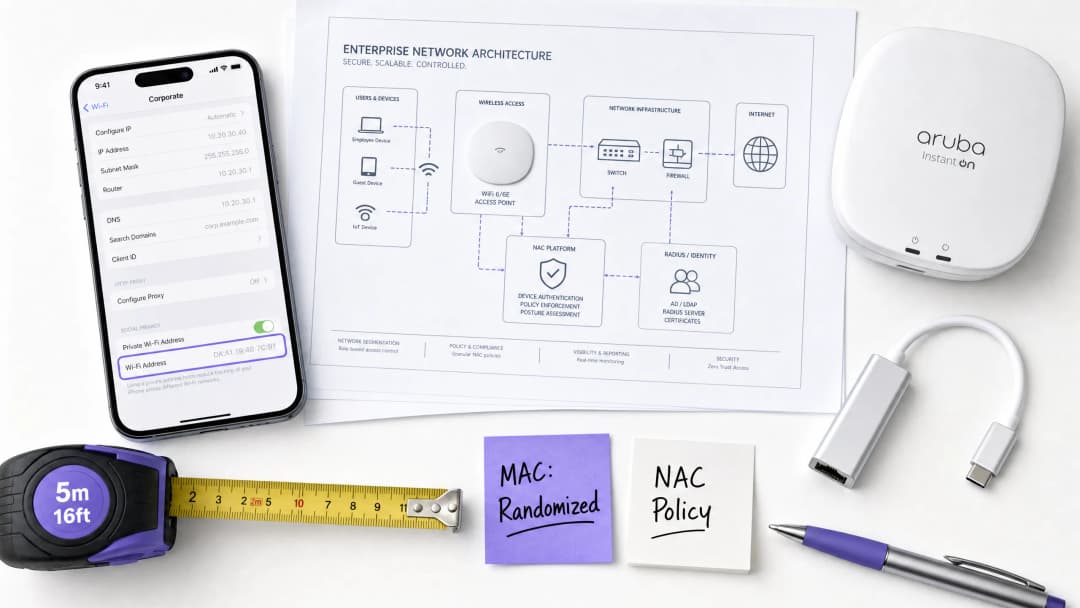
কার্যনির্বাহী সারাংশ
MAC অ্যাড্রেস র্যান্ডমাইজেশন - যা এখন iOS 14+, Android 10+ এবং Windows 11-এ ডিফল্ট আচরণ - ডিভাইস-কেন্দ্রিক অথেন্টিকেশন মডেলটিকে মৌলিকভাবে ভেঙে দিয়েছে যার উপর এন্টারপ্রাইজ NAC সিস্টেমগুলি দুই দশক ধরে নির্ভর করে আসছে। যখন একটি ডিভাইস তার MAC অ্যাড্রেস পরিবর্তন করে, তখন নেটওয়ার্ক এটিকে সম্পূর্ণ নতুন ক্লায়েন্ট হিসাবে বিবেচনা করে। এর ফলাফলগুলি তাৎক্ষণিক এবং কর্মক্ষম: Captive Portals ফিরে আসা অতিথিদের পুনরায় অথেন্টিকেট করতে বাধ্য করে, উচ্চ-ঘনত্বের পরিবেশে DHCP স্কোপগুলি শেষ হয়ে যায়, NAC পলিসিগুলি প্রয়োগ করতে ব্যর্থ হয় এবং অ্যানালিটিক্স প্ল্যাটফর্মগুলি অত্যন্ত স্ফীত দর্শক সংখ্যা রিপোর্ট করে।
Hospitality প্রপার্টি, Retail এস্টেট, Healthcare ক্যাম্পাস বা Transport হাব পরিচালনাকারী আইটি লিডারদের জন্য এটি কোনো তাত্ত্বিক ঝুঁকি নয় - এটি একটি সক্রিয় কর্মক্ষম সমস্যা যা অতিথিদের সন্তুষ্টি, সিকিউরিটি পোস্টার এবং মার্কেটিং ডেটার গুণমানকে প্রভাবিত করছে।
সমাধানটি আর্কিটেকচারাল, কসমেটিক নয়। হার্ডওয়্যার আইডেন্টিফায়ার (MAC অ্যাড্রেস) অথেন্টিকেট করার পরিবর্তে নেটওয়ার্কগুলিকে IEEE 802.1X, Passpoint (Hotspot 2.0) এবং OpenRoaming-এর মাধ্যমে যাচাইকৃত ব্যবহারকারীর পরিচয় অথেন্টিকেট করার দিকে স্থানান্তরিত হতে হবে। এই গাইডটি এই কোয়ার্টারে সেই রূপান্তরটি করার জন্য প্রযুক্তিগত গভীরতা এবং বাস্তবায়ন রোডম্যাপ প্রদান করে।
প্রযুক্তিগত গভীর আলোচনা: MAC র্যান্ডমাইজেশন কীভাবে কাজ করে
MAC র্যান্ডমাইজেশন কোনো একঘেয়ে স্ট্যান্ডার্ড নয়। ডিভাইস ইকোসিস্টেম জুড়ে এর বাস্তবায়ন উল্লেখযোগ্যভাবে পরিবর্তিত হয়, যা নেটওয়ার্ক ইঞ্জিনিয়ারদের জন্য অপ্রত্যাশিত এবং বহুস্তরের চ্যালেঞ্জ তৈরি করে।
অপারেটিং সিস্টেমগুলি কীভাবে র্যান্ডমাইজেশন পরিচালনা করে
আধুনিক অপারেটিং সিস্টেমগুলি দুটি পৃথক মোডে MAC র্যান্ডমাইজেশন প্রয়োগ করে, যার উভয়ই লেগ্যাসি NAC আর্কিটেকচারকে ব্যাহত করে:
প্রতি-নেটওয়ার্ক র্যান্ডমাইজেশন (ডিফল্ট আচরণ): ডিভাইসটি যে প্রতিটি SSID-এর সাথে সংযোগ করে তার জন্য একটি অনন্য, স্থানীয়ভাবে পরিচালিত MAC অ্যাড্রেস তৈরি করে। এই অ্যাড্রেসটি SSID এবং ডিভাইস-নির্দিষ্ট সিডের একটি হ্যাশ থেকে উদ্ভূত হয়, যার অর্থ এটি সেই নির্দিষ্ট নেটওয়ার্কের জন্য স্ট্যাটিক থাকে তবে হার্ডওয়্যার MAC থেকে সম্পূর্ণ আলাদা হয়। এটি iOS 14+, Android 10+ এবং Windows 11-এ ডিফল্ট।
পর্যায়ক্রমিক ঘূর্ণন (উন্নত গোপনীয়তা মোড): অ্যাপলের 'Private WiFi Address' (iOS 15+) এবং অ্যান্ড্রয়েডের 'Use randomised MAC' এর মতো উন্নত ট্র্যাকিং সুরক্ষা বৈশিষ্ট্যগুলি একটি নির্দিষ্ট SSID-এর জন্য র্যান্ডমাইজড MAC অ্যাড্রেসটিকে দৈনিক বা সাপ্তাহিক শিডিউলে বা নিষ্ক্রিয়তার একটি কনফিগারযোগ্য সময়ের পরে ঘুরিয়ে দেবে। এন্টারপ্রাইজ পরিবেশের জন্য এটি আরও বেশি ব্যাহতকারী মোড।
তদুপরি, ডিভাইসগুলি সক্রিয় স্ক্যানিং (প্রোব রিকোয়েস্ট) চলাকালীন র্যান্ডমাইজড MAC ব্যবহার করে - কোনো অ্যাসোসিয়েশন ঘটার আগে। এর অর্থ হল প্রোব রিকোয়েস্ট ট্র্যাককারী প্যাসিভ অ্যানালিটিক্স ইঞ্জিনগুলিও নির্ভরযোগ্যভাবে অনন্য ডিভাইস গণনা করতে পারে না।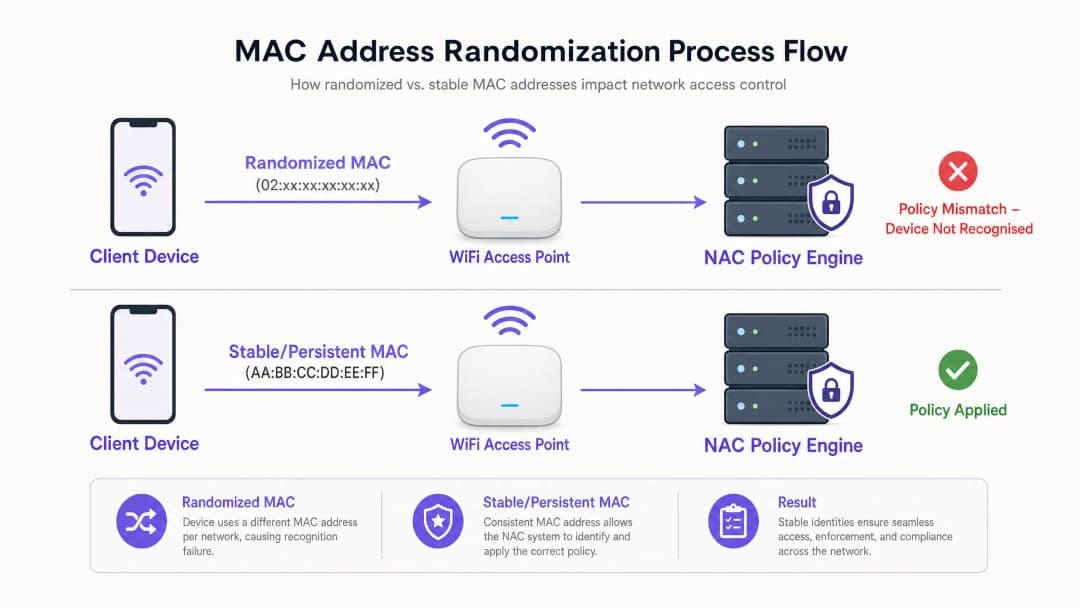
নেটওয়ার্ক ইনফ্রাস্ট্রাকচারের উপর ব্যর্থতার ধারাবাহিক প্রভাব
যখন একটি ডিভাইস তার MAC অ্যাড্রেস পরিবর্তন করে, তখন নেটওয়ার্ক এটিকে সম্পূর্ণ নতুন একটি ক্লায়েন্ট হিসেবে গণ্য করে। এই একটি ঘটনা একাধিক নেটওয়ার্ক লেয়ার জুড়ে পর্যায়ক্রমিক আর্কিটেকচারাল ব্যর্থতার সৃষ্টি করে:
| ব্যর্থতার ধরন | প্রযুক্তিগত কারণ | ব্যবসায়িক প্রভাব |
|---|---|---|
| Captive Portal ক্লান্তি | MAC-এর উপর ভিত্তি করে NAC সেশন ক্যাশে; অ্যাড্রেস পরিবর্তনের ফলে ক্যাশে এন্ট্রিটি অবৈধ হয়ে যায় | ফিরে আসা অতিথিরা পুনরায় প্রমাণীকরণ করতে বাধ্য হন; সাপোর্ট টিকিটের সংখ্যা বৃদ্ধি পায় |
| DHCP স্কোপ নিঃশেষকরণ | প্রতিটি নতুন MAC একটি নতুন IP লিজ গ্রহণ করে; TTL শেষ না হওয়া পর্যন্ত পুরোনো লিজগুলো মুক্ত হয় না | নতুন ডিভাইসগুলো IP অ্যাড্রেস পেতে ব্যর্থ হয়; অতিথিদের জন্য নেটওয়ার্ক বিভ্রাট ঘটে |
| NAC পলিসি অমিল | পলিসিগুলো (VLAN, রেট লিমিট, ACL) MAC-এর সাথে যুক্ত থাকে; নতুন MAC-এর কোনো পলিসি থাকে না | সিকিউরিটি কন্ট্রোল বাইপাস; অতিথিরা ভুল VLAN-এ অ্যাক্সেস করতে পারেন |
| অ্যানালিটিক্স স্ফীতি | লেয়ার ২ MAC-এর উপর ভিত্তি করে অ্যানালিটিক্স; একটি ডিভাইসকে একাধিক অনন্য ভিজিটর হিসেবে দেখায় | ভুল ফুটফল ডেটা; ভুল মেট্রিক্সের উপর ভিত্তি করে মার্কেটিং সিদ্ধান্ত গ্রহণ |
| সেশন ধারাবাহিকতা হারানো | AP রোমিং এবং লোড ব্যালেন্সিং সেশন হ্যান্ডঅফের জন্য MAC-এর উপর নির্ভর করে | রোমিং অভিজ্ঞতা হ্রাস পায়; চলাচলের সময় সেশন ড্রপ হয় |
IEEE স্ট্যান্ডার্ড রেফারেন্স
লোকালি অ্যাডমিনিস্টার্ড অ্যাড্রেস বিট (প্রথম অকটেটের দ্বিতীয় সর্বনিম্ন গুরুত্বপূর্ণ বিট) র্যান্ডমাইজড MAC-এ 1 সেট করা থাকে, যা এটিকে গ্লোবালি অনন্য হার্ডওয়্যার অ্যাড্রেস থেকে আলাদা করে। প্রথম অকটেটে 02:, 06:, 0A:, বা 0E: দিয়ে শুরু হওয়া একটি MAC নিশ্চিতভাবেই একটি লোকালি অ্যাডমিনিস্টার্ড (সম্ভাব্য র্যান্ডমাইজড) অ্যাড্রেস। নেটওয়ার্ক ইঞ্জিনিয়াররা RADIUS বা DHCP সার্ভার স্তরে র্যান্ডমাইজড ক্লায়েন্ট সনাক্ত করতে এটি ব্যবহার করতে পারেন, যদিও কেবল সনাক্তকরণই প্রমাণীকরণ সমস্যার সমাধান করে না।
এই ডিভাইসগুলো যে RF পরিবেশে কাজ করে সে সম্পর্কে আরও জানতে, আমাদের এই গাইডটি দেখুন WiFi Frequencies: A Guide to WiFi Frequencies in 2026।
আপনার নির্দিষ্ট সেটআপ নিয়ে কোনো প্রশ্ন আছে?
আমাদের টিম ৮০,০০০ ভেন্যুতে ভেন্যু অপারেটর, IT ম্যানেজার এবং নেটওয়ার্ক ইঞ্জিনিয়ারদের সাথে কাজ করে। একটি ২০ মিনিটের কল বুক করুন এবং আপনার মতো অন্যরা কীভাবে এর সমাধান করেছেন তা আমরা আপনাকে দেখাব।
ইমপ্লিমেন্টেশন গাইড: একটি আইডেন্টিটি-সেন্ট্রিক আর্কিটেকচারে স্থানান্তরিত হওয়া
MAC র্যান্ডমাইজেশনের একমাত্র স্থায়ী সমাধান হলো হার্ডওয়্যার আইডেন্টিফায়ার থেকে প্রমাণীকরণ এবং পলিসি প্রয়োগকে সম্পূর্ণ আলাদা করা। নিম্নলিখিত তিন ধাপের ইমপ্লিমেন্টেশন রোডম্যাপ একটি আইডেন্টিটি-সেন্ট্রিক নেটওয়ার্কে পৌঁছানোর জন্য একটি ভেন্ডর-নিরপেক্ষ পথ প্রদান করে।
ধাপ ১: তাৎক্ষণিক প্রশমন (সপ্তাহ ১ - ২)
একটি সম্পূর্ণ আর্কিটেকচারাল মাইগ্রেশন শুরু করার আগে, পরিবেশকে স্থিতিশীল করতে এই কৌশলগত প্রশমন ব্যবস্থাগুলো বাস্তবায়ন করুন:
- DHCP লিজের সময় হ্রাস করুন: গেস্ট VLAN-এ লিজের সময়কাল সাধারণ ২৪ ঘণ্টা থেকে কমিয়ে ১ - ৪ ঘণ্টা করুন। এটি ক্ষণস্থায়ী ডিভাইসগুলো থেকে দ্রুত IP অ্যাড্রেসগুলো পুনরুদ্ধার করে এবং স্কোপ নিঃশেষ হওয়া রোধ করে। উচ্চ ভিড়সম্পন্ন স্টেডিয়াম বা কনভেনশন সেন্টারে ৩০ মিনিটের মতো সংক্ষিপ্ত লিজের কথা বিবেচনা করুন।2. DHCP pool এর আকার বৃদ্ধি করুন: রোটেটিং MAC-এর কারণে বর্ধিত চাহিদা সামাল দেওয়ার জন্য একটি স্বল্পমেয়াদী বাফার হিসেবে গেস্ট DHCP স্কোপ বৃদ্ধি করুন।
- হেল্পডেস্ক স্ক্রিপ্ট আপডেট করুন: সাপোর্ট স্টাফদের নির্দেশ দিন যে গেস্ট কানেকশনের সমস্যা সমাধানের সময় তারা যেন সাধারণ ডিভাইস সেটিংস থেকে হার্ডওয়্যার MAC খোঁজার পরিবর্তে নির্দিষ্ট SSID-এর জন্য ডিভাইসের বর্তমান র্যান্ডমাইজড MAC (যা WiFi নেটওয়ার্ক ডিটেইলসে পাওয়া যায়) জানতে চান।
ধাপ ২: পরিচিত ব্যবহারকারীদের জন্য IEEE 802.1X স্থাপন করুন (মাস ১ - ৩)
IEEE 802.1X হলো আইডেন্টিটি-কেন্দ্রিক নেটওয়ার্ক অ্যাক্সেসের মূল ভিত্তি। MAC-এর মাধ্যমে কোনো ডিভাইসকে অথেন্টিকেট করার পরিবর্তে, নেটওয়ার্কটি RADIUS সার্ভারের সাথে একটি EAP (Extensible Authentication Protocol) বিনিময়ের মাধ্যমে ক্রেডেনশিয়াল, সার্টিফিকেট বা টোকেনাইজড আইডেন্টিটি ব্যবহার করে ব্যবহারকারীকে অথেন্টিকেট করে।
মূল কনফিগারেশন ধাপসমূহ:
- আপনার আইডেন্টিটি ডিরেক্টরির (Active Directory, LDAP, বা ক্লাউড IdP) সাথে ইন্টিগ্রেটেড একটি RADIUS সার্ভার (যেমন, FreeRADIUS, Cisco ISE, Aruba ClearPass) স্থাপন করুন।
- পরিচিত ব্যবহারকারীদের (স্টাফ, নিবন্ধিত গেস্ট, লয়্যালটি মেম্বার) জন্য একটি ডেডিকেটেড WPA3-Enterprise SSID তৈরি করুন।
- কর্পোরেট ডিভাইসের জন্য একটি Mobile Device Management (MDM) সমাধানের মাধ্যমে অথবা BYOD এবং নিবন্ধিত গেস্টদের জন্য একটি সেলফ-সার্ভিস অনবোর্ডিং পোর্টালের মাধ্যমে 802.1X ক্রেডেনশিয়াল প্রদান করুন।
- MAC অ্যাড্রেসের পরিবর্তে RADIUS অ্যাট্রিবিউটের (যেমন, VLAN অ্যাসাইনমেন্টের জন্য
Tunnel-Private-Group-ID) উপর ভিত্তি করে VLAN অ্যাসাইনমেন্ট, ACL এবং রেট লিমিট কার্যকর করতে NAC পলিসি আপডেট করুন।
ধাপ ৩: ট্রানজিয়েন্ট গেস্টদের জন্য Passpoint এবং OpenRoaming ইমপ্লিমেন্ট করুন (মাস ৩ - ৬)
ট্রানজিয়েন্ট গেস্টদের জন্য - যেমন হোটেলের ভিজিটর, রিটেল শপার, স্টেডিয়ামের দর্শক - আলাদাভাবে 802.1X ক্রেডেনশিয়াল পরিচালনা করা অবাস্তব। Passpoint (Hotspot 2.0 / IEEE 802.11u) কোনো Captive Portal ছাড়াই নিরবচ্ছিন্ন, স্বয়ংক্রিয় এবং এনক্রিপ্টড অথেন্টিকেশন সক্ষম করে এই সমস্যার সমাধান করে।
Passpoint একটি ডিভাইসকে স্বয়ংক্রিয়ভাবে একটি সামঞ্জস্যপূর্ণ নেটওয়ার্ক খুঁজে পেতে এবং একটি বিশ্বস্ত Identity Provider (IdP) দ্বারা প্রদত্ত ক্রেডেনশিয়াল ব্যবহার করে অথেন্টিকেট হতে সাহায্য করে। ব্যবহারকারীকে কখনোই কোনো লগইন পেজ দেখতে হয় না।
Identity Provider হিসেবে Purple-এর ভূমিকা: Connect লাইসেন্সের অধীনে OpenRoaming-এর মতো পরিষেবাগুলোর জন্য Purple's Guest WiFi প্ল্যাটফর্ম একটি ফ্রি Identity Provider হিসেবে কাজ করে। কোনো একটি লোকেশনে কোনো গেস্ট যখন একটি Purple-চালিত Captive Portal বা লয়্যালটি অ্যাপের মাধ্যমে অথেন্টিকেট হন, তখন Purple তাদের Passpoint ক্রেডেনশিয়াল প্রদান করে। পরবর্তীতে ফেডারেশনের যেকোনো OpenRoaming-সক্ষম লোকেশনে যাওয়ার পর ডিভাইসটি স্বয়ংক্রিয়ভাবে এবং সুরক্ষিতভাবে কানেক্ট হয়ে যায় - তাদের MAC অ্যাড্রেস যা-ই হোক না কেন, Layer 7-এ ব্যবহারকারীর পরিচয় যাচাই করা হয়।
এই আর্কিটেকচারটি সরাসরি WiFi Analytics প্ল্যাটফর্মে ডেটা পাঠায়, যেখানে ভিজিটরের সংখ্যা, ডুয়েলিং টাইম এবং রিটার্ন ভিজিটের হার ক্ষণস্থায়ী MAC অ্যাড্রেসের পরিবর্তে যাচাইকৃত আইডেন্টিটি থেকে হিসাব করা হয়।

Enterprise Deployment-এর জন্য সেরা অনুশীলনসমূহ
নিম্নলিখিত বিক্রেতা-নিরপেক্ষ সেরা অনুশীলনগুলি সমস্ত ধরণের স্কেলের ডেপ্লয়মেন্টের ক্ষেত্রে প্রযোজ্য:
MAC অ্যাড্রেস থেকে পলিসি আলাদা করুন: আপনার পরিবেশের প্রতিটি NAC পলিসি অডিট করুন। নির্দিষ্ট MAC অ্যাড্রেস বা MAC-ভিত্তিক ডিভাইস গ্রুপকে নির্দেশ করে এমন যেকোনো পলিসিকে ব্যবহারকারীর পরিচয় অ্যাট্রিবিউট (RADIUS ইউজারনেম, Active Directory গ্রুপ, সার্টিফিকেট CN) নির্দেশ করার জন্য স্থানান্তরিত করতে হবে। MAC-randomisation-প্রতিরোধী নেটওয়ার্কের জন্য এটি একটি বাধ্যতামূলক পূর্বশর্ত।
IoT ডিভাইসগুলিকে আলাদাভাবে সেগমেন্ট করুন: বেশিরভাগ এন্টারপ্রাইজ IoT ডিভাইস (অ্যাক্সেস কন্ট্রোল রিডার, HVAC কন্ট্রোলার, ডিজিটাল সাইনেজ) MAC randomisation প্রয়োগ করে না। তবে, MAC Authentication Bypass (MAB), যা স্পুফিংয়ের জন্য ঝুঁকিপূর্ণ, তার পরিবর্তে MPSK বা সার্টিফিকেট-ভিত্তিক প্রমাণীকরণ ব্যবহার করে একটি ডেডিকেটেড VLAN-এ সেগুলিকে আলাদা করা উচিত। এই বিষয়ের বিস্তারিত বিশ্লেষণের জন্য, Managing IoT Device Security with NAC and MPSK সংক্রান্ত আমাদের গাইডটি দেখুন (স্প্যানিশ ভাষাতেও উপলব্ধ: Gestión de la seguridad de dispositivos IoT con NAC y MPSK)।
ভিত্তিরেখা হিসেবে WPA3 গ্রহণ করুন: WPA3-Personal (SAE) এবং WPA3-Enterprise, WPA2-এর চেয়ে উল্লেখযোগ্যভাবে শক্তিশালী নিরাপত্তা প্রদান করে এবং Passpoint R3 ডেপ্লয়মেন্টের জন্য এগুলি আবশ্যক। ধাপ ৩ শুরু করার আগে আপনার অ্যাক্সেস পয়েন্ট ফার্মওয়্যার এবং ক্লায়েন্ট সাপ্লিক্যান্টগুলি WPA3 সমর্থন করে কিনা তা নিশ্চিত করুন।
কমপ্লায়েন্স লগিং যাচাই করুন: GDPR এবং PCI-DSS-এর অধীনে, আপনাকে অবশ্যই নেটওয়ার্ক অ্যাক্টিভিটিকে একটি নির্দিষ্ট ব্যবহারকারী বা ডিভাইসের সাথে যুক্ত করতে সক্ষম হতে হবে। MAC-ভিত্তিক লগিং সিস্টেমগুলি আর যথেষ্ট নয়। আপনার SIEM এবং লগিং পরিকাঠামো যাতে DHCP লগ থেকে শুধুমাত্র MAC অ্যাড্রেস সংগ্রহের পরিবর্তে RADIUS অ্যাকাউন্টিং রেকর্ড থেকে প্রমাণিত ব্যবহারকারীর পরিচয় ক্যাপচার করে তা নিশ্চিত করুন।
সংশ্লিষ্ট এন্টারপ্রাইজ নেটওয়ার্কিং সিদ্ধান্তের প্রসঙ্গের জন্য, SD-WAN vs MPLS: The 2026 Enterprise Network Guide সংক্রান্ত আমাদের গাইড এবং BLE Low Energy Explained for Enterprise সম্পর্কিত আমাদের প্রাথমিক নির্দেশিকাটি দেখুন।
ট্রাবলশুটিং এবং ঝুঁকি হ্রাস
সাধারণ ব্যর্থতার ধরণ এবং সমাধান
লক্ষণ: স্বাভাবিক উপস্থিতি থাকা সত্ত্বেও পিক আওয়ারে DHCP পুল শেষ হয়ে যাচ্ছে। নির্ণয়: একই ফিজিক্যাল ডিভাইসে (AP অ্যাসোসিয়েশন লগের সাথে সম্পর্কযুক্ত করে সনাক্তকরণযোগ্য) বরাদ্দ করা একাধিক লিজের জন্য DHCP লিজ লগ পরীক্ষা করুন। যদি একটি একক ডিভাইস ২৪ ঘণ্টার মধ্যে ৩টির বেশি লিজ ব্যবহার করে থাকে, তবে MAC রোটেশন নিশ্চিত। সমাধান: অবিলম্বে লিজের সময়কাল কমিয়ে দিন। ঘন ঘন ব্যবহারকারীদের পরিচয় স্থিতিশীল করতে ধাপ ২ (802.1X) প্রয়োগ করুন।
লক্ষণ: ফিরে আসা অতিথিদের বারবার Captive Portal-এ রিডাইরেক্ট করা হচ্ছে। নির্ণয়: NAC সেশন ক্যাশটি MAC-এর উপর ভিত্তি করে তৈরি। অতিথির বর্তমান MAC তাদের আগের সেশনের ক্যাশ করা MAC-এর সাথে মিলছে কিনা তা পরীক্ষা করে নিশ্চিত করুন। সমাধান: কোনো লয়্যালটি অ্যাপ বা প্রোফাইল প্রভিশনিংয়ের মাধ্যমে ফিরে আসা অতিথিদের জন্য Passpoint প্রয়োগ করুন। এটিই একমাত্র স্থায়ী সমাধান।
**লক্ষণ: অ্যানালিটিক্স প্রত্যাশার চেয়ে ৩ গুণ বেশি ইউনিক ভিজিটর কাউন্ট রিপোর্ট করছে।**ডায়াগনোসিস: অ্যানালিটিক্স প্ল্যাটফর্মটি অনন্য অথেন্টিকেটেড সেশনের পরিবর্তে অনন্য MAC অ্যাড্রেস গণনা করছে। সমাধান: Captive Portal অথেন্টিকেশন লগ বা RADIUS অ্যাকাউন্টিং থেকে লেয়ার ৭ আইডেন্টিটি ডেটার উপর নির্ভর করতে অ্যানালিটিক্স মাইগ্রেট করুন। সম্পূর্ণভাবে MAC-ভিত্তিক ভিজিটর গণনা পরিত্যাগ করুন।
উপসর্গ: দৃশ্যত পুনরায় সংযুক্ত হওয়ার পরে IoT ডিভাইস VLAN অ্যাসাইনমেন্ট হারায়। ডায়াগনোসিস: IoT ডিভাইস ফার্মওয়্যার MAC র্যান্ডমাইজেশন প্রয়োগ করে কিনা তা নিশ্চিত করুন (এন্টারপ্রাইজ পরিবেশে নিয়োজিত কিছু কনজিউমার-গ্রেড IoT ডিভাইসে এটি বিরল তবে উপস্থিত থাকে)। সমাধান: MPSK বা সার্টিফিকেট-ভিত্তিক 802.1X-এ IoT অথেন্টিকেশন মাইগ্রেট করুন। র্যান্ডমাইজেশন প্রয়োগকারী কোনো ডিভাইসের জন্য MAB-এর উপর নির্ভর করবেন না।
ROI এবং ব্যবসায়িক প্রভাব
MAC র্যান্ডমাইজেশন মোকাবেলা করা কোনো খরচ কেন্দ্র নয় - এটি রাজস্ব এবং কমপ্লায়েন্স সক্ষমকারী।
অপারেশনাল খরচ হ্রাস: Captive Portals সম্পর্কিত সাপোর্ট টিকিট দূর করা তাৎক্ষণিক সঞ্চয় প্রদান করে। ২০০টি প্রপার্টি সহ একটি বড় হোটেল চেইনের জন্য, গেস্ট WiFi সাপোর্ট কল এমনকি ৩০% হ্রাস করলেও বার্ষিক হেল্পডেস্ক খরচ হাজার হাজার পাউন্ড কমিয়ে আনা সম্ভব।
মার্কেটিং ডেটার গুণমান: সঠিক, আইডেন্টিটি-ভিত্তিক ভিজিটর অ্যানালিটিক্স সরাসরি মার্কেটিং ক্যাম্পেইনের ROI উন্নত করে। যখন ফুটফল ডেটা ঘূর্ণায়মান MAC-এর পরিবর্তে যাচাইকৃত আইডেন্টিটির উপর ভিত্তি করে তৈরি হয়, তখন কনভার্সন রেট গণনা, ডওয়েল-টাইম বিশ্লেষণ এবং রিটার্ন-ভিজিট অ্যাট্রিবিউশন ব্যবসায়িক সিদ্ধান্তের জন্য নির্ভরযোগ্য ইনপুট হয়ে ওঠে।
কমপ্লায়েন্সের নিশ্চয়তা: GDPR-এর জন্য প্রয়োজনীয় যে ডেটা প্রসেসিং যথাযথ সম্মতি সহ সনাক্তযোগ্য ব্যক্তিদের সাথে লিঙ্ক করা হতে হবে। একটি MAC-ভিত্তিক সিস্টেম নির্ভরযোগ্যভাবে নেটওয়ার্ক অ্যাক্টিভিটিকে একটি নির্দিষ্ট ব্যক্তির সাথে লিঙ্ক করতে পারে না। যাচাইকৃত অথেন্টিকেশন সহ একটি আইডেন্টিটি-কেন্দ্রিক সিস্টেম GDPR কমপ্লায়েন্স এবং PCI-DSS নেটওয়ার্ক সেগমেন্টেশন লগিংয়ের জন্য প্রয়োজনীয় অডিট ট্রেইল সরবরাহ করে।
গেস্ট অভিজ্ঞতা এবং রাজস্ব: হসপিটালিটিতে, একটি নির্বিঘ্ন, স্বয়ংক্রিয় WiFi সংযোগ (Passpoint-এর মাধ্যমে) দ্রুত একটি প্রতিযোগিতামূলক পার্থক্যকারী হয়ে উঠছে। যে সমস্ত হোটেল এবং ভেন্যু ফিরে আসা গেস্টদের জন্য Captive Portals বাদ দেয় তারা গেস্ট সন্তুষ্টির স্কোরে উল্লেখযোগ্য বৃদ্ধি এবং দীর্ঘতর ডওয়েল-টাইম রিপোর্ট করে - যার উভয়ই প্রতি ভিজিটে উচ্চতর আনুষঙ্গিক রাজস্বের সাথে সম্পর্কিত।
মূল সংজ্ঞাসমূহ
MAC Address Randomization
আধুনিক অপারেটিং সিস্টেমের (iOS 14+, Android 10+, Windows 11) একটি প্রাইভেসি ফিচার যেখানে একটি ডিভাইস WiFi নেটওয়ার্কের সাথে কানেক্ট করার সময় বা নেটওয়ার্ক স্ক্যান করার সময় তার আসল হার্ডওয়্যার অ্যাড্রেস ব্যবহার না করে একটি স্থানীয়ভাবে পরিচালিত, সাময়িক MAC অ্যাড্রেস তৈরি করে। এই র্যান্ডমাইজড অ্যাড্রেসটি প্রতি নেটওয়ার্ক ভিত্তিক (একটি নির্দিষ্ট SSID-এর জন্য অপরিবর্তিত) হতে পারে বা পর্যায়ক্রমে পরিবর্তিত হতে পারে।
আইটি টিমগুলো এই সমস্যার সম্মুখীন হয় যখন ডিভাইসগুলো পরবর্তী ভিজিটে Captive Portal বাইপাস করতে ব্যর্থ হয়, যখন অ্যানালিটিক্স প্ল্যাটফর্মগুলো অতিরিক্ত ইউনিক ভিজিটর সংখ্যা দেখায়, অথবা যখন উচ্চ-ঘনত্বের পরিবেশে অপ্রত্যাশিতভাবে DHCP স্কোপ শেষ হয়ে যায়।
Network Access Control (NAC)
একটি সিকিউরিটি ফ্রেমওয়ার্ক এবং সংশ্লিষ্ট প্রযুক্তি যা কোনো নেটওয়ার্কে প্রবেশ করতে চাওয়া ডিভাইসগুলোর ওপর পলিসি প্রয়োগ করে এবং ডিভাইসের পরিচয়, নিরাপত্তা অবস্থা (কমপ্লায়েন্স স্টেট) এবং ইউজারের ক্রেডেনশিয়ালের ওপর ভিত্তি করে অ্যাক্সেসের মাত্রা নির্ধারণ করে। সাধারণ NAC প্ল্যাটফর্মগুলোর মধ্যে রয়েছে Cisco ISE, Aruba ClearPass এবং Forescout।
NAC সিস্টেমগুলো ঐতিহাসিকভাবে ডিভাইস প্রোফাইলিং, পলিসি প্রয়োগ এবং সেশন ট্র্যাকিংয়ের জন্য MAC অ্যাড্রেসের ওপর নির্ভর করত - যা MAC র্যান্ডমাইজেশন মৌলিকভাবে ক্ষতিগ্রস্ত করেছে।
Captive Portal
একটি ওয়েব পেজ যা ইউজারের HTTP ট্রাফিককে বাধা দেয় এবং নেটওয়ার্ক অ্যাক্সেস দেওয়ার আগে ইন্টারঅ্যাকশন (লগইন, শর্তাবলী গ্রহণ বা পেমেন্ট) দাবি করে। Captive Portal সাধারণত ফিরে আসা ইউজারদের চিনতে এবং পুনরায় অথেন্টিকেশন বাইপাস করতে MAC অ্যাড্রেস ক্যাশিং ব্যবহার করে।
MAC র্যান্ডমাইজেশন Captive Portal-এর 'Remember Me' কার্যকারিতা নষ্ট করে দেয়, কারণ ফিরে আসা ডিভাইসটি একটি নতুন MAC অ্যাড্রেস উপস্থাপন করে যা ক্যাশে থাকা সেশনের সাথে মেলে না।
IEEE 802.1X
পোর্ট-ভিত্তিক Network Access Control-এর জন্য একটি IEEE স্ট্যান্ডার্ড যা LAN বা WLAN-এর সাথে সংযুক্ত ডিভাইসগুলোর জন্য একটি অথেন্টিকেশন প্রক্রিয়া প্রদান করে। এটি একটি RADIUS সার্ভারের বিপরীতে ইউজার বা ডিভাইস অথেন্টিকেট করতে Extensible Authentication Protocol (EAP) ব্যবহার করে, যা নেটওয়ার্ক অ্যাক্সেসকে একটি হার্ডওয়্যার অ্যাড্রেসের পরিবর্তে একটি যাচাইকৃত পরিচয়ের সাথে যুক্ত করে।
এন্টারপ্রাইজ পরিবেশের জন্য MAC র্যান্ডমাইজেশনের প্রধান কাঠামোগত সমাধান হলো 802.1X, যা অথেন্টিকেশনকে ডিভাইস লেয়ার থেকে আইডেন্টিটি লেয়ারে নিয়ে যায়।
Passpoint (Hotspot 2.0 / IEEE 802.11u)
একটি Wi-Fi Alliance সার্টিফিকেশন প্রোগ্রাম এবং সংশ্লিষ্ট IEEE স্ট্যান্ডার্ড যা ডিভাইসগুলোকে কোনো ব্যবহারকারীর হস্তক্ষেপ বা Captive Portal রিডাইরেকশন ছাড়াই একটি বিশ্বস্ত Identity Provider দ্বারা প্রদত্ত ক্রেডেনশিয়াল ব্যবহার করে স্বয়ংক্রিয়ভাবে WiFi নেটওয়ার্ক আবিষ্কার, নির্বাচন এবং অথেন্টিকেট করতে সক্ষম করে।
হসপিটালিটি, রিটেইল এবং পাবলিক ভেন্যুতে অস্থায়ী অতিথিদের জন্য MAC-নির্ভর Captive Portal দূর করার জন্য Passpoint হলো প্রস্তাবিত সমাধান।
OpenRoaming
WiFi নেটওয়ার্ক এবং আইডেন্টিটি প্রোভাইডারদের একটি Wireless Broadband Alliance (WBA) ফেডারেশন যা ডিভাইসগুলোকে তাদের বিদ্যমান সেলুলার, এন্টারপ্রাইজ বা সোশ্যাল ক্রেডেনশিয়াল ব্যবহার করে বিশ্বব্যাপী অংশগ্রহণকারী নেটওয়ার্কগুলোতে নির্বিঘ্নে এবং সুরক্ষিতভাবে সংযুক্ত হতে সক্ষম করে।
Purple Connect লাইসেন্সের অধীনে OpenRoaming-এর জন্য একটি identity provider হিসেবে কাজ করে, যা ভেন্যুগুলোকে অ্যানালিটিক্স এবং কমপ্লায়েন্সের জন্য আইডেন্টিটি ভিজিবিলিটি বজায় রেখে স্বয়ংক্রিয়, সুরক্ষিত গেস্ট WiFi অ্যাক্সেস অফার করার সুবিধা দেয়।
DHCP Scope Exhaustion
এমন একটি নেটওয়ার্ক পরিস্থিতি যেখানে একটি DHCP সার্ভার তার কনফিগার করা পুলে থাকা সমস্ত উপলব্ধ IP অ্যাড্রেস অ্যাসাইন করে ফেলেছে এবং নতুন DHCP অনুরোধগুলো পূরণ করতে পারছে না, যার ফলে নতুন ক্লায়েন্টরা নেটওয়ার্ক কানেক্টিভিটি পেতে ব্যর্থ হচ্ছে।
উচ্চ-ঘনত্ব বিশিষ্ট পরিবেশে MAC randomisation-এর একটি সরাসরি অপারেশনাল লক্ষণ। একটি একক ফিজিক্যাল ডিভাইস তার MAC অ্যাড্রেস পরিবর্তন করার মাধ্যমে একাধিক IP লিজ ব্যবহার করতে পারে, যা দ্রুত উপলব্ধ পুলকে নিঃশেষ করে দেয়।
Layer 7 Identity Binding
MAC অ্যাড্রেস (Layer 2) বা IP অ্যাড্রেসের (Layer 3) মতো নেটওয়ার্ক-লেয়ার আইডেন্টিফায়ারের ওপর নির্ভর না করে, অ্যাপ্লিকেশন লেয়ারে (OSI মডেলের Layer 7) একটি নির্দিষ্ট অথেন্টিকেটেড ব্যবহারকারীর আইডেন্টিটির সাথে নেটওয়ার্ক অ্যাক্টিভিটি, সেশন ডেটা এবং অ্যানালিটিক্স সংযুক্ত করার প্রক্রিয়া।
একটি পোস্ট-MAC randomisation নেটওয়ার্ক আর্কিটেকচারে সঠিক WiFi অ্যানালিটিক্স, GDPR-অনুগতিপূর্ণ সেশন লগিং এবং নির্ভরযোগ্য NAC পলিসি প্রয়োগের জন্য অপরিহার্য।
Locally Administered Address (LAA)
একটি MAC অ্যাড্রেস যেখানে প্রথম অক্টেটের দ্বিতীয়-সর্বনিম্ন-গুরুত্বপূর্ণ বিট ('U/L' বিট) ১-এ সেট করা থাকে, যা নির্দেশ করে যে অ্যাড্রেসটি হার্ডওয়্যার প্রস্তুতকারকের পরিবর্তে সফটওয়্যার দ্বারা অ্যাসাইন করা হয়েছে। র্যান্ডমাইজড MAC অ্যাড্রেসগুলো সর্বদা locally administered addresses হয়ে থাকে।
নেটওয়ার্ক ইঞ্জিনিয়াররা LAA বিট পরীক্ষা করে RADIUS বা DHCP সার্ভারে র্যান্ডমাইজড ক্লায়েন্ট সনাক্ত করতে পারেন। প্রথম অক্টেট 02, 06, 0A, অথবা 0E হলে তা একটি locally administered address নির্দেশ করে।
সমাধানকৃত উদাহরণসমূহ
একটি ৫০০টি আউটলেটের রিটেইল চেইন পিক উইকএন্ড ট্রেডিং আওয়ারের সময় DHCP পুলের ঘাটতি অনুভব করছে। নেটওয়ার্ক টিম ক্রেতার আগমন বৃদ্ধি পায়নি বলে জানিয়েছে, তবে DHCP লগ দেখাচ্ছে যে শনিবার দুপুরের মধ্যেই গেস্ট VLAN স্কোপটি সম্পূর্ণ খালি হয়ে যাচ্ছে। বর্তমান লিজ টাইম হলো ২৪ ঘণ্টা।
ধাপ ১ - মূল কারণ নিশ্চিত করুন: DHCP লিজ লগ সংগ্রহ করুন এবং AP অ্যাসোসিয়েশন লগের সাথে ক্রস-রেফারেন্স করুন। ২৪ ঘণ্টার মধ্যে একই ফিজিক্যাল ডিভাইসে একাধিক লিজ বরাদ্দ করা হয়েছে কিনা তা পরীক্ষা করুন। যদি একটি ডিভাইস একদিনে ৩+ আলাদা MAC অ্যাড্রেসের সাথে উপস্থিত হয়, তবে নিশ্চিত হওয়া যাবে যে MAC রোটেশনই এর প্রধান কারণ।
ধাপ ২ - তাত্ক্ষণিক সমাধান: গেস্ট VLAN-এ DHCP লিজ টাইম ২৪ ঘণ্টা থেকে কমিয়ে ২ ঘণ্টা করুন। এটি ক্ষণস্থায়ী ক্রেতা এবং পরিবর্তনশীল MAC থেকে অনেক দ্রুত IP অ্যাড্রেসগুলো পুনরুদ্ধার করে। এছাড়াও একটি বাফার হিসেবে DHCP পুলের সাইজ বাড়ান।
ধাপ ৩ - মধ্যমেয়াদী সমাধান: ব্র্যান্ডের লয়্যালটি অ্যাপের মাধ্যমে Passpoint প্রভিশনিং প্রয়োগ করুন। যে সমস্ত নিয়মিত ক্রেতারা অ্যাপটি ইনস্টল করবেন তারা একটি Passpoint প্রোফাইল পাবেন যা তাদের 802.1X-এ স্বয়ংক্রিয়ভাবে অথেন্টিকেট করবে এবং MAC-নির্ভর Captive Portal এড়িয়ে যাবে। তাদের সেশন এখন তাদের লয়্যালটি আইডেন্টিটির সাথে যুক্ত হবে, তাদের MAC-এর সাথে নয়।
ধাপ ৪ - NAC পলিসি আপডেট করুন: নিশ্চিত করুন যে VLAN অ্যাসাইনমেন্ট এবং রেট লিমিটিং পলিসিগুলো RADIUS ইউজারনেম অ্যাট্রিবিউটকে রেফারেন্স করে, MAC অ্যাড্রেসকে নয়। এটি MAC রোটেশন নির্বিশেষে সামঞ্জস্যপূর্ণ পলিসি প্রয়োগ নিশ্চিত করে।
একটি ৪০০ রুমের হোটেল গ্রুপ অতিথিদের কাছ থেকে অভিযোগ পাচ্ছে যে তাদের থাকার প্রতিটি দিনই হোটেলের WiFi-এ লগ ইন করতে হচ্ছে, যদিও Captive Portal-এ 'Remember this device for 7 days' বিকল্পটি প্রদর্শিত হচ্ছে। হোটেলের IT টিম নিশ্চিত করেছে যে NAC-টি ৭ দিনের সেশন ক্যাশ সহ সঠিকভাবে কনফিগার করা হয়েছে।
ধাপ ১ - MAC রোটেশন নির্ণয় করুন: অতিথিদের নির্দিষ্ট হোটেলের SSID এর জন্য তাদের iPhone বা Android সেটিংস পরীক্ষা করতে বলুন। iOS-এ, Settings > WiFi > [Hotel SSID]-এ যান এবং 'Private WiFi Address'-টি 'Rotating'-এ সেট করা আছে কিনা তা পরীক্ষা করুন। এটি সক্রিয় থাকলে, ডিভাইসটি প্রতিদিন তার MAC পরিবর্তন করে, ফলে প্রতি ২৪ ঘণ্টায় ৭ দিনের সেশন ক্যাশেটি বাতিল হয়ে যায়।
ধাপ ২ - স্বল্পমেয়াদী অতিথি যোগাযোগ: হোটেলের WiFi স্বাগত স্ক্রীন এবং রুমের নির্দেশিকায় অতিথিকে তাদের Private WiFi Address-টি হোটেলের SSID-এর জন্য 'Fixed'-এ সেট করার উপায় জানিয়ে আপডেট করুন। এটি কেবল একটি সাময়িক ব্যবস্থা।
ধাপ ৩ - স্থায়ী কাঠামোগত সমাধান: হোটেলের অ্যাক্সেস পয়েন্টগুলোতে একটি Passpoint R2 কনফিগারেশন স্থাপন করুন। আইডেন্টিটি প্রোভাইডার হিসেবে Purple-এর Guest WiFi প্ল্যাটফর্মের সাথে এটি যুক্ত করুন। প্রথম দিনে একবার Captive Portal-এর মাধ্যমে অথেন্টিকেট করা অতিথিদের একটি Passpoint প্রোফাইল দেওয়া হবে। তাদের থাকার বাকি দিনগুলোতে - এবং পরবর্তী পরিদর্শনে - কোনো পোর্টাল ইন্টারঅ্যাকশন ছাড়াই তাদের ডিভাইস স্বয়ংক্রিয়ভাবে এবং নিরাপদে কানেক্ট হবে।
ধাপ ৪ - RADIUS অ্যাকাউন্টিংয়ের মাধ্যমে যাচাইকরণ: GDPR-সম্মত সেশন লগিং নিশ্চিত করতে RADIUS অ্যাকাউন্টিং লগগুলো শুধু MAC অ্যাড্রেসের পরিবর্তে অতিথির অথেন্টিকেট করা আইডি (ইমেল বা লয়ালটি ID) সংগ্রহ করছে কিনা তা নিশ্চিত করুন।
অনুশীলনী প্রশ্নসমূহ
Q1. একটি স্টেডিয়ামের IT ডিরেক্টর লক্ষ্য করেছেন যে তাদের গেস্ট WiFi অ্যানালিটিক্স প্ল্যাটফর্ম একটি ম্যাচ চলাকালীন ৫৮,০০০ ইউনিক ভিজিটর রিপোর্ট করছে, কিন্তু স্টেডিয়ামের ভেরিফাইড ধারণক্ষমতা ৩২,০০০। অ্যানালিটিক্স ভেন্ডর নিশ্চিত করেছে যে প্ল্যাটফর্মটি ইউনিক MAC অ্যাড্রেস গণনা করে। এর সম্ভাব্য কারণ কী, এবং সঠিক ভিজিটর সংখ্যা পাওয়ার জন্য কী ধরনের আর্কিটেকচারাল পরিবর্তন প্রয়োজন?
ইঙ্গিত: একটি ৩ ঘণ্টার ইভেন্ট চলাকালীন একটি একক ডিভাইসের MAC অ্যাড্রেস কতবার পরিবর্তিত হতে পারে এবং নেটওয়ার্ক স্ট্যাকের কোন লেয়ার থেকে অ্যানালিটিক্স প্ল্যাটফর্মটি রিড করছে তা বিবেচনা করুন।
মডেল উত্তর দেখুন
অ্যানালিটিক্স প্ল্যাটফর্মটি Layer 2-এ ইউনিক MAC অ্যাড্রেস গণনা করছে, এবং MAC randomisation-এর কারণে প্রতিটি ফিজিক্যাল ডিভাইস ইভেন্ট চলাকালীন তার অ্যাড্রেস পরিবর্তন করার ফলে একাধিক ইউনিক ভিজিটর হিসেবে প্রদর্শিত হচ্ছে। ৫৮,০০০ সংখ্যাটি সম্ভবত প্রকৃত ব্যক্তির পরিবর্তে MAC পরিবর্তনের ঘটনার সংখ্যা নির্দেশ করছে। এর আর্কিটেকচারাল সমাধান হলো অ্যানালিটিক্স প্ল্যাটফর্মটিকে Layer 7-এ ইউনিক অথেন্টিকেটেড আইডেন্টিটি - বিশেষ করে, ইউনিক Captive Portal অথেন্টিকেশন সেশন বা RADIUS অ্যাকাউন্টিং রেকর্ড গণনা করার জন্য স্থানান্তরিত করা। প্রতিটি অথেন্টিকেটেড সেশন একটি ভেরিফাইড আইডেন্টিটির (ইমেল, ফোন নম্বর বা সোশ্যাল লগইন) সাথে যুক্ত থাকে, যা MAC পরিবর্তিত হলেও পরিবর্তিত হয় না। এটি একটি সঠিক এবং GDPR-অনুগতিপূর্ণ ভিজিটর সংখ্যা প্রদান করবে।
Q2. আপনি একটি নতুন NAC সলিউশন ডেপ্লয় করা একটি বড় NHS ট্রাস্টের নেটওয়ার্ক আর্কিটেক্ট। আপনাকে নিশ্চিত করতে হবে যেন মেডিকেল IoT ডিভাইসগুলো (ইনফিউশন পাম্প, পেশেন্ট মনিটরিং সিস্টেম) একটি ক্লিনিক্যাল VLAN-এর সাথে সুরক্ষিতভাবে সংযুক্ত থাকে, যেখানে গেস্ট ডিভাইসগুলো (রোগী এবং দর্শনার্থী) শুধুমাত্র ইন্টারনেট-অ্যাসোসিয়েটেড VLAN-এ আইসোলেটেড থাকে। ট্রাস্টের CISO জানিয়েছেন যে ক্লিনিক্যাল ডিভাইসের নিরাপত্তার জন্য MAC Authentication Bypass (MAB) যথেষ্ট নয়। আপনি প্রতিটি ডিভাইস ক্লাসের জন্য অথেন্টিকেশন আর্কিটেকচার কীভাবে ডিজাইন করবেন?
ইঙ্গিত: হেডলেস মেডিকেল IoT ডিভাইস এবং কনজিউমার স্মার্টফোনের অথেন্টিকেশন ক্ষমতার মধ্যে পার্থক্য করুন। কোন ডিভাইসগুলো 802.1X সার্টিফিকেট সাপোর্ট করতে পারে এবং কোনগুলো পারে না তা বিবেচনা করুন।
মডেল উত্তর দেখুন
চিকিৎসা সংক্রান্ত IoT ডিভাইসের জন্য: যে সমস্ত ডিভাইস এটি সমর্থন করে সেগুলির জন্য EAP-TLS (সার্টিফিকেট-ভিত্তিক অথেন্টিকেশন) সহ 802.1X স্থাপন করুন। যে সমস্ত লেগাসি ডিভাইস 802.1X সমর্থন করতে পারে না, সেগুলির জন্য প্রতি ডিভাইসে একটি অনন্য PSK সহ MPSK (Multi Pre-Shared Key) ব্যবহার করুন, যা নিশ্চিত করে যে একটি PSK আপোসপ্রাপ্ত হলেও প্রতিটি ডিভাইস আলাদা থাকে। একটি কঠোর ডিভাইস ইনভেন্টরি বজায় রাখুন এবং MDM/ডিভাইস ম্যানেজমেন্ট সিস্টেমের মাধ্যমে সার্টিফিকেট বা PSK গুলি প্রোভিশন করুন। সফল অথেন্টিকেশনের পর RADIUS অ্যাট্রিবিউটের মাধ্যমে ক্লিনিকাল VLAN অ্যাসাইন করুন।
অতিথি ডিভাইসের জন্য (রোগী এবং দর্শনার্থী): ধরে নিন সমস্ত MAC র্যান্ডমাইজ করা হয়েছে। প্রাথমিক অথেন্টিকেশনের জন্য একটি captive portal স্থাপন করুন (GDPR সম্মতির জন্য ইমেল/SMS ভেরিফিকেশন)। ফিরে আসা অতিথিদের জন্য, পরবর্তী ভিজিটগুলিতে স্বয়ংক্রিয় রিকানেকশন সক্ষম করতে Purple এর Passpoint/OpenRoaming এর সাথে ইন্টিগ্রেট করুন। সমস্ত অতিথি ট্রাফিককে শুধুমাত্র ইন্টারনেট-ভিত্তিক একটি VLAN-এ অ্যাসাইন করুন যেখানে ক্লিনিকাল নেটওয়ার্কগুলিতে কোনও অ্যাক্সেস নেই, যা ব্যবহারকারী গ্রুপ দ্বারা RADIUS স্তরে প্রয়োগ করা হয়, MAC অ্যাড্রেস দ্বারা নয়।
Q3. একটি লাক্সারি রিটেইল ব্র্যান্ড একটি 'ঝামেলাহীন' WiFi অভিজ্ঞতা বাস্তবায়ন করতে চায় যেখানে ভিআইপি লয়্যালটি মেম্বাররা বিশ্বব্যাপী ব্র্যান্ডের ৮০টি ফ্ল্যাগশিপ স্টোরের যেকোনো একটিতে প্রবেশ করলে কোনো পোর্টাল ইন্টারঅ্যাকশন ছাড়াই স্বয়ংক্রিয়ভাবে কানেক্ট হবে। যেহেতু MAC র্যান্ডমাইজেশন MAC-ভিত্তিক সেশন ক্যাশিংকে অবিশ্বস্ত করে তোলে, তাই সবচেয়ে নির্ভরযোগ্য আর্কিটেকচারাল পদ্ধতি কোনটি এবং এর ফলে ব্র্যান্ডটি কী ডেটা লাভ করে?
ইঙ্গিত: MAC ক্যাশিং 'ঝামেলাহীন' রিটার্ন ভিজিটের জন্য কোনও কার্যকর প্রক্রিয়া নয়। এর পরিবর্তে কোন স্থায়ী, নন-রোটেটিং আইডেন্টিফায়ার ব্যবহার করা যেতে পারে এবং এটি কীভাবে ডিভাইসে প্রোভিশন করা হয় তা বিবেচনা করুন।
মডেল উত্তর দেখুন
সবচেয়ে নির্ভরযোগ্য পদ্ধতি হল Passpoint (Hotspot 2.0) যা ব্র্যান্ডের লয়্যালটি অ্যাপের মাধ্যমে প্রোভিশন করা হয়। যখন একজন ভিআইপি মেম্বার প্রথমবার অথেন্টিকেট করেন (অ্যাপ বা ওয়ান-টাইম captive portal-এর মাধ্যমে), তখন Purple Guest WiFi প্ল্যাটফর্ম মেম্বারের লয়্যালটি আইডেন্টিটির সাথে যুক্ত 802.1X ক্রেডেন্সিয়াল সমন্বিত একটি Passpoint প্রোফাইল প্রোভিশন করে। প্রোফাইলটি ডিভাইসে ইনস্টল করা হয় এবং সুরক্ষিতভাবে সংরক্ষণ করা হয়। পরবর্তীকালে ৮০টি স্টোরের যেকোনো একটিতে যাওয়ার সময়, ডিভাইসটি স্বয়ংক্রিয়ভাবে Passpoint-সক্ষম SSID সনাক্ত করে এবং সংরক্ষিত ক্রেডেন্সিয়াল ব্যবহার করে ব্যাকগ্রাউন্ডে অথেন্টিকেট করে - কোনো পোর্টাল, কোনো ইন্টারঅ্যাকশন এবং কোনো MAC নির্ভরতা ছাড়াই।
ব্র্যান্ডটি লাভ করে: (১) প্রতিটি স্টোর ভিজিটের জন্য সঠিক, আইডেন্টিটি-লিঙ্কড কানেকশন ইভেন্ট, যা নির্দিষ্ট লয়্যালটি মেম্বারদের সঠিক ফুটফল অ্যাট্রিবিউশন সক্ষম করে; (২) CRM সমৃদ্ধকরণের জন্য ভেরিফাইড আইডেন্টিটির সাথে যুক্ত ডোয়েল টাইম এবং ভিজিট ফ্রিকোয়েন্সি ডেটা; (৩) একটি GDPR-সম্মত অডিট ট্রেইল যা প্রাথমিক অনবোর্ডিংয়ের সময় ক্যাপচার করা স্পষ্ট সম্মতির সাথে নেটওয়ার্ক অ্যাক্সেসকে লিঙ্ক করে; এবং (৪) WiFi Analytics প্ল্যাটফর্ম ব্যবহার করে ইন-স্টোর উপস্থিতির ওপর ভিত্তি করে রিয়েল-টাইম ব্যক্তিগতকৃত মার্কেটিং মেসেজ ট্রিগার করার ক্ষমতা।
এই সিরিজে পড়া চালিয়ে যান
PPSK WPA3: বৈশিষ্ট্য এবং ডেপ্লয়মেন্ট মডেলের তুলনা
এই টেকনিক্যাল রেফারেন্স গাইডটি PPSK এবং WPA3-SAE-এর তুলনা করে, মাল্টি-টেন্যান্ট পরিবেশের জন্য তাদের আর্কিটেকচারাল পার্থক্য এবং ডেপ্লয়মেন্ট মডেলগুলো ব্যাখ্যা করে। এটি IT ম্যানেজার এবং প্রোপার্টি ডেভেলপারদের Purple-এর আইডেন্টিটি-ভিত্তিক সリューション ব্যবহার করে সুরক্ষিত, আইসোলেটেড WiFi নেটওয়ার্ক গড়ে তোলার বিষয়ে কার্যকর নির্দেশনা প্রদান করে।
কর্মীদের WiFi-এর জন্য ব্যান্ডউইথ পরিচালনা: শেপিং, QoS এবং ট্রাফিক কমানো
এই নির্দেশিকাটি এন্টারপ্রাইজ ভেন্যুতে কর্মীদের WiFi-এর জন্য ব্যান্ডউইথ পরিচালনার ব্যবহারিক পদ্ধতিগুলো বিশদভাবে বর্ণনা করে। এটি ট্রাফিক শেপিং, QoS বাস্তবায়ন এবং কীভাবে কোনো অবকাঠামোগত আপগ্রেড ছাড়াই Purple Shield মোতায়েন নেটওয়ার্ক লোড কমায় তা কভার করে।
প্রতি-ডিভাইস PSK (iPSK, DPSK, MPSK) ব্যবহার করে WiFi SSID-এর সংখ্যা কীভাবে কমানো যায়
এই নির্ভরযোগ্য টেকনিক্যাল রেফারেন্স গাইডটি ব্যাখ্যা করে যে কীভাবে IT টিমগুলো প্রতি-ডিভাইস PSK (xPSK) ব্যবহার করে একাধিক নির্দিষ্ট উদ্দেশ্যে তৈরি নেটওয়ার্ককে একটি একক SSID-এ নিয়ে এসে SSID বিকন ওভারহেডের কারণে সৃষ্ট WiFi পারফরম্যান্সের অবনতি দূর করতে পারে। এটি Cisco iPSK, HPE Aruba MPSK, Ruckus DPSK, Juniper Mist PPSK এবং Ubiquiti UniFi PPSK জুড়ে ভেন্ডর ল্যান্ডস্কেপ কভার করে, যার সাথে ডাইনামিক VLAN অ্যাসাইনমেন্ট, IoT অনবোর্ডিং এবং PCI DSS কমপ্লায়েন্সের ব্যবহারিক ইমপ্লিমেন্টেশন গাইডলাইন রয়েছে। হসপিটালিটি, রিটেইল, স্টেডিয়াম এবং সরকারি খাতের ভেন্যু অপারেটররা এখানে কার্যকর আর্কিটেকচার গাইডেন্স এবং বাস্তব জীবনের কাজের উদাহরণ পাবেন।
আপনার নির্দিষ্ট সেটআপ নিয়ে কোনো প্রশ্ন আছে?
আমাদের টিম ৮০,০০০ ভেন্যুতে ভেন্যু অপারেটর, IT ম্যানেজার এবং নেটওয়ার্ক ইঞ্জিনিয়ারদের সাথে কাজ করে। একটি ২০ মিনিটের কল বুক করুন এবং আপনার মতো অন্যরা কীভাবে এর সমাধান করেছেন তা আমরা আপনাকে দেখাব।