
The Impact of MAC Randomization on NAC and How to Overcome It
This guide provides a deep-dive technical reference on the impact of MAC address randomization on Network Access Control (NAC) systems and guest WiFi architectures. It explains the mechanics of per-network and periodic MAC rotation across iOS, Android, and Windows, and details the cascading failures this causes - from captive portal fatigue and DHCP exhaustion to policy enforcement breakdown and inaccurate analytics. IT leaders and network architects will find actionable, vendor-neutral strategies for migrating from device-centric to identity-centric authentication using IEEE 802.1X, Passpoint (Hotspot 2.0), and OpenRoaming, with concrete implementation guidance for hospitality, retail, healthcare, and public-sector environments.
Video overview
Listen to this guide
View podcast transcript
Part of our core series: Enterprise WiFi Security Guide →
Executive Summary
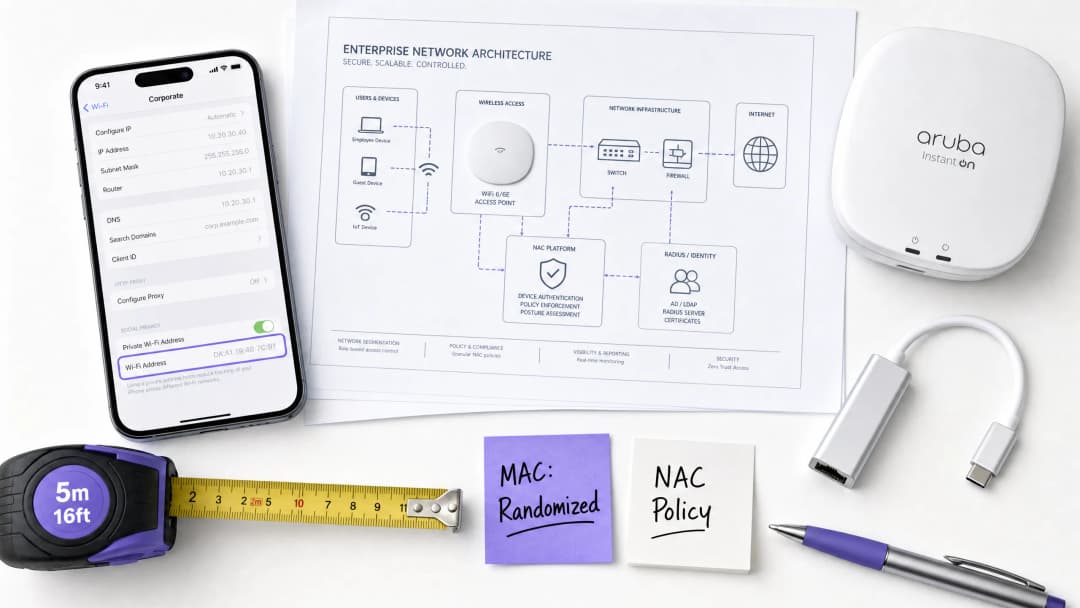
MAC address randomization - which is now the default behavior on iOS 14+, Android 10+, and Windows 11 - has fundamentally broken the device-centric authentication model that enterprise NAC systems have relied upon for two decades. When a device rotates its MAC address, the network treats it as a completely new client. The consequences are immediate and operational: Captive Portals force returning guests to re-authenticate, DHCP scopes are exhausted in high-density environments, NAC policies fail to apply, and analytics platforms report heavily inflated visitor numbers.
For IT leaders managing Hospitality properties, Retail estates, Healthcare campuses, or Transport hubs, this is not a theoretical risk - it is an active operational issue affecting guest satisfaction, security posture, and marketing data quality.
The solution is architectural, not cosmetic. Networks must migrate away from authenticating hardware identifiers (MAC addresses) towards authenticating verified user identity via IEEE 802.1X, Passpoint (Hotspot 2.0), and OpenRoaming. This guide provides the technical depth and implementation roadmap to make that transition this quarter.
Technical Deep-Dive: How MAC Randomization Works
MAC randomization is not a monolithic standard. Its implementation varies significantly across device ecosystems, creating unpredictable and layered challenges for network engineers.
How Operating Systems Handle Randomization
Modern operating systems implement MAC randomization in two distinct modes, both of which disrupt legacy NAC architectures:
Per-network randomization (default behavior): The device generates a unique, locally administered MAC address for each SSID it connects to. This address is derived from a hash of the SSID and a device-specific seed, meaning it remains static for that specific network but is entirely different from the hardware MAC. This is the default on iOS 14+, Android 10+, and Windows 11.
Periodic rotation (enhanced privacy mode): Features like Apple's 'Private WiFi Address' (iOS 15+) and Android's 'Use randomized MAC' with enhanced tracking protection will rotate the randomized MAC address for a given SSID on a daily or weekly schedule, or after a configurable period of inactivity. This is the more disruptive mode for enterprise environments.
Furthermore, devices use randomized MACs during active scanning (probe requests) - before any association occurs. This means passive analytics engines tracking probe requests cannot reliably count unique devices either.
The Cascade of Failures on Network Infrastructure
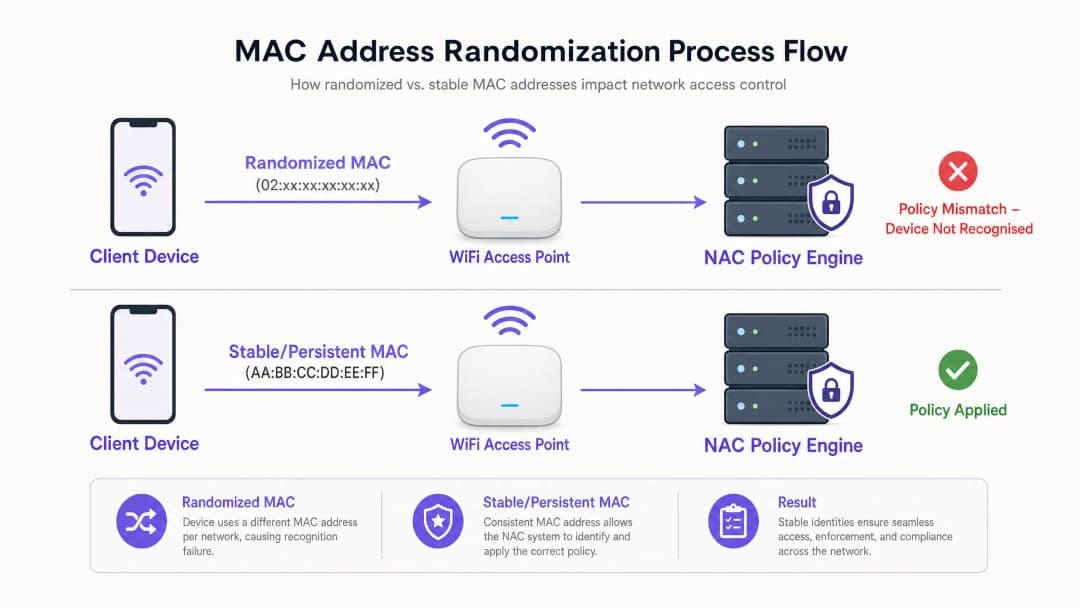
When a device rotates its MAC address, the network treats it as a completely new client. This single event triggers a cascade of architectural failures across multiple network layers:
| Failure Mode | Technical Cause | Business Impact |
|---|---|---|
| Captive Portal Fatigue | NAC session cache based on MAC; rotation invalidates the cache entry | Returning guests forced to re-authenticate; increase in support tickets |
| DHCP Scope Exhaustion | Each new MAC takes a new IP lease; old leases are not released until TTL expires | New devices unable to obtain IP addresses; network outages for guests |
| NAC Policy Mismatch | Policies (VLAN, rate limits, ACLs) are bound to MAC; new MAC has no policy | Security control bypass; guests may access the wrong VLAN |
| Analytics Inflation | Analytics based on Layer 2 MAC; one device appears as multiple unique visitors | Inaccurate foot traffic data; marketing decisions based on false metrics |
| Loss of Session Continuity | AP roaming and load balancing rely on MAC for session handoff | Degraded roaming experience; sessions dropped during movement |
IEEE Standard Reference
The locally administered address bit (the second least significant bit of the first octet) is set to 1 in randomized MACs, distinguishing them from globally unique hardware addresses. A MAC starting with 02:, 06:, 0A:, or 0E: in the first octet is definitively a locally administered (potentially randomized) address. Network engineers can use this to detect randomized clients at the RADIUS or DHCP server level, though detection alone does not solve the authentication problem.
For more context on the RF environment in which these devices operate, see our guide on WiFi Frequencies: A Guide to WiFi Frequencies in 2026.
Got questions about your specific setup?
Our team works with venue operators, IT managers, and network engineers across 80,000 venues. Book a 20-minute call and we will show you how others like you solved it.
Implementation Guide: Migrating to an Identity-Centric Architecture
The only permanent solution to MAC randomization is to completely decouple authentication and policy enforcement from hardware identifiers. The following three-step implementation roadmap provides a vendor-neutral path to an identity-centric network.
Step 1: Immediate Mitigation (Weeks 1-2)
Before initiating a full architectural migration, implement these tactical mitigation measures to stabilize the environment:
- Reduce DHCP lease times: On guest VLANs, reduce the lease duration from the typical 24 hours to 1-4 hours. This rapidly reclaims IP addresses from transient devices and prevents scope exhaustion. In high-turnover stadiums or convention centers, consider leases as short as 30 minutes.
- Expand DHCP pool sizes: Expand guest DHCP scopes as a short-term buffer to accommodate the increased demand from rotating MACs.
- Update helpdesk scripts: Instruct support staff that when troubleshooting guest connection issues, they should ask for the device's current randomized MAC for that specific SSID (found in the WiFi network details) rather than the hardware MAC from general device settings.
Step 2: Deploy IEEE 802.1X for Known Users (Months 1 - 3)
IEEE 802.1X is the cornerstone of identity-centric network access. Instead of authenticating a device via its MAC, the network authenticates the user via credentials, certificates, or tokenized identity through an EAP (Extensible Authentication Protocol) exchange with the RADIUS server.
Key Configuration Steps:
- Deploy a RADIUS server (e.g., FreeRADIUS, Cisco ISE, Aruba ClearPass) integrated with your identity directory (Active Directory, LDAP, or cloud IdP).
- Create a dedicated WPA3-Enterprise SSID for known users (staff, registered guests, loyalty members).
- Provision 802.1X credentials via a Mobile Device Management (MDM) solution for corporate devices, or via a self-service onboarding portal for BYOD and registered guests.
- Update NAC policies to enforce VLAN assignments, ACLs, and rate limits based on RADIUS attributes (e.g.,
Tunnel-Private-Group-IDfor VLAN assignment) rather than MAC addresses.
Step 3: Implement Passpoint and OpenRoaming for Transient Guests (Months 3 - 6)
For transient guests - hotel visitors, retail shoppers, stadium attendees - managing individual 802.1X credentials is impractical. Passpoint (Hotspot 2.0 / IEEE 802.11u) solves this by enabling seamless, automatic, and encrypted authentication without a Captive Portal.
Passpoint allows a device to automatically discover a compatible network and authenticate using credentials provided by a trusted Identity Provider (IdP). The user never sees a login page.
Purple's Role as an Identity Provider: Purple's Guest WiFi platform acts as a free Identity Provider for services like OpenRoaming under the Connect license. Once a guest authenticates via a Purple-powered Captive Portal or loyalty app at one location, Purple provisions them with Passpoint credentials. On subsequent visits to any OpenRoaming-enabled location in the federation, the device connects automatically and securely - the user's identity is verified at Layer 7, regardless of their MAC address.
This architecture also feeds directly into the WiFi Analytics platform, where visitor counts, dwell times, and return visit rates are calculated from verified identities rather than ephemeral MAC addresses.

Best Practices for Enterprise Deployment
The following vendor-neutral best practices apply across all deployment scales:
Decouple policy from MAC addresses: Audit every NAC policy in your environment. Any policy referencing a specific MAC address or MAC-based device group must be migrated to reference user identity attributes (RADIUS username, Active Directory group, certificate CN). This is a non-negotiable prerequisite for a MAC-randomization-resilient network.
Segment IoT devices separately: Most enterprise IoT devices (access control readers, HVAC controllers, digital signage) do not implement MAC randomization. However, they should be segregated on a dedicated VLAN using MPSK or certificate-based authentication rather than MAC Authentication Bypass (MAB), which remains vulnerable to spoofing. For a detailed breakdown of this topic, see our guide on Managing IoT Device Security with NAC and MPSK (also available in Spanish: Gestión de la seguridad de dispositivos IoT con NAC y MPSK).
Adopt WPA3 as a baseline: WPA3-Personal (SAE) and WPA3-Enterprise offer significantly stronger security than WPA2 and are required for Passpoint R3 deployments. Ensure your access point firmware and client supplicants support WPA3 before initiating Step 3.
Validate compliance logging: Under CCPA/CPRA and PCI-DSS, you must be able to associate network activity with a specific user or device. MAC-based logging systems are no longer sufficient. Ensure your SIEM and logging infrastructure captures authenticated user identities from RADIUS accounting records rather than just MAC addresses from DHCP logs.
For context on related enterprise networking decisions, see our guide on SD-WAN vs MPLS: The 2026 Enterprise Network Guide and our primer on BLE Low Energy Explained for Enterprise.
Troubleshooting and Risk Mitigation
Common Failure Modes and Resolutions
Symptom: DHCP pool exhausted during peak hours despite normal foot traffic. Diagnosis: Inspect DHCP lease logs for multiple leases assigned to the same physical device (identifiable by correlating with AP association logs). If a single device has consumed 3+ leases in 24 hours, MAC rotation is confirmed. Resolution: Reduce lease times immediately. Implement Step 2 (802.1X) to stabilize the identity of high-frequency users.
Symptom: Returning guests repeatedly redirected to the Captive Portal. Diagnosis: The NAC session cache is based on the MAC. Confirm by checking if the guest's current MAC matches the cached MAC of their previous session. Resolution: Implement Passpoint for returning guests via a loyalty app or profile provisioning. This is the only permanent solution.
Symptom: Analytics reporting 3x higher unique visitor counts than expected. Diagnosis: The analytics platform is counting unique MAC addresses instead of unique authenticated sessions. Resolution: Migrate analytics to rely on Layer 7 identity data from Captive Portal authentication logs or RADIUS accounting. Abandon MAC-based visitor counting entirely.
Symptom: IoT device loses VLAN assignment after apparently reconnecting. Diagnosis: Confirm if the IoT device firmware implements MAC randomization (rare but present in some consumer-grade IoT devices deployed in enterprise environments). Resolution: Migrate IoT authentication to MPSK or certificate-based 802.1X. Do not rely on MAB for any device implementing randomization.
ROI and Business Impact
Addressing MAC randomization is not a cost center - it is a revenue and compliance enabler.
Operational Cost Reduction: Eliminating support tickets related to Captive Portals yields immediate savings. For a large hotel chain with 200 properties, reducing guest WiFi support calls by even 30% can lower annual helpdesk costs by tens of thousands of dollars.
Marketing Data Quality: Accurate, identity-based visitor analytics directly improves the ROI of marketing campaigns. When foot traffic data is based on verified identities rather than rotating MACs, conversion rate calculations, dwell-time analysis, and return-visit attribution become reliable inputs for business decisions.
Compliance Assurance: CCPA/CPRA requires that data processing be linked to identifiable individuals with proper consent. A MAC-based system cannot reliably link network activity to a specific individual. An identity-centric system with verified authentication provides the audit trail necessary for CCPA/CPRA compliance and PCI-DSS network segmentation logging.
Guest Experience and Revenue: In hospitality, a frictionless, automatic WiFi connection (via Passpoint) is rapidly becoming a competitive differentiator. Hotels and venues that eliminate Captive Portals for returning guests report significant increases in guest satisfaction scores and longer dwell times - both of which correlate with higher ancillary revenue per visit.
Key Definitions
MAC Address Randomization
A privacy feature in modern operating systems (iOS 14+, Android 10+, Windows 11) where a device generates a locally administered, temporary MAC address instead of using its burned-in hardware address when connecting to or scanning for WiFi networks. The randomized address may be per-network (stable for a given SSID) or periodically rotated.
IT teams encounter this when devices fail to bypass captive portals on return visits, when analytics platforms report inflated unique visitor counts, or when DHCP scopes exhaust unexpectedly in high-density environments.
Network Access Control (NAC)
A security framework and associated technology that enforces policy on devices attempting to access a network, determining the level of access granted based on device identity, posture (compliance state), and user credentials. Common NAC platforms include Cisco ISE, Aruba ClearPass, and Forescout.
NAC systems traditionally relied on MAC addresses for device profiling, policy enforcement, and session tracking - a paradigm that MAC randomization has fundamentally undermined.
Captive Portal
A web page that intercepts a user's HTTP traffic and requires interaction (login, terms acceptance, or payment) before granting network access. Captive portals typically use MAC address caching to recognize returning users and bypass re-authentication.
MAC randomization breaks the 'Remember Me' functionality of captive portals, as the returning device presents a new MAC address that does not match the cached session.
IEEE 802.1X
An IEEE standard for port-based Network Access Control that provides an authentication mechanism for devices connecting to a LAN or WLAN. It uses the Extensible Authentication Protocol (EAP) to authenticate users or devices against a RADIUS server, binding network access to a verified identity rather than a hardware address.
802.1X is the primary architectural solution to MAC randomization for enterprise environments, shifting authentication from the device layer to the identity layer.
Passpoint (Hotspot 2.0 / IEEE 802.11u)
A WiFi Alliance certification program and associated IEEE standard that enables devices to automatically discover, select, and authenticate to WiFi networks using credentials provided by a trusted Identity Provider, without user interaction or captive portal redirection.
Passpoint is the recommended solution for eliminating MAC-dependent captive portals for transient guest populations in hospitality, retail, and public venues.
OpenRoaming
A Wireless Broadband Alliance (WBA) federation of WiFi networks and identity providers that enables devices to seamlessly and securely connect to participating networks globally, using their existing cell phone, enterprise, or social credentials.
Purple acts as an identity provider for OpenRoaming under the Connect license, allowing venues to offer automatic, secure guest WiFi access while maintaining identity visibility for analytics and compliance.
DHCP Scope Exhaustion
A network condition where a DHCP server has assigned all available IP addresses in its configured pool and cannot service new DHCP requests, causing new clients to fail to obtain network connectivity.
A direct operational symptom of MAC randomization in high-density environments. A single physical device rotating its MAC address can consume multiple IP leases, rapidly depleting the available pool.
Layer 7 Identity Binding
The process of associating network activity, session data, and analytics with a specific authenticated user identity at the application layer (Layer 7 of the OSI model), rather than relying on network-layer identifiers such as MAC addresses (Layer 2) or IP addresses (Layer 3).
Essential for accurate WiFi analytics, CCPA/CPRA-compliant session logging, and reliable NAC policy enforcement in a post-MAC randomization network architecture.
Locally Administered Address (LAA)
A MAC address in which the second-least-significant bit of the first octet (the 'U/L' bit) is set to 1, indicating the address has been assigned by software rather than the hardware manufacturer. Randomized MAC addresses are always locally administered addresses.
Network engineers can detect randomized clients at the RADIUS or DHCP server by checking for the LAA bit. First octets of 02, 06, 0A, or 0E indicate a locally administered address.
Worked Examples
A 500-store retail chain is experiencing DHCP pool exhaustion during peak weekend trading hours. The network team has not increased foot traffic, but DHCP logs show the guest VLAN scope is consistently exhausted by midday on Saturdays. The current lease time is 24 hours.
Step 1 - Confirm the root cause: Pull DHCP lease logs and cross-reference with AP association logs. Look for multiple leases assigned to the same physical device within a 24-hour window. If a device appears with 3+ different MAC addresses in a single day, MAC rotation is confirmed as the primary driver.
Step 2 - Immediate mitigation: Reduce DHCP lease times on the guest VLAN from 24 hours to 2 hours. This reclaims IP addresses from transient shoppers and rotating MACs significantly faster. Also expand the DHCP pool size as a buffer.
Step 3 - Medium-term fix: Implement Passpoint provisioning via the brand's loyalty app. Frequent shoppers who install the app receive a Passpoint profile that authenticates them automatically on 802.1X, bypassing the MAC-dependent captive portal. Their session is now tied to their loyalty identity, not their MAC.
Step 4 - Update NAC policies: Ensure VLAN assignment and rate limiting policies reference the RADIUS username attribute, not the MAC address. This ensures consistent policy application regardless of MAC rotation.
A 400-room hotel group is receiving guest complaints that they have to log in to the hotel WiFi every day of their stay, despite the captive portal displaying a 'Remember this device for 7 days' option. The hotel's IT team has confirmed the NAC is configured correctly with a 7-day session cache.
Step 1 - Diagnose the MAC rotation: Ask a guest to check their iPhone or Android settings for the specific hotel SSID. On iOS, navigate to Settings > WiFi > [Hotel SSID] and check if 'Private WiFi Address' is set to 'Rotating'. If enabled, the device rotates its MAC daily, invalidating the 7-day session cache every 24 hours.
Step 2 - Short-term guest communication: Update the hotel's WiFi welcome screen and in-room materials to instruct guests on how to set their Private WiFi Address to 'Fixed' for the hotel SSID. This is a stopgap measure only.
Step 3 - Permanent architectural fix: Deploy a Passpoint R2 configuration on the hotel's access points. Integrate with Purple's Guest WiFi platform as the Identity Provider. Guests who authenticate once via the captive portal on day one are provisioned with a Passpoint profile. For the remainder of their stay - and on future visits - their device connects automatically and securely without any portal interaction.
Step 4 - Validate with RADIUS accounting: Confirm that RADIUS accounting logs are capturing the guest's authenticated identity (email or loyalty ID) rather than just the MAC address, to ensure CCPA/CPRA-compliant session logging.
Practice Questions
Q1. A stadium IT director notices that their guest WiFi analytics platform is reporting 58,000 unique visitors during a match, but the stadium's verified capacity is 32,000. The analytics vendor confirms the platform counts unique MAC addresses. What is the most likely cause, and what architectural change is required to produce accurate visitor counts?
Hint: Consider how many times a single device's MAC address might rotate during a 3-hour event, and what layer of the network stack the analytics platform is reading from.
View model answer
The analytics platform is counting unique MAC addresses at Layer 2, and MAC randomization is causing each physical device to appear as multiple unique visitors as it rotates its address during the event. The 58,000 figure likely represents MAC rotation events rather than actual individuals. The architectural fix is to migrate the analytics platform to count unique authenticated identities at Layer 7 - specifically, unique captive portal authentication sessions or RADIUS accounting records. Each authenticated session is tied to a verified identity (email, cell phone number, or social login), which does not change when the MAC rotates. This will produce an accurate, CCPA/CPRA-compliant visitor count.
Q2. You are the network architect for a large healthcare organization deploying a new NAC solution. You need to ensure that medical IoT devices (infusion pumps, patient monitoring systems) remain securely connected to a clinical VLAN, while guest devices (patients and visitors) are isolated on an internet-only VLAN. The organization's CISO has flagged that MAC Authentication Bypass (MAB) is insufficient for clinical device security. How do you design the authentication architecture for each device class?
Hint: Differentiate the authentication capabilities of headless medical IoT devices versus smartphones. Consider which devices can support 802.1X certificates and which cannot.
View model answer
For medical IoT devices: Deploy 802.1X with EAP-TLS (certificate-based authentication) for devices that support it. For legacy devices that cannot support 802.1X, use MPSK (Multi Pre-Shared Key) with a unique PSK per device, ensuring each device is isolated even if one PSK is compromised. Maintain a strict device inventory and provision certificates or PSKs via the MDM/device management system. Assign clinical VLAN via RADIUS attributes on successful authentication.
For guest devices (patients and visitors): Assume all MACs are randomized. Deploy a captive portal for initial authentication (email/SMS verification for CCPA/CPRA consent). For returning guests, integrate with Purple's Passpoint/OpenRoaming to enable automatic reconnection on subsequent visits. Assign all guest traffic to an internet-only VLAN with no access to clinical networks, enforced at the RADIUS level by user group, not by MAC address.
Q3. A luxury retail brand wants to implement a "frictionless" WiFi experience where VIP loyalty members connect automatically without any portal interaction when they enter any of the brand's 80 flagship stores globally. Given that MAC randomization makes MAC-based session caching unreliable, what is the most robust architectural approach, and what data does the brand gain as a result?
Hint: MAC caching is not a viable mechanism for "frictionless" return visits. Consider what persistent, non-rotating identifier can be used instead, and how it is provisioned to the device.
View model answer
The most robust approach is Passpoint (Hotspot 2.0) provisioned via the brand's loyalty app. When a VIP member first authenticates (via the app or a one-time captive portal), the Purple Guest WiFi platform provisions a Passpoint profile containing 802.1X credentials tied to the member's loyalty identity. The profile is installed on the device and stored securely. On subsequent visits to any of the 80 stores, the device automatically discovers the Passpoint-enabled SSID and authenticates in the background using the stored credentials - no portal, no interaction, no MAC dependency.
The brand gains: (1) accurate, identity-linked connection events for each store visit, enabling precise footfall attribution to specific loyalty members; (2) dwell time and visit frequency data tied to verified identities for CRM enrichment; (3) a CCPA/CPRA-compliant audit trail linking network access to explicit consent captured during initial onboarding; and (4) the ability to trigger real-time personalized marketing messages based on in-store presence, using the WiFi Analytics platform.
Continue reading in this series
PPSK wpa3: comparing features and deployment models
This technical reference guide compares PPSK and WPA3-SAE, explaining their architectural differences and deployment models for multi-tenant environments. It provides actionable guidance for IT managers and property developers on achieving secure, isolated WiFi networks using Purple's identity-based solutions.
Managing Bandwidth for Staff WiFi: Shaping, QoS and Reducing Traffic
This guide details practical methods for managing bandwidth for staff WiFi in enterprise venues. It covers traffic shaping, QoS implementation, and how deploying Purple Shield reduces network load without requiring infrastructure upgrades.
How to Reduce the Number of WiFi SSIDs Using Per-Device PSK (iPSK, DPSK, MPSK)
This authoritative technical reference guide explains how IT teams can eliminate WiFi performance degradation caused by SSID beacon overhead by collapsing multiple purpose-built networks into a single SSID using per-device PSK (xPSK). It covers the vendor landscape across Cisco iPSK, HPE Aruba MPSK, Ruckus DPSK, Juniper Mist PPSK, and Ubiquiti UniFi PPSK, with practical implementation guidance on dynamic VLAN assignment, IoT onboarding, and PCI DSS compliance. Venue operators in hospitality, retail, stadiums, and public-sector organisations will find actionable architecture guidance and real-world worked examples.
Got questions about your specific setup?
Our team works with venue operators, IT managers, and network engineers across 80,000 venues. Book a 20-minute call and we will show you how others like you solved it.