
WiFi চ্যানেলের চূড়ান্ত গাইড: 2.4GHz বনাম 5GHz এর বিস্তারিত ব্যাখ্যা
এই নির্ভরযোগ্য গাইডটি এন্টারপ্রাইজ পরিবেশের জন্য 2.4GHz এবং 5GHz WiFi চ্যানেলের মধ্যে গুরুত্বপূর্ণ পার্থক্যগুলো বিস্তারিতভাবে তুলে ধরে। এটি IT ম্যানেজার এবং নেটওয়ার্ক আর্কিটেক্টদের চ্যানেল পরিকল্পনা, হস্তক্ষেপ কমানো এবং ROI বাড়ানোর জন্য উচ্চ-ঘনত্বপূর্ণ ভেন্যুতে স্থাপনা অপ্টিমাইজ করার কার্যকরী কৌশল সরবরাহ করে।
Video overview
এই গাইডটি শুনুন
পডকাস্ট ট্রান্সক্রিপ্ট দেখুন
আমাদের মূল সিরিজের অংশ: Guest WiFi নির্দেশিকা →
2.4 GHz vs 5 GHz WiFi channel & capacity planner
Model channel availability, co-channel interference (CCI), and cell coverage balance across 2.4 GHz and 5 GHz frequency bands. Generate vendor-ready configurations for Cisco Meraki, Aruba HPE, Ruckus, and Ubiquiti UniFi.
RF Analysis & Channel Allocation Strategy
Dual-band imbalance: 2.4 GHz is heavily saturated while 5 GHz carries excessive channel width contention. Transition clients to 5 GHz 20/40 MHz.
- Transmit Power Balancing: Crucial 6 dB rule: maintain a 6 dB transmit power delta between 2.4 GHz and 5 GHz radios. Because 2.4 GHz propagates further, equal power causes clients to stick to slow 2.4 GHz connections.
- Airtime & Rate Pruning: Set 12 Mbps minimum on 2.4 GHz and 12-24 Mbps minimum on 5 GHz. Enforce 802.11k/v neighbor reports to assist client roaming.
- Client Band Steering: Configure band steering probe suppression for RSSI > -72 dBm to steer dual-band devices to 5 GHz.
- Target Distribution: 80% to 85% of clients steered to 5 GHz; 15% to 20% on 2.4 GHz (IoT and legacy)
Vendor-specific radio configuration blueprints
Cisco Meraki
Wireless > Radio Settings:
- RF Profile: Assign high-density template
- 2.4 GHz: Channel width 20 MHz only, Min bitrate 12 Mbps
- 5 GHz: Channel width 20 MHz, Min bitrate 12 Mbps
- Band Steering: Dual-band operation (Band steering enabled, 5 GHz preferred)
- Transmit Power: 2.4 GHz Min 8 dBm / Max 11 dBm; 5 GHz Min 14 dBm / Max 17 dBm
Meraki Auto-RF will automatically balance channels 1, 6, and 11 on 2.4 GHz while honoring the configured 6 dB power gap.
Aruba HPE (AOS-10 / Central)
RF Management > Adaptive Radio Management (ARM):
- 2.4 GHz Radio: Allowed channels 1, 6, 11 (Channel width: 20MHz)
- 5 GHz Radio: Allowed channels 36-64, 100-144, 149-165 (Width: 20 MHz)
- Client Match: Enabled with steer-margin 6 dB
- Basic Rates: Disable 1, 2, 5.5, 6, 9, 11 Mbps; Beacon rate 12 Mbps
- Tx Power: 2.4 GHz 9-12 dBm EIRP, 5 GHz 15-18 dBm EIRP
Aruba Client Match actively evaluates client RSSI and steers capable devices away from congested 2.4 GHz channels without disconnecting active sessions.
Ruckus (SmartZone / Unleashed)
Wireless LANs > Advanced Options:
- ChannelScan: Background scanning enabled (Interval: 300s)
- 2.4 GHz: Restrict to non-overlapping 1, 6, 11 (20 MHz width)
- 5 GHz: Channelization 20 MHz (DFS enabled if outside radar exclusion zones)
- Band Balancing: Enabled (80% 5 GHz distribution target)
- BSS Min Rate: 12 Mbps for both bands
Ruckus BeamFlex+ dynamic antenna arrays assist in mitigating adjacent interference by focusing RF energy directly toward connected clients.
Ubiquiti UniFi
Settings > Radio Settings:
- 2.4 GHz: Width HT20, Channels Auto (1, 6, 11), Power Custom (10 dBm)
- 5 GHz: Width HE20, Channels Auto (DFS allowed), Power Custom (16 dBm)
- Band Steering: Prefer 5 GHz
- Minimum Data Rate Control: 2.4 GHz set to 12 Mbps; 5 GHz set to 12 Mbps
- Fast Roaming (802.11r) and BSS Transition (802.11v): Enabled
Set fixed transmit power rather than Auto in UniFi Network to prevent access points from broadcasting 2.4 GHz at maximum 20+ dBm.
Request an enterprise WiFi capacity & channel planning audit
Need assistance designing a conflict-free channel plan or optimizing guest onboarding across multi-vendor wireless environments? Speak with Purple's network solutions engineers for a comprehensive site survey and airtime analysis.
এক্সিকিউটিভ সামারি
উচ্চ-ঘনত্বের ওয়্যারলেস অবকাঠামো স্থাপনকারী IT ম্যানেজার এবং নেটওয়ার্ক স্থপতিদের জন্য, 2.4GHz এবং 5GHz এর মধ্যে নির্বাচন করা এখন আর কেবল রেঞ্জ বনাম স্পিডের সাধারণ আপস নয়। আধুনিক এন্টারপ্রাইজ পরিবেশে - ৫০০ কক্ষের হোটেল থেকে শুরু করে বিশাল রিটেল এস্টেট পর্যন্ত - চ্যানেল নির্বাচন একটি মৌলিক কাঠামোগত সিদ্ধান্ত যা নেটওয়ার্কের থ্রুপুট, ক্লায়েন্টের অভিজ্ঞতা এবং সুরক্ষার অবস্থান নির্ধারণ করে। এই গাইডটি 5GHz WiFi এর জন্য সেরা চ্যানেলগুলি, 2.4GHz-এ সহ-চ্যানেল হস্তক্ষেপ (co-channel interference) হ্রাস করা এবং একটি স্কেলযোগ্য চ্যানেল পরিকল্পনা ডিজাইন করার বিষয়ে একটি সুনির্দিষ্ট প্রযুক্তিগত বিশ্লেষণ প্রদান করে।
প্রাথমিক ক্লায়েন্ট অ্যাক্সেসের জন্য 5GHz স্ট্যান্ডার্ডাইজ করে এবং লেগ্যাসি IoT ডিভাইসগুলির জন্য 2.4GHz সীমাবদ্ধ করে, ভেন্যু অপারেটররা সামগ্রিক নেটওয়ার্কের ক্ষমতা নাটকীয়ভাবে বৃদ্ধি করতে পারে। যখন এটি Guest WiFi এবং শক্তিশালী WiFi Analytics-এর সাথে যুক্ত হয়, তখন একটি পরিষ্কার চ্যানেল পরিকল্পনা একটি ব্যয় কেন্দ্রকে ডেটা ক্যাপচার এবং কাস্টমার এনগেজমেন্টের একটি নির্ভরযোগ্য ইঞ্জিনে রূপান্তরিত করে।
টেকনিক্যাল ডিপ-ডাইভ: ফ্রিকোয়েন্সি ব্যান্ড এবং চ্যানেলগুলি বোঝা
একটি স্থিতিস্থাপক নেটওয়ার্ক তৈরি করতে, আমাদের ফ্রিকোয়েন্সি ব্যান্ড এবং তাদের মধ্যকার চ্যানেলগুলির মধ্যে পার্থক্য করতে হবে। একটি ফ্রিকোয়েন্সি ব্যান্ড ওয়্যারলেস যোগাযোগের জন্য বরাদ্দ করা বিস্তৃত রেডিও স্পেকট্রামকে প্রতিনিধিত্ব করে, অন্যদিকে চ্যানেলগুলি হলো নির্দিষ্ট উপবিভাগ যেখানে অ্যাক্সেস পয়েন্ট (APs) এবং ক্লায়েন্ট ডিভাইসগুলি সংযোগ স্থাপন করে।
2.4GHz ব্যান্ড: লেগ্যাসি সীমাবদ্ধতা এবং হস্তক্ষেপ
2.4GHz ব্যান্ডটি (2.400 - 2.4835 GHz) হলো ওয়্যারলেস নেটওয়ার্কিংয়ের ঐতিহ্যবাহী প্রধান ভিত্তি। এর প্রধান সুবিধা হলো সিগন্যাল প্রচার; নিম্ন-ফ্রিকোয়েন্সির তরঙ্গগুলি উচ্চ ফ্রিকোয়েন্সির তুলনায় দেয়াল, দরজা এবং মেঝেতে আরও কার্যকরভাবে প্রবেশ করতে পারে। তবে, এই রেঞ্জটি উচ্চ-ঘনত্বের স্থাপনায় একটি গুরুতর কাঠামোগত অসুবিধার সৃষ্টি করে।
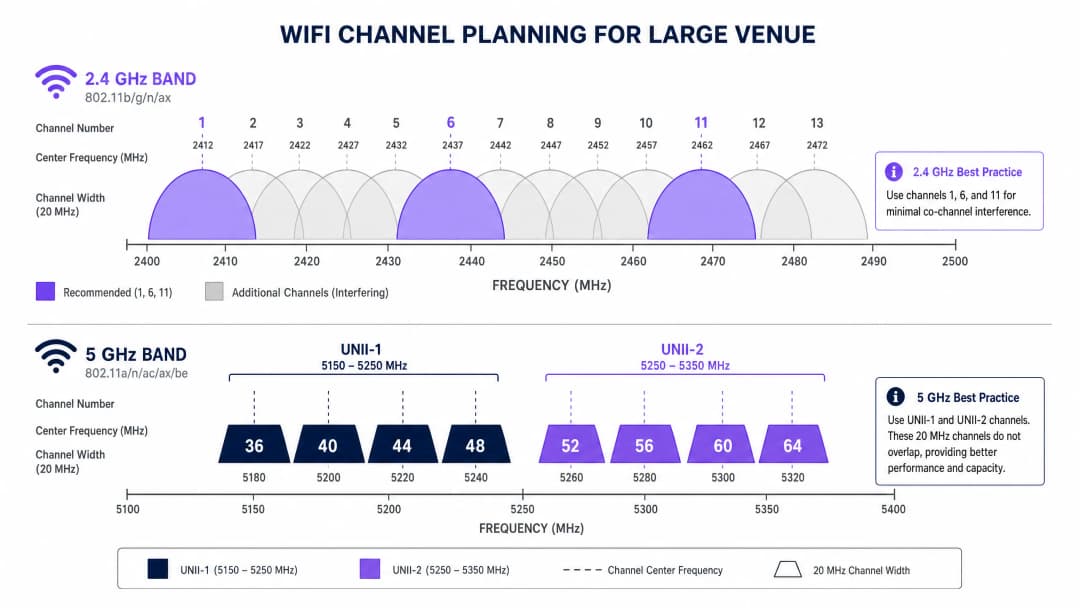
যুক্তরাজ্য এবং ইউরোপে, 2.4GHz ব্যান্ডটি ১৩টি চ্যানেল প্রদান করে। প্রতিটি চ্যানেল 20MHz চওড়া, তবে এগুলি কেবল 5MHz ব্যবধানে অবস্থিত। এই কাঠামোগত ওভারল্যাপের অর্থ হলো মাত্র তিনটি চ্যানেল - ১, ৬ এবং ১১ - প্রকৃতপক্ষে নন-ওভারল্যাপিং। একটি ঘন পরিবেশে, যেমন একটি Hospitality ভেন্যুতে যেখানে প্রতিটি অন্য ঘরে AP স্থাপন করা হয়েছে, সেখানে শত শত ডিভাইসকে তিনটি চ্যানেলে বাধ্য করা অনিবার্যভাবে গুরুতর সহ-চ্যানেল হস্তক্ষেপের (CCI) দিকে পরিচালিত করে। তদুপরি, 2.4GHz স্পেকট্রামটি নন-WiFi ইন্টারফিয়ারার যেমন মাইক্রোওয়েভ ওভেন, ব্লুটুথ ডিভাইস এবং DECT ফোন দ্বারা ব্যাপকভাবে দূষিত।
5GHz ব্যান্ড: ক্যাপাসিটি এবং DFS চ্যালেঞ্জ
5GHz ব্যান্ডটি (5.150 - 5.850 GHz) মৌলিকভাবে নেটওয়ার্ক ক্ষমতার সমীকরণ পরিবর্তন করে। এটি উল্লেখযোগ্যভাবে আরও বেশি ব্যবহারযোগ্য স্পেকট্রাম সরবরাহ করে, যা আরও চওড়া চ্যানেল এবং উচ্চতর ডেটা রেটের অনুমতি দেয়। যুক্তরাজ্যে, 5GHz ব্যান্ডটি আনলাইসেন্সড ন্যাশনাল ইনফরমেশন ইনফ্রাস্ট্রাকচার (UNII) সাব-ব্যান্ডে বিভক্ত, যা ১৯টি পর্যন্ত নন-overlapping 20MHz চ্যানেল অফার করে।
5GHz WiFi-এর জন্য সেরা চ্যানেল নির্ধারণ করার সময়, নেটওয়ার্ক আর্কিটেক্টদের অবশ্যই Dynamic Frequency Selection (DFS) নেভিগেট করতে হবে। DFS হল একটি নিয়ন্ত্রক প্রয়োজনীয়তা যা WiFi নেটওয়ার্কগুলিকে বর্তমান রাডার সিস্টেম, যেমন আবহাওয়া এবং সামরিক রাডারের সাথে হস্তক্ষেপ করতে বাধা দেওয়ার জন্য ডিজাইন করা হয়েছে।
- UNII-1 (চ্যানেল 36, 40, 44, 48): এই চ্যানেলগুলির জন্য DFS-এর প্রয়োজন নেই। এন্টারপ্রাইজ স্থাপনার জন্য এগুলি হল গোল্ড স্ট্যান্ডার্ড কারণ রাডার সনাক্ত করা হলে APs হঠাৎ করে চ্যানেল পরিবর্তন করবে না, যা স্থিতিশীল ক্লায়েন্ট সংযোগ নিশ্চিত করে।
- UNII-2A এবং UNII-2C (চ্যানেল 52-144): এগুলি DFS চ্যানেল। যদি একটি AP তার অপারেটিং চ্যানেলে একটি রাডার সিগনেচার সনাক্ত করে, তবে তাকে অবিলম্বে সেই চ্যানেলটি খালি করতে হবে এবং অন্য চ্যানেলে চলে যেতে হবে, যা সক্রিয় ক্লায়েন্ট সেশনগুলিকে ড্রপ করতে পারে।
- UNII-3 (চ্যানেল 149-165): অঞ্চলভেদে এর প্রাপ্যতা ভিন্ন হয়, তবে যেখানে অনুমতি দেওয়া হয়, এগুলি সাধারণত নন-DFS চ্যানেল।
আপনার নির্দিষ্ট সেটআপ নিয়ে কোনো প্রশ্ন আছে?
আমাদের টিম ৮০,০০০ ভেন্যুতে ভেন্যু অপারেটর, IT ম্যানেজার এবং নেটওয়ার্ক ইঞ্জিনিয়ারদের সাথে কাজ করে। একটি ২০ মিনিটের কল বুক করুন এবং আপনার মতো অন্যরা কীভাবে এর সমাধান করেছেন তা আমরা আপনাকে দেখাব।
বাস্তবায়ন গাইড: একটি চ্যানেল পরিকল্পনা তৈরি করা
একটি সফল স্থাপনার জন্য চ্যানেল পরিকল্পনার ক্ষেত্রে একটি ভেন্ডর-নিরপেক্ষ, ডেটা-চালিত পদ্ধতির প্রয়োজন। আপনি একটি Retail পরিবেশে মোতায়েন করছেন বা একটি Transport হাব আপগ্রেড করছেন না কেন, এই পদক্ষেপগুলি একটি উচ্চ-ক্ষমতাসম্পন্ন নেটওয়ার্কের জন্য বেসলাইন তৈরি করে।
১. একটি অ্যাক্টিভ RF সাইট সার্ভে পরিচালনা করুন
কখনই শুধুমাত্র ভবিষ্যদ্বাণীমূলক মডেলিংয়ের উপর নির্ভর করবেন না। বিদ্যমান RF পরিবেশের মানচিত্র তৈরি করতে একটি স্পেকট্রাম অ্যানালাইজার ব্যবহার করে একটি অ্যাক্টিভ সার্ভে পরিচালনা করুন। রোগ APs, নন-WiFi হস্তক্ষেপ এবং প্রতিবেশী নেটওয়ার্কগুলি সনাক্ত করুন। বিদ্যমান কনজেশন এড়ানো চ্যানেলগুলি বরাদ্দ করার জন্য এই অভিজ্ঞতামূলক ডেটা অপরিহার্য।
২. রক্ষণশীলভাবে চ্যানেলের প্রস্থ নির্ধারণ করুন
চ্যানেল বন্ডিং করে (যেমন 80MHz বা 160MHz প্রস্থ ব্যবহার করে) থ্রুপুট সর্বাধিক করার প্রবণতা ঘনবসতিপূর্ণ ভেন্যুগুলিতে একটি সাধারণ আর্কিটেকচারাল ত্রুটি।
- 5GHz-এ: 20MHz বা 40MHz চ্যানেল প্রস্থে স্ট্যান্ডার্ডাইজ করুন। যদিও প্রতি ক্লায়েন্ট পিক স্পিড 80MHz চ্যানেলের তুলনায় কম হয়, তবুও নেটওয়ার্কের সামগ্রিক থ্রুপুট বৃদ্ধি পায় কারণ আপনি আরও বেশি ওভারল্যাপ না করা চ্যানেল সংরক্ষণ করতে পারেন, যা CCI হ্রাস করে।
- 2.4GHz-এ: কঠোরভাবে 20MHz চ্যানেল প্রস্থ প্রয়োগ করুন। একটি এন্টারপ্রাইজ সেটিংয়ে 2.4GHz-এ 40MHz ব্যবহার করা মারাত্মক হস্তক্ষেপের গ্যারান্টি দেয়।
৩. ব্যান্ড স্টিয়ারিং বাস্তবায়ন করুন
আধুনিক এন্টারপ্রাইজ APs ব্যান্ড স্টিয়ারিং সমর্থন করে, এমন একটি বৈশিষ্ট্য যা ডুয়াল-ব্যান্ড সক্ষম ক্লায়েন্টদের 5GHz ব্যান্ডের সাথে সংযোগ করতে উত্সাহিত করে। এটি লেগাসি ডিভাইস এবং IoT সেন্সরগুলির জন্য 2.4GHz স্পেকট্রাম খালি করে দেয়, যেমনটি আমাদের BLE Low Energy Explained for Enterprise গাইডে আলোচনা করা হয়েছে।
৪. ট্রান্সমিট পাওয়ার অপ্টিমাইজ করুন
উচ্চতর ট্রান্সমিট পাওয়ার মানেই ভালো পারফরম্যান্স নয়; এর মানে একটি বৃহত্তর ইন্টারফারেন্স ডোমেন। হাই-ডেনসিটি ডেপ্লয়মেন্টের ক্ষেত্রে, সেলের সাইজ কমাতে এবং CCI সীমিত করতে 2.4GHz রেডিওতে ট্রান্সমিট পাওয়ার হ্রাস করুন (যেমন ৮-১১ dBm)। কম পেনিট্রেশন ক্ষমতা পূরণ করতে 5GHz রেডিও কিছুটা বেশি পাওয়ারে (যেমন ১৪-১৭ dBm) চলতে পারে।
সেরা অনুশীলন এবং ইন্ডাস্ট্রি স্ট্যান্ডার্ড
কমপ্লায়েন্স এবং অপারেশনাল উৎকর্ষতা বজায় রাখতে, এই ইন্ডাস্ট্রি স্ট্যান্ডার্ড সুপারিশগুলো অনুসরণ করুন:
১. গুরুত্বপূর্ণ ইনফাস্ট্রাকচারের জন্য UNII-1 স্ট্যান্ডার্ডাইজ করুন: এক্সিকিউটিভ বোর্ডরুম বা পয়েন্ট অব সেল (POS) ক্লাস্টারের মতো সম্পূর্ণ স্থিতিশীলতার প্রয়োজন এমন এলাকার জন্য ৩৬, ৪০, ৪৪ এবং ৪৮ চ্যানেলগুলো ব্যবহার করুন। ২. ডায়নামিক অপ্টিমাইজেশনের জন্য অ্যানালিটিক্স ব্যবহার করুন: RF এনভায়রনমেন্ট ক্রমাগত পর্যবেক্ষণ করতে Purple এর মতো প্ল্যাটফর্মগুলো ব্যবহার করুন। যদি কোনো প্রতিবেশী টেন্যান্ট কোনো রোগ (rogue) AP ডেপ্লয় করে, তবে আপনার অ্যানালিটিক্সের বর্ধিত চ্যানেল ব্যবহার শনাক্ত করা উচিত এবং একটি অটোমেটেড বা ম্যানুয়াল চ্যানেল অ্যাডজাস্টমেন্ট ট্রিগার করা উচিত। অফিসের পরিবেশ অপ্টিমাইজ করার বিষয়ে বিস্তারিত জানতে Office WiFi: Optimize Your Modern Office WiFi Network দেখুন। ৩. লাইভে যাওয়ার আগে DFS আচরণ অডিট করুন: UNII-2 চ্যানেল ব্যবহার করলে, AP-গুলো কত ঘন ঘন DFS ইভেন্ট ট্রিগার করে তা পর্যবেক্ষণ করার জন্য কঠোর পরীক্ষা নিরীক্ষা চালান। যদি রাডার শনাক্তকরণ ঘন ঘন ঘটে (যেমন এয়ারপোর্টের কাছাকাছি), তবে AP-এর অনুমোদিত চ্যানেলের তালিকা থেকে সেই নির্দিষ্ট চ্যানেলগুলো সরিয়ে দিন। ৪. Wi-Fi 6E-এর জন্য প্রস্তুতি নিন: হার্ডওয়্যার রিফ্রেশ করার সময়, Wi-Fi 6E (6GHz ব্যান্ডে চালিত 802.11ax) মূল্যায়ন করুন। 6GHz স্পেকট্রাম যুক্তরাজ্যে ৫০০MHz পর্যন্ত অতিরিক্ত, ইন্টারফারেন্স-মুক্ত ব্যান্ডউইথ প্রদান করে, যা হাই-ডেনসিটি ক্যাপাসিটির সমস্যাটি কার্যকরভাবে সমাধান করে। বিস্তারিত পড়ুন WiFi Frequencies: A Guide to WiFi Frequencies in 2026 এ।
ট্রাবলশুটিং এবং ঝুঁকি হ্রাসকরণ
সতর্ক পরিকল্পনার পরেও, RF এনভায়রনমেন্ট গতিশীল থাকে। সাধারণ ব্যর্থতার কারণগুলোর মধ্যে রয়েছে:
- "স্টিকি ক্লায়েন্ট" সমস্যা: ক্লায়েন্টরা কাছাকাছি থাকা AP-তে রোম করতে অস্বীকার করে, যার ফলে দুর্বল কানেকশন বজায় থাকে এবং সামগ্রিক সেলের পারফরম্যান্স হ্রাস পায়। ঝুঁকি হ্রাসকরণ: নিরবচ্ছিন্ন রোমিং সহজতর করতে ন্যূনতম RSSI থ্রেশহোল্ড প্রয়োগ করুন এবং 802.11k/v/r প্রোটোকল ব্যবহার করুন।
- অটো-চ্যানেল বিপর্যয়: কন্ট্রোলার-ভিত্তিক অটো-চ্যানেল অ্যালগরিদমগুলো প্রায়শই একই কয়েকটি চ্যানেলের উপর নির্ভরশীল হয়ে পড়ে, যার ফলে ব্যাপক হারে CCI ঘটে। ঝুঁকি হ্রাসকরণ: শুধুমাত্র প্রাথমিক ডেপ্লয়মেন্ট বা শিডিউল করা রক্ষণাবেক্ষণের সময় অটো-চ্যানেল ফিচারগুলো ব্যবহার করুন। চলমান অপারেশনের জন্য, অ্যানালিটিক্স দ্বারা যাচাইকৃত একটি স্ট্যাটিক ও সতর্কতার সাথে পরিকল্পিত চ্যানেল ম্যাপের উপর নির্ভর করুন।
- হ্রাসপ্রাপ্ত নিরাপত্তা পরিস্থিতি: দুর্বল চ্যানেল পরিকল্পনা রোগ এপি (rogue AP) বা ইভিল টুইন (evil twin) আক্রমণের উপস্থিতি আড়াল করতে পারে। প্রশমন: একটি পরিচ্ছন্ন RF পরিবেশ অসঙ্গতি সনাক্তকরণকে উল্লেখযোগ্যভাবে আরও নির্ভরযোগ্য করে তোলে। আপনার আর্কিটেকচার আধুনিক নিরাপত্তা ফ্রেমওয়ার্কের সাথে সারিবদ্ধ আছে কিনা তা নিশ্চিত করুন, যেমনটি La lista de verificación para migrar de NAC heredado a NAC nativo de la nube এবং A Lista de Verificação para Migrar de NAC Legado para NAC Nativo da Nuvem-এ আলোচনা করা হয়েছে।
ROI এবং ব্যবসায়িক প্রভাব
সঠিকভাবে ইঞ্জিনিয়ারড ওয়্যারলেস নেটওয়ার্কের ব্যবসায়িক প্রভাব আইটি হেল্পডেস্ক টিকিটের সংখ্যা হ্রাসের চেয়েও অনেক বেশি প্রসারিত। খুচরা এবং আতিথেয়তা শিল্পে, অতিথিদের সম্পৃক্ততা এবং ডেটা সংগ্রহের জন্য WiFi নেটওয়ার্ক হলো প্রাথমিক মাধ্যম।
যখন কো-চ্যানেল ইন্টারফেয়ারেন্স দূর করা হয় এবং ক্লায়েন্টদের সফলভাবে পরিচ্ছন্ন 5GHz চ্যানেলে চালিত করা হয়, তখন নেটওয়ার্কটি কর্মক্ষমতার অবনতি ছাড়াই উচ্চ ক্লায়েন্ট ঘনত্বকে সমর্থন করতে পারে। এই নির্ভরযোগ্যতা নিশ্চিত করে যে Captive Portals তাৎক্ষণিকভাবে লোড হবে, যা গেস্ট WiFi লগইনের কনভার্সন রেট বৃদ্ধি করে। এর ফলে সংগৃহীত ফার্স্ট-পার্টি ডেটা লক্ষ্যযুক্ত বিপণন প্রচারাভিযান পরিচালনা করে, যা সরাসরি মূল আয়ের উপর ইতিবাচক প্রভাব ফেলে।
এই বিষয়ে আমাদের সম্পূর্ণ প্রযুক্তিগত ব্রিফিংটি শুনুন:
মূল সংজ্ঞাসমূহ
Co-Channel Interference (CCI)
যখন দুটি বা ততোধিক অ্যাক্সেস পয়েন্ট ঠিক একই চ্যানেলে কাজ করে এবং তাদের কভারেজ এলাকা একে অপরের ওপর চলে আসে তখন এই হস্তক্ষেপের সৃষ্টি হয়।
CCI ডিভাইসগুলোকে ট্রান্সমিট করার জন্য তাদের নিজ নিজ সুযোগের অপেক্ষা করতে বাধ্য করে, যা ঘন স্থাপনাগুলোতে নেটওয়ার্কের গতি মারাত্মকভাবে কমিয়ে দেয়।
Dynamic Frequency Selection (DFS)
একটি নিয়ন্ত্রক বাধ্যবাধকতা যার জন্য নির্দিষ্ট কিছু 5GHz ব্যান্ডে চালিত WiFi ডিভাইসগুলোকে রাডার সিস্টেম সনাক্ত করতে এবং তা এড়িয়ে চলতে হয়।
যদি একটি AP কোনো DFS চ্যানেলে রাডার সনাক্ত করে, তবে এটিকে অবিলম্বে চ্যানেল পরিবর্তন করতে হবে, যার ফলে সংযুক্ত ক্লায়েন্টদের কানেক্টিভিটি সাময়িকভাবে বিচ্ছিন্ন হতে পারে।
Band Steering
এন্টারপ্রাইজ AP-এর একটি বৈশিষ্ট্য যা ডুয়াল-ব্যান্ড ব্যবহারে সক্ষম ক্লায়েন্টদের সনাক্ত করে এবং তাদের 2.4GHz-এর পরিবর্তে সক্রিয়ভাবে 5GHz ব্যান্ডের সাথে সংযুক্ত হতে উৎসাহিত করে।
পুরানো IoT ডিভাইসগুলোর জন্য সীমিত 2.4GHz স্পেকট্রাম সংরক্ষণ করা এবং উচ্চ-পারফরম্যান্স ক্লায়েন্টদের সর্বোত্তম গতি নিশ্চিত করার জন্য এটি অত্যন্ত প্রয়োজনীয়।
Channel Bonding
ডাটা থ্রুপুট বাড়ানোর জন্য দুটি বা ততোধিক সংলগ্ন 20MHz চ্যানেলকে একটি একক প্রশস্ত চ্যানেলে (যেমন, 40MHz, 80MHz) একত্রিত করার প্রক্রিয়া।
যদিও এটি গতি বাড়ায়, এটি উপলব্ধ নন-ওভারল্যাপিং চ্যানেলের মোট সংখ্যা কমিয়ে দেয়, যা উচ্চ-ঘনত্বের পরিবেশে বেশ ঝুঁকিপূর্ণ।
UNII-1 Band
5GHz স্পেকট্রামের নিচের অংশ (চ্যানেল ৩৬, ৪০, ৪৪, ৪৮) যার জন্য DFS সম্মতির প্রয়োজন হয় না।
গুরুত্বপূর্ণ এন্টারপ্রাইজ ওয়্যারলেস ট্রাফিকের জন্য সবচেয়ে স্থিতিশীল এবং নির্ভরযোগ্য চ্যানেল।
Adjacent Channel Interference (ACI)
ওভারল্যাপ হওয়া কিন্তু অভিন্ন নয় এমন ফ্রিকোয়েন্সিতে ট্রান্সমিশনের কারণে সৃষ্ট হস্তক্ষেপ (যেমন, 2.4GHz-এ চ্যানেল ৩ এবং চ্যানেল ৬ ব্যবহার করা)।
ACI মূলত CCI-এর চেয়ে বেশি ক্ষতিকারক কারণ ডিভাইসগুলো ওভারল্যাপ হওয়া সিগন্যাল সঠিকভাবে ডিকোড করতে পারে না, যার ফলে উচ্চ মাত্রায় প্যাকেট লস হয়।
RSSI (Received Signal Strength Indicator)
একটি প্রাপ্ত রেডিও সিগন্যালে উপস্থিত পাওয়ার পরিমাপের একটি একক।
নেটওয়ার্ক অ্যাডমিনিস্ট্রেটরদের দ্বারা ন্যূনতম কানেকশন থ্রেশহোল্ড সেট করতে ব্যবহৃত হয়, যা 'sticky clients'-কে কাছাকাছি অ্যাক্সেস পয়েন্টগুলিতে রোম করতে বাধ্য করে।
BSS Coloring
Wi-Fi 6 (802.11ax)-এ প্রবর্তিত একটি ফিচার যা ট্রান্সমিশনে একটি 'colour' আইডেন্টিফায়ার যুক্ত করে, যার ফলে একই চ্যানেলে থাকা AP গুলি কালার না মিললে একে অপরের ট্রাফিক উপেক্ষা করতে পারে।
স্টেডিয়ামের মতো অত্যন্ত ঘনবসতিপূর্ণ ডেপ্লয়মেন্টে কো-চ্যানেল ইন্টারফেয়ারেন্সের প্রভাব উল্লেখযোগ্যভাবে হ্রাস করে।
সমাধানকৃত উদাহরণসমূহ
একটি ঘন শহুরে পরিবেশে অবস্থিত ৪০০ কক্ষের হোটেলে সন্ধ্যার ব্যস্ত সময়ে (সন্ধ্যা ৭টা - রাত ১০টা) অতিথিরা ধীরগতির WiFi নিয়ে ব্যাপক অভিযোগ করছেন। বর্তমান সিস্টেমে প্রতি দুটি কক্ষের একটিতে ডুয়াল-ব্যান্ড AP ব্যবহার করা হচ্ছে, যেখানে অটো-চ্যানেল সিলেকশন সক্রিয় রয়েছে এবং 5GHz-এ 80MHz চ্যানেল উইডথ সেট করা আছে।
১. অনবরত চ্যানেলের পরিবর্তন রোধ করতে অটো-চ্যানেল সিলেকশন নিষ্ক্রিয় করুন। ২. উপলব্ধ নন-ওভারল্যাপিং চ্যানেলের সংখ্যা বাড়াতে এবং কো-চ্যানেল হস্তক্ষেপ দূর করতে 5GHz চ্যানেল উইডথ 80MHz থেকে কমিয়ে 20MHz করুন। ৩. UNII-1 (36, 40, 44, 48) এবং পরিষ্কার UNII-2 চ্যানেলগুলোকে অগ্রাধিকার দিয়ে statically 5GHz চ্যানেল অ্যাসাইন করুন। ৪. সেল ওভারল্যাপ কমাতে 2.4GHz ট্রান্সমিট পাওয়ার 8dBm-এ হ্রাস করুন এবং চ্যানেল ১, ৬ ও ১১-এর মধ্যে সীমাবদ্ধ করুন।
একটি বড় রিটেইল চেইন একটি নতুন পয়েন্ট-অফ-সেল (POS) সিস্টেম স্থাপন করছে যা ওয়্যারলেস কানেক্টিভিটির উপর নির্ভরশীল। দোকানটি এমন একটি শপিং সেন্টারে অবস্থিত যেখানে আশেপাশের ডজন ডজন রিটেইল WiFi নেটওয়ার্ক দৃশ্যমান। POS বিক্রেতা 'ভালো রেঞ্জ'-এর জন্য 2.4GHz ব্যবহার করার সুপারিশ করেছেন।
১. গুরুত্বপূর্ণ অবকাঠামোর জন্য বিক্রেতার 2.4GHz ব্যবহারের সুপারিশটি প্রত্যাখ্যান করুন। ২. শুধুমাত্র 5GHz ব্যান্ডে কাজ করার জন্য POS সিস্টেমের জন্য একটি ডেডিকেটেড SSID কনফিগার করুন। ৩. সম্ভাব্য DFS রাডার বিঘ্ন এড়াতে এই SSID-টি UNII-1 চ্যানেলে (36, 40, 44, 48) অ্যাসাইন করুন। ৪. গ্রাহকদের ডিভাইসগুলোকে 2.4GHz স্পেকট্রাম থেকে যতটা সম্ভব দূরে রাখতে পাবলিক Guest WiFi SSID-তে ব্যান্ড স্টিয়ারিং প্রয়োগ করুন।
অনুশীলনী প্রশ্নসমূহ
Q1. আপনি এমন একটি হাসপাতালে WiFi ডেপ্লয় করছেন যেখানে অত্যন্ত গুরুত্বপূর্ণ লাইফ-ক্রিটিক্যাল টেলিমেট্রি সরঞ্জাম 2.4GHz-এ কাজ করে। হাসপাতালটি ওয়েটিং এরিয়াতে উচ্চ-গতির Guest WiFi সুবিধা প্রদান করতে চায়। আপনি কীভাবে এই চ্যানেল প্ল্যানটি ডিজাইন করবেন?
ইঙ্গিত: শারীরিক দূরত্ব এবং ব্যান্ড ডেডিকেশনের কথা বিবেচনা করুন।
মডেল উত্তর দেখুন
১. 2.4GHz ব্যান্ডটি সম্পূর্ণভাবে টেলিমেট্রি সরঞ্জামের জন্য ডেডিকেট করুন এবং স্ট্যাটিকভাবে চ্যানেল ১, ৬ এবং ১১ অ্যাসাইন করুন। ২. 2.4GHz রেডিওতে Guest WiFi SSID সম্পূর্ণভাবে নিষ্ক্রিয় করুন। ৩. শুধুমাত্র UNII-1 এবং UNII-2 চ্যানেল ব্যবহার করে 5GHz ব্যান্ডে Guest WiFi প্রচার করুন। এটি নিশ্চিত করে যে লাইফ-ক্রিটিক্যাল 2.4GHz স্পেকট্রাম কোনো রকম বাধা ছাড়াই থাকবে এবং অতিথিদের জন্য উচ্চ ক্ষমতা প্রদান করবে।
Q2. একটি স্টেডিয়াম ডেপ্লয়মেন্টে 20MHz চ্যানেল ব্যবহার করা সত্ত্বেও 5GHz-এ মারাত্মক ইন্টারফেয়ারেন্স হচ্ছে। AP গুলি অনেক উঁচুতে মাউন্ট করা হয়েছে এবং পুরো বাটি আকৃতির স্টেডিয়াম জুড়ে একে অপরের সিগন্যাল 'শুনতে' পাচ্ছে। এর জন্য কী ধরনের কনফিগারেশন পরিবর্তন প্রয়োজন?
ইঙ্গিত: সিগন্যালটি কতদূর যাচ্ছে এবং কীভাবে AP গুলি চ্যানেলটি ফাঁকা কিনা তা সিদ্ধান্ত নেয় সে সম্পর্কে চিন্তা করুন।
মডেল উত্তর দেখুন
১. সেলের আকার ছোট করতে 5GHz রেডিওতে ট্রান্সমিট (Tx) পাওয়ার উল্লেখযোগ্যভাবে হ্রাস করুন। ২. RX-SOP (Receive Start of Packet) থ্রেশহোল্ড বাড়ান, যা স্টেডিয়ামের দূরবর্তী AP থেকে আসা দুর্বল সিগন্যালের প্রতি AP-কে 'বধির' করে তোলে, ফলে এটি ক্যারিয়ার সেন্স মেকানিজম ট্রিগার না করেই একই সাথে ট্রান্সমিট করতে পারে।
Q3. আপনার কর্পোরেট অফিসটি একটি বড় বাণিজ্যিক বিমানবন্দর থেকে ২ মাইলেরও কম দূরত্বে অবস্থিত। আপনি বর্তমানে ৩৬, ৪০, ৪৪, ৪৮, ৫২, ৫৬, ৬০ এবং ৬৪ চ্যানেলগুলি ব্যবহার করছেন। ব্যবহারকারীরা হঠাৎ হঠাৎ এবং ক্ষণস্থায়ী ডিসকানেকশনের অভিযোগ করছেন। এর সম্ভাব্য কারণ এবং সমাধান কী?
ইঙ্গিত: নির্দিষ্ট 5GHz চ্যানেলের জন্য রেগুলেটরি প্রয়োজনীয়তাগুলি বিবেচনা করুন।
মডেল উত্তর দেখুন
এই ডিসকানেকশনগুলি DFS (Dynamic Frequency Selection) ইভেন্টের কারণে ঘটছে। ৫২ - ৬৪ চ্যানেলের AP গুলি বিমানবন্দরের রাডার শনাক্ত করছে এবং চ্যানেল খালি করে দিচ্ছে। এর সমাধান হলো অনুমোদিত চ্যানেলের তালিকা থেকে UNII-2 DFS চ্যানেলগুলি (৫২ - ৬৪) সরিয়ে ফেলা এবং শুধুমাত্র নন-DFS UNII-1 চ্যানেলগুলির (৩৬ - ৪৮) উপর নির্ভর করা, অথবা নন-DFS 6GHz ব্যান্ড ব্যবহার করতে Wi-Fi 6E-তে আপগ্রেড করা।
প্রায়শই জিজ্ঞাসিত প্রশ্নাবলী
Why are channels 1, 6, and 11 the only non-overlapping channels on 2.4 GHz?
The 2.4 GHz ISM band allocates channels spaced only 5 MHz apart, but standard 802.11 transmissions require 20 MHz or 22 MHz of channel width. Channels 1 (2412 MHz), 6 (2437 MHz), and 11 (2462 MHz) are separated by 25 MHz, allowing them to operate concurrently without spectral overlap or adjacent channel interference.
What is the recommended transmit power difference between 2.4 GHz and 5 GHz radios?
Enterprise network engineers recommend maintaining a 6 dB transmit power differential between 2.4 GHz and 5 GHz radios (for example, setting 2.4 GHz to 10-12 dBm and 5 GHz to 16-18 dBm). Because 2.4 GHz RF signals propagate further and penetrate obstacles more effectively, equal power levels cause client devices to stick to slower 2.4 GHz associations instead of roaming to high-throughput 5 GHz cells.
Should enterprise networks use 40 MHz or 80 MHz channel widths on 5 GHz?
For high-density venues, hospitals, and corporate offices, 20 MHz or conservative 40 MHz channel widths are recommended. While 80 MHz delivers higher peak single-client PHY rates, it reduces the number of non-overlapping channels in the UNII bands to only 6 (or only 2 without DFS), creating severe co-channel interference and airtime contention across multi-AP deployments.
How does band steering improve overall WiFi network performance?
Band steering detects dual-band capable client probe requests and suppresses responses on the 2.4 GHz radio while responding promptly on the 5 GHz radio. This steers modern smartphones and laptops to the wider, cleaner 5 GHz spectrum, reserving scarce 2.4 GHz airtime for legacy clients and low-power IoT devices.
How does Purple optimize guest WiFi across multi-band enterprise wireless infrastructure?
Purple provides hardware-agnostic captive portal onboarding and footfall analytics that integrate directly with enterprise controllers (Cisco Meraki, Aruba HPE, Ruckus, Ubiquiti). Purple enables seamless visitor authentication, bandwidth capping, and network segmentation across 2.4 GHz and 5 GHz SSIDs without degrading internal corporate airtime capacity.
এই সিরিজে পড়া চালিয়ে যান
অপ্টিমাল চ্যানেল প্ল্যানিংয়ের জন্য RSSI এবং সিগন্যালের ক্ষমতা বোঝা
এই নির্দেশিকাটি অপ্টিমাল চ্যানেল প্ল্যানিংয়ের জন্য RSSI, সিগন্যাল-টু-নয়েজ রেশিও (SNR), এবং RF প্রোপাগেশন নীতিগুলির একটি বিস্তৃত প্রযুক্তিগত বিশ্লেষণ প্রদান করে। এটি IT ম্যানেজার, নেটওয়ার্ক আর্কিটেক্ট এবং ভেন্যু অপারেশন ডিরেক্টরদের কো-চ্যানেল এবং অ্যাডজাসেন্ট চ্যানেল ইন্টারফারেন্স হ্রাস করার, AP প্লেসমেন্ট অপ্টিমাইজ করার এবং হসপিটালিটি, রিটেইল এবং পাবলিক-সেক্টর পরিবেশে পরিমাপযোগ্য ব্যবসায়িক প্রভাবের জন্য অ্যানালিটিক্স ব্যবহার করার কার্যকর কৌশল প্রদান করে।
WiFi 6 বনাম WiFi 5: এটি কি চ্যানেল ইন্টারফেয়ারেন্সের সমাধান করে?
এই গাইডটি OFDMA এবং BSS Coloring-এর মাধ্যমে কীভাবে WiFi 6 (802.11ax) উচ্চ-ঘনত্বের এন্টারপ্রাইজ পরিবেশে চ্যানেল ইন্টারফেয়ারেন্সের সমাধান করে সে সম্পর্কে একটি প্রযুক্তিগত বিশ্লেষণ প্রদান করে। এটি IT ম্যানেজার, নেটওয়ার্ক আর্কিটেক্ট এবং CTO-দের কার্যকর ডেপ্লয়মেন্ট কৌশল, হসপিটালিটি ও হেলথকেয়ারের বাস্তব কেস স্টাডি এবং ওয়্যারলেস পারফরম্যান্স ব্যবসায়িকভাবে অত্যন্ত গুরুত্বপূর্ণ এমন ভেন্যুগুলোতে ইনফ্রাস্ট্রাকচার আপগ্রেডের ROI মূল্যায়নের জন্য একটি ফ্রেমওয়ার্ক প্রদান করে।
উচ্চ-ঘনত্বের ভেন্যুর জন্য সেরা WiFi চ্যানেলসমূহ
স্টেডিয়াম, অ্যারেনা এবং বৃহৎ পাবলিক ভেন্যুর মতো উচ্চ-ঘনত্বের পরিবেশে WiFi চ্যানেল নির্বাচন এবং অপ্টিমাইজ করার জন্য একটি চূড়ান্ত প্রযুক্তিগত নির্দেশিকা। এটি RF ফিজিক্স, 5 GHz এবং 6 GHz ব্যান্ড জুড়ে চ্যানেল পুনরায় ব্যবহারের কৌশল এবং IT লিডারদের জন্য কার্যকরী স্থাপনা নির্দেশিকা কভার করে।
আপনার নির্দিষ্ট সেটআপ নিয়ে কোনো প্রশ্ন আছে?
আমাদের টিম ৮০,০০০ ভেন্যুতে ভেন্যু অপারেটর, IT ম্যানেজার এবং নেটওয়ার্ক ইঞ্জিনিয়ারদের সাথে কাজ করে। একটি ২০ মিনিটের কল বুক করুন এবং আপনার মতো অন্যরা কীভাবে এর সমাধান করেছেন তা আমরা আপনাকে দেখাব।