

WPA, WPA2 and WPA3: What's the Difference and Which Should You Use?
This authoritative technical reference guide explores the architectural differences between WPA, WPA2, and WPA3 security protocols. It provides actionable deployment recommendations for IT managers and network architects to secure enterprise and guest WiFi environments while ensuring compliance and optimal performance.
🎧 Listen to this Guide
View Transcript
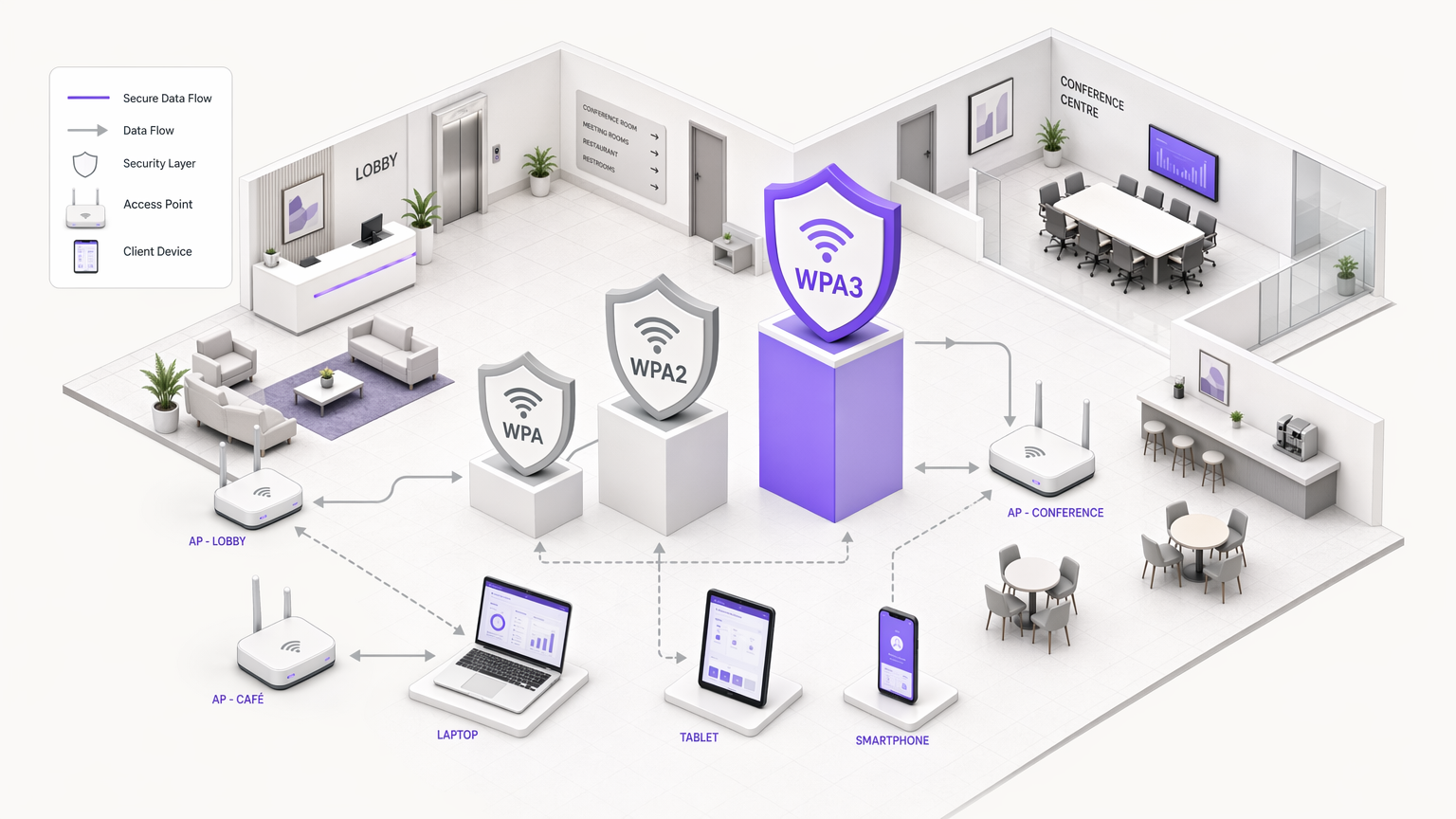
Executive Summary
For IT managers, network architects, and CTOs operating enterprise environments, the choice of WiFi security protocol is a critical risk management decision. As venues across Hospitality , Retail , Healthcare , and Transport expand their wireless footprints, the reliance on outdated security standards introduces significant vulnerabilities. This technical reference guide provides a definitive comparison of WPA, WPA2, and WPA3 architectures, detailing their cryptographic foundations and operational implications.
While WPA2 has served as the industry standard for nearly two decades, its structural vulnerabilities—specifically offline dictionary attacks against the four-way handshake—have necessitated the transition to WPA3. WPA3 introduces Simultaneous Authentication of Equals (SAE) to eliminate these risks, alongside Enhanced Open (OWE) to secure unauthenticated guest networks. For enterprise operators, the mandate is clear: WPA must be eradicated from the environment, WPA2-Enterprise remains a viable baseline for corporate access, and WPA3 must be phased in to ensure long-term compliance with PCI DSS and GDPR mandates. This guide outlines the technical mechanisms behind these protocols and provides a vendor-neutral deployment strategy for modernising your wireless infrastructure.
Technical Deep-Dive: Architectural Evolution
The evolution of WiFi Protected Access (WPA) reflects the ongoing arms race between cryptographic security and computational power. Understanding the underlying mechanics of each protocol is essential for designing resilient network architectures.
WPA: The Emergency Patch
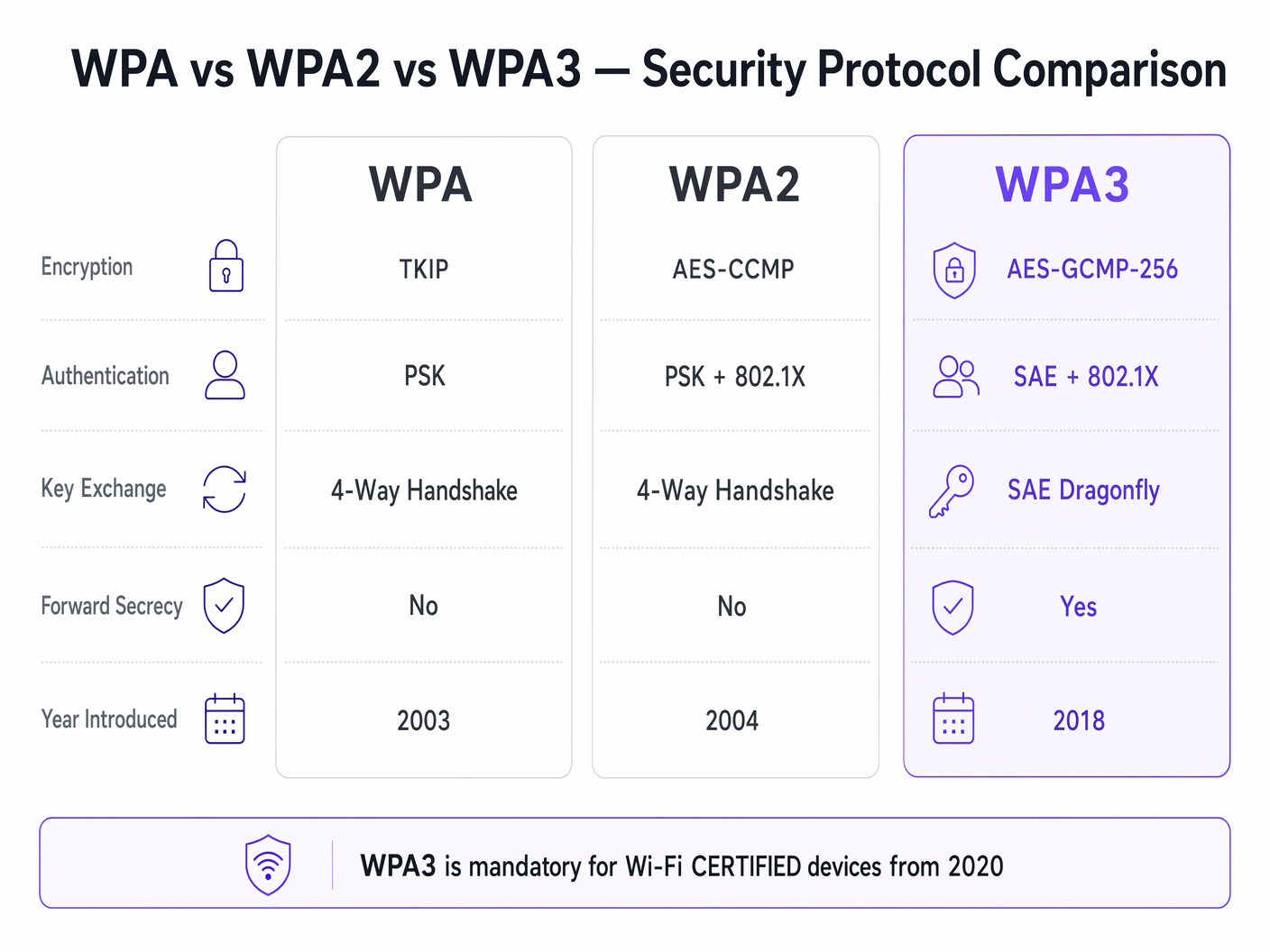
Introduced in 2003, WPA was designed as a rapid response to the catastrophic failure of Wired Equivalent Privacy (WEP). WPA's primary innovation was the Temporal Key Integrity Protocol (TKIP), which dynamically generated a new 128-bit encryption key for every packet. This addressed WEP's static key reuse vulnerability. However, because WPA had to run on legacy WEP hardware, TKIP was built on the same RC4 stream cipher. By 2009, cryptographic research had demonstrated practical attacks against TKIP, rendering WPA fundamentally insecure. In modern enterprise environments, WPA represents a critical security liability and must be actively deprecated.
WPA2: The Enterprise Baseline
Ratified in 2004, WPA2 introduced a structural shift by replacing TKIP with the Advanced Encryption Standard (AES) operating in Counter Mode with Cipher Block Chaining Message Authentication Code Protocol (CCMP). AES is a robust block cipher, and CCMP provides simultaneous encryption and data integrity validation. This architecture established WPA2 as the dominant standard for enterprise networking.
However, WPA2 is bifurcated into two distinct operational modes:
WPA2-Personal (PSK): This mode relies on a Pre-Shared Key (PSK). Every device on the Service Set Identifier (SSID) uses the same passphrase to derive session keys during the four-way handshake. The critical vulnerability here is that the four-way handshake can be captured passively. Attackers can then subject the captured handshake to offline dictionary attacks using high-performance GPU clusters. Consequently, WPA2-Personal provides minimal security against targeted attacks if the passphrase lacks sufficient entropy.
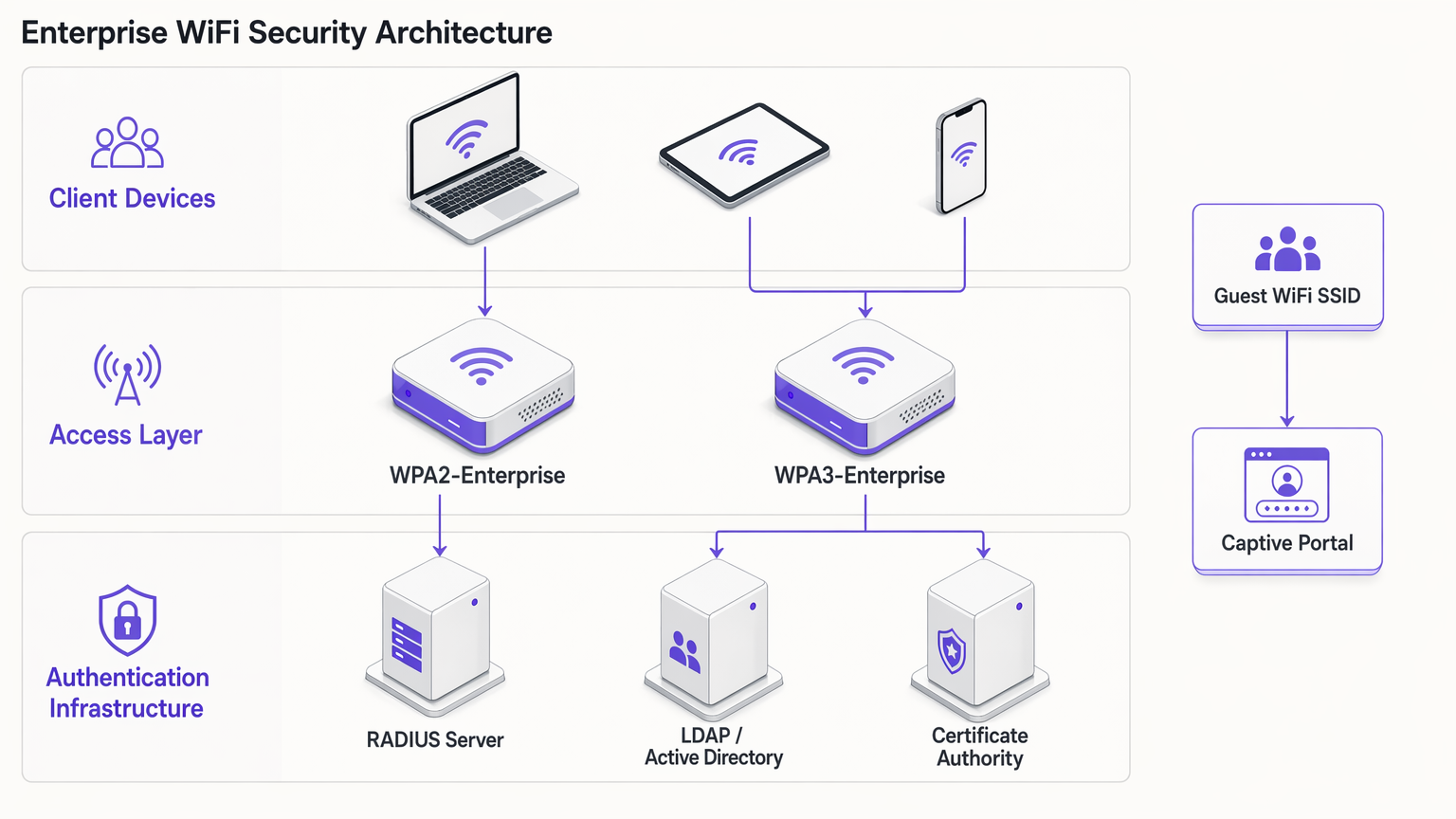
WPA2-Enterprise (802.1X): In contrast, WPA2-Enterprise leverages IEEE 802.1X for port-based network access control. Devices do not share a common passphrase; instead, they authenticate individually using the Extensible Authentication Protocol (EAP). Authentication is brokered by a RADIUS server communicating with a directory service (e.g., Active Directory or LDAP). Each authenticated session receives unique cryptographic key material. This architecture mitigates the risks associated with shared passphrases and remains the baseline standard for corporate network access.
WPA3: The Modern Standard
Mandatory for Wi-Fi CERTIFIED devices since July 2020, WPA3 addresses the cryptographic vulnerabilities exposed in WPA2 over its lifespan.
WPA3-Personal (SAE): The defining feature of WPA3-Personal is the replacement of the vulnerable four-way handshake with Simultaneous Authentication of Equals (SAE), also known as the Dragonfly handshake. SAE is a zero-knowledge proof protocol. It requires active interaction with the access point for every authentication attempt, rendering offline dictionary attacks computationally infeasible. This effectively neutralises the KRACK (Key Reinstallation Attacks) vulnerability class.
WPA3-Enterprise: WPA3-Enterprise enhances corporate security by introducing an optional 192-bit security suite. This mode utilises AES-GCMP-256 for encryption and HMAC-SHA-384 for message integrity, aligning with the Commercial National Security Algorithm (CNSA) suite required for high-security government and financial deployments.
Forward Secrecy: WPA3 implements forward secrecy by generating ephemeral session keys via the SAE handshake. If an attacker records encrypted traffic and later compromises the network credential, they cannot retroactively decrypt the historical traffic. This is a crucial risk reduction mechanism for venues processing sensitive data.
Enhanced Open (OWE): For guest networks, WPA3 introduces Opportunistic Wireless Encryption (OWE). OWE provides unauthenticated encryption—devices connect without a password, but the traffic between the device and the access point is individually encrypted. This eliminates passive eavesdropping on open guest networks without introducing connection friction.
Implementation Guide: Securing the Enterprise Environment
Deploying modern WiFi security requires a segmented approach, balancing the stringent requirements of corporate access with the operational realities of guest networking and legacy IoT devices.
Corporate and Staff Networks
For internal networks, the objective is strong identity validation and robust encryption.
- Mandate 802.1X Authentication: Deploy WPA2-Enterprise or WPA3-Enterprise. Never use WPA2-Personal for staff networks.
- Implement Strong EAP Methods: Utilise EAP-TLS (Transport Layer Security) wherever possible, as it requires both client and server certificates, providing the highest level of assurance. If certificate deployment is impractical, PEAP-MSCHAPv2 can be used, provided the RADIUS server certificate is strictly validated by clients.
- Enable WPA3 Transition Mode: If your access points support WPA3, enable transition mode. This allows WPA3-capable clients to benefit from SAE and forward secrecy while maintaining connectivity for legacy WPA2 clients. Monitor the RADIUS logs to track the migration rate of client devices.
Guest WiFi and Public Access
Guest networks present a unique challenge: balancing security, compliance, and user experience. The traditional approach of broadcasting a shared WPA2-Personal password is both insecure and non-compliant with data privacy regulations, as it provides no visibility into user identity.
- Deploy Captive Portals: Implement an open SSID or a WPA2/WPA3-Personal SSID integrated with a captive portal. This ensures users must authenticate and accept terms and conditions before gaining network access.
- Leverage Identity Providers: Utilise platforms like Purple to manage guest authentication. Purple can act as a free identity provider for services like OpenRoaming under the Connect licence, streamlining access while capturing consented first-party data for WiFi Analytics .
- Enable OWE: If your infrastructure supports it, enable Opportunistic Wireless Encryption (OWE) on the open guest SSID. This encrypts guest traffic against passive sniffing without requiring users to enter a password, significantly improving the security posture of the Guest WiFi environment.
IoT and Legacy Device Segmentation
Many IoT devices—such as legacy point-of-sale terminals, building management systems, and IP cameras—lack support for WPA3 or 802.1X authentication.
- Isolate Legacy Devices: Do not downgrade the security of your primary networks to accommodate legacy devices. Instead, create dedicated VLANs and SSIDs specifically for IoT hardware.
- Implement MPSK/PPSK: Where supported by your vendor, use Multi Pre-Shared Key (MPSK) or Private Pre-Shared Key (PPSK) for IoT networks. This assigns a unique WPA2 passphrase to each individual IoT device, limiting the blast radius if a single device is compromised.
- Restrict Lateral Movement: Apply strict firewall rules to the IoT VLANs, permitting only necessary outbound communication and blocking lateral movement to corporate subnets.
Best Practices and Compliance
Maintaining a secure wireless environment requires ongoing operational discipline.
- Certificate Lifecycle Management: In WPA2/WPA3-Enterprise deployments, expired RADIUS certificates are a primary cause of network outages. Implement automated certificate renewal and monitor expiration dates rigorously.
- Rogue AP Detection: Utilise the Wireless Intrusion Prevention System (WIPS) capabilities of your access points to detect and neutralise rogue access points broadcasting your corporate SSIDs.
- PCI DSS 4.0 Compliance: For environments processing payment card data, WPA2-Personal is generally insufficient. PCI DSS mandates strong cryptography and access control. WPA2-Enterprise or WPA3-Enterprise with robust EAP methods is required to maintain compliance.
- Regular Auditing: Conduct quarterly audits of your wireless infrastructure, verifying firmware versions, cryptographic configurations, and the segmentation of IoT devices.
Troubleshooting & Risk Mitigation
When transitioning to WPA3 or managing mixed environments, specific failure modes commonly arise:
- Client Compatibility Issues: Some legacy clients may fail to connect to an SSID operating in WPA3 Transition Mode due to poor driver implementation. If this occurs, you may need to maintain a separate WPA2-only SSID for legacy devices until they can be decommissioned.
- 802.1X Timeout Errors: Authentication timeouts in WPA2/WPA3-Enterprise are often caused by latency between the RADIUS server and the directory service, or by misconfigured client supplicants failing to validate the server certificate. Ensure RADIUS servers are geographically proximate to the access points and that client trust stores are properly configured.
- PMF Incompatibility: Protected Management Frames (PMF) are mandatory in WPA3 and highly recommended in WPA2 to prevent deauthentication attacks. However, some older WPA2 clients do not support PMF and will fail to associate if PMF is set to 'Required'. Set PMF to 'Optional' during the transition phase.
ROI & Business Impact
Upgrading wireless security protocols is not merely a technical exercise; it delivers tangible business value:
- Risk Mitigation: Transitioning to WPA3 and WPA2-Enterprise significantly reduces the probability of a successful wireless breach, mitigating the financial and reputational damage associated with data exfiltration.
- Compliance Assurance: Aligning with modern cryptographic standards ensures compliance with PCI DSS, GDPR, and industry-specific regulations, avoiding regulatory fines and simpsimplifying audit processes.
- Operational Efficiency: Implementing automated certificate management and 802.1X authentication reduces the operational overhead associated with managing shared passwords and troubleshooting connectivity issues.
- Enhanced Guest Experience: Deploying OWE and seamless captive portal authentication via platforms like Purple improves the guest experience by providing secure, frictionless connectivity, driving higher adoption rates and richer data capture for marketing initiatives. See The 10 Best WiFi Splash Page Examples (And What Makes Them Work) for insights on optimising the authentication flow.
Listen to our comprehensive briefing on WPA, WPA2, and WPA3 for further insights:
Key Terms & Definitions
802.1X
An IEEE standard for port-based network access control that provides an authentication mechanism to devices wishing to attach to a LAN or WLAN.
The foundation of WPA2/WPA3-Enterprise, requiring a RADIUS server to validate individual user or device credentials before granting network access.
AES-CCMP
Advanced Encryption Standard with Counter Mode CBC-MAC Protocol. A robust encryption protocol introduced in WPA2.
The standard encryption mechanism that replaced the vulnerable TKIP, providing both data confidentiality and integrity.
EAP-TLS
Extensible Authentication Protocol - Transport Layer Security. An authentication method that requires both client and server certificates.
Considered the gold standard for enterprise WiFi authentication, as it eliminates reliance on passwords and prevents credential theft.
Four-Way Handshake
The process used in WPA2-Personal to derive encryption keys from the Pre-Shared Key (PSK) and establish a secure session.
The primary vulnerability point in WPA2-Personal, as it can be captured and subjected to offline dictionary attacks.
Opportunistic Wireless Encryption (OWE)
A WPA3 feature that provides unauthenticated encryption for open WiFi networks.
Crucial for securing guest WiFi environments, preventing passive eavesdropping without requiring users to enter a password.
RADIUS
Remote Authentication Dial-In User Service. A networking protocol that provides centralised Authentication, Authorization, and Accounting (AAA) management.
The core infrastructure component required to deploy WPA2-Enterprise or WPA3-Enterprise, brokering authentication between the access point and the directory service.
Simultaneous Authentication of Equals (SAE)
A secure key establishment protocol used in WPA3-Personal, replacing the four-way handshake.
Prevents offline dictionary attacks by requiring active interaction for every authentication attempt, securing networks even with weak passwords.
TKIP
Temporal Key Integrity Protocol. An older encryption protocol introduced with WPA to replace WEP.
Now considered highly vulnerable and deprecated. Its presence on a network indicates a severe security risk.
Case Studies
A 200-room hotel needs to upgrade its wireless infrastructure. The current setup uses a single WPA2-Personal SSID for both guests and hotel staff (housekeeping tablets, maintenance devices). Guests are given a password printed on their keycard sleeve. How should the IT manager redesign this architecture for security and compliance?
The IT manager must segment the network into distinct SSIDs mapped to separate VLANs.
- Staff Network: Create a hidden SSID for staff devices using WPA2-Enterprise or WPA3-Enterprise (802.1X). Housekeeping tablets and maintenance devices should authenticate using client certificates (EAP-TLS) managed via a Mobile Device Management (MDM) solution. This eliminates shared passwords and allows individual device revocation.
- Guest Network: Create an open SSID utilising WPA3 Enhanced Open (OWE) if hardware permits, ensuring encrypted transit without a password. Integrate this with a captive portal via a platform like Purple to handle terms of service acceptance and capture consented identity data for marketing analytics.
- IoT Network: Create a dedicated SSID for legacy hotel systems (e.g., smart thermostats) using WPA2-Personal with Multi Pre-Shared Key (MPSK), assigning a unique password to each device type, and restricting this VLAN from accessing the internet or corporate subnets.
A large retail chain is deploying new point-of-sale (POS) terminals across 50 locations. The network architect must ensure the wireless deployment complies with PCI DSS 4.0 requirements. The existing network uses WPA2-Personal with a complex, frequently rotated passphrase. Is this sufficient?
No, relying on WPA2-Personal is insufficient for PCI DSS compliance in a modern retail environment, regardless of password complexity or rotation frequency. The network architect must deploy WPA2-Enterprise or WPA3-Enterprise for the POS network.
- Authentication: Implement 802.1X authentication using a RADIUS server. Each POS terminal must be provisioned with a unique client certificate (EAP-TLS) to authenticate to the network.
- Encryption: Ensure the network is configured to use AES-CCMP (WPA2) or AES-GCMP (WPA3). TKIP must be explicitly disabled on the wireless controller.
- Segmentation: The POS SSID must be mapped to a highly restricted VLAN that only permits traffic to the payment processing gateways. It must be completely isolated from the store's corporate and guest networks.
Scenario Analysis
Q1. Your organisation is migrating from WPA2-Personal to WPA3-Enterprise for the corporate network. During the rollout, several older laptops running outdated wireless drivers are unable to connect to the new SSID, even when configured with the correct certificates. What is the most secure interim solution?
💡 Hint:Consider the impact of downgrading the primary corporate network versus isolating the problem devices.
Show Recommended Approach
Create a temporary, hidden WPA2-Enterprise SSID specifically for the legacy laptops, mapped to the same corporate VLAN. Do not downgrade the primary SSID to WPA2-Personal or disable WPA3. Prioritise updating the wireless drivers or replacing the network cards on the legacy laptops to fully decommission the temporary WPA2-Enterprise SSID as quickly as possible.
Q2. A hospital IT director wants to secure the public guest WiFi network. They propose implementing WPA2-Personal with a password displayed on digital signage in the waiting areas to prevent drive-by eavesdropping. Why is this approach flawed, and what is the recommended alternative?
💡 Hint:Evaluate the security value of a publicly broadcast password and the compliance requirements for guest identity.
Show Recommended Approach
Broadcasting a WPA2-Personal password provides negligible security, as anyone in range can capture the four-way handshake and decrypt traffic if they know the password (which is publicly displayed). Furthermore, it provides no visibility into user identity, complicating incident response and compliance. The recommended alternative is to deploy an open SSID with WPA3 Enhanced Open (OWE) to encrypt transit traffic without a password, integrated with a captive portal to authenticate users, accept terms of service, and capture identity data.
Q3. You are auditing a retail environment and discover that the wireless barcode scanners in the warehouse are connecting via WPA (TKIP) because their firmware cannot be updated to support WPA2. The warehouse manager refuses to replace the scanners due to budget constraints. How do you mitigate this risk?
💡 Hint:Focus on network segmentation and access control when dealing with insecure legacy hardware.
Show Recommended Approach
The risk must be contained through strict network segmentation. Move the barcode scanners to a dedicated, isolated VLAN with its own hidden SSID. Implement stringent firewall rules on the router/firewall that only permit the scanners to communicate with the specific inventory management server on the required ports. Block all internet access and all lateral movement to other corporate subnets from the scanner VLAN.




