
हाय-डेन्सिटी कॉर्पोरेट नेटवर्क्ससाठी सर्वोत्तम 5GHz चॅनेल्स
हे मार्गदर्शक हाय-डेन्सिटी कॉर्पोरेट वातावरणात इष्टतम 5GHz चॅनेल्स निवडण्यासाठी निश्चित तांत्रिक संदर्भ प्रदान करते, ज्यामध्ये UNII बँड आर्किटेक्चर, DFS चॅनेल रिस्क मॅनेजमेंट आणि स्पेक्ट्रम विश्लेषण कार्यपद्धती समाविष्ट आहे. हे हॉटेल्स, रिटेल इस्टेट्स, स्टेडियम्स, कॉन्फरन्स सेंटर्स आणि सार्वजनिक क्षेत्रातील कॅम्पसेसमध्ये एंटरप्राइझ WiFi तैनात करणाऱ्या नेटवर्क आर्किटेक्ट्स आणि IT निर्णयकर्त्यांसाठी लिहिले गेले आहे. या तिमाहीत उपयोजन निर्णयांचे समर्थन करण्यासाठी व्यावहारिक अंमलबजावणी मार्गदर्शन, वास्तविक-जगातील केस स्टडीज आणि ROI फ्रेमवर्क समाविष्ट केले आहेत.
हे मार्गदर्शक ऐका
पॉडकास्ट ट्रान्सक्रिप्ट पहा
आमच्या मुख्य मालिकेचा भाग: Guest WiFi Guide →
मुख्य सारांश (Executive Summary)
5GHz बँडमधील चॅनेलची निवड हा केवळ कॉन्फिगरेशनचा तपशील नाही - तो एक पायाभूत आर्किटेक्चरल निर्णय आहे जो थेट कोणत्याही हाय-डेन्सिटी डिप्लॉयमेंटमधील थ्रूपुट, विश्वासार्हता आणि क्लायंट क्षमता निर्धारित करतो. प्रत्येक मजल्यावर शेकडो एकाच वेळी कार्यरत असलेल्या उपकरणांना सपोर्ट करणाऱ्या एंटरप्राइझ वातावरणासाठी, सुनियोजित चॅनेल धोरण आणि डीफॉल्ट ऑटो-चॅनेल कॉन्फिगरेशन यामधील फरक म्हणजे ५०ms पेक्षा कमी लेटन्सी आणि लोड आल्यावर निकामी होणारे नेटवर्क यामधील फरक असू शकतो.
5GHz स्पेक्ट्रम UNII-1, UNII-2 आणि UNII-3 बँडवर २५ पर्यंत नॉन-ओव्हरलॅपिंग 20MHz चॅनेल्स ऑफर करतो. तथापि, सर्व चॅनेल्स सारखे नसतात. UNII-1 (चॅनेल्स ३६-४८) आणि UNII-3 (चॅनेल्स १४९-१६५) हे नॉन-DFS आहेत आणि त्यांनी कोणत्याही एंटरप्राइझ चॅनेल योजनेचा कणा बनवला पाहिजे. UNII-2 चॅनेल्स (५२-१४४) हे डायनॅमिक फ्रिक्वेन्सी सिलेक्शन (DFS) बंधने आणतात ज्यामुळे रडार-नजीकच्या वातावरणात ऑपरेशनल धोका निर्माण होतो.
हे मार्गदर्शक 5GHz स्पेक्ट्रमच्या तांत्रिक आर्किटेक्चरचे विश्लेषण करते, एक संरचित चॅनेल प्लॅनिंग पद्धत प्रदान करते आणि हॉस्पिटॅलिटी, हेल्थकेअर आणि मोठ्या ठिकाणांच्या डिप्लॉयमेंटमधील वास्तविक-जगातील केस स्टडीज सादर करते. आधीच मोठ्या प्रमाणावर Guest WiFi इन्फ्रास्ट्रक्चर ऑपरेट करणाऱ्या टीम्ससाठी, येथे वर्णन केलेले चॅनेल धोरण थेट WiFi Analytics द्वारे विश्लेषण-चालित क्षमता नियोजनासह समाकलित होते.
तांत्रिक सखोल विश्लेषण (Technical Deep-Dive)
5GHz स्पेक्ट्रम आर्किटेक्चर

5GHz बँडचे वर्गीकरण Unlicensed National Information Infrastructure (UNII) सब-बँडमध्ये केले गेले आहे, ज्यातील प्रत्येकाची विशिष्ट नियामक वैशिष्ट्ये आहेत. एंटरप्राइझ आर्किटेक्ट्ससाठी हे फरक समजून घेणे अत्यंत आवश्यक आहे.
| बँड | चॅनेल्स | फ्रिक्वेन्सी रेंज | DFS आवश्यक आहे का | कमाल EIRP (EU) | शिफारस केलेला वापर |
|---|---|---|---|---|---|
| UNII-1 | 36, 40, 44, 48 | 5.180–5.240 GHz | नाही | 200 mW | मिशन-क्रिटिकल SSIDs |
| UNII-2A | 52, 56, 60, 64 | 5.260–5.320 GHz | होय | 200 mW | पूरक क्षमता |
| UNII-2C | 100–144 | 5.500–5.720 GHz | होय | 1000 mW | केवळ हाय-पॉवर बॅकहॉल |
| UNII-3 | 149, 153, 157, 161, 165 | 5.745–5.825 GHz | नाही (बहुतांश प्रदेश) | 200 mW | मिशन-क्रिटिकल SSIDs |
टीप: UNII-3 DFS आवश्यकता अधिकारक्षेत्रानुसार बदलतात. युनायटेड किंगडम (UK) आणि युरोपियन युनियन (EU) मध्ये, चॅनेल्स १४९-१६५ हे नॉन-DFS आहेत. डिप्लॉयमेंटपूर्वी स्थानिक OFCOM किंवा राष्ट्रीय नियामक आवश्यकतांची पडताळणी करा.
चॅनेलची रुंदी (Channel Width) हा सर्वात गैरसमज असलेला व्हेरिएबल का आहे
सैद्धांतिक थ्रूपुट जास्तीत जास्त करण्यासाठी 80MHz किंवा 160MHz चॅनेल विड्थ कॉन्फिगर करण्याची सहज प्रवृत्ती असणे साहजिक आहे परंतु दाट तैनातींमध्ये (dense deployments) हे नुकसानकारक ठरते. एक सिंगल 80MHz चॅनेल चार 20MHz चॅनेल्स इतकी स्पेक्ट्रम क्षमता वापरतो. 40 ऍक्सेस पॉईंट्स असलेल्या ठिकाणी, यामुळे उपलब्ध चॅनेल पूल लक्षणीयरीत्या कमी होतो, ज्यामुळे को-चॅनेल इंटरफेरियन्स (सह-चॅनेल हस्तक्षेप) निर्माण होतो आणि प्रति-क्लायंट थ्रूपुट वाढीच्या फायद्यापेक्षा एकूण नेटवर्क कामगिरीचे खूप जास्त नुकसान होते.
हाय-डेन्सिटी वातावरणासाठी, 20MHz चॅनेल्स हाच योग्य डीफॉल्ट पर्याय आहे. प्रत्येक क्लायंटला विस्तीर्ण पाईप देण्याऐवजी अधिक एकाच वेळी होणाऱ्या अवकाशीय पुनर्वापराला (spatial reuse) सक्षम करून संपूर्ण ठिकाणचा एकत्रित थ्रूपुट जास्तीत जास्त वाढवला जातो. एक्झिक्युटिव्ह बोर्डरूम किंवा खाजगी कार्यालयांसारख्या मध्यम-डेन्सिटी झोनमध्ये 40MHz चॅनेल्स योग्य असू शकतात. 80MHz आणि 160MHz चे आरक्षण वायरलेस बॅकहॉल किंवा कमी-क्लायंट संख्या असलेल्या निर्जन क्षेत्रांमधील AV वितरणासारख्या समर्पित हाय-थ्रूपुट ऍप्लिकेशन्ससाठी ठेवले पाहिजे.
DFS: विक्रेते कमी लेखत असलेली ऑपरेशनल जोखीम
डायनॅमिक फ्रिक्वेन्सी सिलेक्शन (DFS) ही एक IEEE 802.11h यंत्रणा आहे ज्यामध्ये ऍक्सेस पॉईंट्सना रडार सिग्नल्सचे निरीक्षण करणे आणि रडार आढळल्यास 60 सेकंदांच्या आत तो चॅनेल रिकामा करणे आवश्यक असते. अनिवार्य चॅनेल उपलब्धता तपासणी (CAC) कालावधी - काही चॅनेल्सवर 60 सेकंदांपर्यंत - याचा अर्थ असा आहे की जोपर्यंत चॅनेल रडार-मुक्त असल्याची पुष्टी होत नाही तोपर्यंत AP DFS चॅनेलवर ट्रान्समिट करू शकत नाही. फेलओव्हर किंवा रीबूटच्या परिस्थितीत, यामुळे सेवेमध्ये खंड पडतो.
एंटरप्राइझ तैनातीसाठी याचे व्यावहारिक परिणाम महत्त्वपूर्ण आहेत. विमानतळ, बंदरे, लष्करी प्रतिष्ठाने आणि हवामान मॉनिटरिंग स्टेशन्स हे सर्व रडार प्रणाली चालवतात ज्या DFS इव्हेंट्स ट्रिगर करू शकतात. अगदी शहरी वातावरणातही अनपेक्षित DFS इव्हेंट्स घडतात. फॉलबॅक योजनेशिवाय UNII-2 चॅनेल्सवर मोठ्या प्रमाणावर अवलंबून असणाऱ्या नेटवर्कला वेळोवेळी, अनपेक्षित क्लायंट डिस्कनेक्शनचा सामना करावा लागेल ज्याचे निदान करणे कठीण असते आणि ते अंतिम वापरकर्त्यांसाठी त्रासदायक ठरते.
विशेषतः hospitality तैनातींसाठी, जिथे पाहुण्यांचे समाधान थेट नेटवर्कच्या विश्वासार्हतेशी जोडलेले असते, पीक चेक-इन कालावधी किंवा कॉन्फरन्स सत्रांदरम्यान DFS मुळे येणारे व्यत्यय व्यावसायिकदृष्ट्या नुकसानकारक असतात. हाच नियम retail वातावरणाला लागू होतो जिथे पॉईंट-ऑफ-सेल सिस्टीम आणि इन्व्हेंटरी मॅनेजमेंट टूल्स अखंड कनेक्टिव्हिटीवर अवलंबून असतात.
फ्रिक्वेन्सी बँडच्या वैशिष्ट्यांच्या सविस्तर माहितीसाठी, Wi-Fi Frequencies: A Guide to Wi-Fi Frequencies in 2026 पहा.
सर्वोत्तम 5GHz चॅनेल्स: एक निश्चित क्रमवारी
एंटरप्राइझ तैनातीसाठी, शिफारस केलेले चॅनेल प्राधान्य खालीलप्रमाणे आहे:
टियर 1 - नेहमी वापरा (Non-DFS, सार्वत्रिक सुसंगतता)
- चॅनेल्स 36, 40, 44, 48 (UNII-1)
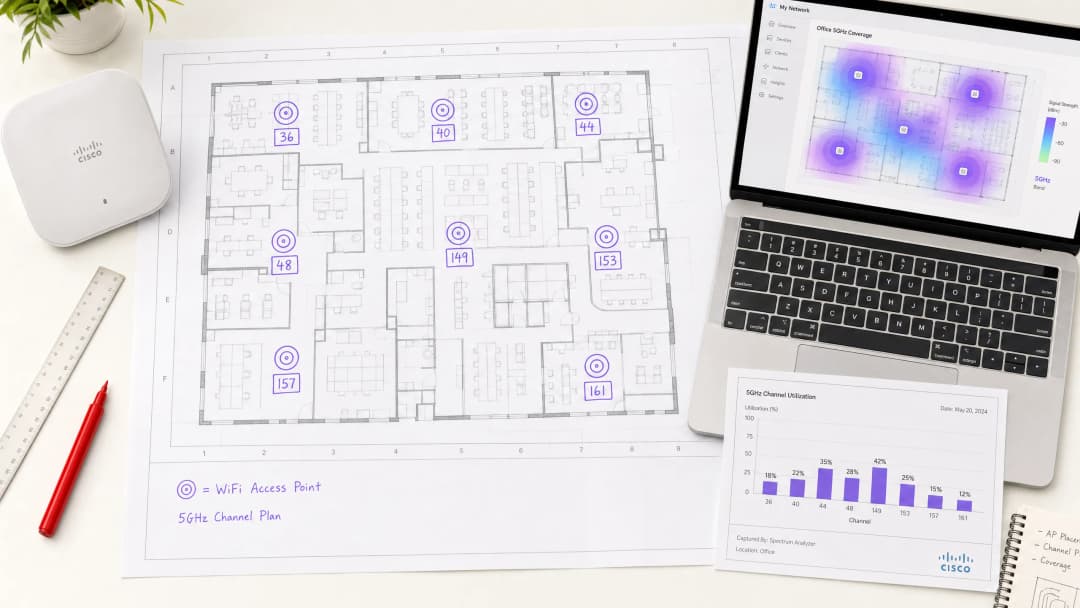
- चॅनेल्स 149, 153, 157, 161 (UNII-3) हे आठ चॅनेल्स कोणत्याही एंटरप्राइझ चॅनेल योजनेचा पाया बनतात. हे नॉन-DFS आहेत, क्लायंट उपकरणांद्वारे सार्वत्रिकपणे समर्थित आहेत, आणि सर्व प्रमुख नियामक क्षेत्रांमध्ये उपलब्ध आहेत. प्रति मजला आठ APs पर्यंतच्या डिप्लॉयमेंटसाठी, केवळ Tier 1 चॅनेल्स वापरून स्वच्छ एक-चॅनेल-प्रति-AP असाइनमेंट साध्य करणे शक्य आहे.
Tier 2 — मॉनिटरिंगसह वापरा (DFS, कमी रडार जोखीम)
- चॅनेल्स 52, 56, 60, 64 (UNII-2A)
या चॅनेल्सवर DFS ची बंधने आहेत परंतु हे लोअर UNII-2 रेंजमध्ये आहेत, जिथे सहसा UNII-2C पेक्षा कमी रडार हस्तक्षेप दिसतो. ज्या वातावरणात Tier 1 चॅनेल्स संपले आहेत आणि रडारची जवळीक कमी असल्याचे मूल्यांकन केले गेले आहे अशा वातावरणात पूरक क्षमतेसाठी हे योग्य आहेत.
Tier 3 — सावधगिरीने वापरा (DFS, जास्त रडार जोखीम, हाय पॉवर)
- चॅनेल्स 100 - 144 (UNII-2C)
जरी UNII-2C चॅनेल्स काही क्षेत्रांमध्ये जास्त ट्रान्समिट पॉवरची परवानगी देतात, तरीही त्यामध्ये रडार हस्तक्षेपाचा सर्वाधिक धोका असतो. हे समर्पित बॅकहॉल लिंक्ससाठी किंवा अशा वातावरणासाठी राखीव ठेवा जिथे सखोल स्पेक्ट्रम सर्वेक्षणाने किमान रडार क्रियाकलाप असल्याची पुष्टी केली आहे.
ट्रान्समिट पॉवर आणि सेल सायझिंग
चॅनेल प्लॅनिंगला ट्रान्समिट पॉवर मॅनेजमेंटपासून वेगळे केले जाऊ शकत नाही. जास्त पॉवर असलेले ॲक्सेस पॉइंट्स मोठे सेल्स तयार करतात ज्यामुळे को-चॅनेल हस्तक्षेप वाढतो. हाय-डेन्सिटी डिप्लॉयमेंट्समध्ये, लक्ष्यित सेलचा आकार लहान आणि सुसंगत असावा. ट्रान्समिट पॉवर अशा किमान पातळीवर सेट केली पाहिजे जी इच्छित क्षेत्रासाठी पुरेशी कव्हरेज प्रदान करेल, साधारणपणे दाट इनडोअर वातावरणात क्लायंट-सर्व्हिंग रेडिओसाठी 8 - 14 dBm च्या दरम्यान.
ऑटोमॅटिक पॉवर कंट्रोल यंत्रणा जसे की Cisco ची TPC किंवा Aruba ची ARM एका परिभाषित पॉवर रेंजपुरती मर्यादित असताना प्रभावी ठरू शकतात. या प्रणाल्यांना मर्यादेशिवाय काम करू दिल्यास बऱ्याचदा हाय-पॉवर कॉन्फिगरेशन्स होतात ज्या चॅनेल रियूज प्लॅनला कमकुवत करतात.
तुमच्या विशिष्ट सेटअपबद्दल काही प्रश्न आहेत का?
आमची टीम ८०,००० हून अधिक वेन्यूजमधील वेन्यू ऑपरेटर्स, IT मॅनेजर्स आणि नेटवर्क इंजिनिअर्ससोबत काम करते. २० मिनिटांचा कॉल बुक करा आणि तुमच्यासारख्या इतरांनी ही समस्या कशी सोडवली हे आम्ही तुम्हाला दाखवू.
अंमलबजावणी मार्गदर्शक
पायरी 1: डिप्लॉयमेंट-पूर्व स्पेक्ट्रम सर्वेक्षण
एकही ॲक्सेस पॉइंट स्थापित करण्यापूर्वी, संपूर्ण ठिकाणाचे पॅसिव्ह स्पेक्ट्रम सर्वेक्षण करा. शेजारील नेटवर्क, जुनी उपकरणे, मायक्रोवेव्ह हस्तक्षेप आणि कोणताही रडार क्रियाकलाप यांसारखे विद्यमान RF स्रोत ओळखणे हा याचा उद्देश आहे. Ekahau Sidekick, AirMagnet Survey Pro, किंवा एंटरप्राइझ कंट्रोलर्सच्या (Cisco CleanAir, Aruba AirMatch) अंगभूत स्पेक्ट्रम विश्लेषण क्षमता यांसारखी साधने आवश्यक दृश्यमानता प्रदान करतात.
सर्वेक्षणाचे निष्कर्ष चॅनेल युटिलायझेशन मॅपमध्ये दस्तऐवजीकरण करा. शेजारील डिप्लॉयमेंट्समुळे कोणते चॅनेल्स आधीच कोंदट झाले आहेत आणि कोणते स्वच्छ आहेत ते ओळखा. हा डेटा थेट तुमच्या चॅनेल असाइनमेंट योजनेला माहिती पुरवतो.
पायरी 2: तुमची चॅनेल योजना परिभाषित करा
स्पेक्ट्रम सर्वेक्षणाच्या आधारे, खालील तत्त्वांचे पालन करून ॲक्सेस पॉइंट्सना चॅनेल्स नियुक्त करा:
- लगतच्या APs नी समान चॅनेल शेअर करू नये.
- को-चॅनेल हस्तक्षेप कमी करण्यासाठी एकाच चॅनेलवरील APs मध्ये किमान दोन सेल व्यासांचे अंतर असावे.
- Tier 2 किंवा Tier 3 चॅनेल्सचा वापर सुरू करण्यापूर्वी Tier 1 चॅनेल्सच्या पूर्ण सेटचा वापर करा.
- बहु-मजली डिप्लॉयमेंटसाठी, व्हर्टिकल को-चॅनेल इंटरफेअरेन्स (co-channel interference) लक्षात घ्या. एकमेकांच्या अगदी वर किंवा खाली असलेले APs वेगवेगळ्या चॅनेल्सवर असावेत.
आठ APs असलेल्या १०,००० स्क्वेअर फूट मजल्यासाठी, ३६, ४०, ४४, ४८, १४९, १५३, १५७, १६१ या चॅनेल्सचा वापर करून एकाच मजल्यावर कोणताही चॅनेल पुन्हा न वापरता एक स्पष्ट असाइनमेंट मिळवता येऊ शकते. आठपेक्षा जास्त APs आवश्यक असलेल्या मोठ्या मजल्यांसाठी, रडारचा धोका कमी असल्याची खात्री केल्यानंतर Tier 2 चॅनेल्सचा वापर सुरू करा.
पायरी ३: चॅनेल विड्थ (Channel Width) कॉन्फिगर करा
सर्व क्लायंट-सर्व्हिंग रेडिओसाठी २०MHz चॅनेल विड्थ डीफॉल्ट म्हणून सेट करा. जर विशिष्ट हाय-थ्रूपूट झोन्स (उदा. व्हिडिओ कॉन्फरन्सिंगच्या आवश्यकता असलेला बोर्डरूम) ४०MHz चे समर्थन करत असतील, तर नेटवर्क डिझाइन रेकॉर्डमध्ये स्पष्ट समर्थनासह अपवाद म्हणून हे कॉन्फिगर करा.
पायरी ४: क्रिटिकल इन्फ्रास्ट्रक्चरवर ऑटो-चॅनेल अक्षम करा
मिशन-क्रिटिकल ॲप्लिकेशन्स - POS सिस्टीम्स, VoIP, वैद्यकीय उपकरणे - चालवणाऱ्या APs साठी ऑटोमॅटिक चॅनेल सिलेक्शन अक्षम करा आणि चॅनेल्स स्टॅटिकली असाइन करा. ऑटो-चॅनेल अल्गोरिदम, सामान्य डिप्लॉयमेंटसाठी उपयुक्त असले तरी, जटिल RF वातावरणात चुकीचे निर्णय घेऊ शकतात आणि व्यावसायिक वेळेत अनपेक्षित चॅनेल बदल घडवून आणू शकतात.
पायरी ५: बँड स्टीअरिंग आणि क्लायंट लोड बॅलन्सिंग कॉन्फिगर करा
सक्षम क्लायंट्सना ५GHz वर नेण्यासाठी बँड स्टीअरिंग सुरू असल्याची खात्री करा. WiFi ६ (802.11ax) डिप्लॉयमेंट्समध्ये, OFDMA आणि BSS Colouring को-चॅनेल इंटरफेअरेन्स कमी करण्यासाठी अतिरिक्त यंत्रणा प्रदान करतात, परंतु हे एका चांगल्या चॅनेल प्लॅनला पूरक आहेत - त्याचा पर्याय नाहीत.
शेअर केलेल्या वातावरणात एकाधिक SSIDs वर ट्रॅफिक विभागण्याबाबतच्या मार्गदर्शनासाठी, Micro-Segmentation Best Practices for Shared WiFi Networks पहा.
पायरी ६: डिप्लॉयमेंटनंतरचे प्रमाणीकरण (Post-Deployment Validation)
डिप्लॉयमेंटनंतर, कव्हरेज, सिग्नल स्ट्रेंथ आणि चॅनेलचा वापर तपासण्यासाठी एक ॲक्टिव्ह सर्व्हे करा. खालील मुख्य मेट्रिक्सची खात्री करा:
- क्लायंट डिव्हाइसेसवरील RSSI: सेलच्या टोकाला -६५ dBm किंवा त्याहून अधिक चांगले लक्ष्य ठेवा.
- को-चॅनेल इंटरफेअरेन्स (CCI): को-चॅनेल शेजाऱ्यांकडून -८५ dBm पेक्षा कमी लक्ष्य ठेवा.
- चॅनेलचा वापर: पीक लोड दरम्यान कोणत्याही एका चॅनेलवर ५०% पेक्षा कमी वापर लक्ष्य ठेवा.
- रोमिंग परफॉर्मन्स: 802.11r (Fast BSS Transition) आणि 802.11k (Neighbour Reports) योग्यरित्या कार्य करत असल्याचे प्रमाणित करा.
सर्वोत्तम पद्धती (Best Practices)
खालील शिफारसी IEEE 802.11 मानके आणि WiFi Alliance व CWNP सह इतर संस्थांच्या WLAN उद्योग मार्गदर्शनाशी सुसंगत असलेल्या व्हेंडर-न्यूट्रल सर्वोत्तम पद्धतींचे प्रतिनिधित्व करतात.
सर्व हाय-डेन्सिटी डिप्लॉयमेंट्ससाठी २०MHz चॅनेल्सचे प्रमाणीकरण करा. प्रति AP २० पेक्षा जास्त एकाच वेळी सक्रिय क्लायंट्स असलेल्या वातावरणात चॅनेल री-युझचा एकूण क्षमता वाढीचा फायदा हा नेहमीच विस्तीर्ण चॅनेल्सच्या प्रति-क्लायंट थ्रूपूट फायद्यापेक्षा सरस ठरतो.
चॅनेल प्लॅन दस्तऐवज तयार ठेवा. प्रत्येक AP कडे दस्तऐवजीकरण केलेले चॅनेल असाइनमेंट, पॉवर लेव्हल आणि त्याचे स्पष्टीकरण असावे. ट्रबलशूटिंगसाठी आणि फर्मवेअर अपग्रेड किंवा हार्डवेअर बदलताना सातत्य राखण्यासाठी हे अत्यंत आवश्यक आहे.
कॉर्पोरेट SSIDs साठी 802.1X ऑथेंटिकेशनसह WPA3-Enterprise लागू करा. पेमेंट कार्ड डेटा हाताळणाऱ्या वातावरणात, PCI-DSS 4.0 साठी मजबूत ऑथेंटिकेशन आणि एन्क्रिप्शन आवश्यक आहे. CNSA-suite क्रिप्टोग्राफीसह WPA3 या आवश्यकता पूर्ण करतो आणि फॉरवर्ड सिक्रसी प्रदान करतो ज्याची हमी WPA2 देऊ शकत नाही.
DFS इव्हेंट्सचे सतत मॉनिटरिंग करा. DFS चॅनेलवर कार्यरत असलेल्या कोणत्याही AP च्या DFS इव्हेंट लॉगचे ऑपरेशनच्या पहिल्या महिन्यामध्ये दर आठवड्याला पुनरावलोकन केले पाहिजे. दर आठवड्याला दोनपेक्षा जास्त DFS इव्हेंट असलेल्या चॅनेल्सना ऑटो-चॅनेल पूलमधून ब्लॅकलिस्ट केले पाहिजे.
गेस्ट नेटवर्कसाठी GDPR आवश्यकतांशी सुसंगत रहा. hospitality आणि retail वातावरणात, गेस्ट WiFi डेटा संकलन GDPR चे पालन करणारे असावे. Purple चे Guest WiFi प्लॅटफॉर्म अंगभूत संमती व्यवस्थापन आणि डेटा गव्हर्नन्स टूल्स प्रदान करते जे या मार्गदर्शकामध्ये वर्णन केलेल्या नेटवर्क इन्फ्रास्ट्रक्चरशी समाकलित होते.
ऑफिस-विशिष्ट WiFi ऑप्टिमायझेशनच्या बाबींसाठी, Office Wi-Fi: Optimise Your Modern Office Wi-Fi Network पहा.
-
ट्रबलशूटिंग आणि जोखीम निवारण
को-चॅनेल इंटरफेरियन्स (CCI)
एंटरप्राइझ WiFi उपयोजनांमध्ये CCI हा कार्यक्षमता कमी करणारा सर्वात सामान्य घटक आहे. लक्षणांमध्ये हाय रिट्राय रेट, कमी झालेली थ्रुपुट आणि खराब रोमिंग परफॉर्मन्स यांचा समावेश होतो. निदानासाठी स्पेक्ट्रम विश्लेषक किंवा कंट्रोलर-आधारित RF विश्लेषणाची आवश्यकता असते. समाधानामध्ये को-चॅनेल APs मधील अंतर वाढवण्यासाठी चॅनेल असाइनमेंट समायोजित करणे आणि सेलचे आकार कमी करण्यासाठी ट्रान्समिट पॉवर कमी करणे समाविष्ट आहे.
DFS-ट्रिगर केलेले चॅनेल बदल
क्लायंट्सना 30 ते 60 सेकंदांपर्यंत वेळोवेळी डिस्कनेक्शनचा अनुभव येत असल्यास, DFS इव्हेंट्स हे त्याचे संभाव्य कारण असू शकते. DFS रडार डिटेक्शन एंट्रीजसाठी AP इव्हेंट लॉग तपासा. समाधान: प्रभावित चॅनेलला ऑटो-चॅनेल पूलमधून ब्लॅकलिस्ट करा आणि पर्यायी टियर 1 चॅनेल नियुक्त करा. ज्या वातावरणात DFS इव्हेंट वारंवार घडतात, तिथे नॉन-DFS चॅनेल्सवर पूर्ण मायग्रेशन करण्याचा विचार करा.
हिडन नोड समस्या
वेअरहाऊस किंवा एक्झिबिशन हॉलसारख्या मोठ्या खुल्या वातावरणात, हिडन नोड समस्या - जिथे दोन क्लायंट एकमेकांना ऐकू शकत नाहीत परंतु दोन्ही एकाच AP कडे ट्रान्समिट करण्याचा प्रयत्न करतात - ज्यामुळे कोलिजन रेट वाढतो. निवारणामध्ये RTS/CTS थ्रेशोल्ड सक्षम करणे आणि AP प्लेसमेंट पुरेशी कव्हरेज ओव्हरलॅप प्रदान करते याची खात्री करणे समाविष्ट आहे.
लेगसी क्लायंट सुसंगतता
लेगसी 802.11a डिव्हाइसेस केवळ UNII-1 चॅनेल्सवर कार्य करतात. तुमच्या वातावरणात लेगसी डिव्हाइसेस समाविष्ट असल्यास, UNII-1 चॅनेल्स उपलब्ध राहतील आणि लेगसी क्लायंट्सना सेवा देणाऱ्या SSID कडे कमी अनिवार्य डेटा दर सक्षम असल्याची खात्री करा. एकाच SSID वर लेगसी क्लायंट्सना आधुनिक 802.11ac किंवा Wi-Fi 6 क्लायंट्ससह एकत्र करणे टाळा, कारण लेगसी मॅनेजमेंट फ्रेम्स एकूण नेटवर्क कार्यक्षमता कमी करतात.
WiFi सोबत ब्लूटूथ लो एनर्जी समाकलित करणाऱ्या वातावरणासाठी - जे retail आणि healthcare उपयोजनांमध्ये सामान्य आहे - सह-अस्तित्व मार्गदर्शनासाठी BLE Low Energy Explained for Enterprise पहा.
रोग AP डिटेक्शन
उच्च-घनतेच्या (high-density) वातावरणात, तुमच्या इन्फ्रास्ट्रक्चरसारख्याच चॅनेलवर चालणारे रोग (rogue) ॲक्सेस पॉइंट्स अनमॅनेज्ड हस्तक्षेप निर्माण करतात. रोग APs शोधण्यासाठी आणि त्यांना नियंत्रित करण्यासाठी WIDS/WIPS (Wireless Intrusion Detection/Prevention) लागू करा. बहुतेक एंटरप्राइझ कंट्रोलर्समध्ये ही क्षमता मूळ स्वरूपात समाविष्ट असते.
ROI आणि व्यावसायिक प्रभाव
खराब चॅनेल नियोजनाच्या खर्चाचे प्रमाण मोजणे
suboptimal चॅनेल कॉन्फिगरेशनचा व्यावसायिक प्रभाव मोजता येण्याजोगा आहे. २०० खोल्यांच्या हॉटेलमध्ये, को-चॅनेल हस्तक्षेपामुळे १५% पॅकेट रिट्राय रेटचा सामना करणाऱ्या नेटवर्कला लोड असताना प्रति AP सरासरी अंदाजे ४० - ५० Mbps थ्रूपुट मिळेल, तर योग्यरित्या नियोजित चॅनेल धोरणासह १५०+ Mbps साध्य करता येऊ शकते. व्हिडिओ स्ट्रीमिंग, व्हिडिओ कॉन्फरन्सिंग आणि क्लाउड-आधारित कामासाठी नेटवर्कवर अवलंबून असलेल्या पाहुण्यांसाठी, हा फरक त्वरित लक्षात येतो आणि थेट समाधान गुणांवर परिणाम करतो.
रिटेल वातावरणात, POS प्रणालींवर परिणाम करणारी नेटवर्क अस्थिरता थेट महसुलावर परिणाम करते. पीक ट्रेडिंग दरम्यान १० मिनिटांसाठी व्यवहार प्रक्रियेस असमर्थ असलेला एकच POS टर्मिनल, थ्रूपुटवर अवलंबून, सामान्य हाय-स्ट्रीट रिटेलरला गमावलेल्या विक्रीमध्ये £२०० - £५०० चा फटका देतो. मल्टी-साइट इस्टेटमध्ये, खराब WiFi विश्वासार्हतेचा एकूण खर्च लक्षणीय असतो.
यश मोजणे
योग्यरित्या राबवलेल्या चॅनेल योजनेसाठी मुख्य कामगिरी निर्देशक (KPIs) खालीलप्रमाणे आहेत:
| KPI | बेसलाइन (खराब कॉन्फिगरेशन) | लक्ष्य (ऑप्टिमाइझ केलेले) |
|---|---|---|
| सरासरी क्लायंट थ्रूपुट | २० - ४० Mbps | १०० - २०० Mbps |
| पॅकेट रिट्राय रेट | १५ - २५% | < ५% |
| रोमिंग लेटन्सी | २०० - ५०० ms | < ५० ms (802.11r सह) |
| दर आठवड्याला DFS इव्हेंट्स | ५ - २० | ० (नॉन-DFS चॅनेल) |
| क्लायंट असोसिएशन फेल्युअर्स | ३ - ८% | < १% |
ॲनालिटिक्स-चालित क्षमता नियोजनासह एकत्रीकरण
चॅनेल नियोजन ही एकदाच करायची कसरत नाही. डिव्हाइसची घनता, वापर पद्धती आणि शेजारील RF वातावरण जसे बदलतात, तसे चॅनेल प्लॅनचे पुनरावलोकन आणि अपडेट केले जाणे आवश्यक आहे. Purple चे WiFi Analytics प्लॅटफॉर्म झोननुसार क्लायंटची घनता, ड्वेल टाइम आणि नेटवर्क वापरामध्ये रिअल-टाइम दृश्यमानता प्रदान करते - हा डेटा चालू असलेल्या चॅनेल प्लॅनच्या ऑप्टिमायझेशनला थेट माहिती पुरवतो.
वाहतूक हब आणि आरोग्य सेवा कॅम्पससाठी जेथे डिव्हाइसची घनता दिवसाच्या वेळेनुसार लक्षणीयरीत्या बदलते, ॲनालिटिक्स-चालित डायनॅमिक चॅनेल व्यवस्थापन मॅन्युअल हस्तक्षेपाशिवाय सातत्यपूर्ण कामगिरी राखण्यासाठी आवश्यक असलेली ऑपरेशनल इंटेलिजन्स प्रदान करते.
हे मार्गदर्शक Purple तांत्रिक सामग्री टीमद्वारे व्यवस्थापित केले जाते. अंमलबजावणीच्या समर्थनासाठी किंवा तुमच्या विशिष्ट उपयोजन आवश्यकतांवर चर्चा करण्यासाठी, Purple शी purple.ai वर संपर्क साधा.
महत्वाच्या व्याख्या
UNII Band
Unlicensed National Information Infrastructure - ही एक नियामक फ्रेमवर्क आहे जी 5GHz स्पेक्ट्रमला सब-बँड्समध्ये विभागते (UNII-1, UNII-2A, UNII-2C, UNII-3), ज्या प्रत्येकाची विशिष्ट पॉवर लिमिट्स आणि DFS आवश्यकता असतात. UNII डेझिग्नेशन हे ठरवते की रडार सहअस्तित्त्वाच्या बंधनांशिवाय कोणते चॅनेल्स उपलब्ध आहेत.
वेगवेगळ्या स्पेक्ट्रम नियमावली असलेल्या अनेक देशांमध्ये कार्यरत असताना, विशेषतः 5GHz डेप्लॉयमेंट्ससाठी नियामक अनुपालनाचे पुनरावलोकन करताना IT टीम्सना याचा सामना करावा लागतो.
DFS (Dynamic Frequency Selection)
हा एक IEEE 802.11h मेकॅनिझम आहे ज्यासाठी ॲक्सेस पॉइंट्सनी UNII-2 चॅनेल्सवरील रडार सिग्नल्सवर लक्ष ठेवणे आणि रडार आढळल्यास तो चॅनेल त्वरित रिकामा करणे आवश्यक असते. अनिवार्य चॅनेल उपलब्धता तपासणी (CAC) कालावधी ६० सेकंदांपर्यंत असू शकतो, ज्या दरम्यान AP ट्रान्समिट करू शकत नाही.
५२ ते १४४ चॅनेल्स वापरणाऱ्या कोणत्याही डेप्लॉयमेंटसाठी हे अत्यंत महत्त्वाचे आहे. DFS इव्हेंट्समुळे क्लायंट कनेक्शन खंडित होते आणि विमानतळ, बंदरे किंवा हवामान केंद्रांच्या जवळील वातावरणात अधूनमधून येणाऱ्या WiFi अपयशाचे हे एक सामान्य मूळ कारण आहे.
Co-Channel Interference (CCI)
जेव्हा दोन किंवा अधिक ॲक्सेस पॉइंट्स एकमेकांच्या रेंजमध्ये एकाच चॅनेलवर कार्यरत असतात तेव्हा हा हस्तक्षेप होतो. शेजारील चॅनेलच्या हस्तक्षेपाच्या (adjacent-channel interference) विपरीत, CCI मुळे APs ट्रान्समिशन पुढे ढकलतात (CSMA/CA), ज्यामुळे थेट एकूण थ्रूटपुट कमी होतो आणि लेटन्सी वाढते.
हाय-डेन्सिटी WiFi डेप्लॉयमेंट्समध्ये कार्यक्षमता कमी करणारा हा मुख्य घटक आहे. स्पेक्ट्रम विश्लेषण किंवा कंट्रोलर RF रिपोर्ट्सद्वारे याचे निदान केले जाते जे उच्च रिट्राय दर आणि कमी चॅनेल वापर कार्यक्षमता दर्शवतात.
Channel Reuse
सह-चॅनेल हस्तक्षेप टाळण्यासाठी पुरेशा प्रमाणात दूर असलेल्या अनेक ऍक्सेस पॉईंट्सना एकच चॅनेल देण्याची पद्धत. प्रभावी चॅनेल पुनर्वापर ओव्हरलॅप न होणाऱ्या कव्हरेज क्षेत्रांमध्ये एकाच वारंवारतेवर एकाच वेळी ट्रान्समिशनला अनुमती देऊन एकूण नेटवर्क क्षमता जास्तीत जास्त वाढवतो.
हाय-डेन्सिटी WiFi डिझाइनमागील हा मूळ सिद्धांत आहे. २०MHz चॅनेल्सचा वापर करून आणि सेल आकारावर नियंत्रण ठेवून चॅनेल रीयुज वाढवणे - प्रत्येक क्लायंटचे थ्रूटपुट वाढवण्यापेक्षा सतत उत्तम एकूण कार्यक्षमता प्रदान करते.
BSS Colouring
एक IEEE 802.11ax (WiFi 6) वैशिष्ट्य जे प्रत्येक Basic Service Set ला रंग ओळखकर्ता नियुक्त करते, ज्यामुळे APs ना स्वतःच्या BSS कडील आणि ओव्हरलॅप होणाऱ्या इतर BSS कडील ट्रान्समिशनमधील फरक ओळखणे शक्य होते. हे अनेक BSS ओव्हरलॅप होत असलेल्या अत्यंत गर्दीच्या वातावरणात अनावश्यक विलंब कमी करते.
WiFi 6 आणि WiFi 6E हार्डवेअरवर उपलब्ध. दाट उपयोजनांमध्ये सह-चॅनेल हस्तक्षेपाचा प्रभाव कमी करतो परंतु योग्य चॅनेल प्लॅनची आवश्यकता दूर करत नाही.
OFDMA (Orthogonal Frequency Division Multiple Access)
IEEE 802.11ax मध्ये सादर केलेले एक मल्टी-युझर ऍक्सेस तंत्रज्ञान जे चॅनेलला लहान रिसोर्स युनिट्समध्ये (RUs) विभागते, ज्यामुळे एका AP ला एकाच ट्रान्समिशन संधीमध्ये एकाच वेळी अनेक क्लायंट्सना सेवा देणे शक्य होते. लहान-पॅकेट क्लायंट्सची संख्या जास्त असलेल्या उच्च-घनता वातावरणात हे कार्यक्षमता लक्षणीयरीत्या सुधारते.
उच्च क्लायंट घनता आणि मिश्रित ट्रॅफिक प्रकार (IoT, मोबाईल, लॅपटॉप) असलेल्या वातावरणातील WiFi 6 उपयोजनांसाठी सुसंगत. OFDMA चॅनेल प्लॅनिंगला पूरक ठरते परंतु त्याची जागा घेऊ शकत नाही.
TPC (Transmit Power Control)
एक IEEE 802.11h कार्यप्रणाली जी ऍक्सेस पॉईंट्सना RF वातावरणावर आधारित ट्रान्समिट पॉवर डायनॅमिकरीत्या समायोजित करण्यास अनुमती देते. एंटरप्राइझ उपयोजनांमध्ये, सेलचा आकार कमी करण्यासाठी आणि सह-चॅनेल हस्तक्षेप कमी करण्यासाठी TPC चा वापर केला जातो, जे विशेषतः उच्च-घनतेच्या कॉन्फिगरेशनमध्ये महत्त्वाचे असते.
एंटरप्राइझ उपयोजनांमध्ये स्पष्ट किमान आणि कमाल पॉवर मर्यादांसह कॉन्फिगर केले पाहिजे. अनियंत्रित TPC मुळे उच्च-पॉवर कॉन्फिगरेशन तयार होऊ शकतात जे चॅनेल पुनर्वापर योजनेला बाधा आणतात.
802.11r (Fast BSS Transition)
एक IEEE दुरुस्ती जी क्लायंट रोमिंग सुरू करण्यापूर्वी शेजारील ऍक्सेस पॉईंट्ससह क्लायंटचे प्री-ऑथेंटिकेशन करून रोमिंग लेटन्सी कमी करते. हे रोमिंगचा वेळ 200 - 500ms (मानक 802.11) वरून 50ms पेक्षा कमी करते, जे व्हॉईस आणि व्हिडिओ ऍप्लिकेशन्ससाठी महत्त्वपूर्ण आहे.
VoIP, व्हिडिओ कॉन्फरन्सिंग किंवा क्लायंट्स APs दरम्यान रोमिंग करत असलेल्या रिअल-टाइम ऍप्लिकेशन्सना सपोर्ट करणाऱ्या कोणत्याही उपयोजनासाठी अत्यंत आवश्यक. इष्टतम रोमिंग कामगिरीसाठी 802.11k (Neighbour Reports) आणि 802.11v (BSS Transition Management) सोबत सक्रिय करणे आवश्यक आहे.
Spectrum Analysis
सिग्नलचे स्रोत, हस्तक्षेप आणि चॅनेलचा वापर ओळखण्यासाठी फ्रिक्वेन्सी बँडमधील RF वातावरण मोजण्याची प्रक्रिया. पॅसिव्ह स्पेक्ट्रम विश्लेषण (केवळ-प्राप्त) उपयोजनापूर्वी केले जाते; कामगिरी सत्यापित करण्यासाठी उपयोजनानंतर ऍक्टिव्ह विश्लेषण केले जाते.
कोणत्याही एंटरप्राइझ WiFi उपयोजनामध्ये एक अनिवार्य पायरी. स्पेक्ट्रम सर्वेक्षणाशिवाय, चॅनेलचे वाटप अशा गृहीतकांवर आधारित असते जे वास्तविक RF वातावरण दर्शवत नाहीत, ज्यामुळे उपयोजनानंतर निदान करण्यास कठीण असलेल्या हस्तक्षेपाच्या समस्या निर्माण होतात.
सोडवलेली उदाहरणे
३५० खोल्यांचे शहर-मध्यवर्ती हॉटेल १२ मजल्यांवर WiFi ६ ॲक्सेस पॉइंट्स तैनात करत आहे, ज्यामध्ये प्रति मजला अंदाजे ३० APs आहेत. हॉटेलमध्ये १,२०० क्षमतेच्या बॉलरूममध्ये वारंवार कॉर्पोरेट कार्यक्रम आयोजित केले जातात. IT डायरेक्टरने कळवले आहे की मागील नेटवर्कला मोठ्या कार्यक्रमांदरम्यान सतत कनेक्टिव्हिटीच्या समस्यांचा सामना करावा लागला होता, ज्यामध्ये पाहुण्यांनी कमी वेगाच्या आणि वारंवार डिस्कनेक्शनच्या तक्रारी केल्या होत्या. चॅनेल प्लॅनची रचना कशी असावी?
इमारतीच्या परिमितीवरून दिसणाऱ्या शेजारच्या हॉटेल आणि ऑफिस बिल्डिंगच्या WiFi नेटवर्क्सकडे विशेष लक्ष देऊन, सर्व १२ मजल्यांवर आणि बॉलरूममध्ये पूर्ण पॅसिव्ह स्पेक्ट्रम सर्वेक्षणासह प्रारंभ करा. शहरी स्थान लक्षात घेता, शेजारील उपयोजनांमधून लक्षणीय RF कंजेशन गृहीत धरा.
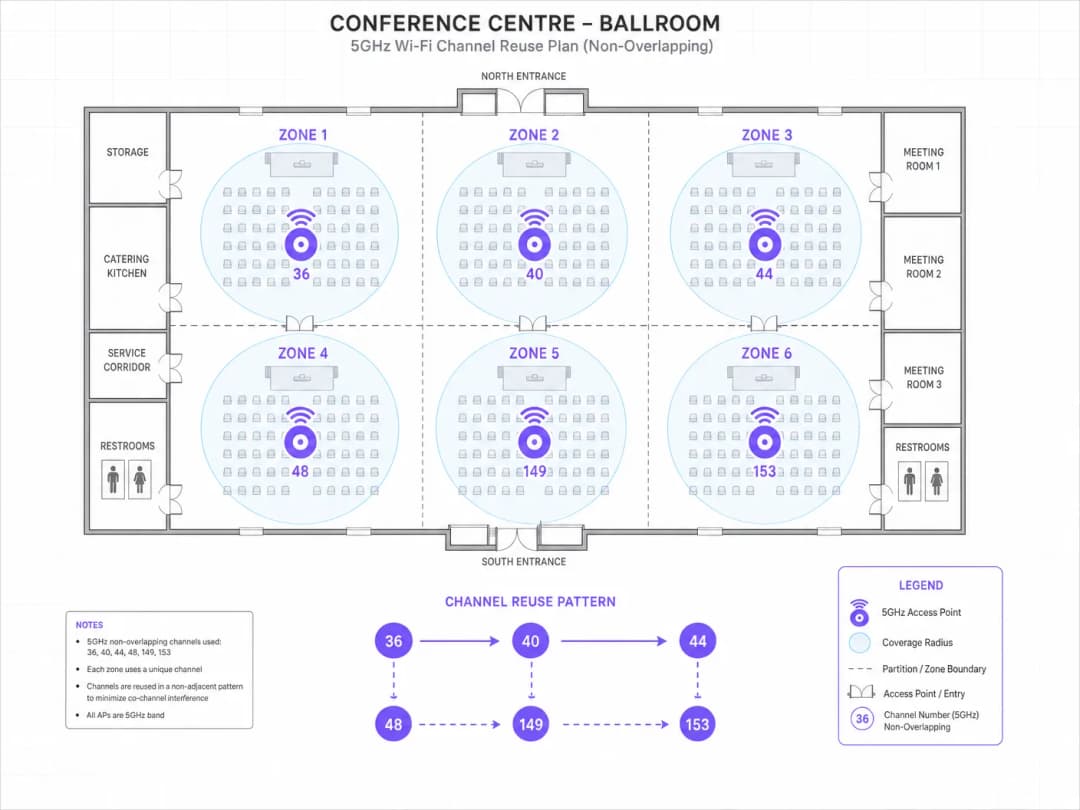
गेस्ट रूमच्या मजल्यांसाठी: प्रति मजला ३० APs सह, आठ Tier 1 नॉन-DFS चॅनेल्स (३६, ४०, ४४, ४८, १४९, १५३, १५७, १६१) पुन्हा वापरावे लागतील. को-चॅनेल APs मधील फिजिकल सेपरेशन जास्तीत जास्त वाढवेल अशा पॅटर्नमध्ये चॅनेल्स नियुक्त करा - सामान्यतः एक डायगोनल रियूज पॅटर्न. सर्व रेडिओ २०MHz चॅनेल विड्थवर सेट करा. वरील आणि खालील मजल्यावरील को-चॅनेल इंटरफेरियन्स कमी करणाऱ्या लहान, मर्यादित सेल्स तयार करण्यासाठी ट्रान्समिट पॉवर १० - १२ dBm वर कॉन्फिगर करा.
बॉलरूमसाठी: वरच्या दिशेने लावलेल्या आणि खालच्या दिशेने निर्देशित केलेल्या डायरेक्शनल अँटेनासह हाय-डेन्सिटी APs (उदा. Cisco Catalyst ९१३०AXE किंवा Aruba AP-५७५) छताच्या उंचीवर तैनात करा. प्रत्येक AP ला युनिक चॅनेल्स नियुक्त करा - बॉलरूममध्ये कोणताही चॅनेल रियूज नाही. २.४GHz इंटरफेरियन्स दूर करण्यासाठी बॉलरूम APs वर २.४GHz निष्क्रिय करा. समान वितरण सुनिश्चित करण्यासाठी क्लायंट आयसोलेशन आणि प्रति क्लायंट बँडविड्थ मर्यादा असलेला समर्पित इव्हेंट SSID कॉन्फिगर करा. APs दरम्यान जलद रोमिंगसाठी ८०२.११r सक्षम करा.
कॉर्पोरेट SSID साठी: ८०२.१X ऑथेंटिकेशनसह WPA३-Enterprise कॉन्फिगर करा. बिझनेस सेंटर आणि मीटिंग रूम्सना सेवा देणाऱ्या APs ना स्टॅटिक चॅनेल्स नियुक्त करा. शहरी स्थान आणि अनपेक्षित रडार वातावरण लक्षात घेता DFS चॅनेल्स पूर्णपणे निष्क्रिय करा.
तैनातीनंतर: २००+ कनेक्ट केलेल्या डिव्हाइसेससह चाचणी कार्यक्रमादरम्यान ॲक्टिव्ह सर्वेक्षणासह प्रमाणीकरण करा. ५% पेक्षा कमी रिट्राय रेट आणि ८० Mbps पेक्षा जास्त सरासरी क्लायंट थ्रूपुटचे लक्ष्य ठेवा.
१८० स्टोअर्स असलेली एक राष्ट्रीय रिटेल साखळी अंदाजे १५% ठिकाणी मधूनमधून POS सिस्टीम बिघाड अनुभवत आहे. हे बिघाड दिवसाच्या वेळेशी किंवा ट्रान्झॅक्शन व्हॉल्यूमशी संबंधित नाहीत. नेटवर्क लॉग्स नियतकालिक AP रीबूट आणि चॅनेल बदल दर्शवतात. ही साखळी ३ - ५ वर्षांपूर्वी तैनात केलेल्या Aruba आणि Cisco APs च्या मिश्रणाचा वापर करते, ज्यामध्ये सर्व साइट्सवर ऑटो-चॅनेल सक्षम आहे. तुम्ही या समस्येचे निदान आणि निवारण कसे कराल?
लक्षणांचे स्वरूप - लोडशी संबंधित नसलेले, काही विशिष्ट ठिकाणांवर अधूनमधून येणारे अपयश आणि त्यासोबत होणारे चॅनेल बदल - हा एक नमुना DFS इव्हेंटचा परिणाम आहे. पहिले पाऊल म्हणजे प्रभावित साइट्सवरून DFS इव्हेंट लॉग्स मिळवणे. Aruba वातावरणात, हे AirWave किंवा Central द्वारे उपलब्ध आहे. Cisco वातावरणात, हे Prime Infrastructure किंवा DNA Center द्वारे उपलब्ध आहे.
प्रत्येक प्रभावित साइटसाठी, कोणत्या चॅनेल्सवर DFS इव्हेंट्स येत आहेत आणि त्या इव्हेंट्सची वारंवारता काय आहे ते ओळखा. Ofcom चा Sitefinder डेटाबेस किंवा समतुल्य राष्ट्रीय नोंदणी वापरून विमानतळ, बंदरे आणि हवामान रडार प्रतिष्ठानांच्या जवळील साइट्सच्या ठिकाणांची पडताळणी करा.
निश्चित DFS इव्हेंट्स असलेल्या साइट्ससाठी: प्रभावित चॅनेल्सना ताबडतोब ऑटो-चॅनेल पूलमधून ब्लॅकलिस्ट करा. ऑटो-चॅनेल फक्त UNII-1 आणि UNII-3 चॅनेल्स पुरतेच मर्यादित करा (36, 40, 44, 48, 149, 153, 157, 161). विशेषतः POS सेवा देणाऱ्या APs साठी, ऑटो-चॅनेल पूर्णपणे बंद करा आणि स्टॅटिक टियर 1 चॅनेल्स नियुक्त करा.
उरलेल्या ८५% DFS इव्हेंट्स नसलेल्या साइट्ससाठी: प्रतिबंधात्मक उपाय म्हणून ऑटो-चॅनेलचा वापर टियर 1 चॅनेल्सपुरताच मर्यादित करा. DFS चॅनेल्सचा किरकोळ क्षमता वाढवण्याचा फायदा हा POS इन्फ्रास्ट्रक्चरच्या ऑपरेशनल जोखमीच्या तुलनेत योग्य ठरत नाही.
सेंट्रलाइज्ड कंट्रोलर मॅनेजमेंट प्लॅटफॉर्मद्वारे टप्प्याटप्प्याने कॉन्फिगरेशन बदल लागू करा: आधी २० साइट्सवर पायलट रन करा, दोन आठवड्यांसाठी त्याचे प्रमाणीकरण करा आणि नंतर संपूर्ण मालमत्तेवर ते तैनात करा. नेटवर्क मॅनेजमेंट सिस्टममध्ये प्रत्येक साइटसाठी चॅनेल प्लॅनची नोंद ठेवा.
सराव प्रश्न
Q1. तुम्ही 15,000 क्षमतेच्या इनडोअर स्पोर्ट्स एरिनासाठी नेटवर्क आर्किटेक्ट आहात. या ठिकाणी वर्षाला 80 कार्यक्रम होतात, ज्यामध्ये अंदाजे 8,000 उपकरणांचे कमाल एकाच वेळी WiFi कनेक्शन्स असतात. हे ठिकाण प्रादेशिक विमानतळापासून 4 किमी अंतरावर आहे. तुम्हाला 120 ऍक्सेस पॉईंट्ससाठी बजेट मंजूर झाले आहे. 5GHz रेडिओ कॉन्फिगरेशनसाठी चॅनेल प्लॅन डिझाइन करा.
टीप: विमानतळाच्या जवळ असण्याचा आणि त्याच्या DFS चॅनेलच्या उपलब्धतेवर होणाऱ्या परिणामांचा विचार करा. एकाच मोठ्या जागेत पसरलेले 120 APs चॅनेल पुनर्वापराच्या आवश्यकतांवर कसा परिणाम करतात याचा विचार करा. कोणती चॅनेल रुंदी 8,000 एकाच वेळी कनेक्ट असलेल्या क्लायंट्ससाठी एकूण क्षमता जास्तीत जास्त वाढवते?
नमुना उत्तर पहा
प्रादेशिक विमानतळापासून ४ किमीचे हवाई अंतर विचारात घेता, DFS चॅनेल्समुळे अस्वीकार्य असा ऑपरेशन्सचा धोका उद्भवू शकतो - रडार डिटेक्शनच्या घटनांमुळे थेट कार्यक्रमांदरम्यान AP चॅनेल्स आपोआप बदलले जातील, ज्यामुळे एकाच वेळी हजारो युजर्ससाठी कनेक्टिव्हिटीमध्ये उघड अडथळे निर्माण होतील. चॅनेल आराखडा फक्त टियर १ च्या नॉन-DFS चॅनेल्सपुरताच मर्यादित असणे आवश्यक आहे: ३६, ४०, ४४, ४८, १४९, १५३, १५७, १६१.
१२० APs आणि आठ उपलब्ध चॅनेल्ससह, सरासरी चॅनेल रियूज फॅक्टर १५ आहे (प्रत्येक चॅनेल अंदाजे १५ APs द्वारे वापरला जातो). या रियूज फॅक्टरवर को-चॅनेल इंटरफेअरेन्स (हस्तक्षेप) कमी करण्यासाठी, सर्व रेडिओ २०MHz चॅनेल विड्थवर सेट करणे आवश्यक आहे आणि ट्रान्समिट पॉवर अत्यंत नियंत्रित असावी - प्रेक्षक गॅलरीतील APs साठी ८ - १० dBm चे उद्दिष्ट ठेवा जेणेकरून लहान आणि मर्यादित सेल्स तयार होतील.
प्रेक्षक गॅलरीत AP ची मांडणी ग्रिड पॅटर्ननुसार असावी, ज्यामध्ये APs आसनांच्या रांगांखाली (अंडर-सीट AP डिप्लॉयमेंट) किंवा ३ - ४ रांगांच्या अंतरावर स्टँशियन्सवर खाली तोंड करून लावलेले असावेत. यामुळे कव्हरेजची त्रिज्या कमी होते आणि कोणत्याही विशिष्ट क्लायंटच्या रेंजमधील को-चॅनेल APs ची संख्या कमी होते.
कमी गर्दीच्या कॉनकोर्स क्षेत्रांसाठी, UNII-1 वरील ४०MHz चॅनेल्स योग्य ठरतील. स्टाफ/ऑपरेशन्ससाठी UNII-3 चॅनेल्सवर स्टॅटिक चॅनेल असाइनमेंट्ससह एक स्वतंत्र SSID डिप्लॉय करा.
डिप्लॉयमेंटनंतर, पहिल्या लाईव्ह इव्हेंटच्या आधी रिट्राय रेट्स आणि थ्रूटपुट सत्यापित करण्यासाठी २००+ चाचणी उपकरणांसह संपूर्ण ॲक्टिव्ह सर्वे करा.
Q2. एक हेल्थकेअर ट्रस्ट ४०० खाटांच्या रुग्णालयात नवीन WiFi नेटवर्क डिप्लॉय करत आहे. या नेटवर्कने इलेक्ट्रॉनिक पेशंट रेकॉर्ड्स (EPR), VoIP हँडसेट्स, इन्फ्युजन पंप टेलिमेट्री आणि नर्स कॉल सिस्टम यांसह क्लिनिकल ॲप्लिकेशन्सना सपोर्ट करणे आवश्यक आहे. ट्रस्टच्या इन्फॉर्मेशन सिक्युरिटी टीमने पेमेंट किऑस्कसाठी PCI DSS चे आणि रुग्णांच्या डेटासाठी GDPR चे पालन करणे बंधनकारक केले आहे. मुख्य चॅनेल प्लॅनिंग आणि सुरक्षा कॉन्फिगरेशन संदर्भातील निर्णय कोणते असावेत?
टीप: मिशन-क्रिटिकल क्लिनिकल ॲप्लिकेशन्स (डिस्कनेक्शन अजिबात सहन न करणे) आणि सुरक्षेच्या सेगमेंटेशन आवश्यकतांचे मिश्रण लक्षात घ्या. वैद्यकीय उपकरणांच्या उपस्थितीचा तुमच्या चॅनेल विड्थ आणि DFS च्या निर्णयांवर कसा परिणाम होतो?
नमुना उत्तर पहा
क्लिनिकल वातावरणात नेटवर्कमध्ये येणारे व्यत्यय अजिबात सहन केले जात नाहीत - VoIP हँडसेटवरील कॉल कट होणे किंवा इन्फ्युजन पंपची टेलिमेट्री कनेक्टिव्हिटी तुटणे याचा थेट परिणाम रुग्णांच्या सुरक्षिततेवर होतो. चॅनेल प्लॅनिंगमध्ये क्षमतेपेक्षा विश्वासार्हतेला प्राधान्य दिले पाहिजे.
सर्व क्लिनिकल APs ना स्टॅटिक टियर १ चॅनेल्स (३६, ४०, ४४, ४८, १४९, १५३, १५७, १६१) नियुक्त केले जाणे आवश्यक आहे. DFS चॅनेल्स पूर्णपणे बंद केले पाहिजेत - DFS मुळे चॅनेल बदलल्यामुळे क्लिनिकल ॲप्लिकेशनमध्ये व्यत्यय येण्याचा धोका स्वीकारता येणारा नाही. क्लिनिकल क्षेत्रांमध्ये सेवा देणाऱ्या सर्व APs वर ऑटो-चॅनेल सिलेक्शन बंद केले पाहिजे.
VoIP हँडसेट्ससाठी: व्हॉइस SSID वर 802.11r (फास्ट BSS ट्रान्झिशन), 802.11k (नेबर रिपोर्ट्स), आणि 802.11v (BSS ट्रान्झिशन मॅनेजमेंट) सुरू करा. रोमिंग लेटन्सी ५०ms च्या खाली असण्याचे ध्येय ठेवा. व्हॉइस ट्रॅफिकला प्राधान्य देण्यासाठी WMM QoS कॉन्फिगर करून व्हॉइससाठी समर्पित SSID नियुक्त करा (AC_VO क्यू).
सुरक्षा सेगमेंटेशनसाठी: क्लिनिकल स्टाफ (WPA3-Enterprise, सर्टिफिकेट-बेस्ड ऑथेंटिकेशनसह 802.1X), वैद्यकीय उपकरणे (डिव्हाइस सपोर्टनुसार WPA2-Enterprise किंवा WPA3-Enterprise), पाहुणे/रुग्ण (WPA3-Personal किंवा Captive Portal सह ओपन), आणि पेमेंट किऑस्क (WPA3-Enterprise, PCI DSS पालनासाठी आयसोलेटेड VLAN) यांच्यासाठी स्वतंत्र SSIDs डिप्लॉय करा.
PCI DSS 4.0 पालनासाठी: पेमेंट किऑस्क SSID ने CNSA-सुइट क्रिप्टोग्राफीसह WPA3-Enterprise वापरणे आवश्यक आहे, ते क्लिनिकल नेटवर्कशी कोणताही थेट संपर्क नसलेल्या आयसोलेटेड VLAN वर कार्यरत असावे आणि त्याचे त्रैमासिक वायरलेस व्हल्नेरेबिलिटी असेसमेंट्स केले जावे.
GDPR साठी: WiFi वरून ट्रान्समिट होणारा रुग्णांचा डेटा WPA3 ट्रान्सपोर्ट एन्क्रिप्शन व्यतिरिक्त ॲप्लिकेशन लेयरवर (किमान TLS 1.3) एन्क्रिप्ट केलेला असणे आवश्यक आहे. गेस्ट WiFi Captive Portal मध्ये डेटा कॅप्चर करण्यापूर्वी स्पष्ट संमती मिळवणे आवश्यक आहे.
Q3. एका रिटेल चेनच्या नेटवर्क ऑपरेशन्स सेंटरने असे शोधून काढले आहे की, २०० स्टोअर्सच्या समूहापैकी २३ स्टोअर्समध्ये गर्दीच्या वेळी (१२:००–१४:०० आणि १७:००–१९:००) क्लायंट थ्रुपुट सातत्याने २० Mbps च्या खाली दिसून येत आहे. सर्व स्टोअर्समध्ये समान AP मॉडेल आणि फर्मवेअर वापरले जातात. कंट्रोलर प्रभावित स्टोअर्समधील चॅनेल ३६ आणि १४९ वर सरासरी ७८% चॅनेल युटिलायझेशन दर्शवतो. याचे निदान आणि उपाय योजना काय आहे?
टीप: विशिष्ट वेळेत विशिष्ट चॅनेल्सवर जास्त प्रमाणात होणारा चॅनेलचा वापर हा एका विशिष्ट इंटरफेअरेन्स (हस्तक्षेप) पॅटर्नकडे निर्देश करतो. सर्व २३ प्रभावित स्टोअर्समध्ये काय साम्य आहे आणि गर्दीच्या खरेदीच्या वेळी काय बदलते याचा विचार करा.
नमुना उत्तर पहा
गर्दीच्या वेळी चॅनेल ३६ आणि १४९ वर ७८% चॅनेल युटिलायझेशन असणे हे क्लायंटच्या उच्च घनतेमुळे निर्माण होणाऱ्या को-चॅनेल इंटरफरन्सचे (co-channel interference) स्पष्ट संकेत आहे, जे बहुधा शेजारील इतर रिटेल WiFi नेटवर्क्समुळे अधिक वाढले आहे ज्यांच्याकडेही याच वेळात गर्दी असते.
निदानाचे टप्पे: (१) गर्दीच्या वेळी प्रभावित स्टोअर्समधील स्पेक्ट्रम विश्लेषणाचा डेटा मिळवा. चॅनेल युटिलायझेशन स्टोअरच्या स्वतःच्या क्लायंट्समुळे होत आहे की शेजारच्या नेटवर्क्समुळे, हे ओळखा. (२) AP च्या ट्रान्समिट पॉवर सेटिंग्ज तपासा - जर APs जास्तीत जास्त पॉवरवर चालत असतील, तर त्यांचे सेल्स मोठे आणि ओव्हरलॅप होतात, ज्यामुळे स्टोअरच्या स्वतःच्या APs दरम्यान जास्त को-चॅनेल इंटरफरन्स निर्माण होतो. (३) चॅनेल असाइनमेंट सत्यापित करा - जर फक्त चॅनेल ३६ आणि १४९ वापरात असतील, तर सर्व APs दोनच चॅनेल्स शेअर करत आहेत, जे याचे मुख्य कारण आहे.
उपाय योजना: (१) सर्व आठही Tier 1 चॅनेल्स (३६, ४०, ४४, ४८, १४९, १५३, १५७, १६१) वापरण्यासाठी चॅनेल प्लॅनचा विस्तार करा. सर्व आठ चॅनेल्सवर APs ची पुनर्रचना करा. (२) सेलचा आकार मर्यादित करण्यासाठी आणि को-चॅनेल इंटरफरन्स कमी करण्यासाठी ट्रान्समिट पॉवर १०-१२ dBm पर्यंत कमी करा. (३) सक्षम क्लायंट्स 5GHz शी कनेक्ट होतील याची खात्री करण्यासाठी बँड स्टिअरिंग (band steering) सक्षम करा. (४) जर शेजारील नेटवर्कचा इंटरफरन्स विशेषतः चॅनेल ३६ आणि १४९ वर जास्त असेल, तर ते व्यस्त फ्रिक्वेन्सी टाळण्यासाठी त्या APs ना चॅनेल ४४ आणि १५७ वर पुन्हा असाइन करा.
अपेक्षित परिणाम: चॅनेल युटिलायझेशन प्रति चॅनेल ३०-४५% पर्यंत कमी झाले पाहिजे, आणि गर्दीच्या वेळी सरासरी क्लायंट थ्रुपुट ८०-१२० Mbps पर्यंत सुधारले पाहिजे.
या मालिकेमध्ये पुढे वाचा
उत्कृष्ट चॅनेल प्लॅनिंगसाठी RSSI आणि सिग्नल स्ट्रेंथ समजून घेणे
हे मार्गदर्शक उत्कृष्ट चॅनेल प्लॅनिंगसाठी RSSI, सिग्नल - टू - नॉईज रेशो (SNR) आणि RF प्रोपॅगेशन सिद्धांतांचा सखोल तांत्रिक अभ्यास प्रदान करते. हे IT मॅनेजर्स, नेटवर्क आर्किटेक्ट्स आणि व्हेन्यू ऑपरेशन्स डायरेक्टर्सना को - चॅनेल आणि ॲडजेसेंट चॅनेल इंटरफेरन्स कमी करण्यासाठी, AP प्लेसमेंट सुधारण्यासाठी आणि हॉस्पिटॅलिटी, रिटेल आणि सार्वजनिक क्षेत्रातील वातावरणात मोजता येण्याजोग्या व्यावसायिक प्रभावासाठी ॲनालिटिक्सचा लाभ घेण्यासाठी कृतीयोग्य धोरणे प्रदान करते.
WiFi 6 विरुद्ध WiFi 5: हे चॅनेल इंटरफेरन्स सोडवते का?
हे मार्गदर्शक WiFi 6 (802.11ax) हे OFDMA आणि BSS Coloring द्वारे हाय-डेन्सिटी एंटरप्राइझ वातावरणात चॅनेल इंटरफेरन्सचे निवारण कसे करते याचे तांत्रिक सखोल विश्लेषण प्रदान करते. हे IT व्यवस्थापक, network architects, आणि CTOs ना व्यावहारिक अंमलबजावणी धोरणे, हॉस्पिटॅलिटी आणि हेल्थकेअरमधील वास्तविक केस स्टडीज आणि ज्या ठिकाणी वायरलेस कामगिरी व्यवसायासाठी अत्यंत महत्त्वाची आहे अशा ठिकाणी इन्फ्रास्ट्रक्चर अपग्रेडच्या ROI चे मूल्यमापन करण्यासाठी एक फ्रेमवर्क प्रदान करते.
उच्च-घनता असलेल्या ठिकाणांसाठी सर्वोत्तम WiFi चॅनेल्स
स्टेडियम, क्रीडांगणे आणि मोठ्या सार्वजनिक ठिकाणांसारख्या उच्च-घनता असलेल्या वातावरणात WiFi चॅनेल्स निवडण्यासाठी आणि ऑप्टिमाइझ करण्यासाठी एक निश्चित तांत्रिक संदर्भ. यामध्ये RF फिजिक्स, 5 GHz आणि 6 GHz बँड्समधील चॅनेलचा पुनर्वापर करण्याच्या रणनीती आणि IT लीडर्ससाठी प्रत्यक्ष अंमलबजावणीचे मार्गदर्शन समाविष्ट आहे.
तुमच्या विशिष्ट सेटअपबद्दल काही प्रश्न आहेत का?
आमची टीम ८०,००० हून अधिक वेन्यूजमधील वेन्यू ऑपरेटर्स, IT मॅनेजर्स आणि नेटवर्क इंजिनिअर्ससोबत काम करते. २० मिनिटांचा कॉल बुक करा आणि तुमच्यासारख्या इतरांनी ही समस्या कशी सोडवली हे आम्ही तुम्हाला दाखवू.