
Best 5GHz Channels for High-Density Corporate Networks
This guide provides a definitive technical reference for selecting the optimal 5GHz channels in high-density corporate environments, covering UNII band architecture, DFS channel risk management, and spectrum analysis methodology. It is written for network architects and IT decision-makers deploying enterprise WiFi across hotels, retail estates, stadiums, conference centres, and public-sector campuses. Practical implementation guidance, real-world case studies, and ROI frameworks are included to support deployment decisions this quarter.
Video overview
Listen to this guide
View podcast transcript
Part of our core series: Guest WiFi Guide →
Executive Summary
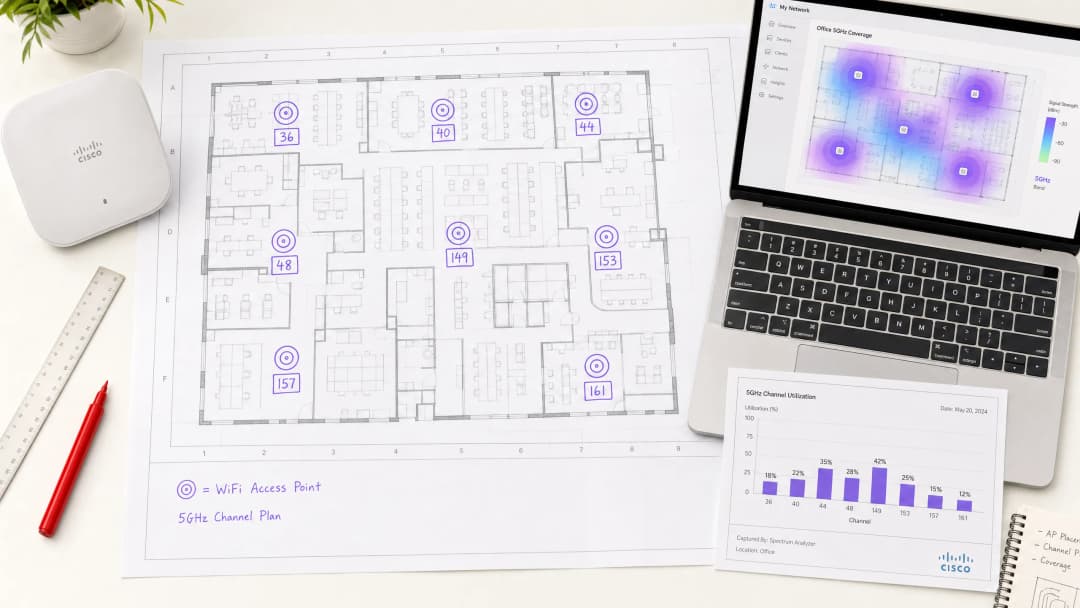
Channel selection in the 5GHz band is not a configuration detail — it is a foundational architectural decision that directly determines throughput, reliability, and client capacity in any high-density deployment. For enterprise environments supporting hundreds of concurrent devices per floor, the difference between a well-planned channel strategy and a default auto-channel configuration can mean the difference between sub-50ms latency and a network that fails under load.
The 5GHz spectrum offers up to 25 non-overlapping 20MHz channels across the UNII-1, UNII-2, and UNII-3 bands. However, not all channels are equal. UNII-1 (channels 36–48) and UNII-3 (channels 149–165) are non-DFS and should form the backbone of any enterprise channel plan. UNII-2 channels (52–144) introduce Dynamic Frequency Selection obligations that create operational risk in radar-proximate environments.
This guide walks through the technical architecture of the 5GHz spectrum, provides a structured channel planning methodology, and presents real-world case studies from hospitality, healthcare, and large-venue deployments. For teams already operating Guest WiFi infrastructure at scale, the channel strategy outlined here integrates directly with analytics-driven capacity planning via WiFi Analytics.
Technical Deep-Dive
The 5GHz Spectrum Architecture

The 5GHz band is segmented into Unlicensed National Information Infrastructure (UNII) sub-bands, each with distinct regulatory characteristics. Understanding these distinctions is non-negotiable for enterprise architects.
| Band | Channels | Frequency Range | DFS Required | Max EIRP (EU) | Recommended Use |
|---|---|---|---|---|---|
| UNII-1 | 36, 40, 44, 48 | 5.180–5.240 GHz | No | 200 mW | Mission-critical SSIDs |
| UNII-2A | 52, 56, 60, 64 | 5.260–5.320 GHz | Yes | 200 mW | Supplementary capacity |
| UNII-2C | 100–144 | 5.500–5.720 GHz | Yes | 1000 mW | High-power backhaul only |
| UNII-3 | 149, 153, 157, 161, 165 | 5.745–5.825 GHz | No (most regions) | 200 mW | Mission-critical SSIDs |
Note: UNII-3 DFS requirements vary by jurisdiction. In the UK and EU, channels 149–165 are non-DFS. Verify local OFCOM or national regulator requirements before deployment.
Why Channel Width Is the Most Misunderstood Variable
The instinct to configure 80MHz or 160MHz channel widths to maximise theoretical throughput is understandable but counterproductive in dense deployments. A single 80MHz channel consumes four 20MHz channels worth of spectrum. In a venue with 40 access points, this dramatically reduces the available channel pool, forcing co-channel interference that degrades aggregate network performance far more than the per-client throughput gain justifies.
For high-density environments, 20MHz channels are the correct default. The aggregate throughput across the entire venue is maximised by enabling more simultaneous spatial reuse, not by giving each client a wider pipe. 40MHz channels may be appropriate in medium-density zones such as executive boardrooms or private offices. 80MHz and 160MHz should be reserved for dedicated high-throughput applications such as wireless backhaul or AV distribution in isolated, low-client-count areas.
DFS: The Operational Risk That Vendors Understate
Dynamic Frequency Selection (DFS) is an IEEE 802.11h mechanism that requires access points to monitor for radar signals and vacate any channel on which radar is detected within 60 seconds. The mandatory Channel Availability Check (CAC) period — up to 60 seconds on some channels — means an AP cannot transmit on a DFS channel until it has confirmed the channel is radar-free. In a failover or reboot scenario, this introduces a service gap.
The practical implications for enterprise deployments are significant. Airports, ports, military installations, and weather monitoring stations all operate radar systems that can trigger DFS events. Even in urban environments, unexpected DFS events occur. A network that relies heavily on UNII-2 channels without a fallback plan will experience periodic, unpredictable client disconnections that are difficult to diagnose and frustrating for end users.
For hospitality deployments in particular, where guest satisfaction is directly tied to network reliability, DFS-triggered disruptions during peak check-in periods or conference sessions are commercially damaging. The same principle applies to retail environments where point-of-sale systems and inventory management tools depend on uninterrupted connectivity.
For a broader treatment of frequency band characteristics, see Wi-Fi Frequencies: A Guide to Wi-Fi Frequencies in 2026.
The Best 5GHz Channels: A Definitive Ranking
For enterprise deployments, the recommended channel priority is as follows:
Tier 1 — Always Use (Non-DFS, Universal Compatibility)
- Channels 36, 40, 44, 48 (UNII-1)
- Channels 149, 153, 157, 161 (UNII-3)
These eight channels form the foundation of any enterprise channel plan. They are non-DFS, universally supported by client devices, and available in all major regulatory domains. For a deployment with up to eight APs per floor, a clean one-channel-per-AP assignment is achievable using only Tier 1 channels.
Tier 2 — Use With Monitoring (DFS, Lower Radar Risk)
- Channels 52, 56, 60, 64 (UNII-2A)
These channels carry DFS obligations but are in the lower UNII-2 range, which typically sees less radar interference than UNII-2C. They are appropriate for supplementary capacity in environments where Tier 1 channels are exhausted and radar proximity has been assessed as low.
Tier 3 — Use With Caution (DFS, Higher Radar Risk, High Power)
- Channels 100–144 (UNII-2C)
While UNII-2C channels offer higher permitted transmit power in some regions, they carry the highest radar interference risk. Reserve these for dedicated backhaul links or environments where a thorough spectrum survey has confirmed minimal radar activity.
Transmit Power and Cell Sizing
Channel planning cannot be separated from transmit power management. Over-powered access points create large cells that increase co-channel interference. In high-density deployments, the target cell size should be small and consistent. Transmit power should be set to the minimum level that provides adequate coverage for the intended zone, typically between 8–14 dBm for client-serving radios in dense indoor environments.
Automatic power control mechanisms such as Cisco's TPC or Aruba's ARM can be effective when constrained to a defined power range. Allowing these systems to operate without bounds often results in high-power configurations that undermine the channel reuse plan.
Got questions about your specific setup?
Our team works with venue operators, IT managers, and network engineers across 80,000 venues. Book a 20-minute call and we will show you how others like you solved it.
Implementation Guide
Step 1: Pre-Deployment Spectrum Survey
Before placing a single access point, conduct a passive spectrum survey of the entire venue. The objective is to identify existing RF sources — neighbouring networks, legacy equipment, microwave interference, and any radar activity. Tools such as Ekahau Sidekick, AirMagnet Survey Pro, or the built-in spectrum analysis capabilities of enterprise controllers (Cisco CleanAir, Aruba AirMatch) provide the necessary visibility.
Document the survey findings in a channel utilisation map. Identify which channels are already congested from adjacent deployments and which are clean. This data directly informs your channel assignment plan.
Step 2: Define Your Channel Plan
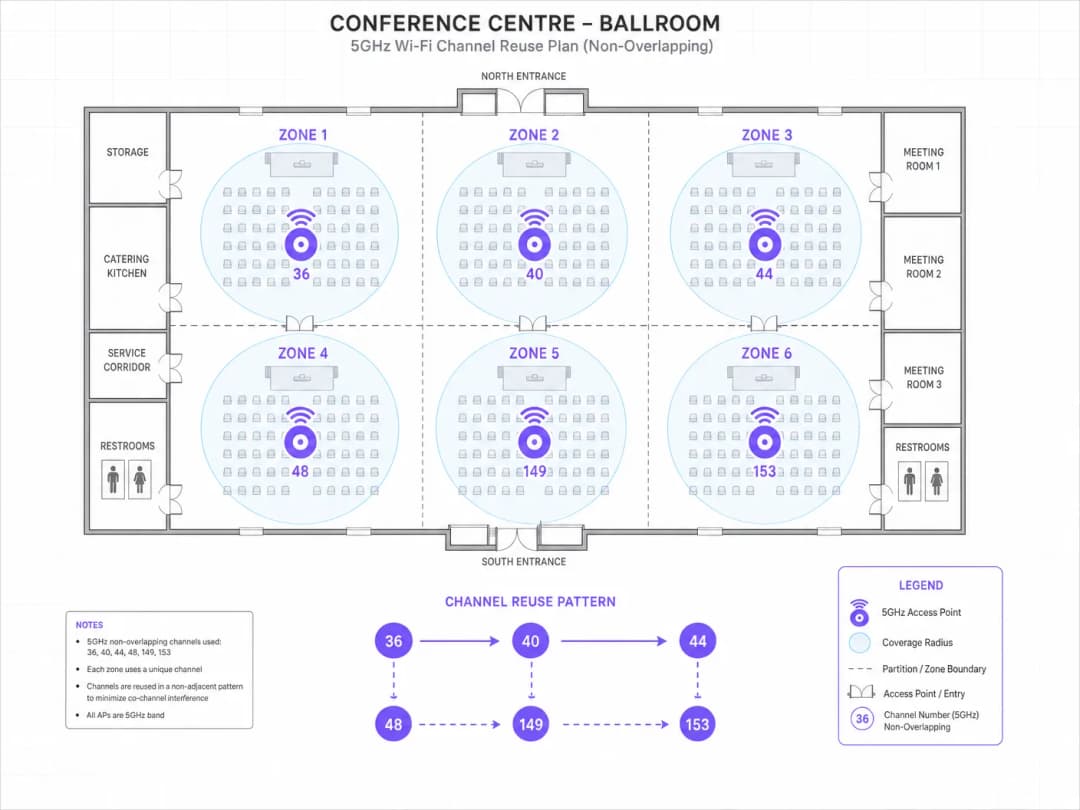
Based on the spectrum survey, assign channels to access points following these principles:
- Adjacent APs must not share the same channel.
- APs on the same channel should be separated by at least two cell diameters to minimise co-channel interference.
- Use the full set of Tier 1 channels before introducing Tier 2 or Tier 3 channels.
- For multi-floor deployments, account for vertical co-channel interference. APs directly above or below each other should be on different channels.
For a 10,000 sq ft floor with eight APs, a clean assignment using channels 36, 40, 44, 48, 149, 153, 157, 161 is achievable with no channel reuse on the same floor. For larger floors requiring more than eight APs, introduce Tier 2 channels after confirming low radar risk.
Step 3: Configure Channel Width
Set all client-serving radios to 20MHz channel width as the default. If specific high-throughput zones (e.g., a boardroom with video conferencing requirements) justify 40MHz, configure these as exceptions with explicit justification documented in the network design record.
Step 4: Disable Auto-Channel on Critical Infrastructure
For APs serving mission-critical applications — POS systems, VoIP, medical devices — disable automatic channel selection and assign channels statically. Auto-channel algorithms, while useful for general deployments, can make suboptimal decisions in complex RF environments and introduce unexpected channel changes during business hours.
Step 5: Configure Band Steering and Client Load Balancing
Ensure band steering is enabled to push capable clients to 5GHz. In Wi-Fi 6 (802.11ax) deployments, OFDMA and BSS Colouring provide additional mechanisms to reduce co-channel interference, but these are supplements to — not replacements for — a sound channel plan.
For guidance on segmenting traffic across multiple SSIDs in shared environments, see Micro-Segmentation Best Practices for Shared WiFi Networks.
Step 6: Post-Deployment Validation
After deployment, run an active survey to validate coverage, signal strength, and channel utilisation. Key metrics to confirm:
- RSSI at client devices: target -65 dBm or better at the cell edge.
- Co-channel interference (CCI): target below -85 dBm from co-channel neighbours.
- Channel utilisation: target below 50% on any single channel during peak load.
- Roaming performance: validate 802.11r (Fast BSS Transition) and 802.11k (Neighbour Reports) are functioning correctly.
Best Practices
The following recommendations represent vendor-neutral best practices aligned with IEEE 802.11 standards and WLAN industry guidance from bodies including the Wi-Fi Alliance and CWNP.
Standardise on 20MHz channels for all high-density deployments. The aggregate capacity benefit of channel reuse consistently outperforms the per-client throughput gain from wider channels in environments with more than 20 concurrent clients per AP.
Maintain a channel plan document. Every AP should have a documented channel assignment, power level, and justification. This is essential for troubleshooting and for maintaining consistency across firmware upgrades or hardware replacements.
Implement WPA3-Enterprise with 802.1X authentication for corporate SSIDs. In environments handling payment card data, PCI DSS 4.0 requires strong authentication and encryption. WPA3 with CNSA-suite cryptography satisfies these requirements and provides forward secrecy that WPA2 cannot guarantee.
Monitor DFS events continuously. Any AP operating on a DFS channel should have its DFS event log reviewed weekly during the first month of operation. Channels with more than two DFS events per week should be blacklisted from the auto-channel pool.
Align with GDPR requirements for guest networks. In hospitality and retail environments, guest WiFi data collection must comply with GDPR. Purple's Guest WiFi platform provides built-in consent management and data governance tooling that integrates with the network infrastructure described in this guide.
For office-specific WiFi optimisation considerations, see Office Wi-Fi: Optimize Your Modern Office Wi-Fi Network.
Troubleshooting & Risk Mitigation
Co-Channel Interference (CCI)
CCI is the most common performance degrader in enterprise WiFi deployments. Symptoms include high retry rates, reduced throughput, and poor roaming performance. Diagnosis requires a spectrum analyser or controller-based RF analysis. Resolution involves adjusting channel assignments to increase separation between co-channel APs and reducing transmit power to shrink cell sizes.
DFS-Triggered Channel Changes
If clients are experiencing periodic disconnections lasting 30–60 seconds, DFS events are the likely cause. Check the AP event log for DFS radar detection entries. Resolution: blacklist the affected channel from the auto-channel pool and assign an alternative Tier 1 channel. In environments where DFS events are frequent, consider a full migration to non-DFS channels.
Hidden Node Problem
In large open-plan environments such as warehouses or exhibition halls, the hidden node problem — where two clients cannot hear each other but both attempt to transmit to the same AP — causes collision rates to increase. Mitigation involves enabling RTS/CTS thresholds and ensuring AP placement provides adequate coverage overlap.
Legacy Client Compatibility
Legacy 802.11a devices operate only on UNII-1 channels. If your environment includes legacy devices, ensure UNII-1 channels remain available and that the SSID serving legacy clients has lower mandatory data rates enabled. Avoid mixing legacy clients with modern 802.11ac or Wi-Fi 6 clients on the same SSID, as legacy management frames reduce overall network efficiency.
For environments integrating Bluetooth Low Energy alongside WiFi — common in retail and healthcare deployments — see BLE Low Energy Explained for Enterprise for coexistence guidance.
Rogue AP Detection
In high-density environments, rogue access points operating on the same channels as your infrastructure create unmanaged interference. Implement WIDS/WIPS (Wireless Intrusion Detection/Prevention) to detect and contain rogue APs. Most enterprise controllers include this capability natively.
ROI & Business Impact
Quantifying the Cost of Poor Channel Planning
The business impact of suboptimal channel configuration is measurable. In a 200-room hotel, a network experiencing 15% packet retry rates due to co-channel interference will deliver average throughput of approximately 40–50 Mbps per AP under load, compared to 150+ Mbps achievable with a properly planned channel strategy. For guests relying on the network for video streaming, video conferencing, and cloud-based work, this difference is immediately perceptible and directly affects satisfaction scores.
In retail environments, network instability affecting POS systems creates direct revenue impact. A single POS terminal unable to process transactions for 10 minutes during peak trading costs a typical high-street retailer £200–£500 in lost sales, depending on throughput. Across a multi-site estate, the aggregate cost of poor WiFi reliability is significant.
Measuring Success
Key performance indicators for a well-executed channel plan include:
| KPI | Baseline (Poor Config) | Target (Optimised) |
|---|---|---|
| Average client throughput | 20–40 Mbps | 100–200 Mbps |
| Packet retry rate | 15–25% | < 5% |
| Roaming latency | 200–500 ms | < 50 ms (with 802.11r) |
| DFS events per week | 5–20 | 0 (non-DFS channels) |
| Client association failures | 3–8% | < 1% |
Integration with Analytics-Driven Capacity Planning
Channel planning is not a one-time exercise. As device density, usage patterns, and neighbouring RF environments evolve, the channel plan must be reviewed and updated. Purple's WiFi Analytics platform provides real-time visibility into client density, dwell time, and network utilisation by zone — data that directly informs ongoing channel plan optimisation.
For transport hubs and healthcare campuses where device density fluctuates significantly by time of day, analytics-driven dynamic channel management provides the operational intelligence needed to maintain consistent performance without manual intervention.
This guide is maintained by the Purple technical content team. For implementation support or to discuss your specific deployment requirements, contact Purple at purple.ai.
Key Definitions
UNII Band
Unlicensed National Information Infrastructure - the regulatory framework that divides the 5GHz spectrum into sub-bands (UNII-1, UNII-2A, UNII-2C, UNII-3), each with distinct power limits and DFS requirements. The UNII designation determines which channels are available without radar coexistence obligations.
IT teams encounter this when reviewing regulatory compliance for 5GHz deployments, particularly when operating across multiple countries with different spectrum regulations.
DFS (Dynamic Frequency Selection)
An IEEE 802.11h mechanism that requires access points to monitor for radar signals on UNII-2 channels and vacate any channel on which radar is detected. The mandatory Channel Availability Check (CAC) period can be up to 60 seconds, during which the AP cannot transmit.
Critical for any deployment using channels 52–144. DFS events cause client disconnections and are a common root cause of intermittent WiFi failures in environments near airports, ports, or weather stations.
Co-Channel Interference (CCI)
Interference that occurs when two or more access points operate on the same channel within range of each other. Unlike adjacent-channel interference, CCI causes APs to defer transmission (CSMA/CA), directly reducing aggregate throughput and increasing latency.
The primary performance degrader in high-density WiFi deployments. Diagnosed via spectrum analysis or controller RF reports showing high retry rates and low channel utilisation efficiency.
Channel Reuse
The practice of assigning the same channel to multiple access points that are sufficiently separated to avoid co-channel interference. Effective channel reuse maximises aggregate network capacity by allowing simultaneous transmissions on the same frequency in non-overlapping coverage areas.
The core principle behind high-density WiFi design. Maximising channel reuse - by using 20MHz channels and controlling cell size - consistently delivers better aggregate performance than maximising per-client throughput.
BSS Colouring
An IEEE 802.11ax (WiFi 6) feature that assigns a colour identifier to each Basic Service Set, allowing APs to distinguish between transmissions from their own BSS and those from overlapping BSSs. This reduces unnecessary deferral in high-density environments where multiple BSSs overlap.
Available on WiFi 6 and WiFi 6E hardware. Reduces the impact of co-channel interference in dense deployments but does not eliminate the need for a sound channel plan.
OFDMA (Orthogonal Frequency Division Multiple Access)
A multi-user access technology introduced in IEEE 802.11ax that divides a channel into smaller resource units (RUs), allowing an AP to serve multiple clients simultaneously within a single transmission opportunity. Significantly improves efficiency in high-density environments with many small-packet clients.
Relevant for WiFi 6 deployments in environments with high client density and mixed traffic types (IoT, mobile, laptops). OFDMA complements but does not replace channel planning.
TPC (Transmit Power Control)
An IEEE 802.11h mechanism that allows access points to dynamically adjust transmit power based on the RF environment. In enterprise deployments, TPC is used to reduce cell size and minimise co-channel interference, particularly important in high-density configurations.
Should be configured with explicit minimum and maximum power bounds in enterprise deployments. Unconstrained TPC can result in high-power configurations that undermine the channel reuse plan.
802.11r (Fast BSS Transition)
An IEEE amendment that reduces roaming latency by pre-authenticating clients with neighbouring access points before the client initiates a roam. Reduces roaming time from 200–500ms (standard 802.11) to under 50ms, critical for voice and video applications.
Essential for any deployment supporting VoIP, video conferencing, or real-time applications where clients roam between APs. Must be enabled alongside 802.11k (Neighbour Reports) and 802.11v (BSS Transition Management) for optimal roaming performance.
Spectrum Analysis
The process of measuring the RF environment across frequency bands to identify signal sources, interference, and channel utilisation. Passive spectrum analysis (receive-only) is conducted pre-deployment; active analysis is conducted post-deployment to validate performance.
A mandatory step in any enterprise WiFi deployment. Without a spectrum survey, channel assignments are based on assumptions that may not reflect the actual RF environment, leading to interference issues that are difficult to diagnose after deployment.
Worked Examples
A 350-room city-centre hotel is deploying WiFi 6 access points across 12 floors, with approximately 30 APs per floor. The hotel hosts frequent corporate events in a 1,200-capacity ballroom. The IT director has reported that the previous network suffered from persistent connectivity issues during large events, with guests complaining of slow speeds and frequent disconnections. How should the channel plan be structured?
Begin with a full passive spectrum survey across all 12 floors and the ballroom, paying particular attention to neighbouring hotel and office building WiFi networks visible from the building perimeter. Given the urban location, assume significant RF congestion from adjacent deployments.
For the guest room floors: with 30 APs per floor, the eight Tier 1 non-DFS channels (36, 40, 44, 48, 149, 153, 157, 161) will require reuse. Assign channels in a pattern that maximises physical separation between co-channel APs - typically a diagonal reuse pattern. Set all radios to 20MHz channel width. Configure transmit power at 10–12 dBm to create small, contained cells that minimise co-channel interference from the floor above and below.
For the ballroom: deploy high-density APs (e.g., Cisco Catalyst 9130AXE or Aruba AP-575) mounted at ceiling height with directional antennas aimed downward. Assign unique channels to each AP - no channel reuse within the ballroom. Disable 2.4GHz on ballroom APs to eliminate 2.4GHz interference. Configure a dedicated event SSID with client isolation and bandwidth limiting per client to ensure equitable distribution. Enable 802.11r for fast roaming between APs.
For the corporate SSID: configure WPA3-Enterprise with 802.1X authentication. Assign static channels to the APs serving the business centre and meeting rooms. Disable DFS channels entirely given the urban location and unpredictable radar environment.
Post-deployment: validate with an active survey during a test event with 200+ connected devices. Target retry rate below 5% and average client throughput above 80 Mbps.
A national retail chain with 180 stores is experiencing intermittent POS system failures at approximately 15% of locations. The failures are not correlated with time of day or transaction volume. Network logs show periodic AP reboots and channel changes. The chain uses a mix of Aruba and Cisco APs deployed 3–5 years ago, with auto-channel enabled across all sites. How do you diagnose and resolve the issue?
The symptom profile - intermittent failures at a subset of locations, not correlated with load, accompanied by channel changes - is a textbook DFS event signature. The first step is to extract DFS event logs from the affected sites. In Aruba environments, this is available via AirWave or Central. In Cisco environments, via Prime Infrastructure or DNA Center.
For each affected site, identify which channels are experiencing DFS events and the frequency of those events. Cross-reference the site locations with proximity to airports, ports, and weather radar installations using Ofcom's Sitefinder database or equivalent national registry.
For sites with confirmed DFS events: immediately blacklist the affected channels from the auto-channel pool. Restrict auto-channel to UNII-1 and UNII-3 channels only (36, 40, 44, 48, 149, 153, 157, 161). For POS-serving APs specifically, disable auto-channel entirely and assign static Tier 1 channels.
For the remaining 85% of sites with no DFS events: proactively restrict auto-channel to Tier 1 channels as a preventive measure. The marginal capacity benefit of DFS channels does not justify the operational risk for POS infrastructure.
Roll out the configuration change via the centralised controller management platform in a phased approach: pilot at 20 sites, validate over two weeks, then deploy to the full estate. Document the channel plan for each site in the network management system.
Practice Questions
Q1. You are the network architect for a 15,000-capacity indoor sports arena. The venue hosts 80 events per year, with peak concurrent WiFi connections of approximately 8,000 devices. The venue is located 4km from a regional airport. You have been allocated a budget for 120 access points. Design the channel plan for the 5GHz radio configuration.
Hint: Consider the airport proximity and its implications for DFS channel availability. Think about how 120 APs across a single large space affects channel reuse requirements. What channel width maximises aggregate capacity for 8,000 concurrent clients?
View model answer
Given the 4km proximity to a regional airport, DFS channels present an unacceptable operational risk - radar detection events would cause AP channel changes during live events, creating visible connectivity disruptions for thousands of users simultaneously. The channel plan must be restricted to Tier 1 non-DFS channels only: 36, 40, 44, 48, 149, 153, 157, 161.
With 120 APs and eight available channels, the average channel reuse factor is 15 (each channel used by approximately 15 APs). To minimise co-channel interference at this reuse factor, all radios must be set to 20MHz channel width and transmit power must be tightly controlled - target 8–10 dBm for seating bowl APs to create small, contained cells.
AP placement should follow a grid pattern in the seating bowl with APs mounted under seat rows (under-seat AP deployment) or on stanchions at 3–4 row intervals, pointing downward. This minimises the coverage radius and reduces the number of co-channel APs within range of any given client.
For the concourse areas with lower density, 40MHz channels on UNII-1 are acceptable. Deploy a separate SSID for staff/operations with static channel assignments on UNII-3 channels.
Post-deployment, conduct a full active survey with 200+ test devices to validate retry rates and throughput before the first live event.
Q2. A healthcare trust is deploying a new WiFi network across a 400-bed hospital. The network must support clinical applications including electronic patient records (EPR), VoIP handsets, infusion pump telemetry, and nurse call systems. The trust's information security team has mandated PCI DSS compliance for the payment kiosks and GDPR compliance for patient data. What are the key channel planning and security configuration decisions?
Hint: Consider the mix of mission-critical clinical applications (zero tolerance for disconnection) and the security segmentation requirements. How does the presence of medical devices affect your channel width and DFS decisions?
View model answer
Clinical environments have zero tolerance for network disruption - a VoIP handset dropping a call or an infusion pump losing telemetry connectivity has direct patient safety implications. The channel plan must prioritise reliability over capacity.
All clinical APs must be assigned static Tier 1 channels (36, 40, 44, 48, 149, 153, 157, 161). DFS channels must be completely disabled - the risk of a DFS-triggered channel change disrupting a clinical application is unacceptable. Auto-channel selection must be disabled on all APs serving clinical areas.
For the VoIP handsets: enable 802.11r (Fast BSS Transition), 802.11k (Neighbour Reports), and 802.11v (BSS Transition Management) on the voice SSID. Target roaming latency below 50ms. Assign a dedicated SSID for voice with WMM QoS configured to prioritise voice traffic (AC_VO queue).
For security segmentation: deploy separate SSIDs for clinical staff (WPA3-Enterprise, 802.1X with certificate-based authentication), medical devices (WPA2-Enterprise or WPA3-Enterprise depending on device support), guest/patient (WPA3-Personal or open with captive portal), and payment kiosks (WPA3-Enterprise, isolated VLAN for PCI DSS compliance).
For PCI DSS 4.0 compliance: the payment kiosk SSID must use WPA3-Enterprise with CNSA-suite cryptography, operate on an isolated VLAN with no lateral movement to clinical networks, and be subject to quarterly wireless vulnerability assessments.
For GDPR: patient data transmitted over WiFi must be encrypted at the application layer (TLS 1.3 minimum) in addition to the WPA3 transport encryption. Guest WiFi captive portal must include explicit consent collection before data capture.
Q3. A retail chain's network operations centre has identified that 23 stores in a 200-store estate are consistently showing client throughput below 20 Mbps during peak trading hours (12:00–14:00 and 17:00–19:00). All stores use the same AP model and firmware. The controller shows average channel utilisation of 78% on channels 36 and 149 at the affected stores. What is the diagnosis and remediation plan?
Hint: High channel utilisation on specific channels during predictable time windows points to a specific interference pattern. Consider what is common to all 23 affected stores and what changes at peak trading hours.
View model answer
78% channel utilisation on channels 36 and 149 during peak trading hours is a clear indicator of co-channel interference from high client density, likely compounded by neighbouring retail WiFi networks that also peak during trading hours.
Diagnosis steps: (1) Pull the spectrum analysis data from the affected stores during peak hours. Identify whether the channel utilisation is driven by the store's own clients or by neighbouring networks. (2) Check the AP transmit power settings - if APs are running at maximum power, their cells are large and overlapping, creating high co-channel interference between the store's own APs. (3) Verify the channel assignment - if only channels 36 and 149 are in use, all APs are sharing two channels, which is the root cause.
Remediation: (1) Expand the channel plan to use all eight Tier 1 channels (36, 40, 44, 48, 149, 153, 157, 161). Redistribute APs across all eight channels. (2) Reduce transmit power to 10–12 dBm to shrink cell sizes and reduce co-channel interference. (3) Enable band steering to ensure capable clients connect to 5GHz. (4) If neighbouring network interference is significant on channels 36 and 149 specifically, reassign those APs to channels 44 and 157 to avoid the congested frequencies.
Expected outcome: channel utilisation should drop to 30–45% per channel, with average client throughput recovering to 80–120 Mbps during peak hours.
Continue reading in this series
Understanding RSSI and Signal Strength for Optimal Channel Planning
This guide provides a comprehensive technical deep-dive into RSSI, Signal-to-Noise Ratio (SNR), and RF propagation principles for optimal channel planning. It equips IT managers, network architects, and venue operations directors with actionable strategies to mitigate Co-Channel and Adjacent Channel Interference, optimize AP placement, and leverage analytics for measurable business impact across hospitality, retail, and public-sector environments.
WiFi 6 vs WiFi 5: Does it Solve Channel Interference?
This guide provides a technical deep dive into how WiFi 6 (802.11ax) addresses channel interference in high-density enterprise environments through OFDMA and BSS Coloring. It equips IT managers, network architects, and CTOs with actionable deployment strategies, real-world case studies from hospitality and healthcare, and a framework for evaluating the ROI of infrastructure upgrades in venues where wireless performance is business-critical.
Best WiFi Channels for High-Density Venues
A definitive technical reference for selecting and optimizing WiFi channels in high-density environments like stadiums, arenas, and large public venues. It covers RF physics, channel reuse strategies across 5 GHz and 6 GHz bands, and actionable deployment guidance for IT leaders.
Got questions about your specific setup?
Our team works with venue operators, IT managers, and network engineers across 80,000 venues. Book a 20-minute call and we will show you how others like you solved it.