
Guest WiFi सर्वोत्तम पद्धती: सुरक्षा, कार्यक्षमता आणि अनुपालन
हे सर्वसमावेशक मार्गदर्शक एंटरप्राइझ ठिकाणांवर सुरक्षित, उच्च-कार्यक्षमता असलेले guest WiFi नेटवर्क तैनात करण्यासाठी आवश्यक असलेल्या महत्त्वपूर्ण ऑपरेशनल निर्णयांची रूपरेषा देते. हे नेटवर्क सेगमेंटेशन, ऑथेंटिकेशन, बँडविड्थ व्यवस्थापन आणि नियामक अनुपालनासाठी — PCI DSS, GDPR आणि IEEE 802.1X कव्हर करणारे — कृती करण्यायोग्य फ्रेमवर्क्स प्रदान करते जेणेकरून IT टीम्सना जोखीम कमी करण्यात आणि मोजता येण्याजोगे व्यावसायिक मूल्य वितरीत करण्यात मदत होईल. Purple चे guest WiFi आणि ॲनालिटिक्स प्लॅटफॉर्म प्रत्येक सर्वोत्तम पद्धतीसाठी एक ठोस अंमलबजावणी साधन म्हणून संपूर्ण संदर्भात दिले आहे.
हे मार्गदर्शक ऐका
पॉडकास्ट ट्रान्सक्रिप्ट पहा

कार्यकारी सारांश
आधुनिक एंटरप्राइझ वातावरणात — मग ते स्टेडियम असो, रिटेल चेन असो, हॉस्पिटॅलिटी ठिकाण असो किंवा सार्वजनिक क्षेत्रातील सुविधा असो — guest WiFi नेटवर्क तैनात करणे हा आता केवळ एक साधा पायाभूत सुविधांचा निर्णय राहिलेला नाही. याचे थेट परिणाम सुरक्षा स्थिती, नियामक अनुपालन आणि ब्रँडच्या प्रतिष्ठेवर होतात. आयटी व्यवस्थापक, नेटवर्क आर्किटेक्ट आणि CTOs साठी, कॉर्पोरेट मालमत्तेचे संरक्षण करणाऱ्या आणि ऑडिटर्सचे समाधान करणाऱ्या मजबूत नियंत्रणांसह अखंड अतिथी कनेक्टिव्हिटीचा समतोल राखणे हे एक आव्हान आहे.
हे मार्गदर्शक guest WiFi सर्वोत्तम पद्धती लागू करण्यासाठी एक व्यावहारिक, व्हेंडर-न्यूट्रल फ्रेमवर्क प्रदान करते, ज्यामध्ये नेटवर्क सेगमेंटेशन, ऑथेंटिकेशन यंत्रणा, बँडविड्थ व्यवस्थापन आणि डेटा रिटेन्शन यावर ठोस मार्गदर्शन दिले आहे. हे IEEE 802.1X, WPA3, PCI DSS आणि GDPR यांसारख्या प्रस्थापित मानकांवर आधारित आहे. जिथे संबंधित असेल, तिथे हे Purple च्या Guest WiFi प्लॅटफॉर्मचा डिप्लॉयमेंट साधन म्हणून आणि त्याच्या WiFi Analytics क्षमतांचा पायाभूत सुविधांच्या गुंतवणुकीला कृती करण्यायोग्य बिझनेस इंटेलिजन्समध्ये रूपांतरित करणारी यंत्रणा म्हणून संदर्भ देते.
तांत्रिक सखोल माहिती (Technical Deep-Dive)
1. नेटवर्क सेगमेंटेशन: तडजोड न करण्यायोग्य पाया
कोणत्याही guest WiFi सेटअपमधील सर्वात महत्त्वाचे नियंत्रण म्हणजे कठोर नेटवर्क सेगमेंटेशन. अतिथी ट्रॅफिक तार्किकदृष्ट्या — आणि शक्य तिथे भौतिकदृष्ट्या — कॉर्पोरेट LAN पासून वेगळे केले पाहिजे. याशिवाय, तडजोड केलेल्या अतिथी उपकरणाला पॉइंट-ऑफ-सेल टर्मिनल्स, HR डेटाबेस आणि ऑपरेशनल तंत्रज्ञानासह अंतर्गत सिस्टीमचा थेट मार्ग मिळतो.
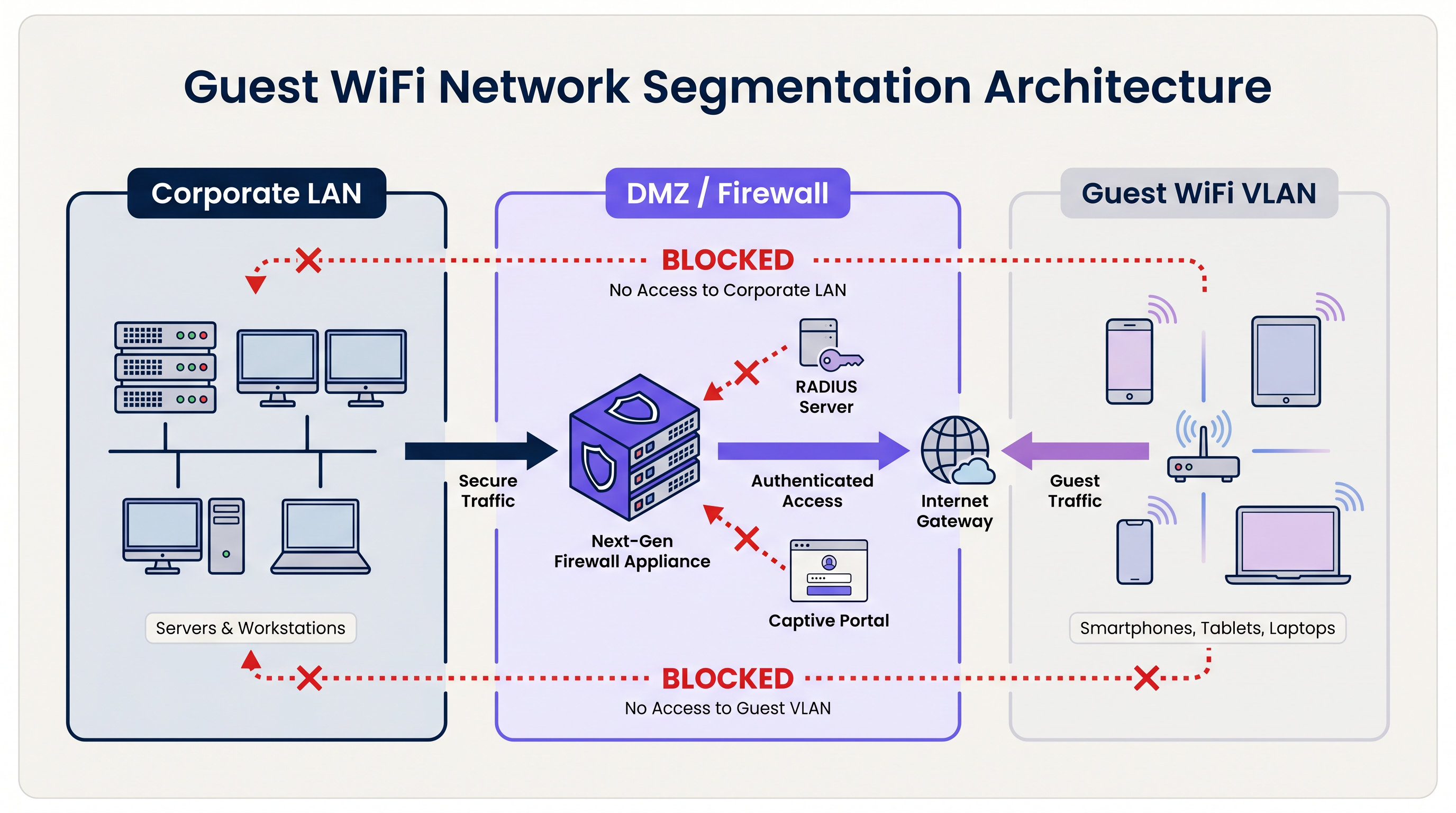
प्रमाणित आर्किटेक्चर समर्पित व्हर्च्युअल लोकल एरिया नेटवर्क्स (VLANs) वापरते. अतिथी SSID एका विशिष्ट VLAN शी बांधील असतो, जो परिमिती फायरवॉल किंवा DMZ वर समाप्त होतो. फायरवॉल डीफॉल्ट-डिनाय पॉलिसी लागू करते: केवळ आउटबाउंड इंटरनेट ट्रॅफिक (TCP 80, 443, आणि DNS साठी UDP 53) ला परवानगी आहे. अतिथी VLAN आणि कोणत्याही अंतर्गत सबनेटमधील सर्व राउटिंग स्पष्टपणे अवरोधित केले आहे.
PCI DSS च्या अधीन असलेल्या संस्थांसाठी, हे सेगमेंटेशन अनिवार्य आहे. पेमेंट कार्ड इंडस्ट्री डेटा सिक्युरिटी स्टँडर्डनुसार कार्डहोल्डर डेटा एन्व्हायर्नमेंट (CDE) कोणत्याही सार्वजनिक-दर्शनी नेटवर्कपासून पूर्णपणे वेगळे असणे आवश्यक आहे. हे साध्य करण्यात अयशस्वी झाल्यास क्वालिफाईड सिक्युरिटी असेसर (QSA) ऑडिट अयशस्वी होईल.
VLAN सेगमेंटेशनच्या पलीकडे, प्रत्येक अतिथी SSID वर लेयर 2 क्लायंट आयसोलेशन सक्षम करणे आवश्यक आहे. हे एकाच वायरलेस नेटवर्कवरील उपकरणांना एकमेकांशी थेट संवाद साधण्यापासून प्रतिबंधित करते, अतिथी उपकरणांमधील लॅटरल हल्ल्यांचा धोका कमी करते — Hospitality सारख्या वातावरणात हे एक महत्त्वपूर्ण नियंत्रण आहे जिथे अतिथी समान भौतिक जागा सामायिक करतात.
2. ऑथेंटिकेशन आणि ॲक्सेस कंट्रोल
guest WiFi सिस्टीमसाठी निवडलेले ऑथेंटिकेशन मॉडेल सुरक्षा पातळी आणि अतिथी अनुभवाची गुणवत्ता दोन्ही निर्धारित करते.
प्री-शेअर्ड कीज (PSKs): सामायिक पासवर्डसह WPA2/WPA3-Personal हे सर्वात सोपे डिप्लॉयमेंट मॉडेल आहे परंतु एंटरप्राइझ वातावरणासाठी सर्वात कमकुवत सुरक्षा स्थिती देते. PSKs कोणतीही वैयक्तिक जबाबदारी प्रदान करत नाहीत, प्रति-वापरकर्ता रद्द केले जाऊ शकत नाहीत आणि बऱ्याचदा इच्छित प्रेक्षकांच्या पलीकडे सामायिक केले जातात.
Captive Portals: सार्वजनिक ठिकाणांसाठी उद्योग मानक. Captive Portal अतिथीच्या सुरुवातीच्या HTTP विनंतीला अडवते आणि त्यांना ब्रँडेड लँडिंग पेजवर पुनर्निर्देशित करते. ॲक्सेस मिळण्यापूर्वी अतिथीने सेवा अटी (ToS) स्वीकारणे आवश्यक आहे. हे संमतीचा कायदेशीर रेकॉर्ड तयार करते, फर्स्ट-पार्टी डेटा संकलन (ईमेल, सोशल लॉगिन, फॉर्म डेटा) सक्षम करते आणि ठिकाणाला स्वीकारार्ह वापर धोरणे लागू करण्यास अनुमती देते. Purple चे Guest WiFi सारखे प्लॅटफॉर्म अंगभूत GDPR संमती प्रवाह आणि CRM इंटिग्रेशनसह पूर्णपणे व्यवस्थापित Captive Portal प्रदान करतात.
प्रोफाइल-आधारित ऑथेंटिकेशन (Passpoint / OpenRoaming): सर्वात प्रगत डिप्लॉयमेंट मॉडेल. IEEE 802.1X आणि WPA3-Enterprise वापरून, उपकरणे पासवर्डऐवजी क्रेडेंशियल प्रोफाइल वापरून ऑथेंटिकेट करतात. वापरकर्ता एकदा नोंदणी करतो — सामान्यतः मोबाइल ॲप किंवा Captive Portal द्वारे — आणि त्यांचे उपकरण पुढील भेटींमध्ये स्वयंचलितपणे आणि सुरक्षितपणे कनेक्ट होते. Purple कनेक्ट लायसन्स अंतर्गत OpenRoaming साठी मोफत आयडेंटिटी प्रोव्हायडर म्हणून काम करते, ज्यामुळे ठिकाणांना मोठ्या प्रमाणावर अखंड, सुरक्षित कनेक्टिव्हिटी ऑफर करता येते. 802.1X ला आधार देणाऱ्या RADIUS ऑथेंटिकेशन ट्रॅफिकला सुरक्षित करण्याच्या तपशीलवार तांत्रिक माहितीसाठी, आमच्या RadSec: Securing RADIUS Authentication Traffic with TLS वरील मार्गदर्शकाचा संदर्भ घ्या.
3. एन्क्रिप्शन मानके
सर्व नवीन guest WiFi डिप्लॉयमेंट्सनी WPA3 ला लक्ष्य केले पाहिजे. WPA2 वरील प्रमुख सुधारणा लक्षणीय आहेत:
| वैशिष्ट्य | WPA2 | WPA3 |
|---|---|---|
| की एक्सचेंज | 4-वे हँडशेक (KRACK साठी असुरक्षित) | सायमलटेनियस ऑथेंटिकेशन ऑफ इक्वल्स (SAE) |
| ओपन नेटवर्क एन्क्रिप्शन | काहीही नाही | ऑपर्च्युनिस्टिक वायरलेस एन्क्रिप्शन (OWE) |
| फॉरवर्ड सिक्रेसी | नाही | होय |
| ब्रूट-फोर्स रेझिस्टन्स | कमी | उच्च (SAE ऑफलाइन हल्ले मर्यादित करते) |
विशेषतः ओपन अतिथी नेटवर्क्ससाठी, WPA3 चे ऑपर्च्युनिस्टिक वायरलेस एन्क्रिप्शन (OWE) ही एक परिवर्तनात्मक सुधारणा आहे. OWE पासवर्डची आवश्यकता नसताना प्रत्येक क्लायंट आणि AP मधील ट्रॅफिक एन्क्रिप्ट करते, वापरकर्त्यांना अन्यथा अनएन्क्रिप्टेड चॅनेलवर होणाऱ्या पॅसिव्ह इव्हस्ड्रॉपिंगपासून (चोरून ऐकण्यापासून) संरक्षित करते.
4. बँडविड्थ व्यवस्थापन आणि QoS
उच्च-घनतेच्या वातावरणात — स्टेडियम्स, कॉन्फरन्स सेंटर्स, रिटेल फ्लोअर्स — बँडविड्थ व्यवस्थापन सुरक्षेइतकेच महत्त्वाचे आहे. नियंत्रणांशिवाय, कमी संख्येतील वापरकर्ते बहुतांश उपलब्ध थ्रूपुट वापरू शकतात, ज्यामुळे सर्वांचा अनुभव खराब होतो.
प्रमुख नियंत्रणांमध्ये हे समाविष्ट आहे:
- प्रति-वापरकर्ता रेट लिमिटिंग: वैयक्तिक वापरकर्त्यांना परिभाषित थ्रूपुटवर (उदा., 5 Mbps डाउन / 2 Mbps अप) मर्यादित करा. हे वायरलेस LAN कंट्रोलर (WLC) किंवा क्लाउड मॅनेजमेंट प्लॅटफॉर्म स्तरावर कॉन्फिगर केले जाते.
- लेयर 7 ॲप्लिकेशन कंट्रोल: पीक अवर्समध्ये पीअर-टू-पीअर फाइल शेअरिंग, व्हिडिओ स्ट्रीमिंग सेवा आणि सॉफ्टवेअर अपडेट डाउनलोड्स यांसारख्या हाय-बँडविड्थ ॲप्लिकेशन्सना ब्लॉक करा किंवा त्यांचे प्राधान्य कमी करा.
- सेशन टाइमआउट्स: निष्क्रिय क्लायंट्सकडून IP पत्ते आणि एअरटाइम परत मिळवण्यासाठी आयडल टाइमआउट्स (उदा., 30 मिनिटे) आणि ॲब्सोल्युट सेशन टाइमआउट्स (उदा., 4 तास) कॉन्फिगर करा.
- DHCP लीज मॅनेजमेंट: Transport हब्स आणि स्टेडियम्स सारख्या ट्रान्झिएंट वातावरणात, DHCP लीज वेळा 15-30 मिनिटांवर सेट करा आणि पीक डिमांड दरम्यान पूल एक्झॉशन टाळण्यासाठी मोठे सबनेट्स (/21 किंवा /20) प्रोव्हिजन करा.
अंमलबजावणी मार्गदर्शक
टप्पा 1: आर्किटेक्चर डिझाइन
नेटवर्क टोपोलॉजी रिव्ह्यूने सुरुवात करा. सर्व विद्यमान VLANs ओळखा आणि कोणत्याही अंतर्गत सबनेटवर राउटिंग न करता समर्पित अतिथी VLAN प्रोव्हिजन केले जाऊ शकते याची पुष्टी करा. फायरवॉल रूल्ससेट परिभाषित करा आणि निवडलेल्या AP हार्डवेअरद्वारे क्लायंट आयसोलेशन समर्थित असल्याची पुष्टी करा.
टप्पा 2: हार्डवेअर आणि कंट्रोलर कॉन्फिगरेशन
उच्च-घनतेच्या वातावरणासाठी WPA3, 802.11ax (Wi-Fi 6) किंवा 802.11be (Wi-Fi 6E) च्या समर्थनासह एंटरप्राइझ-ग्रेड APs निवडा आणि केंद्रीकृत धोरण अंमलबजावणीसाठी क्लाउड-मॅनेज्ड कंट्रोलर्स निवडा. अतिथी SSID कॉन्फिगर करा, त्याला अतिथी VLAN शी बाइंड करा आणि क्लायंट आयसोलेशन सक्षम करा. प्रति-वापरकर्ता रेट लिमिट्स आणि सेशन टाइमआउट्स सेट करा.
टप्पा 3: Captive Portal डिप्लॉयमेंट
WLC किंवा क्लाउड AP प्लॅटफॉर्मला व्यवस्थापित Guest WiFi सेवेसह इंटिग्रेट करा. ब्रँडेड ॲसेट्स, ToS स्वीकृती आणि डेटा कॅप्चर फील्ड्ससह पोर्टल कॉन्फिगर करा. संमती यंत्रणा GDPR-सुसंगत असल्याची खात्री करा: मार्केटिंग कम्युनिकेशन्ससाठी स्पष्ट ऑप्ट-इन, स्पष्ट गोपनीयता सूचना आणि दस्तऐवजीकरण केलेले डेटा रिटेन्शन धोरण. Retail आणि Healthcare वातावरणासाठी, पोर्टल ToS मध्ये ठिकाणाच्या प्रकारासाठी योग्य असलेल्या स्वीकारार्ह वापर कलमांचा समावेश असल्याची खात्री करा.
टप्पा 4: मॉनिटरिंग आणि ॲनालिटिक्स
एकदा तैनात केल्यानंतर, प्लॅटफॉर्मला WiFi Analytics डॅशबोर्डशी कनेक्ट करा. रोग (rogue) AP शोध, DHCP पूल युटिलायझेशन थ्रेशोल्ड्स आणि असामान्य ट्रॅफिक पॅटर्नसाठी अलर्ट्स कॉन्फिगर करा. ऑपरेशनल निर्णयांची माहिती देण्यासाठी फूटफॉल आणि ड्वेल टाइम डेटाचे नियमितपणे पुनरावलोकन करा.
सर्वोत्तम पद्धती
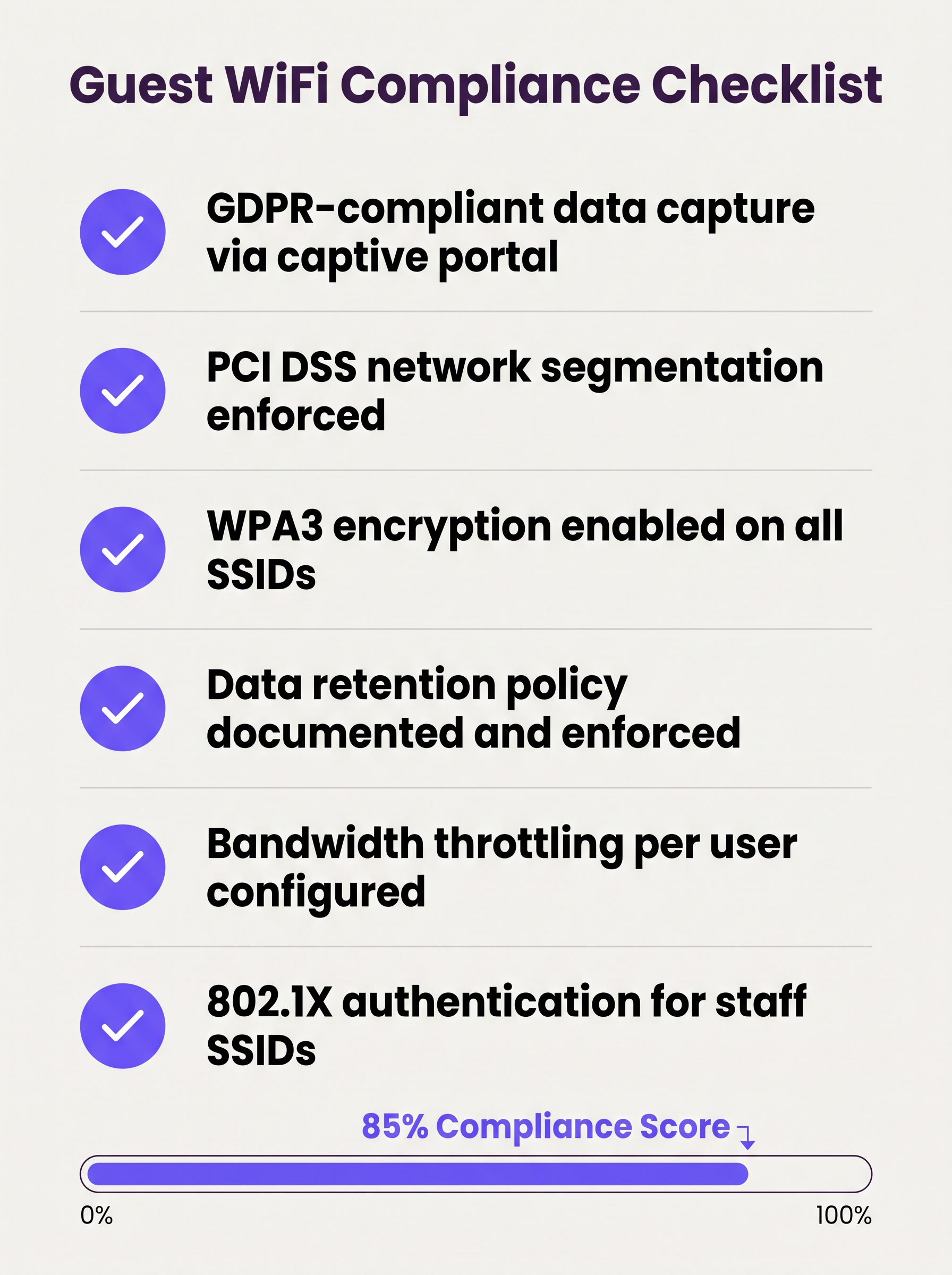
खालील चेकलिस्ट कोणत्याही एंटरप्राइझ guest WiFi डिप्लॉयमेंटसाठी किमान व्यवहार्य सुरक्षा आणि अनुपालन स्थिती दर्शवते:
- अतिथी आणि कॉर्पोरेट नेटवर्क्स दरम्यान डीफॉल्ट-डिनाय फायरवॉल नियमांसह VLAN सेगमेंटेशन लागू केले.
- सर्व अतिथी SSIDs वर लेयर 2 क्लायंट आयसोलेशन सक्षम केले.
- सर्व नवीन SSIDs वर WPA3 एन्क्रिप्शन कॉन्फिगर केले; जिथे लेगसी उपकरणांना आवश्यकता असेल तिथेच WPA2 ठेवले.
- GDPR-सुसंगत संमतीसह Captive Portal प्रवाह तैनात आणि तपासले.
- कंट्रोलर स्तरावर प्रति-वापरकर्ता बँडविड्थ मर्यादा कॉन्फिगर केल्या.
- ठिकाणाच्या अपेक्षित ड्वेल टाइमनुसार DHCP लीज वेळा ट्यून केल्या.
- डेटा रिटेन्शन धोरण दस्तऐवजीकरण केले, रिटेन्शन विंडोच्या पलीकडे अतिथी रेकॉर्ड्स स्वयंचलितपणे पुसून टाकण्यासह.
- रोग (rogue) APs शोधण्यासाठी वायरलेस इंट्रुजन प्रिव्हेन्शन सिस्टीम (WIPS) सक्रिय केली.
- अतिथी नेटवर्क परिमितीचे नियमित पेनिट्रेशन टेस्टिंग, किमान वार्षिक.
- कर्मचारी SSIDs साठी 802.1X / RADIUS तैनात केले, ट्रान्झिटमध्ये ऑथेंटिकेशन ट्रॅफिक सुरक्षित करण्यासाठी RadSec सह.
ट्रबलशूटिंग आणि जोखीम निवारण
रोग ॲक्सेस पॉइंट्स (Rogue Access Points)
अतिथी SSID स्पूफ करणारा रोग AP हा मोठ्या ठिकाणांवर एक महत्त्वपूर्ण धोका आहे. हल्लेखोर समान SSID नाव ब्रॉडकास्ट करणारे उपकरण सेट करतात, अनभिज्ञ वापरकर्त्यांकडून क्रेडेंशियल्स आणि सेशन डेटा कॅप्चर करतात. निवारणासाठी सक्रिय WIPS आवश्यक आहे जे RF वातावरणाचे निरीक्षण करते आणि रोग उपकरणांना स्वयंचलितपणे नियंत्रित करू शकते. PCI DSS 11.2 अंतर्गत हे एक अनिवार्य नियंत्रण आहे.
MAC ॲड्रेस रँडमायझेशन
आधुनिक मोबाइल ऑपरेटिंग सिस्टीम्स (iOS 14+, Android 10+) डीफॉल्टनुसार MAC ॲड्रेस रँडमायझेशन लागू करतात. हे MAC-आधारित Captive Portal बायपास लॉजिक खंडित करते (जिथे परत येणाऱ्या वापरकर्त्यांना त्यांच्या उपकरणाच्या MAC द्वारे ओळखले जाते आणि ते री-ऑथेंटिकेशन वगळतात). Guest WiFi प्लॅटफॉर्म्सनी रँडमाइज्ड MACs योग्यरित्या हाताळले पाहिजेत, सामान्यतः सेशन टोकन्स जारी करून किंवा त्याऐवजी प्रोफाइल-आधारित ऑथेंटिकेशन वापरून.
DHCP पूल एक्झॉशन
उच्च ट्रान्झिएंट फूटफॉल असलेल्या ठिकाणांवर, DHCP पूल एक्झॉशन हे एक सामान्य आणि सहज टाळता येण्याजोगे अपयश आहे. याचा उपाय म्हणजे लहान लीज वेळा आणि पुरेशा आकाराचे सबनेट्स यांचे संयोजन. SNMP किंवा क्लाउड मॅनेजमेंट प्लॅटफॉर्मद्वारे DHCP पूल युटिलायझेशनचे निरीक्षण करा आणि 80% युटिलायझेशनवर अलर्ट्स सेट करा.
Captive Portal सर्टिफिकेट एरर्स
जर Captive Portal सेल्फ-साइंड सर्टिफिकेट वापरत असेल, तर वापरकर्त्यांना ब्राउझर सुरक्षा चेतावणी मिळतील ज्यामुळे विश्वास दुखावला जातो आणि नोंदणी दर कमी होतो. पोर्टल डोमेनसाठी नेहमी विश्वसनीय सर्टिफिकेट ऑथॉरिटी (CA) कडील सर्टिफिकेट वापरा.
ROI आणि व्यावसायिक प्रभाव
चांगल्या प्रकारे तैनात केलेली guest WiFi सिस्टीम अनेक व्यावसायिक आयामांमध्ये मोजता येण्याजोगे परतावे निर्माण करते:
| मेट्रिक | मोजमाप पद्धत | सामान्य परिणाम |
|---|---|---|
| फर्स्ट-पार्टी डेटा कॅप्चर | प्रति महिना पोर्टल नोंदणी | युनिक अभ्यागतांपैकी 15-40% |
| मार्केटिंग रीच | ईमेल लिस्ट ग्रोथ रेट | प्रति वर्ष 20-50% ची चक्रवाढ वाढ |
| ऑपरेशनल इनसाइट | फूटफॉल आणि ड्वेल टाइम ॲनालिटिक्स | स्टाफिंग, लेआउट आणि प्रमोशन्सची माहिती देते |
| अनुपालन जोखीम कपात | ऑडिट निष्कर्ष | नेटवर्क सेगमेंटेशनशी संबंधित शून्य PCI DSS निष्कर्ष |
| IT ओव्हरहेड | केंद्रीकृत व्यवस्थापन वि. ऑन-साइट कॉन्फिग | साइट व्हिजिट फ्रिक्वेन्सीमध्ये 30-50% घट |
वितरित इस्टेट चालवणाऱ्या संस्थांसाठी — एकाधिक रिटेल शाखा, हॉटेल प्रॉपर्टीज किंवा ट्रान्सपोर्ट हब्स — क्लाउड-होस्टेड guest WiFi मॅनेजमेंट प्लॅटफॉर्म्सशी विश्वसनीय कनेक्टिव्हिटी सुनिश्चित करण्यात अंतर्निहित WAN आर्किटेक्चर देखील भूमिका बजावते. क्लाउड-मॅनेज्ड नेटवर्क इन्फ्रास्ट्रक्चरसाठी WAN कनेक्टिव्हिटी ऑप्टिमाइझ करण्याच्या मार्गदर्शनासाठी The Core SD WAN Benefits for Modern Businesses चा संदर्भ घ्या.
guest WiFi चे धोरणात्मक मूल्य IT च्या खूप पुढे जाते. नेटवर्कला डेटा ॲसेट मानून, Retail , Hospitality , Healthcare , आणि Transport मधील संस्था सत्यापित फर्स्ट-पार्टी ग्राहक प्रोफाइल्स तयार करू शकतात, लॉयल्टी प्रोग्राम्स चालवू शकतात आणि रिटेल मीडिया महसूल निर्माण करू शकतात — युटिलिटी खर्चाचे मोजता येण्याजोग्या व्यावसायिक मालमत्तेत रूपांतर करू शकतात.
महत्वाच्या व्याख्या
VLAN (व्हर्च्युअल लोकल एरिया नेटवर्क)
नेटवर्क उपकरणांचे तार्किक गट जे पायाभूत सुविधांवरील त्यांच्या भौतिक स्थानाची पर्वा न करता स्वतंत्र नेटवर्क सेगमेंटवर असल्यासारखे वागतात.
सामायिक भौतिक हार्डवेअरवर अतिथी ट्रॅफिकला कॉर्पोरेट ट्रॅफिकपासून वेगळे करण्याची प्राथमिक यंत्रणा. PCI DSS अनुपालनासाठी अनिवार्य.
क्लायंट आयसोलेशन
ॲक्सेस पॉइंट स्तरावर कॉन्फिगर केलेले वायरलेस नेटवर्क सुरक्षा वैशिष्ट्य, जे एकाच SSID शी कनेक्ट केलेल्या उपकरणांना लेयर 2 वर एकमेकांशी थेट संवाद साधण्यापासून प्रतिबंधित करते.
कोणत्याही सार्वजनिक-दर्शनी SSID साठी आवश्यक. तडजोड केलेल्या अतिथी उपकरणाला त्याच नेटवर्कवरील इतर अतिथींना स्कॅन करण्यापासून किंवा त्यांच्यावर हल्ला करण्यापासून प्रतिबंधित करते.
Captive Portal
एक वेब पेज जे वापरकर्त्याच्या सुरुवातीच्या HTTP/HTTPS विनंतीला अडवते आणि इंटरनेट ॲक्सेस देण्यापूर्वी त्यांना ऑथेंटिकेशन किंवा नोंदणी पृष्ठावर पुनर्निर्देशित करते.
guest WiFi साठी प्रमाणित ऑनबोर्डिंग यंत्रणा. सेवा अटी लागू करण्यासाठी, फर्स्ट-पार्टी डेटा संकलित करण्यासाठी आणि संमतीचा कायदेशीर रेकॉर्ड तयार करण्यासाठी वापरले जाते.
IEEE 802.1X
पोर्ट-आधारित नेटवर्क ॲक्सेस कंट्रोलसाठी एक IEEE मानक जे ऑथेंटिकेशन बॅकएंड म्हणून RADIUS सर्व्हर वापरून LAN किंवा WLAN शी कनेक्ट होणाऱ्या उपकरणांसाठी ऑथेंटिकेशन फ्रेमवर्क प्रदान करते.
एंटरप्राइझ WiFi सुरक्षेचा पाया. कर्मचारी SSIDs आणि Passpoint किंवा OpenRoaming वापरून प्रगत अतिथी डिप्लॉयमेंट्ससाठी वापरले जाते.
WPA3
Wi-Fi प्रोटेक्टेड ॲक्सेस सिक्युरिटी प्रोटोकॉलची तिसरी पिढी, जी मजबूत की एक्सचेंजसाठी सायमलटेनियस ऑथेंटिकेशन ऑफ इक्वल्स (SAE) आणि ओपन नेटवर्क्ससाठी ऑपर्च्युनिस्टिक वायरलेस एन्क्रिप्शन (OWE) सादर करते.
सर्व नवीन WiFi डिप्लॉयमेंट्ससाठी वर्तमान एन्क्रिप्शन मानक. संवेदनशील डेटा हाताळणाऱ्या किंवा अनुपालन फ्रेमवर्कच्या अधीन असलेल्या कोणत्याही नेटवर्कसाठी अनिवार्य.
OWE (ऑपर्च्युनिस्टिक वायरलेस एन्क्रिप्शन)
एक WPA3 वैशिष्ट्य जे क्लायंट आणि ॲक्सेस पॉइंट दरम्यान निनावी डिफी-हेलमन की एक्सचेंज करून ओपन (पासवर्डलेस) WiFi नेटवर्क्सवर एन्क्रिप्शन प्रदान करते.
ठिकाणांना वापरकर्त्यांचे ट्रॅफिक पॅसिव्ह इव्हस्ड्रॉपिंगच्या संपर्कात न आणता ओपन guest WiFi ऑफर करण्याची अनुमती देते. लेगसी ओपन नेटवर्क्सच्या तुलनेत महत्त्वपूर्ण सुरक्षा वाढ.
DHCP लीज टाइम
DHCP सर्व्हर क्लायंट उपकरणाला IP ॲड्रेस नियुक्त करतो तो कालावधी, ज्यानंतर ॲड्रेसचे नूतनीकरण केले जाणे किंवा पूलमध्ये परत सोडले जाणे आवश्यक असते.
उच्च-घनतेच्या, ट्रान्झिएंट वातावरणात व्यवस्थापित करणे महत्त्वपूर्ण आहे. जास्त लांब लीज वेळा IP पूल एक्झॉशनला कारणीभूत ठरतात, ज्यामुळे नवीन उपकरणांना कनेक्ट होण्यापासून प्रतिबंधित केले जाते.
Passpoint / Hotspot 2.0
IEEE 802.11u मानकावर आधारित Wi-Fi अलायन्स सर्टिफिकेशन प्रोग्राम जो वापरकर्त्याच्या हस्तक्षेपाची आवश्यकता नसताना स्वयंचलित, सुरक्षित नेटवर्क शोध आणि ऑथेंटिकेशन सक्षम करतो.
अखंड रोमिंग अनुभवांसाठी तांत्रिक पाया. उपकरणे प्रोव्हिजन केलेल्या क्रेडेंशियल प्रोफाइलचा वापर करून स्वयंचलितपणे कनेक्ट होतात, परत येणाऱ्या वापरकर्त्यांसाठी Captive Portal काढून टाकतात.
WIPS (वायरलेस इंट्रुजन प्रिव्हेन्शन सिस्टीम)
एक सुरक्षा सिस्टीम जी अनधिकृत ॲक्सेस पॉइंट्स आणि क्लायंट उपकरणांसाठी रेडिओ फ्रिक्वेन्सी (RF) स्पेक्ट्रमचे सतत निरीक्षण करते आणि शोधलेल्या धोक्यांना स्वयंचलितपणे नियंत्रित किंवा ब्लॉक करू शकते.
PCI DSS 11.2 द्वारे आवश्यक. अतिथी SSID स्पूफ करणारे रोग APs शोधते आणि सुरक्षा टीमला संभाव्य मॅन-इन-द-मिडल हल्ल्यांबद्दल सावध करते.
PCI DSS
पेमेंट कार्ड इंडस्ट्री डेटा सिक्युरिटी स्टँडर्ड — क्रेडिट कार्ड माहिती स्वीकारणाऱ्या, प्रक्रिया करणाऱ्या, संचयित करणाऱ्या किंवा प्रसारित करणाऱ्या सर्व कंपन्या सुरक्षित वातावरण राखतात याची खात्री करण्यासाठी डिझाइन केलेल्या सुरक्षा मानकांचा संच.
कार्ड पेमेंट्सवर प्रक्रिया करणाऱ्या कोणत्याही ठिकाणाशी थेट संबंधित. अतिथी WiFi आणि कार्डहोल्डर डेटा एन्व्हायर्नमेंट मधील नेटवर्क सेगमेंटेशन हे एक अनिवार्य नियंत्रण आहे.
सोडवलेली उदाहरणे
एका 200-खोल्यांच्या हॉटेलमध्ये सध्या अतिथी, प्रॉपर्टी मॅनेजमेंट सिस्टीम (PMS) आणि बॅक-ऑफिस वर्कस्टेशन्स यांच्यात सामायिक केलेले एकच फ्लॅट नेटवर्क चालते. IT संचालकांना सांगण्यात आले आहे की त्यांना पुढील ऑडिटपूर्वी PCI DSS अनुपालन साध्य करणे आवश्यक आहे. त्यांनी कुठून सुरुवात करावी?
तात्काळ प्राधान्य नेटवर्क सेगमेंटेशनला आहे. IT संचालकांनी तीन VLANs प्रोव्हिजन केले पाहिजेत: PMS, बॅक-ऑफिस वर्कस्टेशन्स आणि कर्मचारी उपकरणांसाठी VLAN 10 (कॉर्पोरेट); अभ्यागत WiFi साठी VLAN 20 (अतिथी); आणि स्मार्ट टीव्ही, थर्मोस्टॅट्स आणि डोअर लॉक कंट्रोलर्ससाठी VLAN 30 (IoT). फायरवॉल VLAN 20 आणि VLAN 10 मधील आणि VLAN 30 आणि VLAN 10 मधील सर्व इंटर-VLAN राउटिंग ब्लॉक करण्यासाठी कॉन्फिगर केले पाहिजे. अतिथी SSID WPA3-Personal (किंवा ओपन SSID साठी OWE) सह कॉन्फिगर केले पाहिजे, क्लायंट आयसोलेशन सक्षम केले पाहिजे आणि हॉटेलच्या लॉयल्टी CRM सह एकत्रित केलेले Captive Portal असावे. बँडविड्थ प्रति वापरकर्ता 10 Mbps वर मर्यादित असावी, लॉयल्टी प्रोग्राम सदस्यांसाठी प्रीमियम टियर (25 Mbps) उपलब्ध असावा. रोग APs चे निरीक्षण करण्यासाठी WIPS सक्रिय केले पाहिजे. पोर्टल नोंदणीसाठी डेटा रिटेन्शन धोरण 24 महिन्यांवर सेट केले पाहिजे, त्यानंतर स्वयंचलितपणे पुसून टाकले जावे.
150 स्टोअर्स असलेल्या एका मोठ्या रिटेल चेनला पीक ट्रेडिंग अवर्समध्ये (दुपारी 12-2 आणि संध्याकाळी 5-7) खराब guest WiFi कार्यक्षमतेचा अनुभव येत आहे. सहा महिन्यांपूर्वीच्या तुलनेत Captive Portal नोंदणी दर 35% ने घसरला आहे आणि IT टीमला स्टोअर व्यवस्थापकांकडून तक्रारी येत आहेत. प्रत्येक साइटवरील इंटरनेट बॅकहॉल 500 Mbps आहे — जे आवश्यकतेपेक्षा खूप जास्त आहे.
ही समस्या निश्चितपणे बॅकहॉल क्षमतेची नाही तर DHCP पूल एक्झॉशन, एअरटाइम कंटेंशन आणि प्रति-वापरकर्ता रेट लिमिटिंगच्या अभावाचे संयोजन आहे. निवारणाचे टप्पे आहेत: (1) ग्राहक स्टोअरमधून फिरत असताना IP पत्ते त्वरीत रिसायकल केले जातील याची खात्री करण्यासाठी DHCP लीज वेळा डीफॉल्ट 24 तासांवरून 20 मिनिटांपर्यंत कमी करा. (2) पीक समवर्ती कनेक्शन्स सामावून घेण्यासाठी DHCP स्कोप /24 (254 पत्ते) वरून /22 (1022 पत्ते) पर्यंत वाढवा. (3) कोणत्याही एका उपकरणाला एअरटाइमची मक्तेदारी करण्यापासून रोखण्यासाठी 3 Mbps वर प्रति-वापरकर्ता रेट लिमिटिंग लागू करा. (4) पीक अवर्समध्ये व्हिडिओ स्ट्रीमिंग सेवा ब्लॉक करण्यासाठी लेयर 7 ॲप्लिकेशन कंट्रोल सक्षम करा. (5) AP चॅनेल युटिलायझेशनचे पुनरावलोकन करा आणि सक्षम उपकरणांना 5 GHz किंवा 6 GHz बँडवर ढकलण्यासाठी बँड स्टीयरिंग सक्षम करा, ज्यामुळे 2.4 GHz वरील गर्दी कमी होईल. (6) नोंदणीला परावृत्त करणाऱ्या ब्राउझर सुरक्षा चेतावणी दूर करण्यासाठी Captive Portal रीडायरेक्ट वैध सर्टिफिकेटसह HTTPS वापरत असल्याची खात्री करा.
सराव प्रश्न
Q1. हॉस्पिटलचे IT संचालक 500-बेडच्या सुविधेमध्ये रुग्ण आणि अभ्यागतांना मोफत WiFi देण्याची योजना आखत आहेत. त्यांना HIPAA अनुपालन आणि अतिथी उपकरणांमधून नेटवर्क केलेल्या वैद्यकीय उपकरणांमध्ये मालवेअर पसरण्याच्या धोक्याची चिंता आहे. त्यांनी कोणते आर्किटेक्चर आणि नियंत्रणे लागू करावीत?
टीप: रुग्ण/अभ्यागत, क्लिनिकल कर्मचारी आणि वैद्यकीय उपकरणे या तीन भिन्न वापरकर्ता गटांमध्ये नेटवर्क ट्रॅफिक कसे वेगळे केले जाते याचा विचार करा. अतिथी उपकरण संक्रमित झाल्यास काय होते याचा विचार करा.
नमुना उत्तर पहा
IT संचालकांनी किमान तीन VLANs लागू करणे आवश्यक आहे: अतिथी (रुग्ण आणि अभ्यागत), क्लिनिकल कर्मचारी आणि वैद्यकीय IoT. अतिथी VLAN फायरवॉलवर समाप्त होणे आवश्यक आहे ज्यामध्ये क्लिनिकल आणि IoT VLANs कडे जाणारे सर्व राउटिंग ब्लॉक करणारे डीफॉल्ट-डिनाय नियम आहेत. अतिथी उपकरणांना एकमेकांशी किंवा कोणत्याही वैद्यकीय उपकरणाशी संवाद साधण्यापासून रोखण्यासाठी अतिथी SSID वर लेयर 2 क्लायंट आयसोलेशन सक्षम केले पाहिजे. ToS स्वीकृतीसह Captive Portal तैनात केले पाहिजे. वैद्यकीय IoT VLAN कठोर ॲक्सेस कंट्रोल्ससह वेगळ्या भौतिक किंवा तार्किकदृष्ट्या वेगळ्या नेटवर्क सेगमेंटवर असावे. रोग APs शोधण्यासाठी नियमित WIPS स्कॅनिंग सक्रिय असावे. हे आर्किटेक्चर सुनिश्चित करते की पूर्णपणे तडजोड केलेल्या अतिथी उपकरणालाही क्लिनिकल सिस्टीम किंवा वैद्यकीय उपकरणांपर्यंत पोहोचण्याचा कोणताही मार्ग नाही.
Q2. स्टेडियमचे CTO अहवाल देतात की हाऊसफुल्ल इव्हेंटच्या (60,000 उपस्थित) हाफटाइम दरम्यान, अतिथी WiFi पूर्णपणे निरुपयोगी होते. वापरकर्ते अजिबात कनेक्ट होऊ शकत नाहीत — त्यांना 'IP ॲड्रेस मिळवण्यात अक्षम' एरर्स मिळतात. इंटरनेट बॅकहॉल हे 10 Gbps समर्पित फायबर कनेक्शन आहे. याचे सर्वात संभाव्य कारण काय आहे आणि त्याचे निराकरण कसे करावे?
टीप: बॅकहॉल ही अडचण नाही. 45 मिनिटे WiFi कव्हरेज नसलेल्या भागात राहिल्यानंतर 60,000 उपकरणे एकाच वेळी कनेक्ट होतात तेव्हा IP ॲड्रेस वाटप स्तरावर काय होते याचा विचार करा.
नमुना उत्तर पहा
मूळ कारण DHCP पूल एक्झॉशन आहे. 60,000 उपकरणे एकाच वेळी कनेक्ट होण्याचा प्रयत्न करत असताना, DHCP सर्व्हरकडे नियुक्त करण्यासाठी उपलब्ध IP पत्ते संपत आहेत. निराकरणासाठी दोन बदल आवश्यक आहेत: (1) DHCP लीज वेळ 15-20 मिनिटांपर्यंत कमी करा, हे सुनिश्चित करून की कव्हरेज क्षेत्र सोडलेल्या उपकरणांचे IP पत्ते त्वरीत रिसायकल केले जातात. (2) पीक समवर्ती कनेक्शन संख्येसाठी पुरेसे पत्ते प्रदान करण्यासाठी DHCP स्कोप /19 किंवा /18 सबनेटपर्यंत वाढवा. याव्यतिरिक्त, CTO ने पुरेशी एअरटाइम क्षमता सुनिश्चित करण्यासाठी AP घनता आणि चॅनेल नियोजनाचे पुनरावलोकन केले पाहिजे आणि 802.11ax (Wi-Fi 6) APs तैनात करण्याचा विचार केला पाहिजे जे मागील पिढ्यांच्या तुलनेत उच्च क्लायंट घनता लक्षणीयरीत्या अधिक कार्यक्षमतेने हाताळतात.
Q3. एका रिटेल चेनला मार्केटिंग डेटाबेस तयार करण्यासाठी Captive Portal द्वारे ग्राहकांचे ईमेल पत्ते कॅप्चर करायचे आहेत, परंतु त्यांच्या मार्केटिंग टीमचा अहवाल आहे की नियमित ग्राहक प्रत्येक भेटीत पुन्हा नोंदणी करावी लागत असल्याबद्दल तक्रार करत आहेत. IT टीमला पोर्टल पूर्णपणे न काढता हे दुरुस्त करायचे आहे. शिफारस केलेला दृष्टिकोन काय आहे?
टीप: वापरकर्त्याला पुन्हा फॉर्म न भरता सिस्टीम परत येणारे उपकरण कसे ओळखू शकते? नेटवर्क स्तरावर कोणता आयडेंटिफायर उपलब्ध आहे याचा विचार करा.
नमुना उत्तर पहा
शिफारस केलेला दृष्टिकोन म्हणजे सेशन टोकनसह MAC ॲड्रेस कॅशिंग. पहिल्या भेटीत, वापरकर्ता पोर्टल नोंदणी पूर्ण करतो आणि त्यांच्या उपकरणाचा MAC ॲड्रेस guest WiFi प्लॅटफॉर्ममधील त्यांच्या प्रोफाइलवर संचयित केला जातो. पुढील भेटींमध्ये, Captive Portal सिस्टीम कनेक्ट होणाऱ्या उपकरणाचा MAC ॲड्रेस संचयित डेटाबेससह तपासते. जर जुळणी आढळली, तर वापरकर्त्याला बॅकग्राउंडमध्ये सायलेंटली ऑथेंटिकेट केले जाते आणि नोंदणी फॉर्म वगळून थेट इंटरनेटवर पुनर्निर्देशित केले जाते. ॲनालिटिक्सच्या उद्देशाने भेट अद्याप लॉग केली जाते. हे लक्षात घेणे महत्त्वाचे आहे की आधुनिक iOS आणि Android उपकरणांवरील MAC ॲड्रेस रँडमायझेशन या दृष्टिकोनात व्यत्यय आणू शकते — अशा प्रकरणांमध्ये, प्लॅटफॉर्मने सेशन कुकीवर परत जावे किंवा पूर्ण नोंदणी फॉर्मऐवजी वन-क्लिक ईमेल री-कन्फर्मेशनसाठी प्रॉम्प्ट करावे.
Q4. कॉन्फरन्स सेंटरचे IT व्यवस्थापक 5,000 उपस्थितांसह एका मोठ्या तीन-दिवसीय उद्योग कार्यक्रमाची तयारी करत आहेत. इव्हेंट आयोजकाला टियर्ड WiFi ऑफर करायचे आहे: सर्व उपस्थितांसाठी मोफत बेसिक ॲक्सेस आणि हाय-बँडविड्थ व्हिडिओ कॉन्फरन्सिंगची आवश्यकता असलेल्या एक्झिबिटर्ससाठी प्रीमियम सशुल्क टियर. हे कसे आर्किटेक्ट केले पाहिजे?
टीप: समान भौतिक पायाभूत सुविधांवर भिन्न वापरकर्ता गटांसाठी भिन्न बँडविड्थ धोरणे कशी लागू करावीत आणि प्रत्येक टियरला कसे ऑथेंटिकेट करावे याचा विचार करा.
नमुना उत्तर पहा
आर्किटेक्चरसाठी दोन स्वतंत्र VLANs वर मॅप केलेले दोन स्वतंत्र SSIDs आवश्यक आहेत: मोफत बेसिक ॲक्सेससाठी 'Conference-Guest' SSID (प्रति वापरकर्ता 2 Mbps वर रेट मर्यादित, लेयर 7 फिल्टरिंगद्वारे व्हिडिओ स्ट्रीमिंग ब्लॉक केलेले) आणि सशुल्क एक्झिबिटर ॲक्सेससाठी 'Conference-Premium' SSID (प्रति वापरकर्ता 25 Mbps वर रेट मर्यादित, QoS द्वारे व्हिडिओ कॉन्फरन्सिंग ॲप्लिकेशन्सना प्राधान्य दिलेले). प्रीमियम SSID ने पैसे देणाऱ्या एक्झिबिटर्सपुरता ॲक्सेस मर्यादित करण्यासाठी व्हाउचर-आधारित किंवा 802.1X ऑथेंटिकेशन यंत्रणा वापरली पाहिजे. दोन्ही VLANs ठिकाणाच्या कॉर्पोरेट नेटवर्कपासून वेगळे असणे आवश्यक आहे. सामान्य उपस्थितांच्या ट्रॅफिकपासून स्वतंत्र, थ्रूपुटची हमी देण्यासाठी प्रीमियम VLAN ला समर्पित इंटरनेट सर्किट किंवा MPLS मार्ग वाटप केला पाहिजे.
या मालिकेमध्ये पुढे वाचा
कर्मचारी WiFi साठी बँडविड्थ व्यवस्थापित करणे: शेपिंग, QoS आणि ट्रॅफिक कमी करणे
हे मार्गदर्शक एंटरप्राइझ स्थळांमध्ये कर्मचारी WiFi साठी बँडविड्थ व्यवस्थापित करण्याच्या व्यावहारिक पद्धतींचे तपशील देते. यामध्ये ट्रॅफिक शेपिंग, QoS अंमलबजावणी आणि Purple Shield तैनात केल्याने पायाभूत सुविधांच्या अपग्रेडची आवश्यकता नसताना नेटवर्क लोड कसा कमी होतो हे समाविष्ट आहे.
प्रति-डिव्हाइस PSK (iPSK, DPSK, MPSK) वापरून WiFi SSID ची संख्या कशी कमी करावी
हे अधिकृत तांत्रिक संदर्भ मार्गदर्शक स्पष्ट करते की IT टीम्स प्रति-डिव्हाइस PSK (xPSK) चा वापर करून एकाच SSID मध्ये अनेक विशिष्ट हेतूंसाठी तयार केलेले नेटवर्क एकत्र करून SSID बीकन ओव्हरहेडमुळे होणारी WiFi कार्यक्षमता घसरण कशी दूर करू शकतात. यामध्ये Cisco iPSK, HPE Aruba MPSK, Ruckus DPSK, Juniper Mist PPSK आणि Ubiquiti UniFi PPSK मधील व्हेंडर लँडस्केपचा समावेश आहे, ज्यामध्ये डायनॅमिक VLAN असाइनमेंट, IoT ऑनबोर्डिंग आणि PCI DSS अनुपालनावर व्यावहारिक अंमलबजावणी मार्गदर्शन दिले आहे. हॉस्पिटॅलिटी, रिटेल, स्टेडियम आणि सार्वजनिक क्षेत्रातील संस्थांमधील वेन्यू ऑपरेटर्सना यामध्ये कृतीयोग्य आर्किटेक्चर मार्गदर्शन आणि वास्तविक जगातील उदाहरणे मिळतील.
प्रोब रिक्वेस्ट म्हणजे काय? डिव्हाइसेस नेटवर्क कसे शोधतात हे समजून घेणे
हे तांत्रिक संदर्भ मार्गदर्शक IEEE 802.11 प्रोब रिक्वेस्ट, सक्रिय विरुद्ध निष्क्रिय स्कॅनिंग आणि MAC रँडमायझेशनचा ठिकाणच्या विश्लेषणावर होणारा परिणाम यावर सखोल माहिती देते. हे नेटवर्क आर्किटेक्ट्सना उच्च-घनतेच्या उपयोजनांना अनुकूल करण्यासाठी, प्रोब स्टॉर्म्स कमी करण्यासाठी आणि प्रमाणित ओळख स्तरांचा वापर करून अचूक, GDPR-अनुरूप डेटा संकलन सुनिश्चित करण्यासाठी कृतीयोग्य अंमलबजावणी धोरणे प्रदान करते.