
कर्मचारी WiFi साठी बँडविड्थ व्यवस्थापित करणे: शेपिंग, QoS आणि ट्रॅफिक कमी करणे
हे मार्गदर्शक व्यावसायिक ठिकाणी कर्मचारी WiFi साठी बँडविड्थ व्यवस्थापित करण्याच्या व्यावहारिक पद्धतींचे तपशील देते. यामध्ये ट्रॅफिक शेपिंग, QoS अंमलबजावणी आणि पायाभूत सुविधांमध्ये सुधारणा न करता Purple Shield तैनात केल्याने नेटवर्क लोड कसा कमी होतो याचा समावेश आहे.
हे मार्गदर्शक ऐका
पॉडकास्ट ट्रान्सक्रिप्ट पहा
आमच्या मुख्य मालिकेचा भाग: Enterprise WiFi Security Guide →
मुख्य कार्यकारी सारांश (Executive Summary)
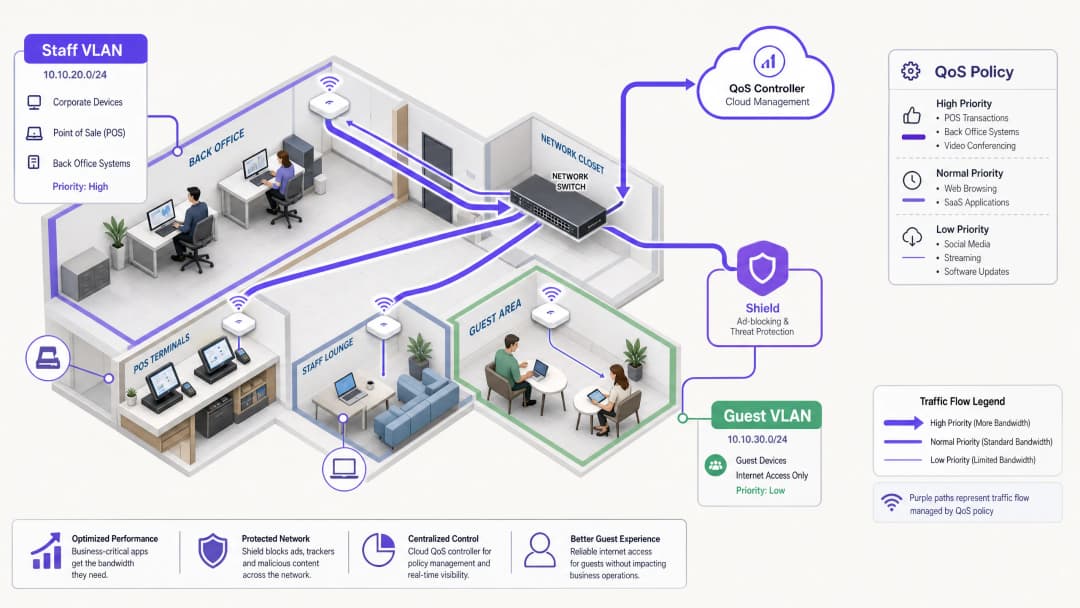
स्टाफ WiFi साठी बँडविड्थ व्यवस्थापित करण्यासाठी केवळ लाइनचा स्पीड वाढवणे पुरेसे नसते. व्यावसायिक-गंभीर (business-critical) ॲप्लिकेशन्स जेव्हा बॅकग्राउंड टास्क आणि अनावश्यक ट्रॅफिकशी स्पर्धा करतात, तेव्हा एंटरप्राइझ ठिकाणांना सतत नेटवर्क गर्दीचा सामना करावा लागतो. ही मार्गदर्शिका आवश्यक सिस्टीमसाठी कामगिरीची हमी देण्यासाठी ट्रॅफिक शेपिंग आणि Quality of Service (QoS) च्या तांत्रिक अंमलबजावणीची रूपरेषा आखते. सर्वात महत्त्वाचे म्हणजे, DNS-स्तरावरील जाहिरात-ब्लॉकिंगसाठी Purple Shield तैनात केल्याने बँडविड्थ वापरली जाण्यापूर्वीच ३०% पर्यंत अनावश्यक ट्रॅफिक कसे काढून टाकले जाते, हे यामध्ये दर्शवले आहे. ॲप्लिकेशन-अवेअर QoS सोबत नेटवर्क-स्तरीय थ्रेट प्रोटेक्शन एकत्र करून, तुम्ही तुमच्या सध्याच्या इन्फ्रास्ट्रक्चरला अनुकूल करू शकता आणि महागड्या लाइन अपग्रेड्स टाळू शकता.
तांत्रिक सखोल विश्लेषण: आर्किटेक्चर आणि मानके
एक मजबूत नेटवर्क आर्किटेक्चर विशिष्ट पॉलिसी लागू करण्यासाठी ट्रॅफिकच्या प्रकारांचे विभाजन करते. स्टाफ WiFi हे Guest WiFi आणि IoT उपकरणांपासून पूर्णपणे वेगळे असलेल्या समर्पित VLAN वर चालले पाहिजे. हे विभाजन PCI DSS आणि GDPR सारख्या मानकांच्या अनुपालनासाठी एक मूलभूत आवश्यकता आहे, आणि ते प्रभावी ट्रॅफिक व्यवस्थापनाचा पाया तयार करते.
QoS आणि WMM ची भूमिका
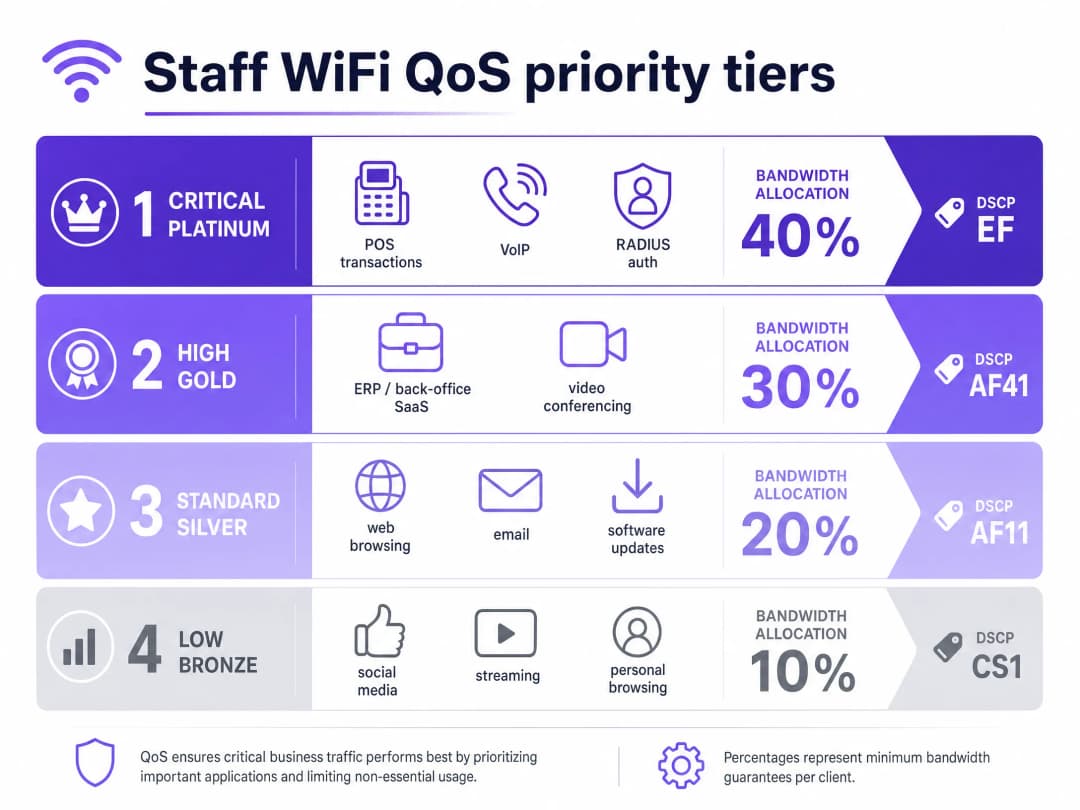
Quality of Service (QoS) हे सुनिश्चित करते की लेटन्सी-संवेदनशील (latency-sensitive) ट्रॅफिकला प्राधान्य मिळेल. वायरलेस वातावरणात, हे IEEE 802.11e मानकाद्वारे नियंत्रित केले जाते, ज्याने Wireless Multimedia (WMM) ची ओळख करून दिली. WMM ट्रॅफिकचे चार ॲक्सेस टियर्समध्ये वर्गीकरण करते: व्हॉइस, व्हिडिओ, बेस्ट एफर्ट, आणि बॅकग्राउंड. Cisco Meraki, HPE Aruba, Ruckus, Juniper Mist, Ubiquiti UniFi, Cambium, Extreme Networks, आणि Fortinet चे एंटरप्राइझ हार्डवेअर WMM ला पूर्णपणे सपोर्ट करतात.
वायर्ड इन्फ्रास्ट्रक्चरवर, QoS हे IP हेडरमधील Differentiated Services Code Point (DSCP) मार्किंगवर अवलंबून असते.
- DSCP EF (Expedited Forwarding) हे व्हॉइस ट्रॅफिक आणि POS ट्रान्झॅक्शन्ससारख्या महत्त्वपूर्ण सिस्टीम्ससाठी नियुक्त केले जाते.
- DSCP AF41 व्हिडिओ कॉन्फरन्सिंग आणि ERP ॲप्लिकेशन्स हाताळते.
- DSCP CS1 सॉफ्टवेअर अपडेट्ससारख्या बॅकग्राउंड टास्क व्यवस्थापित करते.
ओळख आणि प्रवेश व्यवस्थापन (Identity and Access Management)
स्टाफ डिव्हाइसेसनी RADIUS सर्व्हरच्या विरुद्ध EAP-TLS किंवा PEAP सह 802.1X वापरून ऑथेंटिकेट केले पाहिजे. Purple हे थेट Microsoft Entra ID, Okta, आणि Google Workspace सोबत इंटिग्रेट होते. हे नेटवर्क ॲक्सेस मध्यवर्ती ओळख प्रदात्याशी (identity provider) जोडलेले असल्याची खात्री करते. जेव्हा तुम्ही Entra ID मध्ये ॲक्सेस रद्द करता, तेव्हा नेटवर्क ॲक्सेस त्वरित समाप्त केला जातो.
तुमच्या विशिष्ट सेटअपबद्दल काही प्रश्न आहेत का?
आमची टीम ८०,००० हून अधिक वेन्यूजमधील वेन्यू ऑपरेटर्स, IT मॅनेजर्स आणि नेटवर्क इंजिनिअर्ससोबत काम करते. २० मिनिटांचा कॉल बुक करा आणि तुमच्यासारख्या इतरांनी ही समस्या कशी सोडवली हे आम्ही तुम्हाला दाखवू.
अंमलबजावणी मार्गदर्शिका: शेपिंग आणि कपात
१. नेटवर्क विभाजन (Network Segmentation)
स्टाफ, पाहुणे आणि ऑपरेशनल हार्डवेअरसाठी स्वतंत्र VLAN तैनात करा. वैयक्तिक वापरकर्त्यांना कनेक्शन पूर्णपणे संपवण्यापासून रोखण्यासाठी गेस्ट VLAN वर प्रति-वापरकर्ता दर मर्यादा (उदा. ५ Mbps डाउनस्ट्रिम) लागू करा. स्टाफ VLAN वर, महत्त्वपूर्ण ॲप्लिकेशन्सना किमान बँडविड्थ टक्केवारीची हमी द्या.### 2. Application-Aware QoS कॉन्फिगरेशन तुमच्या व्यावसायिक ॲप्लिकेशन्सना योग्य DSCP मार्किंग्जवर मॅप करा. तुमचे मुख्य स्विचेस आणि ॲक्सेस पॉइंट्स संपूर्ण नेटवर्क पाथवर या मार्किंग्जचा आदर करण्यासाठी कॉन्फिगर केलेले असल्याची खात्री करा. तुमचा ISP गेटवेवर DSCP टॅग्ज काढून टाकत नाही याची पडताळणी करा.
3. ट्रॅफिक कमी करण्यासाठी Purple Shield तैनात करणे
कर्मचाऱ्यांच्या वेब ट्रॅफिकमधील मोठा हिस्सा थर्ड-पार्टी जाहिरात नेटवर्क आणि ट्रॅकिंग पिक्सेल्सचा असतो. हे ट्रॅफिक बँडविड्थ वापरते, DNS क्वेरी लोड वाढवते आणि सुरक्षिततेचे धोके निर्माण करते. Purple Shield हे DNS-layer फिल्टर म्हणून काम करते. तुमचे DHCP सर्व्हर्स Purple च्या DNS रिझॉल्व्हर्सकडे निर्देशित करून, Shield कनेक्शन्स स्थापित होण्यापूर्वीच ज्ञात जाहिरात नेटवर्क्स आणि घातक डोमेन्सच्या विनंत्या ब्लॉक करते.
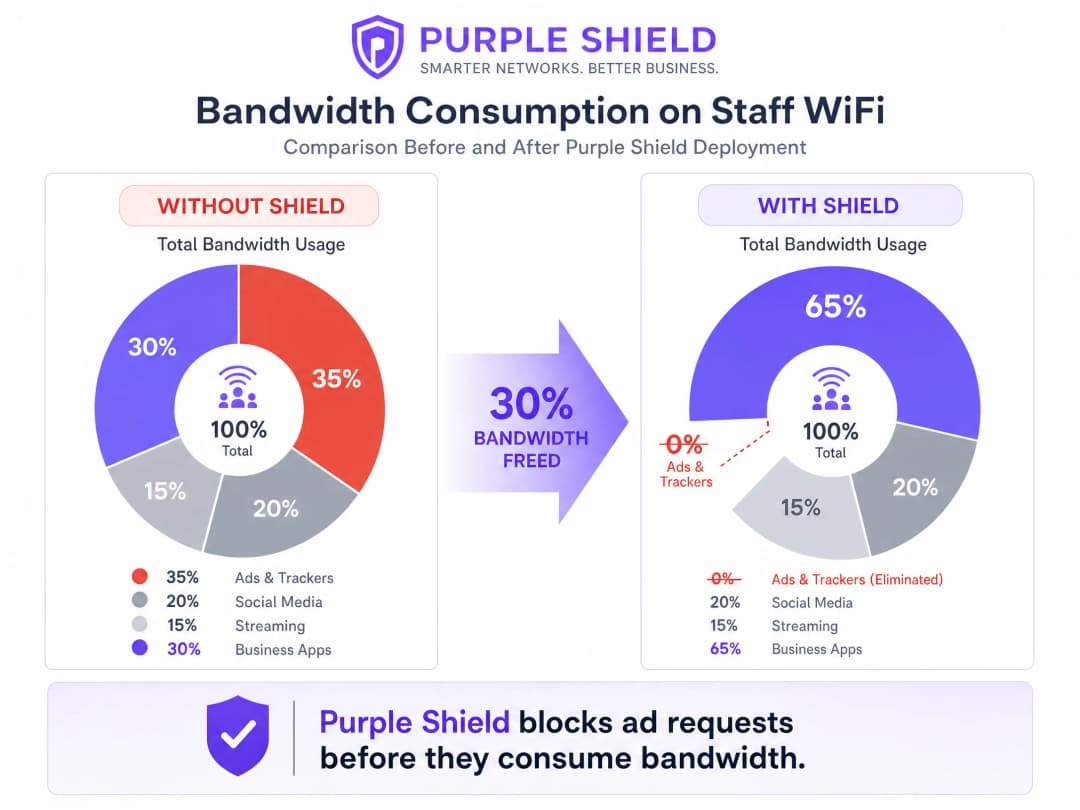
Shield तैनात करणाऱ्या ठिकाणांना सामान्यतः एकूण DNS क्वेरीच्या प्रमाणात ३०% घट दिसून येते. हे व्यावसायिक ॲप्लिकेशन्ससाठी प्रभावीपणे बँडविड्थ मोकळी करते, ज्यामुळे संबंधित खर्चाशिवाय लाइन अपग्रेडसारखे काम होते.
सर्वोत्तम पद्धती
- Token Bucket Shaping वापरा: कडक रेट लिमिट्सऐवजी, बर्स्ट अलाउन्ससह token bucket shaping वापरा. हे शाश्वत कामगिरीवर परिणाम न करता, अचानक सॉफ्टवेअर अपडेट्ससारख्या ट्रॅफिकमधील तात्पुरत्या वाढीस सामावून घेते.
- जुनी डिव्हाइसेस ऑडिट करा: जुनी शेअर केलेली टर्मिनल्स WMM ला योग्यरित्या सपोर्ट करणार नाहीत. ही डिव्हाइसेस ओळखा आणि आवश्यक असल्यास पोर्ट-बेस्ड QoS पॉलिसी लागू करा.
- मॉनिटर करा आणि ॲडजस्ट करा: WiFi Analytics वापरून पीक युटिलायझेशन मेट्रिक्स आणि DNS क्वेरी प्रमाणाचे नियमितपणे पुनरावलोकन करा. कर्मचाऱ्यांची संख्या आणि ॲप्लिकेशनच्या गरजा बदलत असताना रेट लिमिट्स ॲडजस्ट करा.
ट्रबलशूटिंग आणि जोखीम कमी करणे
- DSCP Remarking: जर QoS पॉलिसी प्रभावी वाटत नसतील, तर गेटवेवर पॅकेट्स कॅप्चर करा. काही एंटरप्राइझ स्विचेस DSCP व्हॅल्यूज डिफॉल्ट सेटिंग्जवर रिमार्क करतात, ज्यामुळे तुमचे कॉन्फिगरेशन निरुपयोगी ठरते.
- DNS-over-HTTPS बायपास: कर्मचाऱ्यांची डिव्हाइसेस DNS-over-HTTPS वापरत असल्यास, ते स्थानिक DNS रिझॉल्व्हरला बायपास करतात, ज्यामुळे Shield अप्रभावी ठरते. फायरवॉलवर DNS-over-HTTPS ब्लॉक करा किंवा अंतर्गत रिझॉल्व्हर्स वापरण्यासाठी MDM द्वारे व्यवस्थापित डिव्हाइसेस कॉन्फिगर करा.
ROI आणि व्यावसायिक प्रभाव
प्रभावी बँडविड्थ व्यवस्थापनाचा मुख्य व्यावसायिक प्रभाव म्हणजे खर्च टाळणे होय. QoS लागू करून आणि Shield तैनात करून, एखादे ठिकाण महागड्या लीज्ड लाइन अपग्रेड्स टाळू शकते. मध्यम आकाराच्या Retail साखळीसाठी, ५० स्टोअर्समध्ये लाइन अपग्रेड्स टाळल्यास दरवर्षी हजारो पौंड वाचू शकतात. शिवाय, POS आणि ERP ट्रॅफिकला प्राधान्य दिल्याने थेट ऑपरेशन्सची कार्यक्षमता सुधारते आणि पीक ट्रेडिंग कालावधीत डाउनटाइम कमी होतो.
अधिक तपशीलांसाठी आमचा तांत्रिक ब्रीफिंग पॉडकास्ट ऐका:
महत्वाच्या व्याख्या
QoS (Quality of Service)
महत्त्वाच्या ॲप्लिकेशन्ससाठी कामगिरीची हमी देण्यासाठी नेटवर्क ट्रॅफिक व्यवस्थापित करणाऱ्या तंत्रज्ञानाचा संच.
नेटवर्कच्या गर्दीच्या वेळी VoIP आणि POS प्रणाली विश्वसनीयपणे कार्य करतात याची खात्री करण्यासाठी आवश्यक आहे.
DSCP (Differentiated Services Code Point)
QoS उद्देशांसाठी नेटवर्क ट्रॅफिकचे वर्गीकरण करण्यासाठी IP हेडरमध्ये वापरले जाणारे फील्ड.
क्यूमध्ये कोणत्या पॅकेट्सना प्राधान्य मिळते हे निर्धारित करण्यासाठी नेटवर्क स्विचद्वारे वापरले जाते.
WMM (Wireless Multimedia)
IEEE 802.11e मानकावर आधारित एक WiFi Alliance प्रमाणन जे वायरलेस नेटवर्कसाठी QoS वैशिष्ट्ये प्रदान करते.
ॲक्सेस पॉइंट्स सामान्य डेटापेक्षा व्हॉइस आणि व्हिडिओ ट्रॅफिकला प्राधान्य देतात याची खात्री करते.
VLAN (Virtual Local Area Network)
एक लॉजिकल सबनेटवर्क जे डिव्हाइसेसच्या संग्रहाला गटबद्ध करते, त्यांचे ट्रॅफिक उर्वरित नेटवर्कपासून वेगळे करते.
सुरक्षा आणि ट्रॅफिक व्यवस्थापनासाठी अतिथी नेटवर्कपासून कर्मचाऱ्यांच्या डिव्हाइसेसना वेगळे करण्यासाठी वापरले जाते.
DNS-layer filtering
DNS रिझोल्यूशन विनंत्या अडवून आणि नाकारून विशिष्ट डोमेन्सचा ॲक्सेस ब्लॉक करण्याची प्रक्रिया.
डिव्हाइसेसना जाहिरात नेटवर्क आणि दुर्भावनायुक्त साइट्सशी कनेक्ट होण्यापासून रोखण्यासाठी Purple Shield वापरत असलेली यंत्रणा.
Token bucket shaping
एक बँडविड्थ व्यवस्थापन अल्गोरिदम जे दीर्घकालीन सरासरी रेट मर्यादा लागू करत असताना ट्रॅफिकच्या लहान बर्स्ट्सना अनुमती देते.
पेज लोडसारख्या संक्षिप्त स्पाइक्स सामावून घेऊन कडक रेट मर्यादेपेक्षा अधिक चांगला वापरकर्ता अनुभव प्रदान करते.
802.1X
पोर्ट-आधारित नेटवर्क ॲक्सेस नियंत्रणासाठी एक IEEE मानक, जे LAN किंवा WLAN ला जोडू इच्छिणाऱ्या डिव्हाइसेसना प्रमाणीकरण यंत्रणा प्रदान करते.
एंटरप्राइझ कर्मचारी WiFi सुरक्षित करण्यासाठी मानक पद्धत, जी बऱ्याचदा RADIUS सह एकत्रित केली जाते.
RADIUS (Remote Authentication Dial-In User Service)
एक नेटवर्किंग प्रोटोकॉल जो केंद्रीकृत प्रमाणीकरण, अधिकृतता आणि लेखा व्यवस्थापन प्रदान करतो.
Microsoft Entra ID सारख्या ओळख प्रदात्यांविरुद्ध कर्मचाऱ्यांच्या क्रेडेंशियल्सची पडताळणी करण्यासाठी 802.1X च्या संयोजनात वापरले जाते.
सोडवलेली उदाहरणे
एका २०० खोल्यांच्या हॉटेलला हे सुनिश्चित करणे आवश्यक आहे की पीक चेक-इन कालावधीत मालमत्ता व्यवस्थापन सॉफ्टवेअर आणि VoIP फोन स्थिर राहतील, तर कर्मचारी सामान्य ब्राउझिंगसाठी देखील नेटवर्क वापरतात.
कर्मचाऱ्यांना समर्पित VLAN वर ठेवून नेटवर्कचे विभाजन करा. मालमत्ता व्यवस्थापन प्रणाली आणि VoIP ट्रॅफिकवर DSCP EF लागू करा. सामान्य ब्राउझिंग आणि बॅकग्राउंड अपडेट्सवर DSCP CS1 लागू करा. जाहिरात आणि ट्रॅकर ट्रॅफिक काढून टाकण्यासाठी कर्मचारी VLAN वर Purple Shield तैनात करा, ज्यामुळे बेसलाइन क्षमता मोकळी होईल.
५० स्टोअर्स असलेल्या एका रिटेल साखळीला गर्दीच्या काळात POS टाईमआउट्सचा सामना करावा लागतो कारण कर्मचाऱ्यांची डिव्हाइसेस सामायिक केलेल्या १०० Mbps ब्रॉडबँड कनेक्शनला संतृप्त (saturate) करतात.
कडक QoS प्राधान्यासह समर्पित VLAN वर POS टर्मिनल्स वेगळे करा. कर्मचारी WiFi VLAN वर, टोकन बकेट शेपिंग वापरून प्रति वापरकर्ता १० Mbps डाउनस्ट्रिम आणि २ Mbps अपस्ट्रिमची रेट मर्यादा लागू करा. बिगर-व्यवसाय जाहिरात ट्रॅफिक ब्लॉक करण्यासाठी Purple Shield तैनात करा.
सराव प्रश्न
Q1. तुम्ही एक Hospitality ठिकाण व्यवस्थापित करता जेथे अतिथी नेटवर्क वारंवार ५०० Mbps कनेक्शन संतृप्त करते, ज्यामुळे बॅक-ऑफिस ERP प्रणालीचे कनेक्शन सुटते. तुमच्याकडे एकच फ्लॅट नेटवर्क आहे. याचे निराकरण करण्यासाठी पहिले पाऊल काय आहे?
टीप: प्रभावी QoS धोरणे लागू करण्यासाठी आवश्यक गोष्टींचा विचार करा.
नमुना उत्तर पहा
पहिले पाऊल म्हणजे नेटवर्कचे विभाजन (segmentation) करणे होय. आपण स्टाफची उपकरणे आणि ERP सिस्टीम एका समर्पित VLAN वर वेगळी केली पाहिजे, जेणेकरून ती गेस्ट नेटवर्कपासून पूर्णपणे वेगळी राहतील. एकदा हे विभाजन पूर्ण झाले की, आपण गेस्ट VLAN वर प्रति-वापरकर्ता कडक रेट लिमिट लागू करू शकता आणि ERP ट्रॅफिकला प्राधान्य देण्यासाठी स्टाफ VLAN वर QoS कॉन्फिगर करू शकता.
Q2. स्टाफ VLAN वर तुमच्या VoIP ट्रॅफिकसाठी DSCP EF मार्किंग कॉन्फिगर केल्यानंतरही, गर्दीच्या वेळेत युजर्सना कॉलची गुणवत्ता खराब असल्याची तक्रार येत आहे. याचे सर्वात संभाव्य कारण कोणते असू शकते?
टीप: पॅकेट्स विविध नेटवर्क उपकरणांमधून जात असताना त्यांच्या हेडर्सचे काय होते याचा विचार करा.
नमुना उत्तर पहा
याचे सर्वात संभाव्य कारण म्हणजे DSCP रिमार्किंग असू शकते. एकतर दरम्यानचा एखादा एंटरप्राइझ स्विच किंवा ISP गेटवे DSCP व्हॅल्यूज काढून टाकत आहे किंवा त्या डीफॉल्ट (बेस्ट एफर्ट) वर रीसेट करत आहे. QoS मार्किंग संपूर्ण मार्गावर सुरक्षित राहतात की नाही हे तपासण्यासाठी तुम्हाला गेटवेवर पॅकेट कॅप्चर करावे लागेल.
Q3. व्यावसायिक ॲप्लिकेशन्सवर परिणाम न करता तुम्हाला स्टाफ नेटवर्कवरील एकूण बँडविड्थचा वापर कमी करायचा आहे. सर्वात प्रभावी मार्ग कोणता आहे?
टीप: बिगर-अत्यावश्यक असलेले कोणते ट्रॅफिक आपोआप मोठ्या प्रमाणात बँडविड्थ वापरते याचा विचार करा.
नमुना उत्तर पहा
DNS लेयरवर ट्रॅफिक फिल्टर करण्यासाठी Purple Shield तैनात करा. कनेक्शन स्थापित होण्यापूर्वीच जाहिरात नेटवर्क आणि ट्रॅकिंग पिक्सल्सच्या विनंत्या ब्लॉक करून, Shield बिगर-व्यावसायिक ट्रॅफिकचा एक मोठा भाग काढून टाकते, ज्यामुळे सामान्यतः एकूण DNS क्वेरीचे प्रमाण आणि बँडविड्थचा वापर 30% पर्यंत कमी होतो.
या मालिकेमध्ये पुढे वाचा
Per-Device PSK (iPSK, DPSK, MPSK) चा वापर करून WiFi SSID ची संख्या कशी कमी करावी
हा अधिकृत तांत्रिक संदर्भ मार्गदर्शक स्पष्ट करतो की IT टीम्स प्रति-डिव्हाइस PSK (xPSK) चा वापर करून एकाच SSID मध्ये एकाधिक विशिष्ट उद्देशांसाठी तयार केलेले नेटवर्क्स एकत्र करून SSID बीकन ओव्हरहेडमुळे होणारी WiFi परफॉर्मन्सची घसरण कशी दूर करू शकतात. यामध्ये Cisco iPSK, HPE Aruba MPSK, Ruckus DPSK, Juniper Mist PPSK, आणि Ubiquiti UniFi PPSK मधील व्हेंडर लँडस्केपचा समावेश आहे, ज्यामध्ये डायनॅमिक VLAN असाइनमेंट, IoT ऑनबोर्डिंग आणि PCI DSS अनुपालनावर व्यावहारिक अंमलबजावणीचे मार्गदर्शन आहे. हॉस्पिटॅलिटी, रिटेल, स्टेडियम आणि सार्वजनिक क्षेत्रातील संस्थांमधील वेन्यू ऑपरेटर्सना यामध्ये कृतीयोग्य आर्किटेक्चर मार्गदर्शन आणि वास्तविक जगातील व्यावहारिक उदाहरणे मिळतील.
Legacy NAC कडून Cloud-Native NAC वर स्थलांतरित करण्यासाठीची चेकलिस्ट
हे अधिकृत तांत्रिक संदर्भ मार्गदर्शक Legacy Network Access Control (NAC) कडून cloud-native आर्किटेक्चरवर स्थलांतरित करण्यासाठी तीन टप्प्यांची रचनाबद्ध चेकलिस्ट प्रदान करते. हे IT व्यवस्थापक आणि नेटवर्क आर्किटेक्ट्सना ठिकाणांच्या कामकाजात कोणताही व्यत्यय न आणता ओळख एकत्रीकरण, पॉलिसी समानता आणि अनुपालन हाताळण्यासाठी व्यावहारिक धोरणांसह सुसज्ज करते.
निरंतर ट्रस्ट मॉनिटरिंगसाठी पोस्ट-ॲडमिशन NAC कसे लागू करावे
हे मार्गदर्शक हॉस्पिटॅलिटी, रिटेल, हेल्थकेअर आणि सार्वजनिक-क्षेत्रातील वातावरणासह कॉर्पोरेट ठिकाणांवर निरंतर ट्रस्ट मॉनिटरिंगसह पोस्ट-ॲडमिशन नेटवर्क ॲक्सेस कंट्रोल (NAC) लागू करण्यासाठी एक अधिकृत तांत्रिक आराखडा प्रदान करते. यामध्ये RADIUS CoA, बिहेवियरल बेसलाइनिंग आणि टेलिमेट्री इंटिग्रेशनचा वापर करून स्टॅटिक प्री-ॲडमिशन तपासण्यांपासून डायनॅमिक, सेशन-अवेअर अंमलबजावणीपर्यंतच्या आर्किटेक्चरल बदलाचे तपशील दिले आहेत. IT आर्किटेक्ट आणि नेटवर्क ऑपरेशन्स टीम्सना यामध्ये प्रत्यक्ष उपयोजन मार्गदर्शन, रिअल-वर्ल्ड केस स्टडीज, कंप्लायन्स अलाइनमेंट नोट्स आणि मोजता येण्याजोगे ROI फ्रेम्स मिळतील.
तुमच्या विशिष्ट सेटअपबद्दल काही प्रश्न आहेत का?
आमची टीम ८०,००० हून अधिक वेन्यूजमधील वेन्यू ऑपरेटर्स, IT मॅनेजर्स आणि नेटवर्क इंजिनिअर्ससोबत काम करते. २० मिनिटांचा कॉल बुक करा आणि तुमच्यासारख्या इतरांनी ही समस्या कशी सोडवली हे आम्ही तुम्हाला दाखवू.