
Gestión del ancho de banda para el WiFi del personal: modelado, QoS y reducción de tráfico
Esta guía detalla métodos prácticos para gestionar el ancho de banda para el WiFi del personal en entornos empresariales. Cubre el modelado de tráfico, la implementación de QoS y cómo el despliegue de Purple Shield reduce la carga de la red sin necesidad de actualizar la infraestructura.
Escuchar esta guía
Ver transcripción del podcast
Parte de nuestra serie principal: Enterprise WiFi Security Guide →
Resumen Ejecutivo
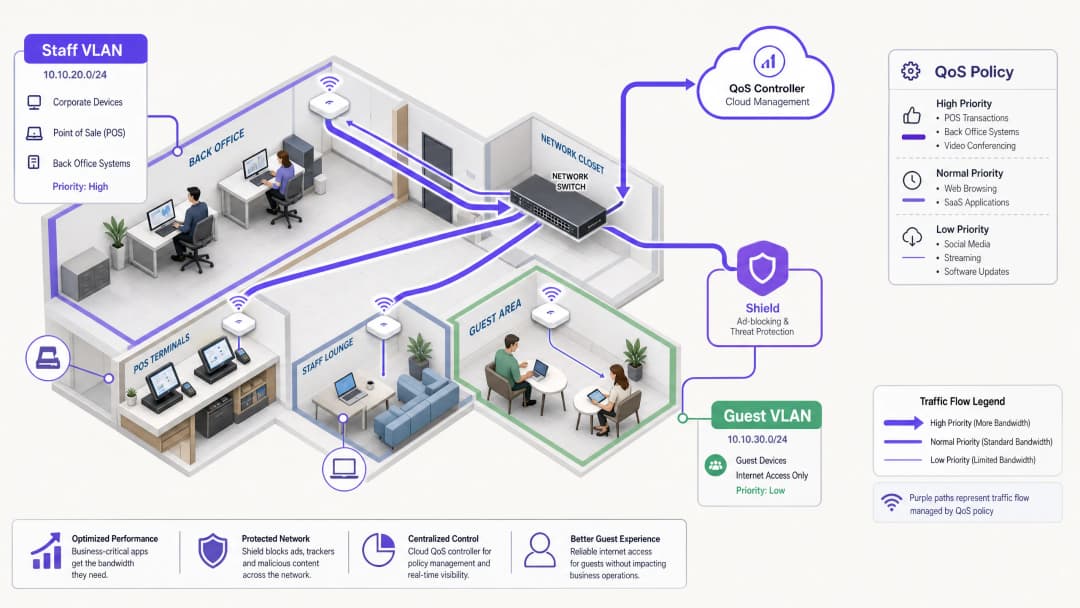
La gestión del ancho de banda para el WiFi del personal requiere mucho más que simplemente aumentar la velocidad de la línea. Los centros empresariales se enfrentan constantemente a la congestión de la red, ya que las aplicaciones críticas para el negocio compiten con las tareas en segundo plano y el tráfico no esencial. Esta guía detalla la implementación técnica del modelado de tráfico y la Calidad de Servicio (QoS) para garantizar el rendimiento de los sistemas esenciales. Fundamentalmente, demuestra cómo el despliegue de Purple Shield para el bloqueo de anuncios a nivel de DNS elimina hasta un 30% del tráfico no esencial antes de que consuma ancho de banda. Al combinar QoS con reconocimiento de aplicaciones y protección contra amenazas a nivel de red, optimiza la infraestructura existente y aplaza las costosas actualizaciones de línea.
Análisis Técnico Detallado: Arquitectura y Estándares
Una arquitectura de red sólida segrega los tipos de tráfico para aplicar políticas específicas. El WiFi del personal debe ejecutarse en una VLAN dedicada, completamente aislada del Guest WiFi y de los dispositivos IoT. Esta segmentación es un requisito fundamental para el cumplimiento de estándares como PCI-DSS y GDPR, y constituye la base para una gestión de tráfico eficaz.
El Rol de QoS y WMM
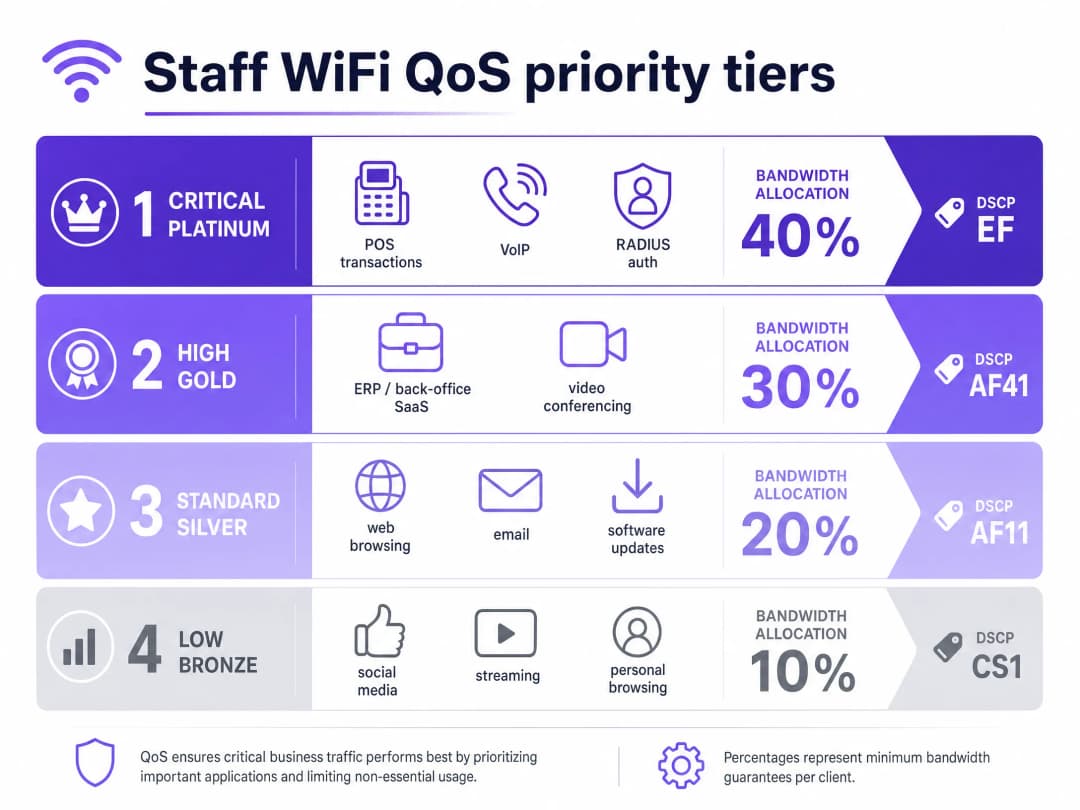
La Calidad de Servicio (QoS) garantiza que el tráfico sensible a la latencia reciba prioridad. En entornos inalámbricos, esto se rige por el estándar IEEE 802.11e, que introdujo Wireless Multimedia (WMM). WMM categoriza el tráfico en cuatro niveles de acceso: Voz, Vídeo, Mejor Esfuerzo (Best Effort) y Segundo Plano. El hardware empresarial de Cisco Meraki, HPE Aruba, Ruckus, Juniper Mist, Ubiquiti UniFi, Cambium, Extreme Networks y Fortinet es totalmente compatible con WMM.
En la infraestructura cableada, QoS se basa en las marcas del Punto de Código de Servicios Diferenciados (DSCP) en la cabecera IP.
- DSCP EF (Expedited Forwarding) se asigna a sistemas críticos como el tráfico de voz y las transacciones de TPV.
- DSCP AF41 gestiona las videoconferencias y las aplicaciones ERP.
- DSCP CS1 administra las tareas en segundo plano, como las actualizaciones de software.
Gestión de Identidades y Accesos
Los dispositivos del personal deben autenticarse mediante 802.1X con EAP-TLS o PEAP contra un servidor RADIUS. Purple se integra directamente con Microsoft Entra ID, Okta y Google Workspace. Esto garantiza que el acceso a la red esté vinculado al proveedor de identidad central. Cuando se revoca el acceso en Entra ID, el acceso a la red se cancela de forma instantánea.
¿Tiene preguntas sobre su configuración específica?
Nuestro equipo trabaja con operadores de recintos, responsables de TI e ingenieros de redes en 80 000 espacios. Reserve una llamada de 20 minutos y le mostraremos cómo lo han solucionado otros profesionales como usted.
Guía de Implementación: Modelado y Reducción
1. Segmentación de Red
Despliegue VLANs separadas para el personal, los invitados y el hardware operativo. Aplique límites de velocidad por usuario (por ejemplo, 5 Mbps de bajada) en la VLAN de invitados para evitar que usuarios individuales saturen las conexiones. En la VLAN del personal, asigne un porcentaje mínimo de ancho de banda garantizado a las aplicaciones críticas.
2. Configuración de QoS consciente de aplicaciones
Asocie sus aplicaciones empresariales con los marcados DSCP adecuados. Asegúrese de que sus switches principales y puntos de acceso estén configurados para respetar estos marcados a lo largo de toda la ruta de red. Verifique que su ISP no elimine las etiquetas DSCP en la puerta de enlace.
3. Implementación de Purple Shield para la reducción del tráfico
Una gran parte del tráfico web del personal consiste en redes de anuncios de terceros y píxeles de seguimiento. Este tráfico consume ancho de banda, aumenta la carga de consultas DNS y plantea riesgos de seguridad. Purple Shield funciona como un filtro a nivel de DNS. Al dirigir sus servidores DHCP a los solucionadores DNS de Purple, Shield bloquea las solicitudes a redes de anuncios conocidas y dominios maliciosos antes de que se establezcan las conexiones.
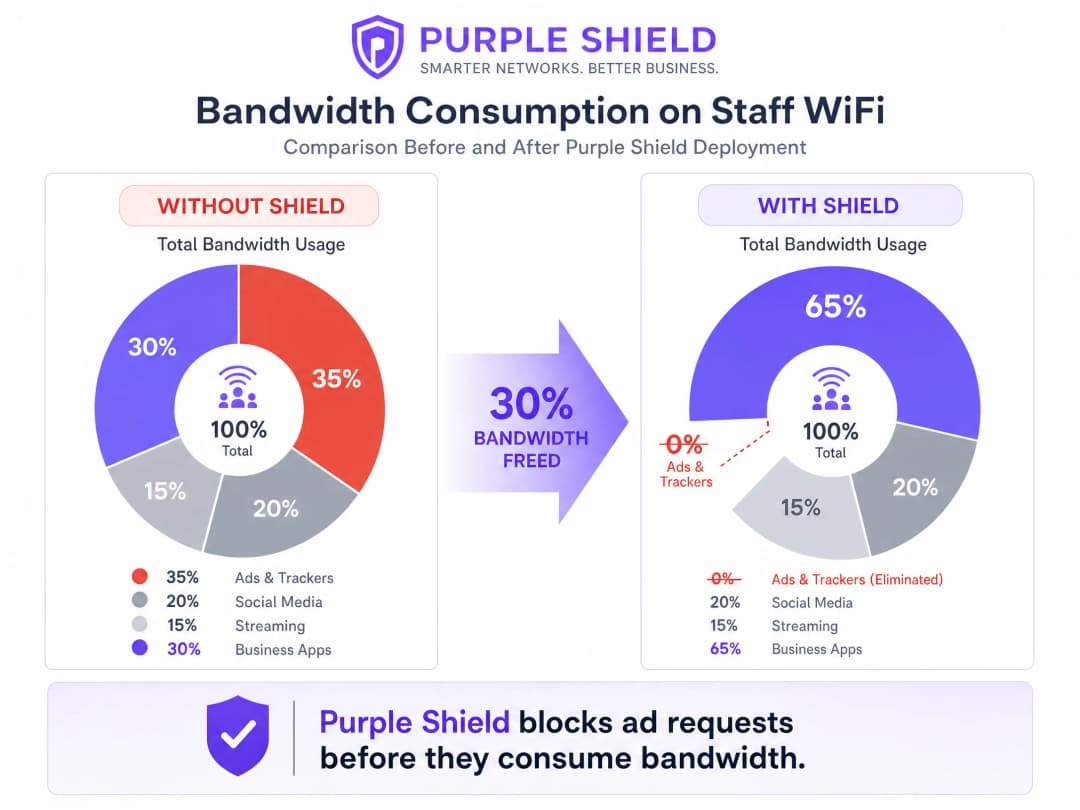
Las ubicaciones que implementan Shield suelen experimentar una reducción del 30 % en el volumen general de consultas DNS. Esto libera de manera efectiva ancho de banda para las aplicaciones empresariales, funcionando como una mejora de la línea sin los costes asociados.
Buenas prácticas
- Utilice modelado por cubo de tokens: En lugar de límites estrictos de velocidad, utilice el modelado por cubo de tokens con una tolerancia a ráfagas. Esto se adapta a picos breves de tráfico, como actualizaciones repentinas de software, sin afectar al rendimiento sostenido.
- Audite dispositivos heredados: Es posible que los terminales compartidos más antiguos no admitan WMM correctamente. Identifique estos dispositivos y aplique políticas de QoS basadas en puertos si es necesario.
- Supervise y ajuste: Revise periódicamente las métricas de uso máximo y los volúmenes de consultas DNS utilizando WiFi Analytics. Ajuste los límites de velocidad a medida que cambien el número de empleados y las necesidades de las aplicaciones.
Resolución de problemas y mitigación de riesgos
- Remarcado de DSCP: Si las políticas de QoS parecen ineficaces, capture paquetes en la puerta de enlace. Algunos switches empresariales remarcan los valores DSCP a los ajustes predeterminados, lo que invalida su configuración.
- Omisión de DNS sobre HTTPS: Si los dispositivos del personal utilizan DNS sobre HTTPS, omiten el solucionador DNS local, lo que hace que Shield sea ineficaz. Bloquee el DNS sobre HTTPS en el firewall o configure los dispositivos gestionados a través de MDM para que utilicen solucionadores internos.
Retorno de la inversión e impacto empresarial
El principal impacto empresarial de una gestión eficaz del ancho de banda es la prevención de costes. Al implementar QoS y desplegar Shield, un establecimiento puede aplazar las costosas mejoras de las líneas dedicadas. Para una cadena mediana de Retail, evitar las mejoras de línea en 50 tiendas puede ahorrar miles de libras al año. Además, priorizar el tráfico de POS y ERP mejora directamente la eficiencia operativa y reduce el tiempo de inactividad durante los períodos de mayor actividad comercial.
Escuche nuestro pódcast de sesión técnica informativa para obtener más detalles:
Definiciones clave
QoS (Quality of Service)
Un conjunto de tecnologías que gestionan el tráfico de red para garantizar el rendimiento de las aplicaciones críticas.
Esencial para garantizar que los sistemas VoIP y de punto de venta funcionen de manera fiable durante la congestión de la red.
DSCP (Differentiated Services Code Point)
Un campo en la cabecera IP utilizado para clasificar el tráfico de red con fines de QoS.
Utilizado por los conmutadores de red para determinar qué paquetes reciben prioridad en la cola.
WMM (Wireless Multimedia)
Una certificación de la WiFi Alliance basada en el estándar IEEE 802.11e que proporciona funciones de QoS para redes inalámbricas.
Garantiza que los puntos de acceso prioricen el tráfico de voz y vídeo sobre los datos generales.
VLAN (Virtual Local Area Network)
Una subred lógica que agrupa un conjunto de dispositivos, aislando su tráfico del resto de la red.
Utilizado para separar los dispositivos del personal de las redes de invitados por motivos de seguridad y gestión del tráfico.
Filtrado a nivel de DNS
El proceso de bloquear el acceso a dominios específicos mediante la interceptación y denegación de las solicitudes de resolución DNS.
El mecanismo que utiliza Purple Shield para evitar que los dispositivos se conecten a redes de anuncios y sitios maliciosos.
Modelado de cubeta de tokens
Un algoritmo de gestión de ancho de banda que permite ráfagas cortas de tráfico mientras aplica un límite de velocidad promedio a largo plazo.
Ofrece una mejor experiencia de usuario que la limitación estricta de velocidad al adaptarse a picos breves como la carga de páginas.
802.1X
Un estándar IEEE para el control de acceso a redes basado en puertos, que proporciona un mecanismo de autenticación a los dispositivos que desean conectarse a una LAN o WLAN.
El método estándar para proteger el WiFi del personal de la empresa, a menudo integrado con RADIUS.
RADIUS (Remote Authentication Dial-In User Service)
Un protocolo de red que proporciona una gestión centralizada de autenticación, autorización y contabilidad.
Utilizado junto con 802.1X para verificar las credenciales del personal con proveedores de identidad como Microsoft Entra ID.
Ejemplos prácticos
Un hotel de 200 habitaciones necesita garantizar que el software de gestión hotelera y los teléfonos VoIP permanezcan estables durante los periodos de máxima afluencia en el registro de entrada, mientras el personal también utiliza la red para la navegación general.
Segmente la red ubicando al personal en una VLAN dedicada. Aplique DSCP EF al sistema de gestión hotelera y al tráfico VoIP. Aplique DSCP CS1 a la navegación general y a las actualizaciones en segundo plano. Despliegue Purple Shield en la VLAN del personal para eliminar el tráfico de anuncios y rastreadores, liberando capacidad base.
Una cadena de tiendas de distribución con 50 establecimientos experimenta interrupciones por tiempo de espera en los terminales de punto de venta (POS) durante los periodos de mayor actividad porque los dispositivos del personal saturan la conexión de banda ancha compartida de 100 Mbps.
Aísle los terminales de punto de venta en una VLAN dedicada con prioridad estricta de QoS. En la VLAN de WiFi del personal, implemente un límite de velocidad por usuario de 10 Mbps de bajada y 2 Mbps de subida utilizando el modelado de cubeta de tokens. Despliegue Purple Shield para bloquear el tráfico de anuncios no relacionados con la actividad comercial.
Preguntas de práctica
Q1. Usted gestiona un establecimiento del sector Hostelería donde la red de invitados satura con frecuencia la conexión de 500 Mbps, lo que provoca caídas de conexión en el sistema ERP de la oficina central. Tiene una única red plana. ¿Cuál es el primer paso para resolver esto?
Sugerencia: Considere los requisitos previos para aplicar políticas de QoS efectivas.
Ver respuesta modelo
El primer paso es la segmentación de la red. Debe separar los dispositivos del personal y el sistema ERP en una VLAN dedicada, aislada de la red de invitados. Una vez segmentada, puede aplicar un límite de ancho de banda estricto por usuario a la VLAN de invitados y configurar QoS en la VLAN del personal para priorizar el tráfico del ERP.
Q2. Después de configurar el marcado DSCP EF para su tráfico VoIP en la VLAN del personal, los usuarios siguen informando de una mala calidad de las llamadas durante las horas punta. ¿Cuál es la causa más probable?
Sugerencia: Piense en lo que les ocurre a las cabeceras de los paquetes a medida que atraviesan los diferentes equipos de red.
Ver respuesta modelo
La causa más probable es el remarcado DSCP. O bien un conmutador empresarial intermedio o bien la pasarela del ISP está eliminando o restableciendo los valores DSCP a los valores predeterminados (best effort). Debe realizar una captura de paquetes en la pasarela para verificar si los marcados de QoS sobreviven a todo el trayecto.
Q3. Necesita reducir el consumo total de ancho de banda en la red del personal sin que esto afecte a las aplicaciones empresariales. ¿Cuál es el enfoque más eficaz?
Sugerencia: Considere qué tráfico no esencial consume una cantidad significativa de ancho de banda de forma automática.
Ver respuesta modelo
Desplegar Purple Shield para filtrar el tráfico en la capa de DNS. Al bloquear las solicitudes a las redes de anuncios y a los píxeles de seguimiento antes de que se establezcan las conexiones, Shield elimina una parte importante del tráfico que no es de negocios, reduciendo normalmente el volumen total de consultas DNS y el consumo de ancho de banda hasta en un 30%.
Continúe leyendo esta serie
Cómo reducir el número de SSIDs de WiFi utilizando PSK por dispositivo (iPSK, DPSK, MPSK)
Esta guía de referencia técnica autorizada explica cómo los equipos de TI pueden eliminar la degradación del rendimiento de WiFi causada por la sobrecarga de balizas de SSID colapsando múltiples redes dedicadas en un único SSID mediante el uso de PSK por dispositivo (xPSK). Cubre el panorama de proveedores que incluye Cisco iPSK, HPE Aruba MPSK, Ruckus DPSK, Juniper Mist PPSK y Ubiquiti UniFi PPSK, con orientación práctica de implementación sobre asignación dinámica de VLAN, incorporación de IoT y cumplimiento de PCI DSS. Los operadores de recintos en los sectores de hostelería, retail, estadios y organizaciones del sector público encontrarán orientación de arquitectura práctica y ejemplos de casos reales.
La lista de comprobación para migrar de un NAC heredado a un NAC nativo de la nube
Esta guía de referencia técnica autorizada proporciona una lista de comprobación estructurada en tres fases para migrar de un Control de Acceso a la Red (NAC) heredado a una arquitectura nativa de la nube. Equipa a los responsables de TI y arquitectos de red con estrategias prácticas para gestionar la integración de la identidad, la paridad de políticas y el cumplimiento sin interrumpir las operaciones del recinto.
Cómo implementar NAC posterior a la admisión para la supervisión continua de la confianza
Esta guía proporciona una plantilla técnica autorizada para implementar el control de acceso a la red (NAC) posterior a la admisión con supervisión continua de la confianza en entornos empresariales, incluidos los sectores de hostelería, comercio minorista, atención médica y sector público. Detalla el cambio de arquitectura de las comprobaciones estáticas previas a la admisión a la aplicación dinámica con reconocimiento de sesión mediante RADIUS CoA, el establecimiento de líneas de base de comportamiento y la integración de telemetría. Los arquitectos de TI y los equipos de operaciones de red encontrarán directrices de despliegue prácticas, casos de estudio reales, notas de alineación de cumplimiento y marcos de ROI medibles.
¿Tiene preguntas sobre su configuración específica?
Nuestro equipo trabaja con operadores de recintos, responsables de TI e ingenieros de redes en 80 000 espacios. Reserve una llamada de 20 minutos y le mostraremos cómo lo han solucionado otros profesionales como usted.