
Gestion de la bande passante pour le WiFi du personnel : lissage, QoS et réduction du trafic
Ce guide détaille les méthodes pratiques pour gérer la bande passante du WiFi du personnel dans les établissements d'entreprise. Il aborde le lissage du trafic, la mise en œuvre de la QoS et la manière dont le déploiement de Purple Shield réduit la charge réseau sans nécessiter de mise à niveau de l'infrastructure.
Écouter ce guide
Voir la transcription du podcast
Fait partie de notre série principale : Enterprise WiFi Security Guide →
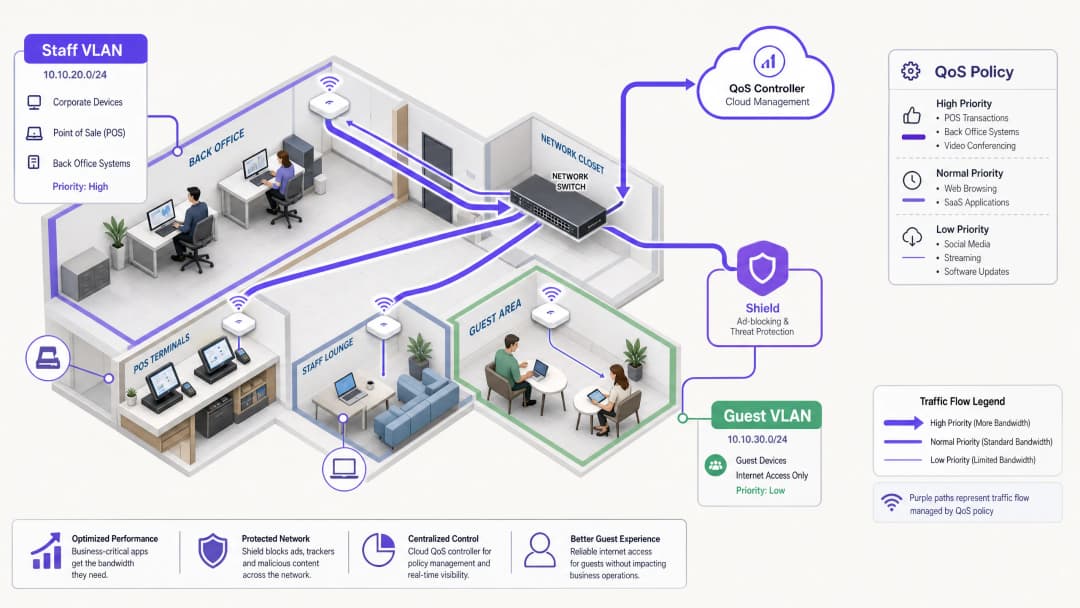
Synthèse
La gestion de la bande passante pour le WiFi du personnel exige bien plus qu'une simple augmentation du débit de la ligne. Les sites d'entreprise sont constamment confrontés à la congestion du réseau, car les applications critiques pour l'activité rivalisent avec les tâches d'arrière-plan et le trafic non essentiel. Ce guide présente la mise en œuvre technique du lissage de trafic et de la qualité de service (QoS) pour garantir les performances des systèmes essentiels. Surtout, il démontre comment le déploiement de Purple Shield pour le blocage des publicités au niveau de la couche DNS élimine jusqu'à 30 % du trafic non essentiel avant même qu'il ne consomme de la bande passante. En combinant une QoS sensible aux applications avec une protection contre les menaces au niveau du réseau, vous optimisez l'infrastructure existante et reportez les mises à niveau de ligne coûteuses.
Analyse Technique Approfondie : Architecture et Normes
Une architecture réseau robuste isole les types de trafic afin d'appliquer des politiques spécifiques. Le WiFi du personnel doit fonctionner sur un VLAN dédié, totalement isolé du WiFi invité et des appareils IoT. Cette segmentation est une exigence fondamentale pour la conformité avec des normes telles que PCI-DSS et le GDPR, et elle constitue la base d'une gestion efficace du trafic.
Le Rôle de la QoS et du WMM
La qualité de service (QoS) garantit que le trafic sensible à la latence reçoit la priorité. Dans les environnements sans fil, cela est régi par la norme IEEE 802.11e, qui a introduit le Wireless Multimedia (WMM). Le WMM classe le trafic en quatre catégories d'accès : Voix, Vidéo, Meilleur effort (Best Effort) et Arrière-plan. Les équipements d'entreprise de Cisco Meraki, HPE Aruba, Ruckus, Juniper Mist, Ubiquiti UniFi, Cambium, Extreme Networks et Fortinet prennent entièrement en charge le WMM.
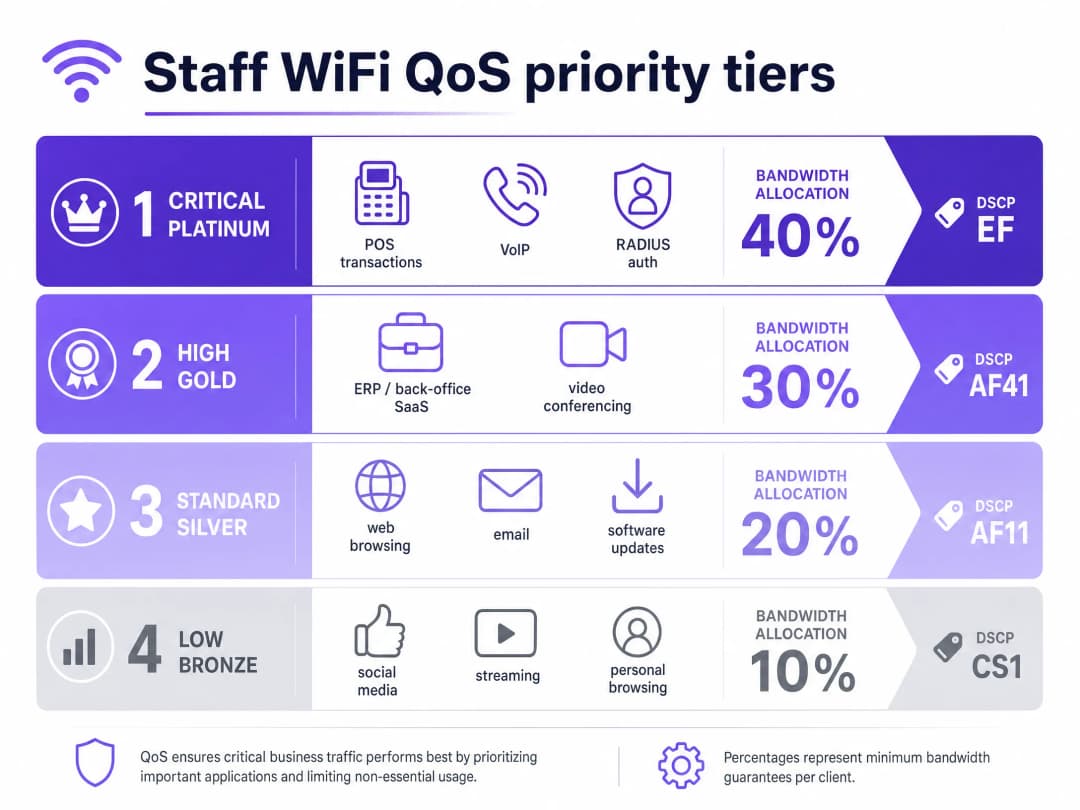
Sur l'infrastructure câblée, la QoS s'appuie sur les marquages Differentiated Services Code Point (DSCP) dans l'en-tête IP.
- DSCP EF (Expedited Forwarding) est attribué aux systèmes critiques tels que le trafic vocal et les transactions POS.
- DSCP AF41 gère la visioconférence et les applications ERP.
- DSCP CS1 gère les tâches d'arrière-plan telles que les mises à jour logicielles.
Gestion des Identités et des Accès
Les appareils du personnel doivent s'authentifier à l'aide de 802.1X avec EAP-TLS ou PEAP auprès d'un serveur RADIUS. Purple s'intègre directement avec Microsoft Entra ID, Okta et Google Workspace. Cela garantit que l'accès au réseau est lié au fournisseur d'identité central. Lorsque vous révoquez un accès dans Entra ID, l'accès au réseau est instantanément interrompu.
Vous avez des questions sur votre configuration spécifique ?
Notre équipe collabore avec des exploitants de sites, des responsables informatiques et des ingénieurs réseau au sein de 80 000 sites. Réservez un appel de 20 minutes et nous vous montrerons comment d'autres professionnels comme vous ont résolu ce problème.
Guide de Mise en Œuvre : Lissage et Réduction
1. Segmentation du Réseau
Déployez des VLAN distincts pour le personnel, les invités et le matériel opérationnel. Appliquez des limites de débit par utilisateur (par exemple, 5 Mbps en débit descendant) sur le VLAN invité pour éviter que des utilisateurs individuels ne saturent les connexions. Sur le VLAN du personnel, allouez un pourcentage de bande passante minimale garantie aux applications critiques.
2. Configuration de la QoS orientée applications
Associez vos applications professionnelles aux marquages DSCP appropriés. Assurez-vous que vos commutateurs principaux et vos points d'accès sont configurés pour respecter ces marquages sur l'ensemble du chemin réseau. Vérifiez que votre fournisseur d'accès Internet ne supprime pas les balises DSCP au niveau de la passerelle.
3. Déploiement de Purple Shield pour la réduction du trafic
Une grande partie du trafic web du personnel est constituée de réseaux publicitaires tiers et de pixels de suivi. Ce trafic consomme de la bande passante, augmente la charge des requêtes DNS et pose des risques de sécurité. Purple Shield fonctionne comme un filtre au niveau de la couche DNS. En orientant vos serveurs DHCP vers les résolveurs DNS de Purple, Shield bloque les requêtes vers les réseaux publicitaires connus et les domaines malveillants avant que les connexions ne soient établies.
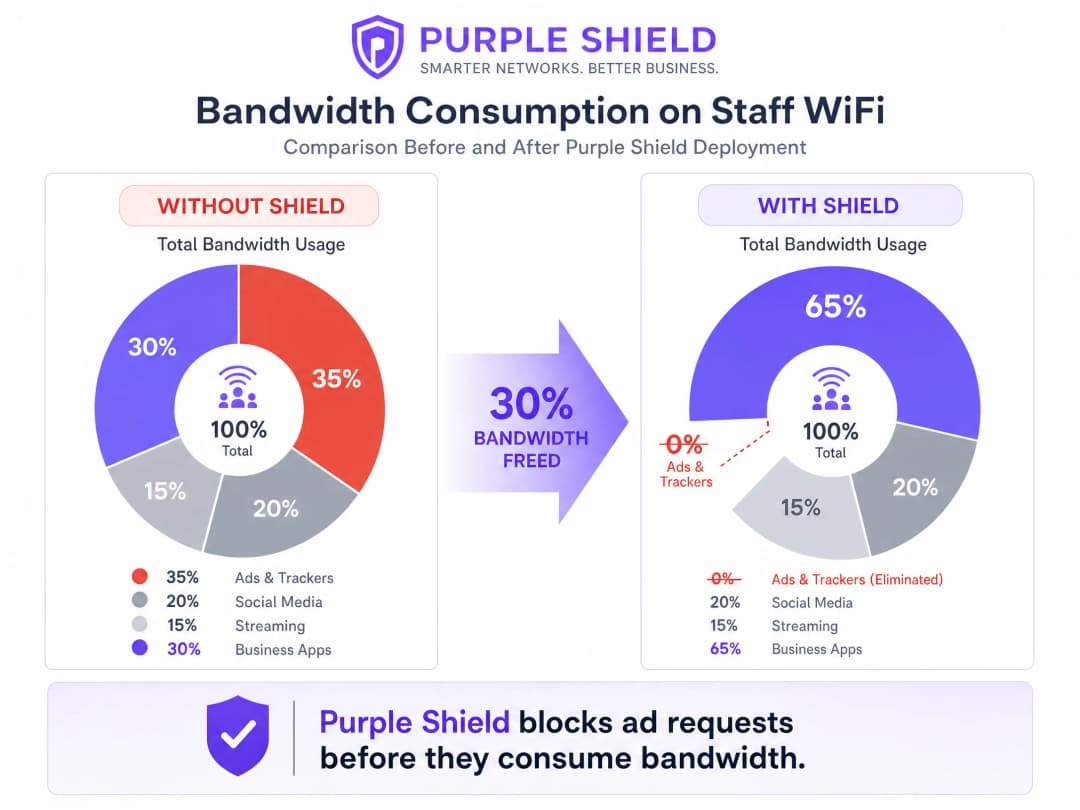
Les sites qui déploient Shield constatent généralement une réduction de 30 % du volume global des requêtes DNS. Cela libère efficacement de la bande passante pour les applications professionnelles, fonctionnant comme une mise à niveau de ligne sans les coûts associés.
Bonnes pratiques
- Utiliser le façonnage par seau de jetons (Token Bucket) : Au lieu de limites de débit strictes, utilisez le façonnage par seau de jetons avec une tolérance aux rafales (burst). Cela permet de gérer de brèves pointes de trafic, telles que des mises à jour logicielles soudaines, sans impacter les performances de fond.
- Auditer les anciens équipements : Les terminaux partagés plus anciens peuvent ne pas prendre en charge correctement le WMM. Identifiez ces appareils et appliquez des politiques de QoS basées sur les ports si nécessaire.
- Surveiller et ajuster : Examinez régulièrement les indicateurs d'utilisation de pointe et les volumes de requêtes DNS à l'aide de WiFi Analytics. Ajustez les limites de débit à mesure que l'effectif du personnel et les besoins applicatifs évoluent.
Dépannage et atténuation des risques
- Remarquage DSCP : Si les politiques de QoS semblent inefficaces, capturez les paquets au niveau de la passerelle. Certains commutateurs d'entreprise remarquent les valeurs DSCP aux paramètres par défaut, rendant votre configuration inutile.
- Contournement du DNS-over-HTTPS : Si les appareils du personnel utilisent le DNS-over-HTTPS, ils contournent le résolveur DNS local, ce qui rend Shield inefficace. Bloquez le DNS-over-HTTPS au niveau du pare-feu ou configurez les appareils gérés via MDM pour utiliser des résolveurs internes.
ROI et impact commercial
L'impact commercial principal d'une gestion efficace de la bande passante est l'évitement des coûts. En mettant en œuvre la QoS et en déployant Shield, un site peut reporter des mises à niveau coûteuses de lignes louées. Pour une chaîne de Retail de taille moyenne, éviter les mises à niveau de lignes sur 50 magasins peut économiser des milliers d'euros par an. De plus, la priorisation du trafic POS et ERP améliore directement l'efficacité opérationnelle et réduit les temps d'arrêt pendant les périodes d'activité intense.
Écoutez notre podcast de briefing technique pour plus de détails :
Définitions clés
QoS (Quality of Service)
Ensemble de technologies permettant de gérer le trafic réseau afin de garantir les performances des applications critiques.
Essentiel pour garantir le fonctionnement fiable des systèmes VoIP et des terminaux de paiement en cas de congestion du réseau.
DSCP (Differentiated Services Code Point)
Un champ de l'en-tête IP utilisé pour classifier le trafic réseau à des fins de QoS.
Utilisé par les commutateurs réseau pour déterminer quels paquets sont prioritaires dans la file d'attente.
WMM (Wireless Multimedia)
Certification de la WiFi Alliance basée sur la norme IEEE 802.11e qui fournit des fonctionnalités de QoS pour les réseaux sans fil.
Garantit que les points d'accès accordent la priorité au trafic voix et vidéo par rapport aux données générales.
VLAN (Virtual Local Area Network)
Sous-réseau logique qui regroupe un ensemble d'appareils, isolant leur trafic du reste du réseau.
Utilisé pour séparer les appareils du personnel des réseaux invités à des fins de sécurité et de gestion du trafic.
Filtrage au niveau de la couche DNS
Processus consistant à bloquer l'accès à des domaines spécifiques en interceptant et en refusant les requêtes de résolution DNS.
Le mécanisme utilisé par Purple Shield pour empêcher les appareils de se connecter aux réseaux publicitaires et aux sites malveillants.
Lissage par seau à jetons
Algorithme de gestion de la bande passante qui autorise de courtes pointes de trafic tout en imposant une limite de débit moyen à long terme.
Offre une meilleure expérience utilisateur qu'une limitation stricte du débit en s'adaptant aux brèves pointes de trafic comme le chargement de pages.
802.1X
Norme IEEE pour le contrôle d'accès réseau basé sur les ports, fournissant un mécanisme d'authentification pour les appareils souhaitant se connecter à un réseau LAN ou WLAN.
Méthode standard pour sécuriser le WiFi d'entreprise du personnel, souvent intégrée à RADIUS.
RADIUS (Remote Authentication Dial-In User Service)
Protocole réseau assurant une gestion centralisée de l'authentification, de l'autorisation et de la comptabilité.
Utilisé en conjonction avec 802.1X pour vérifier les identifiants du personnel auprès de fournisseurs d'identité comme Microsoft Entra ID.
Exemples concrets
Un hôtel de 200 chambres doit garantir que le logiciel de gestion d'établissement et les téléphones VoIP restent stables pendant les périodes de pointe d'enregistrement, alors que le personnel utilise également le réseau pour la navigation générale.
Segmentez le réseau en plaçant le personnel sur un VLAN dédié. Appliquez le DSCP EF au système de gestion d'établissement et au trafic VoIP. Appliquez le DSCP CS1 à la navigation générale et aux mises à jour en arrière-plan. Déployez Purple Shield sur le VLAN du personnel pour éliminer le trafic publicitaire et de suivi, libérant ainsi de la capacité de base.
Une chaîne de vente au détail de 50 magasins subit des interruptions de session de ses terminaux de paiement pendant les périodes de forte affluence car les appareils du personnel saturent la connexion haut débit partagée de 100 Mbps.
Isolez les terminaux de paiement sur un VLAN dédié avec une priorité QoS stricte. Sur le VLAN du WiFi du personnel, mettez en œuvre une limite de débit par utilisateur de 10 Mbps en aval et 2 Mbps en amont à l'aide d'un lissage par seau à jetons. Déployez Purple Shield pour bloquer le trafic publicitaire non professionnel.
Questions d'entraînement
Q1. Vous gérez un établissement du secteur Hospitality où le réseau invité sature fréquemment la connexion de 500 Mbps, provoquant des déconnexions du progiciel de gestion intégré (ERP) du back-office. Vous disposez d'un seul réseau à plat. Quelle est la première étape pour résoudre ce problème ?
Conseil : Réfléchissez aux conditions préalables à l'application de politiques de QoS efficaces.
Voir la réponse type
La première étape est la segmentation du réseau. Vous devez séparer les appareils du personnel et le système ERP sur un VLAN dédié, isolé du réseau invité. Une fois segmenté, vous pouvez appliquer une limite de débit stricte par utilisateur sur le VLAN invité et configurer la QoS sur le VLAN du personnel pour prioriser le trafic ERP.
Q2. Après avoir configuré le marquage DSCP EF pour votre trafic VoIP sur le VLAN du personnel, les utilisateurs signalent toujours une mauvaise qualité d'appel pendant les heures de pointe. Quelle en est la cause la plus probable ?
Conseil : Pensez à ce qui arrive aux en-têtes de paquets lorsqu'ils traversent différents équipements réseau.
Voir la réponse type
La cause la plus probable est le re-marquage DSCP. Soit un commutateur d'entreprise intermédiaire, soit la passerelle du FAI supprime ou réinitialise les valeurs DSCP par défaut (best effort). Vous devez effectuer une capture de paquets au niveau de la passerelle pour vérifier si les marquages QoS survivent tout au long du parcours.
Q3. Vous devez réduire la consommation globale de bande passante sur le réseau du personnel sans impact sur les applications professionnelles. Quelle est l'approche la plus efficace ?
Conseil : Réfléchissez au trafic non essentiel qui consomme automatiquement une bande passante importante.
Voir la réponse type
Déployez Purple Shield pour filtrer le trafic au niveau de la couche DNS. En bloquant les requêtes vers les réseaux publicitaires et les pixels de suivi avant que les connexions ne soient établies, Shield élimine une partie importante du trafic non professionnel, réduisant généralement le volume total de requêtes DNS et la consommation de bande passante jusqu'à 30 %.
Continuer la lecture de cette série
Comment réduire le nombre de SSIDs WiFi grâce au PSK par appareil (iPSK, DPSK, MPSK)
Ce guide de référence technique faisant autorité explique comment les équipes informatiques peuvent éliminer la dégradation des performances WiFi causée par la surcharge des balises SSID en regroupant plusieurs réseaux dédiés en un seul SSID à l'aide du PSK par appareil (xPSK). Il couvre le paysage des constructeurs à travers Cisco iPSK, HPE Aruba MPSK, Ruckus DPSK, Juniper Mist PPSK et Ubiquiti UniFi PPSK, avec des conseils pratiques de mise en œuvre sur l'attribution dynamique de VLAN, l'intégration de l'IoT et la conformité PCI DSS. Les exploitants de sites dans l'hôtellerie, le commerce de détail, les stades et les organisations du secteur public y trouveront des conseils d'architecture exploitables et des exemples concrets.
La checklist pour migrer d'un NAC hérité vers un NAC cloud-native
Ce guide de référence technique faisant autorité fournit une checklist structurée en trois phases pour migrer d'un contrôle d'accès réseau (NAC) hérité vers une architecture cloud-native. Il apporte aux responsables informatiques et aux architectes réseau des stratégies concrètes pour gérer l'intégration d'identité, la parité des politiques et la conformité sans perturber l'exploitation des sites.
Comment mettre en œuvre le NAC Post-Admission pour une surveillance continue de la confiance
Ce guide fournit un schéma technique faisant autorité pour la mise en œuvre du contrôle d'accès réseau (NAC) Post-Admission avec une surveillance continue de la confiance dans les environnements d'entreprise, y compris l'hôtellerie, le commerce de détail, la santé et le secteur public. Il détaille la transition architecturale des contrôles statiques de pré-admission vers une application dynamique et sensible à la session à l'aide de RADIUS CoA, de la modélisation des comportements de référence et de l'intégration de la télémétrie. Les architectes informatiques et les équipes d'exploitation réseau y trouveront des conseils de déploiement exploitables, des études de cas réels, des notes d'alignement de conformité et des cadres de ROI mesurables.
Vous avez des questions sur votre configuration spécifique ?
Notre équipe collabore avec des exploitants de sites, des responsables informatiques et des ingénieurs réseau au sein de 80 000 sites. Réservez un appel de 20 minutes et nous vous montrerons comment d'autres professionnels comme vous ont résolu ce problème.