
Gestione della larghezza di banda per il WiFi del personale: Shaping, QoS e riduzione del traffico
Questa guida illustra in dettaglio i metodi pratici per gestire la larghezza di banda per il WiFi del personale in ambienti aziendali. Copre la configurazione del traffic shaping, l'implementazione del QoS e come la distribuzione di Purple Shield riduca il carico di rete senza richiedere aggiornamenti dell'infrastruttura.
Ascolta questa guida
Visualizza trascrizione del podcast
Parte della nostra serie principale: Enterprise WiFi Security Guide →
Sintesi Esecutiva
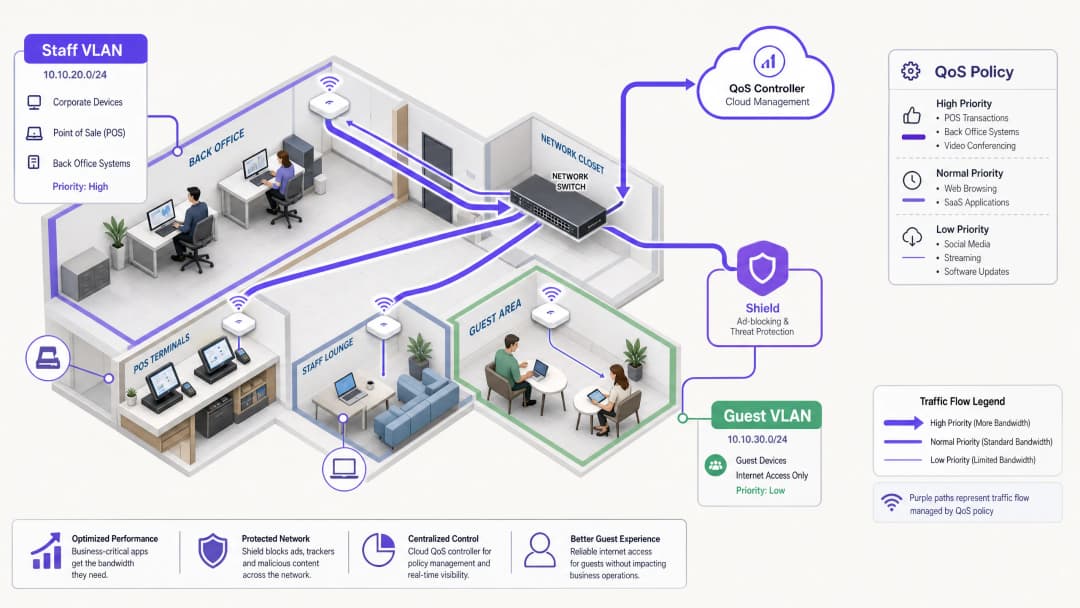
La gestione della larghezza di banda per il WiFi del personale richiede molto di più del semplice aumento della velocità della linea. Le strutture aziendali si trovano costantemente ad affrontare la congestione della rete, poiché le applicazioni aziendali critiche competono con le attività in background e il traffico non essenziale. Questa guida illustra l'implementazione tecnica del traffic shaping e della Quality of Service (QoS) per garantire le prestazioni dei sistemi essenziali. In particolare, dimostra come l'implementazione di Purple Shield per il blocco degli annunci a livello DNS elimini fino al 30% del traffico non essenziale prima ancora che consumi la larghezza di banda. Combinando una QoS consapevole delle applicazioni con la protezione dalle minacce a livello di rete, si ottimizza l'infrastruttura esistente e si rinviano costosi aggiornamenti della linea.
Approfondimento Tecnico: Architettura e Standard
Un'architettura di rete solida segrega i tipi di traffico per applicare policy specifiche. Il WiFi del personale deve essere eseguito su una VLAN dedicata, completamente isolata dal Guest WiFi e dai dispositivi IoT. Questa segmentazione è un requisito fondamentale per la conformità a standard quali PCI-DSS e GDPR, e costituisce la base per una gestione efficace del traffico.
Il Ruolo di QoS e WMM
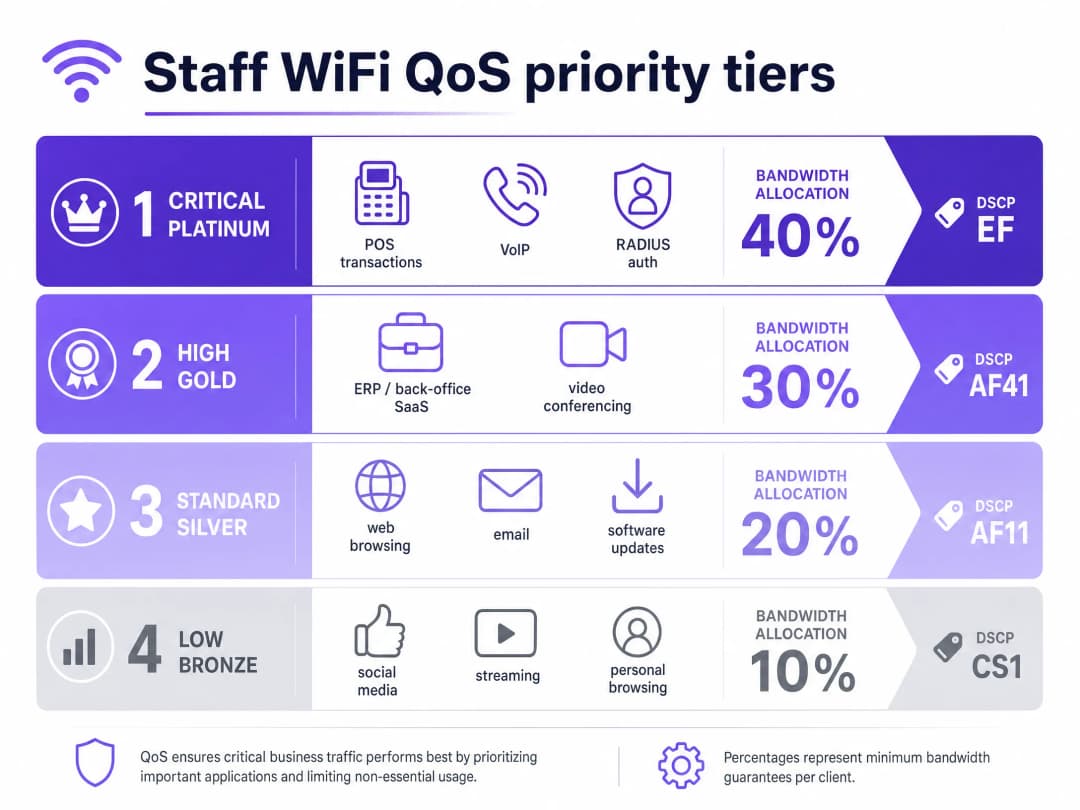
La Quality of Service (QoS) garantisce che il traffico sensibile alla latenza riceva la priorità. Negli ambienti wireless, questo è regolato dallo standard IEEE 802.11e, che ha introdotto il Wireless Multimedia (WMM). Il WMM categorizza il traffico in quattro livelli di accesso: Voice, Video, Best Effort e Background. L'hardware aziendale di Cisco Meraki, HPE Aruba, Ruckus, Juniper Mist, Ubiquiti UniFi, Cambium, Extreme Networks e Fortinet supporta pienamente il WMM.
Sull'infrastruttura cablata, la QoS si affida alle marcature Differentiated Services Code Point (DSCP) nell'intestazione IP.
- DSCP EF (Expedited Forwarding) è assegnato ai sistemi critici come il traffico vocale e le transazioni POS.
- DSCP AF41 gestisce le videoconferenze e le applicazioni ERP.
- DSCP CS1 gestisce le attività in background come gli aggiornamenti software.
Gestione delle Identità e degli Accessi
I dispositivi del personale devono autenticarsi utilizzando 802.1X con EAP-TLS o PEAP rispetto a un server RADIUS. Purple si integra direttamente con Microsoft Entra ID, Okta e Google Workspace. Ciò garantisce che l'accesso alla rete sia legato all'identity provider centrale. Quando si revoca l'accesso in Entra ID, l'accesso alla rete viene interrotto istantaneamente.
Hai domande sulla tua configurazione specifica?
Il nostro team collabora con gestori di sedi, responsabili IT e ingegneri di rete in 80.000 sedi. Prenota una chiamata di 20 minuti e ti mostreremo come altri professionisti come te hanno risolto il problema.
Guida all'Implementazione: Shaping e Riduzione
1. Segmentazione della Rete
Distribuisci VLAN separate per il personale, gli ospiti e l'hardware operativo. Applica limiti di larghezza di banda per utente (ad esempio, 5 Mbps in downstream) sulla VLAN degli ospiti per evitare che i singoli utenti saturino le connessioni. Sulla VLAN del personale, alloca una percentuale minima garantita di larghezza di banda alle applicazioni critiche.
2. Configurazione QoS Application-Aware
Mappa le tue applicazioni aziendali con le marcature DSCP appropriate. Assicurati che i tuoi switch core e gli access point siano configurati per rispettare queste marcature lungo l'intero percorso di rete. Verifica che il tuo ISP non rimuova i tag DSCP a livello di gateway.
3. Distribuzione di Purple Shield per la Riduzione del Traffico
Una gran parte del traffico web del personale è costituita da reti pubblicitarie di terze parti e pixel di tracciamento. Questo traffico consuma larghezza di banda, aumenta il carico delle query DNS e comporta rischi per la sicurezza. Purple Shield funziona come un filtro a livello DNS. Indirizzando i tuoi server DHCP ai risolutori DNS di Purple, Shield blocca le richieste a reti pubblicitarie note e domini dannosi prima che vengano stabilite le connessioni.
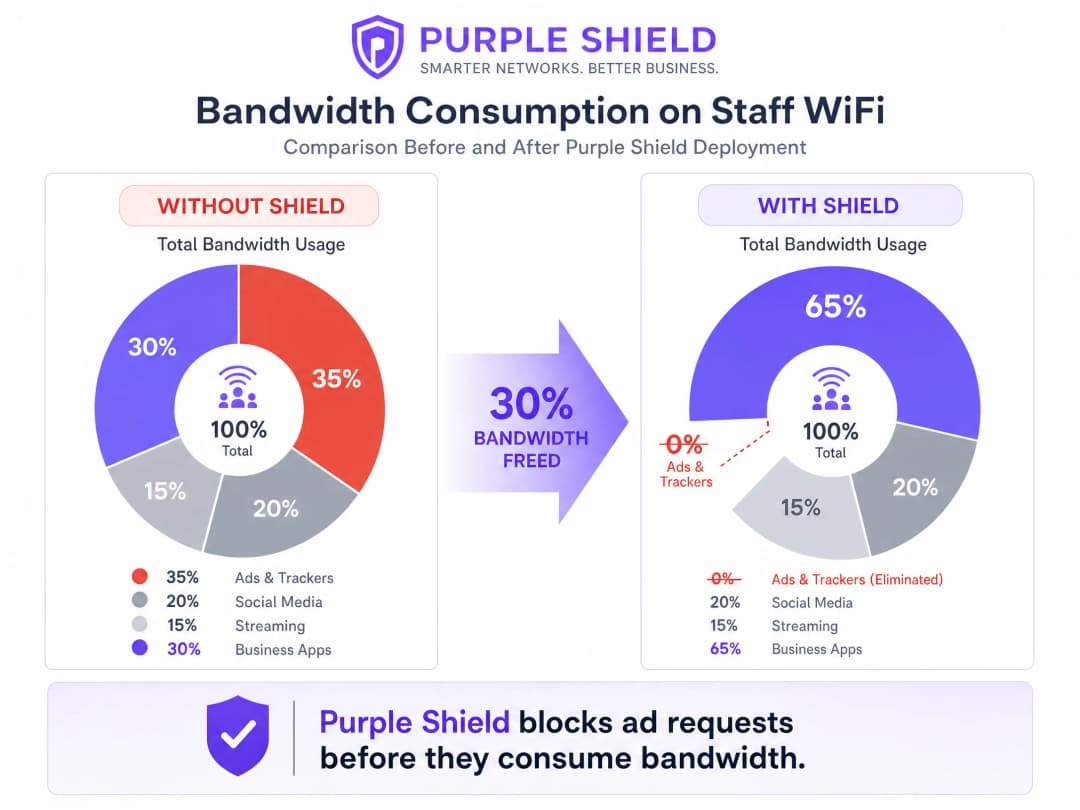
Le sedi che implementano Shield registrano in genere una riduzione del 30% del volume complessivo delle query DNS. Questo libera efficacemente larghezza di banda per le applicazioni aziendali, funzionando come un aggiornamento della linea senza i costi associati.
Best Practice
- Usa il Token Bucket Shaping: Invece di limiti di velocità rigidi, utilizza il token bucket shaping con una tolleranza di burst. Questo consente di gestire brevi picchi di traffico, come improvvisi aggiornamenti software, senza influire sulle prestazioni costanti.
- Controlla i Dispositivi Legacy: I terminali condivisi più vecchi potrebbero non supportare correttamente il WMM. Identifica questi dispositivi e applica criteri QoS basati su porta, se necessario.
- Monitora e Regola: Esamina regolarmente le metriche di utilizzo nei picchi e i volumi di query DNS utilizzando WiFi Analytics. Regola i limiti di velocità al variare del numero di dipendenti e delle esigenze delle applicazioni.
Risoluzione dei Problemi e Mitigazione dei Rischi
- Rimarcatura DSCP: Se i criteri QoS sembrano inefficaci, acquisisci i pacchetti sul gateway. Alcuni switch aziendali rimarcano i valori DSCP sulle impostazioni predefinite, rendendo inutile la tua configurazione.
- Bypass DNS-over-HTTPS: Se i dispositivi del personale utilizzano DNS-over-HTTPS, bypassano il risolutore DNS locale, rendendo inefficace Shield. Blocca il DNS-over-HTTPS sul firewall o configura i dispositivi gestiti tramite MDM per utilizzare i risolutori interni.
ROI e Impatto Aziendale
L'impatto aziendale principale di una gestione efficace della larghezza di banda è l'evitamento dei costi. Implementando il QoS e distribuendo Shield, una sede può rimandare costosi aggiornamenti delle linee dedicate. Per una catena Retail di medie dimensioni, evitare l'aggiornamento delle linee in 50 negozi può far risparmiare migliaia di sterline all'anno. Inoltre, dare priorità al traffico POS ed ERP migliora direttamente l'efficienza operativa e riduce i tempi di inattività durante i periodi di picco delle vendite.
Ascolta il nostro podcast di briefing tecnico per ulteriori dettagli:
Definizioni chiave
QoS (Quality of Service)
Un insieme di tecnologie che gestiscono il traffico di rete per garantire le prestazioni delle applicazioni critiche.
Essenziale per garantire che i sistemi VoIP e POS funzionino in modo affidabile durante la congestione della rete.
DSCP (Differentiated Services Code Point)
Un campo nell'intestazione IP utilizzato per classificare il traffico di rete ai fini della QoS.
Utilizzato dagli switch di rete per determinare quali pacchetti hanno la priorità nella coda.
WMM (Wireless Multimedia)
Una certificazione WiFi Alliance basata sullo standard IEEE 802.11e che fornisce funzionalità QoS per le reti wireless.
Garantisce che gli access point diano la priorità al traffico voce e video rispetto ai dati generali.
VLAN (Virtual Local Area Network)
Una sottorete logica che raggruppa un insieme di dispositivi, isolando il loro traffico dal resto della rete.
Utilizzata per separare i dispositivi del personale dalle reti guest per motivi di sicurezza e gestione del traffico.
Filtraggio a livello DNS
Il processo di blocco dell'accesso a domini specifici intercettando e rifiutando le richieste di risoluzione DNS.
Il meccanismo utilizzato da Purple Shield per impedire ai dispositivi di connettersi a reti pubblicitarie e siti dannosi.
Shaping token bucket
Un algoritmo di gestione della larghezza di banda che consente brevi picchi di traffico imponendo al contempo un limite medio di velocità a lungo termine.
Offre un'esperienza utente migliore rispetto alla limitazione rigida della velocità, gestendo brevi picchi come il caricamento delle pagine.
802.1X
Uno standard IEEE per il controllo dell'accesso alla rete basato su porta, che fornisce un meccanismo di autenticazione ai dispositivi che desiderano connettersi a una LAN o WLAN.
Il metodo standard per proteggere il WiFi aziendale del personale, spesso integrato con RADIUS.
RADIUS (Remote Authentication Dial-In User Service)
Un protocollo di rete che fornisce gestione centralizzata di autenticazione, autorizzazione e tracciamento delle sessioni.
Utilizzato in combinazione con 802.1X per verificare le credenziali del personale rispetto a provider di identità come Microsoft Entra ID.
Esempi pratici
Un hotel da 200 camere deve garantire che il software di gestione della proprietà e i telefoni VoIP rimangano stabili durante i periodi di punta per il check-in, mentre il personale utilizza la rete anche per la navigazione generale.
Segmentare la rete inserendo il personale in una VLAN dedicata. Applicare il DSCP EF al sistema di gestione della proprietà e al traffico VoIP. Applicare il DSCP CS1 alla navigazione generale e agli aggiornamenti in background. Implementare Purple Shield sulla VLAN del personale per eliminare il traffico di annunci e tracker, liberando capacità di base.
Una catena di negozi con 50 punti vendita riscontra timeout dei POS durante i periodi di intensa attività a causa dei dispositivi del personale che saturano la connessione a banda larga condivisa da 100 Mbps.
Isolare i terminali POS su una VLAN dedicata con priorità QoS rigorosa. Sulla VLAN WiFi del personale, implementare un limite di velocità per utente di 10 Mbps in download e 2 Mbps in upload utilizzando lo shaping token bucket. Distribuire Purple Shield per bloccare il traffico pubblicitario non correlato all'attività aziendale.
Domande di esercitazione
Q1. Gestisci una struttura ricettiva [Hospitality](/industries/hospitality) in cui la rete ospiti satura frequentemente la connessione da 500 Mbps, causando la perdita di connessione del sistema ERP del back-office. Hai un'unica rete piatta. Qual è il primo passo per risolvere il problema?
Suggerimento: Considera i prerequisiti per applicare politiche QoS efficaci.
Visualizza risposta modello
Il primo passo è la segmentazione della rete. È necessario separare i dispositivi del personale e il sistema ERP su una VLAN dedicata, isolata dalla rete ospiti. Una volta segmentata, è possibile applicare un limite di larghezza di banda rigoroso per utente alla VLAN ospiti e configurare il QoS sulla VLAN del personale per dare priorità al traffico ERP.
Q2. Dopo aver configurato i contrassegni DSCP EF per il traffico VoIP sulla VLAN del personale, gli utenti segnalano ancora una scarsa qualità delle chiamate durante le ore di punta. Qual è la causa più probabile?
Suggerimento: Pensa a cosa succede alle intestazioni dei pacchetti quando attraversano i diversi apparati di rete.
Visualizza risposta modello
La causa più probabile è la riscrittura del DSCP. Uno switch aziendale intermedio o il gateway dell'ISP sta rimuovendo o reimpostando i valori DSCP a quelli predefiniti (best effort). È necessario eseguire una cattura dei pacchetti sul gateway per verificare se i contrassegni QoS sopravvivono lungo l'intero percorso.
Q3. È necessario ridurre il consumo complessivo di larghezza di banda sulla rete del personale senza impattare sulle applicazioni aziendali. Qual è l'approccio più efficace?
Suggerimento: Considera quale traffico non essenziale consuma automaticamente una quantità significativa di larghezza di banda.
Visualizza risposta modello
Implementare Purple Shield per filtrare il traffico a livello DNS. Bloccando le richieste alle reti pubblicitarie e ai pixel di tracciamento prima che vengano stabilite le connessioni, Shield elimina una parte significativa del traffico non aziendale, riducendo tipicamente il volume totale delle query DNS e il consumo di larghezza di banda fino al 30%.
Continua a leggere questa serie
PPSK WPA3: confronto tra funzionalità e modelli di implementazione
Questa guida tecnica di riferimento confronta PPSK e WPA3-SAE, spiegando le loro differenze architetturali e i modelli di implementazione per ambienti multi-tenant. Fornisce indicazioni pratiche per IT manager e sviluppatori immobiliari su come ottenere reti WiFi sicure e isolate utilizzando le soluzioni basate sull'identità di Purple.
How to Reduce the Number of WiFi SSIDs Using Per-Device PSK (iPSK, DPSK, MPSK)
This authoritative technical reference guide explains how IT teams can eliminate WiFi performance degradation caused by SSID beacon overhead by collapsing multiple purpose-built networks into a single SSID using per-device PSK (xPSK). It covers the vendor landscape across Cisco iPSK, HPE Aruba MPSK, Ruckus DPSK, Juniper Mist PPSK, and Ubiquiti UniFi PPSK, with practical implementation guidance on dynamic VLAN assignment, IoT onboarding, and PCI DSS compliance. Venue operators in hospitality, retail, stadiums, and public-sector organisations will find actionable architecture guidance and real-world worked examples.
La checklist per migrare da NAC legacy a NAC cloud-native
Questa guida di riferimento tecnico autorevole fornisce una checklist strutturata in tre fasi per migrare da un Network Access Control (NAC) legacy a un'architettura cloud-native. Offre ai responsabili IT e agli architetti di rete strategie pratiche per gestire l'integrazione dell'identità, la parità delle policy e la conformità senza interrompere le attività delle sedi.
Hai domande sulla tua configurazione specifica?
Il nostro team collabora con gestori di sedi, responsabili IT e ingegneri di rete in 80.000 sedi. Prenota una chiamata di 20 minuti e ti mostreremo come altri professionisti come te hanno risolto il problema.