
Verwaltung der Bandbreite für das Mitarbeiter-WiFi: Shaping, QoS und Reduzierung des Datenverkehrs
Dieser Leitfaden beschreibt praktische Methoden zur Verwaltung der Bandbreite für das Mitarbeiter-WiFi an Unternehmensstandorten. Er umfasst Traffic Shaping, QoS-Implementierung und wie der Einsatz von Purple Shield die Netzwerklast ohne Infrastruktur-Upgrades reduziert.
Diesen Leitfaden anhören
Podcast-Transkript ansehen
Teil unserer Kernserie: Enterprise WiFi Security Guide →
Management-Zusammenfassung
Die Bandbreitenverwaltung für das Mitarbeiter-WiFi erfordert weit mehr als nur eine Erhöhung der Leitungsgeschwindigkeit. Enterprise-Standorte sind ständig mit Netzwerküberlastungen konfrontiert, da geschäftskritische Anwendungen mit Hintergrundprozessen und unwichtigem Datenverkehr konkurrieren. Dieser Leitfaden beschreibt die technische Implementierung von Traffic Shaping und Quality of Service (QoS), um die Leistung essenzieller Systeme zu garantieren. Vor allem zeigt er, wie der Einsatz von Purple Shield zur Werbeblockierung auf DNS-Ebene bis zu 30 % des nicht-essenziellen Datenverkehrs eliminiert, noch bevor dieser überhaupt Bandbreite verbraucht. Durch die Kombination von anwendungsorientiertem QoS mit Bedrohungsschutz auf Netzwerkebene optimieren Sie Ihre bestehende Infrastruktur und verschieben kostspielige Leitungs-Upgrades.
Technische Vertiefung: Architektur und Standards
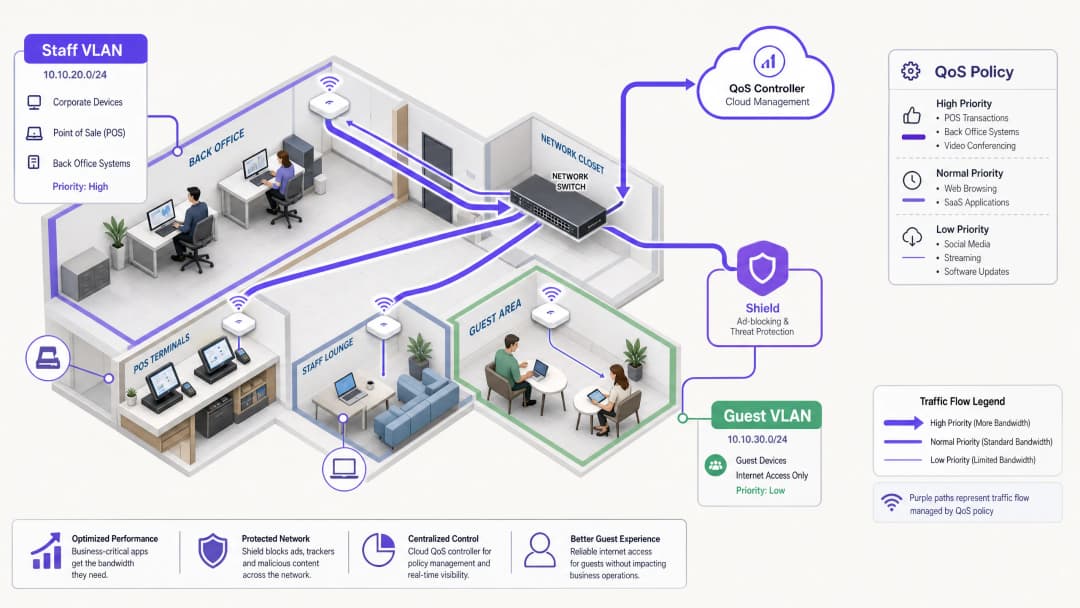
Eine robuste Netzwerkarchitektur trennt die verschiedenen Traffic-Typen, um spezifische Richtlinien anzuwenden. Das Mitarbeiter-WiFi muss in einem dedizierten VLAN laufen, das vollständig vom Guest WiFi und von IoT-Geräten isoliert ist. Diese Segmentierung ist eine grundlegende Voraussetzung für die Einhaltung von Standards wie PCI-DSS und GDPR und bildet das Fundament für ein effektives Traffic-Management.
Die Rolle von QoS und WMM
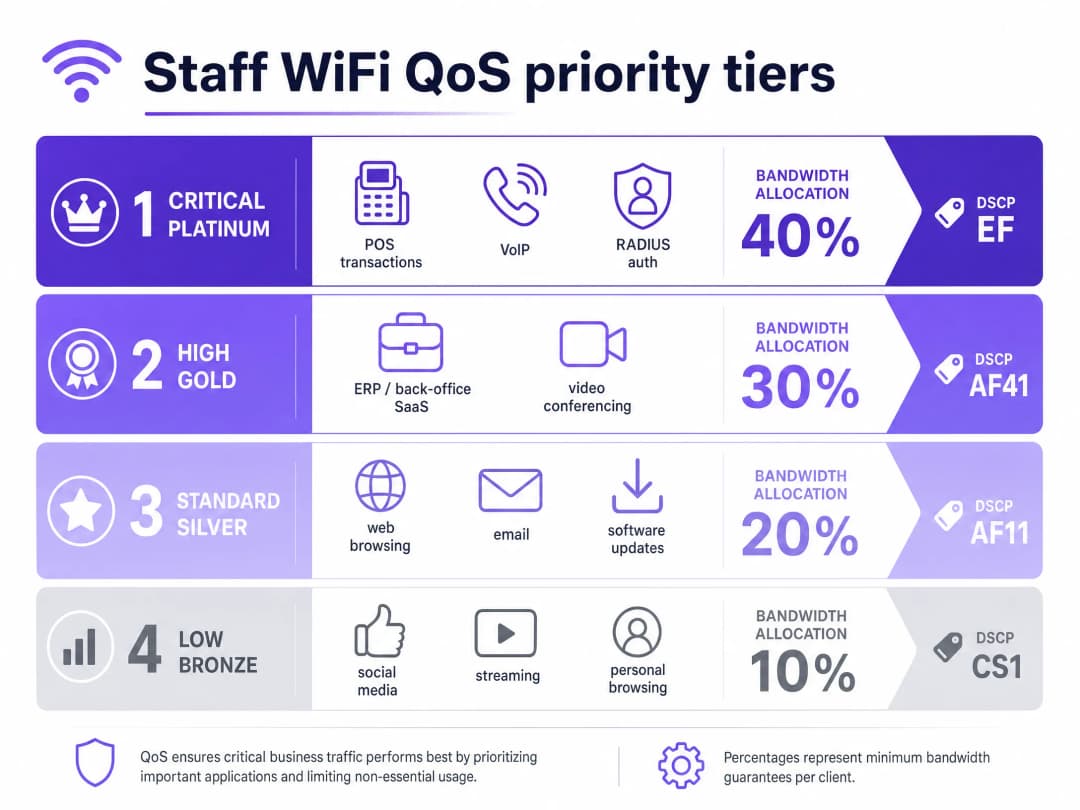
Quality of Service (QoS) stellt sicher, dass latenzempfindlicher Datenverkehr Priorität erhält. In Wireless-Umgebungen wird dies durch den Standard IEEE 802.11e geregelt, mit dem Wireless Multimedia (WMM) eingeführt wurde. WMM kategorisiert den Datenverkehr in vier Zugriffsklassen: Voice, Video, Best Effort und Background. Enterprise-Hardware von Cisco Meraki, HPE Aruba, Ruckus, Juniper Mist, Ubiquiti UniFi, Cambium, Extreme Networks und Fortinet unterstützt WMM vollständig.
In kabelgebundenen Infrastrukturen basiert QoS auf DSCP-Markierungen (Differentiated Services Code Point) im IP-Header.
- DSCP EF (Expedited Forwarding) wird kritischen Systemen wie dem Sprachdatenverkehr und POS-Transaktionen zugewiesen.
- DSCP AF41 verarbeitet Videokonferenzen und ERP-Anwendungen.
- DSCP CS1 verwaltet Hintergrundprozesse wie Software-Updates.
Identitäts- und Zugriffsmanagement
Mitarbeitergeräte müssen sich über 802.1X mit EAP-TLS oder PEAP an einem RADIUS-Server authentifizieren. Purple lässt sich direkt in Microsoft Entra ID, Okta und Google Workspace integrieren. Dies stellt sicher, dass der Netzwerkzugriff an den zentralen Identitätsanbieter gekoppelt ist. Wenn Sie den Zugriff in Entra ID entziehen, wird der Netzwerkzugriff sofort beendet.
Haben Sie Fragen zu Ihrem spezifischen Setup?
Unser Team arbeitet mit Standortbetreibern, IT-Managern und Netzwerktechnikern an über 80.000 Standorten zusammen. Buchen Sie ein 20-minütiges Gespräch und wir zeigen Ihnen, wie andere diese Herausforderungen gelöst haben.
Implementierungsleitfaden: Shaping und Reduzierung
1. Netzwerksegmentierung
Richten Sie separate VLANs für Mitarbeiter, Gäste und betriebliche Hardware ein. Wenden Sie Ratenbegrenzungen pro Benutzer (z. B. 5 Mbps Downstream) im Gäste-VLAN an, um zu verhindern, dass einzelne Nutzer die Verbindungen auslasten. Weisen Sie im Mitarbeiter-VLAN kritischen Anwendungen einen garantierten Mindestprozentsatz der Bandbreite zu.### 2. Anwendungsbasierte QoS-Konfiguration Ordnen Sie Ihre Geschäftsanwendungen den entsprechenden DSCP-Markierungen zu. Stellen Sie sicher, dass Ihre Core-Switches und Access Points so konfiguriert sind, dass sie diese Markierungen auf dem gesamten Netzwerkpfad berücksichtigen. Überprüfen Sie, ob Ihr ISP die DSCP-Tags am Gateway nicht entfernt.
3. Implementierung von Purple Shield zur Traffic-Reduzierung
Ein großer Teil des Web-Traffics der Mitarbeiter besteht aus Werbenetzwerken von Drittanbietern und Tracking-Pixeln. Dieser Traffic verbraucht Bandbreite, erhöht die DNS-Abfragelast und birgt Sicherheitsrisiken. Purple Shield arbeitet als Filter auf DNS-Ebene. Indem Sie Ihre DHCP-Server auf die DNS-Resolver von Purple verweisen lassen, blockiert Shield Anfragen an bekannte Werbenetzwerke und bösartige Domains, noch bevor Verbindungen hergestellt werden.
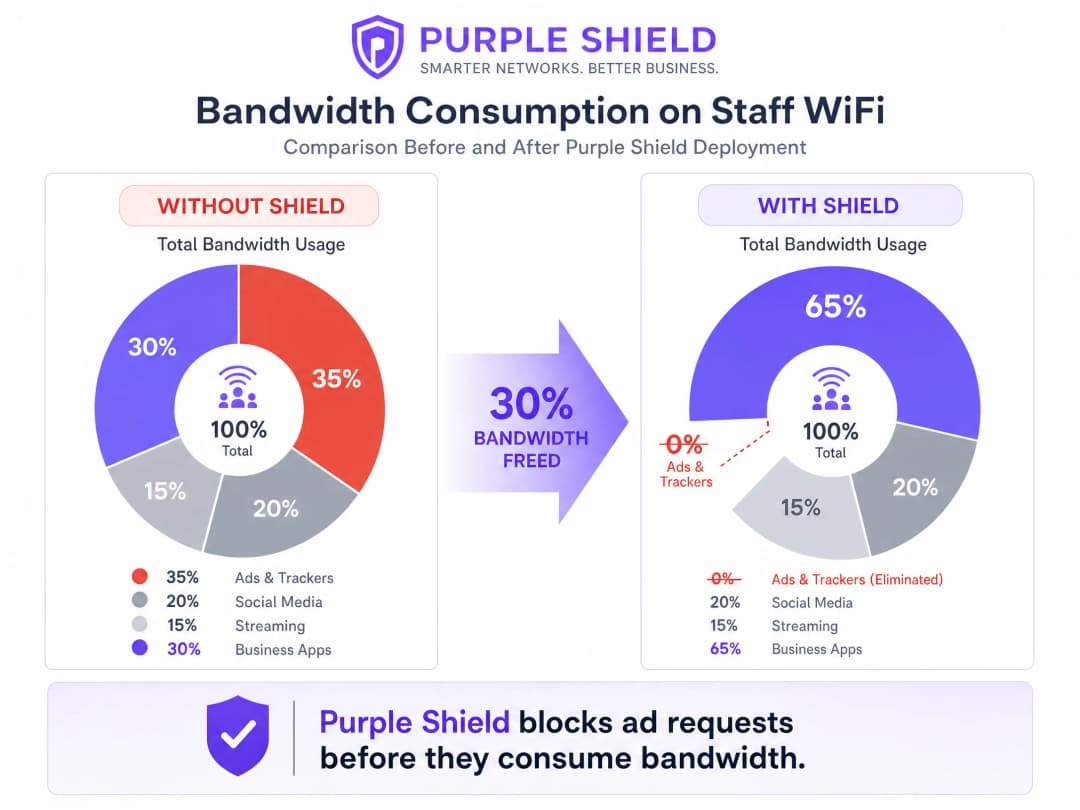
Standorte, die Shield einsetzen, verzeichnen in der Regel eine Reduzierung des gesamten DNS-Abfragevolumens um 30 %. Dies gibt effektiv Bandbreite für Geschäftsanwendungen frei und funktioniert wie ein Leitungs-Upgrade ohne die damit verbundenen Kosten.
Best Practices
- Token-Bucket-Shaping nutzen: Verwenden Sie anstelle von strikten Ratenbegrenzungen ein Token-Bucket-Shaping mit einer Burst-Toleranz. Dies fängt kurze Traffic-Spitzen, wie plötzliche Software-Updates, ab, ohne die dauerhafte Leistung zu beeinträchtigen.
- Altsysteme überprüfen: Ältere gemeinsam genutzte Endgeräte unterstützen WMM möglicherweise nicht ordnungsgemäß. Identifizieren Sie diese Geräte und wenden Sie bei Bedarf portbasierte QoS-Richtlinien an.
- Überwachen und anpassen: Überprüfen Sie regelmäßig die Metriken zur Spitzenauslastung und das DNS-Abfragevolumen mithilfe von WiFi Analytics. Passen Sie die Ratenbegrenzungen an, wenn sich die Mitarbeiterzahl und die Anforderungen der Anwendungen ändern.
Fehlerbehebung und Risikominderung
- DSCP-Umschreibung (Remarking): Wenn QoS-Richtlinien wirkungslos erscheinen, führen Sie eine Paketerfassung am Gateway durch. Einige Enterprise-Switches schreiben DSCP-Werte auf Standardeinstellungen um, was Ihre Konfiguration unbrauchbar macht.
- Umgehung durch DNS-over-HTTPS: Wenn die Geräte der Mitarbeiter DNS-over-HTTPS verwenden, umgehen sie den lokalen DNS-Resolver, was Shield wirkungslos macht. Blockieren Sie DNS-over-HTTPS an der Firewall oder konfigurieren Sie verwaltete Geräte über ein MDM so, dass sie interne Resolver verwenden.
ROI und geschäftlicher Nutzen
Der primäre geschäftliche Nutzen eines effektiven Bandbreitenmanagements liegt in der Kostenvermeidung. Durch die Implementierung von QoS und den Einsatz von Shield kann ein Standort teure Upgrades von Mietleitungen aufschieben. Für eine mittlere Kette im Bereich Retail kann die Vermeidung von Leitungs-Upgrades in 50 Filialen jährlich Tausende von Pfund einsparen. Darüber hinaus verbessert die Priorisierung von POS- und ERP-Traffic direkt die betriebliche Effizienz und reduziert Ausfallzeiten während der Hauptgeschäftszeiten.
Hören Sie sich unseren Podcast zum technischen Briefing an, um weitere Details zu erfahren:
Schlüsseldefinitionen
QoS (Quality of Service)
Eine Reihe von Technologien zur Verwaltung des Netzwerkverkehrs, um die Leistung kritischer Anwendungen zu garantieren.
Unerlässlich, um sicherzustellen, dass VoIP- und POS-Systeme bei Netzwerküberlastung zuverlässig funktionieren.
DSCP (Differentiated Services Code Point)
Ein Feld im IP-Header, das zur Klassifizierung des Netzwerkverkehrs für QoS-Zwecke verwendet wird.
Wird von Netzwerk-Switches verwendet, um zu bestimmen, welche Pakete in der Warteschlange Priorität erhalten.
WMM (Wireless Multimedia)
Eine Zertifizierung der WiFi Alliance auf Basis des Standards IEEE 802.11e, die QoS-Funktionen für drahtlose Netzwerke bereitstellt.
Stellt sicher, dass Access Points Sprach- und Videodatenverkehr gegenüber allgemeinen Daten priorisieren.
VLAN (Virtual Local Area Network)
Ein logisches Subnetzwerk, das eine Gruppe von Geräten zusammenfasst und deren Datenverkehr vom Rest des Netzwerks isoliert.
Wird verwendet, um Mitarbeitergeräte aus Sicherheits- und Verkehrsverwaltungsgründen von Gastnetzwerken zu trennen.
Filterung auf DNS-Ebene
Der Prozess des Blockierens des Zugriffs auf bestimmte Domänen durch Abfangen und Ablehnen von DNS-Auflösungsanfragen.
Der Mechanismus, den Purple Shield nutzt, um zu verhindern, dass sich Geräte mit Werbenetzwerken und schädlichen Websites verbinden.
Token-Bucket-Shaping
Ein Bandbreitenmanagement-Algorithmus, der kurze Datenverkehrsspitzen zulässt, während er gleichzeitig ein langfristiges durchschnittliches Limit durchsetzt.
Bietet eine bessere Benutzererfahrung als eine strikte Ratenbegrenzung, indem kurze Spitzen wie das Laden von Seiten abgefangen werden.
802.1X
Ein IEEE-Standard für die portbasierte Netzwerkzugriffskontrolle, der einen Authentifizierungsmechanismus für Geräte bereitstellt, die eine Verbindung zu einem LAN oder WLAN herstellen möchten.
Die Standardmethode zur Absicherung des Mitarbeiter-WiFi in Unternehmen, häufig integriert mit RADIUS.
RADIUS (Remote Authentication Dial-In User Service)
Ein Netzwerkprotokoll, das eine zentrale Authentifizierung, Autorisierung und Abrechnungsverwaltung bereitstellt.
Wird in Verbindung mit 802.1X verwendet, um die Anmeldedaten der Mitarbeiter mit Identitätsanbietern wie Microsoft Entra ID abzugleichen.
Ausgearbeitete Beispiele
Ein Hotel mit 200 Zimmern muss sicherstellen, dass die Property-Management-Software und VoIP-Telefone während der Haupt-Check-in-Zeiten stabil bleiben, während die Mitarbeiter das Netzwerk auch für allgemeines Surfen nutzen.
Segmentieren Sie das Netzwerk, indem Sie die Mitarbeiter in ein dediziertes VLAN verschieben. Wenden Sie DSCP EF auf das Property-Management-System und den VoIP-Verkehr an. Wenden Sie DSCP CS1 auf das allgemeine Surfen und Hintergrund-Updates an. Implementieren Sie Purple Shield auf dem Mitarbeiter-VLAN, um den Datenverkehr durch Werbung und Tracker zu eliminieren und so die Grundkapazität freizugeben.
Eine Einzelhandelskette mit 50 Filialen verzeichnet während der Stoßzeiten POS-Timeouts, da Mitarbeitergeräte die gemeinsame 100-Mbps-Breitbandverbindung überlasten.
Isolieren Sie POS-Terminals in einem dedizierten VLAN mit strikter QoS-Priorität. Implementieren Sie auf dem Mitarbeiter-WiFi-VLAN eine Ratenbegrenzung pro Benutzer von 10 Mbps im Downstream und 2 Mbps im Upstream mittels Token-Bucket-Shaping. Setzen Sie Purple Shield ein, um nicht geschäftlichen Werbeverkehr zu blockieren.
Übungsfragen
Q1. Sie verwalten einen [Gastronomiebetrieb](/industries/hotels), in dem das Gastnetzwerk häufig die 500-Mbps-Verbindung auslastet, was dazu führt, dass das ERP-System der Verwaltung die Verbindung verliert. Sie verfügen über ein einziges, flaches Netzwerk. Was ist der erste Schritt zur Lösung dieses Problems?
Hinweis: Berücksichtigen Sie die Voraussetzungen für die Anwendung effektiver QoS-Richtlinien.
Musterlösung anzeigen
Der erste Schritt ist die Netzwerksegmentierung. Sie müssen die Mitarbeitergeräte und das ERP-System in ein dediziertes VLAN aufteilen, das vom Gastnetzwerk isoliert ist. Sobald dieses segmentiert ist, können Sie eine strenge Ratenbegrenzung pro Benutzer auf das Gast-VLAN anwenden und QoS auf dem Mitarbeiter-VLAN konfigurieren, um den ERP-Datenverkehr zu priorisieren.
Q2. Nachdem Sie DSCP EF-Markierungen für Ihren VoIP-Datenverkehr im Mitarbeiter-VLAN konfiguriert haben, melden Benutzer während der Stoßzeiten immer noch eine schlechte Anrufqualität. Was ist die wahrscheinlichste Ursache?
Hinweis: Denken Sie daran, was mit den Paket-Headern passiert, wenn sie verschiedene Netzwerkgeräte passieren.
Musterlösung anzeigen
Die wahrscheinlichste Ursache ist das Zurücksetzen (Remarking) von DSCP. Entweder ein zwischengeschalteter Enterprise-Switch oder das ISP-Gateway entfernt die DSCP-Werte oder setzt sie auf den Standardwert (Best Effort) zurück. Sie müssen eine Paketerfassung (Packet Capture) am Gateway durchführen, um zu überprüfen, ob die QoS-Markierungen auf dem gesamten Pfad erhalten bleiben.
Q3. Sie müssen den gesamten Bandbreitenverbrauch im Mitarbeiternetzwerk reduzieren, ohne die Geschäftsanwendungen zu beeinträchtigen. Was ist der effektivste Ansatz?
Hinweis: Überlegen Sie, welcher nicht wesentliche Datenverkehr automatisch erhebliche Bandbreite verbraucht.
Musterlösung anzeigen
Setzen Sie Purple Shield ein, um den Datenverkehr auf der DNS-Ebene zu filtern. Durch das Blockieren von Anfragen an Werbenetzwerke und Tracking-Pixel, noch bevor die Verbindungen aufgebaut werden, eliminiert Shield einen erheblichen Teil des nicht geschäftlichen Datenverkehrs, was das gesamte DNS-Abfragevolumen und den Bandbreitenverbrauch typischerweise um bis zu 30 % reduziert.
Weiterlesen in dieser Reihe
So reduzieren Sie die Anzahl der WiFi SSIDs mit Per-Device PSK (iPSK, DPSK, MPSK)
Dieser maßgebliche technische Referenzleitfaden erklärt, wie IT-Teams die durch den SSID-Beacon-Overhead verursachte WiFi-Leistungsbeeinträchtigung eliminieren können, indem sie mehrere zweckgebundene Netzwerke mithilfe von Per-Device PSK (xPSK) in einer einzigen SSID zusammenfassen. Er deckt die Herstellerlandschaft mit Cisco iPSK, HPE Aruba MPSK, Ruckus DPSK, Juniper Mist PPSK und Ubiquiti UniFi PPSK ab und bietet praktische Implementierungshinweise zur dynamischen VLAN-Zuweisung, zum IoT-Onboarding und zur PCI-DSS-Compliance. Betreiber von Veranstaltungsorten in der Hotellerie, im Einzelhandel, in Stadien und in Organisationen des öffentlichen Sektors finden hier umsetzbare Architekturrichtlinien und praxisnahe Beispiele.
Die Checkliste für die Migration von Legacy-NAC zu Cloud-Native NAC
Dieser maßgebliche technische Leitfaden bietet eine strukturierte, dreiphasige Checkliste für die Migration von herkömmlichen Network Access Control (NAC)-Lösungen auf eine cloud-native Architektur. Er stattet IT-Manager und Netzwerkarchitekten mit praktischen Strategien aus, um Identitätsintegration, Richtlinienparität und Compliance ohne Unterbrechung des Betriebs vor Ort zu bewältigen.
So implementieren Sie Post-Admission NAC für eine kontinuierliche Vertrauensüberwachung
Dieser Leitfaden bietet ein verbindliches technisches Konzept für die Implementierung von Post-Admission Network Access Control (NAC) mit kontinuierlicher Vertrauensüberwachung in Unternehmensumgebungen wie Gastronomie, Einzelhandel, Gesundheitswesen und dem öffentlichen Sektor. Er beschreibt den architektonischen Wandel von statischen Pre-Admission-Prüfungen hin zu einer dynamischen, sitzungsbasierten Durchsetzung mittels RADIUS CoA, Verhaltens-Baselining und Telemetrie-Integration. IT-Architekten und Netzwerksicherheitsteams erhalten praxisnahe Bereitstellungsanleitungen, reale Fallstudien, Hinweise zur Compliance-Ausrichtung und Frameworks zur ROI-Messung.
Haben Sie Fragen zu Ihrem spezifischen Setup?
Unser Team arbeitet mit Standortbetreibern, IT-Managern und Netzwerktechnikern an über 80.000 Standorten zusammen. Buchen Sie ein 20-minütiges Gespräch und wir zeigen Ihnen, wie andere diese Herausforderungen gelöst haben.