
কর্মীদের WiFi-এর জন্য ব্যান্ডউইথ পরিচালনা: শেপিং, QoS এবং ট্রাফিক কমানো
এই নির্দেশিকাটি এন্টারপ্রাইজ ভেন্যুতে কর্মীদের WiFi-এর জন্য ব্যান্ডউইথ পরিচালনার ব্যবহারিক পদ্ধতিগুলো বিশদভাবে বর্ণনা করে। এটি ট্রাফিক শেপিং, QoS বাস্তবায়ন এবং কীভাবে কোনো অবকাঠামোগত আপগ্রেড ছাড়াই Purple Shield মোতায়েন নেটওয়ার্ক লোড কমায় তা কভার করে।
এই গাইডটি শুনুন
পডকাস্ট ট্রান্সক্রিপ্ট দেখুন
আমাদের মূল সিরিজের অংশ: Enterprise WiFi Security Guide →
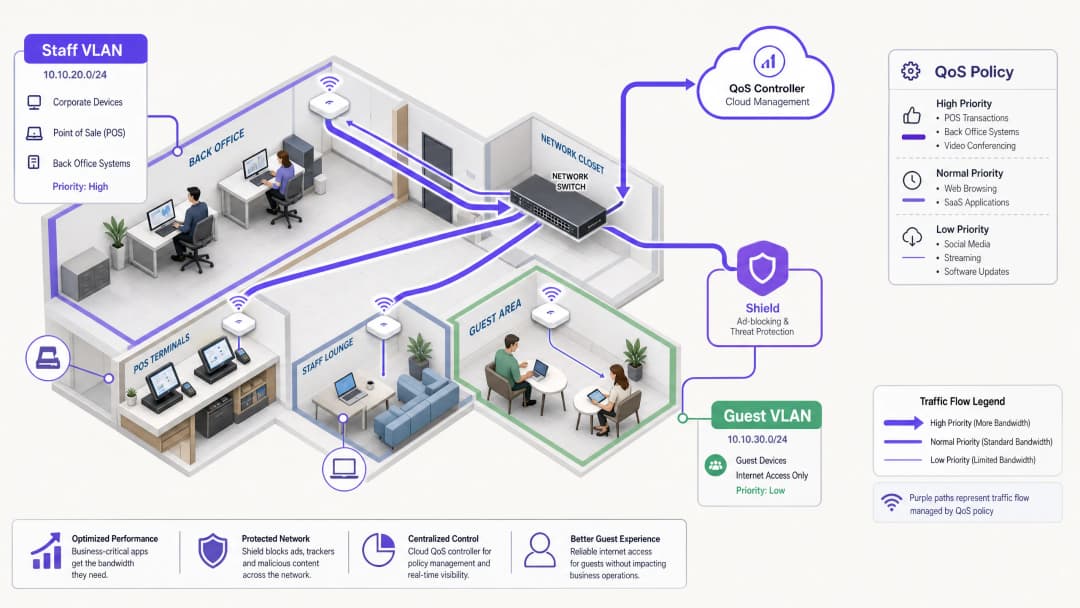
সারসংক্ষেপ
স্টাফ WiFi-এর জন্য ব্যান্ডউইথ পরিচালনা করার ক্ষেত্রে শুধুমাত্র লাইনের গতি বাড়ানোর চেয়ে আরও অনেক বেশি কিছুর প্রয়োজন হয়। এন্টারপ্রাইজ ভেন্যুগুলো প্রতিনিয়ত নেটওয়ার্ক কনজেশনের মুখোমুখি হয় কারণ অত্যন্ত গুরুত্বপূর্ণ বিজনেস অ্যাপ্লিকেশনগুলো ব্যাকগ্রাউন্ড টাস্ক এবং অপ্রয়োজনীয় ট্রাফিকের সাথে প্রতিযোগিতা করে। এই গাইডে ট্রাফিক শেপিং এবং Quality of Service (QoS)-এর টেকনিক্যাল বাস্তবায়ন সম্পর্কে আলোচনা করা হয়েছে যাতে জরুরি সিস্টেমগুলোর পারফরম্যান্স নিশ্চিত করা যায়। সবচেয়ে গুরুত্বপূর্ণ বিষয় হলো, এটি দেখায় যে কীভাবে DNS-লেয়ার অ্যাড-ব্লকিংয়ের জন্য Purple Shield মোতায়েন করা হলে তা ব্যান্ডউইথ ব্যবহার করার আগেই ৩০% পর্যন্ত অপ্রয়োজনীয় ট্রাফিক দূর করে। অ্যাপ্লিকেশন-অ্যাওয়ার QoS-এর সাথে নেটওয়ার্ক-স্তরের হুমকি সুরক্ষা যুক্ত করে, আপনি আপনার বিদ্যমান অবকাঠামোকে অপ্টিমাইজ করতে পারবেন এবং ব্যয়বহুল লাইন আপগ্রেডের প্রয়োজনীয়তা এড়াতে পারবেন।
টেকনিক্যাল বিশদ বিশ্লেষণ: আর্কিটেকচার এবং স্ট্যান্ডার্ড
একটি শক্তিশালী নেটওয়ার্ক আর্কিটেকচার নির্দিষ্ট পলিসি প্রয়োগ করার জন্য ট্রাফিকের ধরনগুলোকে আলাদা করে। স্টাফ WiFi অবশ্যই একটি ডেডিকেটেড VLAN-এ চলতে হবে, যা Guest WiFi এবং IoT ডিভাইসগুলো থেকে সম্পূর্ণ বিচ্ছিন্ন। এই সেগমেন্টেশন PCI DSS এবং GDPR-এর মতো স্ট্যান্ডার্ডগুলোর কমপ্লায়েন্সের জন্য একটি মৌলিক প্রয়োজনীয়তা এবং এটি কার্যকর ট্রাফিক ব্যবস্থাপনার ভিত্তি তৈরি করে।
QoS এবং WMM-এর ভূমিকা
Quality of Service (QoS) নিশ্চিত করে যে ল্যাটেন্সি-সেনসিটিভ ট্রাফিক অগ্রাধিকার পায়। ওয়্যারলেস পরিবেশে, এটি IEEE 802.11e স্ট্যান্ডার্ড দ্বারা পরিচালিত হয়, যা Wireless Multimedia (WMM) প্রবর্তন করেছে। WMM ট্রাফিককে চারটি অ্যাক্সেস টিয়ারে বিভক্ত করে: Voice, Video, Best Effort, এবং Background। Cisco Meraki, HPE Aruba, Ruckus, Juniper Mist, Ubiquiti UniFi, Cambium, Extreme Networks, এবং Fortinet-এর এন্টারপ্রাইজ হার্ডওয়্যার সম্পূর্ণভাবে WMM সমর্থন করে।
ওয়্যার্ড অবকাঠামোতে, QoS আইপি হেডারে Differentiated Services Code Point (DSCP) মার্কিংয়ের ওপর নির্ভর করে।
- DSCP EF (Expedited Forwarding) ভয়েস ট্রাফিক এবং POS লেনদেনের মতো গুরুত্বপূর্ণ সিস্টেমগুলোতে অ্যাসাইন করা হয়।
- DSCP AF41 ভিডিও কনফারেন্সিং এবং ERP অ্যাপ্লিকেশনগুলো পরিচালনা করে।
- DSCP CS1 সফটওয়্যার আপডেটের মতো ব্যাকগ্রাউন্ড টাস্কগুলো পরিচালনা করে।
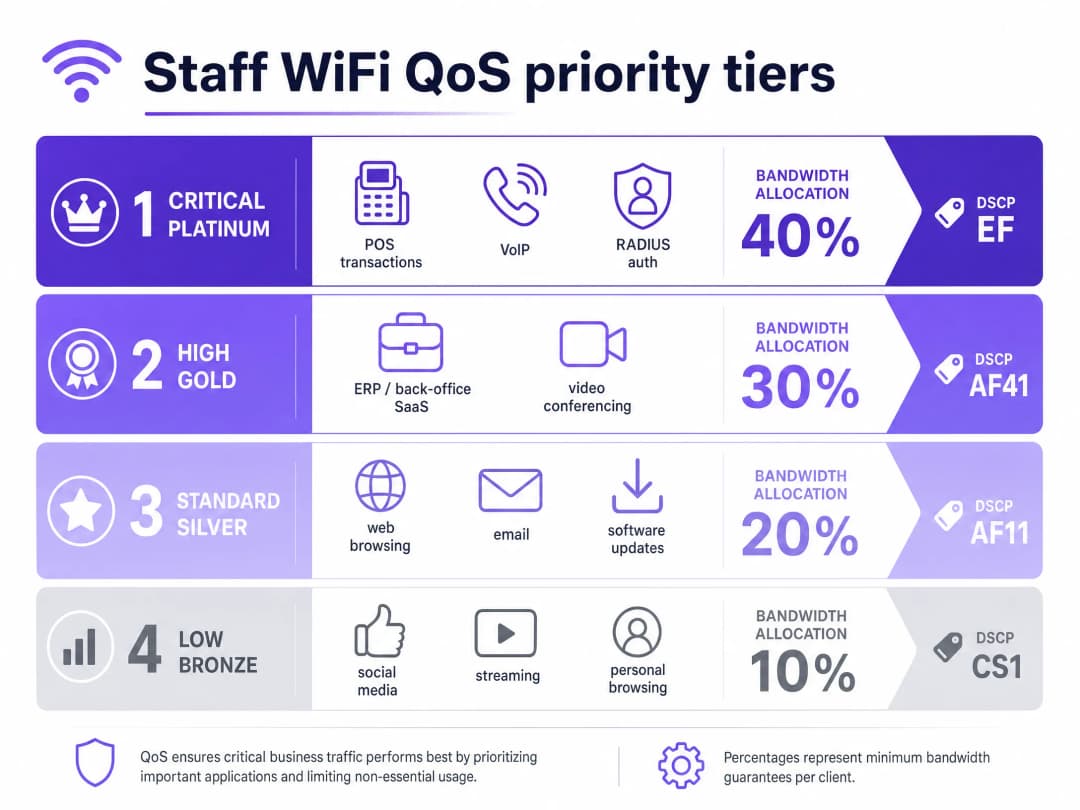
আইডেন্টিটি অ্যান্ড অ্যাক্সেস ম্যানেজমেন্ট
স্টাফ ডিভাইসগুলোকে একটি RADIUS সার্ভারের বিপরীতে EAP-TLS অথবা PEAP সহ 802.1X ব্যবহার করে অবশ্যই অথেন্টিকেট করতে হবে। Purple সরাসরি Microsoft Entra ID, Okta, এবং Google Workspace-এর সাথে ইন্টিগ্রেট করে। এটি নিশ্চিত করে যে নেটওয়ার্ক অ্যাক্সেস সেন্ট্রাল আইডেন্টিটি প্রোভাইডারের সাথে সংযুক্ত রয়েছে। আপনি যখন Entra ID-তে অ্যাক্সেস বাতিল করবেন, তখন নেটওয়ার্ক অ্যাক্সেস তাৎক্ষণিকভাবে বন্ধ হয়ে যাবে।
আপনার নির্দিষ্ট সেটআপ নিয়ে কোনো প্রশ্ন আছে?
আমাদের টিম ৮০,০০০ ভেন্যুতে ভেন্যু অপারেটর, IT ম্যানেজার এবং নেটওয়ার্ক ইঞ্জিনিয়ারদের সাথে কাজ করে। একটি ২০ মিনিটের কল বুক করুন এবং আপনার মতো অন্যরা কীভাবে এর সমাধান করেছেন তা আমরা আপনাকে দেখাব।
বাস্তবায়ন গাইড: শেপিং এবং রিডাকশন
১. নেটওয়ার্ক সেগমেন্টেশন
স্টাফ, গেস্ট এবং অপারেশনাল হার্ডওয়্যারের জন্য আলাদা VLAN মোতায়েন করুন। গেস্ট VLAN-এ প্রতি-ব্যবহারকারী রেট লিমিট (যেমন, ৫ Mbps ডাউনস্ট্রিম) প্রয়োগ করুন যাতে একক কোনো ব্যবহারকারী কানেকশন সম্পূর্ণ ব্যবহার করে ফেলতে না পারে। স্টাফ VLAN-এ, অত্যন্ত গুরুত্বপূর্ণ অ্যাপ্লিকেশনগুলোর জন্য একটি গ্যারান্টিযুক্ত ন্যূনতম ব্যান্ডউইথ শতাংশ বরাদ্দ করুন।### ২. Application-Aware QoS কনফিগারেশন আপনার বিজনেস অ্যাপ্লিকেশনগুলিকে উপযুক্ত DSCP মার্কিংয়ের সাথে ম্যাপ করুন। পুরো নেটওয়ার্ক পথ জুড়ে এই মার্কিংগুলিকে মান্যতা দেওয়ার জন্য আপনার কোর সুইচ এবং অ্যাক্সেস পয়েন্টগুলি কনফিগার করা হয়েছে কিনা তা নিশ্চিত করুন। আপনার ISP গেটওয়েতে DSCP ট্যাগগুলি বাদ দিচ্ছে না তা যাচাই করুন।
৩. ট্রাফিক কমানোর জন্য Purple Shield স্থাপন করা
কর্মীদের ওয়েব ট্রাফিকের একটি বড় অংশ জুড়ে থাকে থার্ড-পার্টি বিজ্ঞাপন নেটওয়ার্ক এবং ট্র্যাকিং পিক্সেল। এই ট্রাফিক ব্যান্ডউইথ ব্যবহার করে, DNS কোয়েরির লোড বাড়ায় এবং সুরক্ষাজনিত ঝুঁকি তৈরি করে। Purple Shield একটি DNS-লেয়ার ফিল্টার হিসেবে কাজ করে। আপনার DHCP সার্ভারগুলিকে Purple-এর DNS রিজলভারের দিকে নির্দেশ করে, Shield সংযোগ তৈরি হওয়ার আগেই পরিচিত বিজ্ঞাপন নেটওয়ার্ক এবং ক্ষতিকারক ডোমেনগুলির অনুরোধগুলি ব্লক করে দেয়।
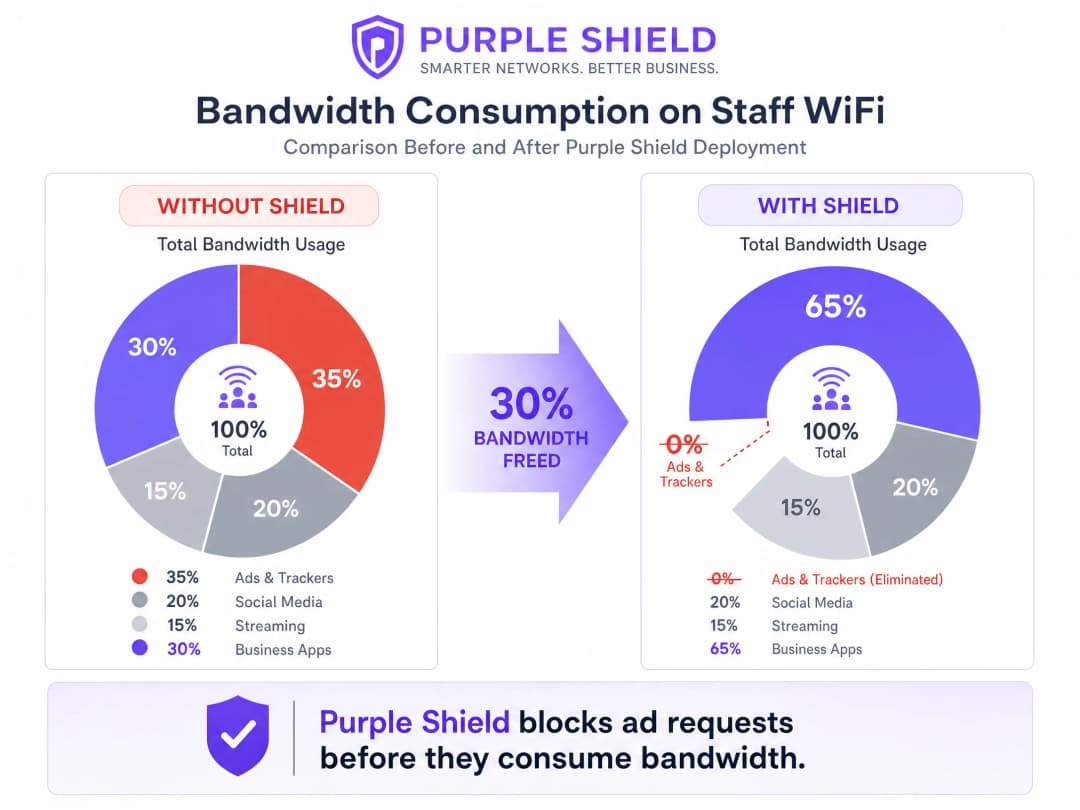
যেসব লোকেশনে Shield স্থাপন করা হয়েছে, সেখানে সাধারণত সামগ্রিক DNS কোয়েরির পরিমাণ ৩০% কমে যায়। এটি কার্যকরভাবে বিজনেস অ্যাপ্লিকেশনের জন্য ব্যান্ডউইথ খালি করে, যা কোনো অতিরিক্ত খরচ ছাড়াই একটি লাইন আপগ্রেডের মতো কাজ করে।
সর্বোত্তম অনুশীলনসমূহ
১. টোকেন বাকেট শেপিং ব্যবহার করুন: কঠোর গতির সীমার পরিবর্তে, বার্স্ট অ্যালাউন্স সহ টোকেন বাকেট শেপিং ব্যবহার করুন। এটি দীর্ঘস্থায়ী কর্মক্ষমতাকে প্রভাবিত না করে হঠাৎ সফ্টওয়্যার আপডেটের মতো ট্রাফিকের সাময়িক বৃদ্ধিকে মানিয়ে নেয়। ২. লেগ্যাসি ডিভাইসগুলি অডিট করুন: পুরোনো শেয়ার করা টার্মিনালগুলি সঠিকভাবে WMM সমর্থন নাও করতে পারে। এই ডিভাইসগুলি সনাক্ত করুন এবং প্রয়োজনে পোর্ট-ভিত্তিক QoS নীতিগুলি প্রয়োগ করুন। ৩. মনিটর এবং অ্যাডজাস্ট করুন: WiFi Analytics ব্যবহার করে নিয়মিত পিক ইউটিলাইজেশন মেট্রিক্স এবং DNS কোয়েরির ভলিউম পর্যালোচনা করুন। কর্মীদের সংখ্যা এবং অ্যাপ্লিকেশনের প্রয়োজনীয়তা পরিবর্তনের সাথে সাথে গতির সীমা সামঞ্জস্য করুন।
সমস্যা সমাধান এবং ঝুঁকি হ্রাসকরণ
- DSCP রিমার্কিং: যদি QoS নীতিগুলি অকার্যকর মনে হয়, তবে গেটওয়েতে প্যাকেট ক্যাপচার করুন। কিছু এন্টারপ্রাইজ সুইচ DSCP মানগুলিকে ডিফল্ট সেটিংসে রিমার্ক করে দেয়, যা আপনার কনফিগারেশনকে অকেজো করে তোলে।
- DNS-over-HTTPS বাইপাস: স্টাফ ডিভাইসগুলি যদি DNS-over-HTTPS ব্যবহার করে, তবে তারা স্থানীয় DNS রিজলভারকে বাইপাস করে, যার ফলে Shield অকার্যকর হয়ে পড়ে। ফায়ারওয়ালে DNS-over-HTTPS ব্লক করুন বা ইন্টারনাল রিজলভার ব্যবহারের জন্য MDM-এর মাধ্যমে পরিচালিত ডিভাইসগুলি কনফিগার করুন।
ROI এবং ব্যবসায়িক প্রভাব
কার্যকর ব্যান্ডউইথ ব্যবস্থাপনার প্রাথমিক ব্যবসায়িক প্রভাব হলো খরচ এড়ানো। QoS প্রয়োগ করে এবং Shield স্থাপন করে, একটি ভেন্যু ব্যয়বহুল লিজড লাইন আপগ্রেড বিলম্বিত করতে পারে। একটি মাঝারি আকারের Retail চেইনের জন্য, ৫০টি স্টোর জুড়ে লাইন আপগ্রেড এড়ানো বার্ষিক হাজার হাজার পাউন্ড বাঁচাতে পারে। তাছাড়া, POS এবং ERP ট্রাফিককে অগ্রাধিকার দেওয়া সরাসরি কর্মক্ষমতা উন্নত করে এবং ব্যস্ততম ব্যবসার সময়ে ডাউনটাইম কমায়।
আরও বিস্তারিত জানার জন্য আমাদের টেকনিক্যাল ব্রিফিং পডকাস্ট শুনুন:
মূল সংজ্ঞাসমূহ
QoS (Quality of Service)
প্রযুক্তি সমূহের একটি সেট যা গুরুত্বপূর্ণ অ্যাপ্লিকেশনের কর্মক্ষমতা নিশ্চিত করতে নেটওয়ার্ক ট্রাফিক পরিচালনা করে।
নেটওয়ার্ক কনজেশনের সময় VoIP এবং POS সিস্টেমগুলো যাতে নির্ভরযোগ্যভাবে কাজ করে তা নিশ্চিত করার জন্য এটি অত্যন্ত প্রয়োজনীয়।
DSCP (Differentiated Services Code Point)
QoS-এর উদ্দেশ্যে নেটওয়ার্ক ট্রাফিক শ্রেণীবদ্ধ করতে IP হেডারে ব্যবহৃত একটি ফিল্ড।
নেটওয়ার্ক সুইচগুলো কিউতে কোন প্যাকেটগুলো অগ্রাধিকার পাবে তা নির্ধারণ করতে এটি ব্যবহার করে।
WMM (Wireless Multimedia)
IEEE 802.11e স্ট্যান্ডার্ডের উপর ভিত্তি করে তৈরি একটি WiFi Alliance সার্টিফিকেশন যা ওয়্যারলেস নেটওয়ার্কের জন্য QoS ফিচার প্রদান করে।
অ্যাক্সেস পয়েন্টগুলো যাতে সাধারণ ডেটার চেয়ে ভয়েস এবং ভিডিও ট্রাফিককে অগ্রাধিকার দেয় তা নিশ্চিত করে।
VLAN (Virtual Local Area Network)
একটি লজিক্যাল সাবনেটওয়ার্ক যা ডিভাইসের একটি সংগ্রহকে গ্রুপ করে এবং বাকি নেটওয়ার্ক থেকে তাদের ট্রাফিককে আলাদা করে।
নিরাপত্তা এবং ট্রাফিক পরিচালনার জন্য গেস্ট নেটওয়ার্ক থেকে কর্মীদের ডিভাইসগুলোকে আলাদা করতে ব্যবহৃত হয়।
DNS-layer filtering
DNS রেজোলিউশন অনুরোধগুলোকে বাধা দিয়ে এবং প্রত্যাখ্যান করে নির্দিষ্ট ডোমেনে অ্যাক্সেস ব্লক করার প্রক্রিয়া।
এই প্রক্রিয়ার মাধ্যমে Purple Shield ডিভাইসগুলোকে বিজ্ঞাপন নেটওয়ার্ক এবং ক্ষতিকারক সাইটের সাথে সংযোগ স্থাপন করতে বাধা দেয়।
Token bucket shaping
একটি ব্যান্ডউইথ ম্যানেজমেন্ট অ্যালগরিদম যা দীর্ঘমেয়াদী গড় রেট লিমিট বলবৎ রাখার পাশাপাশি ট্রাফিকের সংক্ষিপ্ত বার্স্ট বা স্পাইকের অনুমতি দেয়।
পেজ লোডের মতো সংক্ষিপ্ত স্পাইকগুলো মিটমাট করার মাধ্যমে এটি কঠোর রেট লিমিটের তুলনায় আরও ভালো ব্যবহারকারীর অভিজ্ঞতা প্রদান করে।
802.1X
পোর্ট-ভিত্তিক নেটওয়ার্ক অ্যাক্সেস নিয়ন্ত্রণের জন্য একটি IEEE স্ট্যান্ডার্ড, যা LAN বা WLAN-এর সাথে সংযুক্ত হতে চাওয়া ডিভাইসগুলোর জন্য একটি অথেন্টিকেশন মেকানিজম প্রদান করে।
এন্টারপ্রাইজ কর্মীদের WiFi সুরক্ষিত করার স্ট্যান্ডার্ড পদ্ধতি, যা প্রায়শই RADIUS-এর সাথে একীভূত থাকে।
RADIUS (Remote Authentication Dial-In User Service)
একটি নেটওয়ার্কিং প্রোটোকল যা সেন্ট্রালাইজড অথেন্টিকেশন, অথরাইজেশন এবং অ্যাকাউন্টিং ম্যানেজমেন্ট প্রদান করে।
Microsoft Entra ID-এর মতো আইডেন্টিটি প্রোভাইডারের বিপরীতে কর্মীদের প্রমাণপত্র যাচাই করতে 802.1X-এর সাথে একত্রে ব্যবহৃত হয়।
সমাধানকৃত উদাহরণসমূহ
একটি ২০০ রুমের হোটেলকে এটি নিশ্চিত করতে হবে যাতে পিক চেক-ইন সময়ের মধ্যে প্রোপার্টি ম্যানেজমেন্ট সফটওয়্যার এবং VoIP ফোনগুলো স্থিতিশীল থাকে, যখন কর্মীরা সাধারণ ব্রাউজিংয়ের জন্যও নেটওয়ার্ক ব্যবহার করছেন।
কর্মীদের একটি ডেডিকেটেড VLAN-এ রেখে নেটওয়ার্কটি বিভক্ত করুন। প্রোপার্টি ম্যানেজমেন্ট সিস্টেম এবং VoIP ট্রাফিকের ক্ষেত্রে DSCP EF প্রয়োগ করুন। সাধারণ ব্রাউজিং এবং ব্যাকগ্রাউন্ড আপডেটের ক্ষেত্রে DSCP CS1 প্রয়োগ করুন। বিজ্ঞাপন এবং ট্র্যাকার ট্রাফিক দূর করতে স্টাফ VLAN-এ Purple Shield মোতায়েন করুন, যা বেসলাইন সক্ষমতা মুক্ত করবে।
৫০টি স্টোর সহ একটি রিটেইল চেইনে ব্যস্ত সময়ে POS টাইমআউট দেখা দেয় কারণ কর্মীদের ডিভাইসগুলো শেয়ার করা ১০০ Mbps ব্রডব্যান্ড কানেকশনকে সম্পৃক্ত (স্যাচুরেট) করে ফেলে।
কঠোর QoS অগ্রাধিকার সহ একটি ডেডিকেটেড VLAN-এ POS টার্মিনালগুলোকে আলাদা করুন। কর্মীদের WiFi VLAN-এ, টোকেন বাকেট শেপিং ব্যবহার করে প্রতি ব্যবহারকারীর রেট লিমিট ডাউনস্ট্রিমে ১০ Mbps এবং আপস্ট্রিমে ২ Mbps নির্ধারণ করুন। ব্যবসা-বহির্ভূত বিজ্ঞাপন ট্রাফিক ব্লক করতে Purple Shield মোতায়েন করুন।
অনুশীলনী প্রশ্নসমূহ
Q1. আপনি একটি হসপিটালিটি ভেন্যু পরিচালনা করছেন যেখানে গেস্ট নেটওয়ার্ক প্রায়শই ৫০০ Mbps কানেকশনকে সম্পৃক্ত করে ফেলে, যার ফলে ব্যাক-অফিস ERP সিস্টেমের সংযোগ বিচ্ছিন্ন হয়ে যায়। আপনার কাছে একটি মাত্র ফ্ল্যাট নেটওয়ার্ক রয়েছে। এটি সমাধান করার প্রথম পদক্ষেপ কী?
ইঙ্গিত: কার্যকর QoS নীতিগুলো প্রয়োগ করার পূর্বশর্তগুলো বিবেচনা করুন।
মডেল উত্তর দেখুন
প্রথম ধাপ হলো নেটওয়ার্ক সেগমেন্টেশন। আপনাকে অবশ্যই একটি ডেডিকেটেড VLAN-এ স্টাফ ডিভাইস এবং ERP সিস্টেম আলাদা করতে হবে, যা গেস্ট নেটওয়ার্ক থেকে সম্পূর্ণ বিচ্ছিন্ন থাকবে। একবার সেগমেন্ট করার পর, আপনি গেস্ট VLAN-এর জন্য প্রতি ব্যবহারকারী অনুযায়ী কঠোর রেট লিমিট প্রয়োগ করতে পারেন এবং ERP ট্রাফিককে অগ্রাধিকার দিতে স্টাফ VLAN-এ QoS কনফিগার করতে পারেন।
Q2. স্টাফ VLAN-এ আপনার VoIP ট্রাফিকের জন্য DSCP EF মার্কিং কনফিগার করার পরেও, ব্যবহারকারীরা পিক আওয়ারে দুর্বল কল কোয়ালিটির অভিযোগ করছেন। এর সবচেয়ে সম্ভাব্য কারণ কী?
ইঙ্গিত: প্যাকেট হেডার যখন বিভিন্ন নেটওয়ার্ক যন্ত্রপাতির মধ্য দিয়ে যায় তখন সেগুলির কী পরিবর্তন ঘটে তা চিন্তা করুন।
মডেল উত্তর দেখুন
সবচেয়ে সম্ভাব্য কারণ হলো DSCP রিমার্কিং। হয় একটি ইন্টারমিডিয়েট এন্টারপ্রাইজ সুইচ অথবা ISP গেটওয়ে DSCP ভ্যালুগুলিকে ডিফল্ট (বেস্ট এফোর্ট) হিসেবে স্ট্রিপ বা রিসেট করে দিচ্ছে। QoS মার্কিংগুলি পুরো পথ জুড়ে বজায় থাকছে কিনা তা যাচাই করতে আপনাকে গেটওয়েতে একটি প্যাকেট ক্যাপচার করতে হবে।
Q3. ব্যবসায়িক অ্যাপ্লিকেশনের ক্ষতি না করে স্টাফ নেটওয়ার্কে সামগ্রিক ব্যান্ডউইথ খরচ কমাতে হবে। সবচেয়ে কার্যকর পদ্ধতি কোনটি?
ইঙ্গিত: কোন অপ্রয়োজনীয় ট্রাফিক স্বয়ংক্রিয়ভাবে প্রচুর ব্যান্ডউইথ ব্যবহার করে তা বিবেচনা করুন।
মডেল উত্তর দেখুন
DNS লেয়ারে ট্রাফিক ফিল্টার করার জন্য Purple Shield প্রয়োগ করুন। কানেকশন তৈরি হওয়ার আগেই অ্যাড নেটওয়ার্ক এবং ট্র্যাকিং পিক্সেলের রিকোয়েস্ট ব্লক করে Shield অপ্রয়োজনীয় ট্রাফিকের একটি বড় অংশ সরিয়ে দেয়, যা সাধারণত মোট DNS কোয়েরি ভলিউম এবং ব্যান্ডউইথ খরচ ৩০% পর্যন্ত কমিয়ে দেয়।
এই সিরিজে পড়া চালিয়ে যান
প্রতি-ডিভাইস PSK (iPSK, DPSK, MPSK) ব্যবহার করে WiFi SSID-এর সংখ্যা কীভাবে কমানো যায়
এই নির্ভরযোগ্য টেকনিক্যাল রেফারেন্স গাইডটি ব্যাখ্যা করে যে কীভাবে IT টিমগুলো প্রতি-ডিভাইস PSK (xPSK) ব্যবহার করে একাধিক নির্দিষ্ট উদ্দেশ্যে তৈরি নেটওয়ার্ককে একটি একক SSID-এ নিয়ে এসে SSID বিকন ওভারহেডের কারণে সৃষ্ট WiFi পারফরম্যান্সের অবনতি দূর করতে পারে। এটি Cisco iPSK, HPE Aruba MPSK, Ruckus DPSK, Juniper Mist PPSK এবং Ubiquiti UniFi PPSK জুড়ে ভেন্ডর ল্যান্ডস্কেপ কভার করে, যার সাথে ডাইনামিক VLAN অ্যাসাইনমেন্ট, IoT অনবোর্ডিং এবং PCI DSS কমপ্লায়েন্সের ব্যবহারিক ইমপ্লিমেন্টেশন গাইডলাইন রয়েছে। হসপিটালিটি, রিটেইল, স্টেডিয়াম এবং সরকারি খাতের ভেন্যু অপারেটররা এখানে কার্যকর আর্কিটেকচার গাইডেন্স এবং বাস্তব জীবনের কাজের উদাহরণ পাবেন।
Legacy NAC থেকে Cloud-Native NAC-এ স্থানান্তরের চেকলিস্ট
এই নির্ভরযোগ্য টেকনিক্যাল রেফারেন্স নির্দেশিকাটি লেগ্যাসি Network Access Control (NAC) থেকে একটি cloud-native আর্কিটেকচারে স্থানান্তরের জন্য একটি কাঠামোগত, তিন-ধাপের চেকলিস্ট প্রদান করে। এটি IT ম্যানেজার এবং নেটওয়ার্ক স্থপতিদের ভেন্যু পরিচালনা ব্যাহত না করে আইডেন্টিটি ইন্টিগ্রেশন, পলিসি প্যারিটি এবং কমপ্লায়েন্স পরিচালনা করার জন্য কার্যকরী কৌশল সরবরাহ করে।
কীভাবে অবিরাম ট্রাস্ট মনিটরিংয়ের জন্য Post-Admission NAC বাস্তবায়ন করবেন
এই নির্দেশিকাটি হসপিটালিটি, রিটেইল, হেলথকেয়ার এবং পাবলিক-সেক্টর পরিবেশসহ এন্টারপ্রাইজ ভেন্যুগুলোতে Continuous Trust Monitoring সহ Post-Admission Network Access Control (NAC) বাস্তবায়নের জন্য একটি নির্ভরযোগ্য প্রযুক্তিগত ব্লুপ্রিন্ট প্রদান করে। এটি RADIUS CoA, আচরণগত বেসলাইনিং এবং টেলিমেট্রি ইন্টিগ্রেশন ব্যবহার করে স্ট্যাটিক প্রি-অ্যাডমিশন চেক থেকে ডাইনামিক, সেশন-অ্যাওয়ার এনফোর্সমেন্টে আর্কিটেকচারাল পরিবর্তনের বিস্তারিত বিবরণ দেয়। IT আর্কিটেক্ট এবং নেটওয়ার্ক অপারেশন টিমগুলো এখানে কার্যকরী ডিপ্লয়মেন্ট গাইডেন্স, বাস্তবমুখী কেস স্টাডি, কমপ্লায়েন্স অ্যালাইনমেন্ট নোট এবং পরিমাপযোগ্য ROI ফ্রেমওয়ার্ক পাবেন।
আপনার নির্দিষ্ট সেটআপ নিয়ে কোনো প্রশ্ন আছে?
আমাদের টিম ৮০,০০০ ভেন্যুতে ভেন্যু অপারেটর, IT ম্যানেজার এবং নেটওয়ার্ক ইঞ্জিনিয়ারদের সাথে কাজ করে। একটি ২০ মিনিটের কল বুক করুন এবং আপনার মতো অন্যরা কীভাবে এর সমাধান করেছেন তা আমরা আপনাকে দেখাব।